Introduction
to
Data Structures
by
Prof. K.Adisesha
Definition
Prof. K. Adisesha 2
 Data: Collection of raw facts.
 Data structure is representation of the logical
relationship existing between individual
elements of data.
 Data structure is a specialized format for
organizing and storing data in memory that
considers not only the elements stored but also
their relationship to each other.
Introduction
Prof. K. Adisesha 3
 Data structure affects the design of both
structural & functional aspects of a program.
Program=algorithm + Data Structure
 You know that a algorithm is a step by step
procedure to solve a particular function.
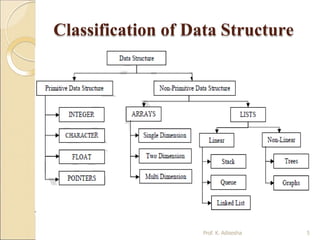
Classification of Data Structure
Prof. K. Adisesha 4
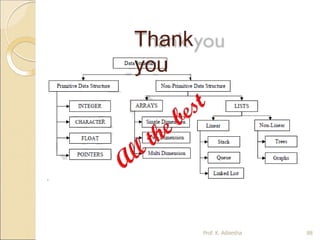
 Data structure are normally divided into
two broad categories:
◦ Primitive Data Structure
◦ Non-Primitive Data Structure
Classification of Data Structure
Prof. K. Adisesha 5
Primitive Data Structure
Prof. K. Adisesha 6
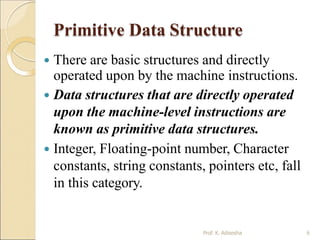
 There are basic structures and directly
operated upon by the machine instructions.
 Data structures that are directly operated
upon the machine-level instructions are
known as primitive data structures.
 Integer, Floating-point number, Character
constants, string constants, pointers etc, fall
in this category.
Primitive Data Structure
Prof. K. Adisesha 7
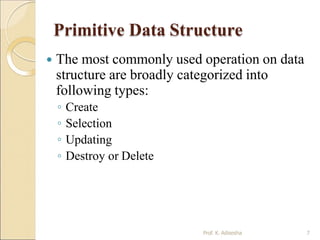
 The most commonly used operation on data
structure are broadly categorized into
following types:
◦ Create
◦ Selection
◦ Updating
◦ Destroy or Delete
Non-Primitive Data Structure
Prof. K. Adisesha 8
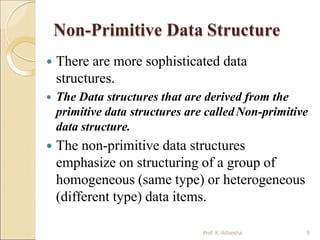
 There are more sophisticated data
structures.
 The Data structures that are derived from the
primitive data structures are calledNon-primitive
data structure.
 The non-primitive data structures
emphasize on structuring of a group of
homogeneous (same type) or heterogeneous
(different type) data items.
Non-Primitive Data Structure
Prof. K. Adisesha 9
Linear Data structures:
◦ Linear Data structures are kind of data structure that has homogeneous
elements.
◦ The data structure in which elements are in a sequence and form a liner
series.
◦ Linear data structures are very easy to implement, since the memory of the
computer is also organized in a linear fashion.
◦ Some commonly used linear data structures are Stack, Queue and Linked
Lists.
Non-Linear Data structures:
◦ A Non-Linear Data structures is a data structure in which data itemis
connected to several other data items.
◦ Non-Linear data structure may exhibit either a hierarchical relationship or
parent child relationship.
◦ The data elements are not arranged in a sequential structure.
◦ The different non-linear data structures are trees and graphs.
Non-Primitive Data Structure
Prof. K. Adisesha 10
 The most commonly used operation on data
structure are broadly categorized into
following types:
◦ Traversal
◦ Insertion
◦ Selection
◦ Searching
◦ Sorting
◦ Merging
◦ Destroy or Delete
Different between them
Prof. K. Adisesha 11
 A primitive data structure is generally a
basic structure that is usually built into the
language, such as an integer, a float.
 A non-primitive data structure is built
out of primitive data structures linked
together in meaningful ways, such as a or
a linked-list, binary search tree, AVLTree,
graph etc.
Description of various
Data Structures : Arrays
Prof. K. Adisesha 12
 An array is defined as a set of finite
number of homogeneous elements or
same data items.
 It means an array can contain one type of
data only, either all integer, all float-point
number or all character.
One dimensional array:
Prof. K. Adisesha 13
 An array with only one row or column is called one-dimensional
array.
 It is finite collection of n number of elements of same type such
that:
◦ can be referred by indexing.
◦ The syntax Elements are stored in continuous locations.
◦ Elements x to define one-dimensional array is:
 Syntax: Datatype Array_Name [Size];
 Where,
Datatype : Type of value it can store (Example: int, char, float)
Array_Name: To identify the array.
 Size : The maximum number of elements that the array can hold.
Arrays
Prof. K. Adisesha 14
 Simply, declaration of array is as follows:
int arr[10]
 Where int specifies the data type or type of
elements arrays stores.
 “arr” is the name of array & the number
specified inside the square brackets is the
number of elements an array can store, this is
also called sized or length of array.
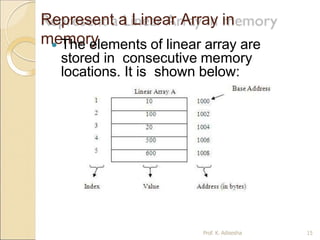
Represent a Linear Array in
memory
 The elements of linear array are
stored in consecutive memory
locations. It is shown below:
Prof. K. Adisesha 15
Arrays
Prof. K. Adisesha 16
◦ The elements of array will always be stored in the
consecutive (continues) memory location.
◦ The number of elements that can be stored in an
array, that is the size of array or its length isgiven
by the following equation:
(Upperbound-lowerbound)+1
◦ For the above array it would be (9-0)+1=10,where 0
is the lower bound of array and 9 is the upper bound
of array.
◦ Array can always be read or written through loop.
For(i=0;i<=9;i++)
{ scanf(“%d”,&arr[i]);
printf(“%d”,arr[i]); }
Arrays
types
Prof. K. Adisesha 17
 Single Dimension
Array
◦ Array with one subscript
 Two Dimension Array
◦ Array with two subscripts (Rows and
Column)
 Multi DimensionArray
◦ Array with Multiple subscripts
Basic operations of Arrays
Prof. K. Adisesha 18
 Some common operation performed
on array are:
◦ Traversing
◦ Searching
◦ Insertion
◦ Deletion
◦ Sorting
◦ Merging
Traversing
Arrays
 Traversing: It is used to access each data item exactly
once so
that it can be processed.
E.g.
We have linear array A as below:
 1 2 3 4 5
 10 20 30 40 50
Here we will start from beginning and will go till last element
and during this process we will access value of each
element exactly once as below:
A [1] = 10
A [2] = 20
A [3] = 30
A [4] = 40
A [5] = 50
Prof. K. Adisesha 19
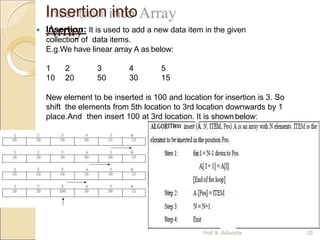
Insertion into
Array
 Insertion: It is used to add a new data item in the given
collection of data items.
E.g.We have linear array A as below:
1 2 3 4 5
10 20 50 30 15
New element to be inserted is 100 and location for insertion is 3. So
shift the elements from 5th location to 3rd location downwards by 1
place.And then insert 100 at 3rd location. It is shownbelow:
Prof. K. Adisesha 20
Deletion from
Array
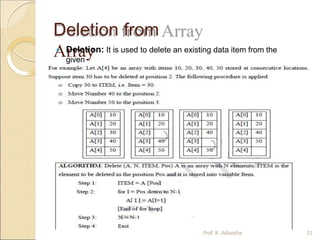
 Deletion: It is used to delete an existing data item from the
given
collection of data items.
Prof. K. Adisesha 21
Searching in
Arrays
Prof. K. Adisesha 22
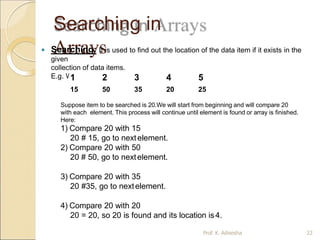
 Searching: It is used to find out the location of the data item if it exists in the
given
collection of data items.
E.g. We have linear array A as below:
1 2 3 4 5
15 50 35 20 25
Suppose item to be searched is 20.We will start from beginning and will compare 20
with each element. This process will continue until element is found or array is finished.
Here:
1) Compare 20 with 15
20 # 15, go to nextelement.
2) Compare 20 with 50
20 # 50, go to nextelement.
3) Compare 20 with 35
20 #35, go to nextelement.
4) Compare 20 with 20
20 = 20, so 20 is found and its location is4.
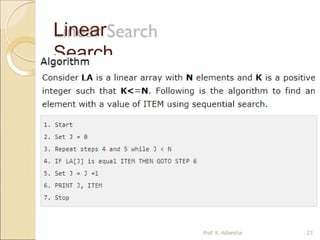
Linear
Search
Prof. K. Adisesha 23
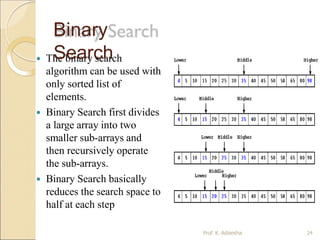
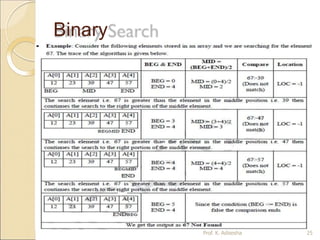
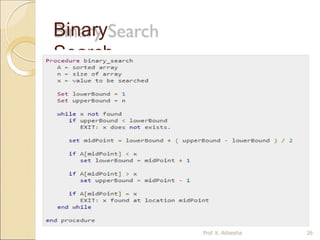
 The binary search
algorithm can be used with
only sorted list of
elements.
 Binary Search first divides
a large array into two
smaller sub-arrays and
then recursively operate
the sub-arrays.
 Binary Search basically
reduces the search space to
half at each step
Binary
Search
Prof. K. Adisesha 24
Binary
Search
Prof. K. Adisesha 25
Binary
Search
Prof. K. Adisesha 26
Searchi
ng
Prof. K. Adisesha 27
Sortin
g
Prof. K. Adisesha 28
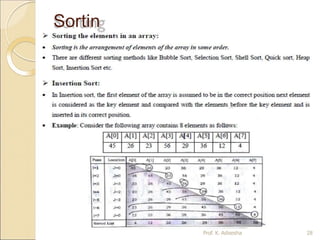
Insertion Sort
 ALGORITHM: Insertion Sort (A, N)A is an array with N
unsorted elements.
◦ Step 1: for I=1 to N-1
◦ Step 2: J = I
While(J >= 1)
if ( A[J] < A[J-1]) then
Temp = A[J];
A[J] = A[J-1];
A[J-1] =
Temp;
[End if]
J = J-1
[End of While
loop] [End of For
loop]
◦ Step 3: Exit Prof. K. Adisesha 29
Merging from
Array
Prof. K. Adisesha 30
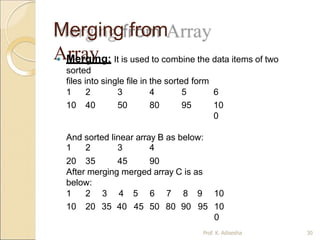
 Merging: It is used to combine the data items of two
sorted
files into single file in the sorted form
We have sorted linear array A as below:
1 2 3 4 5 6
10 40 50 80 95 10
0
And sorted linear array B as below:
1 2 3 4
20 35 45 90
After merging merged array C is as
below:
1 2 3 4 5 6 7 8 9 10
10 20 35 40 45 50 80 90 95 10
0
Two dimensional
array
Prof. K. Adisesha 31
 A two dimensional array is a collection of elements and
each element is identified by a pair of subscripts. ( A[3]
[3] )
 The elements are stored in continuous memory
locations.
 The elements of two-dimensional array as rows and
columns.
 The number of rows and columns in a matrix is called
as
the order of the matrix and denoted as mxn.
 The number of elements can be obtained by
multiplying
number of rows and number of columns.
A[0] A[1] A[2]
A[0] 10 20 30
A[1] 40 50 60
A[2] 70 80 90
Representation of TwoDimensional
Array:
Prof. K. Adisesha 32
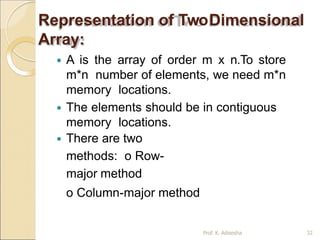
 A is the array of order m x n.To store
m*n number of elements, we need m*n
memory locations.
 The elements should be in contiguous
memory locations.
 There are two
methods: o Row-
major method
o Column-major method
Two Dimensional Array:
Prof. K. Adisesha 33
 Row-Major Method: All the first-row elements are stored in
sequential memory locations and then all the second-row
elements are stored and so on. Ex:A[Row][Col]
 Column-Major Method: All the first column elements are
stored in sequential memory locations and then all the second-
column elements are stored and so on. Ex: A[Col][Row]
1000 10 A[0][0]
1002 20 A[0][1]
1004 30 A[0][2]
1006 40 A[1][0]
1008 50 A[1][1]
1010 60 A[1][2]
1012 70 A[2][0]
1014 80 A[2][1]
1016 90 A[2][2]
Row-Major Method
1000 10 A[0][0]
1002 40 A[1][0]
1004 70 A[2][0]
1006 20 A[0][1]
1008 50 A[1][1]
1010 80 A[2][1]
1012 30 A[0][2]
1014 60 A[1][2]
1016 90 A[2][2]
Col-Major Method
Advantages of Array:
Prof. K. Adisesha 34
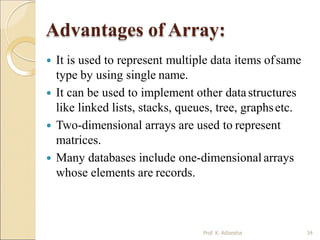
 It is used to represent multiple data items ofsame
type by using single name.
 It can be used to implement other datastructures
like linked lists, stacks, queues, tree, graphsetc.
 Two-dimensional arrays are used to represent
matrices.
 Many databases include one-dimensional arrays
whose elements are records.
Disadvantages of Array
Prof. K. Adisesha 35
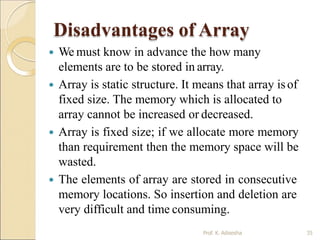
 We must know in advance the how many
elements are to be stored in array.
 Array is static structure. It means that array isof
fixed size. The memory which is allocated to
array cannot be increased or decreased.
 Array is fixed size; if we allocate more memory
than requirement then the memory space will be
wasted.
 The elements of array are stored in consecutive
memory locations. So insertion and deletion are
very difficult and time consuming.
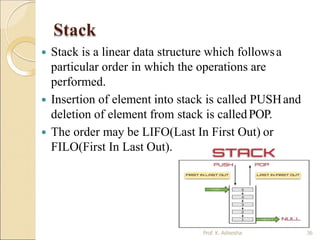
Stack
 Stack is a linear data structure which followsa
particular order in which the operations are
performed.
 Insertion of element into stack is called PUSHand
deletion of element from stack is calledPOP.
 The order may be LIFO(Last In First Out) or
FILO(First In Last Out).
Prof. K. Adisesha 36
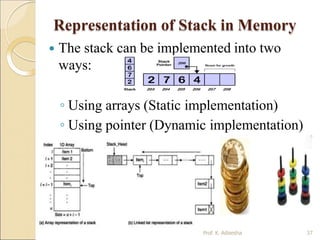
Representation of Stack in Memory
 The stack can be implemented into two
ways:
◦ Using arrays (Static implementation)
◦ Using pointer (Dynamic implementation)
Prof. K. Adisesha 37
Operation on Stacks:
Prof. K. Adisesha 38
 Stack( ): It creates a new stack that is empty. It
needs no parameter and returns an emptystack.
 push(item): It adds a new item to the top ofthe
stack.
 pop( ): It removes the top item from thestack.
 peek( ): It returns the top item from the stackbut
does not remove it.
 isEmpty( ): It tests whether the stack is empty.
 size( ): It returns the number of items on thestack.
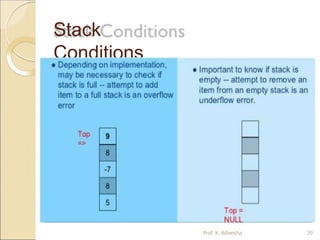
Stack
Conditions
Prof. K. Adisesha 39
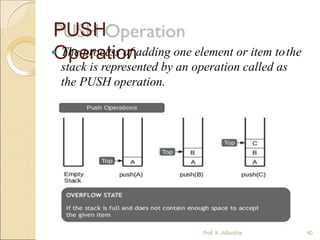
PUSH
Operation
 The process of adding one element or item tothe
stack is represented by an operation called as
the PUSH operation.
Prof. K. Adisesha 40
PUSH
Operation:
Prof. K. Adisesha 41
 The process of adding one element or item to the stack is
represented by an operation called as the PUSH operation.
 The new element is added at the topmost position of the stack.
ALGORITHM:
PUSH (STACK, TOP, SIZE, ITEM)
STACK is the array with N elements. TOP is the pointer to the top of the
element of the array. ITEM to be inserted.
Step 1: if TOP = N then [Check Overflow]
PRINT “ STACK is Full or Overflow”
Exit
[Increment the TOP]
[Insert the ITEM]
[End if]
Step 2: TOP = TOP +1
Step 3: STACK[TOP] = ITEM
Step 4: Return
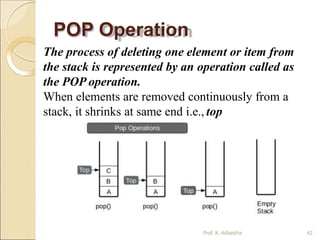
POP Operation
The process of deleting one element or item from
the stack is represented by an operation called as
the POP operation.
When elements are removed continuously from a
stack, it shrinks at same end i.e., top
Prof. K. Adisesha 42
POP Operation
Prof. K. Adisesha 43
The process of deleting one element or item from the stack
is represented by an operation called as the POP
operation.
ALGORITHM: POP (STACK, TOP, ITEM)
STACK is the array with N elements. TOP is the pointer to the top of the
element of the array. ITEM to be inserted.
Step 1: if TOP = 0 then [Check Underflow]
PRINT “ STACK is Empty or Underflow”
Exit
[End if]
[copy the TOPElement]
[Decrement the TOP]
Step 2: ITEM = STACK[TOP]
Step 3: TOP = TOP -1
Step 4: Return
PEEK
Operation
Prof. K. Adisesha 44
The process of returning the top item from the
stack but does not remove it called as the POP
operation.
ALGORITHM: PEEK (STACK, TOP)
STACK is the array with N elements. TOP is the pointer to
the top of the element of the array.
Step 1: if TOP = NULL then [Check Underflow]
PRINT “ STACK is Empty or Underflow”
Exit
[End if]
Step 2: Return (STACK[TOP] [Return the top
element of the stack]
Step 3:Exit
Application of Stacks
 Runtime memory management.
Prof. K. Adisesha 45
 It is used to reverse a word. You push a given word to stack
– letter by letter and then pop letter from the stack.
 “Undo” mechanism in text editor.
 Backtracking: This is a process when you need to access
the most recent data element in a series of elements. Once
you reach a dead end, you must backtrack.
 Language Processing: Compiler’ syntax check for matching
braces in implemented by using stack.
 Conversion of decimal number to binary.
 To solve tower of Hanoi.
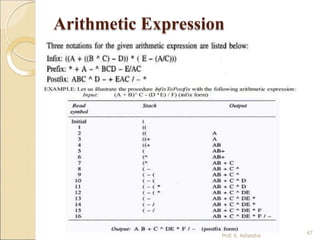
 Conversion of infix expression into prefix and postfix.
 Quick sort
Arithmetic Expression
 Example: +ab
Prof. K. Adisesha 46
 An expression is a combination of operands and operators
that after evaluation results in a single value.
· Operand consists of constants and variables.
· Operators consists of {, +, -, *, /, ), ] etc.
 Expression can be
Infix Expression: If an operator is in between two operands, it is called
infix expression.
 Example: a + b, where a and b are operands and + is an operator.
Postfix Expression: If an operator follows the two operands, it is called
postfix expression.
 Example: ab +
Prefix Expression: an operator precedes the two operands, it is called
prefix expression.
Arithmetic Expression
47
Prof. K. Adisesha
Queue
 A queue is an ordered collection of items where an
item is inserted at one end called the “rear” and an
existing item is removed at the other end, called the
“front”.
 Queue is also called as FIFO list i.e. First-In First-
Out.
 In the queue only two operations are allowed enqueue
and dequeue.
 Enqueue means to insert an item into back of the
queue.
 Dequeue means removing the front item.The people
standing in a railway reservation row are an example
of queue.
48
Prof. K. Adisesha
Queue
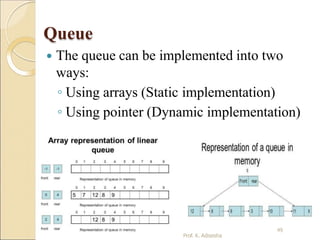
 The queue can be implemented into two
ways:
◦ Using arrays (Static implementation)
◦ Using pointer (Dynamic implementation)
49
Prof. K. Adisesha
Types of
Queues
Prof. K. Adisesha 50
 Queue can be of four
types: o Simple Queue
o Circular Queue
o Priority Queue
o De-queue ( Double Ended
Queue)
Simple Queue
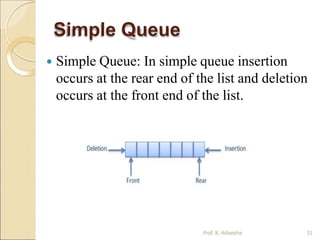
 Simple Queue: In simple queue insertion
occurs at the rear end of the list and deletion
occurs at the front end of the list.
Prof. K. Adisesha 51
Circular Queue
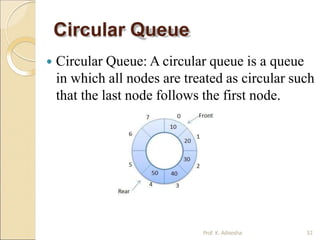
 Circular Queue: A circular queue is a queue
in which all nodes are treated as circular such
that the last node follows the first node.
Prof. K. Adisesha 52
Priority Queue
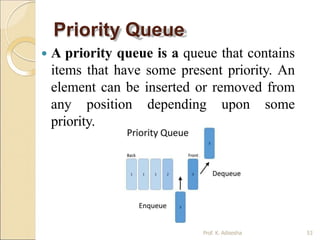
 A priority queue is a queue that contains
items that have some present priority. An
element can be inserted or removed from
any position depending upon some
priority.
Prof. K. Adisesha 53
Dequeue Queue
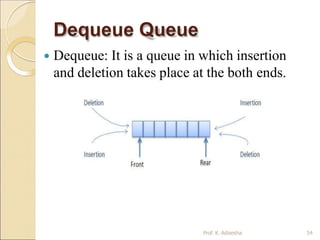
 Dequeue: It is a queue in which insertion
and deletion takes place at the both ends.
Prof. K. Adisesha 54
Operation on Queues
Prof. K. Adisesha 55
 Queue( ): It creates a new queue that is
empty.
 enqueue(item): It adds a new item to the rear
of the queue.
 dequeue( ): It removes the front item from
the queue.
 isEmpty( ): It tests to see whether the queue
is empty.
 size( ): It returns the number of items in the
queue.
Memory Representation of a queue
using array
Prof. K. Adisesha 56
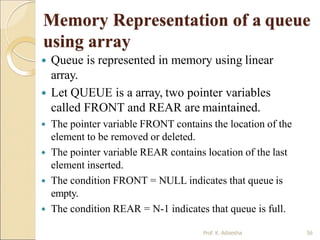
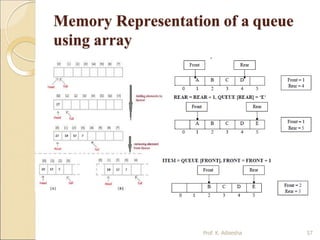
 Queue is represented in memory using linear
array.
 Let QUEUE is a array, two pointer variables
called FRONT and REAR are maintained.
 The pointer variable FRONT contains the location of the
element to be removed or deleted.
 The pointer variable REAR contains location of the last
element inserted.
 The condition FRONT = NULL indicates that queue is
empty.
 The condition REAR = N-1 indicates that queue is full.
Memory Representation of a queue
using array
Prof. K. Adisesha 57
Queue Insertion Operation
(ENQUEUE):
 ALGORITHM: ENQUEUE (QUEUE, REAR, FRONT, ITEM)
QUEUE is the array with N elements. FRONT is the pointer that contains the
location of the element to be deleted and REAR contains the location of the
inserted element. ITEM is the element to be inserted.
Step 1: if REAR = N-1 then [Check Overflow]
PRINT “QUEUE is Full or Overflow”
Exit
[End if]
Step 2: if FRONT = NULL then [Check Whether Queue isempty]
FRONT = -1
REAR = -1
else
REAR = REAR + 1 [Increment REAR Pointer]
Step 3: QUEUE[REAR] = ITEM [Copy ITEM to REAR position]
Step 4: Return
Prof. K. Adisesha 58
Queue Deletion Operation
(DEQUEUE)
ALGORITHM: DEQUEUE (QUEUE, REAR, FRONT, ITEM)
QUEUE is the array with N elements. FRONT is the pointer that contains the
location of the element to be deleted and REAR contains the location of the
inserted element. ITEM is the element to be inserted.
Step 1: if FRONT = NULL then [Check Whether Queue isempty]
PRINT “QUEUE is Empty or Underflow”
Exit
[End if]
Step 2: ITEM = QUEUE[FRONT]
Step 3: if FRONT = REAR then [if QUEUE has only one element]
FRONT = NULL
REAR = NULL
else
FRONT = FRONT + 1 [Increment FRONT pointer]
Step 4: Return
Prof. K. Adisesha 59
Application of
Queue
Prof. K. Adisesha 60
 Simulation
 Various features of Operating system
 Multi-programming platform systems.
 Different types of scheduling algorithms
 Round robin technique algorithms
 Printer server routines
 Various application software’s is also
based on queue data structure.
Lists
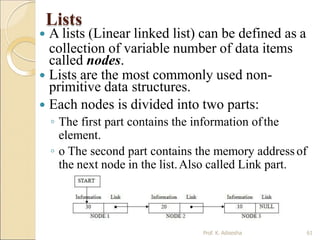
 A lists (Linear linked list) can be defined as a
collection of variable number of data items
called nodes.
 Lists are the most commonly used non-
primitive data structures.
 Each nodes is divided into two parts:
◦ The first part contains the information ofthe
element.
◦ o The second part contains the memory addressof
the next node in the list.Also called Link part.
Prof. K. Adisesha 61
Lists
Prof. K. Adisesha 62
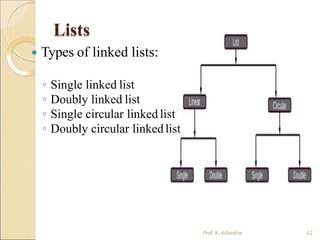
 Types of linked lists:
◦ Single linked list
◦ Doubly linked list
◦ Single circular linked list
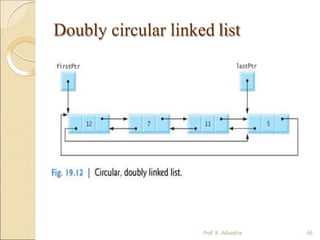
◦ Doubly circular linkedlist
Single linked list
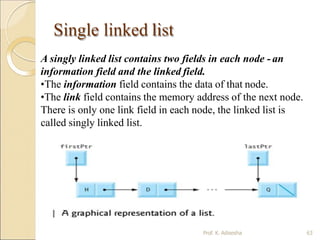
A singly linked list contains two fields in each node - an
information field and the linked field.
•The information field contains the data of that node.
•The link field contains the memory address of the next node.
There is only one link field in each node, the linked list is
called singly linked list.
Prof. K. Adisesha 63
Single circular linked list
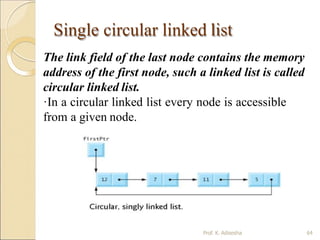
The link field of the last node contains the memory
address of the first node, such a linked list is called
circular linked list.
·In a circular linked list every node is accessible
from a given node.
Prof. K. Adisesha 64
Doubly linked list
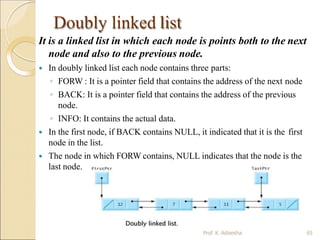
It is a linked list in which each node is points both to the next
node and also to the previous node.
 In doubly linked list each node contains three parts:
◦ FORW : It is a pointer field that contains the address of the next node
◦ BACK: It is a pointer field that contains the address of the previous
node.
◦ INFO: It contains the actual data.
 In the first node, if BACK contains NULL, it indicated that it is the first
node in the list.
 The node in which FORW contains, NULL indicates that the node is the
last node.
Prof. K. Adisesha 65
Doubly circular linked list
Prof. K. Adisesha 66
Operation on Linked List
Prof. K. Adisesha 67
 The operation that are performed
on linked lists are:
◦ Creating a linked list
◦ Traversing a linked list
◦ Inserting an item into a linked list.
◦ Deleting an item from the linked list.
◦ Searching an item in the linked list
◦ Merging two or more linked lists.
Creating a linked
list
Prof. K. Adisesha 68
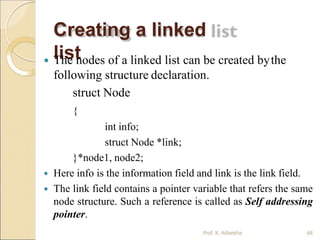
 The nodes of a linked list can be created bythe
following structure declaration.
struct Node
{
int info;
struct Node *link;
}*node1, node2;
 Here info is the information field and link is the link field.
 The link field contains a pointer variable that refers the same
node structure. Such a reference is called as Self addressing
pointer.
Operator new and delete
Prof. K. Adisesha 69
 Operators new allocate memory
space.
◦ Operators new [ ] allocates memory
space for array.
 Operators delete deallocate
memory space.
◦ Operators delete [ ] deallocate
memory space for array.
Traversing a linked list:
Prof. K. Adisesha 70
 Traversing is the process of accessing each node of the
linked list exactly once to perform some operation.
 ALGORITHM: TRAVERS (START, P) START contains
the address of the first node. Another pointer p is
temporarily used to visit all the nodes from the beginning to
the end of the linked list.
Step 1: P = START
Step 2: while P != NULL
Step 3:
Step 4:
PROCESS data (P)
P = link(P)
[Fetch the data]
[Advance P to next node]
Step 5: End of while
Step 6: Return
Inserting a node into
the linked list
Prof. K. Adisesha 71
 Inserting a node at the beginning of
the linked list
 Inserting a node at the given position.
 Inserting a node at the end of the linked
list.
Inserting node at
Front
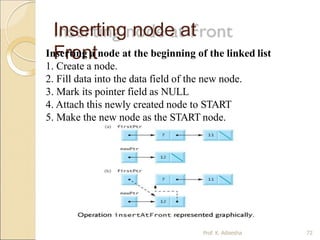
Inserting a node at the beginning of the linked list
1. Create a node.
2. Fill data into the data field of the new node.
3. Mark its pointer field as NULL
4. Attach this newly created node to START
5. Make the new node as the START node.
Prof. K. Adisesha 72
Inserting node at
Front
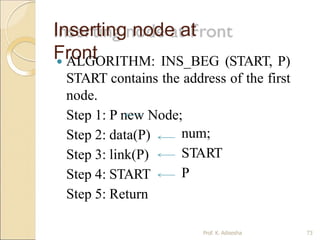
 ALGORITHM: INS_BEG (START, P)
START contains the address of the first
node.
Step 1: P new Node;
num;
START
P
Step 2: data(P)
Step 3: link(P)
Step 4: START
Step 5: Return
Prof. K. Adisesha 73
Inserting node at
Last
Prof. K. Adisesha 74
Inserting node at
Last
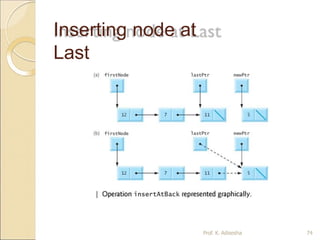
 ALGORITHM: INS_END (START, P) START contains
the address of the first node.
Step 1: START
Step 2: P START [identify the last node]
while P!= null
P next (P)
End while
Step 3: N new Node;
Step 4: data(N) item;
Step 5: link(N) null
Step 6: link(P) N
Step 7: Return Prof. K. Adisesha 75
Inserting node at a given
Position
count+1
next (P)
Count 0
Step 3: while P!= null
count
P
End while
Step 4: if (POS=1)
Call function INS_BEG( )
else if (POS=Count +1)
Call function INS_END( )
For(i=1; i<=pos; i++)
P next(P);
end for
new node
item;
link(P)
N
[create] N
data(N)
link(N)
link(P)
else
PRINT “Invalid position”
Step 5: Return
ALGORITHM: INS_POS (START, P) START contains the
address of the first node.
Step 1: START else if (POS<=Count)
Step 2: P START [Initialize node] P Start
Prof. K. Adisesha 76
Deleting an
node
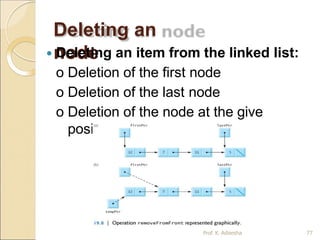
 Deleting an item from the linked list:
o Deletion of the first node
o Deletion of the last node
o Deletion of the node at the give
position
Prof. K. Adisesha 77
Deleting node from
end
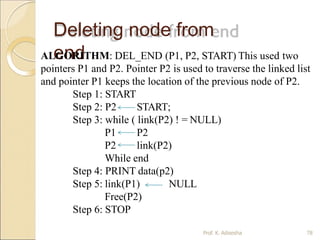
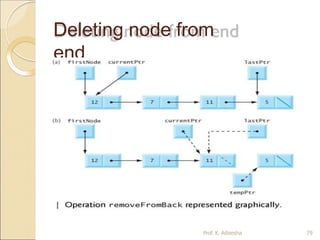
ALGORITHM: DEL_END (P1, P2, START) This used two
pointers P1 and P2. Pointer P2 is used to traverse the linked list
and pointer P1 keeps the location of the previous node of P2.
Step 1: START
Step 2: P2 START;
Step 3: while ( link(P2) ! = NULL)
P1 P2
P2 link(P2)
While end
Step 4: PRINT data(p2)
NULL
Step 5: link(P1)
Free(P2)
Step 6: STOP
Prof. K. Adisesha 78
Deleting node from
end
Prof. K. Adisesha 79
Non-Linear Data structures
Prof. K. Adisesha 80
 A Non-Linear Data structures is a datastructure
in which data item is connected to several other
data items.
 The data items in non-linear data structure
represent hierarchical relationship.
 Each data item is called node.
 The different non-linear data structures are
◦ Trees
◦ Graphs.
Trees
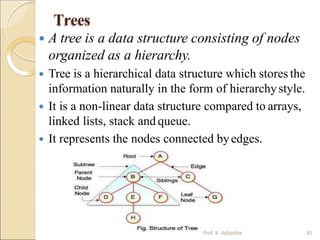
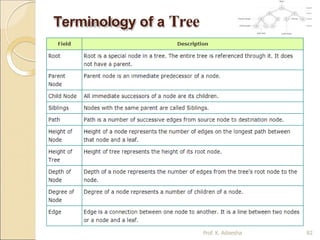
 A tree is a data structure consisting of nodes
organized as a hierarchy.
 Tree is a hierarchical data structure which stores the
information naturally in the form of hierarchystyle.
 It is a non-linear data structure compared to arrays,
linked lists, stack and queue.
 It represents the nodes connected byedges.
Prof. K. Adisesha 81
Terminology of a Tree
Prof. K. Adisesha 82
Binary Tree
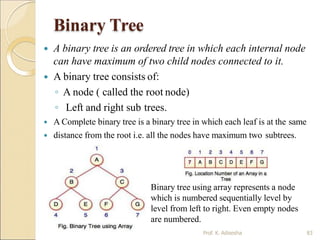
 A binary tree is an ordered tree in which each internal node
can have maximum of two child nodes connected to it.
 A binary tree consists of:
◦ A node ( called the root node)
◦ Left and right sub trees.
 A Complete binary tree is a binary tree in which each leaf is at the same
 distance from the root i.e. all the nodes have maximum two subtrees.
Binary tree using array represents a node
which is numbered sequentially level by
level from left to right. Even empty nodes
are numbered.
Prof. K. Adisesha 83
Graph
Prof. K. Adisesha 84
 Graph is a mathematical non-linear data
structure capable of representing many kind of
physical structures.
 A graph is a set of vertices and edgeswhich
connect them.
 A graph is a collectionof nodes called vertices
and the connection between them callededges.
 Definition:A graph G(V,E) is a set of vertices V
and a set of edges E.
Graph
 Example of graph:
v2
v1
v5
v3
10
15
8
6
11
9
v4
v1
v2 v4
v3
[a] Directed &
Weighted Graph Prof. K. Adisesha 85
[b] Undirected Graph
Graph
Prof. K. Adisesha 86
 An edge connects a pair of vertices and
many have weight such as length, cost and
another measuring instrument for
according the graph.
 Vertices on the graph are shown as point
or circles and edges are drawn as arcs or
line segment.
Graph
Prof. K. Adisesha 87
 Types of Graphs:
◦ Directed graph
◦ Undirected graph
◦ Simple graph
◦ Weighted graph
◦ Connected graph
◦ Non-connected graph
Thank
you
Prof. K. Adisesha 88

datastructureppt-190327174340 (1).pptx

  • 1.
  • 2.
    Definition Prof. K. Adisesha2  Data: Collection of raw facts.  Data structure is representation of the logical relationship existing between individual elements of data.  Data structure is a specialized format for organizing and storing data in memory that considers not only the elements stored but also their relationship to each other.
  • 3.
    Introduction Prof. K. Adisesha3  Data structure affects the design of both structural & functional aspects of a program. Program=algorithm + Data Structure  You know that a algorithm is a step by step procedure to solve a particular function.
  • 4.
    Classification of DataStructure Prof. K. Adisesha 4  Data structure are normally divided into two broad categories: ◦ Primitive Data Structure ◦ Non-Primitive Data Structure
  • 5.
    Classification of DataStructure Prof. K. Adisesha 5
  • 6.
    Primitive Data Structure Prof.K. Adisesha 6  There are basic structures and directly operated upon by the machine instructions.  Data structures that are directly operated upon the machine-level instructions are known as primitive data structures.  Integer, Floating-point number, Character constants, string constants, pointers etc, fall in this category.
  • 7.
    Primitive Data Structure Prof.K. Adisesha 7  The most commonly used operation on data structure are broadly categorized into following types: ◦ Create ◦ Selection ◦ Updating ◦ Destroy or Delete
  • 8.
    Non-Primitive Data Structure Prof.K. Adisesha 8  There are more sophisticated data structures.  The Data structures that are derived from the primitive data structures are calledNon-primitive data structure.  The non-primitive data structures emphasize on structuring of a group of homogeneous (same type) or heterogeneous (different type) data items.
  • 9.
    Non-Primitive Data Structure Prof.K. Adisesha 9 Linear Data structures: ◦ Linear Data structures are kind of data structure that has homogeneous elements. ◦ The data structure in which elements are in a sequence and form a liner series. ◦ Linear data structures are very easy to implement, since the memory of the computer is also organized in a linear fashion. ◦ Some commonly used linear data structures are Stack, Queue and Linked Lists. Non-Linear Data structures: ◦ A Non-Linear Data structures is a data structure in which data itemis connected to several other data items. ◦ Non-Linear data structure may exhibit either a hierarchical relationship or parent child relationship. ◦ The data elements are not arranged in a sequential structure. ◦ The different non-linear data structures are trees and graphs.
  • 10.
    Non-Primitive Data Structure Prof.K. Adisesha 10  The most commonly used operation on data structure are broadly categorized into following types: ◦ Traversal ◦ Insertion ◦ Selection ◦ Searching ◦ Sorting ◦ Merging ◦ Destroy or Delete
  • 11.
    Different between them Prof.K. Adisesha 11  A primitive data structure is generally a basic structure that is usually built into the language, such as an integer, a float.  A non-primitive data structure is built out of primitive data structures linked together in meaningful ways, such as a or a linked-list, binary search tree, AVLTree, graph etc.
  • 12.
    Description of various DataStructures : Arrays Prof. K. Adisesha 12  An array is defined as a set of finite number of homogeneous elements or same data items.  It means an array can contain one type of data only, either all integer, all float-point number or all character.
  • 13.
    One dimensional array: Prof.K. Adisesha 13  An array with only one row or column is called one-dimensional array.  It is finite collection of n number of elements of same type such that: ◦ can be referred by indexing. ◦ The syntax Elements are stored in continuous locations. ◦ Elements x to define one-dimensional array is:  Syntax: Datatype Array_Name [Size];  Where, Datatype : Type of value it can store (Example: int, char, float) Array_Name: To identify the array.  Size : The maximum number of elements that the array can hold.
  • 14.
    Arrays Prof. K. Adisesha14  Simply, declaration of array is as follows: int arr[10]  Where int specifies the data type or type of elements arrays stores.  “arr” is the name of array & the number specified inside the square brackets is the number of elements an array can store, this is also called sized or length of array.
  • 15.
    Represent a LinearArray in memory  The elements of linear array are stored in consecutive memory locations. It is shown below: Prof. K. Adisesha 15
  • 16.
    Arrays Prof. K. Adisesha16 ◦ The elements of array will always be stored in the consecutive (continues) memory location. ◦ The number of elements that can be stored in an array, that is the size of array or its length isgiven by the following equation: (Upperbound-lowerbound)+1 ◦ For the above array it would be (9-0)+1=10,where 0 is the lower bound of array and 9 is the upper bound of array. ◦ Array can always be read or written through loop. For(i=0;i<=9;i++) { scanf(“%d”,&arr[i]); printf(“%d”,arr[i]); }
  • 17.
    Arrays types Prof. K. Adisesha17  Single Dimension Array ◦ Array with one subscript  Two Dimension Array ◦ Array with two subscripts (Rows and Column)  Multi DimensionArray ◦ Array with Multiple subscripts
  • 18.
    Basic operations ofArrays Prof. K. Adisesha 18  Some common operation performed on array are: ◦ Traversing ◦ Searching ◦ Insertion ◦ Deletion ◦ Sorting ◦ Merging
  • 19.
    Traversing Arrays  Traversing: Itis used to access each data item exactly once so that it can be processed. E.g. We have linear array A as below:  1 2 3 4 5  10 20 30 40 50 Here we will start from beginning and will go till last element and during this process we will access value of each element exactly once as below: A [1] = 10 A [2] = 20 A [3] = 30 A [4] = 40 A [5] = 50 Prof. K. Adisesha 19
  • 20.
    Insertion into Array  Insertion:It is used to add a new data item in the given collection of data items. E.g.We have linear array A as below: 1 2 3 4 5 10 20 50 30 15 New element to be inserted is 100 and location for insertion is 3. So shift the elements from 5th location to 3rd location downwards by 1 place.And then insert 100 at 3rd location. It is shownbelow: Prof. K. Adisesha 20
  • 21.
    Deletion from Array  Deletion:It is used to delete an existing data item from the given collection of data items. Prof. K. Adisesha 21
  • 22.
    Searching in Arrays Prof. K.Adisesha 22  Searching: It is used to find out the location of the data item if it exists in the given collection of data items. E.g. We have linear array A as below: 1 2 3 4 5 15 50 35 20 25 Suppose item to be searched is 20.We will start from beginning and will compare 20 with each element. This process will continue until element is found or array is finished. Here: 1) Compare 20 with 15 20 # 15, go to nextelement. 2) Compare 20 with 50 20 # 50, go to nextelement. 3) Compare 20 with 35 20 #35, go to nextelement. 4) Compare 20 with 20 20 = 20, so 20 is found and its location is4.
  • 23.
  • 24.
     The binarysearch algorithm can be used with only sorted list of elements.  Binary Search first divides a large array into two smaller sub-arrays and then recursively operate the sub-arrays.  Binary Search basically reduces the search space to half at each step Binary Search Prof. K. Adisesha 24
  • 25.
  • 26.
  • 27.
  • 28.
  • 29.
    Insertion Sort  ALGORITHM:Insertion Sort (A, N)A is an array with N unsorted elements. ◦ Step 1: for I=1 to N-1 ◦ Step 2: J = I While(J >= 1) if ( A[J] < A[J-1]) then Temp = A[J]; A[J] = A[J-1]; A[J-1] = Temp; [End if] J = J-1 [End of While loop] [End of For loop] ◦ Step 3: Exit Prof. K. Adisesha 29
  • 30.
    Merging from Array Prof. K.Adisesha 30  Merging: It is used to combine the data items of two sorted files into single file in the sorted form We have sorted linear array A as below: 1 2 3 4 5 6 10 40 50 80 95 10 0 And sorted linear array B as below: 1 2 3 4 20 35 45 90 After merging merged array C is as below: 1 2 3 4 5 6 7 8 9 10 10 20 35 40 45 50 80 90 95 10 0
  • 31.
    Two dimensional array Prof. K.Adisesha 31  A two dimensional array is a collection of elements and each element is identified by a pair of subscripts. ( A[3] [3] )  The elements are stored in continuous memory locations.  The elements of two-dimensional array as rows and columns.  The number of rows and columns in a matrix is called as the order of the matrix and denoted as mxn.  The number of elements can be obtained by multiplying number of rows and number of columns. A[0] A[1] A[2] A[0] 10 20 30 A[1] 40 50 60 A[2] 70 80 90
  • 32.
    Representation of TwoDimensional Array: Prof.K. Adisesha 32  A is the array of order m x n.To store m*n number of elements, we need m*n memory locations.  The elements should be in contiguous memory locations.  There are two methods: o Row- major method o Column-major method
  • 33.
    Two Dimensional Array: Prof.K. Adisesha 33  Row-Major Method: All the first-row elements are stored in sequential memory locations and then all the second-row elements are stored and so on. Ex:A[Row][Col]  Column-Major Method: All the first column elements are stored in sequential memory locations and then all the second- column elements are stored and so on. Ex: A[Col][Row] 1000 10 A[0][0] 1002 20 A[0][1] 1004 30 A[0][2] 1006 40 A[1][0] 1008 50 A[1][1] 1010 60 A[1][2] 1012 70 A[2][0] 1014 80 A[2][1] 1016 90 A[2][2] Row-Major Method 1000 10 A[0][0] 1002 40 A[1][0] 1004 70 A[2][0] 1006 20 A[0][1] 1008 50 A[1][1] 1010 80 A[2][1] 1012 30 A[0][2] 1014 60 A[1][2] 1016 90 A[2][2] Col-Major Method
  • 34.
    Advantages of Array: Prof.K. Adisesha 34  It is used to represent multiple data items ofsame type by using single name.  It can be used to implement other datastructures like linked lists, stacks, queues, tree, graphsetc.  Two-dimensional arrays are used to represent matrices.  Many databases include one-dimensional arrays whose elements are records.
  • 35.
    Disadvantages of Array Prof.K. Adisesha 35  We must know in advance the how many elements are to be stored in array.  Array is static structure. It means that array isof fixed size. The memory which is allocated to array cannot be increased or decreased.  Array is fixed size; if we allocate more memory than requirement then the memory space will be wasted.  The elements of array are stored in consecutive memory locations. So insertion and deletion are very difficult and time consuming.
  • 36.
    Stack  Stack isa linear data structure which followsa particular order in which the operations are performed.  Insertion of element into stack is called PUSHand deletion of element from stack is calledPOP.  The order may be LIFO(Last In First Out) or FILO(First In Last Out). Prof. K. Adisesha 36
  • 37.
    Representation of Stackin Memory  The stack can be implemented into two ways: ◦ Using arrays (Static implementation) ◦ Using pointer (Dynamic implementation) Prof. K. Adisesha 37
  • 38.
    Operation on Stacks: Prof.K. Adisesha 38  Stack( ): It creates a new stack that is empty. It needs no parameter and returns an emptystack.  push(item): It adds a new item to the top ofthe stack.  pop( ): It removes the top item from thestack.  peek( ): It returns the top item from the stackbut does not remove it.  isEmpty( ): It tests whether the stack is empty.  size( ): It returns the number of items on thestack.
  • 39.
  • 40.
    PUSH Operation  The processof adding one element or item tothe stack is represented by an operation called as the PUSH operation. Prof. K. Adisesha 40
  • 41.
    PUSH Operation: Prof. K. Adisesha41  The process of adding one element or item to the stack is represented by an operation called as the PUSH operation.  The new element is added at the topmost position of the stack. ALGORITHM: PUSH (STACK, TOP, SIZE, ITEM) STACK is the array with N elements. TOP is the pointer to the top of the element of the array. ITEM to be inserted. Step 1: if TOP = N then [Check Overflow] PRINT “ STACK is Full or Overflow” Exit [Increment the TOP] [Insert the ITEM] [End if] Step 2: TOP = TOP +1 Step 3: STACK[TOP] = ITEM Step 4: Return
  • 42.
    POP Operation The processof deleting one element or item from the stack is represented by an operation called as the POP operation. When elements are removed continuously from a stack, it shrinks at same end i.e., top Prof. K. Adisesha 42
  • 43.
    POP Operation Prof. K.Adisesha 43 The process of deleting one element or item from the stack is represented by an operation called as the POP operation. ALGORITHM: POP (STACK, TOP, ITEM) STACK is the array with N elements. TOP is the pointer to the top of the element of the array. ITEM to be inserted. Step 1: if TOP = 0 then [Check Underflow] PRINT “ STACK is Empty or Underflow” Exit [End if] [copy the TOPElement] [Decrement the TOP] Step 2: ITEM = STACK[TOP] Step 3: TOP = TOP -1 Step 4: Return
  • 44.
    PEEK Operation Prof. K. Adisesha44 The process of returning the top item from the stack but does not remove it called as the POP operation. ALGORITHM: PEEK (STACK, TOP) STACK is the array with N elements. TOP is the pointer to the top of the element of the array. Step 1: if TOP = NULL then [Check Underflow] PRINT “ STACK is Empty or Underflow” Exit [End if] Step 2: Return (STACK[TOP] [Return the top element of the stack] Step 3:Exit
  • 45.
    Application of Stacks Runtime memory management. Prof. K. Adisesha 45  It is used to reverse a word. You push a given word to stack – letter by letter and then pop letter from the stack.  “Undo” mechanism in text editor.  Backtracking: This is a process when you need to access the most recent data element in a series of elements. Once you reach a dead end, you must backtrack.  Language Processing: Compiler’ syntax check for matching braces in implemented by using stack.  Conversion of decimal number to binary.  To solve tower of Hanoi.  Conversion of infix expression into prefix and postfix.  Quick sort
  • 46.
    Arithmetic Expression  Example:+ab Prof. K. Adisesha 46  An expression is a combination of operands and operators that after evaluation results in a single value. · Operand consists of constants and variables. · Operators consists of {, +, -, *, /, ), ] etc.  Expression can be Infix Expression: If an operator is in between two operands, it is called infix expression.  Example: a + b, where a and b are operands and + is an operator. Postfix Expression: If an operator follows the two operands, it is called postfix expression.  Example: ab + Prefix Expression: an operator precedes the two operands, it is called prefix expression.
  • 47.
  • 48.
    Queue  A queueis an ordered collection of items where an item is inserted at one end called the “rear” and an existing item is removed at the other end, called the “front”.  Queue is also called as FIFO list i.e. First-In First- Out.  In the queue only two operations are allowed enqueue and dequeue.  Enqueue means to insert an item into back of the queue.  Dequeue means removing the front item.The people standing in a railway reservation row are an example of queue. 48 Prof. K. Adisesha
  • 49.
    Queue  The queuecan be implemented into two ways: ◦ Using arrays (Static implementation) ◦ Using pointer (Dynamic implementation) 49 Prof. K. Adisesha
  • 50.
    Types of Queues Prof. K.Adisesha 50  Queue can be of four types: o Simple Queue o Circular Queue o Priority Queue o De-queue ( Double Ended Queue)
  • 51.
    Simple Queue  SimpleQueue: In simple queue insertion occurs at the rear end of the list and deletion occurs at the front end of the list. Prof. K. Adisesha 51
  • 52.
    Circular Queue  CircularQueue: A circular queue is a queue in which all nodes are treated as circular such that the last node follows the first node. Prof. K. Adisesha 52
  • 53.
    Priority Queue  Apriority queue is a queue that contains items that have some present priority. An element can be inserted or removed from any position depending upon some priority. Prof. K. Adisesha 53
  • 54.
    Dequeue Queue  Dequeue:It is a queue in which insertion and deletion takes place at the both ends. Prof. K. Adisesha 54
  • 55.
    Operation on Queues Prof.K. Adisesha 55  Queue( ): It creates a new queue that is empty.  enqueue(item): It adds a new item to the rear of the queue.  dequeue( ): It removes the front item from the queue.  isEmpty( ): It tests to see whether the queue is empty.  size( ): It returns the number of items in the queue.
  • 56.
    Memory Representation ofa queue using array Prof. K. Adisesha 56  Queue is represented in memory using linear array.  Let QUEUE is a array, two pointer variables called FRONT and REAR are maintained.  The pointer variable FRONT contains the location of the element to be removed or deleted.  The pointer variable REAR contains location of the last element inserted.  The condition FRONT = NULL indicates that queue is empty.  The condition REAR = N-1 indicates that queue is full.
  • 57.
    Memory Representation ofa queue using array Prof. K. Adisesha 57
  • 58.
    Queue Insertion Operation (ENQUEUE): ALGORITHM: ENQUEUE (QUEUE, REAR, FRONT, ITEM) QUEUE is the array with N elements. FRONT is the pointer that contains the location of the element to be deleted and REAR contains the location of the inserted element. ITEM is the element to be inserted. Step 1: if REAR = N-1 then [Check Overflow] PRINT “QUEUE is Full or Overflow” Exit [End if] Step 2: if FRONT = NULL then [Check Whether Queue isempty] FRONT = -1 REAR = -1 else REAR = REAR + 1 [Increment REAR Pointer] Step 3: QUEUE[REAR] = ITEM [Copy ITEM to REAR position] Step 4: Return Prof. K. Adisesha 58
  • 59.
    Queue Deletion Operation (DEQUEUE) ALGORITHM:DEQUEUE (QUEUE, REAR, FRONT, ITEM) QUEUE is the array with N elements. FRONT is the pointer that contains the location of the element to be deleted and REAR contains the location of the inserted element. ITEM is the element to be inserted. Step 1: if FRONT = NULL then [Check Whether Queue isempty] PRINT “QUEUE is Empty or Underflow” Exit [End if] Step 2: ITEM = QUEUE[FRONT] Step 3: if FRONT = REAR then [if QUEUE has only one element] FRONT = NULL REAR = NULL else FRONT = FRONT + 1 [Increment FRONT pointer] Step 4: Return Prof. K. Adisesha 59
  • 60.
    Application of Queue Prof. K.Adisesha 60  Simulation  Various features of Operating system  Multi-programming platform systems.  Different types of scheduling algorithms  Round robin technique algorithms  Printer server routines  Various application software’s is also based on queue data structure.
  • 61.
    Lists  A lists(Linear linked list) can be defined as a collection of variable number of data items called nodes.  Lists are the most commonly used non- primitive data structures.  Each nodes is divided into two parts: ◦ The first part contains the information ofthe element. ◦ o The second part contains the memory addressof the next node in the list.Also called Link part. Prof. K. Adisesha 61
  • 62.
    Lists Prof. K. Adisesha62  Types of linked lists: ◦ Single linked list ◦ Doubly linked list ◦ Single circular linked list ◦ Doubly circular linkedlist
  • 63.
    Single linked list Asingly linked list contains two fields in each node - an information field and the linked field. •The information field contains the data of that node. •The link field contains the memory address of the next node. There is only one link field in each node, the linked list is called singly linked list. Prof. K. Adisesha 63
  • 64.
    Single circular linkedlist The link field of the last node contains the memory address of the first node, such a linked list is called circular linked list. ·In a circular linked list every node is accessible from a given node. Prof. K. Adisesha 64
  • 65.
    Doubly linked list Itis a linked list in which each node is points both to the next node and also to the previous node.  In doubly linked list each node contains three parts: ◦ FORW : It is a pointer field that contains the address of the next node ◦ BACK: It is a pointer field that contains the address of the previous node. ◦ INFO: It contains the actual data.  In the first node, if BACK contains NULL, it indicated that it is the first node in the list.  The node in which FORW contains, NULL indicates that the node is the last node. Prof. K. Adisesha 65
  • 66.
    Doubly circular linkedlist Prof. K. Adisesha 66
  • 67.
    Operation on LinkedList Prof. K. Adisesha 67  The operation that are performed on linked lists are: ◦ Creating a linked list ◦ Traversing a linked list ◦ Inserting an item into a linked list. ◦ Deleting an item from the linked list. ◦ Searching an item in the linked list ◦ Merging two or more linked lists.
  • 68.
    Creating a linked list Prof.K. Adisesha 68  The nodes of a linked list can be created bythe following structure declaration. struct Node { int info; struct Node *link; }*node1, node2;  Here info is the information field and link is the link field.  The link field contains a pointer variable that refers the same node structure. Such a reference is called as Self addressing pointer.
  • 69.
    Operator new anddelete Prof. K. Adisesha 69  Operators new allocate memory space. ◦ Operators new [ ] allocates memory space for array.  Operators delete deallocate memory space. ◦ Operators delete [ ] deallocate memory space for array.
  • 70.
    Traversing a linkedlist: Prof. K. Adisesha 70  Traversing is the process of accessing each node of the linked list exactly once to perform some operation.  ALGORITHM: TRAVERS (START, P) START contains the address of the first node. Another pointer p is temporarily used to visit all the nodes from the beginning to the end of the linked list. Step 1: P = START Step 2: while P != NULL Step 3: Step 4: PROCESS data (P) P = link(P) [Fetch the data] [Advance P to next node] Step 5: End of while Step 6: Return
  • 71.
    Inserting a nodeinto the linked list Prof. K. Adisesha 71  Inserting a node at the beginning of the linked list  Inserting a node at the given position.  Inserting a node at the end of the linked list.
  • 72.
    Inserting node at Front Insertinga node at the beginning of the linked list 1. Create a node. 2. Fill data into the data field of the new node. 3. Mark its pointer field as NULL 4. Attach this newly created node to START 5. Make the new node as the START node. Prof. K. Adisesha 72
  • 73.
    Inserting node at Front ALGORITHM: INS_BEG (START, P) START contains the address of the first node. Step 1: P new Node; num; START P Step 2: data(P) Step 3: link(P) Step 4: START Step 5: Return Prof. K. Adisesha 73
  • 74.
  • 75.
    Inserting node at Last ALGORITHM: INS_END (START, P) START contains the address of the first node. Step 1: START Step 2: P START [identify the last node] while P!= null P next (P) End while Step 3: N new Node; Step 4: data(N) item; Step 5: link(N) null Step 6: link(P) N Step 7: Return Prof. K. Adisesha 75
  • 76.
    Inserting node ata given Position count+1 next (P) Count 0 Step 3: while P!= null count P End while Step 4: if (POS=1) Call function INS_BEG( ) else if (POS=Count +1) Call function INS_END( ) For(i=1; i<=pos; i++) P next(P); end for new node item; link(P) N [create] N data(N) link(N) link(P) else PRINT “Invalid position” Step 5: Return ALGORITHM: INS_POS (START, P) START contains the address of the first node. Step 1: START else if (POS<=Count) Step 2: P START [Initialize node] P Start Prof. K. Adisesha 76
  • 77.
    Deleting an node  Deletingan item from the linked list: o Deletion of the first node o Deletion of the last node o Deletion of the node at the give position Prof. K. Adisesha 77
  • 78.
    Deleting node from end ALGORITHM:DEL_END (P1, P2, START) This used two pointers P1 and P2. Pointer P2 is used to traverse the linked list and pointer P1 keeps the location of the previous node of P2. Step 1: START Step 2: P2 START; Step 3: while ( link(P2) ! = NULL) P1 P2 P2 link(P2) While end Step 4: PRINT data(p2) NULL Step 5: link(P1) Free(P2) Step 6: STOP Prof. K. Adisesha 78
  • 79.
  • 80.
    Non-Linear Data structures Prof.K. Adisesha 80  A Non-Linear Data structures is a datastructure in which data item is connected to several other data items.  The data items in non-linear data structure represent hierarchical relationship.  Each data item is called node.  The different non-linear data structures are ◦ Trees ◦ Graphs.
  • 81.
    Trees  A treeis a data structure consisting of nodes organized as a hierarchy.  Tree is a hierarchical data structure which stores the information naturally in the form of hierarchystyle.  It is a non-linear data structure compared to arrays, linked lists, stack and queue.  It represents the nodes connected byedges. Prof. K. Adisesha 81
  • 82.
    Terminology of aTree Prof. K. Adisesha 82
  • 83.
    Binary Tree  Abinary tree is an ordered tree in which each internal node can have maximum of two child nodes connected to it.  A binary tree consists of: ◦ A node ( called the root node) ◦ Left and right sub trees.  A Complete binary tree is a binary tree in which each leaf is at the same  distance from the root i.e. all the nodes have maximum two subtrees. Binary tree using array represents a node which is numbered sequentially level by level from left to right. Even empty nodes are numbered. Prof. K. Adisesha 83
  • 84.
    Graph Prof. K. Adisesha84  Graph is a mathematical non-linear data structure capable of representing many kind of physical structures.  A graph is a set of vertices and edgeswhich connect them.  A graph is a collectionof nodes called vertices and the connection between them callededges.  Definition:A graph G(V,E) is a set of vertices V and a set of edges E.
  • 85.
    Graph  Example ofgraph: v2 v1 v5 v3 10 15 8 6 11 9 v4 v1 v2 v4 v3 [a] Directed & Weighted Graph Prof. K. Adisesha 85 [b] Undirected Graph
  • 86.
    Graph Prof. K. Adisesha86  An edge connects a pair of vertices and many have weight such as length, cost and another measuring instrument for according the graph.  Vertices on the graph are shown as point or circles and edges are drawn as arcs or line segment.
  • 87.
    Graph Prof. K. Adisesha87  Types of Graphs: ◦ Directed graph ◦ Undirected graph ◦ Simple graph ◦ Weighted graph ◦ Connected graph ◦ Non-connected graph
  • 88.