 Introduction: History and Physiology
 Construction Glasses-free 3D Displays
 Multi-view Rendering using OpenGL
 Multi-view Interlacing using GLSL
 Designing Content for Glasses-free 3D Displays
 Emerging Technology
 Q & A and Demonstrations
Course Outline
Overview:
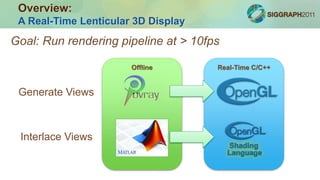
A Real-Time Lenticular 3D Display
Goal: Run rendering pipeline at > 10fps
Generate Views
Offline Real-Time C/C++
Interlace Views
Overview:
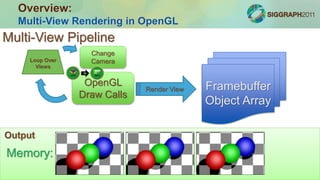
Multi-View Rendering in OpenGL
OpenGL
Draw Calls
Render
Standard Pipeline
Output
Multi-View Pipeline
Loop Over
Views
Backbuffer
Framebuffer
Object Array
Render View
Change
Camera
Screen:Memory:
Overview:
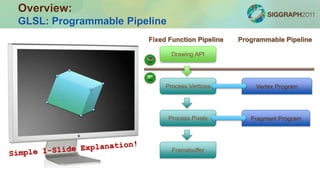
GLSL: Programmable Pipeline
Fixed Function Pipeline
Drawing API
Process Vertices
Process Pixels
Framebuffer
Programmable Pipeline
Vertex Program
Fragment Program
Overview:
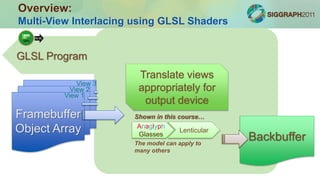
Multi-View Interlacing using GLSL Shaders
Framebuffer
Object Array
Mask
1
Mask
2
Mask
3
View 1
View 2
View 3
GLSL Program
Translate views
appropriately for
output device
Backbuffer
Anaglyph
Glasses
Lenticular
Shown in this course…
The model can apply to
many others
Equivalents in optics/photography
•Perspective Control Lens
•Lens Shift Projector
Photos: wikipedia
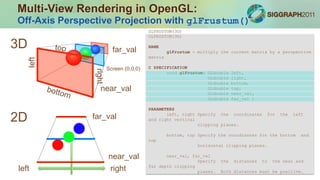
Multi-View Rendering in OpenGL:
Off-Axis Perspective Projection with glFrustum()
GLFRUSTUM(3G)
GLFRUSTUM(3G)
NAME
glFrustum - multiply the current matrix by a perspective
matrix
C SPECIFICATION
void glFrustum( GLdouble left,
GLdouble right,
GLdouble bottom,
GLdouble top,
GLdouble near_val,
GLdouble far_val )
PARAMETERS
left, right Specify the coordinates for the left
and right vertical
clipping planes.
bottom, top Specify the coordinates for the bottom and
top
horizontal clipping planes.
near_val, far_val
Specify the distances to the near and
far depth clipping
planes. Both distances must be positive.
Screen (0,0,0)
far_val
near_val
far_val
near_val
right
right
left
left
3D
2D
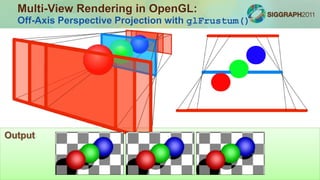
Multi-View Rendering in OpenGL:
Off-Axis Perspective Projection with glFrustum()
Output
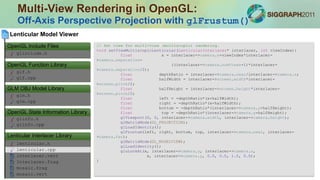
Multi-View Rendering in OpenGL:
Off-Axis Perspective Projection with glFrustum()
// Set view for multi-view (multiscopic) rendering.
void setViewMultiscopicLenticular(LenticularInterlacer* interlacer, int viewIndex){
float x = interlacer->camera.x+viewIndex*interlacer-
>camera.separation-
((interlacer->camera.numViews-1)*interlacer-
>camera.separation/2);
float depthRatio = interlacer->camera.near/interlacer->camera.z;
float halfWidth = interlacer->screen.width*interlacer-
>screen.pitch/2;
float halfHeight = interlacer->screen.height*interlacer-
>screen.pitch/2;
float left = -depthRatio*(x+halfWidth);
float right = -depthRatio*(x-halfWidth);
float bottom = -depthRatio*(interlacer->camera.y+halfHeight);
float top = -depthRatio*(interlacer->camera.y-halfHeight);
glViewport(0, 0, interlacer->camera.width, interlacer->camera.height);
glMatrixMode(GL_PROJECTION);
glLoadIdentity();
glFrustum(left, right, bottom, top, interlacer->camera.near, interlacer-
>camera.far);
glMatrixMode(GL_MODELVIEW);
glLoadIdentity();
gluLookAt(x, interlacer->camera.y, interlacer->camera.z,
x, interlacer->camera.y, 0.0, 0.0, 1.0, 0.0);
}
lenticular.h
Interlacer.frag
lenticular.cpp
interlacer.vert
mosaic.vert
mosaic.frag
Lenticular Interlacer Library
Lenticular Model Viewer
glinfo.h
glinfo.cpp
OpenGL State Information Library
glm.h
glm.cpp
GLM OBJ Model Library
glf.h
glf.cpp
OpenGL Function Library
glinclude.h
OpenGL Include Files
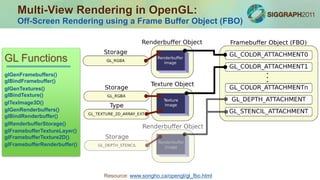
Multi-View Rendering in OpenGL:
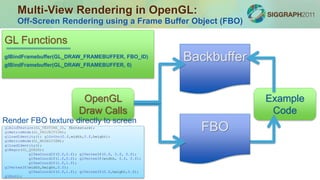
Off-Screen Rendering using a Frame Buffer Object (FBO)
Resource: www.songho.ca/opengl/gl_fbo.html
GL Functions
glGenFramebuffers()
glBindFramebuffer()
glGenTextures()
glBindTexture()
glGenRenderbuffers()
glBindRenderbuffer()
glTexImage3D()
glRenderbufferStorage()
glFramebufferTextureLayer()
glFramebufferTexture2D()
glFramebufferRenderbuffer()
Example
Code
Multi-View Rendering in OpenGL:
Off-Screen Rendering using a Frame Buffer Object (FBO)
GL Functions
glBindFramebuffer(GL_DRAW_FRAMEBUFFER, FBO_ID)
OpenGL
Draw Calls
Backbuffer
FBO
glBindFramebuffer(GL_DRAW_FRAMEBUFFER, 0)
glBindTexture(GL_TEXTURE_2D, fbotexture);
glMatrixMode(GL_PROJECTION);
glLoadIdentity(); glOrtho(0.f,width,0.f,height);
glMatrixMode(GL_MODELVIEW);
glLoadIdentity();
glBegin(GL_QUADS);
glTexCoord2f(0.f,0.f); glVertex3f(0.f, 0.f, 0.f);
glTexCoord2f(1.f,0.f); glVertex3f(width, 0.f, 0.f);
glTexCoord2f(1.f,1.f);
glVertex3f(width,height,0.f);
glTexCoord2f(0.f,1.f); glVertex3f(0.f,height,0.f);
glEnd();
Render FBO texture directly to screen
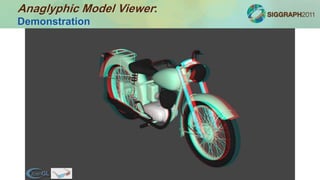
Anaglyphic Model Viewer:
Demonstration
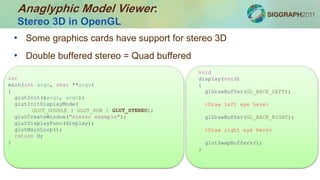
• Some graphics cards have support for stereo 3D
• Double buffered stereo = Quad buffered
void
display(void)
{
glDrawBuffer(GL_BACK_LEFT);
<Draw left eye here>
glDrawBuffer(GL_BACK_RIGHT);
<Draw right eye here>
glutSwapBuffers();
}
int
main(int argc, char **argv)
{
glutInit(&argc, argv);
glutInitDisplayMode(
GLUT_DOUBLE | GLUT_RGB | GLUT_STEREO);
glutCreateWindow("stereo example");
glutDisplayFunc(display);
glutMainLoop();
return 0;
}
Anaglyphic Model Viewer:
Stereo 3D in OpenGL
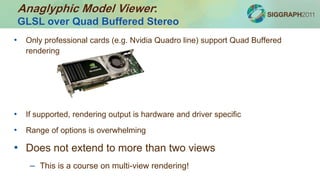
• Only professional cards (e.g. Nvidia Quadro line) support Quad Buffered
rendering
• If supported, rendering output is hardware and driver specific
• Range of options is overwhelming
• Does not extend to more than two views
– This is a course on multi-view rendering!
Anaglyphic Model Viewer:
GLSL over Quad Buffered Stereo
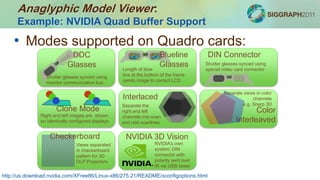
• Modes supported on Quadro cards:
http://us.download.nvidia.com/XFree86/Linux-x86/275.21/README/xconfigoptions.html
DDC
Glasses
Shutter glasses synced using
monitor communication bus
Blueline
GlassesLength of blue
line at the bottom of the frame
sends image to correct LCD
DIN Connector
Shutter glasses synced using
special video card connector
Clone Mode
Right and left images are shown
on identically configured displays
Interlaced
Separate the
right and left
channels into even
and odd scanlines
Color
Interleaved
Separate views in color
channels
e.g. Sharp 3D
Checkerboard
Views separated
in checkerboard
pattern for 3D
DLP Projectors
NVIDIA 3D Vision
NVIDIA’s own
system; DIN
connector with
polarity sent over
IR via USB tower
Anaglyphic Model Viewer:
Example: NVIDIA Quad Buffer Support
Anaglyphic Model Viewer:
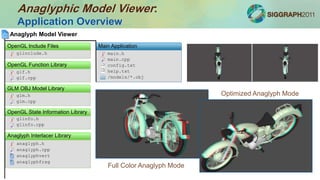
Application Overview
Main Application
main.h
main.cpp
config.txt
help.txt
/models/*.obj
anaglyph.h
anaglyphfrag
anaglyph.cpp
anaglyphvert
Anaglyph Interlacer Library
Anaglyph Model Viewer
glinfo.h
glinfo.cpp
OpenGL State Information Library
glm.h
glm.cpp
GLM OBJ Model Library
glf.h
glf.cpp
OpenGL Function Library
glinclude.h
OpenGL Include Files
Full Color Anaglyph Mode
Optimized Anaglyph Mode
Anaglyphic Model Viewer:
Examining the GLUT Display Callback
main.h
main.cpp
config.txt
help.txt
/models/*.obj
Anaglyph Model Viewer
Main Application
// Define the display function.
void display(void){
. . .
// Render each view.
for(int i=0; i<2; i++){
// Enable FBO rendering mode.
glBindFramebuffer(GL_DRAW_FRAMEBUFFER, anaglyph.FBO[i]);
// Enable depth testing and lighting.
glEnable(GL_DEPTH_TEST);
glEnable(GL_LIGHTING);
// Clear the color and depth buffers.
glClear(GL_COLOR_BUFFER_BIT | GL_DEPTH_BUFFER_BIT);
// Set the projection and modelview transformations.
setViewStereoscopicAnaglyph(&anaglyph, window_width,
window_height, i);
// Display the model.
displayModel();
}
// Display the stereoscopic image using the anaglyph compositor.
displayAnaglyph(&anaglyph, window_width, window_height);
. . .
glutSwapBuffers();
}
anaglyph.h
Anaglyph.frag
anaglyph.cpp
Anaglyph.vert
Anaglyph Interlacer Library
Anaglyph Model Viewer
glinfo.h
glinfo.cpp
OpenGL State Information Library
glm.h
glm.cpp
GLM OBJ Model Library
glf.h
glf.cpp
OpenGL Function Library
glinclude.h
OpenGL Include Files
Anaglyphic Model Viewer:
Examining displayAnaglyph()
// Define the display function for the anaglyph compositor.
void displayAnaglyph(AnaglyphCompositor* anaglyph, int window_width, int window_height){
. . .
// Disable FBO rendering mode.
glBindFramebuffer(GL_DRAW_FRAMEBUFFER, 0);
. . .
// Clear the color buffer.
glClear(GL_COLOR_BUFFER_BIT);
// Enable the anaglyph compositor shader program.
glUseProgram(anaglyph->anaglyphShader.program);
// Bind FBO textures to anaglyph shader program samplers.
glUniform1i(glGetUniformLocation(anaglyph->anaglyphShader.program, "leftTexture"), 0);
glUniform1i(glGetUniformLocation(anaglyph->anaglyphShader.program, "rightTexture"), 1);
for(int i=0; i<2; i++){
glActiveTexture(GL_TEXTURE0+i);
glBindTexture(GL_TEXTURE_2D, anaglyph->viewTexture[i]);
}
glActiveTexture(GL_TEXTURE0);
// Set the anaglyph rendering mode.
glUniform1i(glGetUniformLocation(
anaglyph->anaglyphShader.program, "anaglyphMode"),
anaglyph->mode
);
// Display the anaglyph by rendering contents of FBO to screen quad.
. . .
// Disable the shader program.
glUseProgram(0);
}
Anaglyphic Model Viewer:
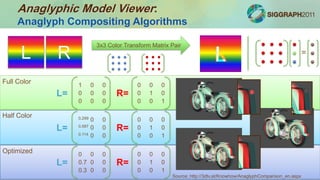
Anaglyph Compositing Algorithms
L R
3x3 Color Transform Matrix Pair
Full Color
Half Color
Optimized
L= R=
1 0 0
0 0 0
0 0 0
0 0 0
0 1 0
0 0 1
L= R=
0.299 0 0
0.587 0 0
0.114 0 0
0 0 0
0 1 0
0 0 1
L= R=
0 0 0
0.7 0 0
0.3 0 0
0 0 0
0 1 0
0 0 1
=
Source: http://3dtv.at/Knowhow/AnaglyphComparison_en.aspx
Anaglyphic Model Viewer:
GLSL Shaders for Anaglyph Compositing
anaglyph.h
anaglyph.frag
anaglyph.cpp
anaglyph.vert
Anaglyph Interlacer Library
Anaglyph Model Viewer
Anaglyph Interlacer Library
glinfo.h
glinfo.cpp
OpenGL State Information Library
glm.h
glm.cpp
GLM OBJ Model Library
glf.h
glf.cpp
OpenGL Function Library
glinclude.h
OpenGL Include Files
/*
* anaglyph.frag
* Anaglyph Compositor Fragment Shader
* Created by Douglas Lanman and Matthew Hirsch.
* Copyright 2011.
*/
// Define samplers corresponding to left and right
images.
uniform sampler2D leftTexture;
uniform sampler2D rightTexture;
// Define anaglyph mode index.
uniform int anaglyphMode;
// Define fragment shader.
void main() {
// Evaluate the left and right
fragment colors.
vec3 leftFragColor = texture2D(
leftTexture,
gl_TexCoord[0].st
).rgb;
vec3 rightFragColor = texture2D(
rightTexture,
gl_TexCoord[0].st
).rgb;
// Assign the output fragment color
using the
// user-selected anaglyph rendering
mode.
mat3 L, R;
R = mat3( 0.0, 0.0, 0.0,
0.0, 1.0, 0.0,
0.0, 0.0, 1.0);
if(anaglyphMode == 2){
// Half-color anaglyph.
L = mat3( 0.299, 0.0,
0.0,
0.587, 0.0,
0.0,
0.114, 0.0,
0.0);
}else if(anaglyphMode == 3){
// Optimized anaglyph.
L = mat3( 0.0, 0.0, 0.0,
0.7, 0.0, 0.0,
0.3, 0.0, 0.0);
}else{
// Full-color anaglyph.
L = mat3( 1.0, 0.0, 0.0,
0.0, 0.0, 0.0,
0.0, 0.0, 0.0);
}
gl_FragColor = vec4(
L*leftFragColor+R*rightFragColor,
1.0
);
}
Anaglyphic Model Viewer:
Possible Extensions: Adding Eye-Tracking
main.h
main.cpp
config.txt
help.txt
/models/*.obj
Anaglyph Model Viewer
Main Application
[screen]
width = 1920
height = 1080
pitch = 0.025800
[camera]
x = 0.000000
y = 0.000000
z = 100.000000
near = 10.000000
far = 300.000000
separation = 6.500000
[viewer]
anaglyph_mode = 1
display_help = 1
display_timer = 1
…
•Camera X and Y control viewer position
•Wiimote and OpenCV headtracking
examples are available online
Johnny Lee
 Introduction: History and Physiology
 Construction Glasses-free 3D Displays
 Multi-view Rendering using OpenGL
 Multi-view Interlacing using GLSL
 Designing Content for Glasses-free 3D Displays
 Emerging Technology
 Q & A and Demonstrations
Course Outline

BYO3D 2011: Rendering

  • 1.
     Introduction: Historyand Physiology  Construction Glasses-free 3D Displays  Multi-view Rendering using OpenGL  Multi-view Interlacing using GLSL  Designing Content for Glasses-free 3D Displays  Emerging Technology  Q & A and Demonstrations Course Outline
  • 2.
    Overview: A Real-Time Lenticular3D Display Goal: Run rendering pipeline at > 10fps Generate Views Offline Real-Time C/C++ Interlace Views
  • 3.
    Overview: Multi-View Rendering inOpenGL OpenGL Draw Calls Render Standard Pipeline Output Multi-View Pipeline Loop Over Views Backbuffer Framebuffer Object Array Render View Change Camera Screen:Memory:
  • 4.
    Overview: GLSL: Programmable Pipeline FixedFunction Pipeline Drawing API Process Vertices Process Pixels Framebuffer Programmable Pipeline Vertex Program Fragment Program
  • 5.
    Overview: Multi-View Interlacing usingGLSL Shaders Framebuffer Object Array Mask 1 Mask 2 Mask 3 View 1 View 2 View 3 GLSL Program Translate views appropriately for output device Backbuffer Anaglyph Glasses Lenticular Shown in this course… The model can apply to many others
  • 6.
    Equivalents in optics/photography •PerspectiveControl Lens •Lens Shift Projector Photos: wikipedia Multi-View Rendering in OpenGL: Off-Axis Perspective Projection with glFrustum() GLFRUSTUM(3G) GLFRUSTUM(3G) NAME glFrustum - multiply the current matrix by a perspective matrix C SPECIFICATION void glFrustum( GLdouble left, GLdouble right, GLdouble bottom, GLdouble top, GLdouble near_val, GLdouble far_val ) PARAMETERS left, right Specify the coordinates for the left and right vertical clipping planes. bottom, top Specify the coordinates for the bottom and top horizontal clipping planes. near_val, far_val Specify the distances to the near and far depth clipping planes. Both distances must be positive. Screen (0,0,0) far_val near_val far_val near_val right right left left 3D 2D
  • 7.
    Multi-View Rendering inOpenGL: Off-Axis Perspective Projection with glFrustum() Output
  • 8.
    Multi-View Rendering inOpenGL: Off-Axis Perspective Projection with glFrustum() // Set view for multi-view (multiscopic) rendering. void setViewMultiscopicLenticular(LenticularInterlacer* interlacer, int viewIndex){ float x = interlacer->camera.x+viewIndex*interlacer- >camera.separation- ((interlacer->camera.numViews-1)*interlacer- >camera.separation/2); float depthRatio = interlacer->camera.near/interlacer->camera.z; float halfWidth = interlacer->screen.width*interlacer- >screen.pitch/2; float halfHeight = interlacer->screen.height*interlacer- >screen.pitch/2; float left = -depthRatio*(x+halfWidth); float right = -depthRatio*(x-halfWidth); float bottom = -depthRatio*(interlacer->camera.y+halfHeight); float top = -depthRatio*(interlacer->camera.y-halfHeight); glViewport(0, 0, interlacer->camera.width, interlacer->camera.height); glMatrixMode(GL_PROJECTION); glLoadIdentity(); glFrustum(left, right, bottom, top, interlacer->camera.near, interlacer- >camera.far); glMatrixMode(GL_MODELVIEW); glLoadIdentity(); gluLookAt(x, interlacer->camera.y, interlacer->camera.z, x, interlacer->camera.y, 0.0, 0.0, 1.0, 0.0); } lenticular.h Interlacer.frag lenticular.cpp interlacer.vert mosaic.vert mosaic.frag Lenticular Interlacer Library Lenticular Model Viewer glinfo.h glinfo.cpp OpenGL State Information Library glm.h glm.cpp GLM OBJ Model Library glf.h glf.cpp OpenGL Function Library glinclude.h OpenGL Include Files
  • 9.
    Multi-View Rendering inOpenGL: Off-Screen Rendering using a Frame Buffer Object (FBO) Resource: www.songho.ca/opengl/gl_fbo.html GL Functions glGenFramebuffers() glBindFramebuffer() glGenTextures() glBindTexture() glGenRenderbuffers() glBindRenderbuffer() glTexImage3D() glRenderbufferStorage() glFramebufferTextureLayer() glFramebufferTexture2D() glFramebufferRenderbuffer()
  • 10.
    Example Code Multi-View Rendering inOpenGL: Off-Screen Rendering using a Frame Buffer Object (FBO) GL Functions glBindFramebuffer(GL_DRAW_FRAMEBUFFER, FBO_ID) OpenGL Draw Calls Backbuffer FBO glBindFramebuffer(GL_DRAW_FRAMEBUFFER, 0) glBindTexture(GL_TEXTURE_2D, fbotexture); glMatrixMode(GL_PROJECTION); glLoadIdentity(); glOrtho(0.f,width,0.f,height); glMatrixMode(GL_MODELVIEW); glLoadIdentity(); glBegin(GL_QUADS); glTexCoord2f(0.f,0.f); glVertex3f(0.f, 0.f, 0.f); glTexCoord2f(1.f,0.f); glVertex3f(width, 0.f, 0.f); glTexCoord2f(1.f,1.f); glVertex3f(width,height,0.f); glTexCoord2f(0.f,1.f); glVertex3f(0.f,height,0.f); glEnd(); Render FBO texture directly to screen
  • 11.
  • 12.
    • Some graphicscards have support for stereo 3D • Double buffered stereo = Quad buffered void display(void) { glDrawBuffer(GL_BACK_LEFT); <Draw left eye here> glDrawBuffer(GL_BACK_RIGHT); <Draw right eye here> glutSwapBuffers(); } int main(int argc, char **argv) { glutInit(&argc, argv); glutInitDisplayMode( GLUT_DOUBLE | GLUT_RGB | GLUT_STEREO); glutCreateWindow("stereo example"); glutDisplayFunc(display); glutMainLoop(); return 0; } Anaglyphic Model Viewer: Stereo 3D in OpenGL
  • 13.
    • Only professionalcards (e.g. Nvidia Quadro line) support Quad Buffered rendering • If supported, rendering output is hardware and driver specific • Range of options is overwhelming • Does not extend to more than two views – This is a course on multi-view rendering! Anaglyphic Model Viewer: GLSL over Quad Buffered Stereo
  • 14.
    • Modes supportedon Quadro cards: http://us.download.nvidia.com/XFree86/Linux-x86/275.21/README/xconfigoptions.html DDC Glasses Shutter glasses synced using monitor communication bus Blueline GlassesLength of blue line at the bottom of the frame sends image to correct LCD DIN Connector Shutter glasses synced using special video card connector Clone Mode Right and left images are shown on identically configured displays Interlaced Separate the right and left channels into even and odd scanlines Color Interleaved Separate views in color channels e.g. Sharp 3D Checkerboard Views separated in checkerboard pattern for 3D DLP Projectors NVIDIA 3D Vision NVIDIA’s own system; DIN connector with polarity sent over IR via USB tower Anaglyphic Model Viewer: Example: NVIDIA Quad Buffer Support
  • 15.
    Anaglyphic Model Viewer: ApplicationOverview Main Application main.h main.cpp config.txt help.txt /models/*.obj anaglyph.h anaglyphfrag anaglyph.cpp anaglyphvert Anaglyph Interlacer Library Anaglyph Model Viewer glinfo.h glinfo.cpp OpenGL State Information Library glm.h glm.cpp GLM OBJ Model Library glf.h glf.cpp OpenGL Function Library glinclude.h OpenGL Include Files Full Color Anaglyph Mode Optimized Anaglyph Mode
  • 16.
    Anaglyphic Model Viewer: Examiningthe GLUT Display Callback main.h main.cpp config.txt help.txt /models/*.obj Anaglyph Model Viewer Main Application // Define the display function. void display(void){ . . . // Render each view. for(int i=0; i<2; i++){ // Enable FBO rendering mode. glBindFramebuffer(GL_DRAW_FRAMEBUFFER, anaglyph.FBO[i]); // Enable depth testing and lighting. glEnable(GL_DEPTH_TEST); glEnable(GL_LIGHTING); // Clear the color and depth buffers. glClear(GL_COLOR_BUFFER_BIT | GL_DEPTH_BUFFER_BIT); // Set the projection and modelview transformations. setViewStereoscopicAnaglyph(&anaglyph, window_width, window_height, i); // Display the model. displayModel(); } // Display the stereoscopic image using the anaglyph compositor. displayAnaglyph(&anaglyph, window_width, window_height); . . . glutSwapBuffers(); }
  • 17.
    anaglyph.h Anaglyph.frag anaglyph.cpp Anaglyph.vert Anaglyph Interlacer Library AnaglyphModel Viewer glinfo.h glinfo.cpp OpenGL State Information Library glm.h glm.cpp GLM OBJ Model Library glf.h glf.cpp OpenGL Function Library glinclude.h OpenGL Include Files Anaglyphic Model Viewer: Examining displayAnaglyph() // Define the display function for the anaglyph compositor. void displayAnaglyph(AnaglyphCompositor* anaglyph, int window_width, int window_height){ . . . // Disable FBO rendering mode. glBindFramebuffer(GL_DRAW_FRAMEBUFFER, 0); . . . // Clear the color buffer. glClear(GL_COLOR_BUFFER_BIT); // Enable the anaglyph compositor shader program. glUseProgram(anaglyph->anaglyphShader.program); // Bind FBO textures to anaglyph shader program samplers. glUniform1i(glGetUniformLocation(anaglyph->anaglyphShader.program, "leftTexture"), 0); glUniform1i(glGetUniformLocation(anaglyph->anaglyphShader.program, "rightTexture"), 1); for(int i=0; i<2; i++){ glActiveTexture(GL_TEXTURE0+i); glBindTexture(GL_TEXTURE_2D, anaglyph->viewTexture[i]); } glActiveTexture(GL_TEXTURE0); // Set the anaglyph rendering mode. glUniform1i(glGetUniformLocation( anaglyph->anaglyphShader.program, "anaglyphMode"), anaglyph->mode ); // Display the anaglyph by rendering contents of FBO to screen quad. . . . // Disable the shader program. glUseProgram(0); }
  • 18.
    Anaglyphic Model Viewer: AnaglyphCompositing Algorithms L R 3x3 Color Transform Matrix Pair Full Color Half Color Optimized L= R= 1 0 0 0 0 0 0 0 0 0 0 0 0 1 0 0 0 1 L= R= 0.299 0 0 0.587 0 0 0.114 0 0 0 0 0 0 1 0 0 0 1 L= R= 0 0 0 0.7 0 0 0.3 0 0 0 0 0 0 1 0 0 0 1 = Source: http://3dtv.at/Knowhow/AnaglyphComparison_en.aspx
  • 19.
    Anaglyphic Model Viewer: GLSLShaders for Anaglyph Compositing anaglyph.h anaglyph.frag anaglyph.cpp anaglyph.vert Anaglyph Interlacer Library Anaglyph Model Viewer Anaglyph Interlacer Library glinfo.h glinfo.cpp OpenGL State Information Library glm.h glm.cpp GLM OBJ Model Library glf.h glf.cpp OpenGL Function Library glinclude.h OpenGL Include Files /* * anaglyph.frag * Anaglyph Compositor Fragment Shader * Created by Douglas Lanman and Matthew Hirsch. * Copyright 2011. */ // Define samplers corresponding to left and right images. uniform sampler2D leftTexture; uniform sampler2D rightTexture; // Define anaglyph mode index. uniform int anaglyphMode; // Define fragment shader. void main() { // Evaluate the left and right fragment colors. vec3 leftFragColor = texture2D( leftTexture, gl_TexCoord[0].st ).rgb; vec3 rightFragColor = texture2D( rightTexture, gl_TexCoord[0].st ).rgb; // Assign the output fragment color using the // user-selected anaglyph rendering mode. mat3 L, R; R = mat3( 0.0, 0.0, 0.0, 0.0, 1.0, 0.0, 0.0, 0.0, 1.0); if(anaglyphMode == 2){ // Half-color anaglyph. L = mat3( 0.299, 0.0, 0.0, 0.587, 0.0, 0.0, 0.114, 0.0, 0.0); }else if(anaglyphMode == 3){ // Optimized anaglyph. L = mat3( 0.0, 0.0, 0.0, 0.7, 0.0, 0.0, 0.3, 0.0, 0.0); }else{ // Full-color anaglyph. L = mat3( 1.0, 0.0, 0.0, 0.0, 0.0, 0.0, 0.0, 0.0, 0.0); } gl_FragColor = vec4( L*leftFragColor+R*rightFragColor, 1.0 ); }
  • 20.
    Anaglyphic Model Viewer: PossibleExtensions: Adding Eye-Tracking main.h main.cpp config.txt help.txt /models/*.obj Anaglyph Model Viewer Main Application [screen] width = 1920 height = 1080 pitch = 0.025800 [camera] x = 0.000000 y = 0.000000 z = 100.000000 near = 10.000000 far = 300.000000 separation = 6.500000 [viewer] anaglyph_mode = 1 display_help = 1 display_timer = 1 … •Camera X and Y control viewer position •Wiimote and OpenCV headtracking examples are available online Johnny Lee
  • 21.
     Introduction: Historyand Physiology  Construction Glasses-free 3D Displays  Multi-view Rendering using OpenGL  Multi-view Interlacing using GLSL  Designing Content for Glasses-free 3D Displays  Emerging Technology  Q & A and Demonstrations Course Outline

Editor's Notes

  • #15 Lots of special case methods for special case hardware. The support matrix between GPU version, driver version, OS, and display hardware, is confusing.