Building Single-page
Applications


         HTML5 expertise at your service
About Lauri & SC5 Online
          •   ”Powerhouse for software projects”
          •   HUT graduate, Information Networks
          •   15 years in software engineering business
          •   A few startups & corporations behind
          •   Now in SC5 Online as a Software Architect

          •   Specializes in HTML5 application development
          •   Located in Helsinki (Kamppi) + Jyväskylä (Innova 2)
          •   Founded in 2006, employs 50 people
          •   Customers e.g. Sanoma, YLE, Veikkaus, F-Secure
          •   blog.sc5.io, twitter: @sc5io
Single-page Application
 A web application or web site that fits on a single web page with the
 goal of providing a more fluid user experience akin to a desktop
 application.
                                                                Wikipedia
Single-page Application
Single page apps typically have
   –   “application like” interaction
   –   dynamic data loading from the server-side API
   –   fluid transitions between page states
   –   more JavaScript than actual HTML
They typically do not have
   – support for crawlers (not for sites relying on search traffic)
   – support for legacy browsers (IE7 or older, dumbphone
     browsers)
SPAs Are Good For …
•   “App-like user experience”
•   Binding to your own (or 3rd party) RESTful API
•   Replacement for Flash or Java in your web pages
•   Hybrid (native) HTML5 applications
•   Mobile version of your web site
    The SPA sweet spot is likely not on web sites,
    but on content-rich cross-platform mobile apps
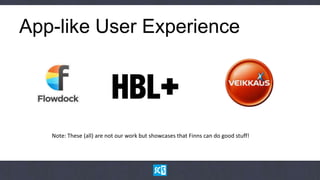
App-like User Experience


   Note: These (all) are not our work but showcases that Finns can do good stuff!
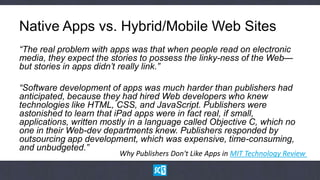
Native Apps vs. Hybrid/Mobile Web Sites
“The real problem with apps was that when people read on electronic
media, they expect the stories to possess the linky-ness of the Web—
but stories in apps didn’t really link.”

“Software development of apps was much harder than publishers had
anticipated, because they had hired Web developers who knew
technologies like HTML, CSS, and JavaScript. Publishers were
astonished to learn that iPad apps were in fact real, if
small, applications, written mostly in a language called Objective
C, which no one in their Web-dev departments knew. Publishers
responded by outsourcing app development, which was
expensive, time-consuming, and unbudgeted.”
                        Why Publishers Don't Like Apps in MIT Technology Review
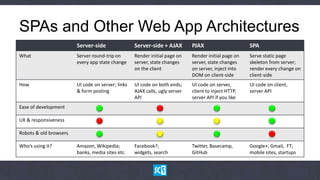
SPAs and Other Web App Architectures
                        Server-side                Server-side + AJAX        PJAX                     SPA
What                    Server round-trip on       Render initial page on    Render initial page on   Serve static page
                        every app state change     server, state changes     server, state changes    skeleton from server;
                                                   on the client             on server, inject into   render every change on
                                                                             DOM on client-side       client-side
How                     UI code on server; links   UI code on both ends;     UI code on server,       UI code on client,
                        & form posting             AJAX calls, ugly server   client to inject HTTP,   server API
                                                   API                       server API if you like
Ease of development

UX & responsiveness

Robots & old browsers

Who’s using it?         Amazon, Wikipedia;         Facebook?;                Twitter, Basecamp,       Google+, Gmail, FT;
                        banks, media sites etc.    widgets, search           GitHub                   mobile sites, startups
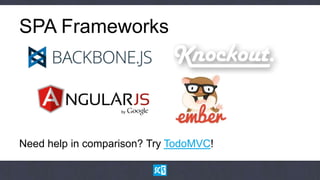
SPA Frameworks


Need help in comparison? Try TodoMVC!
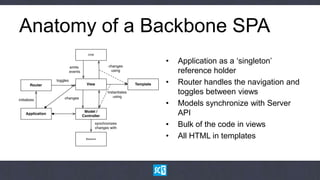
Anatomy of a Backbone SPA
              •   Application as a „singleton‟
                  reference holder
              •   Router handles the navigation and
                  toggles between views
              •   Models synchronize with Server
                  API
              •   Bulk of the code in views
              •   All HTML in templates
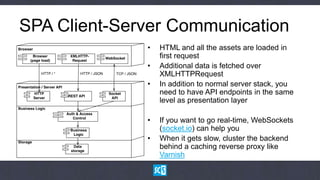
SPA Client-Server Communication
              •   HTML and all the assets are loaded in
                  first request
              •   Additional data is fetched over
                  XMLHTTPRequest
              •   In addition to normal server stack, you
                  need to have API endpoints in the same
                  level as presentation layer

              •   If you want to go real-time, WebSockets
                  (socket.io) can help you
              •   When it gets slow, cluster the backend
                  behind a caching reverse proxy like
                  Varnish
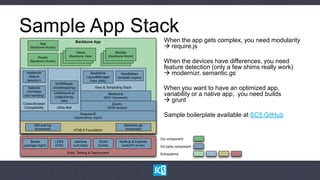
Sample App Stack
            App
                                          Backbone App                                                 When the app gets complex, you need modularity
    (Backbone Router)                                                                                   require.js
                                           Views                             Models
          Router                   (Backbone View)                       (Backbone Model)
    (Backbone Router)                                                                                  When the devices have differences, you need
                                                                                                       feature detection (only a few shims really work)
  modernizr
   (feature
                                                     Backbone
                                                   LayoutManager
                                                                                 Handlebars             modernizr, semantic.gs
                                                                               (template engine)
  detection)                                            (view utility)
                          DOMReady
   fastclick
   (normalise
                        (bootstrapping)                     View & Templating Stack                    When you want to have an optimized app,
click handling)
                        Underscore.js
                        (object/array
                                                                         Backbone                      variability or a native app, you need builds
                                                                                                        grunt
                                                                   (MVC framework)
                            utils)
Cross-Browser                                                              jQuery
 Compatibility            Utility Belt                                   (DOM access)

                                              RequireJS
                                         (dependency mgmt)
                                                                                                       Sample boilerplate available at SC5 GitHub
       320 and Up                                                                   Semantic.gs
        (boilerplate)                    HTML5 Foundation                           (boilerplate)


                                                                                                     Our component
    Bower                LESS            Jasmine               Grunt            Node.js & Express
(package mgmt)           (CSS)           (unit tests)         (builds)            (web/API server)   3rd party component
                                  Build, Testing & Deployment                                        Subsystems
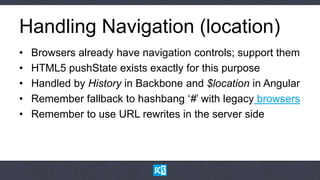
Handling Navigation (location)
•   Browsers already have navigation controls; support them
•   HTML5 pushState exists exactly for this purpose
•   Handled by History in Backbone and $location in Angular
•   Remember fallback to hashbang „#‟ with legacy browsers
•   Remember to use URL rewrites in the server side
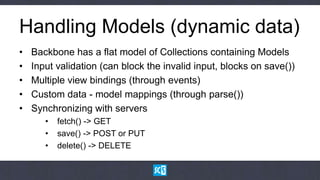
Handling Models (dynamic data)
•   Backbone has a flat model of Collections containing Models
•   Input validation (can block the invalid input, blocks on save())
•   Multiple view bindings (through events)
•   Custom data - model mappings (through parse())
•   Synchronizing with servers
       •   fetch() -> GET
       •   save() -> POST or PUT
       •   delete() -> DELETE
Handling Models (dynamic data)
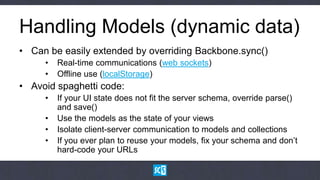
• Can be easily extended by overriding Backbone.sync()
     •   Real-time communications (web sockets)
     •   Offline use (localStorage)
• Avoid spaghetti code:
     •   If your UI state does not fit the server schema, override parse()
         and save()
     •   Use the models as the state of your views
     •   Isolate client-server communication to models and collections
     •   If you ever plan to reuse your models, fix your schema and don‟t
         hard-code your URLs
Handling Views (DOM)
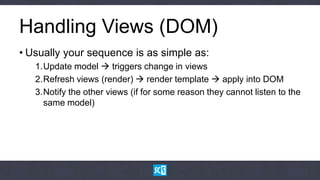
• Usually your sequence is as simple as:
   1.Update model  triggers change in views
   2.Refresh views (render)  render template  apply into DOM
   3.Notify the other views (if for some reason they cannot listen to the
     same model)
Handling Views (DOM)
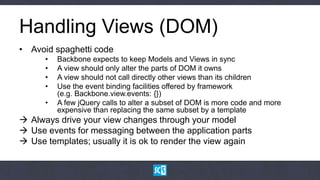
• Avoid spaghetti code
      •   Backbone expects to keep Models and Views in sync
      •   A view should only alter the parts of DOM it owns
      •   A view should not call directly other views than its children
      •   Use the event binding facilities offered by framework
          (e.g. Backbone.view.events: {})
      •   A few jQuery calls to alter a subset of DOM is more code and more
          expensive than replacing the same subset by a template
 Always drive your view changes through your model
 Use events for messaging between the application parts
 Use templates; usually it is ok to render the view again
Page Rendering – Templates
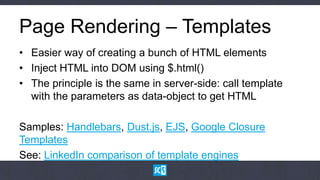
• Easier way of creating a bunch of HTML elements
• Inject HTML into DOM using $.html()
• The principle is the same in server-side: call template
  with the parameters as data-object to get HTML

Samples: Handlebars, Dust.js, EJS, Google Closure
Templates
See: LinkedIn comparison of template engines
Summary
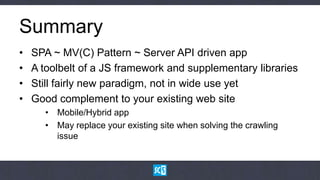
•   SPA ~ MV(C) Pattern ~ Server API driven app
•   A toolbelt of a JS framework and supplementary libraries
•   Still fairly new paradigm, not in wide use yet
•   Good complement to your existing web site
      • Mobile/Hybrid app
      • May replace your existing site when solving the crawling
        issue
Further Reading
• HTML5 sovellusalustana (a book by Pyry L & Jukka K)
  http://www.julkaisija.fi/yleista/html5.php
• Developing Backbone.js Applications (a CC book by Addy Osmani)
  https://github.com/addyosmani/backbone-fundamentals
• HTML5 Rocks as a vault of information
  http://www.html5rocks.com/en/
• A catalogue of JavaScript libraries to choose among
  http://www.jsdb.io/
Thank you !

                 Lauri Svan
                 Software Architect, SC5 Online Ltd
                 https://github.com/laurisvan
                 https://twitter.com/laurisvan


HTML5 expertise at your service

Building single page applications

  • 1.
    Building Single-page Applications HTML5 expertise at your service
  • 2.
    About Lauri &SC5 Online • ”Powerhouse for software projects” • HUT graduate, Information Networks • 15 years in software engineering business • A few startups & corporations behind • Now in SC5 Online as a Software Architect • Specializes in HTML5 application development • Located in Helsinki (Kamppi) + Jyväskylä (Innova 2) • Founded in 2006, employs 50 people • Customers e.g. Sanoma, YLE, Veikkaus, F-Secure • blog.sc5.io, twitter: @sc5io
  • 3.
    Single-page Application Aweb application or web site that fits on a single web page with the goal of providing a more fluid user experience akin to a desktop application. Wikipedia
  • 5.
    Single-page Application Single pageapps typically have – “application like” interaction – dynamic data loading from the server-side API – fluid transitions between page states – more JavaScript than actual HTML They typically do not have – support for crawlers (not for sites relying on search traffic) – support for legacy browsers (IE7 or older, dumbphone browsers)
  • 6.
    SPAs Are GoodFor … • “App-like user experience” • Binding to your own (or 3rd party) RESTful API • Replacement for Flash or Java in your web pages • Hybrid (native) HTML5 applications • Mobile version of your web site The SPA sweet spot is likely not on web sites, but on content-rich cross-platform mobile apps
  • 7.
    App-like User Experience Note: These (all) are not our work but showcases that Finns can do good stuff!
  • 8.
    Native Apps vs.Hybrid/Mobile Web Sites “The real problem with apps was that when people read on electronic media, they expect the stories to possess the linky-ness of the Web— but stories in apps didn’t really link.” “Software development of apps was much harder than publishers had anticipated, because they had hired Web developers who knew technologies like HTML, CSS, and JavaScript. Publishers were astonished to learn that iPad apps were in fact real, if small, applications, written mostly in a language called Objective C, which no one in their Web-dev departments knew. Publishers responded by outsourcing app development, which was expensive, time-consuming, and unbudgeted.” Why Publishers Don't Like Apps in MIT Technology Review
  • 9.
    SPAs and OtherWeb App Architectures Server-side Server-side + AJAX PJAX SPA What Server round-trip on Render initial page on Render initial page on Serve static page every app state change server, state changes server, state changes skeleton from server; on the client on server, inject into render every change on DOM on client-side client-side How UI code on server; links UI code on both ends; UI code on server, UI code on client, & form posting AJAX calls, ugly server client to inject HTTP, server API API server API if you like Ease of development UX & responsiveness Robots & old browsers Who’s using it? Amazon, Wikipedia; Facebook?; Twitter, Basecamp, Google+, Gmail, FT; banks, media sites etc. widgets, search GitHub mobile sites, startups
  • 10.
    SPA Frameworks Need helpin comparison? Try TodoMVC!
  • 11.
    Anatomy of aBackbone SPA • Application as a „singleton‟ reference holder • Router handles the navigation and toggles between views • Models synchronize with Server API • Bulk of the code in views • All HTML in templates
  • 12.
    SPA Client-Server Communication • HTML and all the assets are loaded in first request • Additional data is fetched over XMLHTTPRequest • In addition to normal server stack, you need to have API endpoints in the same level as presentation layer • If you want to go real-time, WebSockets (socket.io) can help you • When it gets slow, cluster the backend behind a caching reverse proxy like Varnish
  • 13.
    Sample App Stack App Backbone App When the app gets complex, you need modularity (Backbone Router)  require.js Views Models Router (Backbone View) (Backbone Model) (Backbone Router) When the devices have differences, you need feature detection (only a few shims really work) modernizr (feature Backbone LayoutManager Handlebars  modernizr, semantic.gs (template engine) detection) (view utility) DOMReady fastclick (normalise (bootstrapping) View & Templating Stack When you want to have an optimized app, click handling) Underscore.js (object/array Backbone variability or a native app, you need builds  grunt (MVC framework) utils) Cross-Browser jQuery Compatibility Utility Belt (DOM access) RequireJS (dependency mgmt) Sample boilerplate available at SC5 GitHub 320 and Up Semantic.gs (boilerplate) HTML5 Foundation (boilerplate) Our component Bower LESS Jasmine Grunt Node.js & Express (package mgmt) (CSS) (unit tests) (builds) (web/API server) 3rd party component Build, Testing & Deployment Subsystems
  • 14.
    Handling Navigation (location) • Browsers already have navigation controls; support them • HTML5 pushState exists exactly for this purpose • Handled by History in Backbone and $location in Angular • Remember fallback to hashbang „#‟ with legacy browsers • Remember to use URL rewrites in the server side
  • 15.
    Handling Models (dynamicdata) • Backbone has a flat model of Collections containing Models • Input validation (can block the invalid input, blocks on save()) • Multiple view bindings (through events) • Custom data - model mappings (through parse()) • Synchronizing with servers • fetch() -> GET • save() -> POST or PUT • delete() -> DELETE
  • 16.
    Handling Models (dynamicdata) • Can be easily extended by overriding Backbone.sync() • Real-time communications (web sockets) • Offline use (localStorage) • Avoid spaghetti code: • If your UI state does not fit the server schema, override parse() and save() • Use the models as the state of your views • Isolate client-server communication to models and collections • If you ever plan to reuse your models, fix your schema and don‟t hard-code your URLs
  • 17.
    Handling Views (DOM) •Usually your sequence is as simple as: 1.Update model  triggers change in views 2.Refresh views (render)  render template  apply into DOM 3.Notify the other views (if for some reason they cannot listen to the same model)
  • 18.
    Handling Views (DOM) •Avoid spaghetti code • Backbone expects to keep Models and Views in sync • A view should only alter the parts of DOM it owns • A view should not call directly other views than its children • Use the event binding facilities offered by framework (e.g. Backbone.view.events: {}) • A few jQuery calls to alter a subset of DOM is more code and more expensive than replacing the same subset by a template  Always drive your view changes through your model  Use events for messaging between the application parts  Use templates; usually it is ok to render the view again
  • 19.
    Page Rendering –Templates • Easier way of creating a bunch of HTML elements • Inject HTML into DOM using $.html() • The principle is the same in server-side: call template with the parameters as data-object to get HTML Samples: Handlebars, Dust.js, EJS, Google Closure Templates See: LinkedIn comparison of template engines
  • 20.
    Summary • SPA ~ MV(C) Pattern ~ Server API driven app • A toolbelt of a JS framework and supplementary libraries • Still fairly new paradigm, not in wide use yet • Good complement to your existing web site • Mobile/Hybrid app • May replace your existing site when solving the crawling issue
  • 21.
    Further Reading • HTML5sovellusalustana (a book by Pyry L & Jukka K) http://www.julkaisija.fi/yleista/html5.php • Developing Backbone.js Applications (a CC book by Addy Osmani) https://github.com/addyosmani/backbone-fundamentals • HTML5 Rocks as a vault of information http://www.html5rocks.com/en/ • A catalogue of JavaScript libraries to choose among http://www.jsdb.io/
  • 22.
    Thank you ! Lauri Svan Software Architect, SC5 Online Ltd https://github.com/laurisvan https://twitter.com/laurisvan HTML5 expertise at your service

Editor's Notes

  • #2 Please keep your eye on notes – some slides contain a lot of good extra insight!
  • #7 “App-like user experience”Touch navigationInstant response to your clicksFluid transitions between pagesCached & pre-fetched contentBinding to your own (or 3rd party) RESTful APIEase of populating modelsReplacement for Flash or Java in your web pagese.g. FlipBoard, LinkedIn iPadHybrid (native) HTML5 applicationse.g. FlipBoard, LinkedIn iPadApache Cordova, Embedded WebViews, Tizen, Windows 8Mobile version of your web sitem.veikkaus.fi, plus.hbl.fi, app.ft.com
  • #10 Note: Ease of development = (design, implementation, testing, maintenance)Testing and maintenance are the hard partsServer-sideThe good old way; write that server-side templateDevelopment: There are dozens of FWs for every major language for thisHow to deal with user state? Store on cookie; Store on session  memory  clustering?Selenium will test your site alrightUX: How to get that app-like experience with 500ms clicks? Transitions? Animations?Robots: No problem if you usecanonicalurls & pagesthemselvesdon’trequireuserstateServer-side + AJAXDevelopment: The problem is in transmitting the UI state & synchronize it in both ends;The simple test: Click refresh on an AJAX page – did you get what you expected?How did you plan to test your system after all? What does your API look like?Spaghetti architectureUX: Can be made fast & responsive, but it’s tedious.Robots: If you’ve got even a single bit that is rendered on client side only, I’m sorry.PJAXDevelopment: The concept is very simple but I’m not aware of any widely used, ready-made frameworks for itBold attempts: https://github.com/defunkt/jquery-pjax, https://github.com/rails/turbolinksNo idea on how to automate testing on itUX: The pages can be pretty fast, but likely the future states are not anticipated & cacheable (like in SPAs)Robots: Twitter actually did SPA before and moved back to PJAX (I believe they missed the searchability too much)SPADevelopment: Clean model (most of the FWs use MVC model, and the future content can be fetched within model without affecting the current view)Usually server-side API is RESTful & clean and hence can be tested easily; testing the client UI is a bit so-soUX: Can have all the bells and whistlesRobots & old browsers: Test for Google (likely won’t work), other crawlers won’t work; IE7/8 and feature phone browsers will cause headacheSPA is not always the only choice, there are reasons for other choices, tooWhy Twitter went back SPA to PJAX:http://engineering.twitter.com/2012/05/improving-performance-on-twittercom.html
  • #11 In the end, all of the frameworks do the same thing. There is no need to switch between them on-project basis (learning always takes some time)Backbone: Simple MVC model, only ~ 800 LOC. Your grandmother would get it. No data bindings built in.Angular.js: “What DOM should have been”. Sophisticated data binding with DOM and your JavaScript model.Knockout: One of the earliest frameworks. Data binding with some enforcements on your coding styleEmber: The biggest framework (by LOC). Very object-oriented (you will drift away from DOM)
  • #14 Utility toolbelts:jQuery: The de-facto DOM manipulation libraryUnderscore.js: Object and Array manipulationClient-side templating engines:Handlebars: Simple templating language that does not break HTMLDust.js: Feature-rich templating language (partials, streaming etc.)ModularizationRequire.js: Module framework for JavaScriptLESS and SASS: Stylesheet languages done rightBrowser compatibilityModernizr: HTML5 and CSS3 feature detectionUI Widget FrameworksBootstrap: Customizable UI widgetsjQuery Mobile: ThemableiOS like widgets for mobile UisBuilding & Test AutomationGrunt: JavaScript/Node.js based build systemJasmine: Behavior-driven test framework; works for TDD-style processQUnit: JavaScript unit testing framework developed by jQuery communityServer APIs made easy:Node.js: JavaScript server-side stack; great for quick no nonsense API servers;express.js: Web application framework for Node.jsApplication BoilerplatesYeoman: An ambitious, grunt-based boilerplate creation utility servers;Backbone boilerplate: Simple creation of Backbone based appsHTML Boilerplates & CSS Grids320andup: Responsive boilerplate with special emphasis on mobileHTML5 Boilerplate: The classic HTML5 app structureSemantic.gs: Easy an customizable CSS grid systemPackaging into a native app:Apache Cordova: ex. PhoneGap; packaging as a hybrid app for multi-platform
  • #15 Browser controls:Back/ForwardReloadBookmarkingSome samples on handling URL rewriteshttp://www.josscrowcroft.com/2012/code/htaccess-for-html5-history-pushstate-url-routing/
  • #16 In most of the cases the flat model is ok, because you don’t want to display multiple levels of hierarchy in a single page/viewYou can extend Backbone to support deeper structures, you will need it if you want to avoid making multiple server queriesIf your structure is static, your Collection can nest other Collections as children (AFAIK Collections can’t have Collections in place of Models)You need to write a custom parse() that will notify your child collections abIt’s complicated…Backbone has a fundamental flaw in blocking input validation:In most of the cases, the user input (e.g. for text) is invalid; Backbone blocks that. The workaround is to
  • #17 For better real-time communications support, see socket.io
  • #18 When using Angular, you don’t need to do a single thing to map your model changes back to DOM
  • #19 Note: In most of the cases you would just want to re-render the view (unless it owns the whole DOM) for changing the state in the UI.Exception cases:You have an input form and you don’t want to lose focusYour DOM subset is huge (e.g. a whole list of a few hundred items)Some highly interactive things like sliders
  • #20 Each template engine works the same wayCompile the template into JavaScript function  JavaScript functionCall with parameters  HTML stringApply the string into DOM -> DOM elementsAngular is different in this regard, as the “templates” are readily as part of DOM and the manipulation happens on DOM level, not HTML levelIn basic use, comparing engines is almost pointless - pick one and stick to itSome things you might want to look for if you have a fancy application & complex templatesLocalisationTemplate inheritance (when you have a lot of redundant pages)Streaming (especially if you use the same template engine on server-side)