D06 Real-world Dojo Mobile Applications


     Andrew Ferrier | Web 2.0 / Mobile Consultant |
     IBM Software Services for WebSphere, UK


                                                      © IBM Corporation 2012
© IBM Corporation 2011
Agenda
• Recap: what is Web 2.0?

• What is Dojo/Dojo Mobile?

• Digression: What is Worklight?

• Project Lifecycle: Best Practices and
  Approach for building Dojo Mobile
  Applications
Recap: what is Web
       2.0?
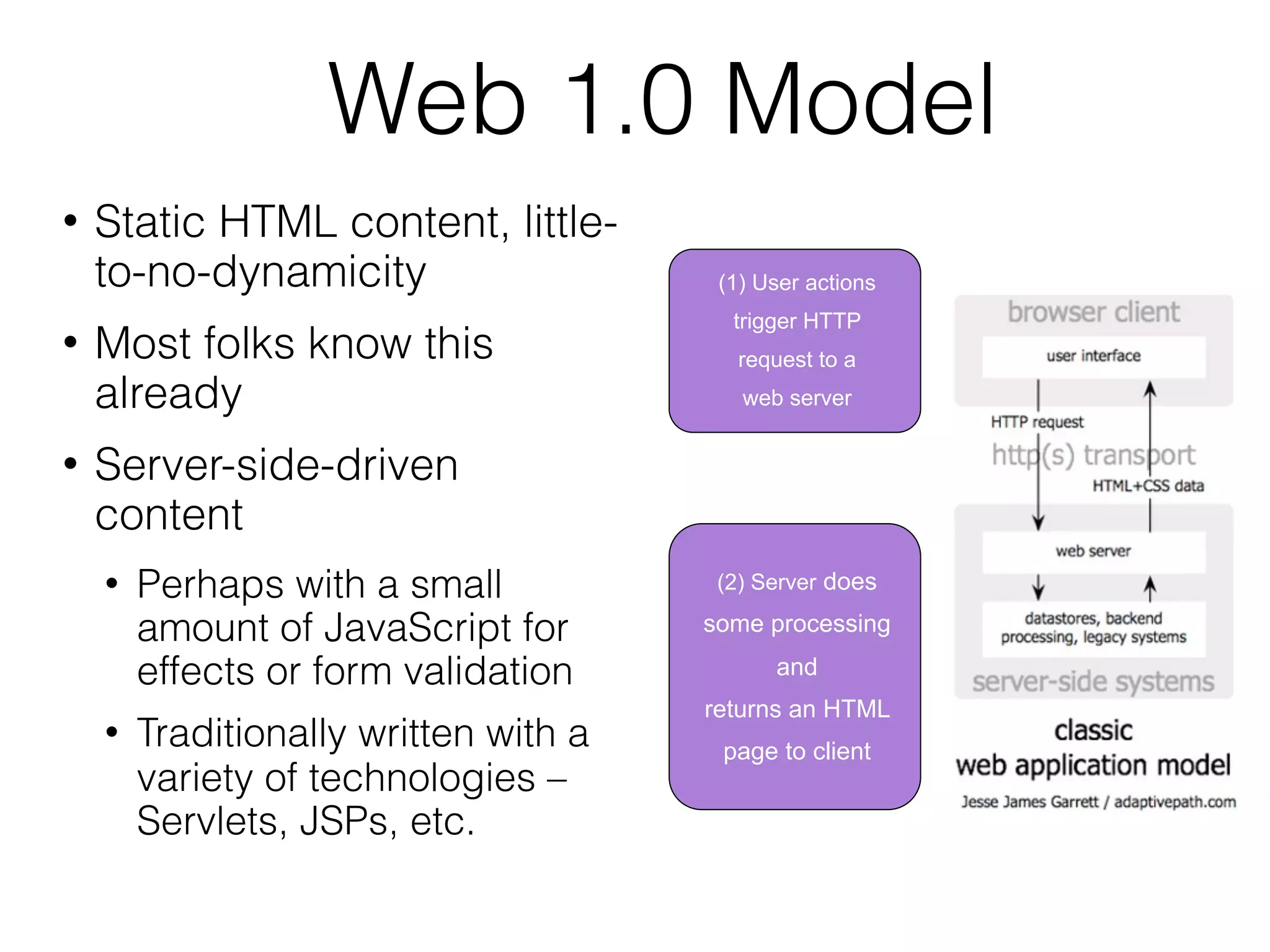
Web 1.0 Model
   Static HTML content, little-
    to-no-dynamicity                    (1) User actions
                                         trigger HTTP
   Most folks know this                  request to a
    already                               web server

   Server-side-driven
    content
       Perhaps with a small            (2) Server does

        amount of JavaScript for       some processing

        effects or form validation           and
                                       returns an HTML
       Traditionally written with a    page to client
        variety of technologies –
        Servlets, JSPs, etc.
Has disadvantages...
   Interaction is awkward
   Slow response time – every action requires a
    entire page refresh
       W3C states that 1 second is highest acceptable
        response time for interactive action
   Often ugly, flickery, content
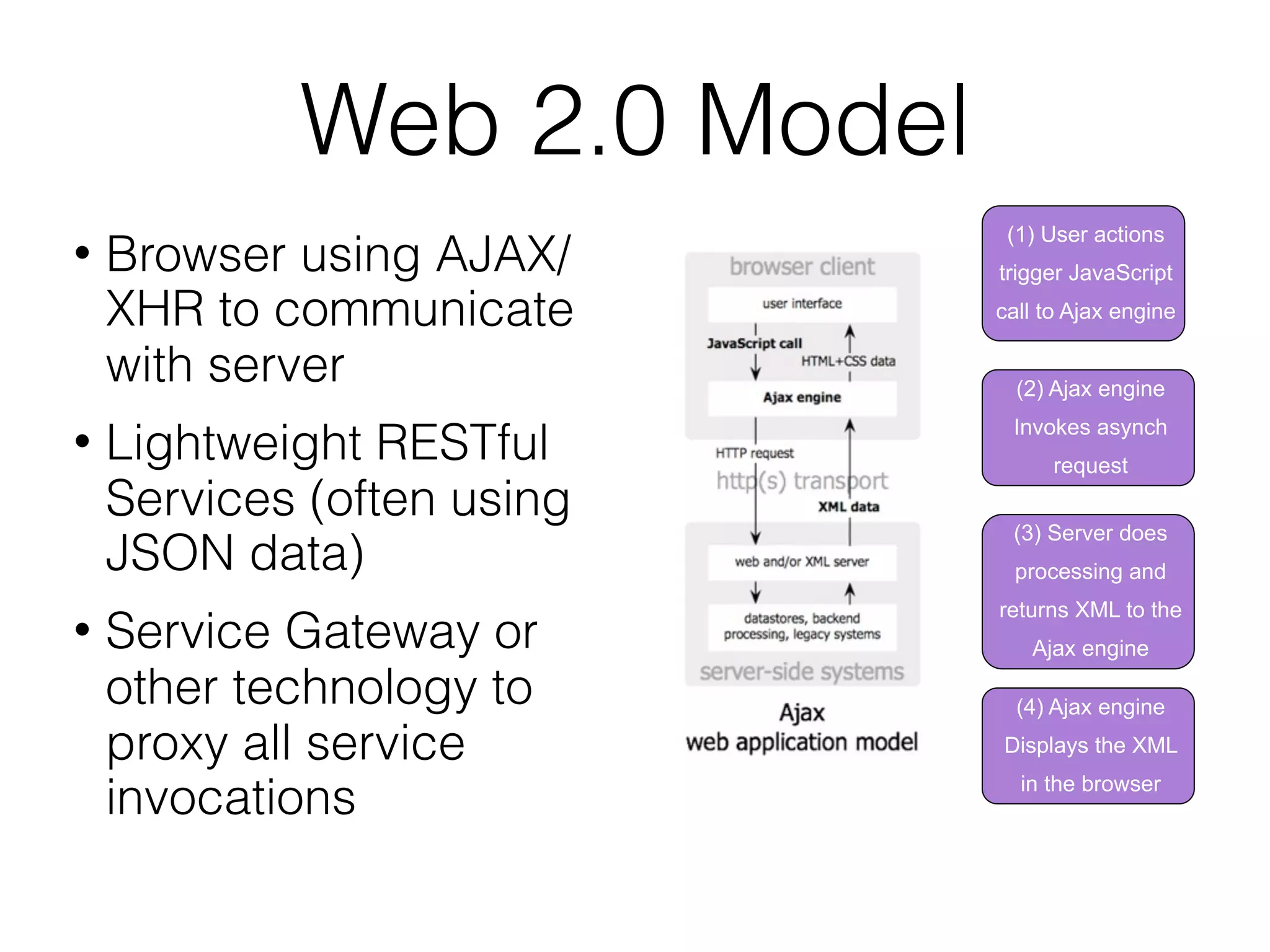
Web 2.0 Model
                             (1) User actions
   Browser using AJAX/     trigger JavaScript

    XHR to communicate      call to Ajax engine

    with server               (2) Ajax engine
                             Invokes asynch
   Lightweight RESTful           request
    Services (often using
                             (3) Server does
    JSON data)                processing and
                            returns XML to the
   Service Gateway or         Ajax engine

    other technology to       (4) Ajax engine

    proxy all service       Displays the XML
                              in the browser
    invocations
Recap: What is Dojo?
   Dojo is a set of common JavaScript libraries used for creating
    Ajax and DHTML web applications
   http://dojotoolkit.org
       Open Source
       Large widget collection (“dijits”)‫‏‬
       Powerful I/O (XHR)‫‏‬
       Data abstraction layer
       Event management
       Logging and debugging
       Extensible modular architecture
       Declarative and programmatic
What is Dojo’s Position?

• IBM supports, and contributes to, Dojo,
  through:

 • WebSphere Feature Pack for Web 2.0 and
   Mobile

 • IBM Worklight and Mobile Platform
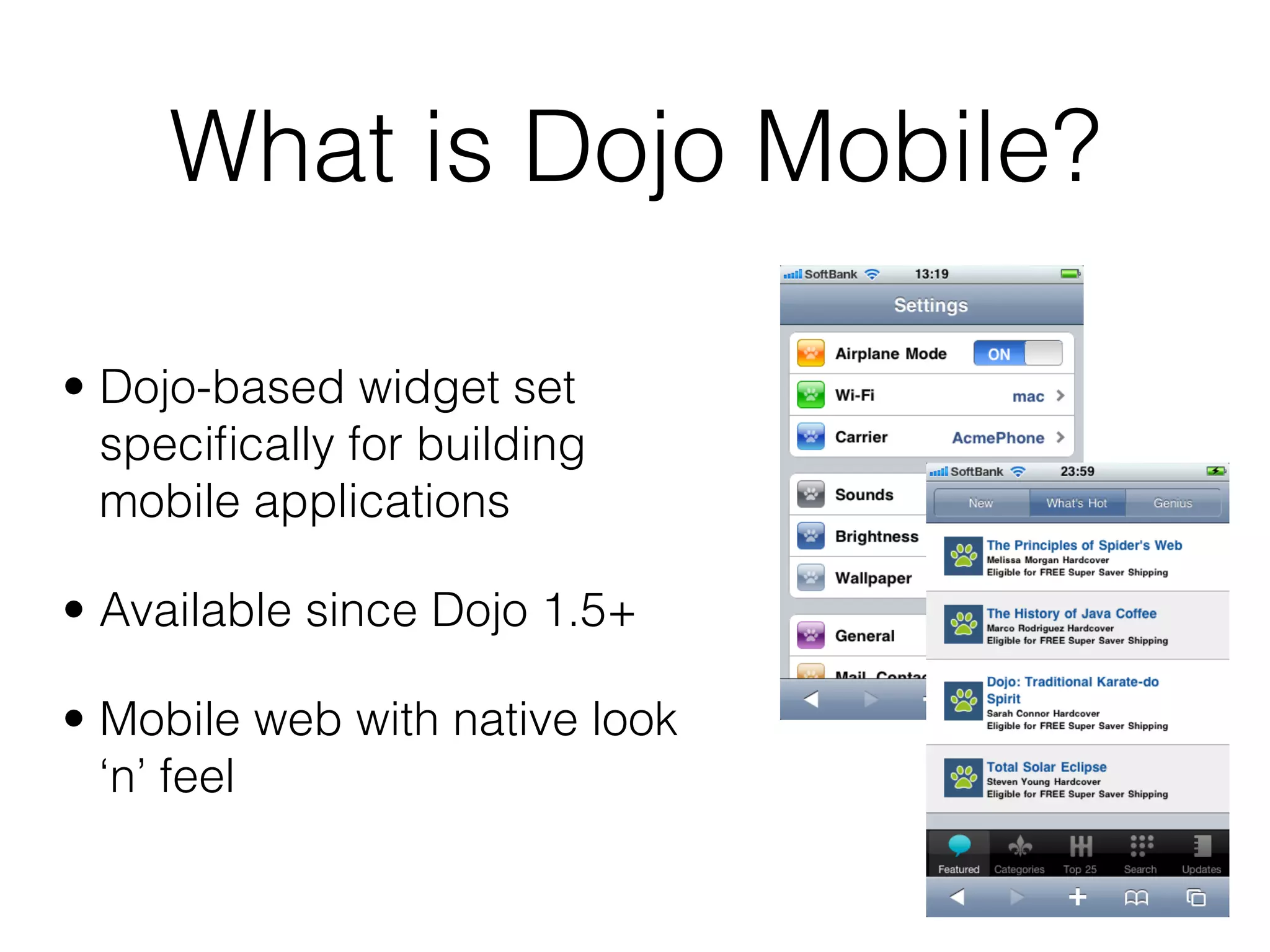
What is Dojo Mobile?

• Dojo-based widget set
  specifically for building
  mobile applications

• Available since Dojo 1.5+

• Mobile web with native look
  ‘n’ feel
What’s Different about
    Dojo Mobile?
• Extra-lightweight widgets

 • No support for non-WebKit browsers by
   default (e.g. Firefox)

• No use of images

• Encourages dojox.mobile.View model where
  pages are dynamically loaded into DOM
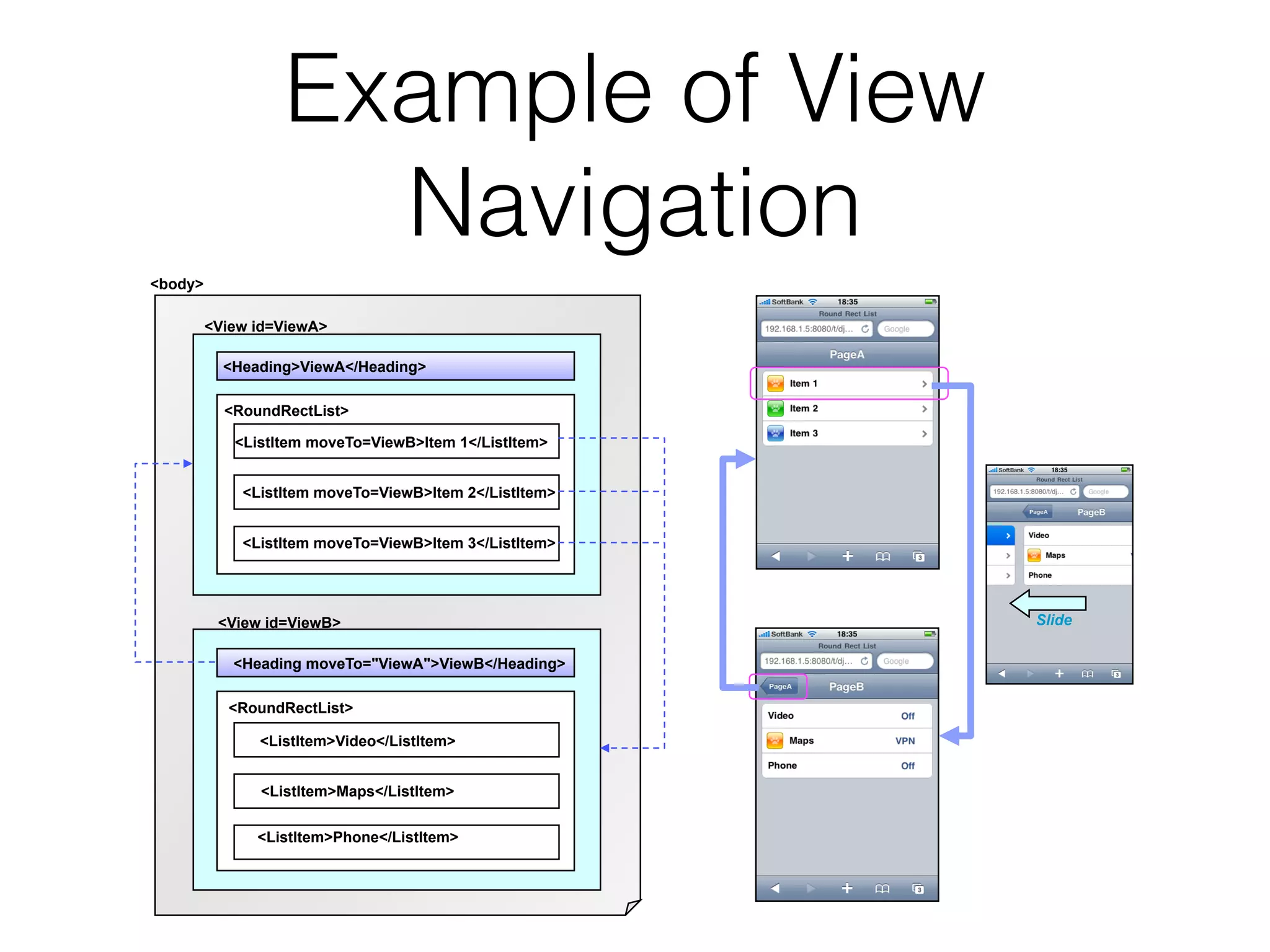
Example of View
                    Navigation
<body>

         <View id=ViewA>

           <Heading>ViewA</Heading>

           <RoundRectList>

            <ListItem moveTo=ViewB>Item 1</ListItem>


             <ListItem moveTo=ViewB>Item 2</ListItem>


             <ListItem moveTo=ViewB>Item 3</ListItem>


          <View id=ViewB>                               Slide

            <Heading moveTo="ViewA">ViewB</Heading>

           <RoundRectList>

               <ListItem>Video</ListItem>


               <ListItem>Maps</ListItem>


               <ListItem>Phone</ListItem>
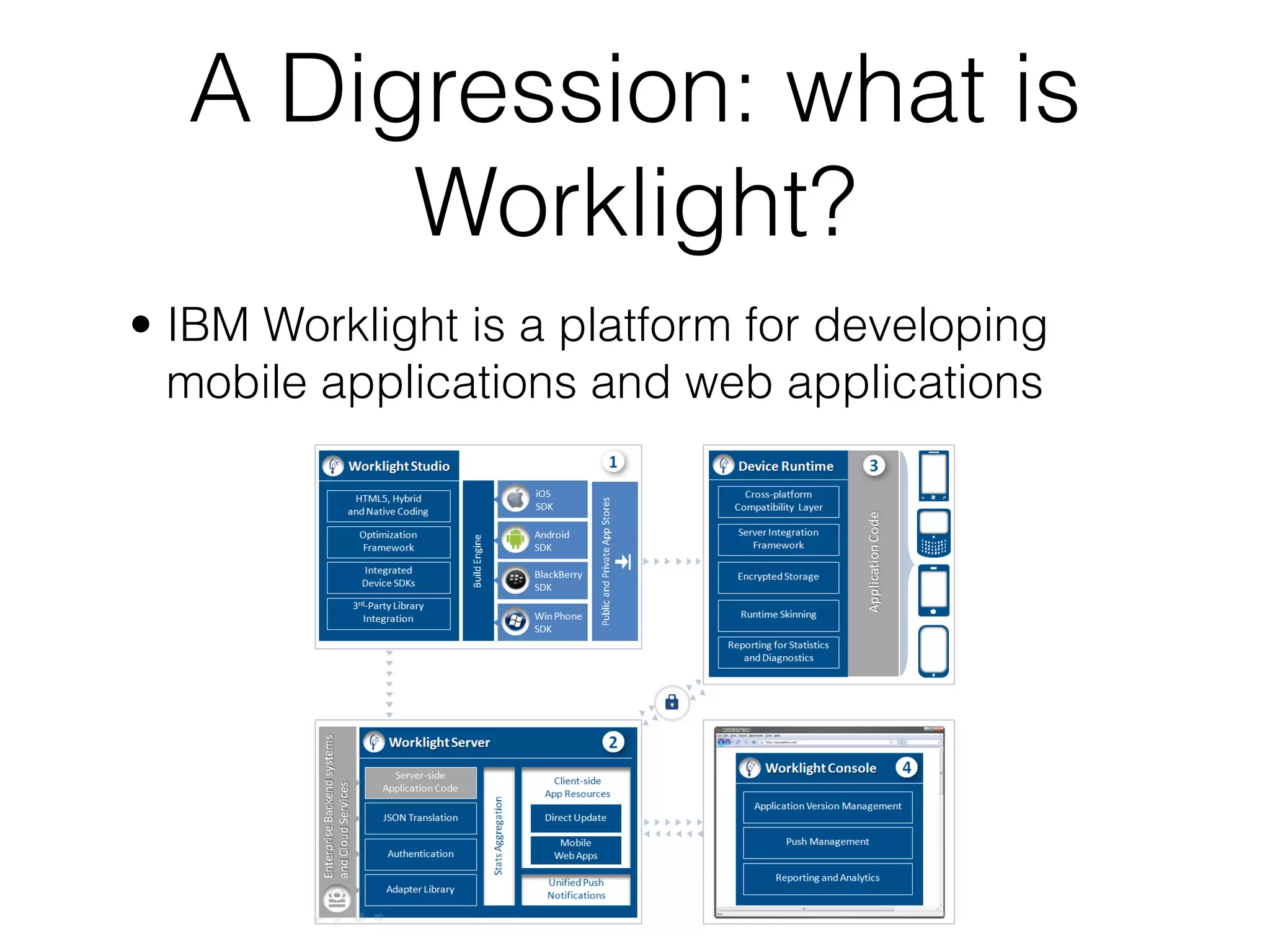
A Digression: what is
       Worklight?
• IBM Worklight is a platform for developing
  mobile applications and web applications
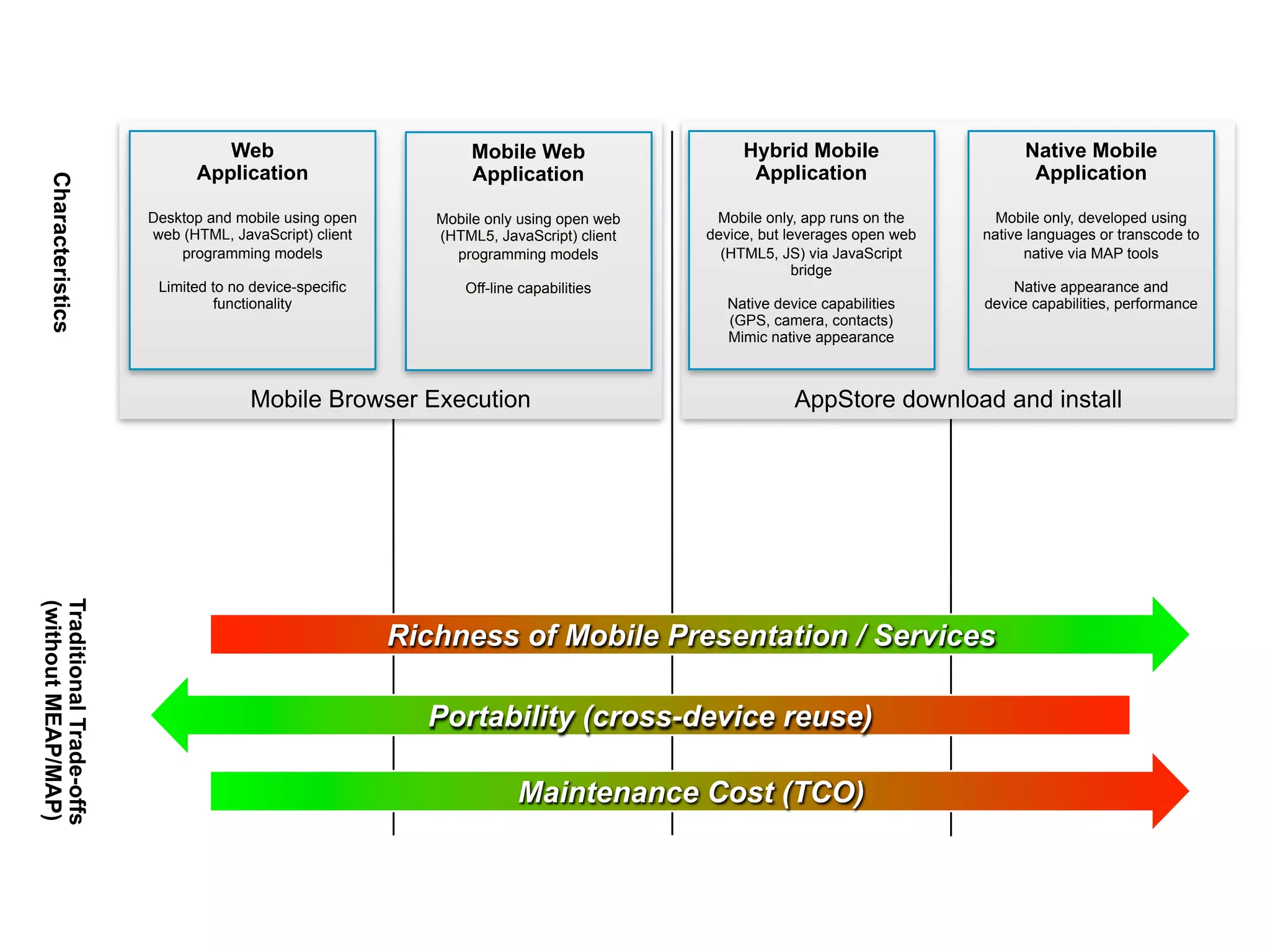
Web                             Mobile Web                   Hybrid Mobile                     Native Mobile
                               Application                        Application                   Application                       Application
   Characteristics


                         Desktop and mobile using open       Mobile only using open web    Mobile only, app runs on the      Mobile only, developed using
                         web (HTML, JavaScript) client       (HTML5, JavaScript) client   device, but leverages open web   native languages or transcode to
                             programming models                programming models           (HTML5, JS) via JavaScript           native via MAP tools
                                                                                                        bridge
                          Limited to no device-specific          Off-line capabilities                                         Native appearance and
                                  functionality                                              Native device capabilities    device capabilities, performance
                                                                                             (GPS, camera, contacts)
                                                                                             Mimic native appearance


                                        Mobile Browser Execution                                       AppStore download and install
Traditional Trade-offs
(without MEAP/MAP)


                                                          Richness of Mobile Presentation / Services

                                                            Portability (cross-device reuse)

                                                                         Maintenance Cost (TCO)
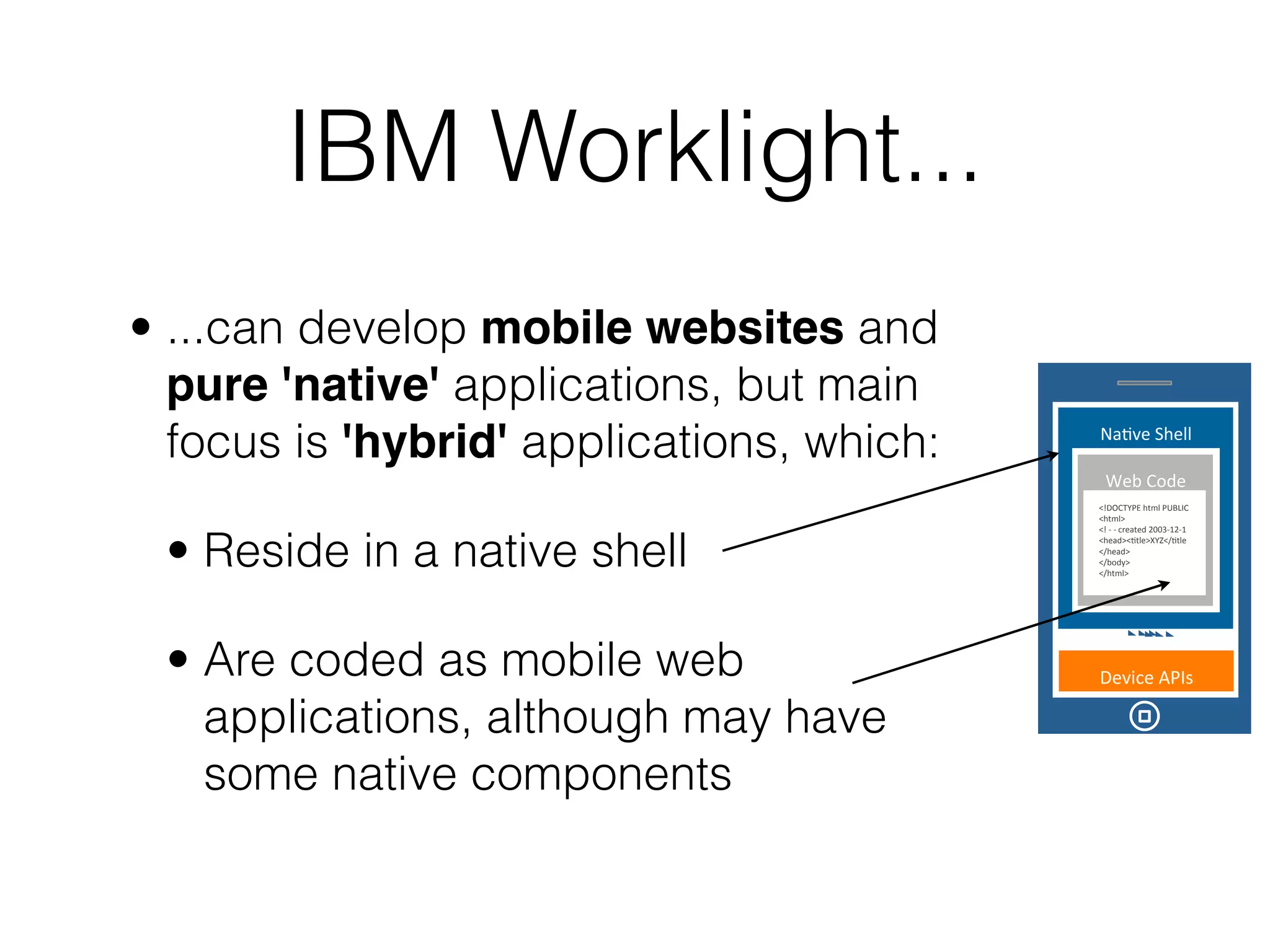
IBM Worklight...
• ...can develop mobile websites and
  pure 'native' applications, but main
  focus is 'hybrid' applications, which:   Na#ve&Shell

                                            Web&Code
                                           <!DOCTYPE&html&PUBLIC
                                           <html>
                                           <!&>&>&created&2003>12>1


 • Reside in a native shell                <head><#tle>XYZ</#tle
                                           </head>
                                           </body>
                                           </html>


 • Are coded as mobile web                 Device&APIs

   applications, although may have
   some native components
IBM Worklight

• There are some Worklight-specific JavaScript
  APIs, but...

• Typically 90% of the content inside a
  Worklight Application is standard JavaScript

• So in this presentation we’ll focus on the 90%
Project Lifecycle
• Design

• Develop

• Build

• Test

• Deploy
Design: UX
• Work with a User EXperience designer

• Especially important for consumer-facing content

• Ensure they understand mobile:

  • Performance Considerations

  • Screen simplicity

  • Locality of site usage

  • Screen size variations (incl. Portrait / Landscape)

  • Touch input implications

  • Limitations/strengths of toolkit and web model
Design: Usage
          Variations
• How will you handle:

 • Software platforms you don’t support?

 • m.mycorp.com or www.mycorp.com?

 • What happens if a customer wants to go to
   the full site on mobile? ...

 • .. Or the mobile on desktop?
Design: Simplicity
• Manage business expectations - keep pages
  simple

 • Minimal content, short phrases

 • Minimal or no promotional/ad content

 • No paragraphs of text

• Mobile websites are not regular websites crammed
  into a smaller space!
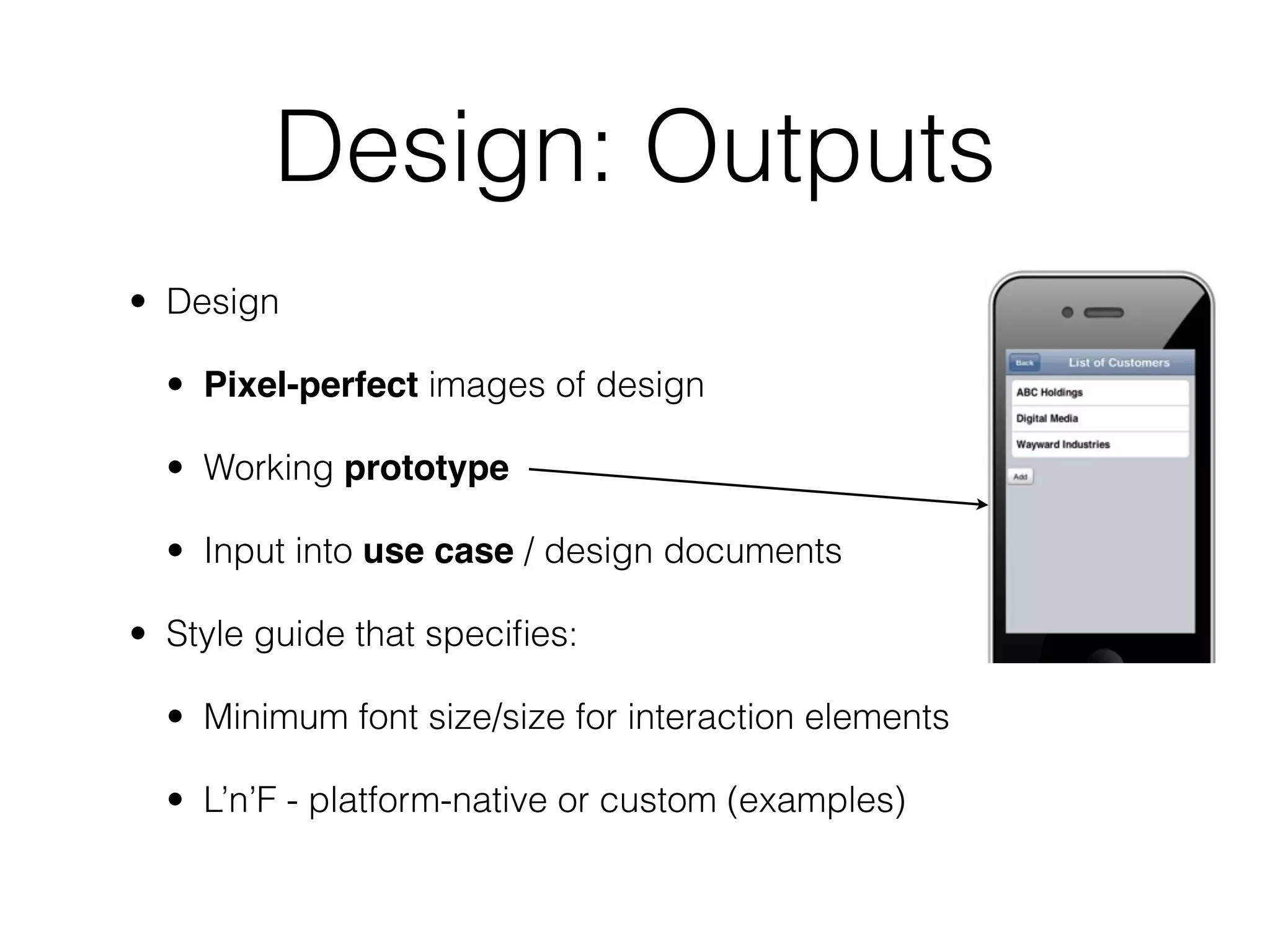
Design: Outputs
• Design

  • Pixel-perfect images of design

  • Working prototype

  • Input into use case / design documents

• Style guide that specifies:

  • Minimum font size/size for interaction elements

  • L’n’F - platform-native or custom (examples)
Design: Platforms
• Decide early on which hardware platforms and
  versions you will support

 • Typical choices are iOS 4.0+, Android 2.2+

 • Affects look and feel

 • Affects the way pages scale across devices

   • Ensure prototype works on all intended devices
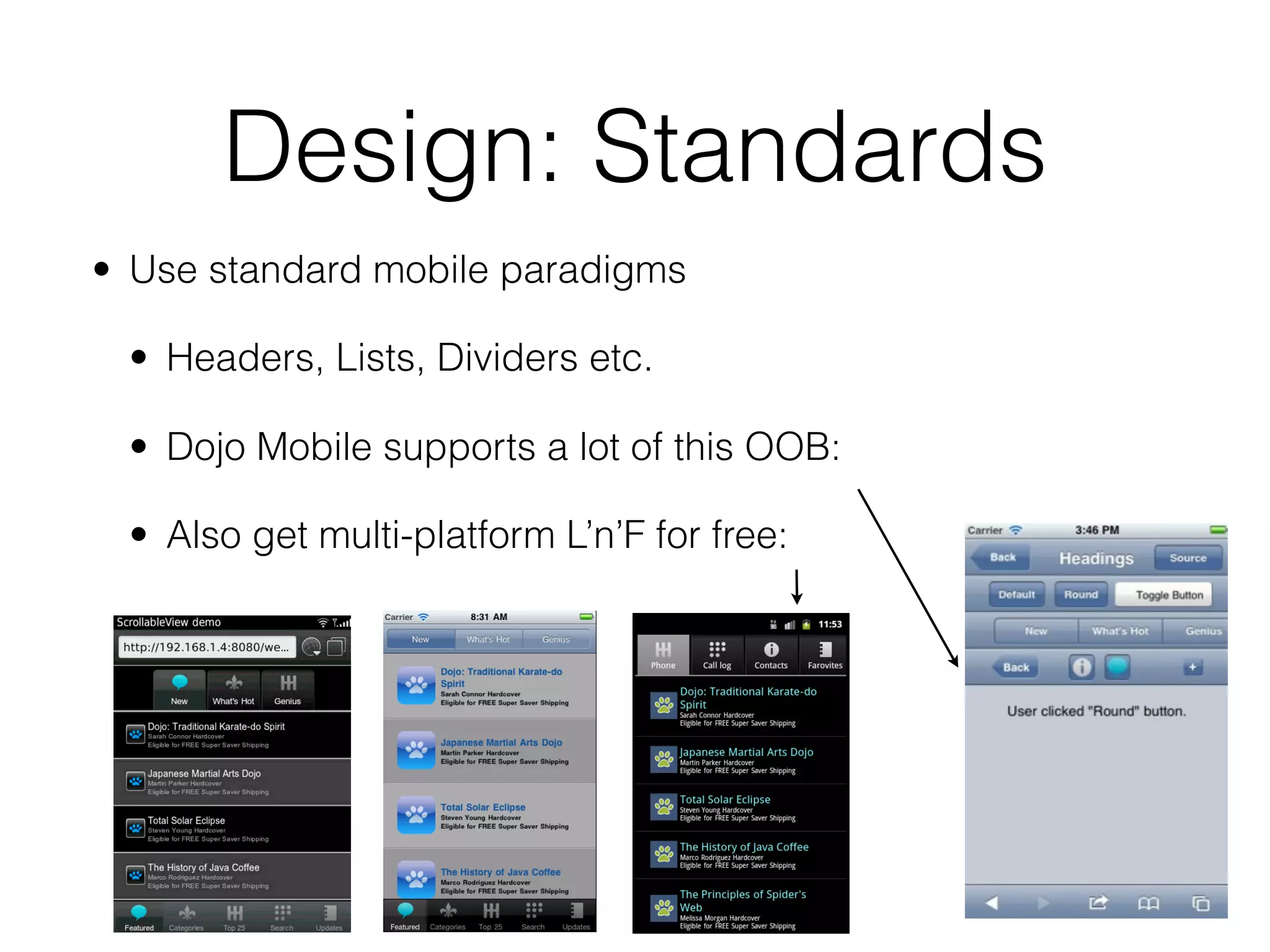
Design: Standards
• Use standard mobile paradigms

 • Headers, Lists, Dividers etc.

 • Dojo Mobile supports a lot of this OOB:

 • Also get multi-platform L’n’F for free:
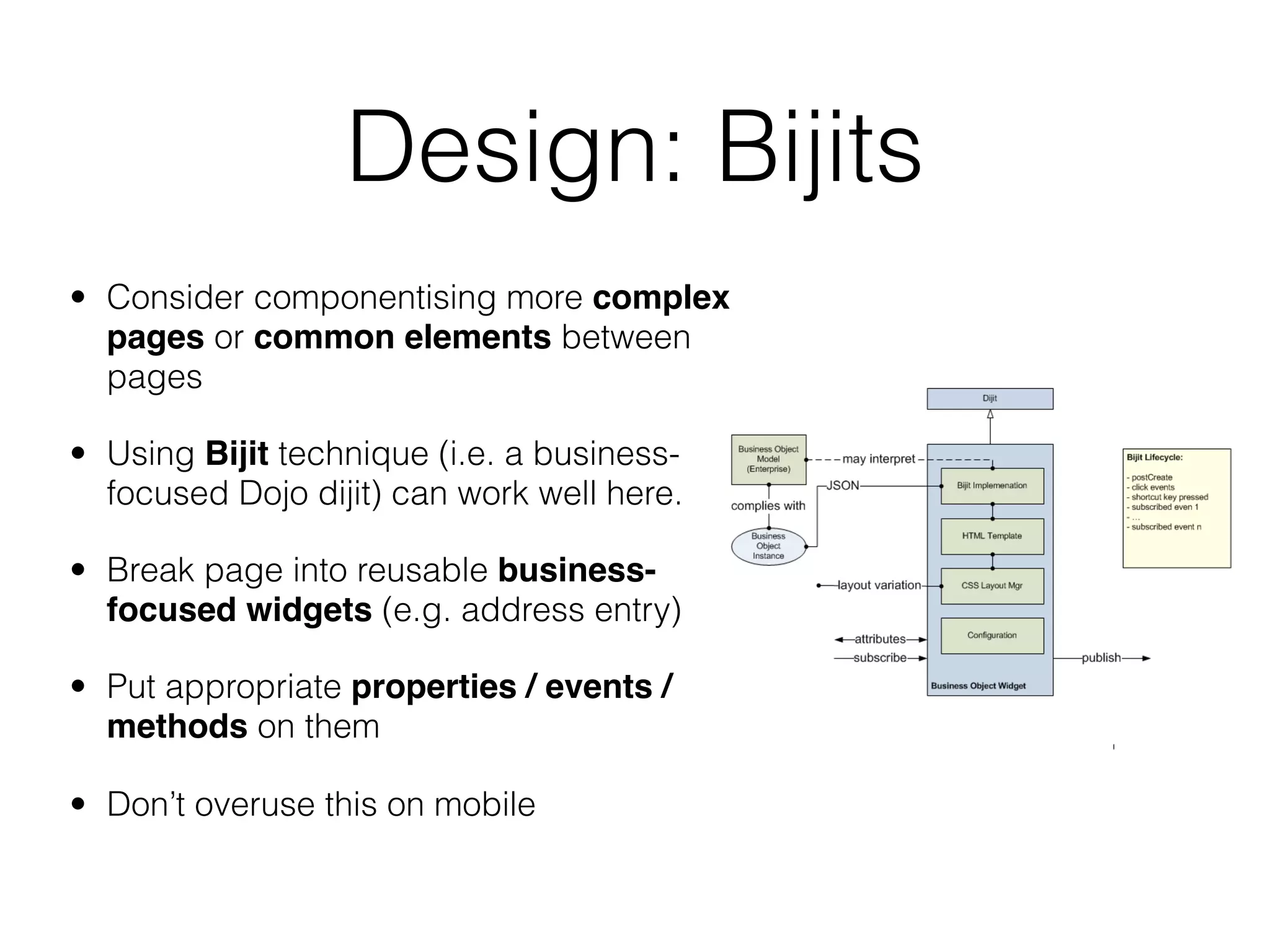
Design: Bijits
• Consider componentising more complex
  pages or common elements between
  pages

• Using Bijit technique (i.e. a business-
  focused Dojo dijit) can work well here.

• Break page into reusable business-
  focused widgets (e.g. address entry)

• Put appropriate properties / events /
  methods on them

• Don’t overuse this on mobile
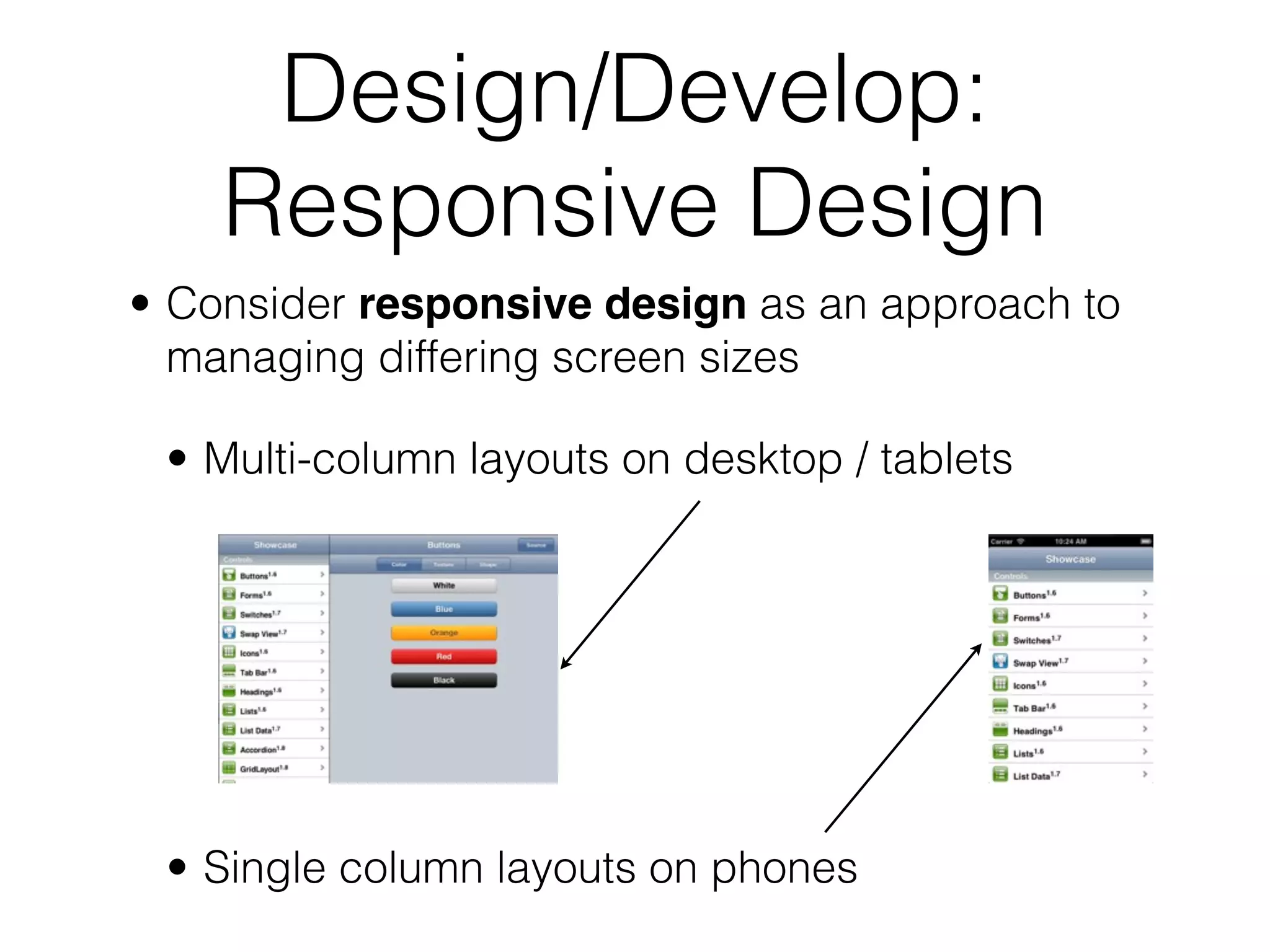
Design/Develop:
    Responsive Design
• Consider responsive design as an approach to
  managing differing screen sizes

 • Multi-column layouts on desktop / tablets


 • Single column layouts on phones
Design/Develop:
    Responsive Design

• Don’t apply responsive design naively to
  everything

• Many UI elements may be irrelevant on
  smaller devices anything requiring
  significant data entry
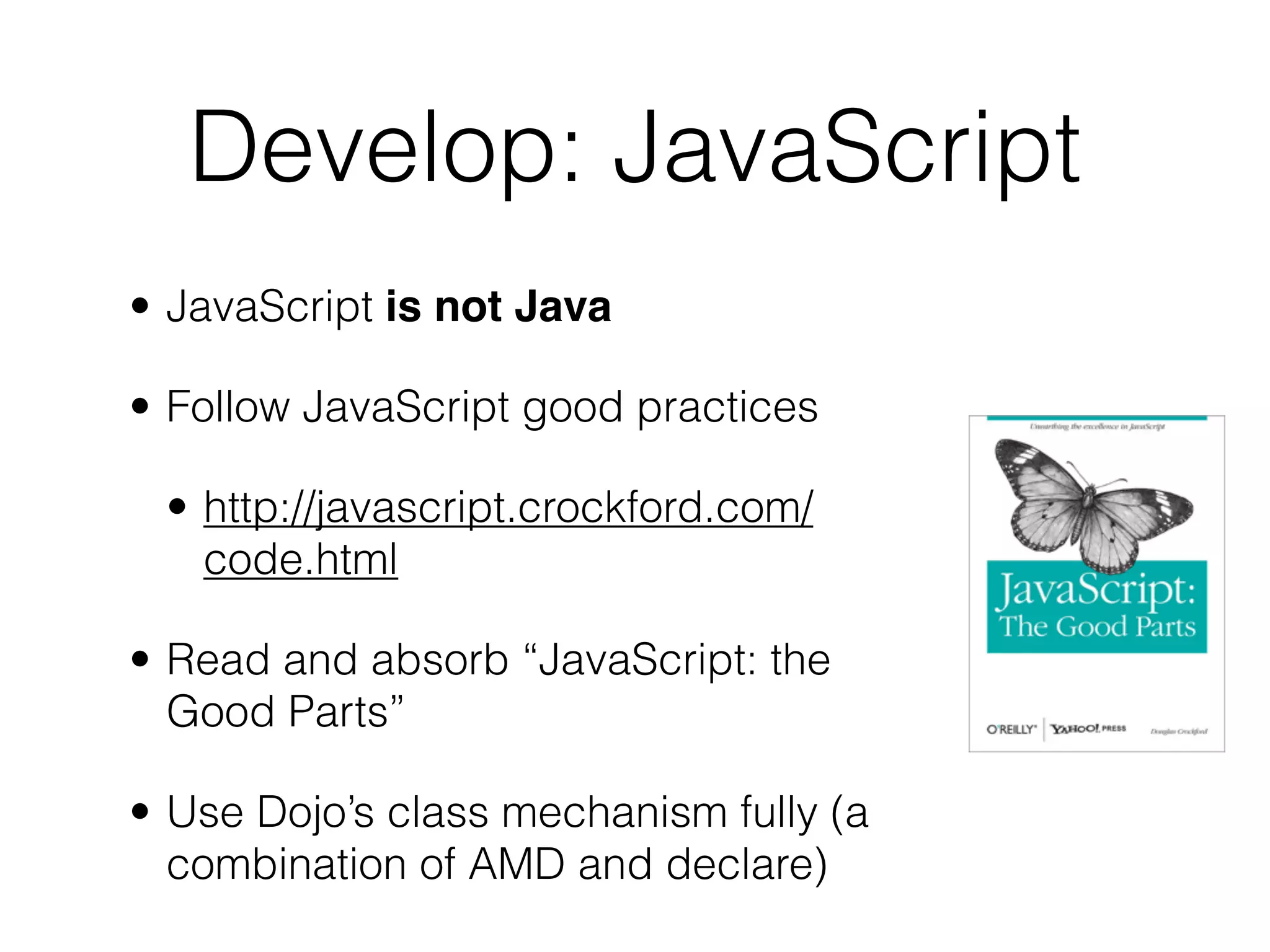
Develop: JavaScript
• JavaScript is not Java

• Follow JavaScript good practices

 • http://javascript.crockford.com/
   code.html

• Read and absorb “JavaScript: the
  Good Parts”

• Use Dojo’s class mechanism fully (a
  combination of AMD and declare)
Develop: MVC
• Think about Model-View-Controller

 • View: typically page content is represented
   using a dojox.mobile.View

 • Controller: often this is just a Dojo class, or
   might use dojox.app

 • Model: dojox.app can be used for this, but
   avoid for simple applications
Develop: MVC Options
• dojox.app: http://www.sitepen.com/blog/2011/09/30/
  dojox-app-a-single-page-application-framework/

• IBM services offerings

• Roll your own...

  • Simple controller classes

  • Use dojox/mvc for live data binding to store/model
Develop: Services

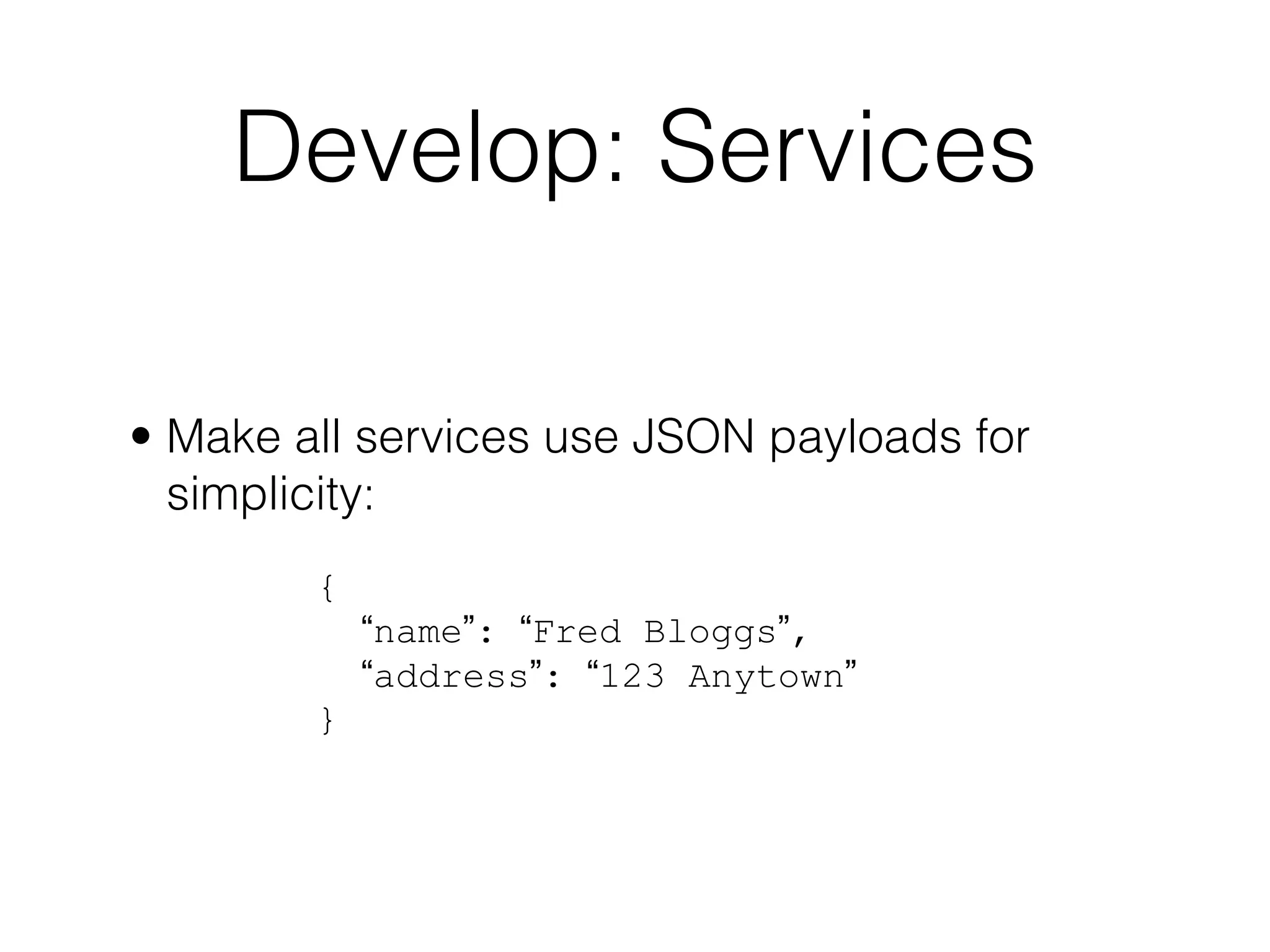
• Make all services use JSON payloads for
  simplicity:
        {
            “name”: “Fred Bloggs”,
            “address”: “123 Anytown”
        }
Develop: Services
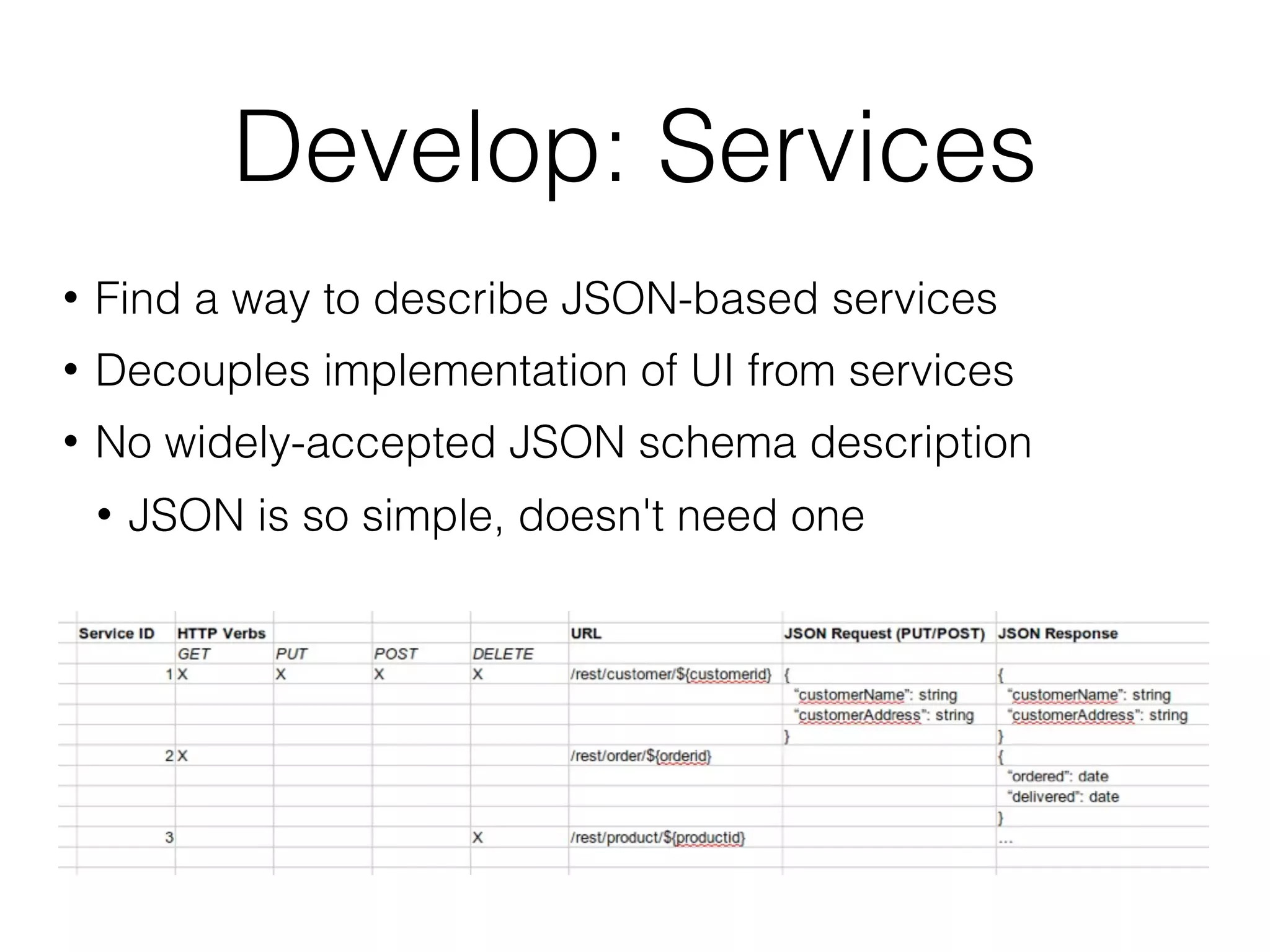
   Find a way to describe JSON-based services
   Decouples implementation of UI from services
   No widely-accepted JSON schema description
       JSON is so simple, doesn't need one
Develop: Services
• Ignore Web 1.0 practice of rendering any content on the server -
  always render data

• Think about RESTful best practices:

  • Cacheability

  • Security

  • Fine-grained-ness (especially important for mobile, XHRs are
    expensive)

  • Pagination / Querying / Sorting

• Session D07 for more information
Develop: Persistence
• Think about short-term (session) data is
  persisted between ‘pages’

• Using dojox.mobile.View model, it can simply
  be saved as a local variable

• If real navigation is done, HTML5 local storage
  is an option

• Otherwise persist to server...
Develop: Other
        Considerations
• Think about standardized approaches for:

 • XHRs - error handling / envelope
   unwrapping etc.

 • Client-side validation

 • Error-handling
Develop/Build: AMD
• Use modern AMD constructs throughout: http://
  dojotoolkit.org/documentation/tutorials/1.7/modules/
  • require([moduleList], function() { // code here });

  • define([moduleList], function() { // factory function });


  • More fine-grained

  • More asynchronous

• Documentation, examples, tutorials, etc. still use
  dojo.require() and dojo.provide() - don’t use these.
Build
• Optimise your build: http://dojotoolkit.org/
  reference-guide/1.8/build/

• Primarily for performance reasons (strip out
  unused code, also minifies remaining code)

• Particularly important for Mobile with slow
  connections
Build/Performance
• Set HTTP headers to cache static
  content: .js, .css, .html, .png, etc.

• Consider using AppCache in HTML5 to more
  permanently cache content

  • Whitelist REST services

  • Generate AppCache automatically - must
    contain everything required and nothing more
Test (for Developers)
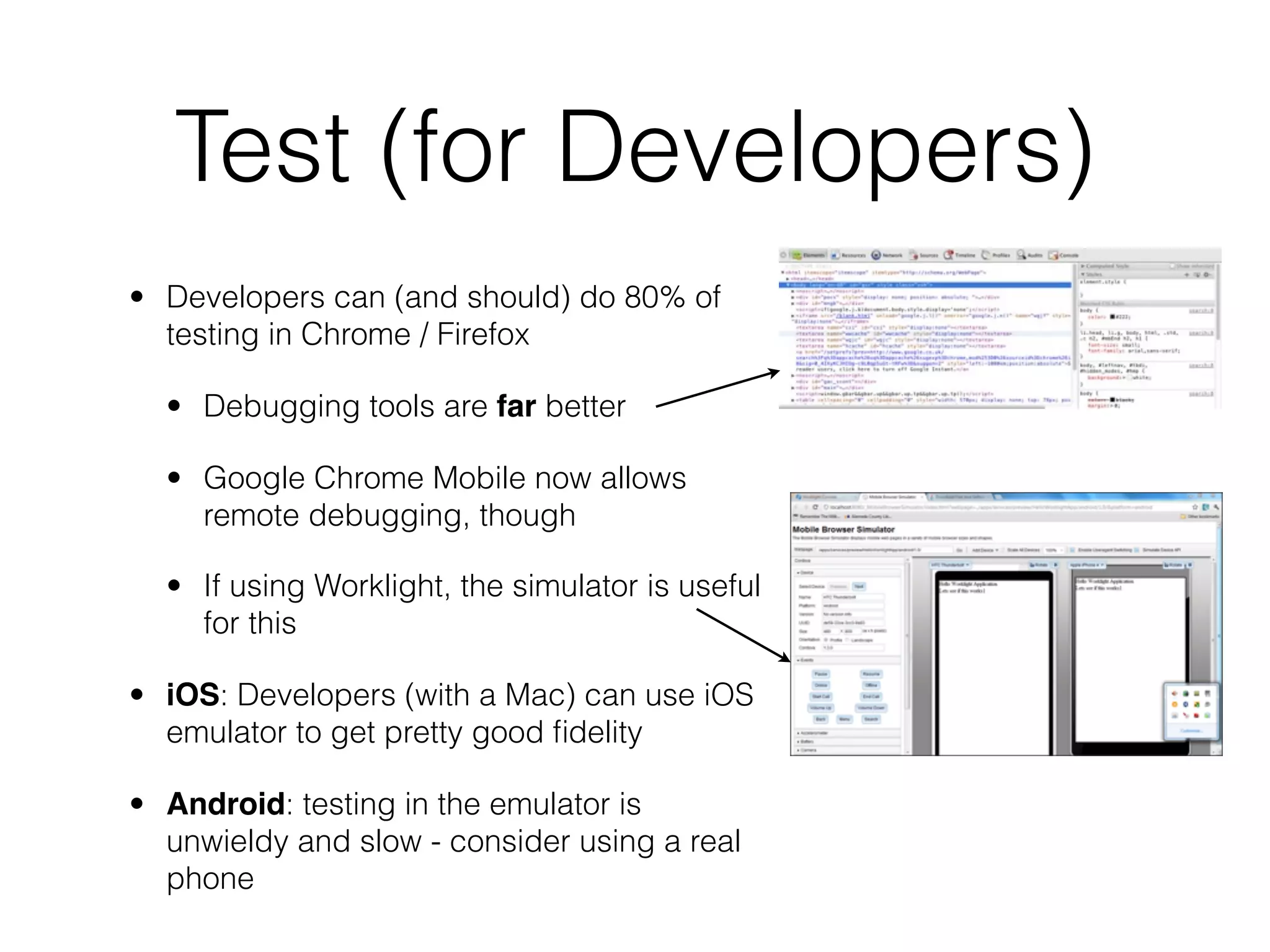
• Developers can (and should) do 80% of
  testing in Chrome / Firefox

  • Debugging tools are far better

  • Google Chrome Mobile now allows
    remote debugging, though

  • If using Worklight, the simulator is useful
    for this

• iOS: Developers (with a Mac) can use iOS
  emulator to get pretty good fidelity

• Android: testing in the emulator is
  unwieldy and slow - consider using a real
  phone
Test (for Testers)
• iOS: Generally sufficient to test on one or two physical
  devices.

• Android: Huge diversity of UIs and UI tweaks to WebKit
  and browser. Consider all modern phones that user
  might use (experience tip: HTCs particularly painful)

• Consider a service such as DeviceAnywhere:

  • http://www.keynotedeviceanywhere.com/

• Testing team should also test on real phones
Test (for Testers)
• Think about how to simulate network issues

 • Test on real 3G/4G/non-Wifi data
   connections

 • Provide services with simulated slowdowns

 • Provide services with simulated failure
Test
• Instrument app during development to output to console,
  especially using a test build

  • Can use console.log(), console.error(), etc.

• Can turn on a basic web console:

  • Android: http://developer.android.com/guide/webapps/
    debugging.html

  • iOS: http://bit.ly/P9YTIb

• Always test with built version of Dojo, occasionally there are
  subtle bugs with build process
Deploy
• Need to find a way to ensure .html files refer to:

 • Unbuilt Dojo during development

 • Built Dojo in test / production

• Provide commented-out sections in all .html
  files which are switched automatically during
  build (e.g. in Ant script)
Key Points

• Design and test the app with an
  understanding of what platforms you are
  targeting

• Design specifically for mobile

• Decide your MVC architecture early on
Further Learning
• Summary of Features: http://dojotoolkit.org/
  features/mobile

• Tutorials: http://dojotoolkit.org/documentation/
  #mobile

• User Interface Design for the Mobile Web: http://
  www.ibm.com/developerworks/web/library/wa-
  interface/index.html

• Blog: http://dojotipsntricks.com/
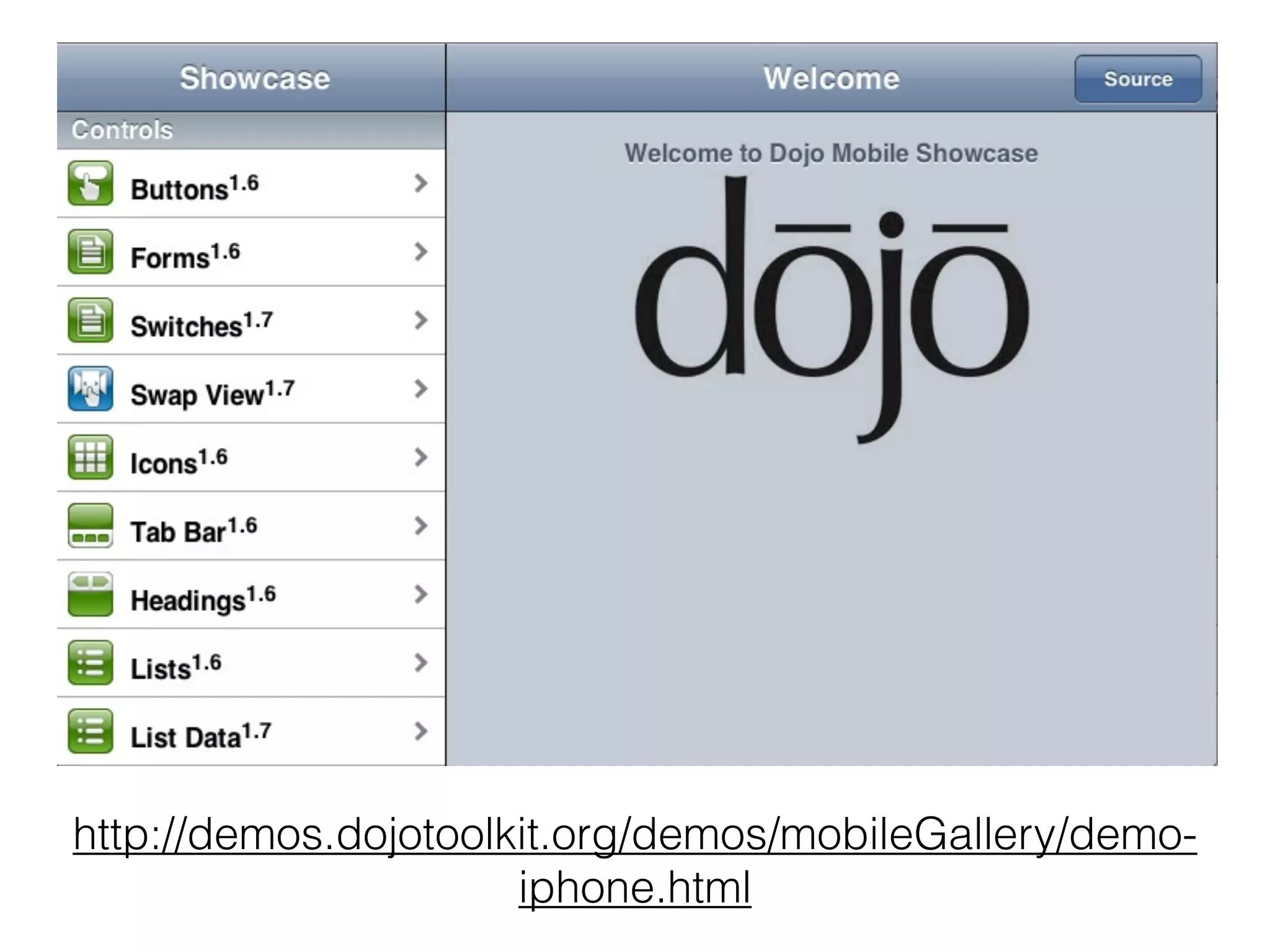
http://demos.dojotoolkit.org/demos/mobileGallery/demo-
                      iphone.html
IBM WebSphere Technical Convention 2012 – Berlin, Germany

Questions?


As a reminder, please fill out a session evaluation


                                                                        © IBM Corporation 2012
IBM WebSphere Technical Convention 2012 – Berlin, Germany

Copyright Information
© Copyright IBM Corporation 2012. All Rights Reserved. IBM, the IBM logo, ibm.com, AppScan, CICS,
   Cloudburst, Cognos, CPLEX, DataPower, DB2, FileNet, ILOG, IMS, InfoSphere, Lotus, Lotus Notes,
   Maximo, Quickr, Rational, Rational Team Concert, Sametime, Tivoli, WebSphere, and z/OS are
   trademarks or registered trademarks of International Business Machines Corporation in the United
   States, other countries, or both. If these and other IBM trademarked terms are marked on their first
   occurrence in this information with a trademark symbol (® or ™), these symbols indicate U.S.
   registered or common law trademarks owned by IBM at the time this information was published. Such
   trademarks may also be registered or common law trademarks in other countries. A current list of IBM
   trademarks is available on the Web at “Copyright and trademark information” at ibm.com/legal/
   copytrade.shtml.
Coremetrics is a trademark or registered trademark of Coremetrics, Inc., an IBM Company.
SPSS is a trademark or registered trademark of SPSS, Inc. (or its affiliates), an IBM Company.
Unica is a trademark or registered trademark of Unica Corporation, an IBM Company.
Java and all Java-based trademarks and logos are trademarks of Oracle and/or its affiliates. Other
   company, product and service names may be trademarks or service marks of others. References in
   this publication to IBM products and services do not imply that IBM intends to make them available in
   all countries in which IBM operates.


                                                                                        © IBM Corporation 2012

Real-world Dojo Mobile

  • 1.
    D06 Real-world DojoMobile Applications Andrew Ferrier | Web 2.0 / Mobile Consultant | IBM Software Services for WebSphere, UK © IBM Corporation 2012 © IBM Corporation 2011
  • 2.
    Agenda • Recap: whatis Web 2.0? • What is Dojo/Dojo Mobile? • Digression: What is Worklight? • Project Lifecycle: Best Practices and Approach for building Dojo Mobile Applications
  • 3.
  • 4.
    Web 1.0 Model  Static HTML content, little- to-no-dynamicity (1) User actions trigger HTTP  Most folks know this request to a already web server  Server-side-driven content  Perhaps with a small (2) Server does amount of JavaScript for some processing effects or form validation and returns an HTML  Traditionally written with a page to client variety of technologies – Servlets, JSPs, etc.
  • 5.
    Has disadvantages...  Interaction is awkward  Slow response time – every action requires a entire page refresh  W3C states that 1 second is highest acceptable response time for interactive action  Often ugly, flickery, content
  • 6.
    Web 2.0 Model (1) User actions  Browser using AJAX/ trigger JavaScript XHR to communicate call to Ajax engine with server (2) Ajax engine Invokes asynch  Lightweight RESTful request Services (often using (3) Server does JSON data) processing and returns XML to the  Service Gateway or Ajax engine other technology to (4) Ajax engine proxy all service Displays the XML in the browser invocations
  • 7.
    Recap: What isDojo?  Dojo is a set of common JavaScript libraries used for creating Ajax and DHTML web applications  http://dojotoolkit.org  Open Source  Large widget collection (“dijits”)‫‏‬  Powerful I/O (XHR)‫‏‬  Data abstraction layer  Event management  Logging and debugging  Extensible modular architecture  Declarative and programmatic
  • 8.
    What is Dojo’sPosition? • IBM supports, and contributes to, Dojo, through: • WebSphere Feature Pack for Web 2.0 and Mobile • IBM Worklight and Mobile Platform
  • 9.
    What is DojoMobile? • Dojo-based widget set specifically for building mobile applications • Available since Dojo 1.5+ • Mobile web with native look ‘n’ feel
  • 10.
    What’s Different about Dojo Mobile? • Extra-lightweight widgets • No support for non-WebKit browsers by default (e.g. Firefox) • No use of images • Encourages dojox.mobile.View model where pages are dynamically loaded into DOM
  • 11.
    Example of View Navigation <body> <View id=ViewA> <Heading>ViewA</Heading> <RoundRectList> <ListItem moveTo=ViewB>Item 1</ListItem> <ListItem moveTo=ViewB>Item 2</ListItem> <ListItem moveTo=ViewB>Item 3</ListItem> <View id=ViewB> Slide <Heading moveTo="ViewA">ViewB</Heading> <RoundRectList> <ListItem>Video</ListItem> <ListItem>Maps</ListItem> <ListItem>Phone</ListItem>
  • 12.
    A Digression: whatis Worklight? • IBM Worklight is a platform for developing mobile applications and web applications
  • 13.
    Web Mobile Web Hybrid Mobile Native Mobile Application Application Application Application Characteristics Desktop and mobile using open Mobile only using open web Mobile only, app runs on the Mobile only, developed using web (HTML, JavaScript) client (HTML5, JavaScript) client device, but leverages open web native languages or transcode to programming models programming models (HTML5, JS) via JavaScript native via MAP tools bridge Limited to no device-specific Off-line capabilities Native appearance and functionality Native device capabilities device capabilities, performance (GPS, camera, contacts) Mimic native appearance Mobile Browser Execution AppStore download and install Traditional Trade-offs (without MEAP/MAP) Richness of Mobile Presentation / Services Portability (cross-device reuse) Maintenance Cost (TCO)
  • 14.
    IBM Worklight... • ...candevelop mobile websites and pure 'native' applications, but main focus is 'hybrid' applications, which: Na#ve&Shell Web&Code <!DOCTYPE&html&PUBLIC <html> <!&>&>&created&2003>12>1 • Reside in a native shell <head><#tle>XYZ</#tle </head> </body> </html> • Are coded as mobile web Device&APIs applications, although may have some native components
  • 15.
    IBM Worklight • Thereare some Worklight-specific JavaScript APIs, but... • Typically 90% of the content inside a Worklight Application is standard JavaScript • So in this presentation we’ll focus on the 90%
  • 16.
    Project Lifecycle • Design •Develop • Build • Test • Deploy
  • 17.
    Design: UX • Workwith a User EXperience designer • Especially important for consumer-facing content • Ensure they understand mobile: • Performance Considerations • Screen simplicity • Locality of site usage • Screen size variations (incl. Portrait / Landscape) • Touch input implications • Limitations/strengths of toolkit and web model
  • 18.
    Design: Usage Variations • How will you handle: • Software platforms you don’t support? • m.mycorp.com or www.mycorp.com? • What happens if a customer wants to go to the full site on mobile? ... • .. Or the mobile on desktop?
  • 19.
    Design: Simplicity • Managebusiness expectations - keep pages simple • Minimal content, short phrases • Minimal or no promotional/ad content • No paragraphs of text • Mobile websites are not regular websites crammed into a smaller space!
  • 20.
    Design: Outputs • Design • Pixel-perfect images of design • Working prototype • Input into use case / design documents • Style guide that specifies: • Minimum font size/size for interaction elements • L’n’F - platform-native or custom (examples)
  • 21.
    Design: Platforms • Decideearly on which hardware platforms and versions you will support • Typical choices are iOS 4.0+, Android 2.2+ • Affects look and feel • Affects the way pages scale across devices • Ensure prototype works on all intended devices
  • 22.
    Design: Standards • Usestandard mobile paradigms • Headers, Lists, Dividers etc. • Dojo Mobile supports a lot of this OOB: • Also get multi-platform L’n’F for free:
  • 23.
    Design: Bijits • Considercomponentising more complex pages or common elements between pages • Using Bijit technique (i.e. a business- focused Dojo dijit) can work well here. • Break page into reusable business- focused widgets (e.g. address entry) • Put appropriate properties / events / methods on them • Don’t overuse this on mobile
  • 24.
    Design/Develop: Responsive Design • Consider responsive design as an approach to managing differing screen sizes • Multi-column layouts on desktop / tablets • Single column layouts on phones
  • 25.
    Design/Develop: Responsive Design • Don’t apply responsive design naively to everything • Many UI elements may be irrelevant on smaller devices anything requiring significant data entry
  • 26.
    Develop: JavaScript • JavaScriptis not Java • Follow JavaScript good practices • http://javascript.crockford.com/ code.html • Read and absorb “JavaScript: the Good Parts” • Use Dojo’s class mechanism fully (a combination of AMD and declare)
  • 27.
    Develop: MVC • Thinkabout Model-View-Controller • View: typically page content is represented using a dojox.mobile.View • Controller: often this is just a Dojo class, or might use dojox.app • Model: dojox.app can be used for this, but avoid for simple applications
  • 28.
    Develop: MVC Options •dojox.app: http://www.sitepen.com/blog/2011/09/30/ dojox-app-a-single-page-application-framework/ • IBM services offerings • Roll your own... • Simple controller classes • Use dojox/mvc for live data binding to store/model
  • 29.
    Develop: Services • Makeall services use JSON payloads for simplicity: { “name”: “Fred Bloggs”, “address”: “123 Anytown” }
  • 30.
    Develop: Services  Find a way to describe JSON-based services  Decouples implementation of UI from services  No widely-accepted JSON schema description  JSON is so simple, doesn't need one
  • 31.
    Develop: Services • IgnoreWeb 1.0 practice of rendering any content on the server - always render data • Think about RESTful best practices: • Cacheability • Security • Fine-grained-ness (especially important for mobile, XHRs are expensive) • Pagination / Querying / Sorting • Session D07 for more information
  • 32.
    Develop: Persistence • Thinkabout short-term (session) data is persisted between ‘pages’ • Using dojox.mobile.View model, it can simply be saved as a local variable • If real navigation is done, HTML5 local storage is an option • Otherwise persist to server...
  • 33.
    Develop: Other Considerations • Think about standardized approaches for: • XHRs - error handling / envelope unwrapping etc. • Client-side validation • Error-handling
  • 34.
    Develop/Build: AMD • Usemodern AMD constructs throughout: http:// dojotoolkit.org/documentation/tutorials/1.7/modules/ • require([moduleList], function() { // code here }); • define([moduleList], function() { // factory function }); • More fine-grained • More asynchronous • Documentation, examples, tutorials, etc. still use dojo.require() and dojo.provide() - don’t use these.
  • 35.
    Build • Optimise yourbuild: http://dojotoolkit.org/ reference-guide/1.8/build/ • Primarily for performance reasons (strip out unused code, also minifies remaining code) • Particularly important for Mobile with slow connections
  • 36.
    Build/Performance • Set HTTPheaders to cache static content: .js, .css, .html, .png, etc. • Consider using AppCache in HTML5 to more permanently cache content • Whitelist REST services • Generate AppCache automatically - must contain everything required and nothing more
  • 37.
    Test (for Developers) •Developers can (and should) do 80% of testing in Chrome / Firefox • Debugging tools are far better • Google Chrome Mobile now allows remote debugging, though • If using Worklight, the simulator is useful for this • iOS: Developers (with a Mac) can use iOS emulator to get pretty good fidelity • Android: testing in the emulator is unwieldy and slow - consider using a real phone
  • 38.
    Test (for Testers) •iOS: Generally sufficient to test on one or two physical devices. • Android: Huge diversity of UIs and UI tweaks to WebKit and browser. Consider all modern phones that user might use (experience tip: HTCs particularly painful) • Consider a service such as DeviceAnywhere: • http://www.keynotedeviceanywhere.com/ • Testing team should also test on real phones
  • 39.
    Test (for Testers) •Think about how to simulate network issues • Test on real 3G/4G/non-Wifi data connections • Provide services with simulated slowdowns • Provide services with simulated failure
  • 40.
    Test • Instrument appduring development to output to console, especially using a test build • Can use console.log(), console.error(), etc. • Can turn on a basic web console: • Android: http://developer.android.com/guide/webapps/ debugging.html • iOS: http://bit.ly/P9YTIb • Always test with built version of Dojo, occasionally there are subtle bugs with build process
  • 41.
    Deploy • Need tofind a way to ensure .html files refer to: • Unbuilt Dojo during development • Built Dojo in test / production • Provide commented-out sections in all .html files which are switched automatically during build (e.g. in Ant script)
  • 42.
    Key Points • Designand test the app with an understanding of what platforms you are targeting • Design specifically for mobile • Decide your MVC architecture early on
  • 43.
    Further Learning • Summaryof Features: http://dojotoolkit.org/ features/mobile • Tutorials: http://dojotoolkit.org/documentation/ #mobile • User Interface Design for the Mobile Web: http:// www.ibm.com/developerworks/web/library/wa- interface/index.html • Blog: http://dojotipsntricks.com/
  • 44.
  • 45.
    IBM WebSphere TechnicalConvention 2012 – Berlin, Germany Questions? As a reminder, please fill out a session evaluation © IBM Corporation 2012
  • 46.
    IBM WebSphere TechnicalConvention 2012 – Berlin, Germany Copyright Information © Copyright IBM Corporation 2012. All Rights Reserved. IBM, the IBM logo, ibm.com, AppScan, CICS, Cloudburst, Cognos, CPLEX, DataPower, DB2, FileNet, ILOG, IMS, InfoSphere, Lotus, Lotus Notes, Maximo, Quickr, Rational, Rational Team Concert, Sametime, Tivoli, WebSphere, and z/OS are trademarks or registered trademarks of International Business Machines Corporation in the United States, other countries, or both. If these and other IBM trademarked terms are marked on their first occurrence in this information with a trademark symbol (® or ™), these symbols indicate U.S. registered or common law trademarks owned by IBM at the time this information was published. Such trademarks may also be registered or common law trademarks in other countries. A current list of IBM trademarks is available on the Web at “Copyright and trademark information” at ibm.com/legal/ copytrade.shtml. Coremetrics is a trademark or registered trademark of Coremetrics, Inc., an IBM Company. SPSS is a trademark or registered trademark of SPSS, Inc. (or its affiliates), an IBM Company. Unica is a trademark or registered trademark of Unica Corporation, an IBM Company. Java and all Java-based trademarks and logos are trademarks of Oracle and/or its affiliates. Other company, product and service names may be trademarks or service marks of others. References in this publication to IBM products and services do not imply that IBM intends to make them available in all countries in which IBM operates. © IBM Corporation 2012