Building “old” Windows drivers (XP, Vista, 2003
and 2008) with Visual Studio 2013
Dmitry Fleytman, dmitry@daynix.com
Yan Vugenfirer, yan@daynix.com
Daynix Computing LTD
Agenda
Motivation
XPVistaServer 2003Server 2008 WDM driver step by
step configuration
And don’t forget KMDF
2
Daynix Computing LTD
Motivation
Maintain single code base for variety of Windows OSes
Build XP and Vista drivers with Visual Studio 2013
Use C++11 features of Visual Studio 2013 compiler for
the development of kernel drivers
3
Daynix Computing LTD
What are the basic steps?
Use VS2013 compiler
Compile XP and Vista drivers using legacy DDK for
include files and libraries
Change appropriate preprocessor definitions
Adjust linker options
Adjust packaging for KMDF
4
Daynix Computing LTD
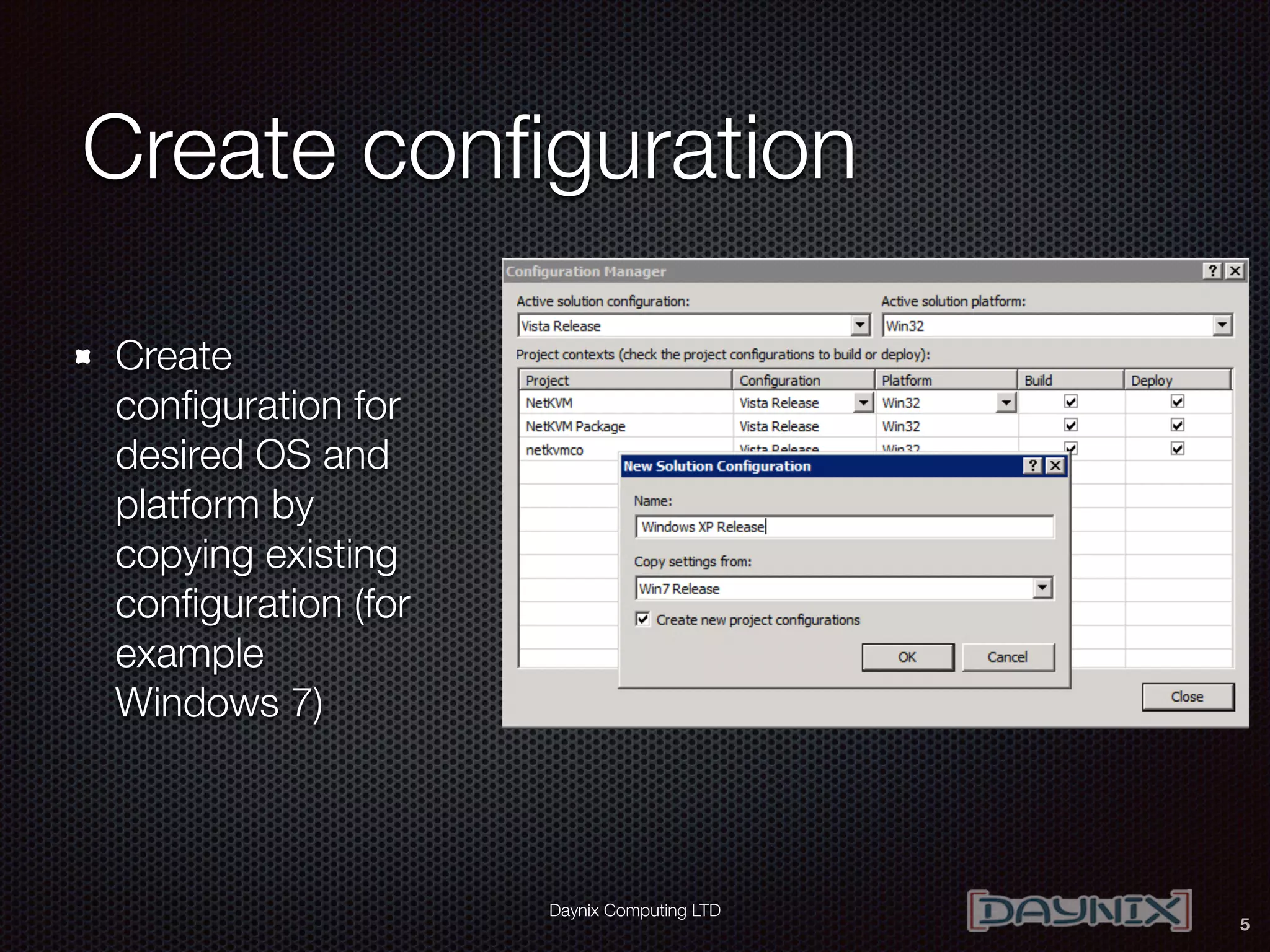
Create configuration
Create
configuration for
desired OS and
platform by
copying existing
configuration (for
example
Windows 7)
5
Daynix Computing LTD
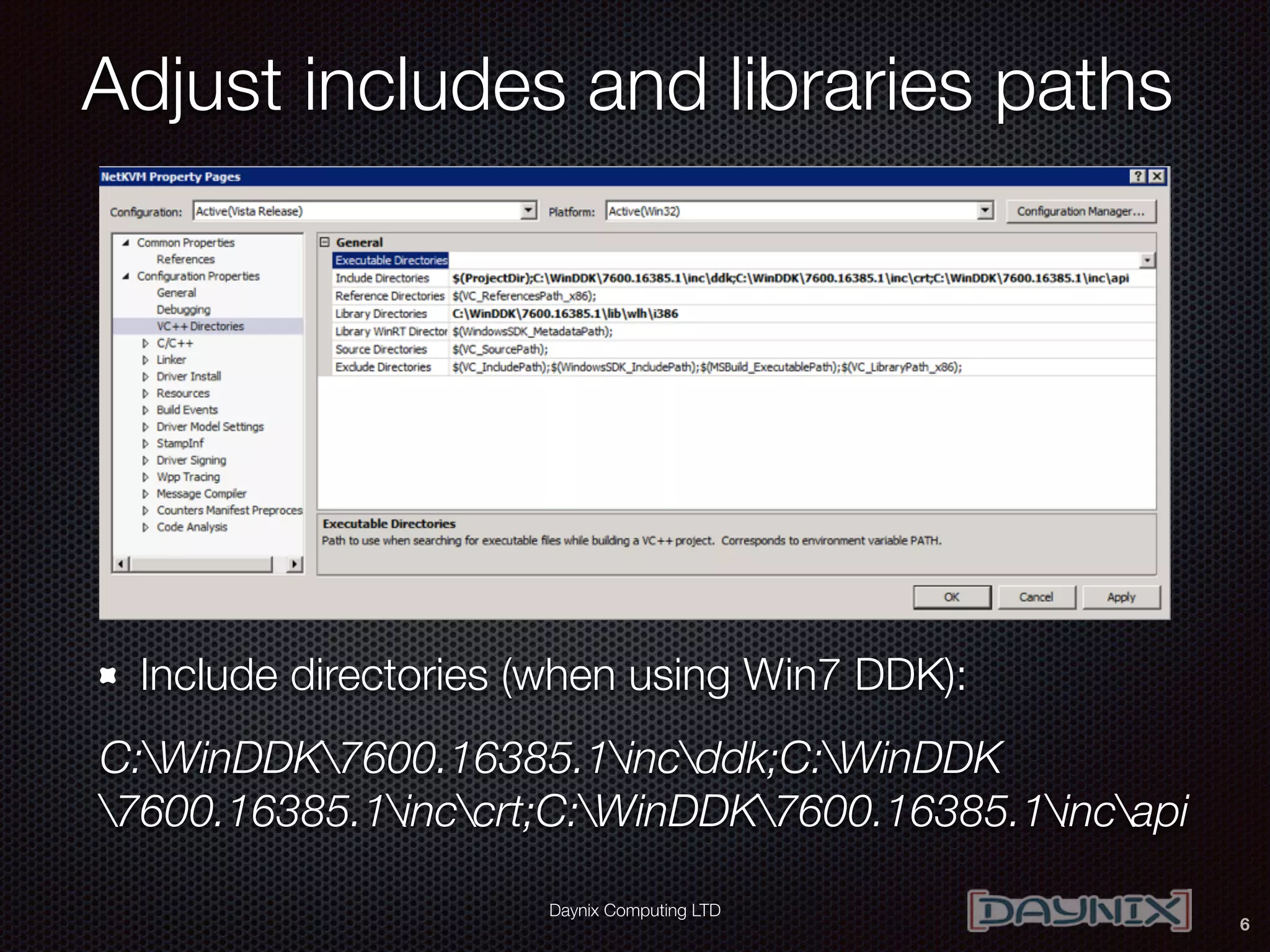
Adjust includes and libraries paths
Include directories (when using Win7 DDK):
C:WinDDK7600.16385.1incddk;C:WinDDK
7600.16385.1inccrt;C:WinDDK7600.16385.1incapi
6
Daynix Computing LTD
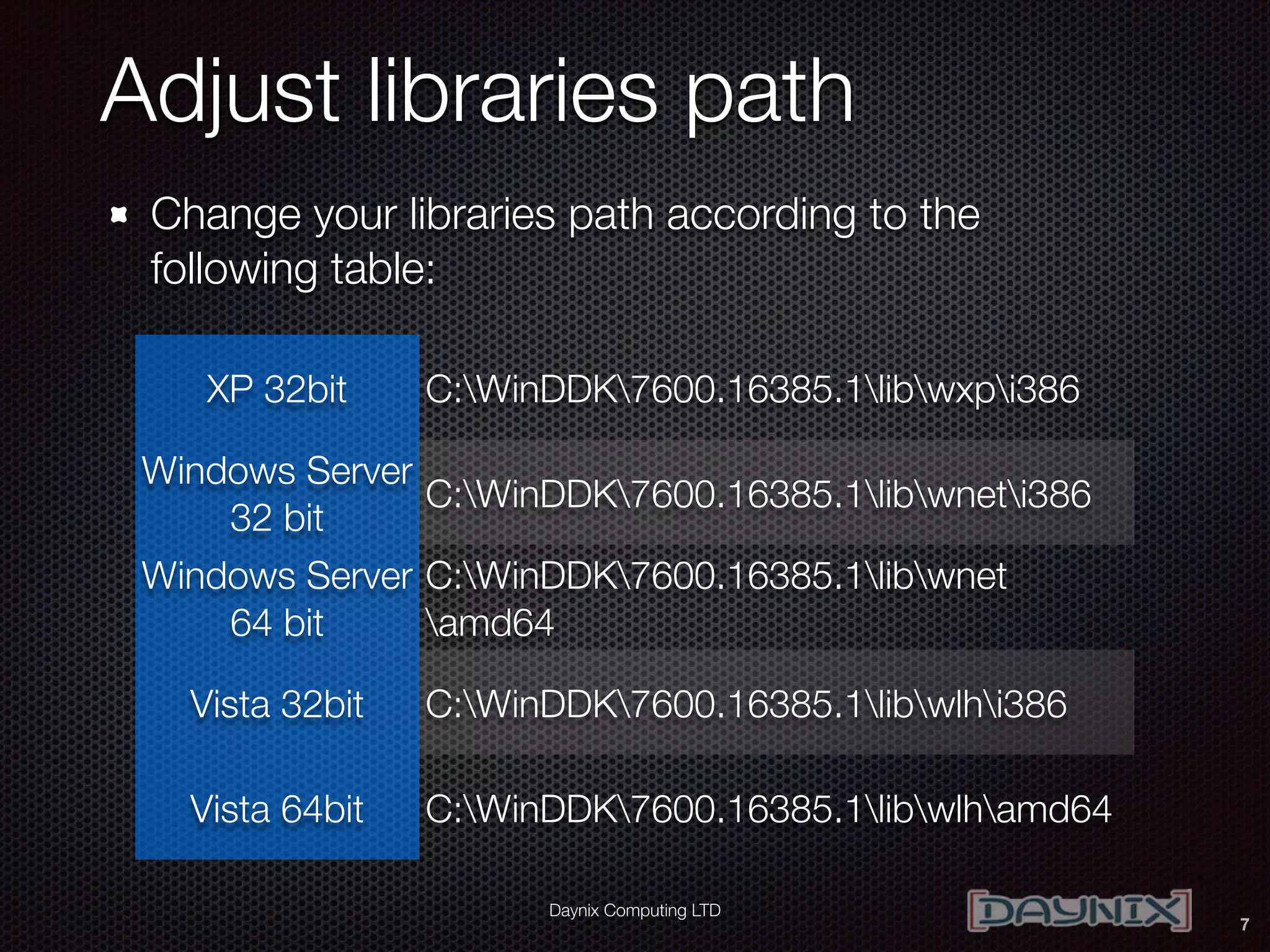
Adjust libraries path
7
XP 32bit C:WinDDK7600.16385.1libwxpi386
Windows Server
32 bit
C:WinDDK7600.16385.1libwneti386
Windows Server
64 bit
C:WinDDK7600.16385.1libwnet
amd64
Vista 32bit C:WinDDK7600.16385.1libwlhi386
Vista 64bit C:WinDDK7600.16385.1libwlhamd64
Change your libraries path according to the
following table:
Daynix Computing LTD
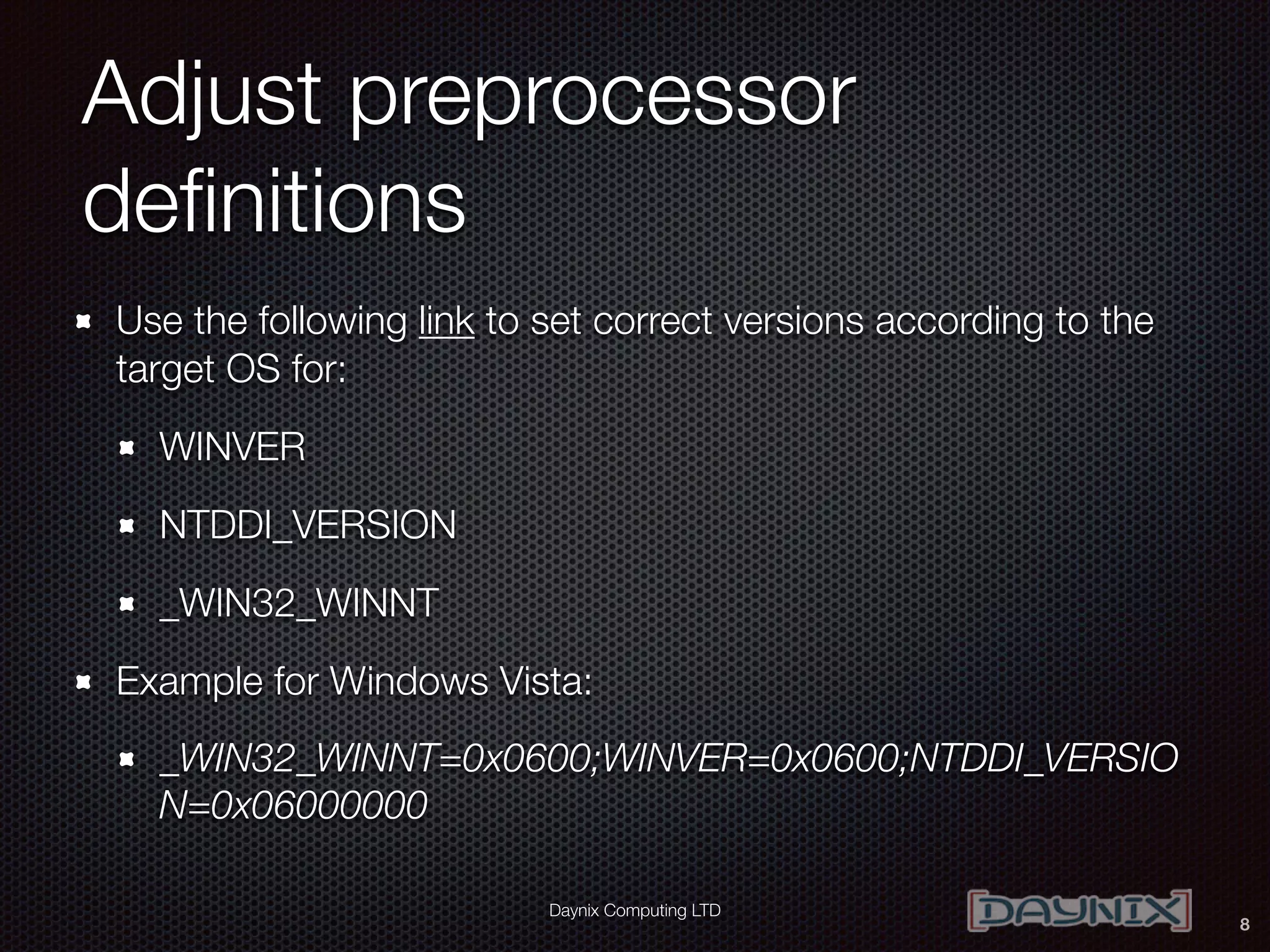
Adjust preprocessor
definitions
Use the following link to set correct versions according to the
target OS for:
WINVER
NTDDI_VERSION
_WIN32_WINNT
Example for Windows Vista:
_WIN32_WINNT=0x0600;WINVER=0x0600;NTDDI_VERSIO
N=0x06000000
8
Daynix Computing LTD
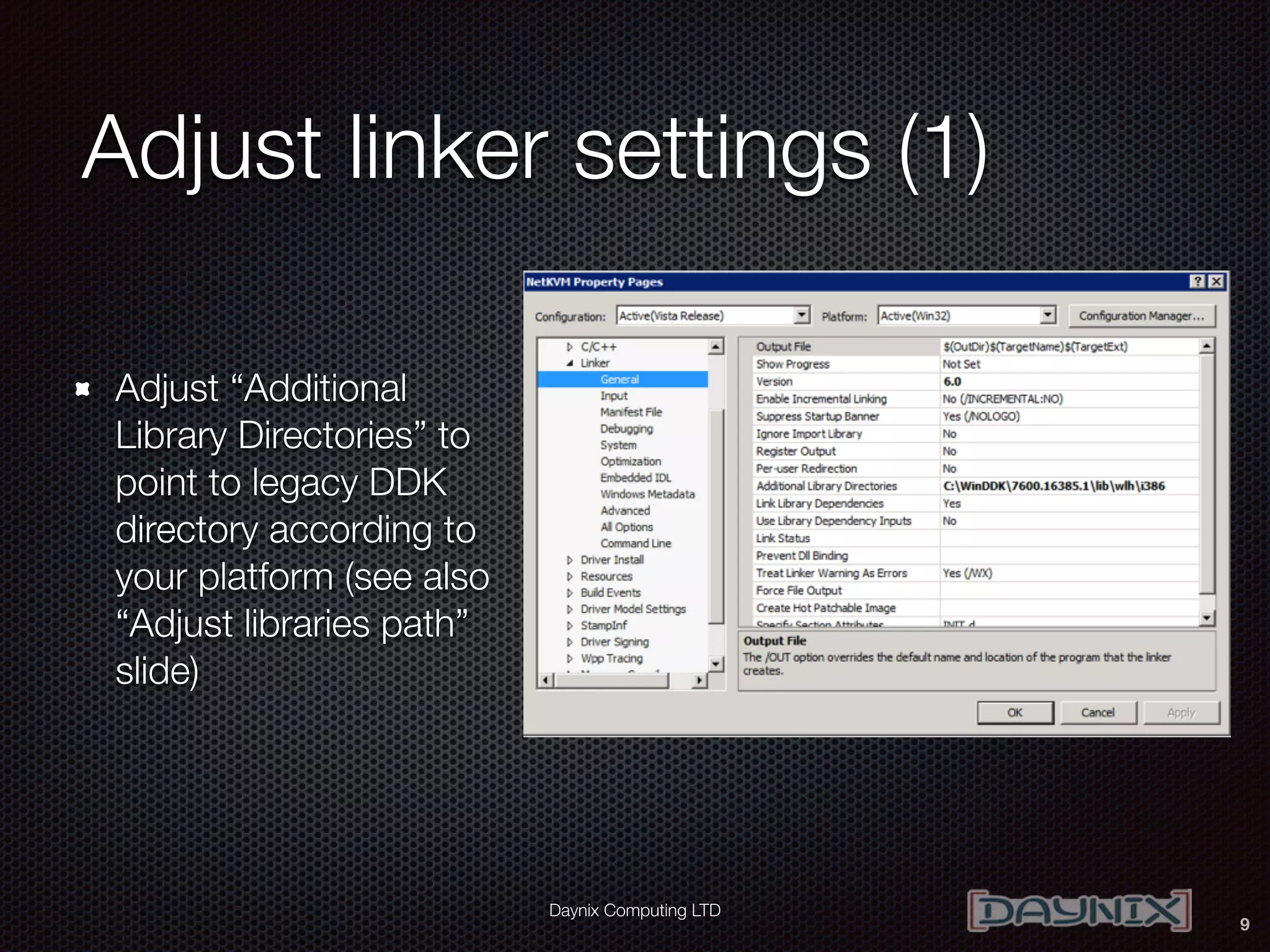
Adjust linker settings (1)
Adjust “Additional
Library Directories” to
point to legacy DDK
directory according to
your platform (see also
“Adjust libraries path”
slide)
9
Daynix Computing LTD
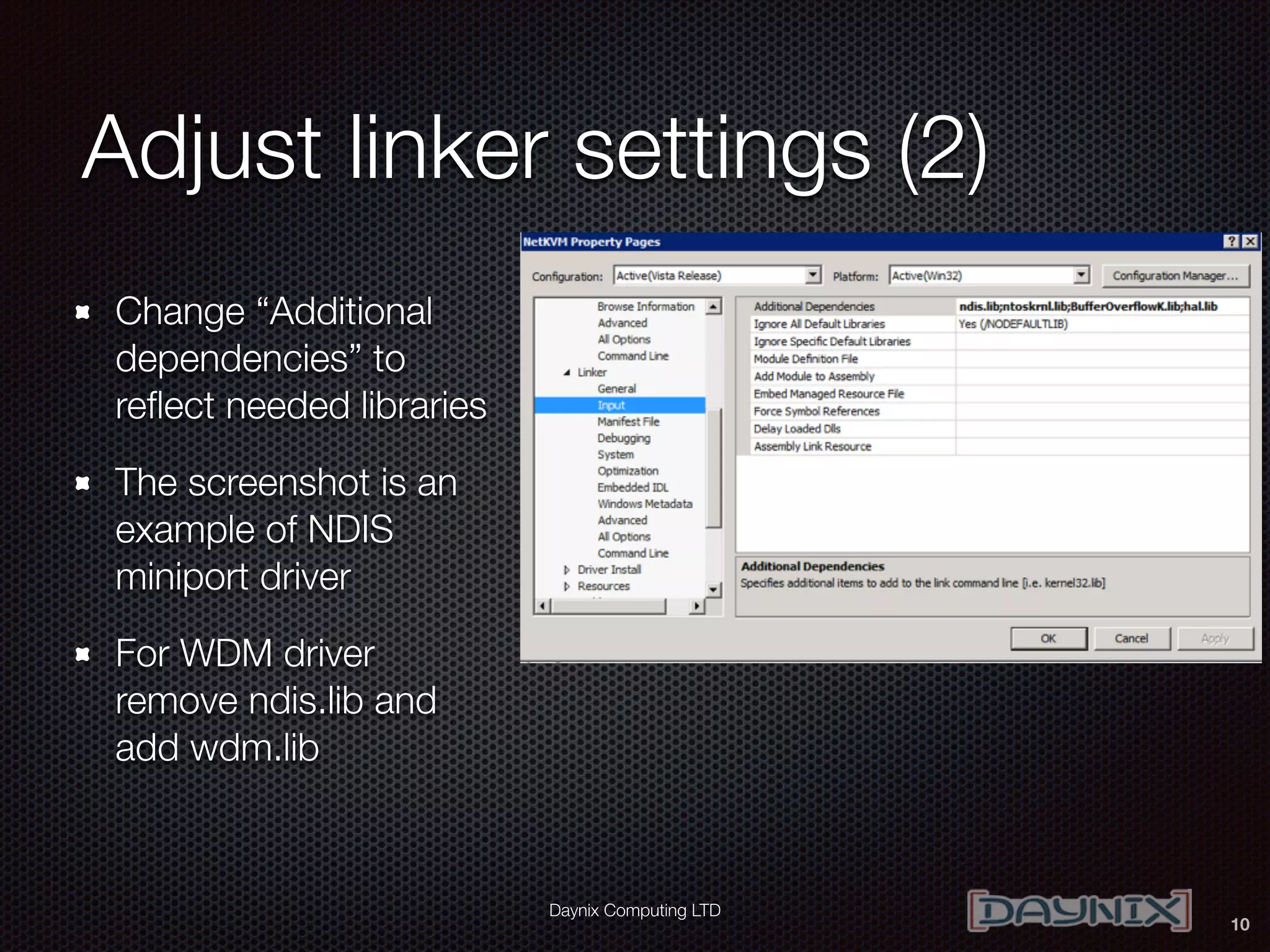
Adjust linker settings (2)
Change “Additional
dependencies” to
reflect needed libraries
The screenshot is an
example of NDIS
miniport driver
For WDM driver
remove ndis.lib and
add wdm.lib
10
Daynix Computing LTD
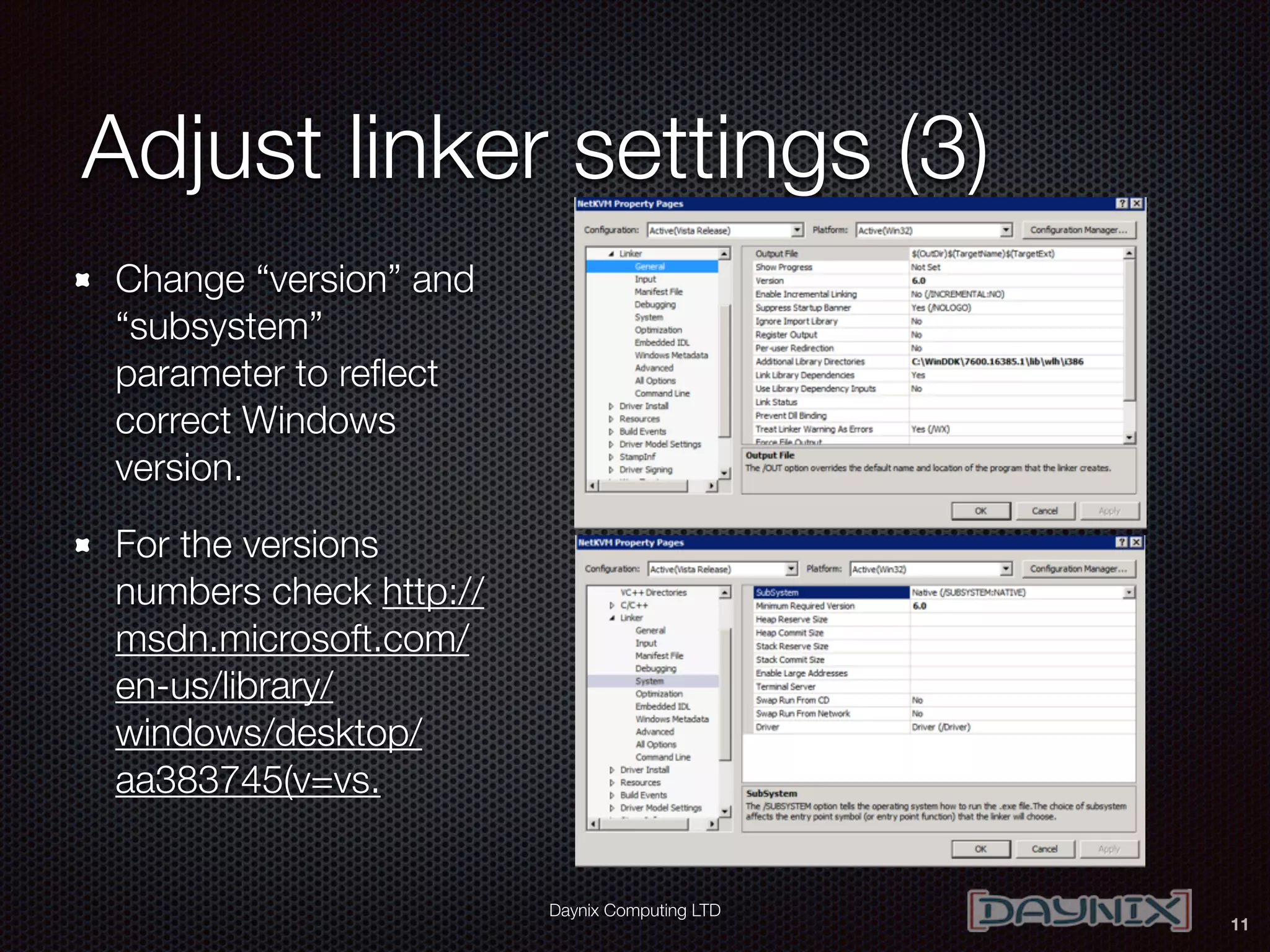
Adjust linker settings (3)
Change “version” and
“subsystem”
parameter to reflect
correct Windows
version.
For the versions
numbers check http://
msdn.microsoft.com/
en-us/library/
windows/desktop/
aa383745(v=vs.
11
Daynix Computing LTD
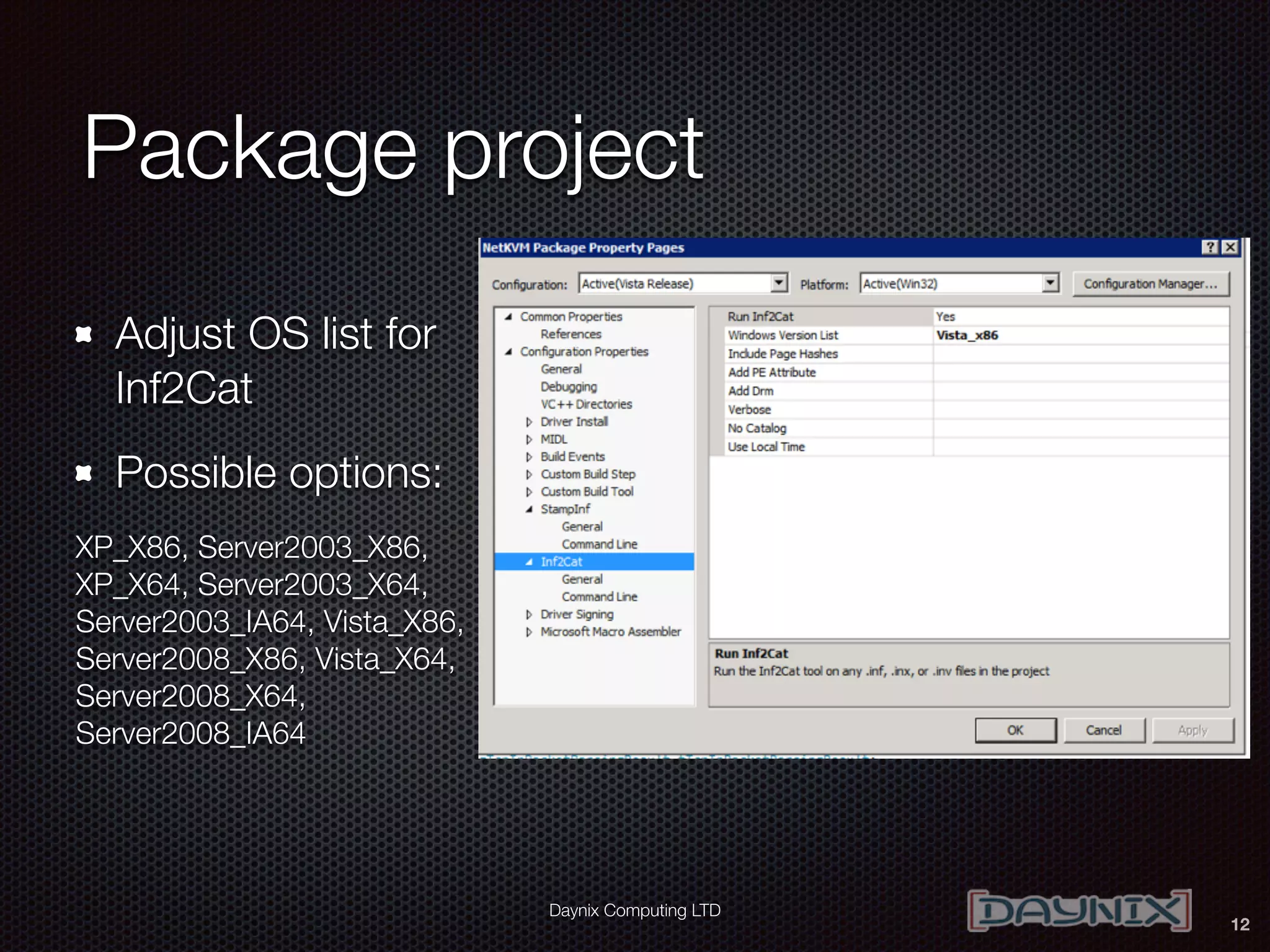
Package project
Adjust OS list for
Inf2Cat
Possible options:
XP_X86, Server2003_X86,
XP_X64, Server2003_X64,
Server2003_IA64, Vista_X86,
Server2008_X86, Vista_X64,
Server2008_X64,
Server2008_IA64
12
Daynix Computing LTD
Check command lines of
compiler and linker
Check compiler (CC++) and linker command line for
references to new WDK (Windows Kits8.1 or Windows
Kits8.0)
Check that all the version numbers reflect correct
Windows version
Fix if needed according to previous slides
13
BUILD THE DRIVER
14
Daynix Computing LTD
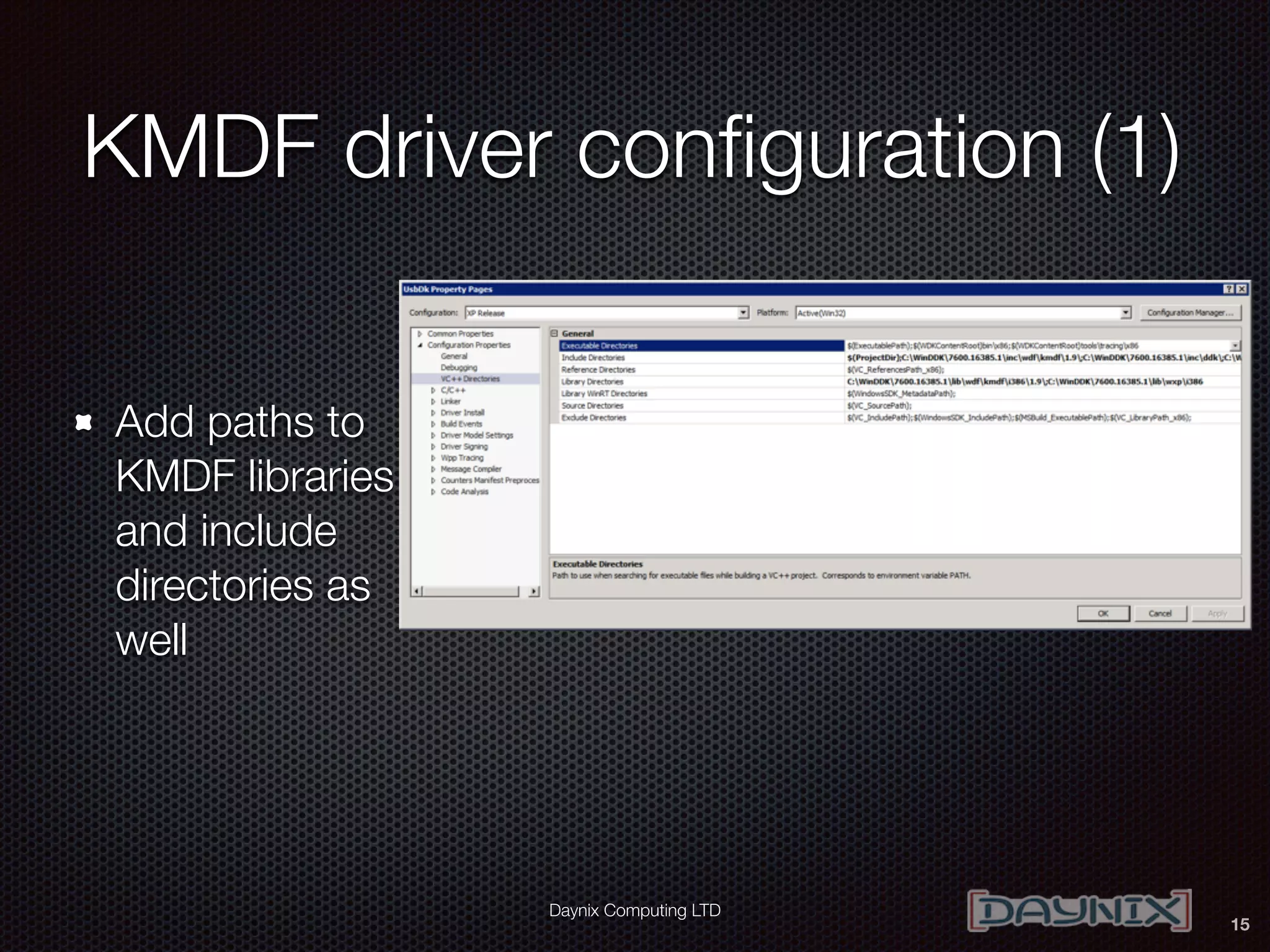
KMDF driver configuration (1)
Add paths to
KMDF libraries
and include
directories as
well
15
Daynix Computing LTD
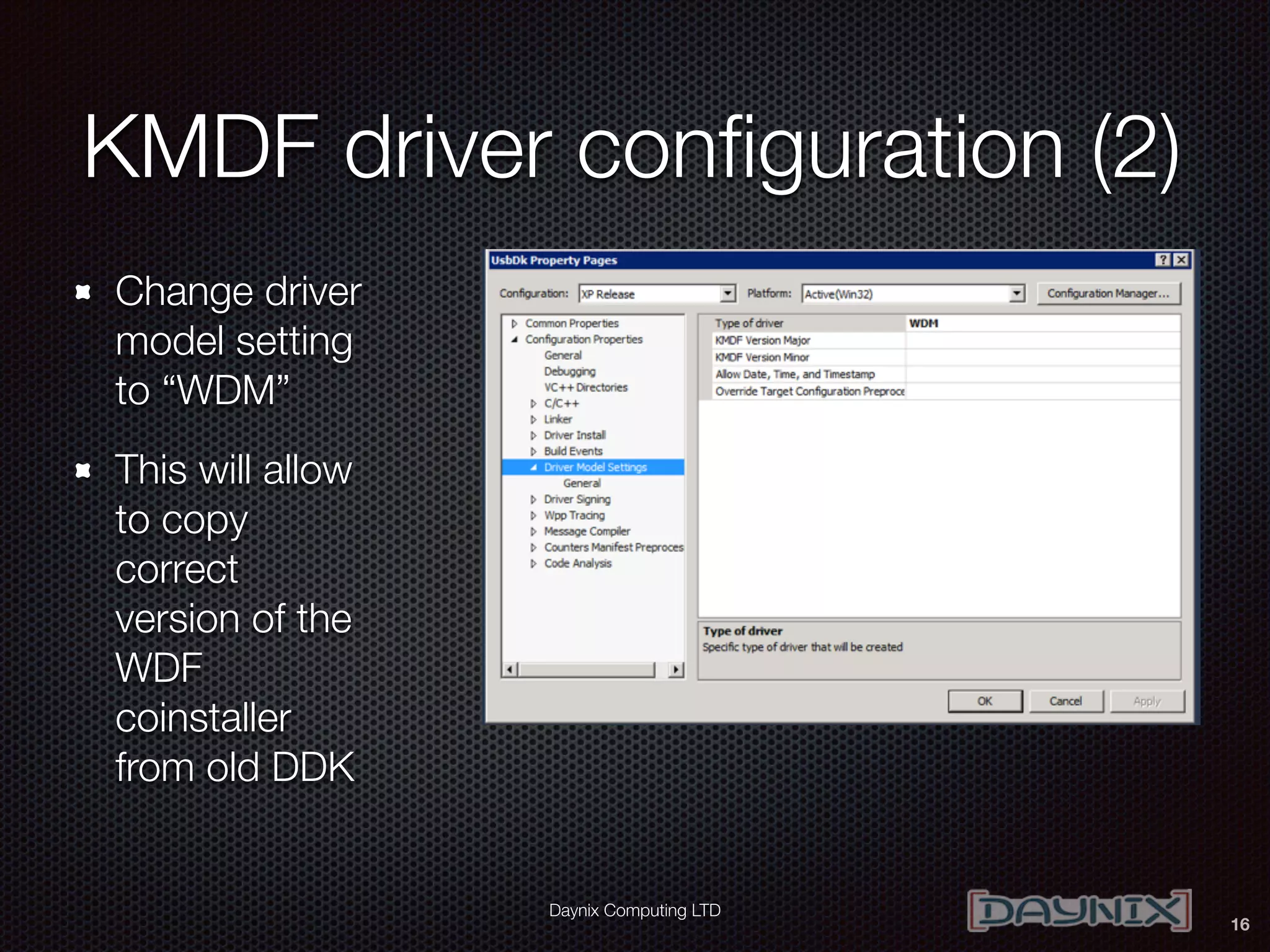
KMDF driver configuration (2)
Change driver
model setting
to “WDM”
This will allow
to copy
correct
version of the
WDF
coinstaller
from old DDK
16
Daynix Computing LTD
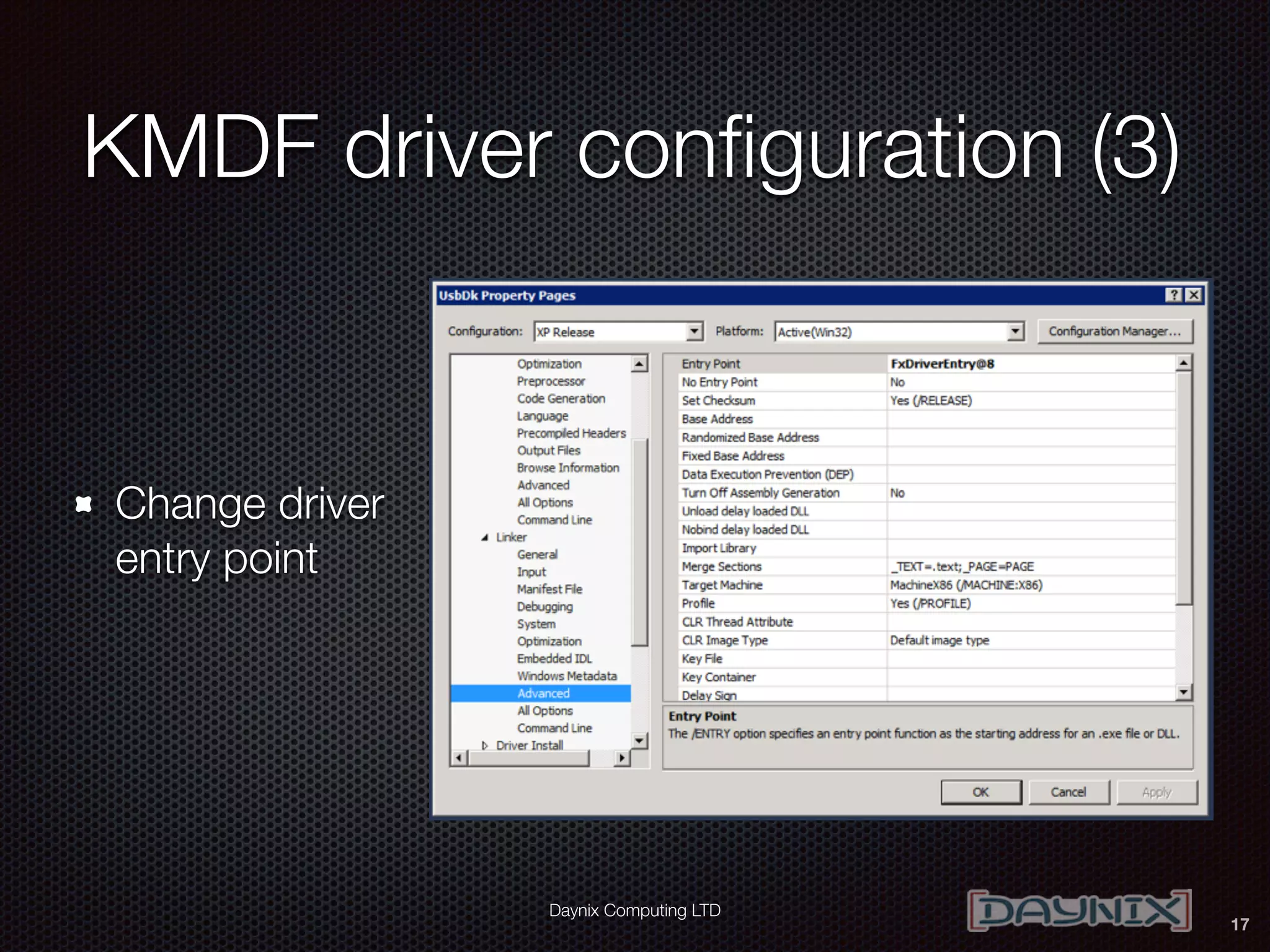
KMDF driver configuration (3)
Change driver
entry point
17
Daynix Computing LTD
KMDF driver configuration (4)
In package project add a correct version of the WDF
coinstaller from old DDK (can be a post build step or
add it as a file that is part of the package).
18
BUILD THE DRIVER
19
Daynix Computing LTD
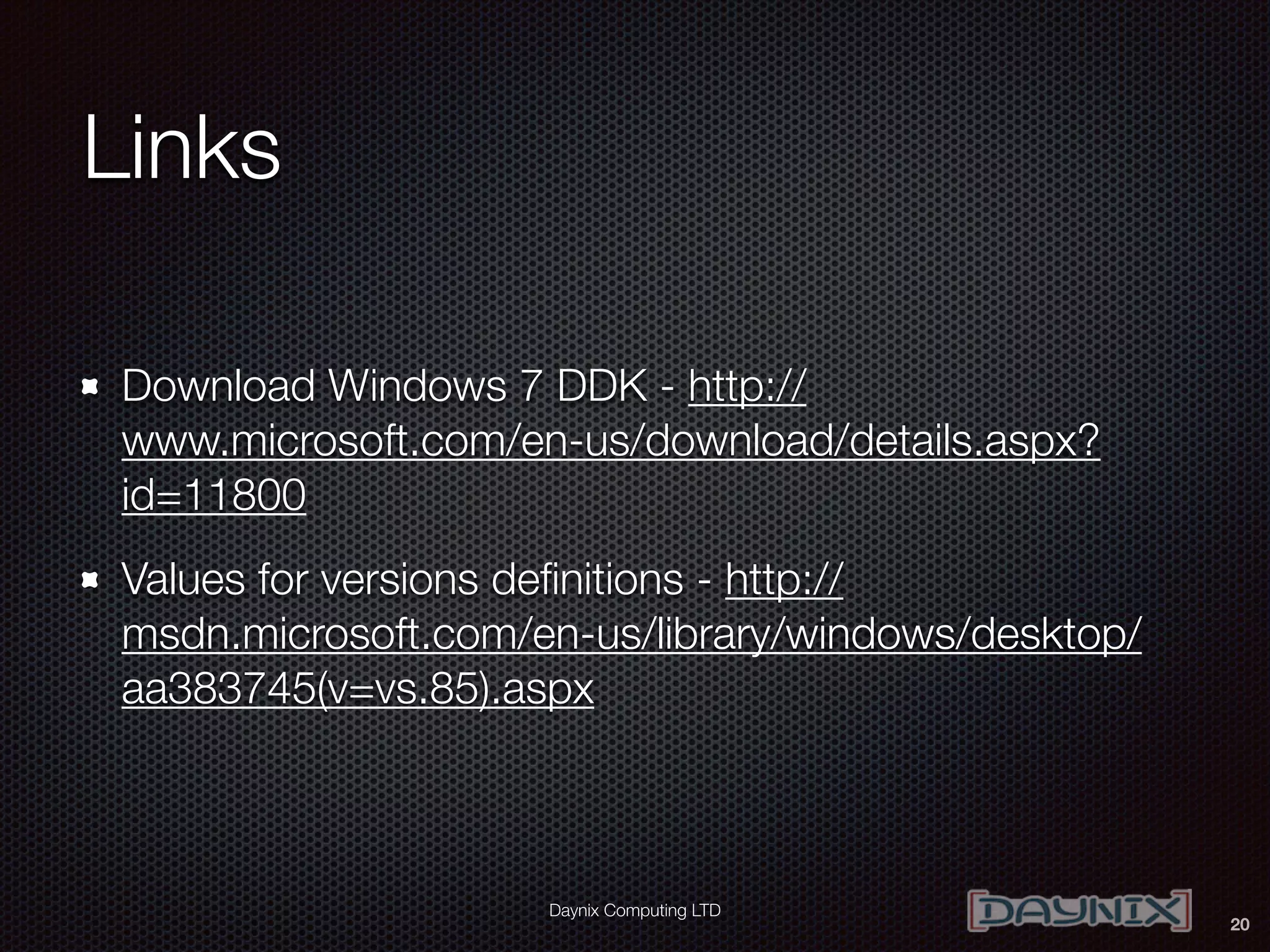
Links
Download Windows 7 DDK - http://
www.microsoft.com/en-us/download/details.aspx?
id=11800
Values for versions definitions - http://
msdn.microsoft.com/en-us/library/windows/desktop/
aa383745(v=vs.85).aspx
20

Building “old” Windows drivers (XP, Vista, 2003 and 2008) with Visual Studio 2013

  • 1.
     Building “old” Windowsdrivers (XP, Vista, 2003 and 2008) with Visual Studio 2013 Dmitry Fleytman, dmitry@daynix.com Yan Vugenfirer, yan@daynix.com Daynix Computing LTD
  • 2.
    Daynix Computing LTD Agenda Motivation XPVistaServer2003Server 2008 WDM driver step by step configuration And don’t forget KMDF 2
  • 3.
    Daynix Computing LTD Motivation Maintainsingle code base for variety of Windows OSes Build XP and Vista drivers with Visual Studio 2013 Use C++11 features of Visual Studio 2013 compiler for the development of kernel drivers 3
  • 4.
    Daynix Computing LTD Whatare the basic steps? Use VS2013 compiler Compile XP and Vista drivers using legacy DDK for include files and libraries Change appropriate preprocessor definitions Adjust linker options Adjust packaging for KMDF 4
  • 5.
    Daynix Computing LTD Createconfiguration Create configuration for desired OS and platform by copying existing configuration (for example Windows 7) 5
  • 6.
    Daynix Computing LTD Adjustincludes and libraries paths Include directories (when using Win7 DDK): C:WinDDK7600.16385.1incddk;C:WinDDK 7600.16385.1inccrt;C:WinDDK7600.16385.1incapi 6
  • 7.
    Daynix Computing LTD Adjustlibraries path 7 XP 32bit C:WinDDK7600.16385.1libwxpi386 Windows Server 32 bit C:WinDDK7600.16385.1libwneti386 Windows Server 64 bit C:WinDDK7600.16385.1libwnet amd64 Vista 32bit C:WinDDK7600.16385.1libwlhi386 Vista 64bit C:WinDDK7600.16385.1libwlhamd64 Change your libraries path according to the following table:
  • 8.
    Daynix Computing LTD Adjustpreprocessor definitions Use the following link to set correct versions according to the target OS for: WINVER NTDDI_VERSION _WIN32_WINNT Example for Windows Vista: _WIN32_WINNT=0x0600;WINVER=0x0600;NTDDI_VERSIO N=0x06000000 8
  • 9.
    Daynix Computing LTD Adjustlinker settings (1) Adjust “Additional Library Directories” to point to legacy DDK directory according to your platform (see also “Adjust libraries path” slide) 9
  • 10.
    Daynix Computing LTD Adjustlinker settings (2) Change “Additional dependencies” to reflect needed libraries The screenshot is an example of NDIS miniport driver For WDM driver remove ndis.lib and add wdm.lib 10
  • 11.
    Daynix Computing LTD Adjustlinker settings (3) Change “version” and “subsystem” parameter to reflect correct Windows version. For the versions numbers check http:// msdn.microsoft.com/ en-us/library/ windows/desktop/ aa383745(v=vs. 11
  • 12.
    Daynix Computing LTD Packageproject Adjust OS list for Inf2Cat Possible options: XP_X86, Server2003_X86, XP_X64, Server2003_X64, Server2003_IA64, Vista_X86, Server2008_X86, Vista_X64, Server2008_X64, Server2008_IA64 12
  • 13.
    Daynix Computing LTD Checkcommand lines of compiler and linker Check compiler (CC++) and linker command line for references to new WDK (Windows Kits8.1 or Windows Kits8.0) Check that all the version numbers reflect correct Windows version Fix if needed according to previous slides 13
  • 14.
  • 15.
    Daynix Computing LTD KMDFdriver configuration (1) Add paths to KMDF libraries and include directories as well 15
  • 16.
    Daynix Computing LTD KMDFdriver configuration (2) Change driver model setting to “WDM” This will allow to copy correct version of the WDF coinstaller from old DDK 16
  • 17.
    Daynix Computing LTD KMDFdriver configuration (3) Change driver entry point 17
  • 18.
    Daynix Computing LTD KMDFdriver configuration (4) In package project add a correct version of the WDF coinstaller from old DDK (can be a post build step or add it as a file that is part of the package). 18
  • 19.
  • 20.
    Daynix Computing LTD Links DownloadWindows 7 DDK - http:// www.microsoft.com/en-us/download/details.aspx? id=11800 Values for versions definitions - http:// msdn.microsoft.com/en-us/library/windows/desktop/ aa383745(v=vs.85).aspx 20