Introduction to Embedded Linux
and Device Drivers
www.definecareer.com
What is an Embedded system?
An embedded system is a special-purpose computer
system designed to perform one or a few dedicated
functions, often with real-time computing constraints.
 It is usually embedded as part of a complete device
including hardware and mechanical parts.
In contrast, a general-purpose computer, such as a
personal computer, can do many different tasks
depending on programming.
Embedded systems control many of the common
devices in use today.
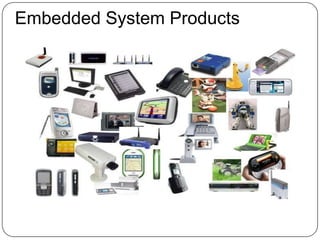
Embedded System Products
Linux
The Free Software and Open Source world offers a
broad range of tools to develop embedded systems.
Advantages
Reuse of existing components for the base system
Allows to focus on the added value of the product.
High quality, proven components (Linux kernel, C
libraries...)
Complete control on the choice of components
Modifications possible without external constraints
Community support: tutorials, mailing lists...
Low cost, in particular no per-unit royalties.
Potentially less legal issues.
Easier access to software and tools.
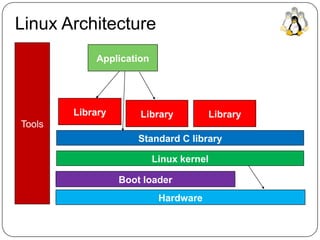
Linux Architecture
Hardware
Boot loader
Linux kernel
Standard C library
Library Library Library
Application
Tools
Embedded Hardware
Hardware for embedded systems is often different
from hardware for classical systems.
Often a different CPU architecture: ARM, MIPS or
PowerPC. Intel atom based on x86 arch is also used.
Storage on flash : NOR or NAND type, often with
limited capacity (from a few hundreds of MB to few
GB)
Limited RAM capacity (from a few tens of MB to
several hundreds of MB)
Many interconnect buses generally not often found
on the desktop: I2C, SPI, SSP, CAN, etc.
Minimum System HW Req
A CPU supported by gcc and the Linux kernel
32 bit CPU
MMU-less CPUs are also supported, through the
uClinux project.
A few MB of RAM (4 MB), 8 MB are needed to
really do something.
Linux isn't designed for small microcontrollers that
just have a few tens or hundreds of KB of flash and
RAM.
Base metal, no OS
Reduced systems, such as FreeRTOS , Nucleus
SW Comp’s Req for Development
Cross-compilation tool chain
Compiler that runs on the development machine, but
generates code for the target
Bootloader
Started by the hardware, responsible for basic
initialization, loading and executing the kernel
Linux Kernel
Contains the process and memory management,
network stack, device drivers and provides services to
userspace applications
C library
The interface between the kernel and the userspace
applications
Libraries and applications
Third-party or in-house
Driver Development
Kernel Architecture for Device Drivers
Embedded Linux Driver
Development
Kernel and Device Drivers
Application
System call interface
Framework
Driver
Bus infrastructure
Hardware
Userspace
Kernel
Unified Device Model
The 2.6 kernel included a significant new feature: a unified device
Model :
 Instead of having different ad-hoc mechanisms in the various
subsystems, the device model unifies the description of the
devices and their topology
 Minimization of code duplication
 Common facilities (reference counting, event notification,
power management, etc.)
 Enumerate the devices, view their interconnections, link
the devices to their buses and drivers, etc.
 Understanding the device model is necessary to understand
how device drivers fit into the Linux kernel architecture.
Bus Drivers
 The first component of the device model is the bus driver;
 One bus driver for each type of bus: USB, PCI, SPI, MMC, I2C, etc.
 It is responsible for:
 Registering the bus type (struct bus_type)
 Allowing the registration of adapter drivers (USB controllers,
I2C adapters, etc.), able of detecting the connected devices,
and providing a communication mechanism with the devices
 Allowing the registration of device drivers (USB devices, I2C
devices, PCI devices, etc.), managing the devices
 Matching the device drivers against the devices detected by
the adapter drivers
 Provides an API to both adapter drivers and device drivers
 Defining driver and device specific structure, typically
xxx_driver and xxx_device
Example: USB Bus
USB core
Registers the bus_type structure
USB adapter
driver A
USB adapter
driver B
USB device
driver 1
USB device
driver 2
USB device
driver 3
System
USB1
USB2
DEV1 DEV2
DEV3 DEV4 DEV5
Platform Devices
 On embedded systems, devices are often not connected
through a bus allowing enumeration, hot plugging, and
providing unique identifiers for devices.
 However, we still want the devices to be part of the device
model.
 The solution to this is the platform driver / platform device
infrastructure.
 The platform devices are the devices that are directly
connected to the CPU, without any kind of bus.
Linux DD Course Content
Overview
Understanding the Linux kernel
 Understanding the development process
 Kernel Internals
 Root file system development from scratch
 Developing Linux device drivers
 Driver architecture
 Development of char driver
 Working with the kernel development community
 Practical labs with ARM boards as well as emulated
PC systems
 Duration
 50 hrs
For further queries/enquiries contact :training@definecareer.com
Thank you!

Introduction to embedded linux device driver and firmware

  • 1.
    Introduction to EmbeddedLinux and Device Drivers www.definecareer.com
  • 2.
    What is anEmbedded system? An embedded system is a special-purpose computer system designed to perform one or a few dedicated functions, often with real-time computing constraints.  It is usually embedded as part of a complete device including hardware and mechanical parts. In contrast, a general-purpose computer, such as a personal computer, can do many different tasks depending on programming. Embedded systems control many of the common devices in use today.
  • 3.
  • 4.
    Linux The Free Softwareand Open Source world offers a broad range of tools to develop embedded systems. Advantages Reuse of existing components for the base system Allows to focus on the added value of the product. High quality, proven components (Linux kernel, C libraries...) Complete control on the choice of components Modifications possible without external constraints Community support: tutorials, mailing lists... Low cost, in particular no per-unit royalties. Potentially less legal issues. Easier access to software and tools.
  • 5.
    Linux Architecture Hardware Boot loader Linuxkernel Standard C library Library Library Library Application Tools
  • 6.
    Embedded Hardware Hardware forembedded systems is often different from hardware for classical systems. Often a different CPU architecture: ARM, MIPS or PowerPC. Intel atom based on x86 arch is also used. Storage on flash : NOR or NAND type, often with limited capacity (from a few hundreds of MB to few GB) Limited RAM capacity (from a few tens of MB to several hundreds of MB) Many interconnect buses generally not often found on the desktop: I2C, SPI, SSP, CAN, etc.
  • 7.
    Minimum System HWReq A CPU supported by gcc and the Linux kernel 32 bit CPU MMU-less CPUs are also supported, through the uClinux project. A few MB of RAM (4 MB), 8 MB are needed to really do something. Linux isn't designed for small microcontrollers that just have a few tens or hundreds of KB of flash and RAM. Base metal, no OS Reduced systems, such as FreeRTOS , Nucleus
  • 8.
    SW Comp’s Reqfor Development Cross-compilation tool chain Compiler that runs on the development machine, but generates code for the target Bootloader Started by the hardware, responsible for basic initialization, loading and executing the kernel Linux Kernel Contains the process and memory management, network stack, device drivers and provides services to userspace applications C library The interface between the kernel and the userspace applications Libraries and applications Third-party or in-house
  • 9.
    Driver Development Kernel Architecturefor Device Drivers Embedded Linux Driver Development
  • 10.
    Kernel and DeviceDrivers Application System call interface Framework Driver Bus infrastructure Hardware Userspace Kernel
  • 11.
    Unified Device Model The2.6 kernel included a significant new feature: a unified device Model :  Instead of having different ad-hoc mechanisms in the various subsystems, the device model unifies the description of the devices and their topology  Minimization of code duplication  Common facilities (reference counting, event notification, power management, etc.)  Enumerate the devices, view their interconnections, link the devices to their buses and drivers, etc.  Understanding the device model is necessary to understand how device drivers fit into the Linux kernel architecture.
  • 12.
    Bus Drivers  Thefirst component of the device model is the bus driver;  One bus driver for each type of bus: USB, PCI, SPI, MMC, I2C, etc.  It is responsible for:  Registering the bus type (struct bus_type)  Allowing the registration of adapter drivers (USB controllers, I2C adapters, etc.), able of detecting the connected devices, and providing a communication mechanism with the devices  Allowing the registration of device drivers (USB devices, I2C devices, PCI devices, etc.), managing the devices  Matching the device drivers against the devices detected by the adapter drivers  Provides an API to both adapter drivers and device drivers  Defining driver and device specific structure, typically xxx_driver and xxx_device
  • 13.
    Example: USB Bus USBcore Registers the bus_type structure USB adapter driver A USB adapter driver B USB device driver 1 USB device driver 2 USB device driver 3 System USB1 USB2 DEV1 DEV2 DEV3 DEV4 DEV5
  • 14.
    Platform Devices  Onembedded systems, devices are often not connected through a bus allowing enumeration, hot plugging, and providing unique identifiers for devices.  However, we still want the devices to be part of the device model.  The solution to this is the platform driver / platform device infrastructure.  The platform devices are the devices that are directly connected to the CPU, without any kind of bus.
  • 15.
    Linux DD CourseContent Overview Understanding the Linux kernel  Understanding the development process  Kernel Internals  Root file system development from scratch  Developing Linux device drivers  Driver architecture  Development of char driver  Working with the kernel development community  Practical labs with ARM boards as well as emulated PC systems  Duration  50 hrs For further queries/enquiries contact :training@definecareer.com
  • 16.