VOICE BASED HOME AUTOMATION
Department of Electronics and Communication
5th
Semester
‘A’ Section
Submitted By:
SUMUKHATHREY - 1DS13EC035
BHARATR. HEGDE - 1DS13EC037
BASAVRAJMOOLI - 1DS13EC036
INTRODUCTION:
The Internet of Things (IoT) is the network of physical
objects or "things" embedded with electronics, software, sensors,
and network connectivity, which enables these objects to collect and
exchange data. IoT allows objects to be sensed and controlled remotely
across existing network infrastructure, creating opportunities for more
direct integration between the physical world and computer-based
systems, and resulting in improved efficiency, accuracy and economic
benefit. Home automation is one of the major areas where IoT can have a
stronghold.
In the recent years, the Home automation system has
seen a rapid change due to introduction of various wireless technologies.
The wireless home automation system is an integrated system to
facilitate elderly and disabled people with an easy-to-use home
automation system that can be fully operated based on speech commands.
The system is portable and constructed in a way that is easy to install,
configure, run, and maintain.
A typical wireless home automation system allows one to
control house hold appliances from a centralized control unit which is
wireless. These appliances usually have to be specially designed to be
compatible with each other and with the control unit for most
commercially available home automation systems. The project
demonstrates a system that can be integrated as a single portable unit
and allows one to wirelessly control lights, fans, air conditioners,
television sets, security cameras, electronic doors, computer systems,
audio/visual equipment’s etc. and turn on or off any appliance that is
plugged into a wall outlet, get the status of different sensors and take
decision accordingly.
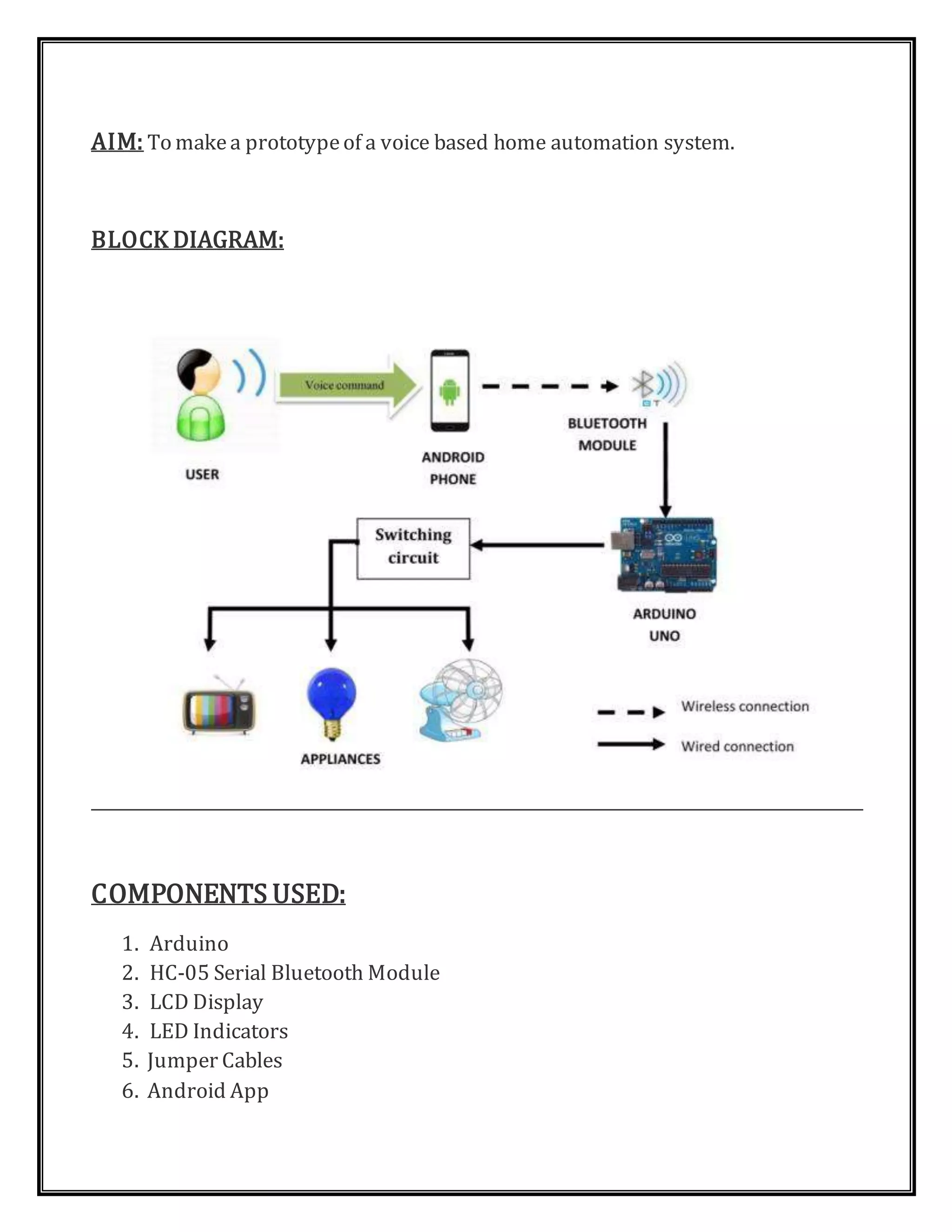
AIM: To makea prototypeof a voice based home automation system.
BLOCK DIAGRAM:
COMPONENTS USED:
1. Arduino
2. HC-05 Serial Bluetooth Module
3. LCD Display
4. LED Indicators
5. Jumper Cables
6. Android App
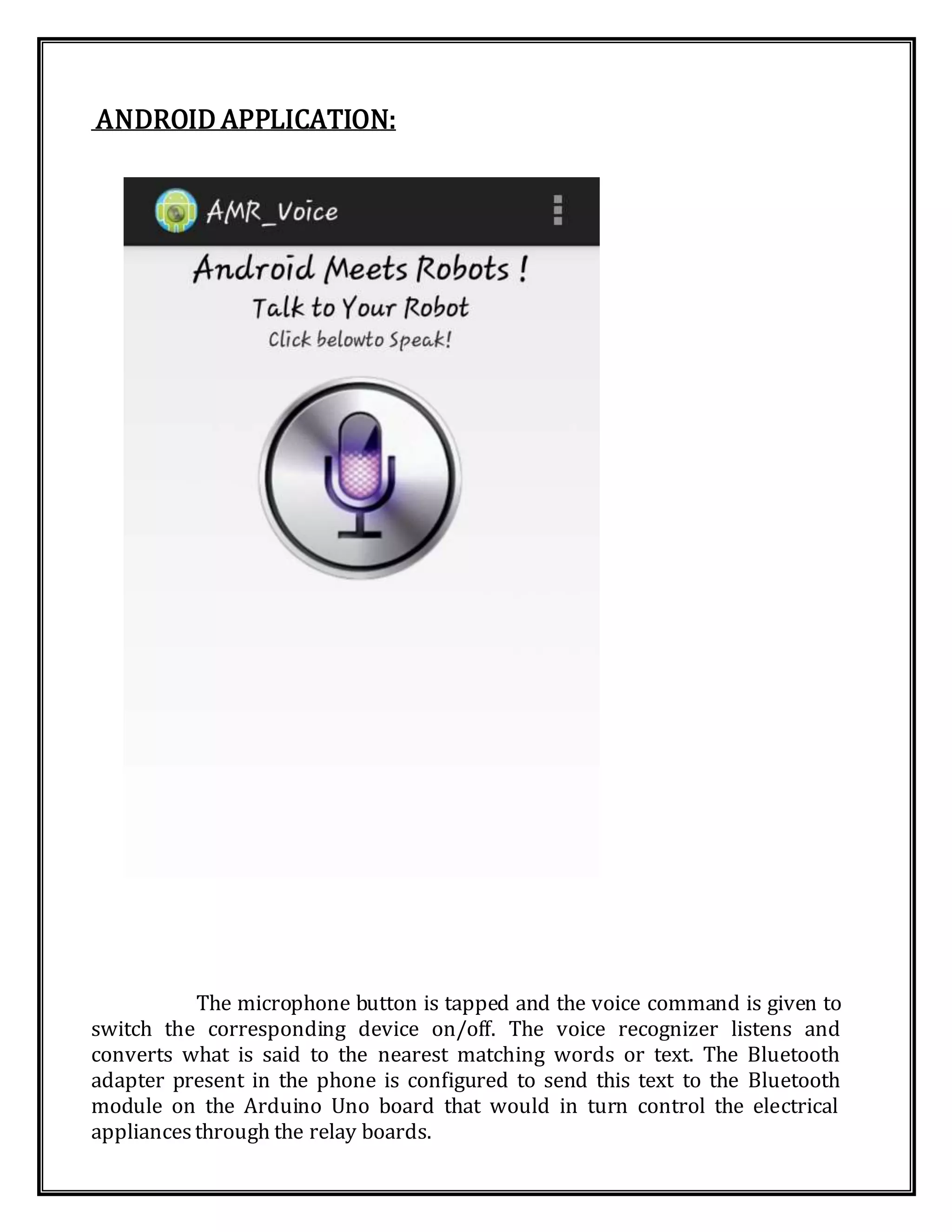
ANDROID APPLICATION:
The microphone button is tapped and the voice command is given to
switch the corresponding device on/off. The voice recognizer listens and
converts what is said to the nearest matching words or text. The Bluetooth
adapter present in the phone is configured to send this text to the Bluetooth
module on the Arduino Uno board that would in turn control the electrical
appliancesthrough the relay boards.
PROCEDURE:
1. Connectthe HC-05 bluetooth moduleto Arduino board asshown.
2. Connectthe LCD display.Theconnections for LCD display are as follows:
 LCD RS pin to digital pin 12
 LCD Enable pin to digital pin 11
 LCD D4 pin to digital pin 5
 LCD D5 pin to digital pin 4
 LCD D6 pin to digital pin 3
 LCD D7 pin to digital pin 2
 LCD R/W pin to ground
3. ConnectLEDs to show the status of the devices.
4. Load the codeto Arduino board and run it.
PROGRAM:
// includethe library code:
#include<LiquidCrystal.h>
// initialize the library with the numbersof the interface pins
LiquidCrystallcd(12, 11, 5, 4, 3, 2);
String voice;
int light1=6;
int light2=7;
int fan1=8;
int fan2=9;
void setup(){
// set up the LCD'snumber of columnsand rows:
lcd.begin(16, 2);
// initialize the serial communications:
Serial.begin(9600);
pinMode(light1,OUTPUT);
pinMode(light2,OUTPUT);
pinMode(fan1,OUTPUT);
pinMode(fan2,OUTPUT);
}
void loop()
{
while(Serial.available())
{
delay(10);
char c=Serial.read();
if(c=='#')
{
break;
}
voice+=c;
}
if(voice.length()>0)
{
Serial.println(voice);
//String one=voice.substring(0,16);
if(voice=="on light 1"){digitalWrite(light1,HIGH);}
else if(voice=="off light 1"){digitalWrite(light1,LOW);}
else if(voice=="on light 2"){digitalWrite(light2,HIGH);}
else if(voice=="off light 2"){digitalWrite(light2,LOW);}
else if(voice=="on fan 1"){digitalWrite(fan1,HIGH);}
else if(voice=="on fan 1"){digitalWrite(fan1,LOW);}
else if(voice=="on fan 2"){digitalWrite(fan2,HIGH);}
else if(voice=="on fan 2"){digitalWrite(fan2,LOW);}
else if(voice=="all
on"){digitalWrite(light1,HIGH);digitalWrite(light2,HIGH);digitalWrite(fan1,H
IGH);digitalWrite(fan2,HIGH);}
else if(voice=="all
of"){digitalWrite(light1,LOW);digitalWrite(light2,LOW);digitalWrite(fan1,LO
W);digitalWrite(fan2,LOW);}
voice="";
// when characters arriveover the serial port.
if (Serial.available())
{
// wait a bit for the entire message to arrive
delay(100);
// clear the screen
lcd.clear();
// read all the available characters
while (Serial.available() > 0) {
// display each character to the LCD
lcd.write(Serial.read());
}
}
}
FUTUREDEVELOPMENT :
Further development can be implemented in the system by using a ZigBee
wireless communication module instead of a Bluetooth module. ZigBee is an
IEEE 802.15.4 standard for data communications with business and consumer
devices. Zigbee is targeted at applications that require low data rate, long
battery life, and securenetworking. Zigbee has a defined rate of 250 kbits/s, best
suited for periodic or intermittent data or a single signal transmission from a
sensor or inputdevice.
Further we can control actual AC appliances with the help of relays, which
can be switched on or off usingthe Arduino board.
CONCLUSION:
Voice based home automation system is successfully implemented using
Arduino. Establishing the system with little modifications could bring revolutionary
change in the way we interact with our home appliances.

Voice Based Home Automation

  • 1.
    VOICE BASED HOMEAUTOMATION Department of Electronics and Communication 5th Semester ‘A’ Section Submitted By: SUMUKHATHREY - 1DS13EC035 BHARATR. HEGDE - 1DS13EC037 BASAVRAJMOOLI - 1DS13EC036
  • 2.
    INTRODUCTION: The Internet ofThings (IoT) is the network of physical objects or "things" embedded with electronics, software, sensors, and network connectivity, which enables these objects to collect and exchange data. IoT allows objects to be sensed and controlled remotely across existing network infrastructure, creating opportunities for more direct integration between the physical world and computer-based systems, and resulting in improved efficiency, accuracy and economic benefit. Home automation is one of the major areas where IoT can have a stronghold. In the recent years, the Home automation system has seen a rapid change due to introduction of various wireless technologies. The wireless home automation system is an integrated system to facilitate elderly and disabled people with an easy-to-use home automation system that can be fully operated based on speech commands. The system is portable and constructed in a way that is easy to install, configure, run, and maintain. A typical wireless home automation system allows one to control house hold appliances from a centralized control unit which is wireless. These appliances usually have to be specially designed to be compatible with each other and with the control unit for most commercially available home automation systems. The project demonstrates a system that can be integrated as a single portable unit and allows one to wirelessly control lights, fans, air conditioners, television sets, security cameras, electronic doors, computer systems, audio/visual equipment’s etc. and turn on or off any appliance that is plugged into a wall outlet, get the status of different sensors and take decision accordingly.
  • 3.
    AIM: To makeaprototypeof a voice based home automation system. BLOCK DIAGRAM: COMPONENTS USED: 1. Arduino 2. HC-05 Serial Bluetooth Module 3. LCD Display 4. LED Indicators 5. Jumper Cables 6. Android App
  • 4.
    ANDROID APPLICATION: The microphonebutton is tapped and the voice command is given to switch the corresponding device on/off. The voice recognizer listens and converts what is said to the nearest matching words or text. The Bluetooth adapter present in the phone is configured to send this text to the Bluetooth module on the Arduino Uno board that would in turn control the electrical appliancesthrough the relay boards.
  • 5.
    PROCEDURE: 1. Connectthe HC-05bluetooth moduleto Arduino board asshown. 2. Connectthe LCD display.Theconnections for LCD display are as follows:  LCD RS pin to digital pin 12  LCD Enable pin to digital pin 11  LCD D4 pin to digital pin 5  LCD D5 pin to digital pin 4  LCD D6 pin to digital pin 3  LCD D7 pin to digital pin 2  LCD R/W pin to ground 3. ConnectLEDs to show the status of the devices. 4. Load the codeto Arduino board and run it.
  • 6.
    PROGRAM: // includethe librarycode: #include<LiquidCrystal.h> // initialize the library with the numbersof the interface pins LiquidCrystallcd(12, 11, 5, 4, 3, 2); String voice; int light1=6; int light2=7; int fan1=8; int fan2=9; void setup(){ // set up the LCD'snumber of columnsand rows: lcd.begin(16, 2); // initialize the serial communications: Serial.begin(9600); pinMode(light1,OUTPUT); pinMode(light2,OUTPUT); pinMode(fan1,OUTPUT); pinMode(fan2,OUTPUT); } void loop() { while(Serial.available()) { delay(10); char c=Serial.read(); if(c=='#')
  • 7.
    { break; } voice+=c; } if(voice.length()>0) { Serial.println(voice); //String one=voice.substring(0,16); if(voice=="on light1"){digitalWrite(light1,HIGH);} else if(voice=="off light 1"){digitalWrite(light1,LOW);} else if(voice=="on light 2"){digitalWrite(light2,HIGH);} else if(voice=="off light 2"){digitalWrite(light2,LOW);} else if(voice=="on fan 1"){digitalWrite(fan1,HIGH);} else if(voice=="on fan 1"){digitalWrite(fan1,LOW);} else if(voice=="on fan 2"){digitalWrite(fan2,HIGH);} else if(voice=="on fan 2"){digitalWrite(fan2,LOW);} else if(voice=="all on"){digitalWrite(light1,HIGH);digitalWrite(light2,HIGH);digitalWrite(fan1,H IGH);digitalWrite(fan2,HIGH);} else if(voice=="all of"){digitalWrite(light1,LOW);digitalWrite(light2,LOW);digitalWrite(fan1,LO W);digitalWrite(fan2,LOW);} voice=""; // when characters arriveover the serial port. if (Serial.available()) { // wait a bit for the entire message to arrive delay(100); // clear the screen lcd.clear(); // read all the available characters while (Serial.available() > 0) { // display each character to the LCD lcd.write(Serial.read()); } }
  • 8.
    } FUTUREDEVELOPMENT : Further developmentcan be implemented in the system by using a ZigBee wireless communication module instead of a Bluetooth module. ZigBee is an IEEE 802.15.4 standard for data communications with business and consumer devices. Zigbee is targeted at applications that require low data rate, long battery life, and securenetworking. Zigbee has a defined rate of 250 kbits/s, best suited for periodic or intermittent data or a single signal transmission from a sensor or inputdevice. Further we can control actual AC appliances with the help of relays, which can be switched on or off usingthe Arduino board. CONCLUSION: Voice based home automation system is successfully implemented using Arduino. Establishing the system with little modifications could bring revolutionary change in the way we interact with our home appliances.