- ICRA2017 Workshop -
Index
1. Overview
2. Features
3. rosserial
4. Development
5. Examples
6. Demo
2
What is OpenCR?
3
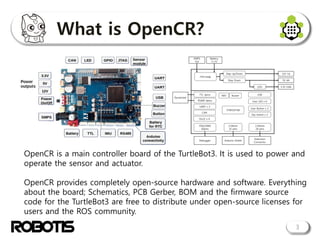
OpenCR is a main controller board of the TurtleBot3. It is used to power and
operate the sensor and actuator.
OpenCR provides completely open-source hardware and software. Everything
about the board; Schematics, PCB Gerber, BOM and the firmware source
code for the TurtleBot3 are free to distribute under open-source licenses for
users and the ROS community.
Features
• High performance
4
Using ST's STM32F746, OpenCR is a high-performance
microcontroller running at up to 216MHz using the Cortex-M7
core at the top of ARM microcontrollers. It can also be used
to process large amounts of data by utilizing algorithms and
various peripherals that require high-speed operation.
• Arduino support
OpenCR is developed by Arduino IDE and supports Linux / Mac
/ Windows. You can easily build a development environment
and use most libraries and source code written for Arduino.
Features
5
• Various interfaces
Dynamixels can be used via TTL and RS485. In addition, it
supports UART / CAN communication interface and has
additional GPIO.
• IMU Sensor
The gyroscope / accelerometer / magnetometer sensors
(MPU9250) are built into the board. It can be applied to
various applications using IMU.
Features
6
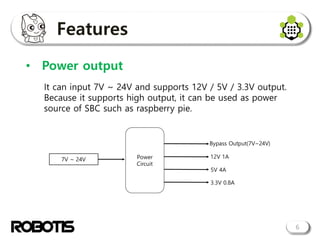
• Power output
It can input 7V ~ 24V and supports 12V / 5V / 3.3V output.
Because it supports high output, it can be used as power
source of SBC such as raspberry pie.
Features
7
• Power hot swap
If you connect the SMPS power while using the battery, the
board power automatically switches from battery power to
SMPS power. By using OpenCR, it is possible to switch to
battery or SMPS without power shutdown.
Features
8
• Open-source
The boot loader / firmware and the PCB Gerber needed for
hardware production are also available on github. Therefore,
the user can make a new change by changing it as needed
https://github.com/ROBOTIS-GIT/OpenCR
https://github.com/ROBOTIS-GIT/OpenCR-Hardware
More information is available through the OpenCR wiki.
https://github.com/ROBOTIS-GIT/OpenCR/wiki
rosserial
9
The rosserial is a package that converts ROS messages, topics,
and services to be used on a serial communication basis. A
message such as rosserial is needed for message communication
between microcontroller and ROS.
The rosserial is used to connect OpenCR and TurtleBot 3 via USB.
rosserial
10
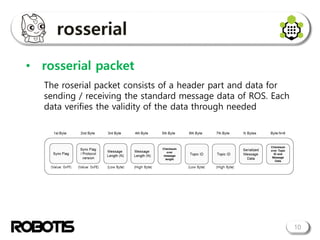
• rosserial packet
The roserial packet consists of a header part and data for
sending / receiving the standard message data of ROS. Each
data verifies the validity of the data through needed
rosserial
11
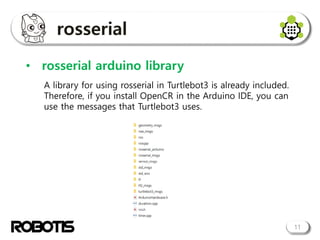
• rosserial arduino library
A library for using rosserial in Turtlebot3 is already included.
Therefore, if you install OpenCR in the Arduino IDE, you can
use the messages that Turtlebot3 uses.
Development
12
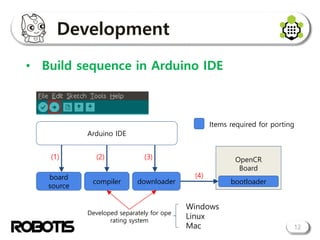
• Build sequence in Arduino IDE
Arduino IDE
OpenCR
Board
compiler
(2)
downloader
(3)
bootloader
(4)board
source
(1)
Items required for porting
Developed separately for ope
rating system
Windows
Linux
Mac
Development
13
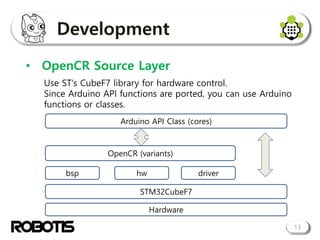
• OpenCR Source Layer
Use ST's CubeF7 library for hardware control.
Since Arduino API functions are ported, you can use Arduino
functions or classes.
Arduino API Class (cores)
STM32CubeF7
OpenCR (variants)
bsp hw driver
Hardware
Development
• Folder structure
14
Development
15
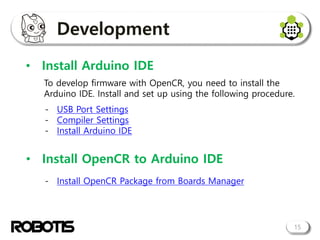
• Install Arduino IDE
- USB Port Settings
- Compiler Settings
- Install Arduino IDE
• Install OpenCR to Arduino IDE
- Install OpenCR Package from Boards Manager
To develop firmware with OpenCR, you need to install the
Arduino IDE. Install and set up using the following procedure.
Examples
16
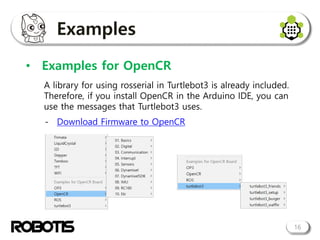
• Examples for OpenCR
A library for using rosserial in Turtlebot3 is already included.
Therefore, if you install OpenCR in the Arduino IDE, you can
use the messages that Turtlebot3 uses.
- Download Firmware to OpenCR
Demo
17
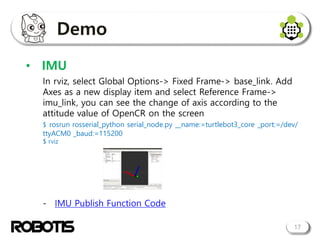
• IMU
In rviz, select Global Options-> Fixed Frame-> base_link. Add
Axes as a new display item and select Reference Frame->
imu_link, you can see the change of axis according to the
attitude value of OpenCR on the screen
$ rosrun rosserial_python serial_node.py __name:=turtlebot3_core _port:=/dev/
ttyACM0 _baud:=115200
$ rviz
- IMU Publish Function Code
18
Thank you

OpenCR tutorial_icra2017

  • 1.
  • 2.
    Index 1. Overview 2. Features 3.rosserial 4. Development 5. Examples 6. Demo 2
  • 3.
    What is OpenCR? 3 OpenCRis a main controller board of the TurtleBot3. It is used to power and operate the sensor and actuator. OpenCR provides completely open-source hardware and software. Everything about the board; Schematics, PCB Gerber, BOM and the firmware source code for the TurtleBot3 are free to distribute under open-source licenses for users and the ROS community.
  • 4.
    Features • High performance 4 UsingST's STM32F746, OpenCR is a high-performance microcontroller running at up to 216MHz using the Cortex-M7 core at the top of ARM microcontrollers. It can also be used to process large amounts of data by utilizing algorithms and various peripherals that require high-speed operation. • Arduino support OpenCR is developed by Arduino IDE and supports Linux / Mac / Windows. You can easily build a development environment and use most libraries and source code written for Arduino.
  • 5.
    Features 5 • Various interfaces Dynamixelscan be used via TTL and RS485. In addition, it supports UART / CAN communication interface and has additional GPIO. • IMU Sensor The gyroscope / accelerometer / magnetometer sensors (MPU9250) are built into the board. It can be applied to various applications using IMU.
  • 6.
    Features 6 • Power output Itcan input 7V ~ 24V and supports 12V / 5V / 3.3V output. Because it supports high output, it can be used as power source of SBC such as raspberry pie.
  • 7.
    Features 7 • Power hotswap If you connect the SMPS power while using the battery, the board power automatically switches from battery power to SMPS power. By using OpenCR, it is possible to switch to battery or SMPS without power shutdown.
  • 8.
    Features 8 • Open-source The bootloader / firmware and the PCB Gerber needed for hardware production are also available on github. Therefore, the user can make a new change by changing it as needed https://github.com/ROBOTIS-GIT/OpenCR https://github.com/ROBOTIS-GIT/OpenCR-Hardware More information is available through the OpenCR wiki. https://github.com/ROBOTIS-GIT/OpenCR/wiki
  • 9.
    rosserial 9 The rosserial isa package that converts ROS messages, topics, and services to be used on a serial communication basis. A message such as rosserial is needed for message communication between microcontroller and ROS. The rosserial is used to connect OpenCR and TurtleBot 3 via USB.
  • 10.
    rosserial 10 • rosserial packet Theroserial packet consists of a header part and data for sending / receiving the standard message data of ROS. Each data verifies the validity of the data through needed
  • 11.
    rosserial 11 • rosserial arduinolibrary A library for using rosserial in Turtlebot3 is already included. Therefore, if you install OpenCR in the Arduino IDE, you can use the messages that Turtlebot3 uses.
  • 12.
    Development 12 • Build sequencein Arduino IDE Arduino IDE OpenCR Board compiler (2) downloader (3) bootloader (4)board source (1) Items required for porting Developed separately for ope rating system Windows Linux Mac
  • 13.
    Development 13 • OpenCR SourceLayer Use ST's CubeF7 library for hardware control. Since Arduino API functions are ported, you can use Arduino functions or classes. Arduino API Class (cores) STM32CubeF7 OpenCR (variants) bsp hw driver Hardware
  • 14.
  • 15.
    Development 15 • Install ArduinoIDE - USB Port Settings - Compiler Settings - Install Arduino IDE • Install OpenCR to Arduino IDE - Install OpenCR Package from Boards Manager To develop firmware with OpenCR, you need to install the Arduino IDE. Install and set up using the following procedure.
  • 16.
    Examples 16 • Examples forOpenCR A library for using rosserial in Turtlebot3 is already included. Therefore, if you install OpenCR in the Arduino IDE, you can use the messages that Turtlebot3 uses. - Download Firmware to OpenCR
  • 17.
    Demo 17 • IMU In rviz,select Global Options-> Fixed Frame-> base_link. Add Axes as a new display item and select Reference Frame-> imu_link, you can see the change of axis according to the attitude value of OpenCR on the screen $ rosrun rosserial_python serial_node.py __name:=turtlebot3_core _port:=/dev/ ttyACM0 _baud:=115200 $ rviz - IMU Publish Function Code
  • 18.