Design and Configure
Azure Web Apps
Metro .NET User Group
January 30, 2018
Roy Kim
@RoyKimYYZ
rkim@roykim.ca
Agenda
▪ Overview of Azure App Service
▪ Design and configuration
▪ Demo
▪ Q&A
Author: Roy Kim
By: Roy Kim
Bio
▪ Roy Kim
▪ 15+ Years of Microsoft Technology Solutions
▪ Azure, SharePoint, BI, Office 365, Solutions
▪ Independent IT Consultant
▪ University of Toronto – Computer Science Degree
Author: Roy Kim
By: Roy Kim
Questions to Audience
By: Roy Kim roykim.ca
1. How many are currently using Azure App Service in your organization?
1. For what scenarios and solutions?
2. What are benefits seen?
2. How many are not using Azure App Service?
1. What are blockers to adopt?
3. How many are learning and planning to use Azure App Service
We can discuss more into these questions into the presentation
What is Azure App Service?
By: Roy Kim roykim.ca
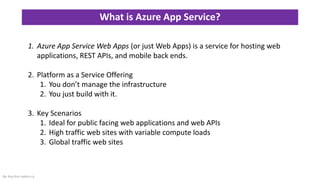
1. Azure App Service Web Apps (or just Web Apps) is a service for hosting web
applications, REST APIs, and mobile back ends.
2. Platform as a Service Offering
1. You don’t manage the infrastructure
2. You just build with it.
3. Key Scenarios
1. Ideal for public facing web applications and web APIs
2. High traffic web sites with variable compute loads
3. Global traffic web sites
What are Key Features?
By: Roy Kim roykim.ca
https://docs.microsoft.com/en-us/azure/app-service/app-
service-web-overview
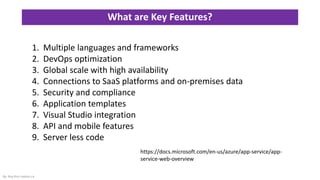
1. Multiple languages and frameworks
2. DevOps optimization
3. Global scale with high availability
4. Connections to SaaS platforms and on-premises data
5. Security and compliance
6. Application templates
7. Visual Studio integration
8. API and mobile features
9. Server less code
Key Design and Configuration Elements
By: Roy Kim roykim.ca
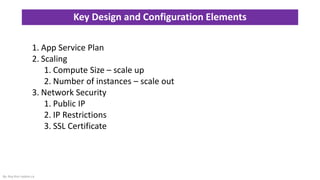
1. App Service Plan
2. Scaling
1. Compute Size – scale up
2. Number of instances – scale out
3. Network Security
1. Public IP
2. IP Restrictions
3. SSL Certificate
Key Design and Configuration Elements
By: Roy Kim roykim.ca
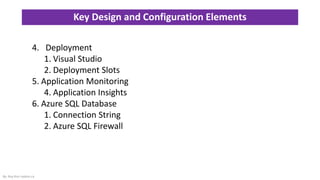
4. Deployment
1. Visual Studio
2. Deployment Slots
5. Application Monitoring
4. Application Insights
6. Azure SQL Database
1. Connection String
2. Azure SQL Firewall
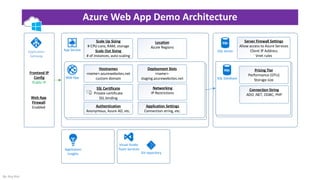
Azure Web App Demo Architecture
By: Roy Kim
Application
Gateway
Frontend IP
Config
Public IP
Web App
Hostnames
<name>.azurewebsites.net
custom domain
Web App
FIrewall
Enabled
App Service
Scale Up Sizing
# CPU core, RAM, storage
Scale Out Sizing
# of instances, auto scaling
Application
Insights
Location
Azure Regions
Deployment Slots
<name>-
staging.azurewebsites.net
SSL Certificate
Private certificate
SSL binding
Networking
IP Restrictions
Authentication
Anonymous, Azure AD, etc.
Server Firewall Settings
Allow access to Azure Services
Client IP Address
Vnet rules
Git repository
Visual Studio
Team Services
SQL Server
Pricing Tier
Performance (DTU)
Storage size
Connection String
ADO .NET, ODBC, PHP
SQL Database
Application Settings
Connection string, etc.
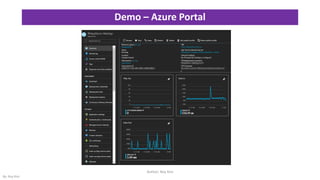
Demo – Azure Portal
Author: Roy Kim
By: Roy Kim
Closing Remarks
▪ Azure Web Apps
▪ Quick to setup
▪ Infrastructure needs are configurable and SLAs are out of the box.
▪ Still need to consider very fine details such as
security, networking, deployment and scaling as you move into
production environment
By: Roy Kim
Call To Action
▪ Get started with Azure Free Trials
▪ Simple Tutorials
▪ Build a .NET Core and SQL Database web app
▪ Designing
▪ Design principles for Azure applications
▪ Best Practices for Azure App Service
▪ Securing PaaS web and mobile applications using Azure App Service
▪ ”Learning is by doing” – Roy Kim
By: Roy Kim
Q & A
By: Roy Kim
• @RoyKimYYZ
• rkim@roykim.ca
roykim.ca

Design and Configure Azure App Service Web Apps

  • 1.
    Design and Configure AzureWeb Apps Metro .NET User Group January 30, 2018 Roy Kim @RoyKimYYZ rkim@roykim.ca
  • 2.
    Agenda ▪ Overview ofAzure App Service ▪ Design and configuration ▪ Demo ▪ Q&A Author: Roy Kim By: Roy Kim
  • 3.
    Bio ▪ Roy Kim ▪15+ Years of Microsoft Technology Solutions ▪ Azure, SharePoint, BI, Office 365, Solutions ▪ Independent IT Consultant ▪ University of Toronto – Computer Science Degree Author: Roy Kim By: Roy Kim
  • 4.
    Questions to Audience By:Roy Kim roykim.ca 1. How many are currently using Azure App Service in your organization? 1. For what scenarios and solutions? 2. What are benefits seen? 2. How many are not using Azure App Service? 1. What are blockers to adopt? 3. How many are learning and planning to use Azure App Service We can discuss more into these questions into the presentation
  • 5.
    What is AzureApp Service? By: Roy Kim roykim.ca 1. Azure App Service Web Apps (or just Web Apps) is a service for hosting web applications, REST APIs, and mobile back ends. 2. Platform as a Service Offering 1. You don’t manage the infrastructure 2. You just build with it. 3. Key Scenarios 1. Ideal for public facing web applications and web APIs 2. High traffic web sites with variable compute loads 3. Global traffic web sites
  • 6.
    What are KeyFeatures? By: Roy Kim roykim.ca https://docs.microsoft.com/en-us/azure/app-service/app- service-web-overview 1. Multiple languages and frameworks 2. DevOps optimization 3. Global scale with high availability 4. Connections to SaaS platforms and on-premises data 5. Security and compliance 6. Application templates 7. Visual Studio integration 8. API and mobile features 9. Server less code
  • 7.
    Key Design andConfiguration Elements By: Roy Kim roykim.ca 1. App Service Plan 2. Scaling 1. Compute Size – scale up 2. Number of instances – scale out 3. Network Security 1. Public IP 2. IP Restrictions 3. SSL Certificate
  • 8.
    Key Design andConfiguration Elements By: Roy Kim roykim.ca 4. Deployment 1. Visual Studio 2. Deployment Slots 5. Application Monitoring 4. Application Insights 6. Azure SQL Database 1. Connection String 2. Azure SQL Firewall
  • 9.
    Azure Web AppDemo Architecture By: Roy Kim Application Gateway Frontend IP Config Public IP Web App Hostnames <name>.azurewebsites.net custom domain Web App FIrewall Enabled App Service Scale Up Sizing # CPU core, RAM, storage Scale Out Sizing # of instances, auto scaling Application Insights Location Azure Regions Deployment Slots <name>- staging.azurewebsites.net SSL Certificate Private certificate SSL binding Networking IP Restrictions Authentication Anonymous, Azure AD, etc. Server Firewall Settings Allow access to Azure Services Client IP Address Vnet rules Git repository Visual Studio Team Services SQL Server Pricing Tier Performance (DTU) Storage size Connection String ADO .NET, ODBC, PHP SQL Database Application Settings Connection string, etc.
  • 10.
    Demo – AzurePortal Author: Roy Kim By: Roy Kim
  • 11.
    Closing Remarks ▪ AzureWeb Apps ▪ Quick to setup ▪ Infrastructure needs are configurable and SLAs are out of the box. ▪ Still need to consider very fine details such as security, networking, deployment and scaling as you move into production environment By: Roy Kim
  • 12.
    Call To Action ▪Get started with Azure Free Trials ▪ Simple Tutorials ▪ Build a .NET Core and SQL Database web app ▪ Designing ▪ Design principles for Azure applications ▪ Best Practices for Azure App Service ▪ Securing PaaS web and mobile applications using Azure App Service ▪ ”Learning is by doing” – Roy Kim By: Roy Kim
  • 13.
    Q & A By:Roy Kim • @RoyKimYYZ • rkim@roykim.ca roykim.ca