For Azure DevOps Online Training : +91-999 123 502
Introduction to Azure DevOps
Shailendra Chauhan
Microsoft MVP, Technical Consultant and Corporate Trainer
For Azure DevOps Online Training : +91-999 123 502
• What is DevOps?
• Need of DevOps
• DevOps Life Cycle
• How DevOps Works?
• DevOps Advantages
• DevOps Tools
• Who is DevOps Engineer?
• DevOps with Azure DevOps
• Azure DevOps Pricing
Agenda
For Azure DevOps Online Training : +91-999 123 502
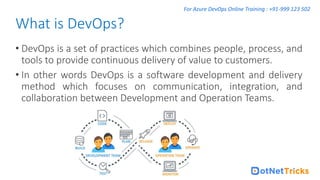
• DevOps is a set of practices which combines people, process, and
tools to provide continuous delivery of value to customers.
• In other words DevOps is a software development and delivery
method which focuses on communication, integration, and
collaboration between Development and Operation Teams.
What is DevOps?
For Azure DevOps Online Training : +91-999 123 502
• In traditional process, the development and operation were
isolated activities.
• Team members spend a lot of time in testing, deploying, and
designing instead of building the project.
• Manual code deployment leads to errors in production.
• Development and operation teams have their own timelines.
Usually separate timelines are not in sync which cause further
delays in delivery.
Need of DevOps
For Azure DevOps Online Training : +91-999 123 502
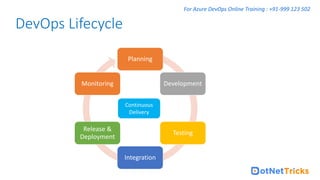
DevOps Lifecycle
Planning
Development
Testing
Integration
Release &
Deployment
Monitoring
Continuous
Delivery
For Azure DevOps Online Training : +91-999 123 502
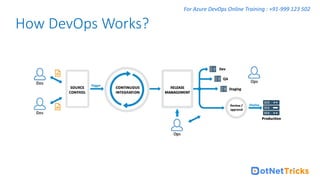
How DevOps Works?
For Azure DevOps Online Training : +91-999 123 502
• Faster releases through CI/CD.
• More engaged and collaborative Dev and Operation teams.
• Faster operational support.
• Less failures and continuous improvement.
• Transparency between the Dev and Operation teams.
• Constant monitoring and better adaption.
• Increase efficiency.
DevOps Advantages
For Azure DevOps Online Training : +91-999 123 502
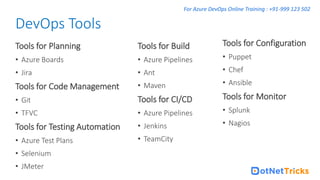
Tools for Planning
• Azure Boards
• Jira
Tools for Code Management
• Git
• TFVC
Tools for Testing Automation
• Azure Test Plans
• Selenium
• JMeter
DevOps Tools
Tools for Build
• Azure Pipelines
• Ant
• Maven
Tools for CI/CD
• Azure Pipelines
• Jenkins
• TeamCity
Tools for Configuration
• Puppet
• Chef
• Ansible
Tools for Monitor
• Splunk
• Nagios
For Azure DevOps Online Training : +91-999 123 502
• A system administrator who also knows how to write code
• A developer who knows the basics of system administration
• An engineer who can be a full time system administrator and full-
time developer for only the cost of one salary.
Who is DevOps Engineer?
For Azure DevOps Online Training : +91-999 123 502
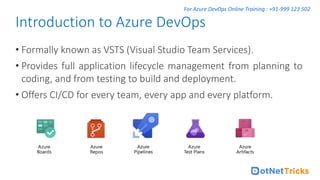
• Formally known as VSTS (Visual Studio Team Services).
• Provides full application lifecycle management from planning to
coding, and from testing to build and deployment.
• Offers CI/CD for every team, every app and every platform.
Introduction to Azure DevOps
For Azure DevOps Online Training : +91-999 123 502
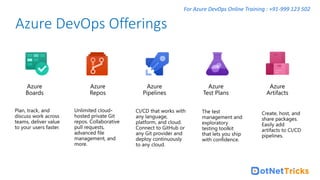
Azure DevOps Offerings
For Azure DevOps Online Training : +91-999 123 502
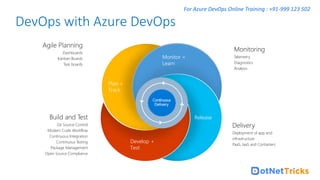
DevOps with Azure DevOps
Continuous
Delivery
Agile Planning
Dashboards
Kanban Boards
Task boards
Build and Test
Git Source Control
Modern Code Workflow
Continuous Integration
Continuous Testing
Package Management
Open Source Compliance
Plan +
Track
Monitor +
Learn
Release
Develop +
Test
Delivery
Deployment of app and
infrastructure
PaaS, IaaS and Containers
Monitoring
Telemetry
Diagnostics
Analysis
For Azure DevOps Online Training : +91-999 123 502
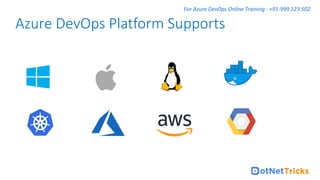
Azure DevOps Platform Supports
For Azure DevOps Online Training : +91-999 123 502
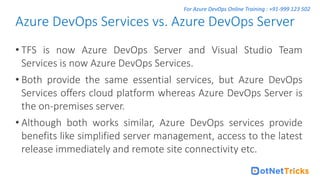
• TFS is now Azure DevOps Server and Visual Studio Team
Services is now Azure DevOps Services.
• Both provide the same essential services, but Azure DevOps
Services offers cloud platform whereas Azure DevOps Server is
the on-premises server.
• Although both works similar, Azure DevOps services provide
benefits like simplified server management, access to the latest
release immediately and remote site connectivity etc.
Azure DevOps Services vs. Azure DevOps Server
For Azure DevOps Online Training : +91-999 123 502
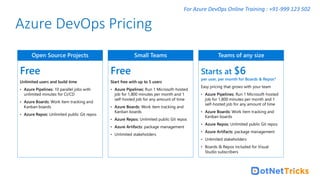
Azure DevOps Pricing

Mastering Best Azure DevOps Online Training and Certification - Dot Net Tricks

  • 1.
    For Azure DevOpsOnline Training : +91-999 123 502 Introduction to Azure DevOps Shailendra Chauhan Microsoft MVP, Technical Consultant and Corporate Trainer
  • 2.
    For Azure DevOpsOnline Training : +91-999 123 502 • What is DevOps? • Need of DevOps • DevOps Life Cycle • How DevOps Works? • DevOps Advantages • DevOps Tools • Who is DevOps Engineer? • DevOps with Azure DevOps • Azure DevOps Pricing Agenda
  • 3.
    For Azure DevOpsOnline Training : +91-999 123 502 • DevOps is a set of practices which combines people, process, and tools to provide continuous delivery of value to customers. • In other words DevOps is a software development and delivery method which focuses on communication, integration, and collaboration between Development and Operation Teams. What is DevOps?
  • 4.
    For Azure DevOpsOnline Training : +91-999 123 502 • In traditional process, the development and operation were isolated activities. • Team members spend a lot of time in testing, deploying, and designing instead of building the project. • Manual code deployment leads to errors in production. • Development and operation teams have their own timelines. Usually separate timelines are not in sync which cause further delays in delivery. Need of DevOps
  • 5.
    For Azure DevOpsOnline Training : +91-999 123 502 DevOps Lifecycle Planning Development Testing Integration Release & Deployment Monitoring Continuous Delivery
  • 6.
    For Azure DevOpsOnline Training : +91-999 123 502 How DevOps Works?
  • 7.
    For Azure DevOpsOnline Training : +91-999 123 502 • Faster releases through CI/CD. • More engaged and collaborative Dev and Operation teams. • Faster operational support. • Less failures and continuous improvement. • Transparency between the Dev and Operation teams. • Constant monitoring and better adaption. • Increase efficiency. DevOps Advantages
  • 8.
    For Azure DevOpsOnline Training : +91-999 123 502 Tools for Planning • Azure Boards • Jira Tools for Code Management • Git • TFVC Tools for Testing Automation • Azure Test Plans • Selenium • JMeter DevOps Tools Tools for Build • Azure Pipelines • Ant • Maven Tools for CI/CD • Azure Pipelines • Jenkins • TeamCity Tools for Configuration • Puppet • Chef • Ansible Tools for Monitor • Splunk • Nagios
  • 9.
    For Azure DevOpsOnline Training : +91-999 123 502 • A system administrator who also knows how to write code • A developer who knows the basics of system administration • An engineer who can be a full time system administrator and full- time developer for only the cost of one salary. Who is DevOps Engineer?
  • 10.
    For Azure DevOpsOnline Training : +91-999 123 502 • Formally known as VSTS (Visual Studio Team Services). • Provides full application lifecycle management from planning to coding, and from testing to build and deployment. • Offers CI/CD for every team, every app and every platform. Introduction to Azure DevOps
  • 11.
    For Azure DevOpsOnline Training : +91-999 123 502 Azure DevOps Offerings
  • 12.
    For Azure DevOpsOnline Training : +91-999 123 502 DevOps with Azure DevOps Continuous Delivery Agile Planning Dashboards Kanban Boards Task boards Build and Test Git Source Control Modern Code Workflow Continuous Integration Continuous Testing Package Management Open Source Compliance Plan + Track Monitor + Learn Release Develop + Test Delivery Deployment of app and infrastructure PaaS, IaaS and Containers Monitoring Telemetry Diagnostics Analysis
  • 13.
    For Azure DevOpsOnline Training : +91-999 123 502 Azure DevOps Platform Supports
  • 14.
    For Azure DevOpsOnline Training : +91-999 123 502 • TFS is now Azure DevOps Server and Visual Studio Team Services is now Azure DevOps Services. • Both provide the same essential services, but Azure DevOps Services offers cloud platform whereas Azure DevOps Server is the on-premises server. • Although both works similar, Azure DevOps services provide benefits like simplified server management, access to the latest release immediately and remote site connectivity etc. Azure DevOps Services vs. Azure DevOps Server
  • 15.
    For Azure DevOpsOnline Training : +91-999 123 502 Azure DevOps Pricing