WHAT WE WILLLEARN TODAY
• Cloud Computing Overview
• Introduction to Azure
• Overview of Azure Services
• Azure Cost Management
3.
CLOUD COMPUTING
• CloudComputing is a
technology that enables users to
access and use computing
resources, such as servers,
storage, and applications, over
the internet
• Instead of owning and
maintaining physical hardware,
users can leverage remote
servers hosted in data centers to
store data, run applications, and
perform various computing tasks
• Operational Expense
• Pay as you go model
• Bill is generated immediately
• No depreciation
• Capital Expenditure
• Upfront spending money on
physical infrastructure
• Cost have a value which reduces
overtime
4.
CLOUD COMPUTING
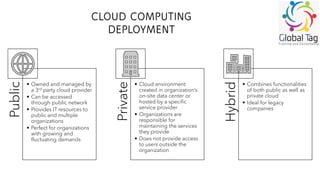
DEPLOYMENT
Public
• Ownedand managed by
a 3rd party cloud provider
• Can be accessed
through public network
• Provides IT resources to
public and multiple
organizations
• Perfect for organizations
with growing and
fluctuating demands
Private
• Cloud environment
created in organization’s
on-site data center or
hosted by a specific
service provider
• Organizations are
responsible for
maintaining the services
they provide
• Does not provide access
to users outside the
organization
Hybrid
• Combines functionalities
of both public as well as
private cloud
• Ideal for legacy
companies
5.
AZURE
• Azure isa could platform by Microsoft that
offers various cloud services and resources for
managing and storing data
• Users can conveniently access these services
via the Azure portal when connected to the
internet
• Microsoft Azure services are widely used
across all industries for running applications,
storing and analyzing data, software
development, machine learning, artificial
intelligence, and other services
• Azure offers four different forms of cloud
computing:
• Infrastructure as a Service (IaaS)
• Platform as a Service (PaaS)
• Software as a Service (SaaS)
• Serverless Functions
• Microsoft adopts a pay-as-you-go model for
Azure: subscribers receive a monthly bill
based on the specific resources and services
they have utilized
Security
Best Hybrid Cloud Solution
Cost Effectiveness
Quick and Adaptable
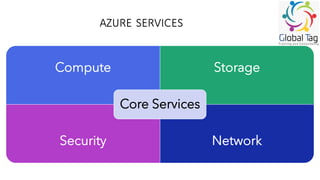
AZURE SERVICES
Compute Storage
SecurityNetwork
Core Services
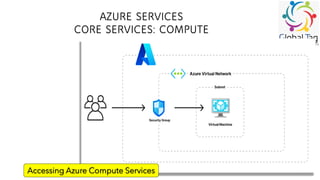
• The Azure Compute service plays a crucial
role in hosting and running applications,
ensuring they are live and available
• It serves as the foundation for executing
various applications in the environment
• Azure Compute handles deployment,
hosting, management, and the actual
running of applications
• It is essential for the overall functioning of
diverse software in the Azure Ecosystem
• This service provides the necessary
infrastructure to support the execution of
applications seamlessly
AZURE SERVICES
CORE SERVICES:COMPUTE
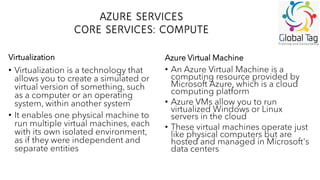
• Virtualization is a technology that
allows you to create a simulated or
virtual version of something, such
as a computer or an operating
system, within another system
• It enables one physical machine to
run multiple virtual machines, each
with its own isolated environment,
as if they were independent and
separate entities
• An Azure Virtual Machine is a
computing resource provided by
Microsoft Azure, which is a cloud
computing platform
• Azure VMs allow you to run
virtualized Windows or Linux
servers in the cloud
• These virtual machines operate just
like physical computers but are
hosted and managed in Microsoft's
data centers
Virtualization Azure Virtual Machine
11.
AZURE SERVICES
CORE SERVICES:COMPUTE
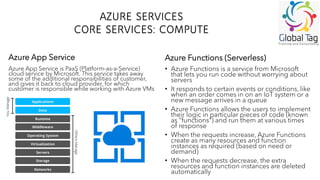
Azure App Service is PaaS (Platform-as-a-Service)
cloud service by Microsoft. This service takes away
some of the additional responsibilities of customer,
and gives it back to cloud provider, for which
customer is responsible while working with Azure VMs
• Azure Functions is a service from Microsoft
that lets you run code without worrying about
servers
• It responds to certain events or conditions, like
when an order comes in on an IoT system or a
new message arrives in a queue
• Azure Functions allows the users to implement
their logic in particular pieces of code (known
as “functions”) and run them at various times
of response
• When the requests increase, Azure Functions
create as many resources and function
instances as required (based on need or
demand)
• When the requests decrease, the extra
resources and function instances are deleted
automatically
Azure App Service Azure Functions (Serverless)
12.
AZURE SERVICES
Compute Storage
SecurityNetwork
Core Services
• Microsoft Azure Storage is a cloud
storage service provided by
Microsoft Azure, offering a scalable
and secure solution for storing and
retrieving data in the cloud
• Azure Storage is:
Durable
Secure
Scalable
Managed
Accessible
13.
AZURE SERVICES
CORE SERVICES:STORAGE
• Azure Blob Storage is a cloud-based
storage service provided by Microsoft
Azure
• It allows storing and managing large
amounts of unstructured data (such as
text or binary)
• It saves that data to facilitate big data
analysis through Data Lake Storage Gen2
• Blob Storage allows direct browser access
(with a single link) to image files or
documents
• Blobs:
• Support streaming for audio and video
• Enable distributed file access
• Provide log file management
• Azure File Storage serves as a suitable
choice when there's a need for a shared
drive connecting multiple servers or users
• Microsoft Azure File storage is a type of
Azure service that was designed to
support the needs of the Azure VM
environment
• The storage is a network share where files
can be stored and accessed from different
Virtual Machines
• File Storage can be used when business
deal with standard File extensions
(“*.docx”, “*.png”, “*.bak”, etc.)
Azure Blob Storage Azure File Storage
14.
AZURE SERVICES
CORE SERVICES:STORAGE
• Azure queues are like virtual mailboxes
where you put messages from a “sender”
to be picked by a “client” who performs
actions on them
• Each message has special features (like a
time limit) before it disappears (called
“expiry time”), which allows organizations
to manage messages between different
parts of a system
• Azure Queue Storage, acting as a virtual
"message queue" on Microsoft Azure
platform, helps different parts of a
program, or different programs,
communicate with each other
• Decoupling the components is one of the
advantages of message queue services
• Azure Table Storage is a cloud-based
NoSQL data store provided by
Microsoft Azure
• It is designed to store and retrieve
large amounts of semi-structured data,
making it suitable for managing and
querying massive datasets
• Azure Table Storage is a very cheap
method used when:
• Dealing with super large amount of data
• Data is stored in a NoSQL manner
• Performance is not a concern
• It could fit any budget
Azure Queue Storage Azure Table Storage
15.
AZURE SERVICES
Compute Storage
SecurityNetwork
Core Services
• Azure offers a variety of networking
services to help users build, deploy,
and manage applications and
services in the cloud
• The services enable organizations
to establish secure and scalable
network architectures
• Azure networking services include:
Azure Virtual Network
Load Balancer
Application Gateway
Traffic Manager
16.
AZURE SERVICES
CORE SERVICES:NETWORK
• Azure Virtual Network is the
fundamental building block for
your private network in Azure. It
allows you to create isolated
networks to host your VMs and
other Azure resources.
• Why to use Azure V-Networks?
• Provides an isolated environment
• Subnet can access the public cloud
• Traffic can be easily filtered from
resources
• Highly secured
• High network connectivity
• Building sophisticated network
topologies in a simple manner
Components of Azure Virtual Network
• Subnets: This lets user segment the virtual
network into one or more sub-networks.
Subnets provide several benefits, including
improved security, efficient network traffic
management, and better organization of
resources.
• Routing: In Azure, routing refers to the process
of directing network traffic between different
networks or subnets. Understanding how
routing works is crucial for designing a
network architecture that meets your
application's requirements.
• Network Security Groups: In Azure, Network
Security Groups (NSGs) are a crucial
component for controlling inbound and
outbound network traffic to and from Azure
resources. NSGs act as a basic, stateful, and
rule-based firewall, allowing you to define
rules that permit or deny traffic based on
various criteria
17.
AZURE SERVICES
CORE SERVICES:NETWORK
• A load balancer distributes user traffic across
multiple instances of your applications
• Load balancer basically reduces the risk of
performance issues
• Uses of Azure Load Balancer include:
• Load balance both internal and external Azure
virtual machine traffic
• Distribute resources within and across zones to
increase availability
• Configure Azure VM outbound connectivity
• Monitor load-balanced resources with health
probes
• Access VMs in a virtual network by port and public
IP address with port forwarding
• In Azure, an Application Gateway is a load
balancer service that enables you to
manage and optimize the traffic to your
web applications. It acts as a traffic
manager, directing client requests to the
appropriate servers based on various
factors
• It is usually used when you expect many
users in your apps or wish to manage web
traffic based on incoming requests
• Application Gateway balances the traffic
across multiple servers and supports
routing to a specific server based on
request components
Load Balancer Application Gateway
18.
AZURE SERVICES
CORE SERVICES:NETWORK
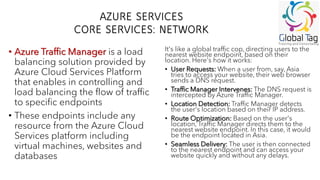
• Azure Traffic Manager is a load
balancing solution provided by
Azure Cloud Services Platform
that enables in controlling and
load balancing the flow of traffic
to specific endpoints
• These endpoints include any
resource from the Azure Cloud
Services platform including
virtual machines, websites and
databases
It's like a global traffic cop, directing users to the
nearest website endpoint, based on their
location. Here's how it works:
• User Requests: When a user from, say, Asia
tries to access your website, their web browser
sends a DNS request.
• Traffic Manager Intervenes: The DNS request is
intercepted by Azure Traffic Manager.
• Location Detection: Traffic Manager detects
the user's location based on their IP address.
• Route Optimization: Based on the user's
location, Traffic Manager directs them to the
nearest website endpoint. In this case, it would
be the endpoint located in Asia.
• Seamless Delivery: The user is then connected
to the nearest endpoint and can access your
website quickly and without any delays.
19.
AZURE SERVICES
Compute Storage
SecurityNetwork
Core Services
• Azure Security Services is a
comprehensive suite of tools and
technologies designed to protect
your cloud infrastructure,
applications, and data across
Microsoft Azure and hybrid
environments
• Azure services work under a Zero
Trust architecture: where every
access request is verified, wherever
it originates from, to maintain a
strong security posture
20.
AZURE SERVICES
CORE SERVICES:SECURITY
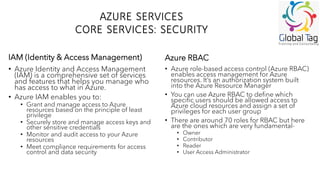
• Azure Identity and Access Management
(IAM) is a comprehensive set of services
and features that helps you manage who
has access to what in Azure.
• Azure IAM enables you to:
• Grant and manage access to Azure
resources based on the principle of least
privilege
• Securely store and manage access keys and
other sensitive credentials
• Monitor and audit access to your Azure
resources
• Meet compliance requirements for access
control and data security
• Azure role-based access control (Azure RBAC)
enables access management for Azure
resources. It’s an authorization system built
into the Azure Resource Manager
• You can use Azure RBAC to define which
specific users should be allowed access to
Azure cloud resources and assign a set of
privileges for each user group
• There are around 70 roles for RBAC but here
are the ones which are very fundamental-
• Owner
• Contributor
• Reader
• User Access Administrator
IAM (Identity & Access Management) Azure RBAC
21.
COST MANAGEMENT
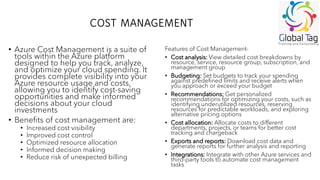
• AzureCost Management is a suite of
tools within the Azure platform
designed to help you track, analyze,
and optimize your cloud spending. It
provides complete visibility into your
Azure resource usage and costs,
allowing you to identify cost-saving
opportunities and make informed
decisions about your cloud
investments
• Benefits of cost management are:
• Increased cost visibility
• Improved cost control
• Optimized resource allocation
• Informed decision making
• Reduce risk of unexpected billing
Features of Cost Management-
• Cost analysis: View detailed cost breakdowns by
resource, service, resource group, subscription, and
management group
• Budgeting: Set budgets to track your spending
against predefined limits and receive alerts when
you approach or exceed your budget
• Recommendations: Get personalized
recommendations for optimizing your costs, such as
identifying underutilized resources, reserving
resources for predictable workloads, and exploring
alternative pricing options
• Cost allocation: Allocate costs to different
departments, projects, or teams for better cost
tracking and chargeback
• Exports and reports: Download cost data and
generate reports for further analysis and reporting
• Integrations: Integrate with other Azure services and
third-party tools to automate cost management
tasks









![[DSC Europe 25] Srba Markovic - From Pilot to Production: Overcoming AI Deplo...](https://cdn.slidesharecdn.com/ss_thumbnails/yjjmrtytmwbalxlba7px-4-srba-markovic-from-pilot-to-production-overcoming-ai-deployment-blockers-with-260114111931-4a892d44-thumbnail.jpg?width=640&height=640&fit=bounds)


![[DSC Europe 25] Mijat Kustudic - Building Financial Intelligence with AI Agen...](https://cdn.slidesharecdn.com/ss_thumbnails/38y2lb5lse6wstegtvas-3-mijat-kustudic-building-financial-intelligence-with-ai-agents-260114111931-1a4783ce-thumbnail.jpg?width=640&height=640&fit=bounds)
![[DSC Europe 25] Ivan Lukovic & Marija Djukic - From Data to Value: Why Maturi...](https://cdn.slidesharecdn.com/ss_thumbnails/ahrfps8xr6knowwhacxh-1-ivan-marija-dsc-2025-ld-v1-presentation-260115093812-be21adfc-thumbnail.jpg?width=640&height=640&fit=bounds)


