HungWei Chiu
(Hwchiu)
DevOps Enginner,
ThunderToken
Location
Build Your Own CaaS
(Container as a Service)
Hung-Wei Chiu (Hwchiu)
1. Develop -> DevOps
2. Co-Organzier of SDNDS-TW/CNTUG (FB)
3. Focus on SDN/CloudNative/Golang/Linux
What is
Kubernetes
Location
What is Kubernetes
1. a container platform
2. a microservices platform
3. contaienr-centric management environment
4. orchestrates computing,networking and storage
infrastructure.
https://kubernetes.io/docs/concepts/overview/what-is-kubernetes/#why-do-i-need-
kubernetes-and-what-can-it-do
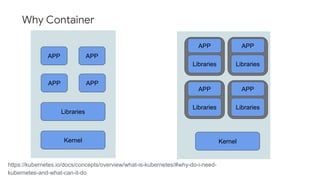
Why Container
https://kubernetes.io/docs/concepts/overview/what-is-kubernetes/#why-do-i-need-
kubernetes-and-what-can-it-do
APP APP
APP APP
Libraries
Kernel
APP
Libraries
Kernel
APP
Libraries
APP
Libraries
APP
Libraries
Why Container
1. Agile application creation and deployment
2. Observablitiy
3. Cloud and OS distribution portability
4. Resource isolation/utilization
5. Loosely coupled, distributed, elastic and liberated
micro-servies
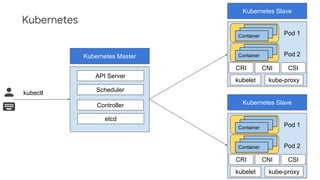
Kubernetes
Kubernetes Master
API Server
Scheduler
Controller
etcd
Kubernetes Slave
CRI
Kubernetes Slave
CNI CSI
kubelet kube-proxy
Containers
Containers
Container
Containers
Containers
Container
Pod 1
Pod 2
CRI CNI CSI
kubelet kube-proxy
Containers
Containers
Container
Containers
Containers
Container
Pod 1
Pod 2
kubectl
What is CaaS
Location
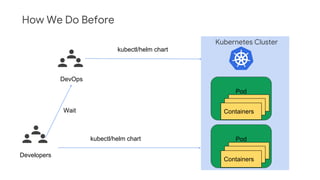
How We Do Before
Kubernetes Cluster
Pod
Containers
Containers
Containers
Pod
Containers
Containers
Containers
DevOps
Developers
kubectl/helm chart
Wait
kubectl/helm chart
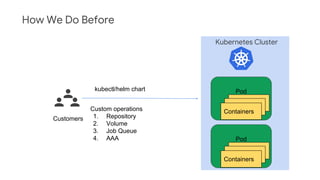
How We Do Before
Kubernetes Cluster
Pod
Containers
Containers
Containers
Pod
Containers
Containers
Containers
Customers
kubectl/helm chart
Custom operations
1. Repository
2. Volume
3. Job Queue
4. AAA
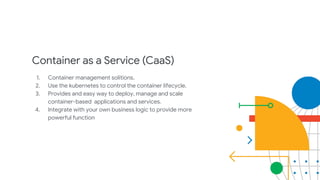
Container as a Service (CaaS)
1. Container management solitions.
2. Use the kubernetes to control the container lifecycle.
3. Provides and easy way to deploy, manage and scale
container-based applications and services.
4. Integrate with your own business logic to provide more
powerful function
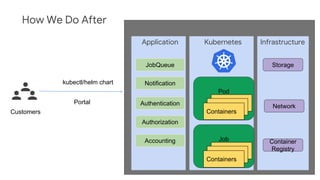
How We Do After
Kubernetes
Job
Containers
Containers
Containers
Pod
Containers
Containers
ContainersCustomers
kubectl/helm chart
Portal
Application
UI
Infrastructure
JobQueue
Notification
Storage
Network
Container
Registry
Authentication
Authorization
Accounting
How to Build
Our Own CaaS
Location
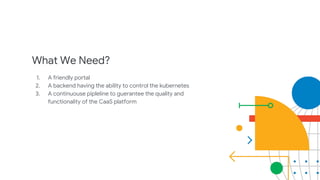
What We Need?
1. A friendly portal
2. A backend having the ability to control the kubernetes
3. A continuouse pipleline to guerantee the quality and
functionality of the CaaS platform
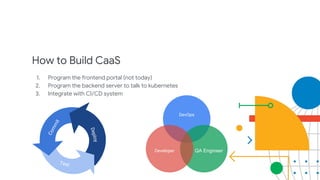
How to Build CaaS
1. Program the frontend portal (not today)
2. Program the backend server to talk to kubernetes
3. Integrate with CI/CD system
DevOps
QA EngineerDeveloper
Deploy
Commit
Test
Commit Test Deploy
Users
QAs
https://cloud.google.com/icons/
https://travis-ci.com/logo
https://github.com/logos
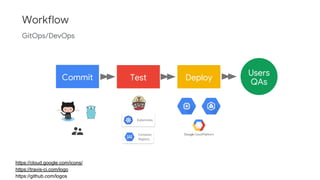
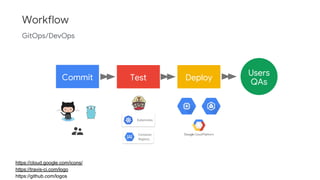
Workflow
GitOps/DevOps
Container
Registry
Kubernetes
As a Devloper,
How?
Location
Commit Test Deploy
Users
QAs
https://cloud.google.com/icons/
https://travis-ci.com/logo
https://github.com/logos
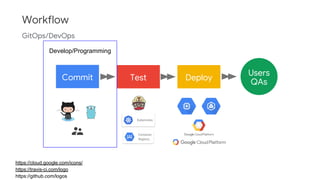
Workflow
GitOps/DevOps
Container
Registry
Kubernetes
Develop/Programming
Before We Starting
We must know how Helm/Kubectl works?
How do they communicate with kubernetes?
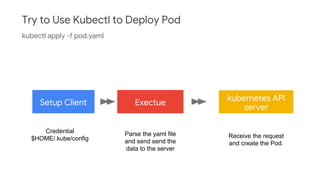
Setup Client Exectue
kubernetes API
server
End
Try to Use Kubectl to Deploy Pod
kubectl apply -f pod.yaml
Credential
$HOME/.kube/config
Parse the yaml file
and send send the
data to the server
Receive the request
and create the Pod.
Programming with Golang
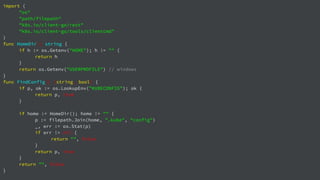
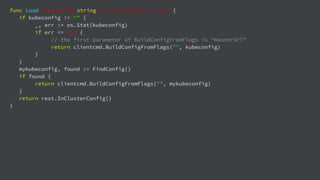
We can use the official library to setup the client.
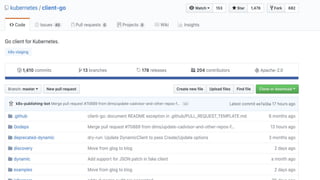
The project client-go is used to talk to a kubernetes cluster
Full bleed photo
with title
Example
1. Setup the client with credential
2. Prepare the Pod resource
3. Create the Pod
import (
"os"
"path/filepath"
"k8s.io/client-go/rest"
"k8s.io/client-go/tools/clientcmd"
)
func HomeDir() string {
if h := os.Getenv("HOME"); h != "" {
return h
}
return os.Getenv("USERPROFILE") // windows
}
func FindConfig() (string, bool) {
if p, ok := os.LookupEnv("KUBECONFIG"); ok {
return p, true
}
if home := HomeDir(); home != "" {
p := filepath.Join(home, ".kube", "config")
_, err := os.Stat(p)
if err != nil {
return "", false
}
return p, true
}
return "", false
}
func Load(kubeconfig string) (*rest.Config, error) {
if kubeconfig != "" {
_, err := os.Stat(kubeconfig)
if err == nil {
// the first parameter of BuildConfigFromFlags is "masterUrl"
return clientcmd.BuildConfigFromFlags("", kubeconfig)
}
}
mykubeconfig, found := FindConfig()
if found {
return clientcmd.BuildConfigFromFlags("", mykubeconfig)
}
return rest.InClusterConfig()
}
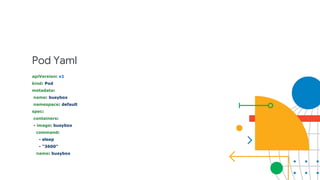
Pod Yaml
apiVersion: v1
kind: Pod
metadata:
name: busybox
namespace: default
spec:
containers:
- image: busybox
command:
- sleep
- "3600"
name: busybox
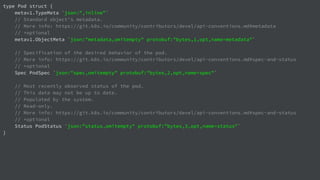
type Pod struct {
metav1.TypeMeta `json:",inline"`
// Standard object's metadata.
// More info: https://git.k8s.io/community/contributors/devel/api-conventions.md#metadata
// +optional
metav1.ObjectMeta `json:"metadata,omitempty" protobuf:"bytes,1,opt,name=metadata"`
// Specification of the desired behavior of the pod.
// More info: https://git.k8s.io/community/contributors/devel/api-conventions.md#spec-and-status
// +optional
Spec PodSpec `json:"spec,omitempty" protobuf:"bytes,2,opt,name=spec"`
// Most recently observed status of the pod.
// This data may not be up to date.
// Populated by the system.
// Read-only.
// More info: https://git.k8s.io/community/contributors/devel/api-conventions.md#spec-and-status
// +optional
Status PodStatus `json:"status,omitempty" protobuf:"bytes,3,opt,name=status"`
}
import (
"fmt"
"log"
"github.com/linkernetworks/kubeconfig"
corev1 "k8s.io/api/core/v1"
metav1 "k8s.io/apimachinery/pkg/apis/meta/v1"
"k8s.io/client-go/kubernetes"
)
func createPod(clientset *kubernetes.Clientset, name string) error {
_, err := clientset.CoreV1().Pods("default").Create(&corev1.Pod{
ObjectMeta: metav1.ObjectMeta{
Name: name,
},
Spec: corev1.PodSpec{
Containers: []corev1.Container{
{
Name: name,
Image: "busybox",
Commands: []string{"sleep",”3600”},
},
},
},
})
return err
}
What We Have Now
1. The ability to talk to kubernetes cluster.
2. We can also implement our business logic with those
kubernetes related opeartions.
3. Provide the REST interface to work with the frontend to
becomd a kubernetes portal.
As a DevOps,
How?
Location
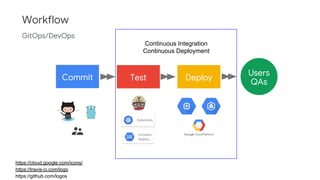
Commit Test Deploy
Users
QAs
https://cloud.google.com/icons/
https://travis-ci.com/logo
https://github.com/logos
Workflow
GitOps/DevOps
Container
Registry
Kubernetes
Continuous Integration
Continuous Deployment
Continuous Integration
When
- commit
- pull-request
Type
- Unit Test
- Integration Test
Unit Testing
Clinet-go support the fack/mock interface to fake
kubernetes.
Integration Testing
There’re some third-party solutions need the real kubernetes
cluster, such as Prometheus/Cadvisor,,etc.
So, We need to a real kubernetes cluster for testing.
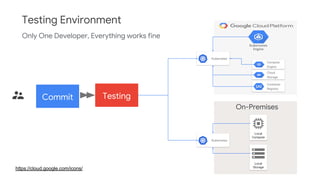
https://cloud.google.com/icons/
Testing Environment
On-Premises
Local
Storage
Local
Compute
Kubernetes
Compute
Engine
Cloud
Storage
Kubernetes
Container
Registry
Kubernetes
Engine
Commit Testing
Only One Developer, Everything works fine
https://cloud.google.com/icons/
Testing Environment
On-Premises
Local
Storage
Local
Compute
Kubernetes
Compute
Engine
Cloud
Storage
Kubernetes
Container
Registry
Kubernetes
Engine
Commit Testing
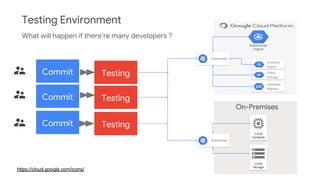
What will happen if there’re many developers ?
Commit
Commit Testing
Testing
Testing Environment
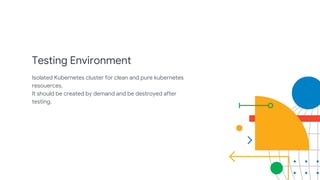
Isolated Kubernetes cluster for clean and pure kubernetes
resouerces.
It should be created by demand and be destroyed after
testing.
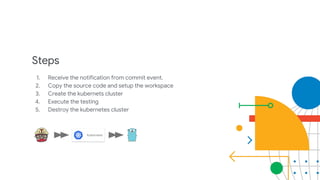
Steps
1. Receive the notification from commit event.
2. Copy the source code and setup the workspace
3. Create the kubernets cluster
4. Execute the testing
5. Destroy the kubernetes cluster
Kubernetes
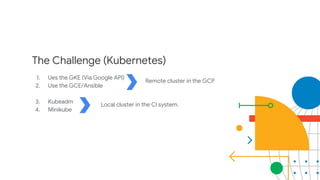
The Challenge (Kubernetes)
1. Ues the GKE (Via Google API)
2. Use the GCE/Ansible
3. Kubeadm
4. Minikube
Remote cluster in the GCP
Local cluster in the CI system.
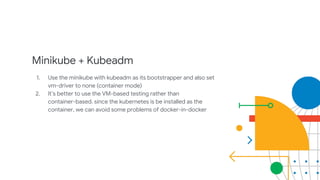
Minikube + Kubeadm
1. Use the minikube with kubeadm as its bootstrapper and also set
vm-driver to none (container mode)
2. It’s better to use the VM-based testing rather than
container-based. since the kubernetes is be installed as the
container, we can avoid some problems of docker-in-docker
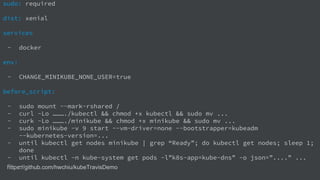
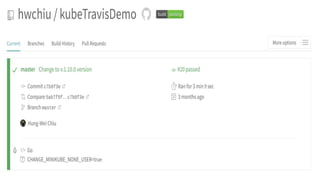
https://github.com/hwchiu/kubeTravisDemo
sudo: required
dist: xenial
services
- docker
env:
- CHANGE_MINIKUBE_NONE_USER=true
before_script:
- sudo mount --mark-rshared /
- curl -Lo ………./kubectl && chmod +x kubectl && sudo mv ...
- curk -Lo ………./minikube && chmod +x minikube && sudo mv ...
- sudo minikube -v 9 start --vm-driver=none --bootstrapper=kubeadm
--kubernetes-version=...
- until kubectl get nodes minikube | grep “Ready”; do kubectl get nodes; sleep 1;
done
- until kubectl -n kube-system get pods -l”k8s-app=kube-dns” -o json=”....” ...
- …
Continuous Deployment
How to deploy the latest program into kuberentes
On-Premise Kubernetres Cluster
Google Kubernetes Engine
Steps
1. Build the container image
2. Push the container image
3. Deploy the new container into kubernetes
a. Proactive/Reactive
https://cloud.google.com/icons/
https://www.docker.com/legal/brand-guideline
https://github.com/goharbor/harbor
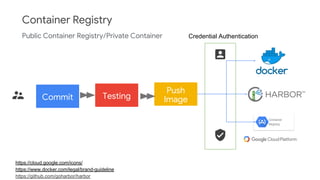
Container Registry
Commit Testing
Public Container Registry/Private Container
Container
Registry
Push
Image
Credential Authentication
Proactive
1. Plain yaml configurations or helm chart.
2. The CI system should have the ability to access the
kubernetes cluster and also have the permission to
deploy yaml/helm into kubernetes cluster.
Reactive
1. Install related polling solution into kubernetes first.
2. We only push the container image in the CI system
3. Then it detects the update of image and update it.
https://cloud.google.com/icons/
Deploy
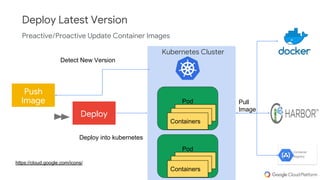
Deploy Latest Version
Push
Image
Preactive/Proactive Update Container Images
Container
Registry
Kubernetes Cluster
Pod
Containers
Containers
Containers
Pod
Containers
Containers
Containers
Detect New Version
Deploy into kubernetes
Pull
Image
Commit Test Deploy
Users
QAs
https://cloud.google.com/icons/
https://travis-ci.com/logo
https://github.com/logos
Workflow
GitOps/DevOps
Container
Registry
Kubernetes
Hwchiu, ThunderToken
@twitterhandle
Location
Thank you!
Q&A
Location

Build Your Own CaaS (Container as a Service)