HYB205: CI/CD Across
Multiple Environments
Vic Iglesias, Cloud Solutions Architect, Google Cloud
Benjamin Good, Solutions Architect, Google Cloud
Karl Isenberg, Tech Lead Manager, Cruise
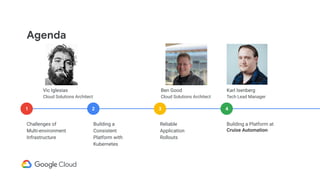
Agenda
Challenges of
Multi-environment
Infrastructure
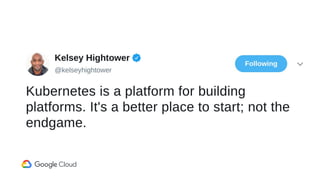
Building a
Consistent
Platform with
Kubernetes
Reliable
Application
Rollouts
Building a Platform at
Cruise Automation
1 2 3 4
Karl Isenberg
Tech Lead Manager
Ben Good
Cloud Solutions Architect
Vic Iglesias
Cloud Solutions Architect
01
Challenges of
Multi-environment
Infrastructure
Prod
Dev
>SSH
Day 1
Staging
Dev
Prod
Shared Tools
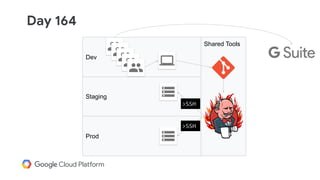
>SSH
>SSH
Day 164
Staging
Dev
Prod
Shared Tools
Day 237
Staging
Dev
Prod
Shared Tools
Next Gen
Prod
Kubernetes
Engine
Compute
Engine
Staging
Compute
Engine
Day 900
Challenges with multiple environments
● Inconsistent deployment tooling
● Environment drift
● Managing access control
● Networking complexity
● Integrating your existing tools
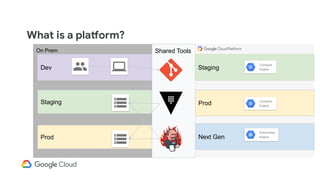
On Prem
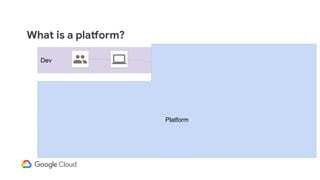
What is a platform?
Staging
Dev
Prod
Shared Tools
Next Gen
Prod
Kubernetes
Engine
Compute
Engine
Staging
Compute
Engine
What is a platform?
Staging
Dev
Prod
Shared Tools
Next Gen
Prod
Kubernetes
Engine
Compute
Engine
Staging
Compute
Engine
Platform
02
Building a
Consistent
Platform with
Kubernetes
Layers of your stack
Platform
Deployment tools, Service Management
Infrastructure
Networking, Compute, Storage
Applications
Layers of your stack
Users
Devs
Infrastructure
Platform
App
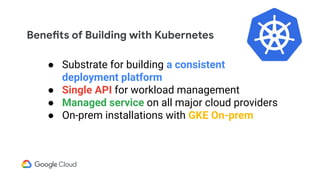
Benefits of Building with Kubernetes
● Substrate for building a consistent
deployment platform
● Single API for workload management
● Managed service on all major cloud providers
● On-prem installations with GKE On-prem
03
Reliable
Application
Rollouts
apiVersion: v1
kind: Pod
metadata:
name: myapp-pod
labels:
app: myapp
spec:
containers:
- name: myapp-container
image: busybox
command: ['myapp']
apiVersion: apps/v1
kind: Deployment
metadata:
name: nginx-deployment
labels:
app: nginx
spec:
replicas: 3
selector:
matchLabels:
app: nginx
template:
metadata:
labels:
app: nginx
spec:
containers:
- name: nginx
image: nginx:1.7.9
ports:
- containerPort: 80
kind: Service
apiVersion: v1
metadata:
name: my-service
spec:
selector:
app: MyApp
ports:
- protocol: TCP
port: 80
targetPort: 9376
apiVersion: v1
kind: ConfigMap
metadata:
name: game-config
namespace: default
data:
game.properties: |
enemies=aliens
lives=3
ui.properties: |
color.good=purple
color.bad=yellow
allow.textmode=true
how.nice.to.look=fairlyNice
kind: Endpoints
apiVersion: v1
metadata:
name: my-service
subsets:
- addresses:
- ip: 1.2.3.4
ports:
- port: 9376
apiVersion: extensions/v1beta1
kind: Ingress
metadata:
name: test-ingress
spec:
rules:
- http:
paths:
- path: /testpath
backend:
serviceName: test
servicePort: 80
Managing
Kubernetes Manifests
across Environments
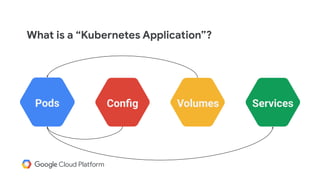
What is a “Kubernetes Application”?
Pods Config Volumes SecretsServices
Pods Config Volumes Services
What is a “Kubernetes Application”?
YAML YAML YAML YAML
What is a “Kubernetes Application”?
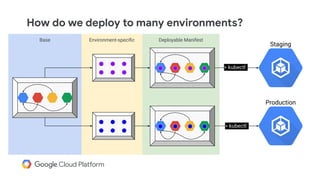
Deployable ManifestEnvironment-specificBase
How do we deploy to many environments?
Staging
Production
> kubectl
> kubectl
Helm
● Use a templating engine to render your
manifests by passing in variables called
“values”
● Large community and lots of examples at
https://hub.helm.sh
● Use loops and conditionals to “program”
your end result. A double-edged sword.
● Familiar for folks coming from CM tools
like Ansible and Chef
apiVersion: v1
kind: Pod
metadata:
name: myapp-pod
labels:
app: myapp
spec:
containers:
- name: myapp-container
image: {{ .Values.image }}
env:
- name: LOG_LEVEL
value: {{ .Values.logLevel }}
image: busybox
logLevel: debug
apiVersion: v1
kind: Pod
metadata:
name: myapp-pod
labels:
app: myapp
spec:
containers:
- name: myapp-container
image: busybox
env:
- name: LOG_LEVEL
value: debug
pod.yaml values.yaml output.yaml
Helm
helm template .
Documentation: https://helm.sh/docs/helm/#helm-template
Helm
Kustomize
Additional Features
● Apply common labels and
annotations
● Add a prefix to all resource names
● Inject config map & secret contents
from local files
● Built-in to kubectl as of 1.14
Add patches to Kubernetes
YAML files leaving the
original YAML untouched
and usable as is.
Kustomize
apiVersion: v1
kind: Pod
metadata:
name: myapp-pod
labels:
app: myapp
spec:
containers:
- name: myapp-container
image: busybox
command: ['app']
apiVersion: v1
kind: Pod
metadata:
name: myapp-pod
spec:
containers:
- name: myapp
command: ['app', '--dev']
apiVersion: v1
kind: Pod
metadata:
name: myapp-pod
labels:
app: myapp
spec:
containers:
- name: myapp-container
image: busybox
command: ['app', '--dev']
base.yaml dev-patch.yaml output.yaml
apiVersion: v1
kind: Pod
metadata:
name: myapp-pod
labels:
app: myapp
spec:
containers:
- name: myapp
image: busybox
apiVersion: v1
kind: Pod
metadata:
name: myapp-pod
spec:
containers:
- name: myapp
image: busybox:dev
apiVersion: v1
kind: Pod
metadata:
name: myapp-pod
labels:
app: myapp
spec:
containers:
- name: myapp
image: busybox:dev
base.yaml dev.yaml output.yaml
Kustomize
dev/kustomization.yaml
namespace: vic-dev
commonLabels:
owner: vic
bases:
- ../base/
patches:
- patch.yaml
configMapGenerator:
- name: application-properties
files:
- properties
~/myapp
├── base/
└── deployment.yaml
└── service.yaml
└── kustomization.yaml
├── dev/
└── patch.yaml
└── properties
└── kustomization.yaml
kubectl apply -k .
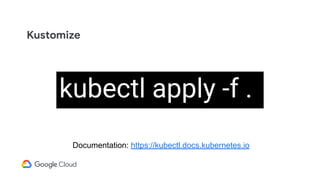
kubectl apply -f .
Documentation: https://kubectl.docs.kubernetes.io
Kustomize
kubectl apply -k .
Documentation: https://kubectl.docs.kubernetes.io
Kustomize
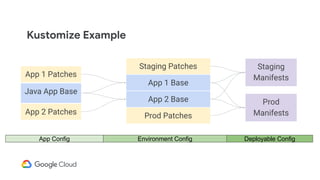
App 1 Base
App 2 Base
Staging Patches Staging
Manifests
Prod Patches
Prod
Manifests
Java App Base
App 1 Patches
App 2 Patches
Environment ConfigApp Config Deployable Config
Kustomize Example
Deployment Strategies
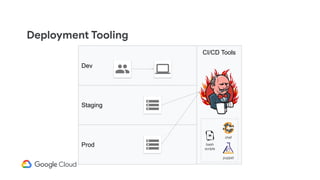
Deployment Tooling
Staging
Dev
Prod
CI/CD Tools
bash
scripts
chef
puppet
Now with Kubernetes
Staging
Dev
Prod
CI/CD Tools
bash
scripts
Kubernetes
Engine
Kubernetes
Engine
Spinnaker to the Rescue
Staging
Dev
Prod
CI/CD Tools
Kubernetes
Engine
Kubernetes
Engine
Kubernetes Awareness
● Pod level visibility
● Automated rollbacks
● Account == k8s cluster
● Resource annotations
Spinnaker Pipeline
Start
Deploy
Frontend
Canary
Deploy
Backend
Canary
Rollout
Backend
Rollout
Frontend
Validate
Canary Success
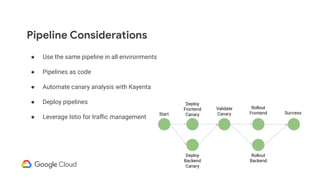
Pipeline Considerations
● Use the same pipeline in all environments
● Pipelines as code
● Automate canary analysis with Kayenta
● Deploy pipelines
● Leverage Istio for traffic management
Start
Deploy
Frontend
Canary
Deploy
Backend
Canary
Rollout
Backend
Rollout
Frontend
Validate
Canary Success
Single Cluster Roll-out
Shared Tools
Kubernetes
Engine
GKE
us-central1
Kubernetes
Engine
Production
Staging
Deployment Strategies
Challenges in a Multi-Cluster Env
GKE
us-central1
Kubernetes
Engine
GKE
europe-west2
Kubernetes
Engine
GKE
On-prem
Kubernetes
Engine
Other Cloud
Kubernetes
1.12.5 1.12.5 1.11.7 1.12.4
● Variations in the clusters
● Configuration differences
Kubernetes
Shared Tools
Kubernetes
Engine
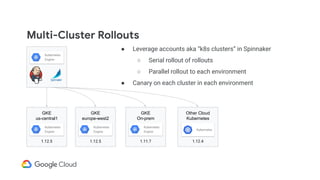
Multi-Cluster Rollouts
GKE
us-central1
Kubernetes
Engine
GKE
europe-west2
Kubernetes
Engine
GKE
On-prem
Kubernetes
Engine
Other Cloud
Kubernetes
1.12.5 1.12.5 1.11.7 1.12.4
● Leverage accounts aka “k8s clusters” in Spinnaker
○ Serial rollout of rollouts
○ Parallel rollout to each environment
● Canary on each cluster in each environment
Kubernetes
Kubernetes
Engine
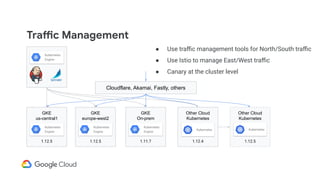
Traffic Management
GKE
us-central1
Kubernetes
Engine
GKE
europe-west2
Kubernetes
Engine
GKE
On-prem
Kubernetes
Engine
Other Cloud
Kubernetes
1.12.5 1.12.5 1.11.7 1.12.4
● Use traffic management tools for North/South traffic
● Use Istio to manage East/West traffic
● Canary at the cluster level
Other Cloud
Kubernetes
1.12.5
Cloudflare, Akamai, Fastly, others
Kubernetes
Engine
Kubernetes Kubernetes
Updating Clusters
Shared Tools
Kubernetes
Engine
GKE
us-central1
Kubernetes
Engine
1.12.4
GKE
us-central1
Kubernetes
Engine
1.12.5
● Treat your pipelines like code
○ Keep them in source control
○ Deploy them like code
○ Declarative pipelines
● Google Cloud Storage plugin for Spinnaker
and Jenkins artifacts
● In Spinnaker “accounts” are K8s clusters
04
Building a
Platform at
Cruise
Automation
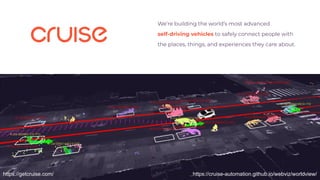
We’re building the world’s most advanced
self-driving vehicles to safely connect people with
the places, things, and experiences they care about.
https://cruise-automation.github.io/webviz/worldview/https://getcruise.com/
Multi-Cloud Infrastructure
On Premises
● Office IT
● Data Ingest
● Network Hub
GCP
● PaaS GKE
● Image Registry
● Continuous
Deployment
● Data Lake
● Data Processing
● Data Science
● Machine Learning
● Simulation
AWS
● PaaS AWS
● Source Control
● Continuous
Integration
@karlkfi
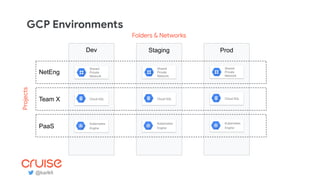
GCP Environments
@karlkfi
Dev Staging Prod
NetEng
Team X
PaaS
Kubernetes
Engine
Shared
Private
Network
Cloud SQL
Kubernetes
Engine
Shared
Private
Network
Cloud SQL
Kubernetes
Engine
Shared
Private
Network
Cloud SQL
Projects
Folders & Networks
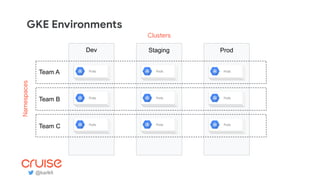
GKE Environments
@karlkfi
Pods
Dev Staging Prod
Team A
Team B
Team C Pods Pods
Pods Pods Pods
Pods Pods Pods
Namespaces
Clusters
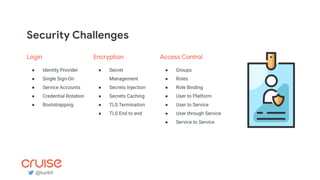
Security Challenges
Login
● Identity Provider
● Single Sign-On
● Service Accounts
● Credential Rotation
● Bootstrapping
Encryption
● Secret
Management
● Secrets Injection
● Secrets Caching
● TLS Termination
● TLS End to end
Access Control
● Groups
● Roles
● Role Binding
● User to Platform
● User to Service
● User through Service
● Service to Service
@karlkfi
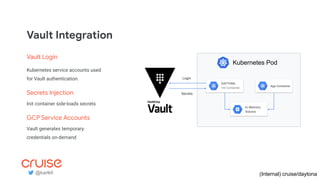
In-Memory
Volume
DAYTONA
Init Container
App Container
Kubernetes Pod
Secrets
Login
Vault Integration
(Internal) cruise/daytona@karlkfi
Vault Login
Kubernetes service accounts used
for Vault authentication.
Secrets Injection
Init container side-loads secrets
GCP Service Accounts
Vault generates temporary
credentials on-demand
Vault Namespacing
@karlkfi
Group Permissions Path
Team Admin admin secret/<prefix>/<namespace>/*
Team Contractor list secret/<prefix>/<namespace>/*
App Service Account list, get secret/<prefix>/<namespace>/<env>/<app>/*
Deployment Challenges
Images
● Image Building
● Container Registry
● Image Caching
● Image Versioning
● Image Promotion
● Pull Secrets
App Ops
● Metrics Library
● Structured Logging
● DNS Config
● TLS Config
Lifecycle
● Templating
● Cloud Dev Env
● Integration Test Env
● Load Test Env
● Approval Gates
● Blue/Green
● Deploy Targets
● Account Management
@karlkfi
Image Building
apiVersion: build.knative.dev/v1alpha1
kind: Build
metadata:
name: example-build
spec:
serviceAccountName: build-auth-example
source:
git:
url: https://github.com/example/build-example.git
revision: master
steps:
- name: ubuntu-example
image: ubuntu
args: [“ubuntu-build-example”, “SECRETS-example.md”]
steps:
- image: gcr.io/example-builders/build-example
args: [“echo”, “hello-example”, “build”]
Build
GCR
Container Registry
(OSS) https://github.com/knative/build
Github
Source Control
Knative Build
@karlkfi
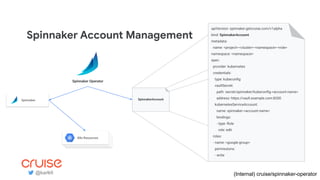
Spinnaker Account Management
apiVersion: spinnaker.getcruise.com/v1alpha
kind: SpinnakerAccount
metadata:
name: <project>-<cluster>-<namespace>-<role>
namespace: <namespace>
spec:
provider: kubernetes
credentials:
type: kubeconfig
vaultSecret:
path: secret/spinnaker/kubeconfig-<account-name>
address: https://vault.example.com:8200
kubernetesServiceAccount:
name: spinnaker-<account-name>
bindings:
- type: Role
role: edit
roles:
- name: <google-group>
permissions:
- write
SpinnakerAccount
Spinnaker Operator
(Internal) cruise/spinnaker-operator
App PodsApp PodsK8s Resources
Spinnaker
@karlkfi
Networking Challenges
DNS
● Public DNS (Private Zones)
● Private DNS (IP Masquerade)
Ingress
● Private Ingress (ILB, Nginx)
● Public Ingress (GCLB)
Egress
● Private Egress (Cloud Router)
● Public Egress (Cloud NAT, Network Tags)
@karlkfi
Private Ingress Controllers
App PodsApp Pods
Ingress
annotation:
kubernetes.io/ingress.class: nginx
Ingress Controller
(OSS) https://github.com/kubernetes-incubator/external-dns +
(OSS) https://github.com/kubernetes/ingress-nginx +
(OSS) https://cloud.google.com/kubernetes-engine/docs/how-to/internal-load-balancing
App Pods
GCE Cloud Provider
Private
Cloud DNS
Internal
Load
Balancer
Kubernetes
Engine
@karlkfi
External DNS
(todo)
Service
type: LoadBalancer
annotation:
external-dns.alpha.kubernetes.io/hostname:
nginx.example.com.
Service
type: ClusterIP
Nginx Pods
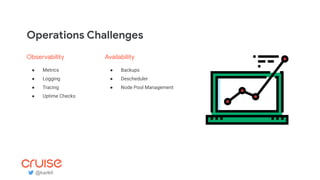
Operations Challenges
Observability
● Metrics
● Logging
● Tracing
● Uptime Checks
Availability
● Backups
● Descheduler
● Node Pool Management
@karlkfi
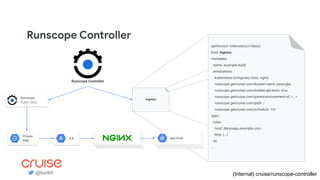
Runscope Controller
apiVersion: extensions/v1beta1
kind: Ingress
metadata:
name: example-build
annotations:
kubernetes.io/ingress.class: nginx
runscope.getcruise.com/bucket-name: paas-gke
runscope.getcruise.com/enable-api-tests: true
runscope.getcruise.com/parent-environment-id: <...>
runscope.getcruise.com/path: /
runscope.getcruise.com/schedule: 1m
spec:
rules:
- host: demoapp.example.com
http: {...}
tls:
...
Ingress
(Internal) cruise/runscope-controller
Runscope Controller
Runscope
Public SaaS
@karlkfi
App PodsApp PodsApp Pods
Private
DNS
ILB
Put your app ops and deploy
config where your app devs can
reach it.
https://medium.com/cruise
@karlkfi
Thank you!
Your Feedback is Greatly Appreciated!
Complete the
session survey
in mobile app
1-5 star rating
system
Open field for
comments
Rate icon in
status bar

CI/CD Across Multiple Environments

  • 1.
    HYB205: CI/CD Across MultipleEnvironments Vic Iglesias, Cloud Solutions Architect, Google Cloud Benjamin Good, Solutions Architect, Google Cloud Karl Isenberg, Tech Lead Manager, Cruise
  • 2.
    Agenda Challenges of Multi-environment Infrastructure Building a Consistent Platformwith Kubernetes Reliable Application Rollouts Building a Platform at Cruise Automation 1 2 3 4 Karl Isenberg Tech Lead Manager Ben Good Cloud Solutions Architect Vic Iglesias Cloud Solutions Architect
  • 3.
  • 4.
  • 5.
  • 6.
  • 7.
  • 8.
    Challenges with multipleenvironments ● Inconsistent deployment tooling ● Environment drift ● Managing access control ● Networking complexity ● Integrating your existing tools
  • 9.
    On Prem What isa platform? Staging Dev Prod Shared Tools Next Gen Prod Kubernetes Engine Compute Engine Staging Compute Engine
  • 10.
    What is aplatform? Staging Dev Prod Shared Tools Next Gen Prod Kubernetes Engine Compute Engine Staging Compute Engine Platform
  • 12.
  • 13.
    Layers of yourstack Platform Deployment tools, Service Management Infrastructure Networking, Compute, Storage Applications
  • 14.
    Layers of yourstack Users Devs Infrastructure Platform App
  • 15.
    Benefits of Buildingwith Kubernetes ● Substrate for building a consistent deployment platform ● Single API for workload management ● Managed service on all major cloud providers ● On-prem installations with GKE On-prem
  • 16.
  • 17.
    apiVersion: v1 kind: Pod metadata: name:myapp-pod labels: app: myapp spec: containers: - name: myapp-container image: busybox command: ['myapp'] apiVersion: apps/v1 kind: Deployment metadata: name: nginx-deployment labels: app: nginx spec: replicas: 3 selector: matchLabels: app: nginx template: metadata: labels: app: nginx spec: containers: - name: nginx image: nginx:1.7.9 ports: - containerPort: 80 kind: Service apiVersion: v1 metadata: name: my-service spec: selector: app: MyApp ports: - protocol: TCP port: 80 targetPort: 9376 apiVersion: v1 kind: ConfigMap metadata: name: game-config namespace: default data: game.properties: | enemies=aliens lives=3 ui.properties: | color.good=purple color.bad=yellow allow.textmode=true how.nice.to.look=fairlyNice kind: Endpoints apiVersion: v1 metadata: name: my-service subsets: - addresses: - ip: 1.2.3.4 ports: - port: 9376 apiVersion: extensions/v1beta1 kind: Ingress metadata: name: test-ingress spec: rules: - http: paths: - path: /testpath backend: serviceName: test servicePort: 80
  • 18.
  • 19.
    What is a“Kubernetes Application”? Pods Config Volumes SecretsServices
  • 20.
    Pods Config VolumesServices What is a “Kubernetes Application”?
  • 21.
    YAML YAML YAMLYAML What is a “Kubernetes Application”?
  • 22.
    Deployable ManifestEnvironment-specificBase How dowe deploy to many environments? Staging Production > kubectl > kubectl
  • 23.
    Helm ● Use atemplating engine to render your manifests by passing in variables called “values” ● Large community and lots of examples at https://hub.helm.sh ● Use loops and conditionals to “program” your end result. A double-edged sword. ● Familiar for folks coming from CM tools like Ansible and Chef
  • 24.
    apiVersion: v1 kind: Pod metadata: name:myapp-pod labels: app: myapp spec: containers: - name: myapp-container image: {{ .Values.image }} env: - name: LOG_LEVEL value: {{ .Values.logLevel }} image: busybox logLevel: debug apiVersion: v1 kind: Pod metadata: name: myapp-pod labels: app: myapp spec: containers: - name: myapp-container image: busybox env: - name: LOG_LEVEL value: debug pod.yaml values.yaml output.yaml Helm
  • 25.
    helm template . Documentation:https://helm.sh/docs/helm/#helm-template Helm
  • 26.
    Kustomize Additional Features ● Applycommon labels and annotations ● Add a prefix to all resource names ● Inject config map & secret contents from local files ● Built-in to kubectl as of 1.14 Add patches to Kubernetes YAML files leaving the original YAML untouched and usable as is.
  • 27.
    Kustomize apiVersion: v1 kind: Pod metadata: name:myapp-pod labels: app: myapp spec: containers: - name: myapp-container image: busybox command: ['app'] apiVersion: v1 kind: Pod metadata: name: myapp-pod spec: containers: - name: myapp command: ['app', '--dev'] apiVersion: v1 kind: Pod metadata: name: myapp-pod labels: app: myapp spec: containers: - name: myapp-container image: busybox command: ['app', '--dev'] base.yaml dev-patch.yaml output.yaml
  • 28.
    apiVersion: v1 kind: Pod metadata: name:myapp-pod labels: app: myapp spec: containers: - name: myapp image: busybox apiVersion: v1 kind: Pod metadata: name: myapp-pod spec: containers: - name: myapp image: busybox:dev apiVersion: v1 kind: Pod metadata: name: myapp-pod labels: app: myapp spec: containers: - name: myapp image: busybox:dev base.yaml dev.yaml output.yaml Kustomize
  • 29.
    dev/kustomization.yaml namespace: vic-dev commonLabels: owner: vic bases: -../base/ patches: - patch.yaml configMapGenerator: - name: application-properties files: - properties ~/myapp ├── base/ └── deployment.yaml └── service.yaml └── kustomization.yaml ├── dev/ └── patch.yaml └── properties └── kustomization.yaml kubectl apply -k .
  • 30.
    kubectl apply -f. Documentation: https://kubectl.docs.kubernetes.io Kustomize
  • 31.
    kubectl apply -k. Documentation: https://kubectl.docs.kubernetes.io Kustomize
  • 32.
    App 1 Base App2 Base Staging Patches Staging Manifests Prod Patches Prod Manifests Java App Base App 1 Patches App 2 Patches Environment ConfigApp Config Deployable Config Kustomize Example
  • 33.
  • 34.
  • 35.
    Now with Kubernetes Staging Dev Prod CI/CDTools bash scripts Kubernetes Engine Kubernetes Engine
  • 36.
    Spinnaker to theRescue Staging Dev Prod CI/CD Tools Kubernetes Engine Kubernetes Engine
  • 37.
    Kubernetes Awareness ● Podlevel visibility ● Automated rollbacks ● Account == k8s cluster ● Resource annotations
  • 38.
  • 39.
    Pipeline Considerations ● Usethe same pipeline in all environments ● Pipelines as code ● Automate canary analysis with Kayenta ● Deploy pipelines ● Leverage Istio for traffic management Start Deploy Frontend Canary Deploy Backend Canary Rollout Backend Rollout Frontend Validate Canary Success
  • 40.
    Single Cluster Roll-out SharedTools Kubernetes Engine GKE us-central1 Kubernetes Engine Production Staging Deployment Strategies
  • 41.
    Challenges in aMulti-Cluster Env GKE us-central1 Kubernetes Engine GKE europe-west2 Kubernetes Engine GKE On-prem Kubernetes Engine Other Cloud Kubernetes 1.12.5 1.12.5 1.11.7 1.12.4 ● Variations in the clusters ● Configuration differences Kubernetes Shared Tools Kubernetes Engine
  • 42.
    Multi-Cluster Rollouts GKE us-central1 Kubernetes Engine GKE europe-west2 Kubernetes Engine GKE On-prem Kubernetes Engine Other Cloud Kubernetes 1.12.51.12.5 1.11.7 1.12.4 ● Leverage accounts aka “k8s clusters” in Spinnaker ○ Serial rollout of rollouts ○ Parallel rollout to each environment ● Canary on each cluster in each environment Kubernetes Kubernetes Engine
  • 43.
    Traffic Management GKE us-central1 Kubernetes Engine GKE europe-west2 Kubernetes Engine GKE On-prem Kubernetes Engine Other Cloud Kubernetes 1.12.51.12.5 1.11.7 1.12.4 ● Use traffic management tools for North/South traffic ● Use Istio to manage East/West traffic ● Canary at the cluster level Other Cloud Kubernetes 1.12.5 Cloudflare, Akamai, Fastly, others Kubernetes Engine Kubernetes Kubernetes
  • 44.
    Updating Clusters Shared Tools Kubernetes Engine GKE us-central1 Kubernetes Engine 1.12.4 GKE us-central1 Kubernetes Engine 1.12.5 ●Treat your pipelines like code ○ Keep them in source control ○ Deploy them like code ○ Declarative pipelines ● Google Cloud Storage plugin for Spinnaker and Jenkins artifacts ● In Spinnaker “accounts” are K8s clusters
  • 45.
  • 46.
    We’re building theworld’s most advanced self-driving vehicles to safely connect people with the places, things, and experiences they care about. https://cruise-automation.github.io/webviz/worldview/https://getcruise.com/
  • 47.
    Multi-Cloud Infrastructure On Premises ●Office IT ● Data Ingest ● Network Hub GCP ● PaaS GKE ● Image Registry ● Continuous Deployment ● Data Lake ● Data Processing ● Data Science ● Machine Learning ● Simulation AWS ● PaaS AWS ● Source Control ● Continuous Integration @karlkfi
  • 48.
    GCP Environments @karlkfi Dev StagingProd NetEng Team X PaaS Kubernetes Engine Shared Private Network Cloud SQL Kubernetes Engine Shared Private Network Cloud SQL Kubernetes Engine Shared Private Network Cloud SQL Projects Folders & Networks
  • 49.
    GKE Environments @karlkfi Pods Dev StagingProd Team A Team B Team C Pods Pods Pods Pods Pods Pods Pods Pods Namespaces Clusters
  • 50.
    Security Challenges Login ● IdentityProvider ● Single Sign-On ● Service Accounts ● Credential Rotation ● Bootstrapping Encryption ● Secret Management ● Secrets Injection ● Secrets Caching ● TLS Termination ● TLS End to end Access Control ● Groups ● Roles ● Role Binding ● User to Platform ● User to Service ● User through Service ● Service to Service @karlkfi
  • 51.
    In-Memory Volume DAYTONA Init Container App Container KubernetesPod Secrets Login Vault Integration (Internal) cruise/daytona@karlkfi Vault Login Kubernetes service accounts used for Vault authentication. Secrets Injection Init container side-loads secrets GCP Service Accounts Vault generates temporary credentials on-demand
  • 52.
    Vault Namespacing @karlkfi Group PermissionsPath Team Admin admin secret/<prefix>/<namespace>/* Team Contractor list secret/<prefix>/<namespace>/* App Service Account list, get secret/<prefix>/<namespace>/<env>/<app>/*
  • 53.
    Deployment Challenges Images ● ImageBuilding ● Container Registry ● Image Caching ● Image Versioning ● Image Promotion ● Pull Secrets App Ops ● Metrics Library ● Structured Logging ● DNS Config ● TLS Config Lifecycle ● Templating ● Cloud Dev Env ● Integration Test Env ● Load Test Env ● Approval Gates ● Blue/Green ● Deploy Targets ● Account Management @karlkfi
  • 54.
    Image Building apiVersion: build.knative.dev/v1alpha1 kind:Build metadata: name: example-build spec: serviceAccountName: build-auth-example source: git: url: https://github.com/example/build-example.git revision: master steps: - name: ubuntu-example image: ubuntu args: [“ubuntu-build-example”, “SECRETS-example.md”] steps: - image: gcr.io/example-builders/build-example args: [“echo”, “hello-example”, “build”] Build GCR Container Registry (OSS) https://github.com/knative/build Github Source Control Knative Build @karlkfi
  • 55.
    Spinnaker Account Management apiVersion:spinnaker.getcruise.com/v1alpha kind: SpinnakerAccount metadata: name: <project>-<cluster>-<namespace>-<role> namespace: <namespace> spec: provider: kubernetes credentials: type: kubeconfig vaultSecret: path: secret/spinnaker/kubeconfig-<account-name> address: https://vault.example.com:8200 kubernetesServiceAccount: name: spinnaker-<account-name> bindings: - type: Role role: edit roles: - name: <google-group> permissions: - write SpinnakerAccount Spinnaker Operator (Internal) cruise/spinnaker-operator App PodsApp PodsK8s Resources Spinnaker @karlkfi
  • 56.
    Networking Challenges DNS ● PublicDNS (Private Zones) ● Private DNS (IP Masquerade) Ingress ● Private Ingress (ILB, Nginx) ● Public Ingress (GCLB) Egress ● Private Egress (Cloud Router) ● Public Egress (Cloud NAT, Network Tags) @karlkfi
  • 57.
    Private Ingress Controllers AppPodsApp Pods Ingress annotation: kubernetes.io/ingress.class: nginx Ingress Controller (OSS) https://github.com/kubernetes-incubator/external-dns + (OSS) https://github.com/kubernetes/ingress-nginx + (OSS) https://cloud.google.com/kubernetes-engine/docs/how-to/internal-load-balancing App Pods GCE Cloud Provider Private Cloud DNS Internal Load Balancer Kubernetes Engine @karlkfi External DNS (todo) Service type: LoadBalancer annotation: external-dns.alpha.kubernetes.io/hostname: nginx.example.com. Service type: ClusterIP Nginx Pods
  • 58.
    Operations Challenges Observability ● Metrics ●Logging ● Tracing ● Uptime Checks Availability ● Backups ● Descheduler ● Node Pool Management @karlkfi
  • 59.
    Runscope Controller apiVersion: extensions/v1beta1 kind:Ingress metadata: name: example-build annotations: kubernetes.io/ingress.class: nginx runscope.getcruise.com/bucket-name: paas-gke runscope.getcruise.com/enable-api-tests: true runscope.getcruise.com/parent-environment-id: <...> runscope.getcruise.com/path: / runscope.getcruise.com/schedule: 1m spec: rules: - host: demoapp.example.com http: {...} tls: ... Ingress (Internal) cruise/runscope-controller Runscope Controller Runscope Public SaaS @karlkfi App PodsApp PodsApp Pods Private DNS ILB
  • 60.
    Put your appops and deploy config where your app devs can reach it. https://medium.com/cruise @karlkfi
  • 61.
  • 62.
    Your Feedback isGreatly Appreciated! Complete the session survey in mobile app 1-5 star rating system Open field for comments Rate icon in status bar