Delivering Docker & K3s to IoT
Edge device
Ajeet S Raina
- Docker Captain
- ARM Innovator
- Author @ collabnix.com
- Docker Community Leader
- DevRel at Redis Labs
- Worked in Dell, VMware & CGI
$whoami
@ajeetsraina
Cloud-Native on IoT Edge (Jetson Nano)
- Cloud-Native technologies offer the flexibility and
agility needed for rapid product development and
continual product upgrades.
- Jetson brings Cloud-Native to the edge and
enables technologies like containers and
container orchestration which revolutionized
cloud applications.
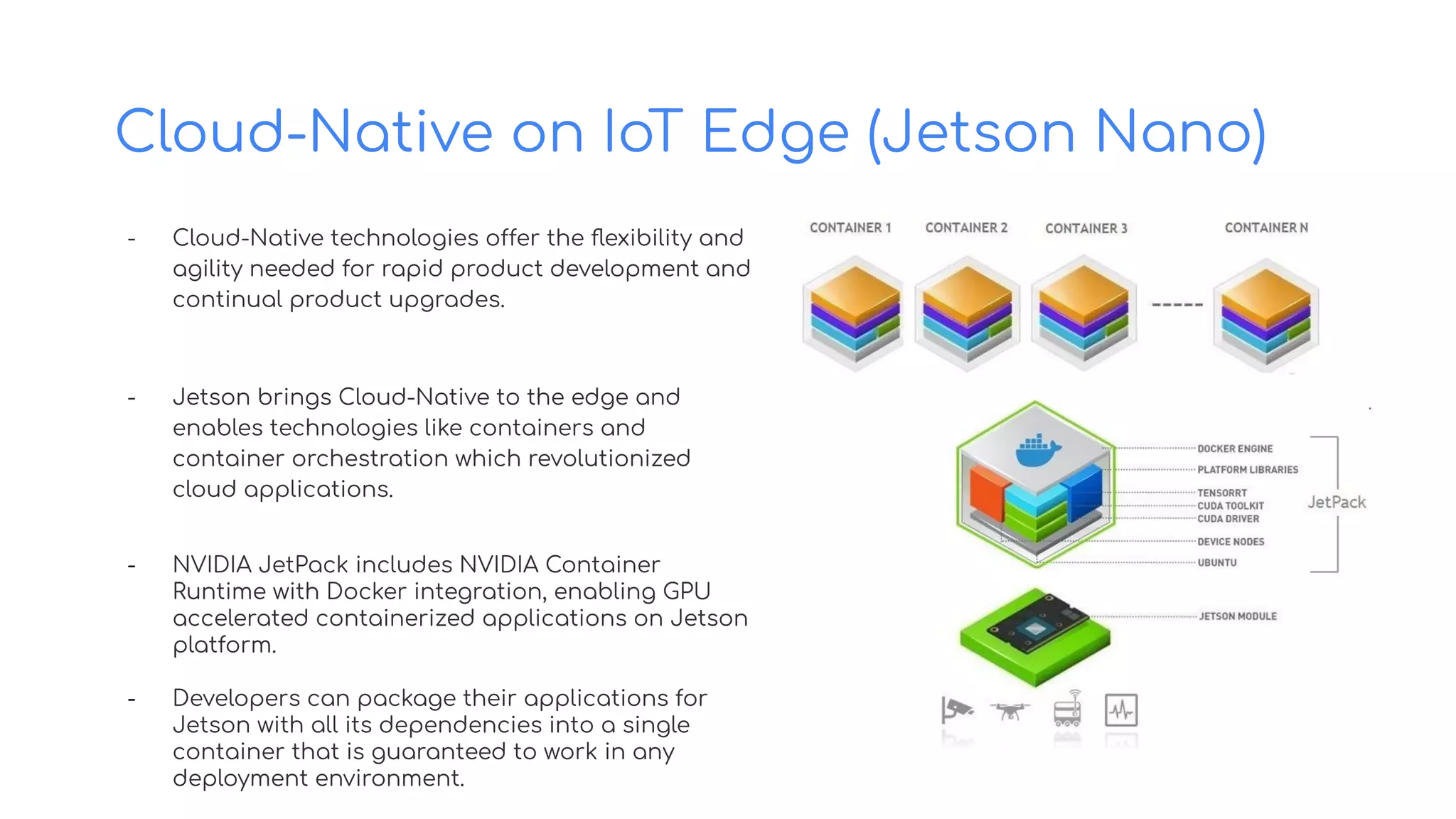
- NVIDIA JetPack includes NVIDIA Container
Runtime with Docker integration, enabling GPU
accelerated containerized applications on Jetson
platform.
- Developers can package their applications for
Jetson with all its dependencies into a single
container that is guaranteed to work in any
deployment environment.
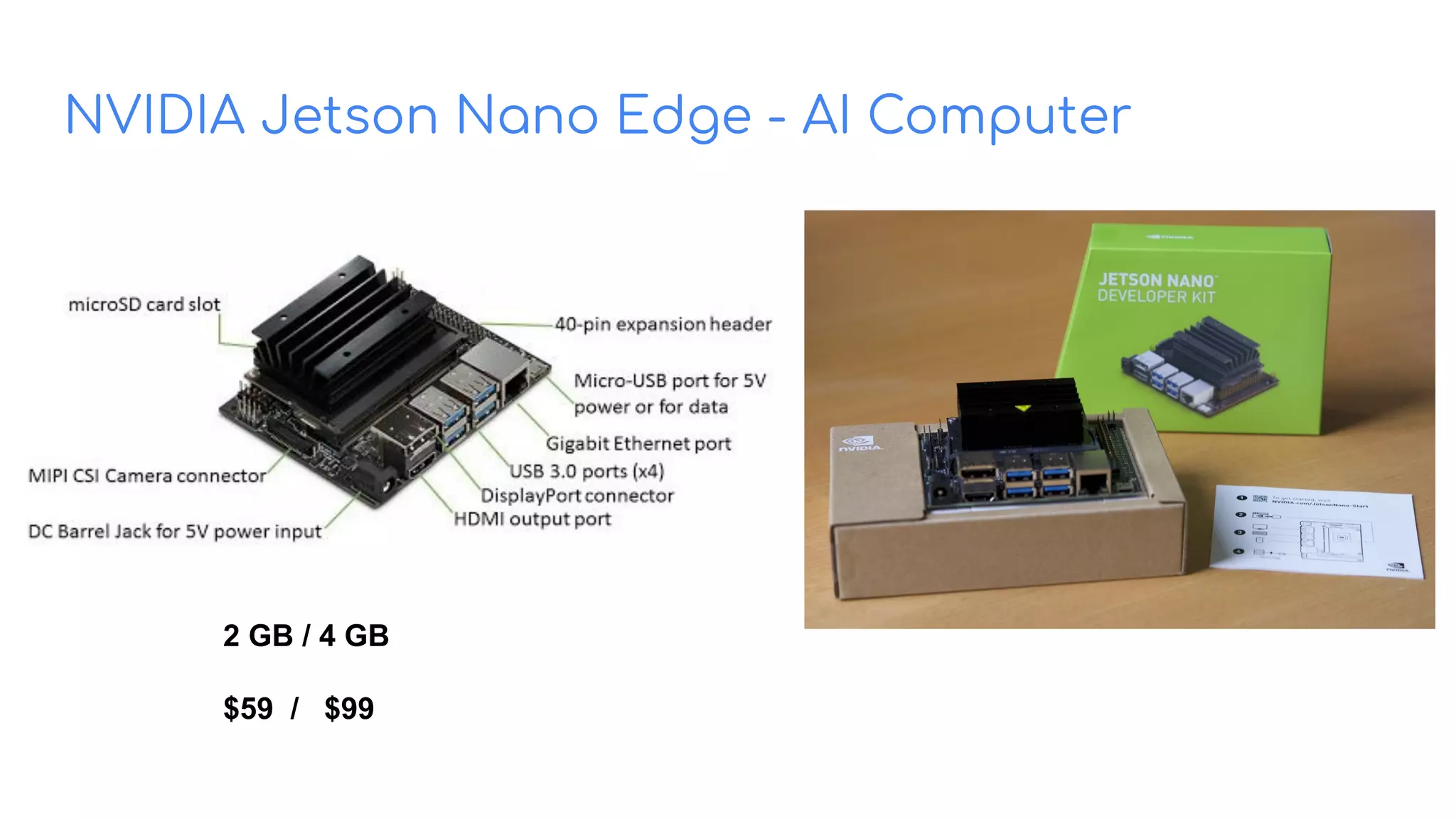
NVIDIA Jetson Nano Edge - AI Computer
2 GB / 4 GB
$59 / $99
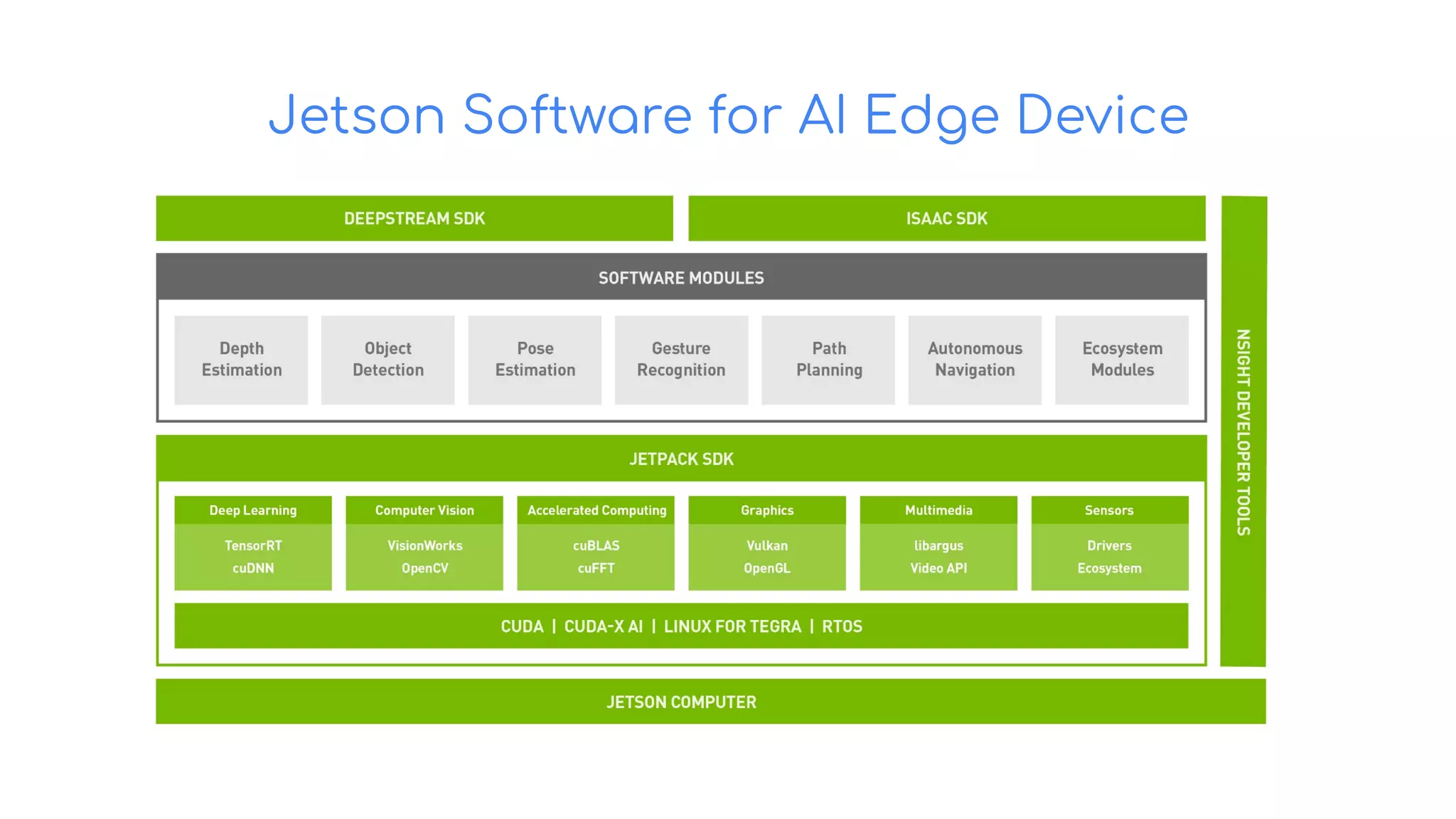
Jetson Software for AI Edge Device
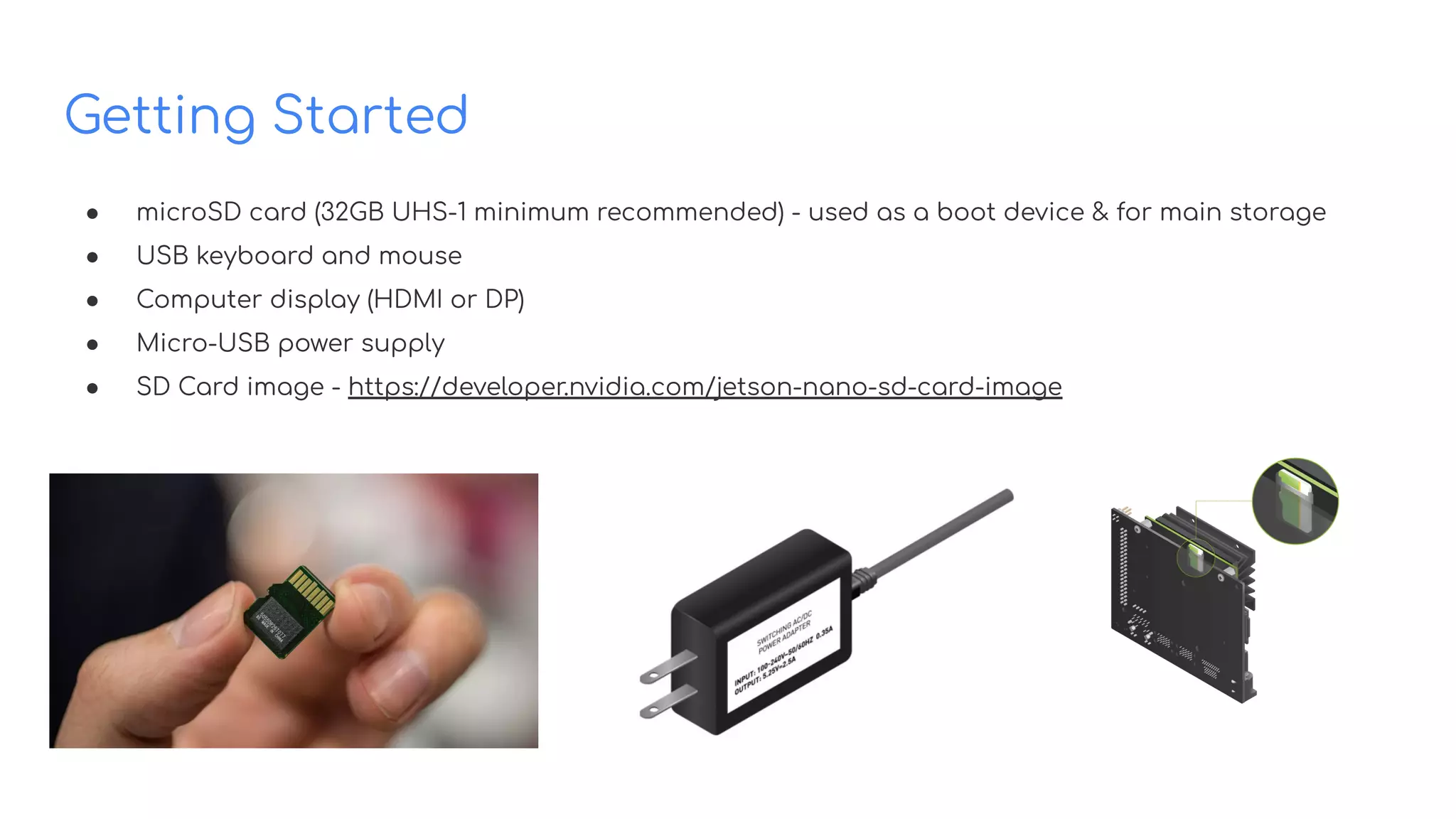
Getting Started
● microSD card (32GB UHS-1 minimum recommended) - used as a boot device & for main storage
● USB keyboard and mouse
● Computer display (HDMI or DP)
● Micro-USB power supply
● SD Card image - https://developer.nvidia.com/jetson-nano-sd-card-image
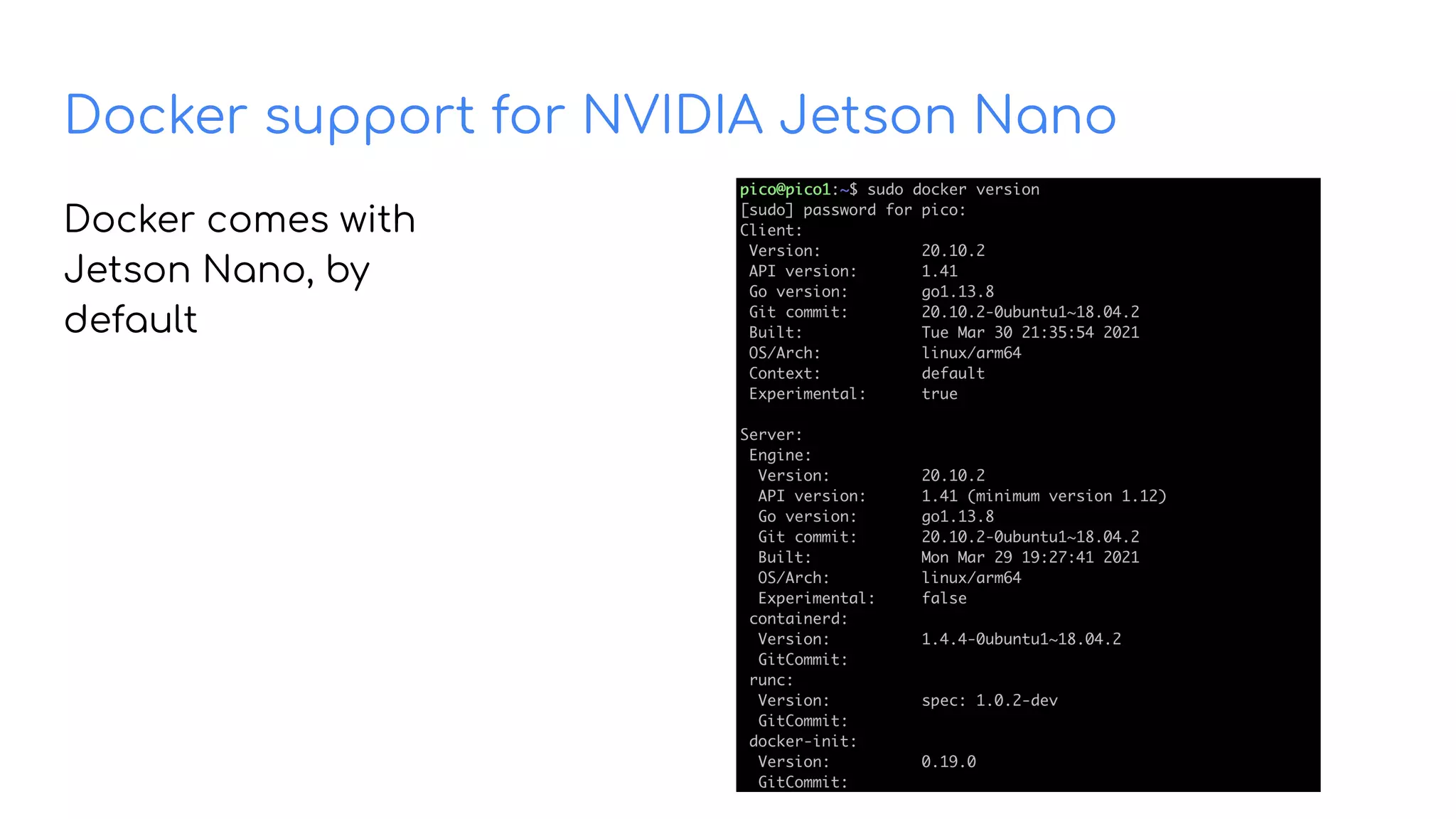
Docker support for NVIDIA Jetson Nano
Docker comes with
Jetson Nano, by
default
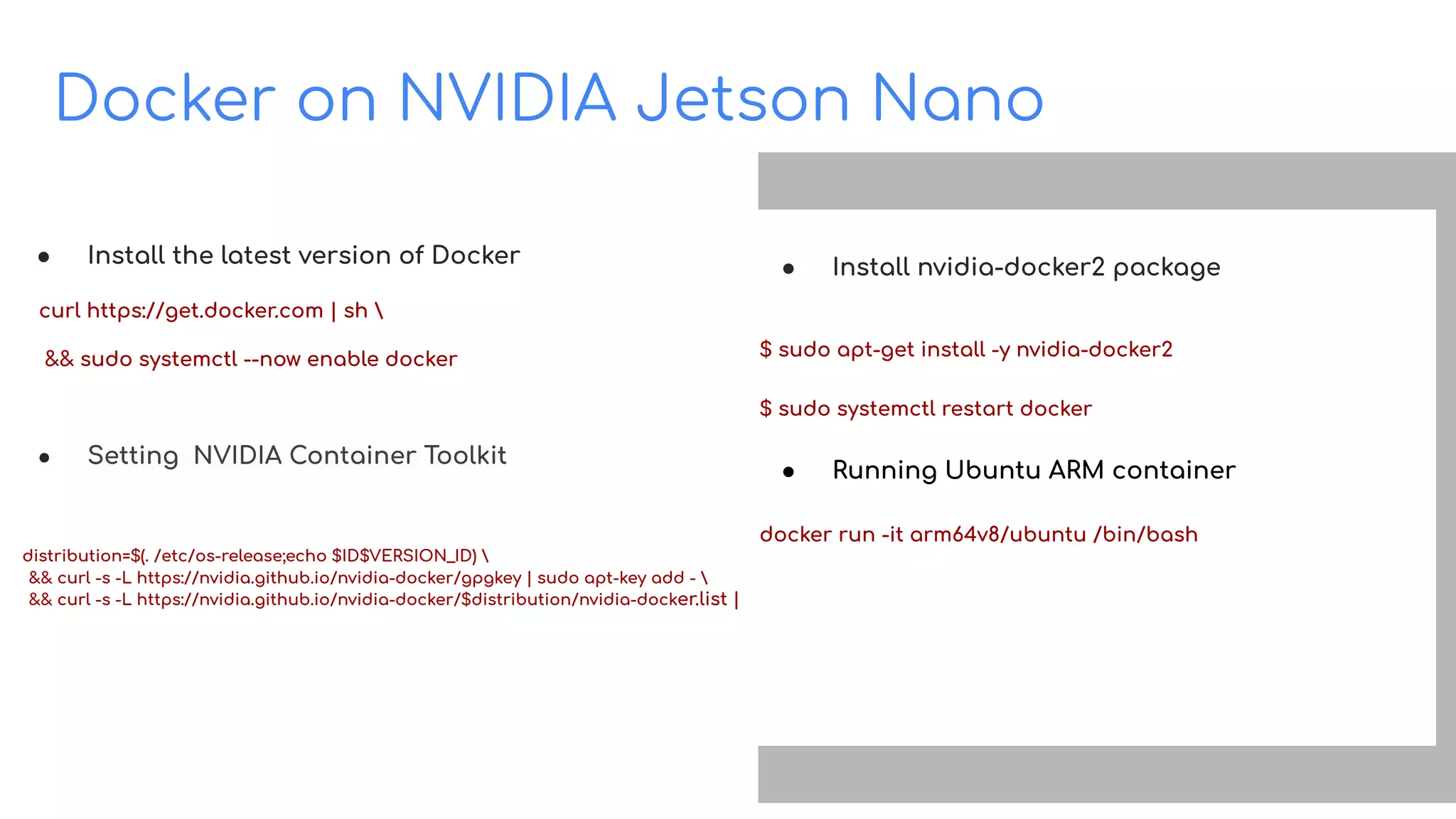
Docker on NVIDIA Jetson Nano
Build on Open Source
● Install the latest version of Docker
curl https://get.docker.com | sh 
&& sudo systemctl --now enable docker
● Setting NVIDIA Container Toolkit
distribution=$(. /etc/os-release;echo $ID$VERSION_ID) 
&& curl -s -L https://nvidia.github.io/nvidia-docker/gpgkey | sudo apt-key add - 
&& curl -s -L https://nvidia.github.io/nvidia-docker/$distribution/nvidia-docker.list | sudo tee /etc/apt/sources.list.d/nvidia-docker.list
● Install nvidia-docker2 package
$ sudo apt-get install -y nvidia-docker2
$ sudo systemctl restart docker
● Running Ubuntu ARM container
docker run -it arm64v8/ubuntu /bin/bash
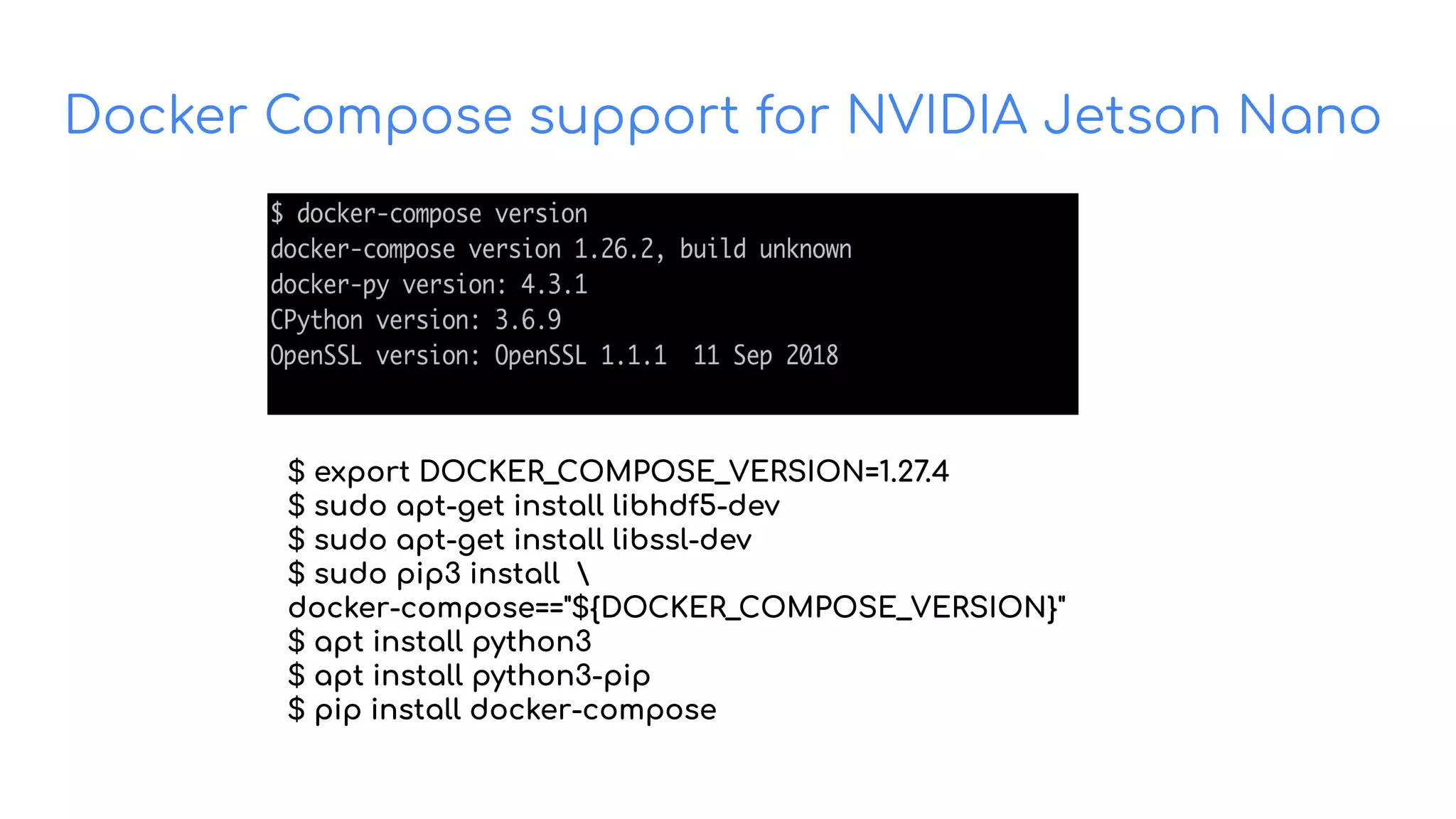
Docker Compose support for NVIDIA Jetson Nano
$ export DOCKER_COMPOSE_VERSION=1.27.4
$ sudo apt-get install libhdf5-dev
$ sudo apt-get install libssl-dev
$ sudo pip3 install 
docker-compose=="${DOCKER_COMPOSE_VERSION}"
$ apt install python3
$ apt install python3-pip
$ pip install docker-compose
Enabling GPU access with Compose
Build on Open Source
● Compose services can define GPU device reservations
services:
test:
image: nvidia/cuda:10.2-base
command: nvidia-smi
deploy:
resources:
reservations:
devices:
- driver: nvidia
count: 1
capabilities: [gpu, utility]
ia-smi
● Bring up GPU-enabled Docker container
$ docker-compose up
Creating network "gpu_default" with the default driver
Creating gpu_test_1 ... done
Attaching to gpu_test_1
test_1 |
+-----------------------------------------------------
------------------------+
test_1 | | NVIDIA-SMI 450.80.02 Driver Version:
450.80.02 CUDA Version: 11.1 |
test_1 |
|-------------------------------+---------------------
-+----------------------+
======================================================
==============|
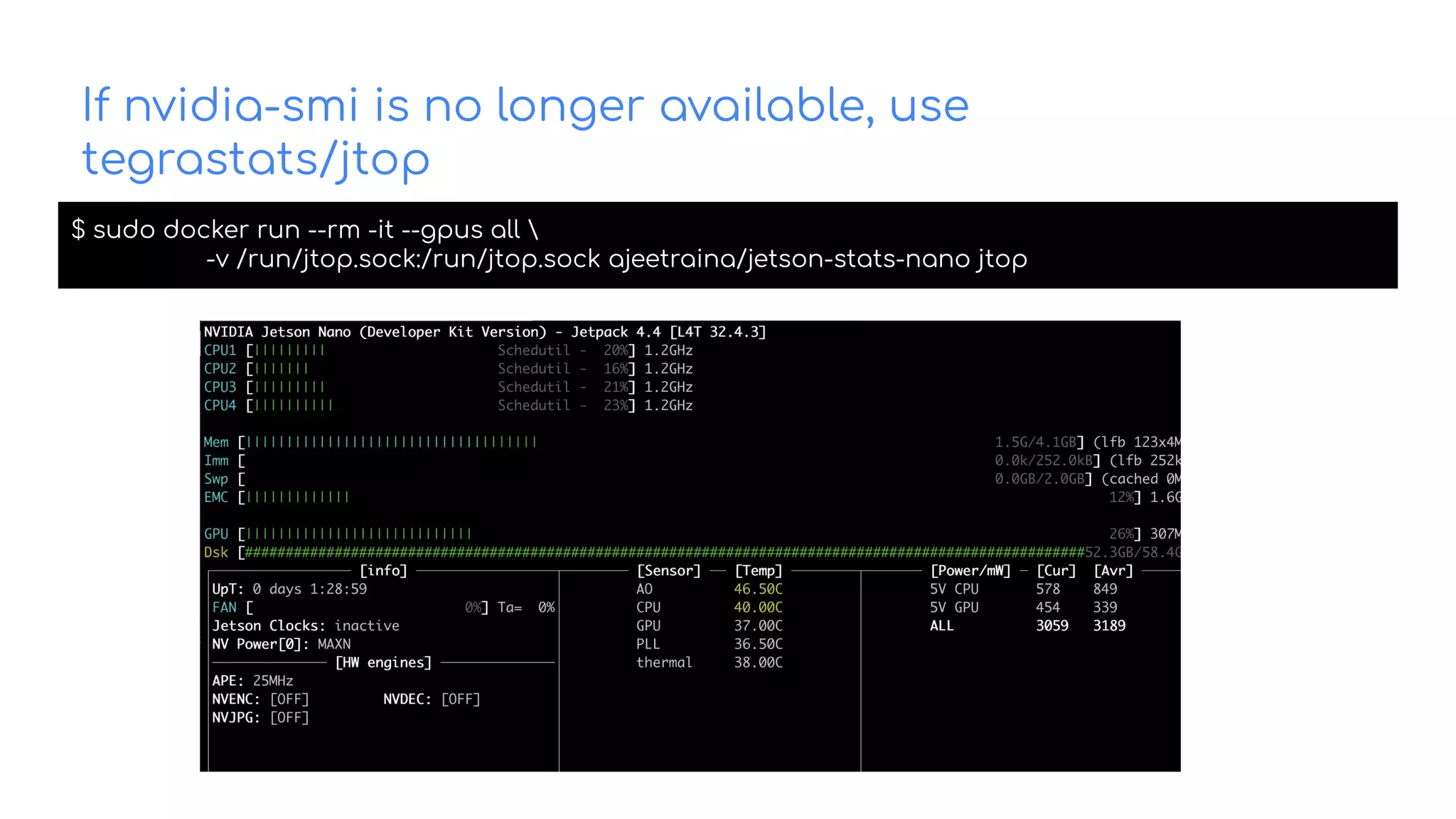
If nvidia-smi is no longer available, use
tegrastats/jtop
$ sudo docker run --rm -it --gpus all 
-v /run/jtop.sock:/run/jtop.sock ajeetraina/jetson-stats-nano jtop
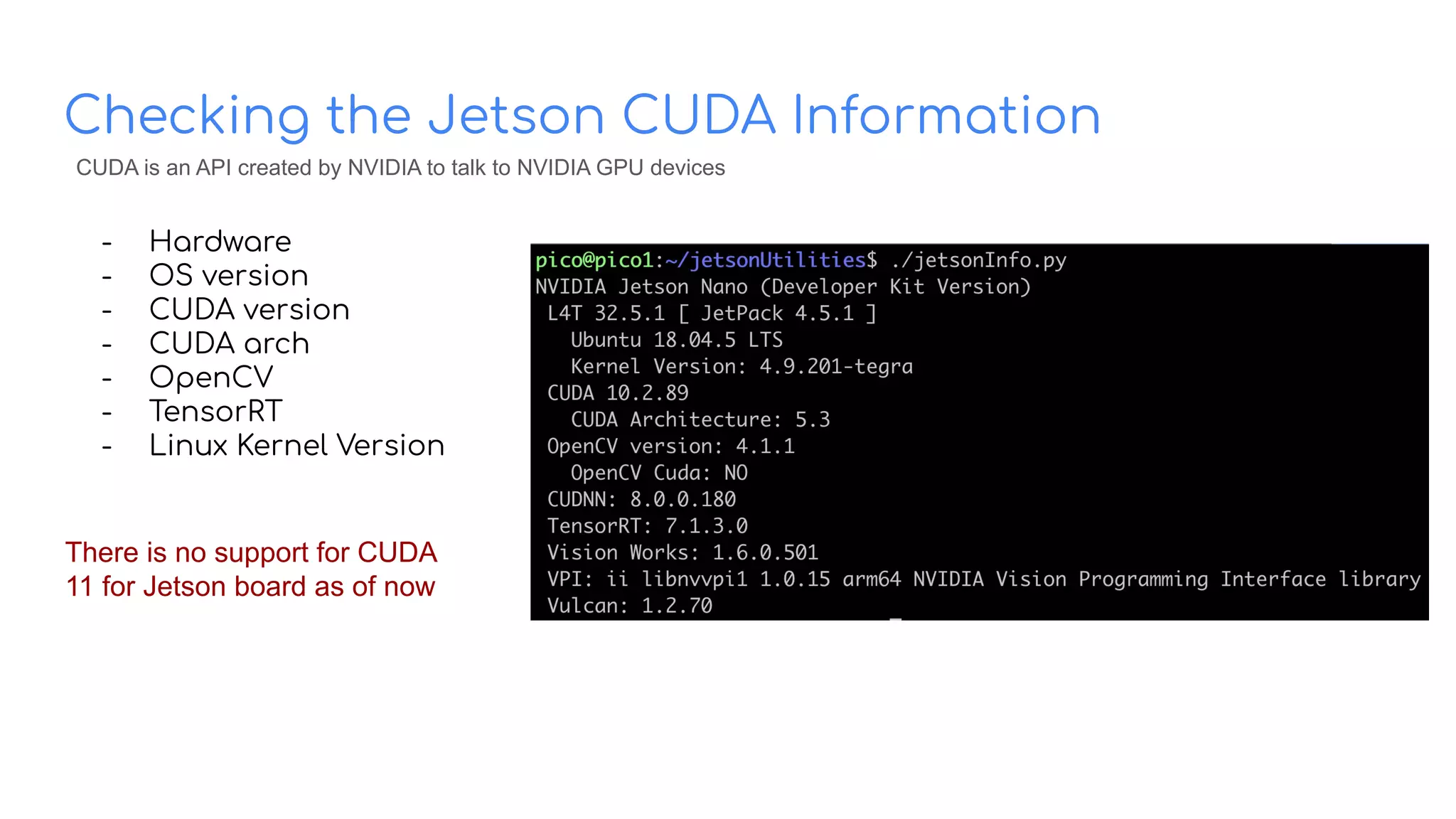
Checking the Jetson CUDA Information
- Hardware
- OS version
- CUDA version
- CUDA arch
- OpenCV
- TensorRT
- Linux Kernel Version
There is no support for CUDA
11 for Jetson board as of now
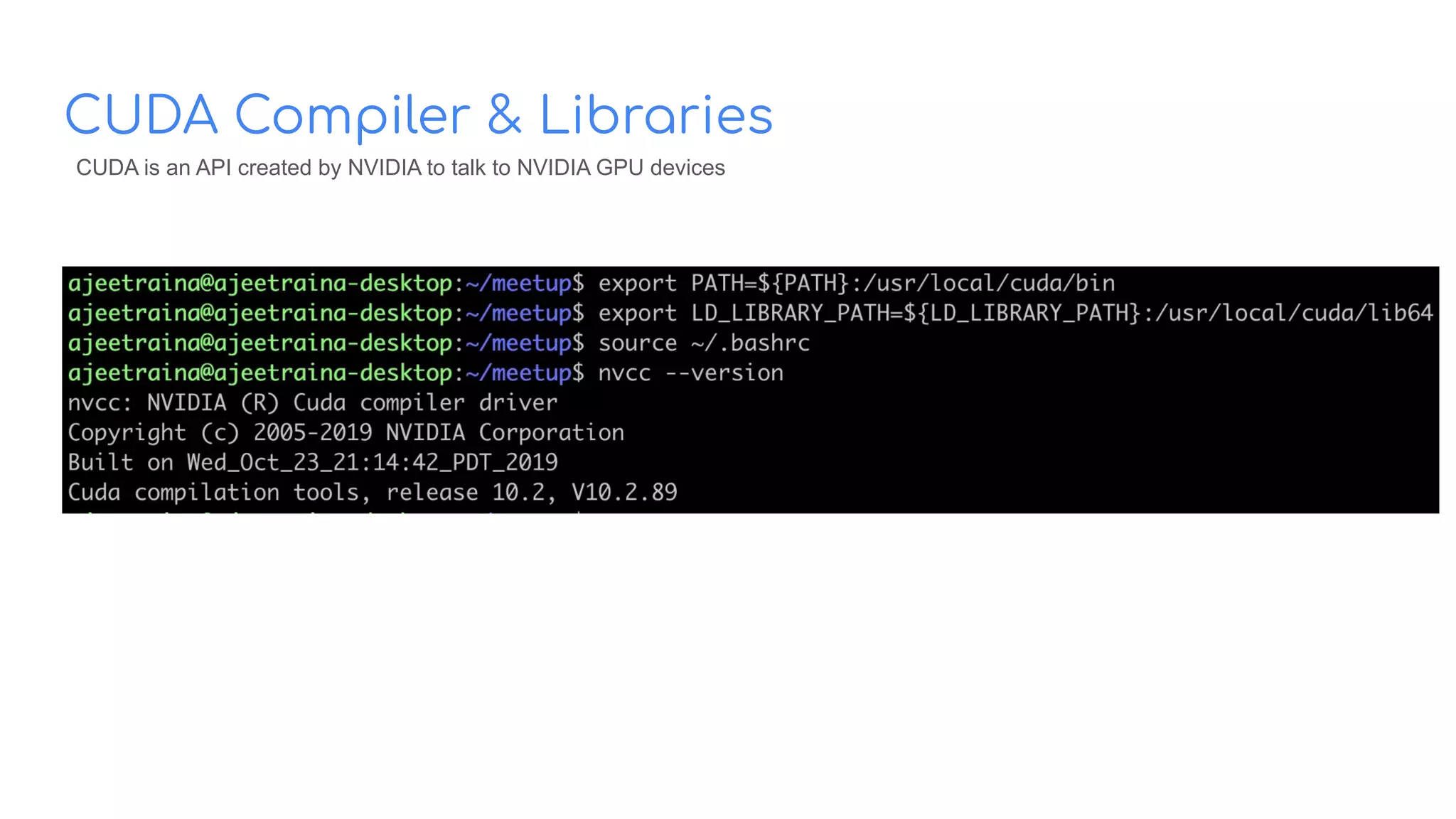
CUDA is an API created by NVIDIA to talk to NVIDIA GPU devices
CUDA Compiler & Libraries
CUDA is an API created by NVIDIA to talk to NVIDIA GPU devices
Interesting? How shall I build those
apps from scratch?
-
-
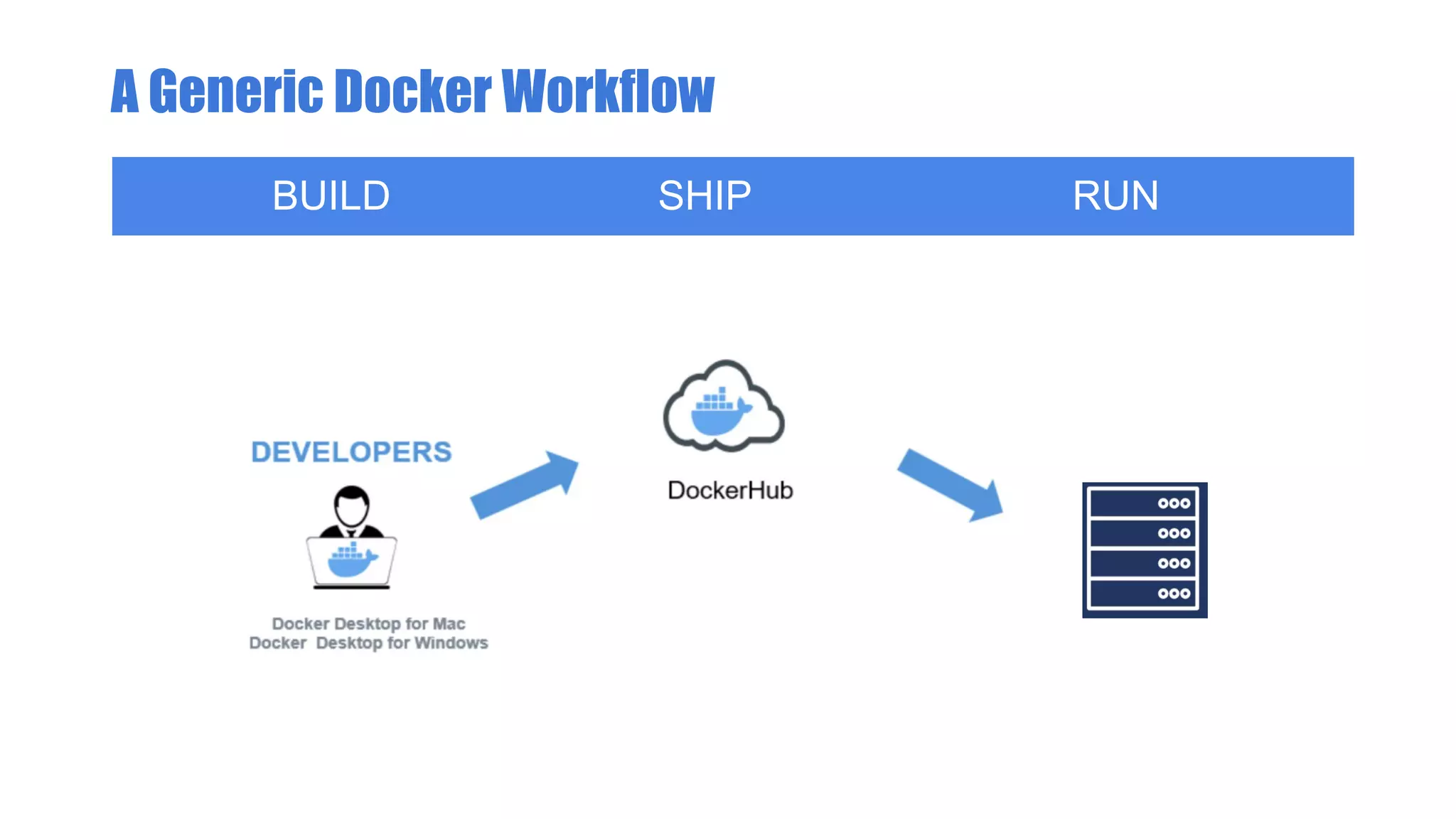
A Generic Docker Workflow
BUILD SHIP RUN
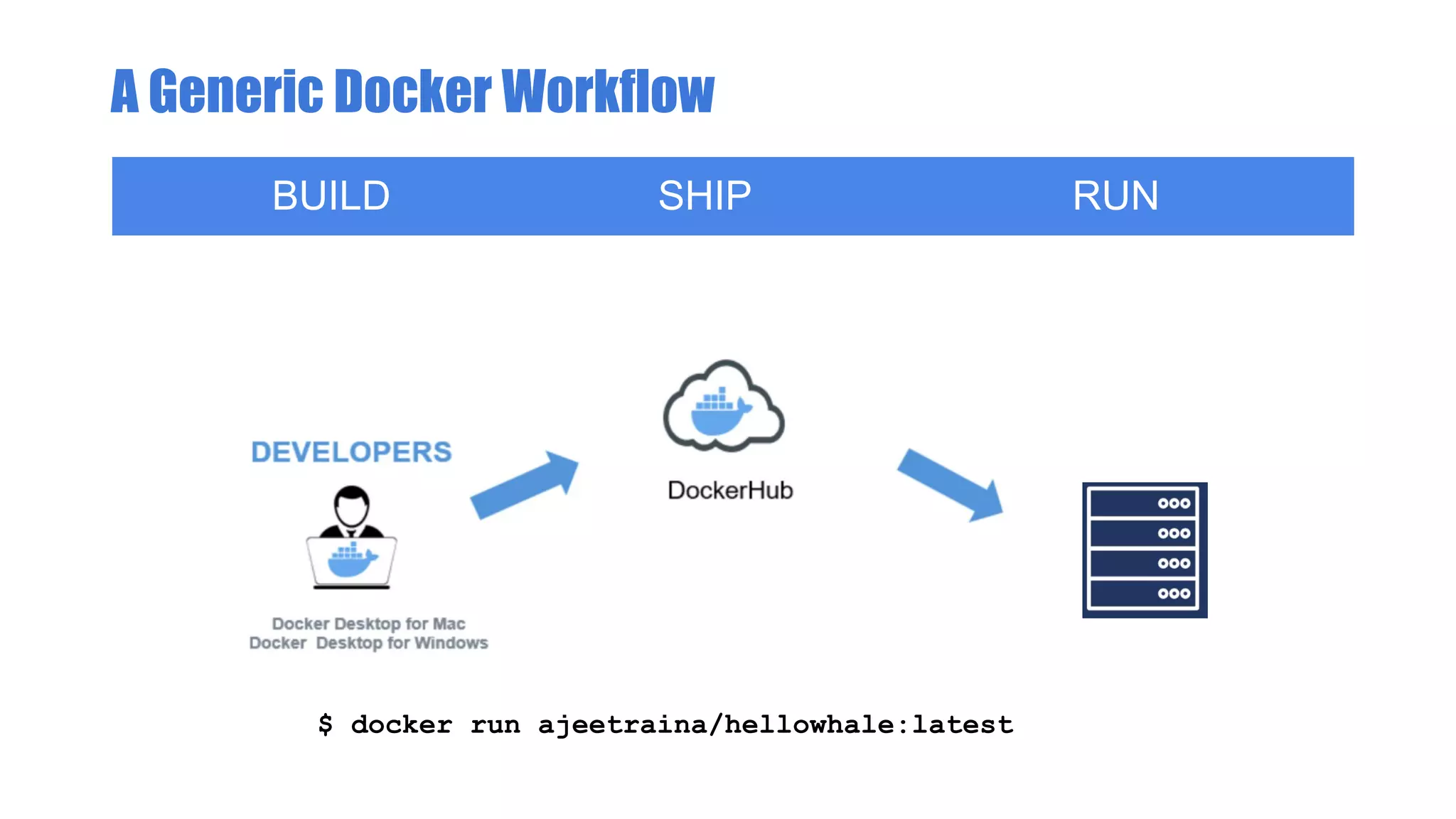
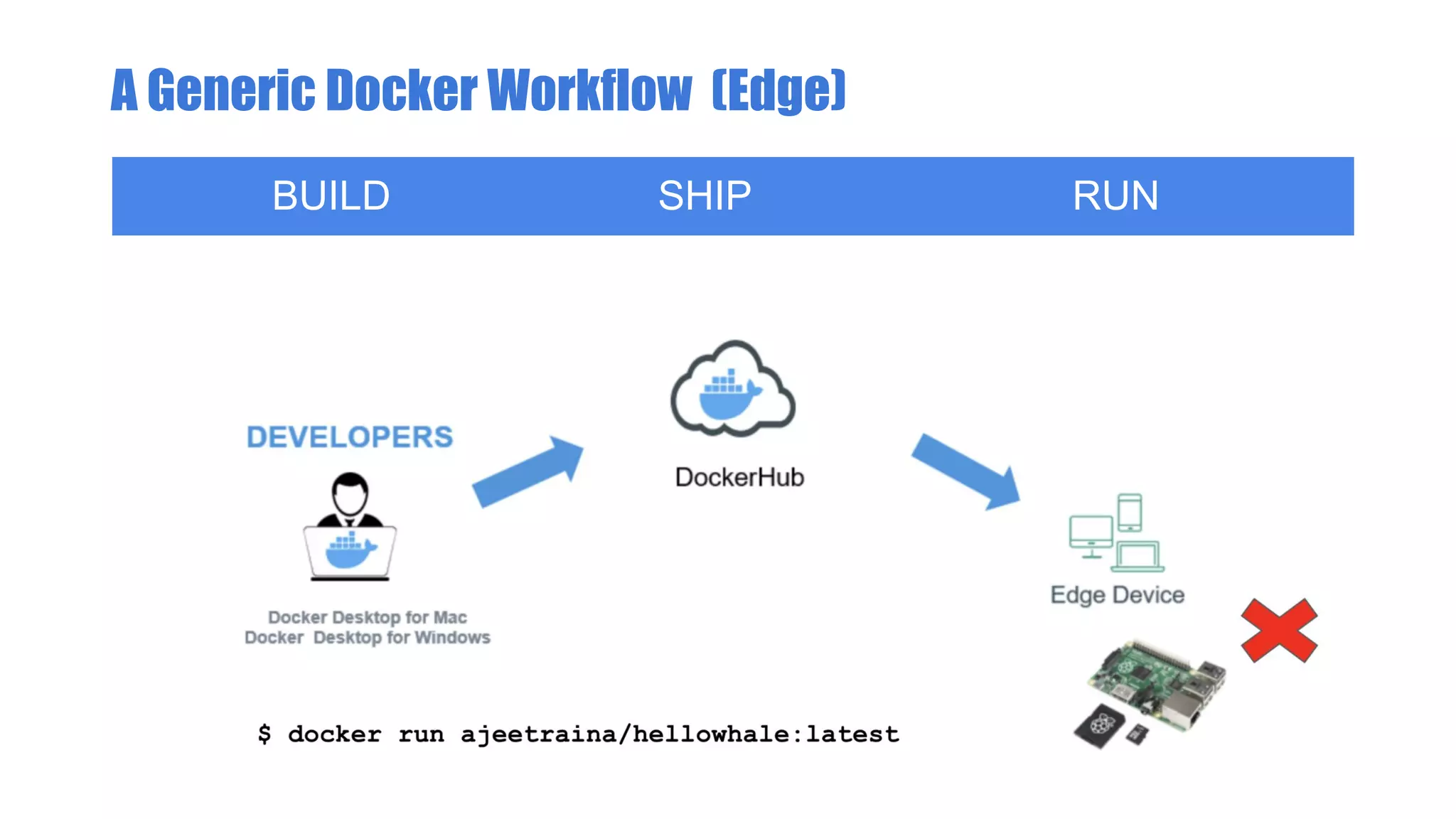
A Generic Docker Workflow
BUILD SHIP RUN
$ docker run ajeetraina/hellowhale:latest
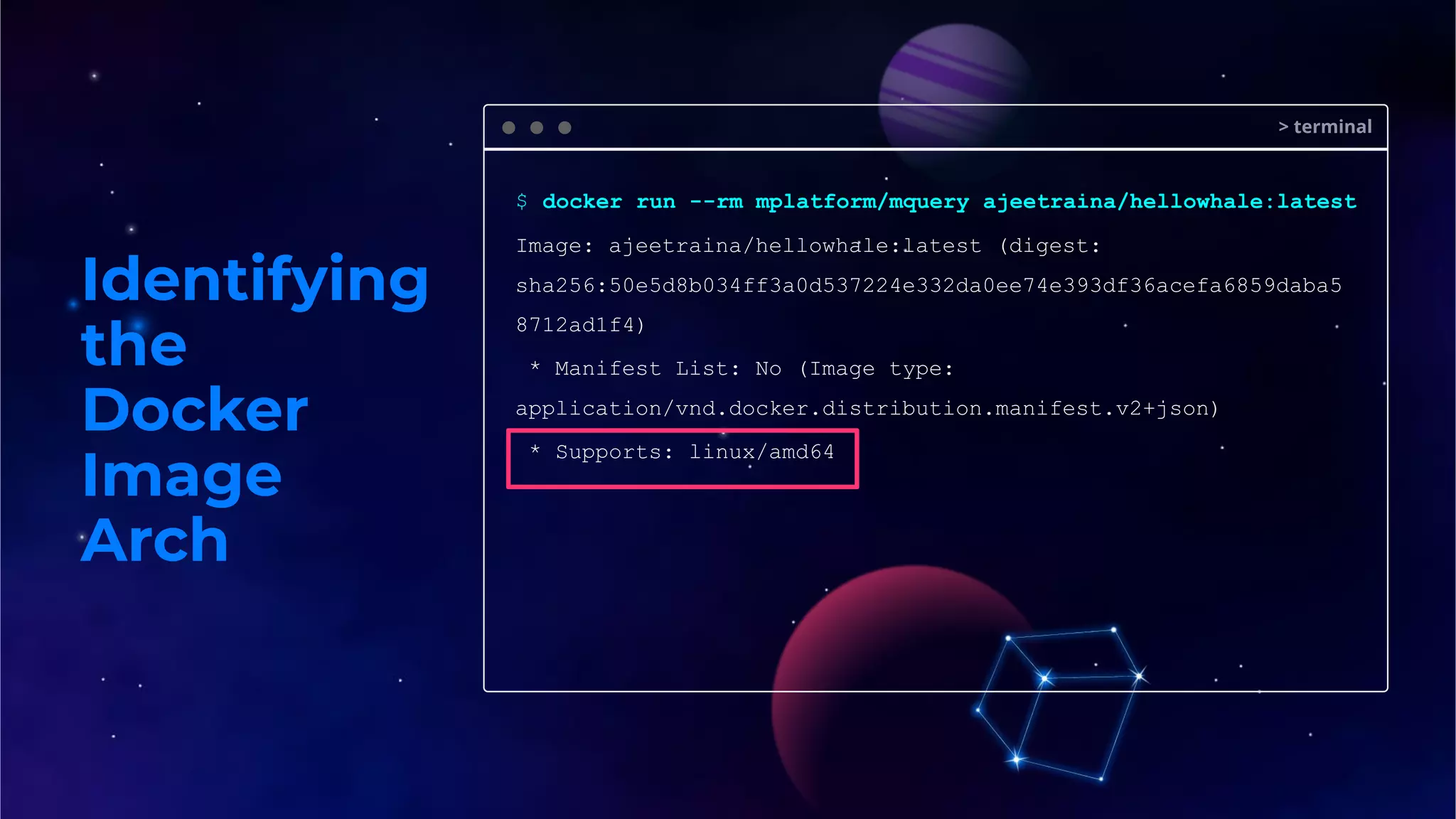
Identifying
the
Docker
Image
Arch
> terminal
$ docker run --rm mplatform/mquery ajeetraina/hellowhale:latest
Image: ajeetraina/hellowhale:latest (digest:
sha256:50e5d8b034ff3a0d537224e332da0ee74e393df36acefa6859daba5
8712ad1f4)
* Manifest List: No (Image type:
application/vnd.docker.distribution.manifest.v2+json)
* Supports: linux/amd64
A Generic Docker Workflow (Edge)
BUILD SHIP RUN
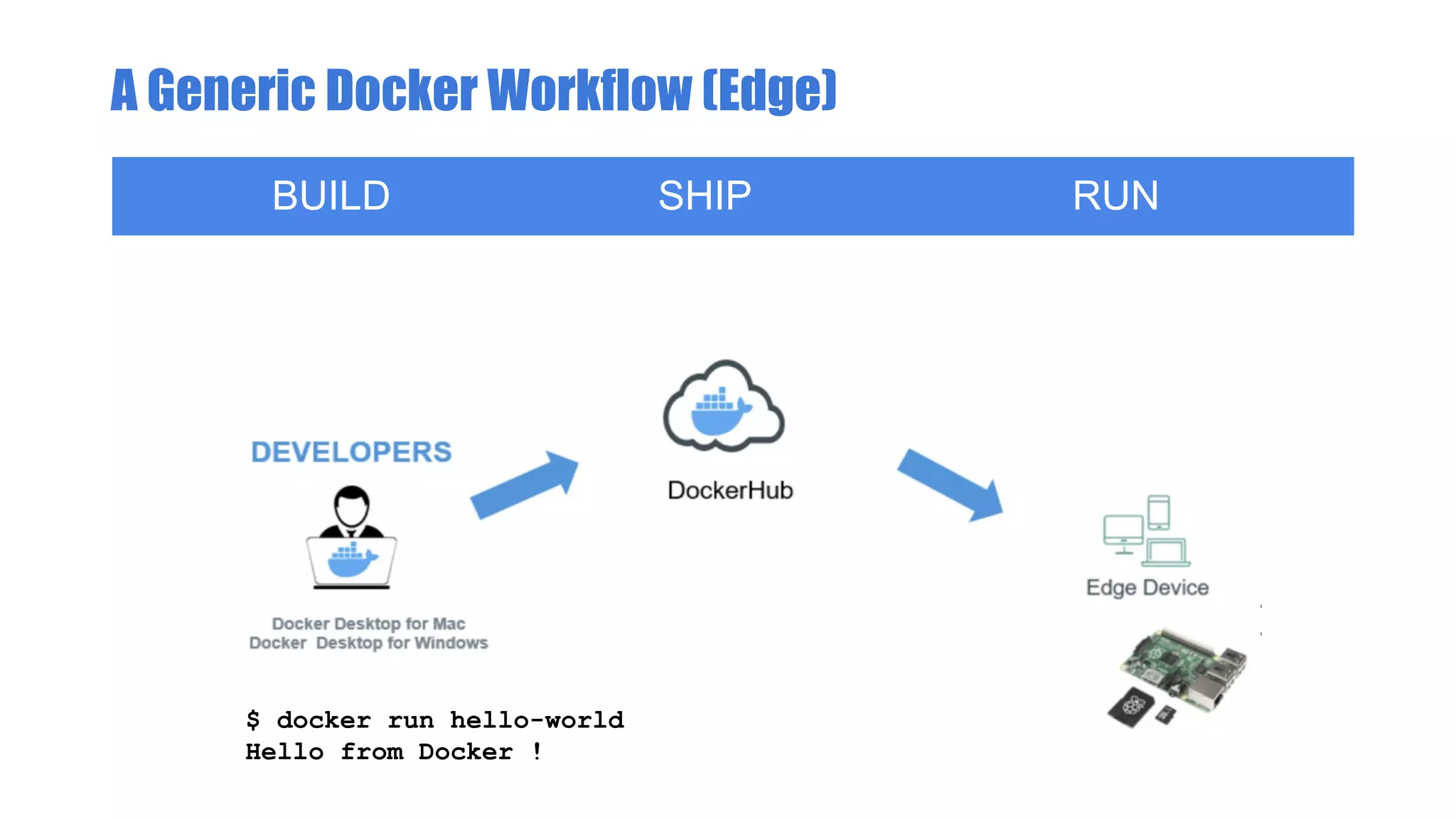
A Generic Docker Workflow (Edge)
BUILD SHIP RUN
$ docker run hello-world
Hello from Docker !
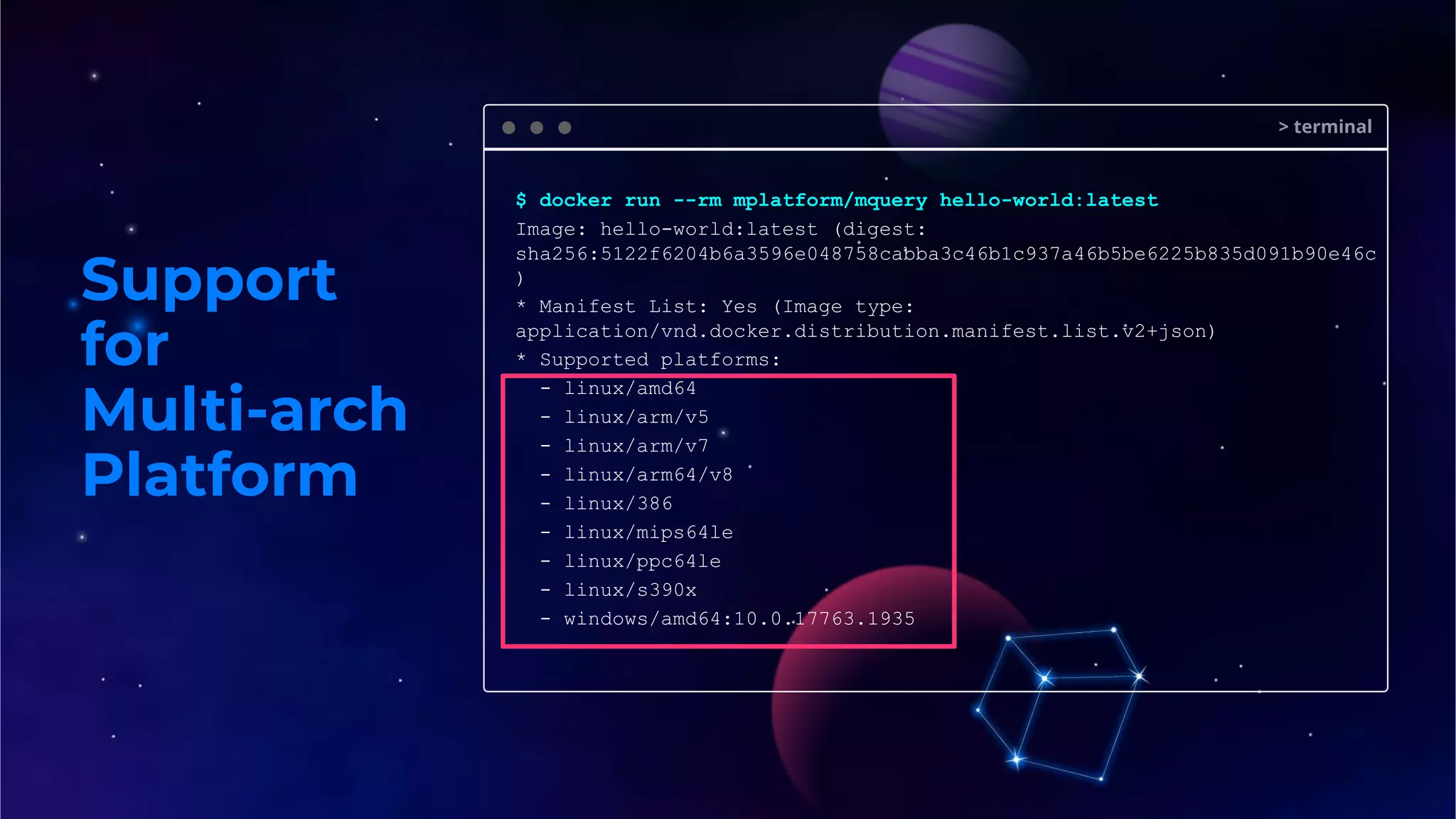
Support
for
Multi-arch
Platform
> terminal
$ docker run --rm mplatform/mquery hello-world:latest
Image: hello-world:latest (digest:
sha256:5122f6204b6a3596e048758cabba3c46b1c937a46b5be6225b835d091b90e46c
)
* Manifest List: Yes (Image type:
application/vnd.docker.distribution.manifest.list.v2+json)
* Supported platforms:
- linux/amd64
- linux/arm/v5
- linux/arm/v7
- linux/arm64/v8
- linux/386
- linux/mips64le
- linux/ppc64le
- linux/s390x
- windows/amd64:10.0.17763.1935
Support
for
Multi-arch
Platform
Docker Compose v2.0
$ docker compose --project-name demo up
[+] Running 3/4
⠿ Network demo_default Created
4.0s
⠿ Volume "demo_db_data" Created
0.0s
⠿ Container demo_db_1 Started
2.2s
⠿ Container demo_wordpress_1 Starting
Do I need ARM-based devices to
build ARM-based images?
Not necessarily.
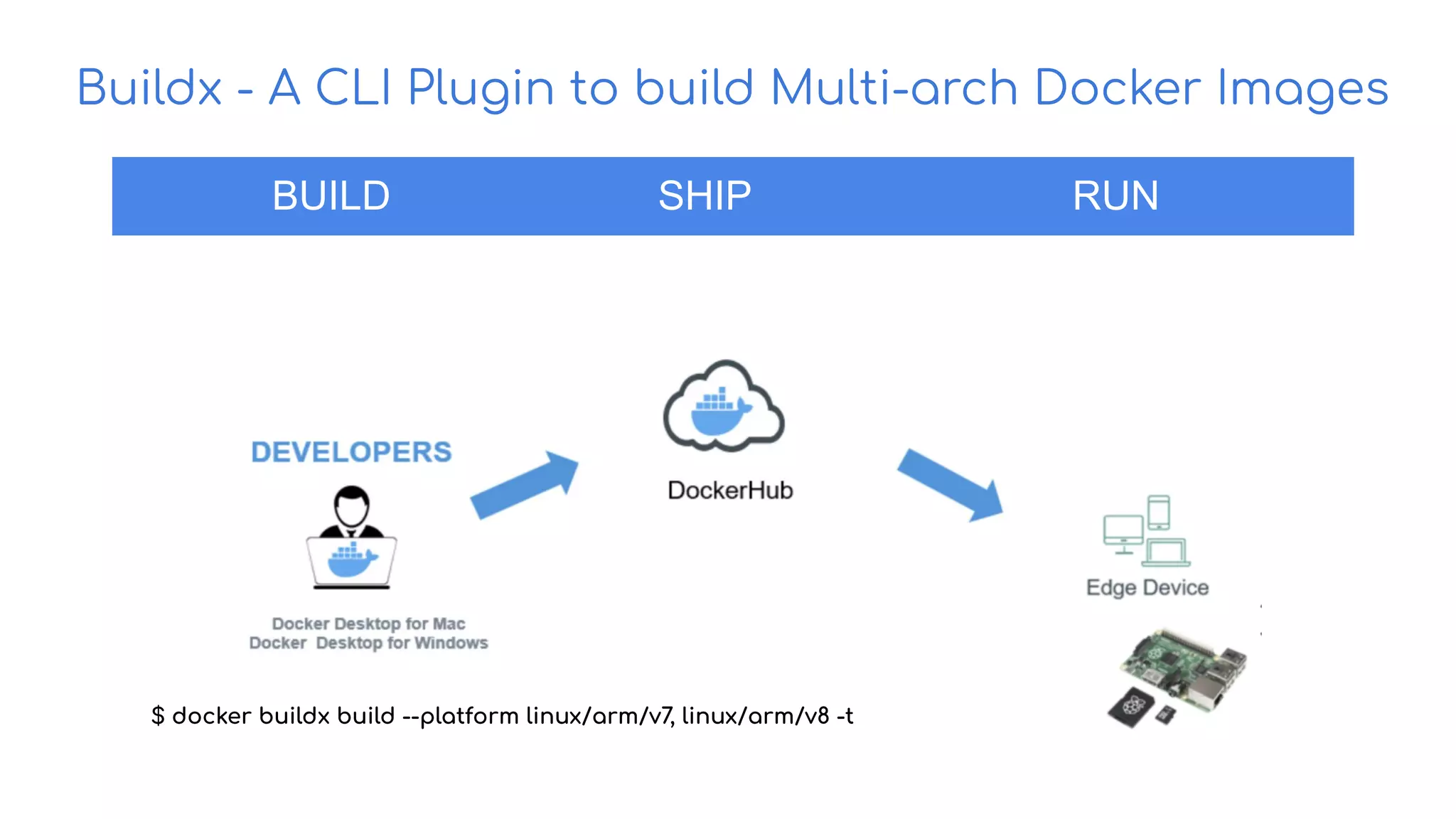
Buildx - A CLI Plugin to build Multi-arch Docker Images
BUILD SHIP RUN
$ docker buildx build --platform linux/arm/v7, linux/arm/v8 -t
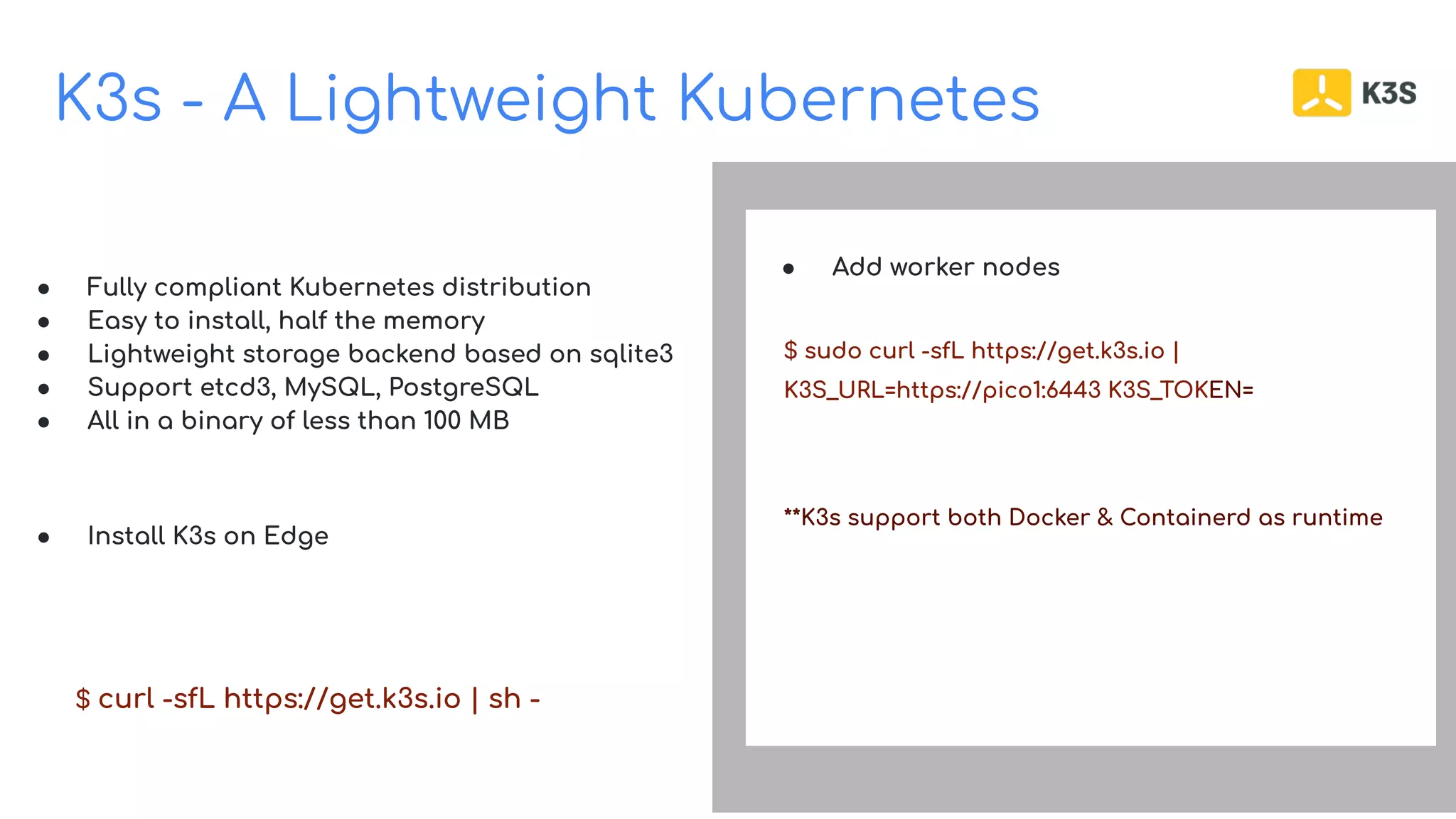
K3s - A Lightweight Kubernetes
Build on Open Source
● Fully compliant Kubernetes distribution
● Easy to install, half the memory
● Lightweight storage backend based on sqlite3
● Support etcd3, MySQL, PostgreSQL
● All in a binary of less than 100 MB
● Install K3s on Edge
$ curl -sfL https://get.k3s.io | sh -
● Add worker nodes
$ sudo curl -sfL https://get.k3s.io |
K3S_URL=https://pico1:6443 K3S_TOKEN=
**K3s support both Docker & Containerd as runtime
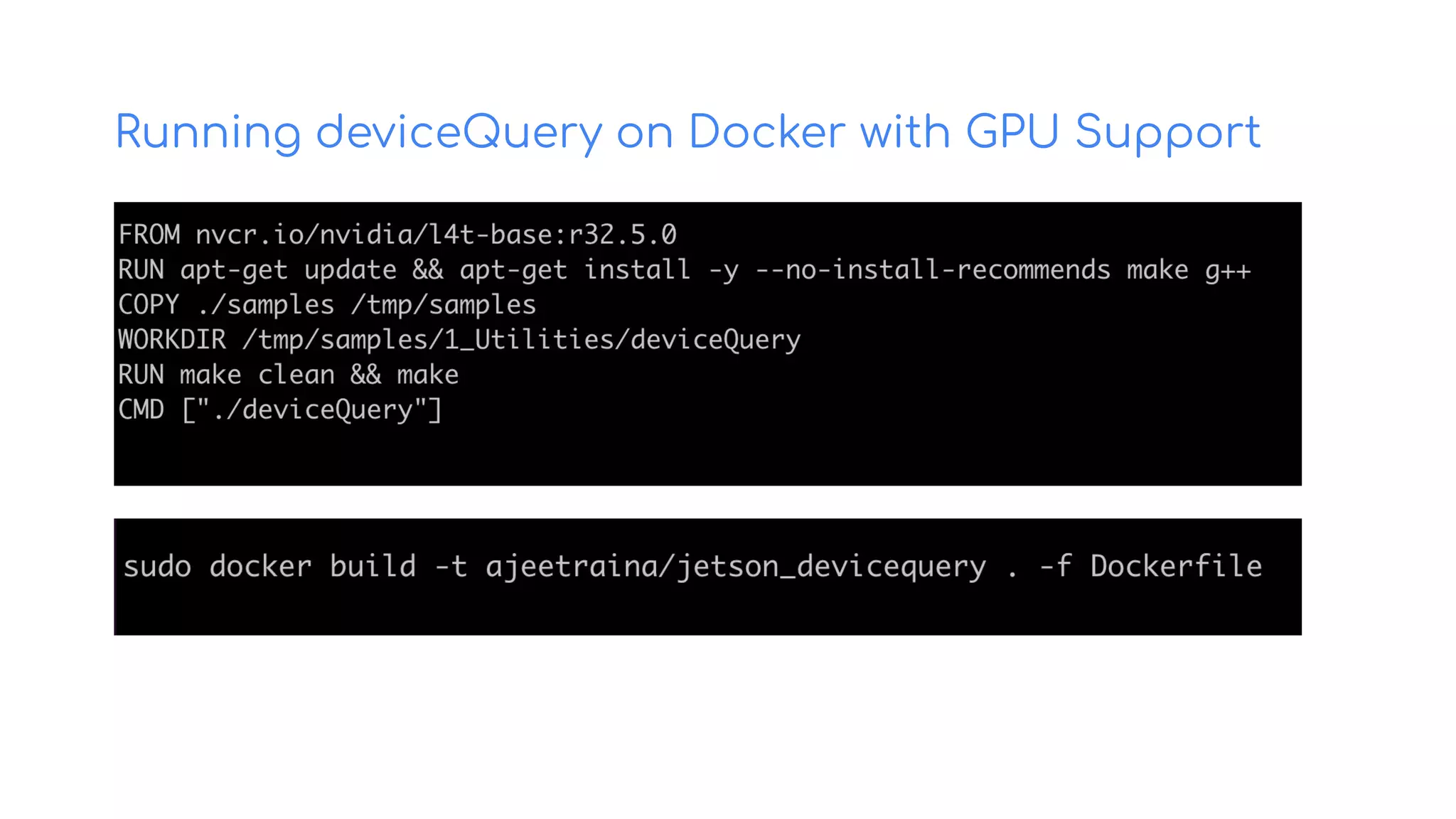
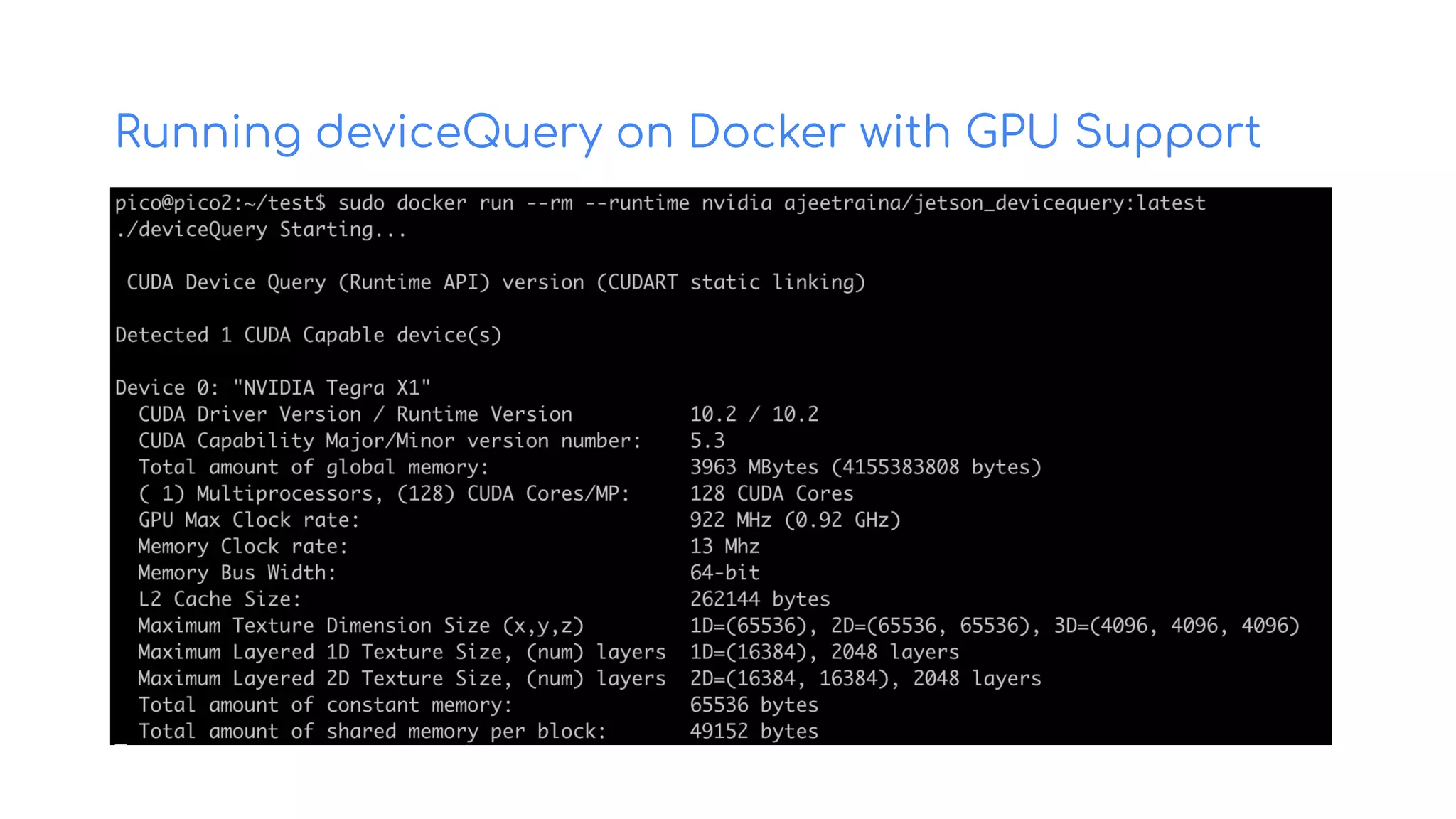
Running deviceQuery on Docker with GPU Support
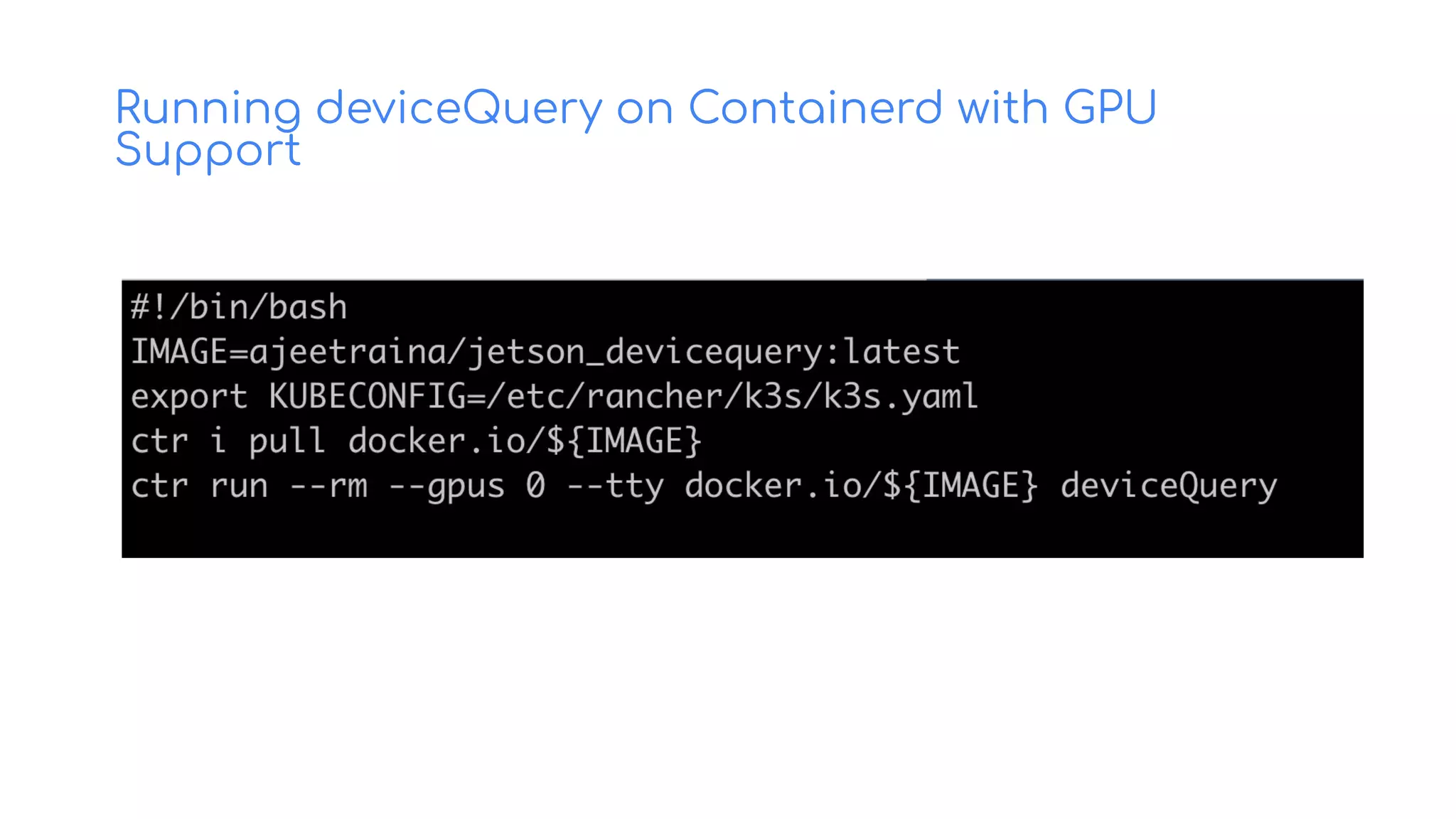
Running deviceQuery on Containerd with GPU
Support
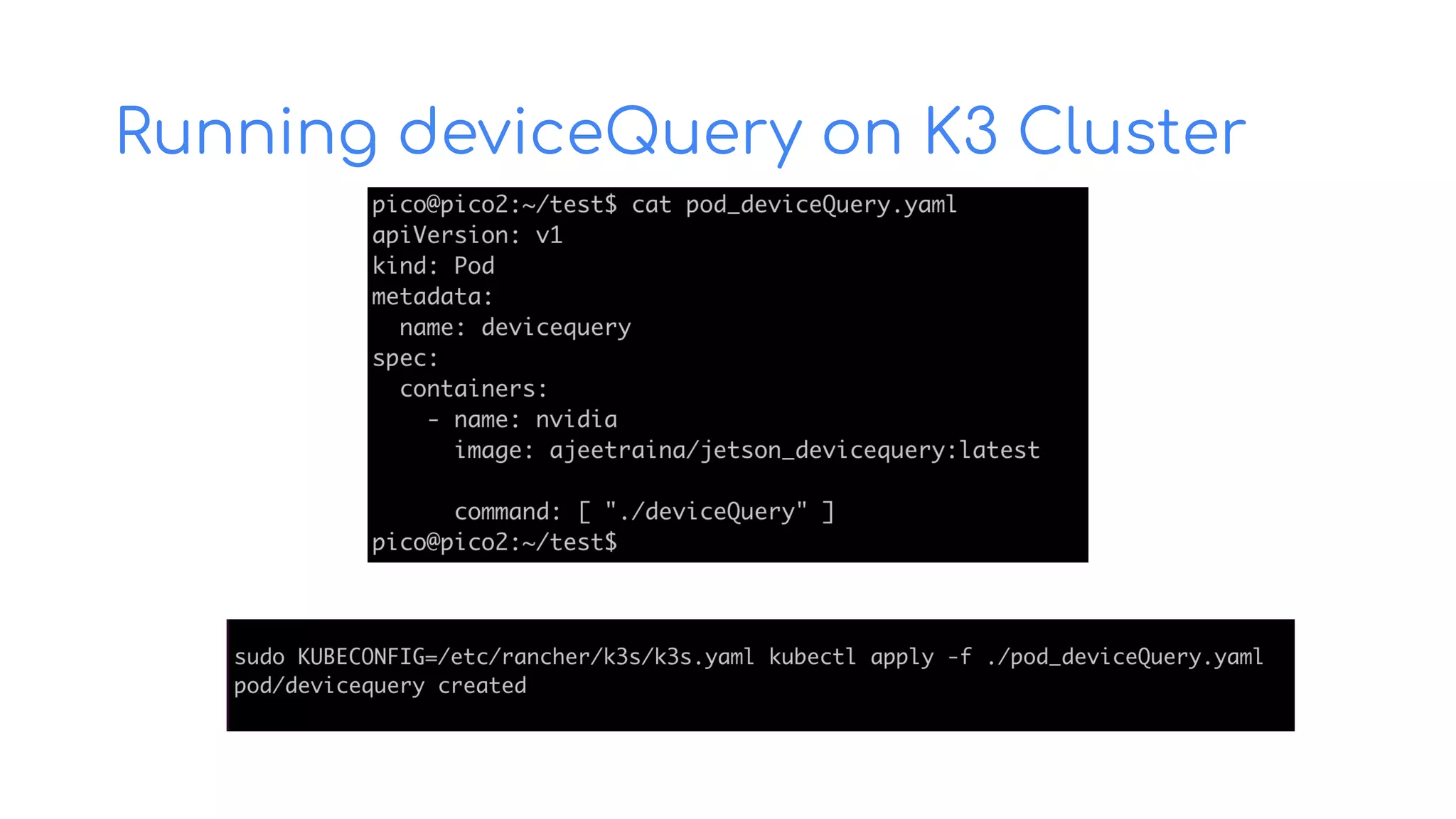
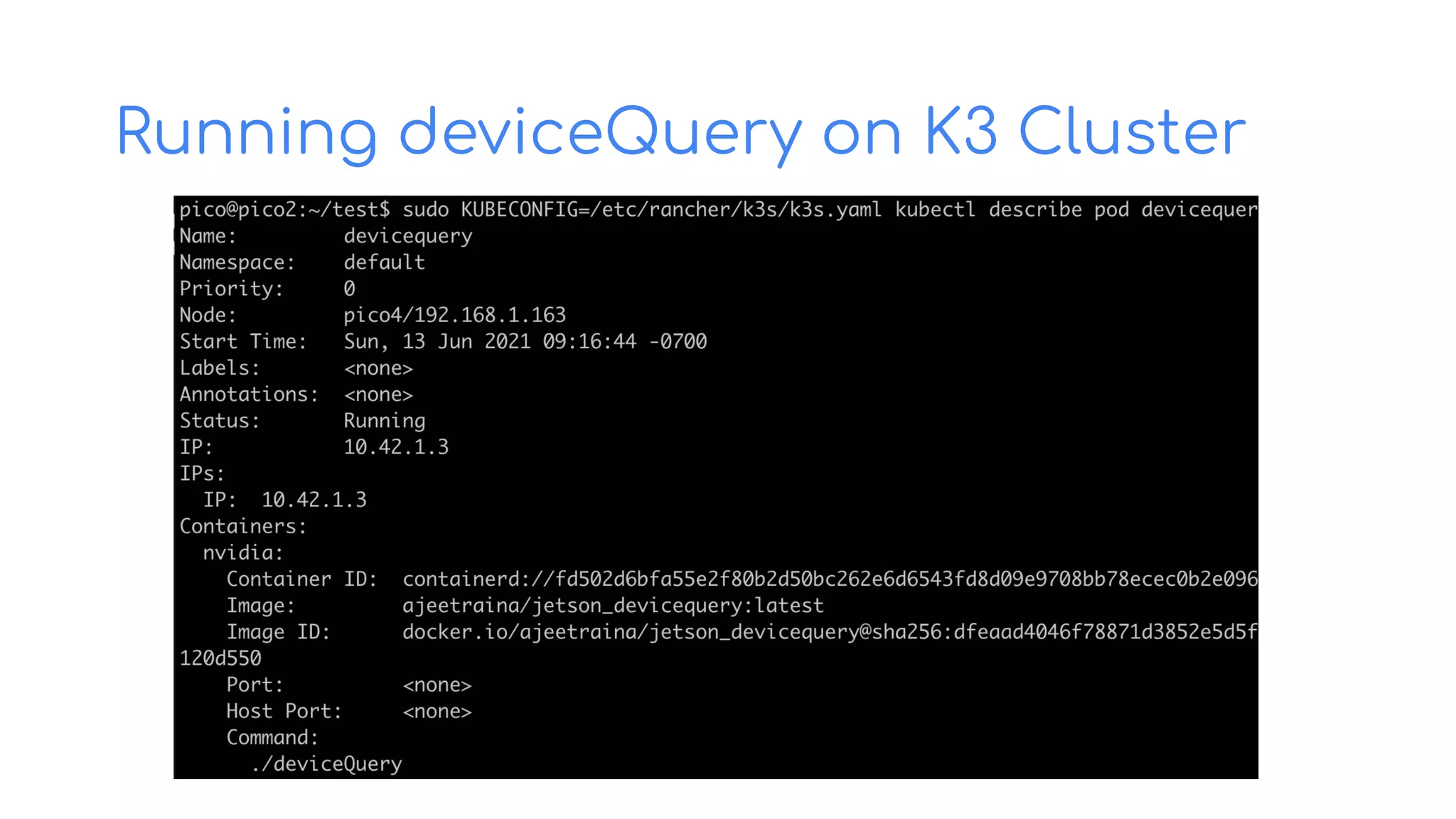
Running deviceQuery on K3 Cluster
Smart Camera system for Real-Time Crowd Face Mask detection
Docker + Edge AI + Camera
Real-time Implementations
Mask Detection System running on Jetson Nano
[Confidential]
- A Jetson Nano Dev Kit running JetPack 4.4.1 or 4.5
- An external DC 5 volt, 4 amp power supply connected through the Dev Kit's
barrel jack connector (J25). (See these instructions on how to enable barrel
jack power.) This software makes full use of the GPU, so it will not run with
USB power.
- A USB webcam attached to your Nano
- Another computer with a program that can display RTSP streams -- we
suggest VLC or QuickTime.
$ sudo docker run --runtime nvidia 
--privileged --rm -it 
--env MASKCAM_DEVICE_ADDRESS=<your-jetson-ip> 
-p 1883:1883 
-p 8080:8080 
-p 8554:8554 
maskcam/maskcam-beta
CherryBot Systems - AI-Powered Payload Delivery System
[Confidential]
- AI-based payload delivery robot
- Low-cost autonomous robot system
- Equipped with NVIDIA Jetson Nano
board, a low-powered AI deployed as
Edge device, a sensor suite that
includes multiple cameras, GPS and
swappable batteries
- Uses deep learning to correctly
interpret data gathered from its
sensors and to make intelligent
decisions that ensure a fast, safe and
cost efficient delivery.
- It can correctly identify objects or
people or detect objects and
obstacles to avoid collisions in a safe
reliable manner.
CherryBot Systems - AI-Powered Payload Delivery System
[Confidential]
CherryBot Systems
[Confidential]
Food Delivery Swag Distribution Medicine Delivery
References
https://github.com/collabnix/ioetplanet
https://collabnix.com
Thank You

Delivering Docker & K3s worloads to IoT Edge devices

  • 1.
    Delivering Docker &K3s to IoT Edge device Ajeet S Raina
  • 2.
    - Docker Captain -ARM Innovator - Author @ collabnix.com - Docker Community Leader - DevRel at Redis Labs - Worked in Dell, VMware & CGI $whoami @ajeetsraina
  • 3.
    Cloud-Native on IoTEdge (Jetson Nano) - Cloud-Native technologies offer the flexibility and agility needed for rapid product development and continual product upgrades. - Jetson brings Cloud-Native to the edge and enables technologies like containers and container orchestration which revolutionized cloud applications. - NVIDIA JetPack includes NVIDIA Container Runtime with Docker integration, enabling GPU accelerated containerized applications on Jetson platform. - Developers can package their applications for Jetson with all its dependencies into a single container that is guaranteed to work in any deployment environment.
  • 4.
    NVIDIA Jetson NanoEdge - AI Computer 2 GB / 4 GB $59 / $99
  • 5.
    Jetson Software forAI Edge Device
  • 6.
    Getting Started ● microSDcard (32GB UHS-1 minimum recommended) - used as a boot device & for main storage ● USB keyboard and mouse ● Computer display (HDMI or DP) ● Micro-USB power supply ● SD Card image - https://developer.nvidia.com/jetson-nano-sd-card-image
  • 8.
    Docker support forNVIDIA Jetson Nano Docker comes with Jetson Nano, by default
  • 9.
    Docker on NVIDIAJetson Nano Build on Open Source ● Install the latest version of Docker curl https://get.docker.com | sh && sudo systemctl --now enable docker ● Setting NVIDIA Container Toolkit distribution=$(. /etc/os-release;echo $ID$VERSION_ID) && curl -s -L https://nvidia.github.io/nvidia-docker/gpgkey | sudo apt-key add - && curl -s -L https://nvidia.github.io/nvidia-docker/$distribution/nvidia-docker.list | sudo tee /etc/apt/sources.list.d/nvidia-docker.list ● Install nvidia-docker2 package $ sudo apt-get install -y nvidia-docker2 $ sudo systemctl restart docker ● Running Ubuntu ARM container docker run -it arm64v8/ubuntu /bin/bash
  • 10.
    Docker Compose supportfor NVIDIA Jetson Nano $ export DOCKER_COMPOSE_VERSION=1.27.4 $ sudo apt-get install libhdf5-dev $ sudo apt-get install libssl-dev $ sudo pip3 install docker-compose=="${DOCKER_COMPOSE_VERSION}" $ apt install python3 $ apt install python3-pip $ pip install docker-compose
  • 11.
    Enabling GPU accesswith Compose Build on Open Source ● Compose services can define GPU device reservations services: test: image: nvidia/cuda:10.2-base command: nvidia-smi deploy: resources: reservations: devices: - driver: nvidia count: 1 capabilities: [gpu, utility] ia-smi ● Bring up GPU-enabled Docker container $ docker-compose up Creating network "gpu_default" with the default driver Creating gpu_test_1 ... done Attaching to gpu_test_1 test_1 | +----------------------------------------------------- ------------------------+ test_1 | | NVIDIA-SMI 450.80.02 Driver Version: 450.80.02 CUDA Version: 11.1 | test_1 | |-------------------------------+--------------------- -+----------------------+ ====================================================== ==============|
  • 12.
    If nvidia-smi isno longer available, use tegrastats/jtop $ sudo docker run --rm -it --gpus all -v /run/jtop.sock:/run/jtop.sock ajeetraina/jetson-stats-nano jtop
  • 13.
    Checking the JetsonCUDA Information - Hardware - OS version - CUDA version - CUDA arch - OpenCV - TensorRT - Linux Kernel Version There is no support for CUDA 11 for Jetson board as of now CUDA is an API created by NVIDIA to talk to NVIDIA GPU devices
  • 14.
    CUDA Compiler &Libraries CUDA is an API created by NVIDIA to talk to NVIDIA GPU devices
  • 15.
    Interesting? How shallI build those apps from scratch? - -
  • 16.
    A Generic DockerWorkflow BUILD SHIP RUN
  • 17.
    A Generic DockerWorkflow BUILD SHIP RUN $ docker run ajeetraina/hellowhale:latest
  • 18.
    Identifying the Docker Image Arch > terminal $ dockerrun --rm mplatform/mquery ajeetraina/hellowhale:latest Image: ajeetraina/hellowhale:latest (digest: sha256:50e5d8b034ff3a0d537224e332da0ee74e393df36acefa6859daba5 8712ad1f4) * Manifest List: No (Image type: application/vnd.docker.distribution.manifest.v2+json) * Supports: linux/amd64
  • 19.
    A Generic DockerWorkflow (Edge) BUILD SHIP RUN
  • 20.
    A Generic DockerWorkflow (Edge) BUILD SHIP RUN $ docker run hello-world Hello from Docker !
  • 21.
    Support for Multi-arch Platform > terminal $ dockerrun --rm mplatform/mquery hello-world:latest Image: hello-world:latest (digest: sha256:5122f6204b6a3596e048758cabba3c46b1c937a46b5be6225b835d091b90e46c ) * Manifest List: Yes (Image type: application/vnd.docker.distribution.manifest.list.v2+json) * Supported platforms: - linux/amd64 - linux/arm/v5 - linux/arm/v7 - linux/arm64/v8 - linux/386 - linux/mips64le - linux/ppc64le - linux/s390x - windows/amd64:10.0.17763.1935
  • 22.
    Support for Multi-arch Platform Docker Compose v2.0 $docker compose --project-name demo up [+] Running 3/4 ⠿ Network demo_default Created 4.0s ⠿ Volume "demo_db_data" Created 0.0s ⠿ Container demo_db_1 Started 2.2s ⠿ Container demo_wordpress_1 Starting
  • 23.
    Do I needARM-based devices to build ARM-based images? Not necessarily.
  • 24.
    Buildx - ACLI Plugin to build Multi-arch Docker Images BUILD SHIP RUN $ docker buildx build --platform linux/arm/v7, linux/arm/v8 -t
  • 26.
    K3s - ALightweight Kubernetes Build on Open Source ● Fully compliant Kubernetes distribution ● Easy to install, half the memory ● Lightweight storage backend based on sqlite3 ● Support etcd3, MySQL, PostgreSQL ● All in a binary of less than 100 MB ● Install K3s on Edge $ curl -sfL https://get.k3s.io | sh - ● Add worker nodes $ sudo curl -sfL https://get.k3s.io | K3S_URL=https://pico1:6443 K3S_TOKEN= **K3s support both Docker & Containerd as runtime
  • 27.
    Running deviceQuery onDocker with GPU Support
  • 28.
    Running deviceQuery onDocker with GPU Support
  • 29.
    Running deviceQuery onContainerd with GPU Support
  • 30.
  • 31.
  • 32.
    Smart Camera systemfor Real-Time Crowd Face Mask detection Docker + Edge AI + Camera Real-time Implementations
  • 33.
    Mask Detection Systemrunning on Jetson Nano [Confidential] - A Jetson Nano Dev Kit running JetPack 4.4.1 or 4.5 - An external DC 5 volt, 4 amp power supply connected through the Dev Kit's barrel jack connector (J25). (See these instructions on how to enable barrel jack power.) This software makes full use of the GPU, so it will not run with USB power. - A USB webcam attached to your Nano - Another computer with a program that can display RTSP streams -- we suggest VLC or QuickTime. $ sudo docker run --runtime nvidia --privileged --rm -it --env MASKCAM_DEVICE_ADDRESS=<your-jetson-ip> -p 1883:1883 -p 8080:8080 -p 8554:8554 maskcam/maskcam-beta
  • 35.
    CherryBot Systems -AI-Powered Payload Delivery System [Confidential] - AI-based payload delivery robot - Low-cost autonomous robot system - Equipped with NVIDIA Jetson Nano board, a low-powered AI deployed as Edge device, a sensor suite that includes multiple cameras, GPS and swappable batteries - Uses deep learning to correctly interpret data gathered from its sensors and to make intelligent decisions that ensure a fast, safe and cost efficient delivery. - It can correctly identify objects or people or detect objects and obstacles to avoid collisions in a safe reliable manner.
  • 36.
    CherryBot Systems -AI-Powered Payload Delivery System [Confidential]
  • 37.
    CherryBot Systems [Confidential] Food DeliverySwag Distribution Medicine Delivery
  • 39.
  • 40.