
Bots, Adaptive Cards, Task
Module, Message Extensions
in Microsoft Teams
Jenkins NS
 Modern Workplace Solution Architect
 International Speaker
 Trainer
 @ JPOWER4 (http://www.jpower4.com/)
 jenkinsns@jpower4.com
 jenkinsns@gmail.com
 @jenkinsns
 My Blog Posts : http://www.Jenkinsblogs.com
 SPFx: https://www.facebook.com/spfxinfo/
 MS Teams: https://www.facebook.com/msteamsinfo
 Github : https://github.com/jenkinsns
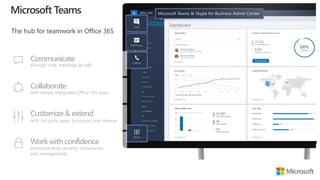
Communicate
through chat, meetings & calls
Collaborate
with deeply integrated Office 365 apps
Customize& extend
with 3rd party apps, processes, and devices
Work withconfidence
enterprise level security, compliance,
and manageability
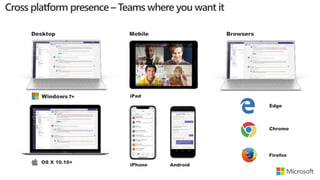
Desktop Mobile Browsers
iPhone Android
iPad
OS X 10.10+
Windows 7+
Edge
Chrome
Firefox
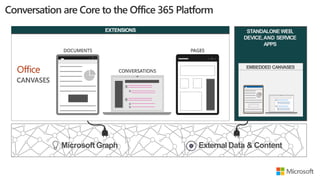
STANDALONEWEB,
DEVICE,AND SERVICE
APPS
EXTENSIONS
EMBEDDED CANVASES
MicrosoftGraph External Data & Content
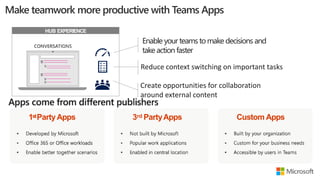
1stPartyApps 3rd PartyApps Custom Apps
HUB EXPERIENCE
Enable your teams tomake decisions and
take action faster
Reduce context switching on important tasks
Create opportunities for collaboration
around external content
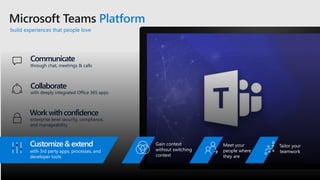
Microsoft Teams Platform
build experiences that people love
Communicate
through chat, meetings & calls
Collaborate
with deeply integrated Office 365 apps
Customize& extend
with 3rd party apps, processes, and
developer tools
Work withconfidence
enterprise level security, compliance,
and manageability
Gain context
without switching
context
Meet your
people where
they are
Tailor your
teamwork
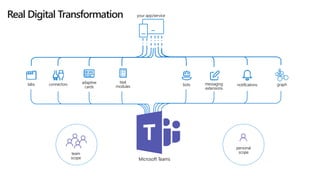
your app/service
tabs adaptive
cards
notificationsbots messaging
extensions
connectors
task
modules graph
Microsoft Teams
team
scope
personal
scope
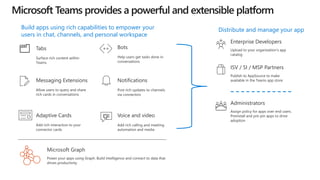
Tabs
Surface rich content within
Teams
Distribute and manage your app
Bots
Help users get tasks done in
conversations
Voice and video
Add rich calling and meeting
automation and media
Messaging Extensions
Allow users to query and share
rich cards in conversations
Power your apps using Graph. Build intelligence and connect to data that
drives productivity
Microsoft Graph
Adaptive Cards
Add rich interaction to your
connector cards
Notifications
Post rich updates to channels
via connectors
Enterprise Developers
Upload to your organization’s app
catalog
ISV / SI / MSP Partners
Publish to AppSource to make
available in the Teams app store
Build apps using rich capabilities to empower your
users in chat, channels, and personal workspace
Administrators
Assign policy for apps over end users.
Preinstall and pre-pin apps to drive
adoption
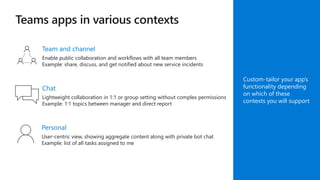
Chat
Lightweight collaboration in 1:1 or group setting without complex permissions
Example: 1:1 topics between manager and direct report
Team and channel
Enable public collaboration and workflows with all team members
Example: share, discuss, and get notified about new service incidents
Personal
User-centric view, showing aggregate content along with private bot chat
Example: list of all tasks assigned to me
Custom-tailor your app’s
functionality depending
on which of these
contexts you will support
Conversations
Notification-Only Bots
Sending and Receiving Files
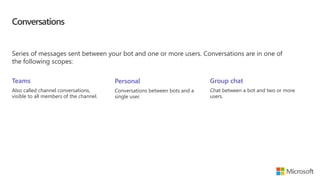
Conversations
Series of messages sent between your bot and one or more users. Conversations are in one of
the following scopes:
Teams
Also called channel conversations,
visible to all members of the channel.
Personal
Conversations between bots and a
single user.
Group chat
Chat between a bot and two or more
users.
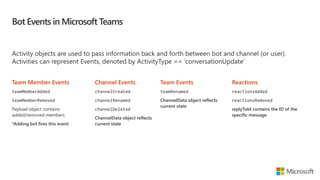
Bot Events in Microsoft Teams
Activity objects are used to pass information back and forth between bot and channel (or user).
Activities can represent Events, denoted by ActivityType == ‘conversationUpdate’
Team Member Events
teamMemberAdded
teamMemberRemoved
Payload object contains
added/removed members
*Adding bot fires this event
Channel Events
channelCreated
channelRenamed
channelDeleted
ChannelData object reflects
current state
Reactions
reactionsAdded
reactionsRemoved
replyToId contains the ID of the
specific message
Team Events
teamRenamed
ChannelData object reflects
current state
Teams Context
Your bot can access additional context about the team or chat, such as user profile. This information
can be used to enrich your bot's functionality and provide a more personalized experience.
Members in conversation
var mbrs = await connector.Conversations
.GetConversationMembersAsync(
message.Conversation.Id
);
foreach (var mbr in mbrs.AsTeamsChannelAccounts())
{
[...]
}
Channels in Team
ConversationList channels =
client
.GetTeamsConnectorClient()
.Teams
.FetchChannelList(
activity.GetChannelData<TeamsChannelData>()
.Team.Id
);
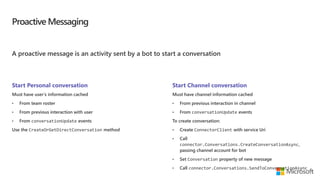
Proactive Messaging
A proactive message is an activity sent by a bot to start a conversation
Start Personal conversation
Must have user’s information cached
• From team roster
• From previous interaction with user
• From conversationUpdate events
Use the CreateOrGetDirectConversation method
Start Channel conversation
Must have channel information cached
• From previous interaction in channel
• From conversationUpdate events
To create conversation:
• Create ConnectorClient with service Uri
• Call
connector.Conversations.CreateConversationAsync,
passing channel account for bot
• Set Conversation property of new message
• Call connector.Conversations.SendToConversationAsync
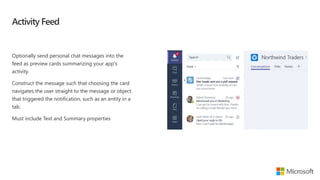
Activity Feed
Optionally send personal chat messages into the
feed as preview cards summarizing your app's
activity.
Construct the message such that choosing the card
navigates the user straight to the message or object
that triggered the notification, such as an entity in a
tab.
Must include Text and Summary properties
Notification only bots
Bots can update the activity feed
If the sole purpose of the bot is to deliver notifications,
consider a notification only bot.
• Users cannot message your notification-only bot
• Users cannot @mention the bot
bots node
isNotificationOnly property
"bots": [
{
"botId": "[MicrosoftAppId]",
"scopes": [
"personal",
"team"
],
"isNotificationOnly": true,
}
]
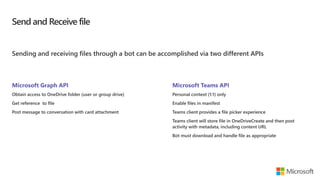
Send and Receive file
Sending and receiving files through a bot can be accomplished via two different APIs
Microsoft Graph API
Obtain access to OneDrive folder (user or group drive)
Get reference to file
Post message to conversation with card attachment
Microsoft Teams API
Personal context (1:1) only
Enable files in manifest
Teams client provides a file picker experience
Teams client will store file in OneDriveCreate and then post
activity with metadata, including content URL
Bot must download and handle file as appropriate
Enable send and receive
Teams client will handle file selection and
storage
Handles scenario User -> Bot
bots node
supportsFiles property
"bots": [
{
"botId": "[MicrosoftAppId]",
"scopes": [
"personal",
"team"
],
"supportsFiles": true,
}
]
Events and Queries
Responding to User Requests
Message Extensions in App
Manifest
Events and Queries
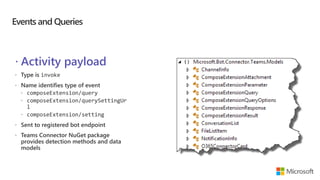
 Activity payload
 composeExtension/query
 composeExtension/querySettingUr
l
 composeExtension/setting
Events and Queries
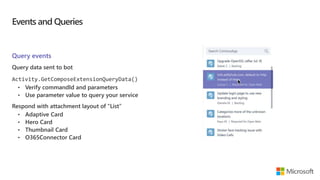
Query events
Query data sent to bot
Activity.GetComposeExtensionQueryData()
• Verify commandId and parameters
• Use parameter value to query your service
Respond with attachment layout of “List”
Events and Queries
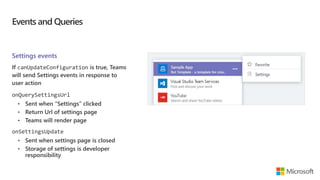
Settings events
If canUpdateConfiguration is true, Teams
will send Settings events in response to
user action
onQuerySettingsUrl
• Sent when “Settings” clicked
• Return Url of settings page
• Teams will render page
onSettingsUpdate
• Sent when settings page is closed
• Storage of settings is developer
responsibility
Responding to User Requests
Service must respond within 5 seconds.
Response is not an activity sent via the Bot Framework.
Response is an HTTP Response:
• HTTP Status of 200
• Content type application/json
• Response body must contain a valid composeExtension object.
Message Extensions in App Manifest
composeExtension node
Associated with a registered application
Personal and Team scopes
Define command UI and parameter
Multiple extensions
Your extension shown along
with all others added to Teams
"composeExtensions": [
{
"botId": "[MicrosoftAppId]",
"scopes": [
"team"
],
"canUpdateConfiguration": true,
"commands": [
{
"id": "searchCmd",
"description": "Search Bot Channels",
"title": "Bot Channels",
"initialRun": false,
"parameters": [
{
"name": "searchText",
"description": "Enter your search text",
"title": "Search Text“
}
]
}
]
}
]
Using Cards in Bots
Using Cards in Messaging Extensions
Adaptive Cards support in Microsoft Teams
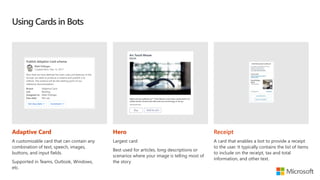
Using Cards in Bots
Adaptive Card
A customizable card that can contain any
combination of text, speech, images,
buttons, and input fields.
Supported in Teams, Outlook, Windows,
etc.
Hero
Largest card
Best used for articles, long descriptions or
scenarios where your image is telling most of
the story
Receipt
A card that enables a bot to provide a receipt
to the user. It typically contains the list of items
to include on the receipt, tax and total
information, and other text.
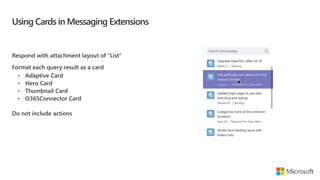
Using Cards in Messaging Extensions
Respond with attachment layout of “List”
Format each query result as a card
Do not include actions
Adaptive Cards support in Microsoft Teams
Microsoft Teams supports three action types for Adaptive cards:
• Action.OpenUrl
• Action.Submit
• Action.ShowCard
Actions other than these are not supported
Using Cards in Bots
Using Cards in Messaging Extensions
Adaptive Cards support in Microsoft Teams
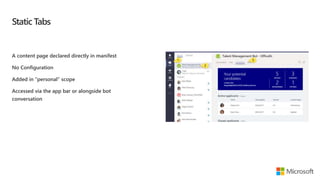
Static Tabs
A content page declared directly in manifest
No Configuration
Added in “personal” scope
Accessed via the app bar or alongside bot
conversation
Static Tabs - Manifest
staticTabs node
contentUrl is hosted in IFRAME in Teams
websiteUrl is used as target for link
validDomains node
A list of valid domains from which the extension
expects to load any content.
"staticTabs": [
{
"entityId": "candidatesTab",
"name": "Candidates",
"contentUrl": "https://.../Tabs/candidates.html",
"websiteUrl": "https://.../Tabs/candidates.html?web=1",
"scopes": [
"personal"
]
}
],
"validDomains": [
"token.botframework.com"
]
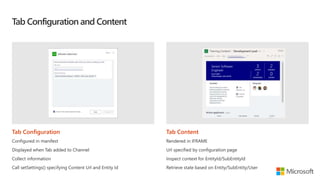
Tab Configuration and Content
Tab Configuration
Configured in manifest
Displayed when Tab added to Channel
Collect information
Call setSettings() specifying Content Url and Entity Id
Tab Content
Rendered in IFRAME
Url specified by configuration page
Inspect context for EntityId/SubEntityId
Retrieve state based on Entity/SubEntity/User
Enjoy the Bootcamp
Call to action
Join Office 365 developer program
https://dev.office.com/devprogram
to leverage all resources for Office 365
development learning
Build applications on Office 365 platform
Attend MVP led local community events to
continue learning on Office 365 development
Share your feedback on Bootcamp at
https://aka.ms/Microsoft365DevBootcampSurvey2019

Bots, adaptive cards, task module, message extensions in microsoft teams

  • 1.
    Bots, Adaptive Cards,Task Module, Message Extensions in Microsoft Teams Jenkins NS
  • 2.
     Modern WorkplaceSolution Architect  International Speaker  Trainer  @ JPOWER4 (http://www.jpower4.com/)  jenkinsns@jpower4.com  jenkinsns@gmail.com  @jenkinsns  My Blog Posts : http://www.Jenkinsblogs.com  SPFx: https://www.facebook.com/spfxinfo/  MS Teams: https://www.facebook.com/msteamsinfo  Github : https://github.com/jenkinsns
  • 3.
    Communicate through chat, meetings& calls Collaborate with deeply integrated Office 365 apps Customize& extend with 3rd party apps, processes, and devices Work withconfidence enterprise level security, compliance, and manageability
  • 4.
    Desktop Mobile Browsers iPhoneAndroid iPad OS X 10.10+ Windows 7+ Edge Chrome Firefox
  • 5.
  • 6.
    1stPartyApps 3rd PartyAppsCustom Apps HUB EXPERIENCE Enable your teams tomake decisions and take action faster Reduce context switching on important tasks Create opportunities for collaboration around external content
  • 7.
    Microsoft Teams Platform buildexperiences that people love Communicate through chat, meetings & calls Collaborate with deeply integrated Office 365 apps Customize& extend with 3rd party apps, processes, and developer tools Work withconfidence enterprise level security, compliance, and manageability Gain context without switching context Meet your people where they are Tailor your teamwork
  • 8.
    your app/service tabs adaptive cards notificationsbotsmessaging extensions connectors task modules graph Microsoft Teams team scope personal scope
  • 9.
    Tabs Surface rich contentwithin Teams Distribute and manage your app Bots Help users get tasks done in conversations Voice and video Add rich calling and meeting automation and media Messaging Extensions Allow users to query and share rich cards in conversations Power your apps using Graph. Build intelligence and connect to data that drives productivity Microsoft Graph Adaptive Cards Add rich interaction to your connector cards Notifications Post rich updates to channels via connectors Enterprise Developers Upload to your organization’s app catalog ISV / SI / MSP Partners Publish to AppSource to make available in the Teams app store Build apps using rich capabilities to empower your users in chat, channels, and personal workspace Administrators Assign policy for apps over end users. Preinstall and pre-pin apps to drive adoption
  • 10.
    Chat Lightweight collaboration in1:1 or group setting without complex permissions Example: 1:1 topics between manager and direct report Team and channel Enable public collaboration and workflows with all team members Example: share, discuss, and get notified about new service incidents Personal User-centric view, showing aggregate content along with private bot chat Example: list of all tasks assigned to me Custom-tailor your app’s functionality depending on which of these contexts you will support
  • 11.
  • 12.
    Conversations Series of messagessent between your bot and one or more users. Conversations are in one of the following scopes: Teams Also called channel conversations, visible to all members of the channel. Personal Conversations between bots and a single user. Group chat Chat between a bot and two or more users.
  • 13.
    Bot Events inMicrosoft Teams Activity objects are used to pass information back and forth between bot and channel (or user). Activities can represent Events, denoted by ActivityType == ‘conversationUpdate’ Team Member Events teamMemberAdded teamMemberRemoved Payload object contains added/removed members *Adding bot fires this event Channel Events channelCreated channelRenamed channelDeleted ChannelData object reflects current state Reactions reactionsAdded reactionsRemoved replyToId contains the ID of the specific message Team Events teamRenamed ChannelData object reflects current state
  • 14.
    Teams Context Your botcan access additional context about the team or chat, such as user profile. This information can be used to enrich your bot's functionality and provide a more personalized experience. Members in conversation var mbrs = await connector.Conversations .GetConversationMembersAsync( message.Conversation.Id ); foreach (var mbr in mbrs.AsTeamsChannelAccounts()) { [...] } Channels in Team ConversationList channels = client .GetTeamsConnectorClient() .Teams .FetchChannelList( activity.GetChannelData<TeamsChannelData>() .Team.Id );
  • 15.
    Proactive Messaging A proactivemessage is an activity sent by a bot to start a conversation Start Personal conversation Must have user’s information cached • From team roster • From previous interaction with user • From conversationUpdate events Use the CreateOrGetDirectConversation method Start Channel conversation Must have channel information cached • From previous interaction in channel • From conversationUpdate events To create conversation: • Create ConnectorClient with service Uri • Call connector.Conversations.CreateConversationAsync, passing channel account for bot • Set Conversation property of new message • Call connector.Conversations.SendToConversationAsync
  • 16.
    Activity Feed Optionally sendpersonal chat messages into the feed as preview cards summarizing your app's activity. Construct the message such that choosing the card navigates the user straight to the message or object that triggered the notification, such as an entity in a tab. Must include Text and Summary properties
  • 17.
    Notification only bots Botscan update the activity feed If the sole purpose of the bot is to deliver notifications, consider a notification only bot. • Users cannot message your notification-only bot • Users cannot @mention the bot bots node isNotificationOnly property "bots": [ { "botId": "[MicrosoftAppId]", "scopes": [ "personal", "team" ], "isNotificationOnly": true, } ]
  • 18.
    Send and Receivefile Sending and receiving files through a bot can be accomplished via two different APIs Microsoft Graph API Obtain access to OneDrive folder (user or group drive) Get reference to file Post message to conversation with card attachment Microsoft Teams API Personal context (1:1) only Enable files in manifest Teams client provides a file picker experience Teams client will store file in OneDriveCreate and then post activity with metadata, including content URL Bot must download and handle file as appropriate
  • 19.
    Enable send andreceive Teams client will handle file selection and storage Handles scenario User -> Bot bots node supportsFiles property "bots": [ { "botId": "[MicrosoftAppId]", "scopes": [ "personal", "team" ], "supportsFiles": true, } ]
  • 21.
    Events and Queries Respondingto User Requests Message Extensions in App Manifest
  • 22.
    Events and Queries Activity payload  composeExtension/query  composeExtension/querySettingUr l  composeExtension/setting
  • 23.
    Events and Queries Queryevents Query data sent to bot Activity.GetComposeExtensionQueryData() • Verify commandId and parameters • Use parameter value to query your service Respond with attachment layout of “List”
  • 24.
    Events and Queries Settingsevents If canUpdateConfiguration is true, Teams will send Settings events in response to user action onQuerySettingsUrl • Sent when “Settings” clicked • Return Url of settings page • Teams will render page onSettingsUpdate • Sent when settings page is closed • Storage of settings is developer responsibility
  • 25.
    Responding to UserRequests Service must respond within 5 seconds. Response is not an activity sent via the Bot Framework. Response is an HTTP Response: • HTTP Status of 200 • Content type application/json • Response body must contain a valid composeExtension object.
  • 26.
    Message Extensions inApp Manifest composeExtension node Associated with a registered application Personal and Team scopes Define command UI and parameter Multiple extensions Your extension shown along with all others added to Teams "composeExtensions": [ { "botId": "[MicrosoftAppId]", "scopes": [ "team" ], "canUpdateConfiguration": true, "commands": [ { "id": "searchCmd", "description": "Search Bot Channels", "title": "Bot Channels", "initialRun": false, "parameters": [ { "name": "searchText", "description": "Enter your search text", "title": "Search Text“ } ] } ] } ]
  • 28.
    Using Cards inBots Using Cards in Messaging Extensions Adaptive Cards support in Microsoft Teams
  • 29.
    Using Cards inBots Adaptive Card A customizable card that can contain any combination of text, speech, images, buttons, and input fields. Supported in Teams, Outlook, Windows, etc. Hero Largest card Best used for articles, long descriptions or scenarios where your image is telling most of the story Receipt A card that enables a bot to provide a receipt to the user. It typically contains the list of items to include on the receipt, tax and total information, and other text.
  • 30.
    Using Cards inMessaging Extensions Respond with attachment layout of “List” Format each query result as a card Do not include actions
  • 31.
    Adaptive Cards supportin Microsoft Teams Microsoft Teams supports three action types for Adaptive cards: • Action.OpenUrl • Action.Submit • Action.ShowCard Actions other than these are not supported
  • 33.
    Using Cards inBots Using Cards in Messaging Extensions Adaptive Cards support in Microsoft Teams
  • 34.
    Static Tabs A contentpage declared directly in manifest No Configuration Added in “personal” scope Accessed via the app bar or alongside bot conversation
  • 35.
    Static Tabs -Manifest staticTabs node contentUrl is hosted in IFRAME in Teams websiteUrl is used as target for link validDomains node A list of valid domains from which the extension expects to load any content. "staticTabs": [ { "entityId": "candidatesTab", "name": "Candidates", "contentUrl": "https://.../Tabs/candidates.html", "websiteUrl": "https://.../Tabs/candidates.html?web=1", "scopes": [ "personal" ] } ], "validDomains": [ "token.botframework.com" ]
  • 36.
    Tab Configuration andContent Tab Configuration Configured in manifest Displayed when Tab added to Channel Collect information Call setSettings() specifying Content Url and Entity Id Tab Content Rendered in IFRAME Url specified by configuration page Inspect context for EntityId/SubEntityId Retrieve state based on Entity/SubEntity/User
  • 38.
  • 39.
    Call to action JoinOffice 365 developer program https://dev.office.com/devprogram to leverage all resources for Office 365 development learning Build applications on Office 365 platform Attend MVP led local community events to continue learning on Office 365 development Share your feedback on Bootcamp at https://aka.ms/Microsoft365DevBootcampSurvey2019

Editor's Notes

  • #4 [This is an animated slide. Please show it in presentation mode] [MAIN POINT TO LAND] Microsoft Teams is a hub for teamwork, a chat-based workspace that enables teams to be more productive by giving them a single and secure location that brings together everything a team needs: chats, meetings, calls, files, and tools. Microsoft Teams is one place for all the needs your teams have.   Microsoft Teams delivers on four core promises to create a digital workspace for high performing teams. [COMMUNICATE] First, Microsoft Teams solves for the communication needs of a diverse workforce. Since preview, Microsoft Teams has evolved to include a complete meetings experience, as well as chat, voice and video - You can use Teams for informal 1:1 or group chats – directly on your phone if you’re on the go. Or you can have an open conversation in a channel. This enables people to share information in a transparent way to accelerate decision making. And it's super easy to move from a chat into a face to face meeting, helping you to bridge geographical barriers.   [COLLABORATE] When it comes to collaboration, the deep Office integration enables today’s multigenerational workforce to use the Office apps they are familiar with and love - Word, Excel, PowerPoint, OneNote, SharePoint, Planner, even Power BI - right within the context of Teams. Teams is unique in how we enable collaboration. Today, when you want somebody’s feedback, you send them the file via email, they store it locally with comments, you store it again…… it's a vicious cycle that results in v2, v3, v4 versions – and you have to jump between email and other apps to get the work done. Teams brings all the Office 365 services together – so that you can easily share and co-author files without the need for email attachments.   [CUSTOMIZE] Many of you use other services than Office 365 as well which results in you having to jump between and spend time in disparate experiences. We built Teams to not only be the hub for Office 365 services, but for all the services and tools teams use on a day to day basis. So, you can customize Teams with tabs, connector and bots to include the apps and services you need - <mention relevant 3rd party apps like GitHub and Trello that can be included in Teams>– we have integrations with over 150 partners. For our developer community, we have also created an extensible platform, to enable building apps and to integrate with business processes.   [WORK WITH CONFIDENCE] Microsoft Teams comes with the enterprise grade security, compliance and manageability that you expect from Office 365 which customers tell us is a huge value add for them.
  • #7 `
  • #8 Talk track: And core to that are the investments we’ve made in the Teams Platform, allowing users & developers alike to customize and build on Teams, in order to deliver experiences that your people & customers LOVE. And when it comes to the platform and the value that our customers are seeing from it, we are seeing three distinct categories emerging: Gain context without switching context: Teams pillar of integration (the single hub for Office) but also the ability to simply curate your experience so you reduce the information overload you get every day and focus on the content that's most relevant to you to get your job done, better. INFUSION Meet Your people where they are: Bring together all the apps and tools your organization is already using, into one user interface. Guess what, for IT that means better & easier management, reduced security threats, and more time you can spend on valuable, forward-looking projects. For end users, #1 just got even better. (opportunity to share a 3rd party apps slide here) Tailoring your experience: to me, this delivers superpowers to people through proactive intelligence. This is the core to the extensibility of the Teams platform. Deliver intelligent experiences using our APIs and/or our partner community that: First: make the most difficult and time-wasting tasks at work, easy Thereafter: drive intelligence to your people that allows them to understand how they add more value to the organization, and then deliver it more efficiently & quickly
  • #9 Tabs - Surface rich content as well as SharePoint Framework based solutions Connectors - Post rich updates to channels Adaptive Cards - Add rich interaction to your connector cards Bots - Help users get tasks done in conversations Message Extensions - Allow users to query and share rich cards in conversations Notifications - Engage users via feed notifications ------ Graph - Build in intelligence and connect to data that drives productivity Apps Store - Drive engagement by submitting your app to our app store or just to certain company stores
  • #10 Microsoft Teams has an open developer platform with a rich set of capabilities to build apps or integrate with new or existing business processes and services.
  • #14 Teams will send notifications to your bot for changes or events that happen in contexts where your bot is active. You can use these events to trigger service logic, such as: Trigger welcome message when your bot is added to a team. Query and cache team information when the bot is added to a team. Updated cached information on team membership or channel information changes. Remove cached information for a team if the bot is removed. Since bot is scoped to team, no events for team creation/deletion provided. When bot is added/removed, TeamMember events are sent.
  • #15 Use the Microsoft.Bot.Connector.Teams package to get extension methods for Microsoft Teams. Handles the parsing of the Bot Framework payload with Teams-specific functionality.
  • #16 Personal conversation requires User Id (from Teams) and Tenant Id
  • #19 Personal conversation requires User Id (from Teams) and Tenant Id
  • #27 commandExtension is part of the manifest.json file Scope determines if 1:1 (personal) or channel (team)
  • #30 This is a sample of cards that can be used. Refer to https://docs.microsoft.com/en-us/microsoftteams/platform/concepts/cards/cards-reference for details
  • #37 To provide a seamless tab experience, perform provisioning and authorization on configuration page when possible. If context has entity/subentity, then respond to a deeplink State storage is developer’s responsibility