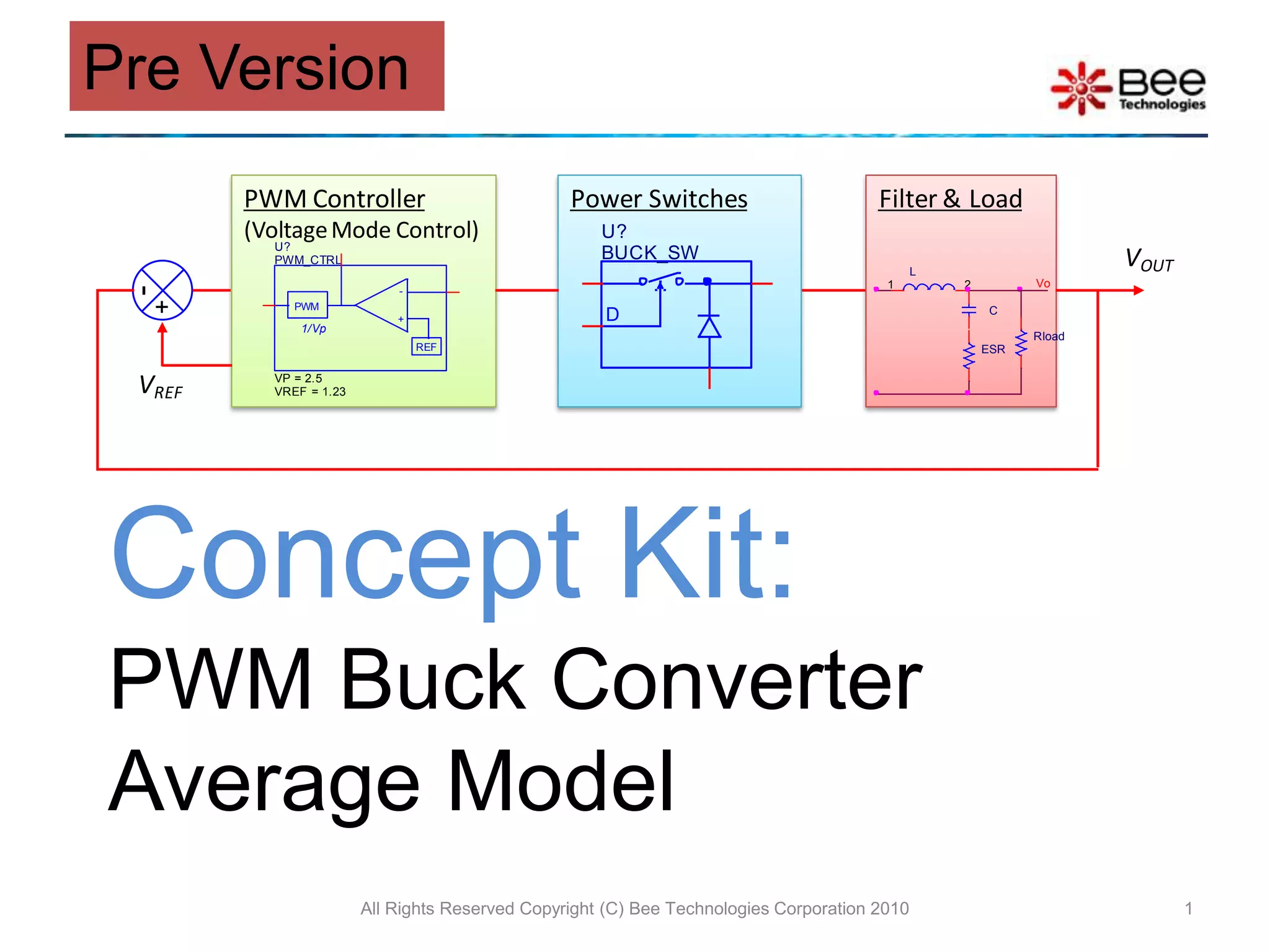
Concept Kit:PWM Buck Converter Average ModelAll Rights Reserved Copyright (C) Bee Technologies Corporation 20101Pre Version
ContentsConcept of SimulationBuck Converter CircuitSwitchesFilter & Load4.1 Inductor4.2 CapacitorPWM Controller5.1 Error Amp.5.2 PWMStabilizing the Converter (Example)Load Transient Response Simulation (Example)Type 2 Compensator CalculatorSimulation IndexAll Rights Reserved Copyright (C) Bee Technologies Corporation 20102
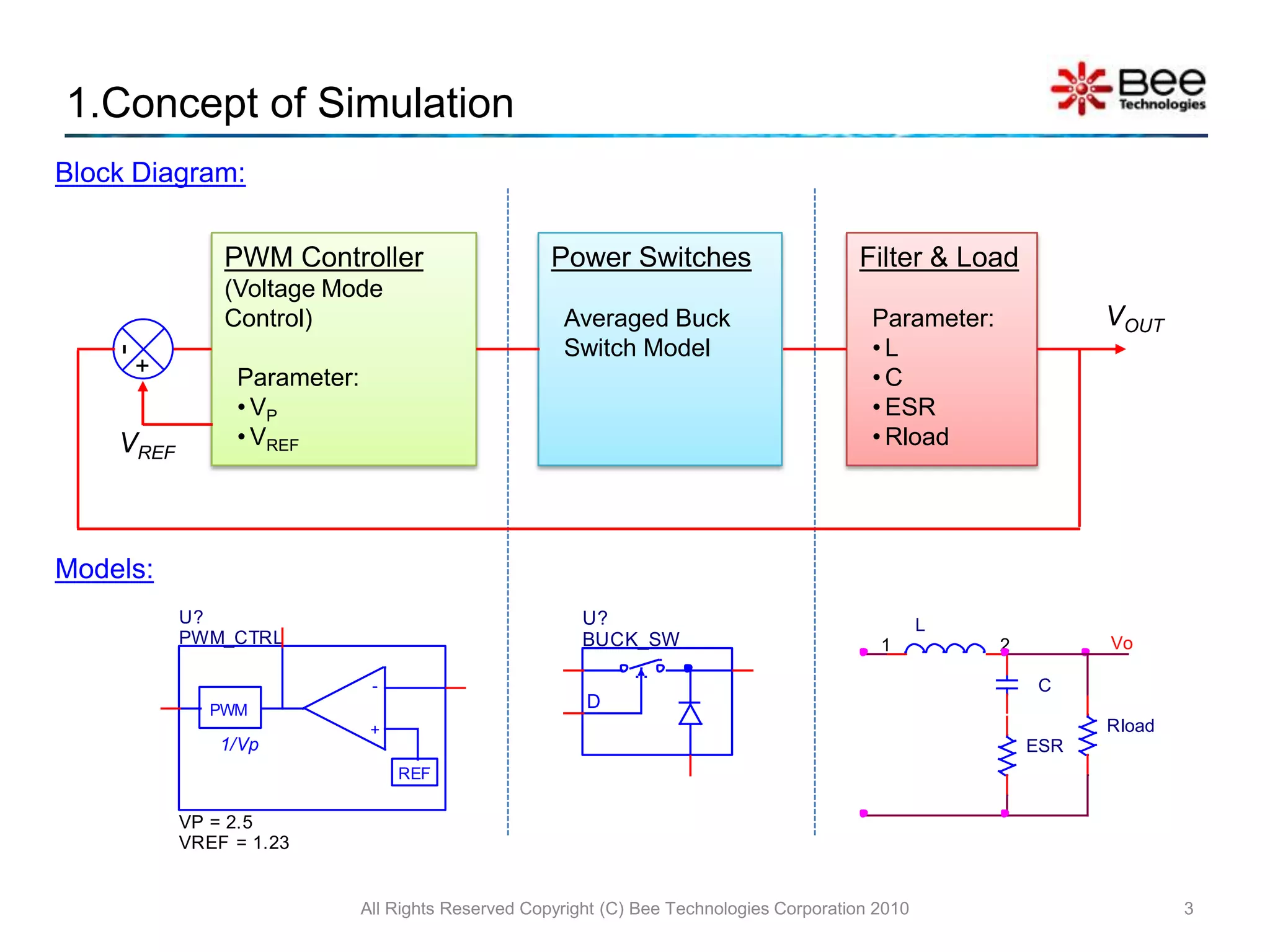
All Rights Reserved Copyright (C) Bee Technologies Corporation 201031.Concept of SimulationBlock Diagram:Power SwitchesAveraged Buck Switch ModelFilter & LoadParameter:L
C
ESR
RloadPWM Controller (Voltage Mode Control)Parameter:VP
VREFVOUTVREFModels:
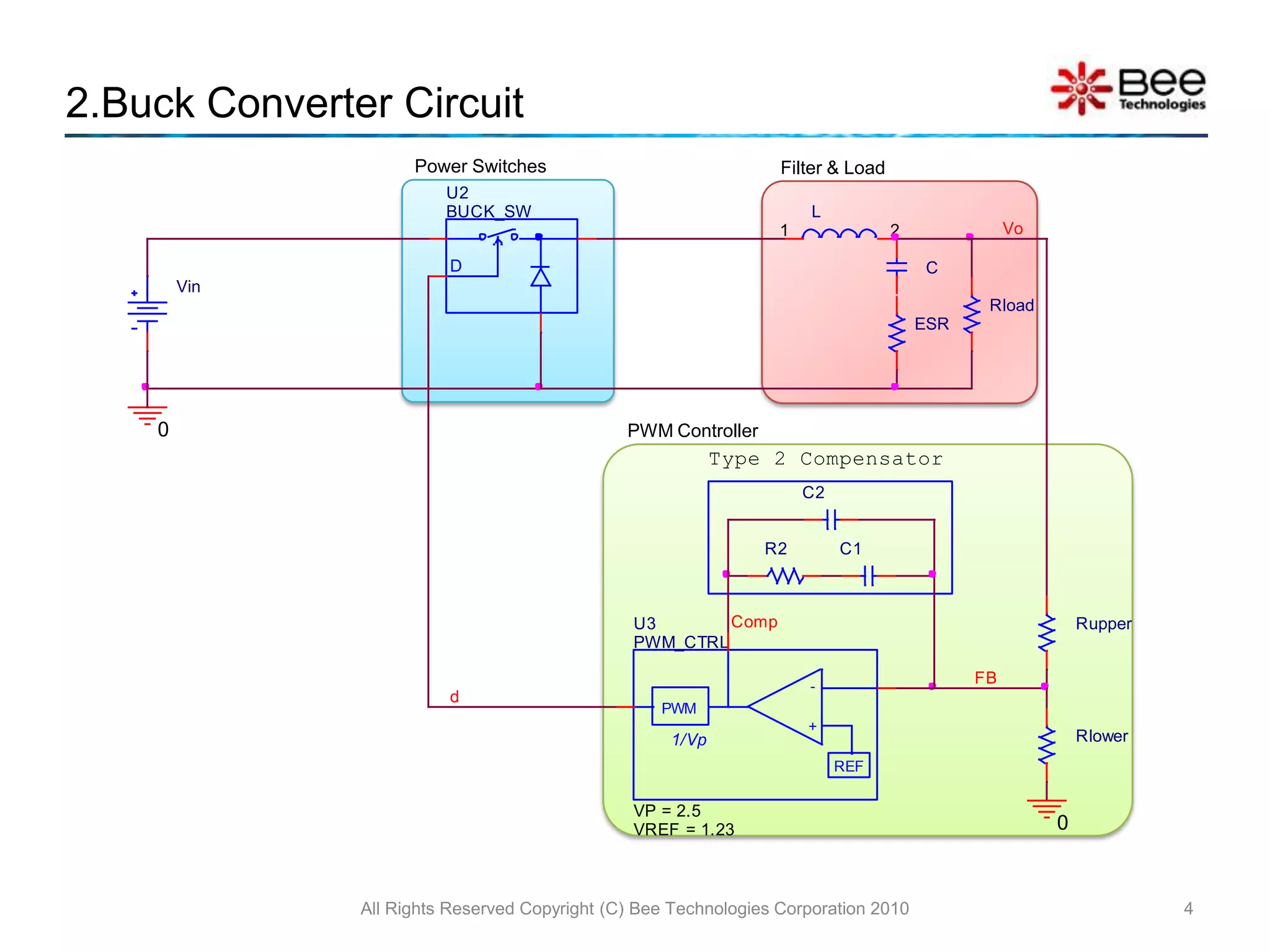
2.Buck Converter CircuitAll Rights Reserved Copyright (C) Bee Technologies Corporation 20104Power SwitchesFilter & LoadPWM Controller
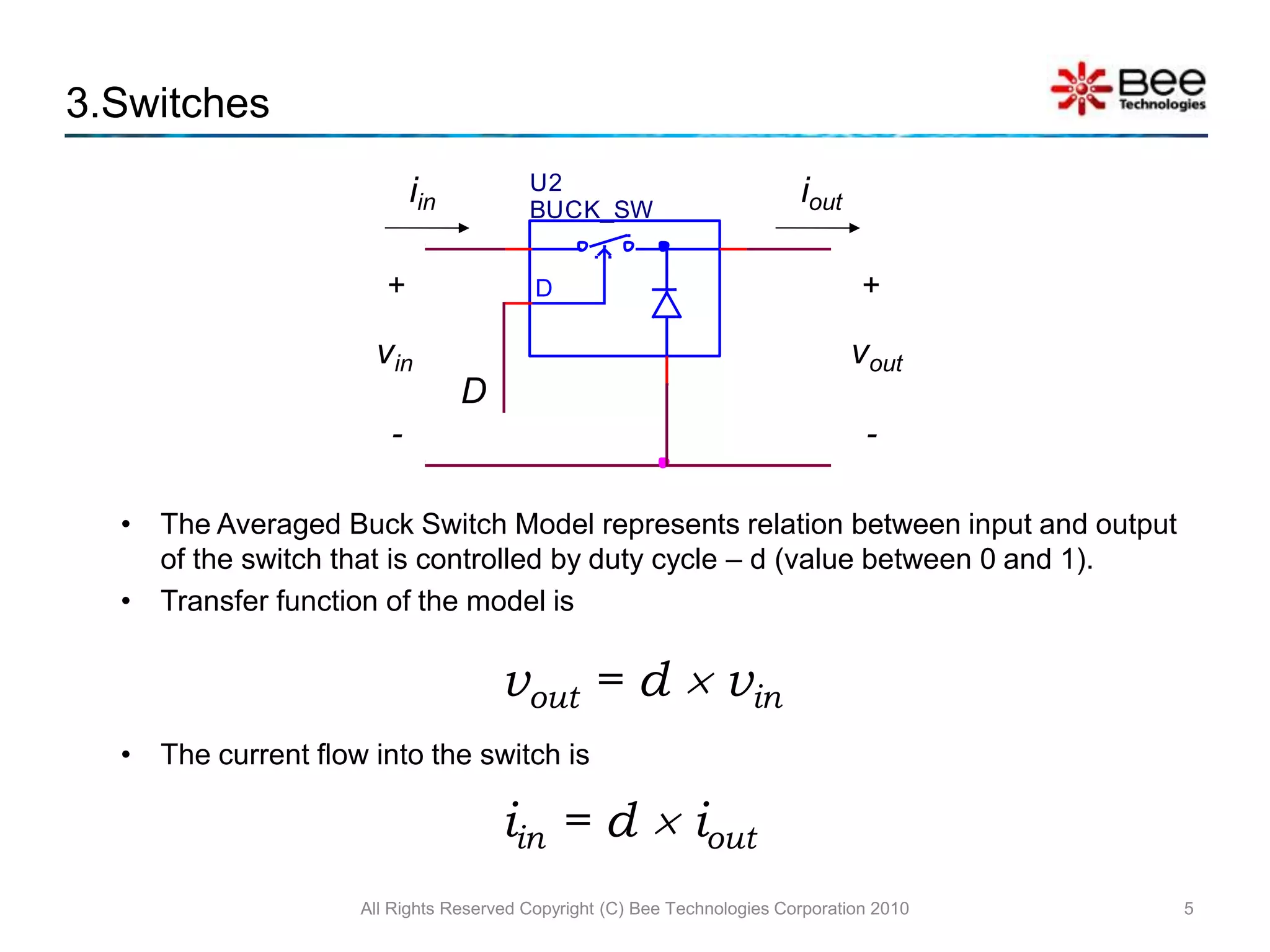
3.Switches The Averaged Buck Switch Model represents relation between input and output of the switch that is controlled by duty cycle – d (value between 0 and 1).
Transfer function of the model is vout = d  vinThe current flow into the switch is iin = d  ioutAll Rights Reserved Copyright (C) Bee Technologies Corporation 20105
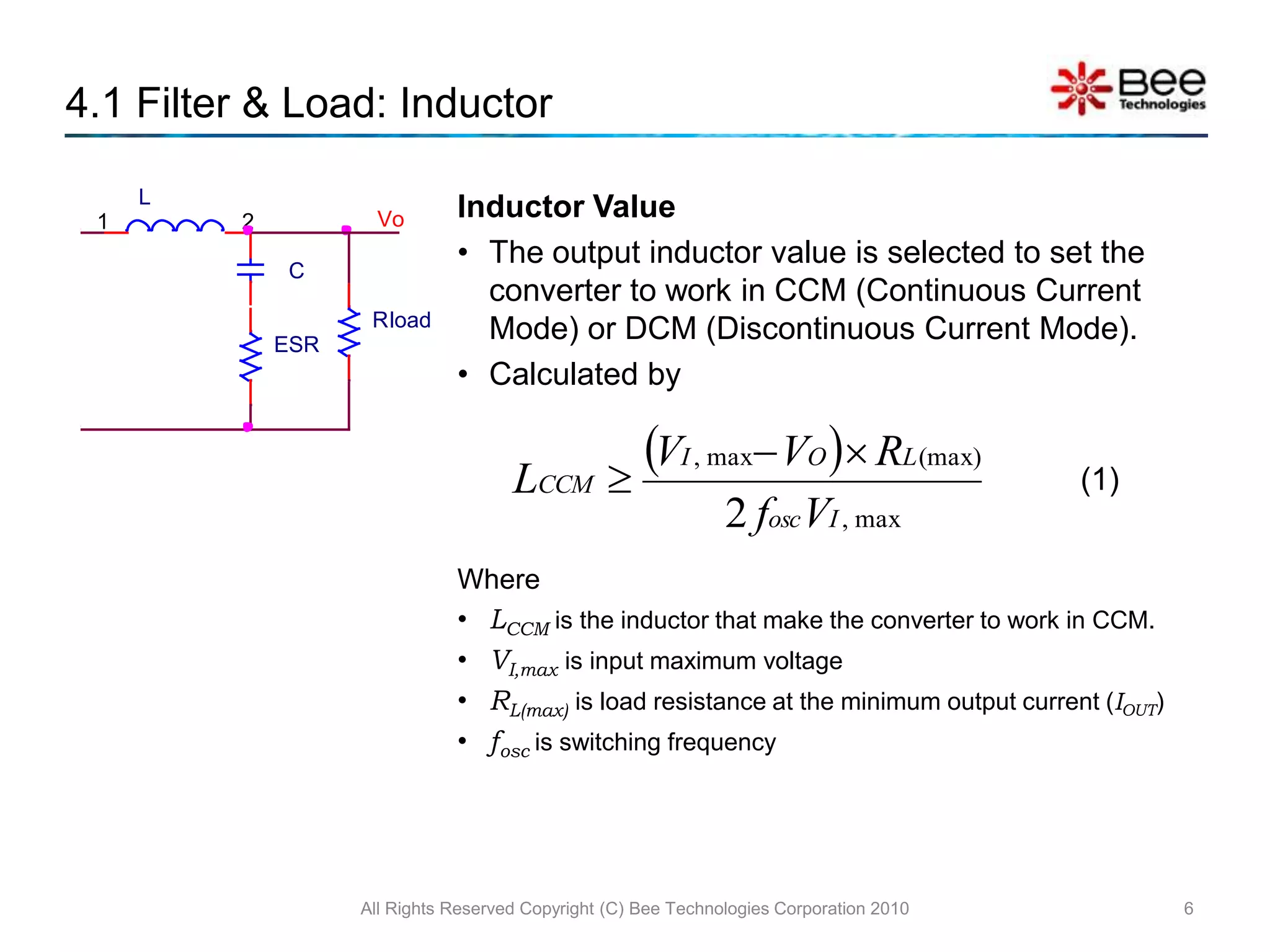
4.1 Filter & Load: InductorAll Rights Reserved Copyright (C) Bee Technologies Corporation 20106Inductor ValueThe output inductor value is selected to set the converter to work in CCM (Continuous Current Mode) or DCM (Discontinuous Current Mode).Calculated byWhereLCCM is the inductor that make the converter to work in CCM.VI,max is input maximum voltageRL(max) is load resistance at the minimum output current (IOUT)fosc is switching frequency(1)
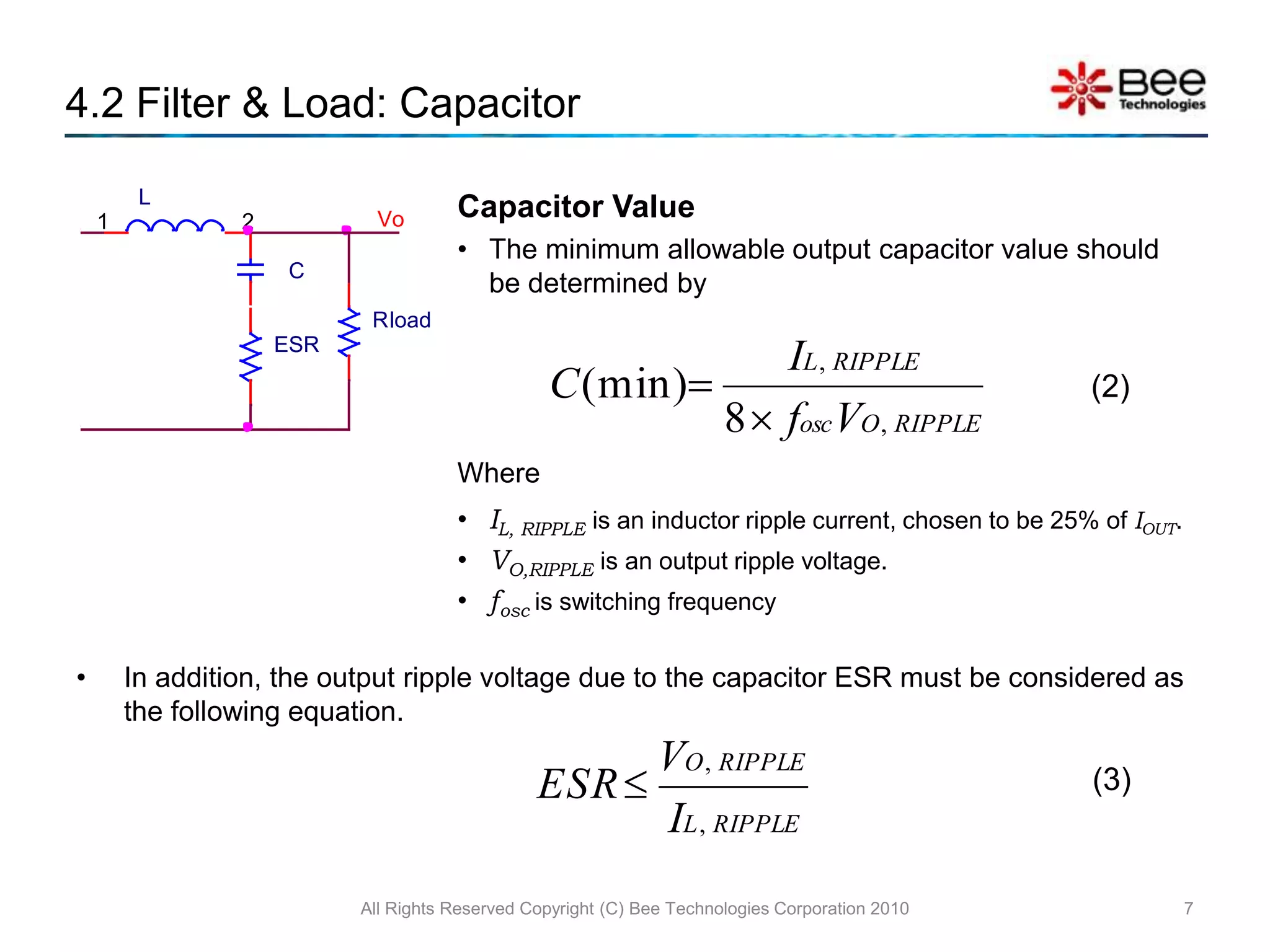
4.2 Filter & Load: CapacitorAll Rights Reserved Copyright (C) Bee Technologies Corporation 20107Capacitor ValueThe minimum allowable output capacitor value should be determined byWhereIL, RIPPLE is an inductor ripple current, chosen to be 25% of IOUT.VO,RIPPLE is an output ripple voltage.fosc is switching frequencyIn addition, the output ripple voltage due to the capacitor ESR must be considered as the following equation.(2)(3)
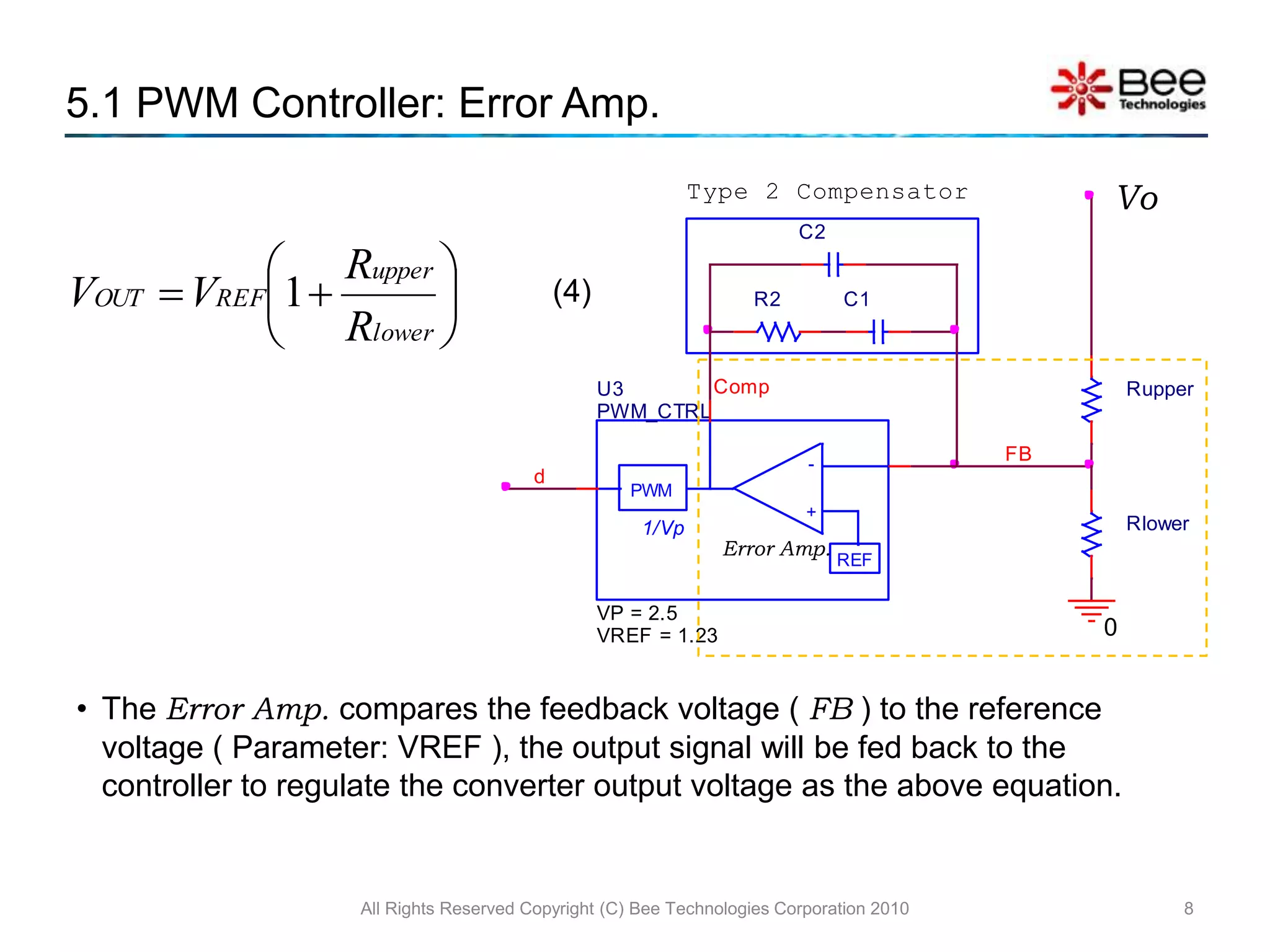
The Error Amp. compares the feedback voltage ( FB ) to the reference voltage ( Parameter: VREF ), the output signal will be fed back to the controller to regulate the converter output voltage as the above equation.5.1 PWM Controller: Error Amp. All Rights Reserved Copyright (C) Bee Technologies Corporation 20108Vo(4)Error Amp.
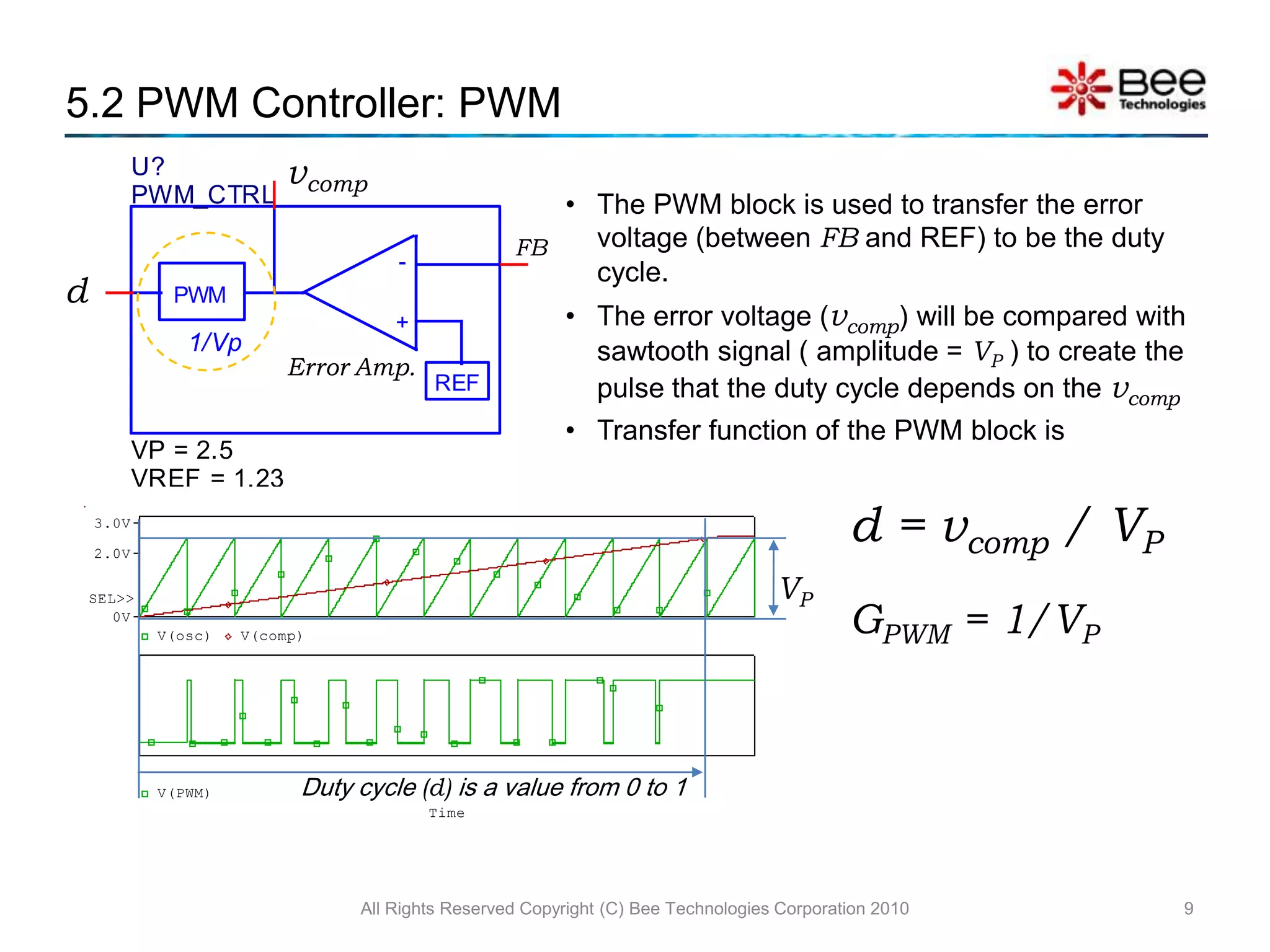
5.2 PWM Controller: PWMAll Rights Reserved Copyright (C) Bee Technologies Corporation 20109The PWM block is used to transfer the error voltage (between FB and REF) to be the duty cycle.The error voltage (vcomp) will be compared with sawtooth signal ( amplitude = VP ) to create the pulse that the duty cycle depends on the vcompTransfer function of the PWM block is d = vcomp/ VPGPWM = 1/VPVPDuty cycle (d) is a value from 0 to 1
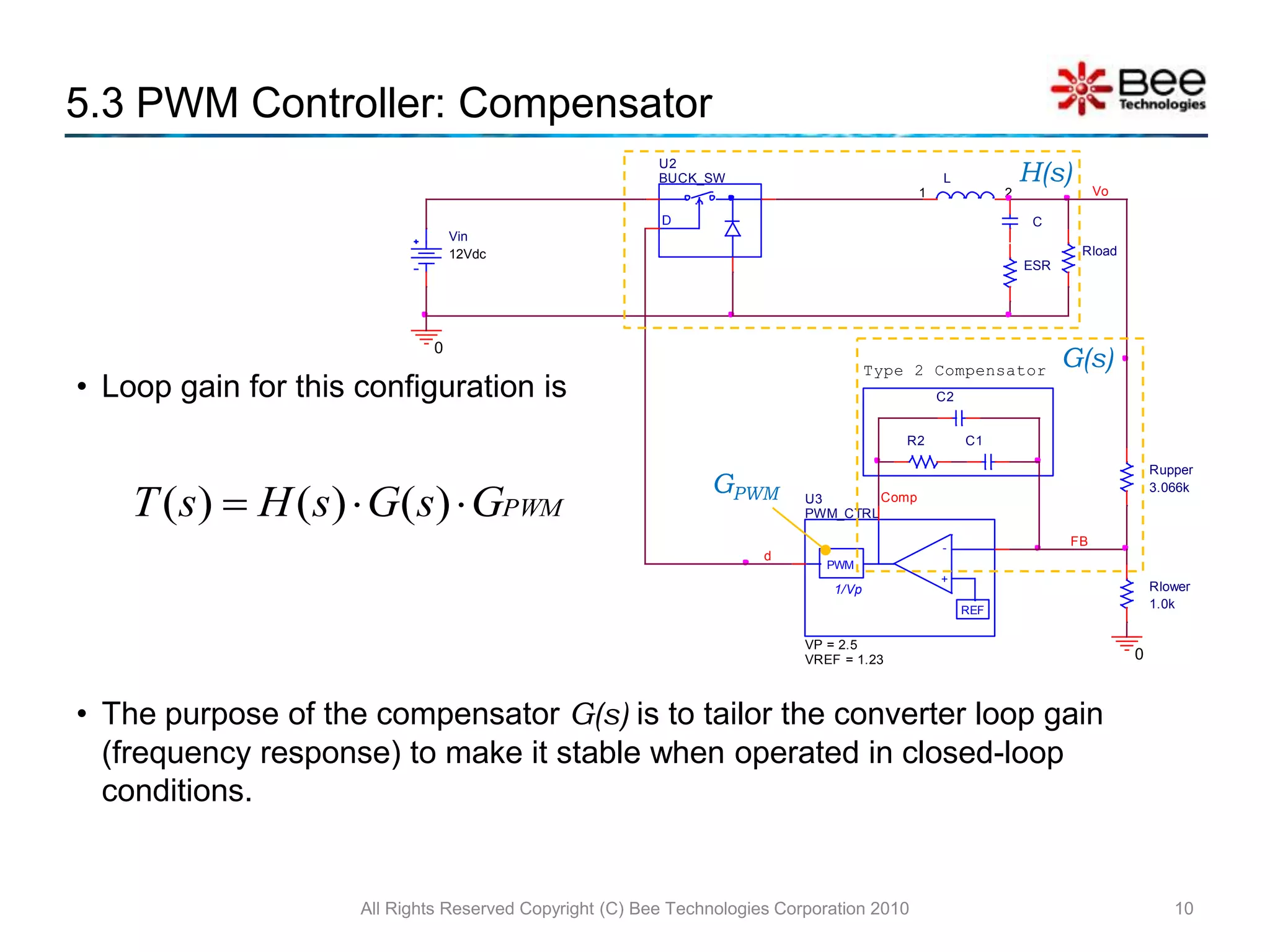
Loop gain for this configuration isThe purpose of the compensator G(s)is to tailor the converter loop gain (frequency response) to make it stable when operated in closed-loop conditions.5.3 PWM Controller: CompensatorAll Rights Reserved Copyright (C) Bee Technologies Corporation 201010H(s)G(s)GPWM
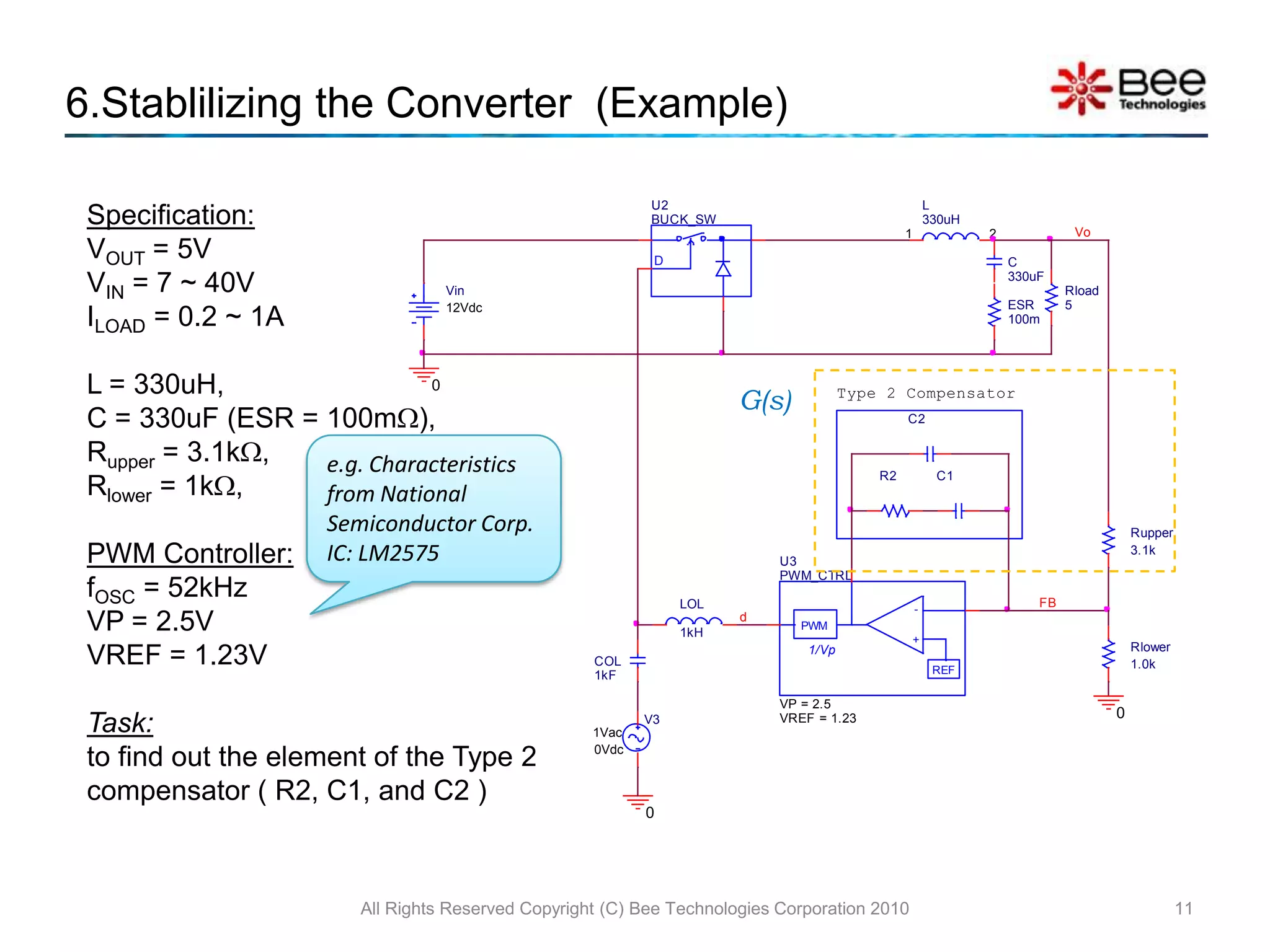
6.Stablilizing the Converter  (Example)All Rights Reserved Copyright (C) Bee Technologies Corporation 201011Specification:VOUT = 5VVIN = 7 ~ 40VILOAD = 0.2 ~ 1AL = 330uH, C = 330uF (ESR = 100m),Rupper = 3.1k,Rlower = 1k,PWM Controller:fOSC = 52kHzVP = 2.5VVREF = 1.23VTask:to find out the element of the Type 2 compensator ( R2, C1, and C2 )G(s)e.g. Characteristics from National Semiconductor Corp. IC: LM2575
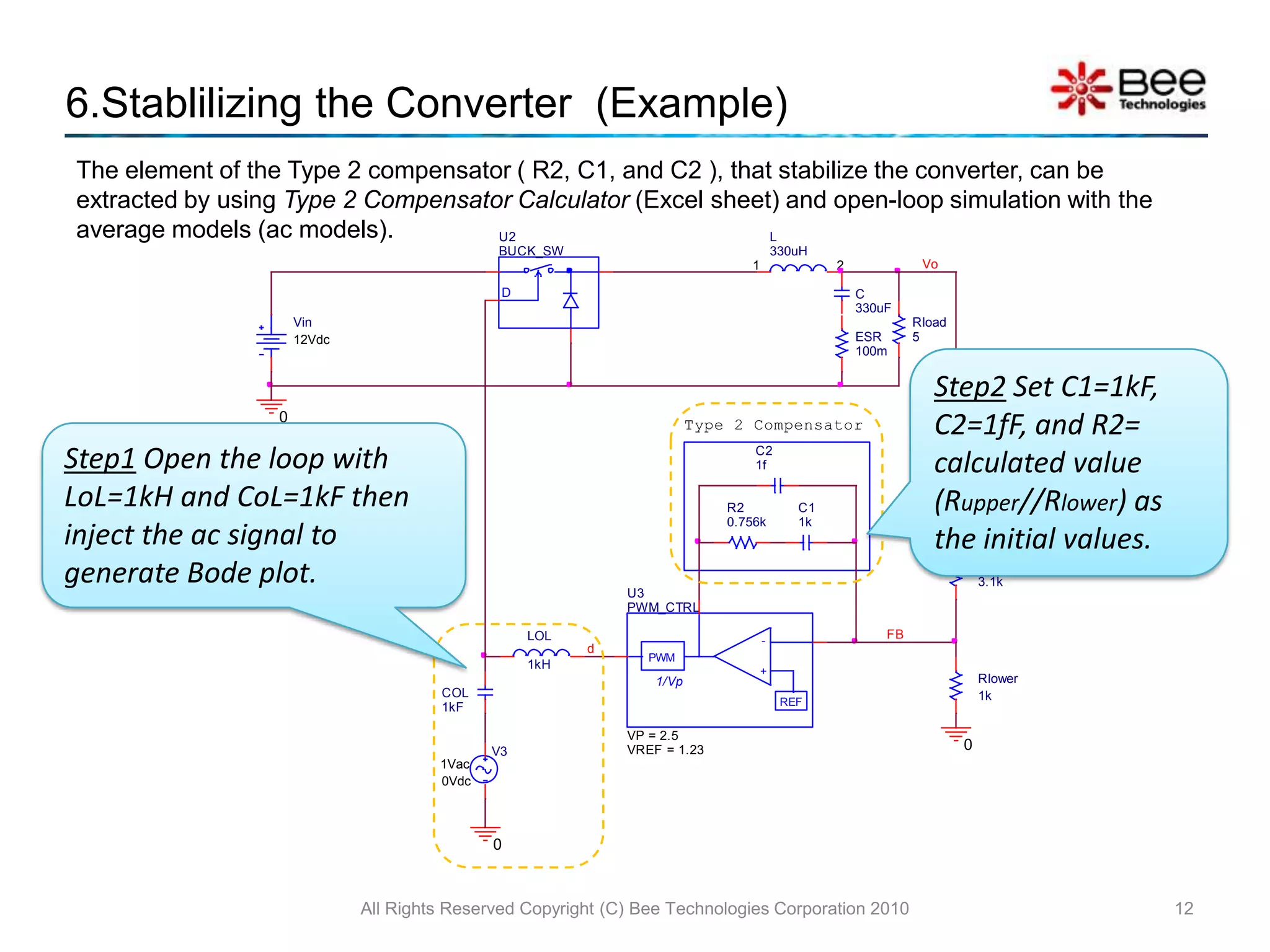
6.Stablilizing the Converter  (Example)All Rights Reserved Copyright (C) Bee Technologies Corporation 201012The element of the Type 2 compensator ( R2, C1, and C2 ), that stabilize the converter, can be extracted by using Type 2 Compensator Calculator (Excel sheet) and open-loop simulation with the average models (ac models).Step2 Set C1=1kF, C2=1fF, and R2= calculated value (Rupper//Rlower) as the initial values.Step1 Open the loop with LoL=1kH and CoL=1kF then inject the ac signal to generate Bode plot.
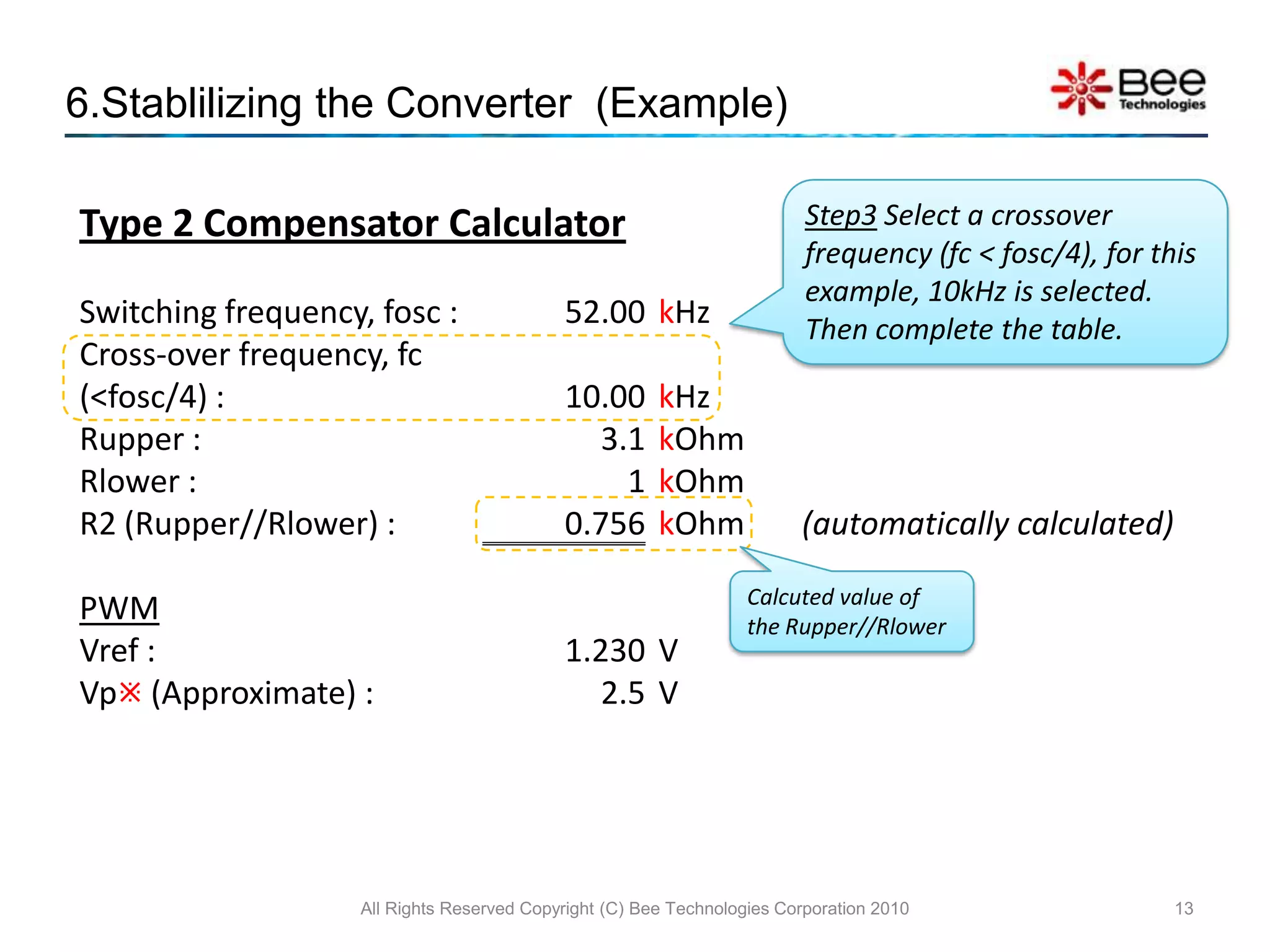
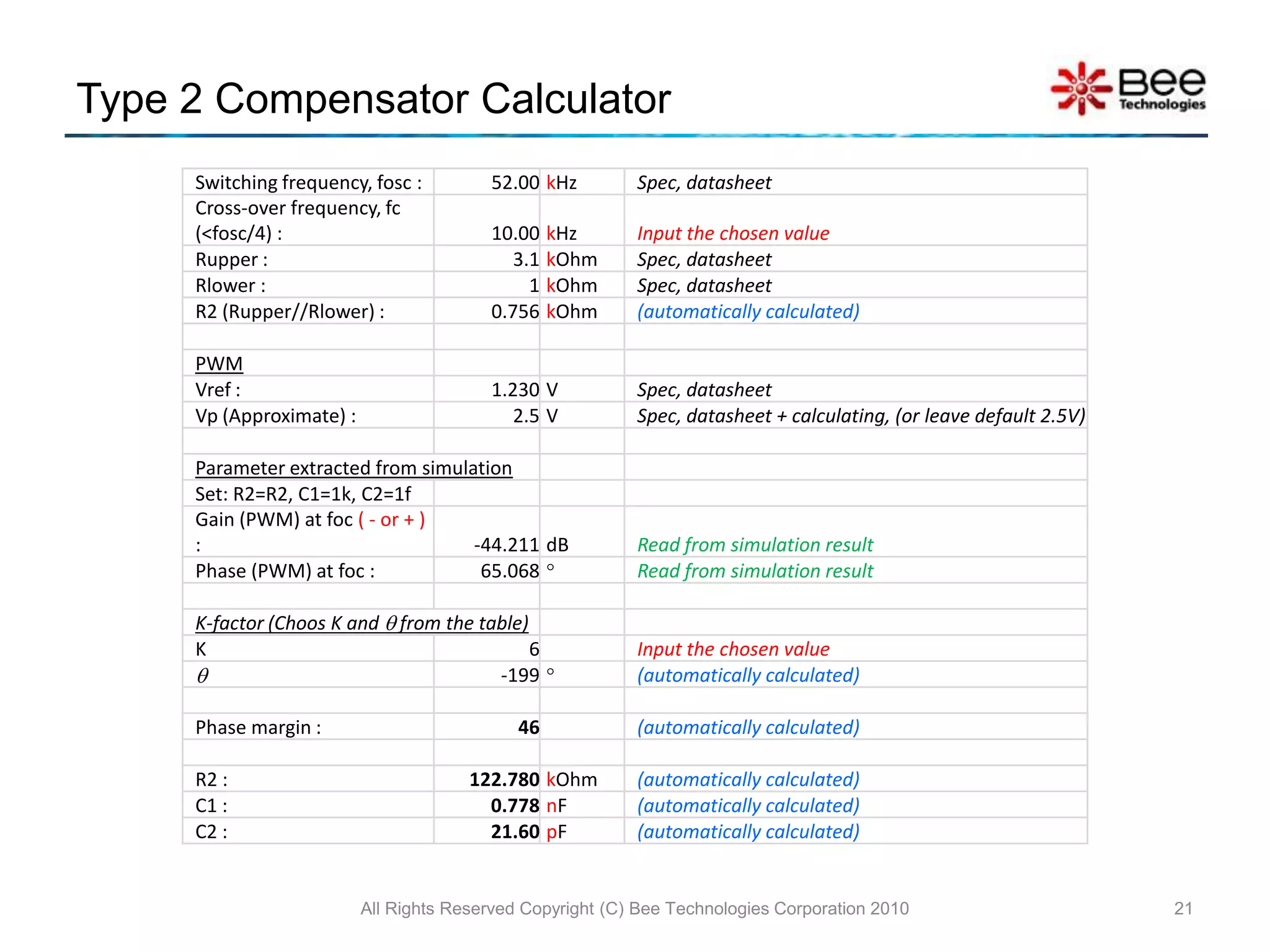
6.Stablilizing the Converter  (Example)All Rights Reserved Copyright (C) Bee Technologies Corporation 201013Step3 Select a crossover frequency (fc < fosc/4), for this example, 10kHz is selected. Then complete the table.Calcuted value of the Rupper//Rlower
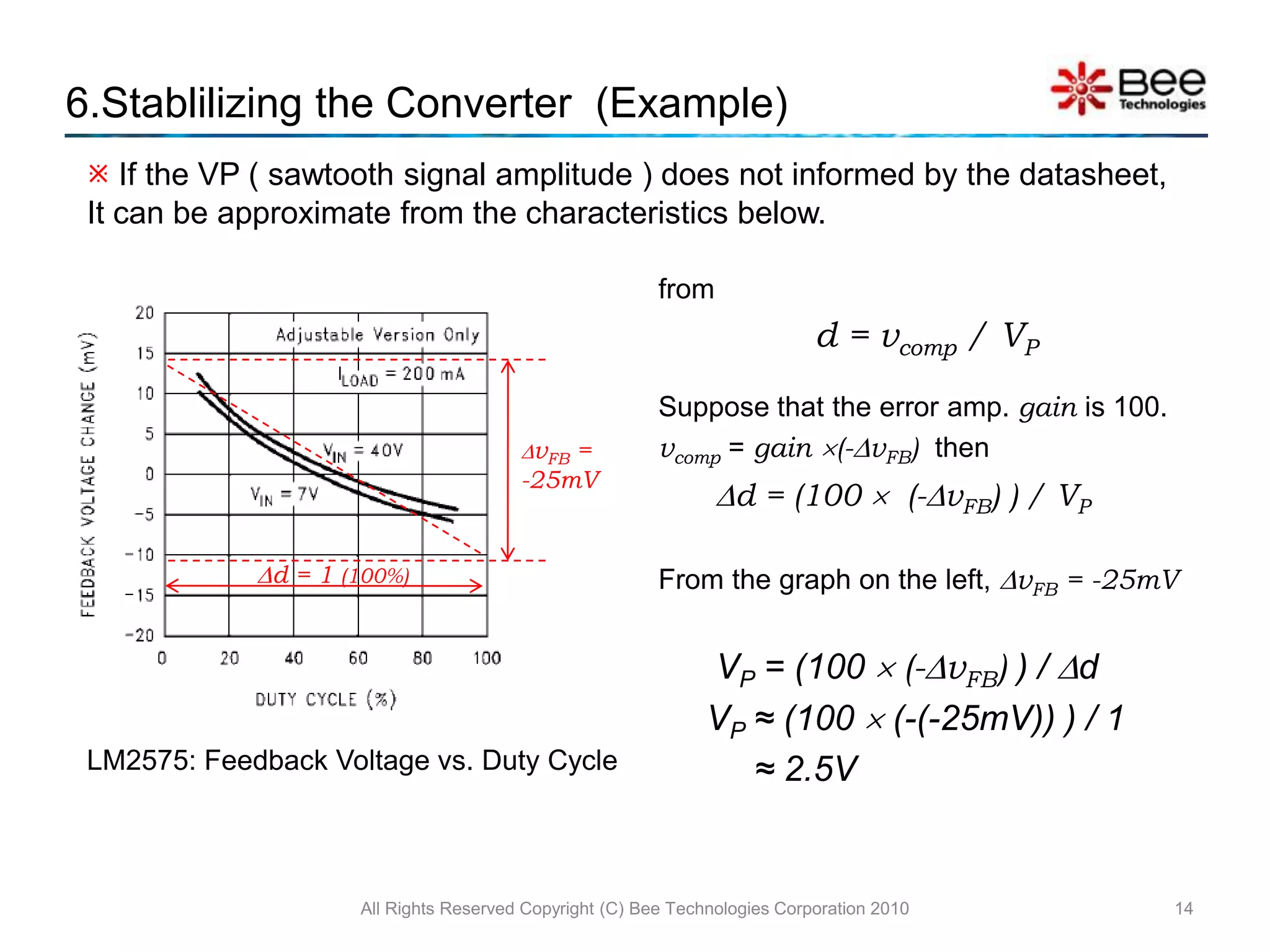
All Rights Reserved Copyright (C) Bee Technologies Corporation 2010146.Stablilizing the Converter  (Example) If the VP ( sawtooth signal amplitude ) does not informed by the datasheet, It can be approximate from the characteristics below.from d = vcomp/ VPSuppose that the error amp. gain is 100.vcomp =gain (-vFB)then d = (100   (-vFB) ) / VPFrom the graph on the left, vFB = -25mV	 VP = (100  (-vFB) ) / d	VP ≈ (100  (-(-25mV)) ) / 1	     ≈ 2.5VvFB = -25mVd = 1 (100%)LM2575: Feedback Voltage vs. Duty Cycle
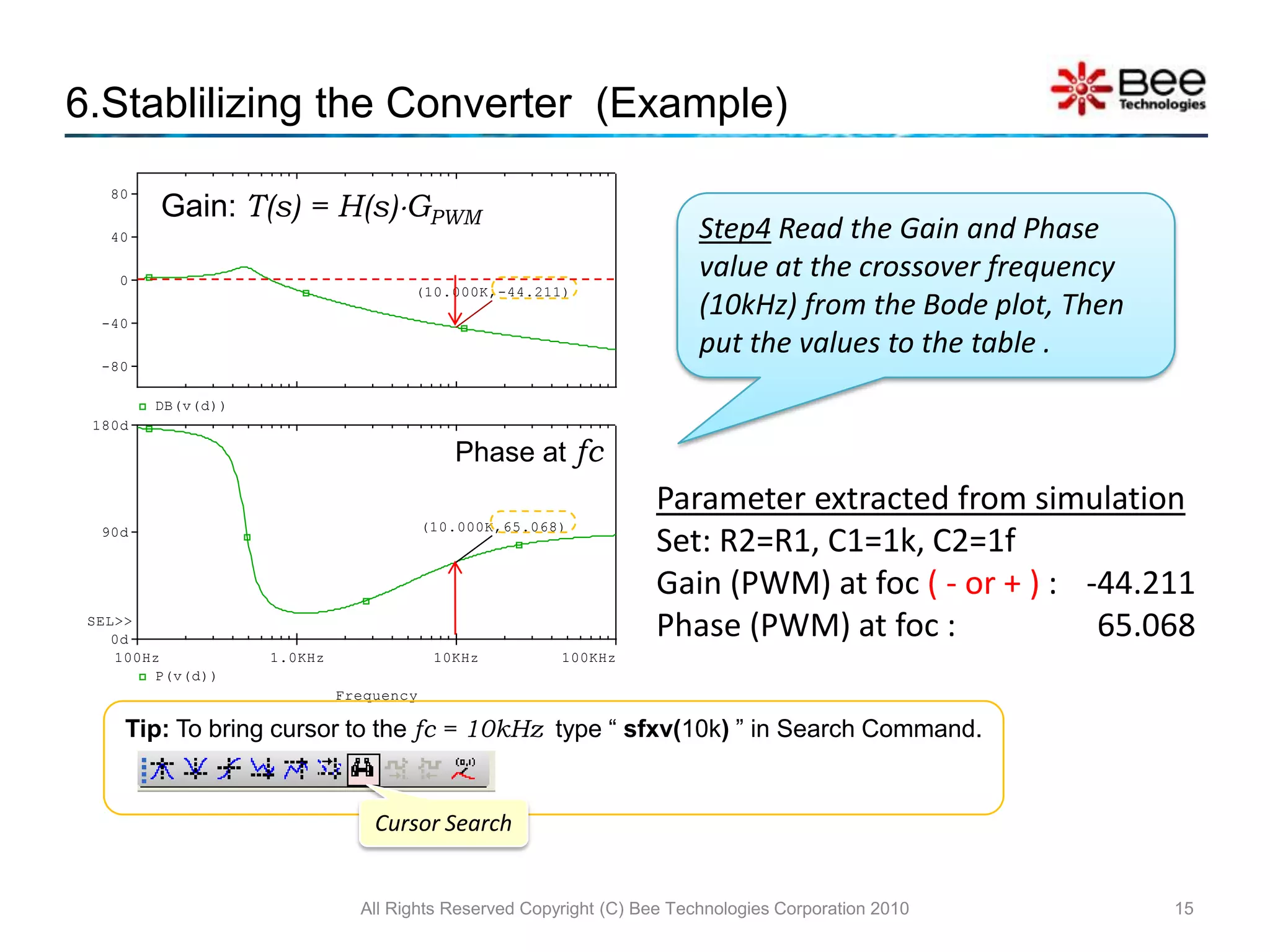
All Rights Reserved Copyright (C) Bee Technologies Corporation 2010156.Stablilizing the Converter  (Example)Gain: T(s) = H(s)GPWMStep4 Read the Gain and Phase value at the crossover frequency (10kHz) from the Bode plot, Then put the values to the table .Phase atfcTip: To bring cursor to the fc = 10kHz  type “ sfxv(10k) ” in Search Command.Cursor Search
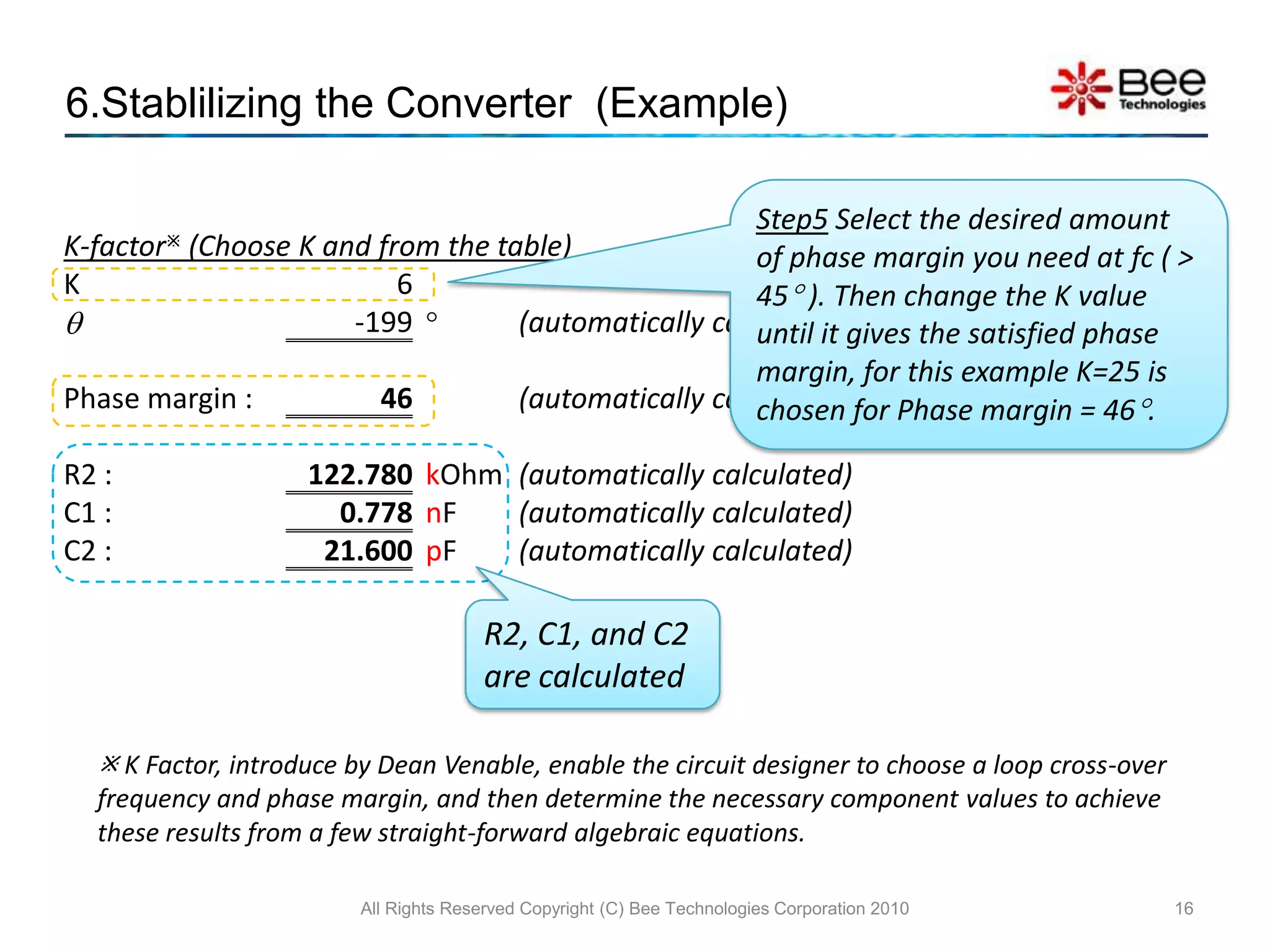
6.Stablilizing the Converter  (Example)All Rights Reserved Copyright (C) Bee Technologies Corporation 201016Step5 Select the desired amount of phase margin you need at fc ( > 45 ). Then change the K value until it gives the satisfied phase margin, for this example K=25 is chosen for Phase margin = 46.R2, C1, and C2 are calculated K Factor, introduce by Dean Venable, enable the circuit designer to choose a loop cross-over frequency and phase margin, and then determine the necessary component values to achieve these results from a few straight-forward algebraic equations.
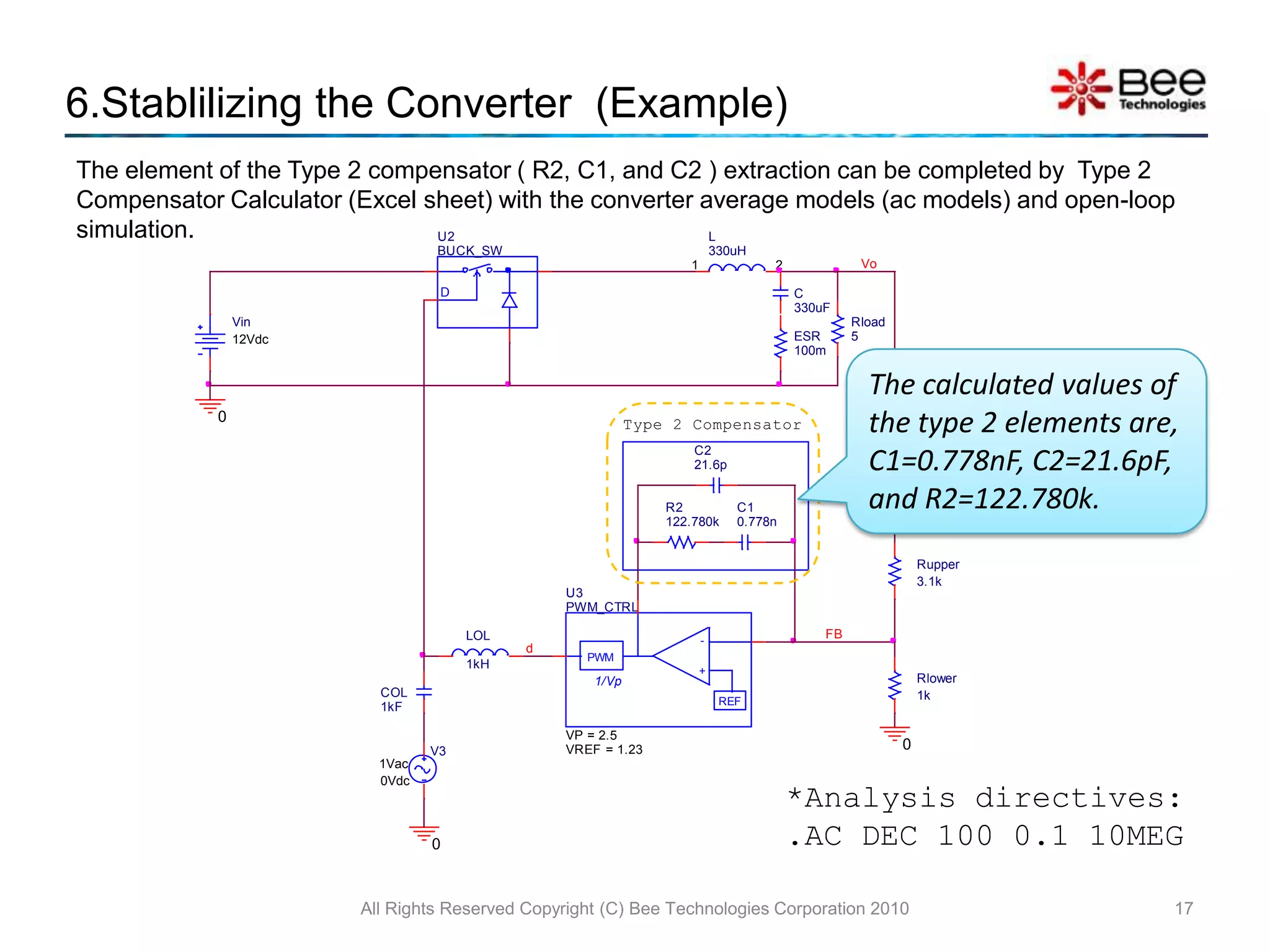
6.Stablilizing the Converter  (Example)All Rights Reserved Copyright (C) Bee Technologies Corporation 201017The element of the Type 2 compensator ( R2, C1, and C2 ) extraction can be completed by  Type 2 Compensator Calculator (Excel sheet) with the converter average models (ac models) and open-loop simulation.The calculated values of the type 2 elements are, C1=0.778nF, C2=21.6pF, and R2=122.780k.*Analysis directives: .AC DEC 100 0.1 10MEG

PWM Buck Converter using Average Model

  • 1.
    Concept Kit:PWM BuckConverter Average ModelAll Rights Reserved Copyright (C) Bee Technologies Corporation 20101Pre Version
  • 2.
    ContentsConcept of SimulationBuckConverter CircuitSwitchesFilter & Load4.1 Inductor4.2 CapacitorPWM Controller5.1 Error Amp.5.2 PWMStabilizing the Converter (Example)Load Transient Response Simulation (Example)Type 2 Compensator CalculatorSimulation IndexAll Rights Reserved Copyright (C) Bee Technologies Corporation 20102
  • 3.
    All Rights ReservedCopyright (C) Bee Technologies Corporation 201031.Concept of SimulationBlock Diagram:Power SwitchesAveraged Buck Switch ModelFilter & LoadParameter:L
  • 4.
  • 5.
  • 6.
    RloadPWM Controller (VoltageMode Control)Parameter:VP
  • 7.
  • 8.
    2.Buck Converter CircuitAllRights Reserved Copyright (C) Bee Technologies Corporation 20104Power SwitchesFilter & LoadPWM Controller
  • 9.
    3.Switches The AveragedBuck Switch Model represents relation between input and output of the switch that is controlled by duty cycle – d (value between 0 and 1).
  • 10.
    Transfer function ofthe model is vout = d  vinThe current flow into the switch is iin = d  ioutAll Rights Reserved Copyright (C) Bee Technologies Corporation 20105
  • 11.
    4.1 Filter &Load: InductorAll Rights Reserved Copyright (C) Bee Technologies Corporation 20106Inductor ValueThe output inductor value is selected to set the converter to work in CCM (Continuous Current Mode) or DCM (Discontinuous Current Mode).Calculated byWhereLCCM is the inductor that make the converter to work in CCM.VI,max is input maximum voltageRL(max) is load resistance at the minimum output current (IOUT)fosc is switching frequency(1)
  • 12.
    4.2 Filter &Load: CapacitorAll Rights Reserved Copyright (C) Bee Technologies Corporation 20107Capacitor ValueThe minimum allowable output capacitor value should be determined byWhereIL, RIPPLE is an inductor ripple current, chosen to be 25% of IOUT.VO,RIPPLE is an output ripple voltage.fosc is switching frequencyIn addition, the output ripple voltage due to the capacitor ESR must be considered as the following equation.(2)(3)
  • 13.
    The Error Amp.compares the feedback voltage ( FB ) to the reference voltage ( Parameter: VREF ), the output signal will be fed back to the controller to regulate the converter output voltage as the above equation.5.1 PWM Controller: Error Amp. All Rights Reserved Copyright (C) Bee Technologies Corporation 20108Vo(4)Error Amp.
  • 14.
    5.2 PWM Controller:PWMAll Rights Reserved Copyright (C) Bee Technologies Corporation 20109The PWM block is used to transfer the error voltage (between FB and REF) to be the duty cycle.The error voltage (vcomp) will be compared with sawtooth signal ( amplitude = VP ) to create the pulse that the duty cycle depends on the vcompTransfer function of the PWM block is d = vcomp/ VPGPWM = 1/VPVPDuty cycle (d) is a value from 0 to 1
  • 15.
    Loop gain forthis configuration isThe purpose of the compensator G(s)is to tailor the converter loop gain (frequency response) to make it stable when operated in closed-loop conditions.5.3 PWM Controller: CompensatorAll Rights Reserved Copyright (C) Bee Technologies Corporation 201010H(s)G(s)GPWM
  • 16.
    6.Stablilizing the Converter (Example)All Rights Reserved Copyright (C) Bee Technologies Corporation 201011Specification:VOUT = 5VVIN = 7 ~ 40VILOAD = 0.2 ~ 1AL = 330uH, C = 330uF (ESR = 100m),Rupper = 3.1k,Rlower = 1k,PWM Controller:fOSC = 52kHzVP = 2.5VVREF = 1.23VTask:to find out the element of the Type 2 compensator ( R2, C1, and C2 )G(s)e.g. Characteristics from National Semiconductor Corp. IC: LM2575
  • 17.
    6.Stablilizing the Converter (Example)All Rights Reserved Copyright (C) Bee Technologies Corporation 201012The element of the Type 2 compensator ( R2, C1, and C2 ), that stabilize the converter, can be extracted by using Type 2 Compensator Calculator (Excel sheet) and open-loop simulation with the average models (ac models).Step2 Set C1=1kF, C2=1fF, and R2= calculated value (Rupper//Rlower) as the initial values.Step1 Open the loop with LoL=1kH and CoL=1kF then inject the ac signal to generate Bode plot.
  • 18.
    6.Stablilizing the Converter (Example)All Rights Reserved Copyright (C) Bee Technologies Corporation 201013Step3 Select a crossover frequency (fc < fosc/4), for this example, 10kHz is selected. Then complete the table.Calcuted value of the Rupper//Rlower
  • 19.
    All Rights ReservedCopyright (C) Bee Technologies Corporation 2010146.Stablilizing the Converter (Example) If the VP ( sawtooth signal amplitude ) does not informed by the datasheet, It can be approximate from the characteristics below.from d = vcomp/ VPSuppose that the error amp. gain is 100.vcomp =gain (-vFB)then d = (100  (-vFB) ) / VPFrom the graph on the left, vFB = -25mV VP = (100  (-vFB) ) / d VP ≈ (100  (-(-25mV)) ) / 1 ≈ 2.5VvFB = -25mVd = 1 (100%)LM2575: Feedback Voltage vs. Duty Cycle
  • 20.
    All Rights ReservedCopyright (C) Bee Technologies Corporation 2010156.Stablilizing the Converter (Example)Gain: T(s) = H(s)GPWMStep4 Read the Gain and Phase value at the crossover frequency (10kHz) from the Bode plot, Then put the values to the table .Phase atfcTip: To bring cursor to the fc = 10kHz type “ sfxv(10k) ” in Search Command.Cursor Search
  • 21.
    6.Stablilizing the Converter (Example)All Rights Reserved Copyright (C) Bee Technologies Corporation 201016Step5 Select the desired amount of phase margin you need at fc ( > 45 ). Then change the K value until it gives the satisfied phase margin, for this example K=25 is chosen for Phase margin = 46.R2, C1, and C2 are calculated K Factor, introduce by Dean Venable, enable the circuit designer to choose a loop cross-over frequency and phase margin, and then determine the necessary component values to achieve these results from a few straight-forward algebraic equations.
  • 22.
    6.Stablilizing the Converter (Example)All Rights Reserved Copyright (C) Bee Technologies Corporation 201017The element of the Type 2 compensator ( R2, C1, and C2 ) extraction can be completed by Type 2 Compensator Calculator (Excel sheet) with the converter average models (ac models) and open-loop simulation.The calculated values of the type 2 elements are, C1=0.778nF, C2=21.6pF, and R2=122.780k.*Analysis directives: .AC DEC 100 0.1 10MEG
  • 23.
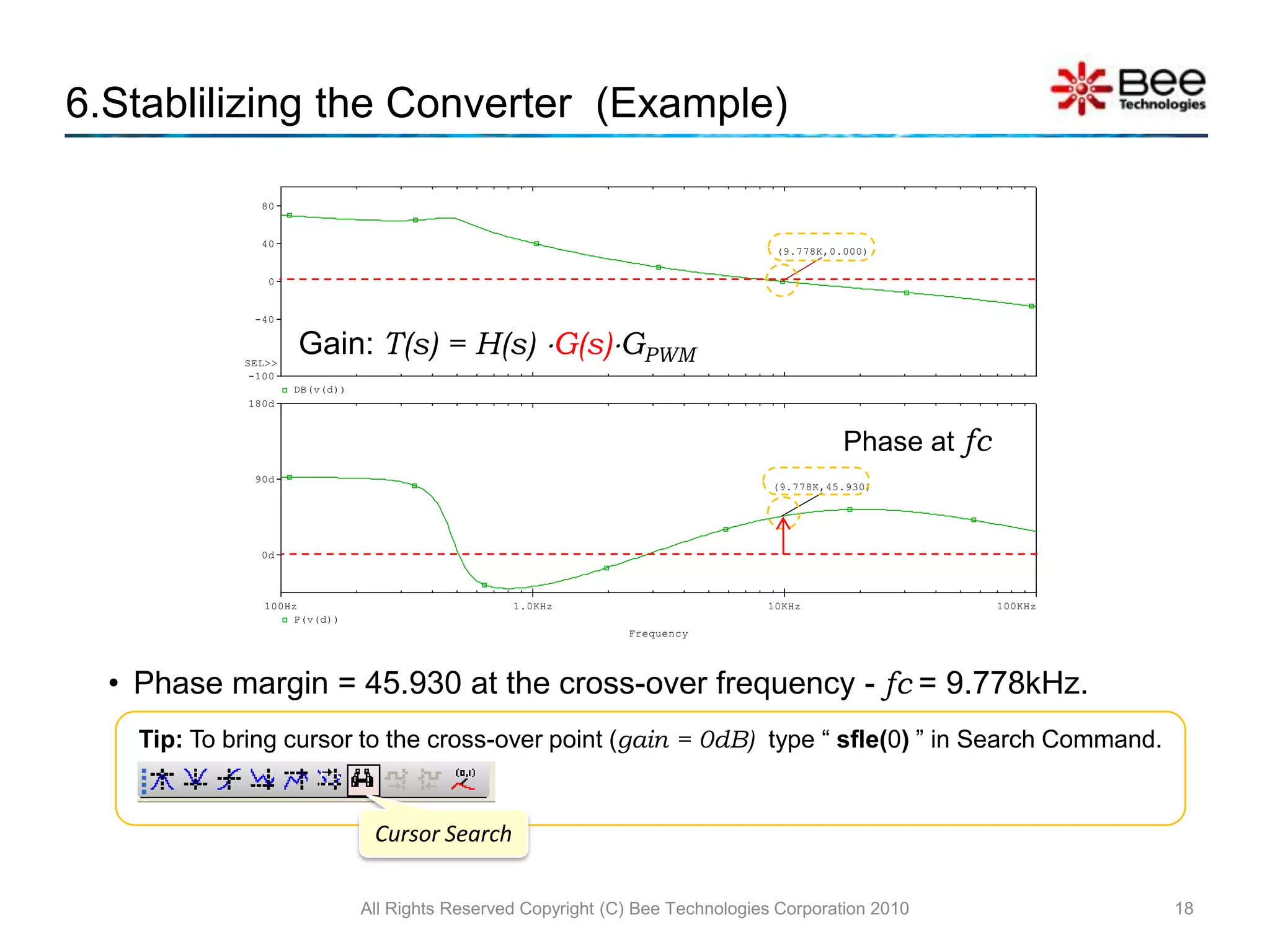
    All Rights ReservedCopyright (C) Bee Technologies Corporation 2010186.Stablilizing the Converter (Example)Gain: T(s) = H(s) G(s)GPWMPhase atfcPhase margin = 45.930 at the cross-over frequency - fc = 9.778kHz.Tip: To bring cursor to the cross-over point (gain = 0dB) type “ sfle(0) ” in Search Command.Cursor Search
  • 24.
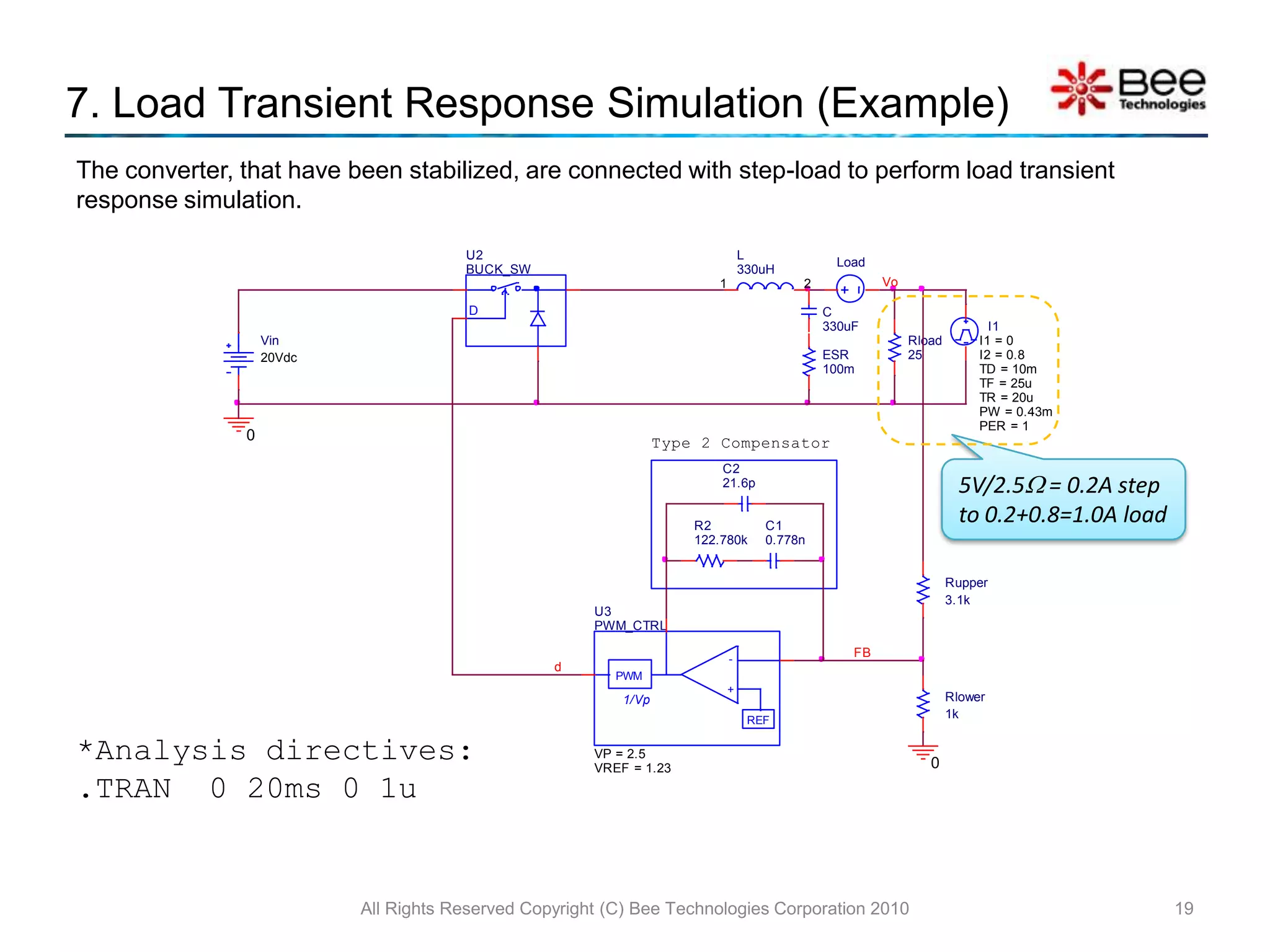
    7. Load TransientResponse Simulation (Example)All Rights Reserved Copyright (C) Bee Technologies Corporation 201019The converter, that have been stabilized, are connected with step-load to perform load transient response simulation.5V/2.5 = 0.2A step to 0.2+0.8=1.0A load*Analysis directives: .TRAN 0 20ms 0 1u
  • 25.
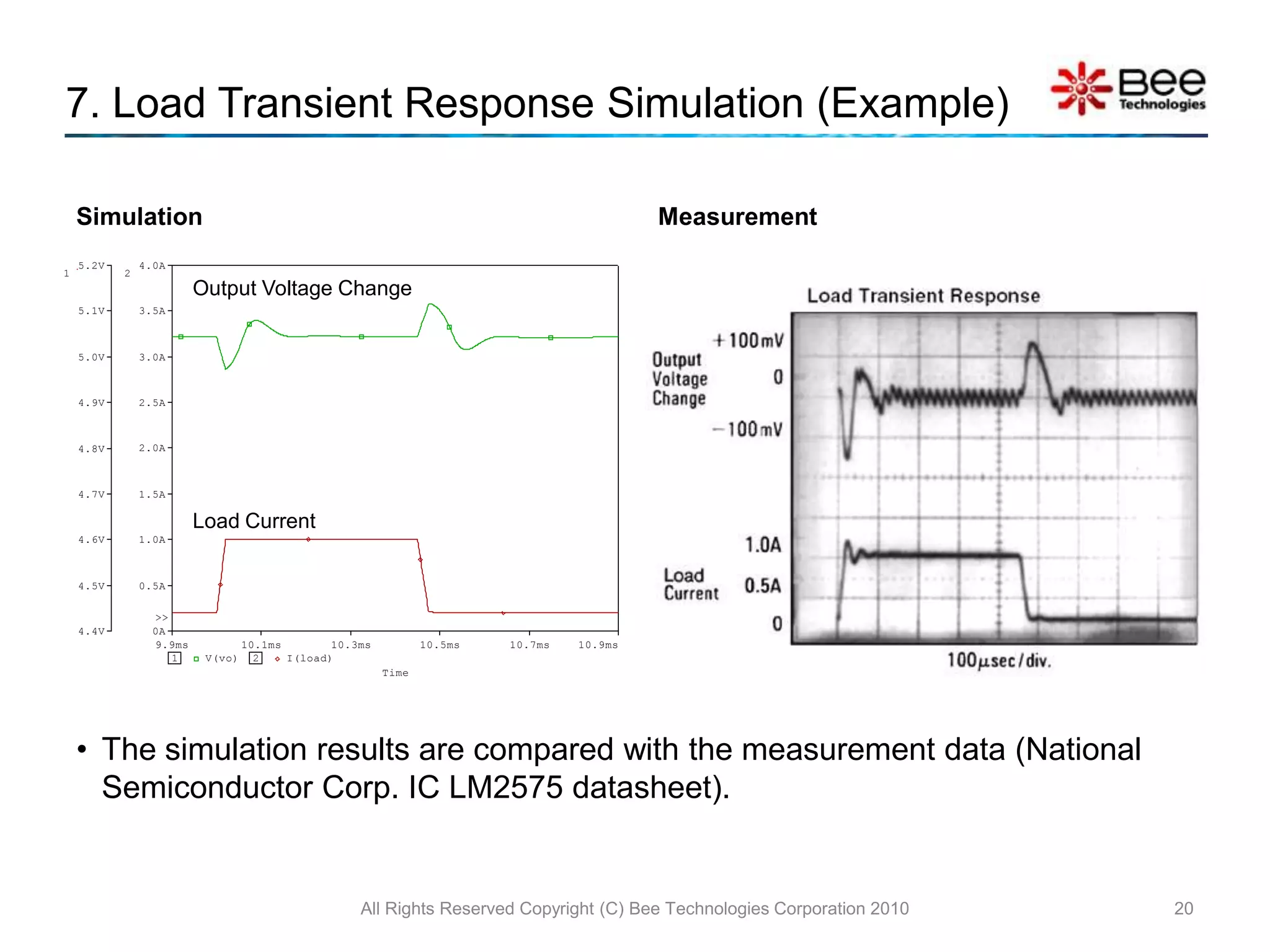
    SimulationMeasurementAll Rights ReservedCopyright (C) Bee Technologies Corporation 2010207. Load Transient Response Simulation (Example)Output Voltage ChangeLoad CurrentThe simulation results are compared with the measurement data (National Semiconductor Corp. IC LM2575 datasheet).Type 2 Compensator CalculatorAll Rights Reserved Copyright (C) Bee Technologies Corporation 201021
  • 26.
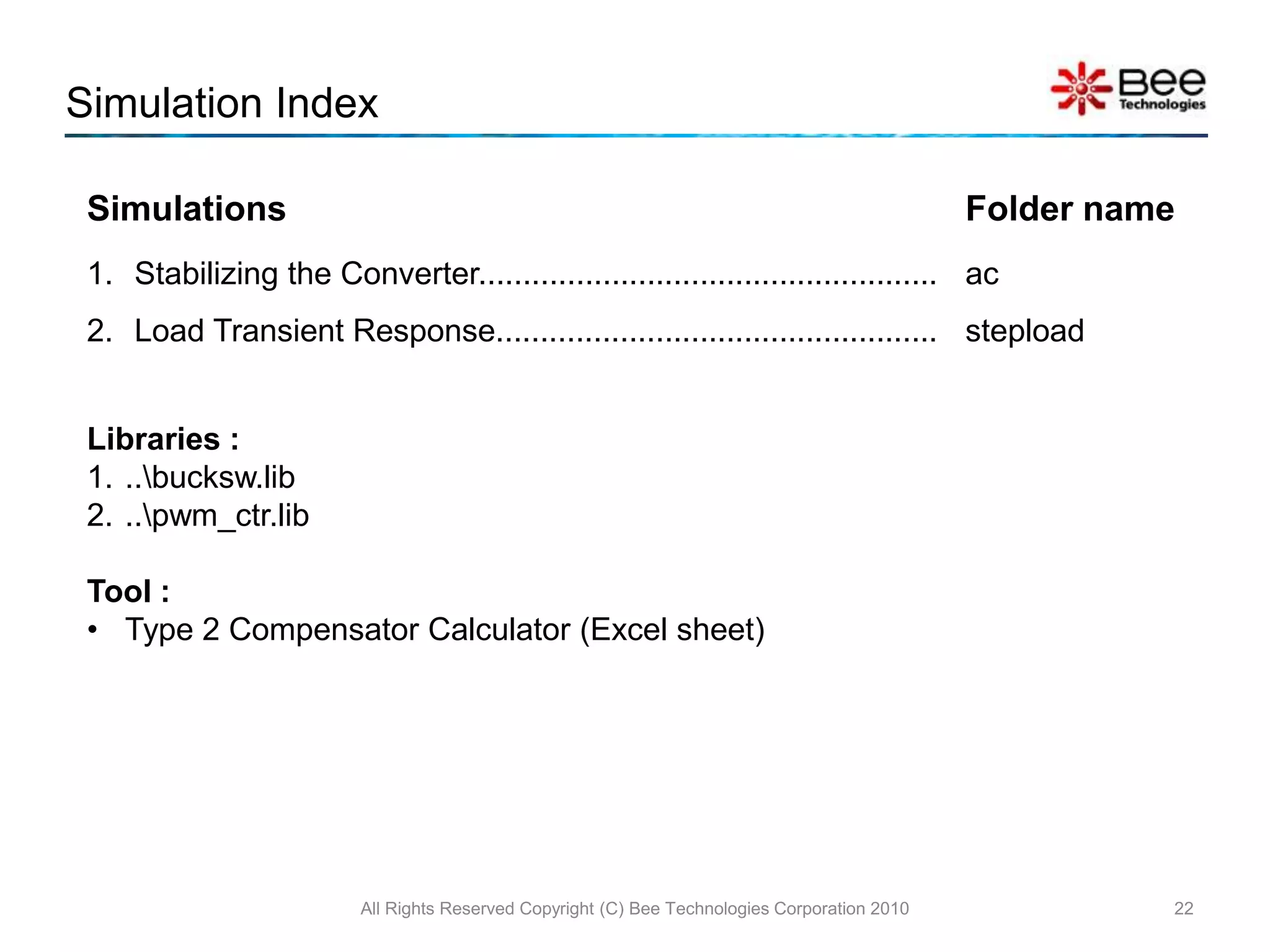
    Simulation IndexAll RightsReserved Copyright (C) Bee Technologies Corporation 201022Libraries :..\bucksw.lib..\pwm_ctr.libTool :Type 2 Compensator Calculator (Excel sheet)