1
NOKIA FLEXI EDGE BTS
INSTALLETION
COMMISSIONING AND
PLANNING
Submitted by:
SAURABH BANSAL
B.TECH (E&C), V Semester
Under the Guidance of
(Mr. Sumit Singh Dhanda)
Amity School of Engineering
AMITY UNIVERSITY RAJASTHAN
2
NOKIA FLEXI EDGE BTS
INSTALLETION
COMMISSIONING AND
PLANNING
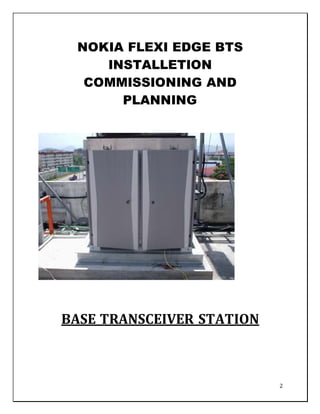
BASE TRANSCEIVER STATION
3
Certificate
This is to certify that the Report entitled NOKIA FLEXI EDGE BTS
INSTALLETION COMMISSIONING AND PLANNING submitted by
SAURABH BANSAL with Enrolment No. A20405110054 on November
2012 is his own work and has been carried out under my supervision. It is
recommended that the candidate may now be evaluated for his work by the
University.
Submitted by: Submitted to:
SAURABH BANSAL Mr. Sumit Singh Dhanda
Signature: Lecturer (Electronics)
Signature:
Date:
4
Acknowledgement
.I owe a great many thanks to many people who helped and supported me during the
writing of this Project Report.
I express my profound gratitude to Dr.Sanyog Rawat, the programme
coordinator of Electronics & Communications for allowing me to proceed with this term
paper.
My deepest thanks to my guide Mr. Sumit Singh dhanda (Dept. of Electronics
and Communication Engineering) the Guide of the project for guiding and correcting
various documents of mine with attention and care. She has taken pain to go through
the project and make necessary correction as and when needed.
I would also thank my Institution and my faculty members without whom this project
would have been a distant reality. I also extend my heartfelt thanks to my family and well-
wishers.
SAURABH BANSAL
B.TECH ECE
V SEM
5
TABLE OF CONTENTS
1. History Of NSN 08
2. BASE TRANSCEIVER STATION 10
3. GENERAL ELEMENTS 12
4. GENERAL DESCRIPTION 14
5. BLOCK DIAGRAM OF THE BTS 15
6. Hardware Description 16
7. Digital Switching Central Office 17
8. Base Transceiver Station 18
9.1 Base Transceiver Station – Mechanical. 18
9.2 Eagle Management Suite 19
9.3 Customer Premises Equipment 19
9. EVOLUTION 19
10. SUMMARY 20
11. RADIO FREQUENCY DETAILS 21
11.1 Radio Link 21
11.2 Spectrum & Frequencies 21
11.3 RBU Capacity & Spectral Efficiency 22
11.4 Power Control 22
11.5 Range 23
11.6 System Capacity 24
11.7 Call Processing 26
11.8 OAM&P 27
12. OPERATIONS 28
12.1 Equipment Activation/Deactivation 28
12.2 Failure Detection 28
12.3 Status Display 28
12.4 Operator Interface 28
13. ADMINISTRATION 29
13.1 Security 29
13.2 RBU Access 29
13.3 Subscriber Unit Access 29
13.4 Activity Reports 30
13.5 System Log 30
13.6 Subscriber Call Data 30
14. MAINTENANCE 30
14.1 Test and Diagnostics – 30
14.2 Initialization State. 31
14.3 Online State. 31
14.4 Offline state. 31
6
15. RBU BIT 31
15.1 SU BIT 32
15.2 Repair and Maintenance Requests 32
16. Provisioning and Configuration 33
16.1 Initial System Provisioning 33
16.2 Modifying System Configuration 34
17. GENERAL FUNCTIONS 35
17.1 Protocol between RBU and SU 35
17.2 Antenna 35
17.3 RF Cable 35
17.4 Grounding 35
17.5 Prime Power Interface 35
17.6 System Health Monitor Function 35
17.7 System Health Data Storage 36
18. Cooling for the Base Transceiver Station 36
19. Maintainability 36
20. Overview of Nokia Flexi EDGE BTS site Commissioning 37
20.1 Purpose 37
20.2 Easy Wizard Template Commissioning 37
20.3 Commissioning Wizard 38
20.4 Easy Wizard Complete SCF Commissioning 39
20.5 Steps 39
a. Install the Nokia Flexi EDGE BTS Manager. 39
b. Check the prerequisites for commissioning: 39
c. Go to one of the following sections, depending on the commissioning mode
used: 39
d. View the commissioning progress and commissioning result. 39
e. If you want to run manual tests, see running manual tests. 39
f. Save the commissioning report, see Commissioning report. 39
g. Preparing for commissioning 40
21. Prerequisites for commissioning Nokia Flexi EDGE BTS 40
7
21.1 Visual checks and inspection 41
22. Changing IP address settings with Windows XP Before you start 41
22.1 Preparing to commission Nokia Flexi EDGE BTS 41
23. Establishing transmission link 42
23.1 Establishing a connection to the node 42
23.2 Starting Nokia Flexi Hub Manager 42
23.3 Connecting locally 42
23.4 Connecting remotely 42
23.5 Closing the connection to a node 43
24. Commissioning FIFA, Nokia Flexi Hopper, and Nokia Metro Hopper 43
24.1 Overview of commissioning with the Commissioning Wizard 43
24.2 Summary 43
24.3 Steps 43
a. Start the Commissioning Wizard and select the commissioning targets. 43
b. Proceed with the Commissioning Wizard. 43
c. Complete the commissioning 44
d. Configure any additional settings. 44
e. Create the 2M-level cross-connections 44
f. Verify the commissioning. 44
24.4 Expected outcome 44
24.5 Further information 44
24.6 Tip 44
25. LIST OF FIGURES:-
a. Figure1:- GENERAL ELEMENTS 12
b. Figure 2:-GENERAL DESCRIPTION 14
c. Figure 3:- BLOCK DIAGRAM OF THE BTS 15
d. Figure 4:- Base Transceiver Station 18
e. Figure 5:- radio Spectrum & Frequencies 21
f. Figure 6:- Range 23
g. Figure 7:-System Capacity 24
8
Nokia Siemens Networks
Type:- Besloten Vennootschap
Industry:- Telecommunications equipment
Founded:- 2007
Headquarters:- Espoo, Finland
Area served:- Worldwide
Key people:-
Rajeev Suri (CEO)
Marco Schröter (CFO)
Jesper Ovesen (Chairman)
Products:-
Mobile and fixed broadband
networks, consultancy and
managed services, multimedia
technology
Revenue:- € 14.041 billion (2011)
Operating income:- € −300 million (2011)
Employees:- 74,000 (2011)
Parent:-
Nokia Oyj (50.1%)
Siemens AG (49.9%)
Website www.nokiasiemensnetworks.com
Nokia Siemens Networks B.V. is a multinational data networking and telecommunications
equipment company headquartered in Espoo, Finland and a joint venture between Nokia of
Finland and Siemens of Germany. It is the world's fourth-largest telecoms equipment
manufacturer measured by 2011 revenues (after Ericsson, Huawei and Alcatel-Lucent).
Nokia Siemens Networks has operations in around 150 countries.
9
History
The company was created as the result of a joint venture between Siemens
Communications division (minus its Enterprise business unit) and Nokia's Network
Business Group. The formation of the company was publicly announced on 19 June 2006.
Nokia Siemens Networks was officially launched at the 3GSM World Congress in Barcelona
in February 2007. Nokia Siemens Networks then began full operations on 1 April 2007 and
has its headquarters in Espoo, Greater Helsinki, Finland. In January 2008 Nokia Siemens
Networks acquired Israeli company Atrica, a company that builds carrier-class Ethernet
transport systems for metro networks. The official release did not disclose terms; however
they are thought to be in the region of $100 million. In February 2008 Nokia Siemens
Networks acquired Apertio, Bristol UK-based, a mobile network customer management
tools provider for €140 million. With this acquisition Nokia Siemens Networks gained
customers in the subscriber management area including Orange, T-Mobile, O2, Vodafone
and Hutchison 3G. On 19 July 2010, Nokia Siemens Networks announced it would acquire
the wireless-network equipment division of Motorola. The acquisition was completed on
29 April 2011 for US $975 million in cash. As part of the transaction approximately 6,900
employees transferred to Nokia Siemens Networks.
On 23 November 2011, Nokia Siemens announced that it planned to eliminate 17,000 jobs
by the end of 2013 to enable Nokia Siemens to refocus on mobile broadband equipment,
the fastest-growing segment of the market. The reductions will slash the company’s work
force by 23 percent from its current level of 74,000. The cuts follow Nokia Siemens’s $1.2
billion purchase of Motorola’s mobile network equipment business in July 2010, which
added staff; and would help the company trim annual operating expenses by $1.35 billion
by the end of 2013
10
BASE TRANSCEIVER STATION
OVERVIEW
The Base Transceiver Station (BTS) consists of a single rack or cabinet that houses the
necessary elements for a point to multi-point RF communication network. A single BTS
may contain 1 or 2 Radio Base Units (RBUs). Each RBU contains all necessary
Transmit/Receive equipment required for the operation of a single sector or cell. A
modular design provides for multiple co-located BTSs. The architecture of the system is
flexible, and can accommodate small or large numbers of subscribers. It can also be
adapted for use in rural, suburban, and urban environments.[1]
INTRODUCTION
The Eagle Telephonic, Inc. Air Link 8000 system is a WLL Specific system based on digital
radio technology. Specifically, it employs direct sequence, spread spectrum based,
Synchronous CDMA (SCDMA) techniques over the air link to provide local access to
subscribers. It offers very high quality, highly reliable service at costs that are very
competitive with the wireline solutions. The system has very high spectral efficiency and
thus can provide wireline quality service with limited available bandwidth. Its
large dynamic range allows it to be deployable in virtually all environments, meeting
specific needs of dense urban, suburban, and rural communities in an economical way.[1]
Some of the key attributes of the system are:
 Wireline voice quality delivered at 32 or 64 kbps.
 High throughput for data and fax applications with 32 or 64 kbps throughput.
 High service reliability with good tolerance for noise
 Secure airlink that is virtually impossible to break into or eavesdrop.
 CLASS services are supported.
11
 Enhanced services like priority/emergency calling - both inbound and outbound.
 Full switching services available.[2]
For the network operator, the system provides several benefits:
 Advanced graphical operator interface.
 Equipment cost per access line is low and very competitive with average wireline
costs.
 In typical deployments, over 70% of the per line equipment cost is on the subscriber
end; thus most of the[2]
Investment needs to be made only when signing up paying customers.
 Quick and easy installation and provisioning process.
 Low maintenance costs reduce the life cycle costs and total cost of ownership.
 Theft deterrent system (stolen or misused equipment will not operate) with
properly implemented procedures, even installation/maintenance staff cannot beat
the system.
 Ability to provide high quality digital data services at 64 to 256 kbps and beyond
increases the appeal to business and discriminating customers and provides
opportunities for premium revenue producing services.
 Economically viable over a wide range of subscriber densities and hence can be
used for stand-alone as well as overlay networks. It can also easily grow with the
subscriber population.
 The system will grow with customer needs and be able to provide higher bandwidth
data/video services.[2]
12
GENERAL ELEMENTS
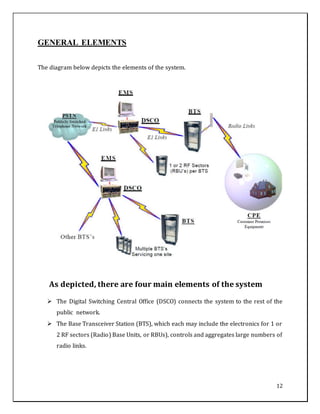
The diagram below depicts the elements of the system.
As depicted, there are four main elements of the system
 The Digital Switching Central Office (DSCO) connects the system to the rest of the
public network.
 The Base Transceiver Station (BTS), which each may include the electronics for 1 or
2 RF sectors (Radio) Base Units, or RBUs), controls and aggregates large numbers of
radio links.
13
 The Customer Premises Equipment (CPE) provides the subscriber end of the radio
link and provides the standard wireline interface to the customers telephony
equipment.
 The Eagle Management Suites (EMS) Software, which provide control to the overall
system.
The Eagle Management Suites (EMS) provides the Operations, Administration,
Maintenance, and Provisioning (OAM&P) functions and EMS also provides programming
control of the DSCO, Collection of the subscribers call records (CDR) and contains the Eagle
Billing Suite (EBS) for real-time billing of the subscriber base.
Some of the distinguishing characteristics of the system include:
 Full duplex Synchronous Code Division Multiple Access (S-CDMA) operation that
provides higher user capacity than competing technologies and systems:
1. Three to five times capacity advantage over conventional asynchronous CDMA
technologies
2. Three to seven times capacity advantage over Time Division Multiple Access
(TDMA) technology
 Modular system design allows service providers to incrementally deploy wireless
service, increasing user densities and capital expenditures while initiating revenue
recovery
 State of the art custom ASICs for improving reliability and packaging, and for
lowering the system power requirements and overall cost
 Complete system redundancy and hot swap capability for all central equipment
provides for high reliability
 Real time Call Record Collection.
 Monthly Invoices to the Subscriber Base
 On-line Subscriber status with the ability to change Customer features.[2]
14
GENERAL DESCRIPTION
The AirLink 8000 system Base Transceiver Station is described in this section. The design
philosophy has been to use advanced technology in order to create a point to multi-point
system with high bandwidth efficiency, and comparatively large range. Attention has been
paid to expandability of future services and requirements, high reliability, service security,
fraud prevention, emergency services, and many other
The following information entails the workings of the BTS in conjunction with the CPE.
Antenna characteristics are matched to the CPE along with controls signals.
See the CPE Overview for a more complete description of the CPE.[2]
15
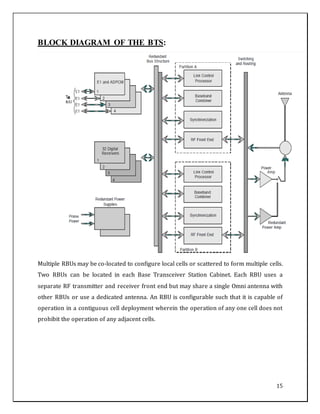
BLOCK DIAGRAM OF THE BTS:
Multiple RBUs may be co-located to configure local cells or scattered to form multiple cells.
Two RBUs can be located in each Base Transceiver Station Cabinet. Each RBU uses a
separate RF transmitter and receiver front end but may share a single Omni antenna with
other RBUs or use a dedicated antenna. An RBU is configurable such that it is capable of
operation in a contiguous cell deployment wherein the operation of any one cell does not
prohibit the operation of any adjacent cells.
16
The modular nature of the RBU accommodates a combination of redundant and high
reliability hardware to provide the necessary resiliency to provide a high MTBF. The RBU
interfaces with the DSCO via one to four E1 connections. An Operation, Administration,
Maintenance, and Provisioning (OAM&P) interface is provided for each RBU, but the
standard OAM&P interface is to the DSCO. The RBU connects to the Network Interface Unit
(DSCO) which is the Eagle Telephonics, Inc. DSCO, via multiple E1 type connections. 75-
ohm BNC or 120 ohm dB connector interfaces are available. Optional Forward Earthing is
available on both interfaces.
This E1 connection may be implemented via various interface links such as wire, optical
fiber, or microwave radio. All external signal cables and field replaceable modules are
accessible from the front of the Base Transceiver Station, with the exception of the antenna
cables, which are accessible from the top of the Base Transceiver Station.[2]
Hardware Description.
There are three primary subsystems in the Eagle Telephonics, Inc.’s AirLink 8000 system
the Eagle Telephonics, Inc. Digital Switching Central Office (DSCO), Base Transceiver
Station (BTS), and Customer Premises Equipment (CPE). The CPE itself has three primary
components — the Subscriber Unit (SU), the Network Termination Unit (NTU), and the
Uninterruptible Power Supply (UPS). The DSCO and the BTS share the Eagle Management
Suites (EMS) for all OAM&P functions, central office control and subscriber programming.
The DSCO connects to the public telephone network via analog or digital trunks. The BTS
connects to the DSCO using E1 trunks and to its master antenna using a coaxial cable. The
SU communicates with the BTS via the radio interface. At the customer premises the NTU
serves as the connection point between the SU and the subscriber’s standard telephony
termination point, and the UPS interfaces to the subscribers’ primary power using a
standard cable. Further details are presented below along with appropriate diagrams.[2]
17
Digital Switching Central Office.
The Digital Switching Central Office (DSCO) is the system’s interface to the public network.
Its primary purpose is to provide the specific protocols and signaling that are required by
the public network. These protocols can vary by the country as well as by the customer and
even by the connecting point in the network.
The DSCO can connect to a maximum of 15 RBUs using 1 to 4 E1 connections per RBU with
4 E1s needed for a fully populated RBU. In addition, each DSCO may be configured for a
maximum of 10,000 subscribers. Time Slot 16 on each E1 trunk is used for passing control
information between the DSCO and the attached RBUs as well as for passing information to
and from the controlling EMS. Specific functions provided by the DSCO include:
 Provisioning of dial tone to the Subscriber Units
 Set up and tear down of voice and data calls
 Billing system interface
 Call priority management (drop least priority when all channels are used)
 Channel reassignment for calls in progress
 Detection of hook flash to enable POTS+ calling features
 32 to 64 kbps rate change initialization
 Pay phone capability (12/16 kHz tone detection, line reversal)
 Priority and emergency number calling
 Accommodation of country specific signaling interfaces such as E&M, R2, R2
variants, V5.1, V5.2, C7, and C7 variants
 System modularity: analog/digital options for both line side and trunk side
 Full redundancy and hot swap for all circuit cards
Note: See the Eagle Telephonics, Inc. Installation and Maintenance Manual (IMM) for
complete details of operation and description for the DSCO.[2]
18
Base Transceiver Station
The BTS consists of a standard front access 19” telephony equipment rack (31U high),
populated with up to four equipment sub racks. The sub racks provide all the functionality
required to interface to the DSCO and may include the electronics for 1 or 2 Radio Base
Units (RBUs) which provide radio communication to all CPE within a cell or sector. The
RBUs are connected to external antennas that communicate with the SUs.[2]
1. Base Transceiver Station – Mechanical.
The antennas can be located up to 100 meters from the BTS using a 50 W coaxial cable. The
antenna location is chosen to optimize transmission characteristics to the served SUs
(principally line of sight). The RBU is fully redundant and all field replaceable units are hot-
swappable. RBU accepts 48 or 60 VDC power with 15% tolerance.[2]
19
2. Eagle Management Suite
The EMS is a personal computer based platform that is used to provide all the Operations,
Administration, Maintenance, and Provisioning (OAM&P) control for the system. The EMS
is hosted on a Windows NT® compatible PC platform and uses a Graphical User Interface
(GUI) to facilitate operator inputs and report system information. Functions managed by
the EMS include initiation, control, and data logging of all system wide tests, alarm
reporting, operator entry of system parameters, and entry and maintenance of subscriber
information such as priority, ID, and phone number. The EMS also acts as the
administration terminal for system configuration and reporting.[2]
3. Customer Premises Equipment.
The Customer Premises Equipment consists of three separate hardware units — the
Subscriber Unit (SU), the Network Termination Unit (NTU) and the Uninterruptible Power
Supply (UPS). All of the CPE units are located at or near the end user’s location. A typical
installation would find the SU located on an exterior wall or rooftop to enable wireless
communication with the RBU antenna, the NTU mounted at a ground accessible exterior
point on the customer building, and the UPS located within the building.[2]
EVOLUTION.
The present system is targeted to meet the needs of a vast majority of business and
residential customers, particularly in the countries/regions with inadequate
telecommunications infrastructure. Its features and functions will serve the needs of
discerning consumers desiring a high quality service that includes data in addition to voice.
Such consumers include middle/upper income residential customers as well as small
businesses throughout the world. With its inherent broadband orientation, the system has
a strong appeal in competitive access markets.[2]
The system will evolve to provide broadband data services (beyond ISDN basic rate) to
further enhance its appeal to business customers. It is also well positioned to serve the
need for specialized overlay networks that may be geographically dispersed in a metro
area..[2
20
SUMMARY
Rapid advances in digital radio technologies have made high quality telecommunications
services feasible and economical using radio instead of wireline. Radio offers advantages
over wireline deployment in the areas of lower initial cost, lower maintenance costs, and
rapid deployment and is thus increasingly becoming the medium of choice for operators
looking to rapidly expand their networks. The Eagle Telephonics, Inc. AirLink 8000 is a
custom designed fixed wireless system using leading edge CDMA technology. It provides
wireline quality at an initial cost that is very competitive with wireline solutions. Advances
in digital radio technology and increasing volumes virtually ensure that it will be the
technology of choice for most fixed telecommunications applications. By providing voice at
32 Kbps and data at 64 Kbps, the system meets or exceeds the quality and performance of
wireline systems. Adjustable dynamic range of a cell from 100m to over 30 km enables the
system to be deployed in a variety of situations ranging from dense urban to sparse rural. It
further enables the system to be deployed as the primary network infrastructure or as an
overlay network for specialized services or for select user communities. The security and
reliability of the CDMA technology ensures privacy, theft deterrence, and
noise/interference immunity.
In the not too distant a future, digital radio technology will be able to provide seamlessly
integrated, economic, high quality, feature rich service to every user - fixed and mobile.
Building a wireless infrastructure for fixed services is a necessary first step in realizing
such a goal and minimizing the risk of leaving behind stranded, non-upgradable assets.[2]
21
RADIO FREQUENCY DETAILS
1. Radio Link
Some of the important characteristics of a radio access link are — the spectrum used,
frequencies of operation, spectral efficiency, multiple access protocol, dynamic range, and
traffic carrying capacity. These aspects are discussed in detail below for AirLink 8000.[3]
2. Spectrum & Frequencies
As mentioned earlier, AirLink 8000 is a CDMA system. It requires a separate 2.72 MHz (3.5
MHz including guard bands) channel in each direction separated by either 100MHz, 119
MHz, or 175 MHz of bandwidth, depending on the band of operation. The system will
operate in one of four 3.5 MHz sub channel pairs in one of the 14 MHz channel pairs as
allocated by ITU-R 283-5, and shown below.
22
Currently available spectrum of operation is 2.1 - 2.3 GHz and 2.5 - 2.7 GHz (per ITU-R 283-
5), 3.4 – 3.7 GHz (per CEPT REC. 1403-E, ANNEX B), and 2.0 – 2.3 GHz (per ETSI DE/TM
04031).[3]
3. RBU Capacity & Spectral Efficiency
One RBU can support 128 simultaneous 34 Kbps channels using the 2.72 MHz bandwidth
giving it a spectral efficiency of 1.6 bits/Hz. Of this total capacity, 9 channels are used by the
system and an additional 2 Kbps per channel is system overhead. Thus the effective traffic
carrying capacity is 119 channels at 32 kbps. In order to further assure continued
operations under less than ideal environmental conditions, the system is conservatively
rated for 100 channels at 32 Kbps. The spectral efficiency of the system is 3 to 5 times that
of competitive CDMA systems primarily because this system employs bi-directional
Synchronous CDMA (S-CDMA). Competing systems, including those based on IS-95 are
asynchronous or at best synchronous only in one direction. The bi-directional
synchronicity permits this system to use near orthogonal codes and gain maximum
possible data carrying capacity. As designed, the system is code limited unlike most other
CDMA systems that are noise or interference limited.[3]
4. Power Control
Radio emissions lose energy as they travel in air over long distances. In order to ensure
that the received signal energy from a distant subscriber is not completely overwhelmed by
that of a near subscriber, the RBU controls the power level of the subscriber unit. In this
system, only the reverse channel power (from SU to the RBU) is controlled by the RBU. This
power control is primarily established at SU initialization.
Subsequent power adjustments are likely to be infrequent and mostly in response to
transient environmental conditions. The closed loop power control is implemented by
comparing against a desire power level and making incremental adjustments until the
desired level is achieved. The forward channel power control is not needed since each SU
receives its entire signal at only one level. The RBU merely to ensures that the received
23
signal strength by the farthest SU is sufficient for its application. The nominal average
power in both directions is 14dbm.[3]
5. Range
The range of an RBU is nominally determined by the farthest SU that can be served by the
RBU. This implies that the range is determined by the farthest SU that has a received signal
strength that is large enough to keep the bit error rate below the acceptable threshold. This
system is nominally designed to serve an SU at a distance of 10 km from the base station
antenna with a bit error rate of less than 1x10⁻⁶. Given good line of sight and
environmental conditions, this range could be further extended up to 30 km
or more.[3]
It is not always desirable to have an extended range. In a dense urban or even a suburban
setting, one needs to deploy the system in a cellular architecture as depicted below. To
reduce interference between sectors and between cells in such a deployment, one needs to
limit the range of an RBU - overall as well as selectively in specific directions. Such range
control may be accomplished using directional master antenna at the RBU as well by
controlling overall RBU power. This system has been designed with a dynamic range
control of 100m to 30 km. Hence in a dense urban setting with need for pico-cell
deployment, the RBU range can be pulled back to as low as 100m. In an overlay network
24
with scattered users or in a semi-rural setting the range may be extended to 30 km and
beyond. Of course the actual range that can be realized depends on site specific
conditions.[3]
6. System Capacity
As mentioned before, the system is rated to provide at least 100 simultaneously active
32kbps channels using 3.5 MHz bandwidth in each direction. Traffic engineering based on
the nature, distribution, holding time and other parameters would determine the number
and type of subscribers that can be put on a single RBU.
Traditional cellular deployment involving sectors, cells, and multiple frequency pairs is the
most pragmatic approach to increase capacity in presence of limited spectrum availability.
A typical 6 sector cell layout is depicted below with reverse circular polarity.
Six sector hexagonal cell layout with reverse circular polarity in adjacent sectors
There are three main parameters to consider when designing the cellular layout — range of
each cell, number of sectors in each cell, and the frequency reuse pattern (in adjacent
sectors and cells). If a number of frequency pairs are available, it is best to use different
frequencies in adjacent sectors to minimize co channel interference. However, unlike the
analog and TDMA systems, the system does function with minimal capacity loss even with
25
one frequency pair. In any situation, additional frequency pairs will increase the overall
traffic carrying capacity of the system. The number of sectors is a function of traffic to be
carried, actual distribution of traffic, and the antenna availability and cost. To reduce
adjacent sector interference reverse circular polarization is recommended with adjacent
sector antennas having alternating Right Hand (RHcp) and Left Hand (LHcp) circular
polarity. This alternating circular polarity provides an additional 6 dB separation, thereby
decreasing adjacent sector interference. For uniformly distributed traffic, a 6 sector
approach is recommended as antennas are relatively common for the 60º beam width.
However, the number of sectors is not a fixed number as the system can accommodate
different number of sectors as needed.
The range of each cell is a function of traffic distribution. The system is designed so that the
RBU power can be adjusted to control the nominal cell/sector range from 100m to 30 km.
Of course the maximum cell size is dependent on prevailing topography and other
environmental conditions and acceptable bit error rate.
This system is likely to suffer minimal capacity degradation under a single frequency reuse
pattern for the following reasons:
 The directional antennas and fixed application provide the flexibility to setup the
RBU and SU antennas so as to minimize interference, something that cannot be
achieved with systems using Omni SU antennas. An SU is more likely to suffer
interference from an adjacent cell rather than an adjacent sector.
 Alternating reverse antenna polarity reduces adjacent sector interference along
common boundaries.
 Synchronous CDMA inherently reduces interference effects by rejecting signals
outside the time slot (chip boundary). This effect is further enhanced by
randomization of the P/N codes.
 The ability to adjust the RBU power to meet the needs of the cell size without
sacrificing capacity reduces interference from adjacent cells.
 The system is code limited, not noise or interference limited. Hence there is a buffer
for additional interference from adjacent sectors without degrading the capacity.
The combined effect of all these factors is that the system can be used in a multi-
sectored cellular architecture with just one frequency pair to provide exceptionally
26
high traffic carrying capacity. The following table illustrates different scenarios for
load carrying capacity of a single RBU system. The Load Density column indicates
the traffic that could be carried with cells sectorized as indicated with one RBU per
sector per cell.
The actual number of subscribers per RBU is limited to 2,500. Thus in the limit, the system
could serve a subscriber density of 460,000 per km2 (which should be more than sufficient
for even the most densely populated cities). In the more common urban scenarios with a
cell radius of 500m and with a relatively high traffic load of 0.1 Erlangs per subscriber (for
a total of 1,000 subscribers per RBU), the system can serve a subscriber density of 9,200
subscribers per km2. All of the numbers stated above are for single frequency re-use.
Higher traffic densities can be served with multiple frequency pairs. Thus the system has
sufficient margins to serve high subscriber densities even when the traffic carrying
capacity is somewhat degraded due to adverse environmental conditions.[3]
7. Call Processing
When an SU detects an off-hook (the user has picked up the phone), it will transmit an
outgoing call request on one of the 6 reverse synchronous side channels in a Slotted ALOHA
fashion. The side channel is chosen at random. The RBU will process this request and,
providing an active channel is available, send an outgoing call reply to the SU which
contains the active channel codes (both forward and reverse).
In the meantime, the RBU will begin to transmit forward side channel data on the newly
activated channel and at a given time, begin to transmit the active call data. The SU, which
is listening to the forward side channel, will receive the active channel assignment and
switch at a super frame boundary to the active codes. It will begin to receive the side
27
channel data and then the active call data. When an incoming call is received by the DSCO
for one of the SUs in the local loop, the RBU will be notified. The RBU will first check to see
if the intended SU is busy. If not, the RBU will send a message to the SU on the forward side
channel that contains the active channel codes. The process then continues the same as the
outgoing call processing discussed above.
If all channels are busy and the DSCO receives an incoming call for a non-busy subscriber, it
provides a subscriber busy tone to the caller unless the called SU has priority inbound
access (like a hospital, fire station, or police), in which case the DSCO will instruct the RBU
to drop the least priority call to free up a channel for the called SU. Similarly, if an SU
initiates request for service and no traffic channels are open, then the RBU provides the
dial tone on a side channel and receives the dialed number. If the dialed number is an
emergency number then the RBU drops a least priority call to free up a traffic channel and
connect it to the SU. If the called number is not an emergency number then the SU is
provided a “soft busy” tone indicating a “wait for service” condition.[3]
8. OAM&P
Eagle Management Suite discussed earlier provides Operations, Administration,
Maintenance, and Provisioning (OAM&P) functions. It is a software module that needs a
Pentium II / 266MHz PC or better running Windows NT® with English language interface.
It can be on dedicated hardware or co-resident with a compatible hardware platform
running the Administration Terminal (AT) for the DSCO. The EMS can communicate with
the DSCO using an RS232 interface or a LAN connection (like Arcnet or Ethernet) and can
also be connected to an RBU using an RS232 connection.[3]
28
OPERATIONS
1. Equipment Activation/Deactivation - All AirLink 8000 equipment
components may be activated and deactivated. This is used variously in the
provisioning and maintenance of the system as well as for security purposes
(compromise/theft of equipment) or a change of over the air frequency planning.
2. Failure Detection - Failures are automatically reported to the EMS. The
information is then reported, logged, and displayed according to operator defined
parameters.
3. Status Display - A permanent Status Display window is provided as a part of the
main screen of the operator console. The specific components for which status is
reported are configurable by the operator
4. Operator Interface - The Man Machine Interface (MMI) for the EMS system is
hosted on a PC with a minimum configuration as described in the table below. The EMS
platform uses a Graphical User Interface (GUI) that is achieved in part by the inherent
“look and feel” of the Windows® architecture and complimented by other features
specific to the OAM&P requirements of the AirLink 8000 system. The interface allows
for either keyboard or mouse inputs and provides the operator with Status Display
windows for selected equipment as well as an Operator Console that displays a wide
range of information based on user selectable data filters. Included in the data filtering
options will be options such as the displaying of system alarms on the basis of Type of
alarm, Source of alarm, or Category of alarm.[4]
Minimum EMS Host Platform Configured
29
ADMINISTRATION
 Security - System security is defined as the access protection afforded the
AirLink 8000 subsystems. The System Log and Activity Reports discussed below
contribute to system security but are not specific to security concerns. To simplify
the administration process, all access procedures may be disabled by the service
provider.
 RBU Access - Three levels of operators are supported: System Administrator,
System Manager, and Technician. Each class of operator has a range of defined
access within the EMS and is uniquely identified by a combination of User ID and
Personal Identification Number (PIN). As an added measure of protection, the EMS
is capable of verifying user ID input by an external swipe card device.
a. A System Administrator is the only Operator able to perform all functions
within the control of the EMS. Functions unique to an administrator are
creation, modification, and deletion of other AirLink 8000 operators.
b. A System Manager has the ability to perform those functions required for
daily operations and installation of subscriber equipment. A System manager
may add Technicians to the system, provision users, and perform Operations
functions.
c. Technician access is limited to actions associated with the installation and
maintenance of the RBU and CPE.
 Subscriber Unit Access - The SU is sealed with a lead seal at the time of
installation in order to detect tampering of the unit. Additionally, an alarm is raised
at the EMS console upon detection of possible theft of services or movement of the
SU.
30
 Activity Reports - The actions performed by the System Administrator,
System Manager or Technician are logged to disk on the EMS terminal. The level of
detail in the activity log is configurable by a System Administrator to allow for
management of the disk space resources. The data logged to disk allows for reports
to be generated for a class of operators over a given period of time. The System
Administrator is responsible for periodic backup of the activity log using standard
system functions.
 System Log - The System Log records all system activity and is maintained in
non-volatile memory in the EMS platform. Included in the System Log are faults,
alarms, configuration commands, provisioning requests, and call activity. The level
of detail within each area is configurable by the System Administrator. The EMS also
provides facilities for interrogating the System Log to select and display events in a
straightforward manner. This includes facilities such as analysis of faults, reports on
call activity for the system of a select group of lines, examinations of commands
invoked by a particular operator, etc.
 Subscriber Call Data - The EMS maintains subscriber call information
similar to that used in typical Call Detail Record (CDR) accounting. This information
includes caller ID, called party ID, call origination and termination times, call
priority, and other lower level information used in calculating system performance
statistics.[4]
 MAINTENANCE
1. Test and Diagnostics - The Test and Diagnostics functions are contained within
the Built-In-Test (BIT) capabilities of the system. Inherent hardware and software
tests exist within the AirLink 8000 equipment down to the level of a Field
Replaceable Unit (FRU) and are designed to detect and isolate non-functional FRUs
31
as rapidly as possible. At a minimum, the internal hardware tests for each FRU are
able to indicate the operational status at power-on and upon request from the
monitoring unit. More detailed software tests reside both internally and externally
to the various FRUs and are used to further evaluate their operational status.
Application of BIT is dependent on the current state or mode of the FRU(s). The
three state conditions are defined as follows:
a. Initialization State. This state is defined by a cold start or power-on reset on
the FRU. BIT is always applied immediately with the results of the test used by
software to determine the follow-on state. A successful initialization BIT transitions
the FRU to an in-service state and an unsuccessful BIT transitions it to an out of
service state.
b. Online State. This state defines the FRU as active and in-service. The FRU may be
continually monitored or polled for status while in the online state. Limited BIT
routines may be applied periodically whenever the FRU is idle or as a part of routine
testing such that it does not interfere with active users.
c. Offline state. This state defines the FRU as out of service. BIT can be applied at
any time under control of the EMS software or System Operator as defined above.
2. RBU BIT - The RBU Built In Tests are the basic set of tests that are used to
determine that the system may be brought into service and for detecting and
isolating faults once the system has transitioned to an in-service operational
configuration. During the initialization state, BIT is performed on the partitioned
(Dual Redundancy) FRUs first. All FRUs associated with the partition must
successfully complete the scripted BIT routines to allow the partition to transition
to an in-service state. To complete the initialization state, the designated online Link
Control Processor (LCP) ensures that BIT is performed on all the remaining FRUs. In
the case of select FRUs not passing the initialization BIT but where limited
operational status may still be achieved, the operator is presented with the option of
proceeding to a degraded in-service mode.
32
a. SU BIT - The BIT for the SU is applied at SU initialization or upon request by the
RBU (EMS). The SU is originally initialized during the provisioning of the unit at the
customer location. Once installation has proceeded to the point of applying power to
the SU, the SU BIT will verify the CCA (modem, RFFE, subscriber interface)
operational status as well as that of the power supply (including battery backup)
prior to entering an online state. Once link availability is established, the results of
the installation and BIT are reported to the RBU and the SU is transitioned to an in-
service state. Once the operational state is obtained, the SU continuously monitors
the forward channel bit error rate and the status of the primary power, making this
information available to the EMS on demand.
In addition to the unit specific tests for both the RBU and the SU, the EMS is able to
command the initiation of system level BIT activities involving both the RBU and the
SU. These include various RF and digital loopbacks, a make/break dial tone test, a
telephone (or X.21 DTE) present test, and the monitoring of an extensive list of link
performance data (Error Free Seconds, Bit Error Rate, etc.).
b. Repair and Maintenance Requests - Repair and Maintenance requests are
initiated in three different ways:
1) A subscriber reports an equipment or service problem
2) An error condition requiring service is detected at the EMS
3) A unit - BTS or SU - is scheduled for periodic maintenance, replacement or upgrade.
Once a request is established through one of these three means, a Work Order is generated,
resulting in technician response. Some maintenance actions may be addressed through the
over-the-air download of software (patches or upgrades) to the SU. This will be
accomplished over an assigned 64 kb/s channel with the software contained in the user
data fields of the message frames.[4]
33
 Provisioning and Configuration
Provisioning and configuration activities involve initial provisioning of a new AirLink 8000
system and modifications to an existing system configuration. They are discussed briefly to
familiarize the reader with some of the key provisioning concepts. A complete explanation
of the provisioning process is covered in the AirLink 8000 Provisioning Manual.[4]
a. Initial System Provisioning
Initial system provisioning is the first ever deployment of the AirLink 8000 product into a
given geographical service area and is in effect whenever a new DSCO is being deployed. All
other provisioning activity (addition of BTSs or RBUs, CPE) will be considered
modifications to the existing configuration. Once the architecture (number of RBUs, CPE,
service mix, subscriber locations, etc.) for the system is determined and the BTS is
physically installed and connected to the DSCO, the system installer (using the EMS
interface) configures the Link Control Processor in the RBU to accommodate the particular
scenario being provisioned. The LCP has the responsibility to coordinate and maintain all
radio specific provisioning parameters. All AirLink 8000 systems are pre-configured for a
generic installation. Site specific parameters are used to tailor this generic configuration to
meet local requirements.
Provisioning data is categorized as:
 Radio characteristics
 Service configuration - Telephony, Data service, payphone
 Hardware configuration
 Periodic functions
 DSCO/EMS configuration information
 Subscriber and CPE information
Once the EMS, DSCO, and BTS components are successfully installed, the provisioning data
entered for the CPE is used to create a Work Order to initiate the physical installation of the
CPE by a technician (the overall procedures are not discussed here). The Initial Boresight
Alignment Tool (IBAT) is the key craft accessory used in the provisioning the CPE/SU. The
34
IBAT is a hand held, battery powered device that provides two essential functions in the
installation of the Subscriber Unit:
 Transfers technician ID/Work Order Number information to the RBU to verify the
authorized installation of the SU (provides SU and service theft protection).
 Assists the technician in aligning the SU antenna in a direction that maximizes RF
link performance with the RBU. The IBAT reads the received power levels for
various adjustment positions attempted by the installer. It stores the various signal
levels and, after a series of readings, indicates to the installer when he has returned
to the position of maximum link margin.
b. Modifying System Configuration
All modification of the system configuration is done through the EMS and must occur
without disruption or impact to the service of current users. The EMS interface allows for
the addition or deletion of DSCOs, RBUs, and SUs. In the case of the SUs, additional
modifications may be made to change the randomizing code (unique to a single cell or
sector) or change the frequency of operation to another of the four sub band frequencies
within the same 14 MHz F.283-5 channels. The RBU is also capable of temporarily
discontinuing service to an SU for equipment repair or other reasons.
The over the air commands to the SUs may be made either individually, group addressed to
a subset of the deployed SUs, or to all SUs in a cell or sector. The code or frequency change
procedures will utilize a secure key system to ensure that unauthorized RBUs or imitators
cannot instruct a change. Additionally, before the final command for a change is sent out by
the controlling RBU, the RBU requires each SU to acknowledge that it has received the new
code or frequency details and that a change is imminent. This allows the genuine RBU to
raise an alarm if it receives this acknowledgment unexpectedly from any SU.[4]
35
 GENERAL FUNCTIONS
a. Protocol between RBU and SU
Command and status communication between the RBU and SU is provided via
overhead control bytes contained in the active channel frame or in a frame sent on a
32 kbps side channel.
b. Antenna
An antenna with an N-type female connector should be located as close to the Base
Transceiver Station as possible. This antenna may be mounted on a tower, pole,
building or suitable structure.
c. RF Cable
The length of the 50 Ohm coaxial RF cable from the Base Transceiver Station to the antenna
is site specific and is recommended to be type LDF5-50A manufactured by Andrew
(attenuation for 100m of type LDF5-50A cable is approximately 6 dB at 2 GHz and 10 dB at
4 GHz). An N-type male connector is specified for both ends.
d. Grounding
A chassis ground stud is provided for connecting the Base Transceiver Station to a required
earth ground point provided by the installer. ESD protection of the Base Transceiver
Station is provided through hardwired chassis connection to earth and a local ground strap
attachment point. All grounding should be in accordance with local code.
e. Prime Power Interface
The Base Transceiver Station accepts a positive ground DC input voltage source 40.8
through 69 VDC. Terminal screws located inside the back of the Circuit Breaker Assembly
are available to connect prime power.
f. System Health Monitor Function
System health is periodically monitored and results are stored at the RBU. Where possible
the RBU and SU detect faults and isolate them to the failing Field Replaceable Unit (FRU).
Request for/access to system health data Requests for system health information come
through the Network Element Management System (EMS) which is connected to the RBU
36
via the common channel signaling interface to the DSCO. Also, health information and
command BIT can be accessed through the maintenance terminal.
g. System Health Data Storage
Complete current system health status is stored in the RBU volatile memory. The status is
updated continuously. Health status is retrieved by the EMS at intervals of approximately
10 minutes. The data is stored in non-volatile memory at the EMS for a period of a least 48
hours.[4]
 Cooling for the Base Transceiver Station
The Base Transceiver Station relies on forced convection air cooling i.e. fans, to exchange
internally heated air with room air. A permanent type (may be cleaned and reused) air filer
is provided. The air handlers are redundant, and are hot swappable. Air temperature
monitoring indicate a high temperature condition due to a dirty air filter or other
environmental conditions.[4]
 Maintainability
The CPE is designed to provide up to 10 years MTBF. The Base Transceiver Station and
DSCO are designed for long MTBF, and vary depending on operating conditions and
configuration.[4]
37
Overview of Nokia Flexi EDGE BTS site
Commissioning
Purpose
This is an overview of how to commission Nokia Flexi EDGE BTS sites using the
Commissioning Wizard in the Nokia Flexi EDGE BTS Manager software. The purpose of
commissioning is to integrate the BTS as a part of the network.
Commissioning is part of the Implementation phase of the site roll-out process. It uses
outputs from the Radio Network Planning and TRS Planning phases in the form of Site
Configuration Files (SCF), templates and/or paper instructions that define the parameters
required to make the BTS site operational.
Commissioning is required in order to make a site operational and is a key component of
site acceptance. Commissioning is also required in order to test the basic functionality of
the BTS as a 'stand-alone network element' to ensure a seamless integration and operation
into a live GSM/EDGE network.
Nokia Flexi EDGE BTS commissioning uses a Site Configuration File (SCF), which is written
in a standard RAML2.1 compliant XML format. The use of the SCF allows configurations to
be fully or partially specified off-site and to be distributed to commissioning engineers
electronically.
You can select one of the following commissioning modes, depending on how much of the
site information has been pre-generated:[4]
Easy Wizard Template Commissioning
Easy Wizard template commissioning is applicable for the majority of sites, and is a simple,
fast and flexible way of commissioning Nokia Flexi EDGE BTS.
Commissioning Wizard
 one SCF template file for the hardware configuration, and
 Another SCF template file for transmission configuration.
38
Once the correct templates have been loaded, the commissioner needs to enter those
parameters that are specific to a site.
Easy Wizard Complete SCF Commissioning
Easy Wizard Complete SCF Commissioning can be used on any site. This mode requires that
an SCF is created for each site beforehand. The commissioning engineer only needs to
select the right file and send it to the BTS.
Because the creation of the complete SCF allows the user to edit any and all commissioning
parameters, it is comparable to precommissioningn a specific unit off-site in a laboratory
without the need to have any physical unit present. It is not possible to change any of the
commissioning information on-site when Easy Wizard Complete SCF Commissioning is
used.
Manual Commissioning Manual Commissioning can be used to commission any Flexi EDGE
BTS site. There are no predefined SCF files required, but it is possible to use SCF files as a
basis to reduce the number of parameters that needs to be entered during commissioning.
Because of the number of available options and the technical knowledge required to set
those options, Nokia recommends that only skilled, experienced commissioning engineers
perform Manual Commissioning.
During Manual Commissioning, the commissioning engineer has the flexibility to change
any of the commissioning parameters before sending the SCF to the BTS. For more
information on the SCF and Easy Wizard template files created by the BSS engineer or
Network planner, see Creating SCF or template.[4]
Steps:-
 Install the Nokia Flexi EDGE BTS Manager.
See Installing Nokia Flexi EDGE BTS Manager.
If you need to change IP settings, see Changing IP address settings for Windows XP
39
 Check the prerequisites for commissioning:
Prerequisites for commissioning Nokia Flexi EDGE BTS
Preparing to commission the Nokia Flexi EDGE BTS
 Go to one of the following sections, depending on the
commissioning mode used:
Easy Wizard Template Commissioning
Easy Wizard Complete SCF Commissioning
Manual Commissioning
 View the commissioning progress and commissioning
result.
See viewing the commissioning progress and the commissioning result. If commissioning
fails, see the following troubleshooting instructions:
Handling alarms
Checklist for troubleshooting
 If you want to run manual tests, see running manual tests.
 Save the commissioning report, see Commissioning report.
Further information If you want to change commissioning settings or undo commissioning,
Changing the settings of a commissioned BTS
Undo commissioning[4]
40
Preparing for commissioning
 Prerequisites for commissioning Nokia Flexi EDGE
BTS
Before commissioning, the physical installation of the BTS (modules, cabling, antennas and
radios) must be complete. Make sure you have a PC with Nokia Flexi EDGE BTS Manager
installed, see Appendix Installing Nokia Flexi EDGE BTS Manager. Make sure you have a
10/100 Mbit/s Ethernet cable available for the connection between the BTS and your PC.0
You need to have the parameter values available that need to be entered during
commissioning. The parameter values are provided by the network planning process.
BSC settings: the BTS site must already be created at the BSC for commissioning to be
successfully completed. For instructions on how to create a BTS site at the BSC, see Radio
Network Administration in BSC/TCSM Product documentation.
Transmission network setup: the transmission link(s) between the BSC and
the BTS must already be set up so that there is a transmission path from the BSC to the BTS
for all the Abis channels.
If there are any intermediate transmission hubs between the BSC and the BTS, the cross
connections in the hubs should either be set up at the E1/T1 link level, or at the n x 64
Kbit/s level for all the channels to the BTS in an E1/T1 link. With the Flexi transmission
interface Flex bus sub-module (FIFA), the transmission link will be established during
commissioning.
These instructions are based on the assumption that the user knows how to use basic
computer software. At least the following actions are needed: installing SW and
uninstalling SW. Nokia also recommend that the user has the relevant knowledge of base
station systems and equipment.[4]
41
 Visual checks and inspection:-
Perform the first part of the visual check before powering on the BTS at the power system.
Check the equipment visually to see that there are no fatal installation errors, which might
lead to equipment damage during the power on. When all is proven to be OK, perform the
'Power on' check and verify the LED status. For more information, see Appendix LED
statuses.
Check the following items:
 the grounding
 power cabling and supply voltage
 other cables and fiber’s
 LED status during power up
 TX/RX/antenna connector torque check
 Flex bus cables (used with FIFA)LAN cable (used with the E1 transmission card)[4]
 Changing IP address settings with Windows XP
Before you start:-
Consult your System Administrator or IT Helpdesk for instructions on how to modify the IP
address settings for your PC. Changes to your IP address settings may affect your ability to
connect to other networks. It is recommended that you make a note of your settings before
changing them so that they can be restored later if required.
 Preparing to commission Nokia Flexi EDGE BTS
1. Connect the Ethernet cable.
2. Check and connect E1/T1 or Flex bus cables to the transmission card.
3. Launch the Nokia Flexi EDGE BTS Manager.
4. Choose the Connection | Connect menu item to connect to the BTS locally.
5. Update the BTS SW if necessary.
42
6. If you need to commission FIFA and microwave radios, choose the Transmission -Launch
Flexi Hub Manager Menu item.[4]
Establishing transmission link
Establishing a connection to the node
 Starting Nokia Flexi Hub Manager
When Nokia Flexi Hub Manager is used for local management, the computer must be
connected to the local management port (LMP) of the Nokia Flexi EDGE BTS System
Module (ESMA) through an Ethernet cable.
Steps
1. Start the computer and Windows.
2. In the Start menu, select Programs → Nokia → Nokia Flexi Hub Manager.
 Connecting locally
Steps
1. Connect your computer to the LMP of the BTS System Module Through an Ethernet cable.
2. Start the Nokia Flexi Hub Manager program.
3. Select File → Connect.
4. Uncheck Connect to Remote Host.
5. Select Flexi EDGE FIFA as Connection Type.
6. Enter Login Information. Factory defaults: User name: PAM; Password: PAM
7. Click Connect.
 Connecting remotely
Steps
1. Start Nokia Flexi Hub Manager.
2. Select File → Connect.
3. Check Connect to Remote Host.
4. Select Q1 as Connection Type.
43
5. Select an existing GCS Sobriquet from the list or enter a new one for FIFA.
6. Click Connect.
 Closing the connection to a node
Steps
1. If necessary, save the changes you have made.
2. In the Nokia Flexi Hub Manager menu, select File → Disconnect.[4]
Commissioning FIFA, Nokia Flexi Hopper, an Nokia
Metro Hopper
 Overview of commissioning with Commissioning
Wizard:-
Summary
The Commissioning Wizard contains several parts. Some parts may not be visible
depending on the equipment structure present in the network element or the way the
Wizard is used. If multiple targets are selected for commissioning, the wizard will proceed
through each part in turn. There is a brief hint on each page; more information is available
by clicking the Help button on each page.[4]
Steps
 Start the Commissioning Wizard and select the commissioning
targets.
For instructions, see starting the Commissioning Wizard.
 Proceed with the Commissioning Wizard.
If you are commissioning a new site, proceed with Commissioning the network element
and continue with either Commissioning a single hop for Nokia Flexi Hopper or
Commissioning a single hop for Nokia Metro Hopper, or Commissioning a protected hop.
44
If you are converting the site from single mode to protected mode, proceed with steps 1
and 2 in Commissioning the network element and continue with Commissioning a
protected hop.
 Complete the commissioning.
Follow the instructions in completing the Commissioning Wizard.
 Configure any additional settings.
See Configuring properties and settings.
 Create the 2M-level cross-connections.
See Adding cross-connections.
 Verify the commissioning.
Monitor the hop as described in monitoring the hop.
 Expected outcome
FIFA Flexbus Transmission Sub-module for Nokia Flexi EDGE BTS is commissioned after
the above steps are completed.
 Further information
 Tip
If you want to adjust the settings on the previous pages, you can go back by clicking back.
The Next button is disabled until you have filled in all the mandatory fields (indicated by a
yellow marker). All settings in the wizard are given default values and you should check
them carefully before clicking Next.[4]
45
 References
1. http://gnuradio.org/trac/wiki/OpenBTS
2. http://gnuradio.org/trac
3. http://en.wikipedia.org/wiki/GSM
4. http://www.ettus.com/

Bts installation & commisioning

  • 1.
    1 NOKIA FLEXI EDGEBTS INSTALLETION COMMISSIONING AND PLANNING Submitted by: SAURABH BANSAL B.TECH (E&C), V Semester Under the Guidance of (Mr. Sumit Singh Dhanda) Amity School of Engineering AMITY UNIVERSITY RAJASTHAN
  • 2.
    2 NOKIA FLEXI EDGEBTS INSTALLETION COMMISSIONING AND PLANNING BASE TRANSCEIVER STATION
  • 3.
    3 Certificate This is tocertify that the Report entitled NOKIA FLEXI EDGE BTS INSTALLETION COMMISSIONING AND PLANNING submitted by SAURABH BANSAL with Enrolment No. A20405110054 on November 2012 is his own work and has been carried out under my supervision. It is recommended that the candidate may now be evaluated for his work by the University. Submitted by: Submitted to: SAURABH BANSAL Mr. Sumit Singh Dhanda Signature: Lecturer (Electronics) Signature: Date:
  • 4.
    4 Acknowledgement .I owe agreat many thanks to many people who helped and supported me during the writing of this Project Report. I express my profound gratitude to Dr.Sanyog Rawat, the programme coordinator of Electronics & Communications for allowing me to proceed with this term paper. My deepest thanks to my guide Mr. Sumit Singh dhanda (Dept. of Electronics and Communication Engineering) the Guide of the project for guiding and correcting various documents of mine with attention and care. She has taken pain to go through the project and make necessary correction as and when needed. I would also thank my Institution and my faculty members without whom this project would have been a distant reality. I also extend my heartfelt thanks to my family and well- wishers. SAURABH BANSAL B.TECH ECE V SEM
  • 5.
    5 TABLE OF CONTENTS 1.History Of NSN 08 2. BASE TRANSCEIVER STATION 10 3. GENERAL ELEMENTS 12 4. GENERAL DESCRIPTION 14 5. BLOCK DIAGRAM OF THE BTS 15 6. Hardware Description 16 7. Digital Switching Central Office 17 8. Base Transceiver Station 18 9.1 Base Transceiver Station – Mechanical. 18 9.2 Eagle Management Suite 19 9.3 Customer Premises Equipment 19 9. EVOLUTION 19 10. SUMMARY 20 11. RADIO FREQUENCY DETAILS 21 11.1 Radio Link 21 11.2 Spectrum & Frequencies 21 11.3 RBU Capacity & Spectral Efficiency 22 11.4 Power Control 22 11.5 Range 23 11.6 System Capacity 24 11.7 Call Processing 26 11.8 OAM&P 27 12. OPERATIONS 28 12.1 Equipment Activation/Deactivation 28 12.2 Failure Detection 28 12.3 Status Display 28 12.4 Operator Interface 28 13. ADMINISTRATION 29 13.1 Security 29 13.2 RBU Access 29 13.3 Subscriber Unit Access 29 13.4 Activity Reports 30 13.5 System Log 30 13.6 Subscriber Call Data 30 14. MAINTENANCE 30 14.1 Test and Diagnostics – 30 14.2 Initialization State. 31 14.3 Online State. 31 14.4 Offline state. 31
  • 6.
    6 15. RBU BIT31 15.1 SU BIT 32 15.2 Repair and Maintenance Requests 32 16. Provisioning and Configuration 33 16.1 Initial System Provisioning 33 16.2 Modifying System Configuration 34 17. GENERAL FUNCTIONS 35 17.1 Protocol between RBU and SU 35 17.2 Antenna 35 17.3 RF Cable 35 17.4 Grounding 35 17.5 Prime Power Interface 35 17.6 System Health Monitor Function 35 17.7 System Health Data Storage 36 18. Cooling for the Base Transceiver Station 36 19. Maintainability 36 20. Overview of Nokia Flexi EDGE BTS site Commissioning 37 20.1 Purpose 37 20.2 Easy Wizard Template Commissioning 37 20.3 Commissioning Wizard 38 20.4 Easy Wizard Complete SCF Commissioning 39 20.5 Steps 39 a. Install the Nokia Flexi EDGE BTS Manager. 39 b. Check the prerequisites for commissioning: 39 c. Go to one of the following sections, depending on the commissioning mode used: 39 d. View the commissioning progress and commissioning result. 39 e. If you want to run manual tests, see running manual tests. 39 f. Save the commissioning report, see Commissioning report. 39 g. Preparing for commissioning 40 21. Prerequisites for commissioning Nokia Flexi EDGE BTS 40
  • 7.
    7 21.1 Visual checksand inspection 41 22. Changing IP address settings with Windows XP Before you start 41 22.1 Preparing to commission Nokia Flexi EDGE BTS 41 23. Establishing transmission link 42 23.1 Establishing a connection to the node 42 23.2 Starting Nokia Flexi Hub Manager 42 23.3 Connecting locally 42 23.4 Connecting remotely 42 23.5 Closing the connection to a node 43 24. Commissioning FIFA, Nokia Flexi Hopper, and Nokia Metro Hopper 43 24.1 Overview of commissioning with the Commissioning Wizard 43 24.2 Summary 43 24.3 Steps 43 a. Start the Commissioning Wizard and select the commissioning targets. 43 b. Proceed with the Commissioning Wizard. 43 c. Complete the commissioning 44 d. Configure any additional settings. 44 e. Create the 2M-level cross-connections 44 f. Verify the commissioning. 44 24.4 Expected outcome 44 24.5 Further information 44 24.6 Tip 44 25. LIST OF FIGURES:- a. Figure1:- GENERAL ELEMENTS 12 b. Figure 2:-GENERAL DESCRIPTION 14 c. Figure 3:- BLOCK DIAGRAM OF THE BTS 15 d. Figure 4:- Base Transceiver Station 18 e. Figure 5:- radio Spectrum & Frequencies 21 f. Figure 6:- Range 23 g. Figure 7:-System Capacity 24
  • 8.
    8 Nokia Siemens Networks Type:-Besloten Vennootschap Industry:- Telecommunications equipment Founded:- 2007 Headquarters:- Espoo, Finland Area served:- Worldwide Key people:- Rajeev Suri (CEO) Marco Schröter (CFO) Jesper Ovesen (Chairman) Products:- Mobile and fixed broadband networks, consultancy and managed services, multimedia technology Revenue:- € 14.041 billion (2011) Operating income:- € −300 million (2011) Employees:- 74,000 (2011) Parent:- Nokia Oyj (50.1%) Siemens AG (49.9%) Website www.nokiasiemensnetworks.com Nokia Siemens Networks B.V. is a multinational data networking and telecommunications equipment company headquartered in Espoo, Finland and a joint venture between Nokia of Finland and Siemens of Germany. It is the world's fourth-largest telecoms equipment manufacturer measured by 2011 revenues (after Ericsson, Huawei and Alcatel-Lucent). Nokia Siemens Networks has operations in around 150 countries.
  • 9.
    9 History The company wascreated as the result of a joint venture between Siemens Communications division (minus its Enterprise business unit) and Nokia's Network Business Group. The formation of the company was publicly announced on 19 June 2006. Nokia Siemens Networks was officially launched at the 3GSM World Congress in Barcelona in February 2007. Nokia Siemens Networks then began full operations on 1 April 2007 and has its headquarters in Espoo, Greater Helsinki, Finland. In January 2008 Nokia Siemens Networks acquired Israeli company Atrica, a company that builds carrier-class Ethernet transport systems for metro networks. The official release did not disclose terms; however they are thought to be in the region of $100 million. In February 2008 Nokia Siemens Networks acquired Apertio, Bristol UK-based, a mobile network customer management tools provider for €140 million. With this acquisition Nokia Siemens Networks gained customers in the subscriber management area including Orange, T-Mobile, O2, Vodafone and Hutchison 3G. On 19 July 2010, Nokia Siemens Networks announced it would acquire the wireless-network equipment division of Motorola. The acquisition was completed on 29 April 2011 for US $975 million in cash. As part of the transaction approximately 6,900 employees transferred to Nokia Siemens Networks. On 23 November 2011, Nokia Siemens announced that it planned to eliminate 17,000 jobs by the end of 2013 to enable Nokia Siemens to refocus on mobile broadband equipment, the fastest-growing segment of the market. The reductions will slash the company’s work force by 23 percent from its current level of 74,000. The cuts follow Nokia Siemens’s $1.2 billion purchase of Motorola’s mobile network equipment business in July 2010, which added staff; and would help the company trim annual operating expenses by $1.35 billion by the end of 2013
  • 10.
    10 BASE TRANSCEIVER STATION OVERVIEW TheBase Transceiver Station (BTS) consists of a single rack or cabinet that houses the necessary elements for a point to multi-point RF communication network. A single BTS may contain 1 or 2 Radio Base Units (RBUs). Each RBU contains all necessary Transmit/Receive equipment required for the operation of a single sector or cell. A modular design provides for multiple co-located BTSs. The architecture of the system is flexible, and can accommodate small or large numbers of subscribers. It can also be adapted for use in rural, suburban, and urban environments.[1] INTRODUCTION The Eagle Telephonic, Inc. Air Link 8000 system is a WLL Specific system based on digital radio technology. Specifically, it employs direct sequence, spread spectrum based, Synchronous CDMA (SCDMA) techniques over the air link to provide local access to subscribers. It offers very high quality, highly reliable service at costs that are very competitive with the wireline solutions. The system has very high spectral efficiency and thus can provide wireline quality service with limited available bandwidth. Its large dynamic range allows it to be deployable in virtually all environments, meeting specific needs of dense urban, suburban, and rural communities in an economical way.[1] Some of the key attributes of the system are:  Wireline voice quality delivered at 32 or 64 kbps.  High throughput for data and fax applications with 32 or 64 kbps throughput.  High service reliability with good tolerance for noise  Secure airlink that is virtually impossible to break into or eavesdrop.  CLASS services are supported.
  • 11.
    11  Enhanced serviceslike priority/emergency calling - both inbound and outbound.  Full switching services available.[2] For the network operator, the system provides several benefits:  Advanced graphical operator interface.  Equipment cost per access line is low and very competitive with average wireline costs.  In typical deployments, over 70% of the per line equipment cost is on the subscriber end; thus most of the[2] Investment needs to be made only when signing up paying customers.  Quick and easy installation and provisioning process.  Low maintenance costs reduce the life cycle costs and total cost of ownership.  Theft deterrent system (stolen or misused equipment will not operate) with properly implemented procedures, even installation/maintenance staff cannot beat the system.  Ability to provide high quality digital data services at 64 to 256 kbps and beyond increases the appeal to business and discriminating customers and provides opportunities for premium revenue producing services.  Economically viable over a wide range of subscriber densities and hence can be used for stand-alone as well as overlay networks. It can also easily grow with the subscriber population.  The system will grow with customer needs and be able to provide higher bandwidth data/video services.[2]
  • 12.
    12 GENERAL ELEMENTS The diagrambelow depicts the elements of the system. As depicted, there are four main elements of the system  The Digital Switching Central Office (DSCO) connects the system to the rest of the public network.  The Base Transceiver Station (BTS), which each may include the electronics for 1 or 2 RF sectors (Radio) Base Units, or RBUs), controls and aggregates large numbers of radio links.
  • 13.
    13  The CustomerPremises Equipment (CPE) provides the subscriber end of the radio link and provides the standard wireline interface to the customers telephony equipment.  The Eagle Management Suites (EMS) Software, which provide control to the overall system. The Eagle Management Suites (EMS) provides the Operations, Administration, Maintenance, and Provisioning (OAM&P) functions and EMS also provides programming control of the DSCO, Collection of the subscribers call records (CDR) and contains the Eagle Billing Suite (EBS) for real-time billing of the subscriber base. Some of the distinguishing characteristics of the system include:  Full duplex Synchronous Code Division Multiple Access (S-CDMA) operation that provides higher user capacity than competing technologies and systems: 1. Three to five times capacity advantage over conventional asynchronous CDMA technologies 2. Three to seven times capacity advantage over Time Division Multiple Access (TDMA) technology  Modular system design allows service providers to incrementally deploy wireless service, increasing user densities and capital expenditures while initiating revenue recovery  State of the art custom ASICs for improving reliability and packaging, and for lowering the system power requirements and overall cost  Complete system redundancy and hot swap capability for all central equipment provides for high reliability  Real time Call Record Collection.  Monthly Invoices to the Subscriber Base  On-line Subscriber status with the ability to change Customer features.[2]
  • 14.
    14 GENERAL DESCRIPTION The AirLink8000 system Base Transceiver Station is described in this section. The design philosophy has been to use advanced technology in order to create a point to multi-point system with high bandwidth efficiency, and comparatively large range. Attention has been paid to expandability of future services and requirements, high reliability, service security, fraud prevention, emergency services, and many other The following information entails the workings of the BTS in conjunction with the CPE. Antenna characteristics are matched to the CPE along with controls signals. See the CPE Overview for a more complete description of the CPE.[2]
  • 15.
    15 BLOCK DIAGRAM OFTHE BTS: Multiple RBUs may be co-located to configure local cells or scattered to form multiple cells. Two RBUs can be located in each Base Transceiver Station Cabinet. Each RBU uses a separate RF transmitter and receiver front end but may share a single Omni antenna with other RBUs or use a dedicated antenna. An RBU is configurable such that it is capable of operation in a contiguous cell deployment wherein the operation of any one cell does not prohibit the operation of any adjacent cells.
  • 16.
    16 The modular natureof the RBU accommodates a combination of redundant and high reliability hardware to provide the necessary resiliency to provide a high MTBF. The RBU interfaces with the DSCO via one to four E1 connections. An Operation, Administration, Maintenance, and Provisioning (OAM&P) interface is provided for each RBU, but the standard OAM&P interface is to the DSCO. The RBU connects to the Network Interface Unit (DSCO) which is the Eagle Telephonics, Inc. DSCO, via multiple E1 type connections. 75- ohm BNC or 120 ohm dB connector interfaces are available. Optional Forward Earthing is available on both interfaces. This E1 connection may be implemented via various interface links such as wire, optical fiber, or microwave radio. All external signal cables and field replaceable modules are accessible from the front of the Base Transceiver Station, with the exception of the antenna cables, which are accessible from the top of the Base Transceiver Station.[2] Hardware Description. There are three primary subsystems in the Eagle Telephonics, Inc.’s AirLink 8000 system the Eagle Telephonics, Inc. Digital Switching Central Office (DSCO), Base Transceiver Station (BTS), and Customer Premises Equipment (CPE). The CPE itself has three primary components — the Subscriber Unit (SU), the Network Termination Unit (NTU), and the Uninterruptible Power Supply (UPS). The DSCO and the BTS share the Eagle Management Suites (EMS) for all OAM&P functions, central office control and subscriber programming. The DSCO connects to the public telephone network via analog or digital trunks. The BTS connects to the DSCO using E1 trunks and to its master antenna using a coaxial cable. The SU communicates with the BTS via the radio interface. At the customer premises the NTU serves as the connection point between the SU and the subscriber’s standard telephony termination point, and the UPS interfaces to the subscribers’ primary power using a standard cable. Further details are presented below along with appropriate diagrams.[2]
  • 17.
    17 Digital Switching CentralOffice. The Digital Switching Central Office (DSCO) is the system’s interface to the public network. Its primary purpose is to provide the specific protocols and signaling that are required by the public network. These protocols can vary by the country as well as by the customer and even by the connecting point in the network. The DSCO can connect to a maximum of 15 RBUs using 1 to 4 E1 connections per RBU with 4 E1s needed for a fully populated RBU. In addition, each DSCO may be configured for a maximum of 10,000 subscribers. Time Slot 16 on each E1 trunk is used for passing control information between the DSCO and the attached RBUs as well as for passing information to and from the controlling EMS. Specific functions provided by the DSCO include:  Provisioning of dial tone to the Subscriber Units  Set up and tear down of voice and data calls  Billing system interface  Call priority management (drop least priority when all channels are used)  Channel reassignment for calls in progress  Detection of hook flash to enable POTS+ calling features  32 to 64 kbps rate change initialization  Pay phone capability (12/16 kHz tone detection, line reversal)  Priority and emergency number calling  Accommodation of country specific signaling interfaces such as E&M, R2, R2 variants, V5.1, V5.2, C7, and C7 variants  System modularity: analog/digital options for both line side and trunk side  Full redundancy and hot swap for all circuit cards Note: See the Eagle Telephonics, Inc. Installation and Maintenance Manual (IMM) for complete details of operation and description for the DSCO.[2]
  • 18.
    18 Base Transceiver Station TheBTS consists of a standard front access 19” telephony equipment rack (31U high), populated with up to four equipment sub racks. The sub racks provide all the functionality required to interface to the DSCO and may include the electronics for 1 or 2 Radio Base Units (RBUs) which provide radio communication to all CPE within a cell or sector. The RBUs are connected to external antennas that communicate with the SUs.[2] 1. Base Transceiver Station – Mechanical. The antennas can be located up to 100 meters from the BTS using a 50 W coaxial cable. The antenna location is chosen to optimize transmission characteristics to the served SUs (principally line of sight). The RBU is fully redundant and all field replaceable units are hot- swappable. RBU accepts 48 or 60 VDC power with 15% tolerance.[2]
  • 19.
    19 2. Eagle ManagementSuite The EMS is a personal computer based platform that is used to provide all the Operations, Administration, Maintenance, and Provisioning (OAM&P) control for the system. The EMS is hosted on a Windows NT® compatible PC platform and uses a Graphical User Interface (GUI) to facilitate operator inputs and report system information. Functions managed by the EMS include initiation, control, and data logging of all system wide tests, alarm reporting, operator entry of system parameters, and entry and maintenance of subscriber information such as priority, ID, and phone number. The EMS also acts as the administration terminal for system configuration and reporting.[2] 3. Customer Premises Equipment. The Customer Premises Equipment consists of three separate hardware units — the Subscriber Unit (SU), the Network Termination Unit (NTU) and the Uninterruptible Power Supply (UPS). All of the CPE units are located at or near the end user’s location. A typical installation would find the SU located on an exterior wall or rooftop to enable wireless communication with the RBU antenna, the NTU mounted at a ground accessible exterior point on the customer building, and the UPS located within the building.[2] EVOLUTION. The present system is targeted to meet the needs of a vast majority of business and residential customers, particularly in the countries/regions with inadequate telecommunications infrastructure. Its features and functions will serve the needs of discerning consumers desiring a high quality service that includes data in addition to voice. Such consumers include middle/upper income residential customers as well as small businesses throughout the world. With its inherent broadband orientation, the system has a strong appeal in competitive access markets.[2] The system will evolve to provide broadband data services (beyond ISDN basic rate) to further enhance its appeal to business customers. It is also well positioned to serve the need for specialized overlay networks that may be geographically dispersed in a metro area..[2
  • 20.
    20 SUMMARY Rapid advances indigital radio technologies have made high quality telecommunications services feasible and economical using radio instead of wireline. Radio offers advantages over wireline deployment in the areas of lower initial cost, lower maintenance costs, and rapid deployment and is thus increasingly becoming the medium of choice for operators looking to rapidly expand their networks. The Eagle Telephonics, Inc. AirLink 8000 is a custom designed fixed wireless system using leading edge CDMA technology. It provides wireline quality at an initial cost that is very competitive with wireline solutions. Advances in digital radio technology and increasing volumes virtually ensure that it will be the technology of choice for most fixed telecommunications applications. By providing voice at 32 Kbps and data at 64 Kbps, the system meets or exceeds the quality and performance of wireline systems. Adjustable dynamic range of a cell from 100m to over 30 km enables the system to be deployed in a variety of situations ranging from dense urban to sparse rural. It further enables the system to be deployed as the primary network infrastructure or as an overlay network for specialized services or for select user communities. The security and reliability of the CDMA technology ensures privacy, theft deterrence, and noise/interference immunity. In the not too distant a future, digital radio technology will be able to provide seamlessly integrated, economic, high quality, feature rich service to every user - fixed and mobile. Building a wireless infrastructure for fixed services is a necessary first step in realizing such a goal and minimizing the risk of leaving behind stranded, non-upgradable assets.[2]
  • 21.
    21 RADIO FREQUENCY DETAILS 1.Radio Link Some of the important characteristics of a radio access link are — the spectrum used, frequencies of operation, spectral efficiency, multiple access protocol, dynamic range, and traffic carrying capacity. These aspects are discussed in detail below for AirLink 8000.[3] 2. Spectrum & Frequencies As mentioned earlier, AirLink 8000 is a CDMA system. It requires a separate 2.72 MHz (3.5 MHz including guard bands) channel in each direction separated by either 100MHz, 119 MHz, or 175 MHz of bandwidth, depending on the band of operation. The system will operate in one of four 3.5 MHz sub channel pairs in one of the 14 MHz channel pairs as allocated by ITU-R 283-5, and shown below.
  • 22.
    22 Currently available spectrumof operation is 2.1 - 2.3 GHz and 2.5 - 2.7 GHz (per ITU-R 283- 5), 3.4 – 3.7 GHz (per CEPT REC. 1403-E, ANNEX B), and 2.0 – 2.3 GHz (per ETSI DE/TM 04031).[3] 3. RBU Capacity & Spectral Efficiency One RBU can support 128 simultaneous 34 Kbps channels using the 2.72 MHz bandwidth giving it a spectral efficiency of 1.6 bits/Hz. Of this total capacity, 9 channels are used by the system and an additional 2 Kbps per channel is system overhead. Thus the effective traffic carrying capacity is 119 channels at 32 kbps. In order to further assure continued operations under less than ideal environmental conditions, the system is conservatively rated for 100 channels at 32 Kbps. The spectral efficiency of the system is 3 to 5 times that of competitive CDMA systems primarily because this system employs bi-directional Synchronous CDMA (S-CDMA). Competing systems, including those based on IS-95 are asynchronous or at best synchronous only in one direction. The bi-directional synchronicity permits this system to use near orthogonal codes and gain maximum possible data carrying capacity. As designed, the system is code limited unlike most other CDMA systems that are noise or interference limited.[3] 4. Power Control Radio emissions lose energy as they travel in air over long distances. In order to ensure that the received signal energy from a distant subscriber is not completely overwhelmed by that of a near subscriber, the RBU controls the power level of the subscriber unit. In this system, only the reverse channel power (from SU to the RBU) is controlled by the RBU. This power control is primarily established at SU initialization. Subsequent power adjustments are likely to be infrequent and mostly in response to transient environmental conditions. The closed loop power control is implemented by comparing against a desire power level and making incremental adjustments until the desired level is achieved. The forward channel power control is not needed since each SU receives its entire signal at only one level. The RBU merely to ensures that the received
  • 23.
    23 signal strength bythe farthest SU is sufficient for its application. The nominal average power in both directions is 14dbm.[3] 5. Range The range of an RBU is nominally determined by the farthest SU that can be served by the RBU. This implies that the range is determined by the farthest SU that has a received signal strength that is large enough to keep the bit error rate below the acceptable threshold. This system is nominally designed to serve an SU at a distance of 10 km from the base station antenna with a bit error rate of less than 1x10⁻⁶. Given good line of sight and environmental conditions, this range could be further extended up to 30 km or more.[3] It is not always desirable to have an extended range. In a dense urban or even a suburban setting, one needs to deploy the system in a cellular architecture as depicted below. To reduce interference between sectors and between cells in such a deployment, one needs to limit the range of an RBU - overall as well as selectively in specific directions. Such range control may be accomplished using directional master antenna at the RBU as well by controlling overall RBU power. This system has been designed with a dynamic range control of 100m to 30 km. Hence in a dense urban setting with need for pico-cell deployment, the RBU range can be pulled back to as low as 100m. In an overlay network
  • 24.
    24 with scattered usersor in a semi-rural setting the range may be extended to 30 km and beyond. Of course the actual range that can be realized depends on site specific conditions.[3] 6. System Capacity As mentioned before, the system is rated to provide at least 100 simultaneously active 32kbps channels using 3.5 MHz bandwidth in each direction. Traffic engineering based on the nature, distribution, holding time and other parameters would determine the number and type of subscribers that can be put on a single RBU. Traditional cellular deployment involving sectors, cells, and multiple frequency pairs is the most pragmatic approach to increase capacity in presence of limited spectrum availability. A typical 6 sector cell layout is depicted below with reverse circular polarity. Six sector hexagonal cell layout with reverse circular polarity in adjacent sectors There are three main parameters to consider when designing the cellular layout — range of each cell, number of sectors in each cell, and the frequency reuse pattern (in adjacent sectors and cells). If a number of frequency pairs are available, it is best to use different frequencies in adjacent sectors to minimize co channel interference. However, unlike the analog and TDMA systems, the system does function with minimal capacity loss even with
  • 25.
    25 one frequency pair.In any situation, additional frequency pairs will increase the overall traffic carrying capacity of the system. The number of sectors is a function of traffic to be carried, actual distribution of traffic, and the antenna availability and cost. To reduce adjacent sector interference reverse circular polarization is recommended with adjacent sector antennas having alternating Right Hand (RHcp) and Left Hand (LHcp) circular polarity. This alternating circular polarity provides an additional 6 dB separation, thereby decreasing adjacent sector interference. For uniformly distributed traffic, a 6 sector approach is recommended as antennas are relatively common for the 60º beam width. However, the number of sectors is not a fixed number as the system can accommodate different number of sectors as needed. The range of each cell is a function of traffic distribution. The system is designed so that the RBU power can be adjusted to control the nominal cell/sector range from 100m to 30 km. Of course the maximum cell size is dependent on prevailing topography and other environmental conditions and acceptable bit error rate. This system is likely to suffer minimal capacity degradation under a single frequency reuse pattern for the following reasons:  The directional antennas and fixed application provide the flexibility to setup the RBU and SU antennas so as to minimize interference, something that cannot be achieved with systems using Omni SU antennas. An SU is more likely to suffer interference from an adjacent cell rather than an adjacent sector.  Alternating reverse antenna polarity reduces adjacent sector interference along common boundaries.  Synchronous CDMA inherently reduces interference effects by rejecting signals outside the time slot (chip boundary). This effect is further enhanced by randomization of the P/N codes.  The ability to adjust the RBU power to meet the needs of the cell size without sacrificing capacity reduces interference from adjacent cells.  The system is code limited, not noise or interference limited. Hence there is a buffer for additional interference from adjacent sectors without degrading the capacity. The combined effect of all these factors is that the system can be used in a multi- sectored cellular architecture with just one frequency pair to provide exceptionally
  • 26.
    26 high traffic carryingcapacity. The following table illustrates different scenarios for load carrying capacity of a single RBU system. The Load Density column indicates the traffic that could be carried with cells sectorized as indicated with one RBU per sector per cell. The actual number of subscribers per RBU is limited to 2,500. Thus in the limit, the system could serve a subscriber density of 460,000 per km2 (which should be more than sufficient for even the most densely populated cities). In the more common urban scenarios with a cell radius of 500m and with a relatively high traffic load of 0.1 Erlangs per subscriber (for a total of 1,000 subscribers per RBU), the system can serve a subscriber density of 9,200 subscribers per km2. All of the numbers stated above are for single frequency re-use. Higher traffic densities can be served with multiple frequency pairs. Thus the system has sufficient margins to serve high subscriber densities even when the traffic carrying capacity is somewhat degraded due to adverse environmental conditions.[3] 7. Call Processing When an SU detects an off-hook (the user has picked up the phone), it will transmit an outgoing call request on one of the 6 reverse synchronous side channels in a Slotted ALOHA fashion. The side channel is chosen at random. The RBU will process this request and, providing an active channel is available, send an outgoing call reply to the SU which contains the active channel codes (both forward and reverse). In the meantime, the RBU will begin to transmit forward side channel data on the newly activated channel and at a given time, begin to transmit the active call data. The SU, which is listening to the forward side channel, will receive the active channel assignment and switch at a super frame boundary to the active codes. It will begin to receive the side
  • 27.
    27 channel data andthen the active call data. When an incoming call is received by the DSCO for one of the SUs in the local loop, the RBU will be notified. The RBU will first check to see if the intended SU is busy. If not, the RBU will send a message to the SU on the forward side channel that contains the active channel codes. The process then continues the same as the outgoing call processing discussed above. If all channels are busy and the DSCO receives an incoming call for a non-busy subscriber, it provides a subscriber busy tone to the caller unless the called SU has priority inbound access (like a hospital, fire station, or police), in which case the DSCO will instruct the RBU to drop the least priority call to free up a channel for the called SU. Similarly, if an SU initiates request for service and no traffic channels are open, then the RBU provides the dial tone on a side channel and receives the dialed number. If the dialed number is an emergency number then the RBU drops a least priority call to free up a traffic channel and connect it to the SU. If the called number is not an emergency number then the SU is provided a “soft busy” tone indicating a “wait for service” condition.[3] 8. OAM&P Eagle Management Suite discussed earlier provides Operations, Administration, Maintenance, and Provisioning (OAM&P) functions. It is a software module that needs a Pentium II / 266MHz PC or better running Windows NT® with English language interface. It can be on dedicated hardware or co-resident with a compatible hardware platform running the Administration Terminal (AT) for the DSCO. The EMS can communicate with the DSCO using an RS232 interface or a LAN connection (like Arcnet or Ethernet) and can also be connected to an RBU using an RS232 connection.[3]
  • 28.
    28 OPERATIONS 1. Equipment Activation/Deactivation- All AirLink 8000 equipment components may be activated and deactivated. This is used variously in the provisioning and maintenance of the system as well as for security purposes (compromise/theft of equipment) or a change of over the air frequency planning. 2. Failure Detection - Failures are automatically reported to the EMS. The information is then reported, logged, and displayed according to operator defined parameters. 3. Status Display - A permanent Status Display window is provided as a part of the main screen of the operator console. The specific components for which status is reported are configurable by the operator 4. Operator Interface - The Man Machine Interface (MMI) for the EMS system is hosted on a PC with a minimum configuration as described in the table below. The EMS platform uses a Graphical User Interface (GUI) that is achieved in part by the inherent “look and feel” of the Windows® architecture and complimented by other features specific to the OAM&P requirements of the AirLink 8000 system. The interface allows for either keyboard or mouse inputs and provides the operator with Status Display windows for selected equipment as well as an Operator Console that displays a wide range of information based on user selectable data filters. Included in the data filtering options will be options such as the displaying of system alarms on the basis of Type of alarm, Source of alarm, or Category of alarm.[4] Minimum EMS Host Platform Configured
  • 29.
    29 ADMINISTRATION  Security -System security is defined as the access protection afforded the AirLink 8000 subsystems. The System Log and Activity Reports discussed below contribute to system security but are not specific to security concerns. To simplify the administration process, all access procedures may be disabled by the service provider.  RBU Access - Three levels of operators are supported: System Administrator, System Manager, and Technician. Each class of operator has a range of defined access within the EMS and is uniquely identified by a combination of User ID and Personal Identification Number (PIN). As an added measure of protection, the EMS is capable of verifying user ID input by an external swipe card device. a. A System Administrator is the only Operator able to perform all functions within the control of the EMS. Functions unique to an administrator are creation, modification, and deletion of other AirLink 8000 operators. b. A System Manager has the ability to perform those functions required for daily operations and installation of subscriber equipment. A System manager may add Technicians to the system, provision users, and perform Operations functions. c. Technician access is limited to actions associated with the installation and maintenance of the RBU and CPE.  Subscriber Unit Access - The SU is sealed with a lead seal at the time of installation in order to detect tampering of the unit. Additionally, an alarm is raised at the EMS console upon detection of possible theft of services or movement of the SU.
  • 30.
    30  Activity Reports- The actions performed by the System Administrator, System Manager or Technician are logged to disk on the EMS terminal. The level of detail in the activity log is configurable by a System Administrator to allow for management of the disk space resources. The data logged to disk allows for reports to be generated for a class of operators over a given period of time. The System Administrator is responsible for periodic backup of the activity log using standard system functions.  System Log - The System Log records all system activity and is maintained in non-volatile memory in the EMS platform. Included in the System Log are faults, alarms, configuration commands, provisioning requests, and call activity. The level of detail within each area is configurable by the System Administrator. The EMS also provides facilities for interrogating the System Log to select and display events in a straightforward manner. This includes facilities such as analysis of faults, reports on call activity for the system of a select group of lines, examinations of commands invoked by a particular operator, etc.  Subscriber Call Data - The EMS maintains subscriber call information similar to that used in typical Call Detail Record (CDR) accounting. This information includes caller ID, called party ID, call origination and termination times, call priority, and other lower level information used in calculating system performance statistics.[4]  MAINTENANCE 1. Test and Diagnostics - The Test and Diagnostics functions are contained within the Built-In-Test (BIT) capabilities of the system. Inherent hardware and software tests exist within the AirLink 8000 equipment down to the level of a Field Replaceable Unit (FRU) and are designed to detect and isolate non-functional FRUs
  • 31.
    31 as rapidly aspossible. At a minimum, the internal hardware tests for each FRU are able to indicate the operational status at power-on and upon request from the monitoring unit. More detailed software tests reside both internally and externally to the various FRUs and are used to further evaluate their operational status. Application of BIT is dependent on the current state or mode of the FRU(s). The three state conditions are defined as follows: a. Initialization State. This state is defined by a cold start or power-on reset on the FRU. BIT is always applied immediately with the results of the test used by software to determine the follow-on state. A successful initialization BIT transitions the FRU to an in-service state and an unsuccessful BIT transitions it to an out of service state. b. Online State. This state defines the FRU as active and in-service. The FRU may be continually monitored or polled for status while in the online state. Limited BIT routines may be applied periodically whenever the FRU is idle or as a part of routine testing such that it does not interfere with active users. c. Offline state. This state defines the FRU as out of service. BIT can be applied at any time under control of the EMS software or System Operator as defined above. 2. RBU BIT - The RBU Built In Tests are the basic set of tests that are used to determine that the system may be brought into service and for detecting and isolating faults once the system has transitioned to an in-service operational configuration. During the initialization state, BIT is performed on the partitioned (Dual Redundancy) FRUs first. All FRUs associated with the partition must successfully complete the scripted BIT routines to allow the partition to transition to an in-service state. To complete the initialization state, the designated online Link Control Processor (LCP) ensures that BIT is performed on all the remaining FRUs. In the case of select FRUs not passing the initialization BIT but where limited operational status may still be achieved, the operator is presented with the option of proceeding to a degraded in-service mode.
  • 32.
    32 a. SU BIT- The BIT for the SU is applied at SU initialization or upon request by the RBU (EMS). The SU is originally initialized during the provisioning of the unit at the customer location. Once installation has proceeded to the point of applying power to the SU, the SU BIT will verify the CCA (modem, RFFE, subscriber interface) operational status as well as that of the power supply (including battery backup) prior to entering an online state. Once link availability is established, the results of the installation and BIT are reported to the RBU and the SU is transitioned to an in- service state. Once the operational state is obtained, the SU continuously monitors the forward channel bit error rate and the status of the primary power, making this information available to the EMS on demand. In addition to the unit specific tests for both the RBU and the SU, the EMS is able to command the initiation of system level BIT activities involving both the RBU and the SU. These include various RF and digital loopbacks, a make/break dial tone test, a telephone (or X.21 DTE) present test, and the monitoring of an extensive list of link performance data (Error Free Seconds, Bit Error Rate, etc.). b. Repair and Maintenance Requests - Repair and Maintenance requests are initiated in three different ways: 1) A subscriber reports an equipment or service problem 2) An error condition requiring service is detected at the EMS 3) A unit - BTS or SU - is scheduled for periodic maintenance, replacement or upgrade. Once a request is established through one of these three means, a Work Order is generated, resulting in technician response. Some maintenance actions may be addressed through the over-the-air download of software (patches or upgrades) to the SU. This will be accomplished over an assigned 64 kb/s channel with the software contained in the user data fields of the message frames.[4]
  • 33.
    33  Provisioning andConfiguration Provisioning and configuration activities involve initial provisioning of a new AirLink 8000 system and modifications to an existing system configuration. They are discussed briefly to familiarize the reader with some of the key provisioning concepts. A complete explanation of the provisioning process is covered in the AirLink 8000 Provisioning Manual.[4] a. Initial System Provisioning Initial system provisioning is the first ever deployment of the AirLink 8000 product into a given geographical service area and is in effect whenever a new DSCO is being deployed. All other provisioning activity (addition of BTSs or RBUs, CPE) will be considered modifications to the existing configuration. Once the architecture (number of RBUs, CPE, service mix, subscriber locations, etc.) for the system is determined and the BTS is physically installed and connected to the DSCO, the system installer (using the EMS interface) configures the Link Control Processor in the RBU to accommodate the particular scenario being provisioned. The LCP has the responsibility to coordinate and maintain all radio specific provisioning parameters. All AirLink 8000 systems are pre-configured for a generic installation. Site specific parameters are used to tailor this generic configuration to meet local requirements. Provisioning data is categorized as:  Radio characteristics  Service configuration - Telephony, Data service, payphone  Hardware configuration  Periodic functions  DSCO/EMS configuration information  Subscriber and CPE information Once the EMS, DSCO, and BTS components are successfully installed, the provisioning data entered for the CPE is used to create a Work Order to initiate the physical installation of the CPE by a technician (the overall procedures are not discussed here). The Initial Boresight Alignment Tool (IBAT) is the key craft accessory used in the provisioning the CPE/SU. The
  • 34.
    34 IBAT is ahand held, battery powered device that provides two essential functions in the installation of the Subscriber Unit:  Transfers technician ID/Work Order Number information to the RBU to verify the authorized installation of the SU (provides SU and service theft protection).  Assists the technician in aligning the SU antenna in a direction that maximizes RF link performance with the RBU. The IBAT reads the received power levels for various adjustment positions attempted by the installer. It stores the various signal levels and, after a series of readings, indicates to the installer when he has returned to the position of maximum link margin. b. Modifying System Configuration All modification of the system configuration is done through the EMS and must occur without disruption or impact to the service of current users. The EMS interface allows for the addition or deletion of DSCOs, RBUs, and SUs. In the case of the SUs, additional modifications may be made to change the randomizing code (unique to a single cell or sector) or change the frequency of operation to another of the four sub band frequencies within the same 14 MHz F.283-5 channels. The RBU is also capable of temporarily discontinuing service to an SU for equipment repair or other reasons. The over the air commands to the SUs may be made either individually, group addressed to a subset of the deployed SUs, or to all SUs in a cell or sector. The code or frequency change procedures will utilize a secure key system to ensure that unauthorized RBUs or imitators cannot instruct a change. Additionally, before the final command for a change is sent out by the controlling RBU, the RBU requires each SU to acknowledge that it has received the new code or frequency details and that a change is imminent. This allows the genuine RBU to raise an alarm if it receives this acknowledgment unexpectedly from any SU.[4]
  • 35.
    35  GENERAL FUNCTIONS a.Protocol between RBU and SU Command and status communication between the RBU and SU is provided via overhead control bytes contained in the active channel frame or in a frame sent on a 32 kbps side channel. b. Antenna An antenna with an N-type female connector should be located as close to the Base Transceiver Station as possible. This antenna may be mounted on a tower, pole, building or suitable structure. c. RF Cable The length of the 50 Ohm coaxial RF cable from the Base Transceiver Station to the antenna is site specific and is recommended to be type LDF5-50A manufactured by Andrew (attenuation for 100m of type LDF5-50A cable is approximately 6 dB at 2 GHz and 10 dB at 4 GHz). An N-type male connector is specified for both ends. d. Grounding A chassis ground stud is provided for connecting the Base Transceiver Station to a required earth ground point provided by the installer. ESD protection of the Base Transceiver Station is provided through hardwired chassis connection to earth and a local ground strap attachment point. All grounding should be in accordance with local code. e. Prime Power Interface The Base Transceiver Station accepts a positive ground DC input voltage source 40.8 through 69 VDC. Terminal screws located inside the back of the Circuit Breaker Assembly are available to connect prime power. f. System Health Monitor Function System health is periodically monitored and results are stored at the RBU. Where possible the RBU and SU detect faults and isolate them to the failing Field Replaceable Unit (FRU). Request for/access to system health data Requests for system health information come through the Network Element Management System (EMS) which is connected to the RBU
  • 36.
    36 via the commonchannel signaling interface to the DSCO. Also, health information and command BIT can be accessed through the maintenance terminal. g. System Health Data Storage Complete current system health status is stored in the RBU volatile memory. The status is updated continuously. Health status is retrieved by the EMS at intervals of approximately 10 minutes. The data is stored in non-volatile memory at the EMS for a period of a least 48 hours.[4]  Cooling for the Base Transceiver Station The Base Transceiver Station relies on forced convection air cooling i.e. fans, to exchange internally heated air with room air. A permanent type (may be cleaned and reused) air filer is provided. The air handlers are redundant, and are hot swappable. Air temperature monitoring indicate a high temperature condition due to a dirty air filter or other environmental conditions.[4]  Maintainability The CPE is designed to provide up to 10 years MTBF. The Base Transceiver Station and DSCO are designed for long MTBF, and vary depending on operating conditions and configuration.[4]
  • 37.
    37 Overview of NokiaFlexi EDGE BTS site Commissioning Purpose This is an overview of how to commission Nokia Flexi EDGE BTS sites using the Commissioning Wizard in the Nokia Flexi EDGE BTS Manager software. The purpose of commissioning is to integrate the BTS as a part of the network. Commissioning is part of the Implementation phase of the site roll-out process. It uses outputs from the Radio Network Planning and TRS Planning phases in the form of Site Configuration Files (SCF), templates and/or paper instructions that define the parameters required to make the BTS site operational. Commissioning is required in order to make a site operational and is a key component of site acceptance. Commissioning is also required in order to test the basic functionality of the BTS as a 'stand-alone network element' to ensure a seamless integration and operation into a live GSM/EDGE network. Nokia Flexi EDGE BTS commissioning uses a Site Configuration File (SCF), which is written in a standard RAML2.1 compliant XML format. The use of the SCF allows configurations to be fully or partially specified off-site and to be distributed to commissioning engineers electronically. You can select one of the following commissioning modes, depending on how much of the site information has been pre-generated:[4] Easy Wizard Template Commissioning Easy Wizard template commissioning is applicable for the majority of sites, and is a simple, fast and flexible way of commissioning Nokia Flexi EDGE BTS. Commissioning Wizard  one SCF template file for the hardware configuration, and  Another SCF template file for transmission configuration.
  • 38.
    38 Once the correcttemplates have been loaded, the commissioner needs to enter those parameters that are specific to a site. Easy Wizard Complete SCF Commissioning Easy Wizard Complete SCF Commissioning can be used on any site. This mode requires that an SCF is created for each site beforehand. The commissioning engineer only needs to select the right file and send it to the BTS. Because the creation of the complete SCF allows the user to edit any and all commissioning parameters, it is comparable to precommissioningn a specific unit off-site in a laboratory without the need to have any physical unit present. It is not possible to change any of the commissioning information on-site when Easy Wizard Complete SCF Commissioning is used. Manual Commissioning Manual Commissioning can be used to commission any Flexi EDGE BTS site. There are no predefined SCF files required, but it is possible to use SCF files as a basis to reduce the number of parameters that needs to be entered during commissioning. Because of the number of available options and the technical knowledge required to set those options, Nokia recommends that only skilled, experienced commissioning engineers perform Manual Commissioning. During Manual Commissioning, the commissioning engineer has the flexibility to change any of the commissioning parameters before sending the SCF to the BTS. For more information on the SCF and Easy Wizard template files created by the BSS engineer or Network planner, see Creating SCF or template.[4] Steps:-  Install the Nokia Flexi EDGE BTS Manager. See Installing Nokia Flexi EDGE BTS Manager. If you need to change IP settings, see Changing IP address settings for Windows XP
  • 39.
    39  Check theprerequisites for commissioning: Prerequisites for commissioning Nokia Flexi EDGE BTS Preparing to commission the Nokia Flexi EDGE BTS  Go to one of the following sections, depending on the commissioning mode used: Easy Wizard Template Commissioning Easy Wizard Complete SCF Commissioning Manual Commissioning  View the commissioning progress and commissioning result. See viewing the commissioning progress and the commissioning result. If commissioning fails, see the following troubleshooting instructions: Handling alarms Checklist for troubleshooting  If you want to run manual tests, see running manual tests.  Save the commissioning report, see Commissioning report. Further information If you want to change commissioning settings or undo commissioning, Changing the settings of a commissioned BTS Undo commissioning[4]
  • 40.
    40 Preparing for commissioning Prerequisites for commissioning Nokia Flexi EDGE BTS Before commissioning, the physical installation of the BTS (modules, cabling, antennas and radios) must be complete. Make sure you have a PC with Nokia Flexi EDGE BTS Manager installed, see Appendix Installing Nokia Flexi EDGE BTS Manager. Make sure you have a 10/100 Mbit/s Ethernet cable available for the connection between the BTS and your PC.0 You need to have the parameter values available that need to be entered during commissioning. The parameter values are provided by the network planning process. BSC settings: the BTS site must already be created at the BSC for commissioning to be successfully completed. For instructions on how to create a BTS site at the BSC, see Radio Network Administration in BSC/TCSM Product documentation. Transmission network setup: the transmission link(s) between the BSC and the BTS must already be set up so that there is a transmission path from the BSC to the BTS for all the Abis channels. If there are any intermediate transmission hubs between the BSC and the BTS, the cross connections in the hubs should either be set up at the E1/T1 link level, or at the n x 64 Kbit/s level for all the channels to the BTS in an E1/T1 link. With the Flexi transmission interface Flex bus sub-module (FIFA), the transmission link will be established during commissioning. These instructions are based on the assumption that the user knows how to use basic computer software. At least the following actions are needed: installing SW and uninstalling SW. Nokia also recommend that the user has the relevant knowledge of base station systems and equipment.[4]
  • 41.
    41  Visual checksand inspection:- Perform the first part of the visual check before powering on the BTS at the power system. Check the equipment visually to see that there are no fatal installation errors, which might lead to equipment damage during the power on. When all is proven to be OK, perform the 'Power on' check and verify the LED status. For more information, see Appendix LED statuses. Check the following items:  the grounding  power cabling and supply voltage  other cables and fiber’s  LED status during power up  TX/RX/antenna connector torque check  Flex bus cables (used with FIFA)LAN cable (used with the E1 transmission card)[4]  Changing IP address settings with Windows XP Before you start:- Consult your System Administrator or IT Helpdesk for instructions on how to modify the IP address settings for your PC. Changes to your IP address settings may affect your ability to connect to other networks. It is recommended that you make a note of your settings before changing them so that they can be restored later if required.  Preparing to commission Nokia Flexi EDGE BTS 1. Connect the Ethernet cable. 2. Check and connect E1/T1 or Flex bus cables to the transmission card. 3. Launch the Nokia Flexi EDGE BTS Manager. 4. Choose the Connection | Connect menu item to connect to the BTS locally. 5. Update the BTS SW if necessary.
  • 42.
    42 6. If youneed to commission FIFA and microwave radios, choose the Transmission -Launch Flexi Hub Manager Menu item.[4] Establishing transmission link Establishing a connection to the node  Starting Nokia Flexi Hub Manager When Nokia Flexi Hub Manager is used for local management, the computer must be connected to the local management port (LMP) of the Nokia Flexi EDGE BTS System Module (ESMA) through an Ethernet cable. Steps 1. Start the computer and Windows. 2. In the Start menu, select Programs → Nokia → Nokia Flexi Hub Manager.  Connecting locally Steps 1. Connect your computer to the LMP of the BTS System Module Through an Ethernet cable. 2. Start the Nokia Flexi Hub Manager program. 3. Select File → Connect. 4. Uncheck Connect to Remote Host. 5. Select Flexi EDGE FIFA as Connection Type. 6. Enter Login Information. Factory defaults: User name: PAM; Password: PAM 7. Click Connect.  Connecting remotely Steps 1. Start Nokia Flexi Hub Manager. 2. Select File → Connect. 3. Check Connect to Remote Host. 4. Select Q1 as Connection Type.
  • 43.
    43 5. Select anexisting GCS Sobriquet from the list or enter a new one for FIFA. 6. Click Connect.  Closing the connection to a node Steps 1. If necessary, save the changes you have made. 2. In the Nokia Flexi Hub Manager menu, select File → Disconnect.[4] Commissioning FIFA, Nokia Flexi Hopper, an Nokia Metro Hopper  Overview of commissioning with Commissioning Wizard:- Summary The Commissioning Wizard contains several parts. Some parts may not be visible depending on the equipment structure present in the network element or the way the Wizard is used. If multiple targets are selected for commissioning, the wizard will proceed through each part in turn. There is a brief hint on each page; more information is available by clicking the Help button on each page.[4] Steps  Start the Commissioning Wizard and select the commissioning targets. For instructions, see starting the Commissioning Wizard.  Proceed with the Commissioning Wizard. If you are commissioning a new site, proceed with Commissioning the network element and continue with either Commissioning a single hop for Nokia Flexi Hopper or Commissioning a single hop for Nokia Metro Hopper, or Commissioning a protected hop.
  • 44.
    44 If you areconverting the site from single mode to protected mode, proceed with steps 1 and 2 in Commissioning the network element and continue with Commissioning a protected hop.  Complete the commissioning. Follow the instructions in completing the Commissioning Wizard.  Configure any additional settings. See Configuring properties and settings.  Create the 2M-level cross-connections. See Adding cross-connections.  Verify the commissioning. Monitor the hop as described in monitoring the hop.  Expected outcome FIFA Flexbus Transmission Sub-module for Nokia Flexi EDGE BTS is commissioned after the above steps are completed.  Further information  Tip If you want to adjust the settings on the previous pages, you can go back by clicking back. The Next button is disabled until you have filled in all the mandatory fields (indicated by a yellow marker). All settings in the wizard are given default values and you should check them carefully before clicking Next.[4]
  • 45.
    45  References 1. http://gnuradio.org/trac/wiki/OpenBTS 2.http://gnuradio.org/trac 3. http://en.wikipedia.org/wiki/GSM 4. http://www.ettus.com/