1 © Nokia Solutions and Networks 2014
Nokia BSS Handbook
Basic information to BSS Engineer
For Internal Use | BSC Basic MML Commands | Ver1.0
2 © Nokia Solutions and Networks 2014
For Internal Use | BSC Basic MML Commands | Ver1.0
 Health & Safety Policy
 Process & Human Error
 2G network BSC Architecture & Troubleshooting process
GSM PLMN Organization
GSM architecture
Base Station Subsystem
BSC3i & functional units
OSS Over IP connectivity
GB Over IP connectivity
Jumper & switch setting of card
3 © Nokia Solutions and Networks 2014
For Internal Use | BSC Basic MML Commands | Ver1.0
Checking the Hardware interchangeable Code.
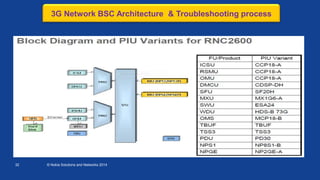
3G Network BSC Architecture & Troubleshooting process
3G Architecture & Interface
Block Diagram & Functional unit of RNC
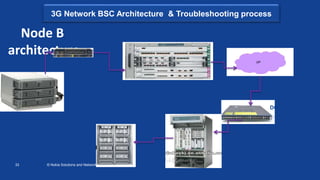
Node B & RNC Architecture
2G/3G Troubleshooting process
 Tool kit & Necessary Software
 LBS Architecture
 Brief details on FM/PM/CM Department.
 Escalation Matrix & Push pull Tool.
 Brief details on TX,NSS,Invas Department
 Basic BSC MML commands
4 © Nokia Solutions and Networks 2014
For Internal Use | BSC Basic MML Commands | Ver1.0
The seven absolute Safety rules are as follows:
1.Always wear your seatbelt while driving & ensure that your co-passengers wear it too (front
seats & back seats)
2.Never exceed speed limits.
3.Always wear a helmet while riding & ensure that the pillion rider wears one too.
4.Never use your mobile phone while driving.
5.Never drive under the influence of alcohol or drugs.
6.Electrical problems should be fixed by qualified workers
7.Always use suitable personal protection equipment and attach safety harnesses while
working at heights. All PPEs should be CE/EN approved & as per VF specifications. All
resources should be trained in CBTHRS (Contractor Basic Training on Height & rescue) by one
of the four VF approved training companies & only trained resources
(riggers/Technicians/Engineers) shall be deployed for all work at heights. All work at heights
shall be supervised by competent supervisors.
Health & Safety policy
5 © Nokia Solutions and Networks 2014
For Internal Use | BSC Basic MML Commands | Ver1.0
Please take activity approval from manager/customer before planned activity.
 Planned activity plan in outage window(00:00Hrs to 05:00Hrs)
 Please avoid human Error.
 If planned activity extended after outage window Please inform to your
Manager/Customer
 Process documents available on sharenet
 https://sharenet-
ims.inside.nokiasiemensnetworks.com/livelink/livelink?func=ll&objId=413013305&objA
ction=Browse
No Process Laps & Human Error
6 © Nokia Solutions and Networks 2014
For Internal Use | BSC Basic MML Commands | Ver1.0
2G Network BSC Architecture & Troubleshooting process
A
NMSNMS
NSSNSSBSSBSS
O&M
Air
MS
Base Station Subsystem
• Radio Resource
Management
• Radio Link Management
7 © Nokia Solutions and Networks 2014
/
GSM network architecture
Mobile Stations
Base Station Subsystem Network Management Subsystem
Base
Transceiver
Stations
Base Station
Controller
Transcoder
Submultiplexer
Digital Cross
Connect
A-Interface Air Interface X.25 Interface Abis Interface
IN Service Control PointShort Message
Service Centre
Voice
mail
Mobile Switching Centre/
Visitor Location Register
Home Location Register/
Authentication Centre/
Equipment Identity
Register
Network Switching Subsystem
PSTN/ISDN
Communications
Server
Data
Communication
Network
Database Server
Workstations
Network
Planning
System
Network
Measurement
System
TCP/IP
Data Communications
Server
8 © Nokia Solutions and Networks 2014
/
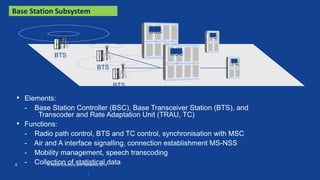
Base Station Subsystem
• Elements:
- Base Station Controller (BSC), Base Transceiver Station (BTS), and
Transcoder and Rate Adaptation Unit (TRAU, TC)
• Functions:
- Radio path control, BTS and TC control, synchronisation with MSC
- Air and A interface signalling, connection establishment MS-NSS
- Mobility management, speech transcoding
- Collection of statistical data
BTS
TC
BSC
BSC
TC
BTS
BTS
9 © Nokia Solutions and Networks 2014
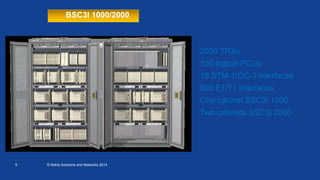
2000 TRXs
100 logical PCUs
16 STM-1/OC-3 interfaces
800 E1/T1 interfaces
One cabinet BSC3i 1000
Two cabinets BSC3i 2000
BSC3I 1000/2000
10 © Nokia Solutions and Networks 2014
Unit Description Redundancy
BCSU BSC Signaling Unit (BCSU) N+1
MCMU Marker and Cellular Management Unit (MCMU)2N
OMU Operation & Maintenance Unit (OMU) OMU supported by MCMUs
including System Disk and Magneto-Optical Drive 2N for hard disks
PCU Packet Control Unit (integrated in the BCSU) N+1
CLS Clock & Synchronization Unit (CLOC) 2N
ET Exchange Terminal (ETC) N+m
GSWB Bit Group Switch (GSW1KB) 2N
SWU LAN Switching Units 2N
EMB Ethernet Message Bus 2N
Functional units
PDH
IP
PCU BCSU
ET CLSGSWB
LAN switch
Hard disks
Optical drive
X 25
MCMU OMU
Message Bus
Ethernet
11 © Nokia Solutions and Networks 2014
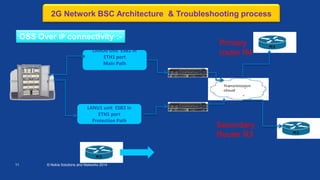
LANU0 unit ESB2 in
ETH1 port
Main Path
LANU1 unit ESB2 in
ETH1 port
Protection Path
Secondary
Router R3
Primary
router R4
OSS Over IP connectivity :-
BSC
BG20
OSS Router
2G Network BSC Architecture & Troubleshooting process
12 © Nokia Solutions and Networks 2014
BSC3i Configuration
BCSU BSC Signalling Unit including Packet
Control Units
CLS Clock & Synchronization Unit
ET Exchange Terminal
GSWB Bit Group Switch
MCMU Marker and Cellular
Management Unit including
IP Switch
OMU Operation & Maintenance Unit including
System Disk and Magneto-Optical Drive
MCMU
2N
C
L
S
GSWB
2N
OMU
& SD
BCSU
N+1
ET ET
BCSU
N+1
BCSU
N+1
• Modular and scalable implementation
• Small amount of different type of plug-in units
• Extremely high availability
• Smooth upgrades and extensions
without services loss
13 © Nokia Solutions and Networks 2014
BSC3i Architecture
Ethernet interfaces for
Gb/IP, Lb/SMLC, BSC-BSC
• 4+4 100baseTx
• 2+2 1000baseSx
readiness
124 E1/T1 for
Abis, Ater, Gb/FR
Interfaces, freely
configurable
• Internal redundant IP switch and Ethernet bus
interconnecting all functional units
• External IP connectivity for future needs
14 © Nokia Solutions and Networks 2014
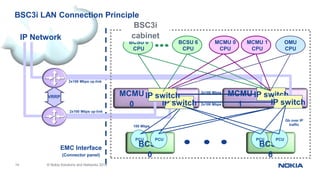
BSC3i LAN Connection Principle
IP Network
EMC Interface
(Connector panel)
VRRP
2x100 Mbps up-link
PCU
BCSU
0
PCU
IP switchMCMU
1 IP switchIP switch
PCU
BCSU
6
PCU
BCSU 0
CPU
BCSU 6
CPU
MCMU 0
CPU
MCMU 1
CPU
OMU
CPU
2x100 Mbps
100 Mbps
BSC3i
cabinet
MCMU
0
IP switch
Gb over IP
traffic
2x100 Mbps
2x100 Mbps up-link
15 © Nokia Siemens Networks Flexi WCDMA BTS Transport Solution / FBe / February 2009
Customer Confidential
BSC3i Functional Units
PDFU 0
PDFU-A
GSWB 0
SW1C-C
CLS0,1
CLOC-B
GSWB 1
SW1C-C
ET4C 0
ET4C-B
(32*ET2E/A)
ET4C 1
ET4C-B
(30*ET2E/A)
FTRB 0 FTRB 1
FTRB 2 FTRB 3
CPRJ45 CPGOCPGO
PDFU 1
PDFU-A
PDFU 2
PDFU-A
PDFU 3
PDFU-A
Marker and Cellular
Management Unit,
MCMU
BSC Signalling
Unit, BCSU
Operations and
Maintenance
Unit, OMU
OMU
CM2C-A
BCSU 1
CC3C-A
BCSU 0
CC3C-A
BCSU 2
CC3C-A
BCSU 4
CC3C-A
BCSU 3
CC3C-A
BCSU 5
CC3C-A
BCSU 6
CC3C-A
CC4C-ACC4C-A
MCMU 1MCMU 0
16 © Nokia Solutions and Networks 2014
Marker Cellular Management Unit (MCMU)/
Bit Oriented Group Swith (GSWB)
1 2 4 5 6 73
DBG
RST
J7
J6
WO
RUN
LF
OL
TE
AP
DRAM
SB
CPSI
SCSI
ETx0
ERx0
OPROPROPR
ON
OFF
ETx1
ERx1
ETH1ETH2
ETH1ETH2
17 © Nokia Solutions and Networks 2014
Base Station Controller Unit (BCSU)
1 2 4 5 6 73 8 9 10
AP
DBG
RST
J7
J6
WO
RUN
LF
OL
TE
AP
DRAM
SB
CPSI
SCSI
ETx0
ERx0
OPROPR
APAP
OPR
ON
OFF
ETx1
ERx1
RUN0
RUN1
RUN0
RUN1
High Capacity
BSC – BSC3i
Number of BCFSIG lapD links per BCSU 43
Number of TRXSIG lapD links per BCSU 110
Maximum number of SDCCHs per BCSU 1760
Maximum number of TCHs per BCSU 880
18 © Nokia Solutions and Networks 2014
• Mobile Pentium®III with 800 MHz
frequency
• 256 MB SDRAM
• Supports standard external interfaces
• two 10 Base-T /100 Base-TX
Ethernet
• Wide Ultra3 SCSI
• The unit is connected to the back
plane CompactPCI bus.
BSC3i Processing Unit
CP710-A, Pentium III Central Processing Unit
19 © Nokia Solutions and Networks 2014
BSC3i Packet Control Unit
PCU-B
• Two PCU functions are integrated in
one plug-in unit; 2 microprocessor
blocks are identical and work
independently to handle the tasks
• Includes Power PCs and DSPs
assembled to the same plug in-unit
with 2 x 256 MB SDRAM memory
• Supports standard external interfaces
• two 10 Base-T /100 Base-TX Ethernet
• three 4 Mbit/s PCM line to GSWB
• The unit is connected to the back
plane CompactPCI bus
20 © Nokia Solutions and Networks 2014
BSC3i Hard Disks
• Standard Hardware Unit in BSC3i
• Duplicated Hard disk units per BSC to
ensure high reliability
• Easy to change or upgrade without traffic
interruption
• BSC3i is delivered with
36G Hard Disks
21 © Nokia Solutions and Networks 2014
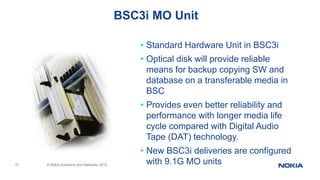
BSC3i MO Unit
• Standard Hardware Unit in BSC3i
• Optical disk will provide reliable
means for backup copying SW and
database on a transferable media in
BSC
• Provides even better reliability and
performance with longer media life
cycle compared with Digital Audio
Tape (DAT) technology.
• New BSC3i deliveries are configured
with 9.1G MO units
22 © Nokia Solutions and Networks 2014
BSC3i GSWB unit
• Conveys the traffic passing through the BSC
• Establishes needed connections to the signalling
units and the internal data transmission channels
• Is responsible for the submultiplexing
functions of the BSC
Default configuration includes
power supply (PSC1-S) unit
and 4 x SW64B units with
SWBUS4 (256 PCMs)
23 © Nokia Solutions and Networks 2014
BSC3i Clock Unit
Clock and Tone Generator (CL3TG) plug-in units
- Allows external synchronization input via connector panel
- Duplicated units are configured per BSC3i
- Housed in the CLOC-B cartridge
24 © Nokia Solutions and Networks 2014
BSC3i ET Units
• Provides the external PCM line connections for BSC
• Each ET2 plug-in units contain two separate PCMs
• Different ET2 plug-in unit types:
- ET2E-S (symmetrical) and ET2E-SC (coaxial) used
for ETSI environment
- ET2A used for ANSI environment
• BSC3i includes in maximum 62 ET2 units providing
124 external PCMs (E1/T1)
25 © Nokia Solutions and Networks 2014
LANU0 unit ESB3 in
ETH1 port
Main Path
LANU1 unit ESB3 in
ETH1 port
Protection Path
GB Over IP connectivity :-
CEN Network
SGSN 3
BSC
BG20
2G Network BSC Architecture & Troubleshooting process
26 © Nokia Solutions and Networks 2014
Jumper & Switch setting of Card-
For example PCU2E
Jumper & switch
shown in Red color
are important
2G Network BSC Architecture & Troubleshooting process
27 © Nokia Solutions and Networks 2014
Checking the Hardware interchangeable Code Checking
Place of manufacture
Year and week of manufacture
Factory identification
Serial number
2G Network BSC Architecture & Troubleshooting process
28 © Nokia Solutions and Networks 2014
Protection for Electrostatic Discharge Sensitive (ESDS) devices.
• Work area:
• It is essential to handle ESDS devices at static-safe workstations. This will prevent yield loss
(through catastrophic damage) or, worse, potential reliability failures in the field (through latent
damage).
• Where it is impractical or impossible to use antistatic wrist-straps or remove items that are
composed of insulative materials at a static-safe workstation, use an air ionizer designed to
neutralize electrostatic charges or apply topical antistats to control generation and accumulation of
static charges.
• Personnel:
• Any accumulated charge on the body of the human operator should be discharged first before
opening the protective container with ESDS devices inside. The discharge can be accomplished by
putting a hand on a grounded surface or, ideally, by wearing a grounded antistatic wrist-strap.
• Packaging and Transportation:
ESD Protection requirements
29 © Nokia Solutions and Networks 2014
ESD Protection requirements
30 © Nokia Solutions and Networks 2014
3G Architecture & interface:-
3G Network BSC Architecture & Troubleshooting process
31 © Nokia Solutions and Networks 2014
3G Network BSC Architecture & Troubleshooting process
32 © Nokia Solutions and Networks 2014
3G Network BSC Architecture & Troubleshooting process
33 © Nokia Solutions and Networks 2014
Node B
architecture
Node B
WCDMA Flexi BTS
BG20
C16-7606
CEN Network
DCN 4948
C18-7609RNC
3G Network BSC Architecture & Troubleshooting process
34 © Nokia Solutions and Networks 2014
RNC architecture
RNC
MSS Node
SGSN
OSS connectivity
RNC connected to
router
IUCS (RNC connected
to MSS node
IUPS (RNC to
SGSN
Iur (RNC to RNC
3G Network BSC Architecture & Troubleshooting process
35 © Nokia Solutions and Networks 2014
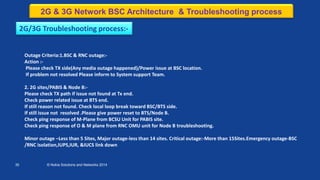
2G/3G Troubleshooting process:-
Outage Criteria:1.BSC & RNC outage:-
Action :-
Please check TX side(Any media outage happened)/Power issue at BSC location.
If problem not resolved Please inform to System support Team.
2. 2G sites/PABIS & Node B:-
Please check TX path if issue not found at Tx end.
Check power related issue at BTS end.
If still reason not found. Check local loop break toward BSC/BTS side.
If still issue not resolved .Please give power reset to BTS/Node B.
Check ping response of M-Plane from BCSU Unit for PABIS site.
Check ping response of O & M plane from RNC OMU unit for Node B troubleshooting.
Minor outage –Less than 5 Sites, Major outage-less than 14 sites. Critical outage:-More than 15Sites.Emergency outage-BSC
/RNC isolation,IUPS,IUR, &IUCS link down
2G & 3G Network BSC Architecture & Troubleshooting process
36 © Nokia Solutions and Networks 2014
Requirement:
1.Laptop
2.Straight/cross cable
3.RJ45 to Serial connector cable
4.Serial connector
5.Data card
6.New BTS Manager software for 2G/3G, Latest all types of BTS and BSC , NodeB and RNC SW
7.FTT software
8.Wireshark software
9.Fishing macro
10.TFTP Software
If software not available in laptop Please collect new BTS software &
software application from System support Team.
Tool kit & Necessary Software
37 © Nokia Solutions and Networks 2014
SMLC server
RNC
BSC
SMLC Link
SMLC Link (In 20
number link
defined at SMLC)
Location Bases Services(LBS) architecture
38 © Nokia Solutions and Networks 2014
OMCR /GNSC Setup
• Fault management
- Collection of alarm reports from network
elements.
- One point for managing all fault
situations.
• Configuration management
- Management of radio network
configuration.
- Maintain up to date
information on the network
element status.
Data
Communic
ations
Network
Servers Router
Workstations
LAN
• Performance management
- Collection of measurement data
from network elements.
- Produce performance result from
raw data.
39 © Nokia Solutions and Networks 2014
Transmission Department:-
 OMCT Team is monitoring the Transmission media as PDH/SDH/FPR & Support to BSS team any
kind of outages.
 TX Planning handles the implement the new ring /installation the BG/XDM100 as per plan &
preparing improvement plan for reduce the outages
Switch network(NSS core)
 It handles core node as MSS/MGW/PSTN/POI & BSC creation in node.
Intelligent Network
 It handles billing/SMS server & Data node as SGSN.
RF & TSG (KPI analysis )
 It handles RF quality issue,perparing improvement plan & customer complaint
Information about TX,NSS,IN,RF & TSG team.
40 © Nokia Solutions and Networks 2014
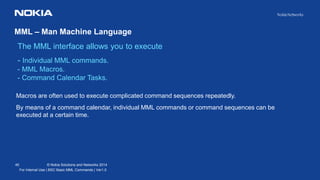
MML – Man Machine Language
The MML interface allows you to execute
- Individual MML commands.
- MML Macros.
- Command Calendar Tasks.
For Internal Use | BSC Basic MML Commands | Ver1.0
Macros are often used to execute complicated command sequences repeatedly.
By means of a command calendar, individual MML commands or command sequences can be
executed at a certain time.
41 © Nokia Solutions and Networks 2014
For Internal Use | BSC Basic MML Commands | Ver1.0
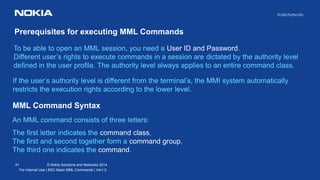
To be able to open an MML session, you need a User ID and Password.
Different user’s rights to execute commands in a session are dictated by the authority level
defined in the user profile. The authority level always applies to an entire command class.
Prerequisites for executing MML Commands
If the user’s authority level is different from the terminal’s, the MMI system automatically
restricts the execution rights according to the lower level.
MML Command Syntax
An MML command consists of three letters:
The first letter indicates the command class,
The first and second together form a command group,
The third one indicates the command.
42 © Nokia Solutions and Networks 2014
For Internal Use | BSC Basic MML Commands | Ver1.0
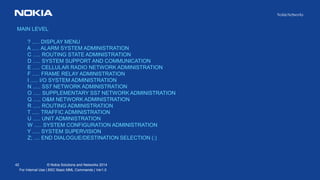
MAIN LEVEL
? ..... DISPLAY MENU
A ..... ALARM SYSTEM ADMINISTRATION
C ..... ROUTING STATE ADMINISTRATION
D ..... SYSTEM SUPPORT AND COMMUNICATION
E ..... CELLULAR RADIO NETWORK ADMINISTRATION
F ..... FRAME RELAY ADMINISTRATION
I ..... I/O SYSTEM ADMINISTRATION
N ..... SS7 NETWORK ADMINISTRATION
O ..... SUPPLEMENTARY SS7 NETWORK ADMINISTRATION
Q ..... O&M NETWORK ADMINISTRATION
R ..... ROUTING ADMINISTRATION
T ..... TRAFFIC ADMINISTRATION
U ..... UNIT ADMINISTRATION
W ..... SYSTEM CONFIGURATION ADMINISTRATION
Y ..... SYSTEM SUPERVISION
Z; .... END DIALOGUE/DESTINATION SELECTION (:)
43 © Nokia Solutions and Networks 2014
MML CMD
For Internal Use | BSC Basic MML Commands | Ver1.0
44 © Nokia Solutions and Networks 2014
MML CMD MENU
For Internal Use | BSC Basic MML Commands | Ver1.0
45 © Nokia Solutions and Networks 2014
Line Editor Commands
For Internal Use | BSC Basic MML Commands | Ver1.0
CTRL A = INSERT/REPLACE
CTRL B = EDIT PREV CMND
CTRL D = CURS LEFT
CTRL E = CURS END OF LINE
CTRL F = CURS RIGHT
CTRL G = CURS DOWN
CTRL H = CURS HOME
CTRL I = CURS UP
CTRL K = CHANGE LANGUAGE
CTRL L = DEL CHAR
CTRL N = CURS BEGINNING OF PARAM BLOCK
CTRL O = HARDCOPY
CTRL P = PAGE MODE ON/OFF
CTRL Q = CONT OUTPUTTING
CTRL S = PAUSE OUTPUTTING
CTRL T = OUTPUT RINGBUFFER
CTRL U = EMPTY EDIT BUFF
CTRL X = JUMP TO CMD GROUP LEVEL
CTRL Y = INTERRUPT
CTRL Z = DEL CHARS IN EDIT BUFF
BREAK = END OF DIALOG
CTRL 7 = DX ERROR DESCRIPTION
The line editor lets you search and edit the commands you have entered during the
current MML session, and edit the command you are typing.
CTRL W => Display Line editor Commands
46 © Nokia Solutions and Networks 2014
MML Punctuation Marks
For Internal Use | BSC Basic MML Commands | Ver1.0
Certain elements of an MML command must be separated from one another by
punctuation marks (separators) and the command must be completed by a semicolon(;).
47 © Nokia Solutions and Networks 2014
Special Character : Ampersand (&)
For Internal Use | BSC Basic MML Commands | Ver1.0
& Groups two combination parameter arguments
&- Groups combination parameter arguments when a group of parameters differs only in their last information unit
&&, &&-
Groups arguments when a group of arguments differs only in their last information unit and constitutes a
consecutive sequence
Group Argument Argument indicate by Grouping
2012-11-01&2012-12-07 2012-11-01 and 2012-12-07
2012-11-01&-07 2012-11-01 and 2012-11-07
2012-11-01&&-03 2012-11-01, 2012-11-02 and 2012-11-03
VC 0&1 VC 0 and VC1
VC 0&&2 VC0, VC1 and VC2
PCM 3&&6 PCM3, PCM4, PCM5 and PCM6
PCM 3-1&&-3 PCM3 TSL1, PCM3 TSL2, PCM3 TSL3
Example
48 © Nokia Solutions and Networks 2014
MML Command Example
For Internal Use | BSC Basic MML Commands | Ver1.0
49 © Nokia Solutions and Networks 2014
MML Command Example
Frequently Used Commands : ALARM SYSTEM ADMINISTRATION
For Internal Use | BSC Basic MML Commands | Ver1.0
ALARM SYSTEM ADMINISTRATION (A?)
? ..... DISPLAY MENU
B ..... BLOCKED ALARMS HANDLING
C ..... ALARM CANCELLING
H ..... ALARM HISTORY HANDLING
L ..... LAMP PANEL HANDLING
O ..... ALARM OPERATING INSTRUCTION HANDLING
P ..... ALARM PARAMETERS HANDLING
T ..... ALARM PRINTING HANDLING
Z; .... RETURN TO MAIN LEVEL
BLOCKED ALARMS HANDLING COMMANDS (AB?)
? ..... DISPLAY MENU
B: ..... BLOCK ALARM
U: ..... UNBLOCK ALARMS
O; ..... OUTPUT BLOCKED ALARMS
Z; ..... RETURN TO MAIN LEVEL
ALARM HISTORY HANDLING COMMANDS (AH?)
? ..... DISPLAY MENU
O: ..... PRINT ALARMS CURRENTLY ON
P: ..... PRINT ALARM HISTORY
Z; ..... RETURN TO MAIN LEVEL
50 © Nokia Solutions and Networks 2014
MML Command Example
Frequently Used Commands :Unit State and Handling
For Internal Use | BSC Basic MML Commands | Ver1.0
US - WORKING STATE AND RESTART HANDLING COMMANDS
The commands in this command group are:
? ... DISPLAY MENU
C: ... CHANGE UNIT STATE
T: ... CHANGE UNIT INFO
I: ... INTERROGATE UNIT STATE
L: ... LIST UNITS IN SPECIFIED STATE OR INFO
U: ... RESTART UNIT
S: ... RESTART SYSTEM
Z; ... RETURN TO MAIN LEVEL
51 © Nokia Solutions and Networks 2014
MML Command Example
Unit State and Handling
For Internal Use | BSC Basic MML Commands | Ver1.0
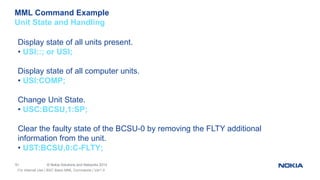
Display state of all units present.
• USI::; or USI;
Display state of all computer units.
• USI:COMP;
Change Unit State.
• USC:BCSU,1:SP;
Clear the faulty state of the BCSU-0 by removing the FLTY additional
information from the unit.
• UST:BCSU,0:C-FLTY;
52 © Nokia Solutions and Networks 2014
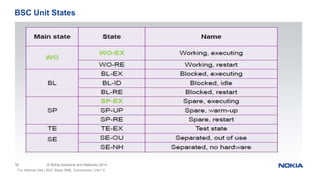
BSC Unit States
For Internal Use | BSC Basic MML Commands | Ver1.0
53 © Nokia Solutions and Networks 2014
MML Command Example
Frequently Used Commands : SYNCHRONIZATION UNIT HANDLING
For Internal Use | BSC Basic MML Commands | Ver1.0
SYNCHRONIZATION UNIT HANDLING (DR?)
? ..... DISPLAY MENU
M: ..... SET OPERATING MODE
C: ..... CREATE SYNCHRONIZATION INPUTS
D: ..... DELETE SYNCHRONIZATION INPUTS
I: ..... INTERROGATE SYNCHRONIZATION UNITS
S: ..... SELECT SPECIAL FUNCTIONS
O: ..... SELECT OSCILLATOR HANDLING FUNCTIONS
Z; ..... RETURN TO MAIN LEVEL
54 © Nokia Solutions and Networks 2014
MML Command Example
Frequently Used Commands : GB INTERFACE UNIT HANDLING
For Internal Use | BSC Basic MML Commands | Ver1.0
GB INTERFACE HANDLING COMMANDS (FX?)
? ..... DISPLAY MENU
C: ..... CREATE NETWORK SERVICE VIRTUAL CONNECTION
D: ..... DELETE NETWORK SERVICE VIRTUAL CONNECTION
M: ..... MODIFY NETWORK SERVICE VIRTUAL CONNECTION
S: ..... CHANGE THE STATE OF NETWORK SERVICE VIRTUAL CONNECTION
O: ..... OUTPUT THE NETWORK SERVICE VIRTUAL CONNECTION DATA
A: ..... CREATE PACKET SERVICE ENTITY
E: ..... DELETE PACKET SERVICE ENTITY
F: ..... MODIFY PACKET SERVICE ENTITY
L: ..... OUTPUT PACKET SERVICE ENTITY DATA
K: ..... CREATE NETWORK SERVICE VIRTUAL LINK
H: ..... DELETE NETWORK SERVICE VIRTUAL LINK
J: ..... MODIFY NETWORK SERVICE VIRTUAL LINK
I: ..... OUTPUT THE NETWORK SERVICE VIRTUAL LINK DATA
R: ..... RESET NETWORK SERVICE ENTITY
P: ..... PREVENT OR ALLOW SGSN DATA TRANSMISSION
Z; ..... RETURN TO MAIN LEVEL
55 © Nokia Solutions and Networks 2014
MML Command Example
Frequently Used Commands : TRANSCEIVER DATA HANDLING
For Internal Use | BSC Basic MML Commands | Ver1.0
TRANSCEIVER DATA HANDLING COMMANDS (ER?)
? ..... DISPLAY MENU
C: ..... CREATE TRANSCEIVER
D: ..... DELETE TRANSCEIVER
M: ..... MODIFY TRANSCEIVER AND RADIO TIME SLOT PARAMETERS
T: ..... MODIFY TRANSCEIVER BINARY OUTPUTS
Y: ..... MODIFY TRANSCEIVER UNDERLAY-OVERLAY PARAMETERS
O: ..... OUTPUT TRANSCEIVER PARAMETERS
S: ..... CHANGE TRANSCEIVER AND RADIO TIME SLOT STATE
Z; ..... RETURN TO MAIN LEVEL
56 © Nokia Solutions and Networks 2014
BSC MML Command List
For Internal Use | BSC Basic MML Commands | Ver1.0
57 © Nokia Siemens Networks Flexi WCDMA BTS Transport Solution / FBe / February 2009
Customer Confidential
Introduction
Transport Network - Nokia ULTRA Flexi GSM BTS - WCDMA BTS
58 © Nokia Solutions and Networks 2014
<Process and Quality Overview>
Introduction
Flexi WCDMA BTS Site Transport Solution Exemples
GSM/EDGE
Nokia Flexi Hub and Nokia FIU19E
Evolution to Packet Transport
Hybrid BTS Backhaul
Software upgrade to native Iub/IP
Synchronisation
Summary
RU20 and RU30 outlook
FTFB, FTLB
Usage of multiple Ethernet ports
Summary
Contents
59 © Nokia Solutions and Networks 2014
Flexi WCDMA BTS Integrated Transport
• Single transport sub-module is an integral part of the BTS System Module
• Network interfaces
- E1/T1/JT1 and E1 coaxial
- Flexbus
- Optical STM-1
- Fast Ethernet, Optical Gigabit Ethernet
• Outdoor (IP65, -35…+55°C)
• Optimized for majority of BTS tail & chain sites
- Most compact, especially with Nokia Siemens Networks MWR backhaul
• Software upgrade to IP transport
• Embedded IP routing for IP managed site devices (RET, MWR,…)
BTS System Module
Integrated Transport
BBBBRFRFRFGESSSSLMP EAC Sync Sync
RF RFRF BB
60 © Nokia Solutions and Networks 2014
Flexi WCDMA BTS Transport Sub-modules 1/2
FTPB
• 8xE1/T1/JT1
FTIA
• 4xE1/T1/JT1
• 2xFE, 1GEo*
FTFA
• 2xFlexbus
FTEB
• 8xE1 coax
FTOA
• 1xSTM1/VC-4
FTJA
• 4xE1 coax
• 2xFE, 1xGEo*
*: GEo= optical GE (SFP)
GEe= electrical GE
61 © Nokia Solutions and Networks 2014
Flexi WCDMA BTS Transport Sub-modules 2/2
FTHA
• 16xE1/T1
FTIB
• 4xE1/T1/JT1
• 2xGEe or 1xGEo+1xGEe
• ToP, SE
RU10 FTFB
• 3xFlexbus
• 2xGEe
• ToP, SE
RU2
0
FTLB
• 4xE1/T1/JT1
• 2xGEe; 1xGEo
• ToP, SE, I-HSPA
*: GEo= optical GE (SFP)
GEe= electrical GE
62 © Nokia Solutions and Networks 2014
16x E1/T1 (twisted pair)
8x E1/T1 in one single cable/connector
For high capacity NodeB’s that interface with other TDM based
devices like SDH ADM’s or stand-alone microwave radio indoor units
Up to 15m distance coaxial E1 via innovative impedance switch
1 to 16 E1/T1 in 1 to 8 IMA groups
2x E1/T1 activated by default, additional capacity provided via licence
keys
FTHA – High density PDH Transport Sub-module
Achieve high PDH based connectivity with legacy site equipment
8x E1/T1
Rel.’99 and HSPA
traffic, Synchronisation
63 © Nokia Solutions and Networks 2014
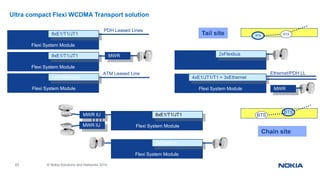
Ultra compact Flexi WCDMA Transport solution
Flexi System Module
2xFlexbus
Flexi System Module
8xE1/T1/JT1
MWR IU
ATM Leased Line
Flexi System Module
1xSTM1/VC4
PDH Leased Lines
Flexi System Module
8xE1/T1/JT1
Flexi System Module
8xE1/T1/JT1 MWR IU
Flexi System Module
2xFlexbus
Ethernet/PDH LL
Flexi System Module
4xE1/JT1/T1 + 3xEthernet
BTS BTS
BTS
BTSMWR IU
Tail site
Chain site
MWR IU
64 © Nokia Solutions and Networks 2014
Integrated microwave radio indoor unit FTFA
• Transport sub-module with 2 Flexbus interfaces
- No additional indoor unit required -> Ultracompact installation
- All Outdoor (IP65, -35…+55°C)
- Embedded 2M cross-connect for chaining
• Flexbus: single-cable connection to MW radio outdoor unit
- Carries data and power
- Supports Nokia FlexiHopper and Nokia MetroHopper
Flexi System Module
2xFlexbus
65 © Nokia Solutions and Networks 2014
Flexi WCDMA Transport sub-modules, overview
*: GEo= optical GE (SFP)
GEe= electrical GE
Module name
Interfaces Availability Remarks
FTPB
8xE1/T1/JT1 today 120/110/100Ω, RJ48C
FTEB
8xE1 coaxial today 75Ω, SMB
FTOA
1xSTM1/VC-4 today 1xSFP, LC equipped
FTFA
2xFlexbus today TNC
FTIA
4xE1/T1/JT1
2xFE, 1xGEo*
today Optional Gigabit Ethernet interface
(SFP)
RJ48C, RJ45, SFP (LC)
FTJA
4xE1 coaxial
2xFE, 1xGEo*
today Optional Gigabit Ethernet interface
(SFP)
SMB, RJ45, SFP (LC)
FTHA 16xE1/T1 RU10 2xMDR68
FTIB 4xE1/T1/JT1
2xGEe, 1xGEo*
RU10 Optional Gigabit Ethernet interface
(SFP)
RJ48C, RJ45, SFP (LC)
FTLB 4xE1/T1/JT1
2xGEe, 1xGEo*
RU20 Optional Gigabit Ethernet interface
(SFP)
RJ48C, RJ45, SFP (LC)
FTFB 3xFlexbus
2xGEe*
RU20 TNC, RJ45
66 © Nokia Solutions and Networks 2014
Scalable base station backhaul solution
Flexi WCDMA BTS offers a basic backhaul capacity of
2 x E1/T1/JT1 (FTPB, FTEB, FTIA, FTJA, FTHA, FTIB, FTLB)
1 x STM1/VC-4 (FTOA)
1 x Flexbus (FTFA, FTFB)
1 x Ethernet (FTIA, FTJA, FTIB, FTLB)*
Additional capacity can be equipped on demand
2 x E1/T1/JT1 (up to 16 interfaces per module)
2nd, 3rd Flexbus
2nd, 3rd Ethernet (via relevant ASW)*
Further solution extensions with NSN TRS Products
ATM aggregation: Tellabs 8600, Surpass HiD 3100
MWR Hub with Ethernet switching: FlexiHybrid, FIU19E
* for optical GE an optional GE SFP is required
67 © Nokia Solutions and Networks 2014
Flexi WCDMA BTS Transmission Cables and GE SFP's
SI SI Name Length [m] For Remarks
470312A FTCA OD CABLE RJ48C - TQ-M/0 120ohm 5 m 5 FTPB,FTIA RJ48C to TQ, 1xE1
470309A FTCB OD CABLE RJ48C 120ohm 15 m 15 FTPB,FTIA One open end, 1xE1
471713A FTCV OD CABLE RJ48C 120ohm 30 m 30 FTPB,FTIA One open end, 1xE1
471714A FTCX OD CABLE RJ48C 120ohm 50 m 50 FTPB,FTIA One open end, 1xE1
470313A FTCD OD CABLE SMB-F/0 75ohm 5 m 5 FTEB, FTJA SMB to BT43, 1xE1 coax
470310A FTCE OD CABLE SMB-F/0 75ohm 15 m 15 FTEB, FTJA One open end, 1xE1 coax
471715A FTCF OD CABLE SMB-F/0 75ohm 30 m 30 FTEB, FTJA One open end, 1xE1 coax
471716A FTCG OD CABLE SMB-F/0 75ohm 50 m 50 FTEB, FTJA One open end, 1xE1 coax
470311A FTCH OD CABLE LC SM 1310 15 m 15 FTOA LC to LC fiber
471391A FTCJ OD cable TNC-F7O-TNC M/O 50 ohm 2.5 m 2.5 FTFA Flexbus
471408A FTCR OD CABLE RJ45 CAT5E 15 m 15 FTIA, FTJA One open end, 1xEthernet
471548A FTCP OD CABLE MDR-68 100ohm 30M for FTHA 30 FTHA MDR-68 at both sides
471717A FTCS OD CABLE RJ45 CAT5E 30 m 30 FTIA, FTJA One open end, 1xEthernet
471718A FTCT OD CABLE RJ45 CAT5E 50 m 50 FTIA, FTJA One open end, 1xEthernet
471392A FTCM OD Adapter Cable RJ48-C 120 ohm 2.5 FMUA&FMUB with FTPB or FTIA RJ48C male, RJ48C female
471393A FTCN OD Adapter Cable SMB 75 ohm 2.5 FMUA&FMUB with FTEB or FTJA
471394A FTCO OD Adapter Cable TNC 2.5 FMUA&FMUB with FTFA
471881A FOSD Flexi Optical Telecom SFP GbE 850nm MM - FTIA, FTJA, FTIB LC, multi mode
471880A FOSC Flexi Optical Telecom SFP GbE 1310nm - FTIA, FTJA, FTIB LC, single mode
68 © Nokia Solutions and Networks 2014
Flexi WCDMA BTS System Module - Cables and SFP’s
Optical cables are equipped at both the ends with Dual LC connectors for SFP modules, so they can be used also for other
purposes like transport module connections
*: Halogen free cables
SI SI Name Length [m] For Remarks
471395A FSFB Flexi System Fibre B 50m 50 System - RF Feederless MM optical cable
471396A FSFC Flexi System Fibre C 100m 100 System - RF Feederless MM optical cable
471743A FSFD Flexi System Fibre D 4m 4 System - RF Feederless MM optical cable
471707A FSFF Flexi System Fibre F 10m 10 System - RF Feederless MM optical cable
471708A FSFG Flexi System Fibre G 20m 20 System - RF Feederless MM optical cable
471709A FSFH Flexi System Fibre H 30m 30 System - RF Feederless MM optical cable
471710A FSFI Flexi System Fibre I 40m 40 System - RF Feederless MM optical cable
471711A FSFK Flexi System Fibre K 75m 75 System - RF Feederless MM optical cable
471712A FSFP Flexi System Fibre P 200m 200 System - RF Feederless MM optical cable
471851A FSFO Flexi System Fibre HF 2m 2 System - RF Feederless MM optical cable, LZH version*
471852A FSFQ Flexi System Fibre HF 50m 50 System - RF Feederless MM optical cable, LZH version*
69 © Nokia Solutions and Networks 2014
Flexi WCDMA BTS Site Transport Solution Examples
• GSM/EDGE
• FIU19E
70 © Nokia Solutions and Networks 2014
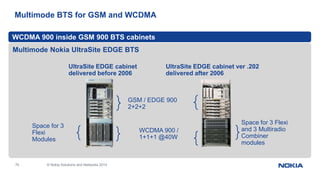
Multimode BTS for GSM and WCDMA
Multimode Nokia UltraSite EDGE BTS
WCDMA 900 inside GSM 900 BTS cabinets
UltraSite EDGE cabinet
delivered before 2006
UltraSite EDGE cabinet ver .202
delivered after 2006
GSM / EDGE 900
2+2+2
WCDMA 900 /
1+1+1 @40W
Space for 3
Flexi
Modules
Space for 3 Flexi
and 3 Multiradio
Combiner
modules
71 © Nokia Solutions and Networks 2014
FlexiSystem
Module
2xFlexbus
FlexiSystem
Module
2xFlexbus
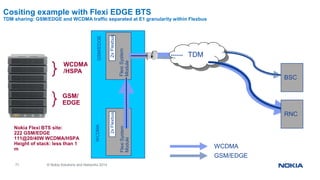
Cositing example with Flexi EDGE BTS
TDM sharing: GSM/EDGE and WCDMA traffic separated at E1 granularity within Flexbus
WCDMA
GSM/EDGE
TDM
BSC
RNC
WCDMA
/HSPA
GSM/
EDGE
Nokia Flexi BTS site:
222 GSM/EDGE
111@20/40W WCDMA/HSPA
Height of stack: less than 1
m
GSM/EDGEWCDMA
72 © Nokia Solutions and Networks 2014
TDM
BSC
RNC
Flexi System
Module
2x Flexbus
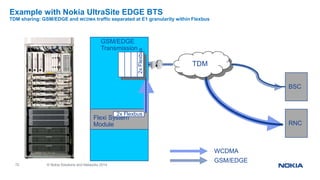
Example with Nokia UltraSite EDGE BTS
TDM sharing: GSM/EDGE and WCDMA traffic separated at E1 granularity within Flexbus
2xFlexbus
GSM/EDGE
Transmission
WCDMA
GSM/EDGE
73 © Nokia Solutions and Networks 2014
NSN FIU19E
- available also for outdoor Flexi application
• Indoor unit for NSN FlexiHopper and MetroHopper microwave radios
• Ethernet plug-in unit to feed in packet traffic
- QoS-unaware Ethernet switching
74 © Nokia Solutions and Networks 2014
Evolution to Packet Transport
• Hybrid BTS Backhaul
• Software upgrade to native Iub/IP
75 © Nokia Solutions and Networks 2014
Flexi WCDMA BTS Transport sub-modules (IP TRS)
FTIA
• 4xE1/T1/JT1
• 2xFE, 1GEo
FTJA
• 4xE1 coax
• 2xFE, 1xGEo
RU10
FTIB
• 4xE1/T1/JT1
• 2xGEe or 1xGEo+1xGEe
• ToP, SE
FTFB
• 3xFlexbus
• 2xGEe
• ToP, SE
RU
20
FTLB
• 4xE1/T1/JT1
• 2xGEe; 1xGEo
• ToP, SE, I-HSPA
*: GEo= optical GE (SFP)
GEe= electrical GE
76 © Nokia Solutions and Networks 2014
Flexi WCDMA BTS evolution 1(2):
ATM over Ethernet (FTIA, FTJA, FTIB)
RAS06 RU10
Ethernet backhaul with Timing over
Packet (IEEE1588v2): FTIB where high
quality Ethernet service available
Packe
t
Packet
TDM
Hybrid backhaul: activate Ethernet
ports by software
Ethernet backhaul: activate
Ethernet ports by software.
External clock sources (SHDSL,
E1 from 2G BTS, GPS, MWR)
Packe
t
RAS05.1
77 © Nokia Solutions and Networks 2014
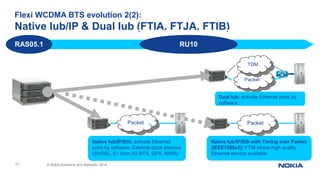
Flexi WCDMA BTS evolution 2(2):
Native Iub/IP & Dual Iub (FTIA, FTJA, FTIB)
RU10
Packet
TDM
Dual Iub: activate Ethernet ports by
software
RAS05.1
Native Iub/IP/Eth with Timing over Packet
(IEEE1588v2): FTIB where high quality
Ethernet service available
PacketPacket
Native Iub/IP/Eth: activate Ethernet
ports by software. External clock sources
(SHDSL, E1 from 2G BTS, GPS, MWR)
78 © Nokia Solutions and Networks 2014
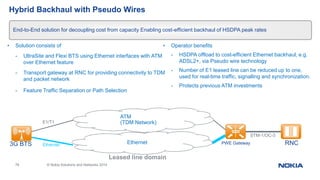
Hybrid Backhaul with Pseudo Wires
• Solution consists of
- UltraSite and Flexi BTS using Ethernet interfaces with ATM
over Ethernet feature
- Transport gateway at RNC for providing connectivity to TDM
and packet network
- Feature Traffic Separation or Path Selection
• Operator benefits
- HSDPA offload to cost-efficient Ethernet backhaul, e.g.
ADSL2+, via Pseudo wire technology
- Number of E1 leased line can be reduced up to one,
used for real-time traffic, signalling and synchronization.
- Protects previous ATM investments
End-to-End solution for decoupling cost from capacity Enabling cost-efficient backhaul of HSDPA peak rates
Leased line domain
Ethernet
ATM
(TDM Network)
PWE Gateway RNC3G BTS
STM-1/OC-3
E1/T1
Ethernet
79 © Nokia Solutions and Networks 2014
Packet Backhaul with Pseudo Wires
• Solution consists of
- For UltraSite and Flexi BTS using Ethernet interfaces with ATM
over Ethernet feature
- Transport gateway at RNC for providing connectivity to TDM
and packet network
Operator benefits
- Complete cell site traffic is transported over high-
quality Ethernet services (e.g. "Metro Ethernet”)
- Usage of ATM pseudo wires allows to benefit
from high ATM efficiency and QoS features
Enables convergence to one single transport network Obsoletes ATM/TDM network for BTS Backhaul
Leased line domain or
operator’s own network
Packet Network
Clock
3G BTS is synchronized by
external source (e.g. GPS,
SHDSL, col-located 2G
BTS)
PWE Gateway RNC
STM-1/OC-3Ethernet
80 © Nokia Solutions and Networks 2014
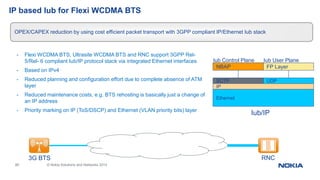
IP based Iub for Flexi WCDMA BTS
- Flexi WCDMA BTS, Ultrasite WCDMA BTS and RNC support 3GPP Rel-
5/Rel- 6 compliant Iub/IP protocol stack via integrated Ethernet interfaces
- Based on IPv4
- Reduced planning and configuration effort due to complete absence of ATM
layer
- Reduced maintenance costs, e.g. BTS rehosting is basically just a change of
an IP address
- Priority marking on IP (ToS/DSCP) and Ethernet (VLAN priority bits) layer
OPEX/CAPEX reduction by using cost efficient packet transport with 3GPP compliant IP/Ethernet Iub stack
Ethernet
Iub/IP
IP
SCTP
NBAP
UDP
FP Layer
Iub Control Plane Iub User Plane
Packet Network
(Ethernet)
3G BTS RNC
81 © Nokia Solutions and Networks 2014
Dual Iub for Flexi WCDMA BTS
Allowing data traffic offload using Ethernet interfaces at RNC and Flexi BTSs
• Operator benefits
- significant cost savings in backhaul, like with solution
Hybrid Backhaul with Pseudo Wires
- no external pseudo wire gateway required at RNC site
- higher peak rates possible as with n*E1s
• Dual Iub allows
- offloading data traffic to alternative Ethernet path using
3GPP Rel-5/Rel-6 compliant Iub/IP protocol stack
- any Ethernet physical layer (e.g. DSL, ng-SDH, adaptive
modulation microwave..) may be used
- ATM/TDM for delay critical R’99 voice and data traffic
as well as signaling traffic
Packet Network
ATM
(TDM Network)
RNC3G BTS
STM-1/
OC3E1/T1
Ethernet Ethernet
82 © Nokia Solutions and Networks 2014
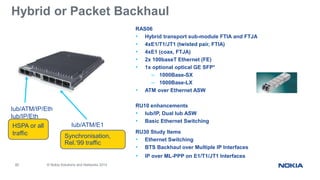
Hybrid or Packet Backhaul
Eth
E1
RAS06
• Hybrid transport sub-module FTIA and FTJA
• 4xE1/T1/JT1 (twisted pair, FTIA)
• 4xE1 (coax, FTJA)
• 2x 100baseT Ethernet (FE)
• 1x optional optical GE SFP*
– 1000Base-SX
– 1000Base-LX
• ATM over Ethernet ASW
RU10 enhancements
• Iub/IP, Dual Iub ASW
• Basic Ethernet Switching
RU30 Study Items
• Ethernet Switching
• BTS Backhaul over Multiple IP Interfaces
• IP over ML-PPP on E1/T1/JT1 Interfaces
Synchronisation,
Rel.‘99 traffic
HSPA or all
traffic
Iub/ATM/E1
Iub/ATM/IP/Eth
Iub/IP/Eth
83 © Nokia Solutions and Networks 2014
Basic Ethernet Switching
• Flexi WCDMA BTS provides Ethernet switching between 2 Ethernet ports in RAN74 IP based Iub mode
• Other base stations can be connected to the Flexi WCDMA BTS either from the same location or daisy chained form
different locations
Obsoletes external Ethernet switch at the cell site
Feature ID(s): RAN1847
RU10
Flexi WCDMA
BTS
RNC
BTS
Flexi WCDMA
BTS
BTS
Packet
Network
Controller
BTS Chaining
example
BTS Collocation
example
Shaping of the aggregated Ethernet
traffic will be available with the feature
RAN1769 Ethernet Switching
84 © Nokia Solutions and Networks 2014
FTIB – Hybrid Transport Sub-module
Timing over Packet and Synchronous EthernetRU10
- 2x 1000/100/10BaseT Ethernet ports
- 4x E1/T1/JT1 (twisted pair)
- 1x optional optical GE SFP*
• 1000Base-SX
• 1000Base-LX
- Iub/IP, Dual Iub or ATM over Ethernet mode via ASW
- Timing over Packet ASW (IEEE1588v2)
- Basic Ethernet Switching
RU20 feature candidates
- Synchronous Ethernet (ASW)
- Flexi WCDMA Interface to FlexiPacket Radio
- Flexi WCDMA Integrated CESoPSN
• RU30 study items
- Ethernet Switching
- BTS Backhaul over Multiple IP Interfaces
- IP over ML-PPP on E1/T1/JT1 Interfaces
Eth
E1
Synchronisation,
Rel.‘99 traffic
Iub/ATM/E1
Iub/ATM/IP/Eth
Iub/IP/Eth
HSPA or all traffic incl.
Sync over Ethernet
*: Without the features „Ethernet Switching“ or „BTS backhaul over multiple IP Interfaces“ only 1 Ethernet port is available. With
either of these features: 2x 1000baseT Ethernet (GE) or 1x 1000baseT Ethernet (GE) and 1x optical GE (via optional SFP) can
be simultaneously used
Synchronization
• Packet Backhaul (PWE3)
• Native Iub/IP
86 © Nokia Solutions and Networks 2014
Synchronization Options
- From GPS
• Using Synchronization Input at FlexiBTS System Module
- From PDH interface
• Using FlexiTransport sub-module for E1/T1/JT1
- From 2.048 MHz signal
• Using Synchronization Input at FlexiBTS System Module
- From Ethernet interface
• Timing-over-Packet (IEEE1588v2, with FTIB in RU10)
• Synchronous Ethernet (G.8261, with FTIB in RU20)
BTS System Module
BBBBRFRFRFGESSSSLMP EAC Sync Sync
RF RFRF BB E1 E1 E1E1FE FE (GE)
BTSE1
GPS/1 ppsBTS2MHz
87 © Nokia Solutions and Networks 2014
Timing over Packet
- Synchronization information, needed for running air interface with required frequency accuracy, can be
provided to BTSs over high quality packet network (e.g. Metro Ethernet)
- Allows to keep costs low by obsolescing use of GPS or Hybrid Backhaul (simultaneous usage of TDM
and packet backhaul) for synchronization
• Solution includes:
- Timing over Packet (ToP) Master Clock at RNC sending synchronization information to BTSs. RNC site
node can be used to connect ToP Master
- FTIB in Flexi BTS (ToP Slave) for recovering clock signal from Timing over Packet data
Taking full advantages of packet transport for BTS backhaul
Packet Network
Router
RNC
1588
master
IEEE1588v2 PTP (unicast)
3G BTS
Ethernet
88 © Nokia Solutions and Networks 2014
BTS Synchronous Ethernet
Accurate frequency synchronization over Ethernet links independent of the network load
• Synchronization information, needed for running air interface with required frequency accuracy, can be provided to
FlexiBTS over the Gigabit Ethernet link
• Synchronous Ethernet provides SDH like mechanism for distributing frequency at layer 1
• In contrary to packet based synchronization (IEEE1588, NTP), the stability of the recovered frequency does not depend
on network load / impairments
• It is point to point technology, which has to be implemented at all intermediate hops
• Supported in FlexiBTS on the FTIB in RU20
1. Point to point optical Gigabit Ethernet
2. Connection via Ethernet Microwave Radios
End to end synchronization across packet based backhaul network
PRC
Reference
Clock
3G BTS
3G BTS
89 © Nokia Solutions and Networks 2014
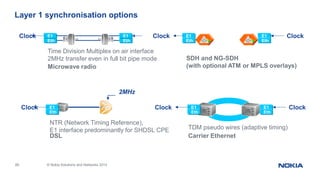
Layer 1 synchronisation options
Microwave radio
Eth
E1
Eth
E1
Time Division Multiplex on air interface
2MHz transfer even in full bit pipe mode
Clock
DSL
E1
Eth
NTR (Network Timing Reference),
E1 interface predominantly for SHDSL CPE
2MHz
Clock
SDH and NG-SDH
(with optional ATM or MPLS overlays)
E1
Eth
E1
Eth
Carrier Ethernet
TDM pseudo wires (adaptive timing)
E1
Eth
E1
Eth
Clock
Clock
Clock
Clock
90 © Nokia Solutions and Networks 2014
RU20 and RU30 outlook
• FTFB, FTLB
• VLAN Traffic Differentiation
• Ethernet Backhaul Enhancements
91 © Nokia Solutions and Networks 2014
Flexi WCDMA BTS: FTFB
Allowing Ethernet based traffic offload via FlexiHopper Plus and Flexi Packet Radio
• FTFB provides
- 3x FlexiHopper Plus interfaces for collocation or chaining (2x
Power over Flexbus)
- 2x GE ports to connect Flexi Packet Radio(s) or offloading to
other Ethernet media
- Offload up to 32Mbps (FlexiHopper Plus) or 350Mbps via
Ethernet (Flexi Packet Radio)
- Zero footprint Ethernet&Hybrid upgrade for entire installed
FlexiHopper base
Operator benefits
• Total Cost of Ownership (TCO) minimized especially in case of
2G/3G collocations connected via Nokia Siemens Networks’
microwave radios
• Significant TCO reduction through integrated MWR based Ethernet
or Hybrid backhaul solution
• Future proof all IP migration path
FXC RRI
Chain SiteTail Site Tail Site
GSM/EDGE WCDMA
Chain Site
GSM/EDGE WCDMAWCDMA GSM/EDGE WCDMA
RU20
92 © Nokia Solutions and Networks 2014
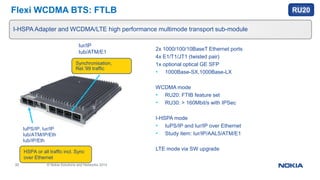
2x 1000/100/10BaseT Ethernet ports
4x E1/T1/JT1 (twisted pair)
1x optional optical GE SFP
• 1000Base-SX,1000Base-LX
WCDMA mode
• RU20: FTIB feature set
• RU30: > 160Mbit/s with IPSec
I-HSPA mode
• IuPS/IP and Iur/IP over Ethernet
• Study item: Iur/IP/AAL5/ATM/E1
LTE mode via SW upgrade
Eth
E1
Synchronisation,
Rel.‘99 traffic
Iur/IP
Iub/ATM/E1
IuPS/IP, Iur/IP
Iub/ATM/IP/Eth
Iub/IP/Eth
HSPA or all traffic incl. Sync
over Ethernet
Flexi WCDMA BTS: FTLB
I-HSPA Adapter and WCDMA/LTE high performance multimode transport sub-module
RU20
93 © Nokia Solutions and Networks 2014
VLAN Traffic Differentiation
OPEX & CAPEX savings by selective transport QoS treatment
RNC and BTS support tagging of Ethernet frames with VLAN IDs according to the traffic class (e.g. R99 voice, R99 data,
HSPA etc.)
- There can be up to 3 VLAN IDs defined per user plane (high, medium and low priority), one VLAN ID for control plane, one
VLAN ID for management plane traffic and one VLAN ID for Timing over Packet.
• Applications:
- Traffic separation: Ethernet switches do forwarding decisions based on VLAN ID, allowing to use different transport paths
or transmission medias like microwave radios and DSL
- Traffic aggregation: Traffic from multiple base stations can be aggregated on Ethernet level for each traffic class separately
- Traffic marking: Some leased line provider do not support priority bit, but rather require QoS marking via VLAN ID
RU20
Ethernet
Violet = VLAN ID for RT voice
Blue = VLAN ID for NRT data
Orange = VLAN ID for HSPA
DSL
Violet = VLAN ID for R99 voice & data
Orange = VLAN ID for HSPA
3G BTS RNC
RNC
3G BTS
94 © Nokia Solutions and Networks 2014
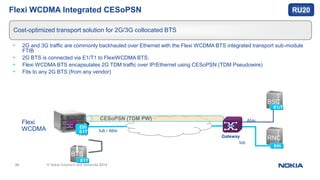
Flexi WCDMA Integrated CESoPSN
• 2G and 3G traffic are commonly backhauled over Ethernet with the Flexi WCDMA BTS integrated transport sub-module
FTIB
• 2G BTS is connected via E1/T1 to FlexiWCDMA BTS,
• Flexi WCDMA BTS encapsulates 2G TDM traffic over IP/Ethernet using CESoPSN (TDM Pseudowire)
• Fits to any 2G BTS (from any vendor)
Cost-optimized transport solution for 2G/3G collocated BTS
Flexi
WCDMA
BTS
IP / Ethernet
E1T1
Iub
Eth
E1T1
RNC
Eth
BSC
E1/T1
Gateway
Iub / Abis
Abis
Iub
CESoPSN (TDM PW)
RU20
95 © Nokia Solutions and Networks 2014
Ethernet Switching
Obsoletes external Ethernet switch at the cell site
RU30
• Flexi WCDMA BTS provides Ethernet switching between up to 3 Ethernet ports
• Another base station can be connected to the Flexi WCDMA BTS either from the same location or
daisy chained over different locations
• Aggregated Ethernet traffic is shaped according to a configurable level, e.g. available uplink capacity
Flexi WCDMA
BTS
BTS
BTS Collocation
example
Uplink traffic
Flexi WCDMA BTS
Uplink traffic BTS
Aggregated uplink traffic
Ethernet shaping level
96 © Nokia Solutions and Networks 2014
BTS Backhaul over Multiple IP Interfaces
- Features allows to establish transport solutions for BTS backhaul, which otherwise would be only possible with additional
costs due to external devices (HW, management, outdoor capability etc.)
• Applications:
- Traffic separation: Each port can be used for specific traffic types (e.g. one for low priority, one for high priority traffic),
allowing to use different backhaul technologies (e.g. two DSL variants or MWR/DSL in parallel)
- Load balancing: Iub traffic is evenly split among the two interfaces and paths, allowing to benefit from higher transport
capacities and also as a means of redundancy
Flexible usage of multiple transport paths
RU30
Packet
Packet3G BTS RNC
Violet = IP flow for R99 voice & data
Blue = IP flow for HSPA
ISP3G BTS RNC
CPE
97 © Nokia Solutions and Networks 2014
IP over ML-PPP on E1/T1/JT1 Interfaces
• Multilink PPP (Point-to-Point Protocol) allows to run Iub/IP over exising TDM infrastructure, e.g.
- TDM microwave radios, which do not support Ethernet transport or a “bitpipe” mode
- Installed Flexi WCDMA BTS with transport submodules providing only PDH interfaces (FTEB, FTPB, FTHA, FTFA): They
can be migrated to Iub/IP without swapping the transport submodule and the legacy last/first mile equipment
• ML-PPP allows to aggregate multiple PDH links into a single bundle and to carry IP traffic over it
• It runs between FlexiBTS and next hop IP router, which also terminates the TDM layer
IP transport over existing PDH infrastructure for Flexi WCDMA BTS
RU30
TDM
Flexi BTS RNC
ML-PPP
IP Router
n x E1/T1
98 © Nokia Siemens Networks Flexi WCDMA BTS Transport Solution / FBe / February 2009
Customer Confidential
Summary
99 © Nokia Solutions and Networks 2014
Summary Flexi WCDMA Transport
• Flexi BTS Transport sub-modules
- Fully integrated, cost-efficient single-slot solution for the majority of sites
- E1/T1/JT1, STM1(VC-4), Flexbus, Fast Ethernet, Gigabit Ethernet interfaces
- Scalable capacity
• Flexi BTS Site Transport modules
- Enhancing Flexi WCDMA BTS Site Solution where needed on selected sites
• Evolution to packet transport
- Hybrid, Dual stack Iub or Packet BTS Backhaul
- Software upgrade to native Iub/IP
10
0
© Nokia Solutions and Networks 2014
Thanks

Nokia engineer basic_training_session_v1

  • 1.
    1 © NokiaSolutions and Networks 2014 Nokia BSS Handbook Basic information to BSS Engineer For Internal Use | BSC Basic MML Commands | Ver1.0
  • 2.
    2 © NokiaSolutions and Networks 2014 For Internal Use | BSC Basic MML Commands | Ver1.0  Health & Safety Policy  Process & Human Error  2G network BSC Architecture & Troubleshooting process GSM PLMN Organization GSM architecture Base Station Subsystem BSC3i & functional units OSS Over IP connectivity GB Over IP connectivity Jumper & switch setting of card
  • 3.
    3 © NokiaSolutions and Networks 2014 For Internal Use | BSC Basic MML Commands | Ver1.0 Checking the Hardware interchangeable Code. 3G Network BSC Architecture & Troubleshooting process 3G Architecture & Interface Block Diagram & Functional unit of RNC Node B & RNC Architecture 2G/3G Troubleshooting process  Tool kit & Necessary Software  LBS Architecture  Brief details on FM/PM/CM Department.  Escalation Matrix & Push pull Tool.  Brief details on TX,NSS,Invas Department  Basic BSC MML commands
  • 4.
    4 © NokiaSolutions and Networks 2014 For Internal Use | BSC Basic MML Commands | Ver1.0 The seven absolute Safety rules are as follows: 1.Always wear your seatbelt while driving & ensure that your co-passengers wear it too (front seats & back seats) 2.Never exceed speed limits. 3.Always wear a helmet while riding & ensure that the pillion rider wears one too. 4.Never use your mobile phone while driving. 5.Never drive under the influence of alcohol or drugs. 6.Electrical problems should be fixed by qualified workers 7.Always use suitable personal protection equipment and attach safety harnesses while working at heights. All PPEs should be CE/EN approved & as per VF specifications. All resources should be trained in CBTHRS (Contractor Basic Training on Height & rescue) by one of the four VF approved training companies & only trained resources (riggers/Technicians/Engineers) shall be deployed for all work at heights. All work at heights shall be supervised by competent supervisors. Health & Safety policy
  • 5.
    5 © NokiaSolutions and Networks 2014 For Internal Use | BSC Basic MML Commands | Ver1.0 Please take activity approval from manager/customer before planned activity.  Planned activity plan in outage window(00:00Hrs to 05:00Hrs)  Please avoid human Error.  If planned activity extended after outage window Please inform to your Manager/Customer  Process documents available on sharenet  https://sharenet- ims.inside.nokiasiemensnetworks.com/livelink/livelink?func=ll&objId=413013305&objA ction=Browse No Process Laps & Human Error
  • 6.
    6 © NokiaSolutions and Networks 2014 For Internal Use | BSC Basic MML Commands | Ver1.0 2G Network BSC Architecture & Troubleshooting process A NMSNMS NSSNSSBSSBSS O&M Air MS Base Station Subsystem • Radio Resource Management • Radio Link Management
  • 7.
    7 © NokiaSolutions and Networks 2014 / GSM network architecture Mobile Stations Base Station Subsystem Network Management Subsystem Base Transceiver Stations Base Station Controller Transcoder Submultiplexer Digital Cross Connect A-Interface Air Interface X.25 Interface Abis Interface IN Service Control PointShort Message Service Centre Voice mail Mobile Switching Centre/ Visitor Location Register Home Location Register/ Authentication Centre/ Equipment Identity Register Network Switching Subsystem PSTN/ISDN Communications Server Data Communication Network Database Server Workstations Network Planning System Network Measurement System TCP/IP Data Communications Server
  • 8.
    8 © NokiaSolutions and Networks 2014 / Base Station Subsystem • Elements: - Base Station Controller (BSC), Base Transceiver Station (BTS), and Transcoder and Rate Adaptation Unit (TRAU, TC) • Functions: - Radio path control, BTS and TC control, synchronisation with MSC - Air and A interface signalling, connection establishment MS-NSS - Mobility management, speech transcoding - Collection of statistical data BTS TC BSC BSC TC BTS BTS
  • 9.
    9 © NokiaSolutions and Networks 2014 2000 TRXs 100 logical PCUs 16 STM-1/OC-3 interfaces 800 E1/T1 interfaces One cabinet BSC3i 1000 Two cabinets BSC3i 2000 BSC3I 1000/2000
  • 10.
    10 © NokiaSolutions and Networks 2014 Unit Description Redundancy BCSU BSC Signaling Unit (BCSU) N+1 MCMU Marker and Cellular Management Unit (MCMU)2N OMU Operation & Maintenance Unit (OMU) OMU supported by MCMUs including System Disk and Magneto-Optical Drive 2N for hard disks PCU Packet Control Unit (integrated in the BCSU) N+1 CLS Clock & Synchronization Unit (CLOC) 2N ET Exchange Terminal (ETC) N+m GSWB Bit Group Switch (GSW1KB) 2N SWU LAN Switching Units 2N EMB Ethernet Message Bus 2N Functional units PDH IP PCU BCSU ET CLSGSWB LAN switch Hard disks Optical drive X 25 MCMU OMU Message Bus Ethernet
  • 11.
    11 © NokiaSolutions and Networks 2014 LANU0 unit ESB2 in ETH1 port Main Path LANU1 unit ESB2 in ETH1 port Protection Path Secondary Router R3 Primary router R4 OSS Over IP connectivity :- BSC BG20 OSS Router 2G Network BSC Architecture & Troubleshooting process
  • 12.
    12 © NokiaSolutions and Networks 2014 BSC3i Configuration BCSU BSC Signalling Unit including Packet Control Units CLS Clock & Synchronization Unit ET Exchange Terminal GSWB Bit Group Switch MCMU Marker and Cellular Management Unit including IP Switch OMU Operation & Maintenance Unit including System Disk and Magneto-Optical Drive MCMU 2N C L S GSWB 2N OMU & SD BCSU N+1 ET ET BCSU N+1 BCSU N+1 • Modular and scalable implementation • Small amount of different type of plug-in units • Extremely high availability • Smooth upgrades and extensions without services loss
  • 13.
    13 © NokiaSolutions and Networks 2014 BSC3i Architecture Ethernet interfaces for Gb/IP, Lb/SMLC, BSC-BSC • 4+4 100baseTx • 2+2 1000baseSx readiness 124 E1/T1 for Abis, Ater, Gb/FR Interfaces, freely configurable • Internal redundant IP switch and Ethernet bus interconnecting all functional units • External IP connectivity for future needs
  • 14.
    14 © NokiaSolutions and Networks 2014 BSC3i LAN Connection Principle IP Network EMC Interface (Connector panel) VRRP 2x100 Mbps up-link PCU BCSU 0 PCU IP switchMCMU 1 IP switchIP switch PCU BCSU 6 PCU BCSU 0 CPU BCSU 6 CPU MCMU 0 CPU MCMU 1 CPU OMU CPU 2x100 Mbps 100 Mbps BSC3i cabinet MCMU 0 IP switch Gb over IP traffic 2x100 Mbps 2x100 Mbps up-link
  • 15.
    15 © NokiaSiemens Networks Flexi WCDMA BTS Transport Solution / FBe / February 2009 Customer Confidential BSC3i Functional Units PDFU 0 PDFU-A GSWB 0 SW1C-C CLS0,1 CLOC-B GSWB 1 SW1C-C ET4C 0 ET4C-B (32*ET2E/A) ET4C 1 ET4C-B (30*ET2E/A) FTRB 0 FTRB 1 FTRB 2 FTRB 3 CPRJ45 CPGOCPGO PDFU 1 PDFU-A PDFU 2 PDFU-A PDFU 3 PDFU-A Marker and Cellular Management Unit, MCMU BSC Signalling Unit, BCSU Operations and Maintenance Unit, OMU OMU CM2C-A BCSU 1 CC3C-A BCSU 0 CC3C-A BCSU 2 CC3C-A BCSU 4 CC3C-A BCSU 3 CC3C-A BCSU 5 CC3C-A BCSU 6 CC3C-A CC4C-ACC4C-A MCMU 1MCMU 0
  • 16.
    16 © NokiaSolutions and Networks 2014 Marker Cellular Management Unit (MCMU)/ Bit Oriented Group Swith (GSWB) 1 2 4 5 6 73 DBG RST J7 J6 WO RUN LF OL TE AP DRAM SB CPSI SCSI ETx0 ERx0 OPROPROPR ON OFF ETx1 ERx1 ETH1ETH2 ETH1ETH2
  • 17.
    17 © NokiaSolutions and Networks 2014 Base Station Controller Unit (BCSU) 1 2 4 5 6 73 8 9 10 AP DBG RST J7 J6 WO RUN LF OL TE AP DRAM SB CPSI SCSI ETx0 ERx0 OPROPR APAP OPR ON OFF ETx1 ERx1 RUN0 RUN1 RUN0 RUN1 High Capacity BSC – BSC3i Number of BCFSIG lapD links per BCSU 43 Number of TRXSIG lapD links per BCSU 110 Maximum number of SDCCHs per BCSU 1760 Maximum number of TCHs per BCSU 880
  • 18.
    18 © NokiaSolutions and Networks 2014 • Mobile Pentium®III with 800 MHz frequency • 256 MB SDRAM • Supports standard external interfaces • two 10 Base-T /100 Base-TX Ethernet • Wide Ultra3 SCSI • The unit is connected to the back plane CompactPCI bus. BSC3i Processing Unit CP710-A, Pentium III Central Processing Unit
  • 19.
    19 © NokiaSolutions and Networks 2014 BSC3i Packet Control Unit PCU-B • Two PCU functions are integrated in one plug-in unit; 2 microprocessor blocks are identical and work independently to handle the tasks • Includes Power PCs and DSPs assembled to the same plug in-unit with 2 x 256 MB SDRAM memory • Supports standard external interfaces • two 10 Base-T /100 Base-TX Ethernet • three 4 Mbit/s PCM line to GSWB • The unit is connected to the back plane CompactPCI bus
  • 20.
    20 © NokiaSolutions and Networks 2014 BSC3i Hard Disks • Standard Hardware Unit in BSC3i • Duplicated Hard disk units per BSC to ensure high reliability • Easy to change or upgrade without traffic interruption • BSC3i is delivered with 36G Hard Disks
  • 21.
    21 © NokiaSolutions and Networks 2014 BSC3i MO Unit • Standard Hardware Unit in BSC3i • Optical disk will provide reliable means for backup copying SW and database on a transferable media in BSC • Provides even better reliability and performance with longer media life cycle compared with Digital Audio Tape (DAT) technology. • New BSC3i deliveries are configured with 9.1G MO units
  • 22.
    22 © NokiaSolutions and Networks 2014 BSC3i GSWB unit • Conveys the traffic passing through the BSC • Establishes needed connections to the signalling units and the internal data transmission channels • Is responsible for the submultiplexing functions of the BSC Default configuration includes power supply (PSC1-S) unit and 4 x SW64B units with SWBUS4 (256 PCMs)
  • 23.
    23 © NokiaSolutions and Networks 2014 BSC3i Clock Unit Clock and Tone Generator (CL3TG) plug-in units - Allows external synchronization input via connector panel - Duplicated units are configured per BSC3i - Housed in the CLOC-B cartridge
  • 24.
    24 © NokiaSolutions and Networks 2014 BSC3i ET Units • Provides the external PCM line connections for BSC • Each ET2 plug-in units contain two separate PCMs • Different ET2 plug-in unit types: - ET2E-S (symmetrical) and ET2E-SC (coaxial) used for ETSI environment - ET2A used for ANSI environment • BSC3i includes in maximum 62 ET2 units providing 124 external PCMs (E1/T1)
  • 25.
    25 © NokiaSolutions and Networks 2014 LANU0 unit ESB3 in ETH1 port Main Path LANU1 unit ESB3 in ETH1 port Protection Path GB Over IP connectivity :- CEN Network SGSN 3 BSC BG20 2G Network BSC Architecture & Troubleshooting process
  • 26.
    26 © NokiaSolutions and Networks 2014 Jumper & Switch setting of Card- For example PCU2E Jumper & switch shown in Red color are important 2G Network BSC Architecture & Troubleshooting process
  • 27.
    27 © NokiaSolutions and Networks 2014 Checking the Hardware interchangeable Code Checking Place of manufacture Year and week of manufacture Factory identification Serial number 2G Network BSC Architecture & Troubleshooting process
  • 28.
    28 © NokiaSolutions and Networks 2014 Protection for Electrostatic Discharge Sensitive (ESDS) devices. • Work area: • It is essential to handle ESDS devices at static-safe workstations. This will prevent yield loss (through catastrophic damage) or, worse, potential reliability failures in the field (through latent damage). • Where it is impractical or impossible to use antistatic wrist-straps or remove items that are composed of insulative materials at a static-safe workstation, use an air ionizer designed to neutralize electrostatic charges or apply topical antistats to control generation and accumulation of static charges. • Personnel: • Any accumulated charge on the body of the human operator should be discharged first before opening the protective container with ESDS devices inside. The discharge can be accomplished by putting a hand on a grounded surface or, ideally, by wearing a grounded antistatic wrist-strap. • Packaging and Transportation: ESD Protection requirements
  • 29.
    29 © NokiaSolutions and Networks 2014 ESD Protection requirements
  • 30.
    30 © NokiaSolutions and Networks 2014 3G Architecture & interface:- 3G Network BSC Architecture & Troubleshooting process
  • 31.
    31 © NokiaSolutions and Networks 2014 3G Network BSC Architecture & Troubleshooting process
  • 32.
    32 © NokiaSolutions and Networks 2014 3G Network BSC Architecture & Troubleshooting process
  • 33.
    33 © NokiaSolutions and Networks 2014 Node B architecture Node B WCDMA Flexi BTS BG20 C16-7606 CEN Network DCN 4948 C18-7609RNC 3G Network BSC Architecture & Troubleshooting process
  • 34.
    34 © NokiaSolutions and Networks 2014 RNC architecture RNC MSS Node SGSN OSS connectivity RNC connected to router IUCS (RNC connected to MSS node IUPS (RNC to SGSN Iur (RNC to RNC 3G Network BSC Architecture & Troubleshooting process
  • 35.
    35 © NokiaSolutions and Networks 2014 2G/3G Troubleshooting process:- Outage Criteria:1.BSC & RNC outage:- Action :- Please check TX side(Any media outage happened)/Power issue at BSC location. If problem not resolved Please inform to System support Team. 2. 2G sites/PABIS & Node B:- Please check TX path if issue not found at Tx end. Check power related issue at BTS end. If still reason not found. Check local loop break toward BSC/BTS side. If still issue not resolved .Please give power reset to BTS/Node B. Check ping response of M-Plane from BCSU Unit for PABIS site. Check ping response of O & M plane from RNC OMU unit for Node B troubleshooting. Minor outage –Less than 5 Sites, Major outage-less than 14 sites. Critical outage:-More than 15Sites.Emergency outage-BSC /RNC isolation,IUPS,IUR, &IUCS link down 2G & 3G Network BSC Architecture & Troubleshooting process
  • 36.
    36 © NokiaSolutions and Networks 2014 Requirement: 1.Laptop 2.Straight/cross cable 3.RJ45 to Serial connector cable 4.Serial connector 5.Data card 6.New BTS Manager software for 2G/3G, Latest all types of BTS and BSC , NodeB and RNC SW 7.FTT software 8.Wireshark software 9.Fishing macro 10.TFTP Software If software not available in laptop Please collect new BTS software & software application from System support Team. Tool kit & Necessary Software
  • 37.
    37 © NokiaSolutions and Networks 2014 SMLC server RNC BSC SMLC Link SMLC Link (In 20 number link defined at SMLC) Location Bases Services(LBS) architecture
  • 38.
    38 © NokiaSolutions and Networks 2014 OMCR /GNSC Setup • Fault management - Collection of alarm reports from network elements. - One point for managing all fault situations. • Configuration management - Management of radio network configuration. - Maintain up to date information on the network element status. Data Communic ations Network Servers Router Workstations LAN • Performance management - Collection of measurement data from network elements. - Produce performance result from raw data.
  • 39.
    39 © NokiaSolutions and Networks 2014 Transmission Department:-  OMCT Team is monitoring the Transmission media as PDH/SDH/FPR & Support to BSS team any kind of outages.  TX Planning handles the implement the new ring /installation the BG/XDM100 as per plan & preparing improvement plan for reduce the outages Switch network(NSS core)  It handles core node as MSS/MGW/PSTN/POI & BSC creation in node. Intelligent Network  It handles billing/SMS server & Data node as SGSN. RF & TSG (KPI analysis )  It handles RF quality issue,perparing improvement plan & customer complaint Information about TX,NSS,IN,RF & TSG team.
  • 40.
    40 © NokiaSolutions and Networks 2014 MML – Man Machine Language The MML interface allows you to execute - Individual MML commands. - MML Macros. - Command Calendar Tasks. For Internal Use | BSC Basic MML Commands | Ver1.0 Macros are often used to execute complicated command sequences repeatedly. By means of a command calendar, individual MML commands or command sequences can be executed at a certain time.
  • 41.
    41 © NokiaSolutions and Networks 2014 For Internal Use | BSC Basic MML Commands | Ver1.0 To be able to open an MML session, you need a User ID and Password. Different user’s rights to execute commands in a session are dictated by the authority level defined in the user profile. The authority level always applies to an entire command class. Prerequisites for executing MML Commands If the user’s authority level is different from the terminal’s, the MMI system automatically restricts the execution rights according to the lower level. MML Command Syntax An MML command consists of three letters: The first letter indicates the command class, The first and second together form a command group, The third one indicates the command.
  • 42.
    42 © NokiaSolutions and Networks 2014 For Internal Use | BSC Basic MML Commands | Ver1.0 MAIN LEVEL ? ..... DISPLAY MENU A ..... ALARM SYSTEM ADMINISTRATION C ..... ROUTING STATE ADMINISTRATION D ..... SYSTEM SUPPORT AND COMMUNICATION E ..... CELLULAR RADIO NETWORK ADMINISTRATION F ..... FRAME RELAY ADMINISTRATION I ..... I/O SYSTEM ADMINISTRATION N ..... SS7 NETWORK ADMINISTRATION O ..... SUPPLEMENTARY SS7 NETWORK ADMINISTRATION Q ..... O&M NETWORK ADMINISTRATION R ..... ROUTING ADMINISTRATION T ..... TRAFFIC ADMINISTRATION U ..... UNIT ADMINISTRATION W ..... SYSTEM CONFIGURATION ADMINISTRATION Y ..... SYSTEM SUPERVISION Z; .... END DIALOGUE/DESTINATION SELECTION (:)
  • 43.
    43 © NokiaSolutions and Networks 2014 MML CMD For Internal Use | BSC Basic MML Commands | Ver1.0
  • 44.
    44 © NokiaSolutions and Networks 2014 MML CMD MENU For Internal Use | BSC Basic MML Commands | Ver1.0
  • 45.
    45 © NokiaSolutions and Networks 2014 Line Editor Commands For Internal Use | BSC Basic MML Commands | Ver1.0 CTRL A = INSERT/REPLACE CTRL B = EDIT PREV CMND CTRL D = CURS LEFT CTRL E = CURS END OF LINE CTRL F = CURS RIGHT CTRL G = CURS DOWN CTRL H = CURS HOME CTRL I = CURS UP CTRL K = CHANGE LANGUAGE CTRL L = DEL CHAR CTRL N = CURS BEGINNING OF PARAM BLOCK CTRL O = HARDCOPY CTRL P = PAGE MODE ON/OFF CTRL Q = CONT OUTPUTTING CTRL S = PAUSE OUTPUTTING CTRL T = OUTPUT RINGBUFFER CTRL U = EMPTY EDIT BUFF CTRL X = JUMP TO CMD GROUP LEVEL CTRL Y = INTERRUPT CTRL Z = DEL CHARS IN EDIT BUFF BREAK = END OF DIALOG CTRL 7 = DX ERROR DESCRIPTION The line editor lets you search and edit the commands you have entered during the current MML session, and edit the command you are typing. CTRL W => Display Line editor Commands
  • 46.
    46 © NokiaSolutions and Networks 2014 MML Punctuation Marks For Internal Use | BSC Basic MML Commands | Ver1.0 Certain elements of an MML command must be separated from one another by punctuation marks (separators) and the command must be completed by a semicolon(;).
  • 47.
    47 © NokiaSolutions and Networks 2014 Special Character : Ampersand (&) For Internal Use | BSC Basic MML Commands | Ver1.0 & Groups two combination parameter arguments &- Groups combination parameter arguments when a group of parameters differs only in their last information unit &&, &&- Groups arguments when a group of arguments differs only in their last information unit and constitutes a consecutive sequence Group Argument Argument indicate by Grouping 2012-11-01&2012-12-07 2012-11-01 and 2012-12-07 2012-11-01&-07 2012-11-01 and 2012-11-07 2012-11-01&&-03 2012-11-01, 2012-11-02 and 2012-11-03 VC 0&1 VC 0 and VC1 VC 0&&2 VC0, VC1 and VC2 PCM 3&&6 PCM3, PCM4, PCM5 and PCM6 PCM 3-1&&-3 PCM3 TSL1, PCM3 TSL2, PCM3 TSL3 Example
  • 48.
    48 © NokiaSolutions and Networks 2014 MML Command Example For Internal Use | BSC Basic MML Commands | Ver1.0
  • 49.
    49 © NokiaSolutions and Networks 2014 MML Command Example Frequently Used Commands : ALARM SYSTEM ADMINISTRATION For Internal Use | BSC Basic MML Commands | Ver1.0 ALARM SYSTEM ADMINISTRATION (A?) ? ..... DISPLAY MENU B ..... BLOCKED ALARMS HANDLING C ..... ALARM CANCELLING H ..... ALARM HISTORY HANDLING L ..... LAMP PANEL HANDLING O ..... ALARM OPERATING INSTRUCTION HANDLING P ..... ALARM PARAMETERS HANDLING T ..... ALARM PRINTING HANDLING Z; .... RETURN TO MAIN LEVEL BLOCKED ALARMS HANDLING COMMANDS (AB?) ? ..... DISPLAY MENU B: ..... BLOCK ALARM U: ..... UNBLOCK ALARMS O; ..... OUTPUT BLOCKED ALARMS Z; ..... RETURN TO MAIN LEVEL ALARM HISTORY HANDLING COMMANDS (AH?) ? ..... DISPLAY MENU O: ..... PRINT ALARMS CURRENTLY ON P: ..... PRINT ALARM HISTORY Z; ..... RETURN TO MAIN LEVEL
  • 50.
    50 © NokiaSolutions and Networks 2014 MML Command Example Frequently Used Commands :Unit State and Handling For Internal Use | BSC Basic MML Commands | Ver1.0 US - WORKING STATE AND RESTART HANDLING COMMANDS The commands in this command group are: ? ... DISPLAY MENU C: ... CHANGE UNIT STATE T: ... CHANGE UNIT INFO I: ... INTERROGATE UNIT STATE L: ... LIST UNITS IN SPECIFIED STATE OR INFO U: ... RESTART UNIT S: ... RESTART SYSTEM Z; ... RETURN TO MAIN LEVEL
  • 51.
    51 © NokiaSolutions and Networks 2014 MML Command Example Unit State and Handling For Internal Use | BSC Basic MML Commands | Ver1.0 Display state of all units present. • USI::; or USI; Display state of all computer units. • USI:COMP; Change Unit State. • USC:BCSU,1:SP; Clear the faulty state of the BCSU-0 by removing the FLTY additional information from the unit. • UST:BCSU,0:C-FLTY;
  • 52.
    52 © NokiaSolutions and Networks 2014 BSC Unit States For Internal Use | BSC Basic MML Commands | Ver1.0
  • 53.
    53 © NokiaSolutions and Networks 2014 MML Command Example Frequently Used Commands : SYNCHRONIZATION UNIT HANDLING For Internal Use | BSC Basic MML Commands | Ver1.0 SYNCHRONIZATION UNIT HANDLING (DR?) ? ..... DISPLAY MENU M: ..... SET OPERATING MODE C: ..... CREATE SYNCHRONIZATION INPUTS D: ..... DELETE SYNCHRONIZATION INPUTS I: ..... INTERROGATE SYNCHRONIZATION UNITS S: ..... SELECT SPECIAL FUNCTIONS O: ..... SELECT OSCILLATOR HANDLING FUNCTIONS Z; ..... RETURN TO MAIN LEVEL
  • 54.
    54 © NokiaSolutions and Networks 2014 MML Command Example Frequently Used Commands : GB INTERFACE UNIT HANDLING For Internal Use | BSC Basic MML Commands | Ver1.0 GB INTERFACE HANDLING COMMANDS (FX?) ? ..... DISPLAY MENU C: ..... CREATE NETWORK SERVICE VIRTUAL CONNECTION D: ..... DELETE NETWORK SERVICE VIRTUAL CONNECTION M: ..... MODIFY NETWORK SERVICE VIRTUAL CONNECTION S: ..... CHANGE THE STATE OF NETWORK SERVICE VIRTUAL CONNECTION O: ..... OUTPUT THE NETWORK SERVICE VIRTUAL CONNECTION DATA A: ..... CREATE PACKET SERVICE ENTITY E: ..... DELETE PACKET SERVICE ENTITY F: ..... MODIFY PACKET SERVICE ENTITY L: ..... OUTPUT PACKET SERVICE ENTITY DATA K: ..... CREATE NETWORK SERVICE VIRTUAL LINK H: ..... DELETE NETWORK SERVICE VIRTUAL LINK J: ..... MODIFY NETWORK SERVICE VIRTUAL LINK I: ..... OUTPUT THE NETWORK SERVICE VIRTUAL LINK DATA R: ..... RESET NETWORK SERVICE ENTITY P: ..... PREVENT OR ALLOW SGSN DATA TRANSMISSION Z; ..... RETURN TO MAIN LEVEL
  • 55.
    55 © NokiaSolutions and Networks 2014 MML Command Example Frequently Used Commands : TRANSCEIVER DATA HANDLING For Internal Use | BSC Basic MML Commands | Ver1.0 TRANSCEIVER DATA HANDLING COMMANDS (ER?) ? ..... DISPLAY MENU C: ..... CREATE TRANSCEIVER D: ..... DELETE TRANSCEIVER M: ..... MODIFY TRANSCEIVER AND RADIO TIME SLOT PARAMETERS T: ..... MODIFY TRANSCEIVER BINARY OUTPUTS Y: ..... MODIFY TRANSCEIVER UNDERLAY-OVERLAY PARAMETERS O: ..... OUTPUT TRANSCEIVER PARAMETERS S: ..... CHANGE TRANSCEIVER AND RADIO TIME SLOT STATE Z; ..... RETURN TO MAIN LEVEL
  • 56.
    56 © NokiaSolutions and Networks 2014 BSC MML Command List For Internal Use | BSC Basic MML Commands | Ver1.0
  • 57.
    57 © NokiaSiemens Networks Flexi WCDMA BTS Transport Solution / FBe / February 2009 Customer Confidential Introduction Transport Network - Nokia ULTRA Flexi GSM BTS - WCDMA BTS
  • 58.
    58 © NokiaSolutions and Networks 2014 <Process and Quality Overview> Introduction Flexi WCDMA BTS Site Transport Solution Exemples GSM/EDGE Nokia Flexi Hub and Nokia FIU19E Evolution to Packet Transport Hybrid BTS Backhaul Software upgrade to native Iub/IP Synchronisation Summary RU20 and RU30 outlook FTFB, FTLB Usage of multiple Ethernet ports Summary Contents
  • 59.
    59 © NokiaSolutions and Networks 2014 Flexi WCDMA BTS Integrated Transport • Single transport sub-module is an integral part of the BTS System Module • Network interfaces - E1/T1/JT1 and E1 coaxial - Flexbus - Optical STM-1 - Fast Ethernet, Optical Gigabit Ethernet • Outdoor (IP65, -35…+55°C) • Optimized for majority of BTS tail & chain sites - Most compact, especially with Nokia Siemens Networks MWR backhaul • Software upgrade to IP transport • Embedded IP routing for IP managed site devices (RET, MWR,…) BTS System Module Integrated Transport BBBBRFRFRFGESSSSLMP EAC Sync Sync RF RFRF BB
  • 60.
    60 © NokiaSolutions and Networks 2014 Flexi WCDMA BTS Transport Sub-modules 1/2 FTPB • 8xE1/T1/JT1 FTIA • 4xE1/T1/JT1 • 2xFE, 1GEo* FTFA • 2xFlexbus FTEB • 8xE1 coax FTOA • 1xSTM1/VC-4 FTJA • 4xE1 coax • 2xFE, 1xGEo* *: GEo= optical GE (SFP) GEe= electrical GE
  • 61.
    61 © NokiaSolutions and Networks 2014 Flexi WCDMA BTS Transport Sub-modules 2/2 FTHA • 16xE1/T1 FTIB • 4xE1/T1/JT1 • 2xGEe or 1xGEo+1xGEe • ToP, SE RU10 FTFB • 3xFlexbus • 2xGEe • ToP, SE RU2 0 FTLB • 4xE1/T1/JT1 • 2xGEe; 1xGEo • ToP, SE, I-HSPA *: GEo= optical GE (SFP) GEe= electrical GE
  • 62.
    62 © NokiaSolutions and Networks 2014 16x E1/T1 (twisted pair) 8x E1/T1 in one single cable/connector For high capacity NodeB’s that interface with other TDM based devices like SDH ADM’s or stand-alone microwave radio indoor units Up to 15m distance coaxial E1 via innovative impedance switch 1 to 16 E1/T1 in 1 to 8 IMA groups 2x E1/T1 activated by default, additional capacity provided via licence keys FTHA – High density PDH Transport Sub-module Achieve high PDH based connectivity with legacy site equipment 8x E1/T1 Rel.’99 and HSPA traffic, Synchronisation
  • 63.
    63 © NokiaSolutions and Networks 2014 Ultra compact Flexi WCDMA Transport solution Flexi System Module 2xFlexbus Flexi System Module 8xE1/T1/JT1 MWR IU ATM Leased Line Flexi System Module 1xSTM1/VC4 PDH Leased Lines Flexi System Module 8xE1/T1/JT1 Flexi System Module 8xE1/T1/JT1 MWR IU Flexi System Module 2xFlexbus Ethernet/PDH LL Flexi System Module 4xE1/JT1/T1 + 3xEthernet BTS BTS BTS BTSMWR IU Tail site Chain site MWR IU
  • 64.
    64 © NokiaSolutions and Networks 2014 Integrated microwave radio indoor unit FTFA • Transport sub-module with 2 Flexbus interfaces - No additional indoor unit required -> Ultracompact installation - All Outdoor (IP65, -35…+55°C) - Embedded 2M cross-connect for chaining • Flexbus: single-cable connection to MW radio outdoor unit - Carries data and power - Supports Nokia FlexiHopper and Nokia MetroHopper Flexi System Module 2xFlexbus
  • 65.
    65 © NokiaSolutions and Networks 2014 Flexi WCDMA Transport sub-modules, overview *: GEo= optical GE (SFP) GEe= electrical GE Module name Interfaces Availability Remarks FTPB 8xE1/T1/JT1 today 120/110/100Ω, RJ48C FTEB 8xE1 coaxial today 75Ω, SMB FTOA 1xSTM1/VC-4 today 1xSFP, LC equipped FTFA 2xFlexbus today TNC FTIA 4xE1/T1/JT1 2xFE, 1xGEo* today Optional Gigabit Ethernet interface (SFP) RJ48C, RJ45, SFP (LC) FTJA 4xE1 coaxial 2xFE, 1xGEo* today Optional Gigabit Ethernet interface (SFP) SMB, RJ45, SFP (LC) FTHA 16xE1/T1 RU10 2xMDR68 FTIB 4xE1/T1/JT1 2xGEe, 1xGEo* RU10 Optional Gigabit Ethernet interface (SFP) RJ48C, RJ45, SFP (LC) FTLB 4xE1/T1/JT1 2xGEe, 1xGEo* RU20 Optional Gigabit Ethernet interface (SFP) RJ48C, RJ45, SFP (LC) FTFB 3xFlexbus 2xGEe* RU20 TNC, RJ45
  • 66.
    66 © NokiaSolutions and Networks 2014 Scalable base station backhaul solution Flexi WCDMA BTS offers a basic backhaul capacity of 2 x E1/T1/JT1 (FTPB, FTEB, FTIA, FTJA, FTHA, FTIB, FTLB) 1 x STM1/VC-4 (FTOA) 1 x Flexbus (FTFA, FTFB) 1 x Ethernet (FTIA, FTJA, FTIB, FTLB)* Additional capacity can be equipped on demand 2 x E1/T1/JT1 (up to 16 interfaces per module) 2nd, 3rd Flexbus 2nd, 3rd Ethernet (via relevant ASW)* Further solution extensions with NSN TRS Products ATM aggregation: Tellabs 8600, Surpass HiD 3100 MWR Hub with Ethernet switching: FlexiHybrid, FIU19E * for optical GE an optional GE SFP is required
  • 67.
    67 © NokiaSolutions and Networks 2014 Flexi WCDMA BTS Transmission Cables and GE SFP's SI SI Name Length [m] For Remarks 470312A FTCA OD CABLE RJ48C - TQ-M/0 120ohm 5 m 5 FTPB,FTIA RJ48C to TQ, 1xE1 470309A FTCB OD CABLE RJ48C 120ohm 15 m 15 FTPB,FTIA One open end, 1xE1 471713A FTCV OD CABLE RJ48C 120ohm 30 m 30 FTPB,FTIA One open end, 1xE1 471714A FTCX OD CABLE RJ48C 120ohm 50 m 50 FTPB,FTIA One open end, 1xE1 470313A FTCD OD CABLE SMB-F/0 75ohm 5 m 5 FTEB, FTJA SMB to BT43, 1xE1 coax 470310A FTCE OD CABLE SMB-F/0 75ohm 15 m 15 FTEB, FTJA One open end, 1xE1 coax 471715A FTCF OD CABLE SMB-F/0 75ohm 30 m 30 FTEB, FTJA One open end, 1xE1 coax 471716A FTCG OD CABLE SMB-F/0 75ohm 50 m 50 FTEB, FTJA One open end, 1xE1 coax 470311A FTCH OD CABLE LC SM 1310 15 m 15 FTOA LC to LC fiber 471391A FTCJ OD cable TNC-F7O-TNC M/O 50 ohm 2.5 m 2.5 FTFA Flexbus 471408A FTCR OD CABLE RJ45 CAT5E 15 m 15 FTIA, FTJA One open end, 1xEthernet 471548A FTCP OD CABLE MDR-68 100ohm 30M for FTHA 30 FTHA MDR-68 at both sides 471717A FTCS OD CABLE RJ45 CAT5E 30 m 30 FTIA, FTJA One open end, 1xEthernet 471718A FTCT OD CABLE RJ45 CAT5E 50 m 50 FTIA, FTJA One open end, 1xEthernet 471392A FTCM OD Adapter Cable RJ48-C 120 ohm 2.5 FMUA&FMUB with FTPB or FTIA RJ48C male, RJ48C female 471393A FTCN OD Adapter Cable SMB 75 ohm 2.5 FMUA&FMUB with FTEB or FTJA 471394A FTCO OD Adapter Cable TNC 2.5 FMUA&FMUB with FTFA 471881A FOSD Flexi Optical Telecom SFP GbE 850nm MM - FTIA, FTJA, FTIB LC, multi mode 471880A FOSC Flexi Optical Telecom SFP GbE 1310nm - FTIA, FTJA, FTIB LC, single mode
  • 68.
    68 © NokiaSolutions and Networks 2014 Flexi WCDMA BTS System Module - Cables and SFP’s Optical cables are equipped at both the ends with Dual LC connectors for SFP modules, so they can be used also for other purposes like transport module connections *: Halogen free cables SI SI Name Length [m] For Remarks 471395A FSFB Flexi System Fibre B 50m 50 System - RF Feederless MM optical cable 471396A FSFC Flexi System Fibre C 100m 100 System - RF Feederless MM optical cable 471743A FSFD Flexi System Fibre D 4m 4 System - RF Feederless MM optical cable 471707A FSFF Flexi System Fibre F 10m 10 System - RF Feederless MM optical cable 471708A FSFG Flexi System Fibre G 20m 20 System - RF Feederless MM optical cable 471709A FSFH Flexi System Fibre H 30m 30 System - RF Feederless MM optical cable 471710A FSFI Flexi System Fibre I 40m 40 System - RF Feederless MM optical cable 471711A FSFK Flexi System Fibre K 75m 75 System - RF Feederless MM optical cable 471712A FSFP Flexi System Fibre P 200m 200 System - RF Feederless MM optical cable 471851A FSFO Flexi System Fibre HF 2m 2 System - RF Feederless MM optical cable, LZH version* 471852A FSFQ Flexi System Fibre HF 50m 50 System - RF Feederless MM optical cable, LZH version*
  • 69.
    69 © NokiaSolutions and Networks 2014 Flexi WCDMA BTS Site Transport Solution Examples • GSM/EDGE • FIU19E
  • 70.
    70 © NokiaSolutions and Networks 2014 Multimode BTS for GSM and WCDMA Multimode Nokia UltraSite EDGE BTS WCDMA 900 inside GSM 900 BTS cabinets UltraSite EDGE cabinet delivered before 2006 UltraSite EDGE cabinet ver .202 delivered after 2006 GSM / EDGE 900 2+2+2 WCDMA 900 / 1+1+1 @40W Space for 3 Flexi Modules Space for 3 Flexi and 3 Multiradio Combiner modules
  • 71.
    71 © NokiaSolutions and Networks 2014 FlexiSystem Module 2xFlexbus FlexiSystem Module 2xFlexbus Cositing example with Flexi EDGE BTS TDM sharing: GSM/EDGE and WCDMA traffic separated at E1 granularity within Flexbus WCDMA GSM/EDGE TDM BSC RNC WCDMA /HSPA GSM/ EDGE Nokia Flexi BTS site: 222 GSM/EDGE 111@20/40W WCDMA/HSPA Height of stack: less than 1 m GSM/EDGEWCDMA
  • 72.
    72 © NokiaSolutions and Networks 2014 TDM BSC RNC Flexi System Module 2x Flexbus Example with Nokia UltraSite EDGE BTS TDM sharing: GSM/EDGE and WCDMA traffic separated at E1 granularity within Flexbus 2xFlexbus GSM/EDGE Transmission WCDMA GSM/EDGE
  • 73.
    73 © NokiaSolutions and Networks 2014 NSN FIU19E - available also for outdoor Flexi application • Indoor unit for NSN FlexiHopper and MetroHopper microwave radios • Ethernet plug-in unit to feed in packet traffic - QoS-unaware Ethernet switching
  • 74.
    74 © NokiaSolutions and Networks 2014 Evolution to Packet Transport • Hybrid BTS Backhaul • Software upgrade to native Iub/IP
  • 75.
    75 © NokiaSolutions and Networks 2014 Flexi WCDMA BTS Transport sub-modules (IP TRS) FTIA • 4xE1/T1/JT1 • 2xFE, 1GEo FTJA • 4xE1 coax • 2xFE, 1xGEo RU10 FTIB • 4xE1/T1/JT1 • 2xGEe or 1xGEo+1xGEe • ToP, SE FTFB • 3xFlexbus • 2xGEe • ToP, SE RU 20 FTLB • 4xE1/T1/JT1 • 2xGEe; 1xGEo • ToP, SE, I-HSPA *: GEo= optical GE (SFP) GEe= electrical GE
  • 76.
    76 © NokiaSolutions and Networks 2014 Flexi WCDMA BTS evolution 1(2): ATM over Ethernet (FTIA, FTJA, FTIB) RAS06 RU10 Ethernet backhaul with Timing over Packet (IEEE1588v2): FTIB where high quality Ethernet service available Packe t Packet TDM Hybrid backhaul: activate Ethernet ports by software Ethernet backhaul: activate Ethernet ports by software. External clock sources (SHDSL, E1 from 2G BTS, GPS, MWR) Packe t RAS05.1
  • 77.
    77 © NokiaSolutions and Networks 2014 Flexi WCDMA BTS evolution 2(2): Native Iub/IP & Dual Iub (FTIA, FTJA, FTIB) RU10 Packet TDM Dual Iub: activate Ethernet ports by software RAS05.1 Native Iub/IP/Eth with Timing over Packet (IEEE1588v2): FTIB where high quality Ethernet service available PacketPacket Native Iub/IP/Eth: activate Ethernet ports by software. External clock sources (SHDSL, E1 from 2G BTS, GPS, MWR)
  • 78.
    78 © NokiaSolutions and Networks 2014 Hybrid Backhaul with Pseudo Wires • Solution consists of - UltraSite and Flexi BTS using Ethernet interfaces with ATM over Ethernet feature - Transport gateway at RNC for providing connectivity to TDM and packet network - Feature Traffic Separation or Path Selection • Operator benefits - HSDPA offload to cost-efficient Ethernet backhaul, e.g. ADSL2+, via Pseudo wire technology - Number of E1 leased line can be reduced up to one, used for real-time traffic, signalling and synchronization. - Protects previous ATM investments End-to-End solution for decoupling cost from capacity Enabling cost-efficient backhaul of HSDPA peak rates Leased line domain Ethernet ATM (TDM Network) PWE Gateway RNC3G BTS STM-1/OC-3 E1/T1 Ethernet
  • 79.
    79 © NokiaSolutions and Networks 2014 Packet Backhaul with Pseudo Wires • Solution consists of - For UltraSite and Flexi BTS using Ethernet interfaces with ATM over Ethernet feature - Transport gateway at RNC for providing connectivity to TDM and packet network Operator benefits - Complete cell site traffic is transported over high- quality Ethernet services (e.g. "Metro Ethernet”) - Usage of ATM pseudo wires allows to benefit from high ATM efficiency and QoS features Enables convergence to one single transport network Obsoletes ATM/TDM network for BTS Backhaul Leased line domain or operator’s own network Packet Network Clock 3G BTS is synchronized by external source (e.g. GPS, SHDSL, col-located 2G BTS) PWE Gateway RNC STM-1/OC-3Ethernet
  • 80.
    80 © NokiaSolutions and Networks 2014 IP based Iub for Flexi WCDMA BTS - Flexi WCDMA BTS, Ultrasite WCDMA BTS and RNC support 3GPP Rel- 5/Rel- 6 compliant Iub/IP protocol stack via integrated Ethernet interfaces - Based on IPv4 - Reduced planning and configuration effort due to complete absence of ATM layer - Reduced maintenance costs, e.g. BTS rehosting is basically just a change of an IP address - Priority marking on IP (ToS/DSCP) and Ethernet (VLAN priority bits) layer OPEX/CAPEX reduction by using cost efficient packet transport with 3GPP compliant IP/Ethernet Iub stack Ethernet Iub/IP IP SCTP NBAP UDP FP Layer Iub Control Plane Iub User Plane Packet Network (Ethernet) 3G BTS RNC
  • 81.
    81 © NokiaSolutions and Networks 2014 Dual Iub for Flexi WCDMA BTS Allowing data traffic offload using Ethernet interfaces at RNC and Flexi BTSs • Operator benefits - significant cost savings in backhaul, like with solution Hybrid Backhaul with Pseudo Wires - no external pseudo wire gateway required at RNC site - higher peak rates possible as with n*E1s • Dual Iub allows - offloading data traffic to alternative Ethernet path using 3GPP Rel-5/Rel-6 compliant Iub/IP protocol stack - any Ethernet physical layer (e.g. DSL, ng-SDH, adaptive modulation microwave..) may be used - ATM/TDM for delay critical R’99 voice and data traffic as well as signaling traffic Packet Network ATM (TDM Network) RNC3G BTS STM-1/ OC3E1/T1 Ethernet Ethernet
  • 82.
    82 © NokiaSolutions and Networks 2014 Hybrid or Packet Backhaul Eth E1 RAS06 • Hybrid transport sub-module FTIA and FTJA • 4xE1/T1/JT1 (twisted pair, FTIA) • 4xE1 (coax, FTJA) • 2x 100baseT Ethernet (FE) • 1x optional optical GE SFP* – 1000Base-SX – 1000Base-LX • ATM over Ethernet ASW RU10 enhancements • Iub/IP, Dual Iub ASW • Basic Ethernet Switching RU30 Study Items • Ethernet Switching • BTS Backhaul over Multiple IP Interfaces • IP over ML-PPP on E1/T1/JT1 Interfaces Synchronisation, Rel.‘99 traffic HSPA or all traffic Iub/ATM/E1 Iub/ATM/IP/Eth Iub/IP/Eth
  • 83.
    83 © NokiaSolutions and Networks 2014 Basic Ethernet Switching • Flexi WCDMA BTS provides Ethernet switching between 2 Ethernet ports in RAN74 IP based Iub mode • Other base stations can be connected to the Flexi WCDMA BTS either from the same location or daisy chained form different locations Obsoletes external Ethernet switch at the cell site Feature ID(s): RAN1847 RU10 Flexi WCDMA BTS RNC BTS Flexi WCDMA BTS BTS Packet Network Controller BTS Chaining example BTS Collocation example Shaping of the aggregated Ethernet traffic will be available with the feature RAN1769 Ethernet Switching
  • 84.
    84 © NokiaSolutions and Networks 2014 FTIB – Hybrid Transport Sub-module Timing over Packet and Synchronous EthernetRU10 - 2x 1000/100/10BaseT Ethernet ports - 4x E1/T1/JT1 (twisted pair) - 1x optional optical GE SFP* • 1000Base-SX • 1000Base-LX - Iub/IP, Dual Iub or ATM over Ethernet mode via ASW - Timing over Packet ASW (IEEE1588v2) - Basic Ethernet Switching RU20 feature candidates - Synchronous Ethernet (ASW) - Flexi WCDMA Interface to FlexiPacket Radio - Flexi WCDMA Integrated CESoPSN • RU30 study items - Ethernet Switching - BTS Backhaul over Multiple IP Interfaces - IP over ML-PPP on E1/T1/JT1 Interfaces Eth E1 Synchronisation, Rel.‘99 traffic Iub/ATM/E1 Iub/ATM/IP/Eth Iub/IP/Eth HSPA or all traffic incl. Sync over Ethernet *: Without the features „Ethernet Switching“ or „BTS backhaul over multiple IP Interfaces“ only 1 Ethernet port is available. With either of these features: 2x 1000baseT Ethernet (GE) or 1x 1000baseT Ethernet (GE) and 1x optical GE (via optional SFP) can be simultaneously used
  • 85.
    Synchronization • Packet Backhaul(PWE3) • Native Iub/IP
  • 86.
    86 © NokiaSolutions and Networks 2014 Synchronization Options - From GPS • Using Synchronization Input at FlexiBTS System Module - From PDH interface • Using FlexiTransport sub-module for E1/T1/JT1 - From 2.048 MHz signal • Using Synchronization Input at FlexiBTS System Module - From Ethernet interface • Timing-over-Packet (IEEE1588v2, with FTIB in RU10) • Synchronous Ethernet (G.8261, with FTIB in RU20) BTS System Module BBBBRFRFRFGESSSSLMP EAC Sync Sync RF RFRF BB E1 E1 E1E1FE FE (GE) BTSE1 GPS/1 ppsBTS2MHz
  • 87.
    87 © NokiaSolutions and Networks 2014 Timing over Packet - Synchronization information, needed for running air interface with required frequency accuracy, can be provided to BTSs over high quality packet network (e.g. Metro Ethernet) - Allows to keep costs low by obsolescing use of GPS or Hybrid Backhaul (simultaneous usage of TDM and packet backhaul) for synchronization • Solution includes: - Timing over Packet (ToP) Master Clock at RNC sending synchronization information to BTSs. RNC site node can be used to connect ToP Master - FTIB in Flexi BTS (ToP Slave) for recovering clock signal from Timing over Packet data Taking full advantages of packet transport for BTS backhaul Packet Network Router RNC 1588 master IEEE1588v2 PTP (unicast) 3G BTS Ethernet
  • 88.
    88 © NokiaSolutions and Networks 2014 BTS Synchronous Ethernet Accurate frequency synchronization over Ethernet links independent of the network load • Synchronization information, needed for running air interface with required frequency accuracy, can be provided to FlexiBTS over the Gigabit Ethernet link • Synchronous Ethernet provides SDH like mechanism for distributing frequency at layer 1 • In contrary to packet based synchronization (IEEE1588, NTP), the stability of the recovered frequency does not depend on network load / impairments • It is point to point technology, which has to be implemented at all intermediate hops • Supported in FlexiBTS on the FTIB in RU20 1. Point to point optical Gigabit Ethernet 2. Connection via Ethernet Microwave Radios End to end synchronization across packet based backhaul network PRC Reference Clock 3G BTS 3G BTS
  • 89.
    89 © NokiaSolutions and Networks 2014 Layer 1 synchronisation options Microwave radio Eth E1 Eth E1 Time Division Multiplex on air interface 2MHz transfer even in full bit pipe mode Clock DSL E1 Eth NTR (Network Timing Reference), E1 interface predominantly for SHDSL CPE 2MHz Clock SDH and NG-SDH (with optional ATM or MPLS overlays) E1 Eth E1 Eth Carrier Ethernet TDM pseudo wires (adaptive timing) E1 Eth E1 Eth Clock Clock Clock Clock
  • 90.
    90 © NokiaSolutions and Networks 2014 RU20 and RU30 outlook • FTFB, FTLB • VLAN Traffic Differentiation • Ethernet Backhaul Enhancements
  • 91.
    91 © NokiaSolutions and Networks 2014 Flexi WCDMA BTS: FTFB Allowing Ethernet based traffic offload via FlexiHopper Plus and Flexi Packet Radio • FTFB provides - 3x FlexiHopper Plus interfaces for collocation or chaining (2x Power over Flexbus) - 2x GE ports to connect Flexi Packet Radio(s) or offloading to other Ethernet media - Offload up to 32Mbps (FlexiHopper Plus) or 350Mbps via Ethernet (Flexi Packet Radio) - Zero footprint Ethernet&Hybrid upgrade for entire installed FlexiHopper base Operator benefits • Total Cost of Ownership (TCO) minimized especially in case of 2G/3G collocations connected via Nokia Siemens Networks’ microwave radios • Significant TCO reduction through integrated MWR based Ethernet or Hybrid backhaul solution • Future proof all IP migration path FXC RRI Chain SiteTail Site Tail Site GSM/EDGE WCDMA Chain Site GSM/EDGE WCDMAWCDMA GSM/EDGE WCDMA RU20
  • 92.
    92 © NokiaSolutions and Networks 2014 2x 1000/100/10BaseT Ethernet ports 4x E1/T1/JT1 (twisted pair) 1x optional optical GE SFP • 1000Base-SX,1000Base-LX WCDMA mode • RU20: FTIB feature set • RU30: > 160Mbit/s with IPSec I-HSPA mode • IuPS/IP and Iur/IP over Ethernet • Study item: Iur/IP/AAL5/ATM/E1 LTE mode via SW upgrade Eth E1 Synchronisation, Rel.‘99 traffic Iur/IP Iub/ATM/E1 IuPS/IP, Iur/IP Iub/ATM/IP/Eth Iub/IP/Eth HSPA or all traffic incl. Sync over Ethernet Flexi WCDMA BTS: FTLB I-HSPA Adapter and WCDMA/LTE high performance multimode transport sub-module RU20
  • 93.
    93 © NokiaSolutions and Networks 2014 VLAN Traffic Differentiation OPEX & CAPEX savings by selective transport QoS treatment RNC and BTS support tagging of Ethernet frames with VLAN IDs according to the traffic class (e.g. R99 voice, R99 data, HSPA etc.) - There can be up to 3 VLAN IDs defined per user plane (high, medium and low priority), one VLAN ID for control plane, one VLAN ID for management plane traffic and one VLAN ID for Timing over Packet. • Applications: - Traffic separation: Ethernet switches do forwarding decisions based on VLAN ID, allowing to use different transport paths or transmission medias like microwave radios and DSL - Traffic aggregation: Traffic from multiple base stations can be aggregated on Ethernet level for each traffic class separately - Traffic marking: Some leased line provider do not support priority bit, but rather require QoS marking via VLAN ID RU20 Ethernet Violet = VLAN ID for RT voice Blue = VLAN ID for NRT data Orange = VLAN ID for HSPA DSL Violet = VLAN ID for R99 voice & data Orange = VLAN ID for HSPA 3G BTS RNC RNC 3G BTS
  • 94.
    94 © NokiaSolutions and Networks 2014 Flexi WCDMA Integrated CESoPSN • 2G and 3G traffic are commonly backhauled over Ethernet with the Flexi WCDMA BTS integrated transport sub-module FTIB • 2G BTS is connected via E1/T1 to FlexiWCDMA BTS, • Flexi WCDMA BTS encapsulates 2G TDM traffic over IP/Ethernet using CESoPSN (TDM Pseudowire) • Fits to any 2G BTS (from any vendor) Cost-optimized transport solution for 2G/3G collocated BTS Flexi WCDMA BTS IP / Ethernet E1T1 Iub Eth E1T1 RNC Eth BSC E1/T1 Gateway Iub / Abis Abis Iub CESoPSN (TDM PW) RU20
  • 95.
    95 © NokiaSolutions and Networks 2014 Ethernet Switching Obsoletes external Ethernet switch at the cell site RU30 • Flexi WCDMA BTS provides Ethernet switching between up to 3 Ethernet ports • Another base station can be connected to the Flexi WCDMA BTS either from the same location or daisy chained over different locations • Aggregated Ethernet traffic is shaped according to a configurable level, e.g. available uplink capacity Flexi WCDMA BTS BTS BTS Collocation example Uplink traffic Flexi WCDMA BTS Uplink traffic BTS Aggregated uplink traffic Ethernet shaping level
  • 96.
    96 © NokiaSolutions and Networks 2014 BTS Backhaul over Multiple IP Interfaces - Features allows to establish transport solutions for BTS backhaul, which otherwise would be only possible with additional costs due to external devices (HW, management, outdoor capability etc.) • Applications: - Traffic separation: Each port can be used for specific traffic types (e.g. one for low priority, one for high priority traffic), allowing to use different backhaul technologies (e.g. two DSL variants or MWR/DSL in parallel) - Load balancing: Iub traffic is evenly split among the two interfaces and paths, allowing to benefit from higher transport capacities and also as a means of redundancy Flexible usage of multiple transport paths RU30 Packet Packet3G BTS RNC Violet = IP flow for R99 voice & data Blue = IP flow for HSPA ISP3G BTS RNC CPE
  • 97.
    97 © NokiaSolutions and Networks 2014 IP over ML-PPP on E1/T1/JT1 Interfaces • Multilink PPP (Point-to-Point Protocol) allows to run Iub/IP over exising TDM infrastructure, e.g. - TDM microwave radios, which do not support Ethernet transport or a “bitpipe” mode - Installed Flexi WCDMA BTS with transport submodules providing only PDH interfaces (FTEB, FTPB, FTHA, FTFA): They can be migrated to Iub/IP without swapping the transport submodule and the legacy last/first mile equipment • ML-PPP allows to aggregate multiple PDH links into a single bundle and to carry IP traffic over it • It runs between FlexiBTS and next hop IP router, which also terminates the TDM layer IP transport over existing PDH infrastructure for Flexi WCDMA BTS RU30 TDM Flexi BTS RNC ML-PPP IP Router n x E1/T1
  • 98.
    98 © NokiaSiemens Networks Flexi WCDMA BTS Transport Solution / FBe / February 2009 Customer Confidential Summary
  • 99.
    99 © NokiaSolutions and Networks 2014 Summary Flexi WCDMA Transport • Flexi BTS Transport sub-modules - Fully integrated, cost-efficient single-slot solution for the majority of sites - E1/T1/JT1, STM1(VC-4), Flexbus, Fast Ethernet, Gigabit Ethernet interfaces - Scalable capacity • Flexi BTS Site Transport modules - Enhancing Flexi WCDMA BTS Site Solution where needed on selected sites • Evolution to packet transport - Hybrid, Dual stack Iub or Packet BTS Backhaul - Software upgrade to native Iub/IP
  • 100.
    10 0 © Nokia Solutionsand Networks 2014 Thanks