

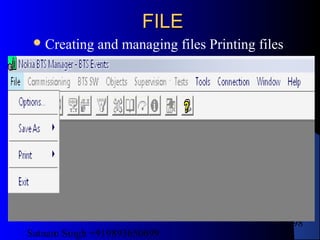
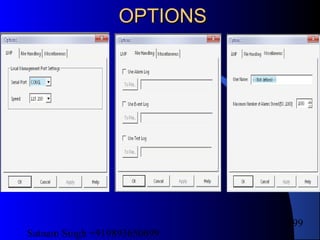
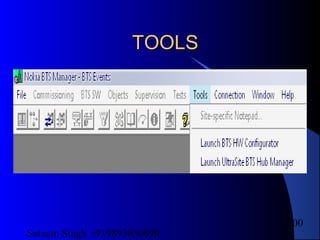
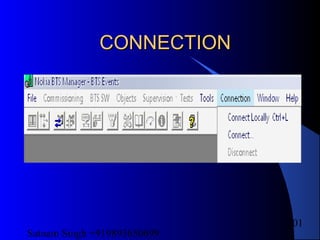

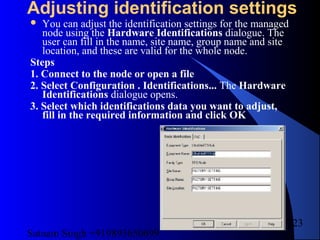
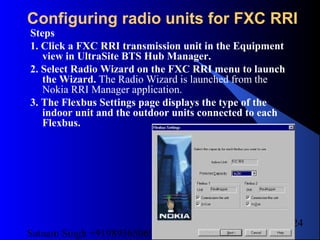
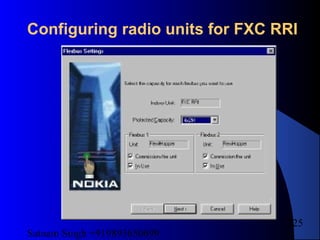
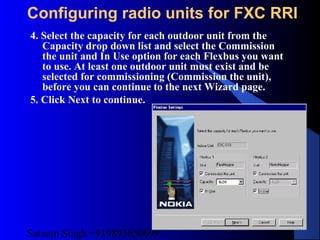
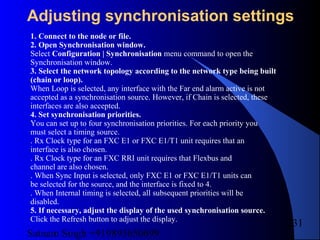
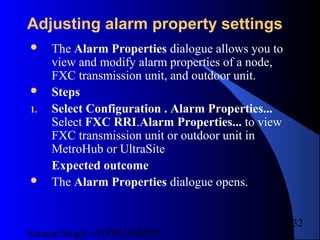
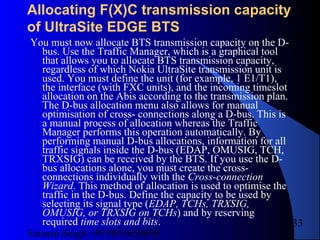
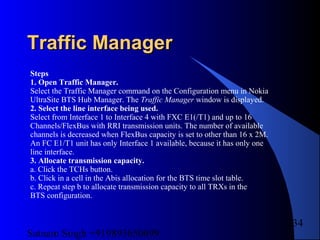
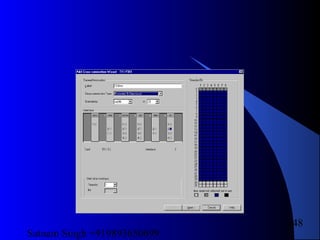
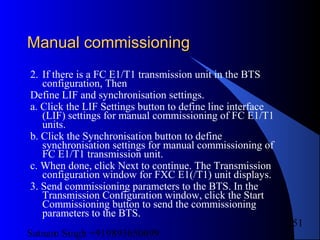
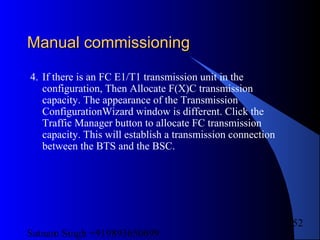
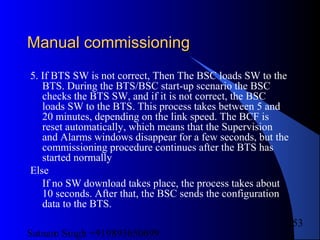
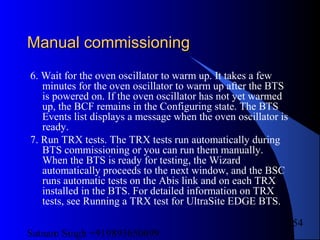
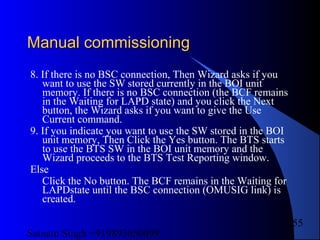
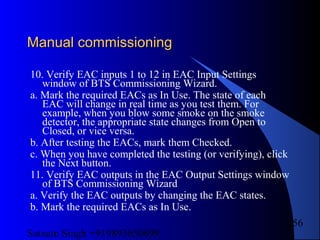
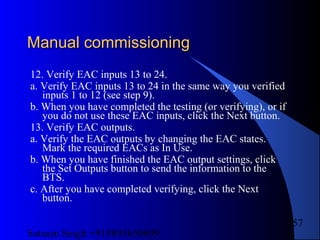

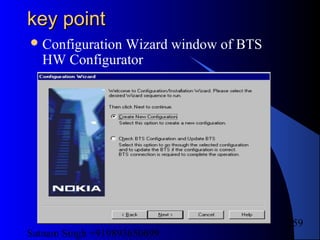
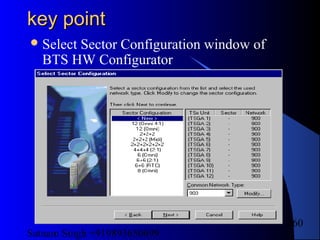
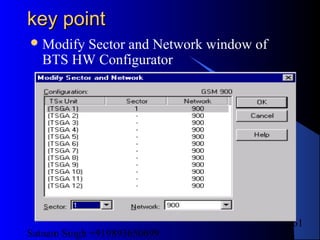
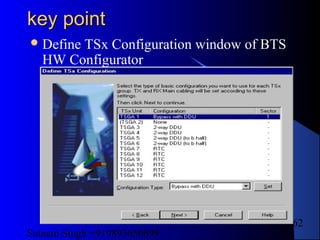
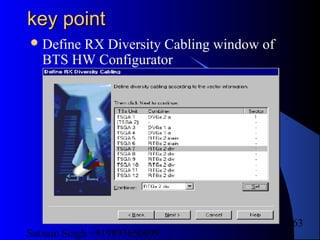


Satnam Singh +919893650699
1
GSM System Engineering.GSM System Engineering.
1. Introduction
2. Modulation & modulation tech.
3. Circuit Switching & Packet Switching
4. The Mobile & Air Interface
5. The base station sub system
6. The core network
7. Logical Channels
WEEK - 01
Satnam Singh +919893650699
2
NOKIA TRAININGNOKIA TRAINING
Components of Nokia BTS
Material req. for installation
Installation
Commissioning procedure
Trouble shooting
key point
WEEK - 02
Satnam Singh +919893650699
3
NOKIA MWNOKIA MW
Components of Nokia MW
Material req. for installation.
Installation
Commissioning procedure
Trouble shooting
key point
WEEK - 03
Satnam Singh +919893650699
4
SIEMENS TRAININGSIEMENS TRAINING
Components of Siemens BTS
Material req. for installation.
Installation
Commissioning procedure
Trouble shooting
key point
WEEK - 04
Satnam Singh +919893650699
5
SIEMENS MWSIEMENS MW
Components of Siemens MW
Material req. for installation.
Installation
Commissioning procedure
Trouble shooting
key point
WEEK - 05
Satnam Singh +919893650699
6
ERRICSSON TRAININGERRICSSON TRAINING
Components of Erricsson BTS
Material req. for installation.
Installation
Commissioning procedure
Trouble shooting
key point
WEEK - 06
Satnam Singh +919893650699
7
ERRICSSON MWERRICSSON MW
Components of Erricsson MW
Material req. for installation.
Installation
Commissioning procedure
Trouble shooting
key point
WEEK - 07
Satnam Singh +919893650699
8
MOTOROLA TRAININGMOTOROLA TRAINING
Components of Motorola BTS
Material req. for installation.
Installation
Commissioning procedure
Trouble shooting
key point
WEEK - 01
Satnam Singh +919893650699
9
INTRODUCTIONINTRODUCTION
Definition
 Global system for mobile communication (GSM) is a globally
accepted standard for digital cellular communication. GSM is the
name of a standardization group established in 1982 to create a
common European mobile telephone standard that would formulate
specifications for a pan-European mobile cellular radio system
operating at 900 MHz. It is estimated that many countries outside of
Europe will join the GSM partnership.
Overview
 This tutorial provides an introduction to basic GSM concepts,
specifications, networks, and services. A short history of network
evolution is provided in order set the context for understanding GSM
index
Satnam Singh +919893650699
10
1. Introduction: The Evolution of Mobil
Telephone Systems
Cellular is one of the fastest growing and most demanding telecommunications
applications. Today, it represents a continuously increasing percentage of all new
telephone subscriptions around the world. Currently there are more than 45 million
cellular subscribers worldwide, and nearly 50 percent of those subscribers are
located in the United States. It is forecasted that cellular systems using a digital
technology will become the universal method of
telecommunications. By the year 2005, forecasters predict that there will be
more than 100 million cellular subscribers worldwide. It has even been estimated
that
some countries may have more mobile phones than fixed phones by the year
2000 (see Figure 1).
index
Satnam Singh +919893650699
11
The concept of cellular service is the use of low-power
transmitters where frequencies can be reused within a
geographic area. The idea of cell-based mobile radio service
was formulated in the United States at Bell Labs in the early
1970s. However, the Nordic countries were the first to
introduce cellular services for commercial use with the
introduction of the Nordic Mobile Telephone (NMT) in1981.
Cellular systems began in the United States with the release
of the advanced mobile phone service (AMPS) system in
1983. The AMPS standard was adopted by Asia, Latin
America, and Oceanic countries, creating the largest potential
market in the world for cellular. In the early 1980s, most
mobile telephone systems were analog rather than digital, like
today's newer systems. One challenge facing analog systems
was the inability to handle the growing capacity needs in a
cost-efficient manner. As a result, digital technology was
welcomed. The advantages of digital systems over analog
systems include ease of signaling, lower levels of
interference, integration of transmission and switching, and
increased ability to meet capacity demands..
index
Satnam Singh +919893650699
12
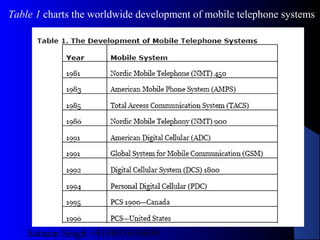
Table 1 charts the worldwide development of mobile telephone systems
Satnam Singh +919893650699
13
index
2. GSM
Throughout the evolution of cellular telecommunications,
various systems have been developed without the benefit
of standardized specifications. This presented many
problems directly related to compatibility, especially
with the development of digital radio technology. The
GSM standard is intended to address these problems.
From 1982 to 1985 discussions were held to decide
between building an analog or digital system. After
multiple field tests, a digital system was adopted for
GSM. The next task was to decide between a narrow or
broadband solution. In May 1987, the narrowband time
division multiple access (TDMA) solution was chosen.
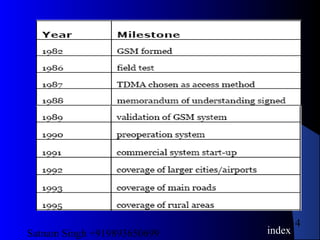
A summary of GSM milestones is given in Table
Satnam Singh +919893650699
14
index
Satnam Singh +919893650699
15
index
3. The GSM Network
GSM provides recommendations, not requirements. The
GSM specifications define the functions and interface
requirements in detail but do not address the hardware.
The reason for this is to limit the designers as little as
possible but still to make it possible for the operators to
buy equipment from different suppliers.
The GSM network is divided into three major systems: the
switching system (SS), the base station system (BSS),
and the operation and support system (OSS).
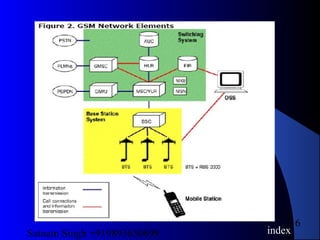
The basic GSM network elements are shown in Figure 2.
Satnam Singh +919893650699
16
index
Satnam Singh +919893650699
17
The Switching System
The switching system (SS) is responsible for performing call processing and
subscriber-related functions. The switching system includes the following
functional units:
• home location register (HLR)—The HLR is a database used for
storage and management of subscriptions. The HLR is considered the
most important database, as it stores permanent data about
subscribers, including a subscriber's service profile, location
information, and activity status. When an individual buys a
subscription from one of the PCS operators, he or she is registered in
the HLR of that operator.
• mobile services switching center (MSC)—The MSC performs the
telephony switching functions of the system. It controls calls to and
from other telephone and data systems. It also performs such functions
as toll ticketing, network interfacing, common channel signaling, and
others.
Satnam Singh +919893650699
18
• visitor location register (VLR)—The VLR is a database that
contains temporary information about subscribers that is needed by
the MSC in order to service visiting subscribers. The VLR is always
integrated with the MSC. When a mobile station roams into a new MSC
area, the VLR connected to that MSC will request data about the
mobile station from the HLR. Later, if the mobile station makes a call,
the VLR will have the information needed for call setup without having
to interrogate the HLR each time.
• authentication center (AUC)—A unit called the AUC provides
authentication and encryption parameters that verify the user's identity
and ensure the confidentiality of each call. The AUC protects network
operators from different types of fraud found in today's cellular world.
• equipment identity register (EIR)—The EIR is a database that
contains information about the identity of mobile equipment that
prevents calls from stolen, unauthorized, or defective mobile stations.
The AUC and EIR are implemented as stand-alone nodes or as a
combined AUC/EIR node.
Satnam Singh +919893650699
19
The Base Station System (BSS)
All radio-related functions are performed in the BSS, which consists of base station
controllers (BSCs) and the base transceiver stations (BTSs).
• BSC—The BSC provides all the control functions and physical links
between the MSC and BTS. It is a high-capacity switch that provides
functions such as handover, cell configuration data, and control of
radio frequency (RF) power levels in base transceiver stations. A
number of BSCs are served by an MSC.
• BTS—The BTS handles the radio interface to the mobile station. The
BTS is the radio equipment (transceivers and antennas) needed to
service each cell in the network. A group of BTSs are controlled by a
BSC.
The Operation and Support System
The operations and maintenance center (OMC) is connected to all equipment in
the switching system and to the BSC. The implementation of OMC is called the
operation and support system (OSS). The OSS is the functional entity from which
the network operator monitors and controls the system. The purpose of OSS is to
offer the customer cost-effective support for centralized, regional, and local
operational and maintenance activities that are required for a GSM network. An
important function of OSS is to provide a network overview and support the
maintenance activities of different operation and maintenance organizations.
index
Satnam Singh +919893650699
20
Additional Functional Elements
Other functional elements shown in Figure 2 are as follows:
• message center (MXE)—The MXE is a node that provides
integrated voice, fax, and data messaging. Specifically, the MXE
handles short message service, cell broadcast, voice mail, fax mail, email,
and notification.
• mobile service node (MSN)—The MSN is the node that handles the
mobile intelligent network (IN) services.
• gateway mobile services switching center (GMSC)—A gateway
is a node used to interconnect two networks. The gateway is often
implemented in an MSC. The MSC is then referred to as the GMSC.
• GSM interworking unit (GIWU)—The GIWU consists of both
hardware and software that provides an interface to various networks
for data communications. Through the GIWU, users can alternate
between speech and data during the same call. The GIWU hardware
equipment is physically located at the MSC/VLR.
index
Satnam Singh +919893650699
21
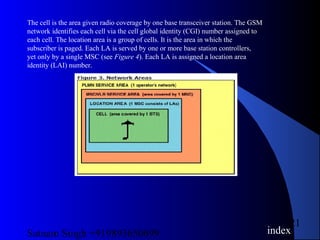
The cell is the area given radio coverage by one base transceiver station. The GSM
network identifies each cell via the cell global identity (CGI) number assigned to
each cell. The location area is a group of cells. It is the area in which the
subscriber is paged. Each LA is served by one or more base station controllers,
yet only by a single MSC (see Figure 4). Each LA is assigned a location area
identity (LAI) number.
index
Satnam Singh +919893650699
22
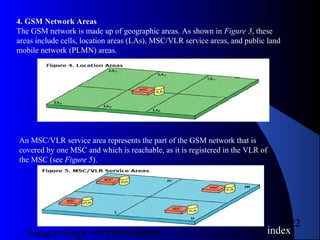
4. GSM Network Areas
The GSM network is made up of geographic areas. As shown in Figure 3, these
areas include cells, location areas (LAs), MSC/VLR service areas, and public land
mobile network (PLMN) areas.
An MSC/VLR service area represents the part of the GSM network that is
covered by one MSC and which is reachable, as it is registered in the VLR of
the MSC (see Figure 5).
index
Satnam Singh +919893650699
23
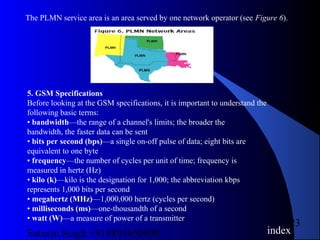
The PLMN service area is an area served by one network operator (see Figure 6).
5. GSM Specifications
Before looking at the GSM specifications, it is important to understand the
following basic terms:
• bandwidth—the range of a channel's limits; the broader the
bandwidth, the faster data can be sent
• bits per second (bps)—a single on-off pulse of data; eight bits are
equivalent to one byte
• frequency—the number of cycles per unit of time; frequency is
measured in hertz (Hz)
• kilo (k)—kilo is the designation for 1,000; the abbreviation kbps
represents 1,000 bits per second
• megahertz (MHz)—1,000,000 hertz (cycles per second)
• milliseconds (ms)—one-thousandth of a second
• watt (W)—a measure of power of a transmitter
index
Satnam Singh +919893650699
24
Specifications for different personal communication services (PCS) systems vary
among the different PCS networks. Listed below is a description of the
specifications and characteristics for GSM.
• frequency band—The frequency range specified for GSM is 1,850 to
1,990 MHz (mobile station to base station).
• duplex distance—The duplex distance is 80 MHz. Duplex distance is
the distance between the uplink and downlink frequencies. A channel
has two frequencies, 80 MHz apart.
• channel separation—The separation between adjacent carrier
frequencies. In GSM, this is 200 kHz.
• modulation—Modulation is the process of sending a signal by
changing the characteristics of a carrier frequency. This is done in GSM
via Gaussian minimum shift keying (GMSK).
• transmission rate—GSM is a digital system with an over-the-air bit
rate of 270 kbps.
• access method—GSM utilizes the time division multiple access
(TDMA) concept. TDMA is a technique in which several different calls
may share the same carrier. Each call is assigned a particular time slot.
• speech coder—GSM uses linear predictive coding (LPC). The purpose
of LPC is to reduce the bit rate. The LPC provides parameters for a
filter that mimics the vocal tract. The signal passes through this filter,
leaving behind a residual signal. Speech is encoded at 13 kbps.
index
Satnam Singh +919893650699
25
6. GSM Subscriber Services
There are two basic types of services offered through GSM: telephony (also referred to as teleservices)
and data (also referred to as bearer services). Telephony services are mainly voice services that provide
subscribers with the complete capability (including necessary terminal equipment) to communicate with
other subscribers. Data services provide the capacity necessary to transmit appropriate data signals
between two access points creating an interface to the network. In addition to normal telephony and
emergency calling, the following subscriber services are supported by GSM:
• dual-tone multifrequency (DTMF)—DTMF is a tone signaling scheme often used for various control
purposes via the telephone network, such as remote control of an answering machine. GSM
supports full-originating DTMF.
• facsimile group III—GSM supports CCITT Group 3 facsimile. As standard fax machines are designed
to be connected to a telephone using analog signals, a special fax converter connected to the exchange
is used in the GSM system. This enables a GSM–connected fax to communicate with any analog fax in
the network.
• short message services—A convenient facility of the GSM network is the short message service. A
message consisting of a maximum of 160 alphanumeric characters can be sent to or from a mobile
station. This service can be viewed as an advanced form of alphanumeric paging with a number of
advantages. If the subscriber's mobile unit is powered off or has left the coverage area, the message is
stored and offered back to the subscriber when the mobile is powered on or has reentered the coverage
area of the network. This function ensures that the message will be received.
• cell broadcast—A variation of the short message service is the cell broadcast facility. A message of a
maximum of 93 characters can be broadcast to all mobile subscribers in a certain geographic area.
Typical applications include traffic congestion warnings and reports on
accidents.
index
Satnam Singh +919893650699
26
• voice mail—This service is actually an answering machine within the network, which is
controlled by the subscriber. Calls can be forwarded to the subscriber's voice-mail box and the
subscriber checks for
messages via a personal security code.
• fax mail—With this service, the subscriber can receive fax messages at any fax machine.
The messages are stored in a service center from which they can be retrieved by the subscriber
via a personal security code to the desired fax number.
Supplementary Services
GSM supports a comprehensive set of supplementary services that can complement and
support both telephony and data services. Supplementary services are defined by GSM and are
characterized as revenue-generating features. A partial listing of supplementary services
follows.
• call forwarding—This service gives the subscriber the ability to forward incoming calls to
another number if the called mobile unit is not reachable, if it is busy, if there is no reply, or if
call forwarding is allowed unconditionally.
• barring of outgoing calls—This service makes it possible for a mobile subscriber to prevent
all outgoing calls.
• barring of incoming calls—This function allows the subscriber to prevent incoming calls.
The following two conditions for incoming call barring exist: baring of all incoming calls and
barring of incoming calls when roaming outside the home PLMN.
index
Satnam Singh +919893650699
27
• advice of charge (AoC)—The AoC service provides the mobile subscriber with an
estimate of the call charges. There are two types of AoC information: one that provides the
subscriber with an estimate of the bill and one that can be used for immediate charging
purposes. AoC
for data calls is provided on the basis of time measurements.
• call hold—This service enables the subscriber to interrupt an ongoing call and then
subsequently reestablish the call. The call hold service is only applicable to normal
telephony.
• call waiting—This service enables the mobile subscriber to be notified of an incoming call
during a conversation. The subscriber can answer, reject, or ignore the incoming call. Call
waiting is applicable to all GSM telecommunications services using a circuit-switched
connection.
• multiparty service—The multiparty service enables a mobile subscriber to establish a
multiparty conversation—that is, a simultaneous conversation between three and six
subscribers. This service is only applicable to normal telephony.
• calling line identification presentation/restriction—These services supply the called
party with the integrated services digital network (ISDN) number of the calling party. The
restriction service enables the calling party to restrict the presentation. The restriction
overrides the presentation.
• closed user groups (CUGs)—CUGs are generally comparable to a PBX. They are a group
of subscribers who are capable of only calling themselves and certain numbers.
index
Satnam Singh +919893650699
28
GLOSSARYGLOSSARY
ADC
 American Digital Cellular
AMPS
 advanced mobile phone service
AoC
 advice of charge
AUC
 authentication center
bps
 bits per second
BSC
 base station controller
BSS
 base station system
BTS
 base transceiver station
CGI
 cell global identity
CUG
 closed user group
DCS
 digital cellular system
DTMF
 dual-tone multifrequency
EIR
 equipment identity register
GIWU
 GSM interworking unit
GMSC
 gateway mobile services switching center
GMSK
 Gaussian minimum shift keying
GSM
 global system for mobile communication
HLR
 home location register
Hz
 hertz
ISDN
 integrated services digital network
k
 kilo
kbps
 kilobits per second
index
Satnam Singh +919893650699
29
GLOSSARYGLOSSARY
LA
 location area
LAI
 location-area identity
LPC
 linear predictive coding
MHz
 megahertz
MSC
 mobile services switching center
MSN
 mobile service node
MXE
 message center
NMT
 Nordic Mobile Telephone
OMC
 operations and maintenance center
OSS
 operation and support system
PCS
 personal communications services
PDC
 personal digital cellular
PLMN
 public land mobile network
SS
 switching system
TACS
 total access communication system
TDMA
 time division multiple access
VLR
 visitor location register
index
Satnam Singh +919893650699
30
Modulation & Modulation tech.Modulation & Modulation tech.
 Introduction
The purpose of analog modulation is to impress
an information-bearing analog waveform onto a
carrier for transmission. The purpose of digital
modulation is to convert an information-bearing
discrete-time symbol sequence into a continuous-
time waveform (perhaps impressed on a carrier).
Key concerns bandwidth eciency and
implementation complexity. These are aected by:
 baseband pulse shape
 phase transition characteristics
 envelope uctuations (channel non-linearities?)
index
Satnam Singh +919893650699
31
Modulation & Modulation tech.Modulation & Modulation tech.
 Example Modulation Schemes for Wireless
 FM | AMPS
 MSK (minimum-shift keying) | CT2
 GMSK (Gaussian MSK) | GSM, DCS 1800, CT3, DECT
 QPSK | NADC (CDMA) - base transmitter
 OQPSK | NADC (CDMA) - mobile transmitter
 =4-DQPSK | NADC (TDMA), PDC (Japan), PHP (Japan)
 M-ary PSK (some wireless LANs)
Satnam Singh +919893650699
32
Modulation & Modulation tech.Modulation & Modulation tech.
 FM Demodulation Methods
 Limiter-discriminator
 FM feedback (FMFB)
 Phase-locked loop (PLL)
 FM Performance
Characterized by signal-to-noise ratio (SNR): the
demodulator input CNR (carrier-to-noise ratio)
for AMPS is specied to be 18dB, resulting in an
output SNR of 40 dB.
Satnam Singh +919893650699
33
Modulation & Modulation tech.Modulation & Modulation tech.
 Digital Modulation
Criteria for selection:
 BER perrformance
-Mobile/personal channel-severe fading
-cellular architecture-interference
-Typically, req't is 10-2
or better (speech)
 Spectral efficiency
 Adjacent channel interface
 Power efficiency(esp. at mobile)
 Implementation complexity/cost (may require dual-mode
mobile)
Satnam Singh +919893650699
34
Modulation & Modulation tech.Modulation & Modulation tech.
 Digital Modulation | Classication
Constant-envelope methods: Allow use of less
expensive amplication (not dependent on signal
amplitude) at the expense of out-of-band
emissions. Limited to a spectral eciency of about
1 bit/sec/Hz.
 Examples: MSK, GMSK
 Linear methods: Higher spectral eciency, but
must use linear ampliers to maintain performance
and to limit out-of-band emissions.
 Examples: PSK, QAM
Satnam Singh +919893650699
35
Modulation & Modulation tech.Modulation & Modulation tech.
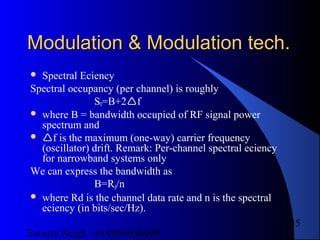
 Spectral Eciency
Spectral occupancy (per channel) is roughly
S0=B+2f
 where B = bandwidth occupied of RF signal power
spectrum and
 f is the maximum (one-way) carrier frequency
(oscillator) drift. Remark: Per-channel spectral eciency
for narrowband systems only
We can express the bandwidth as
B=Rd/n
 where Rd is the channel data rate and n is the spectral
eciency (in bits/sec/Hz).
Satnam Singh +919893650699
36
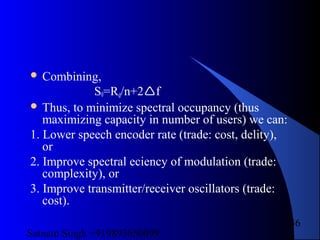
 Combining,
S0=Rd/n+2f
 Thus, to minimize spectral occupancy (thus
maximizing capacity in number of users) we can:
1. Lower speech encoder rate (trade: cost, delity),
or
2. Improve spectral eciency of modulation (trade:
complexity), or
3. Improve transmitter/receiver oscillators (trade:
cost).
Satnam Singh +919893650699
37
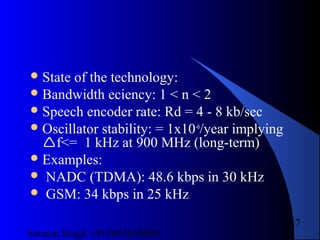
State of the technology:
Bandwidth eciency: 1 < n < 2
Speech encoder rate: Rd = 4 - 8 kb/sec
Oscillator stability: = 1x10⁻⁶
/year implying
f<= 1 kHz at 900 MHz (long-term)
Examples:
 NADC (TDMA): 48.6 kbps in 30 kHz
 GSM: 34 kbps in 25 kHz
Satnam Singh +919893650699
38
Circuit Switching & PacketCircuit Switching & Packet
SwitchingSwitching
Switching Networks
 Long distance transmission is typically done over
a network of switched nodes
 Nodes not concerned with content of data
 End devices are stations
– Computer, terminal, phone, etc.
 A collection of nodes and connections is a
communications network
 Data routed by being switched from node to node
index
Satnam Singh +919893650699
39
NodesNodes
Nodes may connect to other nodes only, or to stations and other
nodes
Node to node links usually multiplexed
Network is usually partially connected
Some redundant connections are desirable for reliability
Two different switching technologies
Circuit switching
Packet switching
index
Satnam Singh +919893650699
40
Simple Switched NetworkSimple Switched Network
index
Satnam Singh +919893650699
41
Switching ActivitiesSwitching Activities
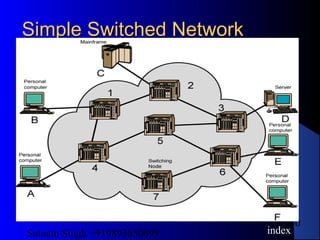
Some nodes connect only to other nodes
(intermediary nodes). Sole purpose is to
switch data
Some nodes have one or more stations
attached. They accept from and deliver
data to the attached station.
Node-to-node links are usually
multiplexed
Multiple paths enhance reliability
index
Satnam Singh +919893650699
42
Circuit SwitchingCircuit Switching
 Originated in public telephone networks
 Well suited to analog transmission of voice signal
 Dedicated communication path between two stations
 Three phases
– Establish
– Transfer
– Disconnect
 Must have switching capacity and channel capacity to
establish connection
 Must have intelligence to work out routing
index
Satnam Singh +919893650699
43
Circuit Switching - ApplicationsCircuit Switching - Applications
Inefficient
– Channel capacity dedicated for duration of
connection
– If no data, capacity wasted
Set up (connection) takes time
Once connected, transfer is transparent
Developed for voice traffic (phone)
index
Satnam Singh +919893650699
44
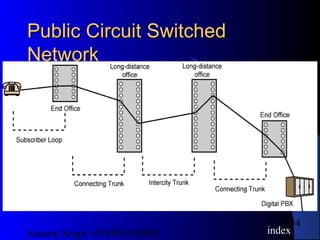
Public Circuit SwitchedPublic Circuit Switched
NetworkNetwork
index
Satnam Singh +919893650699
45
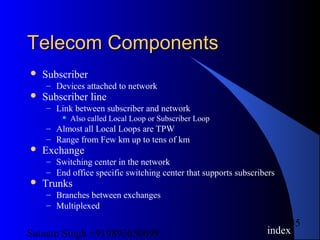
Telecom ComponentsTelecom Components
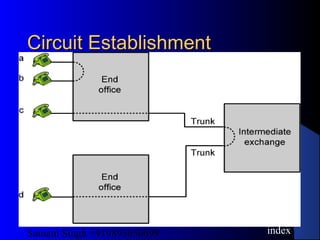
 Subscriber
– Devices attached to network
 Subscriber line
– Link between subscriber and network
 Also called Local Loop or Subscriber Loop
– Almost all Local Loops are TPW
– Range from Few km up to tens of km
 Exchange
– Switching center in the network
– End office specific switching center that supports subscribers
 Trunks
– Branches between exchanges
– Multiplexed
index
Satnam Singh +919893650699
46
Circuit EstablishmentCircuit Establishment
index
Satnam Singh +919893650699
47
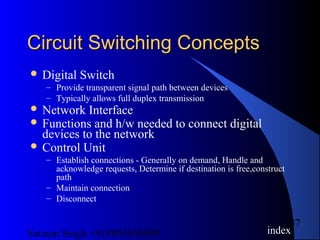
Circuit Switching ConceptsCircuit Switching Concepts
 Digital Switch
– Provide transparent signal path between devices
– Typically allows full duplex transmission
 Network Interface
 Functions and h/w needed to connect digital
devices to the network
 Control Unit
– Establish connections - Generally on demand, Handle and
acknowledge requests, Determine if destination is free,construct
path
– Maintain connection
– Disconnect
index
Satnam Singh +919893650699
48
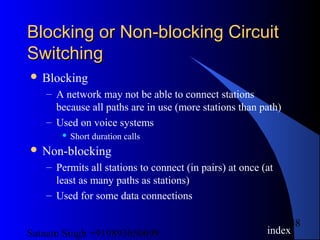
Blocking or Non-blocking CircuitBlocking or Non-blocking Circuit
SwitchingSwitching
 Blocking
– A network may not be able to connect stations
because all paths are in use (more stations than path)
– Used on voice systems
 Short duration calls
 Non-blocking
– Permits all stations to connect (in pairs) at once (at
least as many paths as stations)
– Used for some data connections
index
Satnam Singh +919893650699
49
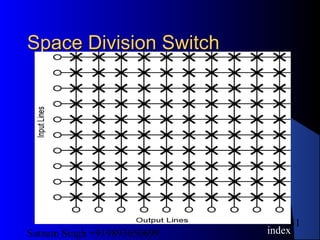
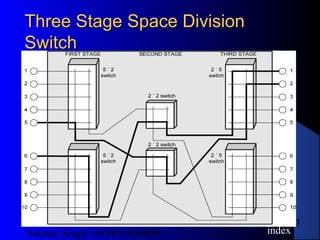
Space Division SwitchingSpace Division Switching
Developed for analog environment, but
carried over into digital
Signal paths are physically separate (slide
15)
Each connection requires dedicated path
(crossbar switch)
index
Satnam Singh +919893650699
50
Crossbar switchCrossbar switch
Number of crosspoints grows as square of
number of stations
Loss of crosspoint prevents connection
– Inefficient use of crosspoints
– If all stations connected, only a few
crosspoints in use
Non-blocking
index
Satnam Singh +919893650699
51
Space Division SwitchSpace Division Switch
index
Satnam Singh +919893650699
52
Multistage SwitchMultistage Switch
Reduced number of crosspoints
More than one path through network
– Increased reliability
More complex control
May be blocking
index
Satnam Singh +919893650699
53
Three StageThree Stage Space DivisionSpace Division
SwitchSwitch
index
Satnam Singh +919893650699
54
Time Division SwitchingTime Division Switching
Modern digital systems rely on intelligent
control of space and time division
elements
Use digital time division techniques to set
up and maintain virtual circuits
Partition low speed bit stream into pieces
that share higher speed stream
index
Satnam Singh +919893650699
55
Control Signaling FunctionsControl Signaling Functions
 Audible communication with subscriber
 Transmission of dialed number
 Call can not be completed indication
 Call ended indication
 Signal to ring phone
 Billing info
 Equipment and trunk status info
 Diagnostic info
 Control of specialist equipment
index
Satnam Singh +919893650699
56
Control Signal SequenceControl Signal Sequence
 Both phones on hook
 Subscriber lifts receiver (off hook)
 End office switch signaled
 Switch responds with dial tone
 Caller dials number
 If target not busy, send ringer signal to target subscriber
 Feedback to caller
– Ringing tone, engaged tone, unobtainable
 Target accepts call by lifting receiver
 Switch terminates ringing signal and ringing tone
 Switch establishes connection
 Connection release when Source subscriber hangs up
index
Satnam Singh +919893650699
57
Switch to Switch SignalingSwitch to Switch Signaling
Subscribers connected to different
switches
Originating switch seizes interswitch trunk
Send off hook signal on trunk, requesting
digit register at target switch (for address)
Terminating switch sends off hook
followed by on hook (wink) to show
register ready
Originating switch sends address
index
Satnam Singh +919893650699
58
In Channel SignalingIn Channel Signaling
 Use same channel for signaling control and call
– Requires no additional transmission facilities
 Inband
– Control signals have same electromagnetic properties
(frequency) as voice signal
– Can go anywhere a voice signal can
– Impossible to set up a call on a faulty speech path
 Out of band
– Voice signals do not use full 4kHz bandwidth
– Narrow signal band within 4kHz used for control
– Can be sent whether or not voice signals are present
– Need extra electronics
– Slower signal rate (narrow bandwidth)
index
Satnam Singh +919893650699
59
Drawbacks of In ChannelDrawbacks of In Channel
SignalingSignaling
Limited transfer rate
Delay between entering address (dialing)
and connection
Overcome by use of common channel
signaling
index
Satnam Singh +919893650699
60
Common Channel SignalingCommon Channel Signaling
 Control signals carried over paths independent of
voice channel
 One control signal channel can carry signals for
a number of subscriber channels
 Common control channel for these subscriber
lines
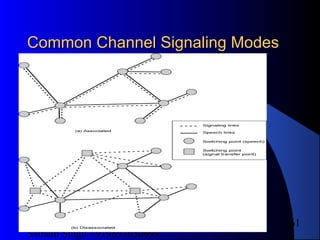
 Associated Mode
– Common channel closely tracks interswitch trunks
 Disassociated Mode
– Additional nodes (signal transfer points)
– Effectively two separate networks
index
Satnam Singh +919893650699
61
Common ChannelCommon Channel Signaling ModesSignaling Modes
Satnam Singh +919893650699
62
Signaling System Number 7Signaling System Number 7
 SS7
 Common channel signaling scheme
 ISDN
 Overall purpose to provide international
standardized common channel signaling system
 Performs call management (setup, maintenance,
termination) and network management functions
 Network is circuit switched, but control is packet
switched
index
Satnam Singh +919893650699
63
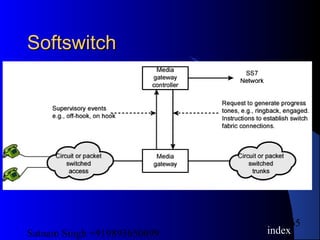
Softswitch ArchitectureSoftswitch Architecture
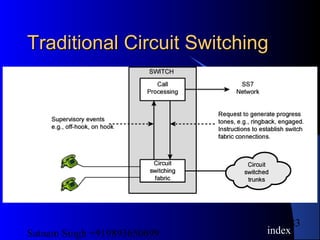
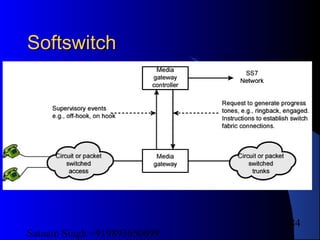
Latest trend in circuit-switching
technology
 General purpose computer running software to
make it a smart phone switch
 Lower cost, greater functionality
 Can packetize digitized voice data, allowing
voice over IP
 Performs call routing
 Separates call processing from hardware function
of switch
index
Satnam Singh +919893650699
64
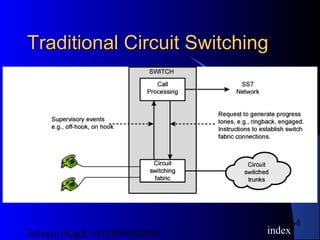
Traditional Circuit SwitchingTraditional Circuit Switching
index
Satnam Singh +919893650699
65
SoftswitchSoftswitch
index
Satnam Singh +919893650699
66
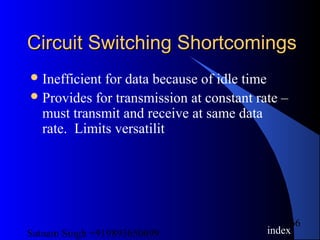
Circuit Switching ShortcomingsCircuit Switching Shortcomings
Inefficient for data because of idle time
Provides for transmission at constant rate –
must transmit and receive at same data
rate. Limits versatilit
index
Satnam Singh +919893650699
67
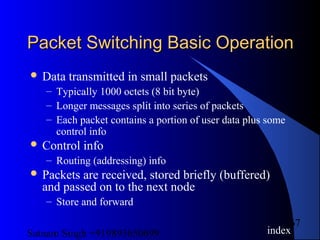
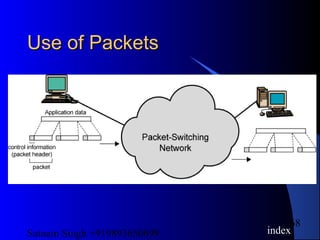
Packet Switching Basic OperationPacket Switching Basic Operation
 Data transmitted in small packets
– Typically 1000 octets (8 bit byte)
– Longer messages split into series of packets
– Each packet contains a portion of user data plus some
control info
 Control info
– Routing (addressing) info
 Packets are received, stored briefly (buffered)
and passed on to the next node
– Store and forward
index
Satnam Singh +919893650699
68
Use of PacketsUse of Packets
index
Satnam Singh +919893650699
69
AdvantagesAdvantages
 Line efficiency
– Single node to node link can be shared by many
packets over time
– Packets queued and transmitted as fast as possible
 Data rate conversion
– Each station connects to the local node at its own
speed
– Nodes buffer data if required to equalize rates
 Packets are accepted even when network is busy
– Delivery may slow down
 Priorities can be used
index
Satnam Singh +919893650699
70
Switching TechniqueSwitching Technique
Station breaks long message into packets
Packets sent one at a time to the network
Packets handled in two ways
– Datagram
– Virtual circuit
index
Satnam Singh +919893650699
71
DatagramDatagram
Each packet treated independently
Packets can take any practical route
Packets may arrive out of order
Packets may go missing
Up to receiver to re-order packets and
recover from missing packets
index
Satnam Singh +919893650699
72
Virtual CircuitVirtual Circuit
 Preplanned route established before any packets
sent
 Call request and call accept packets establish
connection (handshake)
 Each packet contains a virtual circuit identifier
instead of destination address
 No routing decisions required for each packet
 Clear request to drop circuit
 Not a dedicated path
index
Satnam Singh +919893650699
73
Virtual Circuits v DatagramVirtual Circuits v Datagram
 Virtual circuits
– Network can provide sequencing and error control
– Packets are forwarded more quickly
 No routing decisions to make
– Less reliable
 Loss of a node loses all circuits through that node
 Datagram
– No call setup phase
 Better if few packets
– More flexible
 Routing can be used to avoid congested parts of the network
index
Satnam Singh +919893650699
74
Circuit vs. Packet SwitchingCircuit vs. Packet Switching
 Circuit Switched
 Bandwidth guaranteed
 Circuit capacity not
reduced by other
network traffic
 Circuit costs
independent of amount
of data transmitted,
resulting in wasted
bandwidth
Packet Switched
 Bandwidth dynamically
allocated on as-needed
basis
 May have concurrent
transmissions over
physical channel
 May have delays and
congestion
 More cost-effective,
offer better performance
Satnam Singh +919893650699
75
Switch to Switch SignalingSwitch to Switch Signaling
Subscribers connected to different
switches
Originating switch seizes interswitch trunk
Send off hook signal on trunk, requesting
digit register at target switch (for address)
Terminating switch sends off hook
followed by on hook (wink) to show
register ready
Originating switch sends address
index
Satnam Singh +919893650699
76
Location of SignalingLocation of Signaling
Subscriber to network
– Depends on subscriber device and switch
Within network
– Management of subscriber calls and network
– More complex
index
Satnam Singh +919893650699
77
In Channel SignalingIn Channel Signaling
 Use same channel for signaling control and call
– Requires no additional transmission facilities
 Inband
– Control signals have same electromagnetic properties
(frequency) as voice signal
– Can go anywhere a voice signal can
– Impossible to set up a call on a faulty speech path
 Out of band
– Voice signals do not use full 4kHz bandwidth
– Narrow signal band within 4kHz used for control
– Can be sent whether or not voice signals are present
– Need extra electronics
– Slower signal rate (narrow bandwidth)
index
Satnam Singh +919893650699
78
Drawbacks of In ChannelDrawbacks of In Channel
SignalingSignaling
Limited transfer rate
Delay between entering address (dialing)
and connection
Overcome by use of common channel
signaling
index
Satnam Singh +919893650699
79
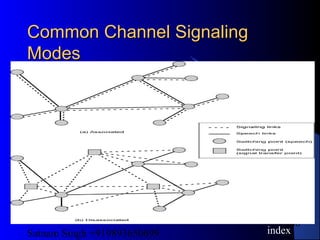
Common Channel SignalingCommon Channel Signaling
 Control signals carried over paths independent of
voice channel
 One control signal channel can carry signals for
a number of subscriber channels
 Common control channel for these subscriber
lines
 Associated Mode
– Common channel closely tracks interswitch trunks
 Disassociated Mode
– Additional nodes (signal transfer points)
– Effectively two separate networks
index
Satnam Singh +919893650699
80
Common ChannelCommon Channel SignalingSignaling
ModesModes
index
Satnam Singh +919893650699
81
Signaling System Number 7Signaling System Number 7
 SS7
 Common channel signaling scheme
 ISDN
 Overall purpose to provide international
standardized common channel signaling system
 Performs call management (setup, maintenance,
termination) and network management functions
 Network is circuit switched, but control is packet
switched
index
Satnam Singh +919893650699
82
Softswitch ArchitectureSoftswitch Architecture
Latest trend in circuit-switching
technology
 General purpose computer running software to
make it a smart phone switch
 Lower cost, greater functionality
 Can packetize digitized voice data, allowing
voice over IP
 Performs call routing
 Separates call processing from hardware function
of switch
index
Satnam Singh +919893650699
83
Traditional Circuit SwitchingTraditional Circuit Switching
index
Satnam Singh +919893650699
84
SoftswitchSoftswitch
Satnam Singh +919893650699
85
Packet Switching Basic OperationPacket Switching Basic Operation
 Data transmitted in small packets
– Typically 1000 octets (8 bit byte)
– Longer messages split into series of packets
– Each packet contains a portion of user data plus some
control info
 Control info
– Routing (addressing) info
 Packets are received, stored briefly (buffered)
and passed on to the next node
– Store and forward
index
Satnam Singh +919893650699
86
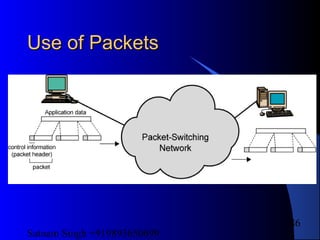
Use of PacketsUse of Packets
Satnam Singh +919893650699
87
AdvantagesAdvantages
 Line efficiency
– Single node to node link can be shared by many
packets over time
– Packets queued and transmitted as fast as possible
 Data rate conversion
– Each station connects to the local node at its own
speed
– Nodes buffer data if required to equalize rates
 Packets are accepted even when network is busy
– Delivery may slow down
 Priorities can be used
index
Satnam Singh +919893650699
88
Switching TechniqueSwitching Technique
Station breaks long message into packets
Packets sent one at a time to the network
Packets handled in two ways
– Datagram
– Virtual circuit
index
Satnam Singh +919893650699
89
DatagramDatagram
Each packet treated independently
Packets can take any practical route
Packets may arrive out of order
Packets may go missing
Up to receiver to re-order packets and
recover from missing packets
index
Satnam Singh +919893650699
90
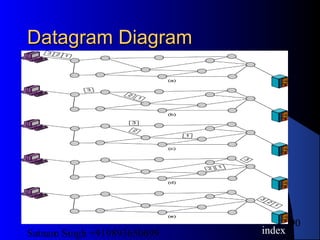
Datagram DiagramDatagram Diagram
index
Satnam Singh +919893650699
91
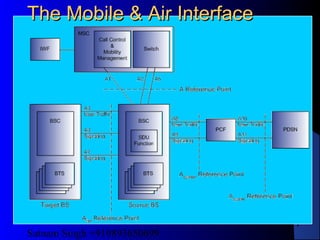
The Mobile & Air InterfaceThe Mobile & Air Interface
Satnam Singh +919893650699
92
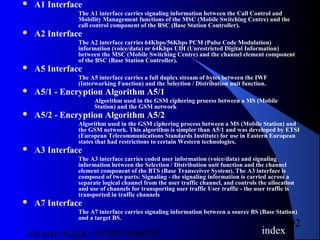
 A1 Interface
The A1 interface carries signaling information between the Call Control and
Mobility Management functions of the MSC (Mobile Switching Centre) and the
call control component of the BSC (Base Station Controller).
 A2 Interface
The A2 interface carries 64Kbps/56Kbps PCM (Pulse Code Modulation)
information (voice/data) or 64Kbps UDI (Unrestricted Digital Information)
between the MSC (Mobile Switching Centre) and the channel element component
of the BSC (Base Station Controller).
 A5 Interface
The A5 interface carries a full duplex stream of bytes between the IWF
(Interworking Function) and the Selection / Distribution unit function.
 A5/1 - Encryption Algorithm A5/1
Algorithm used in the GSM ciphering process between a MS (Mobile
Station) and the GSM network
 A5/2 - Encryption Algorithm A5/2
Algorithm used in the GSM ciphering process between a MS (Mobile Station) and
the GSM network. This algorithm is simpler than A5/1 and was developed by ETSI
(European Telecommunications Standards Institute) for use in Eastern European
states that had restrictions to certain Western technologies.
 A3 Interface
The A3 interface carries coded user information (voice/data) and signaling
information between the Selection / Distribution unit function and the channel
element component of the BTS (Base Transceiver System). The A3 interface is
composed of two parts: Signaling - the signaling information is carried across a
separate logical channel from the user traffic channel, and controls the allocation
and use of channels for transporting user traffic User traffic - the user traffic is
transported in traffic channels
 A7 Interface
The A7 interface carries signaling information between a source BS (Base Station)
and a target BS.
index
Satnam Singh +919893650699
93
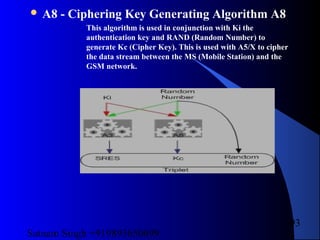
 A8 - Ciphering Key Generating Algorithm A8
This algorithm is used in conjunction with Ki the
authentication key and RAND (Random Number) to
generate Kc (Cipher Key). This is used with A5/X to cipher
the data stream between the MS (Mobile Station) and the
GSM network.
Satnam Singh +919893650699
94
 A8 Interface
The A8 interface carries user traffic between the BS (Base Station) and the
PCF (Packet Control Function).
 A9 Interface
The A9 interface carries signaling information between the BS (Base
Station) and the PCF (Packet Control Function).
 A10 Interface
The A10 interface carries user traffic between the PCF (Packet
Control Function) and the PDSN (Packet Data Serving Node).
 A11 Interface
The A11 interface carries signaling information between the PCF
(Packet Control Function) and the PDSN (Packet Data Serving Node).
 A38
A single algorithm in GSM that performs the functions of A3 and A8 .
 A Link
An "A" (Access) link is a SL (Signalling Link) that connects a signalling end
point, i.e. a SP (Signalling Point), to an STP (Signalling Transfer Point).
Only messages that are originating from or destined to the signalling end
point are transmitted on this link.
Satnam Singh +919893650699
95
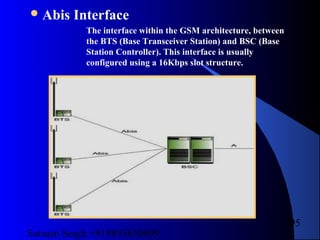
Abis Interface
The interface within the GSM architecture, between
the BTS (Base Transceiver Station) and BSC (Base
Station Controller). This interface is usually
configured using a 16Kbps slot structure.
Satnam Singh +919893650699
96
Voice is not sent as a series of tones, but coded into data bursts. A mobile is only
actually logged onto one cell at a time, but that cell may have several other mobiles
using it at the same time. A basic single-channel cell uses Time Division Multiple
Access (TDMA), which allows eight mobiles to take turns to actively use the channel.
There are around 100 to 200 channels using different pairs of uplink (mobile to base)
and downlink (base to mobile) frequencies within each of the GSM bands (900MHz,
1800MHz and 1900MHz). To minimise the effects of interference, the mobile and the
base frequency-hop during a call. Far more than eight mobiles can be logged on to a
cell, as long as they don't all want to make or receive a call at once.
How a GSM mobile handset communicates with the base station
Satnam Singh +919893650699
97
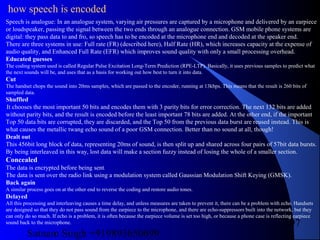
Speech is analogue: In an analogue system, varying air pressures are captured by a microphone and delivered by an earpiece
or loudspeaker, passing the signal between the two ends through an analogue connection. GSM mobile phone systems are
digital: they pass data to and fro, so speech has to be encoded at the microphone end and decoded at the speaker end.
There are three systems in use: Full rate (FR) (described here), Half Rate (HR), which increases capacity at the expense of
audio quality, and Enhanced Full Rate (EFR) which improves sound quality with only a small processing overhead.
Educated guesses
The coding system used is called Regular Pulse Excitation Long-Term Prediction (RPE-LTP). Basically, it uses previous samples to predict what
the next sounds will be, and uses that as a basis for working out how best to turn it into data.
Cut
The handset chops the sound into 20ms samples, which are passed to the encoder, running at 13kbps. This means that the result is 260 bits of
sampled data.
Shuffled
It chooses the most important 50 bits and encodes them with 3 parity bits for error correction. The next 132 bits are added
without parity bits, and the result is encoded before the least important 78 bits are added. At the other end, if the important
Top 50 data bits are corrupted, they are discarded, and the Top 50 from the previous data burst are reused instead. This is
what causes the metallic twang echo sound of a poor GSM connection. Better than no sound at all, though!
Dealt out
This 456bit long block of data, representing 20ms of sound, is then split up and shared across four pairs of 57bit data bursts.
By being interleaved in this way, lost data will make a section fuzzy instead of losing the whole of a smaller section.
Concealed
The data is encrypted before being sent.
The data is sent over the radio link using a modulation system called Gaussian Modulation Shift Keying (GMSK).
Back again
A similar process goes on at the other end to reverse the coding and restore audio tones.
Delayed
All this processing and interleaving causes a time delay, and unless measures are taken to prevent it, there can be a problem with echo. Handsets
are designed so that they do not pass sound from the earpiece to the microphone, and there are echo-suppressors built into the network, but they
can only do so much. If echo is a problem, it is often because the earpiece volume is set too high, or because a phone case is reflecting earpiece
sound back to the microphone.
how speech is encoded
Satnam Singh +919893650699
98
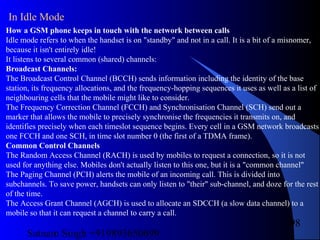
How a GSM phone keeps in touch with the network between calls
Idle mode refers to when the handset is on "standby" and not in a call. It is a bit of a misnomer,
because it isn't entirely idle!
It listens to several common (shared) channels:
Broadcast Channels:
The Broadcast Control Channel (BCCH) sends information including the identity of the base
station, its frequency allocations, and the frequency-hopping sequences it uses as well as a list of
neighbouring cells that the mobile might like to consider.
The Frequency Correction Channel (FCCH) and Synchronisation Channel (SCH) send out a
marker that allows the mobile to precisely synchronise the frequencies it transmits on, and
identifies precisely when each timeslot sequence begins. Every cell in a GSM network broadcasts
one FCCH and one SCH, in time slot number 0 (the first of a TDMA frame).
Common Control Channels
The Random Access Channel (RACH) is used by mobiles to request a connection, so it is not
used for anything else. Mobiles don't actually listen to this one, but it is a "common channel"
The Paging Channel (PCH) alerts the mobile of an incoming call. This is divided into
subchannels. To save power, handsets can only listen to "their" sub-channel, and doze for the rest
of the time.
The Access Grant Channel (AGCH) is used to allocate an SDCCH (a slow data channel) to a
mobile so that it can request a channel to carry a call.
In Idle Mode
Satnam Singh +919893650699
99
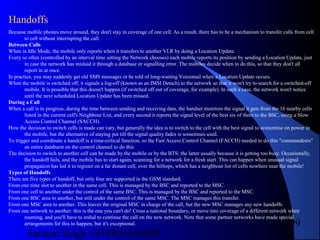
Because mobile phones move around, they don't stay in coverage of one cell. As a result, there has to be a mechanism to transfer calls from cell
to cell without interrupting the call.
Between Calls
When in Idle Mode, the mobile only reports when it transfers to another VLR by doing a Location Update.
Every so often (controlled by an interval time setting the Network chooses) each mobile reports its position by sending a Location Update, just
in case the network has mislaid it through a database or signalling error. The mobiles decide when to do this, so that they don't all
report in at once.
In practice, you may suddenly get old SMS messages or be told of long-waiting Voicemail when a Location Update occurs.
When the mobile is switched off, it signals a log-off (known as an IMSI Detach) to the network so that it won't try to search for a switched-off
mobile. It is possible that this doesn't happen (if switched off out of coverage, for example). In such a case, the network won't notice
until the next scheduled Location Update has been missed.
During a Call
When a call is in progress, during the time between sending and receiving data, the handset monitors the signal it gets from the 16 nearby cells
listed in the current cell's Neighbour List, and every second it reports the signal level of the best six of them to the BSC, using a Slow
Access Control Channel (SACCH).
How the decision to switch cells is made can vary, but generally the idea is to switch to the cell with the best signal to economise on power in
the mobile, but the alternative of staying put till the signal quality fades is sometimes used.
To trigger and coordinate a handoff is a time-critical function, so the Fast Access Control Channel (FACCH) needed to do this "commandeers"
an entire databurst on the control channel to do this.
The decision to switch to another cell can be made by the mobile or by the BTS: the latter usually because it is getting too busy. Occasionally,
the handoff fails, and the mobile has to start again, scanning for a network for a fresh start. This can happen when unusual signal
propagation has led it to register on a far distant cell, over the hilltops, which has a neighbour list of cells nowhere near the mobile!
Types of Handoffs
There are five types of handoff, but only four are supported in the GSM standard.
From one time slot to another in the same cell. This is managed by the BSC and reported to the MSC.
From one cell to another under the control of the same BSC. This is managed by the BSC and reported to the MSC.
From one BSC area to another, but still under the control of the same MSC. The MSC manages this transfer.
From one MSC area to another. This leaves the original MSC in charge of the call, but the new MSC manages any new handoffs.
From one network to another: this is the one you can't do! Cross a national boundary, or move into coverage of a different network when
roaming, and you'll have to redial to continue the call on the new network. Note that some partner networks have made special
arrangements for this to happen, but it's exceptional.
Handoffs
Satnam Singh +919893650699
100
How the network reaches a mobile phone for an incoming call
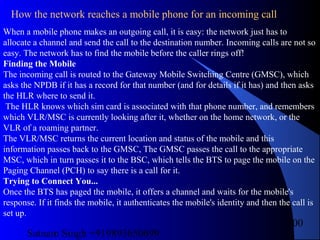
When a mobile phone makes an outgoing call, it is easy: the network just has to
allocate a channel and send the call to the destination number. Incoming calls are not so
easy. The network has to find the mobile before the caller rings off!
Finding the Mobile
The incoming call is routed to the Gateway Mobile Switching Centre (GMSC), which
asks the NPDB if it has a record for that number (and for details if it has) and then asks
the HLR where to send it.
The HLR knows which sim card is associated with that phone number, and remembers
which VLR/MSC is currently looking after it, whether on the home network, or the
VLR of a roaming partner.
The VLR/MSC returns the current location and status of the mobile and this
information passes back to the GMSC, The GMSC passes the call to the appropriate
MSC, which in turn passes it to the BSC, which tells the BTS to page the mobile on the
Paging Channel (PCH) to say there is a call for it.
Trying to Connect You...
Once the BTS has paged the mobile, it offers a channel and waits for the mobile's
response. If it finds the mobile, it authenticates the mobile's identity and then the call is
set up.
Satnam Singh +919893650699
101
The base station sub systemThe base station sub system
 GSM provides recommendations, not
requirements. The GSM specifications define the
functions and interface requirements in detail but
do not address the hardware. The reason for this
is to limit the designers as little as possible but
still to make it possible for the operators to buy
equipment from different suppliers.
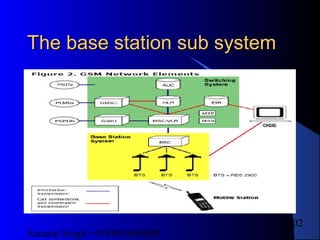
 The GSM network is divided into three major
systems: the switching system (SS), the base
station system (BSS), and the operation and
support system (OSS). The basic GSM network
elements are shown in Figure.
index
Satnam Singh +919893650699
102
The base station sub systemThe base station sub system
Satnam Singh +919893650699
103
The base station sub systemThe base station sub system
The Switching System
The switching system (SS) is responsible for performing call processing and
subscriber-related functions. The switching system includes the following
functional units:
• home location register (HLR)—The HLR is a database used for
storage and management of subscriptions. The HLR is considered the
most important database, as it stores permanent data about
subscribers, including a subscriber's service profile, location
information, and activity status. When an individual buys a
subscription from one of the PCS operators, he or she is registered in
the HLR of that operator.
• mobile services switching center (MSC)—The MSC performs the
telephony switching functions of the system. It controls calls to and
from other telephone and data systems. It also performs such functions
as toll ticketing, network interfacing, common channel signaling, and
others.
Satnam Singh +919893650699
104
The base station sub systemThe base station sub system
• visitor location register (VLR)—The VLR is a database that
contains temporary information about subscribers that is needed by
the MSC in order to service visiting subscribers. The VLR is always
integrated with the MSC. When a mobile station roams into a new MSC
area, the VLR connected to that MSC will request data about the
mobile station from the HLR. Later, if the mobile station makes a call,
the VLR will have the information needed for call setup without having
to interrogate the HLR each time.
• authentication center (AUC)—A unit called the AUC provides
authentication and encryption parameters that verify the user's identity
and ensure the confidentiality of each call. The AUC protects network
operators from different types of fraud found in today's cellular world.
• equipment identity register (EIR)—The EIR is a database that
contains information about the identity of mobile equipment that
prevents calls from stolen, unauthorized, or defective mobile stations.
The AUC and EIR are implemented as stand-alone nodes or as a
combined AUC/EIR node.
Satnam Singh +919893650699
105
The Base Station System (BSS)
All radio-related functions are performed in the BSS, which consists of
base
station controllers (BSCs) and the base transceiver stations (BTSs).
BSC—The BSC provides all the control functions and physical links
between the MSC and BTS. It is a high-capacity switch that provides
functions such as handover, cell configuration data, and control of
radio frequency (RF) power levels in base transceiver stations. A
number of BSCs are served by an MSC.
• BTS—The BTS handles the radio interface to the mobile station. The
BTS is the radio equipment (transceivers and antennas) needed to
service each cell in the network. A group of BTSs are controlled by a
BSC.
Satnam Singh +919893650699
106
The Operation and Support System
The operations and maintenance center (OMC) is connected to all equipment in
the switching system and to the BSC. The implementation of OMC is called the
operation and support system (OSS). The OSS is the functional entity from
which
the network operator monitors and controls the system. The purpose of OSS is
to
offer the customer cost-effective support for centralized, regional, and local
operational and maintenance activities that are required for a GSM network. An
important function of OSS is to provide a network overview and support the
maintenance activities of different operation and maintenance organizations.
Satnam Singh +919893650699
107
Additional Functional Elements
Other functional elements shown in Figure 2 are as follows:
• message center (MXE)—The MXE is a node that provides
integrated voice, fax, and data messaging. Specifically, the MXE
handles short message service, cell broadcast, voice mail, fax mail, email,
and notification.
• mobile service node (MSN)—The MSN is the node that handles the
mobile intelligent network (IN) services.
• gateway mobile services switching center (GMSC)—A gateway
is a node used to interconnect two networks. The gateway is often
implemented in an MSC. The MSC is then referred to as the GMSC.
• GSM interworking unit (GIWU)—The GIWU consists of both
hardware and software that provides an interface to various networks
for data communications. Through the GIWU, users can alternate
between speech and data during the same call. The GIWU hardware
equipment is physically located at the MSC/VLR.
Satnam Singh +919893650699
108
The core networkThe core network
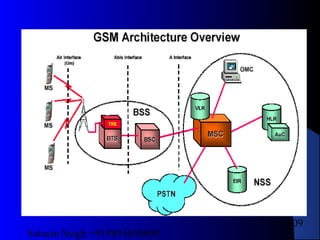
It provides an overview of the GSM network
architecture. This includes a brief explanation of the
different network subsystems and a description of
the functionality of the elements within each of the
subsystems. Topics include:
 General architecture overview
 The Mobile Station (MS) Subsystem and Elements
 The Base Station Subsystem (BSS) and Elements
 The Network Subsystem (NSS) and Elements
 Introduction to network interfaces
index
Satnam Singh +919893650699
109
Satnam Singh +919893650699
110
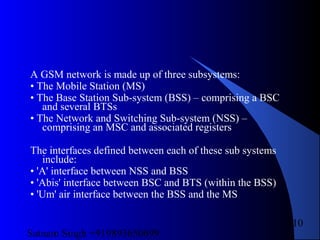
A GSM network is made up of three subsystems:
• The Mobile Station (MS)
• The Base Station Sub-system (BSS) – comprising a BSC
and several BTSs
• The Network and Switching Sub-system (NSS) –
comprising an MSC and associated registers
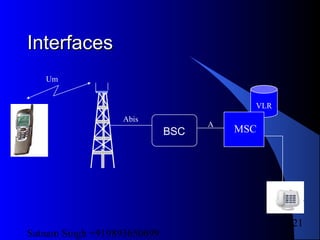
The interfaces defined between each of these sub systems
include:
• 'A' interface between NSS and BSS
• 'Abis' interface between BSC and BTS (within the BSS)
• 'Um' air interface between the BSS and the MS
Satnam Singh +919893650699
111
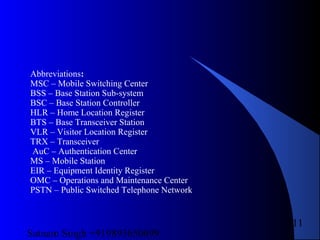
Abbreviations:
MSC – Mobile Switching Center
BSS – Base Station Sub-system
BSC – Base Station Controller
HLR – Home Location Register
BTS – Base Transceiver Station
VLR – Visitor Location Register
TRX – Transceiver
AuC – Authentication Center
MS – Mobile Station
EIR – Equipment Identity Register
OMC – Operations and Maintenance Center
PSTN – Public Switched Telephone Network
Satnam Singh +919893650699
112
Mobile StationMobile Station
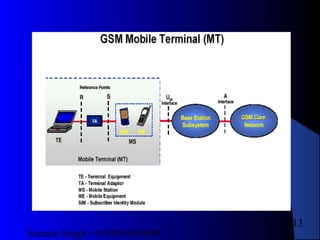
The Mobile Station (MS) consists of the
physical equipment used by a PLMN
subscriber to connect to the network. It
comprises the Mobile Equipment (ME) and
the Subscriber Identity Module (SIM). The
ME forms part of the Mobile Termination
(MT) which, depending on the application
and services, may also include various types
of Terminal Equipment (TE) and associated
Terminal Adapter (TA).
Satnam Singh +919893650699
113
Satnam Singh +919893650699
114
 The IMSI identifies the subscriber within the GSM
network while the MS ISDN is the actual telephone
number a caller (possibly in another network) uses to
reach that person.
 Security is provided by the use of an authentication key
and by the transmission of a temporary subscriber
identity (TMSI) across the radio interface where possible
to avoid using the permanent IMSI identity.
 The IMEI may be used to block certain types of
equipment from accessing the network if they are
unsuitable and also to check for stolen equipment.
Satnam Singh +919893650699
115
MS and SIMMS and SIM
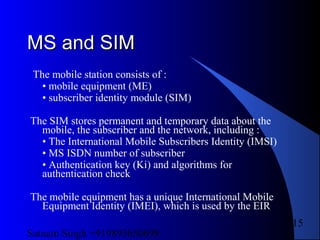
The mobile station consists of :
• mobile equipment (ME)
• subscriber identity module (SIM)
The SIM stores permanent and temporary data about the
mobile, the subscriber and the network, including :
• The International Mobile Subscribers Identity (IMSI)
• MS ISDN number of subscriber
• Authentication key (Ki) and algorithms for
authentication check
The mobile equipment has a unique International Mobile
Equipment Identity (IMEI), which is used by the EIR
Satnam Singh +919893650699
116
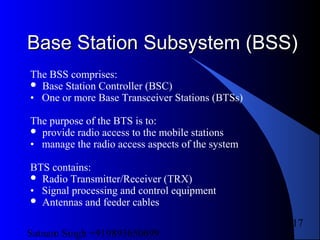
Base Station Subsystem (BSS)Base Station Subsystem (BSS)
Satnam Singh +919893650699
117
Base Station Subsystem (BSS)Base Station Subsystem (BSS)
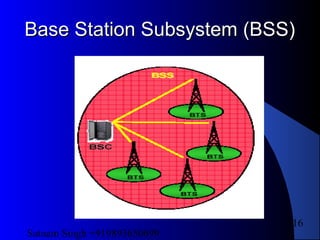
The BSS comprises:
 Base Station Controller (BSC)
• One or more Base Transceiver Stations (BTSs)
The purpose of the BTS is to:
 provide radio access to the mobile stations
• manage the radio access aspects of the system
BTS contains:
 Radio Transmitter/Receiver (TRX)
• Signal processing and control equipment
 Antennas and feeder cables
Satnam Singh +919893650699
118
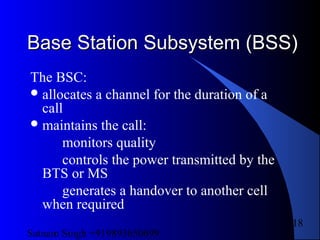
Base Station Subsystem (BSS)Base Station Subsystem (BSS)
The BSC:
allocates a channel for the duration of a
call
maintains the call:
monitors quality
controls the power transmitted by the
BTS or MS
generates a handover to another cell
when required
Satnam Singh +919893650699
119
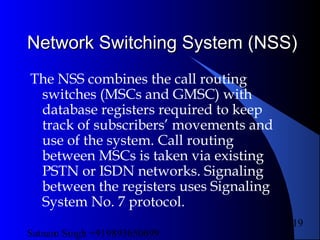
Network Switching System (NSS)Network Switching System (NSS)
The NSS combines the call routing
switches (MSCs and GMSC) with
database registers required to keep
track of subscribers’ movements and
use of the system. Call routing
between MSCs is taken via existing
PSTN or ISDN networks. Signaling
between the registers uses Signaling
System No. 7 protocol.
Satnam Singh +919893650699
120
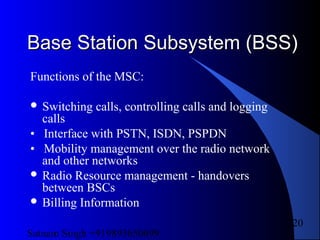
Base Station Subsystem (BSS)Base Station Subsystem (BSS)
Functions of the MSC:
 Switching calls, controlling calls and logging
calls
• Interface with PSTN, ISDN, PSPDN
• Mobility management over the radio network
and other networks
 Radio Resource management - handovers
between BSCs
 Billing Information
Satnam Singh +919893650699
121
InterfacesInterfaces
BSC
VLR
MSC
Um
Abis
A
Satnam Singh +919893650699
122
Logical ChannelsLogical Channels
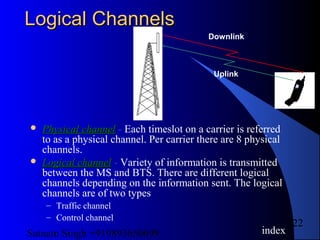
 Physical channelPhysical channel - Each timeslot on a carrier is referred
to as a physical channel. Per carrier there are 8 physical
channels.
 Logical channelLogical channel - Variety of information is transmitted
between the MS and BTS. There are different logical
channels depending on the information sent. The logical
channels are of two types
– Traffic channel
– Control channel
index
Downlink
Uplink
Satnam Singh +919893650699
123
Logical ChannelsLogical Channels
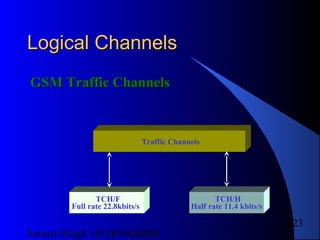
GSM Traffic ChannelsGSM Traffic Channels
Traffic Channels
TCH/F
Full rate 22.8kbits/s
TCH/H
Half rate 11.4 kbits/s
Satnam Singh +919893650699
124
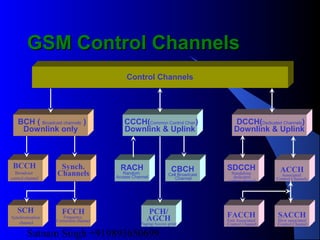
GSM Control ChannelsGSM Control Channels
BCH ( Broadcast channels )
Downlink only
Control Channels
DCCH(Dedicated Channels)
Downlink & Uplink
CCCH(Common Control Chan)
Downlink & Uplink
Synch.
Channels
RACH
Random
Access Channel
CBCH
Cell Broadcast
Channel
SDCCH
Standalone
dedicated
control channel
ACCH
Associated
Control Channels
SACCH
Slow associated
Control Channel
FACCH
Fast Associated
Control Channel
PCH/
AGCH
Paging/Access grant
FCCH
Frequency
Correction channel
SCH
Synchronisation
channel
BCCH
Broadcast
control channel
Satnam Singh +919893650699
125
Logical ChannelsLogical Channels
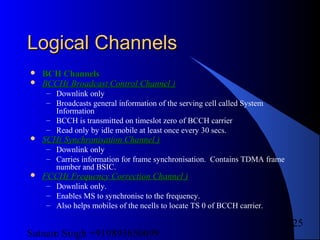
 BCH ChannelsBCH Channels
 BCCH( Broadcast Control Channel )BCCH( Broadcast Control Channel )
– Downlink only
– Broadcasts general information of the serving cell called System
Information
– BCCH is transmitted on timeslot zero of BCCH carrier
– Read only by idle mobile at least once every 30 secs.
 SCH( Synchronisation Channel )SCH( Synchronisation Channel )
– Downlink only
– Carries information for frame synchronisation. Contains TDMA frame
number and BSIC.
 FCCH( Frequency Correction Channel )FCCH( Frequency Correction Channel )
– Downlink only.
– Enables MS to synchronise to the frequency.
– Also helps mobiles of the ncells to locate TS 0 of BCCH carrier.
Satnam Singh +919893650699
126
Logical ChannelsLogical Channels
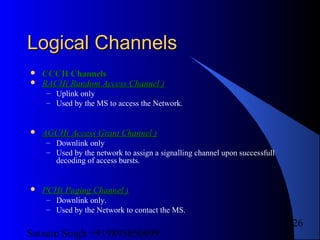
 CCCH ChannelsCCCH Channels
 RACH( Random Access Channel )RACH( Random Access Channel )
– Uplink only
– Used by the MS to access the Network.
 AGCH( Access Grant Channel )AGCH( Access Grant Channel )
– Downlink only
– Used by the network to assign a signalling channel upon successfull
decoding of access bursts.
 PCH( Paging Channel )PCH( Paging Channel )
– Downlink only.
– Used by the Network to contact the MS.
Satnam Singh +919893650699
127
Logical ChannelsLogical Channels
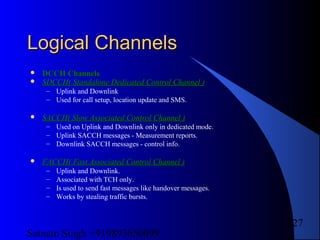
 DCCH ChannelsDCCH Channels
 SDCCH( Standalone Dedicated Control Channel )SDCCH( Standalone Dedicated Control Channel )
– Uplink and Downlink
– Used for call setup, location update and SMS.
 SACCH( Slow Associated Control Channel )SACCH( Slow Associated Control Channel )
– Used on Uplink and Downlink only in dedicated mode.
– Uplink SACCH messages - Measurement reports.
– Downlink SACCH messages - control info.
 FACCH( Fast Associated Control Channel )FACCH( Fast Associated Control Channel )
– Uplink and Downlink.
– Associated with TCH only.
– Is used to send fast messages like handover messages.
– Works by stealing traffic bursts.
Satnam Singh +919893650699
128
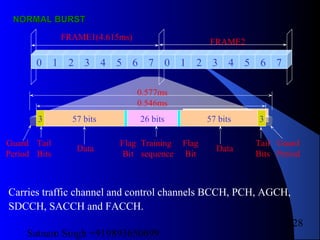
Guard
Period
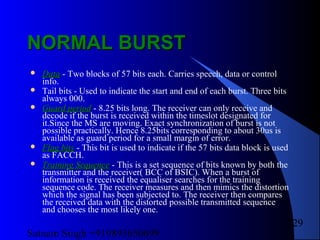
NORMAL BURSTNORMAL BURST
0 1 2 3 4 5 6 7 0 1 2 3 4 5 6 7
57 bits 57 bits26 bits 33
FRAME1(4.615ms)
FRAME2
Training
sequence
Data Data
Tail
Bits
Tail
Bits
Flag
Bit
Flag
Bit
Guard
Period
0.546ms
0.577ms
Carries traffic channel and control channels BCCH, PCH, AGCH,
SDCCH, SACCH and FACCH.
Satnam Singh +919893650699
129
NORMAL BURSTNORMAL BURST
 DataData - Two blocks of 57 bits each. Carries speech, data or control
info.
 Tail bits - Used to indicate the start and end of each burst. Three bits
always 000.
 Guard periodGuard period - 8.25 bits long. The receiver can only receive and
decode if the burst is received within the timeslot designated for
it.Since the MS are moving. Exact synchronization of burst is not
possible practically. Hence 8.25bits corresponding to about 30us is
available as guard period for a small margin of error.
 Flag bitsFlag bits - This bit is used to indicate if the 57 bits data block is used
as FACCH.
 Training SequenceTraining Sequence - This is a set sequence of bits known by both the
transmitter and the receiver( BCC of BSIC). When a burst of
information is received the equaliser searches for the training
sequence code. The receiver measures and then mimics the distortion
which the signal has been subjected to. The receiver then compares
the received data with the distorted possible transmitted sequence
and chooses the most likely one.
Satnam Singh +919893650699
130
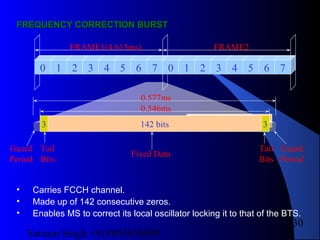
FREQUENCY CORRECTION BURSTFREQUENCY CORRECTION BURST
0 1 2 3 4 5 6 7 0 1 2 3 4 5 6 7
142 bits 33
FRAME1(4.615ms) FRAME2
Fixed Data
Tail
Bits
Tail
Bits
Guard
Period
Guard
Period
0.546ms
0.577ms
• Carries FCCH channel.
• Made up of 142 consecutive zeros.
• Enables MS to correct its local oscillator locking it to that of the BTS.
Satnam Singh +919893650699
131
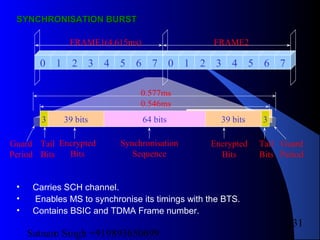
SYNCHRONISATION BURSTSYNCHRONISATION BURST
0 1 2 3 4 5 6 7 0 1 2 3 4 5 6 7
39 bits 33
FRAME1(4.615ms) FRAME2
Synchronisation
Sequence
Tail
Bits
Tail
Bits
Guard
Period
Guard
Period
0.546ms
0.577ms
64 bits 39 bits
Encrypted
Bits
Encrypted
Bits
• Carries SCH channel.
• Enables MS to synchronise its timings with the BTS.
• Contains BSIC and TDMA Frame number.
Satnam Singh +919893650699
132
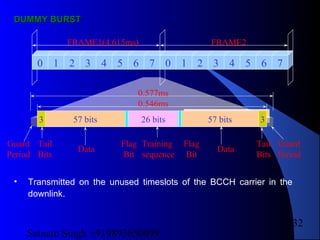
DUMMY BURSTDUMMY BURST
0 1 2 3 4 5 6 7 0 1 2 3 4 5 6 7
57 bits 57 bits26 bits 33
FRAME1(4.615ms) FRAME2
Training
sequence
Data Data
Tail
Bits
Tail
Bits
Flag
Bit
Flag
Bit
Guard
Period
Guard
Period
0.546ms
0.577ms
• Transmitted on the unused timeslots of the BCCH carrier in the
downlink.
Satnam Singh +919893650699
133
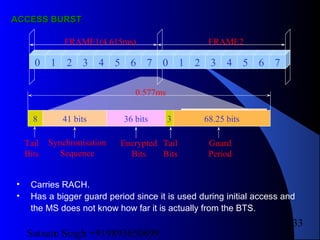
AACCESS BURSTCCESS BURST
0 1 2 3 4 5 6 7 0 1 2 3 4 5 6 7
41 bits 68.25 bits8
FRAME1(4.615ms) FRAME2
Tail
Bits
Tail
Bits
Guard
Period
0.577ms
36 bits
Synchronisation
Sequence
Encrypted
Bits
3
• Carries RACH.
• Has a bigger guard period since it is used during initial access and
the MS does not know how far it is actually from the BTS.
Satnam Singh +919893650699
134
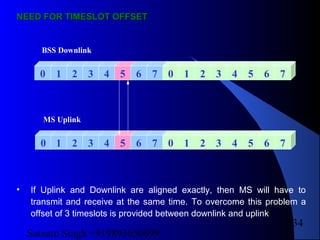
NEED FOR TIMESLOT OFFSETNEED FOR TIMESLOT OFFSET
0 1 2 3 4 5 6 7 0 1 2 3 4 5 6 7
0 1 2 3 4 5 6 7 0 1 2 3 4 5 6 7
BSS Downlink
MS Uplink
• If Uplink and Downlink are aligned exactly, then MS will have to
transmit and receive at the same time. To overcome this problem a
offset of 3 timeslots is provided between downlink and uplink
Satnam Singh +919893650699
135
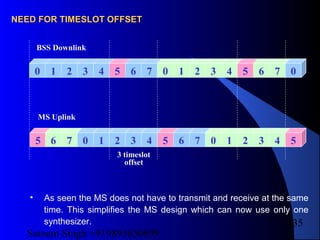
0 1 2 3 4 5 6 7 0 1 2 3 4 5 6 7
5 6 7 0 1 2 3 4 5 6 7 0 1 2 3 4
BSS Downlink
MS Uplink
5
0
3 timeslot
offset
NEED FOR TIMESLOT OFFSETNEED FOR TIMESLOT OFFSET
• As seen the MS does not have to transmit and receive at the same
time. This simplifies the MS design which can now use only one
synthesizer.
Satnam Singh +919893650699
136
Components of Nokia BTSComponents of Nokia BTS
There are two type of Nokia BTS
 Nokia ULTRA
Ultra Indore
Ultra Outdoor
 Nokia METRO
There is some basic different in
these BTS which are goanna to be
discussed later on.
Satnam Singh +919893650699
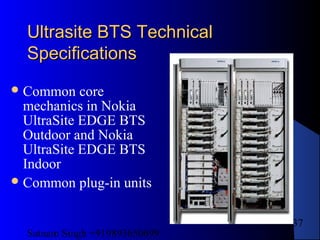
137
Ultrasite BTS TechnicalUltrasite BTS Technical
SpecificationsSpecifications
Common core
mechanics in Nokia
UltraSite EDGE BTS
Outdoor and Nokia
UltraSite EDGE BTS
Indoor
Common plug-in units
Satnam Singh +919893650699
138
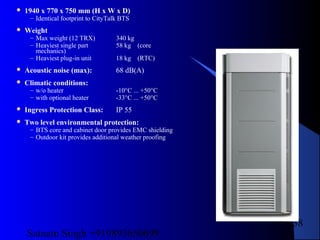
 1940 x 770 x 750 mm (H x W x D)
– Identical footprint to CityTalk BTS
 Weight
– Max weight (12 TRX) 340 kg
– Heaviest single part 58 kg (core
mechanics)
– Heaviest plug-in unit 18 kg (RTC)
 Acoustic noise (max): 68 dB(A)
 Climatic conditions:
– w/o heater -10°C ... +50°C
– with optional heater -33°C ... +50°C
 Ingress Protection Class: IP 55
 Two level environmental protection:
– BTS core and cabinet door provides EMC shielding
– Outdoor kit provides additional weather proofing
Satnam Singh +919893650699
139
Nokia UltraSite EDGE BaseNokia UltraSite EDGE Base
StationStation
with GSM/EDGE and WCDMAwith GSM/EDGE and WCDMA
Nokia UltraSite EDGE BTS cabinet
– up to 6 GSM/EDGE TRXs
– 3 WCDMA carriers (Rel.1), sectorised 1+1+1
– 6 WCDMA carriers (Rel.2), sectorised 2+2+2
WCDMA output power
– 5 W per sector in 1+1+1
– 2 W per sector in 2+2+2
common transmission
sharing feeders through triplexers
common site support provided by
Nokia UltraSite Support
GSM/EDGE
WCDMA
Satnam Singh +919893650699
140
Mechanical CharacteristicsMechanical Characteristics
 1800 x 600 x 570 mm (H x W x D)
– Identical footprint to IntraTalk BTS
– Additional 50 mm free space required
behind cabinet
 Weight
– Max weight (12 TRX) 270 kg
– Heaviest single part 58 kg
(core mechanics)
– Heaviest plug-in unit 18 kg
(RTC)
 Acoustic noise (max): 73
dB(A)
 Climatic conditions: -5°C ... +50 °C
 Ingress Protection Class: IP 20
 BTS core and cabinet door
provides EMC shielding
Satnam Singh +919893650699
141
Temperature Control SystemTemperature Control System
SW controlled cooling
with variable speed fans
–11 unit cooling fans
–1 cabinet cooling fan in UltraSite
EDGE BTS Outdoor
No heat exchangers nor
air-conditioners
Heater unit
–for cold start (< -10ºC)
–optional for UltraSite EDGE
BTS Outdoor
Indoor
Outdoor
Satnam Singh +919893650699
142
Transmission Interface UnitsTransmission Interface Units
PDH radio transmission
– FXC RRI 2 Flexbus interfaces with
2..16 x 2 Mbit/s capacity
Wire line transmission
– FXC E1 & FXC E1/T1 4 E1 (or T1) interfaces
– FC E1/T1 1 E1 or T1 interfaces
Satnam Singh +919893650699
143
Power Consumption with GSMPower Consumption with GSM
TRXsTRXs
BTS type With VACWith VDC
Indoor 3.2 kW2.7 kW
3.4 kW2.9 kWOutdoor
1.8 kW1.5 kWMidi Indoor
Midi Outdoor 2.2 kW 2.5 kW
Maximum configurations with
– GSM 1800 / GSM 1900
– 12 TRX in Indoor and Outdoor
– 6 TRX in Midi Indoor
– full output power in all
timeslots
– 1 transmission unit (no radios)
Power supply redundancy
– with DC full redundancy for 1-12 TRX configurations
– with AC full redundancy for 1-6 TRX configurations
– number of microwave radios may cause limitations
Nominal power consumption:
GSM 900 TRX ~ 200 W
GSM 1800 TRX ~ 220-230 W
GSM 1900 TRX ~ 220-230 W
Satnam Singh +919893650699
144
Antenna Combining OptionsAntenna Combining Options
Combining By-pass
2-way Wideband Combining
4-way Wideband Combining
Remote Tune Combining
Satnam Singh +919893650699
145
ConfigurationsConfigurations
1
2
6+6+6
2+2+2
4+4+4
10+10+10
12+12+12
8+8+8
2
1
1
2
1
1
x
y
y
x
By-pass WBC 2:1 WBC 4:1 RTC
1
1 **
1 **
1
1
1
o/p By-pass 44.5 dBm
WBC 2:1 41.0 dBm
WBC 4:1 37.5 dBm
RTC 42.0 dBm
* ICE+ Feature
** combining type cause extra cabinet
2*
Satnam Singh +919893650699
146
Additional maximum configurations
–1-12 TRX/cell (with BSS10 up to 36 TRX/cell)
–1-108 TRX/site
Max # of TRXs / cabinet
Basic
Basic with 4-way RX diversity
Nokia SRC with 2-way RX diversity
Nokia SRC with 4-way RX diversity
6 TRX BTS12 TRX BTS
12
6
6
6
6
3
3
3
12 TRX BTS with
WCDMA or IBBU
6
3
3
3
Max # of sectors
/ cabinet
Combiner by-pass
WBC 2:1
WBC 4:1
RTC
SRC
3
2
1
1
3
6
4
2
2
6
6 TRX BTS12 TRX BTS 12 TRX BTS with
WCDMA or IBBU
3
2
1
1
3
Satnam Singh +919893650699
147
Combining By-passCombining By-pass
Receive
Multicoupler
Dual Duplex
Unit
AntennasTRX RF Units
Duplexer
LNA
Duplexer
LNAsplitter
splitter
TX
RX main
div
TX
RX main
div
Example:
2 TRX/cell
Satnam Singh +919893650699
148
2-way Wideband Combining2-way Wideband Combining
Example:
4 TRX/cell
TX
RX main
div
Duplexer
LNA
Duplexer
LNA
splitter
splitter
splitter
splitter
TX
RX main
div
TX
RX main
div
TX
RX main
div
WBC
WBC
Satnam Singh +919893650699
149
4-way Wideband Combining4-way Wideband Combining
splitter
splitter
splitter
splitter
splitter
splitter
splitter
splitter
WBC
WBC
WBC
WBC
WBC
WBC
LNA
LNA
DuplexerDuplexer
TX
RX main
div
TX
RX main
div
TX
RX main
div
TX
RX main
div
TX
RX main
div
TX
RX main
div
TX
RX main
div
TX
RX main
div
Satnam Singh +919893650699
150
Remote Tune CombiningRemote Tune Combining
splitter
splitter
Duplexer
LNA's
Cavities
6
6
main
div
6
TX
RX main
div
Antenn
as
TRX RF
Units
Receive
Multicouplers
Remote Tune
Combiner
Satnam Singh +919893650699
151
Material req. for installationMaterial req. for installation
• TRANSCEIVER
Consists of two parts:
– Transceiver RF Unit
– Transceiver Baseband Unit
– Consists of one transmitter, one main
receiver and one diversity receiver
Satnam Singh +919893650699
152
TRXsTRXs
Satnam Singh +919893650699
153
DUAL BASEBAND UNITDUAL BASEBAND UNIT
Dual Baseband Unit (1-6 units)
– Performs DSP functions
– Consists of two independent Transceiver Baseband
Modules
– Each Baseband module independently supports its
own Transceiver RF Unit.
– Each module independently controls its own
frequency hopping function
Satnam Singh +919893650699
154
DUAL BASEBANDDUAL BASEBAND
99584316
B B 2 A 1 1B B 2 A 1 1
S T A T U SS T A T U S
AA
BB
Satnam Singh +919893650699
155
DUAL BASEBANDDUAL BASEBAND
F-bus signals
Clock and
Control signals
D-bus signals
Uplink and
Downlink signals
Section A
D-bus
Interface
Section B
D-bus
Interface
Section A
Control
Block
Section B
Control
Block
Section A
DSP Block
Section B
DSP Block
F-bus for both
Section A and
Section B
Satnam Singh +919893650699
156
DUAL DUPLEXDUAL DUPLEX
– Performs duplex operation of the TX and RX signals
into a common antenna
– Provides filtering and amplification for main and
diversity receive signals
– Contains variable low and high gain LNAs for
optimal amplification of the receive signal from the
optional masthead amplifier
– Sub-banded for the GSM 1800 to increase TX/RX
separation and achieve better performance
Satnam Singh +919893650699
157
DUAL DUPLEXDUAL DUPLEX
99614746
Combines outputs from GSM 900 and GSM 1800 DDUs
or RTCs into one antenna feeder
Satnam Singh +919893650699
158
DUAL BAND DUPLEXDUAL BAND DUPLEX
99614797
Antenna
RX/TXGSM1800band
RX/TXGSM900band
Satnam Singh +919893650699
159
COMBINERCOMBINER
Wideband Combiner (0-9 units)
– Combines the output of two transmitters into one
antenna (with 1 WBC)
– Combines the output of four transmitters into one
antenna (with 3 WBC)
Remote Tune Combiner (0-2 units)
– Combines the output of up to six transmitters into one
antenna
Satnam Singh +919893650699
160
WIDEBAND COMBINERWIDEBAND COMBINER
99614773
Satnam Singh +919893650699
161
REMOTE TUNE COMBINERREMOTE TUNE COMBINER
Satnam Singh +919893650699
162
MULTICOUPLERMULTICOUPLER
 Distributes RX signals to the TRX RF units
 Performs signal splitting for both main and
diversity branches
– 2-way Receive Multicoupler (0-6 units)
 Used in most wideband combining or combining by-pass
configurations
– 6-way Receive Multicoupler (0-2 units)
 Used in conjunction with the RTC configuration
Satnam Singh +919893650699
163
MULTICOUPLERMULTICOUPLER
M2xA M6xA
Satnam Singh +919893650699
164
MASTHEAD AMPLIFIREMASTHEAD AMPLIFIRE
– Provide 33 dB
RX gain for the
GSM 1800/GSM
1900 Base
Stations
– Provide 32 dB
RX gain for the
GSM 900 Base
Stations
Satnam Singh +919893650699
165
BIAS-TEEBIAS-TEE
– Provides DC power to the
MHA via an RF cable
– Two versions of Bias-Tee
available:
 Bias-Tee without VSWR
antenna monitoring
 Bias-Tee with VSWR
antenna monitoring
 Bias-Tee with VSWR
monitoring
– Checks the condition of the
antenna line
– Creates alarm if measured
parameters exceed the limits
– Can be used with or without
the MHA
 Bias-Tee without VSWR
monitoring
– No VSWR monitoring
capabilities
– Solely used with the MHA
Satnam Singh +919893650699
166
BIAS-TEEBIAS-TEE
Satnam Singh +919893650699
167
TRANSMISSION UNITTRANSMISSION UNIT
 Interconnects UltraSite BTSs
 Connects other components of the network such as BSCs,
and other BTSs through the Abis interface.
 Transmission media can be either a radio link
transmission, E1/T1 wire line transmission, or a fibre
optic transmission (STM-1)
 UltraSite BTS supports 16, 32,and 64 kbits/sec data rates
for transceiver RF signaling via Abis interface
 O&M signaling data rate can be 16 or 64 kbits/s
Satnam Singh +919893650699
168
TRANSMISSION UNITTRANSMISSION UNIT
FC E1/T1 (Wire line transmission)
– No cross-connection capability
– Only 1 FC E1/T1 unit is allowed per
BTS cabinet
– Provides 1x2 Mbit/s 75/120 ohms OR
1x1.5 Mbit/s 100 ohms interfaces
Satnam Singh +919893650699
169
TRANSMISSION UNITTRANSMISSION UNIT
RXline
T X li n e
RX/TXline
7 5 1 2 0 / 1 0 0 99591936
Satnam Singh +919893650699
170
TRANSMISSION UNITTRANSMISSION UNIT
FXC E1 and FXC E1/T1 (Wire line transmission)
– Provides cross-connection capability at 8 kbit/s
– Supports grooming, branching and loop protection
– FXC E1
 4x2 Mbit/s interfaces
 4 coaxial 75 ohms TX/RX interfaces
– FXC E1/T1
 4x2/1.5 Mbit/s interfaces
 4 twisted pair 120/100 ohms TX/RX interfaces
RX/TX (Flexbus radio 2)
RX/TX (Flexbus radio 1)
Satnam Singh +919893650699
171
TRANSMISSION UNITTRANSMISSION UNIT
FXC STM (SDH Fibre Optic Radio
Transmission)
– FXC STM-1
 Optical interface with 63 x 2 Mbit/s
– FXC Bridge
 Always used with FXC STM-1 for BTS internal 21x2 Mbit/s
add/drop capacity
– 2 optical STM-1 interfaces
– Add and drop functionality
– Loop and equipment protection
Satnam Singh +919893650699
172
TRANSMISSION UNIT fxc stmTRANSMISSION UNIT fxc stm
OpticalSTM-1interface2
OpticalSTM-1interface1
TX
RX
TX
RX
Powerinterface2
Powerinterface1
00133344
Satnam Singh +919893650699
173
TRANSMISSION UNIT fxc stmTRANSMISSION UNIT fxc stm
Q interfaceX
Satnam Singh +919893650699
174
BOIBOI
Base Operation
and Interface units
(1 unit)
– Responsible for the
control functions
common to all other
units such as O&M
functions, main clock
functions, and
external alarms
collection
00129021
BOIABOIA
STATUSSTATUS
RESETRESET
LMPLMP
FCLKFCLK
13 MHz13 MHz
MONITOR
INTERFACE
MONITOR
INTERFACE
Satnam Singh +919893650699
175
POWER SUPPLYPOWER SUPPLY
 PWSA (AC)
– Operates on AC input
power and provides the
DC output power voltage
– BTS can accommodate up
to 2 AC power supplies
– PWSA supports full
redundancy up to 6 TRX
configuration
– Provide power feed to the
MHAs
99584258
R(FLT)
Y(STANDBY)
G(OPR)
Satnam Singh +919893650699
176
POWER SUPPLYPOWER SUPPLY
 PWSB (1-3 units)
– Operates on DC input
power and provides the
DC output power voltage
– BTS can accommodate up
to 3 DC power supplies
– PWSB Supports full
redundancy for up to 12
TRX configuration
– Provide power feed to the
MHAs
R(FLT)
Y(STANDBY)
G(OPR)
99584285
Satnam Singh +919893650699
177
TEMPRATURE CONTROL SYSTEMTEMPRATURE CONTROL SYSTEM
 Controls
– Door mounted Cabinet Cooling Fan (1) part of the Outdoor Application Kit
(OAKA)
– Unit fans (11) of the cabinet core
– BOIA unit controls the speed of the fan units according to the temperature
information from other units
– Cooling is performed depending on the temperature of the particular unit
 Heater Unit (1)
– Needed in the Outdoor BTS cabinet to cold start when the operating temperature
is in the range of -10 and -33
o
C (+14 and -27
o
F)
– Maintain interior cabinet temperature
Satnam Singh +919893650699
178
CABINET COOLING FANCABINET COOLING FAN
00159448
Locationfor
cabinetfan
Cabinetfan
assembly
Cabinetfan
cover
Wiringtofan
powerandcontrol
Satnam Singh +919893650699
179
HEATER UNITHEATER UNIT
00159436HeaterunitCoverplate
Wiringtoheater
powerandcontrol
Satnam Singh +919893650699
180
UNIT FANSUNIT FANS
3 Unit fans
(Transceiver area)
3 Unit fans
(Transceiver or IBBU area)
NOTE:11 Unit fans per cabinet
1 Unit fan
(BB2x, BOI)
Cabinet
Interface
Area for installation of
WCxx/ DVxx or RTxx
1 Bottom RF Filter unit fan
(Horizontal mounting,not
used with IBBU configuration)
1 Top RF Filter unit fan
(Horizontal mounting)
2 Unit fans
(Power supply area)
Satnam Singh +919893650699
181
ELECTRICAL REQUIREMENTELECTRICAL REQUIREMENT
TYPE OF POWER SUPPLY BATA
AC
PWSA
AC
PWSB
DC
Nominal Voltage 208-230 V 208-230 V -48 / 60 V
Permitted Voltage Range 166-276 V 166-276 V -36 to-72V
AC Voltage frequency range 50-60Hz 50-60Hz N/A
Configuration: Input voltage Circuit Breaker /
Fuse Rate:
External DC supply DC -48 V 125A
External DC supply DC -60 V 100A
IBB + 6 TRX AC 230 V 3 X 16A
IBB + 6 TRX + Heater AC 230 V 3 X 25A
SSU + 12 TRX AC 230 V 3 X 25A
SSU + 12 TRX + Heater AC 230 V 3 X 35A
Configuration Typical Watts Maximum watts Heat dissipation / W
1 TRX TRX alone 190 295 168
1 BTx Booster alone 310 391 201
6 TRX With Cabinet 2300 2402
12 TRX With Cabinet 3900 4803
1BATA Rectifier 1444
Satnam Singh +919893650699
182
InstallationInstallationProperty Value Connector Type
Antenna Connectors 6 + 6 optional
Max. 48dBm / TRX
7/16 (DIN) female
AC Supply 166 - 276 V Screw latch 0.5…16mm
DC Supply - 36 to - 72V Screw latch 16…50mm
Grounding ≤ 10 Ω. Busbar, 5 and 8mm
screw
ESD Stud
External Alarm s And Controls TTL D - 37 pin or optional
screw latch
Frame Number, Frame Clock,
Mains and SISU alarm input
RS - 485 D - 15 pin
Frame Number, Frame Clock,
Mains and SISU alarm output
RS - 485 D - 15 pin
Abis 2 Mbit/s (E1) or 1.5
Mbit/s (T1) PCM
TQ female for 120
ohm / BT43 female
for 75 ohm
DTRU FXC RRI Radiolink i/o TNC
Q1 Interface -SISU RS - 485 TQ
Q1 Interface RS - 485 TQ
MMI / ILMT RS - 232 BQ
13 MHz test clock At BOI front panel 50 ohm SMB female
Test FCLK At BOI front panel 50 ohm SMB female
Test / Monit or Interface BOIA unit LVTTL D - 25 female
Satnam Singh +919893650699
183
CABLE ENTRY BLOCKCABLE ENTRY BLOCK
Nut (7x)
Bracket
Captive
bolt (7x)
Roof hinge pin,
spring loaded
(2x)
Top of cabinet with
cover removed
Cable entry
block, 6 sections
Satnam Singh +919893650699
184
EXTERNAL INTERFACEEXTERNAL INTERFACE
Cabinet
interface
Input/Output
Qx connectors to be changed to D-9
External interface
External Alarms Inputs
Control Outputs
Q1_, Q1_2, Q1_SSS
Satnam Singh +919893650699
185
EXTERNAL INTERFANCEEXTERNAL INTERFANCE
Cabinet
Interface
Customer
Interface
Site Support
Interface
EMC Cover for
Transmission units
12 TX/RX Antennas
(also 6 on back)
as required
Abis Interface
access to
Transmission Unit
DC Power
Input - Right side
(AC Power
input - Left side, optional)
Satnam Singh +919893650699
186
ULTRASITE INDOOR CABINETULTRASITE INDOOR CABINET
Roof
Core
Mechanics
EMC Back
Door
Satnam Singh +919893650699
187
ULTRASITE OUTDOORULTRASITE OUTDOOR
Roof
Core
Mechanics
EMC Plate,
Back
Back wall
Door
Plinth
Side, Left
Side, Right
NOTE:
Door Frame mechanics not
shown for clarity.
Satnam Singh +919893650699
188
GROUNDING CONNECTIONGROUNDING CONNECTION
Cabinet
ground cable
Cabinet
ground cable
CRMA back
Antenna box
M8
M5
Ground nut
Ground bolt
Ground lug
Top view of cabinet Side view of cabinet
Cabinet
ground cable
Back cover
Antenna box
Satnam Singh +919893650699
189
AC SINGLE PHASE POWER CONNECTIONAC SINGLE PHASE POWER CONNECTION
L1
L2
L3
N
PEAC Power
input cable
Shorting bar
NOTE: Power input wiring must adhere to local codes.
L1, L2, L3 (Short Circuited)=Phase 1
N= Phase 2, PE= Ground
Satnam Singh +919893650699
190
DC Power
input cable
(+)
V 48RTN
V 48N
(-)
Satnam Singh +919893650699
191
– Integrated Battery Backup Unit
– Remote Tune Combiners
– Dual Duplex Unit / Dualband Duplex Units
– AC or DC Power Supply Units
– Transceivers
– Receiver Multicouplers
– Wideband Combiners
– Dual Baseband Units
– Base Operation and Interface Unit
– Transmission Units
– Bias-Tee
– Antenna Filter Cables
Satnam Singh +919893650699
192
COMBININGCOMBINING
ANT 1ANT 1
ANT 2ANT 2
X 1X 1
TX 2TX 2
TX 1TX 1
Warning! The weight of
this unit is over 10kg
Warning! The weight of
this unit is over 10kg
RX 2RX 2
RX 1RX 1
RX 2extRX 2ext
RX 1extRX 1ext
R (FLT)
Y (ALM)
G (OPR)
R (FLT)
Y (ALM)
G (OPR)
RXRX
TXTX
DIV
RX
DIV
RX
RXRX
TXTX
DIV
RX
DIV
RX
RX
IN
RX
IN
RX1RX1
RX2RX2
DRX1DRX1
DRX2DRX2
DRX
IN
DRX
IN
Multipin Connection
to TRX Backplane
#993741X3
Antenna: TX/RX 1,
Diversity RX 2, #993744X3
Antenna: TX/RX 2,
Diversity RX 1, #993744X3
#993856X1
(2 places)
#993857X1
(6 places)
Satnam Singh +919893650699
193
COMBINING 2 WAYCOMBINING 2 WAY
TX1TX1 TX OUTTX OUT TX2TX2
RXRX
TXTX
DIV
RX
DIV
RX
RXRX
TXTX
DIV
RX
DIV
RX
RXRX
TXTX
DIV
RX
DIV
RX
RXRX
TXTX
DIV
RX
DIV
RX
RX
IN
RX
IN
RX1RX1
RX2RX2
DRX1DRX1
DRX2DRX2
DRX
IN
DRX
IN
RX
IN
RX
IN
RX1RX1
RX2RX2
DRX1DRX1
DRX2DRX2
DRX
IN
DRX
IN
Multipin Connection
to TRX Backplane
#993741X3
Antenna: TX/RX 1,
Diversity RX 2, #993744X3
Antenna: TX/RX 2,
Diversity RX 1, #993744X3
ANT 1ANT 1
ANT 2ANT 2
X 1X 1
TX 2TX 2
TX 1TX 1
Warning! The weight of
this unit is over 10kg
Warning! The weight of
this unit is over 10kg
RX 2RX 2
RX 1RX 1
RX 2extRX 2ext
RX 1extRX 1ext
R (FLT)
Y (ALM)
G (OPR)
R (FLT)
Y (ALM)
G (OPR)
99624799
#993856X1
(4 places)
#993857X1
(8 places)
#993857X1 or #993747X3
depending on length,
(6 places)
Satnam Singh +919893650699
194
COMBINING 4 WAYCOMBINING 4 WAY
ANT 1ANT 1
ANT 2ANT 2
X 1X 1
TX 2TX 2
TX 1TX 1
Warning! The weight of
this unit is over 10kg
Warning! The weight of
this unit is over 10kg
RX 2RX 2
RX 1RX 1
RX 2extRX 2ext
RX 1extRX 1ext
R (FLT)
Y (ALM)
G (OPR)
R (FLT)
Y (ALM)
G (OPR)
TX1TX1 TX OUTTX OUT TX2TX2
RXRX
TXTX
DIV
RX
DIV
RX
RXRX
TXTX
DIV
RX
DIV
RX
RXRX
TXTX
DIV
RX
DIV
RX
RXRX
TXTX
DIV
RX
DIV
RX
RX
IN
RX
IN
RX1RX1
RX2RX2
DRX1DRX1
DRX2DRX2
DRX
IN
DRX
IN
RX
IN
RX
IN
RX1RX1
RX2RX2
DRX1DRX1
DRX2DRX2
DRX
IN
DRX
IN
99624806
Multipin Connection
to TRX Backplane
#993741X3
Antenna: TX/RX
#993744X3
Antenna, Diversity RX
#993744X3
#993856X1
(4 places)
#993857X1
(8 places)
#993857X1 or #993747X3
depending on length,
(7 places)
Satnam Singh +919893650699
195
REMOTE TUNE COMBINGREMOTE TUNE COMBING
RXRX
TXTX
DIV
RX
DIV
RX
RXRX
TXTX
DIV
RX
DIV
RX
RXRX
TXTX
DIV
RX
DIV
RX
RXRX
TXTX
DIV
RX
DIV
RX
RXRX
TXTX
DIV
RX
DIV
RX
RXRX
TXTX
DIV
RX
DIV
RX
Multipin Connection
to TRX Backplane
#993741X3
#993856X1
NOTE: Unlabeled cables are #993857X1
(18 places)
Antenna: TX/RX
#993744X3
Antenna: Diversity RX
#993744X3
RX1RX1
RX2RX2
RX3RX3
RX4RX4
RX5RX5
RX6RX6
RX
IN
RX
IN
DRX1DRX1
DRX2DRX2
DRX3DRX3
DRX4DRX4
DRX5DRX5
DRX6DRX6
DRX
IN
DRX
IN
TX 1TX 1
TX 2TX 2
TX 3TX 3
TX 4TX 4
RESETRESET
R(FLT)
Y(ALM)
G(OPR)
R(FLT)
Y(ALM)
G(OPR)
TX 5TX 5
TX 6TX 6
RXRX RXExtRXExt
P
W
R
I
N
P
W
R
I
N
DAntDAnt
AntAnt
DRXDRX
WARNING! The weight of
this unit is over 10kg
WARNING! The weight of
this unit is over 10kg
99624818
Satnam Singh +919893650699
196
Commissioning procedureCommissioning procedure
Technical descriptions of UltraSite BTS
Hub Manager
Satnam Singh +919893650699
197
File
Commissioning
BTS SW
Objects
Supervision
Tests
Tools
Connection
Window
Help
Satnam Singh +919893650699
198
FILEFILE
Creating and managing files Printing files
Satnam Singh +919893650699
199
OPTIONSOPTIONS
Satnam Singh +919893650699
200
TOOLSTOOLS
Satnam Singh +919893650699
201
CONNECTIONCONNECTION
Satnam Singh +919893650699
202
HELPHELP
Satnam Singh +919893650699
203
BTS HW CONFIGRATIONBTS HW CONFIGRATION
Satnam Singh +919893650699
204
CABINET UNITSCABINET UNITS
Satnam Singh +919893650699
205
BB2 Tx CROSS CONNECTIONBB2 Tx CROSS CONNECTION
Satnam Singh +919893650699
206
TX CABLINGTX CABLING
Satnam Singh +919893650699
207
RX MAIN CABLINGRX MAIN CABLING
Satnam Singh +919893650699
208
RX-DIV CABLINGRX-DIV CABLING
Satnam Singh +919893650699
209
ANTENNA SETTINGANTENNA SETTING
Satnam Singh +919893650699
210
Steps
1. Connect the LMP cable.
2. Power on the UltraSite EDGE BTS.
3. Install BTS Manager.
4. Install BTS Hub Manager.
Satnam Singh +919893650699
211
Commission the UltraSite EDGE BTSCommission the UltraSite EDGE BTS
Commission the UltraSite EDGE BTS with IBBU.
a. Check the BIOS.
b. Upgrade the BIOS.
c. Upgrade CCUA software.
d. Prepare to commission with PSM Node Manager.
e. Connect to PSM Node Manager remotely.
f. Connect to PSM Node Manager locally.
g. Enter system type and set up details.
h. Enter product code, serialisation and configuration details for SiSS
node.
i. Enter documentation, site details and cabinet mechanics details.
j. Enter product code and serialisation details for rectifiers.
k. Enter product code and serialisation details for batteries.
l. Enter product code and serialisation details for climatic control
unit.
m. Check the configuration and complete commissioning.
n. Print a commissioning report.
o. Check power management settings.
p. Check climatic control settings.
q. Check system settings.
r. Check identifications.
Satnam Singh +919893650699
212
Before you start
 Before commissioning, the physical installation
of the BTS (units, cabling, antennas and radios)
must be complete.
 Steps
 1. Connect the LMP cable.
 2. Power on the UltraSite EDGE BTS.
 3. Set the BOIx unit 13 MHz clock.
 4. Install BTS Manager.
 5. Install BTS Hub Manager.
 6. Install PSM Manager.
 7. Commission the BTS.
Satnam Singh +919893650699
213
BTS Manager
 Nokia BTS Manager has
the following main
features:
 auto-detected base station
hardware in a graphical
Equipment view
 support for transmission
configuration
 advanced BTS diagnostics
and alarm management
 BTS testing
 Commissioning Wizard
Satnam Singh +919893650699
214
LMP CABLE CONFIGRATIONLMP CABLE CONFIGRATION
 Steps
 1. Remove the protective cover
from the LMP port on the
BOIx for GSM/EDGE
connection.
 2. Connect the D9 female
connector to the PC.
 3. Connect the D9 male
connector to the LMP port on
the BOIx for GSM/EDGE
connection.
LMP cable conenction
Satnam Singh +919893650699
215
Setting the BOI 13MHz clock
 Steps
 1. Connect the frequency counter to the 13 MHz test connector on the
BOIx front panel with an appropriate test cable.
 2. Check the current and permanent DAC value with the BTS Manager.
 3. Adjust the trigger level on the counter to produce a frequency
reading.
 4. Set the measuring period to one second for the first adjustment.
 5. Adjust the current DAC value to 13 000 000.0 Hz with the BTS
Manager.
 Click the Set as current button.
 6. Save the current DAC value as the permanent DAC value with the
 BTS Manager.
 When adjustments are complete, click the Save Current Permanently
 button.
 7. Adjust the maximum measuring period to achieve the required
 sampling accuracy.
 8. Re-check the displayed frequency.
 9. If you must make more adjustments, Then
 Readjust the frequency.
 a. Adjust the frequency to 13 000 000.0 Hz with the BTS Manager (see
 steps 4 and 5).
 b. After adjusting the frequency, save the DAC value permanently.
Satnam Singh +919893650699
216
Commissioning GSM/EDGE
UltraSite
 Nokia UltraSite EDGE BTS is manually commissioned,
using these Nokia software applications:
 BTS HW Configurator - a tool for creating, checking,
and updating the configuration of an UltraSite EDGE
BTS cabinet.
 BTS Hub Manager - a tool for configuring and testing the
transmission of the BTS and its Hub node (if there are
FxC units in the configuration).
 BTS Manager - a tool for configuring, commissioning
and managing UltraSite EDGE BTS and related
transmission equipment. BTS Commissioning Wizard is
included in BTS Manager (includes FC E1/T1
transmission unit configuration).
Satnam Singh +919893650699
217
1) Define the BTS configuration with Nokia
BTS HW Configurator. Nokia BTS HW
Configurator allows you to use an existing
configuration or to create a new
configuration, if there is no pre-defined
hardware configuration file available for the
BTS. A BTS HW configuration file with basic
UltraSite BTS configurations is delivered with
Nokia BTS HW Configurator. You may use the
default parameters or modify them as
necessary.
Satnam Singh +919893650699
218
2) Commission the FXC transmission units
with Nokia UltraSite BTS Hub Manager. The
transmission of the BTS and its Hub node are
configured and tested during commissioning
with Nokia UltraSite BTS Hub Manager. FXC
transmission units can be manually
commissioned or commissioned based on a
node file. When commissioning based on a node
file, send the node file to the node during the
commissioning procedure with the Nokia
UltraSite BTS Hub Commissioning Wizard.
This allows more network setup to be done off-
site.
Satnam Singh +919893650699
219
3) Commission the BTS with BTS
Commissioning Wizard. The BTS
Commissioning Wizard guides you through the
commissioning tasks, including manual entry of
commissioning parameters. Commissioning
Wizard runs automatic BSC-controlled tests
and generates the BTS Commissioning Report,
which contains information collected during the
commissioning procedure. FC E1/T1
transmission units are configured during this
step.
Satnam Singh +919893650699
220
Hub configuration of GSM/EDGE UltraSite
Steps
1. Open the Nokia UltraSite BTS Manager.
From the Nokia Applications submenu on the Start | Programs menu in
Windows, select Nokia UltraSite BTS Manager.
Wait until the BTS Manager has properly started and only then move to the
next step.
2. Start the Nokia UltraSite BTS Hub Manager.
Start Nokia UltraSite BTS Hub Manager from the BTS Manager's Tools
menu. When the connection has been established, the Equipment view opens
automatically.
3. If the connection fails, Then Troubleshoot the connection.
Verify the connection speed and LMP cable connection from the Tools |
Options | Manager options. You can also try the Connection | Connect...
command and enter the connection parameters in the Connect to Node
window. Using the Nokia Connection Tool, refer to the applications online
Help.
Satnam Singh +919893650699
221
4. Define LIF settings.
a. Define FXC E1/T1 LIF settings.
b. Define FXC RR1 LIF settings.
5. Adjust identification settings.
6. Adjust service interface settings.
7. Configure radio units for FXC RRI units.
8. Adjust synchronisation settings.
9. Adjust synchronisation loop bit settings.
10. Adjust Q1 management settings.
11. Adjust alarm property settings .
12. Allocate transmission capacity.
13. Create bi-directional cross-connections.For more information about
cross-connections, see Overview of managing cross-connections.
14. Exit UltraSite BTS Hub Manager.
BTS Manager opens automatically if you started the UltraSite Hub
Manager from the BTS Manager.
Satnam Singh +919893650699
222
Defining Line Interface (LIF) settings
 The line interface (LIF) settings available for each transmission unit depend on the type of the unit: FXC E1(/T1)
or FXC RRI.
1. View unit-specific menu.
Click the appropriate FXC E1(/T1) unit in the Equipment view in Nokia
UltraSite BTS Hub Manager. A unit-specific menu displays on the menu bar.
2. Display unit-specific settings.
Select LIF Settings on the FXC E1/T1 menu. The LIF Settings window displays.
3. Select the tab for the line interface you want (LIF 1 - LIF 4).
4. If the interface will be used, Then Select the Interface in Use option.
Else If the interface is not in use,
a. Deselect this option and proceed to the settings of another interface
5. Name the interface.
Type a name for the interface in the Interface Name field.
6. Select the mode.
Select the mode from the Interface Mode list.
7. If you selected the E1 75 ohm interface mode or the E1 120 ohm interface mode
Define TS0 fixed bits in the LIF Settings window for E1 120 ohm mode
Only bits 4 - 8 can be modified, as bits 1 - 3 are reserved for CRC,
frame alighnment and far end alarm indication.
Select the CRC in Use option if an E1 signal in multiframe mode is used.
When using an E1 basic (double) frame, then the CRC in Use option
should be de-selected (no checkmark in box).
8. If you selected the T1 100 ohm interface mode,
Then
Define the Framing Format, Line Code and T1 Interface Type settings
in LIF Settings window for T1 100 ohm mode .
9. Accept the changes.
Click Apply button to accept the changes for the selected LIF tab. The
Apply button is disabled if you made no changes.
10. If necessary, verify or modify the settings for the other line interfaces
as described in steps 1 through 9.
11. Click OK to accept the changes.
12. Repeat steps 1 through 11 for all other FXC E1(/T1) transmission
units in the configuration.
Satnam Singh +919893650699
223
Adjusting identification settings
 You can adjust the identification settings for the managed
node using the Hardware Identifications dialogue. The
user can fill in the name, site name, group name and site
location, and these are valid for the whole node.
Steps
1. Connect to the node or open a file
2. Select Configuration . Identifications... The Hardware
Identifications dialogue opens.
3. Select which identifications data you want to adjust,
fill in the required information and click OK
Satnam Singh +919893650699
224
Configuring radio units for FXC RRI
Steps
1. Click a FXC RRI transmission unit in the Equipment
view in UltraSite BTS Hub Manager.
2. Select Radio Wizard on the FXC RRI menu to launch
the Wizard. The Radio Wizard is launched from the
Nokia RRI Manager application.
3. The Flexbus Settings page displays the type of the
indoor unit and the outdoor units connected to each
Flexbus.
Satnam Singh +919893650699
225
Configuring radio units for FXC RRI
Satnam Singh +919893650699
226
Configuring radio units for FXC RRI
4. Select the capacity for each outdoor unit from the
Capacity drop down list and select the Commission
the unit and In Use option for each Flexbus you want
to use. At least one outdoor unit must exist and be
selected for commissioning (Commission the unit),
before you can continue to the next Wizard page.
5. Click Next to continue.
Satnam Singh +919893650699
227
Configuring radio units for FXC RRI
Satnam Singh +919893650699
228
Configuring radio units for FXC RRI
Satnam Singh +919893650699
229
Configuring radio units for FXC RRI
 The Monitoring Hop page displays the status of the
hops during and after the commissioning. The
commissioning may take some time, and the Status field
displays the message 'reading status'.The status changes
to 'Ready', if the commissioning was successful. If the
commissioning fails for some reason, the Status field
gives a short description of the failure (for example,
'Trying... no far end found').
Satnam Singh +919893650699
230
Satnam Singh +919893650699
231
Adjusting synchronisation settings
1. Connect to the node or file.
2. Open Synchronisation window.
Select Configuration | Synchronisation menu command to open the
Synchronisation window.
3. Select the network topology according to the network type being built
(chain or loop).
When Loop is selected, any interface with the Far end alarm active is not
accepted as a synchronisation source. However, if Chain is selected, these
interfaces are also accepted.
4. Set synchronisation priorities.
You can set up to four synchronisation priorities. For each priority you
must select a timing source.
. Rx Clock type for an FXC E1 or FXC E1/T1 unit requires that an
interface is also chosen.
. Rx Clock type for an FXC RRI unit requires that Flexbus and
channel are also chosen.
. When Sync Input is selected, only FXC E1 or FXC E1/T1 units can
be selected for the source, and the interface is fixed to 4.
. When Internal timing is selected, all subsequent priorities will be
disabled.
5. If necessary, adjust the display of the used synchronisation source.
Click the Refresh button to adjust the display.
Satnam Singh +919893650699
232
Adjusting alarm property settings
 The Alarm Properties dialogue allows you to
view and modify alarm properties of a node,
FXC transmission unit, and outdoor unit.
 Steps
1. Select Configuration . Alarm Properties...
Select FXC RRI.Alarm Properties... to view
FXC transmission unit or outdoor unit in
MetroHub or UltraSite
Expected outcome
 The Alarm Properties dialogue opens.
Satnam Singh +919893650699
233
Allocating F(X)C transmission capacity
of UltraSite EDGE BTS
You must now allocate BTS transmission capacity on the D-
bus. Use the Traffic Manager, which is a graphical tool
that allows you to allocate BTS transmission capacity,
regardless of which Nokia UltraSite transmission unit is
used. You must define the unit (for example, 1 E1/T1),
the interface (with FXC units), and the incoming timeslot
allocation on the Abis according to the transmission plan.
The D-bus allocation menu also allows for manual
optimisation of cross- connections along a D-bus. This is
a manual process of allocation whereas the Traffic
Manager performs this operation automatically. By
performing manual D-bus allocations, information for all
traffic signals inside the D-bus (EDAP, OMUSIG, TCH,
TRXSIG) can be received by the BTS. If you use the D-
bus allocations alone, you must create the cross-
connections individually with the Cross-connection
Wizard. This method of allocation is used to optimise the
traffic in the D-bus. Define the capacity to be used by
selecting its signal type (EDAP, TCHs, TRXSIG,
OMUSIG, or TRXSIG on TCHs) and by reserving
required time slots and bits.
Satnam Singh +919893650699
234
Traffic ManagerTraffic Manager
Steps
1. Open Traffic Manager.
Select the Traffic Manager command on the Configuration menu in Nokia
UltraSite BTS Hub Manager. The Traffic Manager window is displayed.
2. Select the line interface being used.
Select from Interface 1 to Interface 4 with FXC E1(/T1) and up to 16
Channels/FlexBus with RRI transmission units. The number of available
channels is decreased when FlexBus capacity is set to other than 16 x 2M.
An FC E1/T1 unit has only Interface 1 available, because it has only one
line interface.
3. Allocate transmission capacity.
a. Click the TCHs button.
b. Click in a cell in the Abis allocation for the BTS time slot table.
c. Repeat step b to allocate transmission capacity to all TRXs in the
BTS configuration.
Satnam Singh +919893650699
235
Traffic ManagerTraffic Manager
4. Select the link speed (alternative 1).
a. Click the TRXSIG button.
b. Click the first bit in a timeslot in the Abis allocation table.
c. Select the TRX to be defined from the pop-up menu.
d. Select the link speed from the pop-up menu.
e. Repeat steps b to d for all TRXs in the BTS configuration.
f. Click the OMUSIG button.
g. Click a cell in the Abis allocation table.
h. Select the link speed from the pop-up menu.
5. Select the link speed (alternative 2).
a. Click the TRXSIG on TCHs button.
b. Click the first bit in a timeslot you reserved for TCHs in step 3.
c. Select the link speed from the pop-up menu.
d. Repeat step c for all TRXs in the BTS configuration.
e. Click the OMUSIG button.
f. Click a cell in the Abis allocation table.
g. Select the link speed from the pop-up menu.
Satnam Singh +919893650699
236
Traffic ManagerTraffic Manager
6. If you want to modify the allocation table at this
point, Then You must first delete prior
allocations.
a. Right-click on the cell to be modified.
b. Delete either one signal allocation, all signal
allocations or delete all allocations for the
selected port.
7. Verify the signal timing. Verify that the signal
timing (either Normal or Satellite) is correctly
set.
8. Click OK to send the information to the BTS.
Satnam Singh +919893650699
237
Bi-directional cross-connections
Because there is no Cross-connections file available, cross-connections for each
transmission unit are created with Nokia UltraSite BTS Hub Managers cross-
connections tool. This FXC transmission unit configuration work includes also
cross-connections on the D-bus.
Cross-connections define how signals are routed from an FXC transmission unit
to another transmission unit. Cross-connections are created into banks that are
either active or inactive. The cross-connections in the active banks are in use,
whereas you can use those in the inactive banks for creating or editing cross-
connections. This procedure describes how to manually create bi-directional
cross-connections.
Satnam Singh +919893650699
238
Steps
1. Start creating cross-connections.
Select the Cross-connections menu in the Configuration menu.
2. Open the active bank page.
3. Copy cross-connection bank.
Click Copy to copy the active bank into the inactive bank.
4. Open the
Add cross-connections Wizard.
Go to the Inactive Bank and click the Add button to open the Add Cross-
connection Wizard.
5. Alternatively, initiate a cross-connection from the graphical view.
The Add Cross-connection Wizard displays.
6. Define cross-connection settings.
Define the following settings according to the cross-connection plan:
. label (name) of the new cross-connection (maximum 80 characters)
. cross-connection type; in this case the type is bi-directional
. granularity (with nx64k set also its coefficient n)
7. Select termination point settings.
Click Next button to display the Overview window, where you can edit the
termination point(s).
8. If the FXC card is of E1T1 type,
Then
Select the interface as the first termination point.
9. If the FXC card is of RRI type,
Then
Select the Flexbus as the first termination point.
10. If If the RXC card is of RRI type,
Then
Select the Channel and the Interface.
Satnam Singh +919893650699
239
11. Define the start bit of the frame. Click a cell
in the table to define the start bit of the frame.
Click the Next button.
12. Repeat steps 7 through 11 to select the
second termination.
13. If the cross-connection is of Protected type,
Then Set the condition. Click the Condition
button to set the condition.
14. If the cross-connection is of Masked type, Then
Set the Mask bits.
15. If the cross-connection is of Unidirectional
Fixed Data type, Then Set the Fixed Data bits.
16. Exit the Add Cross-connections Wizard.
17. To create other types of cross-connections, if
necessary, repeat steps 5 through 16.
18. Activate the bank.
Satnam Singh +919893650699
240
Bi-directional cross-connections
19. If you wish to change cross-connection settings, you
will need to modify a bank.
a. To modify settings in an inactive bank, double-click the
connection in the Cross-connection list view in the Add
Cross-connection Wizard window.
b. Alternatively, you can select the connection and select
Modify on the pop-up menu (which displays when you
right-click the mouse).
c. Or, select the connection and click the Modify button.
d. If you have activated the bank, you will need to copy the
cross-connection information to the inactive bank for
modification since you cannot modify active banks.
Satnam Singh +919893650699
241
Managing cross-connections
A cross-connection defines how the signals are routed
between FXC units in a node. If there is no cross-
connection file available for commissioning the node, the
cross-connections must be created manually with the
MetroHub or UltraSite BTS Hub Manager.
Cross-connections are created into banks. The node contains
two cross-connection banks. The state of a cross-
connection bank can be active or inactive. Only the
cross-connections that are in the active bank are in use in
the node. If you want to start using the cross-connections
in the inactive bank, you must manually activate that
bank.
Satnam Singh +919893650699
242
Steps
1. To open the Cross-connections window
Steps
a. Create an online access to the node or an offline access to the file
b. Select Configuration . Cross-connections...
Expected outcome
The Cross-connections window is divided into two parts. The upper
window
includes a cross-connection list view and on the right-hand side of the
window
you can find, for example, the buttons for adding, removing and
modifying
connections. The lower window includes a cross-connections graphic
view.
Satnam Singh +919893650699
243
Satnam Singh +919893650699
244
There is a list view for both the active bank and the inactive bank. The list view
shows cross-connection related information in text format. A connection is
always presented in one row. You can select several connections in the list. The
view also provides a pop-up menu to carry out certain functionality for the
selected cross-connection(s). It also provides buttons to carry out cross-
connection-related or bank-related operations.
You can use the graphic view to create cross-connections and also to show how
the selected connection in the cross-connections list view progresses from one
FXC unit to another. The graphic view shows only one connection at a time.
2. To open the Cross-connection Properties dialogue
Steps
a. Select an active or inactive bank
b. Right-click the desired cross-connection
Expected outcome
A pop-up menu opens.
c. Select Properties
Satnam Singh +919893650699
245
Satnam Singh +919893650699
246
Satnam Singh +919893650699
247
Adding cross-connectionsAdding cross-connections
Add Cross-connection Wizard.
Steps
1. Click Configuration ’ Cross-connections
2. Select Inactive bank
3. Select Add Expected outcome Add Cross-
connection Wizard opens.
Satnam Singh +919893650699
248
Satnam Singh +919893650699
249
Manual commissioning of UltraSite EDGE BTSManual commissioning of UltraSite EDGE BTS
Manual commissioning can be done only with a non-commissioned
BTS. If the BTS to be commissioned is already commissioned, you
need to first run the Undo Commissioning procedure in BTS
Commissioning Wizard.
Steps
1. Open Nokia BTS Manager. Select Nokia BTS Manager from the
Nokia Applications submenu on the Start | Programs menu in
Windows.
2. Start BTS Commissioning Wizard. From the Commissioning menu,
select Wizard. The BTS Commissioning Wizard window of Nokia
BTS Manager displays.
3. Select manual commissioning. Select the Manual Commissioning
option and click the Next button.
4. Enter initial settings for manual commissioning of UltraSite EDGE
BTS.
5. Verify the BTS Commissioning Report.
6. Save the report and exit the Wizard. Click the Finish button to save
the report and exit the BTS Commissioning Wizard..
7. Exit the BTS Manager. To quit BTS Manager, select Exit from the
File menu.
8. Disconnect your laptop PC from the BTSs LMP port.
The commissioning parameters are stored in the BOIA memory.
Satnam Singh +919893650699
250
Manual commissioningManual commissioning
Steps
1. Enter optional information in the Set Transmission
Parameters window of BTS Commissioning Wizard.
When done, click the Next button.
. Site name
. Site ID
. BCF ID
. BSC ID
. IP Address
. Network ID
Satnam Singh +919893650699
251
Manual commissioningManual commissioning
2. If there is a FC E1/T1 transmission unit in the BTS
configuration, Then
Define LIF and synchronisation settings.
a. Click the LIF Settings button to define line interface
(LIF) settings for manual commissioning of FC E1/T1
units.
b. Click the Synchronisation button to define
synchronisation settings for manual commissioning of
FC E1/T1 transmission unit.
c. When done, click Next to continue. The Transmission
configuration window for FXC E1(/T1) unit displays.
3. Send commissioning parameters to the BTS. In the
Transmission Configuration window, click the Start
Commissioning button to send the commissioning
parameters to the BTS.
Satnam Singh +919893650699
252
Manual commissioningManual commissioning
4. If there is an FC E1/T1 transmission unit in the
configuration, Then Allocate F(X)C transmission
capacity. The appearance of the Transmission
ConfigurationWizard window is different. Click the
Traffic Manager button to allocate FC transmission
capacity. This will establish a transmission connection
between the BTS and the BSC.
Satnam Singh +919893650699
253
Manual commissioningManual commissioning
5. If BTS SW is not correct, Then The BSC loads SW to the
BTS. During the BTS/BSC start-up scenario the BSC
checks the BTS SW, and if it is not correct, the BSC
loads SW to the BTS. This process takes between 5 and
20 minutes, depending on the link speed. The BCF is
reset automatically, which means that the Supervision
and Alarms windows disappear for a few seconds, but the
commissioning procedure continues after the BTS has
started normally
Else
If no SW download takes place, the process takes about
10 seconds. After that, the BSC sends the configuration
data to the BTS.
Satnam Singh +919893650699
254
Manual commissioningManual commissioning
6. Wait for the oven oscillator to warm up. It takes a few
minutes for the oven oscillator to warm up after the BTS
is powered on. If the oven oscillator has not yet warmed
up, the BCF remains in the Configuring state. The BTS
Events list displays a message when the oven oscillator is
ready.
7. Run TRX tests. The TRX tests run automatically during
BTS commissioning or you can run them manually.
When the BTS is ready for testing, the Wizard
automatically proceeds to the next window, and the BSC
runs automatic tests on the Abis link and on each TRX
installed in the BTS. For detailed information on TRX
tests, see Running a TRX test for UltraSite EDGE BTS.
Satnam Singh +919893650699
255
Manual commissioningManual commissioning
8. If there is no BSC connection, Then Wizard asks if you
want to use the SW stored currently in the BOI unit
memory. If there is no BSC connection (the BCF remains
in the Waiting for LAPD state) and you click the Next
button, the Wizard asks if you want to give the Use
Current command.
9. If you indicate you want to use the SW stored in the BOI
unit memory, Then Click the Yes button. The BTS starts
to use the BTS SW in the BOI unit memory and the
Wizard proceeds to the BTS Test Reporting window.
Else
Click the No button. The BCF remains in the Waiting for
LAPDstate until the BSC connection (OMUSIG link) is
created.
Satnam Singh +919893650699
256
Manual commissioningManual commissioning
10. Verify EAC inputs 1 to 12 in EAC Input Settings
window of BTS Commissioning Wizard.
a. Mark the required EACs as In Use. The state of each
EAC will change in real time as you test them. For
example, when you blow some smoke on the smoke
detector, the appropriate state changes from Open to
Closed, or vice versa.
b. After testing the EACs, mark them Checked.
c. When you have completed the testing (or verifying), click
the Next button.
11. Verify EAC outputs in the EAC Output Settings window
of BTS Commissioning Wizard
a. Verify the EAC outputs by changing the EAC states.
b. Mark the required EACs as In Use.
Satnam Singh +919893650699
257
Manual commissioningManual commissioning
12. Verify EAC inputs 13 to 24.
a. Verify EAC inputs 13 to 24 in the same way you verified
inputs 1 to 12 (see step 9).
b. When you have completed the testing (or verifying), or if
you do not use these EAC inputs, click the Next button.
13. Verify EAC outputs.
a. Verify the EAC outputs by changing the EAC states.
Mark the required EACs as In Use.
b. When you have finished the EAC output settings, click
the Set Outputs button to send the information to the
BTS.
c. After you have completed verifying, click the Next
button.
Satnam Singh +919893650699
258
Trouble shootingTrouble shooting
Satnam Singh +919893650699
259
key pointkey point
Configuration Wizard window of BTS
HW Configurator
Satnam Singh +919893650699
260
key pointkey point
Select Sector Configuration window of
BTS HW Configurator
Satnam Singh +919893650699
261
key pointkey point
Modify Sector and Network window of
BTS HW Configurator
Satnam Singh +919893650699
262
key pointkey point
Define TSx Configuration window of BTS
HW Configurator
Satnam Singh +919893650699
263
key pointkey point
Define RX Diversity Cabling window of
BTS HW Configurator
Satnam Singh +919893650699
264
key pointkey point
Define Antenna Settings window of BTS
HW Configurator
Satnam Singh +919893650699
265
key pointkey point
Report of New Configuration window of
BTS HW Configurator
Satnam Singh +919893650699
266
key pointkey point
UltraSite BTS Hub Manager windows
Satnam Singh +919893650699
267
key pointkey point
LIF Settings window of UltraSite BTS
Hub Manager
Satnam Singh +919893650699
268
key pointkey point
LIF Settings window for T1 100 ohm
mode of UltraSite BTS Hub Manager
Satnam Singh +919893650699
269
key pointkey point
Satnam Singh +919893650699
270
key pointkey point
Satnam Singh +919893650699
271
key pointkey point
Satnam Singh +919893650699
272
key pointkey point
Satnam Singh +919893650699
273
key pointkey point
Satnam Singh +919893650699
274
key pointkey point
Satnam Singh +919893650699
275
key pointkey point
Satnam Singh +919893650699
276
key pointkey point
Satnam Singh +919893650699
277
key pointkey point
Satnam Singh +919893650699
278
key pointkey point
Satnam Singh +919893650699
279
key pointkey point
Satnam Singh +919893650699
280
OverviewOverview
Give the big picture of the subject
Explain how all the individual topics fit
together
Text
Te
xt
Text
TextText
Text
Te
xt
TextText
Satnam Singh +919893650699
281
More InformationMore Information


Notes on gsm

  • 1.
    Satnam Singh +919893650699 1 GSMSystem Engineering.GSM System Engineering. 1. Introduction 2. Modulation & modulation tech. 3. Circuit Switching & Packet Switching 4. The Mobile & Air Interface 5. The base station sub system 6. The core network 7. Logical Channels WEEK - 01
  • 2.
    Satnam Singh +919893650699 2 NOKIATRAININGNOKIA TRAINING Components of Nokia BTS Material req. for installation Installation Commissioning procedure Trouble shooting key point WEEK - 02
  • 3.
    Satnam Singh +919893650699 3 NOKIAMWNOKIA MW Components of Nokia MW Material req. for installation. Installation Commissioning procedure Trouble shooting key point WEEK - 03
  • 4.
    Satnam Singh +919893650699 4 SIEMENSTRAININGSIEMENS TRAINING Components of Siemens BTS Material req. for installation. Installation Commissioning procedure Trouble shooting key point WEEK - 04
  • 5.
    Satnam Singh +919893650699 5 SIEMENSMWSIEMENS MW Components of Siemens MW Material req. for installation. Installation Commissioning procedure Trouble shooting key point WEEK - 05
  • 6.
    Satnam Singh +919893650699 6 ERRICSSONTRAININGERRICSSON TRAINING Components of Erricsson BTS Material req. for installation. Installation Commissioning procedure Trouble shooting key point WEEK - 06
  • 7.
    Satnam Singh +919893650699 7 ERRICSSONMWERRICSSON MW Components of Erricsson MW Material req. for installation. Installation Commissioning procedure Trouble shooting key point WEEK - 07
  • 8.
    Satnam Singh +919893650699 8 MOTOROLATRAININGMOTOROLA TRAINING Components of Motorola BTS Material req. for installation. Installation Commissioning procedure Trouble shooting key point WEEK - 01
  • 9.
    Satnam Singh +919893650699 9 INTRODUCTIONINTRODUCTION Definition Global system for mobile communication (GSM) is a globally accepted standard for digital cellular communication. GSM is the name of a standardization group established in 1982 to create a common European mobile telephone standard that would formulate specifications for a pan-European mobile cellular radio system operating at 900 MHz. It is estimated that many countries outside of Europe will join the GSM partnership. Overview  This tutorial provides an introduction to basic GSM concepts, specifications, networks, and services. A short history of network evolution is provided in order set the context for understanding GSM index
  • 10.
    Satnam Singh +919893650699 10 1.Introduction: The Evolution of Mobil Telephone Systems Cellular is one of the fastest growing and most demanding telecommunications applications. Today, it represents a continuously increasing percentage of all new telephone subscriptions around the world. Currently there are more than 45 million cellular subscribers worldwide, and nearly 50 percent of those subscribers are located in the United States. It is forecasted that cellular systems using a digital technology will become the universal method of telecommunications. By the year 2005, forecasters predict that there will be more than 100 million cellular subscribers worldwide. It has even been estimated that some countries may have more mobile phones than fixed phones by the year 2000 (see Figure 1). index
  • 11.
    Satnam Singh +919893650699 11 Theconcept of cellular service is the use of low-power transmitters where frequencies can be reused within a geographic area. The idea of cell-based mobile radio service was formulated in the United States at Bell Labs in the early 1970s. However, the Nordic countries were the first to introduce cellular services for commercial use with the introduction of the Nordic Mobile Telephone (NMT) in1981. Cellular systems began in the United States with the release of the advanced mobile phone service (AMPS) system in 1983. The AMPS standard was adopted by Asia, Latin America, and Oceanic countries, creating the largest potential market in the world for cellular. In the early 1980s, most mobile telephone systems were analog rather than digital, like today's newer systems. One challenge facing analog systems was the inability to handle the growing capacity needs in a cost-efficient manner. As a result, digital technology was welcomed. The advantages of digital systems over analog systems include ease of signaling, lower levels of interference, integration of transmission and switching, and increased ability to meet capacity demands.. index
  • 12.
    Satnam Singh +919893650699 12 Table1 charts the worldwide development of mobile telephone systems
  • 13.
    Satnam Singh +919893650699 13 index 2.GSM Throughout the evolution of cellular telecommunications, various systems have been developed without the benefit of standardized specifications. This presented many problems directly related to compatibility, especially with the development of digital radio technology. The GSM standard is intended to address these problems. From 1982 to 1985 discussions were held to decide between building an analog or digital system. After multiple field tests, a digital system was adopted for GSM. The next task was to decide between a narrow or broadband solution. In May 1987, the narrowband time division multiple access (TDMA) solution was chosen. A summary of GSM milestones is given in Table
  • 14.
  • 15.
    Satnam Singh +919893650699 15 index 3.The GSM Network GSM provides recommendations, not requirements. The GSM specifications define the functions and interface requirements in detail but do not address the hardware. The reason for this is to limit the designers as little as possible but still to make it possible for the operators to buy equipment from different suppliers. The GSM network is divided into three major systems: the switching system (SS), the base station system (BSS), and the operation and support system (OSS). The basic GSM network elements are shown in Figure 2.
  • 16.
  • 17.
    Satnam Singh +919893650699 17 TheSwitching System The switching system (SS) is responsible for performing call processing and subscriber-related functions. The switching system includes the following functional units: • home location register (HLR)—The HLR is a database used for storage and management of subscriptions. The HLR is considered the most important database, as it stores permanent data about subscribers, including a subscriber's service profile, location information, and activity status. When an individual buys a subscription from one of the PCS operators, he or she is registered in the HLR of that operator. • mobile services switching center (MSC)—The MSC performs the telephony switching functions of the system. It controls calls to and from other telephone and data systems. It also performs such functions as toll ticketing, network interfacing, common channel signaling, and others.
  • 18.
    Satnam Singh +919893650699 18 •visitor location register (VLR)—The VLR is a database that contains temporary information about subscribers that is needed by the MSC in order to service visiting subscribers. The VLR is always integrated with the MSC. When a mobile station roams into a new MSC area, the VLR connected to that MSC will request data about the mobile station from the HLR. Later, if the mobile station makes a call, the VLR will have the information needed for call setup without having to interrogate the HLR each time. • authentication center (AUC)—A unit called the AUC provides authentication and encryption parameters that verify the user's identity and ensure the confidentiality of each call. The AUC protects network operators from different types of fraud found in today's cellular world. • equipment identity register (EIR)—The EIR is a database that contains information about the identity of mobile equipment that prevents calls from stolen, unauthorized, or defective mobile stations. The AUC and EIR are implemented as stand-alone nodes or as a combined AUC/EIR node.
  • 19.
    Satnam Singh +919893650699 19 TheBase Station System (BSS) All radio-related functions are performed in the BSS, which consists of base station controllers (BSCs) and the base transceiver stations (BTSs). • BSC—The BSC provides all the control functions and physical links between the MSC and BTS. It is a high-capacity switch that provides functions such as handover, cell configuration data, and control of radio frequency (RF) power levels in base transceiver stations. A number of BSCs are served by an MSC. • BTS—The BTS handles the radio interface to the mobile station. The BTS is the radio equipment (transceivers and antennas) needed to service each cell in the network. A group of BTSs are controlled by a BSC. The Operation and Support System The operations and maintenance center (OMC) is connected to all equipment in the switching system and to the BSC. The implementation of OMC is called the operation and support system (OSS). The OSS is the functional entity from which the network operator monitors and controls the system. The purpose of OSS is to offer the customer cost-effective support for centralized, regional, and local operational and maintenance activities that are required for a GSM network. An important function of OSS is to provide a network overview and support the maintenance activities of different operation and maintenance organizations. index
  • 20.
    Satnam Singh +919893650699 20 AdditionalFunctional Elements Other functional elements shown in Figure 2 are as follows: • message center (MXE)—The MXE is a node that provides integrated voice, fax, and data messaging. Specifically, the MXE handles short message service, cell broadcast, voice mail, fax mail, email, and notification. • mobile service node (MSN)—The MSN is the node that handles the mobile intelligent network (IN) services. • gateway mobile services switching center (GMSC)—A gateway is a node used to interconnect two networks. The gateway is often implemented in an MSC. The MSC is then referred to as the GMSC. • GSM interworking unit (GIWU)—The GIWU consists of both hardware and software that provides an interface to various networks for data communications. Through the GIWU, users can alternate between speech and data during the same call. The GIWU hardware equipment is physically located at the MSC/VLR. index
  • 21.
    Satnam Singh +919893650699 21 Thecell is the area given radio coverage by one base transceiver station. The GSM network identifies each cell via the cell global identity (CGI) number assigned to each cell. The location area is a group of cells. It is the area in which the subscriber is paged. Each LA is served by one or more base station controllers, yet only by a single MSC (see Figure 4). Each LA is assigned a location area identity (LAI) number. index
  • 22.
    Satnam Singh +919893650699 22 4.GSM Network Areas The GSM network is made up of geographic areas. As shown in Figure 3, these areas include cells, location areas (LAs), MSC/VLR service areas, and public land mobile network (PLMN) areas. An MSC/VLR service area represents the part of the GSM network that is covered by one MSC and which is reachable, as it is registered in the VLR of the MSC (see Figure 5). index
  • 23.
    Satnam Singh +919893650699 23 ThePLMN service area is an area served by one network operator (see Figure 6). 5. GSM Specifications Before looking at the GSM specifications, it is important to understand the following basic terms: • bandwidth—the range of a channel's limits; the broader the bandwidth, the faster data can be sent • bits per second (bps)—a single on-off pulse of data; eight bits are equivalent to one byte • frequency—the number of cycles per unit of time; frequency is measured in hertz (Hz) • kilo (k)—kilo is the designation for 1,000; the abbreviation kbps represents 1,000 bits per second • megahertz (MHz)—1,000,000 hertz (cycles per second) • milliseconds (ms)—one-thousandth of a second • watt (W)—a measure of power of a transmitter index
  • 24.
    Satnam Singh +919893650699 24 Specificationsfor different personal communication services (PCS) systems vary among the different PCS networks. Listed below is a description of the specifications and characteristics for GSM. • frequency band—The frequency range specified for GSM is 1,850 to 1,990 MHz (mobile station to base station). • duplex distance—The duplex distance is 80 MHz. Duplex distance is the distance between the uplink and downlink frequencies. A channel has two frequencies, 80 MHz apart. • channel separation—The separation between adjacent carrier frequencies. In GSM, this is 200 kHz. • modulation—Modulation is the process of sending a signal by changing the characteristics of a carrier frequency. This is done in GSM via Gaussian minimum shift keying (GMSK). • transmission rate—GSM is a digital system with an over-the-air bit rate of 270 kbps. • access method—GSM utilizes the time division multiple access (TDMA) concept. TDMA is a technique in which several different calls may share the same carrier. Each call is assigned a particular time slot. • speech coder—GSM uses linear predictive coding (LPC). The purpose of LPC is to reduce the bit rate. The LPC provides parameters for a filter that mimics the vocal tract. The signal passes through this filter, leaving behind a residual signal. Speech is encoded at 13 kbps. index
  • 25.
    Satnam Singh +919893650699 25 6.GSM Subscriber Services There are two basic types of services offered through GSM: telephony (also referred to as teleservices) and data (also referred to as bearer services). Telephony services are mainly voice services that provide subscribers with the complete capability (including necessary terminal equipment) to communicate with other subscribers. Data services provide the capacity necessary to transmit appropriate data signals between two access points creating an interface to the network. In addition to normal telephony and emergency calling, the following subscriber services are supported by GSM: • dual-tone multifrequency (DTMF)—DTMF is a tone signaling scheme often used for various control purposes via the telephone network, such as remote control of an answering machine. GSM supports full-originating DTMF. • facsimile group III—GSM supports CCITT Group 3 facsimile. As standard fax machines are designed to be connected to a telephone using analog signals, a special fax converter connected to the exchange is used in the GSM system. This enables a GSM–connected fax to communicate with any analog fax in the network. • short message services—A convenient facility of the GSM network is the short message service. A message consisting of a maximum of 160 alphanumeric characters can be sent to or from a mobile station. This service can be viewed as an advanced form of alphanumeric paging with a number of advantages. If the subscriber's mobile unit is powered off or has left the coverage area, the message is stored and offered back to the subscriber when the mobile is powered on or has reentered the coverage area of the network. This function ensures that the message will be received. • cell broadcast—A variation of the short message service is the cell broadcast facility. A message of a maximum of 93 characters can be broadcast to all mobile subscribers in a certain geographic area. Typical applications include traffic congestion warnings and reports on accidents. index
  • 26.
    Satnam Singh +919893650699 26 •voice mail—This service is actually an answering machine within the network, which is controlled by the subscriber. Calls can be forwarded to the subscriber's voice-mail box and the subscriber checks for messages via a personal security code. • fax mail—With this service, the subscriber can receive fax messages at any fax machine. The messages are stored in a service center from which they can be retrieved by the subscriber via a personal security code to the desired fax number. Supplementary Services GSM supports a comprehensive set of supplementary services that can complement and support both telephony and data services. Supplementary services are defined by GSM and are characterized as revenue-generating features. A partial listing of supplementary services follows. • call forwarding—This service gives the subscriber the ability to forward incoming calls to another number if the called mobile unit is not reachable, if it is busy, if there is no reply, or if call forwarding is allowed unconditionally. • barring of outgoing calls—This service makes it possible for a mobile subscriber to prevent all outgoing calls. • barring of incoming calls—This function allows the subscriber to prevent incoming calls. The following two conditions for incoming call barring exist: baring of all incoming calls and barring of incoming calls when roaming outside the home PLMN. index
  • 27.
    Satnam Singh +919893650699 27 •advice of charge (AoC)—The AoC service provides the mobile subscriber with an estimate of the call charges. There are two types of AoC information: one that provides the subscriber with an estimate of the bill and one that can be used for immediate charging purposes. AoC for data calls is provided on the basis of time measurements. • call hold—This service enables the subscriber to interrupt an ongoing call and then subsequently reestablish the call. The call hold service is only applicable to normal telephony. • call waiting—This service enables the mobile subscriber to be notified of an incoming call during a conversation. The subscriber can answer, reject, or ignore the incoming call. Call waiting is applicable to all GSM telecommunications services using a circuit-switched connection. • multiparty service—The multiparty service enables a mobile subscriber to establish a multiparty conversation—that is, a simultaneous conversation between three and six subscribers. This service is only applicable to normal telephony. • calling line identification presentation/restriction—These services supply the called party with the integrated services digital network (ISDN) number of the calling party. The restriction service enables the calling party to restrict the presentation. The restriction overrides the presentation. • closed user groups (CUGs)—CUGs are generally comparable to a PBX. They are a group of subscribers who are capable of only calling themselves and certain numbers. index
  • 28.
    Satnam Singh +919893650699 28 GLOSSARYGLOSSARY ADC American Digital Cellular AMPS  advanced mobile phone service AoC  advice of charge AUC  authentication center bps  bits per second BSC  base station controller BSS  base station system BTS  base transceiver station CGI  cell global identity CUG  closed user group DCS  digital cellular system DTMF  dual-tone multifrequency EIR  equipment identity register GIWU  GSM interworking unit GMSC  gateway mobile services switching center GMSK  Gaussian minimum shift keying GSM  global system for mobile communication HLR  home location register Hz  hertz ISDN  integrated services digital network k  kilo kbps  kilobits per second index
  • 29.
    Satnam Singh +919893650699 29 GLOSSARYGLOSSARY LA location area LAI  location-area identity LPC  linear predictive coding MHz  megahertz MSC  mobile services switching center MSN  mobile service node MXE  message center NMT  Nordic Mobile Telephone OMC  operations and maintenance center OSS  operation and support system PCS  personal communications services PDC  personal digital cellular PLMN  public land mobile network SS  switching system TACS  total access communication system TDMA  time division multiple access VLR  visitor location register index
  • 30.
    Satnam Singh +919893650699 30 Modulation& Modulation tech.Modulation & Modulation tech.  Introduction The purpose of analog modulation is to impress an information-bearing analog waveform onto a carrier for transmission. The purpose of digital modulation is to convert an information-bearing discrete-time symbol sequence into a continuous- time waveform (perhaps impressed on a carrier). Key concerns bandwidth eciency and implementation complexity. These are aected by:  baseband pulse shape  phase transition characteristics  envelope uctuations (channel non-linearities?) index
  • 31.
    Satnam Singh +919893650699 31 Modulation& Modulation tech.Modulation & Modulation tech.  Example Modulation Schemes for Wireless  FM | AMPS  MSK (minimum-shift keying) | CT2  GMSK (Gaussian MSK) | GSM, DCS 1800, CT3, DECT  QPSK | NADC (CDMA) - base transmitter  OQPSK | NADC (CDMA) - mobile transmitter  =4-DQPSK | NADC (TDMA), PDC (Japan), PHP (Japan)  M-ary PSK (some wireless LANs)
  • 32.
    Satnam Singh +919893650699 32 Modulation& Modulation tech.Modulation & Modulation tech.  FM Demodulation Methods  Limiter-discriminator  FM feedback (FMFB)  Phase-locked loop (PLL)  FM Performance Characterized by signal-to-noise ratio (SNR): the demodulator input CNR (carrier-to-noise ratio) for AMPS is specied to be 18dB, resulting in an output SNR of 40 dB.
  • 33.
    Satnam Singh +919893650699 33 Modulation& Modulation tech.Modulation & Modulation tech.  Digital Modulation Criteria for selection:  BER perrformance -Mobile/personal channel-severe fading -cellular architecture-interference -Typically, req't is 10-2 or better (speech)  Spectral efficiency  Adjacent channel interface  Power efficiency(esp. at mobile)  Implementation complexity/cost (may require dual-mode mobile)
  • 34.
    Satnam Singh +919893650699 34 Modulation& Modulation tech.Modulation & Modulation tech.  Digital Modulation | Classication Constant-envelope methods: Allow use of less expensive amplication (not dependent on signal amplitude) at the expense of out-of-band emissions. Limited to a spectral eciency of about 1 bit/sec/Hz.  Examples: MSK, GMSK  Linear methods: Higher spectral eciency, but must use linear ampliers to maintain performance and to limit out-of-band emissions.  Examples: PSK, QAM
  • 35.
    Satnam Singh +919893650699 35 Modulation& Modulation tech.Modulation & Modulation tech.  Spectral Eciency Spectral occupancy (per channel) is roughly S0=B+2f  where B = bandwidth occupied of RF signal power spectrum and  f is the maximum (one-way) carrier frequency (oscillator) drift. Remark: Per-channel spectral eciency for narrowband systems only We can express the bandwidth as B=Rd/n  where Rd is the channel data rate and n is the spectral eciency (in bits/sec/Hz).
  • 36.
    Satnam Singh +919893650699 36 Combining, S0=Rd/n+2f  Thus, to minimize spectral occupancy (thus maximizing capacity in number of users) we can: 1. Lower speech encoder rate (trade: cost, delity), or 2. Improve spectral eciency of modulation (trade: complexity), or 3. Improve transmitter/receiver oscillators (trade: cost).
  • 37.
    Satnam Singh +919893650699 37 Stateof the technology: Bandwidth eciency: 1 < n < 2 Speech encoder rate: Rd = 4 - 8 kb/sec Oscillator stability: = 1x10⁻⁶ /year implying f<= 1 kHz at 900 MHz (long-term) Examples:  NADC (TDMA): 48.6 kbps in 30 kHz  GSM: 34 kbps in 25 kHz
  • 38.
    Satnam Singh +919893650699 38 CircuitSwitching & PacketCircuit Switching & Packet SwitchingSwitching Switching Networks  Long distance transmission is typically done over a network of switched nodes  Nodes not concerned with content of data  End devices are stations – Computer, terminal, phone, etc.  A collection of nodes and connections is a communications network  Data routed by being switched from node to node index
  • 39.
    Satnam Singh +919893650699 39 NodesNodes Nodesmay connect to other nodes only, or to stations and other nodes Node to node links usually multiplexed Network is usually partially connected Some redundant connections are desirable for reliability Two different switching technologies Circuit switching Packet switching index
  • 40.
    Satnam Singh +919893650699 40 SimpleSwitched NetworkSimple Switched Network index
  • 41.
    Satnam Singh +919893650699 41 SwitchingActivitiesSwitching Activities Some nodes connect only to other nodes (intermediary nodes). Sole purpose is to switch data Some nodes have one or more stations attached. They accept from and deliver data to the attached station. Node-to-node links are usually multiplexed Multiple paths enhance reliability index
  • 42.
    Satnam Singh +919893650699 42 CircuitSwitchingCircuit Switching  Originated in public telephone networks  Well suited to analog transmission of voice signal  Dedicated communication path between two stations  Three phases – Establish – Transfer – Disconnect  Must have switching capacity and channel capacity to establish connection  Must have intelligence to work out routing index
  • 43.
    Satnam Singh +919893650699 43 CircuitSwitching - ApplicationsCircuit Switching - Applications Inefficient – Channel capacity dedicated for duration of connection – If no data, capacity wasted Set up (connection) takes time Once connected, transfer is transparent Developed for voice traffic (phone) index
  • 44.
    Satnam Singh +919893650699 44 PublicCircuit SwitchedPublic Circuit Switched NetworkNetwork index
  • 45.
    Satnam Singh +919893650699 45 TelecomComponentsTelecom Components  Subscriber – Devices attached to network  Subscriber line – Link between subscriber and network  Also called Local Loop or Subscriber Loop – Almost all Local Loops are TPW – Range from Few km up to tens of km  Exchange – Switching center in the network – End office specific switching center that supports subscribers  Trunks – Branches between exchanges – Multiplexed index
  • 46.
    Satnam Singh +919893650699 46 CircuitEstablishmentCircuit Establishment index
  • 47.
    Satnam Singh +919893650699 47 CircuitSwitching ConceptsCircuit Switching Concepts  Digital Switch – Provide transparent signal path between devices – Typically allows full duplex transmission  Network Interface  Functions and h/w needed to connect digital devices to the network  Control Unit – Establish connections - Generally on demand, Handle and acknowledge requests, Determine if destination is free,construct path – Maintain connection – Disconnect index
  • 48.
    Satnam Singh +919893650699 48 Blockingor Non-blocking CircuitBlocking or Non-blocking Circuit SwitchingSwitching  Blocking – A network may not be able to connect stations because all paths are in use (more stations than path) – Used on voice systems  Short duration calls  Non-blocking – Permits all stations to connect (in pairs) at once (at least as many paths as stations) – Used for some data connections index
  • 49.
    Satnam Singh +919893650699 49 SpaceDivision SwitchingSpace Division Switching Developed for analog environment, but carried over into digital Signal paths are physically separate (slide 15) Each connection requires dedicated path (crossbar switch) index
  • 50.
    Satnam Singh +919893650699 50 CrossbarswitchCrossbar switch Number of crosspoints grows as square of number of stations Loss of crosspoint prevents connection – Inefficient use of crosspoints – If all stations connected, only a few crosspoints in use Non-blocking index
  • 51.
    Satnam Singh +919893650699 51 SpaceDivision SwitchSpace Division Switch index
  • 52.
    Satnam Singh +919893650699 52 MultistageSwitchMultistage Switch Reduced number of crosspoints More than one path through network – Increased reliability More complex control May be blocking index
  • 53.
    Satnam Singh +919893650699 53 ThreeStageThree Stage Space DivisionSpace Division SwitchSwitch index
  • 54.
    Satnam Singh +919893650699 54 TimeDivision SwitchingTime Division Switching Modern digital systems rely on intelligent control of space and time division elements Use digital time division techniques to set up and maintain virtual circuits Partition low speed bit stream into pieces that share higher speed stream index
  • 55.
    Satnam Singh +919893650699 55 ControlSignaling FunctionsControl Signaling Functions  Audible communication with subscriber  Transmission of dialed number  Call can not be completed indication  Call ended indication  Signal to ring phone  Billing info  Equipment and trunk status info  Diagnostic info  Control of specialist equipment index
  • 56.
    Satnam Singh +919893650699 56 ControlSignal SequenceControl Signal Sequence  Both phones on hook  Subscriber lifts receiver (off hook)  End office switch signaled  Switch responds with dial tone  Caller dials number  If target not busy, send ringer signal to target subscriber  Feedback to caller – Ringing tone, engaged tone, unobtainable  Target accepts call by lifting receiver  Switch terminates ringing signal and ringing tone  Switch establishes connection  Connection release when Source subscriber hangs up index
  • 57.
    Satnam Singh +919893650699 57 Switchto Switch SignalingSwitch to Switch Signaling Subscribers connected to different switches Originating switch seizes interswitch trunk Send off hook signal on trunk, requesting digit register at target switch (for address) Terminating switch sends off hook followed by on hook (wink) to show register ready Originating switch sends address index
  • 58.
    Satnam Singh +919893650699 58 InChannel SignalingIn Channel Signaling  Use same channel for signaling control and call – Requires no additional transmission facilities  Inband – Control signals have same electromagnetic properties (frequency) as voice signal – Can go anywhere a voice signal can – Impossible to set up a call on a faulty speech path  Out of band – Voice signals do not use full 4kHz bandwidth – Narrow signal band within 4kHz used for control – Can be sent whether or not voice signals are present – Need extra electronics – Slower signal rate (narrow bandwidth) index
  • 59.
    Satnam Singh +919893650699 59 Drawbacksof In ChannelDrawbacks of In Channel SignalingSignaling Limited transfer rate Delay between entering address (dialing) and connection Overcome by use of common channel signaling index
  • 60.
    Satnam Singh +919893650699 60 CommonChannel SignalingCommon Channel Signaling  Control signals carried over paths independent of voice channel  One control signal channel can carry signals for a number of subscriber channels  Common control channel for these subscriber lines  Associated Mode – Common channel closely tracks interswitch trunks  Disassociated Mode – Additional nodes (signal transfer points) – Effectively two separate networks index
  • 61.
    Satnam Singh +919893650699 61 CommonChannelCommon Channel Signaling ModesSignaling Modes
  • 62.
    Satnam Singh +919893650699 62 SignalingSystem Number 7Signaling System Number 7  SS7  Common channel signaling scheme  ISDN  Overall purpose to provide international standardized common channel signaling system  Performs call management (setup, maintenance, termination) and network management functions  Network is circuit switched, but control is packet switched index
  • 63.
    Satnam Singh +919893650699 63 SoftswitchArchitectureSoftswitch Architecture Latest trend in circuit-switching technology  General purpose computer running software to make it a smart phone switch  Lower cost, greater functionality  Can packetize digitized voice data, allowing voice over IP  Performs call routing  Separates call processing from hardware function of switch index
  • 64.
    Satnam Singh +919893650699 64 TraditionalCircuit SwitchingTraditional Circuit Switching index
  • 65.
  • 66.
    Satnam Singh +919893650699 66 CircuitSwitching ShortcomingsCircuit Switching Shortcomings Inefficient for data because of idle time Provides for transmission at constant rate – must transmit and receive at same data rate. Limits versatilit index
  • 67.
    Satnam Singh +919893650699 67 PacketSwitching Basic OperationPacket Switching Basic Operation  Data transmitted in small packets – Typically 1000 octets (8 bit byte) – Longer messages split into series of packets – Each packet contains a portion of user data plus some control info  Control info – Routing (addressing) info  Packets are received, stored briefly (buffered) and passed on to the next node – Store and forward index
  • 68.
    Satnam Singh +919893650699 68 Useof PacketsUse of Packets index
  • 69.
    Satnam Singh +919893650699 69 AdvantagesAdvantages Line efficiency – Single node to node link can be shared by many packets over time – Packets queued and transmitted as fast as possible  Data rate conversion – Each station connects to the local node at its own speed – Nodes buffer data if required to equalize rates  Packets are accepted even when network is busy – Delivery may slow down  Priorities can be used index
  • 70.
    Satnam Singh +919893650699 70 SwitchingTechniqueSwitching Technique Station breaks long message into packets Packets sent one at a time to the network Packets handled in two ways – Datagram – Virtual circuit index
  • 71.
    Satnam Singh +919893650699 71 DatagramDatagram Eachpacket treated independently Packets can take any practical route Packets may arrive out of order Packets may go missing Up to receiver to re-order packets and recover from missing packets index
  • 72.
    Satnam Singh +919893650699 72 VirtualCircuitVirtual Circuit  Preplanned route established before any packets sent  Call request and call accept packets establish connection (handshake)  Each packet contains a virtual circuit identifier instead of destination address  No routing decisions required for each packet  Clear request to drop circuit  Not a dedicated path index
  • 73.
    Satnam Singh +919893650699 73 VirtualCircuits v DatagramVirtual Circuits v Datagram  Virtual circuits – Network can provide sequencing and error control – Packets are forwarded more quickly  No routing decisions to make – Less reliable  Loss of a node loses all circuits through that node  Datagram – No call setup phase  Better if few packets – More flexible  Routing can be used to avoid congested parts of the network index
  • 74.
    Satnam Singh +919893650699 74 Circuitvs. Packet SwitchingCircuit vs. Packet Switching  Circuit Switched  Bandwidth guaranteed  Circuit capacity not reduced by other network traffic  Circuit costs independent of amount of data transmitted, resulting in wasted bandwidth Packet Switched  Bandwidth dynamically allocated on as-needed basis  May have concurrent transmissions over physical channel  May have delays and congestion  More cost-effective, offer better performance
  • 75.
    Satnam Singh +919893650699 75 Switchto Switch SignalingSwitch to Switch Signaling Subscribers connected to different switches Originating switch seizes interswitch trunk Send off hook signal on trunk, requesting digit register at target switch (for address) Terminating switch sends off hook followed by on hook (wink) to show register ready Originating switch sends address index
  • 76.
    Satnam Singh +919893650699 76 Locationof SignalingLocation of Signaling Subscriber to network – Depends on subscriber device and switch Within network – Management of subscriber calls and network – More complex index
  • 77.
    Satnam Singh +919893650699 77 InChannel SignalingIn Channel Signaling  Use same channel for signaling control and call – Requires no additional transmission facilities  Inband – Control signals have same electromagnetic properties (frequency) as voice signal – Can go anywhere a voice signal can – Impossible to set up a call on a faulty speech path  Out of band – Voice signals do not use full 4kHz bandwidth – Narrow signal band within 4kHz used for control – Can be sent whether or not voice signals are present – Need extra electronics – Slower signal rate (narrow bandwidth) index
  • 78.
    Satnam Singh +919893650699 78 Drawbacksof In ChannelDrawbacks of In Channel SignalingSignaling Limited transfer rate Delay between entering address (dialing) and connection Overcome by use of common channel signaling index
  • 79.
    Satnam Singh +919893650699 79 CommonChannel SignalingCommon Channel Signaling  Control signals carried over paths independent of voice channel  One control signal channel can carry signals for a number of subscriber channels  Common control channel for these subscriber lines  Associated Mode – Common channel closely tracks interswitch trunks  Disassociated Mode – Additional nodes (signal transfer points) – Effectively two separate networks index
  • 80.
    Satnam Singh +919893650699 80 CommonChannelCommon Channel SignalingSignaling ModesModes index
  • 81.
    Satnam Singh +919893650699 81 SignalingSystem Number 7Signaling System Number 7  SS7  Common channel signaling scheme  ISDN  Overall purpose to provide international standardized common channel signaling system  Performs call management (setup, maintenance, termination) and network management functions  Network is circuit switched, but control is packet switched index
  • 82.
    Satnam Singh +919893650699 82 SoftswitchArchitectureSoftswitch Architecture Latest trend in circuit-switching technology  General purpose computer running software to make it a smart phone switch  Lower cost, greater functionality  Can packetize digitized voice data, allowing voice over IP  Performs call routing  Separates call processing from hardware function of switch index
  • 83.
    Satnam Singh +919893650699 83 TraditionalCircuit SwitchingTraditional Circuit Switching index
  • 84.
  • 85.
    Satnam Singh +919893650699 85 PacketSwitching Basic OperationPacket Switching Basic Operation  Data transmitted in small packets – Typically 1000 octets (8 bit byte) – Longer messages split into series of packets – Each packet contains a portion of user data plus some control info  Control info – Routing (addressing) info  Packets are received, stored briefly (buffered) and passed on to the next node – Store and forward index
  • 86.
    Satnam Singh +919893650699 86 Useof PacketsUse of Packets
  • 87.
    Satnam Singh +919893650699 87 AdvantagesAdvantages Line efficiency – Single node to node link can be shared by many packets over time – Packets queued and transmitted as fast as possible  Data rate conversion – Each station connects to the local node at its own speed – Nodes buffer data if required to equalize rates  Packets are accepted even when network is busy – Delivery may slow down  Priorities can be used index
  • 88.
    Satnam Singh +919893650699 88 SwitchingTechniqueSwitching Technique Station breaks long message into packets Packets sent one at a time to the network Packets handled in two ways – Datagram – Virtual circuit index
  • 89.
    Satnam Singh +919893650699 89 DatagramDatagram Eachpacket treated independently Packets can take any practical route Packets may arrive out of order Packets may go missing Up to receiver to re-order packets and recover from missing packets index
  • 90.
    Satnam Singh +919893650699 90 DatagramDiagramDatagram Diagram index
  • 91.
    Satnam Singh +919893650699 91 TheMobile & Air InterfaceThe Mobile & Air Interface
  • 92.
    Satnam Singh +919893650699 92 A1 Interface The A1 interface carries signaling information between the Call Control and Mobility Management functions of the MSC (Mobile Switching Centre) and the call control component of the BSC (Base Station Controller).  A2 Interface The A2 interface carries 64Kbps/56Kbps PCM (Pulse Code Modulation) information (voice/data) or 64Kbps UDI (Unrestricted Digital Information) between the MSC (Mobile Switching Centre) and the channel element component of the BSC (Base Station Controller).  A5 Interface The A5 interface carries a full duplex stream of bytes between the IWF (Interworking Function) and the Selection / Distribution unit function.  A5/1 - Encryption Algorithm A5/1 Algorithm used in the GSM ciphering process between a MS (Mobile Station) and the GSM network  A5/2 - Encryption Algorithm A5/2 Algorithm used in the GSM ciphering process between a MS (Mobile Station) and the GSM network. This algorithm is simpler than A5/1 and was developed by ETSI (European Telecommunications Standards Institute) for use in Eastern European states that had restrictions to certain Western technologies.  A3 Interface The A3 interface carries coded user information (voice/data) and signaling information between the Selection / Distribution unit function and the channel element component of the BTS (Base Transceiver System). The A3 interface is composed of two parts: Signaling - the signaling information is carried across a separate logical channel from the user traffic channel, and controls the allocation and use of channels for transporting user traffic User traffic - the user traffic is transported in traffic channels  A7 Interface The A7 interface carries signaling information between a source BS (Base Station) and a target BS. index
  • 93.
    Satnam Singh +919893650699 93 A8 - Ciphering Key Generating Algorithm A8 This algorithm is used in conjunction with Ki the authentication key and RAND (Random Number) to generate Kc (Cipher Key). This is used with A5/X to cipher the data stream between the MS (Mobile Station) and the GSM network.
  • 94.
    Satnam Singh +919893650699 94 A8 Interface The A8 interface carries user traffic between the BS (Base Station) and the PCF (Packet Control Function).  A9 Interface The A9 interface carries signaling information between the BS (Base Station) and the PCF (Packet Control Function).  A10 Interface The A10 interface carries user traffic between the PCF (Packet Control Function) and the PDSN (Packet Data Serving Node).  A11 Interface The A11 interface carries signaling information between the PCF (Packet Control Function) and the PDSN (Packet Data Serving Node).  A38 A single algorithm in GSM that performs the functions of A3 and A8 .  A Link An "A" (Access) link is a SL (Signalling Link) that connects a signalling end point, i.e. a SP (Signalling Point), to an STP (Signalling Transfer Point). Only messages that are originating from or destined to the signalling end point are transmitted on this link.
  • 95.
    Satnam Singh +919893650699 95 AbisInterface The interface within the GSM architecture, between the BTS (Base Transceiver Station) and BSC (Base Station Controller). This interface is usually configured using a 16Kbps slot structure.
  • 96.
    Satnam Singh +919893650699 96 Voiceis not sent as a series of tones, but coded into data bursts. A mobile is only actually logged onto one cell at a time, but that cell may have several other mobiles using it at the same time. A basic single-channel cell uses Time Division Multiple Access (TDMA), which allows eight mobiles to take turns to actively use the channel. There are around 100 to 200 channels using different pairs of uplink (mobile to base) and downlink (base to mobile) frequencies within each of the GSM bands (900MHz, 1800MHz and 1900MHz). To minimise the effects of interference, the mobile and the base frequency-hop during a call. Far more than eight mobiles can be logged on to a cell, as long as they don't all want to make or receive a call at once. How a GSM mobile handset communicates with the base station
  • 97.
    Satnam Singh +919893650699 97 Speechis analogue: In an analogue system, varying air pressures are captured by a microphone and delivered by an earpiece or loudspeaker, passing the signal between the two ends through an analogue connection. GSM mobile phone systems are digital: they pass data to and fro, so speech has to be encoded at the microphone end and decoded at the speaker end. There are three systems in use: Full rate (FR) (described here), Half Rate (HR), which increases capacity at the expense of audio quality, and Enhanced Full Rate (EFR) which improves sound quality with only a small processing overhead. Educated guesses The coding system used is called Regular Pulse Excitation Long-Term Prediction (RPE-LTP). Basically, it uses previous samples to predict what the next sounds will be, and uses that as a basis for working out how best to turn it into data. Cut The handset chops the sound into 20ms samples, which are passed to the encoder, running at 13kbps. This means that the result is 260 bits of sampled data. Shuffled It chooses the most important 50 bits and encodes them with 3 parity bits for error correction. The next 132 bits are added without parity bits, and the result is encoded before the least important 78 bits are added. At the other end, if the important Top 50 data bits are corrupted, they are discarded, and the Top 50 from the previous data burst are reused instead. This is what causes the metallic twang echo sound of a poor GSM connection. Better than no sound at all, though! Dealt out This 456bit long block of data, representing 20ms of sound, is then split up and shared across four pairs of 57bit data bursts. By being interleaved in this way, lost data will make a section fuzzy instead of losing the whole of a smaller section. Concealed The data is encrypted before being sent. The data is sent over the radio link using a modulation system called Gaussian Modulation Shift Keying (GMSK). Back again A similar process goes on at the other end to reverse the coding and restore audio tones. Delayed All this processing and interleaving causes a time delay, and unless measures are taken to prevent it, there can be a problem with echo. Handsets are designed so that they do not pass sound from the earpiece to the microphone, and there are echo-suppressors built into the network, but they can only do so much. If echo is a problem, it is often because the earpiece volume is set too high, or because a phone case is reflecting earpiece sound back to the microphone. how speech is encoded
  • 98.
    Satnam Singh +919893650699 98 Howa GSM phone keeps in touch with the network between calls Idle mode refers to when the handset is on "standby" and not in a call. It is a bit of a misnomer, because it isn't entirely idle! It listens to several common (shared) channels: Broadcast Channels: The Broadcast Control Channel (BCCH) sends information including the identity of the base station, its frequency allocations, and the frequency-hopping sequences it uses as well as a list of neighbouring cells that the mobile might like to consider. The Frequency Correction Channel (FCCH) and Synchronisation Channel (SCH) send out a marker that allows the mobile to precisely synchronise the frequencies it transmits on, and identifies precisely when each timeslot sequence begins. Every cell in a GSM network broadcasts one FCCH and one SCH, in time slot number 0 (the first of a TDMA frame). Common Control Channels The Random Access Channel (RACH) is used by mobiles to request a connection, so it is not used for anything else. Mobiles don't actually listen to this one, but it is a "common channel" The Paging Channel (PCH) alerts the mobile of an incoming call. This is divided into subchannels. To save power, handsets can only listen to "their" sub-channel, and doze for the rest of the time. The Access Grant Channel (AGCH) is used to allocate an SDCCH (a slow data channel) to a mobile so that it can request a channel to carry a call. In Idle Mode
  • 99.
    Satnam Singh +919893650699 99 Becausemobile phones move around, they don't stay in coverage of one cell. As a result, there has to be a mechanism to transfer calls from cell to cell without interrupting the call. Between Calls When in Idle Mode, the mobile only reports when it transfers to another VLR by doing a Location Update. Every so often (controlled by an interval time setting the Network chooses) each mobile reports its position by sending a Location Update, just in case the network has mislaid it through a database or signalling error. The mobiles decide when to do this, so that they don't all report in at once. In practice, you may suddenly get old SMS messages or be told of long-waiting Voicemail when a Location Update occurs. When the mobile is switched off, it signals a log-off (known as an IMSI Detach) to the network so that it won't try to search for a switched-off mobile. It is possible that this doesn't happen (if switched off out of coverage, for example). In such a case, the network won't notice until the next scheduled Location Update has been missed. During a Call When a call is in progress, during the time between sending and receiving data, the handset monitors the signal it gets from the 16 nearby cells listed in the current cell's Neighbour List, and every second it reports the signal level of the best six of them to the BSC, using a Slow Access Control Channel (SACCH). How the decision to switch cells is made can vary, but generally the idea is to switch to the cell with the best signal to economise on power in the mobile, but the alternative of staying put till the signal quality fades is sometimes used. To trigger and coordinate a handoff is a time-critical function, so the Fast Access Control Channel (FACCH) needed to do this "commandeers" an entire databurst on the control channel to do this. The decision to switch to another cell can be made by the mobile or by the BTS: the latter usually because it is getting too busy. Occasionally, the handoff fails, and the mobile has to start again, scanning for a network for a fresh start. This can happen when unusual signal propagation has led it to register on a far distant cell, over the hilltops, which has a neighbour list of cells nowhere near the mobile! Types of Handoffs There are five types of handoff, but only four are supported in the GSM standard. From one time slot to another in the same cell. This is managed by the BSC and reported to the MSC. From one cell to another under the control of the same BSC. This is managed by the BSC and reported to the MSC. From one BSC area to another, but still under the control of the same MSC. The MSC manages this transfer. From one MSC area to another. This leaves the original MSC in charge of the call, but the new MSC manages any new handoffs. From one network to another: this is the one you can't do! Cross a national boundary, or move into coverage of a different network when roaming, and you'll have to redial to continue the call on the new network. Note that some partner networks have made special arrangements for this to happen, but it's exceptional. Handoffs
  • 100.
    Satnam Singh +919893650699 100 Howthe network reaches a mobile phone for an incoming call When a mobile phone makes an outgoing call, it is easy: the network just has to allocate a channel and send the call to the destination number. Incoming calls are not so easy. The network has to find the mobile before the caller rings off! Finding the Mobile The incoming call is routed to the Gateway Mobile Switching Centre (GMSC), which asks the NPDB if it has a record for that number (and for details if it has) and then asks the HLR where to send it. The HLR knows which sim card is associated with that phone number, and remembers which VLR/MSC is currently looking after it, whether on the home network, or the VLR of a roaming partner. The VLR/MSC returns the current location and status of the mobile and this information passes back to the GMSC, The GMSC passes the call to the appropriate MSC, which in turn passes it to the BSC, which tells the BTS to page the mobile on the Paging Channel (PCH) to say there is a call for it. Trying to Connect You... Once the BTS has paged the mobile, it offers a channel and waits for the mobile's response. If it finds the mobile, it authenticates the mobile's identity and then the call is set up.
  • 101.
    Satnam Singh +919893650699 101 Thebase station sub systemThe base station sub system  GSM provides recommendations, not requirements. The GSM specifications define the functions and interface requirements in detail but do not address the hardware. The reason for this is to limit the designers as little as possible but still to make it possible for the operators to buy equipment from different suppliers.  The GSM network is divided into three major systems: the switching system (SS), the base station system (BSS), and the operation and support system (OSS). The basic GSM network elements are shown in Figure. index
  • 102.
    Satnam Singh +919893650699 102 Thebase station sub systemThe base station sub system
  • 103.
    Satnam Singh +919893650699 103 Thebase station sub systemThe base station sub system The Switching System The switching system (SS) is responsible for performing call processing and subscriber-related functions. The switching system includes the following functional units: • home location register (HLR)—The HLR is a database used for storage and management of subscriptions. The HLR is considered the most important database, as it stores permanent data about subscribers, including a subscriber's service profile, location information, and activity status. When an individual buys a subscription from one of the PCS operators, he or she is registered in the HLR of that operator. • mobile services switching center (MSC)—The MSC performs the telephony switching functions of the system. It controls calls to and from other telephone and data systems. It also performs such functions as toll ticketing, network interfacing, common channel signaling, and others.
  • 104.
    Satnam Singh +919893650699 104 Thebase station sub systemThe base station sub system • visitor location register (VLR)—The VLR is a database that contains temporary information about subscribers that is needed by the MSC in order to service visiting subscribers. The VLR is always integrated with the MSC. When a mobile station roams into a new MSC area, the VLR connected to that MSC will request data about the mobile station from the HLR. Later, if the mobile station makes a call, the VLR will have the information needed for call setup without having to interrogate the HLR each time. • authentication center (AUC)—A unit called the AUC provides authentication and encryption parameters that verify the user's identity and ensure the confidentiality of each call. The AUC protects network operators from different types of fraud found in today's cellular world. • equipment identity register (EIR)—The EIR is a database that contains information about the identity of mobile equipment that prevents calls from stolen, unauthorized, or defective mobile stations. The AUC and EIR are implemented as stand-alone nodes or as a combined AUC/EIR node.
  • 105.
    Satnam Singh +919893650699 105 TheBase Station System (BSS) All radio-related functions are performed in the BSS, which consists of base station controllers (BSCs) and the base transceiver stations (BTSs). BSC—The BSC provides all the control functions and physical links between the MSC and BTS. It is a high-capacity switch that provides functions such as handover, cell configuration data, and control of radio frequency (RF) power levels in base transceiver stations. A number of BSCs are served by an MSC. • BTS—The BTS handles the radio interface to the mobile station. The BTS is the radio equipment (transceivers and antennas) needed to service each cell in the network. A group of BTSs are controlled by a BSC.
  • 106.
    Satnam Singh +919893650699 106 TheOperation and Support System The operations and maintenance center (OMC) is connected to all equipment in the switching system and to the BSC. The implementation of OMC is called the operation and support system (OSS). The OSS is the functional entity from which the network operator monitors and controls the system. The purpose of OSS is to offer the customer cost-effective support for centralized, regional, and local operational and maintenance activities that are required for a GSM network. An important function of OSS is to provide a network overview and support the maintenance activities of different operation and maintenance organizations.
  • 107.
    Satnam Singh +919893650699 107 AdditionalFunctional Elements Other functional elements shown in Figure 2 are as follows: • message center (MXE)—The MXE is a node that provides integrated voice, fax, and data messaging. Specifically, the MXE handles short message service, cell broadcast, voice mail, fax mail, email, and notification. • mobile service node (MSN)—The MSN is the node that handles the mobile intelligent network (IN) services. • gateway mobile services switching center (GMSC)—A gateway is a node used to interconnect two networks. The gateway is often implemented in an MSC. The MSC is then referred to as the GMSC. • GSM interworking unit (GIWU)—The GIWU consists of both hardware and software that provides an interface to various networks for data communications. Through the GIWU, users can alternate between speech and data during the same call. The GIWU hardware equipment is physically located at the MSC/VLR.
  • 108.
    Satnam Singh +919893650699 108 Thecore networkThe core network It provides an overview of the GSM network architecture. This includes a brief explanation of the different network subsystems and a description of the functionality of the elements within each of the subsystems. Topics include:  General architecture overview  The Mobile Station (MS) Subsystem and Elements  The Base Station Subsystem (BSS) and Elements  The Network Subsystem (NSS) and Elements  Introduction to network interfaces index
  • 109.
  • 110.
    Satnam Singh +919893650699 110 AGSM network is made up of three subsystems: • The Mobile Station (MS) • The Base Station Sub-system (BSS) – comprising a BSC and several BTSs • The Network and Switching Sub-system (NSS) – comprising an MSC and associated registers The interfaces defined between each of these sub systems include: • 'A' interface between NSS and BSS • 'Abis' interface between BSC and BTS (within the BSS) • 'Um' air interface between the BSS and the MS
  • 111.
    Satnam Singh +919893650699 111 Abbreviations: MSC– Mobile Switching Center BSS – Base Station Sub-system BSC – Base Station Controller HLR – Home Location Register BTS – Base Transceiver Station VLR – Visitor Location Register TRX – Transceiver AuC – Authentication Center MS – Mobile Station EIR – Equipment Identity Register OMC – Operations and Maintenance Center PSTN – Public Switched Telephone Network
  • 112.
    Satnam Singh +919893650699 112 MobileStationMobile Station The Mobile Station (MS) consists of the physical equipment used by a PLMN subscriber to connect to the network. It comprises the Mobile Equipment (ME) and the Subscriber Identity Module (SIM). The ME forms part of the Mobile Termination (MT) which, depending on the application and services, may also include various types of Terminal Equipment (TE) and associated Terminal Adapter (TA).
  • 113.
  • 114.
    Satnam Singh +919893650699 114 The IMSI identifies the subscriber within the GSM network while the MS ISDN is the actual telephone number a caller (possibly in another network) uses to reach that person.  Security is provided by the use of an authentication key and by the transmission of a temporary subscriber identity (TMSI) across the radio interface where possible to avoid using the permanent IMSI identity.  The IMEI may be used to block certain types of equipment from accessing the network if they are unsuitable and also to check for stolen equipment.
  • 115.
    Satnam Singh +919893650699 115 MSand SIMMS and SIM The mobile station consists of : • mobile equipment (ME) • subscriber identity module (SIM) The SIM stores permanent and temporary data about the mobile, the subscriber and the network, including : • The International Mobile Subscribers Identity (IMSI) • MS ISDN number of subscriber • Authentication key (Ki) and algorithms for authentication check The mobile equipment has a unique International Mobile Equipment Identity (IMEI), which is used by the EIR
  • 116.
    Satnam Singh +919893650699 116 BaseStation Subsystem (BSS)Base Station Subsystem (BSS)
  • 117.
    Satnam Singh +919893650699 117 BaseStation Subsystem (BSS)Base Station Subsystem (BSS) The BSS comprises:  Base Station Controller (BSC) • One or more Base Transceiver Stations (BTSs) The purpose of the BTS is to:  provide radio access to the mobile stations • manage the radio access aspects of the system BTS contains:  Radio Transmitter/Receiver (TRX) • Signal processing and control equipment  Antennas and feeder cables
  • 118.
    Satnam Singh +919893650699 118 BaseStation Subsystem (BSS)Base Station Subsystem (BSS) The BSC: allocates a channel for the duration of a call maintains the call: monitors quality controls the power transmitted by the BTS or MS generates a handover to another cell when required
  • 119.
    Satnam Singh +919893650699 119 NetworkSwitching System (NSS)Network Switching System (NSS) The NSS combines the call routing switches (MSCs and GMSC) with database registers required to keep track of subscribers’ movements and use of the system. Call routing between MSCs is taken via existing PSTN or ISDN networks. Signaling between the registers uses Signaling System No. 7 protocol.
  • 120.
    Satnam Singh +919893650699 120 BaseStation Subsystem (BSS)Base Station Subsystem (BSS) Functions of the MSC:  Switching calls, controlling calls and logging calls • Interface with PSTN, ISDN, PSPDN • Mobility management over the radio network and other networks  Radio Resource management - handovers between BSCs  Billing Information
  • 121.
  • 122.
    Satnam Singh +919893650699 122 LogicalChannelsLogical Channels  Physical channelPhysical channel - Each timeslot on a carrier is referred to as a physical channel. Per carrier there are 8 physical channels.  Logical channelLogical channel - Variety of information is transmitted between the MS and BTS. There are different logical channels depending on the information sent. The logical channels are of two types – Traffic channel – Control channel index Downlink Uplink
  • 123.
    Satnam Singh +919893650699 123 LogicalChannelsLogical Channels GSM Traffic ChannelsGSM Traffic Channels Traffic Channels TCH/F Full rate 22.8kbits/s TCH/H Half rate 11.4 kbits/s
  • 124.
    Satnam Singh +919893650699 124 GSMControl ChannelsGSM Control Channels BCH ( Broadcast channels ) Downlink only Control Channels DCCH(Dedicated Channels) Downlink & Uplink CCCH(Common Control Chan) Downlink & Uplink Synch. Channels RACH Random Access Channel CBCH Cell Broadcast Channel SDCCH Standalone dedicated control channel ACCH Associated Control Channels SACCH Slow associated Control Channel FACCH Fast Associated Control Channel PCH/ AGCH Paging/Access grant FCCH Frequency Correction channel SCH Synchronisation channel BCCH Broadcast control channel
  • 125.
    Satnam Singh +919893650699 125 LogicalChannelsLogical Channels  BCH ChannelsBCH Channels  BCCH( Broadcast Control Channel )BCCH( Broadcast Control Channel ) – Downlink only – Broadcasts general information of the serving cell called System Information – BCCH is transmitted on timeslot zero of BCCH carrier – Read only by idle mobile at least once every 30 secs.  SCH( Synchronisation Channel )SCH( Synchronisation Channel ) – Downlink only – Carries information for frame synchronisation. Contains TDMA frame number and BSIC.  FCCH( Frequency Correction Channel )FCCH( Frequency Correction Channel ) – Downlink only. – Enables MS to synchronise to the frequency. – Also helps mobiles of the ncells to locate TS 0 of BCCH carrier.
  • 126.
    Satnam Singh +919893650699 126 LogicalChannelsLogical Channels  CCCH ChannelsCCCH Channels  RACH( Random Access Channel )RACH( Random Access Channel ) – Uplink only – Used by the MS to access the Network.  AGCH( Access Grant Channel )AGCH( Access Grant Channel ) – Downlink only – Used by the network to assign a signalling channel upon successfull decoding of access bursts.  PCH( Paging Channel )PCH( Paging Channel ) – Downlink only. – Used by the Network to contact the MS.
  • 127.
    Satnam Singh +919893650699 127 LogicalChannelsLogical Channels  DCCH ChannelsDCCH Channels  SDCCH( Standalone Dedicated Control Channel )SDCCH( Standalone Dedicated Control Channel ) – Uplink and Downlink – Used for call setup, location update and SMS.  SACCH( Slow Associated Control Channel )SACCH( Slow Associated Control Channel ) – Used on Uplink and Downlink only in dedicated mode. – Uplink SACCH messages - Measurement reports. – Downlink SACCH messages - control info.  FACCH( Fast Associated Control Channel )FACCH( Fast Associated Control Channel ) – Uplink and Downlink. – Associated with TCH only. – Is used to send fast messages like handover messages. – Works by stealing traffic bursts.
  • 128.
    Satnam Singh +919893650699 128 Guard Period NORMALBURSTNORMAL BURST 0 1 2 3 4 5 6 7 0 1 2 3 4 5 6 7 57 bits 57 bits26 bits 33 FRAME1(4.615ms) FRAME2 Training sequence Data Data Tail Bits Tail Bits Flag Bit Flag Bit Guard Period 0.546ms 0.577ms Carries traffic channel and control channels BCCH, PCH, AGCH, SDCCH, SACCH and FACCH.
  • 129.
    Satnam Singh +919893650699 129 NORMALBURSTNORMAL BURST  DataData - Two blocks of 57 bits each. Carries speech, data or control info.  Tail bits - Used to indicate the start and end of each burst. Three bits always 000.  Guard periodGuard period - 8.25 bits long. The receiver can only receive and decode if the burst is received within the timeslot designated for it.Since the MS are moving. Exact synchronization of burst is not possible practically. Hence 8.25bits corresponding to about 30us is available as guard period for a small margin of error.  Flag bitsFlag bits - This bit is used to indicate if the 57 bits data block is used as FACCH.  Training SequenceTraining Sequence - This is a set sequence of bits known by both the transmitter and the receiver( BCC of BSIC). When a burst of information is received the equaliser searches for the training sequence code. The receiver measures and then mimics the distortion which the signal has been subjected to. The receiver then compares the received data with the distorted possible transmitted sequence and chooses the most likely one.
  • 130.
    Satnam Singh +919893650699 130 FREQUENCYCORRECTION BURSTFREQUENCY CORRECTION BURST 0 1 2 3 4 5 6 7 0 1 2 3 4 5 6 7 142 bits 33 FRAME1(4.615ms) FRAME2 Fixed Data Tail Bits Tail Bits Guard Period Guard Period 0.546ms 0.577ms • Carries FCCH channel. • Made up of 142 consecutive zeros. • Enables MS to correct its local oscillator locking it to that of the BTS.
  • 131.
    Satnam Singh +919893650699 131 SYNCHRONISATIONBURSTSYNCHRONISATION BURST 0 1 2 3 4 5 6 7 0 1 2 3 4 5 6 7 39 bits 33 FRAME1(4.615ms) FRAME2 Synchronisation Sequence Tail Bits Tail Bits Guard Period Guard Period 0.546ms 0.577ms 64 bits 39 bits Encrypted Bits Encrypted Bits • Carries SCH channel. • Enables MS to synchronise its timings with the BTS. • Contains BSIC and TDMA Frame number.
  • 132.
    Satnam Singh +919893650699 132 DUMMYBURSTDUMMY BURST 0 1 2 3 4 5 6 7 0 1 2 3 4 5 6 7 57 bits 57 bits26 bits 33 FRAME1(4.615ms) FRAME2 Training sequence Data Data Tail Bits Tail Bits Flag Bit Flag Bit Guard Period Guard Period 0.546ms 0.577ms • Transmitted on the unused timeslots of the BCCH carrier in the downlink.
  • 133.
    Satnam Singh +919893650699 133 AACCESSBURSTCCESS BURST 0 1 2 3 4 5 6 7 0 1 2 3 4 5 6 7 41 bits 68.25 bits8 FRAME1(4.615ms) FRAME2 Tail Bits Tail Bits Guard Period 0.577ms 36 bits Synchronisation Sequence Encrypted Bits 3 • Carries RACH. • Has a bigger guard period since it is used during initial access and the MS does not know how far it is actually from the BTS.
  • 134.
    Satnam Singh +919893650699 134 NEEDFOR TIMESLOT OFFSETNEED FOR TIMESLOT OFFSET 0 1 2 3 4 5 6 7 0 1 2 3 4 5 6 7 0 1 2 3 4 5 6 7 0 1 2 3 4 5 6 7 BSS Downlink MS Uplink • If Uplink and Downlink are aligned exactly, then MS will have to transmit and receive at the same time. To overcome this problem a offset of 3 timeslots is provided between downlink and uplink
  • 135.
    Satnam Singh +919893650699 135 01 2 3 4 5 6 7 0 1 2 3 4 5 6 7 5 6 7 0 1 2 3 4 5 6 7 0 1 2 3 4 BSS Downlink MS Uplink 5 0 3 timeslot offset NEED FOR TIMESLOT OFFSETNEED FOR TIMESLOT OFFSET • As seen the MS does not have to transmit and receive at the same time. This simplifies the MS design which can now use only one synthesizer.
  • 136.
    Satnam Singh +919893650699 136 Componentsof Nokia BTSComponents of Nokia BTS There are two type of Nokia BTS  Nokia ULTRA Ultra Indore Ultra Outdoor  Nokia METRO There is some basic different in these BTS which are goanna to be discussed later on.
  • 137.
    Satnam Singh +919893650699 137 UltrasiteBTS TechnicalUltrasite BTS Technical SpecificationsSpecifications Common core mechanics in Nokia UltraSite EDGE BTS Outdoor and Nokia UltraSite EDGE BTS Indoor Common plug-in units
  • 138.
    Satnam Singh +919893650699 138 1940 x 770 x 750 mm (H x W x D) – Identical footprint to CityTalk BTS  Weight – Max weight (12 TRX) 340 kg – Heaviest single part 58 kg (core mechanics) – Heaviest plug-in unit 18 kg (RTC)  Acoustic noise (max): 68 dB(A)  Climatic conditions: – w/o heater -10°C ... +50°C – with optional heater -33°C ... +50°C  Ingress Protection Class: IP 55  Two level environmental protection: – BTS core and cabinet door provides EMC shielding – Outdoor kit provides additional weather proofing
  • 139.
    Satnam Singh +919893650699 139 NokiaUltraSite EDGE BaseNokia UltraSite EDGE Base StationStation with GSM/EDGE and WCDMAwith GSM/EDGE and WCDMA Nokia UltraSite EDGE BTS cabinet – up to 6 GSM/EDGE TRXs – 3 WCDMA carriers (Rel.1), sectorised 1+1+1 – 6 WCDMA carriers (Rel.2), sectorised 2+2+2 WCDMA output power – 5 W per sector in 1+1+1 – 2 W per sector in 2+2+2 common transmission sharing feeders through triplexers common site support provided by Nokia UltraSite Support GSM/EDGE WCDMA
  • 140.
    Satnam Singh +919893650699 140 MechanicalCharacteristicsMechanical Characteristics  1800 x 600 x 570 mm (H x W x D) – Identical footprint to IntraTalk BTS – Additional 50 mm free space required behind cabinet  Weight – Max weight (12 TRX) 270 kg – Heaviest single part 58 kg (core mechanics) – Heaviest plug-in unit 18 kg (RTC)  Acoustic noise (max): 73 dB(A)  Climatic conditions: -5°C ... +50 °C  Ingress Protection Class: IP 20  BTS core and cabinet door provides EMC shielding
  • 141.
    Satnam Singh +919893650699 141 TemperatureControl SystemTemperature Control System SW controlled cooling with variable speed fans –11 unit cooling fans –1 cabinet cooling fan in UltraSite EDGE BTS Outdoor No heat exchangers nor air-conditioners Heater unit –for cold start (< -10ºC) –optional for UltraSite EDGE BTS Outdoor Indoor Outdoor
  • 142.
    Satnam Singh +919893650699 142 TransmissionInterface UnitsTransmission Interface Units PDH radio transmission – FXC RRI 2 Flexbus interfaces with 2..16 x 2 Mbit/s capacity Wire line transmission – FXC E1 & FXC E1/T1 4 E1 (or T1) interfaces – FC E1/T1 1 E1 or T1 interfaces
  • 143.
    Satnam Singh +919893650699 143 PowerConsumption with GSMPower Consumption with GSM TRXsTRXs BTS type With VACWith VDC Indoor 3.2 kW2.7 kW 3.4 kW2.9 kWOutdoor 1.8 kW1.5 kWMidi Indoor Midi Outdoor 2.2 kW 2.5 kW Maximum configurations with – GSM 1800 / GSM 1900 – 12 TRX in Indoor and Outdoor – 6 TRX in Midi Indoor – full output power in all timeslots – 1 transmission unit (no radios) Power supply redundancy – with DC full redundancy for 1-12 TRX configurations – with AC full redundancy for 1-6 TRX configurations – number of microwave radios may cause limitations Nominal power consumption: GSM 900 TRX ~ 200 W GSM 1800 TRX ~ 220-230 W GSM 1900 TRX ~ 220-230 W
  • 144.
    Satnam Singh +919893650699 144 AntennaCombining OptionsAntenna Combining Options Combining By-pass 2-way Wideband Combining 4-way Wideband Combining Remote Tune Combining
  • 145.
    Satnam Singh +919893650699 145 ConfigurationsConfigurations 1 2 6+6+6 2+2+2 4+4+4 10+10+10 12+12+12 8+8+8 2 1 1 2 1 1 x y y x By-passWBC 2:1 WBC 4:1 RTC 1 1 ** 1 ** 1 1 1 o/p By-pass 44.5 dBm WBC 2:1 41.0 dBm WBC 4:1 37.5 dBm RTC 42.0 dBm * ICE+ Feature ** combining type cause extra cabinet 2*
  • 146.
    Satnam Singh +919893650699 146 Additionalmaximum configurations –1-12 TRX/cell (with BSS10 up to 36 TRX/cell) –1-108 TRX/site Max # of TRXs / cabinet Basic Basic with 4-way RX diversity Nokia SRC with 2-way RX diversity Nokia SRC with 4-way RX diversity 6 TRX BTS12 TRX BTS 12 6 6 6 6 3 3 3 12 TRX BTS with WCDMA or IBBU 6 3 3 3 Max # of sectors / cabinet Combiner by-pass WBC 2:1 WBC 4:1 RTC SRC 3 2 1 1 3 6 4 2 2 6 6 TRX BTS12 TRX BTS 12 TRX BTS with WCDMA or IBBU 3 2 1 1 3
  • 147.
    Satnam Singh +919893650699 147 CombiningBy-passCombining By-pass Receive Multicoupler Dual Duplex Unit AntennasTRX RF Units Duplexer LNA Duplexer LNAsplitter splitter TX RX main div TX RX main div Example: 2 TRX/cell
  • 148.
    Satnam Singh +919893650699 148 2-wayWideband Combining2-way Wideband Combining Example: 4 TRX/cell TX RX main div Duplexer LNA Duplexer LNA splitter splitter splitter splitter TX RX main div TX RX main div TX RX main div WBC WBC
  • 149.
    Satnam Singh +919893650699 149 4-wayWideband Combining4-way Wideband Combining splitter splitter splitter splitter splitter splitter splitter splitter WBC WBC WBC WBC WBC WBC LNA LNA DuplexerDuplexer TX RX main div TX RX main div TX RX main div TX RX main div TX RX main div TX RX main div TX RX main div TX RX main div
  • 150.
    Satnam Singh +919893650699 150 RemoteTune CombiningRemote Tune Combining splitter splitter Duplexer LNA's Cavities 6 6 main div 6 TX RX main div Antenn as TRX RF Units Receive Multicouplers Remote Tune Combiner
  • 151.
    Satnam Singh +919893650699 151 Materialreq. for installationMaterial req. for installation • TRANSCEIVER Consists of two parts: – Transceiver RF Unit – Transceiver Baseband Unit – Consists of one transmitter, one main receiver and one diversity receiver
  • 152.
  • 153.
    Satnam Singh +919893650699 153 DUALBASEBAND UNITDUAL BASEBAND UNIT Dual Baseband Unit (1-6 units) – Performs DSP functions – Consists of two independent Transceiver Baseband Modules – Each Baseband module independently supports its own Transceiver RF Unit. – Each module independently controls its own frequency hopping function
  • 154.
    Satnam Singh +919893650699 154 DUALBASEBANDDUAL BASEBAND 99584316 B B 2 A 1 1B B 2 A 1 1 S T A T U SS T A T U S AA BB
  • 155.
    Satnam Singh +919893650699 155 DUALBASEBANDDUAL BASEBAND F-bus signals Clock and Control signals D-bus signals Uplink and Downlink signals Section A D-bus Interface Section B D-bus Interface Section A Control Block Section B Control Block Section A DSP Block Section B DSP Block F-bus for both Section A and Section B
  • 156.
    Satnam Singh +919893650699 156 DUALDUPLEXDUAL DUPLEX – Performs duplex operation of the TX and RX signals into a common antenna – Provides filtering and amplification for main and diversity receive signals – Contains variable low and high gain LNAs for optimal amplification of the receive signal from the optional masthead amplifier – Sub-banded for the GSM 1800 to increase TX/RX separation and achieve better performance
  • 157.
    Satnam Singh +919893650699 157 DUALDUPLEXDUAL DUPLEX 99614746 Combines outputs from GSM 900 and GSM 1800 DDUs or RTCs into one antenna feeder
  • 158.
    Satnam Singh +919893650699 158 DUALBAND DUPLEXDUAL BAND DUPLEX 99614797 Antenna RX/TXGSM1800band RX/TXGSM900band
  • 159.
    Satnam Singh +919893650699 159 COMBINERCOMBINER WidebandCombiner (0-9 units) – Combines the output of two transmitters into one antenna (with 1 WBC) – Combines the output of four transmitters into one antenna (with 3 WBC) Remote Tune Combiner (0-2 units) – Combines the output of up to six transmitters into one antenna
  • 160.
    Satnam Singh +919893650699 160 WIDEBANDCOMBINERWIDEBAND COMBINER 99614773
  • 161.
    Satnam Singh +919893650699 161 REMOTETUNE COMBINERREMOTE TUNE COMBINER
  • 162.
    Satnam Singh +919893650699 162 MULTICOUPLERMULTICOUPLER Distributes RX signals to the TRX RF units  Performs signal splitting for both main and diversity branches – 2-way Receive Multicoupler (0-6 units)  Used in most wideband combining or combining by-pass configurations – 6-way Receive Multicoupler (0-2 units)  Used in conjunction with the RTC configuration
  • 163.
  • 164.
    Satnam Singh +919893650699 164 MASTHEADAMPLIFIREMASTHEAD AMPLIFIRE – Provide 33 dB RX gain for the GSM 1800/GSM 1900 Base Stations – Provide 32 dB RX gain for the GSM 900 Base Stations
  • 165.
    Satnam Singh +919893650699 165 BIAS-TEEBIAS-TEE –Provides DC power to the MHA via an RF cable – Two versions of Bias-Tee available:  Bias-Tee without VSWR antenna monitoring  Bias-Tee with VSWR antenna monitoring  Bias-Tee with VSWR monitoring – Checks the condition of the antenna line – Creates alarm if measured parameters exceed the limits – Can be used with or without the MHA  Bias-Tee without VSWR monitoring – No VSWR monitoring capabilities – Solely used with the MHA
  • 166.
  • 167.
    Satnam Singh +919893650699 167 TRANSMISSIONUNITTRANSMISSION UNIT  Interconnects UltraSite BTSs  Connects other components of the network such as BSCs, and other BTSs through the Abis interface.  Transmission media can be either a radio link transmission, E1/T1 wire line transmission, or a fibre optic transmission (STM-1)  UltraSite BTS supports 16, 32,and 64 kbits/sec data rates for transceiver RF signaling via Abis interface  O&M signaling data rate can be 16 or 64 kbits/s
  • 168.
    Satnam Singh +919893650699 168 TRANSMISSIONUNITTRANSMISSION UNIT FC E1/T1 (Wire line transmission) – No cross-connection capability – Only 1 FC E1/T1 unit is allowed per BTS cabinet – Provides 1x2 Mbit/s 75/120 ohms OR 1x1.5 Mbit/s 100 ohms interfaces
  • 169.
    Satnam Singh +919893650699 169 TRANSMISSIONUNITTRANSMISSION UNIT RXline T X li n e RX/TXline 7 5 1 2 0 / 1 0 0 99591936
  • 170.
    Satnam Singh +919893650699 170 TRANSMISSIONUNITTRANSMISSION UNIT FXC E1 and FXC E1/T1 (Wire line transmission) – Provides cross-connection capability at 8 kbit/s – Supports grooming, branching and loop protection – FXC E1  4x2 Mbit/s interfaces  4 coaxial 75 ohms TX/RX interfaces – FXC E1/T1  4x2/1.5 Mbit/s interfaces  4 twisted pair 120/100 ohms TX/RX interfaces RX/TX (Flexbus radio 2) RX/TX (Flexbus radio 1)
  • 171.
    Satnam Singh +919893650699 171 TRANSMISSIONUNITTRANSMISSION UNIT FXC STM (SDH Fibre Optic Radio Transmission) – FXC STM-1  Optical interface with 63 x 2 Mbit/s – FXC Bridge  Always used with FXC STM-1 for BTS internal 21x2 Mbit/s add/drop capacity – 2 optical STM-1 interfaces – Add and drop functionality – Loop and equipment protection
  • 172.
    Satnam Singh +919893650699 172 TRANSMISSIONUNIT fxc stmTRANSMISSION UNIT fxc stm OpticalSTM-1interface2 OpticalSTM-1interface1 TX RX TX RX Powerinterface2 Powerinterface1 00133344
  • 173.
    Satnam Singh +919893650699 173 TRANSMISSIONUNIT fxc stmTRANSMISSION UNIT fxc stm Q interfaceX
  • 174.
    Satnam Singh +919893650699 174 BOIBOI BaseOperation and Interface units (1 unit) – Responsible for the control functions common to all other units such as O&M functions, main clock functions, and external alarms collection 00129021 BOIABOIA STATUSSTATUS RESETRESET LMPLMP FCLKFCLK 13 MHz13 MHz MONITOR INTERFACE MONITOR INTERFACE
  • 175.
    Satnam Singh +919893650699 175 POWERSUPPLYPOWER SUPPLY  PWSA (AC) – Operates on AC input power and provides the DC output power voltage – BTS can accommodate up to 2 AC power supplies – PWSA supports full redundancy up to 6 TRX configuration – Provide power feed to the MHAs 99584258 R(FLT) Y(STANDBY) G(OPR)
  • 176.
    Satnam Singh +919893650699 176 POWERSUPPLYPOWER SUPPLY  PWSB (1-3 units) – Operates on DC input power and provides the DC output power voltage – BTS can accommodate up to 3 DC power supplies – PWSB Supports full redundancy for up to 12 TRX configuration – Provide power feed to the MHAs R(FLT) Y(STANDBY) G(OPR) 99584285
  • 177.
    Satnam Singh +919893650699 177 TEMPRATURECONTROL SYSTEMTEMPRATURE CONTROL SYSTEM  Controls – Door mounted Cabinet Cooling Fan (1) part of the Outdoor Application Kit (OAKA) – Unit fans (11) of the cabinet core – BOIA unit controls the speed of the fan units according to the temperature information from other units – Cooling is performed depending on the temperature of the particular unit  Heater Unit (1) – Needed in the Outdoor BTS cabinet to cold start when the operating temperature is in the range of -10 and -33 o C (+14 and -27 o F) – Maintain interior cabinet temperature
  • 178.
    Satnam Singh +919893650699 178 CABINETCOOLING FANCABINET COOLING FAN 00159448 Locationfor cabinetfan Cabinetfan assembly Cabinetfan cover Wiringtofan powerandcontrol
  • 179.
    Satnam Singh +919893650699 179 HEATERUNITHEATER UNIT 00159436HeaterunitCoverplate Wiringtoheater powerandcontrol
  • 180.
    Satnam Singh +919893650699 180 UNITFANSUNIT FANS 3 Unit fans (Transceiver area) 3 Unit fans (Transceiver or IBBU area) NOTE:11 Unit fans per cabinet 1 Unit fan (BB2x, BOI) Cabinet Interface Area for installation of WCxx/ DVxx or RTxx 1 Bottom RF Filter unit fan (Horizontal mounting,not used with IBBU configuration) 1 Top RF Filter unit fan (Horizontal mounting) 2 Unit fans (Power supply area)
  • 181.
    Satnam Singh +919893650699 181 ELECTRICALREQUIREMENTELECTRICAL REQUIREMENT TYPE OF POWER SUPPLY BATA AC PWSA AC PWSB DC Nominal Voltage 208-230 V 208-230 V -48 / 60 V Permitted Voltage Range 166-276 V 166-276 V -36 to-72V AC Voltage frequency range 50-60Hz 50-60Hz N/A Configuration: Input voltage Circuit Breaker / Fuse Rate: External DC supply DC -48 V 125A External DC supply DC -60 V 100A IBB + 6 TRX AC 230 V 3 X 16A IBB + 6 TRX + Heater AC 230 V 3 X 25A SSU + 12 TRX AC 230 V 3 X 25A SSU + 12 TRX + Heater AC 230 V 3 X 35A Configuration Typical Watts Maximum watts Heat dissipation / W 1 TRX TRX alone 190 295 168 1 BTx Booster alone 310 391 201 6 TRX With Cabinet 2300 2402 12 TRX With Cabinet 3900 4803 1BATA Rectifier 1444
  • 182.
    Satnam Singh +919893650699 182 InstallationInstallationPropertyValue Connector Type Antenna Connectors 6 + 6 optional Max. 48dBm / TRX 7/16 (DIN) female AC Supply 166 - 276 V Screw latch 0.5…16mm DC Supply - 36 to - 72V Screw latch 16…50mm Grounding ≤ 10 Ω. Busbar, 5 and 8mm screw ESD Stud External Alarm s And Controls TTL D - 37 pin or optional screw latch Frame Number, Frame Clock, Mains and SISU alarm input RS - 485 D - 15 pin Frame Number, Frame Clock, Mains and SISU alarm output RS - 485 D - 15 pin Abis 2 Mbit/s (E1) or 1.5 Mbit/s (T1) PCM TQ female for 120 ohm / BT43 female for 75 ohm DTRU FXC RRI Radiolink i/o TNC Q1 Interface -SISU RS - 485 TQ Q1 Interface RS - 485 TQ MMI / ILMT RS - 232 BQ 13 MHz test clock At BOI front panel 50 ohm SMB female Test FCLK At BOI front panel 50 ohm SMB female Test / Monit or Interface BOIA unit LVTTL D - 25 female
  • 183.
    Satnam Singh +919893650699 183 CABLEENTRY BLOCKCABLE ENTRY BLOCK Nut (7x) Bracket Captive bolt (7x) Roof hinge pin, spring loaded (2x) Top of cabinet with cover removed Cable entry block, 6 sections
  • 184.
    Satnam Singh +919893650699 184 EXTERNALINTERFACEEXTERNAL INTERFACE Cabinet interface Input/Output Qx connectors to be changed to D-9 External interface External Alarms Inputs Control Outputs Q1_, Q1_2, Q1_SSS
  • 185.
    Satnam Singh +919893650699 185 EXTERNALINTERFANCEEXTERNAL INTERFANCE Cabinet Interface Customer Interface Site Support Interface EMC Cover for Transmission units 12 TX/RX Antennas (also 6 on back) as required Abis Interface access to Transmission Unit DC Power Input - Right side (AC Power input - Left side, optional)
  • 186.
    Satnam Singh +919893650699 186 ULTRASITEINDOOR CABINETULTRASITE INDOOR CABINET Roof Core Mechanics EMC Back Door
  • 187.
    Satnam Singh +919893650699 187 ULTRASITEOUTDOORULTRASITE OUTDOOR Roof Core Mechanics EMC Plate, Back Back wall Door Plinth Side, Left Side, Right NOTE: Door Frame mechanics not shown for clarity.
  • 188.
    Satnam Singh +919893650699 188 GROUNDINGCONNECTIONGROUNDING CONNECTION Cabinet ground cable Cabinet ground cable CRMA back Antenna box M8 M5 Ground nut Ground bolt Ground lug Top view of cabinet Side view of cabinet Cabinet ground cable Back cover Antenna box
  • 189.
    Satnam Singh +919893650699 189 ACSINGLE PHASE POWER CONNECTIONAC SINGLE PHASE POWER CONNECTION L1 L2 L3 N PEAC Power input cable Shorting bar NOTE: Power input wiring must adhere to local codes. L1, L2, L3 (Short Circuited)=Phase 1 N= Phase 2, PE= Ground
  • 190.
    Satnam Singh +919893650699 190 DCPower input cable (+) V 48RTN V 48N (-)
  • 191.
    Satnam Singh +919893650699 191 –Integrated Battery Backup Unit – Remote Tune Combiners – Dual Duplex Unit / Dualband Duplex Units – AC or DC Power Supply Units – Transceivers – Receiver Multicouplers – Wideband Combiners – Dual Baseband Units – Base Operation and Interface Unit – Transmission Units – Bias-Tee – Antenna Filter Cables
  • 192.
    Satnam Singh +919893650699 192 COMBININGCOMBINING ANT1ANT 1 ANT 2ANT 2 X 1X 1 TX 2TX 2 TX 1TX 1 Warning! The weight of this unit is over 10kg Warning! The weight of this unit is over 10kg RX 2RX 2 RX 1RX 1 RX 2extRX 2ext RX 1extRX 1ext R (FLT) Y (ALM) G (OPR) R (FLT) Y (ALM) G (OPR) RXRX TXTX DIV RX DIV RX RXRX TXTX DIV RX DIV RX RX IN RX IN RX1RX1 RX2RX2 DRX1DRX1 DRX2DRX2 DRX IN DRX IN Multipin Connection to TRX Backplane #993741X3 Antenna: TX/RX 1, Diversity RX 2, #993744X3 Antenna: TX/RX 2, Diversity RX 1, #993744X3 #993856X1 (2 places) #993857X1 (6 places)
  • 193.
    Satnam Singh +919893650699 193 COMBINING2 WAYCOMBINING 2 WAY TX1TX1 TX OUTTX OUT TX2TX2 TX1TX1 TX OUTTX OUT TX2TX2 RXRX TXTX DIV RX DIV RX RXRX TXTX DIV RX DIV RX RXRX TXTX DIV RX DIV RX RXRX TXTX DIV RX DIV RX RX IN RX IN RX1RX1 RX2RX2 DRX1DRX1 DRX2DRX2 DRX IN DRX IN RX IN RX IN RX1RX1 RX2RX2 DRX1DRX1 DRX2DRX2 DRX IN DRX IN Multipin Connection to TRX Backplane #993741X3 Antenna: TX/RX 1, Diversity RX 2, #993744X3 Antenna: TX/RX 2, Diversity RX 1, #993744X3 ANT 1ANT 1 ANT 2ANT 2 X 1X 1 TX 2TX 2 TX 1TX 1 Warning! The weight of this unit is over 10kg Warning! The weight of this unit is over 10kg RX 2RX 2 RX 1RX 1 RX 2extRX 2ext RX 1extRX 1ext R (FLT) Y (ALM) G (OPR) R (FLT) Y (ALM) G (OPR) 99624799 #993856X1 (4 places) #993857X1 (8 places) #993857X1 or #993747X3 depending on length, (6 places)
  • 194.
    Satnam Singh +919893650699 194 COMBINING4 WAYCOMBINING 4 WAY ANT 1ANT 1 ANT 2ANT 2 X 1X 1 TX 2TX 2 TX 1TX 1 Warning! The weight of this unit is over 10kg Warning! The weight of this unit is over 10kg RX 2RX 2 RX 1RX 1 RX 2extRX 2ext RX 1extRX 1ext R (FLT) Y (ALM) G (OPR) R (FLT) Y (ALM) G (OPR) TX1TX1 TX OUTTX OUT TX2TX2 TX1TX1 TX OUTTX OUT TX2TX2 TX1TX1 TX OUTTX OUT TX2TX2 RXRX TXTX DIV RX DIV RX RXRX TXTX DIV RX DIV RX RXRX TXTX DIV RX DIV RX RXRX TXTX DIV RX DIV RX RX IN RX IN RX1RX1 RX2RX2 DRX1DRX1 DRX2DRX2 DRX IN DRX IN RX IN RX IN RX1RX1 RX2RX2 DRX1DRX1 DRX2DRX2 DRX IN DRX IN 99624806 Multipin Connection to TRX Backplane #993741X3 Antenna: TX/RX #993744X3 Antenna, Diversity RX #993744X3 #993856X1 (4 places) #993857X1 (8 places) #993857X1 or #993747X3 depending on length, (7 places)
  • 195.
    Satnam Singh +919893650699 195 REMOTETUNE COMBINGREMOTE TUNE COMBING RXRX TXTX DIV RX DIV RX RXRX TXTX DIV RX DIV RX RXRX TXTX DIV RX DIV RX RXRX TXTX DIV RX DIV RX RXRX TXTX DIV RX DIV RX RXRX TXTX DIV RX DIV RX Multipin Connection to TRX Backplane #993741X3 #993856X1 NOTE: Unlabeled cables are #993857X1 (18 places) Antenna: TX/RX #993744X3 Antenna: Diversity RX #993744X3 RX1RX1 RX2RX2 RX3RX3 RX4RX4 RX5RX5 RX6RX6 RX IN RX IN DRX1DRX1 DRX2DRX2 DRX3DRX3 DRX4DRX4 DRX5DRX5 DRX6DRX6 DRX IN DRX IN TX 1TX 1 TX 2TX 2 TX 3TX 3 TX 4TX 4 RESETRESET R(FLT) Y(ALM) G(OPR) R(FLT) Y(ALM) G(OPR) TX 5TX 5 TX 6TX 6 RXRX RXExtRXExt P W R I N P W R I N DAntDAnt AntAnt DRXDRX WARNING! The weight of this unit is over 10kg WARNING! The weight of this unit is over 10kg 99624818
  • 196.
    Satnam Singh +919893650699 196 CommissioningprocedureCommissioning procedure Technical descriptions of UltraSite BTS Hub Manager
  • 197.
    Satnam Singh +919893650699 197 File Commissioning BTSSW Objects Supervision Tests Tools Connection Window Help
  • 198.
    Satnam Singh +919893650699 198 FILEFILE Creatingand managing files Printing files
  • 199.
  • 200.
  • 201.
  • 202.
  • 203.
    Satnam Singh +919893650699 203 BTSHW CONFIGRATIONBTS HW CONFIGRATION
  • 204.
  • 205.
    Satnam Singh +919893650699 205 BB2Tx CROSS CONNECTIONBB2 Tx CROSS CONNECTION
  • 206.
  • 207.
    Satnam Singh +919893650699 207 RXMAIN CABLINGRX MAIN CABLING
  • 208.
  • 209.
  • 210.
    Satnam Singh +919893650699 210 Steps 1.Connect the LMP cable. 2. Power on the UltraSite EDGE BTS. 3. Install BTS Manager. 4. Install BTS Hub Manager.
  • 211.
    Satnam Singh +919893650699 211 Commissionthe UltraSite EDGE BTSCommission the UltraSite EDGE BTS Commission the UltraSite EDGE BTS with IBBU. a. Check the BIOS. b. Upgrade the BIOS. c. Upgrade CCUA software. d. Prepare to commission with PSM Node Manager. e. Connect to PSM Node Manager remotely. f. Connect to PSM Node Manager locally. g. Enter system type and set up details. h. Enter product code, serialisation and configuration details for SiSS node. i. Enter documentation, site details and cabinet mechanics details. j. Enter product code and serialisation details for rectifiers. k. Enter product code and serialisation details for batteries. l. Enter product code and serialisation details for climatic control unit. m. Check the configuration and complete commissioning. n. Print a commissioning report. o. Check power management settings. p. Check climatic control settings. q. Check system settings. r. Check identifications.
  • 212.
    Satnam Singh +919893650699 212 Beforeyou start  Before commissioning, the physical installation of the BTS (units, cabling, antennas and radios) must be complete.  Steps  1. Connect the LMP cable.  2. Power on the UltraSite EDGE BTS.  3. Set the BOIx unit 13 MHz clock.  4. Install BTS Manager.  5. Install BTS Hub Manager.  6. Install PSM Manager.  7. Commission the BTS.
  • 213.
    Satnam Singh +919893650699 213 BTSManager  Nokia BTS Manager has the following main features:  auto-detected base station hardware in a graphical Equipment view  support for transmission configuration  advanced BTS diagnostics and alarm management  BTS testing  Commissioning Wizard
  • 214.
    Satnam Singh +919893650699 214 LMPCABLE CONFIGRATIONLMP CABLE CONFIGRATION  Steps  1. Remove the protective cover from the LMP port on the BOIx for GSM/EDGE connection.  2. Connect the D9 female connector to the PC.  3. Connect the D9 male connector to the LMP port on the BOIx for GSM/EDGE connection. LMP cable conenction
  • 215.
    Satnam Singh +919893650699 215 Settingthe BOI 13MHz clock  Steps  1. Connect the frequency counter to the 13 MHz test connector on the BOIx front panel with an appropriate test cable.  2. Check the current and permanent DAC value with the BTS Manager.  3. Adjust the trigger level on the counter to produce a frequency reading.  4. Set the measuring period to one second for the first adjustment.  5. Adjust the current DAC value to 13 000 000.0 Hz with the BTS Manager.  Click the Set as current button.  6. Save the current DAC value as the permanent DAC value with the  BTS Manager.  When adjustments are complete, click the Save Current Permanently  button.  7. Adjust the maximum measuring period to achieve the required  sampling accuracy.  8. Re-check the displayed frequency.  9. If you must make more adjustments, Then  Readjust the frequency.  a. Adjust the frequency to 13 000 000.0 Hz with the BTS Manager (see  steps 4 and 5).  b. After adjusting the frequency, save the DAC value permanently.
  • 216.
    Satnam Singh +919893650699 216 CommissioningGSM/EDGE UltraSite  Nokia UltraSite EDGE BTS is manually commissioned, using these Nokia software applications:  BTS HW Configurator - a tool for creating, checking, and updating the configuration of an UltraSite EDGE BTS cabinet.  BTS Hub Manager - a tool for configuring and testing the transmission of the BTS and its Hub node (if there are FxC units in the configuration).  BTS Manager - a tool for configuring, commissioning and managing UltraSite EDGE BTS and related transmission equipment. BTS Commissioning Wizard is included in BTS Manager (includes FC E1/T1 transmission unit configuration).
  • 217.
    Satnam Singh +919893650699 217 1)Define the BTS configuration with Nokia BTS HW Configurator. Nokia BTS HW Configurator allows you to use an existing configuration or to create a new configuration, if there is no pre-defined hardware configuration file available for the BTS. A BTS HW configuration file with basic UltraSite BTS configurations is delivered with Nokia BTS HW Configurator. You may use the default parameters or modify them as necessary.
  • 218.
    Satnam Singh +919893650699 218 2)Commission the FXC transmission units with Nokia UltraSite BTS Hub Manager. The transmission of the BTS and its Hub node are configured and tested during commissioning with Nokia UltraSite BTS Hub Manager. FXC transmission units can be manually commissioned or commissioned based on a node file. When commissioning based on a node file, send the node file to the node during the commissioning procedure with the Nokia UltraSite BTS Hub Commissioning Wizard. This allows more network setup to be done off- site.
  • 219.
    Satnam Singh +919893650699 219 3)Commission the BTS with BTS Commissioning Wizard. The BTS Commissioning Wizard guides you through the commissioning tasks, including manual entry of commissioning parameters. Commissioning Wizard runs automatic BSC-controlled tests and generates the BTS Commissioning Report, which contains information collected during the commissioning procedure. FC E1/T1 transmission units are configured during this step.
  • 220.
    Satnam Singh +919893650699 220 Hubconfiguration of GSM/EDGE UltraSite Steps 1. Open the Nokia UltraSite BTS Manager. From the Nokia Applications submenu on the Start | Programs menu in Windows, select Nokia UltraSite BTS Manager. Wait until the BTS Manager has properly started and only then move to the next step. 2. Start the Nokia UltraSite BTS Hub Manager. Start Nokia UltraSite BTS Hub Manager from the BTS Manager's Tools menu. When the connection has been established, the Equipment view opens automatically. 3. If the connection fails, Then Troubleshoot the connection. Verify the connection speed and LMP cable connection from the Tools | Options | Manager options. You can also try the Connection | Connect... command and enter the connection parameters in the Connect to Node window. Using the Nokia Connection Tool, refer to the applications online Help.
  • 221.
    Satnam Singh +919893650699 221 4.Define LIF settings. a. Define FXC E1/T1 LIF settings. b. Define FXC RR1 LIF settings. 5. Adjust identification settings. 6. Adjust service interface settings. 7. Configure radio units for FXC RRI units. 8. Adjust synchronisation settings. 9. Adjust synchronisation loop bit settings. 10. Adjust Q1 management settings. 11. Adjust alarm property settings . 12. Allocate transmission capacity. 13. Create bi-directional cross-connections.For more information about cross-connections, see Overview of managing cross-connections. 14. Exit UltraSite BTS Hub Manager. BTS Manager opens automatically if you started the UltraSite Hub Manager from the BTS Manager.
  • 222.
    Satnam Singh +919893650699 222 DefiningLine Interface (LIF) settings  The line interface (LIF) settings available for each transmission unit depend on the type of the unit: FXC E1(/T1) or FXC RRI. 1. View unit-specific menu. Click the appropriate FXC E1(/T1) unit in the Equipment view in Nokia UltraSite BTS Hub Manager. A unit-specific menu displays on the menu bar. 2. Display unit-specific settings. Select LIF Settings on the FXC E1/T1 menu. The LIF Settings window displays. 3. Select the tab for the line interface you want (LIF 1 - LIF 4). 4. If the interface will be used, Then Select the Interface in Use option. Else If the interface is not in use, a. Deselect this option and proceed to the settings of another interface 5. Name the interface. Type a name for the interface in the Interface Name field. 6. Select the mode. Select the mode from the Interface Mode list. 7. If you selected the E1 75 ohm interface mode or the E1 120 ohm interface mode Define TS0 fixed bits in the LIF Settings window for E1 120 ohm mode Only bits 4 - 8 can be modified, as bits 1 - 3 are reserved for CRC, frame alighnment and far end alarm indication. Select the CRC in Use option if an E1 signal in multiframe mode is used. When using an E1 basic (double) frame, then the CRC in Use option should be de-selected (no checkmark in box). 8. If you selected the T1 100 ohm interface mode, Then Define the Framing Format, Line Code and T1 Interface Type settings in LIF Settings window for T1 100 ohm mode . 9. Accept the changes. Click Apply button to accept the changes for the selected LIF tab. The Apply button is disabled if you made no changes. 10. If necessary, verify or modify the settings for the other line interfaces as described in steps 1 through 9. 11. Click OK to accept the changes. 12. Repeat steps 1 through 11 for all other FXC E1(/T1) transmission units in the configuration.
  • 223.
    Satnam Singh +919893650699 223 Adjustingidentification settings  You can adjust the identification settings for the managed node using the Hardware Identifications dialogue. The user can fill in the name, site name, group name and site location, and these are valid for the whole node. Steps 1. Connect to the node or open a file 2. Select Configuration . Identifications... The Hardware Identifications dialogue opens. 3. Select which identifications data you want to adjust, fill in the required information and click OK
  • 224.
    Satnam Singh +919893650699 224 Configuringradio units for FXC RRI Steps 1. Click a FXC RRI transmission unit in the Equipment view in UltraSite BTS Hub Manager. 2. Select Radio Wizard on the FXC RRI menu to launch the Wizard. The Radio Wizard is launched from the Nokia RRI Manager application. 3. The Flexbus Settings page displays the type of the indoor unit and the outdoor units connected to each Flexbus.
  • 225.
  • 226.
    Satnam Singh +919893650699 226 Configuringradio units for FXC RRI 4. Select the capacity for each outdoor unit from the Capacity drop down list and select the Commission the unit and In Use option for each Flexbus you want to use. At least one outdoor unit must exist and be selected for commissioning (Commission the unit), before you can continue to the next Wizard page. 5. Click Next to continue.
  • 227.
  • 228.
  • 229.
    Satnam Singh +919893650699 229 Configuringradio units for FXC RRI  The Monitoring Hop page displays the status of the hops during and after the commissioning. The commissioning may take some time, and the Status field displays the message 'reading status'.The status changes to 'Ready', if the commissioning was successful. If the commissioning fails for some reason, the Status field gives a short description of the failure (for example, 'Trying... no far end found').
  • 230.
  • 231.
    Satnam Singh +919893650699 231 Adjustingsynchronisation settings 1. Connect to the node or file. 2. Open Synchronisation window. Select Configuration | Synchronisation menu command to open the Synchronisation window. 3. Select the network topology according to the network type being built (chain or loop). When Loop is selected, any interface with the Far end alarm active is not accepted as a synchronisation source. However, if Chain is selected, these interfaces are also accepted. 4. Set synchronisation priorities. You can set up to four synchronisation priorities. For each priority you must select a timing source. . Rx Clock type for an FXC E1 or FXC E1/T1 unit requires that an interface is also chosen. . Rx Clock type for an FXC RRI unit requires that Flexbus and channel are also chosen. . When Sync Input is selected, only FXC E1 or FXC E1/T1 units can be selected for the source, and the interface is fixed to 4. . When Internal timing is selected, all subsequent priorities will be disabled. 5. If necessary, adjust the display of the used synchronisation source. Click the Refresh button to adjust the display.
  • 232.
    Satnam Singh +919893650699 232 Adjustingalarm property settings  The Alarm Properties dialogue allows you to view and modify alarm properties of a node, FXC transmission unit, and outdoor unit.  Steps 1. Select Configuration . Alarm Properties... Select FXC RRI.Alarm Properties... to view FXC transmission unit or outdoor unit in MetroHub or UltraSite Expected outcome  The Alarm Properties dialogue opens.
  • 233.
    Satnam Singh +919893650699 233 AllocatingF(X)C transmission capacity of UltraSite EDGE BTS You must now allocate BTS transmission capacity on the D- bus. Use the Traffic Manager, which is a graphical tool that allows you to allocate BTS transmission capacity, regardless of which Nokia UltraSite transmission unit is used. You must define the unit (for example, 1 E1/T1), the interface (with FXC units), and the incoming timeslot allocation on the Abis according to the transmission plan. The D-bus allocation menu also allows for manual optimisation of cross- connections along a D-bus. This is a manual process of allocation whereas the Traffic Manager performs this operation automatically. By performing manual D-bus allocations, information for all traffic signals inside the D-bus (EDAP, OMUSIG, TCH, TRXSIG) can be received by the BTS. If you use the D- bus allocations alone, you must create the cross- connections individually with the Cross-connection Wizard. This method of allocation is used to optimise the traffic in the D-bus. Define the capacity to be used by selecting its signal type (EDAP, TCHs, TRXSIG, OMUSIG, or TRXSIG on TCHs) and by reserving required time slots and bits.
  • 234.
    Satnam Singh +919893650699 234 TrafficManagerTraffic Manager Steps 1. Open Traffic Manager. Select the Traffic Manager command on the Configuration menu in Nokia UltraSite BTS Hub Manager. The Traffic Manager window is displayed. 2. Select the line interface being used. Select from Interface 1 to Interface 4 with FXC E1(/T1) and up to 16 Channels/FlexBus with RRI transmission units. The number of available channels is decreased when FlexBus capacity is set to other than 16 x 2M. An FC E1/T1 unit has only Interface 1 available, because it has only one line interface. 3. Allocate transmission capacity. a. Click the TCHs button. b. Click in a cell in the Abis allocation for the BTS time slot table. c. Repeat step b to allocate transmission capacity to all TRXs in the BTS configuration.
  • 235.
    Satnam Singh +919893650699 235 TrafficManagerTraffic Manager 4. Select the link speed (alternative 1). a. Click the TRXSIG button. b. Click the first bit in a timeslot in the Abis allocation table. c. Select the TRX to be defined from the pop-up menu. d. Select the link speed from the pop-up menu. e. Repeat steps b to d for all TRXs in the BTS configuration. f. Click the OMUSIG button. g. Click a cell in the Abis allocation table. h. Select the link speed from the pop-up menu. 5. Select the link speed (alternative 2). a. Click the TRXSIG on TCHs button. b. Click the first bit in a timeslot you reserved for TCHs in step 3. c. Select the link speed from the pop-up menu. d. Repeat step c for all TRXs in the BTS configuration. e. Click the OMUSIG button. f. Click a cell in the Abis allocation table. g. Select the link speed from the pop-up menu.
  • 236.
    Satnam Singh +919893650699 236 TrafficManagerTraffic Manager 6. If you want to modify the allocation table at this point, Then You must first delete prior allocations. a. Right-click on the cell to be modified. b. Delete either one signal allocation, all signal allocations or delete all allocations for the selected port. 7. Verify the signal timing. Verify that the signal timing (either Normal or Satellite) is correctly set. 8. Click OK to send the information to the BTS.
  • 237.
    Satnam Singh +919893650699 237 Bi-directionalcross-connections Because there is no Cross-connections file available, cross-connections for each transmission unit are created with Nokia UltraSite BTS Hub Managers cross- connections tool. This FXC transmission unit configuration work includes also cross-connections on the D-bus. Cross-connections define how signals are routed from an FXC transmission unit to another transmission unit. Cross-connections are created into banks that are either active or inactive. The cross-connections in the active banks are in use, whereas you can use those in the inactive banks for creating or editing cross- connections. This procedure describes how to manually create bi-directional cross-connections.
  • 238.
    Satnam Singh +919893650699 238 Steps 1.Start creating cross-connections. Select the Cross-connections menu in the Configuration menu. 2. Open the active bank page. 3. Copy cross-connection bank. Click Copy to copy the active bank into the inactive bank. 4. Open the Add cross-connections Wizard. Go to the Inactive Bank and click the Add button to open the Add Cross- connection Wizard. 5. Alternatively, initiate a cross-connection from the graphical view. The Add Cross-connection Wizard displays. 6. Define cross-connection settings. Define the following settings according to the cross-connection plan: . label (name) of the new cross-connection (maximum 80 characters) . cross-connection type; in this case the type is bi-directional . granularity (with nx64k set also its coefficient n) 7. Select termination point settings. Click Next button to display the Overview window, where you can edit the termination point(s). 8. If the FXC card is of E1T1 type, Then Select the interface as the first termination point. 9. If the FXC card is of RRI type, Then Select the Flexbus as the first termination point. 10. If If the RXC card is of RRI type, Then Select the Channel and the Interface.
  • 239.
    Satnam Singh +919893650699 239 11.Define the start bit of the frame. Click a cell in the table to define the start bit of the frame. Click the Next button. 12. Repeat steps 7 through 11 to select the second termination. 13. If the cross-connection is of Protected type, Then Set the condition. Click the Condition button to set the condition. 14. If the cross-connection is of Masked type, Then Set the Mask bits. 15. If the cross-connection is of Unidirectional Fixed Data type, Then Set the Fixed Data bits. 16. Exit the Add Cross-connections Wizard. 17. To create other types of cross-connections, if necessary, repeat steps 5 through 16. 18. Activate the bank.
  • 240.
    Satnam Singh +919893650699 240 Bi-directionalcross-connections 19. If you wish to change cross-connection settings, you will need to modify a bank. a. To modify settings in an inactive bank, double-click the connection in the Cross-connection list view in the Add Cross-connection Wizard window. b. Alternatively, you can select the connection and select Modify on the pop-up menu (which displays when you right-click the mouse). c. Or, select the connection and click the Modify button. d. If you have activated the bank, you will need to copy the cross-connection information to the inactive bank for modification since you cannot modify active banks.
  • 241.
    Satnam Singh +919893650699 241 Managingcross-connections A cross-connection defines how the signals are routed between FXC units in a node. If there is no cross- connection file available for commissioning the node, the cross-connections must be created manually with the MetroHub or UltraSite BTS Hub Manager. Cross-connections are created into banks. The node contains two cross-connection banks. The state of a cross- connection bank can be active or inactive. Only the cross-connections that are in the active bank are in use in the node. If you want to start using the cross-connections in the inactive bank, you must manually activate that bank.
  • 242.
    Satnam Singh +919893650699 242 Steps 1.To open the Cross-connections window Steps a. Create an online access to the node or an offline access to the file b. Select Configuration . Cross-connections... Expected outcome The Cross-connections window is divided into two parts. The upper window includes a cross-connection list view and on the right-hand side of the window you can find, for example, the buttons for adding, removing and modifying connections. The lower window includes a cross-connections graphic view.
  • 243.
  • 244.
    Satnam Singh +919893650699 244 Thereis a list view for both the active bank and the inactive bank. The list view shows cross-connection related information in text format. A connection is always presented in one row. You can select several connections in the list. The view also provides a pop-up menu to carry out certain functionality for the selected cross-connection(s). It also provides buttons to carry out cross- connection-related or bank-related operations. You can use the graphic view to create cross-connections and also to show how the selected connection in the cross-connections list view progresses from one FXC unit to another. The graphic view shows only one connection at a time. 2. To open the Cross-connection Properties dialogue Steps a. Select an active or inactive bank b. Right-click the desired cross-connection Expected outcome A pop-up menu opens. c. Select Properties
  • 245.
  • 246.
  • 247.
    Satnam Singh +919893650699 247 Addingcross-connectionsAdding cross-connections Add Cross-connection Wizard. Steps 1. Click Configuration ’ Cross-connections 2. Select Inactive bank 3. Select Add Expected outcome Add Cross- connection Wizard opens.
  • 248.
  • 249.
    Satnam Singh +919893650699 249 Manualcommissioning of UltraSite EDGE BTSManual commissioning of UltraSite EDGE BTS Manual commissioning can be done only with a non-commissioned BTS. If the BTS to be commissioned is already commissioned, you need to first run the Undo Commissioning procedure in BTS Commissioning Wizard. Steps 1. Open Nokia BTS Manager. Select Nokia BTS Manager from the Nokia Applications submenu on the Start | Programs menu in Windows. 2. Start BTS Commissioning Wizard. From the Commissioning menu, select Wizard. The BTS Commissioning Wizard window of Nokia BTS Manager displays. 3. Select manual commissioning. Select the Manual Commissioning option and click the Next button. 4. Enter initial settings for manual commissioning of UltraSite EDGE BTS. 5. Verify the BTS Commissioning Report. 6. Save the report and exit the Wizard. Click the Finish button to save the report and exit the BTS Commissioning Wizard.. 7. Exit the BTS Manager. To quit BTS Manager, select Exit from the File menu. 8. Disconnect your laptop PC from the BTSs LMP port. The commissioning parameters are stored in the BOIA memory.
  • 250.
    Satnam Singh +919893650699 250 ManualcommissioningManual commissioning Steps 1. Enter optional information in the Set Transmission Parameters window of BTS Commissioning Wizard. When done, click the Next button. . Site name . Site ID . BCF ID . BSC ID . IP Address . Network ID
  • 251.
    Satnam Singh +919893650699 251 ManualcommissioningManual commissioning 2. If there is a FC E1/T1 transmission unit in the BTS configuration, Then Define LIF and synchronisation settings. a. Click the LIF Settings button to define line interface (LIF) settings for manual commissioning of FC E1/T1 units. b. Click the Synchronisation button to define synchronisation settings for manual commissioning of FC E1/T1 transmission unit. c. When done, click Next to continue. The Transmission configuration window for FXC E1(/T1) unit displays. 3. Send commissioning parameters to the BTS. In the Transmission Configuration window, click the Start Commissioning button to send the commissioning parameters to the BTS.
  • 252.
    Satnam Singh +919893650699 252 ManualcommissioningManual commissioning 4. If there is an FC E1/T1 transmission unit in the configuration, Then Allocate F(X)C transmission capacity. The appearance of the Transmission ConfigurationWizard window is different. Click the Traffic Manager button to allocate FC transmission capacity. This will establish a transmission connection between the BTS and the BSC.
  • 253.
    Satnam Singh +919893650699 253 ManualcommissioningManual commissioning 5. If BTS SW is not correct, Then The BSC loads SW to the BTS. During the BTS/BSC start-up scenario the BSC checks the BTS SW, and if it is not correct, the BSC loads SW to the BTS. This process takes between 5 and 20 minutes, depending on the link speed. The BCF is reset automatically, which means that the Supervision and Alarms windows disappear for a few seconds, but the commissioning procedure continues after the BTS has started normally Else If no SW download takes place, the process takes about 10 seconds. After that, the BSC sends the configuration data to the BTS.
  • 254.
    Satnam Singh +919893650699 254 ManualcommissioningManual commissioning 6. Wait for the oven oscillator to warm up. It takes a few minutes for the oven oscillator to warm up after the BTS is powered on. If the oven oscillator has not yet warmed up, the BCF remains in the Configuring state. The BTS Events list displays a message when the oven oscillator is ready. 7. Run TRX tests. The TRX tests run automatically during BTS commissioning or you can run them manually. When the BTS is ready for testing, the Wizard automatically proceeds to the next window, and the BSC runs automatic tests on the Abis link and on each TRX installed in the BTS. For detailed information on TRX tests, see Running a TRX test for UltraSite EDGE BTS.
  • 255.
    Satnam Singh +919893650699 255 ManualcommissioningManual commissioning 8. If there is no BSC connection, Then Wizard asks if you want to use the SW stored currently in the BOI unit memory. If there is no BSC connection (the BCF remains in the Waiting for LAPD state) and you click the Next button, the Wizard asks if you want to give the Use Current command. 9. If you indicate you want to use the SW stored in the BOI unit memory, Then Click the Yes button. The BTS starts to use the BTS SW in the BOI unit memory and the Wizard proceeds to the BTS Test Reporting window. Else Click the No button. The BCF remains in the Waiting for LAPDstate until the BSC connection (OMUSIG link) is created.
  • 256.
    Satnam Singh +919893650699 256 ManualcommissioningManual commissioning 10. Verify EAC inputs 1 to 12 in EAC Input Settings window of BTS Commissioning Wizard. a. Mark the required EACs as In Use. The state of each EAC will change in real time as you test them. For example, when you blow some smoke on the smoke detector, the appropriate state changes from Open to Closed, or vice versa. b. After testing the EACs, mark them Checked. c. When you have completed the testing (or verifying), click the Next button. 11. Verify EAC outputs in the EAC Output Settings window of BTS Commissioning Wizard a. Verify the EAC outputs by changing the EAC states. b. Mark the required EACs as In Use.
  • 257.
    Satnam Singh +919893650699 257 ManualcommissioningManual commissioning 12. Verify EAC inputs 13 to 24. a. Verify EAC inputs 13 to 24 in the same way you verified inputs 1 to 12 (see step 9). b. When you have completed the testing (or verifying), or if you do not use these EAC inputs, click the Next button. 13. Verify EAC outputs. a. Verify the EAC outputs by changing the EAC states. Mark the required EACs as In Use. b. When you have finished the EAC output settings, click the Set Outputs button to send the information to the BTS. c. After you have completed verifying, click the Next button.
  • 258.
  • 259.
    Satnam Singh +919893650699 259 keypointkey point Configuration Wizard window of BTS HW Configurator
  • 260.
    Satnam Singh +919893650699 260 keypointkey point Select Sector Configuration window of BTS HW Configurator
  • 261.
    Satnam Singh +919893650699 261 keypointkey point Modify Sector and Network window of BTS HW Configurator
  • 262.
    Satnam Singh +919893650699 262 keypointkey point Define TSx Configuration window of BTS HW Configurator
  • 263.
    Satnam Singh +919893650699 263 keypointkey point Define RX Diversity Cabling window of BTS HW Configurator
  • 264.
    Satnam Singh +919893650699 264 keypointkey point Define Antenna Settings window of BTS HW Configurator
  • 265.
    Satnam Singh +919893650699 265 keypointkey point Report of New Configuration window of BTS HW Configurator
  • 266.
    Satnam Singh +919893650699 266 keypointkey point UltraSite BTS Hub Manager windows
  • 267.
    Satnam Singh +919893650699 267 keypointkey point LIF Settings window of UltraSite BTS Hub Manager
  • 268.
    Satnam Singh +919893650699 268 keypointkey point LIF Settings window for T1 100 ohm mode of UltraSite BTS Hub Manager
  • 269.
  • 270.
  • 271.
  • 272.
  • 273.
  • 274.
  • 275.
  • 276.
  • 277.
  • 278.
  • 279.
  • 280.
    Satnam Singh +919893650699 280 OverviewOverview Givethe big picture of the subject Explain how all the individual topics fit together Text Te xt Text TextText Text Te xt TextText
  • 281.
    Satnam Singh +919893650699 281 MoreInformationMore Information 