



Christian Rokitta
Development 2014
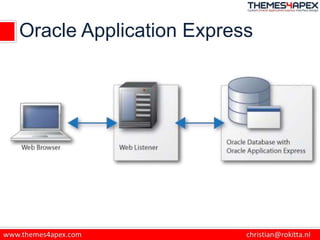
Oracle Application Express
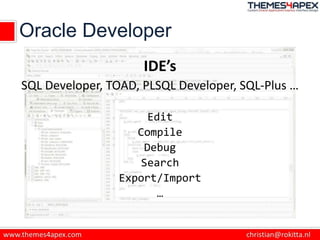
Oracle Developer
IDE’s
SQL Developer, TOAD, PLSQL Developer, SQL-Plus …
Edit
Compile
Debug
Search
Export/Import
…
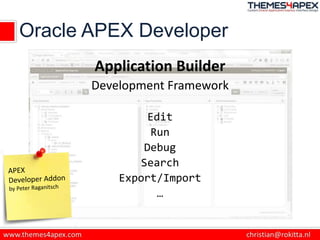
Oracle APEX Developer
Application Builder
Development Framework
Edit
Run
Debug
Search
Export/Import
…
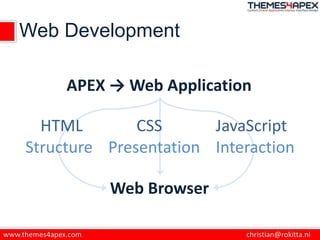
Web Development
HTML
APEX → Web Application
CSS JavaScript
Structure Presentation Interaction
Web Browser
What are Browser Developer Tools?
• Built in to the browser
• Usually reached with:
– F12 on Windows
– ⌘, ⌥ and "i" on Mac
– Right Click > Inspect Element
• No more alert()
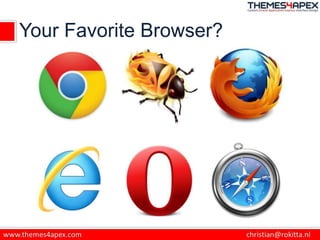
Your Favorite Browser?
Browser Development Tools
• HTML
– inspect/edit
• CSS
– inspect/edit (/validate)
• JavaScript
– inspect/edit/debug/console
• Network
– monitor/trace/performance
Browser Development Tools
• Responsive Web Design
– Resize?!
– Build-in tools
• Browser Version emulation
– IE11
• Mobile Device emulation/integration
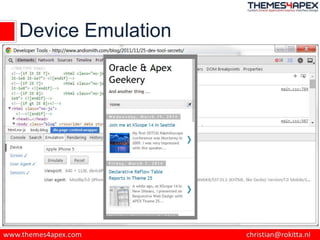
Device Emulation
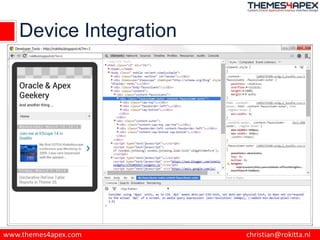
Device Integration
Demo
Tips & Tricks
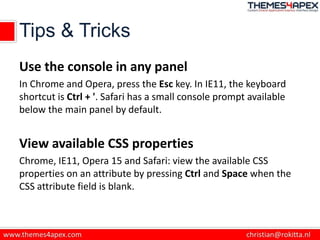
Use the console in any panel
In Chrome and Opera, press the Esc key. In IE11, the keyboard
shortcut is Ctrl + '. Safari has a small console prompt available
below the main panel by default.
View available CSS properties
Chrome, IE11, Opera 15 and Safari: view the available CSS
properties on an attribute by pressing Ctrl and Space when the
CSS attribute field is blank.
Tips & Tricks
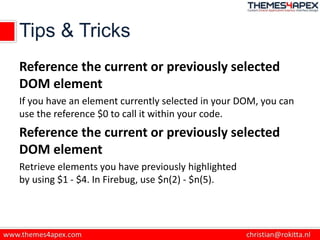
Reference the current or previously selected
DOM element
If you have an element currently selected in your DOM, you can
use the reference $0 to call it within your code.
Reference the current or previously selected
DOM element
Retrieve elements you have previously highlighted
by using $1 - $4. In Firebug, use $n(2) - $n(5).
Tips & Tricks
Chrome's Workspace
Allows you to make changes from the developer tools and
automatically update your source files.
In Sources menu and right-click on one of your CSS or JavaScript
files. Select Map to Network Resource and from the file list that
appears and choose the file that matches your selection. You can
now make changes to your CSS and JavaScript from within the
developer tools and your files will automatically update.
Compare Developer Tools*
• Chrome Developer Tools have the best feature
set and the most frequent updates.
• Firefox Developer Tools are catching up;
no real need for FireBug anymore.
• Opera (21) Dev Tools = Chrome Dev Tools
• I don’t like Safari Developer Tools, I’m using
FireBug Lite extension.
• Internet Explorer 11 has great Developer
Tools, IE9/10 were poor.
* my personal opinion
Productivity
Training
• Einführung in Oracle Application Express:
08.-12. September – online
• HTML, CSS und Javascript in Oracle Application Express:
06.-10. Oktober – online
• Advanced Oracle Application Express (APEX) Workshop:
22.-26. September - online
http://www.skillbuilders.com/
Questions & Discussion
http://rokitta.blogspot.com
@crokitta
christian@rokitta.nl
http://www.themes4apex.com
http://plus.google.com/+ChristianRokitta
http://nl.linkedin.com/in/rokit/

Browser Developer Tools

  • 1.
  • 2.
  • 3.
    Oracle Developer IDE’s SQL Developer,TOAD, PLSQL Developer, SQL-Plus … Edit Compile Debug Search Export/Import …
  • 4.
    Oracle APEX Developer ApplicationBuilder Development Framework Edit Run Debug Search Export/Import …
  • 5.
    Web Development HTML APEX →Web Application CSS JavaScript Structure Presentation Interaction Web Browser
  • 6.
    What are BrowserDeveloper Tools? • Built in to the browser • Usually reached with: – F12 on Windows – ⌘, ⌥ and "i" on Mac – Right Click > Inspect Element • No more alert()
  • 7.
  • 8.
    Browser Development Tools •HTML – inspect/edit • CSS – inspect/edit (/validate) • JavaScript – inspect/edit/debug/console • Network – monitor/trace/performance
  • 9.
    Browser Development Tools •Responsive Web Design – Resize?! – Build-in tools • Browser Version emulation – IE11 • Mobile Device emulation/integration
  • 10.
  • 11.
  • 12.
  • 13.
    Tips & Tricks Usethe console in any panel In Chrome and Opera, press the Esc key. In IE11, the keyboard shortcut is Ctrl + '. Safari has a small console prompt available below the main panel by default. View available CSS properties Chrome, IE11, Opera 15 and Safari: view the available CSS properties on an attribute by pressing Ctrl and Space when the CSS attribute field is blank.
  • 14.
    Tips & Tricks Referencethe current or previously selected DOM element If you have an element currently selected in your DOM, you can use the reference $0 to call it within your code. Reference the current or previously selected DOM element Retrieve elements you have previously highlighted by using $1 - $4. In Firebug, use $n(2) - $n(5).
  • 15.
    Tips & Tricks Chrome'sWorkspace Allows you to make changes from the developer tools and automatically update your source files. In Sources menu and right-click on one of your CSS or JavaScript files. Select Map to Network Resource and from the file list that appears and choose the file that matches your selection. You can now make changes to your CSS and JavaScript from within the developer tools and your files will automatically update.
  • 16.
    Compare Developer Tools* •Chrome Developer Tools have the best feature set and the most frequent updates. • Firefox Developer Tools are catching up; no real need for FireBug anymore. • Opera (21) Dev Tools = Chrome Dev Tools • I don’t like Safari Developer Tools, I’m using FireBug Lite extension. • Internet Explorer 11 has great Developer Tools, IE9/10 were poor. * my personal opinion
  • 17.
  • 18.
    Training • Einführung inOracle Application Express: 08.-12. September – online • HTML, CSS und Javascript in Oracle Application Express: 06.-10. Oktober – online • Advanced Oracle Application Express (APEX) Workshop: 22.-26. September - online http://www.skillbuilders.com/
  • 19.