PLUG-INS UNPLUGGED
Christian Rokitta
Berlin 2016
Content
what context structure details exercise
APEX Versions vs Plug-in Features
5
4
APEX Page States
APEX Page States
Generate HTML
Templates, Definitions
Resources
CSS, JS, Images
Dynamic Actions
Inline JS
AJAX Calls (DB)
Submitting Form
Validating
Processing
Reasons for Using APEX
declarative: hiding complexity
behind properties; especially
HTML, CSS and JavaScript
catalogue of build-in
components
Limitations
common components
evolving standards
evolving browser/device capabilities
users expectations
APEX is an Extensible Framework
Add additional
declarative
functionality
Plug-in Types
Item
Region
Dynamic Action
Process
Authentication
Authorization
Plug-in Types vs Page States
Item Type Plug-in
validations
Region Type Plug-in
static vs dynamic
Dynamic Action Type Plug-in
Process Type Plug-in
Authorization Type Plug-in
Authentication Type Plug-in
Authentication schemes are used to determine if
the user can access the application. As such it is
not run on a page or component level.
When to use Plug-ins
not possible with standard
declarative APEX
hiding complexity
reusability (application,
instance, public)
maintainability
Skills to build APEX Plug-ins
SQL
PL/SQL
Declarative vs Extended Skills
Ideal APEX Team
Inspiration
write your own
cut-n-paste code
libraries/jQuery Plug-ins
Lots of well-know public available APEX plug-ins
are based on existing JS/jQ solutions
https://select2.github.io/
Inspiration
jQuery Plug-in Wishlist
• JS/CSS files/library
• Doc, HTML Example, how-to, …
• Options (Configuration)
• Methods (API)
• Events
http://felicegattuso.com/projects/timedropper/
$('#id').timeDropper({mousewheel:true,meridians:true,init_animation:'dropdown',setCurrentTime:false});
Common Plug-in Structure
Plugin PL/SQL function signature
• render
• AJAX-callback
PL/SQL Types
• configuration
• state
• parameter passing
APEX PL/SQL API helper
• include JS and CSS files
• …
APEX JavaScript API
• initiate AJAX calls
• …
Render Function
function <name of function> (
p_<type> in apex_plugin.t_<type>
, p_plugin in apex_plugin.t_plugin
[, p_...]
) return
apex_plugin.t_<type>_render_result
apex_plugin.t_<type>
type t_<type> is record (
<param n>
…
, <param n>
, attribute_01 varchar2(32767)
…
, attribute_NN varchar2(32767)
);
std. declarative
attributes
additional plug-in
specific attributes
(page component)
APEX Version dependencies
apex_plugin.t_plugin
type t_plugin is record (
name varchar2(45),
file_prefix varchar2(4000),
attribute_01 varchar2(32767),
… ,
attribute_15 varchar2(32767) );
APEX 4 max 10 attr.
additional plug-in
specific attributes
application level
(Component Settings)
Item Type Render Function
function <name of function> (
p_item in apex_plugin.t_item_item
, p_plugin in apex_plugin.t_plugin
, p_value in varchar2
, p_is_readonly in boolean
, p_is_printer_friendly in boolean
) return
apex_plugin.t_page_item_render_result
t_page_item
type t_page_item is record ( id number
, name varchar2(255)
, label varchar2(4000)
, plain_label varchar2(4000)
, label_id varchar2(255)
, placeholder varchar2(255)
, format_mask varchar2(255)
, is_required boolean
, lov_definition varchar2(4000)
, lov_display_extra boolean
, lov_display_null boolean
, lov_null_text varchar2(255)
, lov_null_value varchar2(255)
, lov_cascade_parent_items varchar2(255)
, ajax_items_to_submit varchar2(255)
, ajax_optimize_refresh boolean
, element_width number
, element_max_length number
, element_height number
, element_css_classes varchar2(255)
, element_attributes varchar2(2000)
, element_option_attributes varchar2(4000)
, escape_output boolean
, attribute_01 varchar2(32767)
, …
, attribute_15 varchar2(32767));
Coding the Render Function
generate HTML for object
include assets (JS, CSS, …)
generate JS snippets
Coding the 3 Simple Steps
sys.htp.p('<input type="text" id="'||p_page_item.id||
' name="'||p_page_item.name||'" />');
apex_javascript.add_onload_code (
p_code => '$( "#'||p_page_item.id||'" ).timeDropper();'
,p_key => null );
apex_javascript.add_library (p_name => 'timedropper'
, p_directory => p_plugin.file_prefix
, p_check_to_add_minified => true );
apex_css.add_file (p_name => 'timefropper'
, p_directory => p_plugin.file_prefix );
Basic Demo Render Function
function render_timedropper(p_item in apex_plugin.t_page_item
, p_plugin in apex_plugin.t_plugin
, p_value in varchar2
, p_is_readonly in boolean
, p_is_printer_friendly in boolean)
return apex_plugin.t_page_item_render_result
is
v_result apex_plugin.t_page_item_render_result;
begin
apex_javascript.add_library(p_name => 'timedropper‘
, p_directory => p_plugin.file_prefix, p_check_to_add_minified => true);
apex_css.add_file(p_name => 'timefropper', p_directory => p_plugin.file_prefix);
sys.htp.p('<input type="text" id="' || p_page_item.id || '" name="' || p_page_item || '" />');
apex_javascript.add_onload_code(p_code => '$( "#' || p_page_item.id || '" ).timeDropper();', p_key => null);
return v_result;
end;
Beyond Basic Render Function
item (component) std. attributes
validation (for item type plugin)
AJAX Callback
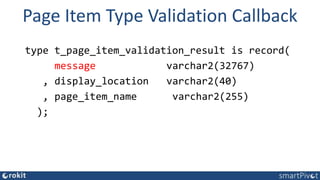
Page Item Type Validation Callback
type t_page_item_validation_result is record(
message varchar2(32767)
, display_location varchar2(40)
, page_item_name varchar2(255)
);
Plug-in AJAX Callback
function <name of function> (
p_<type> in apex_plugin.t_<type>,
p_plugin in apex_plugin.t_plugin )
return apex_plugin.t_<type>_ajax_result
Callin the AJAX Callback
apex.server.plugin ( pAjaxIdentifier, { /*apex_plugin.get_ajax_identifier*/
x01-10: "...",
pageItems: "#P1_DEPTNO,#P1_EMPNO"
}, {
refreshObject: "#P1_MY_LIST",
loadingIndicator: "#P1_MY_LIST",
success: function( pData ) { ... do something ... },
any jQuery.ajax option,
});
sponsered demo
Q&A
Plugins unplugged

Plugins unplugged

  • 1.
  • 3.
  • 4.
    APEX Versions vsPlug-in Features 5 4
  • 5.
  • 6.
    APEX Page States GenerateHTML Templates, Definitions Resources CSS, JS, Images Dynamic Actions Inline JS AJAX Calls (DB) Submitting Form Validating Processing
  • 7.
    Reasons for UsingAPEX declarative: hiding complexity behind properties; especially HTML, CSS and JavaScript catalogue of build-in components
  • 8.
    Limitations common components evolving standards evolvingbrowser/device capabilities users expectations
  • 9.
    APEX is anExtensible Framework Add additional declarative functionality
  • 10.
  • 11.
    Plug-in Types vsPage States
  • 12.
  • 13.
  • 14.
  • 15.
  • 16.
  • 17.
    Authentication Type Plug-in Authenticationschemes are used to determine if the user can access the application. As such it is not run on a page or component level.
  • 18.
    When to usePlug-ins not possible with standard declarative APEX hiding complexity reusability (application, instance, public) maintainability
  • 19.
    Skills to buildAPEX Plug-ins SQL PL/SQL
  • 20.
  • 21.
  • 22.
    Inspiration write your own cut-n-pastecode libraries/jQuery Plug-ins Lots of well-know public available APEX plug-ins are based on existing JS/jQ solutions
  • 24.
  • 25.
  • 26.
    jQuery Plug-in Wishlist •JS/CSS files/library • Doc, HTML Example, how-to, … • Options (Configuration) • Methods (API) • Events
  • 27.
  • 29.
  • 30.
    Common Plug-in Structure PluginPL/SQL function signature • render • AJAX-callback PL/SQL Types • configuration • state • parameter passing APEX PL/SQL API helper • include JS and CSS files • … APEX JavaScript API • initiate AJAX calls • …
  • 31.
    Render Function function <nameof function> ( p_<type> in apex_plugin.t_<type> , p_plugin in apex_plugin.t_plugin [, p_...] ) return apex_plugin.t_<type>_render_result
  • 32.
    apex_plugin.t_<type> type t_<type> isrecord ( <param n> … , <param n> , attribute_01 varchar2(32767) … , attribute_NN varchar2(32767) ); std. declarative attributes additional plug-in specific attributes (page component) APEX Version dependencies
  • 33.
    apex_plugin.t_plugin type t_plugin isrecord ( name varchar2(45), file_prefix varchar2(4000), attribute_01 varchar2(32767), … , attribute_15 varchar2(32767) ); APEX 4 max 10 attr. additional plug-in specific attributes application level (Component Settings)
  • 34.
    Item Type RenderFunction function <name of function> ( p_item in apex_plugin.t_item_item , p_plugin in apex_plugin.t_plugin , p_value in varchar2 , p_is_readonly in boolean , p_is_printer_friendly in boolean ) return apex_plugin.t_page_item_render_result
  • 35.
    t_page_item type t_page_item isrecord ( id number , name varchar2(255) , label varchar2(4000) , plain_label varchar2(4000) , label_id varchar2(255) , placeholder varchar2(255) , format_mask varchar2(255) , is_required boolean , lov_definition varchar2(4000) , lov_display_extra boolean , lov_display_null boolean , lov_null_text varchar2(255) , lov_null_value varchar2(255) , lov_cascade_parent_items varchar2(255) , ajax_items_to_submit varchar2(255) , ajax_optimize_refresh boolean , element_width number , element_max_length number , element_height number , element_css_classes varchar2(255) , element_attributes varchar2(2000) , element_option_attributes varchar2(4000) , escape_output boolean , attribute_01 varchar2(32767) , … , attribute_15 varchar2(32767));
  • 36.
    Coding the RenderFunction generate HTML for object include assets (JS, CSS, …) generate JS snippets
  • 37.
    Coding the 3Simple Steps sys.htp.p('<input type="text" id="'||p_page_item.id|| ' name="'||p_page_item.name||'" />'); apex_javascript.add_onload_code ( p_code => '$( "#'||p_page_item.id||'" ).timeDropper();' ,p_key => null ); apex_javascript.add_library (p_name => 'timedropper' , p_directory => p_plugin.file_prefix , p_check_to_add_minified => true ); apex_css.add_file (p_name => 'timefropper' , p_directory => p_plugin.file_prefix );
  • 38.
    Basic Demo RenderFunction function render_timedropper(p_item in apex_plugin.t_page_item , p_plugin in apex_plugin.t_plugin , p_value in varchar2 , p_is_readonly in boolean , p_is_printer_friendly in boolean) return apex_plugin.t_page_item_render_result is v_result apex_plugin.t_page_item_render_result; begin apex_javascript.add_library(p_name => 'timedropper‘ , p_directory => p_plugin.file_prefix, p_check_to_add_minified => true); apex_css.add_file(p_name => 'timefropper', p_directory => p_plugin.file_prefix); sys.htp.p('<input type="text" id="' || p_page_item.id || '" name="' || p_page_item || '" />'); apex_javascript.add_onload_code(p_code => '$( "#' || p_page_item.id || '" ).timeDropper();', p_key => null); return v_result; end;
  • 40.
    Beyond Basic RenderFunction item (component) std. attributes validation (for item type plugin) AJAX Callback
  • 41.
    Page Item TypeValidation Callback type t_page_item_validation_result is record( message varchar2(32767) , display_location varchar2(40) , page_item_name varchar2(255) );
  • 42.
    Plug-in AJAX Callback function<name of function> ( p_<type> in apex_plugin.t_<type>, p_plugin in apex_plugin.t_plugin ) return apex_plugin.t_<type>_ajax_result
  • 43.
    Callin the AJAXCallback apex.server.plugin ( pAjaxIdentifier, { /*apex_plugin.get_ajax_identifier*/ x01-10: "...", pageItems: "#P1_DEPTNO,#P1_EMPNO" }, { refreshObject: "#P1_MY_LIST", loadingIndicator: "#P1_MY_LIST", success: function( pData ) { ... do something ... }, any jQuery.ajax option, });
  • 44.
  • 46.