Marko Gorički
April 2019., APEX Alpe Adria
JavaScript in APEX
DO IT RIGHT!
• 10+ years working with APEX 🥰
• Presenter at HROUG, SIOUG, KSCOPE, APEX
World, APEX Alpe Adria, APEX Connect
• apex.world Member of the Year 2017.
• APEX related blog on apexbyg.blogspot.comMarko Gorički
Software Consultant@BiLog
@mgoricki
• Software development company
• Technology focus Oracle (APEX)
• APEX development, consulting,
educations, plugin development
• APEX solutions
• HR management software
• Reinsurance
All thoughts are mine…
How to use JavaScript in APEX?
#1
Use Dynamic
Actions whenever
possible
• “declarative” / low code
• relatively small footprint
• extensible
• implicit debugging
• reusable
• simple to use
#2
Too much of
anything is the
beginning of a
mess
• a lot of Dynamic Actions per page
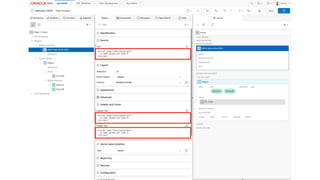
• too much inline JavaScript
Dorothy Draper
#2
Too much of
anything is the
beginning of a
mess
• a lot of Dynamic Actions per page
• too much inline JavaScript
Dorothy Draper
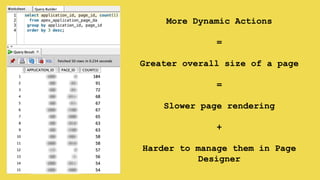
More Dynamic Actions
=
Greater overall size of a page
=
Slower page rendering
+
Harder to manage them in Page
Designer
#2
Too much of
anything is the
beginning of a
mess
Dorothy Draper
• a lot of Dynamic Actions per page
• too much inline JavaScript
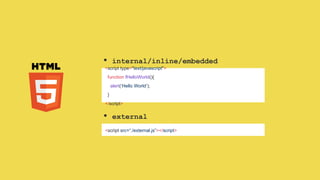
<script type="text/javascript">
function fHelloWorld(){
alert(‘Hello World’);
}
</script>
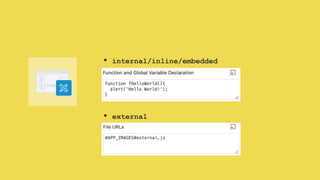
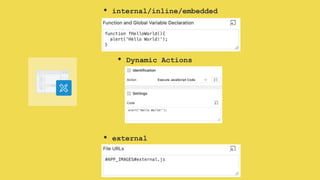
• internal/inline/embedded
<script src=“./external.js”></script>
• external
• internal/inline/embedded
• external
• internal/inline/embedded
• external
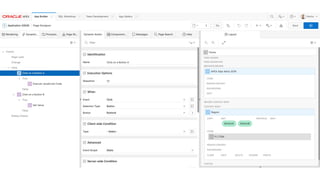
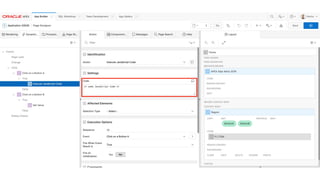
• Dynamic Actions
…generally in APEX…
..few minutes later..
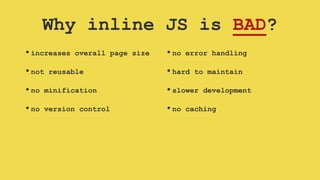
Why inline JS is BAD?
•increases overall page size
•not reusable
•no minification
•no version control
•no error handling
•hard to maintain
•slower development
•no caching
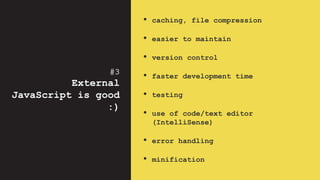
#3
External
JavaScript is good
:)
• caching, file compression
• easier to maintain
• version control
• faster development time
• testing
• use of code/text editor
(IntelliSense)
• error handling
• minification
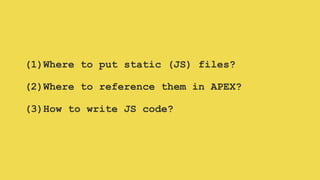
(1)Where to put static (JS) files?
(2)Where to reference them in APEX?
(3)How to write JS code?
(1)Where to put static (JS) files?
(2)Where to reference them in APEX?
(3)How to write JS code?
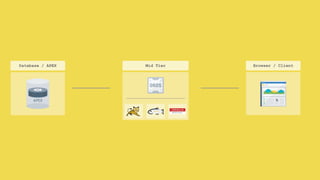
Mid Tier Browser / ClientDatabase / APEX
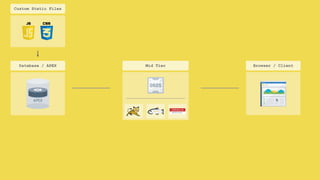
Custom Static Files
Mid Tier Browser / ClientDatabase / APEX
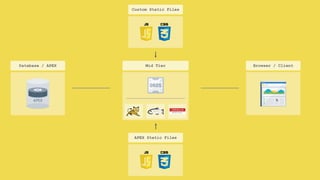
APEX Static Files
Custom Static Files
Mid Tier Browser / ClientDatabase / APEX
APEX Static Files
Web Server
Custom Static Files
Mid Tier Browser / ClientDatabase / APEX Web Server
Custom Static Files
APEX Static Files
over CDN
(1)Where to put static (JS) files?
(2)Where to reference them in APEX?
(3)How to write JS code?
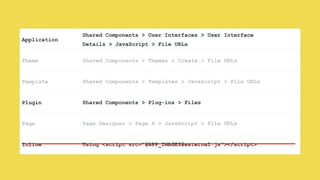
Application
Shared Components > User Interfaces > User Interface
Details > JavaScript > File URLs
Theme Shared Components > Themes > Create > File URLs
Template Shared Components > Templates > JavaScript > File URLs
Plugin Shared Components > Plug-ins > Files
Page Page Designer > Page X > JavaScript > File URLs
Inline Using <script src=“#APP_IMAGES#external.js”></script>
(1)Where to put static (JS) files?
(2)Where to reference them in APEX?
(3)How to write JS code?
APEX JavaScript
API
APEX JavaScript
API
APEX JavaScript
API
APEX JavaScript
API
APEX JavaScript
API
APEX JavaScript
API
1 2 3
How I do it?
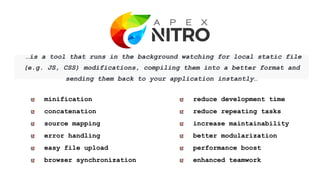
…is a tool that runs in the background watching for local static file
(e.g. JS, CSS) modifications, compiling them into a better format and
sending them back to your application instantly…
reduce development time
reduce repeating tasks
increase maintainability
better modularization
performance boost
enhanced teamwork
minification
concatenation
source mapping
error handling
easy file upload
browser synchronization
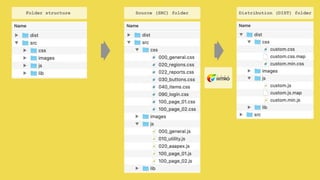
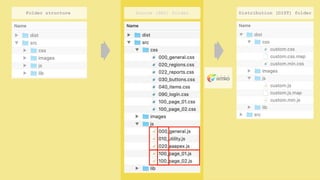
Source (SRC) folderFolder structure Distribution (DIST) folder
#5
Use JavaScript
Namespaces
• Namespace - container created to
hold a logical grouping
• Use them:
• to avoid naming collision
• not to pollute global namespace
• to organize code
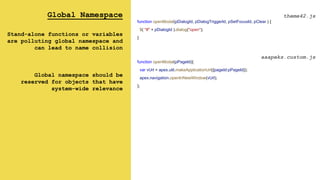
Global Namespace
Stand-alone functions or variables
are polluting global namespace and
can lead to name collision
Global namespace should be
reserved for objects that have
system-wide relevance
function openModal(pDialogId, pDialogTriggerId, pSetFocusId, pClear ) {
$( "#" + pDialogId ).dialog("open");
}
theme42.js
aaapeks.custom.js
function openModal(pPageId){
var vUrl = apex.util.makeApplicationUrl({pageId:pPageId});
apex.navigation.openInNewWindow(vUrl);
};
020_aaapeks.js
/**
* APEX Alpe Adria Namespace
* @namespace aaapeks
*/
aaapeks = {};
/**
* APEX Alpe Adria Namespace
* @namespace aaapeks
*/
aaapeks = {};
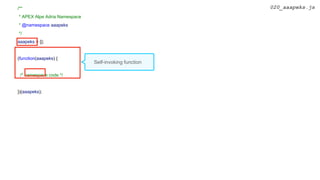
(function(aaapeks) {
/* namespace code */
})(aaapeks);
Self-invoking function
020_aaapeks.js
/**
* APEX Alpe Adria Namespace
* @namespace aaapeks
*/
aaapeks = {};
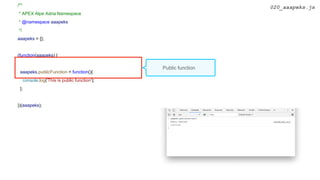
(function(aaapeks) {
aaapeks.publicFunction = function(){
console.log('This is public function');
};
})(aaapeks);
020_aaapeks.js
Public function
* APEX Alpe Adria Namespace
* @namespace aaapeks
*/
var aaapeks = {};
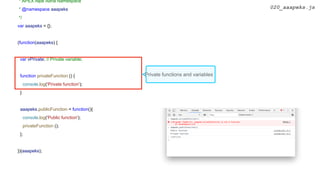
(function(aaapeks) {
var vPrivate; // Private variable;
function privateFunction () {
console.log('Private function');
}
aaapeks.publicFunction = function(){
console.log('Public function');
privateFunction ();
};
})(aaapeks);
020_aaapeks.js
Private functions and variables
* APEX Alpe Adria Namespace
* @namespace aaapeks
*/
var aaapeks = {};
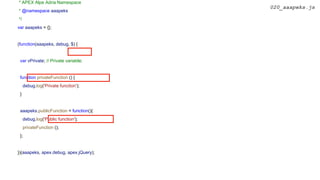
(function(aaapeks, debug, $) {
var vPrivate; // Private variable;
function privateFunction () {
debug.log('Private function');
}
aaapeks.publicFunction = function(){
debug.log('Public function');
privateFunction ();
};
})(aaapeks, apex.debug, apex.jQuery);
020_aaapeks.js
* APEX Alpe Adria Namespace
* @namespace aaapeks
*/
var aaapeks = {};
(function(aaapeks, debug, $) {
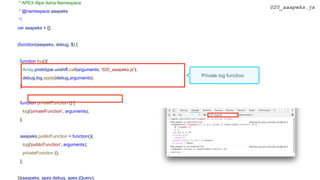
function log(){
Array.prototype.unshift.call(arguments, '020_aaapeks.js');
debug.log.apply(debug,arguments);
};
function privateFunction () {
log('privateFunction', arguments);
};
aaapeks.publicFunction = function(){
log('publicFunction', arguments);
privateFunction ();
};
})(aaapeks, apex.debug, apex.jQuery);
020_aaapeks.js
Private log function
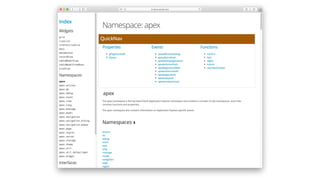
#6
Document your code
with JSDoc
• documentation generator for
JavaScript
• using specific comments and tags
• integration with popular text editor
(function(aaapeks, debug, $) {
/**
* Private Log function, adds filename as a prefix
* @param {object} arguments - default arguments object
*/
function log(){
Array.prototype.unshift.call(arguments, '020_aaapeks.js');
debug.log.apply(debug,arguments);
};
/**
* Private Function
* @param {string} pParam1 - string parameter
* @private
*/
function privateFunction (pParam1) {
log('privateFunction', arguments);
apex.message.alert(pParam1);
};
/**
* Public function
* @param {string} pParam1 - string parameter
* @example
* aaapeks.publicFunction('This is a test');
#7
Hybrid Approach
Dynamic Actions
• use Dynamic Actions whenever is
possible
• call JS custom code from external
files
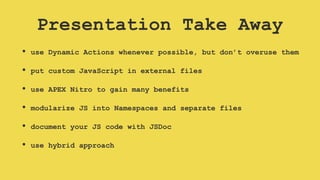
Presentation Take Away
• use Dynamic Actions whenever possible, but don’t overuse them
• put custom JavaScript in external files
• use APEX Nitro to gain many benefits
• modularize JS into Namespaces and separate files
• document your JS code with JSDoc
• use hybrid approach
Questions?
Thank You!

APEX Alpe Adria 2019 - JavaScript in APEX - do it right!

  • 1.
    Marko Gorički April 2019.,APEX Alpe Adria JavaScript in APEX DO IT RIGHT!
  • 2.
    • 10+ yearsworking with APEX 🥰 • Presenter at HROUG, SIOUG, KSCOPE, APEX World, APEX Alpe Adria, APEX Connect • apex.world Member of the Year 2017. • APEX related blog on apexbyg.blogspot.comMarko Gorički Software Consultant@BiLog @mgoricki
  • 3.
    • Software developmentcompany • Technology focus Oracle (APEX) • APEX development, consulting, educations, plugin development • APEX solutions • HR management software • Reinsurance
  • 4.
  • 6.
    How to useJavaScript in APEX?
  • 9.
    #1 Use Dynamic Actions whenever possible •“declarative” / low code • relatively small footprint • extensible • implicit debugging • reusable • simple to use
  • 10.
    #2 Too much of anythingis the beginning of a mess • a lot of Dynamic Actions per page • too much inline JavaScript Dorothy Draper
  • 11.
    #2 Too much of anythingis the beginning of a mess • a lot of Dynamic Actions per page • too much inline JavaScript Dorothy Draper
  • 14.
    More Dynamic Actions = Greateroverall size of a page = Slower page rendering + Harder to manage them in Page Designer
  • 15.
    #2 Too much of anythingis the beginning of a mess Dorothy Draper • a lot of Dynamic Actions per page • too much inline JavaScript
  • 16.
    <script type="text/javascript"> function fHelloWorld(){ alert(‘HelloWorld’); } </script> • internal/inline/embedded <script src=“./external.js”></script> • external
  • 17.
  • 18.
  • 23.
  • 26.
  • 28.
    Why inline JSis BAD? •increases overall page size •not reusable •no minification •no version control •no error handling •hard to maintain •slower development •no caching
  • 29.
    #3 External JavaScript is good :) •caching, file compression • easier to maintain • version control • faster development time • testing • use of code/text editor (IntelliSense) • error handling • minification
  • 30.
    (1)Where to putstatic (JS) files? (2)Where to reference them in APEX? (3)How to write JS code?
  • 31.
    (1)Where to putstatic (JS) files? (2)Where to reference them in APEX? (3)How to write JS code?
  • 32.
    Mid Tier Browser/ ClientDatabase / APEX
  • 33.
    Mid Tier Browser/ ClientDatabase / APEX Custom Static Files
  • 34.
    Mid Tier Browser/ ClientDatabase / APEX APEX Static Files Custom Static Files
  • 35.
    Mid Tier Browser/ ClientDatabase / APEX APEX Static Files Web Server Custom Static Files
  • 36.
    Mid Tier Browser/ ClientDatabase / APEX Web Server Custom Static Files APEX Static Files over CDN
  • 37.
    (1)Where to putstatic (JS) files? (2)Where to reference them in APEX? (3)How to write JS code?
  • 38.
    Application Shared Components >User Interfaces > User Interface Details > JavaScript > File URLs Theme Shared Components > Themes > Create > File URLs Template Shared Components > Templates > JavaScript > File URLs Plugin Shared Components > Plug-ins > Files Page Page Designer > Page X > JavaScript > File URLs Inline Using <script src=“#APP_IMAGES#external.js”></script>
  • 40.
    (1)Where to putstatic (JS) files? (2)Where to reference them in APEX? (3)How to write JS code?
  • 41.
  • 42.
  • 43.
  • 44.
  • 45.
  • 46.
  • 48.
    …is a toolthat runs in the background watching for local static file (e.g. JS, CSS) modifications, compiling them into a better format and sending them back to your application instantly… reduce development time reduce repeating tasks increase maintainability better modularization performance boost enhanced teamwork minification concatenation source mapping error handling easy file upload browser synchronization
  • 49.
    Source (SRC) folderFolderstructure Distribution (DIST) folder
  • 50.
    Source (SRC) folderFolderstructure Distribution (DIST) folder
  • 51.
    #5 Use JavaScript Namespaces • Namespace- container created to hold a logical grouping • Use them: • to avoid naming collision • not to pollute global namespace • to organize code
  • 52.
    Global Namespace Stand-alone functionsor variables are polluting global namespace and can lead to name collision Global namespace should be reserved for objects that have system-wide relevance function openModal(pDialogId, pDialogTriggerId, pSetFocusId, pClear ) { $( "#" + pDialogId ).dialog("open"); } theme42.js aaapeks.custom.js function openModal(pPageId){ var vUrl = apex.util.makeApplicationUrl({pageId:pPageId}); apex.navigation.openInNewWindow(vUrl); };
  • 54.
    020_aaapeks.js /** * APEX AlpeAdria Namespace * @namespace aaapeks */ aaapeks = {};
  • 55.
    /** * APEX AlpeAdria Namespace * @namespace aaapeks */ aaapeks = {}; (function(aaapeks) { /* namespace code */ })(aaapeks); Self-invoking function 020_aaapeks.js
  • 56.
    /** * APEX AlpeAdria Namespace * @namespace aaapeks */ aaapeks = {}; (function(aaapeks) { aaapeks.publicFunction = function(){ console.log('This is public function'); }; })(aaapeks); 020_aaapeks.js Public function
  • 57.
    * APEX AlpeAdria Namespace * @namespace aaapeks */ var aaapeks = {}; (function(aaapeks) { var vPrivate; // Private variable; function privateFunction () { console.log('Private function'); } aaapeks.publicFunction = function(){ console.log('Public function'); privateFunction (); }; })(aaapeks); 020_aaapeks.js Private functions and variables
  • 58.
    * APEX AlpeAdria Namespace * @namespace aaapeks */ var aaapeks = {}; (function(aaapeks, debug, $) { var vPrivate; // Private variable; function privateFunction () { debug.log('Private function'); } aaapeks.publicFunction = function(){ debug.log('Public function'); privateFunction (); }; })(aaapeks, apex.debug, apex.jQuery); 020_aaapeks.js
  • 59.
    * APEX AlpeAdria Namespace * @namespace aaapeks */ var aaapeks = {}; (function(aaapeks, debug, $) { function log(){ Array.prototype.unshift.call(arguments, '020_aaapeks.js'); debug.log.apply(debug,arguments); }; function privateFunction () { log('privateFunction', arguments); }; aaapeks.publicFunction = function(){ log('publicFunction', arguments); privateFunction (); }; })(aaapeks, apex.debug, apex.jQuery); 020_aaapeks.js Private log function
  • 60.
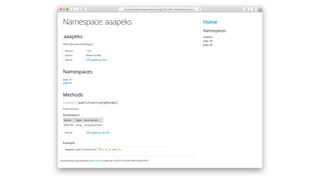
    #6 Document your code withJSDoc • documentation generator for JavaScript • using specific comments and tags • integration with popular text editor
  • 61.
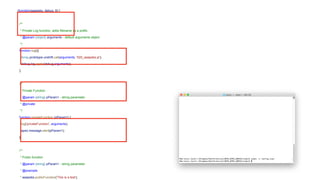
    (function(aaapeks, debug, $){ /** * Private Log function, adds filename as a prefix * @param {object} arguments - default arguments object */ function log(){ Array.prototype.unshift.call(arguments, '020_aaapeks.js'); debug.log.apply(debug,arguments); }; /** * Private Function * @param {string} pParam1 - string parameter * @private */ function privateFunction (pParam1) { log('privateFunction', arguments); apex.message.alert(pParam1); }; /** * Public function * @param {string} pParam1 - string parameter * @example * aaapeks.publicFunction('This is a test');
  • 64.
    #7 Hybrid Approach Dynamic Actions •use Dynamic Actions whenever is possible • call JS custom code from external files
  • 66.
    Presentation Take Away •use Dynamic Actions whenever possible, but don’t overuse them • put custom JavaScript in external files • use APEX Nitro to gain many benefits • modularize JS into Namespaces and separate files • document your JS code with JSDoc • use hybrid approach
  • 67.
  • 68.

Editor's Notes

  • #2 I will talk about how to do JavaScript in APEX and how to do it right at least as I thing it’s right
  • #4 as APEX we are also going into the dark mode, hope that this is right focused on consulting and business solution development very experienced in APEX migrations from Oracle Forms, Excel, ADF…
  • #5 everything I’m going to say today is based on my experience maybe this isn’t the best way… but it’s the way I do it, and for me, and for now, it’s the right way If you have some arguments against it, please let me know I would really like to hear them
  • #6 as I said I will talk about JS And the only book that I’ve read about JS is this…so! Seriously… don’t get me wrong with this presentation and start to write tons of JS in your APEX apps you really don’t need to be JavaScript Expert to create amazing stuff the time when you start to put custom code (JavaScript/CSS) in your APEX apps is the time when you start to be less productive my advise to you is - stick to the native and declarative stuff, as long as you can on long time basis thats the only way to go better to invest more time to data modeling and business logic than to some nice UX effects that will later on create you some problems with maintaining your apps
  • #7 but if you really need it, let’s see what’s the way to do it So let’s get back to the topic of the presentation and see how to use JS in APEX. - There are certainly some rules to follow. - I have a question for you: what’s the first thought that you thing of when somebody says APEX and JavaScript
  • #8 - I have one question for you - What’t the first thing that you can think of when somebody mentions APEX and JavaScript
  • #9 - it’s a result of the love between JS and APEX
  • #10 one of the rules that I really like to follow is… they enable us to create amazing APEX apps without knowing even a line of JavaScript DECLARATIVE - you don’t need to know a lot of JavaScript to do it in APEX it’s just few clicks away SMALL FOOTPRINT - that doesn’t effect page performance so much EXTENSIBLE - they are extensible with plugins and custom JS code IMPLICIT DEBUGGING REUSABLE - you can make them reusable by putting them to the global page SIMPLE TO USE - somebody that never saw the line of JS code can make nice UX they are good up to the some point until you start to use too much inline/embedded JS until you put too much DA on a single page
  • #11 dynamic actions can quickly become bad and ugly there are also some bad usage examples of JavaScript and the second dot there (too much inline JavaScript) is applicable to APEX globally, not only DA dynamic actions can quickly become bad and ugly two worst case scenarios are that you have too many DA per page too much inline JavaScript (that implies not only to the dynamic actions but generally about APEX)
  • #12 too many dynamic actions per page why is that bad?
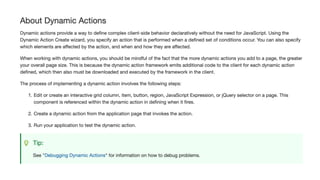
  • #13 even if you go to the documentation and read about Dynamic Actions you can find one sentence
  • #14 - it says that you should be mindful of the fact that the more dynamic actions you add to a page, the greater your overall page size will be
  • #15 you will create something that’s really hard to maintain somebody will ask now - what’s the good limit? select application_id, page_id, count(1) from apex_application_page_da group by application_id, page_id order by 3 desc ;
  • #16 and the second thing that I’ve said I don’t like to see is too much inline JavaScript
  • #17 if we take a look at HTML and how you can write JS basically, there are 2 ways to do it Internal/inline/embedded is better to use embedded JS is for small code snippets are so small that it’s slower to make HTTP request to the server External: in all other cases it’s better to use external js file caching reusability smaller page why not to apply this rule to the APEX
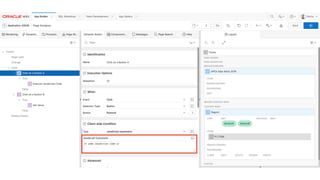
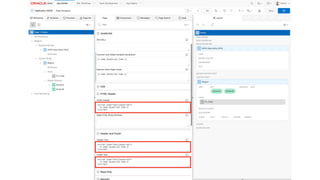
  • #18 if we take a look at APEX you can do the same (put your code internally or externally) Ways to use JS in APEX declarative/low code (Dynamic Actions) embedded Dynamic Actions (Execute JS Code, Set Value, Client Side Condition) Page level (header, regions, properties...) Templates Plugins external - static files Instead of embedded JS you should always use Dynamic Actions
  • #19 if we take a look at APEX you can do the same (put your code internally or externally) declarative/low code (Dynamic Actions) embedded Dynamic Actions (Execute JS Code, Set Value, Client Side Condition) Page level (header, regions, properties...) Templates Plugins external - static files - here we should follow the same best practices as we do for PL/SQL - where you write your code outside of the APEX
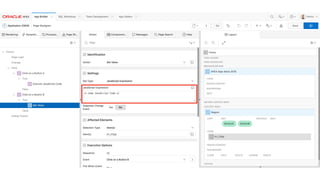
  • #20 the reason why I’ve put “declarative” into quotes is because you can do custom JS there and Dynamic Actions are good until you start do to a lot of custom JS development in JavaScript Expression property
  • #23 you should avoid putting there large chunks of code same as you should avoid putting large chunks of PL/SQL to the processing pages
  • #27 Dynamic Actions (Execute JS Code, Set Value, Client Side Condition) Page level (header, regions, properties...) Templates Plugins I’ve seen it everywhrere: - in templates - plugins - event in PL/SQL procedure
  • #28 please don’t do this
  • #29 - napisati razloge zašto je JS loš
  • #30 if inline JS bad we must agree that external is good you don’t write your PL/SQL code in APEX
  • #31 now when we can agree that External JS files are good I have 3 more questions to answer
  • #32 now when we agreed that External JS files are good I have 3 more questions to answer
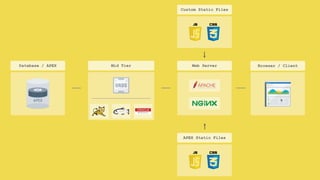
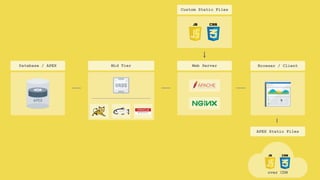
  • #33 this is standard APEX arhitecture on the left side we have DB and APEX in the middle ORDS deployed on Tomcat, Glassfish or Weblogic and on the right - browser/client
  • #34 Static Application Files and Static Workspace Files under the Shared Components there are 3 cases when I use them: 1) development env - because it’s faster to upload 2) small apps or apps with small number of users 3) when It’s really hard to get access to app server what I do for development and smaller apps is that I put static files to the APEX Application/Workspace Files I will show you later on why for development for smaller apps and for apps in some big companies is just pain in the ass to put something to web server where you have to include more than one person (DBA + Web Server Admin)
  • #35 you can also put them to the Mid tier where the ORDS is also, here are by default APEX static files in some cases it can be slow to put them there, especially if you don’t have direct access to that server
  • #36 but if you’re going for the performance and if you want best possible option - that’s to put them on Front End Server (where you can use all those benefits: file caching gzip compression - nginx - engine-x
  • #37 also, as a matter of APEX static files, from version 18.1 you can also use Oracle CDN maybe to free some resources over your servers
  • #38 now when we agreed that External JS files are good I have 3 more questions to answer
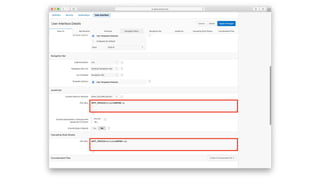
  • #39 there are several ways to reference them in APEX depending on what’s you’re doing if you use UT you can’t change theme or templates most of the time I use only one concatenated file, so I’m not putting any JS reference on the page level
  • #40 if I’m using Universal Theme - I’m putting my reference under the User Interface option when you go to the edit application #APPLICATION_JAVASCRIPT# and #APPLICATION_CSS#
  • #41 so how I do it… it’s really simple… (next slide) file location web server ORDS (application/workspace/theme files) file reference Nitro Config Hybrid DA
  • #43 there are several options to write JavaScript you can go for a Vanilla (plain) JavaScript, jQuery APEX API - build upon jQuery and it’s specific for APEX components or just Google some code and copy paste it to the JS
  • #44 there are several options to write JavaScript you can go for a Vanilla (plain) JavaScript, jQuery APEX API or just Google some code and copy paste it to the JS
  • #45 there are several options to write JavaScript you can go for a Vanilla (plain) JavaScript, jQuery APEX API or just Google some code and copy paste it to the JS
  • #46 there are several options to write JavaScript you can go for a Vanilla (plain) JavaScript, jQuery APEX API or just Google some code and copy paste it to the JS
  • #47 there are several options to write JavaScript you can go for a Vanilla (plain) JavaScript, jQuery APEX API or just Google some code and copy paste it to the JS
  • #49 in any project where I have to write a line of JavaScript or CSS I use APEX nitro - and what APEX nitro is…
  • #50 I won’t talk about the details, because I had presentation last year APEX Alpe Adria I will just make a quick overview the best definition that I came up with is… but that’s not all, Nitro will bring you a whole lot more left side - features right side - benefits the only prerequisite is to have Node and in APEX you need to put on Before Header process
  • #51 I won’t repeat myself about nitro because I’ve had presentation last year, so just quickly tool that enables you to work on static files (CSS, JS) locally runs in a backround watching for local file changes (CSS and JS) on every change it processes files and syncs them to the browser automatically runs in the background watching for local static file (CSS, JS modification) processes the files syncs the files to the browser automatically
  • #52 FEATURES in processing part you’ll get all different features error handling
  • #53 Benefits
  • #54 so, how it works 1) you locally create specific folder structure locally (with src and dist) as displayed on 1 2) and you put some files into this structure 3) Nitro magic happens there, and your files are transformed into some better format (besed on your projects configuration) only everything that’s inside JS and CSS folder is processed to the dist, everything else is just copied processed - it’s depended on your configuration: I always use minification and concatenation you need to write a lot of JS code so that your concatenated files would be very big
  • #55 the important thing is in the middle, that’s the way I structure my files you can see that I split files into meaningful modules, same as I do with the PL/SQL code in packages I do the same with CSS and PL/SQL most of the time I try to write things that are reusable so I put them in some general files if I have any of page specific JS I put it in separate files ORDER is important but from time to time I have something page specific. Everything like that I put into page specific files. same as I modularize my code into PL/SQL packages, I’m doing also with CSS and JS files
  • #56 - the feature of Nitro that I always use is concatenation (CSS and JS files)
  • #57 if we closely look at the slide that I’ve showed before you can see how I structure my files basically I split them in some meaningful modules, same as I do with PL/SQL code in packages most of the time I try to write things that are reusable so I put them in some general files but from time to time I have something page specific. Everything like that I put into page specific files. ORDER is important same as I modularize my code into PL/SQL packages, I’m doing also with CSS and JS files
  • #58 and what happens there is that I have only two file references in APEX app
  • #59 at the end I only have 2 files that are referenced from APEX CDN for static files file location - for development App Files, for prod Web Server - Theme Depended - only if working with custom theme - Custom CSS/JS into User Interface
  • #60 if we take a look back to my source folder you can see that I modularize my files as I said, same as my PL/SQL packages, into sam logical files lets look inside file
  • #61 first of all I use Namespaces Namespace - container created to hold a logical grouping like packages in PL/SQL they say that there’s no serious JS application without namespace Use them: to avoid collisions - to avoid collisions with other objects or variables in the global namespace/ minimize risk of code collision to organize blocks of functionalities into easily manageable groups and to make your code maintainable not to pollute global namespace (possible performance issues ) When you read about JS there are some best practices: Global namespace should be reserved for objects that have system-wide relevance and I try to avoid to use global variables and functions https://javascriptweblog.wordpress.com/2010/12/07/namespacing-in-javascript/ https://stackoverflow.com/questions/8862665/what-does-it-mean-global-namespace-would-be-polluted technically, JavaScript by default doesn’t provide namespaces by default Global variables should be reserved for objects that have system-wide relevance
  • #62 so if you create stand-alone function or variable you’re polluting global namespace window object is top object = global namespace window.apex => apex top object first of all I use namespaces Namespace container created to hold a logical grouping and to avoid collisions with other objects or variables in the global namespace it’s useful to organize blocks of functionalities into easily manageable groups and I try to avoid to use global variables and functions Global namespace should be reserved for objects that have system-wide relevance http://www.apexexplorer.com/how-to-show-and-hide-inline-dialog-in-oracle-apex-using-javascript/ function openModal(pUrl){window.open(pUrl);}
  • #63 so if you create stand-alone function or variable you’re polluting global namespace window object is top object = global namespace window.apex => apex top object first of all I use namespaces Namespace container created to hold a logical grouping and to avoid collisions with other objects or variables in the global namespace it’s useful to organize blocks of functionalities into easily manageable groups and I try to avoid to use global variables and functions Global namespace should be reserved for objects that have system-wide relevance http://www.apexexplorer.com/how-to-show-and-hide-inline-dialog-in-oracle-apex-using-javascript/ function openModal(pUrl){window.open(pUrl);}
  • #65 technically, JavaScript by default doesn’t provide namespaces by default, so we use objects the approach that I mostly use is Dynamic Namespacing - I think same as APEX development team 1) you create object (aaapex) - some logical content
  • #66 2) then you create self-invoking function and you pass namespace object as an argument if there would be any name collision, you need only to change the name of the object and the argument
  • #67 3) after that you can add some code to your namespace
  • #68 one of the benefits of this approach is that you can have also private functions and variables
  • #69 the next thing I like to add here is other namespaces/object
  • #70 next thing that I always add to my namespace is private log function similar to the logger for PL/SQL really helps in debugging pages with lots of JavaScript or Dynamic Actions and it’s really flexible, you don’t even need to add arguments
  • #71 what was missing there prerequisite: Node.js APEX dev team use it
  • #72 you need to put comments in specific format by using asterisks and slash
  • #78 declarative is under quotes because you can still write custom JS custom events - hooks they are event driven (browse, framework, component, custom) the more dynamic actions add to a page the greater your overall page size is they are good up to the some point until you start to use too much inline/embedded JS until you put too much DA on a single page
  • #79 možda je bolje da bude ovako malo bulleta declarative is under quotes because you can still write custom JS custom events - hooks they are event driven (browse, framework, component, custom) the more dynamic actions add to a page the greater your overall page size is they are good up to the some point until you start to use too much inline/embedded JS until you put too much DA on a single page
  • #80 primjer s hide(), show(), setValue(), getValue() zaključak poslije ovog slajda bi trebao biti da je bolje koristiti DA > APEX API
  • #82 - Namespace - namespace is simply a global object that contains a number of functions (top namespace object i apex with lots of sub namespaces like apex.item, apex.util… older non-namespaced APIs - start with charactes $ interfaces - functions that return objects that contain functions known as methods and variables (actions, item, model, region, htmlBuilder) widgets - UI Widgets +