








Single Page Web Applications
with WordPress REST API
WordPress + Javascript = A Marvelous Affair
Hello,
I am Tejaswini
- WordPress Developer
- Co-founder at Staenz Academy
- Partner at Sisme.in
Get in touch: tejaswinideshpande.com
#WCNashik
#HumHainWordPress
SPA
Why?
Access data from WordPress
Starter SPA
https://github.com/tejaswinideshpande/wpVueContentManager
Vue.js
● Easy to learn even if you
don’t have experience with
other libraries.
● Well documented.
● Strong community
involvement and lots of
auxiliary projects.
● Small file size.
● Fast & Reactive
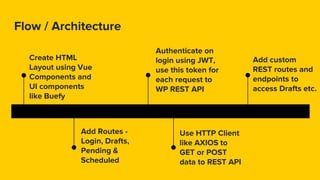
Flow / Architecture
Create HTML
Layout using Vue
Components and
UI components
like Buefy
Add Routes -
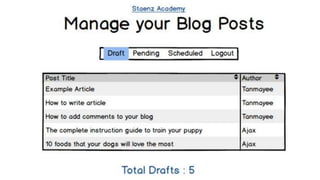
Login, Drafts,
Pending &
Scheduled
Authenticate on
login using JWT,
use this token for
each request to
WP REST API
Use HTTP Client
like AXIOS to
GET or POST
data to REST API
Add custom
REST routes and
endpoints to
access Drafts etc.
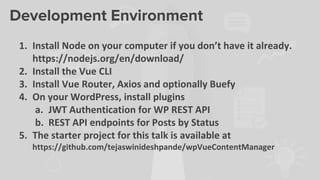
Development Environment
1. Install Node on your computer if you don’t have it already.
https://nodejs.org/en/download/
2. Install the Vue CLI
3. Install Vue Router, Axios and optionally Buefy
4. On your WordPress, install plugins
a. JWT Authentication for WP REST API
b. REST API endpoints for Posts by Status
5. The starter project for this talk is available at
https://github.com/tejaswinideshpande/wpVueContentManager
$ vue init webpack my-project
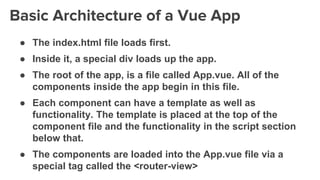
Basic Architecture of a Vue App
● The index.html file loads first.
● Inside it, a special div loads up the app.
● The root of the app, is a file called App.vue. All of the
components inside the app begin in this file.
● Each component can have a template as well as
functionality. The template is placed at the top of the
component file and the functionality in the script section
below that.
● The components are loaded into the App.vue file via a
special tag called the <router-view>
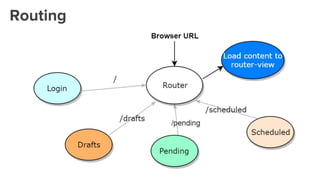
Routing
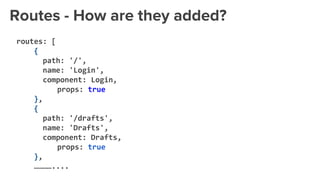
Routes - How are they added?
routes: [
{
path: '/',
name: 'Login',
component: Login,
props: true
},
{
path: '/drafts',
name: 'Drafts',
component: Drafts,
props: true
},
…………....
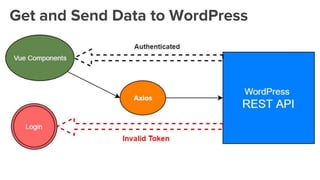
Get and Send Data to WordPress
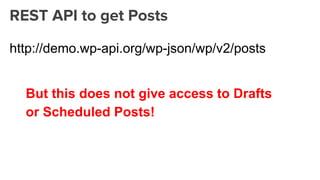
REST API to get Posts
http://demo.wp-api.org/wp-json/wp/v2/posts
But this does not give access to Drafts
or Scheduled Posts!
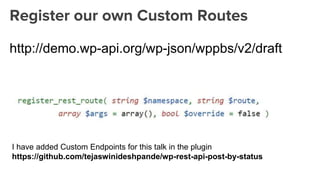
Register our own Custom Routes
http://demo.wp-api.org/wp-json/wppbs/v2/draft
I have added Custom Endpoints for this talk in the plugin
https://github.com/tejaswinideshpande/wp-rest-api-post-by-status
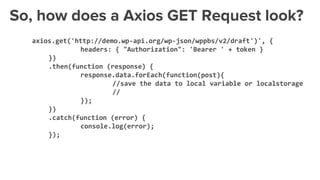
So, how does a Axios GET Request look?
axios.get('http://demo.wp-api.org/wp-json/wppbs/v2/draft')', {
headers: { "Authorization": 'Bearer ' + token }
})
.then(function (response) {
response.data.forEach(function(post){
//save the data to local variable or localstorage
//
});
})
.catch(function (error) {
console.log(error);
});
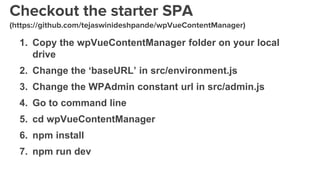
Checkout the starter SPA
(https://github.com/tejaswinideshpande/wpVueContentManager)
1. Copy the wpVueContentManager folder on your local
drive
2. Change the ‘baseURL’ in src/environment.js
3. Change the WPAdmin constant url in src/admin.js
4. Go to command line
5. cd wpVueContentManager
6. npm install
7. npm run dev
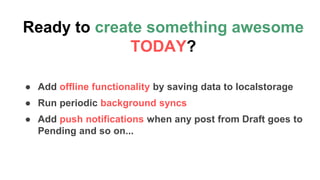
Ready to create something awesome
TODAY?
● Add offline functionality by saving data to localstorage
● Run periodic background syncs
● Add push notifications when any post from Draft goes to
Pending and so on...
Thanks!
Get in touch:
Twitter: @tejaswiniD
Facebook:
facebook.com/tejaswinide
shpande
Website:
tejaswinideshpande.com
References & Credits
https://developer.wordpress.org/rest-api/
https://developer.wordpress.org/rest-api/extending-the-rest-api/adding-custom-
endpoints/
https://vuejs.org/v2/guide/
https://github.com/vuejs/vue-cli
https://router.vuejs.org/en/
https://github.com/axios/axios
https://buefy.github.io/#/
https://2017.birmingham.wordcamp.org/files/2017/09/Build-a-Web-App-With-The-
WordPress-REST-API.pdf
https://wordpress.org/plugins/jwt-authentication-for-wp-rest-api/
and many many more...

Single Page Web Applications with WordPress REST API