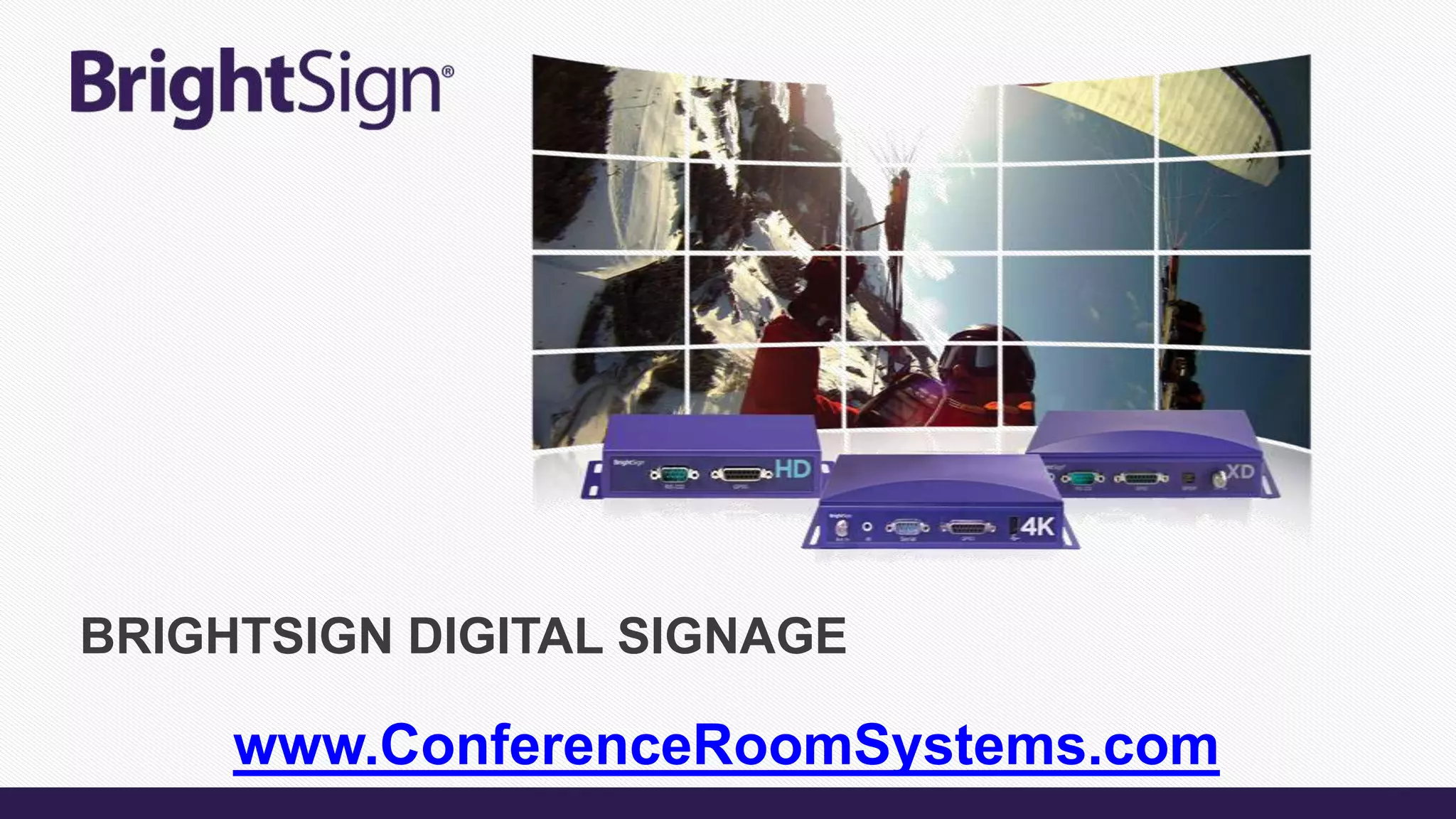
BRIGHTSIGN DIGITAL SIGNAGE
www.ConferenceRoomSystems.com
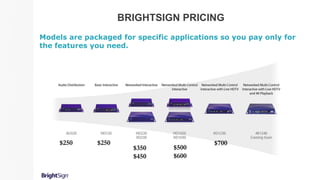
BRIGHTSIGN PRICING
Models are packaged for specific applications so you pay only for
the features you need.
$250 $250
$350
$450
$500
$600
$700
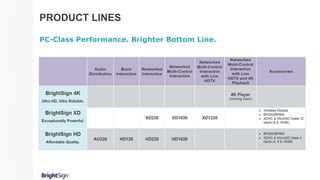
PRODUCT LINES
PC-Class Performance. Brighter Bottom Line.
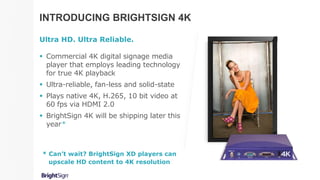
INTRODUCING BRIGHTSIGN 4K
Ultra HD. Ultra Reliable.
 Commercial 4K digital signage media
player that employs leading technology
for true 4K playback
 Ultra-reliable, fan-less and solid-state
 Plays native 4K, H.265, 10 bit video at
60 fps via HDMI 2.0
 BrightSign 4K will be shipping later this
year*
* Can’t wait? BrightSign XD players can
upscale HD content to 4K resolution
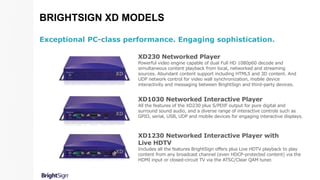
BRIGHTSIGN XD MODELS
Exceptional PC-class performance. Engaging sophistication.
XD230 Networked Player
Powerful video engine capable of dual Full HD 1080p60 decode and
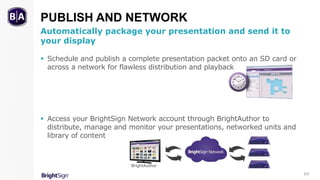
simultaneous content playback from local, networked and streaming
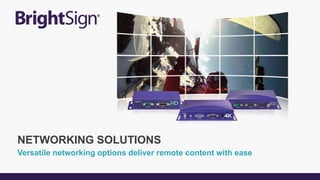
sources. Abundant content support including HTML5 and 3D content. And
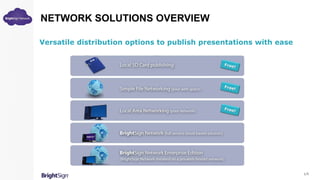
UDP network control for video wall synchronization, mobile device
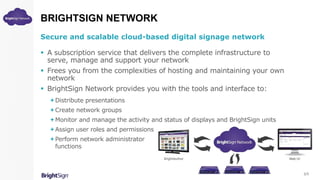
interactivity and messaging between BrightSign and third-party devices.
XD1030 Networked Interactive Player
All the features of the XD230 plus S/PDIF output for pure digital and
surround sound audio, and a diverse range of interactive controls such as
GPIO, serial, USB, UDP and mobile devices for engaging interactive displays.
XD1230 Networked Interactive Player with
Live HDTV
Includes all the features BrightSign offers plus Live HDTV playback to play
content from any broadcast channel (even HDCP-protected content) via the
HDMI input or closed-circuit TV via the ATSC/Clear QAM tuner.
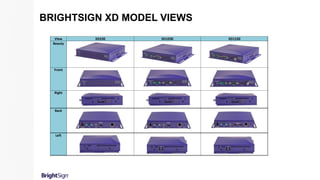
BRIGHTSIGN XD MODEL VIEWS
View XD230 XD1030 XD1230
Beauty
Front
Right
Back
Left
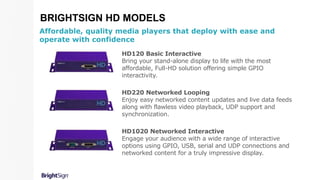
BRIGHTSIGN HD MODELS
HD120 Basic Interactive
Bring your stand-alone display to life with the most
affordable, Full-HD solution offering simple GPIO
interactivity.
HD220 Networked Looping
Enjoy easy networked content updates and live data feeds
along with flawless video playback, UDP support and
synchronization.
HD1020 Networked Interactive
Engage your audience with a wide range of interactive
options using GPIO, USB, serial and UDP connections and
networked content for a truly impressive display.
Affordable, quality media players that deploy with ease and
operate with confidence
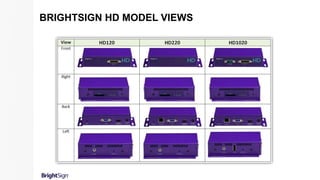
BRIGHTSIGN HD MODEL VIEWS
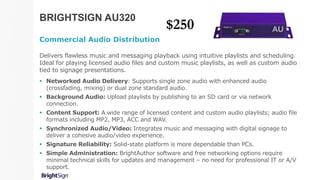
BRIGHTSIGN AU320
Commercial Audio Distribution
Delivers flawless music and messaging playback using intuitive playlists and scheduling.
Ideal for playing licensed audio files and custom music playlists, as well as custom audio
tied to signage presentations.
 Networked Audio Delivery: Supports single zone audio with enhanced audio
(crossfading, mixing) or dual zone standard audio.
 Background Audio: Upload playlists by publishing to an SD card or via network
connection.
 Content Support: A wide range of licensed content and custom audio playlists; audio file
formats including MP2, MP3, ACC and WAV.
 Synchronized Audio/Video: Integrates music and messaging with digital signage to
deliver a cohesive audio/video experience.
 Signature Reliability: Solid-state platform is more dependable than PCs.
 Simple Administration: BrightAuthor software and free networking options require
minimal technical skills for updates and management – no need for professional IT or A/V
support.
$250
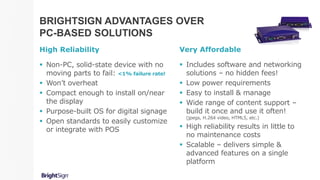
 Non-PC, solid-state device with no
moving parts to fail: <1% failure rate!
 Won’t overheat
 Compact enough to install on/near
the display
 Purpose-built OS for digital signage
 Open standards to easily customize
or integrate with POS
BRIGHTSIGN ADVANTAGES OVER
PC-BASED SOLUTIONS
Very Affordable
 Includes software and networking
solutions – no hidden fees!
 Low power requirements
 Easy to install & manage
 Wide range of content support –
build it once and use it often!
(jpegs, H.264 video, HTML5, etc.)
 High reliability results in little to
no maintenance costs
 Scalable – delivers simple &
advanced features on a single
platform
High Reliability
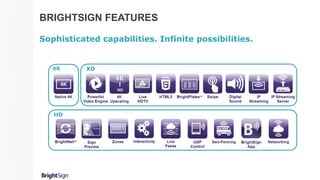
BRIGHTSIGN FEATURES
Sophisticated capabilities. Infinite possibilities.
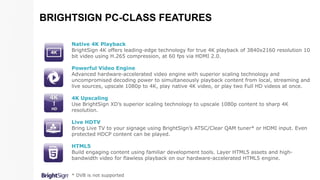
Native 4K Playback
BrightSign 4K offers leading-edge technology for true 4K playback of 3840x2160 resolution 10
bit video using H.265 compression, at 60 fps via HDMI 2.0.
Powerful Video Engine
Advanced hardware-accelerated video engine with superior scaling technology and
uncompromised decoding power to simultaneously playback content from local, streaming and
live sources, upscale 1080p to 4K, play native 4K video, or play two Full HD videos at once.
4K Upscaling
Use BrightSign XD’s superior scaling technology to upscale 1080p content to sharp 4K
resolution.
Live HDTV
Bring Live TV to your signage using BrightSign’s ATSC/Clear QAM tuner* or HDMI input. Even
protected HDCP content can be played.
HTML5
Build engaging content using familiar development tools. Layer HTML5 assets and high-
bandwidth video for flawless playback on our hardware-accelerated HTML5 engine.
* DVB is not supported
BRIGHTSIGN PC-CLASS FEATURES
Swipe
Add the popular swipe screen interactivity to your presentations within HTML content.
Digital Sound
Add crystal clear digital sound to your presentations via SPDIF.
IP Streaming
Supports buffered playback of Full HD videos, MJPEG and audio streams in all common
formats – HLS, UDP/RTP/RTSP, HTTP, SHOUTcast, etc.
IP Streaming Server
Serve video streams from BrightSign XD’s local storage to devices on the same local area
network.
BrightWallTM
Easily create video walls using this powerful drag-and-drop BrightAuthor tool that uses a
common clock to achieve frame-accurate synchronization.
BRIGHTSIGN PC-CLASS FEATURES
Zones
Playback multiple content types and multiple videos on a single screen using zones – even
play video and audio playlists independently from a single player.
Interactivity
Trigger playback from virtually any type of interactive device including barcode
scanners, motion sensors, RFID, GPIO, USB button controls, touch screens, mice and much
more!
UDP Control
Interact with signage via mobile devices, deliver emergency messaging, integrate with
databases, show controllers, etc.
Live Feeds
Instantly display updated content and live feeds without republishing the presentation using
Live Data, Live Media, MRSS, Twitter, Flickr feeds and more! Perfect for menu
boards, waitlists, schedules, social media posts and more!
BRIGHTSIGN PC-CLASS FEATURES
Geo-Fencing
Play content targeted to the current location of your moving digital signage using a
USB GPS dongle.
BrightSign App
Easily update messaging and interact with locally networked signage using your
iPad or iPhone. Change user variables and trigger UDP events for instant signage
updates.
Sign Preview
Get a sneak peek of how your signage will display by viewing your presentation
playback in BrightAuthor.
Networking
BrightSign’s multiple networking options make it easy to update content, playback
live content, monitor and manage your digital signs remotely.
BRIGHTSIGN HD & XD FEATURES
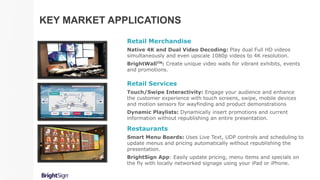
Retail Services
Touch/Swipe Interactivity: Engage your audience and enhance
the customer experience with touch screens, swipe, mobile devices
and motion sensors for wayfinding and product demonstrations
Dynamic Playlists: Dynamically insert promotions and current
information without republishing an entire presentation.
Retail Merchandise
Native 4K and Dual Video Decoding: Play dual Full HD videos
simultaneously and even upscale 1080p videos to 4K resolution.
BrightWallTM: Create unique video walls for vibrant exhibits, events
and promotions.
Restaurants
Smart Menu Boards: Uses Live Text, UDP controls and scheduling to
update menus and pricing automatically without republishing the
presentation.
BrightSign App: Easily update pricing, menu items and specials on
the fly with locally networked signage using your iPad or iPhone.
KEY MARKET APPLICATIONS
Hotels & Casinos
Live Text: Tweet visitors a welcome message upon arrival, add them
to a waitlist or update conference room schedule displays.
HTML5: Display state-of-the-art HTML5 content in your
presentations.
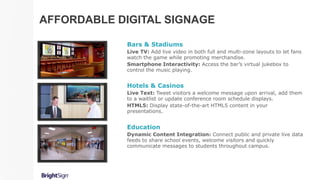
Bars & Stadiums
Live TV: Add live video in both full and multi-zone layouts to let fans
watch the game while promoting merchandise.
Smartphone Interactivity: Access the bar’s virtual jukebox to
control the music playing.
Education
Dynamic Content Integration: Connect public and private live data
feeds to share school events, welcome visitors and quickly
communicate messages to students throughout campus.
AFFORDABLE DIGITAL SIGNAGE
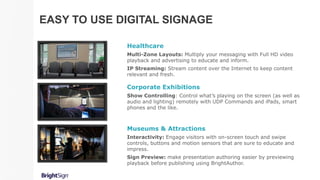
Corporate Exhibitions
Show Controlling: Control what’s playing on the screen (as well as
audio and lighting) remotely with UDP Commands and iPads, smart
phones and the like.
Healthcare
Multi-Zone Layouts: Multiply your messaging with Full HD video
playback and advertising to educate and inform.
IP Streaming: Stream content over the Internet to keep content
relevant and fresh.
Museums & Attractions
Interactivity: Engage visitors with on-screen touch and swipe
controls, buttons and motion sensors that are sure to educate and
impress.
Sign Preview: make presentation authoring easier by previewing
playback before publishing using BrightAuthor.
EASY TO USE DIGITAL SIGNAGE
BRIGHTSIGN IS THE RIGHT CHOICE
Everything you need for sophisticated digital signage.
 Powerful Performance And Reliability
Designed exclusively for digital signage, BrightSign’s slim OS delivers superior
signage capabilities and exceptional Full HD video quality with a solid-state platform
you can depend on.
 Easy To Use, Sophisticated Features
Get dynamic results without difficulty with
BrightSign’s abundance of sophisticated
and easy-to-use features.
 All Inclusive Options
Free BrightAuthor software and networking
solutions are included, with an option to
subscribe to BrightSign Network, a cloud-based
service that frees you from the complexities of
hosting and maintaining your own network.
AU320 SPECIFICATIONS
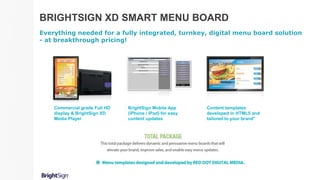
BRIGHTSIGN XD SMART MENU BOARD
Everything needed for a fully integrated, turnkey, digital menu board solution
- at breakthrough pricing!
Commercial grade Full HD
display & BrightSign XD
Media Player
BrightSign Mobile App
(iPhone / iPad) for easy
content updates
Content templates
developed in HTML5 and
tailored to your brand*
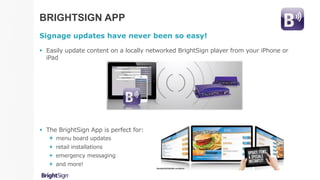
BRIGHTSIGN APP
Signage updates have never been so easy!
 Easily update content on a locally networked BrightSign player from your iPhone or
iPad
 The BrightSign App is perfect for:
 menu board updates
 retail installations
 emergency messaging
 and more!
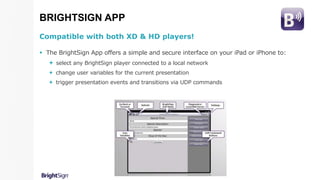
BRIGHTSIGN APP
Compatible with both XD & HD players!
 The BrightSign App offers a simple and secure interface on your iPad or iPhone to:
 select any BrightSign player connected to a local network
 change user variables for the current presentation
 trigger presentation events and transitions via UDP commands
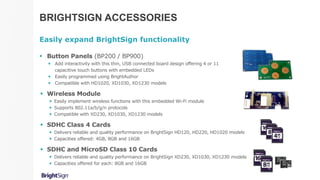
BRIGHTSIGN ACCESSORIES
Easily expand BrightSign functionality
 Button Panels (BP200 / BP900)
 Add interactivity with this thin, USB connected board design offering 4 or 11
capacitive touch buttons with embedded LEDs
 Easily programmed using BrightAuthor
 Compatible with HD1020, XD1030, XD1230 models
 Wireless Module
 Easily implement wireless functions with this embedded Wi-Fi module
 Supports 802.11a/b/g/n protocols
 Compatible with XD230, XD1030, XD1230 models
 SDHC Class 4 Cards
 Delivers reliable and quality performance on BrightSign HD120, HD220, HD1020 models
 Capacities offered: 4GB, 8GB and 16GB
 SDHC and MicroSD Class 10 Cards
 Delivers reliable and quality performance on BrightSign XD230, XD1030, XD1230 models
 Capacities offered for each: 8GB and 16GB
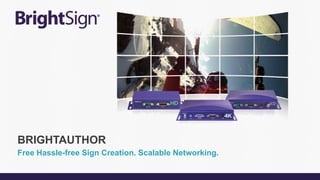
Free Hassle-free Sign Creation. Scalable Networking.
BRIGHTAUTHOR
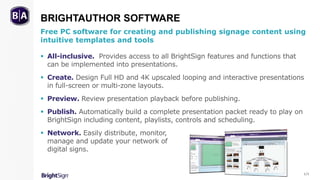
BRIGHTAUTHOR SOFTWARE
Free PC software for creating and publishing signage content using
intuitive templates and tools
 All-inclusive. Provides access to all BrightSign features and functions that
can be implemented into presentations.
 Create. Design Full HD and 4K upscaled looping and interactive presentations
in full-screen or multi-zone layouts.
 Preview. Review presentation playback before publishing.
 Publish. Automatically build a complete presentation packet ready to play on
BrightSign including content, playlists, controls and scheduling.
 Network. Easily distribute, monitor,
manage and update your network of
digital signs.
1/3
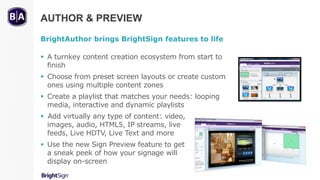
AUTHOR & PREVIEW
BrightAuthor brings BrightSign features to life
 A turnkey content creation ecosystem from start to
finish
 Choose from preset screen layouts or create custom
ones using multiple content zones
 Create a playlist that matches your needs: looping
media, interactive and dynamic playlists
 Add virtually any type of content: video,
images, audio, HTML5, IP streams, live
feeds, Live HDTV, Live Text and more
 Use the new Sign Preview feature to get
a sneak peek of how your signage will
display on-screen
2/3
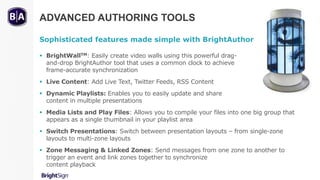
ADVANCED AUTHORING TOOLS
Sophisticated features made simple with BrightAuthor
 BrightWallTM: Easily create video walls using this powerful drag-
and-drop BrightAuthor tool that uses a common clock to achieve
frame-accurate synchronization
 Live Content: Add Live Text, Twitter Feeds, RSS Content
 Dynamic Playlists: Enables you to easily update and share
content in multiple presentations
 Media Lists and Play Files: Allows you to compile your files into one big group that
appears as a single thumbnail in your playlist area
 Switch Presentations: Switch between presentation layouts – from single-zone
layouts to multi-zone layouts
 Zone Messaging & Linked Zones: Send messages from one zone to another to
trigger an event and link zones together to synchronize
content playback
PUBLISH AND NETWORK
Automatically package your presentation and send it to
your display
 Schedule and publish a complete presentation packet onto an SD card or
across a network for flawless distribution and playback
 Access your BrightSign Network account through BrightAuthor to
distribute, manage and monitor your presentations, networked units and
library of content
3/3
BrightAuthor
Versatile networking options deliver remote content with ease
NETWORKING SOLUTIONS
NETWORK SOLUTIONS OVERVIEW
Versatile distribution options to publish presentations with ease
1/5
BRIGHTSIGN NETWORK
Secure and scalable cloud-based digital signage network
 A subscription service that delivers the complete infrastructure to
serve, manage and support your network
 Frees you from the complexities of hosting and maintaining your own
network
 BrightSign Network provides you with the tools and interface to:
Distribute presentations
Create network groups
Monitor and manage the activity and status of displays and BrightSign units
Assign user roles and permissions
Perform network administrator
functions
2/5
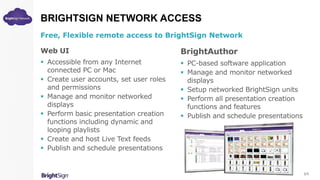
BRIGHTSIGN NETWORK ACCESS
Free, Flexible remote access to BrightSign Network
Web UI
 Accessible from any Internet
connected PC or Mac
 Create user accounts, set user roles
and permissions
 Manage and monitor networked
displays
 Perform basic presentation creation
functions including dynamic and
looping playlists
 Create and host Live Text feeds
 Publish and schedule presentations
BrightAuthor
 PC-based software application
 Manage and monitor networked
displays
 Setup networked BrightSign units
 Perform all presentation creation
functions and features
 Publish and schedule presentations
3/5
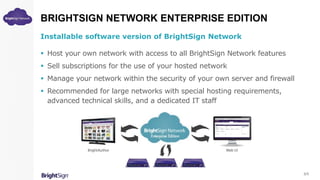
BRIGHTSIGN NETWORK ENTERPRISE EDITION
Installable software version of BrightSign Network
 Host your own network with access to all BrightSign Network features
 Sell subscriptions for the use of your hosted network
 Manage your network within the security of your own server and firewall
 Recommended for large networks with special hosting requirements,
advanced technical skills, and a dedicated IT staff
5/5
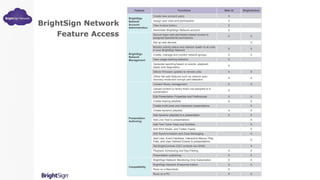
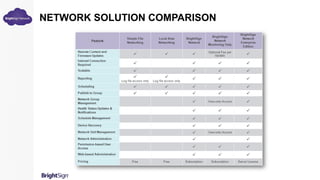
Feature Functions Web UI BrightAuthor
BrightSign
Network
Account
Administration
Create new account users X
Assign user roles and permissions X
View invoice history X
Administer BrightSign Network account X
BrightSign
Network
Management
Secure logon with permission-based access to
assigned operational permissions
X X
Set up new devices X
Monitor activity status and network health of all units
in your BrightSign Network
X X
Create, manage and monitor network groups X X
View usage tracking statistics X
Generate reporting based on events, playback,
states and diagnostics
X
Deliver firmware updates to remote units X X
Utilize fail-safe features such as network auto-
recovery mode and corrupt card detection
X X
Presentation
Authoring
Content library management X X
Upload content to library that’s not assigned to a
presentation
X
Edit Presentation Properties and Preferences X X
Create looping playlists X X
Create multi-zone and interactive presentations X
Create dynamic playlists X X
Add dynamic playlists to a presentation X X
Add Live Text to presentations X
Add Text Ticker Feed and Subtitles X
Add RSS Media and Twitter Feeds X
Add Synchronization and Zone Messaging X
Add Lists, Event Handlers, Interactive Menus, Play
Files, and User Defined Events to presentations
X
Set BrightControls (CEC controls via HDMI) X
Playback Scheduling and Day-Parting X X
Presentation publishing X X
Compatibility
BrightSign Network Monitoring Only Subscription X X
BrightSign Network Enterprise Edition X X
Runs on a Macintosh X
Runs on a PC X X
BrightSign Network
Feature Access
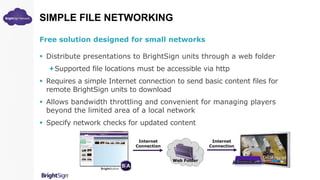
SIMPLE FILE NETWORKING
Free solution designed for small networks
 Distribute presentations to BrightSign units through a web folder
Supported file locations must be accessible via http
 Requires a simple Internet connection to send basic content files for
remote BrightSign units to download
 Allows bandwidth throttling and convenient for managing players
beyond the limited area of a local network
 Specify network checks for updated content
Web Folder
Internet
Connection
Internet
Connection
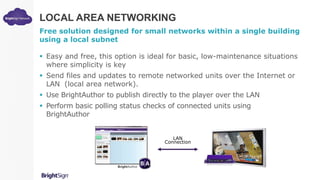
LOCAL AREA NETWORKING
Free solution designed for small networks within a single building
using a local subnet
 Easy and free, this option is ideal for basic, low-maintenance situations
where simplicity is key
 Send files and updates to remote networked units over the Internet or
LAN (local area network).
 Use BrightAuthor to publish directly to the player over the LAN
 Perform basic polling status checks of connected units using
BrightAuthor
LAN
Connection
NETWORK SOLUTION COMPARISON
CASE STUDIES
PROVEN RETURN ON INVESTMENT
Retail digital signage quickly pays for itself
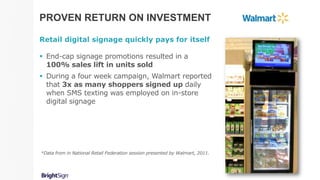
 End-cap signage promotions resulted in a
100% sales lift in units sold
 During a four week campaign, Walmart reported
that 3x as many shoppers signed up daily
when SMS texting was employed on in-store
digital signage
*Data from in National Retail Federation session presented by Walmart, 2011.
PROVEN RETURN ON INVESTMENT
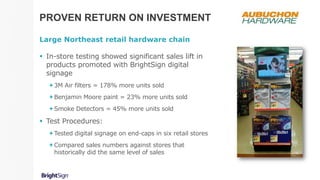
Large Northeast retail hardware chain
 In-store testing showed significant sales lift in
products promoted with BrightSign digital
signage
3M Air filters = 178% more units sold
Benjamin Moore paint = 23% more units sold
Smoke Detectors = 45% more units sold
 Test Procedures:
Tested digital signage on end-caps in six retail stores
Compared sales numbers against stores that
historically did the same level of sales
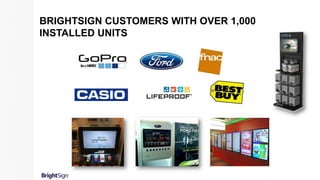
BRIGHTSIGN CUSTOMERS WITH OVER 1,000
INSTALLED UNITS
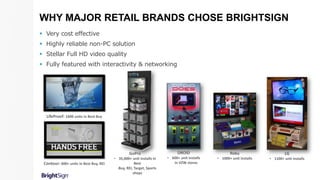
WHY MAJOR RETAIL BRANDS CHOSE BRIGHTSIGN
 Very cost effective
 Highly reliable non-PC solution
 Stellar Full HD video quality
 Fully featured with interactivity & networking
LifeProof: 1600 units in Best Buy
GoPro
• 35,000+ unit installs in
Best
Buy, REI, Target, Sports
shops
Contour: 600+ units in Best Buy, REI
Roku
• 1000+ unit installs
DROID
• 600+ unit installs
in VZW stores
LG
• 1100+ unit installs
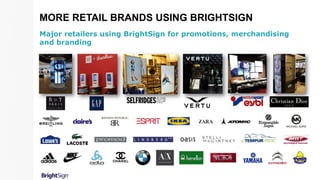
MORE RETAIL BRANDS USING BRIGHTSIGN
Major retailers using BrightSign for promotions, merchandising
and branding
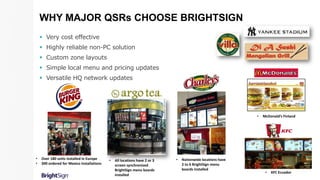
WHY MAJOR QSRs CHOOSE BRIGHTSIGN
 Very cost effective
 Highly reliable non-PC solution
 Custom zone layouts
 Simple local menu and pricing updates
 Versatile HQ network updates
• All locations have 2 or 3
screen synchronized
BrightSign menu boards
installed
• Nationwide locations have
2 to 6 BrightSign menu
boards installed
• McDonald’s Finland
• Over 180 units installed in Europe
• 300 ordered for Mexico installations
• KFC Ecuador
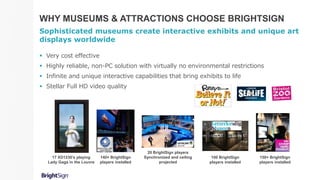
WHY MUSEUMS & ATTRACTIONS CHOOSE BRIGHTSIGN
Sophisticated museums create interactive exhibits and unique art
displays worldwide
 Very cost effective
 Highly reliable, non-PC solution with virtually no environmental restrictions
 Infinite and unique interactive capabilities that bring exhibits to life
 Stellar Full HD video quality
140+ BrightSign
players installed
100 BrightSign
players installed
20 BrightSign players
Synchronized and ceiling
projected
150+ BrightSign
players installed
17 XD1230’s playing
Lady Gaga in the Louvre
CALL US FOR MORE INFO
Call toll free: (800) 486-5276
HAVERFORD SYSTEMS INC
Learn More at our Website
www.ConferenceRoomSystems.com

BrightSign Digital Signage Products

  • 1.
  • 2.
    BRIGHTSIGN PRICING Models arepackaged for specific applications so you pay only for the features you need. $250 $250 $350 $450 $500 $600 $700
  • 3.
  • 4.
    INTRODUCING BRIGHTSIGN 4K UltraHD. Ultra Reliable.  Commercial 4K digital signage media player that employs leading technology for true 4K playback  Ultra-reliable, fan-less and solid-state  Plays native 4K, H.265, 10 bit video at 60 fps via HDMI 2.0  BrightSign 4K will be shipping later this year* * Can’t wait? BrightSign XD players can upscale HD content to 4K resolution
  • 5.
    BRIGHTSIGN XD MODELS ExceptionalPC-class performance. Engaging sophistication. XD230 Networked Player Powerful video engine capable of dual Full HD 1080p60 decode and simultaneous content playback from local, networked and streaming sources. Abundant content support including HTML5 and 3D content. And UDP network control for video wall synchronization, mobile device interactivity and messaging between BrightSign and third-party devices. XD1030 Networked Interactive Player All the features of the XD230 plus S/PDIF output for pure digital and surround sound audio, and a diverse range of interactive controls such as GPIO, serial, USB, UDP and mobile devices for engaging interactive displays. XD1230 Networked Interactive Player with Live HDTV Includes all the features BrightSign offers plus Live HDTV playback to play content from any broadcast channel (even HDCP-protected content) via the HDMI input or closed-circuit TV via the ATSC/Clear QAM tuner.
  • 6.
    BRIGHTSIGN XD MODELVIEWS View XD230 XD1030 XD1230 Beauty Front Right Back Left
  • 7.
    BRIGHTSIGN HD MODELS HD120Basic Interactive Bring your stand-alone display to life with the most affordable, Full-HD solution offering simple GPIO interactivity. HD220 Networked Looping Enjoy easy networked content updates and live data feeds along with flawless video playback, UDP support and synchronization. HD1020 Networked Interactive Engage your audience with a wide range of interactive options using GPIO, USB, serial and UDP connections and networked content for a truly impressive display. Affordable, quality media players that deploy with ease and operate with confidence
  • 8.
  • 9.
    BRIGHTSIGN AU320 Commercial AudioDistribution Delivers flawless music and messaging playback using intuitive playlists and scheduling. Ideal for playing licensed audio files and custom music playlists, as well as custom audio tied to signage presentations.  Networked Audio Delivery: Supports single zone audio with enhanced audio (crossfading, mixing) or dual zone standard audio.  Background Audio: Upload playlists by publishing to an SD card or via network connection.  Content Support: A wide range of licensed content and custom audio playlists; audio file formats including MP2, MP3, ACC and WAV.  Synchronized Audio/Video: Integrates music and messaging with digital signage to deliver a cohesive audio/video experience.  Signature Reliability: Solid-state platform is more dependable than PCs.  Simple Administration: BrightAuthor software and free networking options require minimal technical skills for updates and management – no need for professional IT or A/V support. $250
  • 10.
     Non-PC, solid-statedevice with no moving parts to fail: <1% failure rate!  Won’t overheat  Compact enough to install on/near the display  Purpose-built OS for digital signage  Open standards to easily customize or integrate with POS BRIGHTSIGN ADVANTAGES OVER PC-BASED SOLUTIONS Very Affordable  Includes software and networking solutions – no hidden fees!  Low power requirements  Easy to install & manage  Wide range of content support – build it once and use it often! (jpegs, H.264 video, HTML5, etc.)  High reliability results in little to no maintenance costs  Scalable – delivers simple & advanced features on a single platform High Reliability
  • 11.
  • 12.
    Native 4K Playback BrightSign4K offers leading-edge technology for true 4K playback of 3840x2160 resolution 10 bit video using H.265 compression, at 60 fps via HDMI 2.0. Powerful Video Engine Advanced hardware-accelerated video engine with superior scaling technology and uncompromised decoding power to simultaneously playback content from local, streaming and live sources, upscale 1080p to 4K, play native 4K video, or play two Full HD videos at once. 4K Upscaling Use BrightSign XD’s superior scaling technology to upscale 1080p content to sharp 4K resolution. Live HDTV Bring Live TV to your signage using BrightSign’s ATSC/Clear QAM tuner* or HDMI input. Even protected HDCP content can be played. HTML5 Build engaging content using familiar development tools. Layer HTML5 assets and high- bandwidth video for flawless playback on our hardware-accelerated HTML5 engine. * DVB is not supported BRIGHTSIGN PC-CLASS FEATURES
  • 13.
    Swipe Add the popularswipe screen interactivity to your presentations within HTML content. Digital Sound Add crystal clear digital sound to your presentations via SPDIF. IP Streaming Supports buffered playback of Full HD videos, MJPEG and audio streams in all common formats – HLS, UDP/RTP/RTSP, HTTP, SHOUTcast, etc. IP Streaming Server Serve video streams from BrightSign XD’s local storage to devices on the same local area network. BrightWallTM Easily create video walls using this powerful drag-and-drop BrightAuthor tool that uses a common clock to achieve frame-accurate synchronization. BRIGHTSIGN PC-CLASS FEATURES
  • 14.
    Zones Playback multiple contenttypes and multiple videos on a single screen using zones – even play video and audio playlists independently from a single player. Interactivity Trigger playback from virtually any type of interactive device including barcode scanners, motion sensors, RFID, GPIO, USB button controls, touch screens, mice and much more! UDP Control Interact with signage via mobile devices, deliver emergency messaging, integrate with databases, show controllers, etc. Live Feeds Instantly display updated content and live feeds without republishing the presentation using Live Data, Live Media, MRSS, Twitter, Flickr feeds and more! Perfect for menu boards, waitlists, schedules, social media posts and more! BRIGHTSIGN PC-CLASS FEATURES
  • 15.
    Geo-Fencing Play content targetedto the current location of your moving digital signage using a USB GPS dongle. BrightSign App Easily update messaging and interact with locally networked signage using your iPad or iPhone. Change user variables and trigger UDP events for instant signage updates. Sign Preview Get a sneak peek of how your signage will display by viewing your presentation playback in BrightAuthor. Networking BrightSign’s multiple networking options make it easy to update content, playback live content, monitor and manage your digital signs remotely. BRIGHTSIGN HD & XD FEATURES
  • 16.
    Retail Services Touch/Swipe Interactivity:Engage your audience and enhance the customer experience with touch screens, swipe, mobile devices and motion sensors for wayfinding and product demonstrations Dynamic Playlists: Dynamically insert promotions and current information without republishing an entire presentation. Retail Merchandise Native 4K and Dual Video Decoding: Play dual Full HD videos simultaneously and even upscale 1080p videos to 4K resolution. BrightWallTM: Create unique video walls for vibrant exhibits, events and promotions. Restaurants Smart Menu Boards: Uses Live Text, UDP controls and scheduling to update menus and pricing automatically without republishing the presentation. BrightSign App: Easily update pricing, menu items and specials on the fly with locally networked signage using your iPad or iPhone. KEY MARKET APPLICATIONS
  • 17.
    Hotels & Casinos LiveText: Tweet visitors a welcome message upon arrival, add them to a waitlist or update conference room schedule displays. HTML5: Display state-of-the-art HTML5 content in your presentations. Bars & Stadiums Live TV: Add live video in both full and multi-zone layouts to let fans watch the game while promoting merchandise. Smartphone Interactivity: Access the bar’s virtual jukebox to control the music playing. Education Dynamic Content Integration: Connect public and private live data feeds to share school events, welcome visitors and quickly communicate messages to students throughout campus. AFFORDABLE DIGITAL SIGNAGE
  • 18.
    Corporate Exhibitions Show Controlling:Control what’s playing on the screen (as well as audio and lighting) remotely with UDP Commands and iPads, smart phones and the like. Healthcare Multi-Zone Layouts: Multiply your messaging with Full HD video playback and advertising to educate and inform. IP Streaming: Stream content over the Internet to keep content relevant and fresh. Museums & Attractions Interactivity: Engage visitors with on-screen touch and swipe controls, buttons and motion sensors that are sure to educate and impress. Sign Preview: make presentation authoring easier by previewing playback before publishing using BrightAuthor. EASY TO USE DIGITAL SIGNAGE
  • 19.
    BRIGHTSIGN IS THERIGHT CHOICE Everything you need for sophisticated digital signage.  Powerful Performance And Reliability Designed exclusively for digital signage, BrightSign’s slim OS delivers superior signage capabilities and exceptional Full HD video quality with a solid-state platform you can depend on.  Easy To Use, Sophisticated Features Get dynamic results without difficulty with BrightSign’s abundance of sophisticated and easy-to-use features.  All Inclusive Options Free BrightAuthor software and networking solutions are included, with an option to subscribe to BrightSign Network, a cloud-based service that frees you from the complexities of hosting and maintaining your own network.
  • 20.
  • 21.
    BRIGHTSIGN XD SMARTMENU BOARD Everything needed for a fully integrated, turnkey, digital menu board solution - at breakthrough pricing! Commercial grade Full HD display & BrightSign XD Media Player BrightSign Mobile App (iPhone / iPad) for easy content updates Content templates developed in HTML5 and tailored to your brand*
  • 22.
    BRIGHTSIGN APP Signage updateshave never been so easy!  Easily update content on a locally networked BrightSign player from your iPhone or iPad  The BrightSign App is perfect for:  menu board updates  retail installations  emergency messaging  and more!
  • 23.
    BRIGHTSIGN APP Compatible withboth XD & HD players!  The BrightSign App offers a simple and secure interface on your iPad or iPhone to:  select any BrightSign player connected to a local network  change user variables for the current presentation  trigger presentation events and transitions via UDP commands
  • 24.
    BRIGHTSIGN ACCESSORIES Easily expandBrightSign functionality  Button Panels (BP200 / BP900)  Add interactivity with this thin, USB connected board design offering 4 or 11 capacitive touch buttons with embedded LEDs  Easily programmed using BrightAuthor  Compatible with HD1020, XD1030, XD1230 models  Wireless Module  Easily implement wireless functions with this embedded Wi-Fi module  Supports 802.11a/b/g/n protocols  Compatible with XD230, XD1030, XD1230 models  SDHC Class 4 Cards  Delivers reliable and quality performance on BrightSign HD120, HD220, HD1020 models  Capacities offered: 4GB, 8GB and 16GB  SDHC and MicroSD Class 10 Cards  Delivers reliable and quality performance on BrightSign XD230, XD1030, XD1230 models  Capacities offered for each: 8GB and 16GB
  • 25.
    Free Hassle-free SignCreation. Scalable Networking. BRIGHTAUTHOR
  • 26.
    BRIGHTAUTHOR SOFTWARE Free PCsoftware for creating and publishing signage content using intuitive templates and tools  All-inclusive. Provides access to all BrightSign features and functions that can be implemented into presentations.  Create. Design Full HD and 4K upscaled looping and interactive presentations in full-screen or multi-zone layouts.  Preview. Review presentation playback before publishing.  Publish. Automatically build a complete presentation packet ready to play on BrightSign including content, playlists, controls and scheduling.  Network. Easily distribute, monitor, manage and update your network of digital signs. 1/3
  • 27.
    AUTHOR & PREVIEW BrightAuthorbrings BrightSign features to life  A turnkey content creation ecosystem from start to finish  Choose from preset screen layouts or create custom ones using multiple content zones  Create a playlist that matches your needs: looping media, interactive and dynamic playlists  Add virtually any type of content: video, images, audio, HTML5, IP streams, live feeds, Live HDTV, Live Text and more  Use the new Sign Preview feature to get a sneak peek of how your signage will display on-screen 2/3
  • 28.
    ADVANCED AUTHORING TOOLS Sophisticatedfeatures made simple with BrightAuthor  BrightWallTM: Easily create video walls using this powerful drag- and-drop BrightAuthor tool that uses a common clock to achieve frame-accurate synchronization  Live Content: Add Live Text, Twitter Feeds, RSS Content  Dynamic Playlists: Enables you to easily update and share content in multiple presentations  Media Lists and Play Files: Allows you to compile your files into one big group that appears as a single thumbnail in your playlist area  Switch Presentations: Switch between presentation layouts – from single-zone layouts to multi-zone layouts  Zone Messaging & Linked Zones: Send messages from one zone to another to trigger an event and link zones together to synchronize content playback
  • 29.
    PUBLISH AND NETWORK Automaticallypackage your presentation and send it to your display  Schedule and publish a complete presentation packet onto an SD card or across a network for flawless distribution and playback  Access your BrightSign Network account through BrightAuthor to distribute, manage and monitor your presentations, networked units and library of content 3/3 BrightAuthor
  • 30.
    Versatile networking optionsdeliver remote content with ease NETWORKING SOLUTIONS
  • 31.
    NETWORK SOLUTIONS OVERVIEW Versatiledistribution options to publish presentations with ease 1/5
  • 32.
    BRIGHTSIGN NETWORK Secure andscalable cloud-based digital signage network  A subscription service that delivers the complete infrastructure to serve, manage and support your network  Frees you from the complexities of hosting and maintaining your own network  BrightSign Network provides you with the tools and interface to: Distribute presentations Create network groups Monitor and manage the activity and status of displays and BrightSign units Assign user roles and permissions Perform network administrator functions 2/5
  • 33.
    BRIGHTSIGN NETWORK ACCESS Free,Flexible remote access to BrightSign Network Web UI  Accessible from any Internet connected PC or Mac  Create user accounts, set user roles and permissions  Manage and monitor networked displays  Perform basic presentation creation functions including dynamic and looping playlists  Create and host Live Text feeds  Publish and schedule presentations BrightAuthor  PC-based software application  Manage and monitor networked displays  Setup networked BrightSign units  Perform all presentation creation functions and features  Publish and schedule presentations 3/5
  • 34.
    BRIGHTSIGN NETWORK ENTERPRISEEDITION Installable software version of BrightSign Network  Host your own network with access to all BrightSign Network features  Sell subscriptions for the use of your hosted network  Manage your network within the security of your own server and firewall  Recommended for large networks with special hosting requirements, advanced technical skills, and a dedicated IT staff 5/5
  • 35.
    Feature Functions WebUI BrightAuthor BrightSign Network Account Administration Create new account users X Assign user roles and permissions X View invoice history X Administer BrightSign Network account X BrightSign Network Management Secure logon with permission-based access to assigned operational permissions X X Set up new devices X Monitor activity status and network health of all units in your BrightSign Network X X Create, manage and monitor network groups X X View usage tracking statistics X Generate reporting based on events, playback, states and diagnostics X Deliver firmware updates to remote units X X Utilize fail-safe features such as network auto- recovery mode and corrupt card detection X X Presentation Authoring Content library management X X Upload content to library that’s not assigned to a presentation X Edit Presentation Properties and Preferences X X Create looping playlists X X Create multi-zone and interactive presentations X Create dynamic playlists X X Add dynamic playlists to a presentation X X Add Live Text to presentations X Add Text Ticker Feed and Subtitles X Add RSS Media and Twitter Feeds X Add Synchronization and Zone Messaging X Add Lists, Event Handlers, Interactive Menus, Play Files, and User Defined Events to presentations X Set BrightControls (CEC controls via HDMI) X Playback Scheduling and Day-Parting X X Presentation publishing X X Compatibility BrightSign Network Monitoring Only Subscription X X BrightSign Network Enterprise Edition X X Runs on a Macintosh X Runs on a PC X X BrightSign Network Feature Access
  • 36.
    SIMPLE FILE NETWORKING Freesolution designed for small networks  Distribute presentations to BrightSign units through a web folder Supported file locations must be accessible via http  Requires a simple Internet connection to send basic content files for remote BrightSign units to download  Allows bandwidth throttling and convenient for managing players beyond the limited area of a local network  Specify network checks for updated content Web Folder Internet Connection Internet Connection
  • 37.
    LOCAL AREA NETWORKING Freesolution designed for small networks within a single building using a local subnet  Easy and free, this option is ideal for basic, low-maintenance situations where simplicity is key  Send files and updates to remote networked units over the Internet or LAN (local area network).  Use BrightAuthor to publish directly to the player over the LAN  Perform basic polling status checks of connected units using BrightAuthor LAN Connection
  • 38.
  • 39.
  • 40.
    PROVEN RETURN ONINVESTMENT Retail digital signage quickly pays for itself  End-cap signage promotions resulted in a 100% sales lift in units sold  During a four week campaign, Walmart reported that 3x as many shoppers signed up daily when SMS texting was employed on in-store digital signage *Data from in National Retail Federation session presented by Walmart, 2011.
  • 41.
    PROVEN RETURN ONINVESTMENT Large Northeast retail hardware chain  In-store testing showed significant sales lift in products promoted with BrightSign digital signage 3M Air filters = 178% more units sold Benjamin Moore paint = 23% more units sold Smoke Detectors = 45% more units sold  Test Procedures: Tested digital signage on end-caps in six retail stores Compared sales numbers against stores that historically did the same level of sales
  • 42.
    BRIGHTSIGN CUSTOMERS WITHOVER 1,000 INSTALLED UNITS
  • 43.
    WHY MAJOR RETAILBRANDS CHOSE BRIGHTSIGN  Very cost effective  Highly reliable non-PC solution  Stellar Full HD video quality  Fully featured with interactivity & networking LifeProof: 1600 units in Best Buy GoPro • 35,000+ unit installs in Best Buy, REI, Target, Sports shops Contour: 600+ units in Best Buy, REI Roku • 1000+ unit installs DROID • 600+ unit installs in VZW stores LG • 1100+ unit installs
  • 44.
    MORE RETAIL BRANDSUSING BRIGHTSIGN Major retailers using BrightSign for promotions, merchandising and branding
  • 45.
    WHY MAJOR QSRsCHOOSE BRIGHTSIGN  Very cost effective  Highly reliable non-PC solution  Custom zone layouts  Simple local menu and pricing updates  Versatile HQ network updates • All locations have 2 or 3 screen synchronized BrightSign menu boards installed • Nationwide locations have 2 to 6 BrightSign menu boards installed • McDonald’s Finland • Over 180 units installed in Europe • 300 ordered for Mexico installations • KFC Ecuador
  • 46.
    WHY MUSEUMS &ATTRACTIONS CHOOSE BRIGHTSIGN Sophisticated museums create interactive exhibits and unique art displays worldwide  Very cost effective  Highly reliable, non-PC solution with virtually no environmental restrictions  Infinite and unique interactive capabilities that bring exhibits to life  Stellar Full HD video quality 140+ BrightSign players installed 100 BrightSign players installed 20 BrightSign players Synchronized and ceiling projected 150+ BrightSign players installed 17 XD1230’s playing Lady Gaga in the Louvre
  • 47.
    CALL US FORMORE INFO Call toll free: (800) 486-5276
  • 48.
    HAVERFORD SYSTEMS INC LearnMore at our Website www.ConferenceRoomSystems.com

Editor's Notes

  • #5 BrightSign also
  • #41 The retailer staged a four-week campaign in which shoppers were told that if they&apos;d sign up by dialing a specific code, they&apos;d get exclusive announcements of new “Rollback” offers. During the four-week period, the retailer saw a three-fold increase in daily opt-ins.
  • #43 FNAC:2,100 BrightSign networked controllers in all 82 FNAC stores in France and Belgium