Beyond Usability: User-Centered Design Strategies - - - - - - - - - - - - - - - Christina Wodtke :: christina@carboniq.com   Carbon IQ User Experience Group  http://www.carboniq.com tel: 415 824 7090
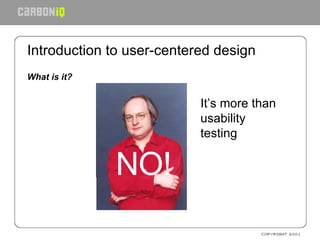
Introduction to user-centered design What is it? NO! It’s more than usability testing
Introduction to user-centered design What is it? A method for understanding and considering  the person  who will experience your design  while  you design
Introduction to user-centered design What is it? A way to get user reactions and feedback to design Performed  throughout the entire product development cycle   Used to ensure a usable product Iterative
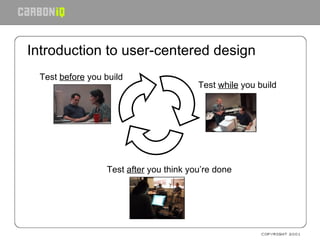
Introduction to user-centered design Test  while  you build Test  before  you build Test  after  you think you’re done
Introduction: How does it work? Learn who the user is. Design for that user Create a rough prototype to test with the people who will use it. Revise based on what you learned. Build a prototype that is close to the finished thing. Test again. Make fixes based on what you learned. Ship the product. Include a feedback device so you can make the next version even better.
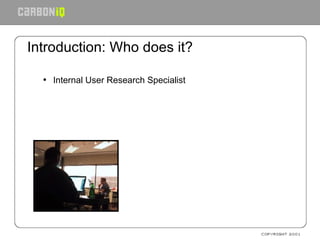
Introduction: Who does it?  Internal User Research Specialist
Introduction: Who does it?  Internal User Research Specialist Outside Consultant
Introduction: Who does it?  Internal User Research Specialist Outside Consultant You
Introduction: Why do it? Know if the product meets user needs  before  you build it Cheap to change a sketch Affordable to change a Photoshop comp Expensive to change fully coded product Customer service expensive as well
Introduction: Why do it? Enable you to develop easy-to-use products Satisfy customers Decrease expenditures on technical support and training Advertise ease-of-use successes Improve brand perception Ultimately increase market share Next: who are the users?
Who are the users of the system? Start by collecting pre-existing information  Hunt down previous data (marketing demographics, surveys, past usability tests) Hold stakeholder interviews Conduct customer service interviews Next: Talk to the user: recruiting
Finding the end user Recruiting  Develop a portrait of the user (a la the persona) Develop a screener based on this Recruit typical end users Professional recruiter Do it yourself Offer a  consideration: cash or a gift Watch for ringers Professional testers Inarticulate users
Not the end user Employees Designers Programmers Market researchers You Next: Contextual Inquiry
Talk to the end user: Questionnaires What is it? Series of questions to be answered by users Mail,or on website Quantitative, rather than qualitative Good for gathering large amounts of facts Less reliable when dealing with opinions People lie, and with very little reason
Talk to the end user: Questionnaires Two types: Factual Gender: male or female Do you drink coffee daily? Opinion From a scale from 1 to 5 where 1 is easy and 5 is difficult, how hard was it to use this system? Would you buy this product?
Talk to the end user: Questionnaires Tips: Keep it short Do multiple surveys, rather than one long Phrase questions cautiously Use Likert scales Keep it anonymous, and state that in the beginning Allow single vote per IP Next: Contextual Inquiry
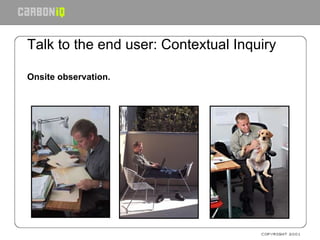
Talk to the end user: Contextual Inquiry Onsite observation.
Talk to the end user: Contextual Inquiry What is it? Observe users in the environment they use your product Watch them use the product Understand their behavior by encouraging them to “think out loud” Remember to compare what they say and what they do.
Talk to the end user: Contextual Inquiry Technique: Thinking-out-loud Also used in usability testing, participatory design Users encouraged to voice their thoughts as they use the product Try an exercise to illustrate
Talk to the end user: Contextual Inquiry Running a contextual inquiry Recruit a number of typical end-users Visit the location where they would use your product Ask them to show you how currently do their tasks Ask them to accomplish those tasks with your product Analyze your results Next: personas
Personas
Persona development Personas are: A key to user-centered design Not “The User” but “one particular user” Inform the entire design process Who are we designing for? What are we designing? How will we design it? Does this design work?
Persona development/user profiling Personas are: Archetypal users Conglomerates based on user data Built collaboratively by team Useful for keeping users front-of-mind
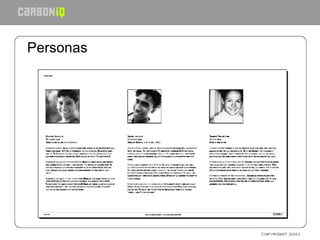
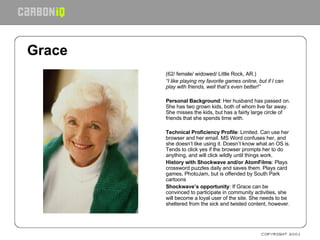
Grace   (62/ female/ widowed/ Little Rock, AR.) “ I like playing my favorite games online, but if I can play with friends, well that’s even better!”    Personal Background : Her husband has passed on. She has two grown kids, both of whom live far away. She misses the kids, but has a fairly large circle of friends that she spends time with.   Technical Proficiency Profile : Limited. Can use her browser and her email. MS Word confuses her, and she doesn’t like using it. Doesn’t know what an OS is. Tends to click yes if the browser prompts her to do anything, and will click wildly until things work. History with Shockwave and/or AtomFilms : Plays crossword puzzles daily and saves them. Plays card games, PhotoJam, but is offended by South Park cartoons Shockwave’s opportunity : If Grace can be convinced to participate in community activities, she will become a loyal user of the site. She needs to be sheltered from the sick and twisted content, however.     
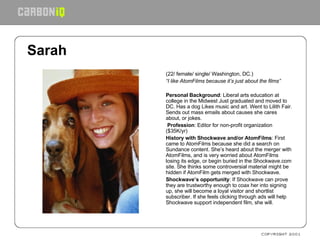
Sarah   (22/ female/ single/ Washington, DC.) “ I like AtomFilms because it’s just about the films”   Personal Background : Liberal arts education at college in the Midwest Just graduated and moved to DC. Has a dog Likes music and art. Went to Lilith Fair. Sends out mass emails about causes she cares about, or jokes.   Profession : Editor for non-profit organization ($35K/yr) History with Shockwave and/or AtomFilms : First came to AtomFilms because she did a search on Sundance content. She’s heard about the merger with AtomFilms, and is very worried about AtomFilms losing its edge, or begin buried in the Shockwave.com site. She thinks some controversial material might be hidden if AtomFilm gets merged with Shockwave.  Shockwave’s opportunity : If Shockwave can prove they are trustworthy enough to coax her into signing up, she will become a loyal visitor and shortlist subscriber. If she feels clicking through ads will help Shockwave support independent film, she will.
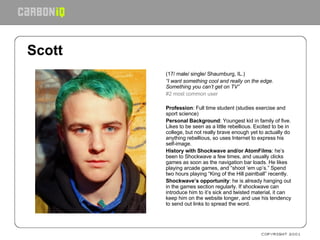
Scott   (17/ male/ single/ Shaumburg, IL.) “ I want something cool and really on the edge. Something you can’t get on TV” #2 most common user   Profession : Full time student (studies exercise and sport science) Personal Background : Youngest kid in family of five. Likes to be seen as a little rebellious. Excited to be in college, but not really brave enough yet to actually do anything rebellious, so uses Internet to express his self-image. History with Shockwave and/or AtomFilms : he’s been to Shockwave a few times, and usually clicks games as soon as the navigation bar loads. He likes playing arcade games, and “shoot ‘em up’s.” Spend two hours playing “King of the Hill paintball” recently. Shockwave’s opportunity : he is already hanging out in the games section regularly. If shockwave can introduce him to it’s sick and twisted material, it can keep him on the website longer, and use his tendency to send out links to spread the word.  
Persona development/user profiling How to create: Summarize findings, distribute to stakeholders. Hold a work session with stakeholders & development team to brainstorm personas. Prioritize and cull lesser personas to develop primary and supporting personas.
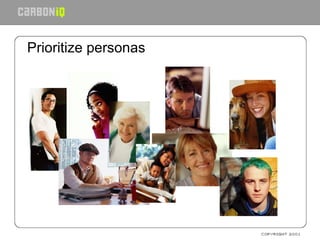
Prioritize personas
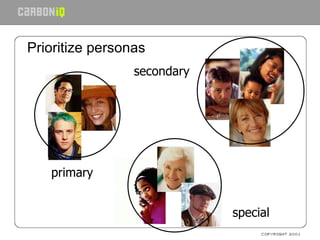
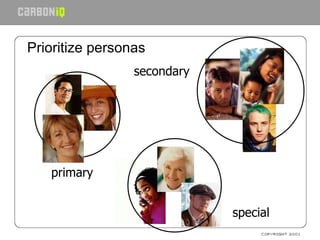
Prioritize personas primary secondary special
Use personas Keep them near Hang them on your wall Make poster, placemats, puppets Role-play personas Evaluate with them Next: mental models
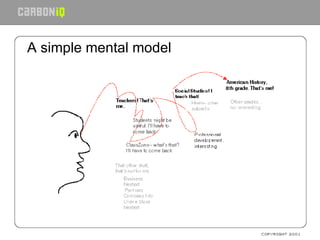
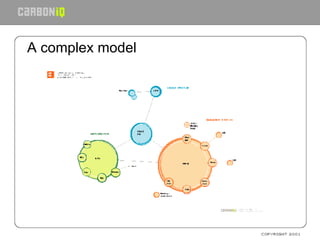
Analyzing what you’ve learned. Mental Models -  diagram of the end user’s perception of product Study the user Map the mental model Design from the mental model
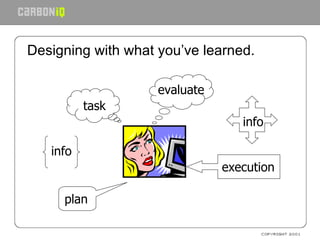
Designing with what you’ve learned. plan task info execution info evaluate
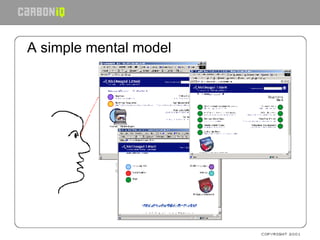
A simple mental model
A complex model
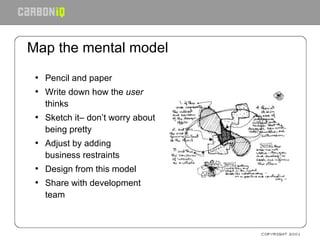
Map the mental model Pencil and paper Write down how the  user  thinks Sketch it– don’t worry about being pretty Adjust by adding business restraints Design from this model Share with development team
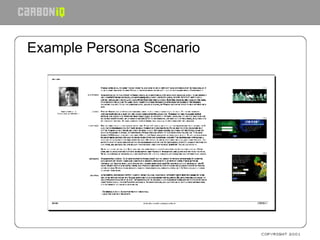
Designing with what you’ve learned Persona Scenarios –  the power of story telling Get your personas out Tell ideal user experience for one persona Adjust for business constraints Build for this scenario
Example Persona Scenario
Designing what you’ve learned. Task analysis Step by step breakdown of scenarios Helps define interface/interaction needs Flushes out potential opportunities for errors
Designing what you’ve learned Task analysis Start with scenario Break it up into discreet tasks Subdivide into smaller steps
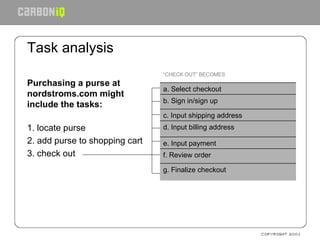
Task analysis Purchasing a purse at nordstroms.com might include the tasks:   1. locate purse  2. add purse to shopping cart 3. check out   f. Review order “ CHECK OUT” BECOMES g. Finalize checkout e. Input payment d. Input billing address c. Input shipping address b. Sign in/sign up a. Select checkout
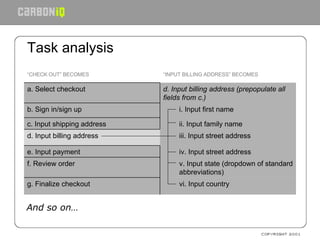
Task analysis And so on… v. Input state (dropdown of standard abbreviations) f. Review order “ INPUT BILLING ADDRESS” BECOMES “ CHECK OUT” BECOMES vi. Input country g. Finalize checkout iv. Input street address e. Input payment iii. Input street address d. Input billing address ii. Input family name c. Input shipping address i. Input first name  b. Sign in/sign up d. Input billing address (prepopulate all fields from c.) a. Select checkout
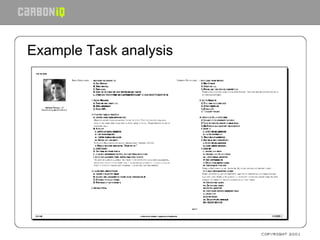
Example Task analysis
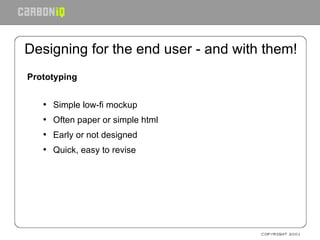
Designing for the end user - and with them! Prototyping Simple low-fi mockup Often paper or simple html Early or not designed Quick, easy to revise
Designing with the user How to: Designing and Preparing a paper prototype test Required: paper, pens, tape, scissors and 3 people   Use paper and hand draw prototype One person acts as the computer, one as moderator, one takes notes Ask users to accomplish tasks Make small changes as needed Paper prototyping kit available at http://www.infodesign.com.au/usability
Rapid prototyping Paper or html Very early stage design, or half complete design Allow time between tests to make changes Note where design gets better or worse You should be making fewer changes as the test continues The report is partly the final prototype Next: card sorting
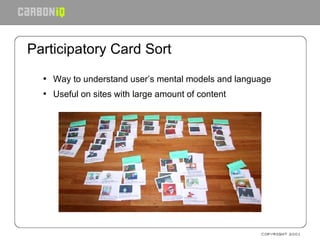
Participatory Card Sort Way to understand user’s mental models and language Useful on sites with large amount of content
How to: Running a successful card sort 50-75 pieces of content (not categories!) Provide as much information as possible while not overwhelming Lay all content out on a large table, shuffled thoroughly Provide blanks for category labels Encourage thinking-out-loud Be helpful, but do not suggest or advise. Play psychiatrist. Collate results and look for patterns.
Usability testing—at last– or at first? Do testing while you still have time to fix problems Do testing before a redesign
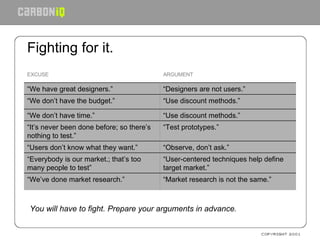
Fighting for it.   You will have to fight. Prepare your arguments in advance. “ User-centered techniques help define target market.” “ Everybody is our market.; that’s too many people to test” ARGUMENT EXCUSE “ Market research is not the same.” “ We’ve done market research.” “ Observe, don’t ask.” “ Users don’t know what they want.” “ Test prototypes.” “ It’s never been done before; so there’s nothing to test.” “ Use discount methods.” “ We don’t have time.” “ Use discount methods.” “ We don’t have the budget.” “ Designers are not users.” “ We have great designers.”
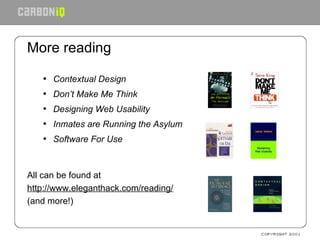
More reading Contextual Design Don’t Make Me Think Designing Web Usability Inmates are Running the Asylum Software For Use All can be found at  http://www.eleganthack.com/reading/ (and more!)
More reading Usable Web  http://www.usableweb.com Usability Toolbox  http://www.best.com/~jthom/usability/ Ask Tog http://www.asktog.com/ Useit.com – Jakob!  http://www.useit.com UIE.com – Jared http://www.uie.com
Conclusion User-centered design works It makes good business sense It’s affordable It’s satisfying
Questions? - - - - - - - - - - - - - - - Christina Wodtke :: christina@carboniq.com   Carbon IQ User Experience Group  http://www.carboniq.com tel: 415 824 7090

Beyond Usability

  • 1.
    Beyond Usability: User-CenteredDesign Strategies - - - - - - - - - - - - - - - Christina Wodtke :: christina@carboniq.com   Carbon IQ User Experience Group http://www.carboniq.com tel: 415 824 7090
  • 2.
    Introduction to user-centereddesign What is it? NO! It’s more than usability testing
  • 3.
    Introduction to user-centereddesign What is it? A method for understanding and considering the person who will experience your design while you design
  • 4.
    Introduction to user-centereddesign What is it? A way to get user reactions and feedback to design Performed throughout the entire product development cycle Used to ensure a usable product Iterative
  • 5.
    Introduction to user-centereddesign Test while you build Test before you build Test after you think you’re done
  • 6.
    Introduction: How doesit work? Learn who the user is. Design for that user Create a rough prototype to test with the people who will use it. Revise based on what you learned. Build a prototype that is close to the finished thing. Test again. Make fixes based on what you learned. Ship the product. Include a feedback device so you can make the next version even better.
  • 7.
    Introduction: Who doesit? Internal User Research Specialist
  • 8.
    Introduction: Who doesit? Internal User Research Specialist Outside Consultant
  • 9.
    Introduction: Who doesit? Internal User Research Specialist Outside Consultant You
  • 10.
    Introduction: Why doit? Know if the product meets user needs before you build it Cheap to change a sketch Affordable to change a Photoshop comp Expensive to change fully coded product Customer service expensive as well
  • 11.
    Introduction: Why doit? Enable you to develop easy-to-use products Satisfy customers Decrease expenditures on technical support and training Advertise ease-of-use successes Improve brand perception Ultimately increase market share Next: who are the users?
  • 12.
    Who are theusers of the system? Start by collecting pre-existing information Hunt down previous data (marketing demographics, surveys, past usability tests) Hold stakeholder interviews Conduct customer service interviews Next: Talk to the user: recruiting
  • 13.
    Finding the enduser Recruiting Develop a portrait of the user (a la the persona) Develop a screener based on this Recruit typical end users Professional recruiter Do it yourself Offer a consideration: cash or a gift Watch for ringers Professional testers Inarticulate users
  • 14.
    Not the enduser Employees Designers Programmers Market researchers You Next: Contextual Inquiry
  • 15.
    Talk to theend user: Questionnaires What is it? Series of questions to be answered by users Mail,or on website Quantitative, rather than qualitative Good for gathering large amounts of facts Less reliable when dealing with opinions People lie, and with very little reason
  • 16.
    Talk to theend user: Questionnaires Two types: Factual Gender: male or female Do you drink coffee daily? Opinion From a scale from 1 to 5 where 1 is easy and 5 is difficult, how hard was it to use this system? Would you buy this product?
  • 17.
    Talk to theend user: Questionnaires Tips: Keep it short Do multiple surveys, rather than one long Phrase questions cautiously Use Likert scales Keep it anonymous, and state that in the beginning Allow single vote per IP Next: Contextual Inquiry
  • 18.
    Talk to theend user: Contextual Inquiry Onsite observation.
  • 19.
    Talk to theend user: Contextual Inquiry What is it? Observe users in the environment they use your product Watch them use the product Understand their behavior by encouraging them to “think out loud” Remember to compare what they say and what they do.
  • 20.
    Talk to theend user: Contextual Inquiry Technique: Thinking-out-loud Also used in usability testing, participatory design Users encouraged to voice their thoughts as they use the product Try an exercise to illustrate
  • 21.
    Talk to theend user: Contextual Inquiry Running a contextual inquiry Recruit a number of typical end-users Visit the location where they would use your product Ask them to show you how currently do their tasks Ask them to accomplish those tasks with your product Analyze your results Next: personas
  • 22.
  • 23.
    Persona development Personasare: A key to user-centered design Not “The User” but “one particular user” Inform the entire design process Who are we designing for? What are we designing? How will we design it? Does this design work?
  • 24.
    Persona development/user profilingPersonas are: Archetypal users Conglomerates based on user data Built collaboratively by team Useful for keeping users front-of-mind
  • 25.
    Grace (62/ female/ widowed/ Little Rock, AR.) “ I like playing my favorite games online, but if I can play with friends, well that’s even better!”    Personal Background : Her husband has passed on. She has two grown kids, both of whom live far away. She misses the kids, but has a fairly large circle of friends that she spends time with.   Technical Proficiency Profile : Limited. Can use her browser and her email. MS Word confuses her, and she doesn’t like using it. Doesn’t know what an OS is. Tends to click yes if the browser prompts her to do anything, and will click wildly until things work. History with Shockwave and/or AtomFilms : Plays crossword puzzles daily and saves them. Plays card games, PhotoJam, but is offended by South Park cartoons Shockwave’s opportunity : If Grace can be convinced to participate in community activities, she will become a loyal user of the site. She needs to be sheltered from the sick and twisted content, however.    
  • 26.
    Sarah (22/ female/ single/ Washington, DC.) “ I like AtomFilms because it’s just about the films”   Personal Background : Liberal arts education at college in the Midwest Just graduated and moved to DC. Has a dog Likes music and art. Went to Lilith Fair. Sends out mass emails about causes she cares about, or jokes.   Profession : Editor for non-profit organization ($35K/yr) History with Shockwave and/or AtomFilms : First came to AtomFilms because she did a search on Sundance content. She’s heard about the merger with AtomFilms, and is very worried about AtomFilms losing its edge, or begin buried in the Shockwave.com site. She thinks some controversial material might be hidden if AtomFilm gets merged with Shockwave. Shockwave’s opportunity : If Shockwave can prove they are trustworthy enough to coax her into signing up, she will become a loyal visitor and shortlist subscriber. If she feels clicking through ads will help Shockwave support independent film, she will.
  • 27.
    Scott (17/ male/ single/ Shaumburg, IL.) “ I want something cool and really on the edge. Something you can’t get on TV” #2 most common user   Profession : Full time student (studies exercise and sport science) Personal Background : Youngest kid in family of five. Likes to be seen as a little rebellious. Excited to be in college, but not really brave enough yet to actually do anything rebellious, so uses Internet to express his self-image. History with Shockwave and/or AtomFilms : he’s been to Shockwave a few times, and usually clicks games as soon as the navigation bar loads. He likes playing arcade games, and “shoot ‘em up’s.” Spend two hours playing “King of the Hill paintball” recently. Shockwave’s opportunity : he is already hanging out in the games section regularly. If shockwave can introduce him to it’s sick and twisted material, it can keep him on the website longer, and use his tendency to send out links to spread the word.  
  • 28.
    Persona development/user profilingHow to create: Summarize findings, distribute to stakeholders. Hold a work session with stakeholders & development team to brainstorm personas. Prioritize and cull lesser personas to develop primary and supporting personas.
  • 29.
  • 30.
    Prioritize personas primarysecondary special
  • 31.
    Prioritize personas primarysecondary special
  • 32.
    Use personas Keepthem near Hang them on your wall Make poster, placemats, puppets Role-play personas Evaluate with them Next: mental models
  • 33.
    Analyzing what you’velearned. Mental Models - diagram of the end user’s perception of product Study the user Map the mental model Design from the mental model
  • 34.
    Designing with whatyou’ve learned. plan task info execution info evaluate
  • 35.
  • 36.
  • 37.
  • 38.
    Map the mentalmodel Pencil and paper Write down how the user thinks Sketch it– don’t worry about being pretty Adjust by adding business restraints Design from this model Share with development team
  • 39.
    Designing with whatyou’ve learned Persona Scenarios – the power of story telling Get your personas out Tell ideal user experience for one persona Adjust for business constraints Build for this scenario
  • 40.
  • 41.
    Designing what you’velearned. Task analysis Step by step breakdown of scenarios Helps define interface/interaction needs Flushes out potential opportunities for errors
  • 42.
    Designing what you’velearned Task analysis Start with scenario Break it up into discreet tasks Subdivide into smaller steps
  • 43.
    Task analysis Purchasinga purse at nordstroms.com might include the tasks: 1. locate purse 2. add purse to shopping cart 3. check out f. Review order “ CHECK OUT” BECOMES g. Finalize checkout e. Input payment d. Input billing address c. Input shipping address b. Sign in/sign up a. Select checkout
  • 44.
    Task analysis Andso on… v. Input state (dropdown of standard abbreviations) f. Review order “ INPUT BILLING ADDRESS” BECOMES “ CHECK OUT” BECOMES vi. Input country g. Finalize checkout iv. Input street address e. Input payment iii. Input street address d. Input billing address ii. Input family name c. Input shipping address i. Input first name b. Sign in/sign up d. Input billing address (prepopulate all fields from c.) a. Select checkout
  • 45.
  • 46.
    Designing for theend user - and with them! Prototyping Simple low-fi mockup Often paper or simple html Early or not designed Quick, easy to revise
  • 47.
    Designing with theuser How to: Designing and Preparing a paper prototype test Required: paper, pens, tape, scissors and 3 people Use paper and hand draw prototype One person acts as the computer, one as moderator, one takes notes Ask users to accomplish tasks Make small changes as needed Paper prototyping kit available at http://www.infodesign.com.au/usability
  • 48.
    Rapid prototyping Paperor html Very early stage design, or half complete design Allow time between tests to make changes Note where design gets better or worse You should be making fewer changes as the test continues The report is partly the final prototype Next: card sorting
  • 49.
    Participatory Card SortWay to understand user’s mental models and language Useful on sites with large amount of content
  • 50.
    How to: Runninga successful card sort 50-75 pieces of content (not categories!) Provide as much information as possible while not overwhelming Lay all content out on a large table, shuffled thoroughly Provide blanks for category labels Encourage thinking-out-loud Be helpful, but do not suggest or advise. Play psychiatrist. Collate results and look for patterns.
  • 51.
    Usability testing—at last–or at first? Do testing while you still have time to fix problems Do testing before a redesign
  • 52.
    Fighting for it. You will have to fight. Prepare your arguments in advance. “ User-centered techniques help define target market.” “ Everybody is our market.; that’s too many people to test” ARGUMENT EXCUSE “ Market research is not the same.” “ We’ve done market research.” “ Observe, don’t ask.” “ Users don’t know what they want.” “ Test prototypes.” “ It’s never been done before; so there’s nothing to test.” “ Use discount methods.” “ We don’t have time.” “ Use discount methods.” “ We don’t have the budget.” “ Designers are not users.” “ We have great designers.”
  • 53.
    More reading ContextualDesign Don’t Make Me Think Designing Web Usability Inmates are Running the Asylum Software For Use All can be found at http://www.eleganthack.com/reading/ (and more!)
  • 54.
    More reading UsableWeb http://www.usableweb.com Usability Toolbox http://www.best.com/~jthom/usability/ Ask Tog http://www.asktog.com/ Useit.com – Jakob! http://www.useit.com UIE.com – Jared http://www.uie.com
  • 55.
    Conclusion User-centered designworks It makes good business sense It’s affordable It’s satisfying
  • 56.
    Questions? - -- - - - - - - - - - - - - Christina Wodtke :: christina@carboniq.com   Carbon IQ User Experience Group http://www.carboniq.com tel: 415 824 7090