Queueable Apex:
More Than an @future
Axaykumar Varu
Queueable Interface
• Take Control of your Asynchronous Apex processes by
using the Queueable interface.
• This interface enables you to add jobs to the queue and
monitor them, which is an enhanced way of running
your asynchronous Apex code compared to using future
methods.
• For Apex processes that run for a long time, you can
run them asynchronously by implementing the
Queueable interface and adding a job to the Apex job
queue.
• In this way, your asynchronous Apex job runs in the
background in its own thread and doesn’t delay the
execution of your main Apex logic.
Queueable Interface vs. @future
• Getting an ID for your job: When you submit your job
by invoking the System.enqueueJob method, the
method returns the ID of the new job. This ID
corresponds to the ID of the AsyncApexJob record
• Using non-primitive types: Your Queueable class can
contain member variables of non-primitive data types,
such as sObjects or custom Apex types. Those objects
can be accessed when the job executes.
• Chaining jobs: You can chain one job to another job by
starting a second job from a running job. Chaining jobs
is useful if you need to do some processing that
depends on another process to have run first.
Syntax
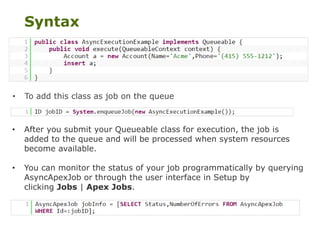
• After you submit your Queueable class for execution, the job is
added to the queue and will be processed when system resources
become available.
• You can monitor the status of your job programmatically by querying
AsyncApexJob or through the user interface in Setup by
clicking Jobs | Apex Jobs.
• To add this class as job on the queue
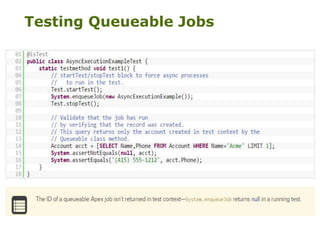
Testing Queueable Jobs
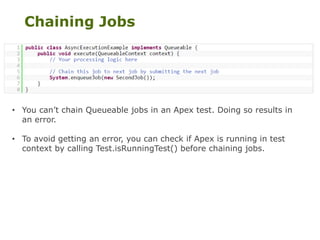
Chaining Jobs
• You can’t chain Queueable jobs in an Apex test. Doing so results in
an error.
• To avoid getting an error, you can check if Apex is running in test
context by calling Test.isRunningTest() before chaining jobs.
Queueable Apex Limits
• The execution of a queued job counts once against the
shared limit for Asynchronous Apex method executions.
• You can add up to 50 jobs to the queue with
System.enqueueJob in a single transaction.
• The maximum stack depth for chained jobs is
two(WI15), which means that you can link a job only
once and have a maximum of two jobs in the chain.
• No limit is enforced on the depth of chained jobs(SP15)
• One parent Job cannot have more than two child jobs.
Demo
• Business requirement: You have to send a callout to an
external service whenever a Case is closed.
• Constraints: The callout will be a REST POST method that
accepts a JSON body with all the non-null Case fields that are
filled exactly when the Case is closed.
• Using a future method, we will pass the case ID to the job
and so make a subsequent SOQL query: this is against the
requirement to pass the fields we have in the Case at the
exact time of the update.
• This might seem an excessive constraint, but with big ORGs
and hundreds of future methods in execution (due to system
overload), future methods can actually be executed after
minutes, so the Case state can be different from when the
future was actually fired.
References
Queueable Apex
• https://developer.salesforce.com/docs/atlas.en-
us.apexcode.meta/apexcode/apex_queueing_jobs.htm
Future Method
• https://developer.salesforce.com/docs/atlas.en-
us.apexcode.meta/apexcode/apex_classes_annotation_
future.htm
Dev Blog: Queueable Apex: More Than an @future
• https://developer.salesforce.com/blogs/developer-
relations/2015/05/queueable-apex-future.html
• Inspect HTTP Request using: http://requestb.in/
Code for the Demo
• https://github.com/enreeco/apex-queueable-
interfaces-example
Questions?
Thank You!

Salesforce DUG - Queueable Apex

  • 1.
    Queueable Apex: More Thanan @future Axaykumar Varu
  • 2.
    Queueable Interface • TakeControl of your Asynchronous Apex processes by using the Queueable interface. • This interface enables you to add jobs to the queue and monitor them, which is an enhanced way of running your asynchronous Apex code compared to using future methods. • For Apex processes that run for a long time, you can run them asynchronously by implementing the Queueable interface and adding a job to the Apex job queue. • In this way, your asynchronous Apex job runs in the background in its own thread and doesn’t delay the execution of your main Apex logic.
  • 3.
    Queueable Interface vs.@future • Getting an ID for your job: When you submit your job by invoking the System.enqueueJob method, the method returns the ID of the new job. This ID corresponds to the ID of the AsyncApexJob record • Using non-primitive types: Your Queueable class can contain member variables of non-primitive data types, such as sObjects or custom Apex types. Those objects can be accessed when the job executes. • Chaining jobs: You can chain one job to another job by starting a second job from a running job. Chaining jobs is useful if you need to do some processing that depends on another process to have run first.
  • 4.
    Syntax • After yousubmit your Queueable class for execution, the job is added to the queue and will be processed when system resources become available. • You can monitor the status of your job programmatically by querying AsyncApexJob or through the user interface in Setup by clicking Jobs | Apex Jobs. • To add this class as job on the queue
  • 5.
  • 6.
    Chaining Jobs • Youcan’t chain Queueable jobs in an Apex test. Doing so results in an error. • To avoid getting an error, you can check if Apex is running in test context by calling Test.isRunningTest() before chaining jobs.
  • 7.
    Queueable Apex Limits •The execution of a queued job counts once against the shared limit for Asynchronous Apex method executions. • You can add up to 50 jobs to the queue with System.enqueueJob in a single transaction. • The maximum stack depth for chained jobs is two(WI15), which means that you can link a job only once and have a maximum of two jobs in the chain. • No limit is enforced on the depth of chained jobs(SP15) • One parent Job cannot have more than two child jobs.
  • 8.
    Demo • Business requirement:You have to send a callout to an external service whenever a Case is closed. • Constraints: The callout will be a REST POST method that accepts a JSON body with all the non-null Case fields that are filled exactly when the Case is closed. • Using a future method, we will pass the case ID to the job and so make a subsequent SOQL query: this is against the requirement to pass the fields we have in the Case at the exact time of the update. • This might seem an excessive constraint, but with big ORGs and hundreds of future methods in execution (due to system overload), future methods can actually be executed after minutes, so the Case state can be different from when the future was actually fired.
  • 10.
    References Queueable Apex • https://developer.salesforce.com/docs/atlas.en- us.apexcode.meta/apexcode/apex_queueing_jobs.htm FutureMethod • https://developer.salesforce.com/docs/atlas.en- us.apexcode.meta/apexcode/apex_classes_annotation_ future.htm Dev Blog: Queueable Apex: More Than an @future • https://developer.salesforce.com/blogs/developer- relations/2015/05/queueable-apex-future.html • Inspect HTTP Request using: http://requestb.in/ Code for the Demo • https://github.com/enreeco/apex-queueable- interfaces-example
  • 11.