INFORMATION
TECHNOLOGY
C L A S S X I
H S C
Information Practices (XI) - slides by Aditi Bhushan 1
CHAPTER 1
B A S I C S O F I N F O R M AT I O N
T E C H N O L O G Y
Information Practices (XI) - slides by Aditi Bhushan 2
BASIC CONCEPTS
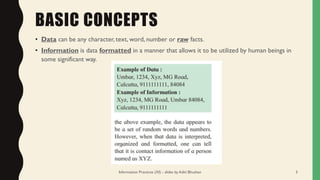
• Data can be any character, text, word, number or raw facts.
• Information is data formatted in a manner that allows it to be utilized by human beings in
some significant way.
Information Practices (XI) - slides by Aditi Bhushan 3
BASIC CONCEPTS
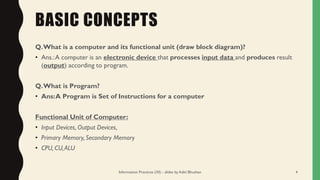
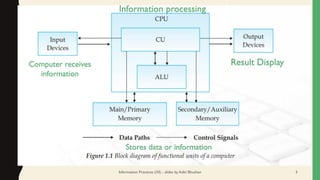
Q.What is a computer and its functional unit (draw block diagram)?
• Ans.:A computer is an electronic device that processes input data and produces result
(output) according to program.
Q.What is Program?
• Ans:A Program is Set of Instructions for a computer
Functional Unit of Computer:
• Input Devices, Output Devices,
• Primary Memory, Secondary Memory
• CPU, CU,ALU
Information Practices (XI) - slides by Aditi Bhushan 4
Computer receives
information
Information processing
Result Display
Stores data or information
Information Practices (XI) - slides by Aditi Bhushan 5
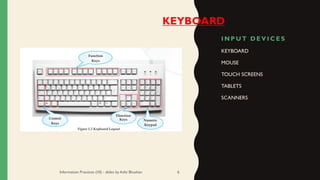
I N P U T D E V I C E S
KEYBOARD
MOUSE
TOUCH SCREENS
TABLETS
SCANNERS
Information Practices (XI) - slides by Aditi Bhushan 6
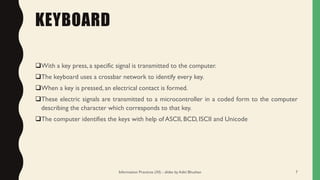
KEYBOARD
KEYBOARD
❑With a key press, a specific signal is transmitted to the computer.
❑The keyboard uses a crossbar network to identify every key.
❑When a key is pressed, an electrical contact is formed.
❑These electric signals are transmitted to a microcontroller in a coded form to the computer
describing the character which corresponds to that key.
❑The computer identifies the keys with help of ASCII, BCD, ISCII and Unicode
Information Practices (XI) - slides by Aditi Bhushan 7
MOUSE
Information Practices (XI) - slides by Aditi Bhushan 8
MOUSE
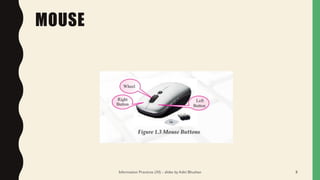
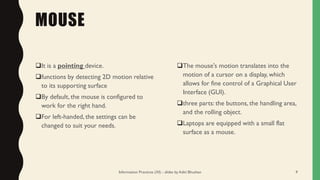
❑It is a pointing device.
❑functions by detecting 2D motion relative
to its supporting surface
❑By default, the mouse is configured to
work for the right hand.
❑For left-handed, the settings can be
changed to suit your needs.
❑The mouse's motion translates into the
motion of a cursor on a display, which
allows for fine control of a Graphical User
Interface (GUI).
❑three parts: the buttons, the handling area,
and the rolling object.
❑Laptops are equipped with a small flat
surface as a mouse.
Information Practices (XI) - slides by Aditi Bhushan 9
OTHER INPUT DEVICES
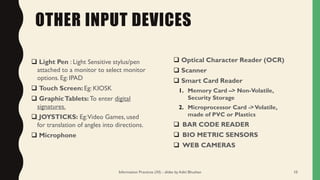
❑ Light Pen : Light Sensitive stylus/pen
attached to a monitor to select monitor
options. Eg: IPAD
❑ Touch Screen: Eg: KIOSK
❑ GraphicTablets: To enter digital
signatures.
❑ JOYSTICKS: Eg:Video Games, used
for translation of angles into directions.
❑ Microphone
❑ Optical Character Reader (OCR)
❑ Scanner
❑ Smart Card Reader
1. Memory Card –> Non-Volatile,
Security Storage
2. Microprocessor Card ->Volatile,
made of PVC or Plastics
❑ BAR CODE READER
❑ BIO METRIC SENSORS
❑ WEB CAMERAS
Information Practices (XI) - slides by Aditi Bhushan 10
OUTPUT DEVICES
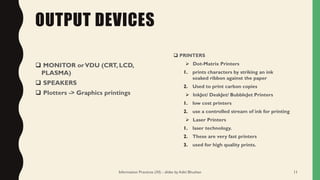
❑ MONITOR orVDU (CRT, LCD,
PLASMA)
❑ SPEAKERS
❑ Plotters -> Graphics printings
❑ PRINTERS
➢ Dot-Matrix Printers
1. prints characters by striking an ink
soaked ribbon against the paper
2. Used to print carbon copies
➢ InkJet/ DeskJet/ BubbleJet Printers
1. low cost printers
2. use a controlled stream of ink for printing
➢ Laser Printers
1. laser technology.
2. These are very fast printers
3. used for high quality prints.
Information Practices (XI) - slides by Aditi Bhushan 11
CENTRAL PROCESSING UNIT
• IT HASTHREE SECTIONS
1. CONTROL UNIT
2. ARITHMETIC LOGICAL UNIT
3. MEMORY UNIT
Information Practices (XI) - slides by Aditi Bhushan 12
CONTROL UNIT
❑ It directs the sequence of operation.
❑ Interpretation of programs
❑ Executes program instructions
❑ The Control unit coordinates and controls the data flow in and out of CPU and also
❑ Controls all the operations of ALU, memory registers and also input/output units.
❑ It is also responsible for carrying out all the instructions stored in the program.
❑ It decodes the fetched instruction, interprets (understands) it and sends control signals to
input/output devices until the required operation is done properly by ALU and memory.
Information Practices (XI) - slides by Aditi Bhushan 13
ARITHMETIC LOGICAL UNIT (ALU)
❑The ALU, as its name suggests performs
mathematical calculations and takes logical decisions.
❑Arithmetic calculations include addition,
subtraction, multiplication and division.
Information Practices (XI) - slides by Aditi Bhushan 14
MEMORY UNIT
Memory
Unit
PRIMARY MEMORY (Main Mem)
[INTERNAL MEMORY]
ROM (Read Only Mem), non-
volatile memory, stores
information from manufacturer
RAM (Random Access Mem) –
volatile memory, hold
active data and
information
SECONDARY MEMORY (Aux. Mem)
[EXTERNAL MEMORY]
Pen-Drive, FD, CD, DVD, HDD, SDD, USB,
FLASH MEMORY
Information Practices (XI) - slides by Aditi Bhushan 15
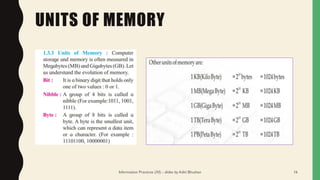
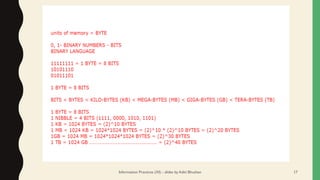
UNITS OF MEMORY
Information Practices (XI) - slides by Aditi Bhushan 16
Information Practices (XI) - slides by Aditi Bhushan 17
SECONDARY STORAGE DEVICES
❑Data is stored for future reference and retrieval.
❑The Date are not stored inside the main memory but auxiliary memory or secondary memory.
❑Examples:
❑ Hard Disk : Storing capacity ranges from 1 GB to 1 TB.
❑ Floppy Disk :A disk of thin, flexible magnetic material enclosed in a cover.
❑ Compact Disk:Thin optical disk. Standard CD is in thickness 120mm and 700 MB.
❑ MagneticTape
❑ DVD (DigitalVersatile Disk or DigitalVideo Disk) : Capacity ranges from 4.7 GB to 8.5 GB.
❑ USB
❑ Memory Cards
Information Practices (XI) - slides by Aditi Bhushan 18
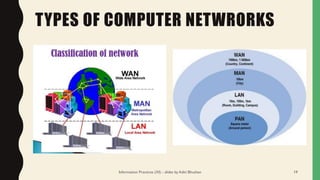
TYPES OF COMPUTER NETWRORKS
Information Practices (XI) - slides by Aditi Bhushan 19
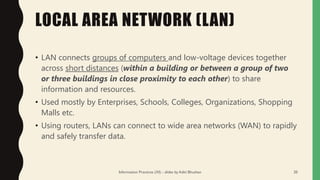
LOCAL AREA NETWORK (LAN)
• LAN connects groups of computers and low-voltage devices together
across short distances (within a building or between a group of two
or three buildings in close proximity to each other) to share
information and resources.
• Used mostly by Enterprises, Schools, Colleges, Organizations, Shopping
Malls etc.
• Using routers, LANs can connect to wide area networks (WAN) to rapidly
and safely transfer data.
Information Practices (XI) - slides by Aditi Bhushan 20
METROPOLITAN AREA NETWORK
[MAN]
• These types of networks are larger than LANs but smaller than
WANs.
• They incorporate elements from both types of networks.
• MANs span an entire geographic area (typically a town or city,
but sometimes a campus).
• Ownership and maintenance is handled by either a single
person or company (a local council, a large company, etc.).
Information Practices (XI) - slides by Aditi Bhushan 21
WIDE AREA NETWORK (WAN)
• Slightly more complex than a LAN, a WAN connects computers together across longer
physical distances.
• This allows computers and low-voltage devices to be remotely connected to each
other over one large network to communicate even when they’re miles apart.
• The Internet is the most basic example of a WAN, connecting all computers together
around the world.
• Because of a WAN’s vast reach, it is typically owned and maintained by multiple
administrators or the public.
Information Practices (XI) - slides by Aditi Bhushan 22
POPULAR IT ENABLED SERVICE
CENTERS :
Popular IT Enabled Service centres are –
• Call Centres
• Electronic Publishing
• MedicalTranscription
• Data Centres
• GIS Mapping (Geographic Information System)
• ERP ( Enterprise Resource Planning )
• Knowledge Management & archiving.
Information Practices (XI) - slides by Aditi Bhushan 23
CARRERS IN IT
• WEB DEVELOPER
• WEB DESIGNER
• SOFTWARE DEVELOPER
• DATABASE MANAGER
• ACCOUNTANT
• FINANCIAL ADVISOR
• DATA ANALYST
• CYBER EXPERT
• AUDIO EDITOR
• VIDEO EDITOR
• GAME DEVELOPER
• ANIMATOR
Information Practices (XI) - slides by Aditi Bhushan 24
TRENDS IN IT
• GREEN COMPUTING
• INTERNET OFTHINGS
• CLOUD COMPUTING
• ARTIFICIAL INTELLIGENCE
• MACHINE LEARNING
• BLOCK CHAIN
Information Practices (XI) - slides by Aditi Bhushan 25

Basics of Information Technology

  • 1.
    INFORMATION TECHNOLOGY C L AS S X I H S C Information Practices (XI) - slides by Aditi Bhushan 1
  • 2.
    CHAPTER 1 B AS I C S O F I N F O R M AT I O N T E C H N O L O G Y Information Practices (XI) - slides by Aditi Bhushan 2
  • 3.
    BASIC CONCEPTS • Datacan be any character, text, word, number or raw facts. • Information is data formatted in a manner that allows it to be utilized by human beings in some significant way. Information Practices (XI) - slides by Aditi Bhushan 3
  • 4.
    BASIC CONCEPTS Q.What isa computer and its functional unit (draw block diagram)? • Ans.:A computer is an electronic device that processes input data and produces result (output) according to program. Q.What is Program? • Ans:A Program is Set of Instructions for a computer Functional Unit of Computer: • Input Devices, Output Devices, • Primary Memory, Secondary Memory • CPU, CU,ALU Information Practices (XI) - slides by Aditi Bhushan 4
  • 5.
    Computer receives information Information processing ResultDisplay Stores data or information Information Practices (XI) - slides by Aditi Bhushan 5
  • 6.
    I N PU T D E V I C E S KEYBOARD MOUSE TOUCH SCREENS TABLETS SCANNERS Information Practices (XI) - slides by Aditi Bhushan 6 KEYBOARD
  • 7.
    KEYBOARD ❑With a keypress, a specific signal is transmitted to the computer. ❑The keyboard uses a crossbar network to identify every key. ❑When a key is pressed, an electrical contact is formed. ❑These electric signals are transmitted to a microcontroller in a coded form to the computer describing the character which corresponds to that key. ❑The computer identifies the keys with help of ASCII, BCD, ISCII and Unicode Information Practices (XI) - slides by Aditi Bhushan 7
  • 8.
    MOUSE Information Practices (XI)- slides by Aditi Bhushan 8
  • 9.
    MOUSE ❑It is apointing device. ❑functions by detecting 2D motion relative to its supporting surface ❑By default, the mouse is configured to work for the right hand. ❑For left-handed, the settings can be changed to suit your needs. ❑The mouse's motion translates into the motion of a cursor on a display, which allows for fine control of a Graphical User Interface (GUI). ❑three parts: the buttons, the handling area, and the rolling object. ❑Laptops are equipped with a small flat surface as a mouse. Information Practices (XI) - slides by Aditi Bhushan 9
  • 10.
    OTHER INPUT DEVICES ❑Light Pen : Light Sensitive stylus/pen attached to a monitor to select monitor options. Eg: IPAD ❑ Touch Screen: Eg: KIOSK ❑ GraphicTablets: To enter digital signatures. ❑ JOYSTICKS: Eg:Video Games, used for translation of angles into directions. ❑ Microphone ❑ Optical Character Reader (OCR) ❑ Scanner ❑ Smart Card Reader 1. Memory Card –> Non-Volatile, Security Storage 2. Microprocessor Card ->Volatile, made of PVC or Plastics ❑ BAR CODE READER ❑ BIO METRIC SENSORS ❑ WEB CAMERAS Information Practices (XI) - slides by Aditi Bhushan 10
  • 11.
    OUTPUT DEVICES ❑ MONITORorVDU (CRT, LCD, PLASMA) ❑ SPEAKERS ❑ Plotters -> Graphics printings ❑ PRINTERS ➢ Dot-Matrix Printers 1. prints characters by striking an ink soaked ribbon against the paper 2. Used to print carbon copies ➢ InkJet/ DeskJet/ BubbleJet Printers 1. low cost printers 2. use a controlled stream of ink for printing ➢ Laser Printers 1. laser technology. 2. These are very fast printers 3. used for high quality prints. Information Practices (XI) - slides by Aditi Bhushan 11
  • 12.
    CENTRAL PROCESSING UNIT •IT HASTHREE SECTIONS 1. CONTROL UNIT 2. ARITHMETIC LOGICAL UNIT 3. MEMORY UNIT Information Practices (XI) - slides by Aditi Bhushan 12
  • 13.
    CONTROL UNIT ❑ Itdirects the sequence of operation. ❑ Interpretation of programs ❑ Executes program instructions ❑ The Control unit coordinates and controls the data flow in and out of CPU and also ❑ Controls all the operations of ALU, memory registers and also input/output units. ❑ It is also responsible for carrying out all the instructions stored in the program. ❑ It decodes the fetched instruction, interprets (understands) it and sends control signals to input/output devices until the required operation is done properly by ALU and memory. Information Practices (XI) - slides by Aditi Bhushan 13
  • 14.
    ARITHMETIC LOGICAL UNIT(ALU) ❑The ALU, as its name suggests performs mathematical calculations and takes logical decisions. ❑Arithmetic calculations include addition, subtraction, multiplication and division. Information Practices (XI) - slides by Aditi Bhushan 14
  • 15.
    MEMORY UNIT Memory Unit PRIMARY MEMORY(Main Mem) [INTERNAL MEMORY] ROM (Read Only Mem), non- volatile memory, stores information from manufacturer RAM (Random Access Mem) – volatile memory, hold active data and information SECONDARY MEMORY (Aux. Mem) [EXTERNAL MEMORY] Pen-Drive, FD, CD, DVD, HDD, SDD, USB, FLASH MEMORY Information Practices (XI) - slides by Aditi Bhushan 15
  • 16.
    UNITS OF MEMORY InformationPractices (XI) - slides by Aditi Bhushan 16
  • 17.
    Information Practices (XI)- slides by Aditi Bhushan 17
  • 18.
    SECONDARY STORAGE DEVICES ❑Datais stored for future reference and retrieval. ❑The Date are not stored inside the main memory but auxiliary memory or secondary memory. ❑Examples: ❑ Hard Disk : Storing capacity ranges from 1 GB to 1 TB. ❑ Floppy Disk :A disk of thin, flexible magnetic material enclosed in a cover. ❑ Compact Disk:Thin optical disk. Standard CD is in thickness 120mm and 700 MB. ❑ MagneticTape ❑ DVD (DigitalVersatile Disk or DigitalVideo Disk) : Capacity ranges from 4.7 GB to 8.5 GB. ❑ USB ❑ Memory Cards Information Practices (XI) - slides by Aditi Bhushan 18
  • 19.
    TYPES OF COMPUTERNETWRORKS Information Practices (XI) - slides by Aditi Bhushan 19
  • 20.
    LOCAL AREA NETWORK(LAN) • LAN connects groups of computers and low-voltage devices together across short distances (within a building or between a group of two or three buildings in close proximity to each other) to share information and resources. • Used mostly by Enterprises, Schools, Colleges, Organizations, Shopping Malls etc. • Using routers, LANs can connect to wide area networks (WAN) to rapidly and safely transfer data. Information Practices (XI) - slides by Aditi Bhushan 20
  • 21.
    METROPOLITAN AREA NETWORK [MAN] •These types of networks are larger than LANs but smaller than WANs. • They incorporate elements from both types of networks. • MANs span an entire geographic area (typically a town or city, but sometimes a campus). • Ownership and maintenance is handled by either a single person or company (a local council, a large company, etc.). Information Practices (XI) - slides by Aditi Bhushan 21
  • 22.
    WIDE AREA NETWORK(WAN) • Slightly more complex than a LAN, a WAN connects computers together across longer physical distances. • This allows computers and low-voltage devices to be remotely connected to each other over one large network to communicate even when they’re miles apart. • The Internet is the most basic example of a WAN, connecting all computers together around the world. • Because of a WAN’s vast reach, it is typically owned and maintained by multiple administrators or the public. Information Practices (XI) - slides by Aditi Bhushan 22
  • 23.
    POPULAR IT ENABLEDSERVICE CENTERS : Popular IT Enabled Service centres are – • Call Centres • Electronic Publishing • MedicalTranscription • Data Centres • GIS Mapping (Geographic Information System) • ERP ( Enterprise Resource Planning ) • Knowledge Management & archiving. Information Practices (XI) - slides by Aditi Bhushan 23
  • 24.
    CARRERS IN IT •WEB DEVELOPER • WEB DESIGNER • SOFTWARE DEVELOPER • DATABASE MANAGER • ACCOUNTANT • FINANCIAL ADVISOR • DATA ANALYST • CYBER EXPERT • AUDIO EDITOR • VIDEO EDITOR • GAME DEVELOPER • ANIMATOR Information Practices (XI) - slides by Aditi Bhushan 24
  • 25.
    TRENDS IN IT •GREEN COMPUTING • INTERNET OFTHINGS • CLOUD COMPUTING • ARTIFICIAL INTELLIGENCE • MACHINE LEARNING • BLOCK CHAIN Information Practices (XI) - slides by Aditi Bhushan 25