What is Computer? 
A computer is a machine designed 
for manipulating data according to a 
list of instructions known as a 
program.
Types of Computer 
 Super Computers 
 Main Frames 
 Personal Computers 
 Laptop Computers 
 Embedded Computers
Super Computers 
• is a computer that leads the world in terms 
of processing capacity, particularly speed 
of calculation, at the time of its 
introduction. 
• Today, supercomputers are typically one-of- 
a-kind custom designs produced by 
"traditional" companies such as IBM and 
HP
Main Frames 
• Are large and expensive computers used 
mainly by government institutions and 
large companies for mission critical 
applications, typically bulk data processing 
such as censuses, industry/consumer 
statistics, ERP, and financial transaction 
processing.
Personal Computers 
• A personal computer (PC) is usually a 
microcomputer whose price, size, and 
capabilities make it suitable for personal usage. 
• Personal computers are normally operated by 
one user at a time to perform such general 
purpose tasks as word processing, internet 
browsing, e-mail and other digital messaging, 
multimedia playback, video game play, 
computer programming, etc.
Laptop Computers 
• A laptop computer or simply laptop (also 
notebook computer or notebook) is a small 
mobile personal computer, usually weighing 
from one to three kilograms, depending on size, 
materials and other factors. 
• Laptops usually run on a single battery or from 
an external AC/DC adapter ("power brick") which 
can charge the battery while also supplying the 
computer itself.
Embedded Computers 
• An embedded system is a special-purpose system in 
which the computer is completely encapsulated by the 
device it controls. 
• Unlike a general-purpose computer, such as a personal 
computer, an embedded system performs pre-defined 
tasks, usually with very specific requirements. 
• The core of any embedded system is formed by one or 
several microprocessors or microcontrollers, 
programmed to perform a small number of tasks.
Examples of Embedded Systems 
• Automated teller machine (ATMs) 
• Internal guidance system (aircrafts and missiles) 
• Mobile phones 
• Engine controllers (for automobiles) 
• Household appliances (TV, washing machines, 
etc.) 
• Personal digital assistants (PDAs) 
• Game consoles (Ps2, PsP, GbA, Xbox)
History of Computers 
• 3000 BC: Abacus was invented 
• 1617: Scottish inventor John Napier uses bones to demonstrate 
division by subtraction and multiplication by addition. 
• 1642: Blaise Pascal builds the first numerical calculating machine in 
Paris. 
• 1673: Gottfried Leibniz builds a mechanical calculating machine that 
multiplies, divides, adds and subtracts. 
• 1822: In England Charles Babbage designs a Difference Engine to 
calculate logarithms, but the machine is never built. 
• 1833: Charles Babbage designs the Analytical Machine that follows 
instructions from punched-cards. It is the first general purpose 
computer. 
• 1842: Lady Ada Byron, Countess of Lovelace and daughter of Lord 
Byron, the poet, documents Babbage's work and writes programs 
for Babbage.
Continued… 
• 1884: Herman Hollerith applies for patents for automatic 
punch-card tabulating machine. 
• 1944: Mark I (IBM ASCC) is completed, based on the 
work of Professor Howard H. Aiken at Harvard and IBM. 
It is a relay-based computer. 
• 1945: John von Neumann paper describes stored-program 
concept for EDVAC. 
• 1946: ENIAC (Electronic Numerical Integrator and 
Computer), with 18,000 vacuum tubes, is dedicated at 
the University of Pennsylvania. It was 8 by 100 feet and 
weighed 80 tons. It could do 5,000 additions and 360 
multiplications per second.
Continued... 
• 1954: FORTRAN is created by John Backus at IBM. 
Harlan Herrick runs the first successful FORTRAN 
program 
• 1964: BASIC (Beginners All-purpose Symbolic 
Instruction Language) is created by Tom Kurtz and John 
Kemeny of Dartmouth. First time-sharing BASIC 
program runs. 
• 1969: PASCAL compiler is written by Nicklaus Wirth and 
installed on the CDC 6400. 
• 1975: Microsoft is founded after Bill Gates and Paul 
Allen adapt and sell BASIC to MITS for the Altair PC. .
How Computers Work? 
• since the first electronic, general-purpose computers of the 1940s, 
most still use the stored program architecture (sometimes called 
the von Neumann architecture) 
• The architecture describes a computer with four main sections: 
– Arithmetic and logic unit (ALU) 
– Control circuitry 
– Memory 
– Input and Output devices (I/O) 
• These parts are interconnected by bundles of wires (called "buses" 
when the same bundle supports more than one data path) and are 
usually driven by a timer or clock (although other events could drive 
the control circuitry).
Memory 
Conceptually, a computer's memory can 
be viewed as a list of cells. Each cell has a 
numbered "address" and can store a 
small, fixed amount of information. This 
information can either be an instruction, 
telling the computer what to do, or data, 
the information which the computer is to 
process using the instructions that have 
been placed in the memory.
Arithmetic Logic Unit (ALU) 
The ALU is in many senses the heart of the 
computer. It is capable of performing two 
classes of basic operations. The first is 
arithmetic operations; for instance, adding or 
subtracting two numbers together. 
The second class of ALU operations involves 
comparison operations: given two numbers, 
determining if they are equal, or if not equal 
which is larger.
Input and Output devices 
• The I/O systems are the means by which the 
computer receives information from the outside 
world, and reports its results back to that world. 
• Input devices: 
– keyboard 
– Mouse 
• Output devices: 
– Monitors 
– Printers
Control Circuit 
The functioning of such a computer is in 
principle quite straightforward. Typically, on each 
clock cycle, the computer fetches instructions 
and data from its memory. The instructions are 
executed, the results are stored, and the next 
instruction is fetched. This procedure repeats 
until a halt instruction is encountered.
Memory/Storage 
Computer storage, computer memory, and often 
casually memory refer to computer components, devices 
and recording media that retain data for some interval of 
time. 
memory usually refers to a form of solid state storage 
known as random access memory (RAM) and 
sometimes other forms of fast but temporary storage. 
storage more commonly refers to optical discs, forms of 
magnetic storage like hard disks, and other types of 
storage which are slower than primary storage, but of a 
more permanent nature.
Magnetic and Optical Storage 
Magnetic storage uses different patterns of magnetization on a magnetically 
coated surface to store information. Magnetic storage is non-volatile. 
– Floppy Disk 
– Hard Disk 
Optical disc storage uses tiny pits etched on the surface of a circular disc to 
store information, and reads this information by illuminating the surface with 
a laser diode and observing the reflection. Optical disc storage is non-volatile 
– CD, CD-ROM, DVD: Read only storage, used for mass distribution of 
digital information (music, video, computer programs) 
– CD-R, DVD-R, DVD+R: Write once storage 
– CD-RW, DVD-RW, DVD+RW, DVD-RAM: Slow write, fast read storage
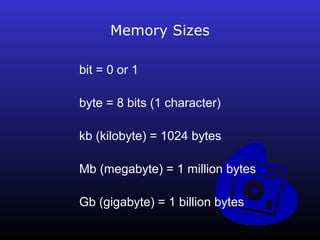
Memory Sizes 
bit = 0 or 1 
byte = 8 bits (1 character) 
kb (kilobyte) = 1024 bytes 
Mb (megabyte) = 1 million bytes 
Gb (gigabyte) = 1 billion bytes
Computer Software 
Computer software (or simply software) is the 
programs and procedures required to enable a 
computer to perform a specific task, as opposed 
to the physical components of the system 
(hardware). This includes application software 
such as a word processor, which enables a user 
to perform a task, and system software such as 
an operating system, which enables other 
software to run properly, by interfacing with 
hardware and with other software.
Major Classes of Computer Software 
• System software helps run the computer hardware and 
computer system. It includes operating systems, device drivers, 
diagnostic tools, servers, windowing systems, utilities and more. 
• Programming software usually provides tools to assist a 
programmer in writing computer programs and software using 
different programming languages in a more convenient way. The 
tools include text editors, compilers, interpreters, linkers, 
debuggers, and so on. 
• Application software allows humans to accomplish one or more 
specific (non-computer related) tasks. Typical applications 
include industrial automation, business software, educational 
software, medical software, databases and computer games.
System Software 
An operating system (OS) is a software 
program that manages the hardware and 
software resources of a computer. The OS 
performs basic tasks, such as controlling and 
allocating memory, prioritizing the processing of 
instructions, controlling input and output devices, 
facilitating networking, and managing files.
Application Software 
Application software is a loosely defined 
subclass of computer software that employs the 
capabilities of a computer directly to a task that 
the user wishes to perform. This should be 
contrasted with system software which is 
involved in integrating a computer's various 
capabilities, but typically does not directly apply 
them in the performance of tasks that benefit the 
user.
Application Software Classifications 
• Computer-mediated communication 
– E-mail 
– Web browser 
• Multimedia 
– Media players 
– 3D graphics 
– Art software 
– Video editing software 
– Computer-aided design (CAD) 
• Entertainment software 
– Arcade 
– Computer and Video Games 
– Handheld Game Consoles Games 
– Video Game Console Games 
– Wireless or Mobile Phone Games
Application Software Classifications 
• Computer-mediated communication 
– E-mail 
– Web browser 
• Multimedia 
– Media players 
– 3D graphics 
– Art software 
– Video editing software 
– Computer-aided design (CAD) 
• Entertainment software 
– Arcade 
– Computer and Video Games 
– Handheld Game Consoles Games 
– Video Game Console Games 
– Wireless or Mobile Phone Games
Computer Hardware 
Computer hardware is the physical part of a 
computer, including the digital circuitry, as 
distinguished from the computer software that 
executes within the hardware.
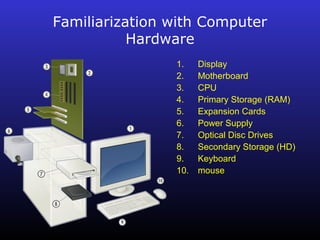
Familiarization with Computer 
Hardware 
1. Display 
2. Motherboard 
3. CPU 
4. Primary Storage (RAM) 
5. Expansion Cards 
6. Power Supply 
7. Optical Disc Drives 
8. Secondary Storage (HD) 
9. Keyboard 
10. mouse
Personal Computer Hardware 
A typical personal computer consists of a case or chassis in desktop 
or tower shape and the following parts: 
• Motherboard or system board with slots for expansion cards and 
holding parts including: 
– Central processing unit (CPU) 
– Random Access Memory (RAM) - for program execution and short term data 
storage, so the computer doesn't have to take the time to access the hard drive 
to find something. More RAM can contribute to a faster PC. RAM is normally 
removable by being in slots on the motherboard. 
– Basic Input-Output System (BIOS) 
– Buses : 
• PCI bus 
• PCI-E or AGP bus 
• ISA bus (outdated) 
• EISA bus (outdated) 
• USB
Continue… 
• Power supply - a case that holds a transformer, voltage 
control and fan 
• Storage controllers of IDE, SATA, SCSI or other type, 
that control hard disk, floppy disk, CD-ROM and other 
drives; the controllers sit directly on the motherboard 
(on-board) or on expansion cards 
• Video display controller that produces the output for 
the computer display 
• Computer bus controllers (parallel, serial, USB, 
FireWire) to connect the computer to external peripheral 
devices such as printers or scanners
Continue… 
• Some type of a removable media writer: 
– CD - the most common type of removable media, 
cheap but fragile. 
• CD-ROM Drive 
• CD Writer 
– DVD 
• DVD-ROM Drive 
• DVD Writer 
– Floppy disk 
– USB Flash Drive
Continue… 
• Internal storage - keeps data inside the computer for 
later use. 
• Hard disk - for medium-term storage of data. 
• Disk array controller 
• Sound card - translates signals from the system board 
into analog voltage levels, and has terminals to plug in 
speakers. 
• Modem - for dial-up connections 
• Network card - for DSL/Cable internet, and/or 
connecting to other computers. 
• Other peripherals
Continue… 
• Input or Input Devices 
– Text input devices 
• Keyboard 
– Pointing devices 
• Mouse 
• Trackball 
– Gaming devices 
• Joystick 
• Gamepad 
• Game controller 
– Image, Video input devices 
• Image scanner 
• Webcam 
– Audio input devices 
• Microphone
Continue… 
• Output or Output devices 
– Image, Video output devices 
• Printer 
• Monitor 
– Audio output devices 
• Speakers 
• Headset

PC for Managers

  • 2.
    What is Computer? A computer is a machine designed for manipulating data according to a list of instructions known as a program.
  • 3.
    Types of Computer  Super Computers  Main Frames  Personal Computers  Laptop Computers  Embedded Computers
  • 4.
    Super Computers •is a computer that leads the world in terms of processing capacity, particularly speed of calculation, at the time of its introduction. • Today, supercomputers are typically one-of- a-kind custom designs produced by "traditional" companies such as IBM and HP
  • 5.
    Main Frames •Are large and expensive computers used mainly by government institutions and large companies for mission critical applications, typically bulk data processing such as censuses, industry/consumer statistics, ERP, and financial transaction processing.
  • 6.
    Personal Computers •A personal computer (PC) is usually a microcomputer whose price, size, and capabilities make it suitable for personal usage. • Personal computers are normally operated by one user at a time to perform such general purpose tasks as word processing, internet browsing, e-mail and other digital messaging, multimedia playback, video game play, computer programming, etc.
  • 7.
    Laptop Computers •A laptop computer or simply laptop (also notebook computer or notebook) is a small mobile personal computer, usually weighing from one to three kilograms, depending on size, materials and other factors. • Laptops usually run on a single battery or from an external AC/DC adapter ("power brick") which can charge the battery while also supplying the computer itself.
  • 8.
    Embedded Computers •An embedded system is a special-purpose system in which the computer is completely encapsulated by the device it controls. • Unlike a general-purpose computer, such as a personal computer, an embedded system performs pre-defined tasks, usually with very specific requirements. • The core of any embedded system is formed by one or several microprocessors or microcontrollers, programmed to perform a small number of tasks.
  • 9.
    Examples of EmbeddedSystems • Automated teller machine (ATMs) • Internal guidance system (aircrafts and missiles) • Mobile phones • Engine controllers (for automobiles) • Household appliances (TV, washing machines, etc.) • Personal digital assistants (PDAs) • Game consoles (Ps2, PsP, GbA, Xbox)
  • 10.
    History of Computers • 3000 BC: Abacus was invented • 1617: Scottish inventor John Napier uses bones to demonstrate division by subtraction and multiplication by addition. • 1642: Blaise Pascal builds the first numerical calculating machine in Paris. • 1673: Gottfried Leibniz builds a mechanical calculating machine that multiplies, divides, adds and subtracts. • 1822: In England Charles Babbage designs a Difference Engine to calculate logarithms, but the machine is never built. • 1833: Charles Babbage designs the Analytical Machine that follows instructions from punched-cards. It is the first general purpose computer. • 1842: Lady Ada Byron, Countess of Lovelace and daughter of Lord Byron, the poet, documents Babbage's work and writes programs for Babbage.
  • 11.
    Continued… • 1884:Herman Hollerith applies for patents for automatic punch-card tabulating machine. • 1944: Mark I (IBM ASCC) is completed, based on the work of Professor Howard H. Aiken at Harvard and IBM. It is a relay-based computer. • 1945: John von Neumann paper describes stored-program concept for EDVAC. • 1946: ENIAC (Electronic Numerical Integrator and Computer), with 18,000 vacuum tubes, is dedicated at the University of Pennsylvania. It was 8 by 100 feet and weighed 80 tons. It could do 5,000 additions and 360 multiplications per second.
  • 12.
    Continued... • 1954:FORTRAN is created by John Backus at IBM. Harlan Herrick runs the first successful FORTRAN program • 1964: BASIC (Beginners All-purpose Symbolic Instruction Language) is created by Tom Kurtz and John Kemeny of Dartmouth. First time-sharing BASIC program runs. • 1969: PASCAL compiler is written by Nicklaus Wirth and installed on the CDC 6400. • 1975: Microsoft is founded after Bill Gates and Paul Allen adapt and sell BASIC to MITS for the Altair PC. .
  • 13.
    How Computers Work? • since the first electronic, general-purpose computers of the 1940s, most still use the stored program architecture (sometimes called the von Neumann architecture) • The architecture describes a computer with four main sections: – Arithmetic and logic unit (ALU) – Control circuitry – Memory – Input and Output devices (I/O) • These parts are interconnected by bundles of wires (called "buses" when the same bundle supports more than one data path) and are usually driven by a timer or clock (although other events could drive the control circuitry).
  • 14.
    Memory Conceptually, acomputer's memory can be viewed as a list of cells. Each cell has a numbered "address" and can store a small, fixed amount of information. This information can either be an instruction, telling the computer what to do, or data, the information which the computer is to process using the instructions that have been placed in the memory.
  • 15.
    Arithmetic Logic Unit(ALU) The ALU is in many senses the heart of the computer. It is capable of performing two classes of basic operations. The first is arithmetic operations; for instance, adding or subtracting two numbers together. The second class of ALU operations involves comparison operations: given two numbers, determining if they are equal, or if not equal which is larger.
  • 16.
    Input and Outputdevices • The I/O systems are the means by which the computer receives information from the outside world, and reports its results back to that world. • Input devices: – keyboard – Mouse • Output devices: – Monitors – Printers
  • 17.
    Control Circuit Thefunctioning of such a computer is in principle quite straightforward. Typically, on each clock cycle, the computer fetches instructions and data from its memory. The instructions are executed, the results are stored, and the next instruction is fetched. This procedure repeats until a halt instruction is encountered.
  • 18.
    Memory/Storage Computer storage,computer memory, and often casually memory refer to computer components, devices and recording media that retain data for some interval of time. memory usually refers to a form of solid state storage known as random access memory (RAM) and sometimes other forms of fast but temporary storage. storage more commonly refers to optical discs, forms of magnetic storage like hard disks, and other types of storage which are slower than primary storage, but of a more permanent nature.
  • 19.
    Magnetic and OpticalStorage Magnetic storage uses different patterns of magnetization on a magnetically coated surface to store information. Magnetic storage is non-volatile. – Floppy Disk – Hard Disk Optical disc storage uses tiny pits etched on the surface of a circular disc to store information, and reads this information by illuminating the surface with a laser diode and observing the reflection. Optical disc storage is non-volatile – CD, CD-ROM, DVD: Read only storage, used for mass distribution of digital information (music, video, computer programs) – CD-R, DVD-R, DVD+R: Write once storage – CD-RW, DVD-RW, DVD+RW, DVD-RAM: Slow write, fast read storage
  • 20.
    Memory Sizes bit= 0 or 1 byte = 8 bits (1 character) kb (kilobyte) = 1024 bytes Mb (megabyte) = 1 million bytes Gb (gigabyte) = 1 billion bytes
  • 21.
    Computer Software Computersoftware (or simply software) is the programs and procedures required to enable a computer to perform a specific task, as opposed to the physical components of the system (hardware). This includes application software such as a word processor, which enables a user to perform a task, and system software such as an operating system, which enables other software to run properly, by interfacing with hardware and with other software.
  • 22.
    Major Classes ofComputer Software • System software helps run the computer hardware and computer system. It includes operating systems, device drivers, diagnostic tools, servers, windowing systems, utilities and more. • Programming software usually provides tools to assist a programmer in writing computer programs and software using different programming languages in a more convenient way. The tools include text editors, compilers, interpreters, linkers, debuggers, and so on. • Application software allows humans to accomplish one or more specific (non-computer related) tasks. Typical applications include industrial automation, business software, educational software, medical software, databases and computer games.
  • 23.
    System Software Anoperating system (OS) is a software program that manages the hardware and software resources of a computer. The OS performs basic tasks, such as controlling and allocating memory, prioritizing the processing of instructions, controlling input and output devices, facilitating networking, and managing files.
  • 24.
    Application Software Applicationsoftware is a loosely defined subclass of computer software that employs the capabilities of a computer directly to a task that the user wishes to perform. This should be contrasted with system software which is involved in integrating a computer's various capabilities, but typically does not directly apply them in the performance of tasks that benefit the user.
  • 25.
    Application Software Classifications • Computer-mediated communication – E-mail – Web browser • Multimedia – Media players – 3D graphics – Art software – Video editing software – Computer-aided design (CAD) • Entertainment software – Arcade – Computer and Video Games – Handheld Game Consoles Games – Video Game Console Games – Wireless or Mobile Phone Games
  • 26.
    Application Software Classifications • Computer-mediated communication – E-mail – Web browser • Multimedia – Media players – 3D graphics – Art software – Video editing software – Computer-aided design (CAD) • Entertainment software – Arcade – Computer and Video Games – Handheld Game Consoles Games – Video Game Console Games – Wireless or Mobile Phone Games
  • 27.
    Computer Hardware Computerhardware is the physical part of a computer, including the digital circuitry, as distinguished from the computer software that executes within the hardware.
  • 28.
    Familiarization with Computer Hardware 1. Display 2. Motherboard 3. CPU 4. Primary Storage (RAM) 5. Expansion Cards 6. Power Supply 7. Optical Disc Drives 8. Secondary Storage (HD) 9. Keyboard 10. mouse
  • 29.
    Personal Computer Hardware A typical personal computer consists of a case or chassis in desktop or tower shape and the following parts: • Motherboard or system board with slots for expansion cards and holding parts including: – Central processing unit (CPU) – Random Access Memory (RAM) - for program execution and short term data storage, so the computer doesn't have to take the time to access the hard drive to find something. More RAM can contribute to a faster PC. RAM is normally removable by being in slots on the motherboard. – Basic Input-Output System (BIOS) – Buses : • PCI bus • PCI-E or AGP bus • ISA bus (outdated) • EISA bus (outdated) • USB
  • 30.
    Continue… • Powersupply - a case that holds a transformer, voltage control and fan • Storage controllers of IDE, SATA, SCSI or other type, that control hard disk, floppy disk, CD-ROM and other drives; the controllers sit directly on the motherboard (on-board) or on expansion cards • Video display controller that produces the output for the computer display • Computer bus controllers (parallel, serial, USB, FireWire) to connect the computer to external peripheral devices such as printers or scanners
  • 31.
    Continue… • Sometype of a removable media writer: – CD - the most common type of removable media, cheap but fragile. • CD-ROM Drive • CD Writer – DVD • DVD-ROM Drive • DVD Writer – Floppy disk – USB Flash Drive
  • 32.
    Continue… • Internalstorage - keeps data inside the computer for later use. • Hard disk - for medium-term storage of data. • Disk array controller • Sound card - translates signals from the system board into analog voltage levels, and has terminals to plug in speakers. • Modem - for dial-up connections • Network card - for DSL/Cable internet, and/or connecting to other computers. • Other peripherals
  • 33.
    Continue… • Inputor Input Devices – Text input devices • Keyboard – Pointing devices • Mouse • Trackball – Gaming devices • Joystick • Gamepad • Game controller – Image, Video input devices • Image scanner • Webcam – Audio input devices • Microphone
  • 34.
    Continue… • Outputor Output devices – Image, Video output devices • Printer • Monitor – Audio output devices • Speakers • Headset