Today’s Topics
What is Computer
Functionalities of Computer
Advantages & Disadvantages
Applications of Computer
Components of Computer
•Input Unit
• CPU
• Output Unit
What is Motherboard
Features of Motherboard
Ph. No. :9729666670,4000670 Website: www.batracomputercentre.com
What is Computer
• Computer is an advanced electronic device
that takes raw data as input from the user
and processes it under the control of set of
instructions (called program), gives the result
(output), and saves it for the future use.
Ph. No. :9729666670,4000670 Website: www.batracomputercentre.com
Functionalities Of Computer
Any digital computer carries out five functions
in gross terms:
• Takes data as input.
• Stores the data/instructions in its memory
and use them when required.
• Processes the data and converts it into useful
information.
• Generates the output
• Controls all the above four steps.
Ph. No. :9729666670,4000670 Website: www.batracomputercentre.com
ADVANTAGES
&
DISADVANTAGES
Advantages
1) High Speed:
• Computer is a very fast device.
• It is capable of performing calculation of very large
amount of data.
• The computer has units of speed in microsecond,
nanosecond, and even the picosecond.
• It can perform millions of calculations in a few
seconds as compared to man who will spend
many months for doing the same task
Ph. No. :9729666670,4000670 Website: www.batracomputercentre.com
2) Accuracy
• In addition to being very fast, computers
are very accurate.
• The calculations are 100% error free.
• Computers perform all jobs with 100%
accuracy provided that correct input has
been given.
Ph. No. :9729666670,4000670 Website: www.batracomputercentre.com
3) Storage Capability
• Memory is a very important characteristic of
computers.
• A computer has much more storage
capacity than human beings.
• It can store large amount of data.
• It can store any type of data such as
images, videos, text, audio and many
others.
Ph. No. :9729666670,4000670 Website: www.batracomputercentre.com
4) Diligence
• Unlike human beings, a computer is free
from monotony, tiredness and lack of
concentration.
• It can work continuously without any error
and boredom.
• It can do repeated work with same speed
and accuracy
Ph. No. :9729666670,4000670 Website: www.batracomputercentre.com
5) Versatility
• A computer is a very versatile machine.
• A computer is very flexible in performing the
jobs to be done.
• This machine can be used to solve the
problems related to various fields.
• At one instance, it may be solving a complex
scientific problem and the very next moment it
may be playing a card game.
Ph. No. :9729666670,4000670 Website: www.batracomputercentre.com
6) Reliability
• A computer is a reliable machine.
• Modern electronic components have long lives.
• Computers are designed to make maintenance
easy
7) Reduce In Cost
• Though the initial investment for installing a
computer is high but it substantially reduces
the cost of each of its transaction
Ph. No. :9729666670,4000670 Website: www.batracomputercentre.com
8) Reduce In Paper Work
• The use of computers for data processing in
an organization leads to reduction in paper
work and results in speeding up a process.
• As data in electronic files can be retrieved as
and when required, the problem of
maintenance of large number of paper files
gets reduced
Ph. No. :9729666670,4000670 Website: www.batracomputercentre.com
Disadvantages
1) No I.Q.
• A computer is a machine that has no intelligence to
perform any task.
• Each instruction has to be given to computer.
• A computer cannot take any decision on its own
2) Dependency
• It functions as per a user’s instruction, so it is fully
dependent on human being
Ph. No. :9729666670,4000670 Website: www.batracomputercentre.com
3) Environment
• The operating environment of computer should be
dust free and suitable.
4) No Feelings
• Computers have no feelings or emotions.
• It cannot make judgement based on feeling, taste,
experience, and knowledge unlike a human being
Ph. No. :9729666670,4000670 Website: www.batracomputercentre.com
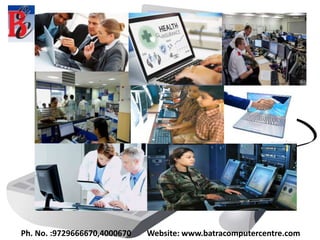
Applications of Computer
 Business
 Banking
 Insurance
 Education
 Marketing
 Health Care
 Engineering Design
 Military
 Communication
 Government
Ph. No. :9729666670,4000670 Website: www.batracomputercentre.com
Components of Computer
All types of computers follow a same basic logical
structure and perform the following five basic
operations for converting raw input data into
information useful to their users.
The main units are:
i. Input Unit
ii. CPU
iii. Output Unit
Ph. No. :9729666670,4000670 Website: www.batracomputercentre.com
Sr.No. Operation Description
1 Take Input The process of entering data and
instructions into the computer system
2 Store Data Saving data and instructions so that they are
available for processing as and when
required.
3 Processing Data Performing arithmetic, and logical operations
on data in order to convert them into useful
information.
4 Output Information The process of producing useful information
or results for the user, such as a printed
report or visual display.
5 Control the workflow Directs the manner and sequence in which
all of the above operations are performed.
Ph. No. :9729666670,4000670 Website: www.batracomputercentre.com
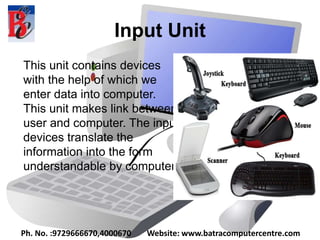
Input Unit
This unit contains devices
with the help of which we
enter data into computer.
This unit makes link between
user and computer. The input
devices translate the
information into the form
understandable by computer.
Ph. No. :9729666670,4000670 Website: www.batracomputercentre.com
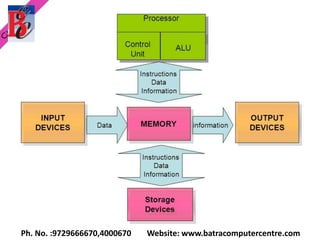
CPU(Central Processing Unit)
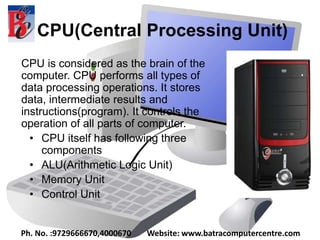
CPU is considered as the brain of the
computer. CPU performs all types of
data processing operations. It stores
data, intermediate results and
instructions(program). It controls the
operation of all parts of computer.
• CPU itself has following three
components
• ALU(Arithmetic Logic Unit)
• Memory Unit
• Control Unit
Ph. No. :9729666670,4000670 Website: www.batracomputercentre.com
Output Unit
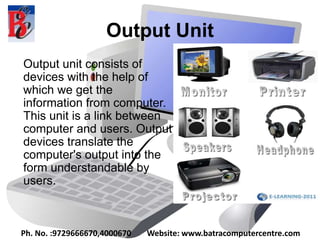
Output unit consists of
devices with the help of
which we get the
information from computer.
This unit is a link between
computer and users. Output
devices translate the
computer's output into the
form understandable by
users.
Ph. No. :9729666670,4000670 Website: www.batracomputercentre.com
What is Motherboard
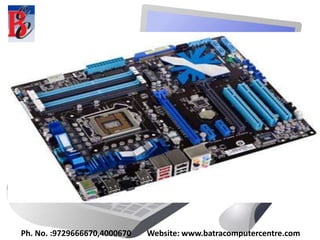
The motherboard serves as a single platform to
connect all of the parts of a computer together.
A motherboard connects CPU, memory, hard
drives, optical drives, video card, sound card,
and other ports and expansion cards directly or
via cables. It can be considered as the
backbone of a computer.
Ph. No. :9729666670,4000670 Website: www.batracomputercentre.com
Features of Motherboard
A motherboard comes with following features:
• Motherboard varies greatly in supporting various
types of components.
• Normally a motherboard supports a single type of
CPU and few types of memories.
• Video Cards, Hard disks, Sound Cards have to be
compatible with motherboard to function properly
• Motherboards, cases and power supplies must be
compatible to work properly together.
Ph. No. :9729666670,4000670 Website: www.batracomputercentre.com
CONTACT US
BATRA COMPUTER CENTRE
SCO 15, Dayal Bagh,
Near Hanuman Mandir,
Ambala Cantt.
Phn No. : 9729666670,0171-4000670
Email : info.jatinbatra@gmail.com
Website : www.batracomputercentre.com
Ph. No. :9729666670,4000670 Website: www.batracomputercentre.com

Basic Computer Course in Ambala ! Batra Computer Centre

  • 2.
    Today’s Topics What isComputer Functionalities of Computer Advantages & Disadvantages Applications of Computer Components of Computer •Input Unit • CPU • Output Unit What is Motherboard Features of Motherboard Ph. No. :9729666670,4000670 Website: www.batracomputercentre.com
  • 3.
    What is Computer •Computer is an advanced electronic device that takes raw data as input from the user and processes it under the control of set of instructions (called program), gives the result (output), and saves it for the future use. Ph. No. :9729666670,4000670 Website: www.batracomputercentre.com
  • 4.
    Functionalities Of Computer Anydigital computer carries out five functions in gross terms: • Takes data as input. • Stores the data/instructions in its memory and use them when required. • Processes the data and converts it into useful information. • Generates the output • Controls all the above four steps. Ph. No. :9729666670,4000670 Website: www.batracomputercentre.com
  • 5.
    Ph. No. :9729666670,4000670Website: www.batracomputercentre.com ADVANTAGES & DISADVANTAGES
  • 6.
    Advantages 1) High Speed: •Computer is a very fast device. • It is capable of performing calculation of very large amount of data. • The computer has units of speed in microsecond, nanosecond, and even the picosecond. • It can perform millions of calculations in a few seconds as compared to man who will spend many months for doing the same task Ph. No. :9729666670,4000670 Website: www.batracomputercentre.com
  • 7.
    2) Accuracy • Inaddition to being very fast, computers are very accurate. • The calculations are 100% error free. • Computers perform all jobs with 100% accuracy provided that correct input has been given. Ph. No. :9729666670,4000670 Website: www.batracomputercentre.com
  • 8.
    3) Storage Capability •Memory is a very important characteristic of computers. • A computer has much more storage capacity than human beings. • It can store large amount of data. • It can store any type of data such as images, videos, text, audio and many others. Ph. No. :9729666670,4000670 Website: www.batracomputercentre.com
  • 9.
    4) Diligence • Unlikehuman beings, a computer is free from monotony, tiredness and lack of concentration. • It can work continuously without any error and boredom. • It can do repeated work with same speed and accuracy Ph. No. :9729666670,4000670 Website: www.batracomputercentre.com
  • 10.
    5) Versatility • Acomputer is a very versatile machine. • A computer is very flexible in performing the jobs to be done. • This machine can be used to solve the problems related to various fields. • At one instance, it may be solving a complex scientific problem and the very next moment it may be playing a card game. Ph. No. :9729666670,4000670 Website: www.batracomputercentre.com
  • 11.
    6) Reliability • Acomputer is a reliable machine. • Modern electronic components have long lives. • Computers are designed to make maintenance easy 7) Reduce In Cost • Though the initial investment for installing a computer is high but it substantially reduces the cost of each of its transaction Ph. No. :9729666670,4000670 Website: www.batracomputercentre.com
  • 12.
    8) Reduce InPaper Work • The use of computers for data processing in an organization leads to reduction in paper work and results in speeding up a process. • As data in electronic files can be retrieved as and when required, the problem of maintenance of large number of paper files gets reduced Ph. No. :9729666670,4000670 Website: www.batracomputercentre.com
  • 13.
    Disadvantages 1) No I.Q. •A computer is a machine that has no intelligence to perform any task. • Each instruction has to be given to computer. • A computer cannot take any decision on its own 2) Dependency • It functions as per a user’s instruction, so it is fully dependent on human being Ph. No. :9729666670,4000670 Website: www.batracomputercentre.com
  • 14.
    3) Environment • Theoperating environment of computer should be dust free and suitable. 4) No Feelings • Computers have no feelings or emotions. • It cannot make judgement based on feeling, taste, experience, and knowledge unlike a human being Ph. No. :9729666670,4000670 Website: www.batracomputercentre.com
  • 15.
    Applications of Computer Business  Banking  Insurance  Education  Marketing  Health Care  Engineering Design  Military  Communication  Government Ph. No. :9729666670,4000670 Website: www.batracomputercentre.com
  • 16.
    Ph. No. :9729666670,4000670Website: www.batracomputercentre.com
  • 17.
    Components of Computer Alltypes of computers follow a same basic logical structure and perform the following five basic operations for converting raw input data into information useful to their users. The main units are: i. Input Unit ii. CPU iii. Output Unit Ph. No. :9729666670,4000670 Website: www.batracomputercentre.com
  • 18.
    Sr.No. Operation Description 1Take Input The process of entering data and instructions into the computer system 2 Store Data Saving data and instructions so that they are available for processing as and when required. 3 Processing Data Performing arithmetic, and logical operations on data in order to convert them into useful information. 4 Output Information The process of producing useful information or results for the user, such as a printed report or visual display. 5 Control the workflow Directs the manner and sequence in which all of the above operations are performed. Ph. No. :9729666670,4000670 Website: www.batracomputercentre.com
  • 19.
    Ph. No. :9729666670,4000670Website: www.batracomputercentre.com
  • 20.
    Input Unit This unitcontains devices with the help of which we enter data into computer. This unit makes link between user and computer. The input devices translate the information into the form understandable by computer. Ph. No. :9729666670,4000670 Website: www.batracomputercentre.com
  • 21.
    CPU(Central Processing Unit) CPUis considered as the brain of the computer. CPU performs all types of data processing operations. It stores data, intermediate results and instructions(program). It controls the operation of all parts of computer. • CPU itself has following three components • ALU(Arithmetic Logic Unit) • Memory Unit • Control Unit Ph. No. :9729666670,4000670 Website: www.batracomputercentre.com
  • 22.
    Output Unit Output unitconsists of devices with the help of which we get the information from computer. This unit is a link between computer and users. Output devices translate the computer's output into the form understandable by users. Ph. No. :9729666670,4000670 Website: www.batracomputercentre.com
  • 23.
    What is Motherboard Themotherboard serves as a single platform to connect all of the parts of a computer together. A motherboard connects CPU, memory, hard drives, optical drives, video card, sound card, and other ports and expansion cards directly or via cables. It can be considered as the backbone of a computer. Ph. No. :9729666670,4000670 Website: www.batracomputercentre.com
  • 24.
    Ph. No. :9729666670,4000670Website: www.batracomputercentre.com
  • 25.
    Features of Motherboard Amotherboard comes with following features: • Motherboard varies greatly in supporting various types of components. • Normally a motherboard supports a single type of CPU and few types of memories. • Video Cards, Hard disks, Sound Cards have to be compatible with motherboard to function properly • Motherboards, cases and power supplies must be compatible to work properly together. Ph. No. :9729666670,4000670 Website: www.batracomputercentre.com
  • 26.
    Ph. No. :9729666670,4000670Website: www.batracomputercentre.com
  • 27.
    CONTACT US BATRA COMPUTERCENTRE SCO 15, Dayal Bagh, Near Hanuman Mandir, Ambala Cantt. Phn No. : 9729666670,0171-4000670 Email : info.jatinbatra@gmail.com Website : www.batracomputercentre.com Ph. No. :9729666670,4000670 Website: www.batracomputercentre.com
  • 28.
    Ph. No. :9729666670,4000670Website: www.batracomputercentre.com