MEANING
• HTML stands for Hypertext Markup Language, and it is the
most widely used language to write Web Pages.
Hypertext refers to the way in which Web pages (HTML
documents) are linked together. Thus, the link available on
a webpage is called Hypertext. As its name suggests,
HTML is a Markup Language which means you use HTML to
simply "mark-up" a text document with tags that tell a Web
browser how to structure it to display. Originally, HTML was
developed with the intent of defining the structure of
documents like headings, paragraphs, lists, and so forth to
facilitate the sharing of scientific information between
researchers. Now, HTML is being widely used to format web
pages with the help of different tags available in HTML
language.
Basic HTML Document
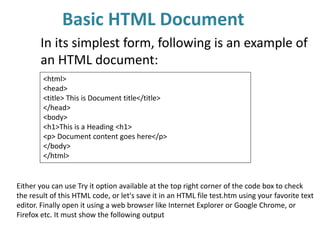
In its simplest form, following is an example of
an HTML document:
<html>
<head>
<title> This is Document title</title>
</head>
<body>
<h1>This is a Heading <h1>
<p> Document content goes here</p>
</body>
</html>
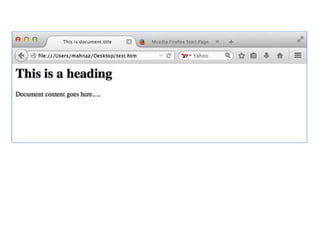
Either you can use Try it option available at the top right corner of the code box to check
the result of this HTML code, or let's save it in an HTML file test.htm using your favorite text
editor. Finally open it using a web browser like Internet Explorer or Google Chrome, or
Firefox etc. It must show the following output
HTML BAICS TAGS
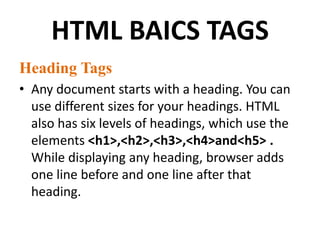
Heading Tags
• Any document starts with a heading. You can
use different sizes for your headings. HTML
also has six levels of headings, which use the
elements <h1>,<h2>,<h3>,<h4>and<h5> .
While displaying any heading, browser adds
one line before and one line after that
heading.
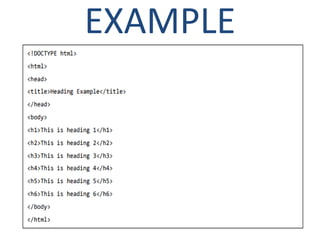
EXAMPLE
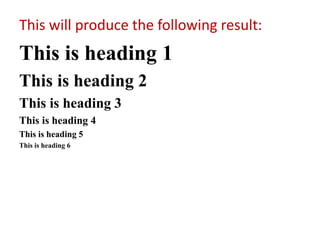
This will produce the following result:
This is heading 1
This is heading 2
This is heading 3
This is heading 4
This is heading 5
This is heading 6
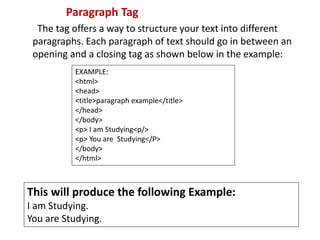
Paragraph Tag
The tag offers a way to structure your text into different
paragraphs. Each paragraph of text should go in between an
opening and a closing tag as shown below in the example:
EXAMPLE:
<html>
<head>
<title>paragraph example</title>
</head>
</body>
<p> I am Studying<p/>
<p> You are Studying</P>
</body>
</html>
This will produce the following Example:
I am Studying.
You are Studying.
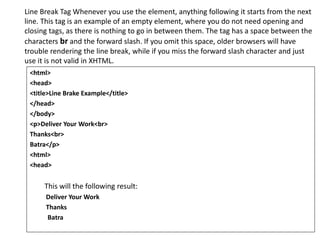
Line Break Tag Whenever you use the element, anything following it starts from the next
line. This tag is an example of an empty element, where you do not need opening and
closing tags, as there is nothing to go in between them. The tag has a space between the
characters br and the forward slash. If you omit this space, older browsers will have
trouble rendering the line break, while if you miss the forward slash character and just
use it is not valid in XHTML.
<html>
<head>
<title>Line Brake Example</title>
</head>
</body>
<p>Deliver Your Work<br>
Thanks<br>
Batra</p>
<html>
<head>
This will the following result:
Deliver Your Work
Thanks
Batra
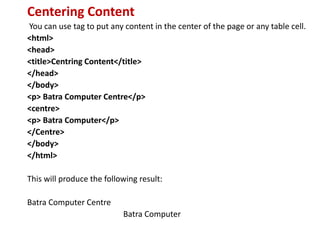
Centering Content
You can use tag to put any content in the center of the page or any table cell.
<html>
<head>
<title>Centring Content</title>
</head>
</body>
<p> Batra Computer Centre</p>
<centre>
<p> Batra Computer</p>
</Centre>
</body>
</html>
This will produce the following result:
Batra Computer Centre
Batra Computer
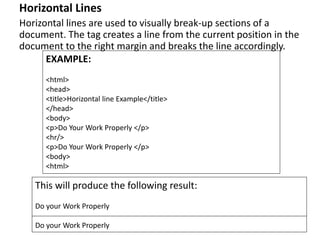
Horizontal Lines
Horizontal lines are used to visually break-up sections of a
document. The tag creates a line from the current position in the
document to the right margin and breaks the line accordingly.
EXAMPLE:
<html>
<head>
<title>Horizontal line Example</title>
</head>
<body>
<p>Do Your Work Properly </p>
<hr/>
<p>Do Your Work Properly </p>
<body>
<html>
This will produce the following result:
Do your Work Properly
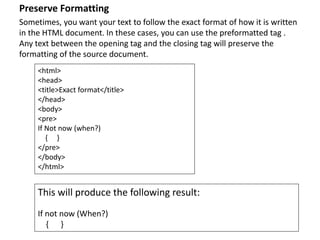
Preserve Formatting
Sometimes, you want your text to follow the exact format of how it is written
in the HTML document. In these cases, you can use the preformatted tag .
Any text between the opening tag and the closing tag will preserve the
formatting of the source document.
<html>
<head>
<title>Exact format</title>
</head>
<body>
<pre>
If Not now (when?)
{ }
</pre>
</body>
</html>
This will produce the following result:
If not now (When?)
{ }
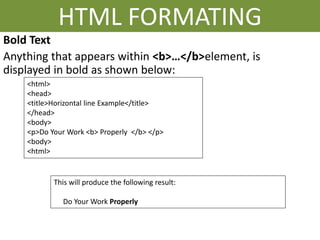
HTML FORMATING
Bold Text
Anything that appears within <b>…</b>element, is
displayed in bold as shown below:
<html>
<head>
<title>Horizontal line Example</title>
</head>
<body>
<p>Do Your Work <b> Properly </b> </p>
<body>
<html>
This will produce the following result:
Do Your Work Properly
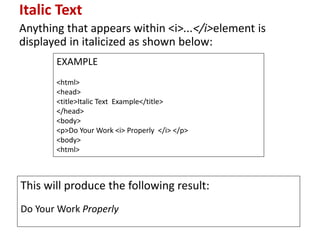
Italic Text
Anything that appears within <i>...</i>element is
displayed in italicized as shown below:
EXAMPLE
<html>
<head>
<title>Italic Text Example</title>
</head>
<body>
<p>Do Your Work <i> Properly </i> </p>
<body>
<html>
This will produce the following result:
Do Your Work Properly
Best HTML Training &Coaching in Ambala

Best HTML Training &Coaching in Ambala

  • 2.
    MEANING • HTML standsfor Hypertext Markup Language, and it is the most widely used language to write Web Pages. Hypertext refers to the way in which Web pages (HTML documents) are linked together. Thus, the link available on a webpage is called Hypertext. As its name suggests, HTML is a Markup Language which means you use HTML to simply "mark-up" a text document with tags that tell a Web browser how to structure it to display. Originally, HTML was developed with the intent of defining the structure of documents like headings, paragraphs, lists, and so forth to facilitate the sharing of scientific information between researchers. Now, HTML is being widely used to format web pages with the help of different tags available in HTML language.
  • 3.
    Basic HTML Document Inits simplest form, following is an example of an HTML document: <html> <head> <title> This is Document title</title> </head> <body> <h1>This is a Heading <h1> <p> Document content goes here</p> </body> </html> Either you can use Try it option available at the top right corner of the code box to check the result of this HTML code, or let's save it in an HTML file test.htm using your favorite text editor. Finally open it using a web browser like Internet Explorer or Google Chrome, or Firefox etc. It must show the following output
  • 5.
    HTML BAICS TAGS HeadingTags • Any document starts with a heading. You can use different sizes for your headings. HTML also has six levels of headings, which use the elements <h1>,<h2>,<h3>,<h4>and<h5> . While displaying any heading, browser adds one line before and one line after that heading.
  • 6.
  • 7.
    This will producethe following result: This is heading 1 This is heading 2 This is heading 3 This is heading 4 This is heading 5 This is heading 6
  • 8.
    Paragraph Tag The tagoffers a way to structure your text into different paragraphs. Each paragraph of text should go in between an opening and a closing tag as shown below in the example: EXAMPLE: <html> <head> <title>paragraph example</title> </head> </body> <p> I am Studying<p/> <p> You are Studying</P> </body> </html> This will produce the following Example: I am Studying. You are Studying.
  • 9.
    Line Break TagWhenever you use the element, anything following it starts from the next line. This tag is an example of an empty element, where you do not need opening and closing tags, as there is nothing to go in between them. The tag has a space between the characters br and the forward slash. If you omit this space, older browsers will have trouble rendering the line break, while if you miss the forward slash character and just use it is not valid in XHTML. <html> <head> <title>Line Brake Example</title> </head> </body> <p>Deliver Your Work<br> Thanks<br> Batra</p> <html> <head> This will the following result: Deliver Your Work Thanks Batra
  • 10.
    Centering Content You canuse tag to put any content in the center of the page or any table cell. <html> <head> <title>Centring Content</title> </head> </body> <p> Batra Computer Centre</p> <centre> <p> Batra Computer</p> </Centre> </body> </html> This will produce the following result: Batra Computer Centre Batra Computer
  • 11.
    Horizontal Lines Horizontal linesare used to visually break-up sections of a document. The tag creates a line from the current position in the document to the right margin and breaks the line accordingly. EXAMPLE: <html> <head> <title>Horizontal line Example</title> </head> <body> <p>Do Your Work Properly </p> <hr/> <p>Do Your Work Properly </p> <body> <html> This will produce the following result: Do your Work Properly Do your Work Properly
  • 12.
    Preserve Formatting Sometimes, youwant your text to follow the exact format of how it is written in the HTML document. In these cases, you can use the preformatted tag . Any text between the opening tag and the closing tag will preserve the formatting of the source document. <html> <head> <title>Exact format</title> </head> <body> <pre> If Not now (when?) { } </pre> </body> </html> This will produce the following result: If not now (When?) { }
  • 13.
    HTML FORMATING Bold Text Anythingthat appears within <b>…</b>element, is displayed in bold as shown below: <html> <head> <title>Horizontal line Example</title> </head> <body> <p>Do Your Work <b> Properly </b> </p> <body> <html> This will produce the following result: Do Your Work Properly
  • 14.
    Italic Text Anything thatappears within <i>...</i>element is displayed in italicized as shown below: EXAMPLE <html> <head> <title>Italic Text Example</title> </head> <body> <p>Do Your Work <i> Properly </i> </p> <body> <html> This will produce the following result: Do Your Work Properly