
Output DeviceOutput Device
Output device are peripheral device,which are employed to get
the output from the computer. Ex.- Printers,Plotters and
Moniter are some examples of output device.
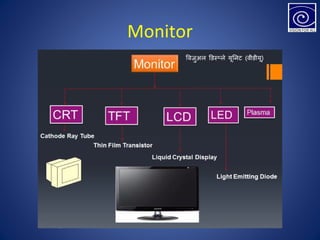
MonitorMonitor
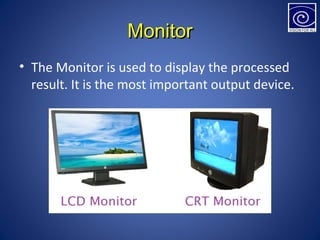
• The Monitor is used to display the processed
result. It is the most important output device.
Monitor
Printers
• The printer provides the hard copy (Printer
material on a paper).
• The printers can be broadly classified in two:-
• Impact Printers and non impact printers
• In Impact printers, there is a direct contact
between the paper and the head. Eg. Dot
Matrix Printer, there is no direct contact
between the paper and the head called non
impact printer. Eg. Ink jet Printer.
.
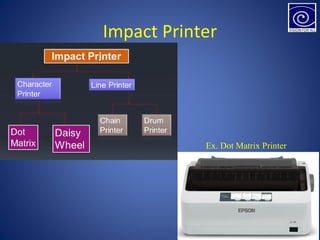
Impact Printer
Ex. Dot Matrix Printer
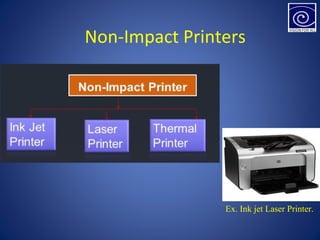
Ex. Ink jet Laser Printer.
Non-Impact Printers
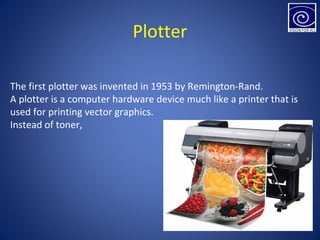
Plotter
The first plotter was invented in 1953 by Remington-Rand.
A plotter is a computer hardware device much like a printer that is
used for printing vector graphics.
Instead of toner,
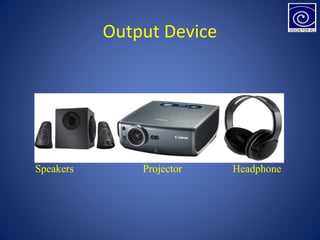
Output Device
Speakers Projector Headphone
Processing Device
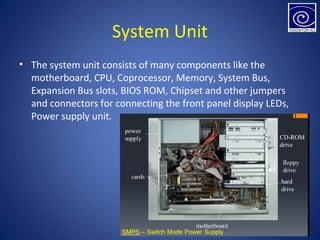
System Unit
• The system unit consists of many components like the
motherboard, CPU, Coprocessor, Memory, System Bus,
Expansion Bus slots, BIOS ROM, Chipset and other jumpers
and connectors for connecting the front panel display LEDs,
Power supply unit.
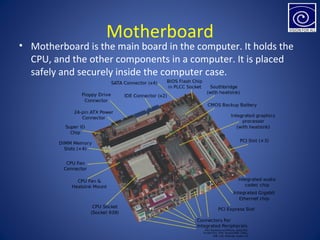
Motherboard
• Motherboard is the main board in the computer. It holds the
CPU, and the other components in a computer. It is placed
safely and securely inside the computer case.
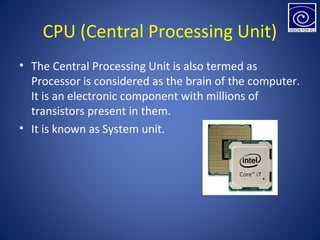
CPU (Central Processing Unit)
• The Central Processing Unit is also termed as
Processor is considered as the brain of the computer.
It is an electronic component with millions of
transistors present in them.
• It is known as System unit.
Memory
• Memory is a device used to store information in the
computer. Memory used in PC can be broadly
classified in to two types
1. Primary Memory e.g. RAM and ROM
2. Secondary Memory e.g. Hard Disk, Floppy Disk, Magnetic
Tapes. CDs etc.
Primary Memory
• Primary memory is used to store the program
that are being currently executed and the
data, which is used for processing.
• The main memory in the motherboard is of
two types ROM and RAM.
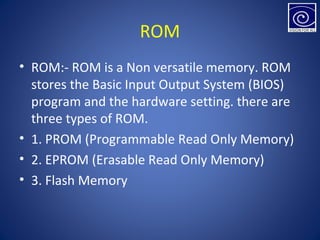
ROM
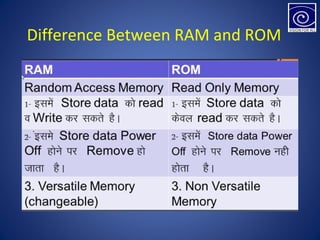
• ROM:- ROM is a Non versatile memory. ROM
stores the Basic Input Output System (BIOS)
program and the hardware setting. there are
three types of ROM.
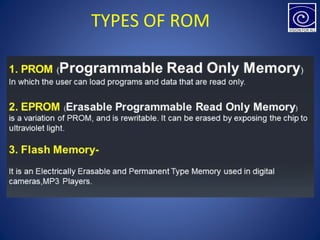
• 1. PROM (Programmable Read Only Memory)
• 2. EPROM (Erasable Read Only Memory)
• 3. Flash Memory
TYPES OF ROM
Difference Between RAM and ROM
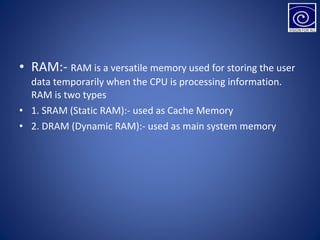
• RAM:- RAM is a versatile memory used for storing the user
data temporarily when the CPU is processing information.
RAM is two types
• 1. SRAM (Static RAM):- used as Cache Memory
• 2. DRAM (Dynamic RAM):- used as main system memory
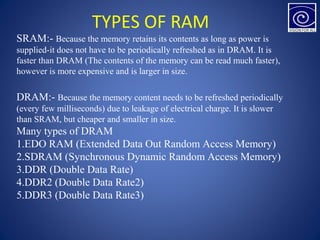
TYPES OF RAM
SRAM:- Because the memory retains its contents as long as power is
supplied-it does not have to be periodically refreshed as in DRAM. It is
faster than DRAM (The contents of the memory can be read much faster),
however is more expensive and is larger in size.
DRAM:- Because the memory content needs to be refreshed periodically
(every few milliseconds) due to leakage of electrical charge. It is slower
than SRAM, but cheaper and smaller in size.
Many types of DRAM
1.EDO RAM (Extended Data Out Random Access Memory)
2.SDRAM (Synchronous Dynamic Random Access Memory)
3.DDR (Double Data Rate)
4.DDR2 (Double Data Rate2)
5.DDR3 (Double Data Rate3)
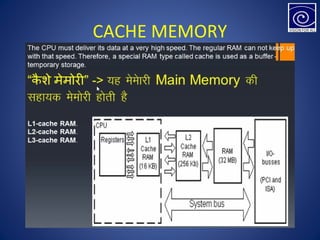
CACHE MEMORY
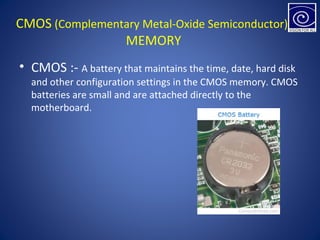
CMOS (Complementary Metal-Oxide Semiconductor)
MEMORY
• CMOS :- A battery that maintains the time, date, hard disk
and other configuration settings in the CMOS memory. CMOS
batteries are small and are attached directly to the
motherboard.
System Bus
• Bus is a set of wires or conductive path that provide electrical connection for the
transfer of data, address and control signal to different components in a
computers. The system bus can be classified as
• Data bus
• Address bus
• Control bus
• Data bus:- data bus is bidirectional, this means that the data is transferred to and
from the CPU. The data in a computer system is sent in the form of binary bits 0s
and 1 s.
• 8 bits = 1 Byte
• 64 bits = 8 Bytes
• 1 Byte = 1 Character
• 1024 Bytes = 1 Kilo Byte (KB)
• 1024 KB = 1 Giga byte (GB)
• 1024 GB = 1 Tera Byte (TB)
• 1024 TB = 1 Peta Byte (PB)
Address Bus
• An address bus is a computer bus architecture used to transfer data
between devices that are identified by the hardware address of the
physical memory (the physical address), which is stored in the form of
binary numbers to enable the data bus to access memory storage.
Control Bus
The control bus is used to synchronize the data between the CPU and
the peripherals ;ike input or output devices or memory. It provides
dialogue control for the data transfer during read or write operation to
the address provided by the address bus.
• PC (Personal Computer Bus)
• ISA (Industry Standard Architecture Bus)
• MCA (Micro Channel Architecture Bus)
• EISA (Extended Industry Standard Architecture)
• VESA (Video Electronics Standard Association Bus)
• PCI (Peripheral Component Interconnect Bus)
Expansion Bus Slots:- Some of the Expansion bus
types are:-
Power Supply
• The Power Supply part is the most significant component of
the computer. The power supply unit in a PC is called as
Switch Mode Power Supply (SMPS). SMPS is used to convert
110V / 220V AC (Alternating Current) into 3.3V, 5V, 12V DC
(Direct Current) supply.
• The Integrated Chips (IC’s) like the motherboard operate with
3.3 V or 5V DC voltage. The elect mechanical components like
the motor, fan etc. operate at 12V DC power supply.
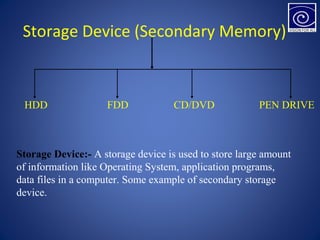
Storage Device (Secondary Memory)
HDD FDD CD/DVD PEN DRIVE
Storage Device:- A storage device is used to store large amount
of information like Operating System, application programs,
data files in a computer. Some example of secondary storage
device.
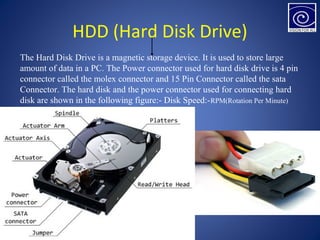
HDD (Hard Disk Drive)
The Hard Disk Drive is a magnetic storage device. It is used to store large
amount of data in a PC. The Power connector used for hard disk drive is 4 pin
connector called the molex connector and 15 Pin Connector called the sata
Connector. The hard disk and the power connector used for connecting hard
disk are shown in the following figure:- Disk Speed:-RPM(Rotation Per Minute)
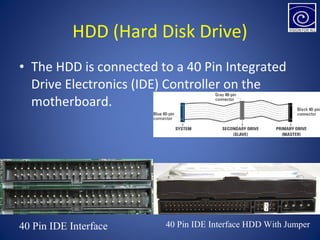
• The HDD is connected to a 40 Pin Integrated
Drive Electronics (IDE) Controller on the
motherboard.
HDD (Hard Disk Drive)
40 Pin IDE Interface 40 Pin IDE Interface HDD With Jumper
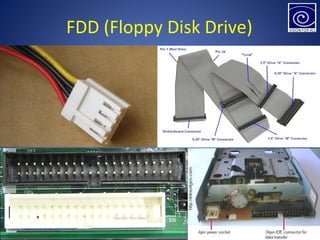
FDD (Floppy Disk Drive)
• The floppy disk is a removable disk that stores the data in a
magnetic media. Floppy disk is available in various storage
capacities. – 360 KB, 720 KB, 1.2 MB, 1.44 MB and 2.88 MB
etc.
• A four pin Berg connector is used to provide power supply to
the floppy disk drive. The floppy disk drive interface has 34
pins and a twist in the cable
FDD (Floppy Disk Drive)
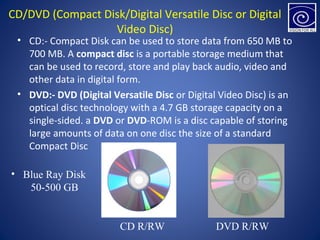
CD/DVD (Compact Disk/Digital Versatile Disc or Digital
Video Disc)
• CD:- Compact Disk can be used to store data from 650 MB to
700 MB. A compact disc is a portable storage medium that
can be used to record, store and play back audio, video and
other data in digital form.
• DVD:- DVD (Digital Versatile Disc or Digital Video Disc) is an
optical disc technology with a 4.7 GB storage capacity on a
single-sided. a DVD or DVD-ROM is a disc capable of storing
large amounts of data on one disc the size of a standard
Compact Disc
CD R/RW DVD R/RW
• Blue Ray Disk
50-500 GB
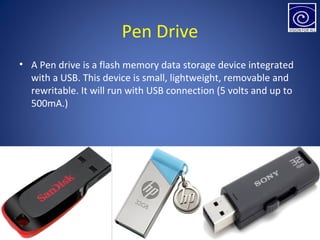
Pen Drive
• A Pen drive is a flash memory data storage device integrated
with a USB. This device is small, lightweight, removable and
rewritable. It will run with USB connection (5 volts and up to
500mA.)
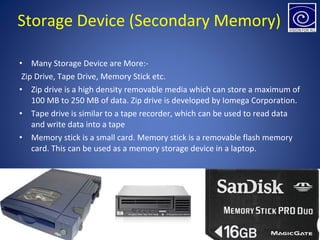
• Many Storage Device are More:-
Zip Drive, Tape Drive, Memory Stick etc.
• Zip drive is a high density removable media which can store a maximum of
100 MB to 250 MB of data. Zip drive is developed by Iomega Corporation.
• Tape drive is similar to a tape recorder, which can be used to read data
and write data into a tape
• Memory stick is a small card. Memory stick is a removable flash memory
card. This can be used as a memory storage device in a laptop.
Storage Device (Secondary Memory)
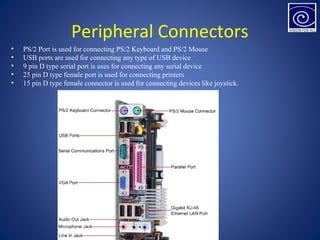
Peripheral Connectors
• PS/2 Port is used for connecting PS/2 Keyboard and PS/2 Mouse
• USB ports are used for connecting any type of USB device
• 9 pin D type serial port is uses for connecting any serial device
• 25 pin D type female port is used for connecting printers
• 15 pin D type female connector is used for connecting devices like joystick.
Thank YouThank You

Basic Computer 208 part 2

  • 2.
    Output DeviceOutput Device Outputdevice are peripheral device,which are employed to get the output from the computer. Ex.- Printers,Plotters and Moniter are some examples of output device.
  • 3.
    MonitorMonitor • The Monitoris used to display the processed result. It is the most important output device.
  • 4.
  • 5.
    Printers • The printerprovides the hard copy (Printer material on a paper). • The printers can be broadly classified in two:- • Impact Printers and non impact printers • In Impact printers, there is a direct contact between the paper and the head. Eg. Dot Matrix Printer, there is no direct contact between the paper and the head called non impact printer. Eg. Ink jet Printer. .
  • 6.
    Impact Printer Ex. DotMatrix Printer
  • 7.
    Ex. Ink jetLaser Printer. Non-Impact Printers
  • 8.
    Plotter The first plotterwas invented in 1953 by Remington-Rand. A plotter is a computer hardware device much like a printer that is used for printing vector graphics. Instead of toner,
  • 9.
  • 10.
  • 11.
    System Unit • Thesystem unit consists of many components like the motherboard, CPU, Coprocessor, Memory, System Bus, Expansion Bus slots, BIOS ROM, Chipset and other jumpers and connectors for connecting the front panel display LEDs, Power supply unit.
  • 12.
    Motherboard • Motherboard isthe main board in the computer. It holds the CPU, and the other components in a computer. It is placed safely and securely inside the computer case.
  • 13.
    CPU (Central ProcessingUnit) • The Central Processing Unit is also termed as Processor is considered as the brain of the computer. It is an electronic component with millions of transistors present in them. • It is known as System unit.
  • 14.
    Memory • Memory isa device used to store information in the computer. Memory used in PC can be broadly classified in to two types 1. Primary Memory e.g. RAM and ROM 2. Secondary Memory e.g. Hard Disk, Floppy Disk, Magnetic Tapes. CDs etc.
  • 15.
    Primary Memory • Primarymemory is used to store the program that are being currently executed and the data, which is used for processing. • The main memory in the motherboard is of two types ROM and RAM.
  • 16.
    ROM • ROM:- ROMis a Non versatile memory. ROM stores the Basic Input Output System (BIOS) program and the hardware setting. there are three types of ROM. • 1. PROM (Programmable Read Only Memory) • 2. EPROM (Erasable Read Only Memory) • 3. Flash Memory
  • 17.
  • 18.
  • 19.
    • RAM:- RAMis a versatile memory used for storing the user data temporarily when the CPU is processing information. RAM is two types • 1. SRAM (Static RAM):- used as Cache Memory • 2. DRAM (Dynamic RAM):- used as main system memory
  • 20.
    TYPES OF RAM SRAM:-Because the memory retains its contents as long as power is supplied-it does not have to be periodically refreshed as in DRAM. It is faster than DRAM (The contents of the memory can be read much faster), however is more expensive and is larger in size. DRAM:- Because the memory content needs to be refreshed periodically (every few milliseconds) due to leakage of electrical charge. It is slower than SRAM, but cheaper and smaller in size. Many types of DRAM 1.EDO RAM (Extended Data Out Random Access Memory) 2.SDRAM (Synchronous Dynamic Random Access Memory) 3.DDR (Double Data Rate) 4.DDR2 (Double Data Rate2) 5.DDR3 (Double Data Rate3)
  • 21.
  • 22.
    CMOS (Complementary Metal-OxideSemiconductor) MEMORY • CMOS :- A battery that maintains the time, date, hard disk and other configuration settings in the CMOS memory. CMOS batteries are small and are attached directly to the motherboard.
  • 23.
    System Bus • Busis a set of wires or conductive path that provide electrical connection for the transfer of data, address and control signal to different components in a computers. The system bus can be classified as • Data bus • Address bus • Control bus • Data bus:- data bus is bidirectional, this means that the data is transferred to and from the CPU. The data in a computer system is sent in the form of binary bits 0s and 1 s. • 8 bits = 1 Byte • 64 bits = 8 Bytes • 1 Byte = 1 Character • 1024 Bytes = 1 Kilo Byte (KB) • 1024 KB = 1 Giga byte (GB) • 1024 GB = 1 Tera Byte (TB) • 1024 TB = 1 Peta Byte (PB)
  • 24.
    Address Bus • Anaddress bus is a computer bus architecture used to transfer data between devices that are identified by the hardware address of the physical memory (the physical address), which is stored in the form of binary numbers to enable the data bus to access memory storage. Control Bus The control bus is used to synchronize the data between the CPU and the peripherals ;ike input or output devices or memory. It provides dialogue control for the data transfer during read or write operation to the address provided by the address bus.
  • 25.
    • PC (PersonalComputer Bus) • ISA (Industry Standard Architecture Bus) • MCA (Micro Channel Architecture Bus) • EISA (Extended Industry Standard Architecture) • VESA (Video Electronics Standard Association Bus) • PCI (Peripheral Component Interconnect Bus) Expansion Bus Slots:- Some of the Expansion bus types are:-
  • 27.
    Power Supply • ThePower Supply part is the most significant component of the computer. The power supply unit in a PC is called as Switch Mode Power Supply (SMPS). SMPS is used to convert 110V / 220V AC (Alternating Current) into 3.3V, 5V, 12V DC (Direct Current) supply. • The Integrated Chips (IC’s) like the motherboard operate with 3.3 V or 5V DC voltage. The elect mechanical components like the motor, fan etc. operate at 12V DC power supply.
  • 28.
    Storage Device (SecondaryMemory) HDD FDD CD/DVD PEN DRIVE Storage Device:- A storage device is used to store large amount of information like Operating System, application programs, data files in a computer. Some example of secondary storage device.
  • 29.
    HDD (Hard DiskDrive) The Hard Disk Drive is a magnetic storage device. It is used to store large amount of data in a PC. The Power connector used for hard disk drive is 4 pin connector called the molex connector and 15 Pin Connector called the sata Connector. The hard disk and the power connector used for connecting hard disk are shown in the following figure:- Disk Speed:-RPM(Rotation Per Minute)
  • 30.
    • The HDDis connected to a 40 Pin Integrated Drive Electronics (IDE) Controller on the motherboard. HDD (Hard Disk Drive) 40 Pin IDE Interface 40 Pin IDE Interface HDD With Jumper
  • 31.
    FDD (Floppy DiskDrive) • The floppy disk is a removable disk that stores the data in a magnetic media. Floppy disk is available in various storage capacities. – 360 KB, 720 KB, 1.2 MB, 1.44 MB and 2.88 MB etc. • A four pin Berg connector is used to provide power supply to the floppy disk drive. The floppy disk drive interface has 34 pins and a twist in the cable
  • 32.
  • 33.
    CD/DVD (Compact Disk/DigitalVersatile Disc or Digital Video Disc) • CD:- Compact Disk can be used to store data from 650 MB to 700 MB. A compact disc is a portable storage medium that can be used to record, store and play back audio, video and other data in digital form. • DVD:- DVD (Digital Versatile Disc or Digital Video Disc) is an optical disc technology with a 4.7 GB storage capacity on a single-sided. a DVD or DVD-ROM is a disc capable of storing large amounts of data on one disc the size of a standard Compact Disc CD R/RW DVD R/RW • Blue Ray Disk 50-500 GB
  • 34.
    Pen Drive • APen drive is a flash memory data storage device integrated with a USB. This device is small, lightweight, removable and rewritable. It will run with USB connection (5 volts and up to 500mA.)
  • 35.
    • Many StorageDevice are More:- Zip Drive, Tape Drive, Memory Stick etc. • Zip drive is a high density removable media which can store a maximum of 100 MB to 250 MB of data. Zip drive is developed by Iomega Corporation. • Tape drive is similar to a tape recorder, which can be used to read data and write data into a tape • Memory stick is a small card. Memory stick is a removable flash memory card. This can be used as a memory storage device in a laptop. Storage Device (Secondary Memory)
  • 36.
    Peripheral Connectors • PS/2Port is used for connecting PS/2 Keyboard and PS/2 Mouse • USB ports are used for connecting any type of USB device • 9 pin D type serial port is uses for connecting any serial device • 25 pin D type female port is used for connecting printers • 15 pin D type female connector is used for connecting devices like joystick.
  • 37.