How To Monitor Application Error Logs – Bash Script
i | P a g e
Table of Contents
Overview.......................................................................................................................................................1
Applies To......................................................................................................................................................1
Pre-requisites................................................................................................................................................1
Script – Snippet.............................................................................................................................................1
Email Notification..........................................................................................................................................4
E-Mail Notification – Subject ....................................................................................................................4
E-Mail Notification – Error Log..................................................................................................................4
How To Monitor Application Error Logs – Bash Script
1 | P a g e
Overview
The purpose of this script is to send notification to the email recipients application error logs file.
The script will scan and capture all the error(s) that have been triggered from current time -2 hours
onwards.
The log format and the script was tested and deployed was JBoss Application Server.
Applies To
Any Linux Operating system that supports bash shell
Pre-requisites
 Bash shell.
 Log Date Format : 2015-09-27 11:02:20
Script – Snippet
#!/bin/bash
SPLIT_LINE=$'n'
LOG_PATH=/usr/local/jboss/server/slend/log
LOG_FILE_NAME=${LOG_PATH}/server.log
APLN_NAME="S Application Deployed on `hostname`"
TO_LOG_FILE_NAME=ErrorLog.txt
ERROR_LOG_FILE_NAME=Error.txt
MAILTO=mailuser@domainname.com
CCMAILTO=ccmailuser@domainname.com
HRS=`date +%H`
HRS=`expr ${HRS} - 2`
#HRS=${HRS}`date +":"%M`
LOG_DATE=`date +%Y"-"%m"-"%d" "`
SEARCH_TIME=${LOG_DATE}${HRS}
# Verify Log File exists
#
if [ ! -e ${LOG_FILE_NAME} ]; then
echo "Log file ${LOG_FILE_NAME} Does't Exists !!!"
echo "${APLN_NAME} $SPLIT_LINE Log File ${LOG_FILE_NAME} File Does't Exists !!!" | mail -s
"${APLN_NAME} Error" $MAILTO
exit 1
fi
How To Monitor Application Error Logs – Bash Script
2 | P a g e
echo "Search Time is : " ${SEARCH_TIME}
#
# Set Hours to extract 12 hours
#
if [ "${HRS}" -eq "-1" ]; then
${HRS}=`expr "${HRS}" + 12`
SEARCH_TIME=${LOG_DATE}${HRS}
echo "-1 Setting Time Search : " ${SEARCH_TIME}
#
# Set Hours to extract 00 Hours
#
elif [ "${HRS}" -le "00" ]; then
${HRS}="${HRS}"
SEARCH_TIME=${LOG_DATE}${HRS}
echo "00 - Setting Time Search : " ${SEARCH_TIME}
#
# Set search to extract
#
elif [ "${HRS}" -eq "-2" ]; then
# `expr "${HRS}" + 12`
${HRS}=`expr "${HRS}" +2`
SEARCH_TIME=${LOG_DATE}${HRS}
echo "Setting Time Search : " ${SEARCH_TIME}
echo "-2 Setting Time Search : " ${SEARCH_TIME}
fi
if [ "${HRS}" -le "9" ]; then
HRS="0""${HRS}"
echo Now the Hours ::: ${HRS}
SEARCH_TIME=${LOG_DATE}${HRS}
fi
cd ${LOG_PATH} > /dev/null
pushd ${LOG_PATH} > /dev/null
echo Search Time : ${SEARCH_TIME}
#
# Find Matching Line number of the matching time in the log file
#
LINE_NO=`grep -n "${SEARCH_TIME}" ${LOG_FILE_NAME} | head -n 1 | cut -f1 -d :`
#
# If No matches were found
#
if [ -z ${LINE_NO} ]; then
How To Monitor Application Error Logs – Bash Script
3 | P a g e
echo "No Matches Found !!!"
echo ${LOG_FILE_NAME}
exit 1
fi
#
# Extract Log 2 lines before and 20 lines after ERROR
#
#LL=`wc -l ${LOG_FILE_NAME} | cut -f4 -d " "`
FILE_LINE_COUNT=`wc -l ${LOG_FILE_NAME} | awk '{ print $1}'`
FROM_LINE=`expr ${FILE_LINE_COUNT} - ${LINE_NO} + 5`
tail -n ${FROM_LINE} ${LOG_FILE_NAME} > ${TO_LOG_FILE_NAME}
grep "ERROR [" ${TO_LOG_FILE_NAME} -B2 -A20 > ${ERROR_LOG_FILE_NAME}
#
# If error Log file is empty.
#
if [ -e ${ERROR_LOG_FILE_NAME} ] && [ ! -z ${ERROR_LOG_FILE_NAME} ]; then
FILESIZE=`ls -l | grep ${ERROR_LOG_FILE_NAME} | awk '{ print $5 }'`
#
# If file size is zero byte
#
if [ "${FILESIZE}" = 0 ]; then
echo "Null File"
rm ${TO_LOG_FILE_NAME} ${ERROR_LOG_FILE_NAME}
exit 1
fi
#
# Send E-Mail Notification
#
echo ${ERROR_LOG_FILE_NAME}
ls -l
echo "Send Condition"
mail -s "${APLN_NAME} Error Log File" -c $CCMAILTO < ${ERROR_LOG_FILE_NAME} $MAILTO
echo "HRS : " ${HRS}
echo "Search Time : " ${SEARCH_TIME}
echo "Log Date Time : "${LOG_DATE}
echo "Line NO. :" ${LINE_NO}
echo "File Lines Count : " $FILE_LINE_COUNT
echo "File Line : " $FROM_LINE
#tail -n 1 ${ERROR_LOG_FILE_NAME} > COMPAREFILE
rm ${TO_LOG_FILE_NAME} ${ERROR_LOG_FILE_NAME}
fi
How To Monitor Application Error Logs – Bash Script
4 | P a g e
Email Notification
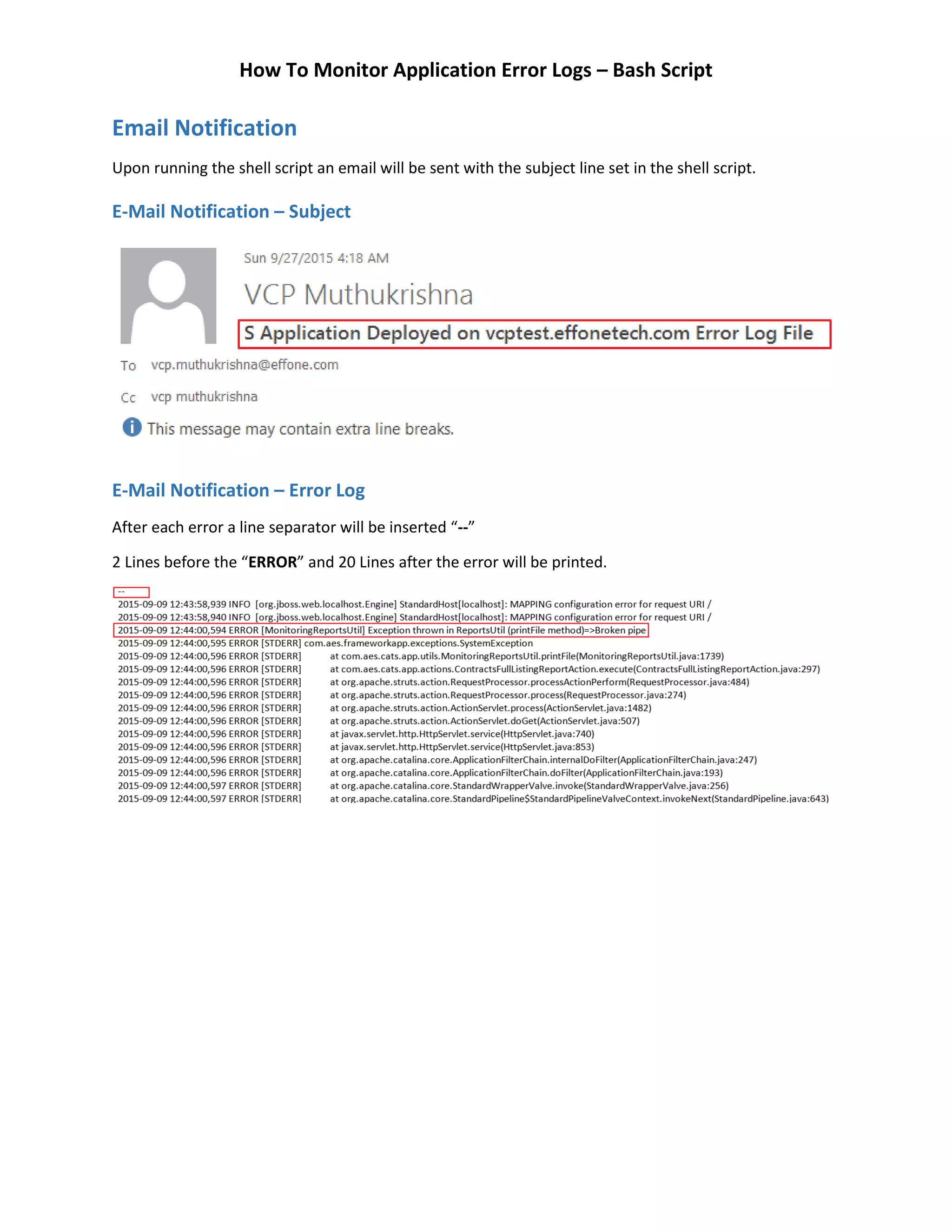
Upon running the shell script an email will be sent with the subject line set in the shell script.
E-Mail Notification – Subject
E-Mail Notification – Error Log
After each error a line separator will be inserted “--”
2 Lines before the “ERROR” and 20 Lines after the Error will be printed.

Bash Script - How To Monitor Application Error Logs and Send Notification

  • 1.
    How To MonitorApplication Error Logs – Bash Script i | P a g e Table of Contents Overview.......................................................................................................................................................1 Applies To......................................................................................................................................................1 Pre-requisites................................................................................................................................................1 Script – Snippet.............................................................................................................................................1 Email Notification..........................................................................................................................................4 E-Mail Notification – Subject ....................................................................................................................4 E-Mail Notification – Error Log..................................................................................................................4
  • 2.
    How To MonitorApplication Error Logs – Bash Script 1 | P a g e Overview The purpose of this script is to send notification to the email recipients application error logs file. The script will scan and capture all the error(s) that have been triggered from current time -2 hours onwards. The log format and the script was tested and deployed was JBoss Application Server. Applies To Any Linux Operating system that supports bash shell Pre-requisites  Bash shell.  Log Date Format : 2015-09-27 11:02:20 Script – Snippet #!/bin/bash SPLIT_LINE=$'n' LOG_PATH=/usr/local/jboss/server/slend/log LOG_FILE_NAME=${LOG_PATH}/server.log APLN_NAME="S Application Deployed on `hostname`" TO_LOG_FILE_NAME=ErrorLog.txt ERROR_LOG_FILE_NAME=Error.txt MAILTO=mailuser@domainname.com CCMAILTO=ccmailuser@domainname.com HRS=`date +%H` HRS=`expr ${HRS} - 2` #HRS=${HRS}`date +":"%M` LOG_DATE=`date +%Y"-"%m"-"%d" "` SEARCH_TIME=${LOG_DATE}${HRS} # Verify Log File exists # if [ ! -e ${LOG_FILE_NAME} ]; then echo "Log file ${LOG_FILE_NAME} Does't Exists !!!" echo "${APLN_NAME} $SPLIT_LINE Log File ${LOG_FILE_NAME} File Does't Exists !!!" | mail -s "${APLN_NAME} Error" $MAILTO exit 1 fi
  • 3.
    How To MonitorApplication Error Logs – Bash Script 2 | P a g e echo "Search Time is : " ${SEARCH_TIME} # # Set Hours to extract 12 hours # if [ "${HRS}" -eq "-1" ]; then ${HRS}=`expr "${HRS}" + 12` SEARCH_TIME=${LOG_DATE}${HRS} echo "-1 Setting Time Search : " ${SEARCH_TIME} # # Set Hours to extract 00 Hours # elif [ "${HRS}" -le "00" ]; then ${HRS}="${HRS}" SEARCH_TIME=${LOG_DATE}${HRS} echo "00 - Setting Time Search : " ${SEARCH_TIME} # # Set search to extract # elif [ "${HRS}" -eq "-2" ]; then # `expr "${HRS}" + 12` ${HRS}=`expr "${HRS}" +2` SEARCH_TIME=${LOG_DATE}${HRS} echo "Setting Time Search : " ${SEARCH_TIME} echo "-2 Setting Time Search : " ${SEARCH_TIME} fi if [ "${HRS}" -le "9" ]; then HRS="0""${HRS}" echo Now the Hours ::: ${HRS} SEARCH_TIME=${LOG_DATE}${HRS} fi cd ${LOG_PATH} > /dev/null pushd ${LOG_PATH} > /dev/null echo Search Time : ${SEARCH_TIME} # # Find Matching Line number of the matching time in the log file # LINE_NO=`grep -n "${SEARCH_TIME}" ${LOG_FILE_NAME} | head -n 1 | cut -f1 -d :` # # If No matches were found # if [ -z ${LINE_NO} ]; then
  • 4.
    How To MonitorApplication Error Logs – Bash Script 3 | P a g e echo "No Matches Found !!!" echo ${LOG_FILE_NAME} exit 1 fi # # Extract Log 2 lines before and 20 lines after ERROR # #LL=`wc -l ${LOG_FILE_NAME} | cut -f4 -d " "` FILE_LINE_COUNT=`wc -l ${LOG_FILE_NAME} | awk '{ print $1}'` FROM_LINE=`expr ${FILE_LINE_COUNT} - ${LINE_NO} + 5` tail -n ${FROM_LINE} ${LOG_FILE_NAME} > ${TO_LOG_FILE_NAME} grep "ERROR [" ${TO_LOG_FILE_NAME} -B2 -A20 > ${ERROR_LOG_FILE_NAME} # # If error Log file is empty. # if [ -e ${ERROR_LOG_FILE_NAME} ] && [ ! -z ${ERROR_LOG_FILE_NAME} ]; then FILESIZE=`ls -l | grep ${ERROR_LOG_FILE_NAME} | awk '{ print $5 }'` # # If file size is zero byte # if [ "${FILESIZE}" = 0 ]; then echo "Null File" rm ${TO_LOG_FILE_NAME} ${ERROR_LOG_FILE_NAME} exit 1 fi # # Send E-Mail Notification # echo ${ERROR_LOG_FILE_NAME} ls -l echo "Send Condition" mail -s "${APLN_NAME} Error Log File" -c $CCMAILTO < ${ERROR_LOG_FILE_NAME} $MAILTO echo "HRS : " ${HRS} echo "Search Time : " ${SEARCH_TIME} echo "Log Date Time : "${LOG_DATE} echo "Line NO. :" ${LINE_NO} echo "File Lines Count : " $FILE_LINE_COUNT echo "File Line : " $FROM_LINE #tail -n 1 ${ERROR_LOG_FILE_NAME} > COMPAREFILE rm ${TO_LOG_FILE_NAME} ${ERROR_LOG_FILE_NAME} fi
  • 5.
    How To MonitorApplication Error Logs – Bash Script 4 | P a g e Email Notification Upon running the shell script an email will be sent with the subject line set in the shell script. E-Mail Notification – Subject E-Mail Notification – Error Log After each error a line separator will be inserted “--” 2 Lines before the “ERROR” and 20 Lines after the Error will be printed.