
All Rights Reserved | FIDO Alliance | Copyright 20171
FIDO2 SPECIFICATION
OVERVIEW
REVISED NOVEMBER 20TH 2017
All Rights Reserved | FIDO Alliance | Copyright 20172
THE ROAD AHEAD
FIDO2 PROJECT:
WEBAUTHN AND CTAP
All Rights Reserved | FIDO Alliance | Copyright 20173
WEB AUTHENTICATION
Supported In:
A new JavaScript API
that enables FIDO Authentication
in the browser
All Rights Reserved | FIDO Alliance | Copyright 20174
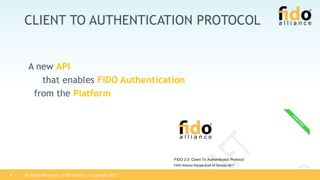
CLIENT TO AUTHENTICATION PROTOCOL
A new API
that enables FIDO Authentication
from the Platform
All Rights Reserved | FIDO Alliance | Copyright 20175
RELYING PARTY APPLICATION
Browser “Application”:
A normal website - HTML, CSS,
JavaScript
Website, Inc. [US] https://www.acme.com
acme.com X
All Rights Reserved | FIDO Alliance | Copyright 20176
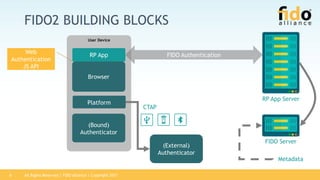
FIDO2 BUILDING BLOCKS
(External)
Authenticator
User Device
Browser
(Bound)
Authenticator
Platform
RP App FIDO Authentication
RP App Server
FIDO Server
Metadata
Web
Authentication
JS API
CTAP
All Rights Reserved | FIDO Alliance | Copyright 20177
CREDENTIAL MANAGEMENT API
• PublicKeyCredential inherits from Credential
• Credentail is a W3C Credential Management API for all types of
credentials
• https://www.w3.org/TR/credential-management-1
• Identifier, type, response, client extension
All Rights Reserved | FIDO Alliance | Copyright 20178
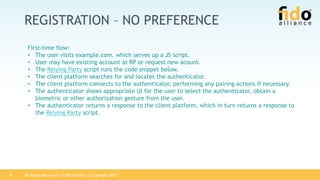
REGISTRATION – NO PREFERENCE
First-time flow:
• The user visits example.com, which serves up a JS script.
• User may have existing account at RP or request new acount.
• The Relying Party script runs the code snippet below.
• The client platform searches for and locates the authenticator.
• The client platform connects to the authenticator, performing any pairing actions if necessary.
• The authenticator shows appropriate UI for the user to select the authenticator, obtain a
biometric or other authorization gesture from the user.
• The authenticator returns a response to the client platform, which in turn returns a response to
the Relying Party script.
All Rights Reserved | FIDO Alliance | Copyright 20179
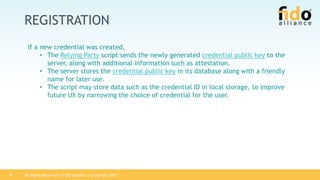
REGISTRATION
If a new credential was created,
• The Relying Party script sends the newly generated credential public key to the
server, along with additional information such as attestation.
• The server stores the credential public key in its database along with a friendly
name for later use.
• The script may store data such as the credential ID in local storage, to improve
future UX by narrowing the choice of credential for the user.
All Rights Reserved | FIDO Alliance | Copyright 201710
NAVIGATOR.CREDENTIAL.CREATE()
if (!PublicKeyCredential) { /* Platform not capable. Handle error. */ }
var publicKey = {
challenge: Uint8Array.from(window.atob("PGifxAoBwCkWkm4b1CiIl5otCphiIh6MijdjbWFjomA="), c=>c.charCodeAt(0)),
// Relying Party:
rp: {
name: "Acme"
},
// User:
user: {
id: "1098237235409872"
name: "john.p.smith@example.com",
displayName: "John P. Smith",
icon: "https://pics.acme.com/00/p/aBjjjpqPb.png"
},
// This Relying Party will accept either an ES256 or RS256 credential, but
// prefers an ES256 credential.
pubKeyCredParams: [
{
type: "public-key",
alg: -7 // "ES256" as registered in the IANA COSE Algorithms registry
},
{
type: "public-key",
alg: -257 // Value registered by this specification for "RS256"
}
],
All Rights Reserved | FIDO Alliance | Copyright 201711
NAVIGATOR.CREDENTIAL.CREATE()
timeout: 60000, // 1 minute
excludeCredentials: [], // No exclude list of PKCredDescriptors
extensions: {"webauthn.location": true} // Include location information
// in attestation
};
// Note: The following call will cause the authenticator to display UI.
navigator.credentials.create({ publicKey })
.then(function (newCredentialInfo) {
// Send new credential info to server for verification and registration.
}).catch(function (err) {
// No acceptable authenticator or user refused consent. Handle appropriately.
});
All Rights Reserved | FIDO Alliance | Copyright 201712
REGISTRATION - PLATFORM AUTHENTICATOR
Relying Party requesting a platform authenticator
• The user visits example.com and clicks on the login button, which redirects the
user to login.example.com.
• The user enters a username and password to log in. After successful login, the
user is redirected back to example.com.
• The Relying Party script runs the JS.
• The user is prompted for whether they are willing to register with the Relying
Party using an available platform authenticator.
• If the user is not willing, terminate this flow.
• The user is shown appropriate UI and guided in creating a credential using one of
the available platform authenticators.
• Upon successful credential creation, the RP script conveys the new credential to
the server.
All Rights Reserved | FIDO Alliance | Copyright 201713
NAVIGATOR.CREDENTIAL.CREATE()
if (!PublicKeyCredential) { /* Platform not capable of the API. Handle error. */ }
PublicKeyCredential.isPlatformAuthenticatorAvailable()
.then(function (userIntent) {
// If the user has affirmed willingness to register with RP using an available platform authenticator
if (userIntent) {
var publicKeyOptions = { /* Public key credential creation options. */};
// Create and register credentials.
return navigator.credentials.create({ "publicKey": publicKeyOptions });
} else {
// Record that the user does not intend to use a platform authenticator
// and default the user to a password-based flow in the future.
}
}).then(function (newCredentialInfo) {
// Send new credential info to server for verification and registration.
}).catch( function(err) {
// Something went wrong. Handle appropriately.
});
All Rights Reserved | FIDO Alliance | Copyright 201714
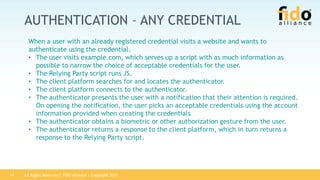
AUTHENTICATION – ANY CREDENTIAL
When a user with an already registered credential visits a website and wants to
authenticate using the credential.
• The user visits example.com, which serves up a script with as much information as
possible to narrow the choice of acceptable credentials for the user.
• The Relying Party script runs JS.
• The client platform searches for and locates the authenticator.
• The client platform connects to the authenticator.
• The authenticator presents the user with a notification that their attention is required.
On opening the notification, the user picks an acceptable credentials using the account
information provided when creating the credentials
• The authenticator obtains a biometric or other authorization gesture from the user.
• The authenticator returns a response to the client platform, which in turn returns a
response to the Relying Party script.
All Rights Reserved | FIDO Alliance | Copyright 201715
AUTHENTICATION - ANY CREDENTAIL
• If an assertion was successfully generated and returned,
• The script sends the assertion to the server.
• The server examines the assertion, extracts the credential ID, looks up the registered
credential public key it is database, and verifies the assertion’s authentication
signature. If valid, it looks up the identity associated with the assertion’s credential ID;
that identity is now authenticated.
• The server now does whatever it would otherwise do upon successful authentication --
return a success page, set authentication cookies, etc.
• If the Relying Party script does not have any hints available (e.g., from locally stored
data) to help it narrow the list of credentials
All Rights Reserved | FIDO Alliance | Copyright 201716
NAVIGATOR.CREDENTIALS.GET()
if (!PublicKeyCredential) { /* Platform not capable. Handle error. */ }
var options = {
challenge: new TextEncoder().encode("climb a mountain"),
timeout: 60000, // 1 minute
allowCredentials: [{ type: "public-key" }]
};
navigator.credentials.get({ "publicKey": options })
.then(function (assertion) {
// Send assertion to server for verification
}).catch(function (err) {
// No acceptable credential or user refused consent. Handle appropriately.
});
All Rights Reserved | FIDO Alliance | Copyright 201717
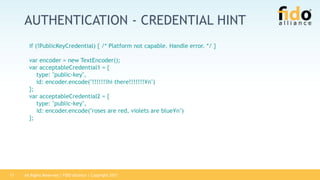
AUTHENTICATION - CREDENTIAL HINT
if (!PublicKeyCredential) { /* Platform not capable. Handle error. */ }
var encoder = new TextEncoder();
var acceptableCredential1 = {
type: "public-key",
id: encoder.encode("!!!!!!!hi there!!!!!!!¥n")
};
var acceptableCredential2 = {
type: "public-key",
id: encoder.encode("roses are red, violets are blue¥n")
};
All Rights Reserved | FIDO Alliance | Copyright 201718
AUTHENTICATION - CREDENTIAL HINT
var options = {
challenge: encoder.encode("climb a mountain"),
timeout: 60000, // 1 minute
allowCredentials: [acceptableCredential1, acceptableCredential2];
extensions: { 'webauthn.txauth.simple':
"Wave your hands in the air like you just don’t care" };
};
navigator.credentials.get({ "publicKey": options })
.then(function (assertion) {
// Send assertion to server for verification
}).catch(function (err) {
// No acceptable credential or user refused consent. Handle appropriately.
});
All Rights Reserved | FIDO Alliance | Copyright 201719
DECOMMISSIONING
Possible situations in which decommissioning a credential might be desired. Note that all of
these are handled on the server side and do not need support from the API specified here.
• Possibility #1 -- user reports the credential as lost.
• User goes to server.example.net, authenticates and follows a link to report a
lost/stolen device.
• Server returns a page showing the list of registered credentials with friendly names
as configured during registration.
• User selects a credential and the server deletes it from its database.
• In future, the Relying Party script does not specify this credential in any list of
acceptable credentials, and assertions signed by this credential are rejected.
All Rights Reserved | FIDO Alliance | Copyright 201720
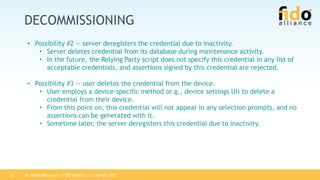
DECOMMISSIONING
• Possibility #2 -- server deregisters the credential due to inactivity.
• Server deletes credential from its database during maintenance activity.
• In the future, the Relying Party script does not specify this credential in any list of
acceptable credentials, and assertions signed by this credential are rejected.
• Possibility #3 -- user deletes the credential from the device.
• User employs a device-specific method (e.g., device settings UI) to delete a
credential from their device.
• From this point on, this credential will not appear in any selection prompts, and no
assertions can be generated with it.
• Sometime later, the server deregisters this credential due to inactivity.
All Rights Reserved | FIDO Alliance | Copyright 201721
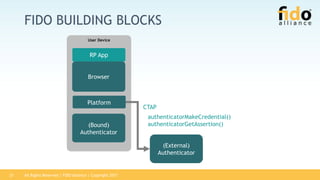
FIDO BUILDING BLOCKS
(External)
Authenticator
User Device
Browser
(Bound)
Authenticator
Platform
RP App
CTAP
authenticatorMakeCredential()
authenticatorGetAssertion()
All Rights Reserved | FIDO Alliance | Copyright 201722
ATTESTATIONS
• Packed Attestations
• This is a WebAuthn optimized attestation statement format. It is implementable by authenticators with
limited resources (e.g., secure elements).
• TPM Attestations
• This attestation statement format is generally used by authenticators that use a Trusted Platform Module
as their cryptographic engine.
• Android Key Attestations
• When the authenticator in question is a platform-provided Authenticator on the Android "N" or later
platform, the attestation statement is based on the Android key attestation.
• Android SafetyNet Attestations
• When the authenticator in question is a platform-provided Authenticator on certain Android platforms,
the attestation statement is based on the SafetyNet API.
• FIDO U2F Attestations
• FIDO U2F authenticators using the formats defined in FIDO-U2F-Message-Formats specification
All Rights Reserved | FIDO Alliance | Copyright 201723
EXTENSIONS
• The mechanism for generating public key credentials and Authentication assertions
• Defined Extensions. Each extension is a client extension (browser must support). Each extention is
registered in a IANA registry.
• AppId
• This authentication extension allows Relying Parties that have previously registered a credential using the legacy
FIDO JavaScript APIs to request an assertion.
• Generic Transaction Authorization Extension
• This registration extension and authentication extension allows for a simple form of transaction authorization. A
Relying Party can specify a prompt string, intended for display on a trusted device on the authenticator
• Authenticator Selection Extension
• This registration extension allows a Relying Party to guide the selection of the authenticator that will be leveraged
when creating the credential. It is intended primarily for Relying Parties that wish to tightly control the experience
around credential creation.
• User Verification Index Extension
• This registration extension and authentication extension enables use of a user verification index
• Supported Extensions Extension
• This registration extension enables the Relying Party to determine which extensions the authenticator supports.
• Location Extension
• The location registration extension and authentication extension provides the client device’s current location to the
WebAuthn Relying Party
• User Verification Method Extension
• This registration extension and authentication extension enables use of a user verification method.
All Rights Reserved | FIDO Alliance | Copyright 201724
FIDO AUTHENTICATION:
SECURITY & CONVENIENCE
All Rights Reserved | FIDO Alliance | Copyright 201725
CONVENIENCE & SECURITY
Security
Convenience
Password + OTP
Password
All Rights Reserved | FIDO Alliance | Copyright 201726
CONVENIENCE & SECURITY
Security
Convenience
Password + OTP
Password
FIDO
In FIDO
• Same user verification method
for all servers
In FIDO: Arbitrary user verification
methods are supported
(+ they are interoperable)
All Rights Reserved | FIDO Alliance | Copyright 201727
CONVENIENCE & SECURITY
Security
Convenience
Password + OTP
Password
FIDO
In FIDO: Scalable security
depending on Authenticator
implementation
In FIDO:
• Only public keys on server
• Not phishable
All Rights Reserved | FIDO Alliance | Copyright 201728
CONCLUSION
• Different authentication use-cases lead to different
authentication requirements
• FIDO separates user verification from authentication and
hence supports all user verification methods
• FIDO supports scalable convenience & security
• User verification data is known to Authenticator only
• FIDO complements federation
All Rights Reserved | FIDO Alliance | Copyright 201729
DEMOS
• Scenario #1 WebAuthn
• TBD
• Scenario #2 CTAP
• TBD

FIDO2 Specifications Overview

  • 1.
    All Rights Reserved| FIDO Alliance | Copyright 20171 FIDO2 SPECIFICATION OVERVIEW REVISED NOVEMBER 20TH 2017
  • 2.
    All Rights Reserved| FIDO Alliance | Copyright 20172 THE ROAD AHEAD FIDO2 PROJECT: WEBAUTHN AND CTAP
  • 3.
    All Rights Reserved| FIDO Alliance | Copyright 20173 WEB AUTHENTICATION Supported In: A new JavaScript API that enables FIDO Authentication in the browser
  • 4.
    All Rights Reserved| FIDO Alliance | Copyright 20174 CLIENT TO AUTHENTICATION PROTOCOL A new API that enables FIDO Authentication from the Platform
  • 5.
    All Rights Reserved| FIDO Alliance | Copyright 20175 RELYING PARTY APPLICATION Browser “Application”: A normal website - HTML, CSS, JavaScript Website, Inc. [US] https://www.acme.com acme.com X
  • 6.
    All Rights Reserved| FIDO Alliance | Copyright 20176 FIDO2 BUILDING BLOCKS (External) Authenticator User Device Browser (Bound) Authenticator Platform RP App FIDO Authentication RP App Server FIDO Server Metadata Web Authentication JS API CTAP
  • 7.
    All Rights Reserved| FIDO Alliance | Copyright 20177 CREDENTIAL MANAGEMENT API • PublicKeyCredential inherits from Credential • Credentail is a W3C Credential Management API for all types of credentials • https://www.w3.org/TR/credential-management-1 • Identifier, type, response, client extension
  • 8.
    All Rights Reserved| FIDO Alliance | Copyright 20178 REGISTRATION – NO PREFERENCE First-time flow: • The user visits example.com, which serves up a JS script. • User may have existing account at RP or request new acount. • The Relying Party script runs the code snippet below. • The client platform searches for and locates the authenticator. • The client platform connects to the authenticator, performing any pairing actions if necessary. • The authenticator shows appropriate UI for the user to select the authenticator, obtain a biometric or other authorization gesture from the user. • The authenticator returns a response to the client platform, which in turn returns a response to the Relying Party script.
  • 9.
    All Rights Reserved| FIDO Alliance | Copyright 20179 REGISTRATION If a new credential was created, • The Relying Party script sends the newly generated credential public key to the server, along with additional information such as attestation. • The server stores the credential public key in its database along with a friendly name for later use. • The script may store data such as the credential ID in local storage, to improve future UX by narrowing the choice of credential for the user.
  • 10.
    All Rights Reserved| FIDO Alliance | Copyright 201710 NAVIGATOR.CREDENTIAL.CREATE() if (!PublicKeyCredential) { /* Platform not capable. Handle error. */ } var publicKey = { challenge: Uint8Array.from(window.atob("PGifxAoBwCkWkm4b1CiIl5otCphiIh6MijdjbWFjomA="), c=>c.charCodeAt(0)), // Relying Party: rp: { name: "Acme" }, // User: user: { id: "1098237235409872" name: "john.p.smith@example.com", displayName: "John P. Smith", icon: "https://pics.acme.com/00/p/aBjjjpqPb.png" }, // This Relying Party will accept either an ES256 or RS256 credential, but // prefers an ES256 credential. pubKeyCredParams: [ { type: "public-key", alg: -7 // "ES256" as registered in the IANA COSE Algorithms registry }, { type: "public-key", alg: -257 // Value registered by this specification for "RS256" } ],
  • 11.
    All Rights Reserved| FIDO Alliance | Copyright 201711 NAVIGATOR.CREDENTIAL.CREATE() timeout: 60000, // 1 minute excludeCredentials: [], // No exclude list of PKCredDescriptors extensions: {"webauthn.location": true} // Include location information // in attestation }; // Note: The following call will cause the authenticator to display UI. navigator.credentials.create({ publicKey }) .then(function (newCredentialInfo) { // Send new credential info to server for verification and registration. }).catch(function (err) { // No acceptable authenticator or user refused consent. Handle appropriately. });
  • 12.
    All Rights Reserved| FIDO Alliance | Copyright 201712 REGISTRATION - PLATFORM AUTHENTICATOR Relying Party requesting a platform authenticator • The user visits example.com and clicks on the login button, which redirects the user to login.example.com. • The user enters a username and password to log in. After successful login, the user is redirected back to example.com. • The Relying Party script runs the JS. • The user is prompted for whether they are willing to register with the Relying Party using an available platform authenticator. • If the user is not willing, terminate this flow. • The user is shown appropriate UI and guided in creating a credential using one of the available platform authenticators. • Upon successful credential creation, the RP script conveys the new credential to the server.
  • 13.
    All Rights Reserved| FIDO Alliance | Copyright 201713 NAVIGATOR.CREDENTIAL.CREATE() if (!PublicKeyCredential) { /* Platform not capable of the API. Handle error. */ } PublicKeyCredential.isPlatformAuthenticatorAvailable() .then(function (userIntent) { // If the user has affirmed willingness to register with RP using an available platform authenticator if (userIntent) { var publicKeyOptions = { /* Public key credential creation options. */}; // Create and register credentials. return navigator.credentials.create({ "publicKey": publicKeyOptions }); } else { // Record that the user does not intend to use a platform authenticator // and default the user to a password-based flow in the future. } }).then(function (newCredentialInfo) { // Send new credential info to server for verification and registration. }).catch( function(err) { // Something went wrong. Handle appropriately. });
  • 14.
    All Rights Reserved| FIDO Alliance | Copyright 201714 AUTHENTICATION – ANY CREDENTIAL When a user with an already registered credential visits a website and wants to authenticate using the credential. • The user visits example.com, which serves up a script with as much information as possible to narrow the choice of acceptable credentials for the user. • The Relying Party script runs JS. • The client platform searches for and locates the authenticator. • The client platform connects to the authenticator. • The authenticator presents the user with a notification that their attention is required. On opening the notification, the user picks an acceptable credentials using the account information provided when creating the credentials • The authenticator obtains a biometric or other authorization gesture from the user. • The authenticator returns a response to the client platform, which in turn returns a response to the Relying Party script.
  • 15.
    All Rights Reserved| FIDO Alliance | Copyright 201715 AUTHENTICATION - ANY CREDENTAIL • If an assertion was successfully generated and returned, • The script sends the assertion to the server. • The server examines the assertion, extracts the credential ID, looks up the registered credential public key it is database, and verifies the assertion’s authentication signature. If valid, it looks up the identity associated with the assertion’s credential ID; that identity is now authenticated. • The server now does whatever it would otherwise do upon successful authentication -- return a success page, set authentication cookies, etc. • If the Relying Party script does not have any hints available (e.g., from locally stored data) to help it narrow the list of credentials
  • 16.
    All Rights Reserved| FIDO Alliance | Copyright 201716 NAVIGATOR.CREDENTIALS.GET() if (!PublicKeyCredential) { /* Platform not capable. Handle error. */ } var options = { challenge: new TextEncoder().encode("climb a mountain"), timeout: 60000, // 1 minute allowCredentials: [{ type: "public-key" }] }; navigator.credentials.get({ "publicKey": options }) .then(function (assertion) { // Send assertion to server for verification }).catch(function (err) { // No acceptable credential or user refused consent. Handle appropriately. });
  • 17.
    All Rights Reserved| FIDO Alliance | Copyright 201717 AUTHENTICATION - CREDENTIAL HINT if (!PublicKeyCredential) { /* Platform not capable. Handle error. */ } var encoder = new TextEncoder(); var acceptableCredential1 = { type: "public-key", id: encoder.encode("!!!!!!!hi there!!!!!!!¥n") }; var acceptableCredential2 = { type: "public-key", id: encoder.encode("roses are red, violets are blue¥n") };
  • 18.
    All Rights Reserved| FIDO Alliance | Copyright 201718 AUTHENTICATION - CREDENTIAL HINT var options = { challenge: encoder.encode("climb a mountain"), timeout: 60000, // 1 minute allowCredentials: [acceptableCredential1, acceptableCredential2]; extensions: { 'webauthn.txauth.simple': "Wave your hands in the air like you just don’t care" }; }; navigator.credentials.get({ "publicKey": options }) .then(function (assertion) { // Send assertion to server for verification }).catch(function (err) { // No acceptable credential or user refused consent. Handle appropriately. });
  • 19.
    All Rights Reserved| FIDO Alliance | Copyright 201719 DECOMMISSIONING Possible situations in which decommissioning a credential might be desired. Note that all of these are handled on the server side and do not need support from the API specified here. • Possibility #1 -- user reports the credential as lost. • User goes to server.example.net, authenticates and follows a link to report a lost/stolen device. • Server returns a page showing the list of registered credentials with friendly names as configured during registration. • User selects a credential and the server deletes it from its database. • In future, the Relying Party script does not specify this credential in any list of acceptable credentials, and assertions signed by this credential are rejected.
  • 20.
    All Rights Reserved| FIDO Alliance | Copyright 201720 DECOMMISSIONING • Possibility #2 -- server deregisters the credential due to inactivity. • Server deletes credential from its database during maintenance activity. • In the future, the Relying Party script does not specify this credential in any list of acceptable credentials, and assertions signed by this credential are rejected. • Possibility #3 -- user deletes the credential from the device. • User employs a device-specific method (e.g., device settings UI) to delete a credential from their device. • From this point on, this credential will not appear in any selection prompts, and no assertions can be generated with it. • Sometime later, the server deregisters this credential due to inactivity.
  • 21.
    All Rights Reserved| FIDO Alliance | Copyright 201721 FIDO BUILDING BLOCKS (External) Authenticator User Device Browser (Bound) Authenticator Platform RP App CTAP authenticatorMakeCredential() authenticatorGetAssertion()
  • 22.
    All Rights Reserved| FIDO Alliance | Copyright 201722 ATTESTATIONS • Packed Attestations • This is a WebAuthn optimized attestation statement format. It is implementable by authenticators with limited resources (e.g., secure elements). • TPM Attestations • This attestation statement format is generally used by authenticators that use a Trusted Platform Module as their cryptographic engine. • Android Key Attestations • When the authenticator in question is a platform-provided Authenticator on the Android "N" or later platform, the attestation statement is based on the Android key attestation. • Android SafetyNet Attestations • When the authenticator in question is a platform-provided Authenticator on certain Android platforms, the attestation statement is based on the SafetyNet API. • FIDO U2F Attestations • FIDO U2F authenticators using the formats defined in FIDO-U2F-Message-Formats specification
  • 23.
    All Rights Reserved| FIDO Alliance | Copyright 201723 EXTENSIONS • The mechanism for generating public key credentials and Authentication assertions • Defined Extensions. Each extension is a client extension (browser must support). Each extention is registered in a IANA registry. • AppId • This authentication extension allows Relying Parties that have previously registered a credential using the legacy FIDO JavaScript APIs to request an assertion. • Generic Transaction Authorization Extension • This registration extension and authentication extension allows for a simple form of transaction authorization. A Relying Party can specify a prompt string, intended for display on a trusted device on the authenticator • Authenticator Selection Extension • This registration extension allows a Relying Party to guide the selection of the authenticator that will be leveraged when creating the credential. It is intended primarily for Relying Parties that wish to tightly control the experience around credential creation. • User Verification Index Extension • This registration extension and authentication extension enables use of a user verification index • Supported Extensions Extension • This registration extension enables the Relying Party to determine which extensions the authenticator supports. • Location Extension • The location registration extension and authentication extension provides the client device’s current location to the WebAuthn Relying Party • User Verification Method Extension • This registration extension and authentication extension enables use of a user verification method.
  • 24.
    All Rights Reserved| FIDO Alliance | Copyright 201724 FIDO AUTHENTICATION: SECURITY & CONVENIENCE
  • 25.
    All Rights Reserved| FIDO Alliance | Copyright 201725 CONVENIENCE & SECURITY Security Convenience Password + OTP Password
  • 26.
    All Rights Reserved| FIDO Alliance | Copyright 201726 CONVENIENCE & SECURITY Security Convenience Password + OTP Password FIDO In FIDO • Same user verification method for all servers In FIDO: Arbitrary user verification methods are supported (+ they are interoperable)
  • 27.
    All Rights Reserved| FIDO Alliance | Copyright 201727 CONVENIENCE & SECURITY Security Convenience Password + OTP Password FIDO In FIDO: Scalable security depending on Authenticator implementation In FIDO: • Only public keys on server • Not phishable
  • 28.
    All Rights Reserved| FIDO Alliance | Copyright 201728 CONCLUSION • Different authentication use-cases lead to different authentication requirements • FIDO separates user verification from authentication and hence supports all user verification methods • FIDO supports scalable convenience & security • User verification data is known to Authenticator only • FIDO complements federation
  • 29.
    All Rights Reserved| FIDO Alliance | Copyright 201729 DEMOS • Scenario #1 WebAuthn • TBD • Scenario #2 CTAP • TBD