Install Active Directory PowerShell Module on Windows 10
i | P a g e
Table of Contents
Overview.......................................................................................................................................................1
Pre-requisites................................................................................................................................................1
Download..................................................................................................................................................1
Installation ................................................................................................................................................1
Verify RSAT Update Installation............................................................................................................1
List ActiveDirectory Module .....................................................................................................................2
Import ActiveDirectory Module................................................................................................................2
Troubleshooting........................................................................................................................................3
Error Message.......................................................................................................................................3
Workaround..........................................................................................................................................3
Expand Patch.........................................................................................................................................3
Deploy Patch.........................................................................................................................................4
Verify RSAT Update Installation............................................................................................................4
Install Active Directory PowerShell Module on Windows 10
1 | P a g e
Overview
The purpose of this guide is install Active Directory PowerShell Module on Windows 10.
Pre-requisites
 Windows 10
 Windows Feature RSAT (Remote Server Administration Tool)
 Install Windows 10 RSAT according to the architecture
 Enable the Active Directory PowerShell feature
 Update-Help for the module
Download
First step is to download the RSAT tools according to the Operating System architecture (x86 or x64)
https://www.microsoft.com/en-in/download/details.aspx?id=45520
Installation
Next step is install RSAT tools after downloading;
Launch the downloaded file “WindowsTH-RSAT_TP5_Update-x64.msu” to install the Windows Feature
“RSAT”.
Verify RSAT Update Installation
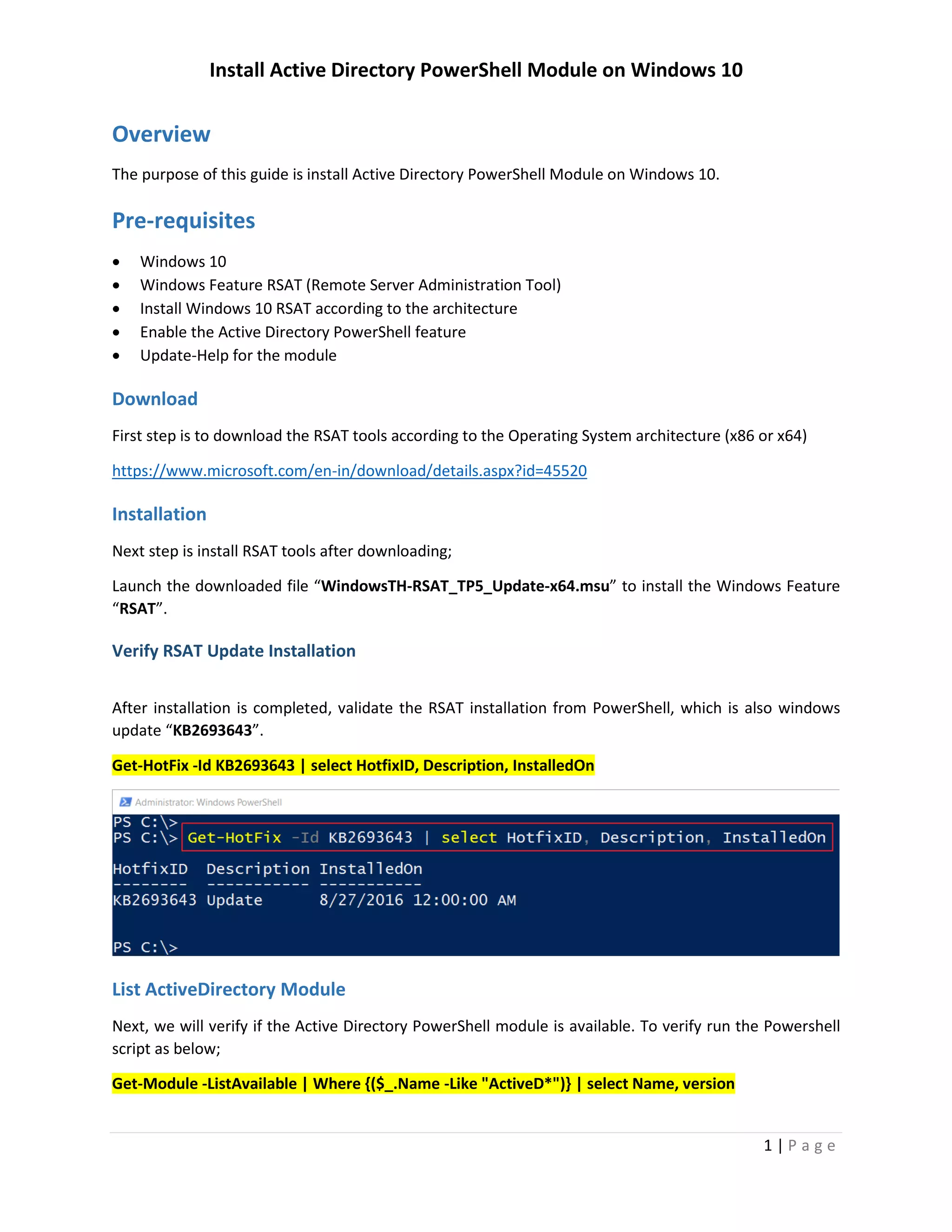
After installation is completed, validate the RSAT installation from PowerShell, which is also windows
update “KB2693643”.
Get-HotFix -Id KB2693643 | select HotfixID, Description, InstalledOn
Install Active Directory PowerShell Module on Windows 10
2 | P a g e
List ActiveDirectory Module
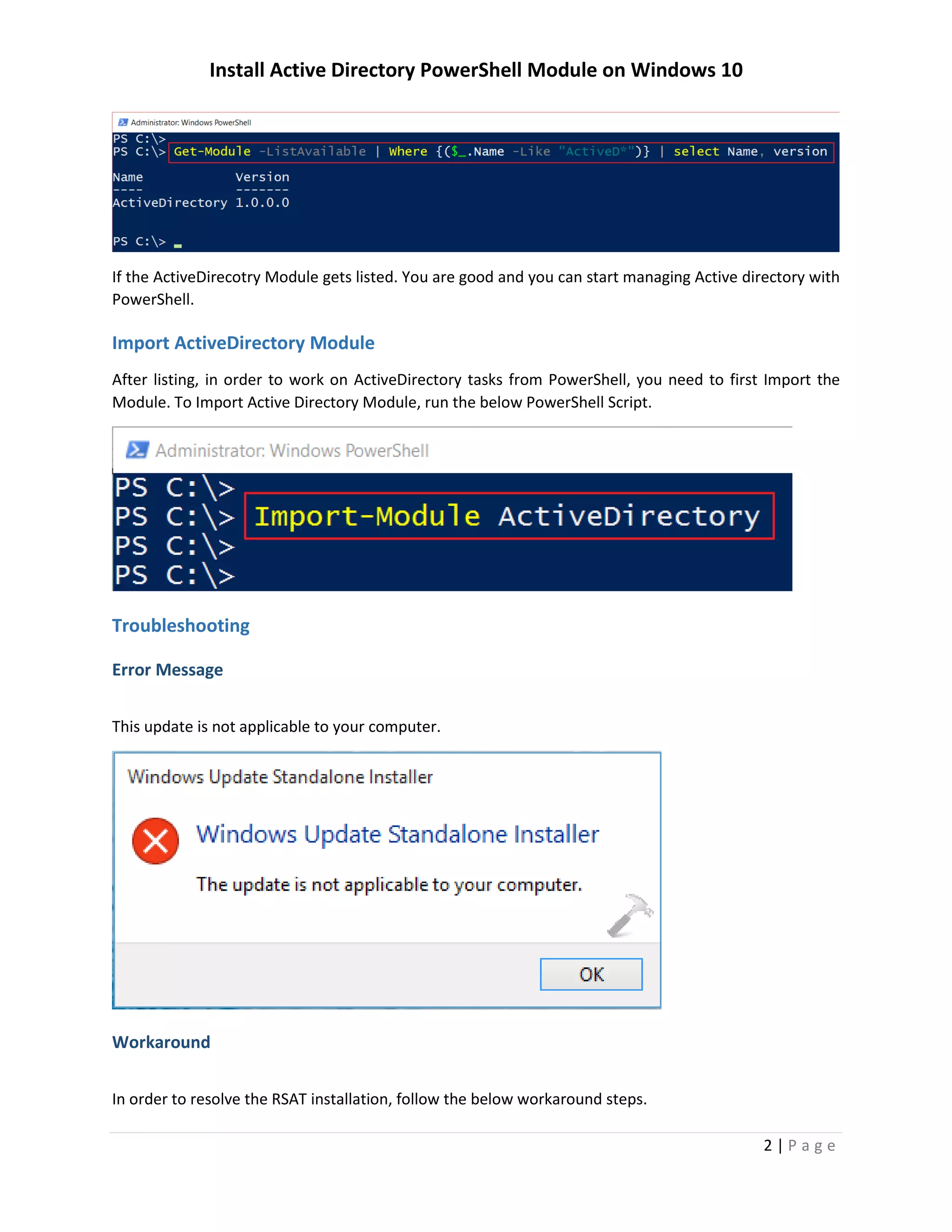
Next, we will verify if the Active Directory PowerShell module is available. To verify run the Powershell
script as below;
Get-Module -ListAvailable | Where {($_.Name -Like "ActiveD*")} | select Name, version
If the ActiveDirecotry Module gets listed. You are good and you can start managing Active directory with
PowerShell.
Import ActiveDirectory Module
After listing, in order to work on ActiveDirectory tasks from PowerShell, you need to first Import the
Module. To Import Active Directory Module, run the below PowerShell Script.
Install Active Directory PowerShell Module on Windows 10
3 | P a g e
Troubleshooting
Error Message
This update is not applicable to your computer.
Workaround
In order to resolve the RSAT installation, follow the below workaround steps.
copy c:DownloadsWindowsTH-KB2693643-x64.msu c:tmp
cd c:tmp
mkdir rsat
Expand Patch
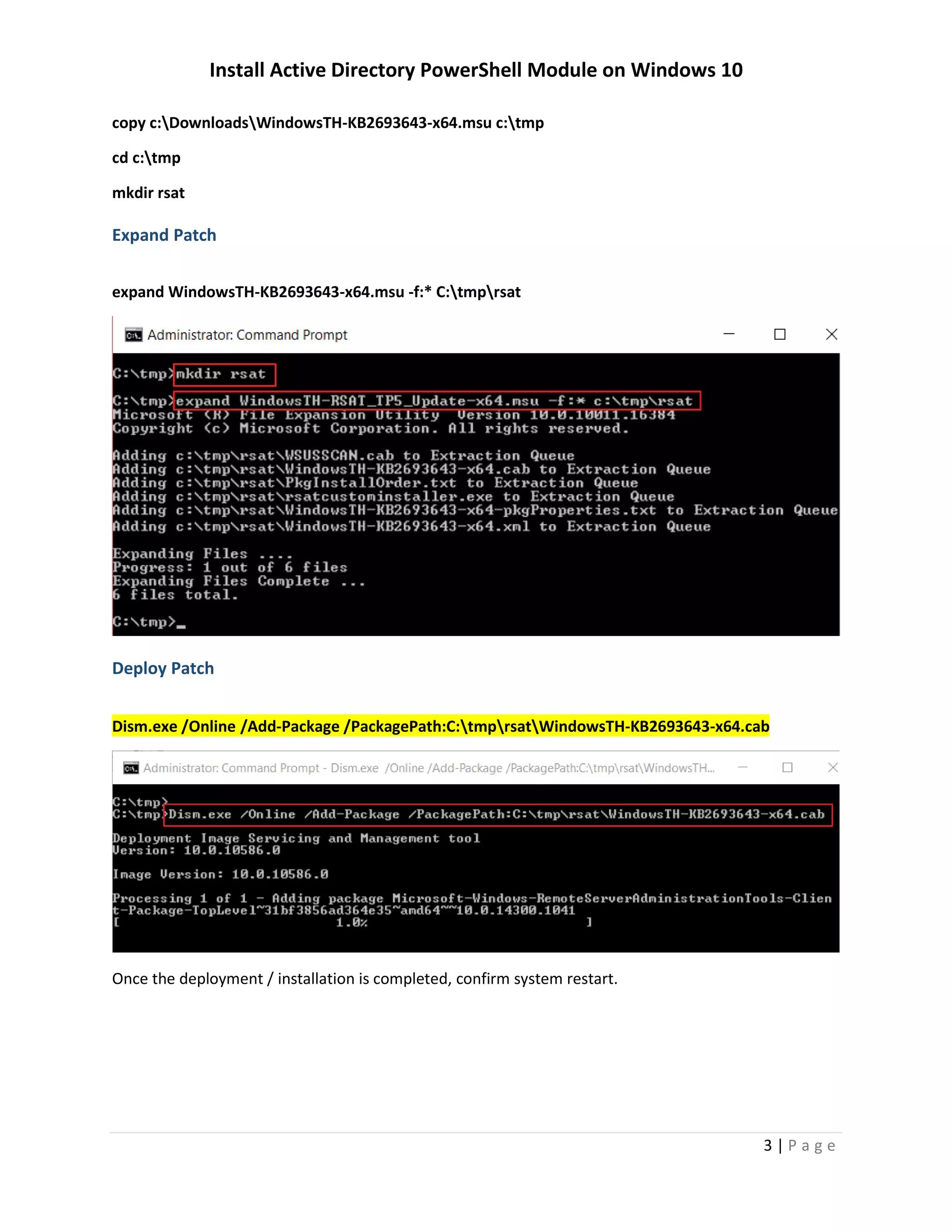
Next step is to expand the copied file into a folder; to expand the file run the commad;
expand WindowsTH-KB2693643-x64.msu -f:* C:tmprsat
Install Active Directory PowerShell Module on Windows 10
4 | P a g e
Deploy Patch
Dism.exe /Online /Add-Package /PackagePath:C:tmprsatWindowsTH-KB2693643-x64.cab
Once the deployment / installation is completed, confirm system restart.
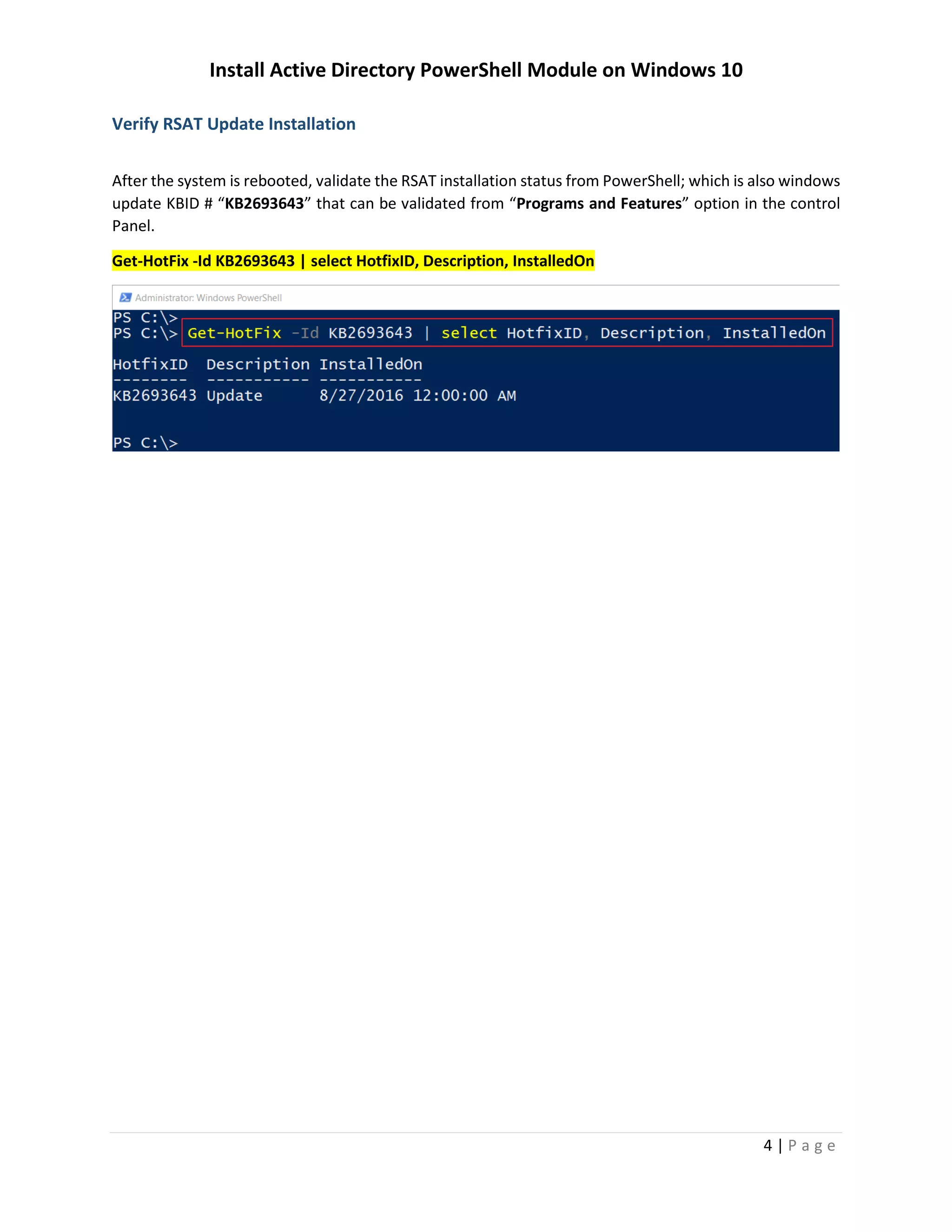
Verify RSAT Update Installation
After the system is rebooted, validate the RSAT installation status from PowerShell; which is also windows
update KBID # “KB2693643” that can be validated from “Programs and Features” option in the control
Panel.
Get-HotFix -Id KB2693643 | select HotfixID, Description, InstalledOn

Install Active Directory PowerShell Module on Windows 10

  • 1.
    Install Active DirectoryPowerShell Module on Windows 10 i | P a g e Table of Contents Overview.......................................................................................................................................................1 Pre-requisites................................................................................................................................................1 Download..................................................................................................................................................1 Installation ................................................................................................................................................1 Verify RSAT Update Installation............................................................................................................1 List ActiveDirectory Module .....................................................................................................................2 Import ActiveDirectory Module................................................................................................................2 Troubleshooting........................................................................................................................................3 Error Message.......................................................................................................................................3 Workaround..........................................................................................................................................3 Expand Patch.........................................................................................................................................3 Deploy Patch.........................................................................................................................................4 Verify RSAT Update Installation............................................................................................................4
  • 2.
    Install Active DirectoryPowerShell Module on Windows 10 1 | P a g e Overview The purpose of this guide is install Active Directory PowerShell Module on Windows 10. Pre-requisites  Windows 10  Windows Feature RSAT (Remote Server Administration Tool)  Install Windows 10 RSAT according to the architecture  Enable the Active Directory PowerShell feature  Update-Help for the module Download First step is to download the RSAT tools according to the Operating System architecture (x86 or x64) https://www.microsoft.com/en-in/download/details.aspx?id=45520 Installation Next step is install RSAT tools after downloading; Launch the downloaded file “WindowsTH-RSAT_TP5_Update-x64.msu” to install the Windows Feature “RSAT”. Verify RSAT Update Installation After installation is completed, validate the RSAT installation from PowerShell, which is also windows update “KB2693643”. Get-HotFix -Id KB2693643 | select HotfixID, Description, InstalledOn
  • 3.
    Install Active DirectoryPowerShell Module on Windows 10 2 | P a g e List ActiveDirectory Module Next, we will verify if the Active Directory PowerShell module is available. To verify run the Powershell script as below; Get-Module -ListAvailable | Where {($_.Name -Like "ActiveD*")} | select Name, version If the ActiveDirecotry Module gets listed. You are good and you can start managing Active directory with PowerShell. Import ActiveDirectory Module After listing, in order to work on ActiveDirectory tasks from PowerShell, you need to first Import the Module. To Import Active Directory Module, run the below PowerShell Script.
  • 4.
    Install Active DirectoryPowerShell Module on Windows 10 3 | P a g e Troubleshooting Error Message This update is not applicable to your computer. Workaround In order to resolve the RSAT installation, follow the below workaround steps. copy c:DownloadsWindowsTH-KB2693643-x64.msu c:tmp cd c:tmp mkdir rsat Expand Patch Next step is to expand the copied file into a folder; to expand the file run the commad; expand WindowsTH-KB2693643-x64.msu -f:* C:tmprsat
  • 5.
    Install Active DirectoryPowerShell Module on Windows 10 4 | P a g e Deploy Patch Dism.exe /Online /Add-Package /PackagePath:C:tmprsatWindowsTH-KB2693643-x64.cab Once the deployment / installation is completed, confirm system restart. Verify RSAT Update Installation After the system is rebooted, validate the RSAT installation status from PowerShell; which is also windows update KBID # “KB2693643” that can be validated from “Programs and Features” option in the control Panel. Get-HotFix -Id KB2693643 | select HotfixID, Description, InstalledOn