OpenNMS Introduction
AGENDA
• What is OpenNMS
• How to install OpenNMS
• Discovery & Monitor Process

• GUI Introduction
What is OpenNMS
• world’s first enterprise grade network
management application platform developed
under the open source model
– World’s First :
• From 1999/7

– Enterprise Grade :
• monitor tens of thousands to ultimately unlimited devices

– Application Platform
• Design for “out of box” and highly customizable

– Open Source
• Under version 3 of the GNU General Public License (GPL)
What is OpenNMS
• Supported OS
– LinuxUnix (rpm, apt), Windows, Mac OS

• Programming Language
–
–
–
–

Java, JSP
jRobin (RRD tool for Java)  Graph
Jasper  Reports
OSGi, SVG, Vaadin and D3.js  Topology Map

• Commercial License
– GPLv3
How to install OpenNMS
• JDK (Java SE)
– http://www.oracle.com/technetwork/java/javase/downloa
ds/jdk7u9-downloads-1859576.html

• PostgreSQL
– http://www.postgresql.org/download/windows/
– Not install the newest version

• OpenNMS
–
–
–
–

http://sourceforge.net/projects/opennms/files/OpenNMS/
standalone-'opennms-installer-X.X.X.zip
Run “%OPENNMS_HOME%binopennms.bat start”
http://localhost:8980/opennms
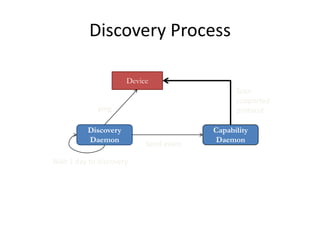
Discovery Process
Device
Scan
supported
protocol

ping
Discovery
Daemon
Wait 1 day to discovery

Send event

Capability
Daemon
Discovery Process
• Discovery Daemon
– Use “Ping” to find all device
• Re-discovery every 24hr

– /etc/discovery-configuration.xml

• capsd (Capability Daemon)
– Check all service in a device
– etc/ capsd-configuration.xml
• Supported services : HTTP, SNMP, ICMP, FTP, …

– newSuspect event ( send-event.pl )
• Received this event to scan this IP
• Received trap will call this event to scan device
Monitor Process


Collected : data collection (/etc/connectd-configuration.xml)
– Collect the data from device
– /etc/connectd-configuration.xml
– SNMP, WMI , OpenNMS-JVM, (NSClient, JMX, HTTP)
• SNMPCollector
– /etc/snmp-config.xml : community string
– /etc/datacollection-config.xml, /datacollection : Supported SNMP MIB

• Monitor : polling daemon
– Every 5 minute to check service is responding correctly
– etc/poller-configuration.xml)
– Supported Service (xxxMonitor)
• ICMP, DNS, SMTP, FTP, SNMP, HTTP, HTTP-8080, HTTP-8000, HTTPS,
HypericAgent, HypericHQ, MySQL, SQL Server, Oracle, Postgres, SSH,
IMAP, POP3, NRPE, NRPE-NoSSL, Windows-Task-Scheduler, OpenNMSJVM
GUI introduction
•
•
•
•
•
•
•
•

Home
Node List
Search
Outages
Path Outages
Dashboard
Events
Alarms

•
•
•
•
•
•
•

Notifications
Assets
Reports
Charts
Surveillance
Maps
Admin
Home
• Node with Outages
• Quick Search
• Available Over the Past 24 Hours
– /etc/categories.xml
– Outages (SurveillanceStatus.java)
• Green : 0 services down
• Yellow : 1 service down
• Red : more than 1 service down

• Notification
• Resource Graphs
• KSC Reports (Key SNMP Customized)
Node List
• Info Table
–
–
–
–
–
–
–

Asset Information
SNMP Attribute
Path Outages
Availability
Node Interface
General
Surveillance Category
Memberships
– Notification
– Recent Events
– Recent Outages

• Link
–
–
–
–
–
–
–
–
–

View Events
View Alarms
View Outages
Asset Info
HTTP
Resource Graphs
Rescan
Admin
Schedule Outage
• poll-outages.xml

– View in Geographical Map
Node List
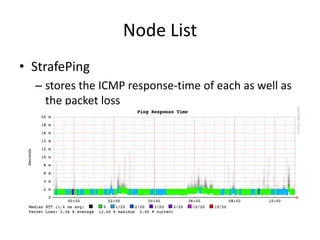
• StrafePing
– stores the ICMP response-time of each as well as
the packet loss
– poller-configuration.xml
• <include-range begin="192.168.6.130"
end="192.168.6.140"/>
Search
• Search for Nodes
– Name containing
– TCP/IP Address like
• 192.168.*.*
• 192.168.0-255.0-255
• 192.168.0,1,2,3-255.*

–
–
–
–

ifAlias, ifName, ifDescr + contains, equals
Providing service
MAC Address like
Foreign Source name like

• Search Asset Information
– Category
– Field
– Containing Text
Outages
• Current Outages
• All Outages
• Additional Query Symbol
– - :show the data not matched the selected field
– +:show the data matched the selected field
– >:show items beginning before this one
– <:show items beginning after this one
Path Outage
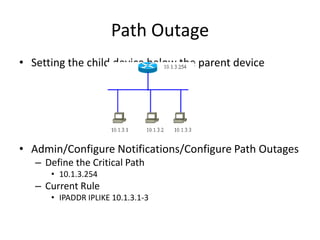
• Setting the child device below the parent device

• Admin/Configure Notifications/Configure Path Outages
– Define the Critical Path
• 10.1.3.254

– Current Rule
• IPADDR IPLIKE 10.1.3.1-3
Dashboard
•
•
•
•

Surveillance View: default
Alarms
Notifications
Node Status
– Add to Surveillance

• Resource Graph
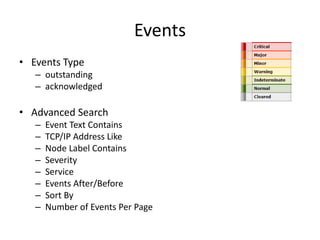
Events
• Events Type
– outstanding
– acknowledged

• Advanced Search
–
–
–
–
–
–
–
–

Event Text Contains
TCP/IP Address Like
Node Label Contains
Severity
Service
Events After/Before
Sort By
Number of Events Per Page
Alarms
• More important Events
– The same events will correlate to one alarms
– /etc/eventconf.xml
• <alarm-data reduction-key="%nodeid%" alarmtype="1" />
– reduction-key : reduce rules

• NCS Alarm List
– Network Communication Services
– Supported by Juniper company (JunosSpace)
Notifications
• Your outstanding notices
• All outstanding notices
• All acknowledge notices
• Setting the Notification
1.
2.
3.
4.

Create user
Destination Paths
Event Notifications
Configure Mail
•

etc/javamail-configuration.properties
–
–

org.opennms.core.utils.fromAddress=FROM-EMAIL-ADDRESS
org.opennms.core.utils.mailHost=MAIL-SERVER-IP
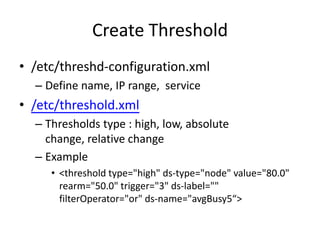
Create Threshold
• /etc/threshd-configuration.xml
– Define name, IP range, service

• /etc/threshold.xml
– Thresholds type : high, low, absolute
change, relative change
– Example
• <threshold type="high" ds-type="node" value="80.0"
rearm="50.0" trigger="3" ds-label=""
filterOperator="or" ds-name="avgBusy5“>
Assets
• All nodes with asset info
Reports
• Resource Graphs
• KSC Performance, Nodes, Domains
1. Create “Customized Report”
2. Add the “Resource Graph” to the report

• Database Reports
– Database Reports
– Performance Reports

• Statistic Reports
– Top 20 ifInOctets across all nodes
– Weekly Top 10 response across all nodes
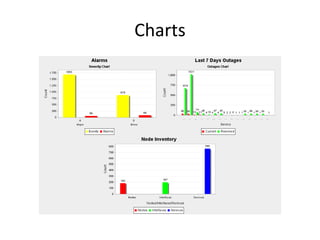
Charts
Surveillance
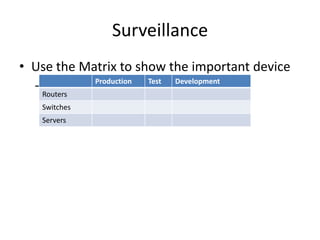
• Use the Matrix to show the important device
Production
Test
Development
– Admin/Manage Surveillance Categories
Routers

Switches
Servers
Maps
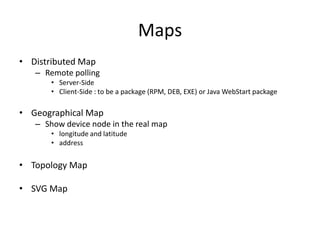
• Distributed Map
– Remote polling
• Server-Side
• Client-Side : to be a package (RPM, DEB, EXE) or Java WebStart package

• Geographical Map
– Show device node in the real map
• longitude and latitude
• address

• Topology Map

• SVG Map
Linkd
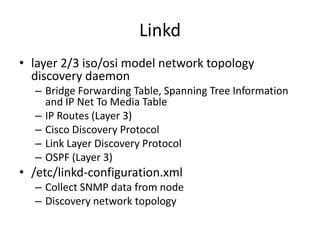
• layer 2/3 iso/osi model network topology
discovery daemon
– Bridge Forwarding Table, Spanning Tree Information
and IP Net To Media Table
– IP Routes (Layer 3)
– Cisco Discovery Protocol
– Link Layer Discovery Protocol
– OSPF (Layer 3)

• /etc/linkd-configuration.xml
– Collect SNMP data from node
– Discovery network topology
SVG Map
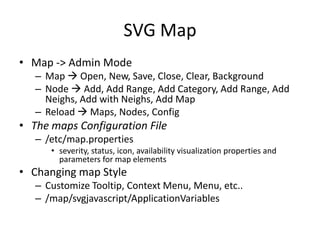
• Map -> Admin Mode
– Map  Open, New, Save, Close, Clear, Background
– Node  Add, Add Range, Add Category, Add Range, Add
Neighs, Add with Neighs, Add Map
– Reload  Maps, Nodes, Config

• The maps Configuration File
– /etc/map.properties
• severity, status, icon, availability visualization properties and
parameters for map elements

• Changing map Style
– Customize Tooltip, Context Menu, Menu, etc..
– /map/svgjavascript/ApplicationVariables
Topology Map
• Display Linkd and VMWare network topology
– OSGi, SVG, Vaadin and D3.js
Admin
•

OpenNMS System
–
–
–

Configure Users, Groups and On-Call Roles
System Information
Instrumentation Log Reader
•

•

The Collecter log status

Operations
–
–
–

Configure Discovery
Configure SNMP Community Names by IP
Configure SNMP Data Collection per Interface
•

–
–
–
–
–
–
–

Manage and Un-manage Interfaces and Services
Manage Thresholds
Send Events
Configure Notifications
Scheduled Outages
SNMP MIB Compile : Generate Event & Data Collection
Manage Events Configuration
•

–

collect this interface or not

etc/events/xxx.events.xml

Manage SNMP Collections and Data Collection Groups
•

etc/datacollection/xxx.xml
Admin
• Node Provisioning
– Add Interface for Scanning
– Manage Provisioning Requisitions
• DNS, FTP, HTTP, HTTPS, ICMP, IMAP, LDAP, NRPE, POP3, SMTP,
SNMP, SSH

– Import and Export Asset Information
– Manage Surveillance Categories
– Delete Nodes

• Distributed Monitoring
– Manage Applications
– Manage Location Monitors
Reference
• http://www.opennms.org/wiki/Installation:Wi
ndows
• http://www.opennms.org/wiki/Main_Page
• http://www.opennms.org/wiki/Data_Collectio
n_Configuration_How-To
• http://www.opennms.org/wiki/Display_Parall
el_Links_Between_Nodes

OpenNMS introduction

  • 1.
  • 2.
    AGENDA • What isOpenNMS • How to install OpenNMS • Discovery & Monitor Process • GUI Introduction
  • 3.
    What is OpenNMS •world’s first enterprise grade network management application platform developed under the open source model – World’s First : • From 1999/7 – Enterprise Grade : • monitor tens of thousands to ultimately unlimited devices – Application Platform • Design for “out of box” and highly customizable – Open Source • Under version 3 of the GNU General Public License (GPL)
  • 4.
    What is OpenNMS •Supported OS – LinuxUnix (rpm, apt), Windows, Mac OS • Programming Language – – – – Java, JSP jRobin (RRD tool for Java)  Graph Jasper  Reports OSGi, SVG, Vaadin and D3.js  Topology Map • Commercial License – GPLv3
  • 5.
    How to installOpenNMS • JDK (Java SE) – http://www.oracle.com/technetwork/java/javase/downloa ds/jdk7u9-downloads-1859576.html • PostgreSQL – http://www.postgresql.org/download/windows/ – Not install the newest version • OpenNMS – – – – http://sourceforge.net/projects/opennms/files/OpenNMS/ standalone-'opennms-installer-X.X.X.zip Run “%OPENNMS_HOME%binopennms.bat start” http://localhost:8980/opennms
  • 6.
  • 7.
    Discovery Process • DiscoveryDaemon – Use “Ping” to find all device • Re-discovery every 24hr – /etc/discovery-configuration.xml • capsd (Capability Daemon) – Check all service in a device – etc/ capsd-configuration.xml • Supported services : HTTP, SNMP, ICMP, FTP, … – newSuspect event ( send-event.pl ) • Received this event to scan this IP • Received trap will call this event to scan device
  • 8.
    Monitor Process  Collected :data collection (/etc/connectd-configuration.xml) – Collect the data from device – /etc/connectd-configuration.xml – SNMP, WMI , OpenNMS-JVM, (NSClient, JMX, HTTP) • SNMPCollector – /etc/snmp-config.xml : community string – /etc/datacollection-config.xml, /datacollection : Supported SNMP MIB • Monitor : polling daemon – Every 5 minute to check service is responding correctly – etc/poller-configuration.xml) – Supported Service (xxxMonitor) • ICMP, DNS, SMTP, FTP, SNMP, HTTP, HTTP-8080, HTTP-8000, HTTPS, HypericAgent, HypericHQ, MySQL, SQL Server, Oracle, Postgres, SSH, IMAP, POP3, NRPE, NRPE-NoSSL, Windows-Task-Scheduler, OpenNMSJVM
  • 9.
    GUI introduction • • • • • • • • Home Node List Search Outages PathOutages Dashboard Events Alarms • • • • • • • Notifications Assets Reports Charts Surveillance Maps Admin
  • 10.
    Home • Node withOutages • Quick Search • Available Over the Past 24 Hours – /etc/categories.xml – Outages (SurveillanceStatus.java) • Green : 0 services down • Yellow : 1 service down • Red : more than 1 service down • Notification • Resource Graphs • KSC Reports (Key SNMP Customized)
  • 11.
    Node List • InfoTable – – – – – – – Asset Information SNMP Attribute Path Outages Availability Node Interface General Surveillance Category Memberships – Notification – Recent Events – Recent Outages • Link – – – – – – – – – View Events View Alarms View Outages Asset Info HTTP Resource Graphs Rescan Admin Schedule Outage • poll-outages.xml – View in Geographical Map
  • 12.
    Node List • StrafePing –stores the ICMP response-time of each as well as the packet loss – poller-configuration.xml • <include-range begin="192.168.6.130" end="192.168.6.140"/>
  • 13.
    Search • Search forNodes – Name containing – TCP/IP Address like • 192.168.*.* • 192.168.0-255.0-255 • 192.168.0,1,2,3-255.* – – – – ifAlias, ifName, ifDescr + contains, equals Providing service MAC Address like Foreign Source name like • Search Asset Information – Category – Field – Containing Text
  • 14.
    Outages • Current Outages •All Outages • Additional Query Symbol – - :show the data not matched the selected field – +:show the data matched the selected field – >:show items beginning before this one – <:show items beginning after this one
  • 15.
    Path Outage • Settingthe child device below the parent device • Admin/Configure Notifications/Configure Path Outages – Define the Critical Path • 10.1.3.254 – Current Rule • IPADDR IPLIKE 10.1.3.1-3
  • 16.
  • 17.
    Events • Events Type –outstanding – acknowledged • Advanced Search – – – – – – – – Event Text Contains TCP/IP Address Like Node Label Contains Severity Service Events After/Before Sort By Number of Events Per Page
  • 18.
    Alarms • More importantEvents – The same events will correlate to one alarms – /etc/eventconf.xml • <alarm-data reduction-key="%nodeid%" alarmtype="1" /> – reduction-key : reduce rules • NCS Alarm List – Network Communication Services – Supported by Juniper company (JunosSpace)
  • 19.
    Notifications • Your outstandingnotices • All outstanding notices • All acknowledge notices • Setting the Notification 1. 2. 3. 4. Create user Destination Paths Event Notifications Configure Mail • etc/javamail-configuration.properties – – org.opennms.core.utils.fromAddress=FROM-EMAIL-ADDRESS org.opennms.core.utils.mailHost=MAIL-SERVER-IP
  • 20.
    Create Threshold • /etc/threshd-configuration.xml –Define name, IP range, service • /etc/threshold.xml – Thresholds type : high, low, absolute change, relative change – Example • <threshold type="high" ds-type="node" value="80.0" rearm="50.0" trigger="3" ds-label="" filterOperator="or" ds-name="avgBusy5“>
  • 21.
    Assets • All nodeswith asset info
  • 22.
    Reports • Resource Graphs •KSC Performance, Nodes, Domains 1. Create “Customized Report” 2. Add the “Resource Graph” to the report • Database Reports – Database Reports – Performance Reports • Statistic Reports – Top 20 ifInOctets across all nodes – Weekly Top 10 response across all nodes
  • 23.
  • 24.
    Surveillance • Use theMatrix to show the important device Production Test Development – Admin/Manage Surveillance Categories Routers Switches Servers
  • 25.
    Maps • Distributed Map –Remote polling • Server-Side • Client-Side : to be a package (RPM, DEB, EXE) or Java WebStart package • Geographical Map – Show device node in the real map • longitude and latitude • address • Topology Map • SVG Map
  • 26.
    Linkd • layer 2/3iso/osi model network topology discovery daemon – Bridge Forwarding Table, Spanning Tree Information and IP Net To Media Table – IP Routes (Layer 3) – Cisco Discovery Protocol – Link Layer Discovery Protocol – OSPF (Layer 3) • /etc/linkd-configuration.xml – Collect SNMP data from node – Discovery network topology
  • 27.
    SVG Map • Map-> Admin Mode – Map  Open, New, Save, Close, Clear, Background – Node  Add, Add Range, Add Category, Add Range, Add Neighs, Add with Neighs, Add Map – Reload  Maps, Nodes, Config • The maps Configuration File – /etc/map.properties • severity, status, icon, availability visualization properties and parameters for map elements • Changing map Style – Customize Tooltip, Context Menu, Menu, etc.. – /map/svgjavascript/ApplicationVariables
  • 28.
    Topology Map • DisplayLinkd and VMWare network topology – OSGi, SVG, Vaadin and D3.js
  • 29.
    Admin • OpenNMS System – – – Configure Users,Groups and On-Call Roles System Information Instrumentation Log Reader • • The Collecter log status Operations – – – Configure Discovery Configure SNMP Community Names by IP Configure SNMP Data Collection per Interface • – – – – – – – Manage and Un-manage Interfaces and Services Manage Thresholds Send Events Configure Notifications Scheduled Outages SNMP MIB Compile : Generate Event & Data Collection Manage Events Configuration • – collect this interface or not etc/events/xxx.events.xml Manage SNMP Collections and Data Collection Groups • etc/datacollection/xxx.xml
  • 30.
    Admin • Node Provisioning –Add Interface for Scanning – Manage Provisioning Requisitions • DNS, FTP, HTTP, HTTPS, ICMP, IMAP, LDAP, NRPE, POP3, SMTP, SNMP, SSH – Import and Export Asset Information – Manage Surveillance Categories – Delete Nodes • Distributed Monitoring – Manage Applications – Manage Location Monitors
  • 31.
    Reference • http://www.opennms.org/wiki/Installation:Wi ndows • http://www.opennms.org/wiki/Main_Page •http://www.opennms.org/wiki/Data_Collectio n_Configuration_How-To • http://www.opennms.org/wiki/Display_Parall el_Links_Between_Nodes