Introduction to Azure Functions
Process events with a serverless code architecture
Microsoft Azure
About me
Callon Campbell
Full-stack developer / technical lead. With over 19 years of experience
developing desktop, mobile and web enterprise applications using Microsoft
.NET Framework, SQL Server and Azure technologies.
I have a passion for both frontend development, specifically with Angular
and Microsoft's Universal Windows Platform (UWP) and also in the cloud
with Microsoft Azure. I blog, tweet and aspire to get an MVP in Azure.
Co-founder of ReflectSoftware Inc and one the principle developers of
ReflectInsight, a real-time .NET logging/analytics framework and Live/Log
Viewer.
2
Email: CallonCampbell@Outlook.com Twitter: @Flying_Maverick, @DevelopAzure
Blog: TheFlyingMaverick.com LinkedIn: LinkedIn.com/in/calloncampbell
Website: ReflectInsight.com
Microsoft Azure
Agenda
•Overview
•Demos – Portal, code and testing locally
•Best practices
•Common scenarios
•Pricing
•Wrap up
3
Microsoft Azure
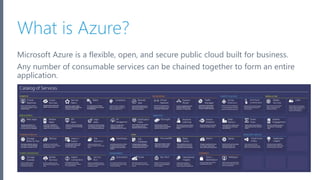
What is Azure?
Microsoft Azure is a flexible, open, and secure public cloud built for business.
Any number of consumable services can be chained together to form an entire
application.
4
Microsoft Azure
Azure serverless compute
•It’s now becoming easier than ever to create small,
targeted microservice architecture using a variety of
services
•Azure provides many services that can help you
achieve a low-friction, high-throughput and low-cost
solution
•Azure Functions is the newest service in the
serverless architecture family
5
Microsoft Azure
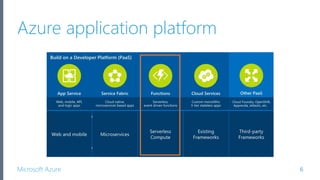
Azure application platform
6
Microsoft Azure
What is Azure Functions?
• Azure Functions are a serverless, event driven experience
that extends the existing Azure App Service platform
• Azure Functions are “nanoservices” that can scale based
on demand (only paying for the resources you use)
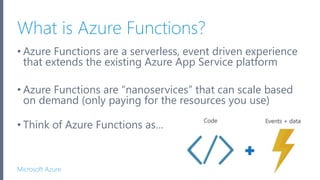
• Think of Azure Functions as…
Microsoft Azure
What is Azure Functions (cont’d)
• Serverless
• Don’t worry about the infrastructure and provisioning of servers,
especially when your Functions call rate scales up
• Accelerate development
• Write your code in the portal for immediate execution
• Quickly and easily iterate with continuous deployment (Visual Studio
Team Services, GitHub, BitBucket)
• Bind into services
• Easily add bindings to Azure services and external services (Box,
DropBox, OneDrive, SendGrid, …) to get input into or output from your
Azure Functions
8
Microsoft Azure
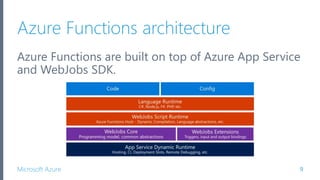
Azure Functions architecture
Azure Functions are built on top of Azure App Service
and WebJobs SDK.
9
Microsoft Azure
Features of Azure Functions
• Choice of language
• Pay-per-use pricing model
• Bring your own dependencies (NuGet, NPM)
• Integrated security
• Simplified integration
• Flexible development / deployment
• Open-source
• Very close to the metal, quickly caches and uncaches
10
Microsoft Azure
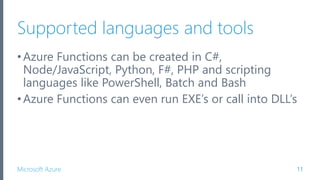
Supported languages and tools
•Azure Functions can be created in C#,
Node/JavaScript, Python, F#, PHP and scripting
languages like PowerShell, Batch and Bash
•Azure Functions can even run EXE’s or call into DLL’s
11
Microsoft Azure
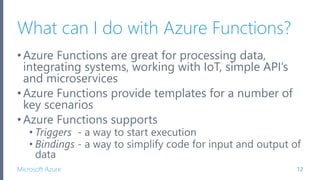
What can I do with Azure Functions?
•Azure Functions are great for processing data,
integrating systems, working with IoT, simple API’s
and microservices
•Azure Functions provide templates for a number of
key scenarios
•Azure Functions supports
• Triggers - a way to start execution
• Bindings - a way to simplify code for input and output of
data
12
Microsoft Azure
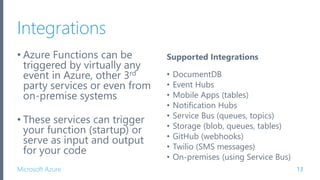
Integrations
• Azure Functions can be
triggered by virtually any
event in Azure, other 3rd
party services or even from
on-premise systems
• These services can trigger
your function (startup) or
serve as input and output
for your code
13
Supported Integrations
• DocumentDB
• Event Hubs
• Mobile Apps (tables)
• Notification Hubs
• Service Bus (queues, topics)
• Storage (blob, queues, tables)
• GitHub (webhooks)
• Twilio (SMS messages)
• On-premises (using Service Bus)
Microsoft Azure
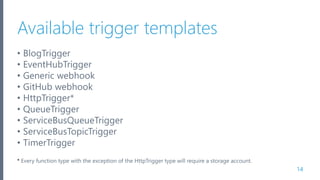
Available trigger templates
• BlogTrigger
• EventHubTrigger
• Generic webhook
• GitHub webhook
• HttpTrigger*
• QueueTrigger
• ServiceBusQueueTrigger
• ServiceBusTopicTrigger
• TimerTrigger
* Every function type with the exception of the HttpTrigger type will require a storage account.
14
Microsoft Azure
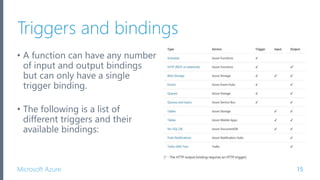
Triggers and bindings
15
• A function can have any number
of input and output bindings
but can only have a single
trigger binding.
• The following is a list of
different triggers and their
available bindings:
Microsoft Azure
Securing your Azure Functions
HttpTriggers can be protected by Oauth providers
such as:
• Azure Active Directory
• Microsoft Account
• Facebook
• Google
• Twitter
16
Getting Started
Demo
HttpTrigger in the Azure Portal
Microsoft Azure
Code and test Azure Functions locally
•Working in the Azure Portal is great but lacks the
following key components:
• Debugging
• Source control integration
• Continuous deployment
•Wouldn’t it be nice if we could use Visual Studio…
22
Microsoft Azure
Introducing Visual Studio Tools for Azure
Functions
• Provides local development and tooling experience
(currently in preview)
• Only available for VS2015 (will come to VS2017 after
VS2017 releases)
• Remote debugging is supported in C# only (for now)
• Running locally is handled by the Azure Functions CLI
• Provides publish to Azure
23
Visual Studio Tools
for Azure Functions
Demo
QueueTrigger
Debugging
Publishing
Microsoft Azure
Add new function (cont’d)
Microsoft Azure
Best practices for Azure Functions
32
Microsoft Azure
Approach to building functions
When building your Azure Functions consider this…
“A key to realizing the full value is to write only the
smallest unit of logic to do a single scope of work and
to keep the dependencies to a minimum.”
– Joseph Fultz and Darren Brust, MSDN Magazine
33
Microsoft Azure
Best practices
•Functions should “do one thing”
•Functions should be idempotent
•Functions should finish as quickly as possible
34
Microsoft Azure
Where to get started
•Start small, replace 1 API or background processing
item
•Integration is a great place, often it’s a new layer on
top of old layers
35
Microsoft Azure
Scaling & runtime best practices
• E2E performance testing
• Know the limits of the service
• Reduce, Reuse and Recycle your resources
• Functions in a Function App share memory
• A Singleton can be shared across many Functions (i.e. DB
connection pooling, Redis caches, etc)
• Be mindful of what you load – memory is averaged over
your functions
• Get rid of data/objects you don’t need
36
Microsoft Azure
Common scenarios for Azure Functions
39
Microsoft Azure
Timer-based processing
Azure Functions supports an event based on a timer
using CRON job syntax.
40
Microsoft Azure
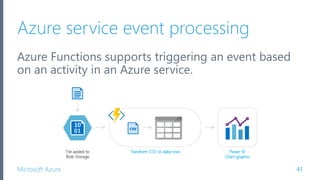
Azure service event processing
Azure Functions supports triggering an event based
on an activity in an Azure service.
41
Microsoft Azure
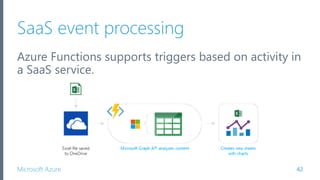
SaaS event processing
Azure Functions supports triggers based on activity in
a SaaS service.
42
Microsoft Azure
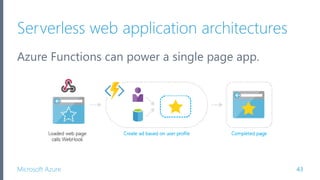
Serverless web application architectures
Azure Functions can power a single page app.
43
Microsoft Azure
Serverless mobile backends
A mobile backend can be just a set of HTTP APIs that
are called from a mobile client using the WebHook
URL.
44
Microsoft Azure
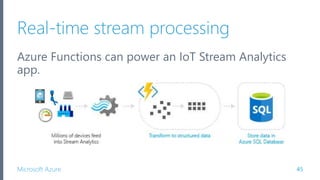
Real-time stream processing
Azure Functions can power an IoT Stream Analytics
app.
45
Microsoft Azure
Real-time bot messaging
Azure Functions can be used to customize the
behavior of a bot using a WebHook.
46
Microsoft Azure
Pricing
47
Microsoft Azure
Pricing
•No upfront cost
•No termination fees
•Pay only for what you use
Only pay for the time your code is running. You’ll be
charged based on the number of resources your
Azure Functions needs, and only for as long as it
takes your code to execute.
48
Microsoft Azure
Two kinds of pricing plans
Consumption plan - When your function runs, Azure
provides all of the necessary computational resources. You
don't have to worry about resource management, and you
only pay for the time that your code runs.
App Service plan - Run your functions just like your web,
mobile, and API apps. When you’re already using App
Service for your other applications, you can also run your
functions on the same plan at no additional cost.
49
Microsoft Azure
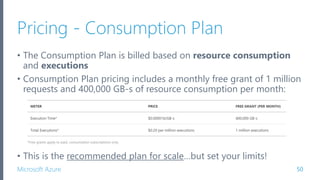
Pricing - Consumption Plan
• The Consumption Plan is billed based on resource consumption
and executions
• Consumption Plan pricing includes a monthly free grant of 1 million
requests and 400,000 GB-s of resource consumption per month:
• This is the recommended plan for scale…but set your limits!
50
Microsoft Azure
Pricing - App Service Plan
• Your functions run on dedicated VMs
• Dedicated VM’s are allocated to your App Service apps and
function apps are always available whether code is actively
running or not
• Good option if you have under utilized VMs
• A VM decouples the cost from both runtime and memory
size – you can limit the cost for long- running functions to
the cost of the VMs they run on
51
Microsoft Azure
Wrap up
52
Microsoft Azure
Summary
•With Azure Functions, the focus is on the code and
not managing the infrastructure.
•Azure Functions are a key ingredient to serverless
compute that is often required for the benefits of
PaaS implementations.
53
Microsoft Azure
Several key benefits
When used as the serverless compute component of
a serverless architecture, you have the following
benefits:
• Reduced time to market
• Lower total cost of ownership
• Pay per execution
54
Microsoft Azure
Take the Azure Functions challenge
https://functionschallenge.azure.com/
55
Microsoft Azure
Thank you!
CallonCampbell@Outlook.com
TheFlyingMaverick.com
@Flying_Maverick
@DevelopAzure
56
Microsoft Azure
References
• https://azure.microsoft.com/en-us/services/functions/
• https://functions.azure.com/
• https://portal.azure.com/
• https://docs.microsoft.com/en-us/azure/azure-functions/
• https://azure.microsoft.com/en-us/pricing/details/functions/
• Azure Functions in Practice
• Azure - Serverless Architecture with Azure Functions
• Visual Studio Tools for Azure Functions Preview
• Azure Storage Explorer
57

Introduction to Azure Functions

  • 1.
    Introduction to AzureFunctions Process events with a serverless code architecture
  • 2.
    Microsoft Azure About me CallonCampbell Full-stack developer / technical lead. With over 19 years of experience developing desktop, mobile and web enterprise applications using Microsoft .NET Framework, SQL Server and Azure technologies. I have a passion for both frontend development, specifically with Angular and Microsoft's Universal Windows Platform (UWP) and also in the cloud with Microsoft Azure. I blog, tweet and aspire to get an MVP in Azure. Co-founder of ReflectSoftware Inc and one the principle developers of ReflectInsight, a real-time .NET logging/analytics framework and Live/Log Viewer. 2 Email: CallonCampbell@Outlook.com Twitter: @Flying_Maverick, @DevelopAzure Blog: TheFlyingMaverick.com LinkedIn: LinkedIn.com/in/calloncampbell Website: ReflectInsight.com
  • 3.
    Microsoft Azure Agenda •Overview •Demos –Portal, code and testing locally •Best practices •Common scenarios •Pricing •Wrap up 3
  • 4.
    Microsoft Azure What isAzure? Microsoft Azure is a flexible, open, and secure public cloud built for business. Any number of consumable services can be chained together to form an entire application. 4
  • 5.
    Microsoft Azure Azure serverlesscompute •It’s now becoming easier than ever to create small, targeted microservice architecture using a variety of services •Azure provides many services that can help you achieve a low-friction, high-throughput and low-cost solution •Azure Functions is the newest service in the serverless architecture family 5
  • 6.
  • 7.
    Microsoft Azure What isAzure Functions? • Azure Functions are a serverless, event driven experience that extends the existing Azure App Service platform • Azure Functions are “nanoservices” that can scale based on demand (only paying for the resources you use) • Think of Azure Functions as…
  • 8.
    Microsoft Azure What isAzure Functions (cont’d) • Serverless • Don’t worry about the infrastructure and provisioning of servers, especially when your Functions call rate scales up • Accelerate development • Write your code in the portal for immediate execution • Quickly and easily iterate with continuous deployment (Visual Studio Team Services, GitHub, BitBucket) • Bind into services • Easily add bindings to Azure services and external services (Box, DropBox, OneDrive, SendGrid, …) to get input into or output from your Azure Functions 8
  • 9.
    Microsoft Azure Azure Functionsarchitecture Azure Functions are built on top of Azure App Service and WebJobs SDK. 9
  • 10.
    Microsoft Azure Features ofAzure Functions • Choice of language • Pay-per-use pricing model • Bring your own dependencies (NuGet, NPM) • Integrated security • Simplified integration • Flexible development / deployment • Open-source • Very close to the metal, quickly caches and uncaches 10
  • 11.
    Microsoft Azure Supported languagesand tools •Azure Functions can be created in C#, Node/JavaScript, Python, F#, PHP and scripting languages like PowerShell, Batch and Bash •Azure Functions can even run EXE’s or call into DLL’s 11
  • 12.
    Microsoft Azure What canI do with Azure Functions? •Azure Functions are great for processing data, integrating systems, working with IoT, simple API’s and microservices •Azure Functions provide templates for a number of key scenarios •Azure Functions supports • Triggers - a way to start execution • Bindings - a way to simplify code for input and output of data 12
  • 13.
    Microsoft Azure Integrations • AzureFunctions can be triggered by virtually any event in Azure, other 3rd party services or even from on-premise systems • These services can trigger your function (startup) or serve as input and output for your code 13 Supported Integrations • DocumentDB • Event Hubs • Mobile Apps (tables) • Notification Hubs • Service Bus (queues, topics) • Storage (blob, queues, tables) • GitHub (webhooks) • Twilio (SMS messages) • On-premises (using Service Bus)
  • 14.
    Microsoft Azure Available triggertemplates • BlogTrigger • EventHubTrigger • Generic webhook • GitHub webhook • HttpTrigger* • QueueTrigger • ServiceBusQueueTrigger • ServiceBusTopicTrigger • TimerTrigger * Every function type with the exception of the HttpTrigger type will require a storage account. 14
  • 15.
    Microsoft Azure Triggers andbindings 15 • A function can have any number of input and output bindings but can only have a single trigger binding. • The following is a list of different triggers and their available bindings:
  • 16.
    Microsoft Azure Securing yourAzure Functions HttpTriggers can be protected by Oauth providers such as: • Azure Active Directory • Microsoft Account • Facebook • Google • Twitter 16
  • 17.
  • 18.
    Microsoft Azure Code andtest Azure Functions locally •Working in the Azure Portal is great but lacks the following key components: • Debugging • Source control integration • Continuous deployment •Wouldn’t it be nice if we could use Visual Studio… 22
  • 19.
    Microsoft Azure Introducing VisualStudio Tools for Azure Functions • Provides local development and tooling experience (currently in preview) • Only available for VS2015 (will come to VS2017 after VS2017 releases) • Remote debugging is supported in C# only (for now) • Running locally is handled by the Azure Functions CLI • Provides publish to Azure 23
  • 20.
    Visual Studio Tools forAzure Functions Demo QueueTrigger Debugging Publishing
  • 21.
    Microsoft Azure Add newfunction (cont’d)
  • 22.
    Microsoft Azure Best practicesfor Azure Functions 32
  • 23.
    Microsoft Azure Approach tobuilding functions When building your Azure Functions consider this… “A key to realizing the full value is to write only the smallest unit of logic to do a single scope of work and to keep the dependencies to a minimum.” – Joseph Fultz and Darren Brust, MSDN Magazine 33
  • 24.
    Microsoft Azure Best practices •Functionsshould “do one thing” •Functions should be idempotent •Functions should finish as quickly as possible 34
  • 25.
    Microsoft Azure Where toget started •Start small, replace 1 API or background processing item •Integration is a great place, often it’s a new layer on top of old layers 35
  • 26.
    Microsoft Azure Scaling &runtime best practices • E2E performance testing • Know the limits of the service • Reduce, Reuse and Recycle your resources • Functions in a Function App share memory • A Singleton can be shared across many Functions (i.e. DB connection pooling, Redis caches, etc) • Be mindful of what you load – memory is averaged over your functions • Get rid of data/objects you don’t need 36
  • 27.
    Microsoft Azure Common scenariosfor Azure Functions 39
  • 28.
    Microsoft Azure Timer-based processing AzureFunctions supports an event based on a timer using CRON job syntax. 40
  • 29.
    Microsoft Azure Azure serviceevent processing Azure Functions supports triggering an event based on an activity in an Azure service. 41
  • 30.
    Microsoft Azure SaaS eventprocessing Azure Functions supports triggers based on activity in a SaaS service. 42
  • 31.
    Microsoft Azure Serverless webapplication architectures Azure Functions can power a single page app. 43
  • 32.
    Microsoft Azure Serverless mobilebackends A mobile backend can be just a set of HTTP APIs that are called from a mobile client using the WebHook URL. 44
  • 33.
    Microsoft Azure Real-time streamprocessing Azure Functions can power an IoT Stream Analytics app. 45
  • 34.
    Microsoft Azure Real-time botmessaging Azure Functions can be used to customize the behavior of a bot using a WebHook. 46
  • 35.
  • 36.
    Microsoft Azure Pricing •No upfrontcost •No termination fees •Pay only for what you use Only pay for the time your code is running. You’ll be charged based on the number of resources your Azure Functions needs, and only for as long as it takes your code to execute. 48
  • 37.
    Microsoft Azure Two kindsof pricing plans Consumption plan - When your function runs, Azure provides all of the necessary computational resources. You don't have to worry about resource management, and you only pay for the time that your code runs. App Service plan - Run your functions just like your web, mobile, and API apps. When you’re already using App Service for your other applications, you can also run your functions on the same plan at no additional cost. 49
  • 38.
    Microsoft Azure Pricing -Consumption Plan • The Consumption Plan is billed based on resource consumption and executions • Consumption Plan pricing includes a monthly free grant of 1 million requests and 400,000 GB-s of resource consumption per month: • This is the recommended plan for scale…but set your limits! 50
  • 39.
    Microsoft Azure Pricing -App Service Plan • Your functions run on dedicated VMs • Dedicated VM’s are allocated to your App Service apps and function apps are always available whether code is actively running or not • Good option if you have under utilized VMs • A VM decouples the cost from both runtime and memory size – you can limit the cost for long- running functions to the cost of the VMs they run on 51
  • 40.
  • 41.
    Microsoft Azure Summary •With AzureFunctions, the focus is on the code and not managing the infrastructure. •Azure Functions are a key ingredient to serverless compute that is often required for the benefits of PaaS implementations. 53
  • 42.
    Microsoft Azure Several keybenefits When used as the serverless compute component of a serverless architecture, you have the following benefits: • Reduced time to market • Lower total cost of ownership • Pay per execution 54
  • 43.
    Microsoft Azure Take theAzure Functions challenge https://functionschallenge.azure.com/ 55
  • 44.
  • 45.
    Microsoft Azure References • https://azure.microsoft.com/en-us/services/functions/ •https://functions.azure.com/ • https://portal.azure.com/ • https://docs.microsoft.com/en-us/azure/azure-functions/ • https://azure.microsoft.com/en-us/pricing/details/functions/ • Azure Functions in Practice • Azure - Serverless Architecture with Azure Functions • Visual Studio Tools for Azure Functions Preview • Azure Storage Explorer 57

Editor's Notes

  • #5 How many people here know what Azure is? How many people have used Azure? Anyone know what Azure Functions are? In Azure there are many consumable services that can be chained together to form an entire application.
  • #6 Other serverless Azure services are: Azure Functions Azure Logic Apps Azure Service Fabric Azure Batch Reference: https://www.simple-talk.com/cloud/cloud-development/serverless-architecture-azure/
  • #7 A new key component of these consumable services is Azure Functions which was introduced last year (2016) at the Microsoft Build developer conference. Microsoft touts Azure Functions as part and parcel of Azure's PaaS solutions portfolio, used primarily for event-driven, pay-as-you-go computing at scale. Azure Functions can provide the serverless compute capability in a complete solution ecosystem. Platform as a service (PaaS) is a complete development and deployment environment in the cloud, with resources that enable you to deliver everything from simple cloud-based apps to sophisticated, cloud-enabled enterprise applications. Like IaaS, PaaS includes infrastructure—servers, storage, and networking—but also middleware, development tools, business intelligence (BI) services, database management systems, and more. PaaS is designed to support the complete web application lifecycle: building, testing, deploying, managing, and updating. PaaS allows you to avoid the expense and complexity of buying and managing software licenses, the underlying application infrastructure and middleware or the development tools and other resources. You manage the applications and services you develop, and the cloud service provider typically manages everything else.
  • #8 Azure Functions is an event driven, compute-on-demand experience. You can leverage Azure Functions to build HTTP endpoints accessible by mobile and IoT devices. Azure Functions can be considered “nanoservices” that can scale based on demand.
  • #9 With serverless, you don’t need to worry about the infrastructure and provisioning of servers. Setup continuous deployment of your functions from Visual Studio Tea Services, GitHub and BitBucket. Easily add bindings to Azure or external services.
  • #10 Key take away is that Azure Functions gets all the benefits of using Azure App Service.
  • #11 Protect HTTP-triggered functions with OAuth providers such as Azure Active Directory, Facebook, Google, Twitter, and Microsoft Account. Easily leverage Azure services and other software-as-a-service (SaaS) offerings. Code your functions right in the portal or set up continuous integration and deploy your code through GitHub, Visual Studio Team Services, and other supported development tools. The Functions runtime is open-source and available on GitHub
  • #12 Take that console application you already have an upload it to run as an Azure Function.
  • #15 Every function type with the exception of the http trigger type will require a storage account.
  • #16 Any number of input and output bindings, but only have a single trigger.
  • #17 Only HttpTriggers can be protected.
  • #18 https://portal.azure.com/ I’ll now show you how to get started creating and running a simple HttpTrigger function from the Azure Portal.
  • #20 Use the QuickStart process to create a premade function or using the left side navigation, create your own custom function.
  • #21 There are a number of templates available for different languages including some prebuilt samples. Looking at these samples and experiment functions is a great way to see what you can do.
  • #22 When you’re function is ready, save and run it immediately in the portal and see the output in the logs. You can also test your functions from the right navigation pane.
  • #24 Visual Studio tooling for Azure Functions provides local development and debugging experience. Currently in preview and only available for Visual Studio 2015 (coming soon to VS2017). Supports remote debugging for C# only. Executing locally is handled by the Azure Functions CLI When you’re ready it provides the capability to publish to Azure.
  • #25 I’ll now create a new Azure Function app in Visual Studio, run and debug it locally using the Azure Functions CLI and finally I’ll publish it up to Azure.
  • #26 File -> New Project, look under Cloud and then select “Azure Functions (Preview)”.
  • #28 Storage account connection should be “AzureWebJobsStorage”. You will then add your connection string to that keys value in the AppSettings. AppSettings are shared across functions.
  • #30 Using the Azure Storage Explorer, I can get my connection string for the storage account. Get Primary Connection String and add to AppSettings to key “AzureWebJobsStorage”. I can also insert some sample test data to be consumed by my function.
  • #32 Adjust timing polling. Open up Host.json and using intellisence, add “queues” : {“maxPollingInterval”: 1000} where this value is in milliseconds.
  • #34 Smallest unit of logic Single scope of work Keep dependencies to a minimum
  • #35 Azure Functions should be SINGLE PURPOSE in nature. Think of them as short concise statements rather than compound sentences. Azure Functions should be IDEMPOTENT in nature. This means that the resulting state of the function should be identical if called subsequent times with the same parameters. Azure Functions should be quick and short lived - keeping execution time brief. For longer running jobs consider using Azure WebJobs or hosting the service in Azure Service Fabric.
  • #36 Start small and look at replacing a single API or perhaps a background processing item. Integration is another great place to start as it’s often a new layer on top of old existing layers.
  • #41 For example, you could execute code that runs every 15 minutes and cleans up a database table based on custom business logic.
  • #42 For example, you could execute a function that reads newly discovered log files in an Azure Blob Storage container. The data can then be transformed into a row in an Azure SQL Database table, or DocumentDB or perhaps feed it into another service. C# Azure Function for reacting to Azure Insights Events
  • #43 For example, when a file is saved in OneDrive, this triggers a function that uses the Microsoft Graph API to modify the spreadsheet, creating additional charts and calculated data.
  • #44 The app calls functions using the WebHook URL, saving user data and deciding what data to display. Or, you can do simple customizations, such as changing an ad based on user profile information. Node.js Azure Function for generating SAS tokens C# Azure Function for generating SAS tokens
  • #45 For example, a mobile application could capture an image, then call an Azure Function to get an access token for uploading to blob storage. A second Azure Function is triggered by the blob upload and resizes the image to be mobile-friendly.
  • #46 For example, IoT devices send messages to Azure Stream Analytics, which then calls an Azure Function to transform the message. This function processes the data and creates a new record in an Azure SQL Database.
  • #47 For example, you can create an Azure Function that processes a message using Cortana Analytics and call this function using the Microsoft Bot Framework.
  • #50 On a Consumption compute plan, you are currently limited to 5 minutes of computation. On a regular App Service Plan, running for 10 minutes is quite reasonable. Long-running functions is more on the order of an hour.
  • #51 Resource consumption in GB-s (gigabyte-seconds) is computed as a combination of memory size and execution time for all functions running in a Function App. Executions counted each time a function is executed in response to an event, triggered by a binding.