PhoneUP - Applications Bundle
for Cisco Unified Communications
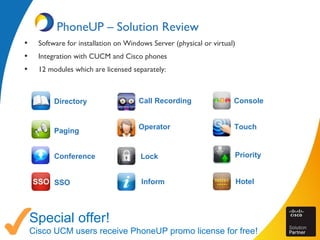
PhoneUP – Solution Review
• Software for installation on Windows Server (physical or virtual)
• Integration with CUCM and Cisco phones
• 12 modules which are licensed separately:
Special offer!
Cisco UCM users receive PhoneUP promo license for free!
Directory
Paging
Conference
SSO
Call Recording
Operator
Lock
Inform
Console
Touch
Priority
Hotel
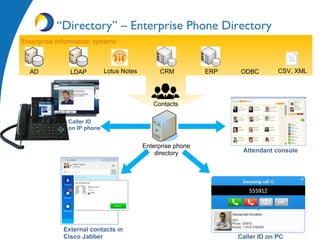
Enterprise phone
directory
Enterprise information systems
“Directory” – Enterprise Phone Directory
Lotus Notes ODBCLDAP CRMAD ERP CSV, XML
Contacts
Caller ID
on IP phone
External contacts in
Cisco Jabber Caller ID on PC
Attendant console
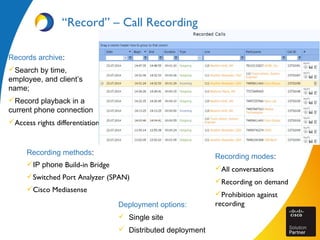
Recording methods:
IP phone Build-in Bridge
Switched Port Analyzer (SPAN)
Cisco Mediasense
“Record” – Call Recording
Deployment options:
 Single site
 Distributed deployment
Records archive:
Search by time,
employee, and client’s
name;
Record playback in a
current phone connection
Access rights differentiation
Recording modes:
All conversations
Recording on demand
Prohibition against
recording
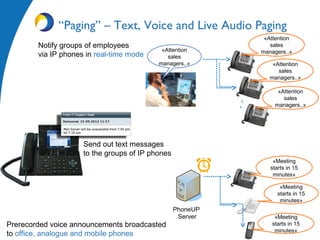
Notify groups of employees
via IP phones in real-time mode
Prerecorded voice announcements broadcasted
to office, analogue and mobile phones
«Attention
sales
managers..»«Attention
sales
managers..» «Attention
sales
managers..»
«Attention
sales
managers..»
“Paging” – Text, Voice and Live Audio Paging
Send out text messages
to the groups of IP phones
«Meeting
starts in 15
minutes»
«Meeting
starts in 15
minutes»
«Meeting
starts in 15
minutes»
PhoneUP
Server
“Operator” - For Receptionists and Contact
Center Operators
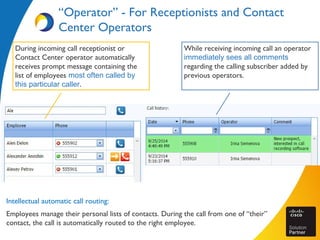
Intellectual automatic call routing:
Employees manage their personal lists of contacts. During the call from one of “their”
contact, the call is automatically routed to the right employee.
While receiving incoming call an operator
immediately sees all comments
regarding the calling subscriber added by
previous operators.
During incoming call receptionist or
Contact Center operator automatically
receives prompt message containing the
list of employees most often called by
this particular caller.
“Console” – Attendant Console
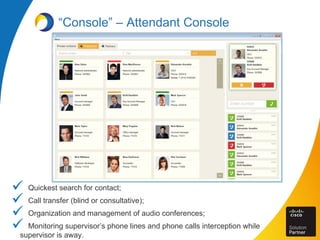
 Quickest search for contact;
 Call transfer (blind or consultative);
 Organization and management of audio conferences;
 Monitoring supervisor’s phone lines and phone calls interception while
supervisor is away.
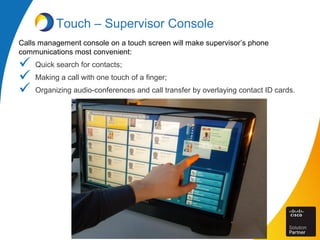
Touch – Supervisor Console
Calls management console on a touch screen will make supervisor’s phone
communications most convenient:
 Quick search for contacts;
 Making a call with one touch of a finger;
 Organizing audio-conferences and call transfer by overlaying contact ID cards.
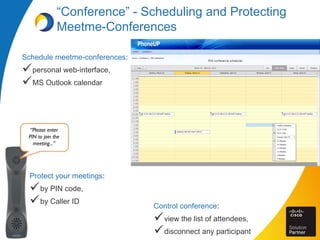
“Conference” - Scheduling and Protecting
Meetme-Conferences
Schedule meetme-conferences:
personal web-interface,
MS Outlook calendar
“Please enter
PIN to join the
meeting...”
Protect your meetings:
by PIN code,
by Caller ID
Control conference:
view the list of attendees,
disconnect any participant
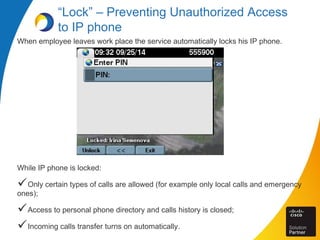
“Lock” – Preventing Unauthorized Access
to IP phone
When employee leaves work place the service automatically locks his IP phone.
While IP phone is locked:
Only certain types of calls are allowed (for example only local calls and emergency
ones);
Access to personal phone directory and calls history is closed;
Incoming calls transfer turns on automatically.
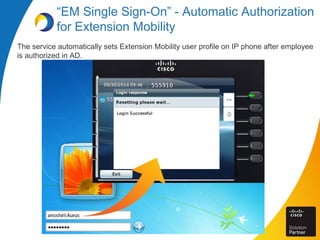
“EM Single Sign-On” - Automatic Authorization
for Extension Mobility
The service automatically sets Extension Mobility user profile on IP phone after employee
is authorized in AD.
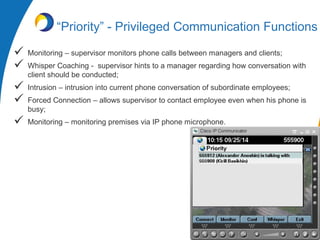
“Priority” - Privileged Communication Functions
 Monitoring – supervisor monitors phone calls between managers and clients;
 Whisper Coaching - supervisor hints to a manager regarding how conversation with
client should be conducted;
 Intrusion – intrusion into current phone conversation of subordinate employees;
 Forced Connection – allows supervisor to contact employee even when his phone is
busy;
 Monitoring – monitoring premises via IP phone microphone.
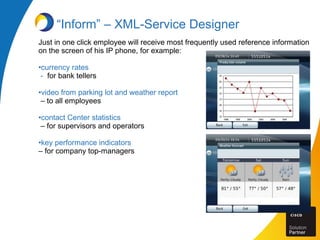
Just in one click employee will receive most frequently used reference information
on the screen of his IP phone, for example:
•currency rates
- for bank tellers
•video from parking lot and weather report
– to all employees
•contact Center statistics
– for supervisors and operators
•key performance indicators
– for company top-managers
“Inform” – XML-Service Designer
PhoneUP Licensing
Main provisions of licensing and sales:
Try it first –fully functional product demo is provided to our potential clients free
of charge;
Buy what you really require – each module is licensed separately, a license
key may activate any set of modules;
Buy as many as you require – each module can be licensed for different
number of endpoints;
Update for free – the cost of one year of technical support and product update
is included in the license cost;
Work with your partner – the product is distributed via system integrators.
Aurus channel partners network includes all Cisco partners specialized in unified
communications.
Aurus Product Line
Aurus specializes in development of software solutions for enterprise communication and
Contact Centers:
Applications bundle for enterprise IP telephony, enhancing
basic features of Cisco Unified Communications Manager
Video call and web-collaboration for customer
support
Easy scheduling of Cisco TelePresence meetings and their
management via iPad.
Outbound calling campaigns software
Aurus
Nikolayeva str.,11
Novosibirsk, Russia
630090
+7 (383) 344-92-92
info@aurus5.com
http://www.aurus5.com
Aurus has the Skolkovo
resident status since 2011
Thank you for your time!

Aurus PhoneUP

  • 1.
    PhoneUP - ApplicationsBundle for Cisco Unified Communications
  • 2.
    PhoneUP – SolutionReview • Software for installation on Windows Server (physical or virtual) • Integration with CUCM and Cisco phones • 12 modules which are licensed separately: Special offer! Cisco UCM users receive PhoneUP promo license for free! Directory Paging Conference SSO Call Recording Operator Lock Inform Console Touch Priority Hotel
  • 3.
    Enterprise phone directory Enterprise informationsystems “Directory” – Enterprise Phone Directory Lotus Notes ODBCLDAP CRMAD ERP CSV, XML Contacts Caller ID on IP phone External contacts in Cisco Jabber Caller ID on PC Attendant console
  • 4.
    Recording methods: IP phoneBuild-in Bridge Switched Port Analyzer (SPAN) Cisco Mediasense “Record” – Call Recording Deployment options:  Single site  Distributed deployment Records archive: Search by time, employee, and client’s name; Record playback in a current phone connection Access rights differentiation Recording modes: All conversations Recording on demand Prohibition against recording
  • 5.
    Notify groups ofemployees via IP phones in real-time mode Prerecorded voice announcements broadcasted to office, analogue and mobile phones «Attention sales managers..»«Attention sales managers..» «Attention sales managers..» «Attention sales managers..» “Paging” – Text, Voice and Live Audio Paging Send out text messages to the groups of IP phones «Meeting starts in 15 minutes» «Meeting starts in 15 minutes» «Meeting starts in 15 minutes» PhoneUP Server
  • 6.
    “Operator” - ForReceptionists and Contact Center Operators Intellectual automatic call routing: Employees manage their personal lists of contacts. During the call from one of “their” contact, the call is automatically routed to the right employee. While receiving incoming call an operator immediately sees all comments regarding the calling subscriber added by previous operators. During incoming call receptionist or Contact Center operator automatically receives prompt message containing the list of employees most often called by this particular caller.
  • 7.
    “Console” – AttendantConsole  Quickest search for contact;  Call transfer (blind or consultative);  Organization and management of audio conferences;  Monitoring supervisor’s phone lines and phone calls interception while supervisor is away.
  • 8.
    Touch – SupervisorConsole Calls management console on a touch screen will make supervisor’s phone communications most convenient:  Quick search for contacts;  Making a call with one touch of a finger;  Organizing audio-conferences and call transfer by overlaying contact ID cards.
  • 9.
    “Conference” - Schedulingand Protecting Meetme-Conferences Schedule meetme-conferences: personal web-interface, MS Outlook calendar “Please enter PIN to join the meeting...” Protect your meetings: by PIN code, by Caller ID Control conference: view the list of attendees, disconnect any participant
  • 10.
    “Lock” – PreventingUnauthorized Access to IP phone When employee leaves work place the service automatically locks his IP phone. While IP phone is locked: Only certain types of calls are allowed (for example only local calls and emergency ones); Access to personal phone directory and calls history is closed; Incoming calls transfer turns on automatically.
  • 11.
    “EM Single Sign-On”- Automatic Authorization for Extension Mobility The service automatically sets Extension Mobility user profile on IP phone after employee is authorized in AD.
  • 12.
    “Priority” - PrivilegedCommunication Functions  Monitoring – supervisor monitors phone calls between managers and clients;  Whisper Coaching - supervisor hints to a manager regarding how conversation with client should be conducted;  Intrusion – intrusion into current phone conversation of subordinate employees;  Forced Connection – allows supervisor to contact employee even when his phone is busy;  Monitoring – monitoring premises via IP phone microphone.
  • 13.
    Just in oneclick employee will receive most frequently used reference information on the screen of his IP phone, for example: •currency rates - for bank tellers •video from parking lot and weather report – to all employees •contact Center statistics – for supervisors and operators •key performance indicators – for company top-managers “Inform” – XML-Service Designer
  • 14.
    PhoneUP Licensing Main provisionsof licensing and sales: Try it first –fully functional product demo is provided to our potential clients free of charge; Buy what you really require – each module is licensed separately, a license key may activate any set of modules; Buy as many as you require – each module can be licensed for different number of endpoints; Update for free – the cost of one year of technical support and product update is included in the license cost; Work with your partner – the product is distributed via system integrators. Aurus channel partners network includes all Cisco partners specialized in unified communications.
  • 15.
    Aurus Product Line Aurusspecializes in development of software solutions for enterprise communication and Contact Centers: Applications bundle for enterprise IP telephony, enhancing basic features of Cisco Unified Communications Manager Video call and web-collaboration for customer support Easy scheduling of Cisco TelePresence meetings and their management via iPad. Outbound calling campaigns software
  • 16.
    Aurus Nikolayeva str.,11 Novosibirsk, Russia 630090 +7(383) 344-92-92 info@aurus5.com http://www.aurus5.com Aurus has the Skolkovo resident status since 2011 Thank you for your time!