Introduction to Avaya
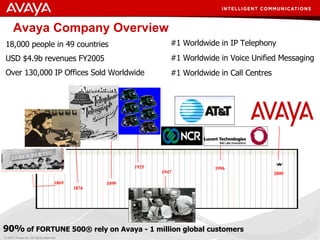
Avaya Company Overview 18,000 people in 49 countries USD $4.9b revenues FY2005 Over 130,000 IP Offices Sold Worldwide #1 Worldwide in IP Telephony #1 Worldwide in Voice Unified Messaging #1 Worldwide in Call Centres 1869 1876 1899 1925 1996 1947 2000 90%  of FORTUNE 500® rely on Avaya - 1 million global customers
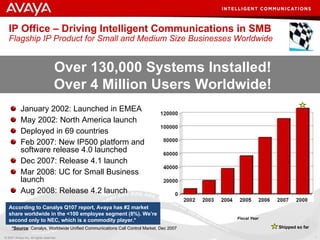
IP Office – Driving Intelligent Communications in SMB Flagship IP Product for Small and Medium Size Businesses Worldwide January 2002: Launched in EMEA May 2002: North America launch Deployed in 69 countries Feb 2007: New IP500 platform and software release 4.0 launched Dec 2007: Release 4.1 launch Mar 2008: UC for Small Business launch Aug 2008: Release 4.2 launch Fiscal Year Over 130,000 Systems Installed! Over 4 Million Users Worldwide! According to Canalys Q107 report, Avaya has #2 market share worldwide in the <100 employee segment (8%). We’re second only to NEC, which is a commodity player.*   *Source : Canalys, Worldwide Unified Communications Call Control Market, Dec 2007  Shipped so far
Introduction to IP Office
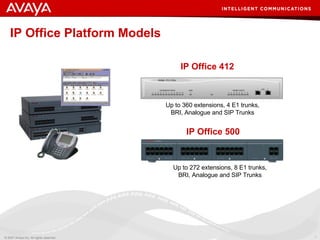
IP Office 412 Up to 360 extensions, 4 E1 trunks, BRI, Analogue and SIP Trunks IP Office 500 Up to 272 extensions, 8 E1 trunks, BRI, Analogue and SIP Trunks IP Office Platform Models
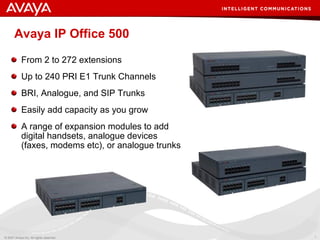
Avaya IP Office 500 From 2 to 272 extensions Up to 240 PRI E1 Trunk Channels BRI, Analogue, and SIP Trunks Easily add capacity as you grow A range of expansion modules to add digital handsets, analogue devices (faxes, modems etc), or analogue trunks
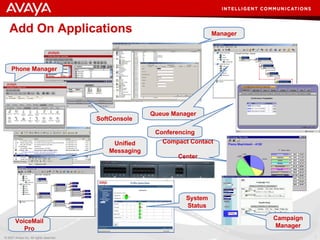
Add On  Applications Phone Manager Unified Messaging SoftConsole VoiceMail Pro Manager Queue Manager Conferencing Compact Contact  Center Campaign Manager System Status
IP Office as a Voice Platform
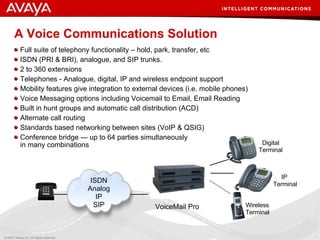
A  Voice Communications Solution Full suite of telephony functionality – hold, park, transfer, etc ISDN (PRI & BRI), analogue, and SIP trunks. 2 to 360 extensions Telephones - Analogue, digital, IP and wireless endpoint support Mobility features give integration to external devices (i.e. mobile phones) Voice Messaging options including Voicemail to Email, Email Reading Built in hunt groups and automatic call distribution (ACD)  Alternate call routing Standards based networking between sites (VoIP & QSIG) Conference bridge — up to 64 parties simultaneously in many combinations IP  Terminal Digital Terminal Wireless Terminal VoiceMail Pro ISDN Analog IP SIP
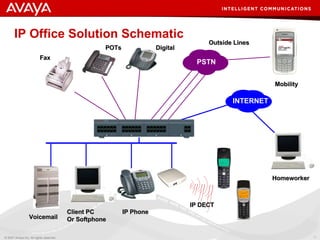
IP Office Solution Schematic POTs Fax Digital Voicemail Client PC Or Softphone IP Phone Homeworker IP DECT Outside Lines Mobility PSTN INTERNET
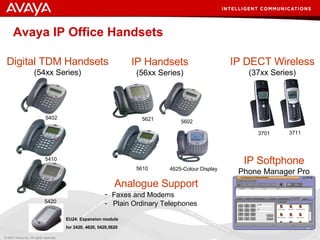
Avaya IP Office Handsets  Digital TDM Handsets (54xx Series) IP Handsets (56xx Series) IP DECT Wireless (37xx Series) Analogue Support Faxes and Modems Plain Ordinary Telephones 5402 5410 5420 5621 5602 5610 3711 3701 EU24: Expansion module  for 2420, 4620, 5420,5620  4625- Colour Display IP Softphone Phone Manager Pro
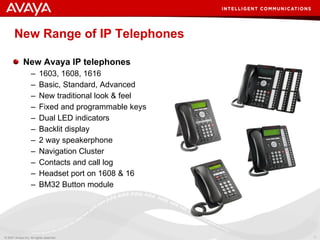
New Range of IP Telephones New Avaya IP telephones 1603, 1608, 1616 Basic, Standard, Advanced New traditional look & feel Fixed and programmable keys Dual LED indicators Backlit display 2 way speakerphone Navigation Cluster Contacts and call log Headset port on 1608 & 16 BM32 Button module
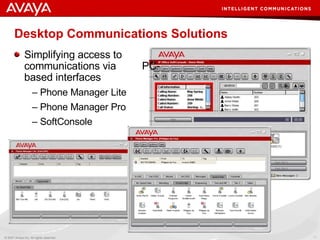
Desktop Communications Solutions Simplifying access to communications via  PC-based interfaces Phone Manager Lite Phone Manager Pro SoftConsole
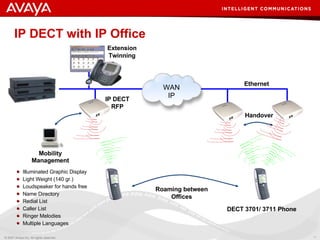
IP DECT with IP Office Illuminated Graphic Display Light Weight (140 gr.) Loudspeaker for hands free Name Directory Redial List Caller List Ringer Melodies Multiple Languages Roaming between Offices DECT 3701/ 3711 Phone Ethernet Mobility Management Handover IP DECT RFP Extension Twinning WAN IP
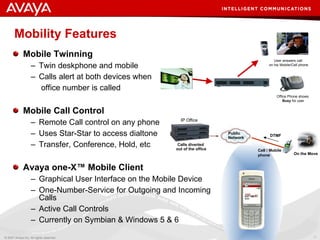
Mobility Features Mobile Twinning Twin deskphone and mobile Calls alert at both devices when   office number is called Mobile Call Control Remote Call control on any phone Uses Star-Star to access dialtone Transfer, Conference, Hold, etc Avaya one-X™ Mobile Client Graphical User Interface on the Mobile Device One-Number-Service for Outgoing and Incoming Calls Active Call Controls Currently on Symbian & Windows 5 & 6 IP Office Calls diverted  out of the office Public Network  On the Move Cell / Mobile phone DTMF User answers call  on his Mobile/Cell phone Office Phone shows  Busy  for user
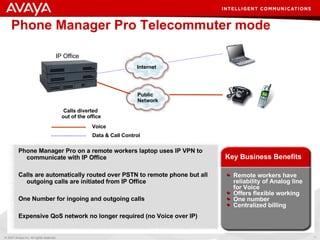
Phone Manager Pro Telecommuter mode Phone Manager Pro on a remote workers laptop uses IP VPN to communicate with IP Office Calls are automatically routed over PSTN to remote phone but all outgoing calls are initiated from IP Office One Number for ingoing and outgoing calls Expensive QoS network no longer required (no Voice over IP) Remote workers have reliability of Analog line for Voice Offers flexible working One number Centralized billing Key Business Benefits IP Office Calls diverted  out of the office Internet  Voice Data & Call Control Public Network
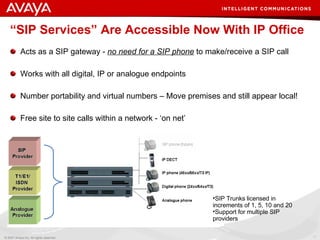
“ SIP Services” Are Accessible Now With IP Office   Acts as a SIP gateway -  no need for a SIP phone  to make/receive a SIP call Works with all digital, IP or analogue endpoints Number portability and virtual numbers – Move premises and still appear local! Free site to site calls within a network - ‘on net’ SIP Trunks licensed in increments of 1, 5, 10 and 20 Support for multiple SIP providers
IP Office as a Messaging Solution
IP Office Messaging Options Embedded Voicemail For the IP Office 500 system  Supports 4 ports and up to 15 Hours total record time Includes Auto Attendant and Vmail to Email functionality VoiceMail Pro PC-based scalable messaging solution including Automated Attendant, Call Recording, Voicemail to Email presentation and more.  Provides the base for advanced applications such as IVR, Text-to-Speech, and  Unified Messaging Centralized Voicemail Pro Utilize a single voicemail system to service multiple sites.
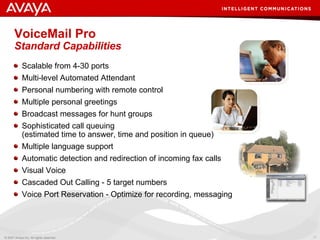
VoiceMail Pro  Standard Capabilities Scalable from 4-30 ports  Multi-level Automated Attendant  Personal numbering with remote control  Multiple personal greetings Broadcast messages for hunt groups Sophisticated call queuing (estimated time to answer, time and position in queue) Multiple language support Automatic detection and redirection of incoming fax calls Visual Voice Cascaded Out Calling - 5 target numbers Voice Port Reservation - Optimize for recording, messaging
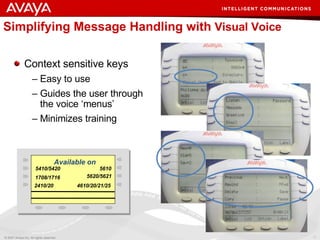
Simplifying Message Handling with  Visual Voice Context sensitive keys  Easy to use Guides the user through the voice ‘menus’ Minimizes training 5410/5420 4610/20/21/25 5620/5621 5610 2410/20 1708/1716 Available on
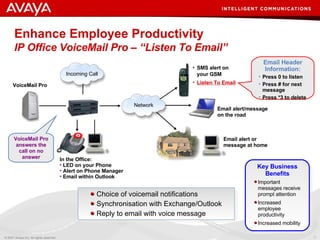
Enhance Employee Productivity IP Office VoiceMail Pro – “Listen To Email”   Choice of voicemail notifications Synchronisation with Exchange/Outlook Reply to email with voice message In the Office: LED on your Phone  Alert on Phone Manager Email within Outlook Network Email alert/message on the road Email alert or message at home SMS alert on your GSM Listen To Email Email Header Information: Press 0 to listen Press # for next message Press *3 to delete VoiceMail Pro answers the call on no answer Important messages receive prompt attention Increased employee productivity Increased mobility Key Business Benefits VoiceMail Pro Network Incoming Call
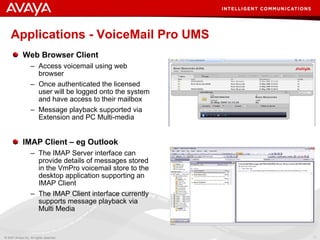
Applications - VoiceMail Pro UMS Web Browser Client Access voicemail using web browser Once authenticated the licensed user will be logged onto the system and have access to their mailbox Message playback supported via Extension and PC Multi-media IMAP Client – eg Outlook The IMAP Server interface can provide details of messages stored in the VmPro voicemail store to the desktop application supporting an IMAP Client The IMAP Client interface currently supports message playback via Multi Media
IP Office Voice Networking
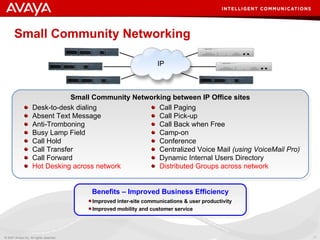
Small Community Networking Desk-to-desk dialing  Absent Text Message Anti-Tromboning Busy Lamp Field Call Hold Call Transfer Call Forward Hot Desking across network Call Paging  Call Pick-up Call Back when Free Camp-on  Conference Centralized Voice Mail  (using VoiceMail Pro) Dynamic Internal Users Directory Distributed Groups across network Small Community Networking between IP Office sites IP Improved inter-site communications & user productivity Improved mobility and customer service Benefits – Improved Business Efficiency
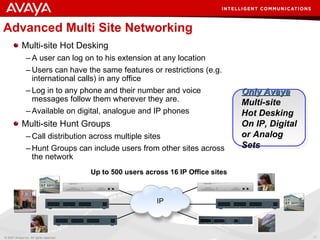
Advanced Multi Site Networking Multi-site Hot Desking A user can log on to his extension at any location Users can have the same features or restrictions (e.g. international calls) in any office Log in to any phone and their number and voice messages follow them wherever they are. Available on digital, analogue and IP phones Multi-site Hunt Groups Call distribution across multiple sites Hunt Groups can include users from other sites across the network Up to 500 users across 16 IP Office sites Only Avaya Multi-site  Hot Desking On IP, Digital or Analog Sets IP
IP Office as a  Conferencing Solution
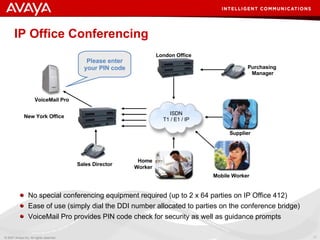
IP Office Conferencing No special conferencing equipment required (up to 2 x 64 parties on IP Office 412) Ease of use (simply dial the DDI number allocated to parties on the conference bridge) VoiceMail Pro provides PIN code check for security as well as guidance prompts VoiceMail Pro New York Office Sales Director Purchasing  Manager London Office Supplier Mobile Worker Home Worker Please enter your PIN code ISDN T1 / E1 / IP
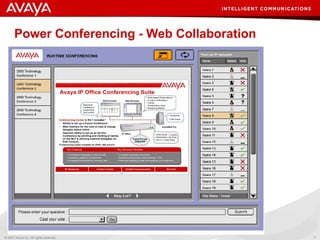
Power Conferencing - Web Collaboration
IP Office as a  Contact Center Platform
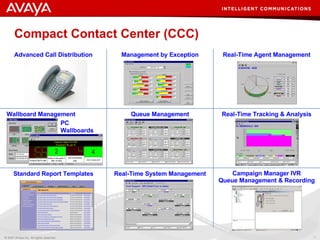
Compact Contact Center (CCC) PC  Wallboards Advanced Call Distribution Management by Exception Real-Time Agent Management Wallboard Management Queue Management Real-Time Tracking & Analysis Standard Report Templates Real-Time System Management Campaign Manager IVR Queue Management & Recording
IP Office Management & Administration
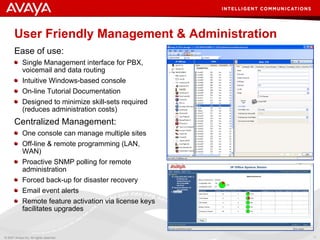
User Friendly Management & Administration Ease of use: Single Management interface for PBX, voicemail and data routing Intuitive Windows-based console On-line Tutorial Documentation Designed to  minimize  skill-sets required (reduces administration costs) Centralized Management:  One console can manage multiple sites Off-line & remote programming (LAN, WAN) Proactive SNMP polling for remote administration Forced back-up for disaster recovery Email event alerts Remote feature activation via license keys facilitates upgrades
IP Office Feature Overview
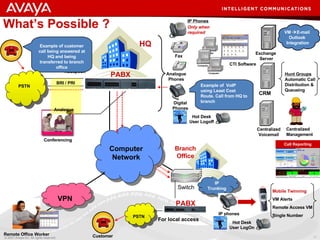
What’s Possible ? HQ CTI Software Computer Computer Computer Exchange  Server VM   E-mail  Outlook  Integration Call Recording CRM Hunt Groups Automatic Call Distribution & Queueing IP Trunking IP phones Computer Network Switch Branch Office Hot Desk User Logoff Hot Desk User LogOn Conferencing Centralized Voicemail 0800  Auto Attend  IVR   Centralized  Reception Centralized  Management Call Reporting Remote Office Worker VPN PSTN PABX For local access Customer Example of  VoIP  using Least Cost Route. Call from HQ to branch Example of customer call being answered at HQ and being transferred to branch office Mobile Twinning   VM Alerts Remote Access VM Single Number  PSTN BRI / PRI  Analogue Fax Analogue  Phones Digital Phones IP Phones   Only when required PABX
Delivering Intelligent Communications to Small and Midsize Businesses Avaya IP Office Avaya and the Avaya Logo are trademarks of Avaya Inc. and may be registered in certain jurisdictions.  All trademarks identified by the ® or ™ are registered trademarks or trademarks, respectively, of Avaya Inc.  All other trademarks are the property of their respective owners.

Avaya IP Office Demo V4 2

  • 1.
  • 2.
    Avaya Company Overview18,000 people in 49 countries USD $4.9b revenues FY2005 Over 130,000 IP Offices Sold Worldwide #1 Worldwide in IP Telephony #1 Worldwide in Voice Unified Messaging #1 Worldwide in Call Centres 1869 1876 1899 1925 1996 1947 2000 90% of FORTUNE 500® rely on Avaya - 1 million global customers
  • 3.
    IP Office –Driving Intelligent Communications in SMB Flagship IP Product for Small and Medium Size Businesses Worldwide January 2002: Launched in EMEA May 2002: North America launch Deployed in 69 countries Feb 2007: New IP500 platform and software release 4.0 launched Dec 2007: Release 4.1 launch Mar 2008: UC for Small Business launch Aug 2008: Release 4.2 launch Fiscal Year Over 130,000 Systems Installed! Over 4 Million Users Worldwide! According to Canalys Q107 report, Avaya has #2 market share worldwide in the <100 employee segment (8%). We’re second only to NEC, which is a commodity player.* *Source : Canalys, Worldwide Unified Communications Call Control Market, Dec 2007 Shipped so far
  • 4.
  • 5.
    IP Office 412Up to 360 extensions, 4 E1 trunks, BRI, Analogue and SIP Trunks IP Office 500 Up to 272 extensions, 8 E1 trunks, BRI, Analogue and SIP Trunks IP Office Platform Models
  • 6.
    Avaya IP Office500 From 2 to 272 extensions Up to 240 PRI E1 Trunk Channels BRI, Analogue, and SIP Trunks Easily add capacity as you grow A range of expansion modules to add digital handsets, analogue devices (faxes, modems etc), or analogue trunks
  • 7.
    Add On Applications Phone Manager Unified Messaging SoftConsole VoiceMail Pro Manager Queue Manager Conferencing Compact Contact Center Campaign Manager System Status
  • 8.
    IP Office asa Voice Platform
  • 9.
    A VoiceCommunications Solution Full suite of telephony functionality – hold, park, transfer, etc ISDN (PRI & BRI), analogue, and SIP trunks. 2 to 360 extensions Telephones - Analogue, digital, IP and wireless endpoint support Mobility features give integration to external devices (i.e. mobile phones) Voice Messaging options including Voicemail to Email, Email Reading Built in hunt groups and automatic call distribution (ACD) Alternate call routing Standards based networking between sites (VoIP & QSIG) Conference bridge — up to 64 parties simultaneously in many combinations IP Terminal Digital Terminal Wireless Terminal VoiceMail Pro ISDN Analog IP SIP
  • 10.
    IP Office SolutionSchematic POTs Fax Digital Voicemail Client PC Or Softphone IP Phone Homeworker IP DECT Outside Lines Mobility PSTN INTERNET
  • 11.
    Avaya IP OfficeHandsets Digital TDM Handsets (54xx Series) IP Handsets (56xx Series) IP DECT Wireless (37xx Series) Analogue Support Faxes and Modems Plain Ordinary Telephones 5402 5410 5420 5621 5602 5610 3711 3701 EU24: Expansion module for 2420, 4620, 5420,5620  4625- Colour Display IP Softphone Phone Manager Pro
  • 12.
    New Range ofIP Telephones New Avaya IP telephones 1603, 1608, 1616 Basic, Standard, Advanced New traditional look & feel Fixed and programmable keys Dual LED indicators Backlit display 2 way speakerphone Navigation Cluster Contacts and call log Headset port on 1608 & 16 BM32 Button module
  • 13.
    Desktop Communications SolutionsSimplifying access to communications via PC-based interfaces Phone Manager Lite Phone Manager Pro SoftConsole
  • 14.
    IP DECT withIP Office Illuminated Graphic Display Light Weight (140 gr.) Loudspeaker for hands free Name Directory Redial List Caller List Ringer Melodies Multiple Languages Roaming between Offices DECT 3701/ 3711 Phone Ethernet Mobility Management Handover IP DECT RFP Extension Twinning WAN IP
  • 15.
    Mobility Features MobileTwinning Twin deskphone and mobile Calls alert at both devices when office number is called Mobile Call Control Remote Call control on any phone Uses Star-Star to access dialtone Transfer, Conference, Hold, etc Avaya one-X™ Mobile Client Graphical User Interface on the Mobile Device One-Number-Service for Outgoing and Incoming Calls Active Call Controls Currently on Symbian & Windows 5 & 6 IP Office Calls diverted out of the office Public Network On the Move Cell / Mobile phone DTMF User answers call on his Mobile/Cell phone Office Phone shows Busy for user
  • 16.
    Phone Manager ProTelecommuter mode Phone Manager Pro on a remote workers laptop uses IP VPN to communicate with IP Office Calls are automatically routed over PSTN to remote phone but all outgoing calls are initiated from IP Office One Number for ingoing and outgoing calls Expensive QoS network no longer required (no Voice over IP) Remote workers have reliability of Analog line for Voice Offers flexible working One number Centralized billing Key Business Benefits IP Office Calls diverted out of the office Internet Voice Data & Call Control Public Network
  • 17.
    “ SIP Services”Are Accessible Now With IP Office Acts as a SIP gateway - no need for a SIP phone to make/receive a SIP call Works with all digital, IP or analogue endpoints Number portability and virtual numbers – Move premises and still appear local! Free site to site calls within a network - ‘on net’ SIP Trunks licensed in increments of 1, 5, 10 and 20 Support for multiple SIP providers
  • 18.
    IP Office asa Messaging Solution
  • 19.
    IP Office MessagingOptions Embedded Voicemail For the IP Office 500 system Supports 4 ports and up to 15 Hours total record time Includes Auto Attendant and Vmail to Email functionality VoiceMail Pro PC-based scalable messaging solution including Automated Attendant, Call Recording, Voicemail to Email presentation and more. Provides the base for advanced applications such as IVR, Text-to-Speech, and Unified Messaging Centralized Voicemail Pro Utilize a single voicemail system to service multiple sites.
  • 20.
    VoiceMail Pro Standard Capabilities Scalable from 4-30 ports Multi-level Automated Attendant Personal numbering with remote control Multiple personal greetings Broadcast messages for hunt groups Sophisticated call queuing (estimated time to answer, time and position in queue) Multiple language support Automatic detection and redirection of incoming fax calls Visual Voice Cascaded Out Calling - 5 target numbers Voice Port Reservation - Optimize for recording, messaging
  • 21.
    Simplifying Message Handlingwith Visual Voice Context sensitive keys Easy to use Guides the user through the voice ‘menus’ Minimizes training 5410/5420 4610/20/21/25 5620/5621 5610 2410/20 1708/1716 Available on
  • 22.
    Enhance Employee ProductivityIP Office VoiceMail Pro – “Listen To Email” Choice of voicemail notifications Synchronisation with Exchange/Outlook Reply to email with voice message In the Office: LED on your Phone Alert on Phone Manager Email within Outlook Network Email alert/message on the road Email alert or message at home SMS alert on your GSM Listen To Email Email Header Information: Press 0 to listen Press # for next message Press *3 to delete VoiceMail Pro answers the call on no answer Important messages receive prompt attention Increased employee productivity Increased mobility Key Business Benefits VoiceMail Pro Network Incoming Call
  • 23.
    Applications - VoiceMailPro UMS Web Browser Client Access voicemail using web browser Once authenticated the licensed user will be logged onto the system and have access to their mailbox Message playback supported via Extension and PC Multi-media IMAP Client – eg Outlook The IMAP Server interface can provide details of messages stored in the VmPro voicemail store to the desktop application supporting an IMAP Client The IMAP Client interface currently supports message playback via Multi Media
  • 24.
    IP Office VoiceNetworking
  • 25.
    Small Community NetworkingDesk-to-desk dialing Absent Text Message Anti-Tromboning Busy Lamp Field Call Hold Call Transfer Call Forward Hot Desking across network Call Paging Call Pick-up Call Back when Free Camp-on Conference Centralized Voice Mail (using VoiceMail Pro) Dynamic Internal Users Directory Distributed Groups across network Small Community Networking between IP Office sites IP Improved inter-site communications & user productivity Improved mobility and customer service Benefits – Improved Business Efficiency
  • 26.
    Advanced Multi SiteNetworking Multi-site Hot Desking A user can log on to his extension at any location Users can have the same features or restrictions (e.g. international calls) in any office Log in to any phone and their number and voice messages follow them wherever they are. Available on digital, analogue and IP phones Multi-site Hunt Groups Call distribution across multiple sites Hunt Groups can include users from other sites across the network Up to 500 users across 16 IP Office sites Only Avaya Multi-site Hot Desking On IP, Digital or Analog Sets IP
  • 27.
    IP Office asa Conferencing Solution
  • 28.
    IP Office ConferencingNo special conferencing equipment required (up to 2 x 64 parties on IP Office 412) Ease of use (simply dial the DDI number allocated to parties on the conference bridge) VoiceMail Pro provides PIN code check for security as well as guidance prompts VoiceMail Pro New York Office Sales Director Purchasing Manager London Office Supplier Mobile Worker Home Worker Please enter your PIN code ISDN T1 / E1 / IP
  • 29.
    Power Conferencing -Web Collaboration
  • 30.
    IP Office asa Contact Center Platform
  • 31.
    Compact Contact Center(CCC) PC Wallboards Advanced Call Distribution Management by Exception Real-Time Agent Management Wallboard Management Queue Management Real-Time Tracking & Analysis Standard Report Templates Real-Time System Management Campaign Manager IVR Queue Management & Recording
  • 32.
    IP Office Management& Administration
  • 33.
    User Friendly Management& Administration Ease of use: Single Management interface for PBX, voicemail and data routing Intuitive Windows-based console On-line Tutorial Documentation Designed to minimize skill-sets required (reduces administration costs) Centralized Management: One console can manage multiple sites Off-line & remote programming (LAN, WAN) Proactive SNMP polling for remote administration Forced back-up for disaster recovery Email event alerts Remote feature activation via license keys facilitates upgrades
  • 34.
  • 35.
    What’s Possible ?HQ CTI Software Computer Computer Computer Exchange Server VM  E-mail Outlook Integration Call Recording CRM Hunt Groups Automatic Call Distribution & Queueing IP Trunking IP phones Computer Network Switch Branch Office Hot Desk User Logoff Hot Desk User LogOn Conferencing Centralized Voicemail 0800 Auto Attend IVR Centralized Reception Centralized Management Call Reporting Remote Office Worker VPN PSTN PABX For local access Customer Example of VoIP using Least Cost Route. Call from HQ to branch Example of customer call being answered at HQ and being transferred to branch office Mobile Twinning VM Alerts Remote Access VM Single Number PSTN BRI / PRI Analogue Fax Analogue Phones Digital Phones IP Phones Only when required PABX
  • 36.
    Delivering Intelligent Communicationsto Small and Midsize Businesses Avaya IP Office Avaya and the Avaya Logo are trademarks of Avaya Inc. and may be registered in certain jurisdictions. All trademarks identified by the ® or ™ are registered trademarks or trademarks, respectively, of Avaya Inc. All other trademarks are the property of their respective owners.

Editor's Notes

  • #2 Introduction to the Avaya IP Office family.