Augmented Reality
By : Krunal P. Ambodkar
BE-Instru
Contents
 Concept
 AR vs VE
 Display Systems
 Interaction Techniques
 Applications
 Advantages
 Disadvantages
 Conclusion
 References
Concept
 Augmented reality (AR) refers to computer displays that add
virtual information to a user’s sensory perception.
 It is related to a more general concept called mediated reality in
which a view of reality is modified (possibly even diminished
rather than augmented) by a computer.
Real Environment Augmented
Reality
Augmented
virtuality
Virtual
Environment
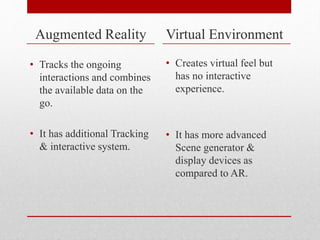
Augmented Reality
• Tracks the ongoing
interactions and combines
the available data on the
go.
• It has additional Tracking
& interactive system.
Virtual Environment
• Creates virtual feel but
has no interactive
experience.
• It has more advanced
Scene generator &
display devices as
compared to AR.
Continued…
Reality Augmented
Reality
Virtual
Display Systems
 Head Mounted Display (HMD)
 Video See-Through Displays
 Direct Projection
Interaction Techniques
 Touch
The simplest interaction technique for any technology is
undoubtedly touch. Its best suited with direct projection.
 Gesture
All the advanced commands can be efficiently given
to system using gesture inputs.
 Speech
Since the commercialization of the systems like
Siri the possibility of enhancement of speech input
has expanded horizon.
Applications
Medical
• Image guided surgery.
• Augmented reality can be applied so that the surgical
team can see the CT or MRI data correctly registered
on the patient.
Defense
• Air Force has been using displays in cockpit that
present information to the pilot on the windshield.
Entertainment
• Gaming with a virtual model of the real environment.
• Virtual studio environment (Avatar movie)
Advantages
Can increase knowledge and information
People can share experiences with each other in real
time over long distances
Games that provide an even more "real" experience
Things come to life on people's mobile
Disadvantages
 Spam and Security
 Social and Real-Time vs. Solitary
 UX (User Experience): Using AR can be inappropriate
in social situations.
 Not affodable
Conclusion
 Augmented reality serves the best purpose of adding
information and meaning to the real object or place.
 The goal of AR is to make the system so efficient
that the user wouldn't be able to differentiate
between real and virtual components.
 Augmented Reality has possibilities beyond our
imagination and perception.
References
 Olwal A. Unobtrusive Augmentation of
Physical Environments: Interaction
Techniques, Spatial Displays and Ubiquitous
Sensing.
 https://wikipedia.org/wiki/Augmented_realit
y
 Understanding Augmented reality by Alan B.
Craig
 Augmented reality by Gregory Kipper

Augmented reality ppt

  • 1.
    Augmented Reality By :Krunal P. Ambodkar BE-Instru
  • 2.
    Contents  Concept  ARvs VE  Display Systems  Interaction Techniques  Applications  Advantages  Disadvantages  Conclusion  References
  • 3.
    Concept  Augmented reality(AR) refers to computer displays that add virtual information to a user’s sensory perception.  It is related to a more general concept called mediated reality in which a view of reality is modified (possibly even diminished rather than augmented) by a computer. Real Environment Augmented Reality Augmented virtuality Virtual Environment
  • 4.
    Augmented Reality • Tracksthe ongoing interactions and combines the available data on the go. • It has additional Tracking & interactive system. Virtual Environment • Creates virtual feel but has no interactive experience. • It has more advanced Scene generator & display devices as compared to AR.
  • 5.
  • 6.
    Display Systems  HeadMounted Display (HMD)
  • 7.
     Video See-ThroughDisplays  Direct Projection
  • 8.
    Interaction Techniques  Touch Thesimplest interaction technique for any technology is undoubtedly touch. Its best suited with direct projection.
  • 9.
     Gesture All theadvanced commands can be efficiently given to system using gesture inputs.
  • 10.
     Speech Since thecommercialization of the systems like Siri the possibility of enhancement of speech input has expanded horizon.
  • 11.
    Applications Medical • Image guidedsurgery. • Augmented reality can be applied so that the surgical team can see the CT or MRI data correctly registered on the patient. Defense • Air Force has been using displays in cockpit that present information to the pilot on the windshield. Entertainment • Gaming with a virtual model of the real environment. • Virtual studio environment (Avatar movie)
  • 12.
    Advantages Can increase knowledgeand information People can share experiences with each other in real time over long distances Games that provide an even more "real" experience Things come to life on people's mobile
  • 13.
    Disadvantages  Spam andSecurity  Social and Real-Time vs. Solitary  UX (User Experience): Using AR can be inappropriate in social situations.  Not affodable
  • 14.
    Conclusion  Augmented realityserves the best purpose of adding information and meaning to the real object or place.  The goal of AR is to make the system so efficient that the user wouldn't be able to differentiate between real and virtual components.  Augmented Reality has possibilities beyond our imagination and perception.
  • 15.
    References  Olwal A.Unobtrusive Augmentation of Physical Environments: Interaction Techniques, Spatial Displays and Ubiquitous Sensing.  https://wikipedia.org/wiki/Augmented_realit y  Understanding Augmented reality by Alan B. Craig  Augmented reality by Gregory Kipper