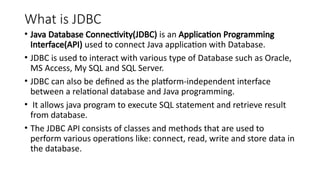
What is JDBC
•Java Database Connectivity(JDBC) is an Application Programming
Interface(API) used to connect Java application with Database.
• JDBC is used to interact with various type of Database such as Oracle,
MS Access, My SQL and SQL Server.
• JDBC can also be defined as the platform-independent interface
between a relational database and Java programming.
• It allows java program to execute SQL statement and retrieve result
from database.
• The JDBC API consists of classes and methods that are used to
perform various operations like: connect, read, write and store data in
the database.
3.
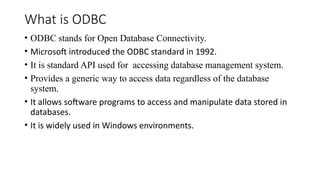
What is ODBC
•ODBC stands for Open Database Connectivity.
• Microsoft introduced the ODBC standard in 1992.
• It is standard API used for accessing database management system.
• Provides a generic way to access data regardless of the database
system.
• It allows software programs to access and manipulate data stored in
databases.
• It is widely used in Windows environments.
4.
Difference between ODBCand JDBC
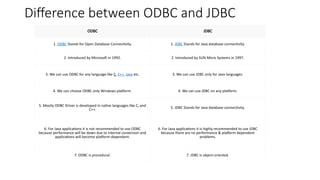
ODBC JDBC
1. ODBC Stands for Open Database Connectivity. 1. JDBC Stands for Java database connectivity.
2. Introduced by Microsoft in 1992. 2. Introduced by SUN Micro Systems in 1997.
3. We can use ODBC for any language like C, C++, Java etc. 3. We can use JDBC only for Java languages.
4. We can choose ODBC only Windows platform. 4. We can use JDBC on any platform.
5. Mostly ODBC Driver is developed in native languages like C, and
C++. 5. JDBC Stands for Java database connectivity.
6. For Java applications it is not recommended to use ODBC
because performance will be down due to internal conversion and
applications will become platform-dependent.
6. For Java applications it is highly recommended to use JDBC
because there are no performance & platform dependent
problems.
7. ODBC is procedural. 7. JDBC is object-oriented.
5.
General JDBC Architecture
•The JDBC API supports both two-tier and three-tier processing models for
database access but in general, JDBC Architecture consists of two layers −
▪ JDBC API: This provides the application-to-JDBC Manager connection.
▪ JDBC Driver API: This supports the JDBC Manager-to-Driver Connection.
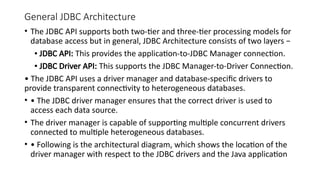
• The JDBC API uses a driver manager and database-specific drivers to
provide transparent connectivity to heterogeneous databases.
• • The JDBC driver manager ensures that the correct driver is used to
access each data source.
• The driver manager is capable of supporting multiple concurrent drivers
connected to multiple heterogeneous databases.
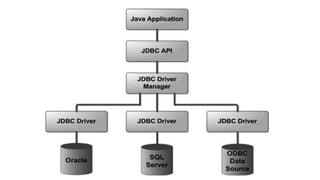
• • Following is the architectural diagram, which shows the location of the
driver manager with respect to the JDBC drivers and the Java application
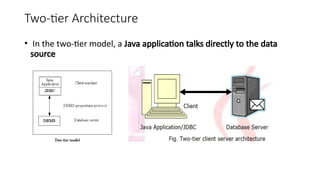
• This requiresa JDBC driver that can communicate with the particular
data source being accessed.
• A user's commands are delivered to the database or other data
source, and the results of those statements are sent back to the user.
• The data source may be located on another machine to which the
user is connected via a network. This is referred to as a client/server
configuration, with the user's machine as the client, and the machine
housing the data source as the server.
• The network can be an intranet, which, for example, connects
employees within a corporation, or it can be the Internet.
9.
Three-Tier Architecture
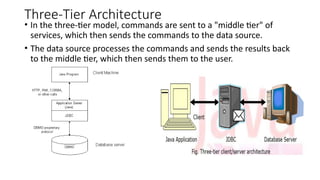
• Inthe three-tier model, commands are sent to a "middle tier" of
services, which then sends the commands to the data source.
• The data source processes the commands and sends the results back
to the middle tier, which then sends them to the user.
10.
JDBC Product Components:
•JDBC has four Components:
1. The JDBC API.
2. The JDBC Driver Manager.
3. The JDBC Test Suite.
4. The JDBC-ODBC Bridge.
11.
1. JDBC API:
•The JDBC API provides the facility for accessing the relational database from the Java
programming language.
• The API technology provides the industrial standard for independently connecting Java
programming language and a wide range of databases. The user not only execute the
SQL statements, retrieve results, and update the data but can also access it anywhere
within a network because of its "Write Once, Run Anywhere" (WORA) capabilities.
• Due to JDBC API technology, user can also access other tabular data sources like
spreadsheets or flat files even in the heterogeneous environment.
• JDBC application programming interface is a part of the Java platform that have
included in Java Standard Edition (Java SE) and the Java Enterprise Edition (Java EE) in
itself.
• The latest version of JDBC 4.0 application programming interface is divided into two
packages
• i. java.sql
• ii. javax.sql.
12.
• 2. JDBCDriver Manager:
• This interface manages a list of database drivers. Matches connection
requests from the java application with the proper database driver
using communication sub protocol.
• The first driver that recognizes a certain sub protocol under JDBC will
be used to establish a database Connection.
• Internally, JDBC DriverManager is a class in JDBC API. The objects of
this class can connect Java applications to a JDBC driver.
• DriverManager is the very important part of the JDBC architecture.
The main responsibility of JDBC DriverManager is to load all the
drivers found in the system properly.
• The Driver Manager also helps to select the most appropriate driver
from the previously loaded drivers when a new open database is
connected.
13.
3: JDBC TestSuite:
• The function of JDBC driver test suite is to make ensure that the JDBC
drivers will run user's program or not.
• The test suite of JDBC application program interface is very useful for
testing a driver based on JDBC technology during testing period. It
ensures the requirement of Java Platform Enterprise Edition (J2EE).
4. JDBC-ODBC Bridge:
• The JDBC-ODBC Bridge, also known as JDBC type 1 driver is a
database driver that utilizes the ODBC driver to connect the database.
• This driver translates JDBC method calls into ODBC function calls. The
Bridge implements JDBC for any database for which an ODBC driver is
available. The Bridge is always implemented as the sun.jdbc.odbc
• Java package and it contains a native library used to access ODBC.
14.
JDBC Drivers
• JDBCdriver implementations differ because of the wide variety of
operating systems and hardware platforms in which Java operates.
Sun has divided the implementation types into four categories, Types
1, 2, 3, and 4, which are explained below:
15.
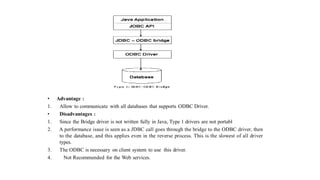
Type 1: JDBC-ODBCBridge Driver:
• In a Type 1 driver, a JDBC bridge is used to access ODBC drivers
installed on each client machine. Using ODBC requires configuring on
your system a Data Source Name (DSN) that represents the target
database.
• When Java first came out, this was a useful driver because most
databases only supported ODBC access but now this type of driver is
recommended only for experimental use or when no other alternative
is available.
• The JDBC-ODBC Bridge that comes with JDK 1.2 is a good example of
this kind of driver.
17.
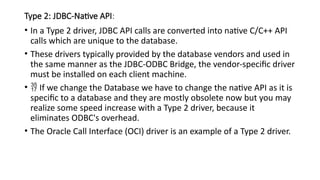
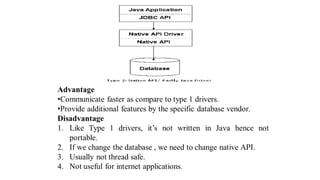
Type 2: JDBC-NativeAPI:
• In a Type 2 driver, JDBC API calls are converted into native C/C++ API
calls which are unique to the database.
• These drivers typically provided by the database vendors and used in
the same manner as the JDBC-ODBC Bridge, the vendor-specific driver
must be installed on each client machine.
• If we change the Database we have to change the native API as it is
specific to a database and they are mostly obsolete now but you may
realize some speed increase with a Type 2 driver, because it
eliminates ODBC's overhead.
• The Oracle Call Interface (OCI) driver is an example of a Type 2 driver.
19.
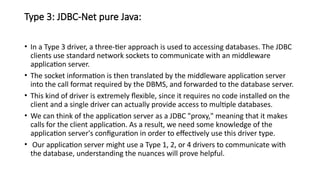
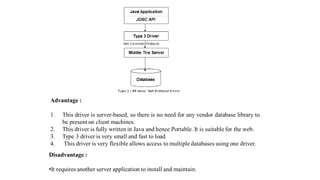
Type 3: JDBC-Netpure Java:
• In a Type 3 driver, a three-tier approach is used to accessing databases. The JDBC
clients use standard network sockets to communicate with an middleware
application server.
• The socket information is then translated by the middleware application server
into the call format required by the DBMS, and forwarded to the database server.
• This kind of driver is extremely flexible, since it requires no code installed on the
client and a single driver can actually provide access to multiple databases.
• We can think of the application server as a JDBC "proxy," meaning that it makes
calls for the client application. As a result, we need some knowledge of the
application server's configuration in order to effectively use this driver type.
• Our application server might use a Type 1, 2, or 4 drivers to communicate with
the database, understanding the nuances will prove helpful.
21.
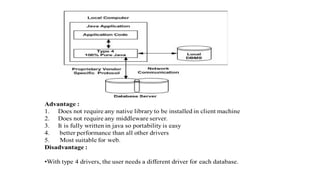
Type 4: 100%pure Java:
• In a Type 4 driver, a pure Java-based driver that communicates
directly with vendor's database through socket connection. This is the
highest performance driver available for the database and is usually
provided by the vendor itself.
• This kind of driver is extremely flexible; you don't need to install
special software on the client or server. Further, these drivers can be
downloaded dynamically.
23.
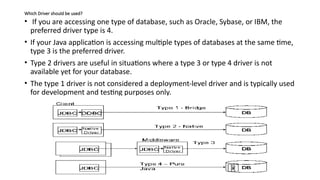
Which Driver shouldbe used?
• If you are accessing one type of database, such as Oracle, Sybase, or IBM, the
preferred driver type is 4.
• If your Java application is accessing multiple types of databases at the same time,
type 3 is the preferred driver.
• Type 2 drivers are useful in situations where a type 3 or type 4 driver is not
available yet for your database.
• The type 1 driver is not considered a deployment-level driver and is typically used
for development and testing purposes only.
24.
Why use JDBC
•Ease of programming
• can write Java language instead of SQL statements
• Performance improvement
• Able to rollback to the save set of data
• Support batch updates
• Have many optional packages to use
25.
JDBC : advantageand disadvantage
• Advantage
• Provide Existing Enterprise Data Businesses can continue to use their
installed databases and access information even if it is stored on different
database management systems
• Simplified Enterprise Development The combination of the Java API and the
JDBC API makes application development easy and cost effective
• Zero Configuration for Network Computers No configuration is required on
the client side centralizes software maintenance. Driver is written in the
Java ,so all the information needed to make a connection is completely
defined by the JDBC URL or by a DataSource object. DataSource object is
registered with a Java Naming and Directory Interface (JNDI) naming service.
• Full Access to Metadata The underlying facilities and capabilities of a specific
database connection need to be understood. The JDBC API provides
metadata access that enables the development of sophisticated applications.
26.
• Disadvantage
• Theprocess of creating a connection, always an expensive, time-
consuming operation, is multiplied in these environments where a
large number of users are accessing the database in short,
unconnected operations.
• Creating connections over and over in these environments is simply
too expensive.
• When multiple connections are created and closed it affects the
performance.
27.
• JDBC API
•The JDBC API provides the following interfaces and classes:
• DriverManager: This class manages a list of database drivers. Matches connection requests
from the java application with the proper database driver using communication sub protocol.
• Driver: This interface handles the communications with the database server. You will
interact directly with Driver objects very rarely. Instead, you use a DriverManager object, which
manages objects of this type. It also abstracts the details associated with working with Driver
objects
• Connection: This interface with all methods for contacting a database. The connection
object represents communication context, i.e., all communication with database is through
connection object only.
•
Statement: You use objects created from this interface to submit the SQL statements to the
database. Some derived interfaces accept parameters in addition to executing stored procedures.
• ResultSet: These objects hold data retrieved from a database after you execute an SQL
query using Statement objects. It acts as an iterator to allow you to move through its data.
• SQLException: This class handles any errors that occur in a database application.
28.
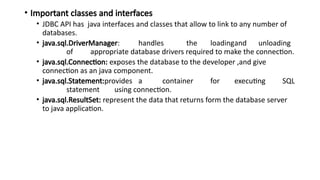
• Important classesand interfaces
• JDBC API has java interfaces and classes that allow to link to any number of
databases.
• java.sql.DriverManager: handles the loadingand unloading
of appropriate database drivers required to make the connection.
• java.sql.Connection: exposes the database to the developer ,and give
connection as an java component.
• java.sql.Statement:provides a container for executing SQL
statement using connection.
• java.sql.ResultSet: represent the data that returns form the database server
to java application.
29.
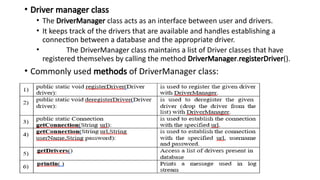
• Driver managerclass
• The DriverManager class acts as an interface between user and drivers.
• It keeps track of the drivers that are available and handles establishing a
connection between a database and the appropriate driver.
• The DriverManager class maintains a list of Driver classes that have
registered themselves by calling the method DriverManager.registerDriver().
• Commonly used methods of DriverManager class:
30.
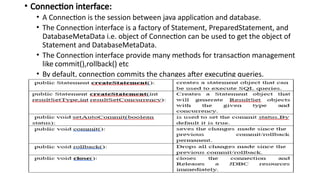
• Connection interface:
•A Connection is the session between java application and database.
• The Connection interface is a factory of Statement, PreparedStatement, and
DatabaseMetaData i.e. object of Connection can be used to get the object of
Statement and DatabaseMetaData.
• The Connection interface provide many methods for transaction management
like commit(),rollback() etc
• By default, connection commits the changes after executing queries.
31.
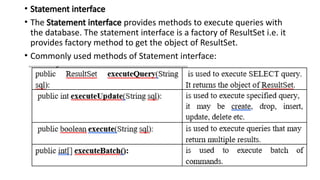
• Statement interface
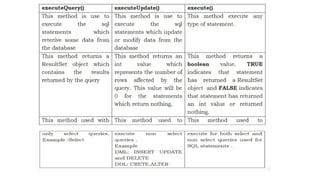
•The Statement interface provides methods to execute queries with
the database. The statement interface is a factory of ResultSet i.e. it
provides factory method to get the object of ResultSet.
• Commonly used methods of Statement interface:
32.
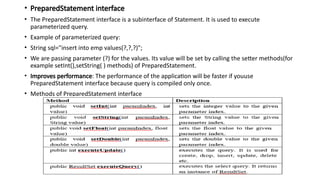
• PreparedStatement interface
•The PreparedStatement interface is a subinterface of Statement. It is used to execute
parameterized query.
• Example of parameterized query:
• String sql="insert into emp values(?,?,?)";
• We are passing parameter (?) for the values. Its value will be set by calling the setter methods(for
example setInt(),setString( ) methods) of PreparedStatement.
• Improves performance: The performance of the application will be faster if youuse
PreparedStatement interface because query is compiled only once.
• Methods of PreparedStatement interface
33.
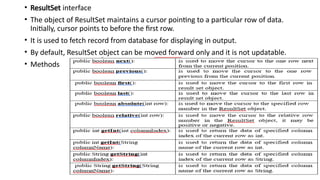
• ResultSet interface
•The object of ResultSet maintains a cursor pointing to a particular row of data.
Initially, cursor points to before the first row.
• It is used to fetch record from database for displaying in output.
• By default, ResultSet object can be moved forward only and it is not updatable.
• Methods
34.
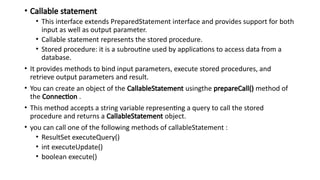
• Callable statement
•This interface extends PreparedStatement interface and provides support for both
input as well as output parameter.
• Callable statement represents the stored procedure.
• Stored procedure: it is a subroutine used by applications to access data from a
database.
• It provides methods to bind input parameters, execute stored procedures, and
retrieve output parameters and result.
• You can create an object of the CallableStatement usingthe prepareCall() method of
the Connection .
• This method accepts a string variable representing a query to call the stored
procedure and returns a CallableStatement object.
• you can call one of the following methods of callableStatement :
• ResultSet executeQuery()
• int executeUpdate()
• boolean execute()
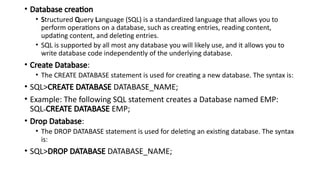
• Database creation
•Structured Query Language (SQL) is a standardized language that allows you to
perform operations on a database, such as creating entries, reading content,
updating content, and deleting entries.
• SQL is supported by all most any database you will likely use, and it allows you to
write database code independently of the underlying database.
• Create Database:
• The CREATE DATABASE statement is used for creating a new database. The syntax is:
• SQL>CREATE DATABASE DATABASE_NAME;
• Example: The following SQL statement creates a Database named EMP:
SQL>CREATE DATABASE EMP;
• Drop Database:
• The DROP DATABASE statement is used for deleting an existing database. The syntax
is:
• SQL>DROP DATABASE DATABASE_NAME;
38.
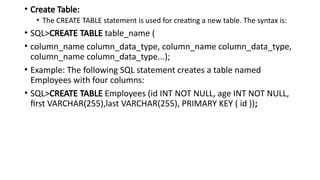
• Create Table:
•The CREATE TABLE statement is used for creating a new table. The syntax is:
• SQL>CREATE TABLE table_name (
• column_name column_data_type, column_name column_data_type,
column_name column_data_type...);
• Example: The following SQL statement creates a table named
Employees with four columns:
• SQL>CREATE TABLE Employees (id INT NOT NULL, age INT NOT NULL,
first VARCHAR(255),last VARCHAR(255), PRIMARY KEY ( id ));
39.
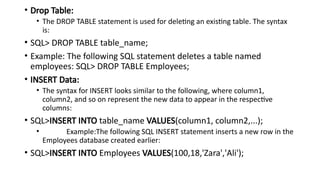
• Drop Table:
•The DROP TABLE statement is used for deleting an existing table. The syntax
is:
• SQL> DROP TABLE table_name;
• Example: The following SQL statement deletes a table named
employees: SQL> DROP TABLE Employees;
• INSERT Data:
• The syntax for INSERT looks similar to the following, where column1,
column2, and so on represent the new data to appear in the respective
columns:
• SQL>INSERT INTO table_name VALUES(column1, column2,...);
• Example:The following SQL INSERT statement inserts a new row in the
Employees database created earlier:
• SQL>INSERT INTO Employees VALUES(100,18,'Zara','Ali');
40.
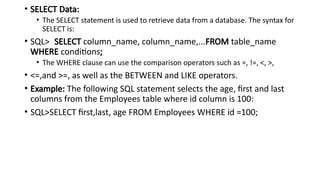
• SELECT Data:
•The SELECT statement is used to retrieve data from a database. The syntax for
SELECT is:
• SQL> SELECT column_name, column_name,...FROM table_name
WHERE conditions;
• The WHERE clause can use the comparison operators such as =, !=, <, >,
• <=,and >=, as well as the BETWEEN and LIKE operators.
• Example: The following SQL statement selects the age, first and last
columns from the Employees table where id column is 100:
• SQL>SELECT first,last, age FROM Employees WHERE id =100;
41.
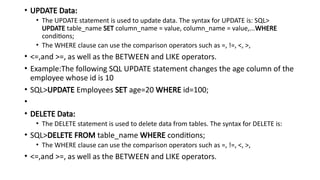
• UPDATE Data:
•The UPDATE statement is used to update data. The syntax for UPDATE is: SQL>
UPDATE table_name SET column_name = value, column_name = value,...WHERE
conditions;
• The WHERE clause can use the comparison operators such as =, !=, <, >,
• <=,and >=, as well as the BETWEEN and LIKE operators.
• Example:The following SQL UPDATE statement changes the age column of the
employee whose id is 10
• SQL>UPDATE Employees SET age=20 WHERE id=100;
•
• DELETE Data:
• The DELETE statement is used to delete data from tables. The syntax for DELETE is:
• SQL>DELETE FROM table_name WHERE conditions;
• The WHERE clause can use the comparison operators such as =, !=, <, >,
• <=,and >=, as well as the BETWEEN and LIKE operators.
42.
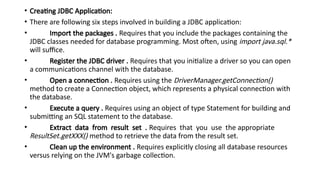
• Creating JDBCApplication:
• There are following six steps involved in building a JDBC application:
• Import the packages . Requires that you include the packages containing the
JDBC classes needed for database programming. Most often, using import java.sql.*
will suffice.
• Register the JDBC driver . Requires that you initialize a driver so you can open
a communications channel with the database.
• Open a connection . Requires using the DriverManager.getConnection()
method to create a Connection object, which represents a physical connection with
the database.
• Execute a query . Requires using an object of type Statement for building and
submitting an SQL statement to the database.
• Extract data from result set . Requires that you use the appropriate
ResultSet.getXXX() method to retrieve the data from the result set.
• Clean up the environment . Requires explicitly closing all database resources
versus relying on the JVM's garbage collection.
43.
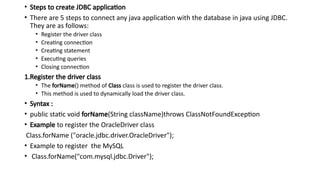
• Steps tocreate JDBC application
• There are 5 steps to connect any java application with the database in java using JDBC.
They are as follows:
• Register the driver class
• Creating connection
• Creating statement
• Executing queries
• Closing connection
1.Register the driver class
• The forName() method of Class class is used to register the driver class.
• This method is used to dynamically load the driver class.
• Syntax :
• public static void forName(String className)throws ClassNotFoundException
• Example to register the OracleDriver class
Class.forName ("oracle.jdbc.driver.OracleDriver");
• Example to register the MySQL
• Class.forName("com.mysql.jdbc.Driver");
44.
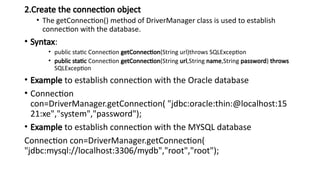
2.Create the connectionobject
• The getConnection() method of DriverManager class is used to establish
connection with the database.
• Syntax:
• public static Connection getConnection(String url)throws SQLException
• public static Connection getConnection(String url,String name,String password) throws
SQLException
• Example to establish connection with the Oracle database
• Connection
con=DriverManager.getConnection( "jdbc:oracle:thin:@localhost:15
21:xe","system","password");
• Example to establish connection with the MYSQL database
Connection con=DriverManager.getConnection(
"jdbc:mysql://localhost:3306/mydb","root","root");
45.
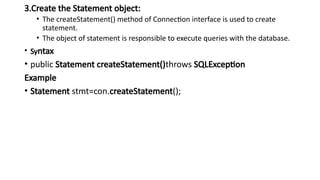
3.Create the Statementobject:
• The createStatement() method of Connection interface is used to create
statement.
• The object of statement is responsible to execute queries with the database.
• Syntax
• public Statement createStatement()throws SQLException
Example
• Statement stmt=con.createStatement();
46.
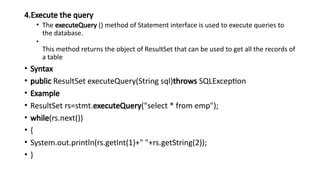
4.Execute the query
•The executeQuery () method of Statement interface is used to execute queries to
the database.
•
This method returns the object of ResultSet that can be used to get all the records of
a table
• Syntax
• public ResultSet executeQuery(String sql)throws SQLException
• Example
• ResultSet rs=stmt.executeQuery("select * from emp");
• while(rs.next())
• {
• System.out.println(rs.getInt(1)+" "+rs.getString(2));
• }
47.
5.Close the connectionobject
• By closing connection object statement and ResultSet will be closed
automatically.
• The close() method of Connection interface is used to close the connection.
• Syntax: public void close()throws SQLException
• Example: con.close();
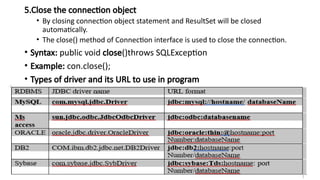
• Types of driver and its URL to use in program
48.
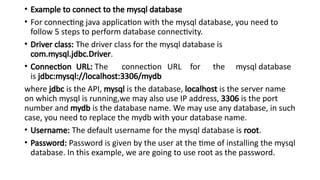
• Example toconnect to the mysql database
• For connecting java application with the mysql database, you need to
follow 5 steps to perform database connectivity.
• Driver class: The driver class for the mysql database is
com.mysql.jdbc.Driver.
• Connection URL: The connection URL for the mysql database
is jdbc:mysql://localhost:3306/mydb
where jdbc is the API, mysql is the database, localhost is the server name
on which mysql is running,we may also use IP address, 3306 is the port
number and mydb is the database name. We may use any database, in such
case, you need to replace the mydb with your database name.
• Username: The default username for the mysql database is root.
• Password: Password is given by the user at the time of installing the mysql
database. In this example, we are going to use root as the password.
49.
• Example toConnect Java Application with mysql database
import java.sql.*;
class MysqlCon
{
public static void main(String args[])
{
try
{
Class.forName("com.mysql.jdbc.Driver"); //step1
Connection con=DriverManager.getConnection( "jdbc:mysql://localhost:3306/mydb","root","root"); //step2
//here mydb is database name, root is username and password
Statement stmt=con.createStatement(); //step3
ResultSet rs=stmt.executeQuery("select * from emp"); //step4
while(rs.next())
{
System.out.println(rs.getInt(1)+" "+rs.getString(2)+" "+rs.getString(3));
}
con.close(); //step5
}catch(Exception e)
{
System.out.println(e);
}
}
}
50.
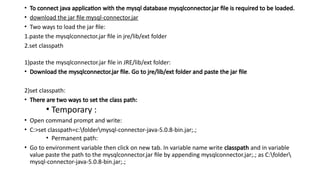
• To connectjava application with the mysql database mysqlconnector.jar file is required to be loaded.
• download the jar file mysql-connector.jar
• Two ways to load the jar file:
1.paste the mysqlconnector.jar file in jre/lib/ext folder
2.set classpath
1)paste the mysqlconnector.jar file in JRE/lib/ext folder:
• Download the mysqlconnector.jar file. Go to jre/lib/ext folder and paste the jar file
2)set classpath:
• There are two ways to set the class path:
• Temporary :
• Open command prompt and write:
• C:>set classpath=c:foldermysql-connector-java-5.0.8-bin.jar;.;
• Permanent path:
• Go to environment variable then click on new tab. In variable name write classpath and in variable
value paste the path to the mysqlconnector.jar file by appending mysqlconnector.jar;.; as C:folder
mysql-connector-java-5.0.8-bin.jar;.;
51.
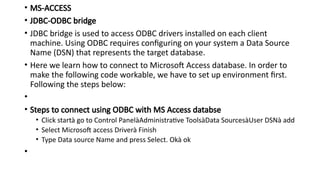
• MS-ACCESS
• JDBC-ODBCbridge
• JDBC bridge is used to access ODBC drivers installed on each client
machine. Using ODBC requires configuring on your system a Data Source
Name (DSN) that represents the target database.
• Here we learn how to connect to Microsoft Access database. In order to
make the following code workable, we have to set up environment first.
Following the steps below:
•
• Steps to connect using ODBC with MS Access databse
• Click startà go to Control PanelàAdministrative ToolsàData SourcesàUser DSNà add
• Select Microsoft access Driverà Finish
• Type Data source Name and press Select. Okà ok
•
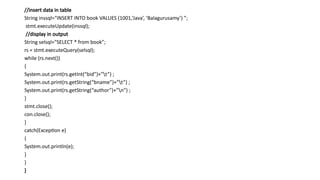
//insert data intable
String inssql="INSERT INTO book VALUES (1001,’Java’, ’Balagurusamy’) ”;
stmt.executeUpdate(inssql);
//display in output
String selsql="SELECT * from book”;
rs = stmt.executeQuery(selsql);
while (rs.next())
{
System.out.print(rs.getInt(“bid”)+”t”) ;
System.out.print(rs.getString(“bname”)+”t”) ;
System.out.print(rs.getString(“author”)+”n”) ;
}
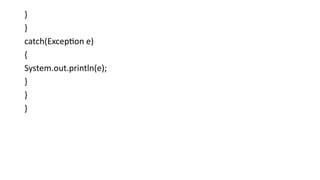
stmt.close();
con.close();
}
catch(Exception e)
{
System.out.println(e);
}
}
}
54.
1.JDBC program tocreate table
import java.sql.*;
public class CreateTable
{
public static void main(String args[])
{
try
{
Class.forName("com.mysql.jdbc.Driver");
Connection cn=DriverManager.getConnection("jdbc:mysql://localhost:3306/mydb","root",“root");
Statement stmt=cn.createStatement();
stmt.execute("drop table stud"); //if table stud is already exit
String sql = "create table stud(id int,name varchar(20))";
stmt.execute(sql); System.out.println("Table is created") ;
cn.close() ;
}
catch(Exception e)
{
System.out.println(e);
}
}
}
Output: Table is created
55.
2. JDBC programto insert data into table
import java.sql.*;
public class insert
{
public static void main(String[] args)
{
try
{
Class.forName("com.mysql.jdbc.Driver");
Connection cn=DriverManager.getConnection("jdbc:mysql://localhost:3306/mydb","root",“root");
Statement stmt=cn.createStatement();
String sql = "INSERT INTO stud VALUES (1, 'Rita')";
stmt.execute(sql);
String sql = "INSERT INTO stud VALUES (2, 'Ram')";
stmt.execute(sql); System.out.println(“Row is inserted") ;
ResultSet rs=stmt.executeQuery("select DISTINCT * from stud ");
while(rs.next())
{
System.out.print(rs.getInt("id")+"t");
System.out.print(rs.getString("name")+"n");
}
cn.close() ;
}catch(Exception e)
{System.out.println(e);
}
}
}
56.
3.JDBC program todelete data from table
import java.sql.*;
public class del
{
public static void main(String args[])
{
try
{
Class.forName("com.mysql.jdbc.Driver");
Connection cn=DriverManager.getConnection("jdbc:mysql://localhost:3306/mydb","root",“root");
Statement stmt=cn.createStatement();
String sql = "delete from stud " + "where id=2";
stmt.execute(sql); System.out.println("Row is deleted") ;
ResultSet rs=stmt.executeQuery("select DISTINCT * from stud ");
while(rs.next())
{
System.out.print(rs.getInt("id")+"t"); // you can use 1 instead of id,where1 is column index
System.out.print(rs.getString("name")+"n");
}
cn.close() ;
}
catch(Exception e)
{
System.out.println(e);
}
}
}
57.
4. JDBC programto update data from table.
import java.sql.*; public class update
{
public static void main(String[] args)
{
try
{
Class.forName("com.mysql.jdbc.Driver"); Connection
cn=DriverManager.getConnection("jdbc:mysql://localhost:3306/mydb","root","");
Statement stmt=cn.createStatement();
int up=stmt.executeUpdate("update stud set name='Sita' where id=1");
if(up>0)
{
System.out.println("Record Sucessfully Updated...!!!");
}
ResultSet rs=stmt.executeQuery("select DISTINCT * from stud "); while(rs.next())
{
System.out.print(rs.getInt("id")+"t"); System.out.print(rs.getString("name")+"n");
}
cn.close() ;
}
catch(Exception e)
{
System.out.println(e);
}
}
}
58.
5. JDBC programto display record from table.
import java.sql.*;
public class selectdata
{
public static void main(String args[])
{
try
{
Class.forName("com.mysql.jdbc.Driver");
Connectioncn=DriverManager.getConnection("jdbc:mysql://localhost:3306/mydb","root", “root");
Statement stmt=cn.createStatement();
System.out.println(“ Table data :”);
ResultSet rs=stmt.executeQuery("select distinct * from stud");
while(rs.next())
{
System.out.print(rs.getInt("id")+ "t");
System.out.print(rs.getString("name")+"n");
![• Example to Connect Java Application with mysql database
import java.sql.*;
class MysqlCon
{
public static void main(String args[])
{
try
{
Class.forName("com.mysql.jdbc.Driver"); //step1
Connection con=DriverManager.getConnection( "jdbc:mysql://localhost:3306/mydb","root","root"); //step2
//here mydb is database name, root is username and password
Statement stmt=con.createStatement(); //step3
ResultSet rs=stmt.executeQuery("select * from emp"); //step4
while(rs.next())
{
System.out.println(rs.getInt(1)+" "+rs.getString(2)+" "+rs.getString(3));
}
con.close(); //step5
}catch(Exception e)
{
System.out.println(e);
}
}
}](https://image.slidesharecdn.com/unitno3-jdbc-251219051528-08e7cb9c/85/Advanced-Java-Programming-JDBC-Concept-pptx-49-320.jpg)
![• Example
import java.sql.*;
public class TestDBDriver
{
Connection con;
Statement stmt;
ResultSet rs;
public static void main(String[] args)
{
try
{
Class.forName("sun.jdbc.odbc.JdbcOdbcDriver");
con = DriverManager.getConnection(jdbc:odbc:mydb, "", "");
stmt = con.createStatement();
//create table
String sql = "create table book(bid int,bname varchar(20),author varchar(30)”;
stmt.executeUpdate(sql);](https://image.slidesharecdn.com/unitno3-jdbc-251219051528-08e7cb9c/85/Advanced-Java-Programming-JDBC-Concept-pptx-52-320.jpg)
![1.JDBC program to create table
import java.sql.*;
public class CreateTable
{
public static void main(String args[])
{
try
{
Class.forName("com.mysql.jdbc.Driver");
Connection cn=DriverManager.getConnection("jdbc:mysql://localhost:3306/mydb","root",“root");
Statement stmt=cn.createStatement();
stmt.execute("drop table stud"); //if table stud is already exit
String sql = "create table stud(id int,name varchar(20))";
stmt.execute(sql); System.out.println("Table is created") ;
cn.close() ;
}
catch(Exception e)
{
System.out.println(e);
}
}
}
Output: Table is created](https://image.slidesharecdn.com/unitno3-jdbc-251219051528-08e7cb9c/85/Advanced-Java-Programming-JDBC-Concept-pptx-54-320.jpg)
![2. JDBC program to insert data into table
import java.sql.*;
public class insert
{
public static void main(String[] args)
{
try
{
Class.forName("com.mysql.jdbc.Driver");
Connection cn=DriverManager.getConnection("jdbc:mysql://localhost:3306/mydb","root",“root");
Statement stmt=cn.createStatement();
String sql = "INSERT INTO stud VALUES (1, 'Rita')";
stmt.execute(sql);
String sql = "INSERT INTO stud VALUES (2, 'Ram')";
stmt.execute(sql); System.out.println(“Row is inserted") ;
ResultSet rs=stmt.executeQuery("select DISTINCT * from stud ");
while(rs.next())
{
System.out.print(rs.getInt("id")+"t");
System.out.print(rs.getString("name")+"n");
}
cn.close() ;
}catch(Exception e)
{System.out.println(e);
}
}
}](https://image.slidesharecdn.com/unitno3-jdbc-251219051528-08e7cb9c/85/Advanced-Java-Programming-JDBC-Concept-pptx-55-320.jpg)
![3.JDBC program to delete data from table
import java.sql.*;
public class del
{
public static void main(String args[])
{
try
{
Class.forName("com.mysql.jdbc.Driver");
Connection cn=DriverManager.getConnection("jdbc:mysql://localhost:3306/mydb","root",“root");
Statement stmt=cn.createStatement();
String sql = "delete from stud " + "where id=2";
stmt.execute(sql); System.out.println("Row is deleted") ;
ResultSet rs=stmt.executeQuery("select DISTINCT * from stud ");
while(rs.next())
{
System.out.print(rs.getInt("id")+"t"); // you can use 1 instead of id,where1 is column index
System.out.print(rs.getString("name")+"n");
}
cn.close() ;
}
catch(Exception e)
{
System.out.println(e);
}
}
}](https://image.slidesharecdn.com/unitno3-jdbc-251219051528-08e7cb9c/85/Advanced-Java-Programming-JDBC-Concept-pptx-56-320.jpg)
![4. JDBC program to update data from table.
import java.sql.*; public class update
{
public static void main(String[] args)
{
try
{
Class.forName("com.mysql.jdbc.Driver"); Connection
cn=DriverManager.getConnection("jdbc:mysql://localhost:3306/mydb","root","");
Statement stmt=cn.createStatement();
int up=stmt.executeUpdate("update stud set name='Sita' where id=1");
if(up>0)
{
System.out.println("Record Sucessfully Updated...!!!");
}
ResultSet rs=stmt.executeQuery("select DISTINCT * from stud "); while(rs.next())
{
System.out.print(rs.getInt("id")+"t"); System.out.print(rs.getString("name")+"n");
}
cn.close() ;
}
catch(Exception e)
{
System.out.println(e);
}
}
}](https://image.slidesharecdn.com/unitno3-jdbc-251219051528-08e7cb9c/85/Advanced-Java-Programming-JDBC-Concept-pptx-57-320.jpg)
![5. JDBC program to display record from table.
import java.sql.*;
public class selectdata
{
public static void main(String args[])
{
try
{
Class.forName("com.mysql.jdbc.Driver");
Connectioncn=DriverManager.getConnection("jdbc:mysql://localhost:3306/mydb","root", “root");
Statement stmt=cn.createStatement();
System.out.println(“ Table data :”);
ResultSet rs=stmt.executeQuery("select distinct * from stud");
while(rs.next())
{
System.out.print(rs.getInt("id")+ "t");
System.out.print(rs.getString("name")+"n");](https://image.slidesharecdn.com/unitno3-jdbc-251219051528-08e7cb9c/85/Advanced-Java-Programming-JDBC-Concept-pptx-58-320.jpg)
![Program using prepareStatement( )
1. JDBC program to insert data using PreparedStatement interface.
import java.sql.*;
public class insert
{
public static void main(String[] args)
{
try
{
Class.forName("com.mysql.jdbc.Driver");
Connection cn=DriverManager.getConnection("jdbc:mysql://localhost:3306/mydb","root","");
String sql = "insert into stud(id, name) values(?, ?)";
PreparedStatement pstmt=cn.prepareStatement(sql);
pstmt.setInt(1, 10); // set input parameter 1 for id,value 100
pstmt.setString(2, "dhara"); // set input parameter 2 for name ,value dhara
pstmt.executeUpdate();
ResultSet rs=pstmt.executeQuery("select DISTINCT * from stud ");
while(rs.next())
{
System.out.print(rs.getInt("id")+"t");
System.out.println(rs.getString("name")+"t");
}
cn.close() ;
}
catch(Exception e)
{
System.out.println(e);}}}](https://image.slidesharecdn.com/unitno3-jdbc-251219051528-08e7cb9c/85/Advanced-Java-Programming-JDBC-Concept-pptx-60-320.jpg)
![2.JDBCprogram to deletedatafrom tableusingPreparedStatement interface.
import java.sql.*;
public class delete
{
public static void main(String[] args)
{
try
{
Class.forName("com.mysql.jdbc.Driver");
Connection cn=DriverManager.getConnection("jdbc:mysql://localhost:3306/mydb","root",“root");
String sql="delete from stud where id=?";
PreparedStatement pstmt=cn.prepareStatement(sql);
pstmt.setInt(1,10); //10 is id you want to delete pstmt.executeUpdate();
ResultSet rs=pstmt.executeQuery("select DISTINCT * from stud ");
while(rs.next())
{
System.out.print(rs.getInt("id")+"t");
System.out.println(rs.getString("name")+"t");
}
cn.close() ;
}
catch(Exception e)
{
System.out.println(e);
}
}
}](https://image.slidesharecdn.com/unitno3-jdbc-251219051528-08e7cb9c/85/Advanced-Java-Programming-JDBC-Concept-pptx-61-320.jpg)
![3. JDBC program to update data from table using PreparedStatement interface.
import java.sql.*;
public class updatepre
{
public static void main(String[] args)
{
try
{
Class.forName("com.mysql.jdbc.Driver");
Connection cn=DriverManager.getConnection("jdbc:mysql://localhost:3306/mydb1","root","");
String sql= "UPDATE stud SET name = ? WHERE id = ?";
PreparedStatement pstmt = cn.prepareStatement(sql);
pstmt.setString(1, "abc"); // name =abc
pstmt.setInt(2, 10); //id=10
int up=pstmt .executeUpdate();
if(up>0)
{
System.out.println("Record Sucessfully Updated...!!!");
}
ResultSet rs=pstmt.executeQuery("select DISTINCT * from stud "); while(rs.next())
{
System.out.print(rs.getInt("id")+"t"); System.out.print(rs.getString("name")+"n");
}
cn.close() ;
}catch(Exception e)
{System.out.println(e);}}}](https://image.slidesharecdn.com/unitno3-jdbc-251219051528-08e7cb9c/85/Advanced-Java-Programming-JDBC-Concept-pptx-62-320.jpg)


![Chapter_4_-_JDBC[1].pptx](https://cdn.slidesharecdn.com/ss_thumbnails/chapter4-jdbc1-230626113458-ee1260db-thumbnail.jpg?width=640&height=640&fit=bounds)


