Dynamic Web Applications
With Databases
Adapted from Database Management course
offered by Ray Larson, UC Berkeley
Overview
• Why use a database system for Web
design and e-commerce?
• What systems are available?
• Pros and Cons of different web database
systems?
Why Use a Database System?
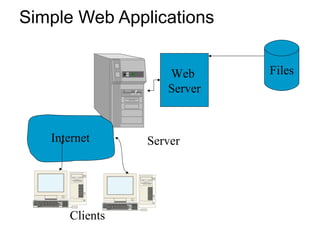
• Simple Web sites with only a few pages
don’t need much more than static HTML
files
Simple Web Applications
Server
Web
Server
Internet
Files
Clients
Adding Dynamic Content to the Site
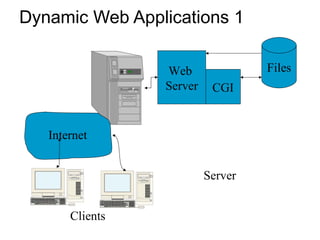
• Small sites can often use simple HTML
and CGI scripts accessing data files to
create dynamic content for small sites.
Dynamic Web Applications 1
Server
CGI
Web
Server
Internet
Files
Clients
Issues For Scaling Up Web Applications
• Performance
• Scalability
• Maintenance
• Data Integrity
• Transaction support
Performance Issues
• Problems arise as both the data to be
managed and usage of the site grows.
– Interpreted CGI scripts are inherently slower
than compiled native programs
– Starting CGI applications takes time for each
connection
– Load on the system compounds the problem
– Tied to other scalability issues
Scalability Issues
• Well-designed database systems will
permit the applications to scale to
accommodate very large databases
– A script that works fine scanning a small data
file may become unusable when the file
becomes large.
– Issues of transaction workload on the site
• Starting a separate copy of a CGI program for
each user is NOT a scalable solution as the
workload grows
Maintenance Issues
• Dealing with multiple data files (customer list,
product list, customer orders, etc.) using CGI
means:
– If any data element in one of the files changes, all
scripts that access that file must be rewritten
– If files are linked, the programs must insure that data
in all the files remains synchronized
– A large part of maintenance will involve dealing with
data integrity issues
– Unanticipated requirements may require rewriting
scripts
Data Integrity Constraint Issues
• These are constraints we wish to impose
in order to protect the database from
becoming inconsistent.
• Five basic types
– Required data
– attribute domain constraints
– entity integrity
– referential integrity
– enterprise constraints
Transaction support
• Concurrency control (ensuring the validity
of database updates in a shared multiuser
environment).
Transaction Processing
• Transactions should be ACID:
– Atomic – Results of transaction are either all
committed or all rolled back
– Consistent – Data is transformed from one
consistent state to another
– Isolated – The results of a transaction are
invisible to other transactions
– Durable – Once committed the results of a
transaction are permanent and survive
system or media failures
Why Use a Database System?
• Database systems have concentrated on
providing solutions for all of these issues
for scaling up Web applications
– Performance
– Scalability
– Maintenance
– Data Integrity
– Transaction support
• While systems differ in their support, most
offer some support for all of these.
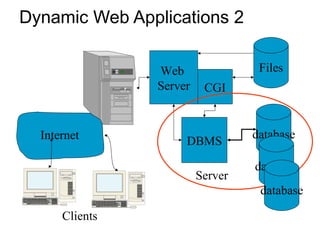
Dynamic Web Applications 2
Server
database
CGI
DBMS
Web
Server
Internet
Files
Clients
database
database
What Database systems are available?
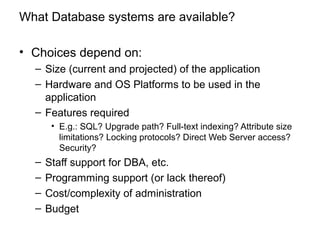
• Choices depend on:
– Size (current and projected) of the application
– Hardware and OS Platforms to be used in the
application
– Features required
• E.g.: SQL? Upgrade path? Full-text indexing? Attribute size
limitations? Locking protocols? Direct Web Server access?
Security?
– Staff support for DBA, etc.
– Programming support (or lack thereof)
– Cost/complexity of administration
– Budget
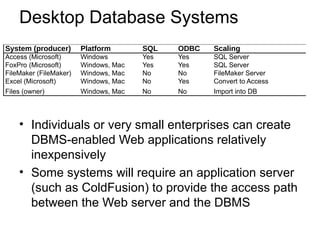
Desktop Database Systems
• Individuals or very small enterprises can create
DBMS-enabled Web applications relatively
inexpensively
• Some systems will require an application server
(such as ColdFusion) to provide the access path
between the Web server and the DBMS
System (producer) Platform SQL ODBC Scaling
Access (Microsoft) Windows Yes Yes SQL Server
FoxPro (Microsoft) Windows, Mac Yes Yes SQL Server
FileMaker (FileMaker) Windows, Mac No No FileMaker Server
Excel (Microsoft) Windows, Mac No Yes Convert to Access
Files (owner) Windows, Mac No No Import into DB
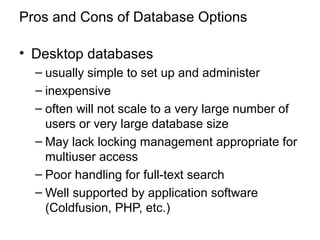
Pros and Cons of Database Options
• Desktop databases
– usually simple to set up and administer
– inexpensive
– often will not scale to a very large number of
users or very large database size
– May lack locking management appropriate for
multiuser access
– Poor handling for full-text search
– Well supported by application software
(Coldfusion, PHP, etc.)
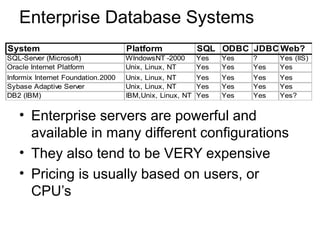
Enterprise Database Systems
• Enterprise servers are powerful and
available in many different configurations
• They also tend to be VERY expensive
• Pricing is usually based on users, or
CPU’s
System Platform SQL ODBC JDBC Web?
SQL-Server (Microsoft) WIndowsNT -2000 Yes Yes ? Yes (IIS)
Oracle Internet Platform Unix, Linux, NT Yes Yes Yes Yes
Informix Internet Foundation.2000 Unix, Linux, NT Yes Yes Yes Yes
Sybase Adaptive Server Unix, Linux, NT Yes Yes Yes Yes
DB2 (IBM) IBM,Unix, Linux, NT Yes Yes Yes Yes?
Pros and Cons of Database Options
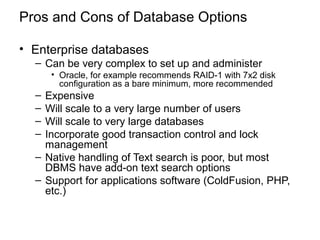
• Enterprise databases
– Can be very complex to set up and administer
• Oracle, for example recommends RAID-1 with 7x2 disk
configuration as a bare minimum, more recommended
– Expensive
– Will scale to a very large number of users
– Will scale to very large databases
– Incorporate good transaction control and lock
management
– Native handling of Text search is poor, but most
DBMS have add-on text search options
– Support for applications software (ColdFusion, PHP,
etc.)
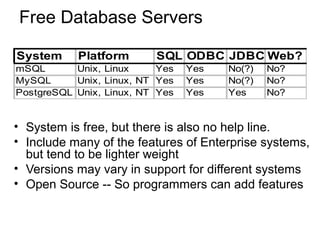
Free Database Servers
• System is free, but there is also no help line.
• Include many of the features of Enterprise systems,
but tend to be lighter weight
• Versions may vary in support for different systems
• Open Source -- So programmers can add features
System Platform SQL ODBC JDBC Web?
mSQL Unix, Linux Yes Yes No(?) No?
MySQL Unix, Linux, NT Yes Yes No(?) No?
PostgreSQL Unix, Linux, NT Yes Yes Yes No?
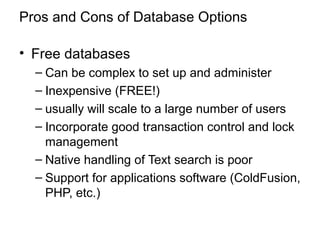
Pros and Cons of Database Options
• Free databases
– Can be complex to set up and administer
– Inexpensive (FREE!)
– usually will scale to a large number of users
– Incorporate good transaction control and lock
management
– Native handling of Text search is poor
– Support for applications software (ColdFusion,
PHP, etc.)
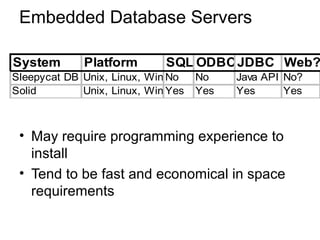
Embedded Database Servers
• May require programming experience to
install
• Tend to be fast and economical in space
requirements
System Platform SQL ODBCJDBC Web?
Sleepycat DB Unix, Linux, Win No No Java API No?
Solid Unix, Linux, Win Yes Yes Yes Yes
Pros and Cons of Database Options
• Embedded databases
– Must be embedded in a program
– Can be incorporated in a scripting language
– inexpensive (for non-commercial application)
– May not scale to a very large number of users
(depends on how it is used)
– Incorporate good transaction control and lock
management
– Text search support is minimal
– May not support SQL
Database Security
• Different systems vary in security support:
– Views or restricted subschemas
– Authorization rules to identify users and the
actions they can perform
– User-defined procedures (and rule systems)
to define additional constraints or limitations in
using the database
– Encryption to encode sensitive data
– Authentication schemes to positively identify a
person attempting to gain access to the
database
Views
• A subset of the database presented to
some set of users.
– SQL: CREATE VIEW viewname AS SELECT
field1, field2, field3,…, FROM table1, table2
WHERE <where clause>;
– Note: “queries” in Access function as views.
Authorization Rules
• Most current DBMS permit the DBA to
define “access permissions” on a table by
table basis (at least) using the GRANT
and REVOKE SQL commands.
• Some systems permit finer grained
authorization (most use GRANT and
REVOKE on variant views.
• Some desktop systems have poor
authorization support.
Database Backup and Recovery
• Backup
• Journaling (audit trail)
• Checkpoint facility
• Recovery manager
Web Application Server Software
• PHP
• ASP
• All of the are server-side scripting
languages that embed code in HTML
pages
PHP
• PHP is an Open Source Software project
with many programmers working on the
code.
– Commonly paired with MySQL, another OSS
project
– Free
– Both Windows and Unix support
• Estimated that more than 250,000 web
sites use PHP as an Apache Module.
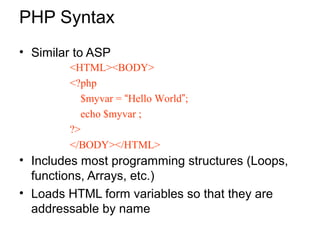
PHP Syntax
• Similar to ASP
• Includes most programming structures (Loops,
functions, Arrays, etc.)
• Loads HTML form variables so that they are
addressable by name
<HTML><BODY>
<?php
$myvar = “Hello World”;
echo $myvar ;
?>
</BODY></HTML>
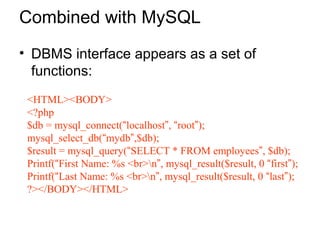
Combined with MySQL
• DBMS interface appears as a set of
functions:
<HTML><BODY>
<?php
$db = mysql_connect(“localhost”, “root”);
mysql_select_db(“mydb”,$db);
$result = mysql_query(“SELECT * FROM employees”, $db);
Printf(“First Name: %s <br>n”, mysql_result($result, 0 “first”);
Printf(“Last Name: %s <br>n”, mysql_result($result, 0 “last”);
?></BODY></HTML>
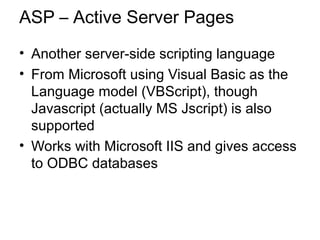
ASP – Active Server Pages
• Another server-side scripting language
• From Microsoft using Visual Basic as the
Language model (VBScript), though
Javascript (actually MS Jscript) is also
supported
• Works with Microsoft IIS and gives access
to ODBC databases
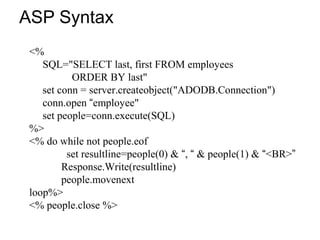
ASP Syntax
<%
SQL="SELECT last, first FROM employees
ORDER BY last"
set conn = server.createobject("ADODB.Connection")
conn.open “employee"
set people=conn.execute(SQL)
%>
<% do while not people.eof
set resultline=people(0) & “, “ & people(1) & “<BR>”
Response.Write(resultline)
people.movenext
loop%>
<% people.close %>
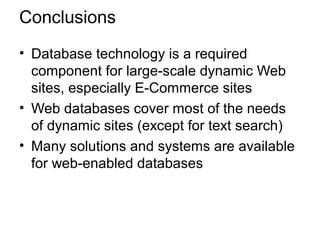
Conclusions
• Database technology is a required
component for large-scale dynamic Web
sites, especially E-Commerce sites
• Web databases cover most of the needs
of dynamic sites (except for text search)
• Many solutions and systems are available
for web-enabled databases

Lecture 9: Dynamic web application

  • 1.
    Dynamic Web Applications WithDatabases Adapted from Database Management course offered by Ray Larson, UC Berkeley
  • 2.
    Overview • Why usea database system for Web design and e-commerce? • What systems are available? • Pros and Cons of different web database systems?
  • 3.
    Why Use aDatabase System? • Simple Web sites with only a few pages don’t need much more than static HTML files
  • 4.
  • 5.
    Adding Dynamic Contentto the Site • Small sites can often use simple HTML and CGI scripts accessing data files to create dynamic content for small sites.
  • 6.
    Dynamic Web Applications1 Server CGI Web Server Internet Files Clients
  • 7.
    Issues For ScalingUp Web Applications • Performance • Scalability • Maintenance • Data Integrity • Transaction support
  • 8.
    Performance Issues • Problemsarise as both the data to be managed and usage of the site grows. – Interpreted CGI scripts are inherently slower than compiled native programs – Starting CGI applications takes time for each connection – Load on the system compounds the problem – Tied to other scalability issues
  • 9.
    Scalability Issues • Well-designeddatabase systems will permit the applications to scale to accommodate very large databases – A script that works fine scanning a small data file may become unusable when the file becomes large. – Issues of transaction workload on the site • Starting a separate copy of a CGI program for each user is NOT a scalable solution as the workload grows
  • 10.
    Maintenance Issues • Dealingwith multiple data files (customer list, product list, customer orders, etc.) using CGI means: – If any data element in one of the files changes, all scripts that access that file must be rewritten – If files are linked, the programs must insure that data in all the files remains synchronized – A large part of maintenance will involve dealing with data integrity issues – Unanticipated requirements may require rewriting scripts
  • 11.
    Data Integrity ConstraintIssues • These are constraints we wish to impose in order to protect the database from becoming inconsistent. • Five basic types – Required data – attribute domain constraints – entity integrity – referential integrity – enterprise constraints
  • 12.
    Transaction support • Concurrencycontrol (ensuring the validity of database updates in a shared multiuser environment).
  • 13.
    Transaction Processing • Transactionsshould be ACID: – Atomic – Results of transaction are either all committed or all rolled back – Consistent – Data is transformed from one consistent state to another – Isolated – The results of a transaction are invisible to other transactions – Durable – Once committed the results of a transaction are permanent and survive system or media failures
  • 14.
    Why Use aDatabase System? • Database systems have concentrated on providing solutions for all of these issues for scaling up Web applications – Performance – Scalability – Maintenance – Data Integrity – Transaction support • While systems differ in their support, most offer some support for all of these.
  • 15.
    Dynamic Web Applications2 Server database CGI DBMS Web Server Internet Files Clients database database
  • 16.
    What Database systemsare available? • Choices depend on: – Size (current and projected) of the application – Hardware and OS Platforms to be used in the application – Features required • E.g.: SQL? Upgrade path? Full-text indexing? Attribute size limitations? Locking protocols? Direct Web Server access? Security? – Staff support for DBA, etc. – Programming support (or lack thereof) – Cost/complexity of administration – Budget
  • 17.
    Desktop Database Systems •Individuals or very small enterprises can create DBMS-enabled Web applications relatively inexpensively • Some systems will require an application server (such as ColdFusion) to provide the access path between the Web server and the DBMS System (producer) Platform SQL ODBC Scaling Access (Microsoft) Windows Yes Yes SQL Server FoxPro (Microsoft) Windows, Mac Yes Yes SQL Server FileMaker (FileMaker) Windows, Mac No No FileMaker Server Excel (Microsoft) Windows, Mac No Yes Convert to Access Files (owner) Windows, Mac No No Import into DB
  • 18.
    Pros and Consof Database Options • Desktop databases – usually simple to set up and administer – inexpensive – often will not scale to a very large number of users or very large database size – May lack locking management appropriate for multiuser access – Poor handling for full-text search – Well supported by application software (Coldfusion, PHP, etc.)
  • 19.
    Enterprise Database Systems •Enterprise servers are powerful and available in many different configurations • They also tend to be VERY expensive • Pricing is usually based on users, or CPU’s System Platform SQL ODBC JDBC Web? SQL-Server (Microsoft) WIndowsNT -2000 Yes Yes ? Yes (IIS) Oracle Internet Platform Unix, Linux, NT Yes Yes Yes Yes Informix Internet Foundation.2000 Unix, Linux, NT Yes Yes Yes Yes Sybase Adaptive Server Unix, Linux, NT Yes Yes Yes Yes DB2 (IBM) IBM,Unix, Linux, NT Yes Yes Yes Yes?
  • 20.
    Pros and Consof Database Options • Enterprise databases – Can be very complex to set up and administer • Oracle, for example recommends RAID-1 with 7x2 disk configuration as a bare minimum, more recommended – Expensive – Will scale to a very large number of users – Will scale to very large databases – Incorporate good transaction control and lock management – Native handling of Text search is poor, but most DBMS have add-on text search options – Support for applications software (ColdFusion, PHP, etc.)
  • 21.
    Free Database Servers •System is free, but there is also no help line. • Include many of the features of Enterprise systems, but tend to be lighter weight • Versions may vary in support for different systems • Open Source -- So programmers can add features System Platform SQL ODBC JDBC Web? mSQL Unix, Linux Yes Yes No(?) No? MySQL Unix, Linux, NT Yes Yes No(?) No? PostgreSQL Unix, Linux, NT Yes Yes Yes No?
  • 22.
    Pros and Consof Database Options • Free databases – Can be complex to set up and administer – Inexpensive (FREE!) – usually will scale to a large number of users – Incorporate good transaction control and lock management – Native handling of Text search is poor – Support for applications software (ColdFusion, PHP, etc.)
  • 23.
    Embedded Database Servers •May require programming experience to install • Tend to be fast and economical in space requirements System Platform SQL ODBCJDBC Web? Sleepycat DB Unix, Linux, Win No No Java API No? Solid Unix, Linux, Win Yes Yes Yes Yes
  • 24.
    Pros and Consof Database Options • Embedded databases – Must be embedded in a program – Can be incorporated in a scripting language – inexpensive (for non-commercial application) – May not scale to a very large number of users (depends on how it is used) – Incorporate good transaction control and lock management – Text search support is minimal – May not support SQL
  • 25.
    Database Security • Differentsystems vary in security support: – Views or restricted subschemas – Authorization rules to identify users and the actions they can perform – User-defined procedures (and rule systems) to define additional constraints or limitations in using the database – Encryption to encode sensitive data – Authentication schemes to positively identify a person attempting to gain access to the database
  • 26.
    Views • A subsetof the database presented to some set of users. – SQL: CREATE VIEW viewname AS SELECT field1, field2, field3,…, FROM table1, table2 WHERE <where clause>; – Note: “queries” in Access function as views.
  • 27.
    Authorization Rules • Mostcurrent DBMS permit the DBA to define “access permissions” on a table by table basis (at least) using the GRANT and REVOKE SQL commands. • Some systems permit finer grained authorization (most use GRANT and REVOKE on variant views. • Some desktop systems have poor authorization support.
  • 28.
    Database Backup andRecovery • Backup • Journaling (audit trail) • Checkpoint facility • Recovery manager
  • 29.
    Web Application ServerSoftware • PHP • ASP • All of the are server-side scripting languages that embed code in HTML pages
  • 30.
    PHP • PHP isan Open Source Software project with many programmers working on the code. – Commonly paired with MySQL, another OSS project – Free – Both Windows and Unix support • Estimated that more than 250,000 web sites use PHP as an Apache Module.
  • 31.
    PHP Syntax • Similarto ASP • Includes most programming structures (Loops, functions, Arrays, etc.) • Loads HTML form variables so that they are addressable by name <HTML><BODY> <?php $myvar = “Hello World”; echo $myvar ; ?> </BODY></HTML>
  • 32.
    Combined with MySQL •DBMS interface appears as a set of functions: <HTML><BODY> <?php $db = mysql_connect(“localhost”, “root”); mysql_select_db(“mydb”,$db); $result = mysql_query(“SELECT * FROM employees”, $db); Printf(“First Name: %s <br>n”, mysql_result($result, 0 “first”); Printf(“Last Name: %s <br>n”, mysql_result($result, 0 “last”); ?></BODY></HTML>
  • 33.
    ASP – ActiveServer Pages • Another server-side scripting language • From Microsoft using Visual Basic as the Language model (VBScript), though Javascript (actually MS Jscript) is also supported • Works with Microsoft IIS and gives access to ODBC databases
  • 34.
    ASP Syntax <% SQL="SELECT last,first FROM employees ORDER BY last" set conn = server.createobject("ADODB.Connection") conn.open “employee" set people=conn.execute(SQL) %> <% do while not people.eof set resultline=people(0) & “, “ & people(1) & “<BR>” Response.Write(resultline) people.movenext loop%> <% people.close %>
  • 35.
    Conclusions • Database technologyis a required component for large-scale dynamic Web sites, especially E-Commerce sites • Web databases cover most of the needs of dynamic sites (except for text search) • Many solutions and systems are available for web-enabled databases