Department of Information Science & Engineering 
Global Academy of Technology 
1 
ATM LOCATOR 
Under the guidance of: Presented By: 
Mrs.Jyothi Neeli Sagar U S(1GA09IS037) 
Associate professor Sumanth Udupa(1GA09IS044) 
Dept of ISE, GAT Unnath Prasad(1GA09IS049) 
Vinay Kumar(1GA09IS052)
Agenda 
• Abstract 
• Introduction 
• Existing system 
• Proposed system 
• Design considerations 
• Implementation 
• API Key Generation 
• Future enhancement 
• Conclusion 
• Bibliography 2
Abstract 
• This project aims at building the mobile application for 
banking user to find nearest Branch ATM based on search 
criteria . 
• ATM locator provides exact location of ATM of the particular 
city on Google map of android devices. 
3
Introduction 
• Android phones come up with the GPS. 
• GPS(Global Positioning System) is a service offered by 
Google. 
• Global Positioning System tracks the location and provides 
information of nearby points of interest. 
• This application uses the android core services such as GPS to 
determine the location of nearby ATMs then displays them on 
Google map. 
• Distances and directions are provided for each branch/ATM. 
4
Existing System 
• Currently there are no universal ATM locators. 
• Most of the ATM locaters are specific to the Banks. 
Limitations: 
• Every bank has its own application which displays the location 
of the Particular Bank’s ATMs only. 
• User cannot get Appropriate ATM of choices. 
5
Proposed System 
• Google Maps are used to check and extract the global co-ordinates 
of Automatic teller machines in a given radius. 
• Using yourself as the centre and supplying the application 
with a radius, the application should list and show all the 
available ATMs in ascending order of the distance from you. 
• On selecting a particular ATM it should show the route from 
user’s current location to selected ATM. 
6
Software and hardware requirements 
Software requirements: 
• Operating System: Windows XP/7 ,Linux 
• Application Software: Android SDK3.0(Honey Comb),JDK 
1.6,Eclipse Galileo. 
• Programming Language: Java, Android, HTML5,Javascript 
• Online Services : GPS 
Hardware requirements: 
• PC with 20 GB hard-disk and 2 GB RAM. 
• Supporting Devices: Samsung galaxy y, HTC Pyramid and all 
Android Phones. 
7
Design 
• This Mobile application helps banking user to find nearest 
Branch or ATM based on search criteria (Ex: Distance). The 
app finds the nearest ATM based on the phone's GPS. It gives 
distance and directions so we know how to get to the 
Branch/ATM machine. 
• Heart of the design lies in structuring the: 
1.System Architecture 
2.User Interface design 
8
System architecture 
9
Continued… 
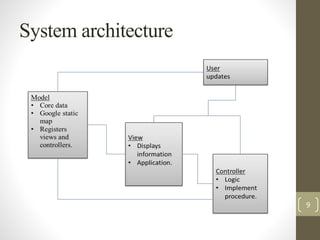
• Our application is based on the standard MVC architecture. 
• Three major components include : 
Model: 
It refers to the database or the static data. 
Core functionality is included in the model part. 
In our application Google Maps serves as a database. 
View: 
.It displays information to the user i.e. it assist the user about 
the actions to be performed. 
Controller: 
the implementation logic of how all the modules serve the 
purpose are contained in the controller. 
10
UI Design 
11
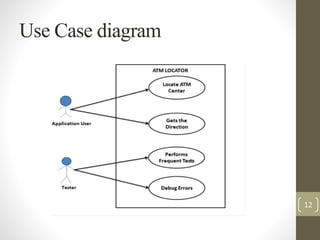
Use Case diagram 
12
Data flow diagram 
13
Continued… 
• Data flow diagram is a graphical tool used to describe and 
analyze the flow of data through a system either manually or 
automated - including the processes, storing of data, and delays 
in the system. 
• User enters the input. 
• Application tracks the location using GPS. 
• Google static map query is sent along with the key generated. 
• The result of the query will be in the form of xml code. 
• Xml parser is used to convert this xml code into text. 
• User makes a selection. 
• The path to the selected ATM is is displayed on the google 
map. 
14
Implementation 
• All ATM users would interact on Mobile via activities 
• Minimal data is locally stored on Mobile SQL Lite database, 
otherwise data is fetched from App server which in turn fetches 
the data from database 
• Services on App server are called via Web services 
• Users would see the ATMs on map using Google Map 
• Three basic modules of our application includes: 
1.Profiling module 
2.listing and selection module 
3.path display module 
15
Profiling module 
16
Continued… 
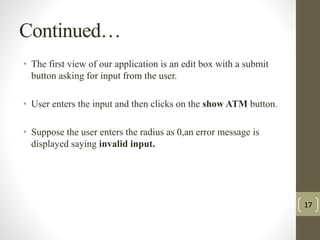
• The first view of our application is an edit box with a submit 
button asking for input from the user. 
• User enters the input and then clicks on the show ATM button. 
• Suppose the user enters the radius as 0,an error message is 
displayed saying invalid input. 
17
Listing and selection module: 
• When the user enters the input, GPS tracks the latitude and 
longitude values of the ATM centers falling within the range. 
• These values along with the key to access the google services 
is sent as a query to the google static maps. 
• Xml parser is used to convert the result of the query into text. 
• Now, list of the ATM centers are visible to the user and he is 
free to select any from the list. 
18
Continued… 
19
Path display module 
• When the user makes a selection, java script query is sent to 
establish the path from the user current location to the selected 
ATM. 
• The established path is then displayed on the google map of 
the android device. 
• A Line represents the path from the users current location to 
the selected ATM. 
20
Continued… 
21
Google API Key Generation 
• In order to use the Google Maps functionality in Android, we 
need to register for a Maps API key with Google. 
• All Maps API applications should load the Maps API using an 
API key. 
• provides us with the terms and services for using the API key. 
22
Continue… 
23
Continue… 
24
Future work 
• Performance of the Application can be Enhanced through 
Voice Help. 
• 3D Images around the ATM center would help the user to 
reach the Destination more appropriately. 
• Application could be extended for use in different operating 
systems other than Android. 
25
Conclusion 
• We hereby create an application to work on android devices 
that locates the nearest ATM or the list of ATM centers over 
specified distance. 
• The application developed would be of great use for all the 
banking users to find their nearest ATM’s in the sense that they 
can reduce their work of searching for the ATM’S nearby. 
• This application gains importance in the sense that it is not 
specific to a particular ATM instead it locates and lists out all 
the ATM’s within the given limit of radius. 
26
Bibliography 
1. developer.android.com 
2. maps.googleapis.com 
3. http://en.wikipedia.org/android 
4. http://en.wikipedia.org/xml 
5. http://en.wikipedia.org/javascript 
27
28

ATM Locator

  • 1.
    Department of InformationScience & Engineering Global Academy of Technology 1 ATM LOCATOR Under the guidance of: Presented By: Mrs.Jyothi Neeli Sagar U S(1GA09IS037) Associate professor Sumanth Udupa(1GA09IS044) Dept of ISE, GAT Unnath Prasad(1GA09IS049) Vinay Kumar(1GA09IS052)
  • 2.
    Agenda • Abstract • Introduction • Existing system • Proposed system • Design considerations • Implementation • API Key Generation • Future enhancement • Conclusion • Bibliography 2
  • 3.
    Abstract • Thisproject aims at building the mobile application for banking user to find nearest Branch ATM based on search criteria . • ATM locator provides exact location of ATM of the particular city on Google map of android devices. 3
  • 4.
    Introduction • Androidphones come up with the GPS. • GPS(Global Positioning System) is a service offered by Google. • Global Positioning System tracks the location and provides information of nearby points of interest. • This application uses the android core services such as GPS to determine the location of nearby ATMs then displays them on Google map. • Distances and directions are provided for each branch/ATM. 4
  • 5.
    Existing System •Currently there are no universal ATM locators. • Most of the ATM locaters are specific to the Banks. Limitations: • Every bank has its own application which displays the location of the Particular Bank’s ATMs only. • User cannot get Appropriate ATM of choices. 5
  • 6.
    Proposed System •Google Maps are used to check and extract the global co-ordinates of Automatic teller machines in a given radius. • Using yourself as the centre and supplying the application with a radius, the application should list and show all the available ATMs in ascending order of the distance from you. • On selecting a particular ATM it should show the route from user’s current location to selected ATM. 6
  • 7.
    Software and hardwarerequirements Software requirements: • Operating System: Windows XP/7 ,Linux • Application Software: Android SDK3.0(Honey Comb),JDK 1.6,Eclipse Galileo. • Programming Language: Java, Android, HTML5,Javascript • Online Services : GPS Hardware requirements: • PC with 20 GB hard-disk and 2 GB RAM. • Supporting Devices: Samsung galaxy y, HTC Pyramid and all Android Phones. 7
  • 8.
    Design • ThisMobile application helps banking user to find nearest Branch or ATM based on search criteria (Ex: Distance). The app finds the nearest ATM based on the phone's GPS. It gives distance and directions so we know how to get to the Branch/ATM machine. • Heart of the design lies in structuring the: 1.System Architecture 2.User Interface design 8
  • 9.
  • 10.
    Continued… • Ourapplication is based on the standard MVC architecture. • Three major components include : Model: It refers to the database or the static data. Core functionality is included in the model part. In our application Google Maps serves as a database. View: .It displays information to the user i.e. it assist the user about the actions to be performed. Controller: the implementation logic of how all the modules serve the purpose are contained in the controller. 10
  • 11.
  • 12.
  • 13.
  • 14.
    Continued… • Dataflow diagram is a graphical tool used to describe and analyze the flow of data through a system either manually or automated - including the processes, storing of data, and delays in the system. • User enters the input. • Application tracks the location using GPS. • Google static map query is sent along with the key generated. • The result of the query will be in the form of xml code. • Xml parser is used to convert this xml code into text. • User makes a selection. • The path to the selected ATM is is displayed on the google map. 14
  • 15.
    Implementation • AllATM users would interact on Mobile via activities • Minimal data is locally stored on Mobile SQL Lite database, otherwise data is fetched from App server which in turn fetches the data from database • Services on App server are called via Web services • Users would see the ATMs on map using Google Map • Three basic modules of our application includes: 1.Profiling module 2.listing and selection module 3.path display module 15
  • 16.
  • 17.
    Continued… • Thefirst view of our application is an edit box with a submit button asking for input from the user. • User enters the input and then clicks on the show ATM button. • Suppose the user enters the radius as 0,an error message is displayed saying invalid input. 17
  • 18.
    Listing and selectionmodule: • When the user enters the input, GPS tracks the latitude and longitude values of the ATM centers falling within the range. • These values along with the key to access the google services is sent as a query to the google static maps. • Xml parser is used to convert the result of the query into text. • Now, list of the ATM centers are visible to the user and he is free to select any from the list. 18
  • 19.
  • 20.
    Path display module • When the user makes a selection, java script query is sent to establish the path from the user current location to the selected ATM. • The established path is then displayed on the google map of the android device. • A Line represents the path from the users current location to the selected ATM. 20
  • 21.
  • 22.
    Google API KeyGeneration • In order to use the Google Maps functionality in Android, we need to register for a Maps API key with Google. • All Maps API applications should load the Maps API using an API key. • provides us with the terms and services for using the API key. 22
  • 23.
  • 24.
  • 25.
    Future work •Performance of the Application can be Enhanced through Voice Help. • 3D Images around the ATM center would help the user to reach the Destination more appropriately. • Application could be extended for use in different operating systems other than Android. 25
  • 26.
    Conclusion • Wehereby create an application to work on android devices that locates the nearest ATM or the list of ATM centers over specified distance. • The application developed would be of great use for all the banking users to find their nearest ATM’s in the sense that they can reduce their work of searching for the ATM’S nearby. • This application gains importance in the sense that it is not specific to a particular ATM instead it locates and lists out all the ATM’s within the given limit of radius. 26
  • 27.
    Bibliography 1. developer.android.com 2. maps.googleapis.com 3. http://en.wikipedia.org/android 4. http://en.wikipedia.org/xml 5. http://en.wikipedia.org/javascript 27
  • 28.