Assistive Technology
in the Classroom
Dr.R.VISWANATHAN
ASSISTANT PROFESSOR OF ENGLISH
THIAGARAJAR COLLEGE OF
PRECEPTORS
MADURAI
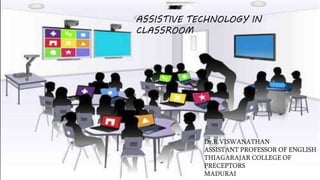
ASSISTIVE TECHNOLOGY IN
CLASSROOM
What Is Assistive Technology?
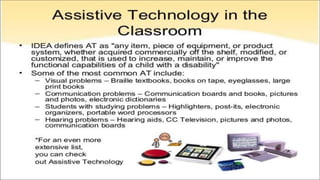
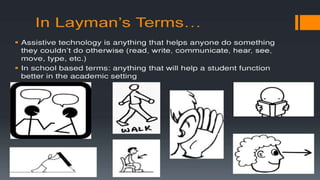
 AT is “any item, piece of equipment, or product system, whether acquired
commercially off the shelf, modified or customized, that is used to increase,
maintain, or improve the functional capabilities of a child with a disability”
 AT can be anything from a simple device, such as a magnifying glass, to a
complex device, such as a computerized communication system.
THE POWER OF ASSISTIVE
TECHNOLOGY
 “Technology has great potential in providing
access for all learners. Through the use of a
variety of assistive technologies, students with
disabilities can have the ability to access the
general curriculum. When assistive technology
is appropriately integrated into the regular
classroom, students are provided with multiple
means to complete their work”
 Inclusion: The practice of educating all or most
children in the same classroom, including children
with physical, mental, and developmental disabilities.
(Association for Supervision and Curriculum
Development)
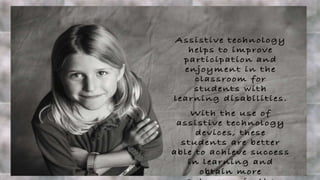
 AT helps students who have disabilities learn the
material in a way that they can understand it
 AT helps eliminate barriers students may face that
prevent them from being at the same level as their
classmates
A Student’s AT Needs Evolve Over Time
 As a student’s schoolwork gets more advanced, their technology needs may
change or increase.
 New technology may become available that will better meet the needs of the
student.
 During a regularly scheduled evaluation, the IEP team or another professional
may decide that another piece of technology will be better for the student.
Teachers Can Make Their Classrooms
More Conducive to AT
 Have certain computers in the classroom that are set up for the use of the students
with disabilities – ones that have necessary software on them.
 Include AT in lessons
 Familiarize the other students with the AT that other students may be using in the
classroom and make sure they understand why this AT is being used.
AT in the Classroom
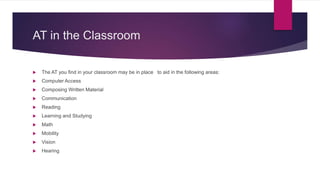
 The AT you find in your classroom may be in place to aid in the following areas:
 Computer Access
 Composing Written Material
 Communication
 Reading
 Learning and Studying
 Math
 Mobility
 Vision
 Hearing
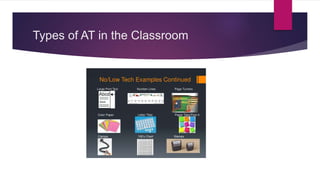
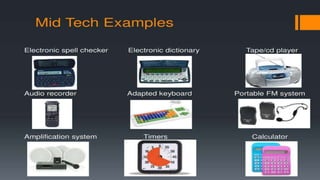
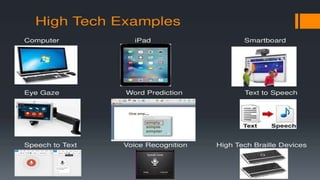
Types of AT in the Classroom
THANK YOU…..

ASSISTIVE TECHNOLOGY IN CLASS ROOM

  • 1.
    Assistive Technology in theClassroom Dr.R.VISWANATHAN ASSISTANT PROFESSOR OF ENGLISH THIAGARAJAR COLLEGE OF PRECEPTORS MADURAI ASSISTIVE TECHNOLOGY IN CLASSROOM
  • 2.
    What Is AssistiveTechnology?  AT is “any item, piece of equipment, or product system, whether acquired commercially off the shelf, modified or customized, that is used to increase, maintain, or improve the functional capabilities of a child with a disability”  AT can be anything from a simple device, such as a magnifying glass, to a complex device, such as a computerized communication system.
  • 10.
    THE POWER OFASSISTIVE TECHNOLOGY  “Technology has great potential in providing access for all learners. Through the use of a variety of assistive technologies, students with disabilities can have the ability to access the general curriculum. When assistive technology is appropriately integrated into the regular classroom, students are provided with multiple means to complete their work”
  • 11.
     Inclusion: Thepractice of educating all or most children in the same classroom, including children with physical, mental, and developmental disabilities. (Association for Supervision and Curriculum Development)  AT helps students who have disabilities learn the material in a way that they can understand it  AT helps eliminate barriers students may face that prevent them from being at the same level as their classmates
  • 12.
    A Student’s ATNeeds Evolve Over Time  As a student’s schoolwork gets more advanced, their technology needs may change or increase.  New technology may become available that will better meet the needs of the student.  During a regularly scheduled evaluation, the IEP team or another professional may decide that another piece of technology will be better for the student.
  • 13.
    Teachers Can MakeTheir Classrooms More Conducive to AT  Have certain computers in the classroom that are set up for the use of the students with disabilities – ones that have necessary software on them.  Include AT in lessons  Familiarize the other students with the AT that other students may be using in the classroom and make sure they understand why this AT is being used.
  • 14.
    AT in theClassroom  The AT you find in your classroom may be in place to aid in the following areas:  Computer Access  Composing Written Material  Communication  Reading  Learning and Studying  Math  Mobility  Vision  Hearing
  • 18.
    Types of ATin the Classroom
  • 30.