AssistiveTechnology
for theClassroom
Presentation by Christina Golden
Assistive
Technology for
theClassroom
This presentation will address assistive
technology can that can aid students in
reaching their desired learning outcomes
for each of the following disabilities:
Hearing impaired
Visually impaired
Learning disabilities
Physically disabled
What is
Assistive
Technology?
 Assistive Technology is defined as “any device or
service that helps a student with a disability to meet his
or her individualized education program (IEP) goals and
to participate in the general education setting to the
greatest possible extent. More simply, AT improves the
functional performance of an individual with a
disability. (The IRIS Center forTraining Enhancements,
2010)”
 Schools must provide assistive technology services and
devices for each student based on the disabilities listed
in their IEP.
What does the
law say about
Assistive
Technology?
 The Individuals with Disabilities EducationAct (IDEA) lays out the
fine details for providing assistive technology to students.
 “IDEA states that school districts must consider assistive
technology for any child in special education.That means that for
any child receiving special education services, the educational
team must ask if there is a device that will “increase, maintain, or
improve functional capabilities” of that child. (PBS, 2003-2014)”
 The school’s IEP team must work with the teachers and parents to
arrange for assistive technologies.
 More details and resources on IDEA can be found at
http://www.wrightslaw.com/info/atech.index.htm
Assistive
Technology for
Students who
are Hearing
Impaired
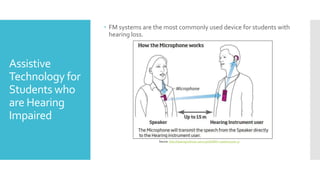
 FM systems are the most commonly used device for students with
hearing loss.
Source: http://hearinginstitute.ca/2013/08/08/fm-systems-part-3/
Additional
Assistive
Technology
Resources for
Hearing
Impaired
Students
 Two other important assistive technology resources for
hearing impaired students are live closed captioning
and closed captioning.
 Live closed captioning:This involves using a
device that allows the teacher to speak into the
microphone and the text is inputted onto the
screen for the student.
 Closed captioning: Most audio and video resources
provide closed captioning. If not, they may provide
a transcript.
Assistive
Technology for
Students who
areVisually
Impaired
 Many resources for visually impaired students include magnifying
glass, enlarged font, books on tape, talking calculators, screen
readers, a slate and stylus, and a braille writer.
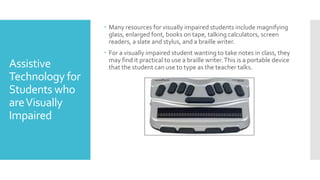
 For a visually impaired student wanting to take notes in class, they
may find it practical to use a braille writer.This is a portable device
that the student can use to type as the teacher talks.
Additional
Assistive
Technology
Resources for
Visually
Impaired
Students
 A few great programs and devices for visually
impaired students are:
 JAWS Screen Reader –Translates the text
on the screen into audio
 ZoomText – Magnifies the text on a screen
 Sapphire – A handheld magnifier
 Digital Book Readers – Kindle, iPad, etc.
Assistive
Technology for
Students with
Learning
Disabilities
 There are various types of learning disabilities.This could range
from trouble with reading to communication to math skills.
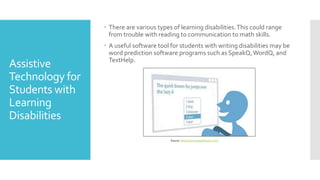
 A useful software tool for students with writing disabilities may be
word prediction software programs such as SpeakQ,WordQ, and
TextHelp.
Source: http://www.goqsoftware.com/
Additional
Assistive
Technology
Resources for
Students with
Learning
Disabilities
Researchers Marshall Raskind, Ph.D. and Kristin Stanberry suggest
asking the following questions when determining whichAssistive
Technology resources would most benefit your child:
 “What are her specific needs and challenges? In what academic
skill areas does she struggle?
 What are her strengths?AT should utilize your child's abilities to
help compensate for her disability.
 What is her interest, skill and experience in using technology? In
what settings and situations will she use the AT tool? AT can help a
child with LD function better at school as well as in other settings
such as home, work, social gatherings and recreational events.
(Raskind, Ph.D & Stanberry, 2010)”
Assistive
Technology for
Students with
Physical
Disabilities
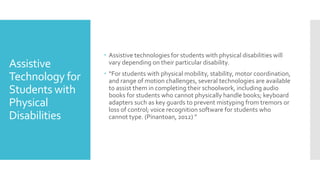
 Assistive technologies for students with physical disabilities will
vary depending on their particular disability.
 “For students with physical mobility, stability, motor coordination,
and range of motion challenges, several technologies are available
to assist them in completing their schoolwork, including audio
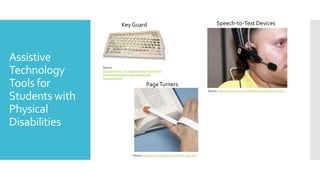
books for students who cannot physically handle books; keyboard
adapters such as key guards to prevent mistyping from tremors or
loss of control; voice recognition software for students who
cannot type. (Pinantoan, 2012) ”
Assistive
Technology
Tools for
Students with
Physical
Disabilities
Source:
http://www.bbc.co.uk/accessibility/archive/win/
keyboard/keyboard_easy/solutions/alt-
keyboard.shtml
Key Guard Speech-to-Text Devices
Source: http://atarizona.com/showtell/22handsfreeaccess.php
PageTurners
Source: https://www.ncmedical.com/item_943.html
References
 AtArizona. (2014). Hands-free Navigation and Speech Recognition.
Retrieved from AssistiveTechnology in Arizona:
http://atarizona.com/showtell/22handsfreeaccess.php
 BBC. (2014). Alternative Keyboards. Retrieved from BBC:
http://www.bbc.co.uk/accessibility/archive/win/keyboard/keyb
oard_easy/solutions/alt-keyboard.shtml
 Freedom Scientific . (n.d.). LowVision Solutions. Retrieved from
Freedom Scientific:
http://www.freedomscientific.com/Products/LowVision
 GoQ Software. (n.d.). Resources. Retrieved from GoQ Software:
http://www.goqsoftware.com/
 Hearing Institute Atlantic. (n.d.). FM Systems. Retrieved from Hearing
Institute Atlantic: http://hearinginstitute.ca/2013/08/08/fm-
systems-part-3/
 North Coast Medical and Rehabilitation Products. (2014). Assistive
Devices: Reading andWriting. Retrieved from
https://www.ncmedical.com/item_943.html
References
 PBS. (2003-2014). Education - AssistiveTechnology. Retrieved from
PBS Parents:
http://www.pbs.org/parents/education/learning-
disabilities/strategies-for-learning-disabilities/assistive-
technology/
 Pinantoan, A. (2012, December 18).The Role Of Assistive
Technology In Supporting Disabled Learners. Retrieved from
Te@achThought:
http://www.teachthought.com/technology/the-role-of-
assitive-technology-in-supporting-disabled-learners/
 Raskind, Ph.D, M., & Stanberry, K. (2010, February). Assistive
technology for kids with LD: An overview. Retrieved from
Great!Schools: http://www.greatschools.org/special-
education/assistive-technology/702-assistive-technology-for-
kids-with-learning-disabilities-an-overview.gs
 The IRIS Center forTraining Enhancements. (2010). Assistive
Technology: An Overview. Retrieved fromThe IRIS Center for
Training Enhancements:
http://iris.peabody.vanderbilt.edu/module/at/

Assisstive Technology Presentation

  • 1.
  • 2.
    Assistive Technology for theClassroom This presentationwill address assistive technology can that can aid students in reaching their desired learning outcomes for each of the following disabilities: Hearing impaired Visually impaired Learning disabilities Physically disabled
  • 3.
    What is Assistive Technology?  AssistiveTechnology is defined as “any device or service that helps a student with a disability to meet his or her individualized education program (IEP) goals and to participate in the general education setting to the greatest possible extent. More simply, AT improves the functional performance of an individual with a disability. (The IRIS Center forTraining Enhancements, 2010)”  Schools must provide assistive technology services and devices for each student based on the disabilities listed in their IEP.
  • 4.
    What does the lawsay about Assistive Technology?  The Individuals with Disabilities EducationAct (IDEA) lays out the fine details for providing assistive technology to students.  “IDEA states that school districts must consider assistive technology for any child in special education.That means that for any child receiving special education services, the educational team must ask if there is a device that will “increase, maintain, or improve functional capabilities” of that child. (PBS, 2003-2014)”  The school’s IEP team must work with the teachers and parents to arrange for assistive technologies.  More details and resources on IDEA can be found at http://www.wrightslaw.com/info/atech.index.htm
  • 5.
    Assistive Technology for Students who areHearing Impaired  FM systems are the most commonly used device for students with hearing loss. Source: http://hearinginstitute.ca/2013/08/08/fm-systems-part-3/
  • 6.
    Additional Assistive Technology Resources for Hearing Impaired Students  Twoother important assistive technology resources for hearing impaired students are live closed captioning and closed captioning.  Live closed captioning:This involves using a device that allows the teacher to speak into the microphone and the text is inputted onto the screen for the student.  Closed captioning: Most audio and video resources provide closed captioning. If not, they may provide a transcript.
  • 7.
    Assistive Technology for Students who areVisually Impaired Many resources for visually impaired students include magnifying glass, enlarged font, books on tape, talking calculators, screen readers, a slate and stylus, and a braille writer.  For a visually impaired student wanting to take notes in class, they may find it practical to use a braille writer.This is a portable device that the student can use to type as the teacher talks.
  • 8.
    Additional Assistive Technology Resources for Visually Impaired Students  Afew great programs and devices for visually impaired students are:  JAWS Screen Reader –Translates the text on the screen into audio  ZoomText – Magnifies the text on a screen  Sapphire – A handheld magnifier  Digital Book Readers – Kindle, iPad, etc.
  • 9.
    Assistive Technology for Students with Learning Disabilities There are various types of learning disabilities.This could range from trouble with reading to communication to math skills.  A useful software tool for students with writing disabilities may be word prediction software programs such as SpeakQ,WordQ, and TextHelp. Source: http://www.goqsoftware.com/
  • 10.
    Additional Assistive Technology Resources for Students with Learning Disabilities ResearchersMarshall Raskind, Ph.D. and Kristin Stanberry suggest asking the following questions when determining whichAssistive Technology resources would most benefit your child:  “What are her specific needs and challenges? In what academic skill areas does she struggle?  What are her strengths?AT should utilize your child's abilities to help compensate for her disability.  What is her interest, skill and experience in using technology? In what settings and situations will she use the AT tool? AT can help a child with LD function better at school as well as in other settings such as home, work, social gatherings and recreational events. (Raskind, Ph.D & Stanberry, 2010)”
  • 11.
    Assistive Technology for Students with Physical Disabilities Assistive technologies for students with physical disabilities will vary depending on their particular disability.  “For students with physical mobility, stability, motor coordination, and range of motion challenges, several technologies are available to assist them in completing their schoolwork, including audio books for students who cannot physically handle books; keyboard adapters such as key guards to prevent mistyping from tremors or loss of control; voice recognition software for students who cannot type. (Pinantoan, 2012) ”
  • 12.
    Assistive Technology Tools for Students with Physical Disabilities Source: http://www.bbc.co.uk/accessibility/archive/win/ keyboard/keyboard_easy/solutions/alt- keyboard.shtml KeyGuard Speech-to-Text Devices Source: http://atarizona.com/showtell/22handsfreeaccess.php PageTurners Source: https://www.ncmedical.com/item_943.html
  • 13.
    References  AtArizona. (2014).Hands-free Navigation and Speech Recognition. Retrieved from AssistiveTechnology in Arizona: http://atarizona.com/showtell/22handsfreeaccess.php  BBC. (2014). Alternative Keyboards. Retrieved from BBC: http://www.bbc.co.uk/accessibility/archive/win/keyboard/keyb oard_easy/solutions/alt-keyboard.shtml  Freedom Scientific . (n.d.). LowVision Solutions. Retrieved from Freedom Scientific: http://www.freedomscientific.com/Products/LowVision  GoQ Software. (n.d.). Resources. Retrieved from GoQ Software: http://www.goqsoftware.com/  Hearing Institute Atlantic. (n.d.). FM Systems. Retrieved from Hearing Institute Atlantic: http://hearinginstitute.ca/2013/08/08/fm- systems-part-3/  North Coast Medical and Rehabilitation Products. (2014). Assistive Devices: Reading andWriting. Retrieved from https://www.ncmedical.com/item_943.html
  • 14.
    References  PBS. (2003-2014).Education - AssistiveTechnology. Retrieved from PBS Parents: http://www.pbs.org/parents/education/learning- disabilities/strategies-for-learning-disabilities/assistive- technology/  Pinantoan, A. (2012, December 18).The Role Of Assistive Technology In Supporting Disabled Learners. Retrieved from Te@achThought: http://www.teachthought.com/technology/the-role-of- assitive-technology-in-supporting-disabled-learners/  Raskind, Ph.D, M., & Stanberry, K. (2010, February). Assistive technology for kids with LD: An overview. Retrieved from Great!Schools: http://www.greatschools.org/special- education/assistive-technology/702-assistive-technology-for- kids-with-learning-disabilities-an-overview.gs  The IRIS Center forTraining Enhancements. (2010). Assistive Technology: An Overview. Retrieved fromThe IRIS Center for Training Enhancements: http://iris.peabody.vanderbilt.edu/module/at/