
Company Confidential – For Oracle Internal Use Only
Copy right © Oracle Corporation, 2002. All rights reserv ed.
Payables - Invoice Match to Receipt
Page 1
Payments - Create an EFT
PPR for Multiple Legal
Entities
Demo Script (Internal)
Company Confidential – For Oracle Internal Use Only
Copy right © Oracle Corporation, 2002. All rights reserv ed.
Payables - Invoice Match to Receipt
Page i
Table of Contents
Payments – Create an EFT Payment Process Request for Multiple Legal Entities .......................................1
Payments – Create an EFT Payment Process Request for Multiple Legal Entities ............................................1
Enter Invoices.............................................................................................................................................................2
Create and Submit a Single Payment Process Request .......................................................................................4
Review Selected Invoices ........................................................................................................................................6
Complete Document Assignments .........................................................................................................................7
Review Payment Instructions..................................................................................................................................8
Flowchart..........................................................................................................................................................................9
Copy right © Oracle Corporation, 2003. All rights reserv ed.
Payments - Create an EFT PPR for Multiple Legal Entities PAYMENT-CREATEAPPRFORMULTIPLELEGALENTITIESEFT-1512020938
Effective 28-Feb-2007 Page 1 of 11Version Error! Unknown document property name. Error! Unknow
Payments – Create an EFT Payment Process Request for
Multiple Legal Entities
DocumentControl
Date Owner App
Release
Version Change Reference
28-Feb-2007 Nick.Dennison 12.0 V1.0 Created.
Objective
The purpose of this product functionality demo script is to show how to create an EFT payment
process request to pay invoices from multiple legal entities.
What's New?
The payment process has changed for R12. Invoice payment processing has been moved into the
Payments module. (formerly iPayment)
Pitfalls
N/A
Assumptions
N/A
Related Business Flow(s)
N/A
Related Documents
N/A
Begin Demo
Copy right © Oracle Corporation, 2003. All rights reserv ed.
Payments - Create an EFT PPR for Multiple Legal Entities PAYMENT-CREATEAPPRFORMULTIPLELEGALENTITIESEFT-1512020938
Effective 28-Feb-2007 Page 2 of 11Version Error! Unknown document property name. Error! Unknow
Payments - Create an EFT Payment Process Request for Multiple
Legal Entities
Enter Invoices
1. Login to Oracle Applications
Field MOAC Worldwide
Username/password Cbrown/welcome
Responsibility Payables,MOAC Worldwide
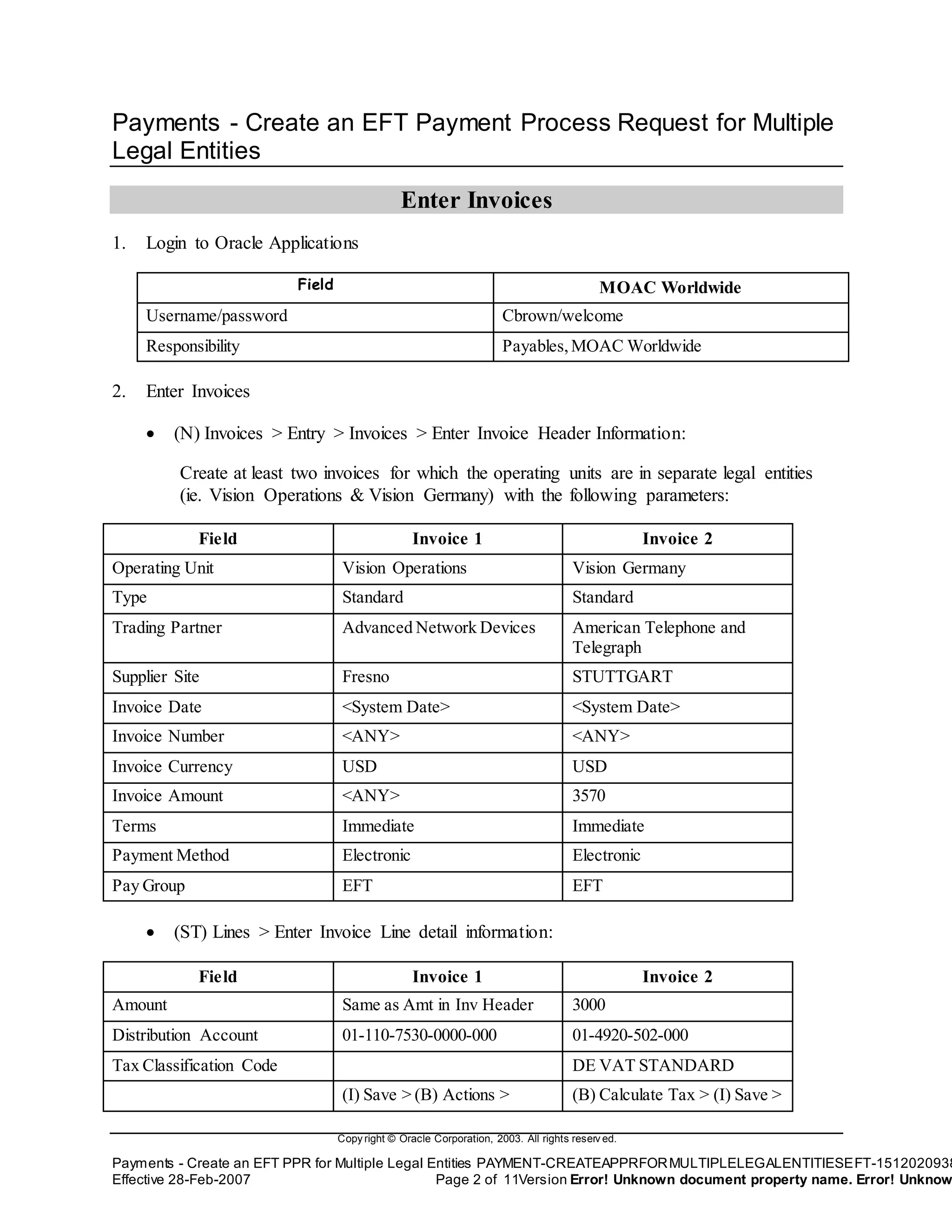
2. Enter Invoices
 (N) Invoices > Entry > Invoices > Enter Invoice Header Information:
Create at least two invoices for which the operating units are in separate legal entities
(ie. Vision Operations & Vision Germany) with the following parameters:
Field Invoice 1 Invoice 2
Operating Unit Vision Operations Vision Germany
Type Standard Standard
Trading Partner Advanced Network Devices American Telephone and
Telegraph
Supplier Site Fresno STUTTGART
Invoice Date <System Date> <System Date>
Invoice Number <ANY> <ANY>
Invoice Currency USD USD
Invoice Amount <ANY> 3570
Terms Immediate Immediate
Payment Method Electronic Electronic
Pay Group EFT EFT
 (ST) Lines > Enter Invoice Line detail information:
Field Invoice 1 Invoice 2
Amount Same as Amt in Inv Header 3000
Distribution Account 01-110-7530-0000-000 01-4920-502-000
Tax Classification Code DE VAT STANDARD
(I) Save > (B) Actions > (B) Calculate Tax > (I) Save >
Copy right © Oracle Corporation, 2003. All rights reserv ed.
Payments - Create an EFT PPR for Multiple Legal Entities PAYMENT-CREATEAPPRFORMULTIPLELEGALENTITIESEFT-1512020938
Effective 28-Feb-2007 Page 3 of 11Version Error! Unknown document property name. Error! Unknow
Check Validate Box > (B) OK (B) Actions > Check Validate
Box > (B) OK
Copy right © Oracle Corporation, 2003. All rights reserv ed.
Payments - Create an EFT PPR for Multiple Legal Entities PAYMENT-CREATEAPPRFORMULTIPLELEGALENTITIESEFT-1512020938
Effective 28-Feb-2007 Page 4 of 11Version Error! Unknown document property name. Error! Unknow
Payments - Create an EFT Payment Process Request for Multiple
Legal Entities
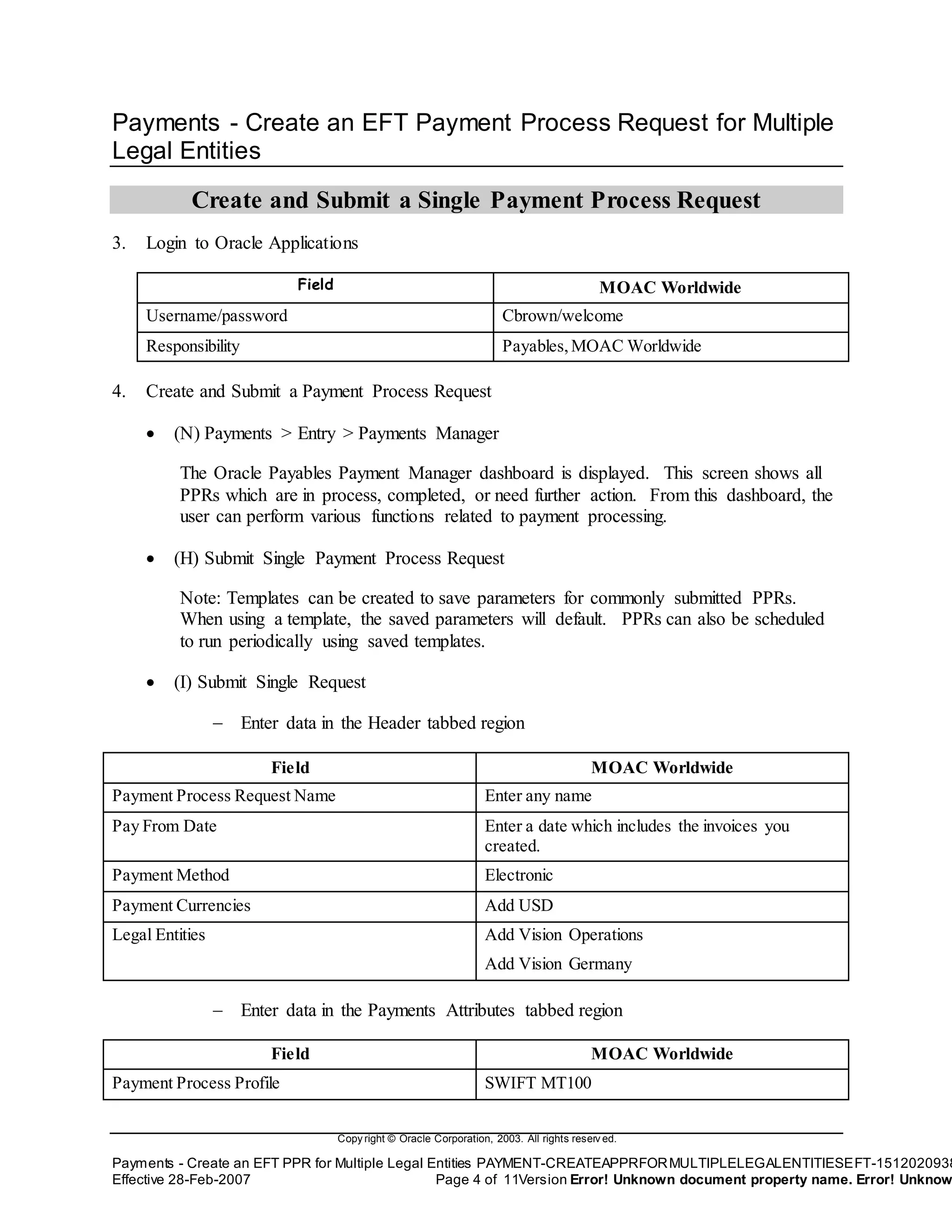
Create and Submit a Single Payment Process Request
3. Login to Oracle Applications
Field MOAC Worldwide
Username/password Cbrown/welcome
Responsibility Payables,MOAC Worldwide
4. Create and Submit a Payment Process Request
 (N) Payments > Entry > Payments Manager
The Oracle Payables Payment Manager dashboard is displayed. This screen shows all
PPRs which are in process, completed, or need further action. From this dashboard, the
user can perform various functions related to payment processing.
 (H) Submit Single Payment Process Request
Note: Templates can be created to save parameters for commonly submitted PPRs.
When using a template, the saved parameters will default. PPRs can also be scheduled
to run periodically using saved templates.
 (I) Submit Single Request
 Enter data in the Header tabbed region
Field MOAC Worldwide
Payment Process Request Name Enter any name
Pay From Date Enter a date which includes the invoices you
created.
Payment Method Electronic
Payment Currencies Add USD
Legal Entities Add Vision Operations
Add Vision Germany
 Enter data in the Payments Attributes tabbed region
Field MOAC Worldwide
Payment Process Profile SWIFT MT100
Copy right © Oracle Corporation, 2003. All rights reserv ed.
Payments - Create an EFT PPR for Multiple Legal Entities PAYMENT-CREATEAPPRFORMULTIPLELEGALENTITIESEFT-1512020938
Effective 28-Feb-2007 Page 5 of 11Version Error! Unknown document property name. Error! Unknow
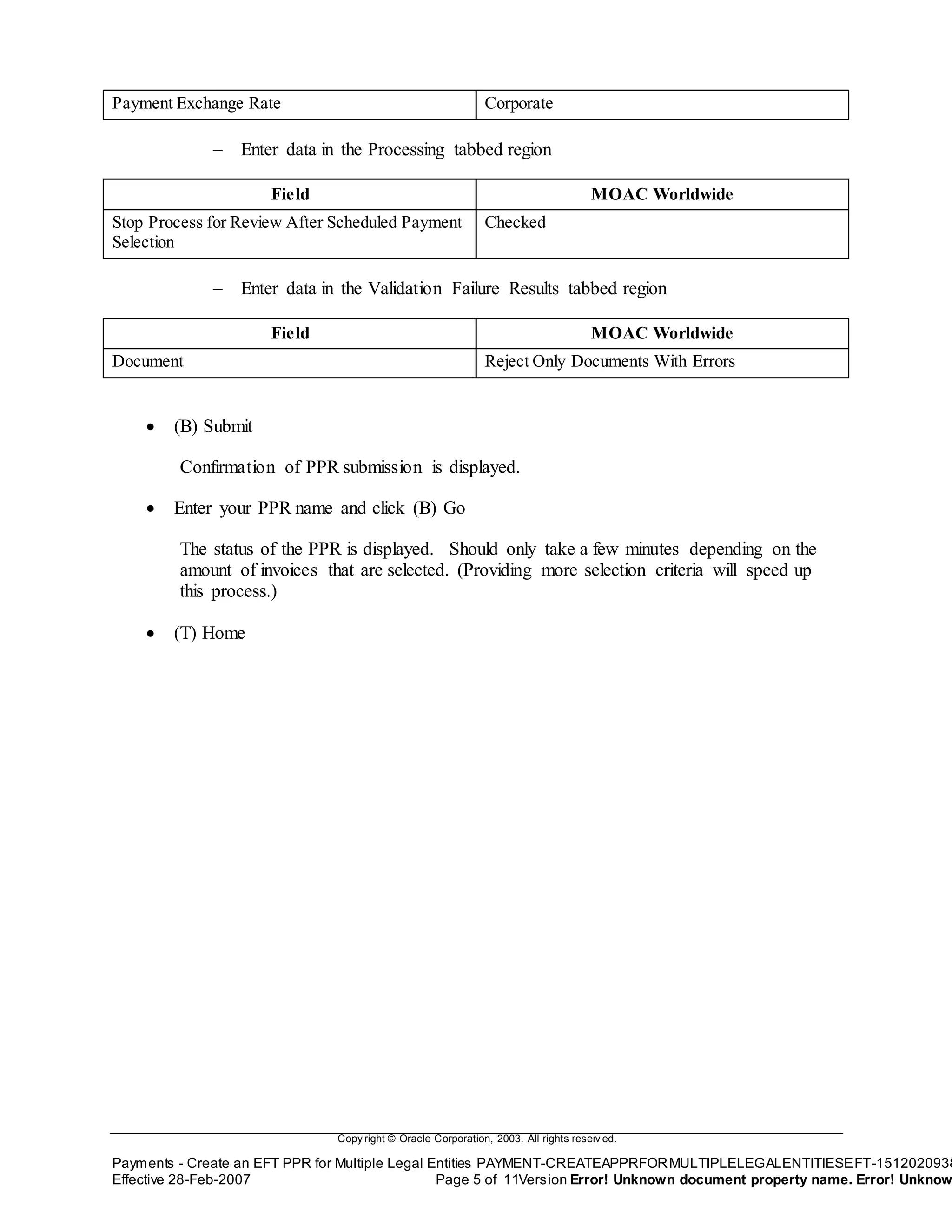
Payment Exchange Rate Corporate
 Enter data in the Processing tabbed region
Field MOAC Worldwide
Stop Process for Review After Scheduled Payment
Selection
Checked
 Enter data in the Validation Failure Results tabbed region
Field MOAC Worldwide
Document Reject Only Documents With Errors
 (B) Submit
Confirmation of PPR submission is displayed.
 Enter your PPR name and click (B) Go
The status of the PPR is displayed. Should only take a few minutes depending on the
amount of invoices that are selected. (Providing more selection criteria will speed up
this process.)
 (T) Home
Copy right © Oracle Corporation, 2003. All rights reserv ed.
Payments - Create an EFT PPR for Multiple Legal Entities PAYMENT-CREATEAPPRFORMULTIPLELEGALENTITIESEFT-1512020938
Effective 28-Feb-2007 Page 6 of 11Version Error! Unknown document property name. Error! Unknow
Payments - Create an EFT Payment Process Request for Multiple
Legal Entities
Review Selected Invoices
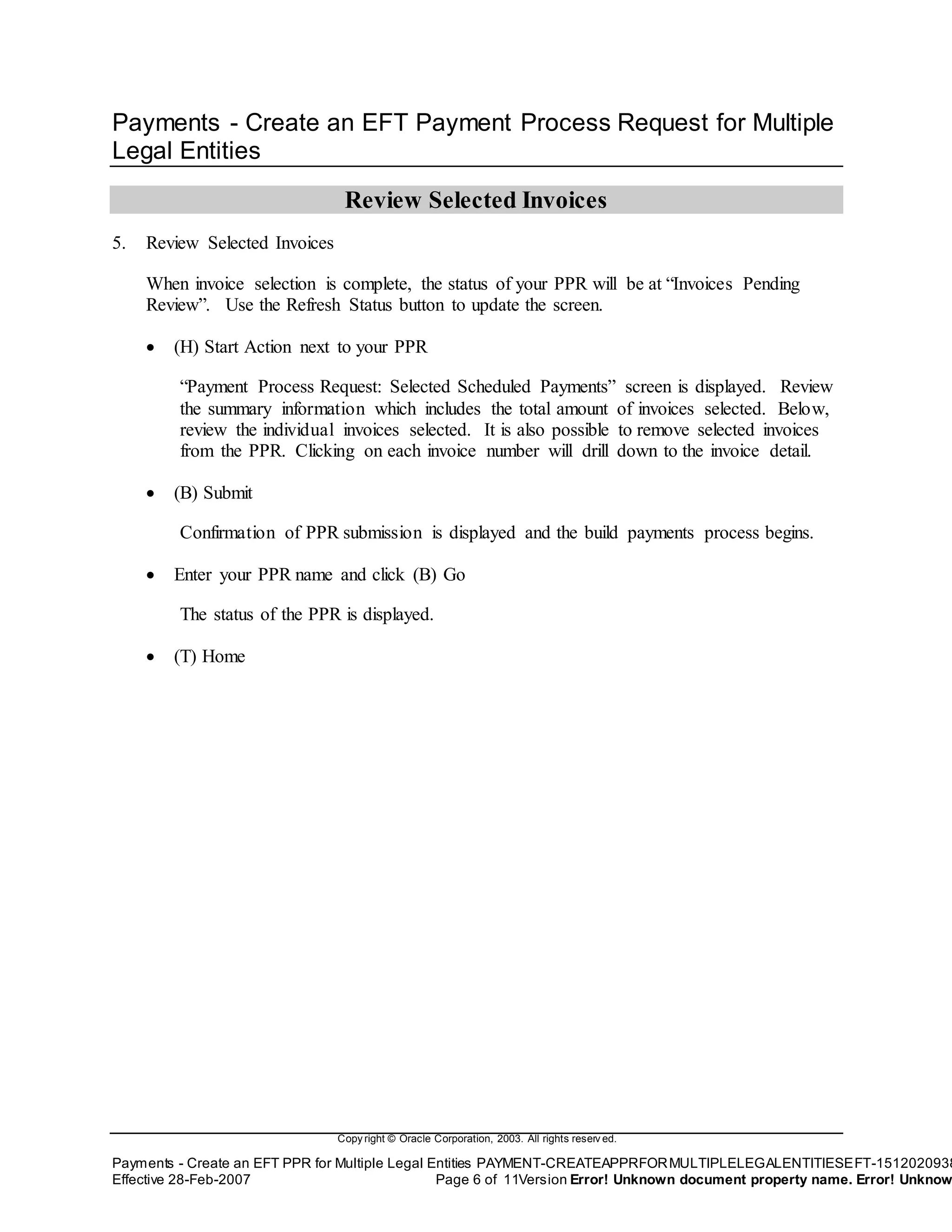
5. Review Selected Invoices
When invoice selection is complete, the status of your PPR will be at “Invoices Pending
Review”. Use the Refresh Status button to update the screen.
 (H) Start Action next to your PPR
“Payment Process Request: Selected Scheduled Payments” screen is displayed. Review
the summary information which includes the total amount of invoices selected. Below,
review the individual invoices selected. It is also possible to remove selected invoices
from the PPR. Clicking on each invoice number will drill down to the invoice detail.
 (B) Submit
Confirmation of PPR submission is displayed and the build payments process begins.
 Enter your PPR name and click (B) Go
The status of the PPR is displayed.
 (T) Home
Copy right © Oracle Corporation, 2003. All rights reserv ed.
Payments - Create an EFT PPR for Multiple Legal Entities PAYMENT-CREATEAPPRFORMULTIPLELEGALENTITIESEFT-1512020938
Effective 28-Feb-2007 Page 7 of 11Version Error! Unknown document property name. Error! Unknow
Payments - Create an EFT Payment Process Request for Multiple
Legal Entities
Complete Document Assignments
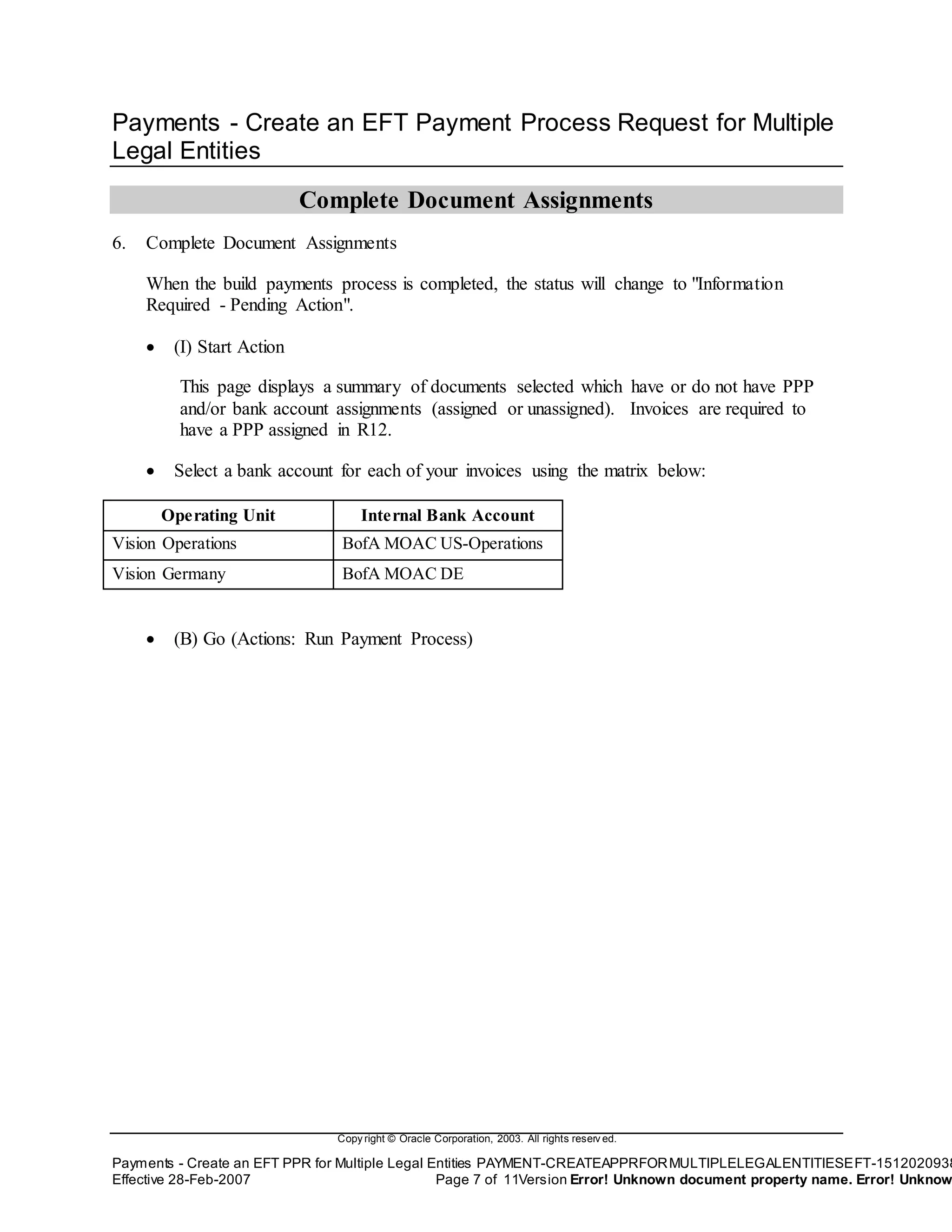
6. Complete Document Assignments
When the build payments process is completed, the status will change to "Information
Required - Pending Action".
 (I) Start Action
This page displays a summary of documents selected which have or do not have PPP
and/or bank account assignments (assigned or unassigned). Invoices are required to
have a PPP assigned in R12.
 Select a bank account for each of your invoices using the matrix below:
Operating Unit Internal Bank Account
Vision Operations BofA MOAC US-Operations
Vision Germany BofA MOAC DE
 (B) Go (Actions: Run Payment Process)
Copy right © Oracle Corporation, 2003. All rights reserv ed.
Payments - Create an EFT PPR for Multiple Legal Entities PAYMENT-CREATEAPPRFORMULTIPLELEGALENTITIESEFT-1512020938
Effective 28-Feb-2007 Page 8 of 11Version Error! Unknown document property name. Error! Unknow
Payments - Create an EFT Payment Process Request for Multiple
Legal Entities
Review Payment Instructions
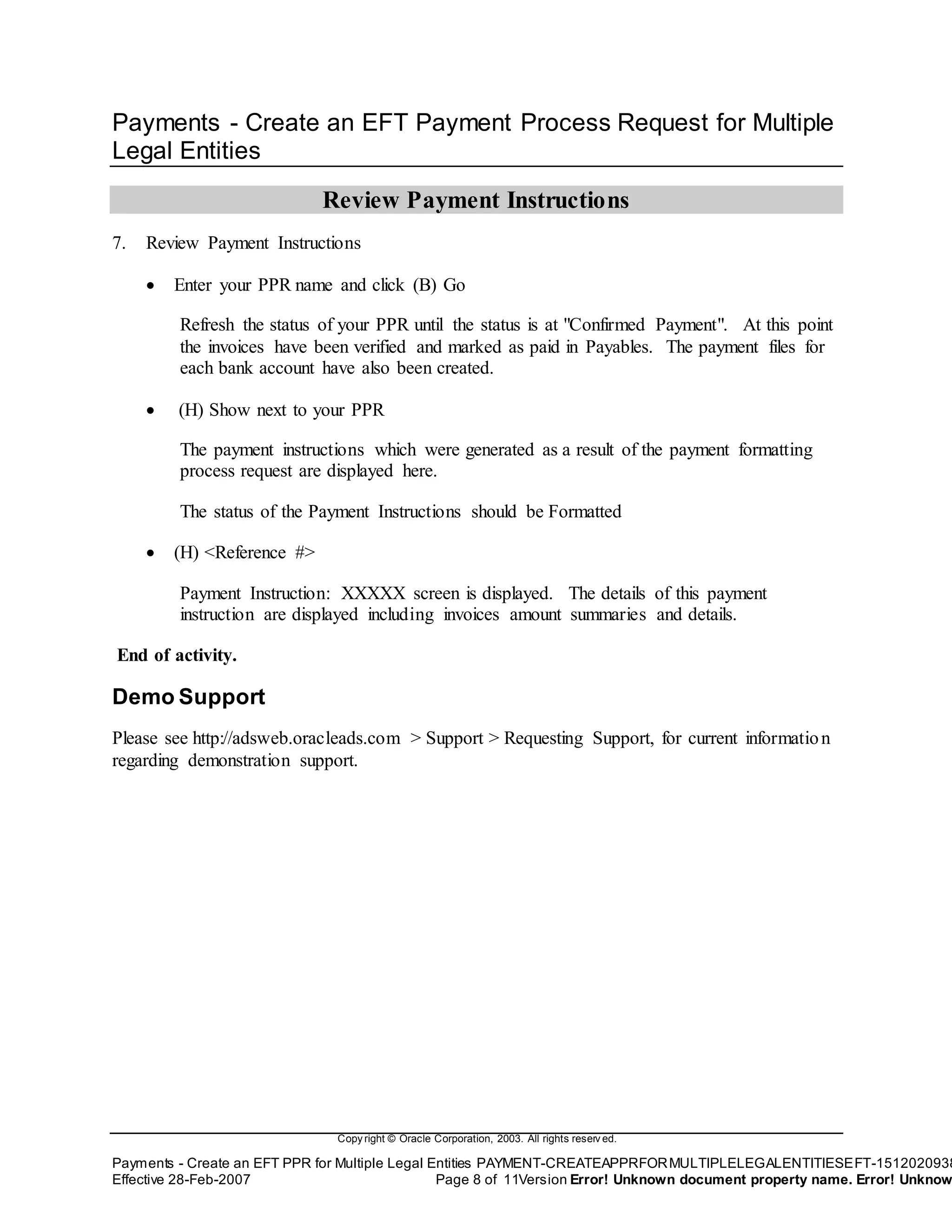
7. Review Payment Instructions
 Enter your PPR name and click (B) Go
Refresh the status of your PPR until the status is at "Confirmed Payment". At this point
the invoices have been verified and marked as paid in Payables. The payment files for
each bank account have also been created.
 (H) Show next to your PPR
The payment instructions which were generated as a result of the payment formatting
process request are displayed here.
The status of the Payment Instructions should be Formatted
 (H) <Reference #>
Payment Instruction: XXXXX screen is displayed. The details of this payment
instruction are displayed including invoices amount summaries and details.
End of activity.
Demo Support
Please see http://adsweb.oracleads.com > Support > Requesting Support, for current information
regarding demonstration support.
Copy right © Oracle Corporation, 2003. All rights reserv ed.
Payments - Create an EFT PPR for Multiple Legal Entities PAYMENT-CREATEAPPRFORMULTIPLELEGALENTITIESEFT-1512020938
Effective 28-Feb-2007 Page 9 of 11Version Error! Unknown document property name. Error! Unknow
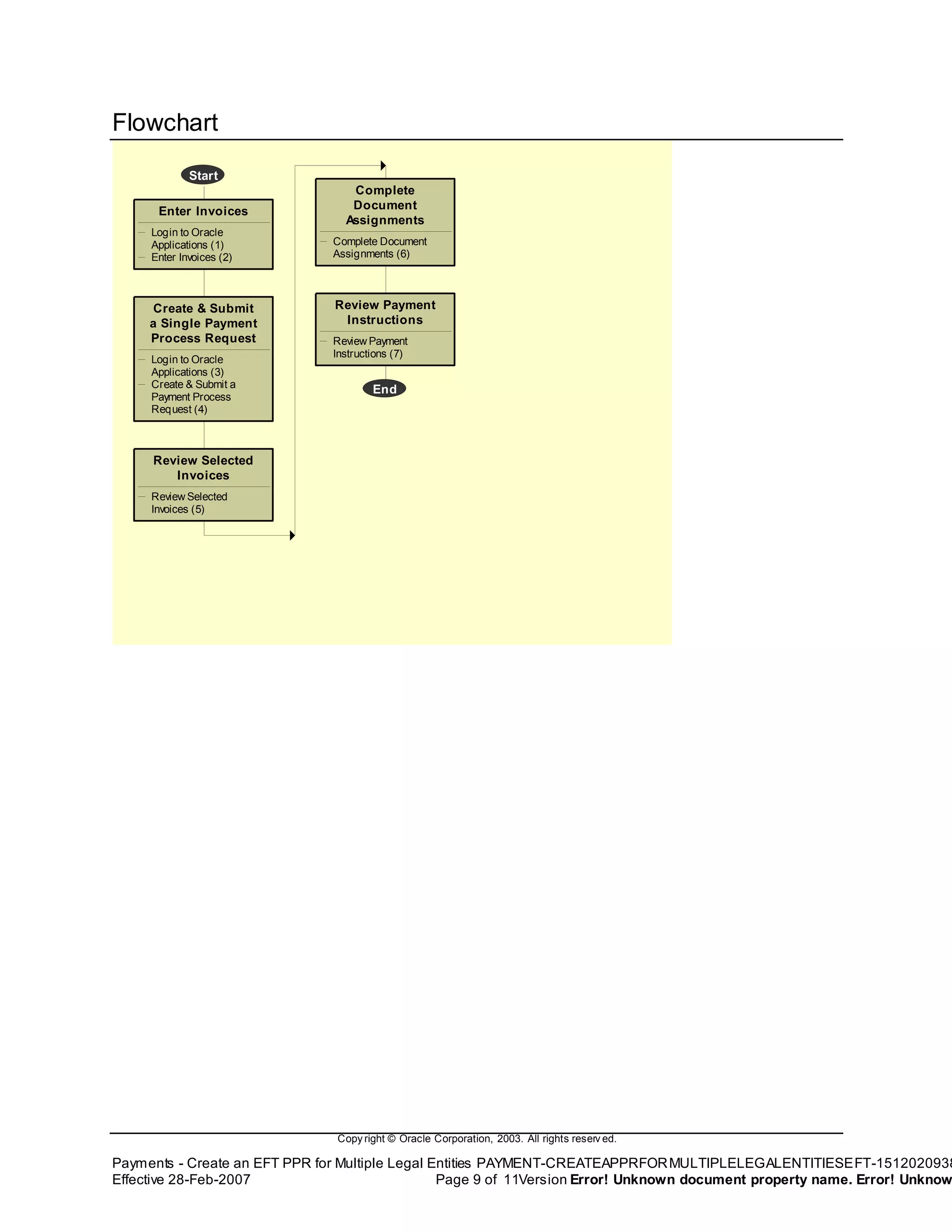
Flowchart
Start
Enter Invoices
Login to Oracle
Applications (1)
Enter Invoices (2)
Create & Submit
a Single Payment
Process Request
Login to Oracle
Applications (3)
Create & Submit a
Payment Process
Request (4)
Review Selected
Invoices
Review Selected
Invoices (5)
Complete
Document
Assignments
Complete Document
Assignments (6)
Review Payment
Instructions
Review Payment
Instructions (7)
End

Payment create a ppr for multiple legal entities (eft)

  • 1.
    Company Confidential –For Oracle Internal Use Only Copy right © Oracle Corporation, 2002. All rights reserv ed. Payables - Invoice Match to Receipt Page 1 Payments - Create an EFT PPR for Multiple Legal Entities Demo Script (Internal)
  • 2.
    Company Confidential –For Oracle Internal Use Only Copy right © Oracle Corporation, 2002. All rights reserv ed. Payables - Invoice Match to Receipt Page i Table of Contents Payments – Create an EFT Payment Process Request for Multiple Legal Entities .......................................1 Payments – Create an EFT Payment Process Request for Multiple Legal Entities ............................................1 Enter Invoices.............................................................................................................................................................2 Create and Submit a Single Payment Process Request .......................................................................................4 Review Selected Invoices ........................................................................................................................................6 Complete Document Assignments .........................................................................................................................7 Review Payment Instructions..................................................................................................................................8 Flowchart..........................................................................................................................................................................9
  • 3.
    Copy right ©Oracle Corporation, 2003. All rights reserv ed. Payments - Create an EFT PPR for Multiple Legal Entities PAYMENT-CREATEAPPRFORMULTIPLELEGALENTITIESEFT-1512020938 Effective 28-Feb-2007 Page 1 of 11Version Error! Unknown document property name. Error! Unknow Payments – Create an EFT Payment Process Request for Multiple Legal Entities DocumentControl Date Owner App Release Version Change Reference 28-Feb-2007 Nick.Dennison 12.0 V1.0 Created. Objective The purpose of this product functionality demo script is to show how to create an EFT payment process request to pay invoices from multiple legal entities. What's New? The payment process has changed for R12. Invoice payment processing has been moved into the Payments module. (formerly iPayment) Pitfalls N/A Assumptions N/A Related Business Flow(s) N/A Related Documents N/A Begin Demo
  • 4.
    Copy right ©Oracle Corporation, 2003. All rights reserv ed. Payments - Create an EFT PPR for Multiple Legal Entities PAYMENT-CREATEAPPRFORMULTIPLELEGALENTITIESEFT-1512020938 Effective 28-Feb-2007 Page 2 of 11Version Error! Unknown document property name. Error! Unknow Payments - Create an EFT Payment Process Request for Multiple Legal Entities Enter Invoices 1. Login to Oracle Applications Field MOAC Worldwide Username/password Cbrown/welcome Responsibility Payables,MOAC Worldwide 2. Enter Invoices  (N) Invoices > Entry > Invoices > Enter Invoice Header Information: Create at least two invoices for which the operating units are in separate legal entities (ie. Vision Operations & Vision Germany) with the following parameters: Field Invoice 1 Invoice 2 Operating Unit Vision Operations Vision Germany Type Standard Standard Trading Partner Advanced Network Devices American Telephone and Telegraph Supplier Site Fresno STUTTGART Invoice Date <System Date> <System Date> Invoice Number <ANY> <ANY> Invoice Currency USD USD Invoice Amount <ANY> 3570 Terms Immediate Immediate Payment Method Electronic Electronic Pay Group EFT EFT  (ST) Lines > Enter Invoice Line detail information: Field Invoice 1 Invoice 2 Amount Same as Amt in Inv Header 3000 Distribution Account 01-110-7530-0000-000 01-4920-502-000 Tax Classification Code DE VAT STANDARD (I) Save > (B) Actions > (B) Calculate Tax > (I) Save >
  • 5.
    Copy right ©Oracle Corporation, 2003. All rights reserv ed. Payments - Create an EFT PPR for Multiple Legal Entities PAYMENT-CREATEAPPRFORMULTIPLELEGALENTITIESEFT-1512020938 Effective 28-Feb-2007 Page 3 of 11Version Error! Unknown document property name. Error! Unknow Check Validate Box > (B) OK (B) Actions > Check Validate Box > (B) OK
  • 6.
    Copy right ©Oracle Corporation, 2003. All rights reserv ed. Payments - Create an EFT PPR for Multiple Legal Entities PAYMENT-CREATEAPPRFORMULTIPLELEGALENTITIESEFT-1512020938 Effective 28-Feb-2007 Page 4 of 11Version Error! Unknown document property name. Error! Unknow Payments - Create an EFT Payment Process Request for Multiple Legal Entities Create and Submit a Single Payment Process Request 3. Login to Oracle Applications Field MOAC Worldwide Username/password Cbrown/welcome Responsibility Payables,MOAC Worldwide 4. Create and Submit a Payment Process Request  (N) Payments > Entry > Payments Manager The Oracle Payables Payment Manager dashboard is displayed. This screen shows all PPRs which are in process, completed, or need further action. From this dashboard, the user can perform various functions related to payment processing.  (H) Submit Single Payment Process Request Note: Templates can be created to save parameters for commonly submitted PPRs. When using a template, the saved parameters will default. PPRs can also be scheduled to run periodically using saved templates.  (I) Submit Single Request  Enter data in the Header tabbed region Field MOAC Worldwide Payment Process Request Name Enter any name Pay From Date Enter a date which includes the invoices you created. Payment Method Electronic Payment Currencies Add USD Legal Entities Add Vision Operations Add Vision Germany  Enter data in the Payments Attributes tabbed region Field MOAC Worldwide Payment Process Profile SWIFT MT100
  • 7.
    Copy right ©Oracle Corporation, 2003. All rights reserv ed. Payments - Create an EFT PPR for Multiple Legal Entities PAYMENT-CREATEAPPRFORMULTIPLELEGALENTITIESEFT-1512020938 Effective 28-Feb-2007 Page 5 of 11Version Error! Unknown document property name. Error! Unknow Payment Exchange Rate Corporate  Enter data in the Processing tabbed region Field MOAC Worldwide Stop Process for Review After Scheduled Payment Selection Checked  Enter data in the Validation Failure Results tabbed region Field MOAC Worldwide Document Reject Only Documents With Errors  (B) Submit Confirmation of PPR submission is displayed.  Enter your PPR name and click (B) Go The status of the PPR is displayed. Should only take a few minutes depending on the amount of invoices that are selected. (Providing more selection criteria will speed up this process.)  (T) Home
  • 8.
    Copy right ©Oracle Corporation, 2003. All rights reserv ed. Payments - Create an EFT PPR for Multiple Legal Entities PAYMENT-CREATEAPPRFORMULTIPLELEGALENTITIESEFT-1512020938 Effective 28-Feb-2007 Page 6 of 11Version Error! Unknown document property name. Error! Unknow Payments - Create an EFT Payment Process Request for Multiple Legal Entities Review Selected Invoices 5. Review Selected Invoices When invoice selection is complete, the status of your PPR will be at “Invoices Pending Review”. Use the Refresh Status button to update the screen.  (H) Start Action next to your PPR “Payment Process Request: Selected Scheduled Payments” screen is displayed. Review the summary information which includes the total amount of invoices selected. Below, review the individual invoices selected. It is also possible to remove selected invoices from the PPR. Clicking on each invoice number will drill down to the invoice detail.  (B) Submit Confirmation of PPR submission is displayed and the build payments process begins.  Enter your PPR name and click (B) Go The status of the PPR is displayed.  (T) Home
  • 9.
    Copy right ©Oracle Corporation, 2003. All rights reserv ed. Payments - Create an EFT PPR for Multiple Legal Entities PAYMENT-CREATEAPPRFORMULTIPLELEGALENTITIESEFT-1512020938 Effective 28-Feb-2007 Page 7 of 11Version Error! Unknown document property name. Error! Unknow Payments - Create an EFT Payment Process Request for Multiple Legal Entities Complete Document Assignments 6. Complete Document Assignments When the build payments process is completed, the status will change to "Information Required - Pending Action".  (I) Start Action This page displays a summary of documents selected which have or do not have PPP and/or bank account assignments (assigned or unassigned). Invoices are required to have a PPP assigned in R12.  Select a bank account for each of your invoices using the matrix below: Operating Unit Internal Bank Account Vision Operations BofA MOAC US-Operations Vision Germany BofA MOAC DE  (B) Go (Actions: Run Payment Process)
  • 10.
    Copy right ©Oracle Corporation, 2003. All rights reserv ed. Payments - Create an EFT PPR for Multiple Legal Entities PAYMENT-CREATEAPPRFORMULTIPLELEGALENTITIESEFT-1512020938 Effective 28-Feb-2007 Page 8 of 11Version Error! Unknown document property name. Error! Unknow Payments - Create an EFT Payment Process Request for Multiple Legal Entities Review Payment Instructions 7. Review Payment Instructions  Enter your PPR name and click (B) Go Refresh the status of your PPR until the status is at "Confirmed Payment". At this point the invoices have been verified and marked as paid in Payables. The payment files for each bank account have also been created.  (H) Show next to your PPR The payment instructions which were generated as a result of the payment formatting process request are displayed here. The status of the Payment Instructions should be Formatted  (H) <Reference #> Payment Instruction: XXXXX screen is displayed. The details of this payment instruction are displayed including invoices amount summaries and details. End of activity. Demo Support Please see http://adsweb.oracleads.com > Support > Requesting Support, for current information regarding demonstration support.
  • 11.
    Copy right ©Oracle Corporation, 2003. All rights reserv ed. Payments - Create an EFT PPR for Multiple Legal Entities PAYMENT-CREATEAPPRFORMULTIPLELEGALENTITIESEFT-1512020938 Effective 28-Feb-2007 Page 9 of 11Version Error! Unknown document property name. Error! Unknow Flowchart Start Enter Invoices Login to Oracle Applications (1) Enter Invoices (2) Create & Submit a Single Payment Process Request Login to Oracle Applications (3) Create & Submit a Payment Process Request (4) Review Selected Invoices Review Selected Invoices (5) Complete Document Assignments Complete Document Assignments (6) Review Payment Instructions Review Payment Instructions (7) End