Assessment
Tools
Polling Apps
• Polling apps engage students through the
use of surveys and polls as methods of
formative assessment.
Polling apps work like “clicker” technology,
but the student’s computer or mobile
device becomes the clicker.
These apps present an opportunity for
formative assessment and increased
participation from students.
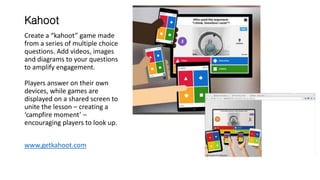
Kahoot
Create a “kahoot” game made
from a series of multiple choice
questions. Add videos, images
and diagrams to your questions
to amplify engagement.
Players answer on their own
devices, while games are
displayed on a shared screen to
unite the lesson – creating a
‘campfire moment’ –
encouraging players to look up.
www.getkahoot.com
GoSoapBox
Leveraging web-enabled devices,
teachers digitally engage students
to conduct formative assessment
and gain insight into student
comprehension.
Key Features:
Confusion Barometer lets students
indicate whether or not they are
getting it.
Social Q&A, lets students submit
and vote for questions, allowing
the best question to rise to the
top.
www.gosoapbox.com
Plickers
Plickers is a powerfully simple tool
that lets teachers collect real-time
formative assessment data without
the need for student devices.
Each student is given a card with a
unique visual code. The code has 4
sides, each lettered A, B, C, and D.
The student holds the card with
the A, B, C, or D side up.
The teacher opens the Plickers app
and scans the room with his or her
device.
The app recognizes the cards,
records who the teacher assigned
them to, and captures the answer
that each student chose.
www.plickers.com
Scanner Assessment Apps
Scanner assessment apps turn a
mobile device into an optical
scanner (like a Scantron machine).
These apps make grading exit
tickets, quizzes, and formative
assessments quick and easy.
ZipGrade
ZipGrade turns your phone or
tablet into an optical grading
machine similar to a Scantron. It
reads free-to-download answer
sheets in multiple sizes. Provide
instant feedback to students by
grading exit tickets, quizzes, and
formative assessments as soon as
they finish.
http://www.zipgrade.com/
InstaGrade
InstaGrade turns your phone or
tablet into an optical grading
machine similar to Zipgrade.
The difference is that the answer
sheets this app reads are the quiz
itself—the questions are printed
on the scannable sheet.
This app allows for short written
responses.
http://www.instagradepp.com/
Presentation Assessment Apps
Presentation Assessment Apps allow
instructors to create multimedia
presentations including slides, video, audio
and images and embed assessment tools
within them.
Depending on the app, users can move
through the presentation by themselves or
directed by the instructor.
The instructor can use the assessment data
generated as formative assessment for
lesson planning.
Nearpod
Nearpod is an interactive
presentation and assessment
tool in which a teacher can
modify existing presentations
or create new presentations
that can contain quizzes, polls,
videos, images, drawing-
boards, and web content.
The students access the
presentation on their own
devices. The instructor can
then move the class through
the presentation and let them
interact with the media as
they go.
www.nearpod.com
Zaption
Zaption is a tool that allows
instructors to create engaging
interactive video lessons embedded
with student response and
assessment prompts.
Share video lessons with a simple
link, or embed directly in your LMS,
blog, or website.
www.zaption.com
Classkick
With Classkick, students work on
assignments on their iPad using
the iPad's screen as a
whiteboard. Instructors see all
their students’ work in real-time,
on their own iPad. The instructor
can give feedback to individual
students or can facilitate
students helping each other
anonymously.
http://www.classkick.com/
Rubric Apps
Rubric apps allow instructors to
create rubrics for assessing
students.
Some rubric apps are helpful in
generating rubric criteria language.
Some are helpful in assessing
performance-based assignments,
with the ability to attach video and
notes to the assessment.
EasyAssessment
This rubric generator allows
instructors to create rubrics in two
easy steps.
During assessment, the user is
presented with a simple set of slider
scales to quickly assess each
student’s performance. Additional
data can be tagged to each student
in note, photo and even video form.
The instructor can export an excel
spreadsheet for analysis.
http://thepegeekapps.com/assessm
ent/#iPad
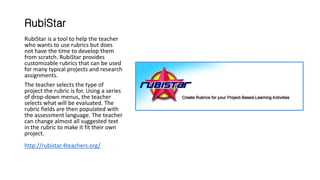
RubiStar
RubiStar is a tool to help the teacher
who wants to use rubrics but does
not have the time to develop them
from scratch. RubiStar provides
customizable rubrics that can be used
for many typical projects and research
assignments.
The teacher selects the type of
project the rubric is for. Using a series
of drop-down menus, the teacher
selects what will be evaluated. The
rubric fields are then populated with
the assessment language. The teacher
can change almost all suggested text
in the rubric to make it fit their own
project.
http://rubistar.4teachers.org/

Assessment tools

  • 1.
  • 2.
    Polling Apps • Pollingapps engage students through the use of surveys and polls as methods of formative assessment. Polling apps work like “clicker” technology, but the student’s computer or mobile device becomes the clicker. These apps present an opportunity for formative assessment and increased participation from students.
  • 3.
    Kahoot Create a “kahoot”game made from a series of multiple choice questions. Add videos, images and diagrams to your questions to amplify engagement. Players answer on their own devices, while games are displayed on a shared screen to unite the lesson – creating a ‘campfire moment’ – encouraging players to look up. www.getkahoot.com
  • 4.
    GoSoapBox Leveraging web-enabled devices, teachersdigitally engage students to conduct formative assessment and gain insight into student comprehension. Key Features: Confusion Barometer lets students indicate whether or not they are getting it. Social Q&A, lets students submit and vote for questions, allowing the best question to rise to the top. www.gosoapbox.com
  • 5.
    Plickers Plickers is apowerfully simple tool that lets teachers collect real-time formative assessment data without the need for student devices. Each student is given a card with a unique visual code. The code has 4 sides, each lettered A, B, C, and D. The student holds the card with the A, B, C, or D side up. The teacher opens the Plickers app and scans the room with his or her device. The app recognizes the cards, records who the teacher assigned them to, and captures the answer that each student chose. www.plickers.com
  • 6.
    Scanner Assessment Apps Scannerassessment apps turn a mobile device into an optical scanner (like a Scantron machine). These apps make grading exit tickets, quizzes, and formative assessments quick and easy.
  • 7.
    ZipGrade ZipGrade turns yourphone or tablet into an optical grading machine similar to a Scantron. It reads free-to-download answer sheets in multiple sizes. Provide instant feedback to students by grading exit tickets, quizzes, and formative assessments as soon as they finish. http://www.zipgrade.com/
  • 8.
    InstaGrade InstaGrade turns yourphone or tablet into an optical grading machine similar to Zipgrade. The difference is that the answer sheets this app reads are the quiz itself—the questions are printed on the scannable sheet. This app allows for short written responses. http://www.instagradepp.com/
  • 9.
    Presentation Assessment Apps PresentationAssessment Apps allow instructors to create multimedia presentations including slides, video, audio and images and embed assessment tools within them. Depending on the app, users can move through the presentation by themselves or directed by the instructor. The instructor can use the assessment data generated as formative assessment for lesson planning.
  • 10.
    Nearpod Nearpod is aninteractive presentation and assessment tool in which a teacher can modify existing presentations or create new presentations that can contain quizzes, polls, videos, images, drawing- boards, and web content. The students access the presentation on their own devices. The instructor can then move the class through the presentation and let them interact with the media as they go. www.nearpod.com
  • 11.
    Zaption Zaption is atool that allows instructors to create engaging interactive video lessons embedded with student response and assessment prompts. Share video lessons with a simple link, or embed directly in your LMS, blog, or website. www.zaption.com
  • 12.
    Classkick With Classkick, studentswork on assignments on their iPad using the iPad's screen as a whiteboard. Instructors see all their students’ work in real-time, on their own iPad. The instructor can give feedback to individual students or can facilitate students helping each other anonymously. http://www.classkick.com/
  • 13.
    Rubric Apps Rubric appsallow instructors to create rubrics for assessing students. Some rubric apps are helpful in generating rubric criteria language. Some are helpful in assessing performance-based assignments, with the ability to attach video and notes to the assessment.
  • 14.
    EasyAssessment This rubric generatorallows instructors to create rubrics in two easy steps. During assessment, the user is presented with a simple set of slider scales to quickly assess each student’s performance. Additional data can be tagged to each student in note, photo and even video form. The instructor can export an excel spreadsheet for analysis. http://thepegeekapps.com/assessm ent/#iPad
  • 15.
    RubiStar RubiStar is atool to help the teacher who wants to use rubrics but does not have the time to develop them from scratch. RubiStar provides customizable rubrics that can be used for many typical projects and research assignments. The teacher selects the type of project the rubric is for. Using a series of drop-down menus, the teacher selects what will be evaluated. The rubric fields are then populated with the assessment language. The teacher can change almost all suggested text in the rubric to make it fit their own project. http://rubistar.4teachers.org/