Web Security
SQL Injection, XSS, CSRF, Parameter
Tampering, DoS Attacks, Session
Hijacking
SoftUni Team
Radi Atanassov
Software University
http://softuni.bg
C:usersradi>whoami
Radi Atanassov
Microsoft Certified Master:
SharePoint 2010
Microsoft Certified Solutions
Master
Microsoft MVP - SharePoint
Microsoft Certified Trainer
Owner - OneBit Software
Web Platform User Group Lead
Certified Scrum Master
Microsoft Office Dev PnP Core
Team & P-TSP
3
 Web Security Main Concepts
 Main Security Problems with Examples
 SQL Injection
 Cross Site Scripting (XSS)
 Cross-Site Request Forgery (CSRF)
 Parameter Tampering
 Other Threats
 Server-Side Protection
Table of Contents
Web Security Main Concepts
5
Security Triangle
Security
Ease of UseFeatures
* Bonus content
6
 Is Software Security a Feature?
 Most people consider software security as a necessary feature of
a product
 Is Security Vulnerability a Bug?
 If the software "failed" and allowed a hacker to see personal info,
most users would consider that a software bug
Feature or Bug
7
 Not enough time or money
 No quality over development
 Lack of penetration testing in the industry
 Redundant solutions are expensive
 Software failures usually happen spontaneously
 Without intentional mischief
 Failures can be result of malicious attacks
 For the Challenge/Prestige
 Curiosity driven
 Aiming to use resources
 Vandalizing
 Stealing
Reasons for Failures
8
* Bonus content
Keep Calm
You Will Be Hacked
9
 We use a secure hosting provider
 We are not a bank
 We are too busy and don’t have time
 We are too small
 We are using a stable platform like Java, PHP, ASP.NET
Real-Life Excuses
* Bonus content
10
 Maximum Simplicity
 More complicated – greater chance for mistakes
 Secure the Weakest Link
 Hackers attack where the weakest link is
 Limit the Publicly Available Resources
 Incorrect Until Proven Correct
 Consider each user input as incorrect
 The Principle of the "Weakest Privilege"
 Security in Errors (Remain stable)
 Provide Constant Defense (also use backups)
Golden Rules!
11
 The Open Web Application Security Project (OWASP) is a not-
for-profit org. focused on improving the security of software,
make software security visible, so that individuals and
organizations worldwide can make informed decisions about
true software security risks.
https://www.owasp.org
* Bonus content
12
 Injection
 Broken Authentication and Session Management
 Cross-Site Scripting (XSS)
 Insecure Direct Object References
 Security Misconfiguration
 Sensitive Data Exposure
 Missing Function Level Access Control
 Cross-Site Request Forgery (CSRF)
 Using Components with Known Vulnerabilities
 Unvalidated Redirects and Forwards
Top 10 Web Security Vulnerabilities
* Bonus content
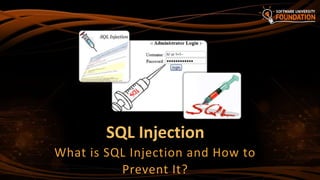
SQL Injection
What is SQL Injection and How to
Prevent It?
14
 Try the following queries:
 '  crashes
 '; INSERT INTO Messages(MessageText, MessageDate) VALUES
('Hacked!!!', '1.1.1980')  injects a message
What is SQL Injection?
protected void ButtonSearch_Click(object sender, EventArgs e)
{
string searchString = this.TextBoxSearch.Text;
string searchSql = "SELECT * FROM Messages WHERE
MessageText LIKE '%" + searchString + "%'";
MessagesDbContext dbContext = new MessagesDbContext();
var matchingMessages =
dbContext.Database.SqlQuery<Message>(searchSql).ToList();
this.ListViewMessages.DataSource = matchingMessages;
this.DataBind();
}
15
 The following SQL commands are executed:
 Usual search (no SQL injection):
 SQL-injected search (matches all records):
 SQL-injected INSERT command:
How Does
SQL Injection Work?
SELECT * FROM Messages WHERE MessageText LIKE '%atanassov%'"
SELECT * FROM Messages WHERE MessageText LIKE '%%%%'"
SELECT * FROM Messages WHERE MessageText
LIKE '%'; INSERT INTO Messages(MessageText, MessageDate)
VALUES ('Hacked!!!', '1.1.1980') --%'"
SELECT * FROM Messages WHERE MessageText LIKE '%' or 1=1 --%'"
16
 Original SQL Query:
 Setting username to Admin & password to ' OR '1'= '1 produces
 The result:
 If a user Admin exists – he is logged in without password
Another SQL Injection Example
String sqlQuery = SELECT * FROM user WHERE name =
'Admin' AND pass='' OR '1'='1'
String sqlQuery = "SELECT * FROM user WHERE name = '" +
username + "' AND pass='" + password + "'"
* Bonus content
17
 Username: radi
 Password: test
-> SELECT * FROM users WHERE name = ‘radi’ AND pass=‘test’
 Username: ‘ OR 1=1; /*
 Password: */ --
 -> SELECT * FROM users WHERE name=‘’ OR 1=1; /* ‘ AND pass=‘*/’
Another SQL Injection Example
18
 Ways to prevent the SQL injection:
 SQL-escape all data coming from the user:
 Not recommended: use as last resort only!
 Preferred approach:
 Use ORM (e.g. Entity Framework)
 Use parameterized queries
Preventing SQL Injection
string searchSql = @"SELECT * FROM Messages
WHERE MessageText LIKE {0} ESCAPE '~'";
string searchString = "%" +
TextBoxSearch.Text.Replace("~", "~~").Replace("%", "~%") + "%";
MessagesDbContext dbContext = new MessagesDbContext();
var matchingMessages = dbContext.Database.SqlQuery<Message>(searchSql, searchString);
19
 SqlDataAdapter myCommand = new SqlDataAdapter(
"SELECT au_lname, au_fname FROM Authors WHERE au_id =
@au_id", myConnection);
SqlParameter param =
myCommand.SelectCommand.Parameters.Add( "@au_id"
,SqlDbType.VarChar, 11);
param.Value = Login.Text;
SQL Query Parameters – ADO.NET
* Bonus content
Stored Procedures & ORM
ALTER PROCEDURE dbo.SearchWidgets
@SearchTerm VARCHAR(50)
AS BEGIN
DECLARE @query VARCHAR(100)
SET @query = 'SELECT Id, Name FROM dbo.Widget WHERE Name LIKE ''%'
+ @SearchTerm + '%'''
EXEC(@query)
END
20
var searchTerm = Request.QueryString["SearchTerm"];
var db = new WidgetEntities();
var widgets = db.SearchWidgets(searchTerm);
SELECT Id, Name FROM dbo.Widget WHERE Name LIKE '%Radi' or 1=1;--%'
* Bonus content from: http://www.troyhunt.com/2012/12/stored-procedures-and-orms-wont-save.html
21
 Encrypt your DB connection: https://technet.microsoft.com/en-
us/library/ms189067.aspx (Use SSL for connections to MS SQL
Server)
 Do not use username/password in your connection string!
-> use service accounts
-> use ApplicaitonPoolIdentity and give access to “IIS
APPPOOLAppPoolName”
 Run under a “least privilege” account
 Avoid query concatenation at almost all costs.
BONUS: SQL Security Hardening
* Bonus content
22
 sp_executesql vs. EXEC
 exec “string” – executes T-SQL string – not safe!
 sp_executesql allows parameterized statements – safer!
BONUS: SQL Security Hardening
* Bonus content
SQL Injection and Prevention
Live Demo
Cross Site Scripting (XSS)
What is XSS and How to Prevent It?
25
 Cross-site scripting (XSS) is a common security vulnerability in Web
applications
 Web application is let to display a JavaScript code that is executed at
the client's browser
 Crackers could take control over sessions, cookies, passwords, and other
private data
 How to prevent from XSS?
 Validate the user input (built-in in ASP.NET)
 Perform HTML escaping when displaying text data in a Web control
XSS Attack
26
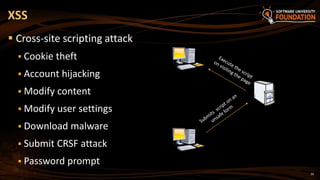
 Cross-site scripting attack
 Cookie theft
 Account hijacking
 Modify content
 Modify user settings
 Download malware
 Submit CRSF attack
 Password prompt
XSS
27
 ASP.NET applies automatic request validation
 Controlled by the ValidateRequest attribute of Page
directive
 Checks all input data against a hard-coded list of potentially
dangerous values
 The default is true
 Using it could harm the normal work on most applications
 E.g. a user posts JavaScript code in a forum
 Escaping is a better way to handle the problem
Automatic Request Validation
500 Internal Server Error: A potentially dangerous
Request.Form value was detected from the client (…)
28
 ASP.NET WebForms
 Disable the HTTP request validation for all pages in Web.config
(in <system.web>):
 ASP.NET MVC
 Using the ValidateInput filter we can disable validation for an
action or entire controller
Disable Request Validation
<httpRuntime requestValidationMode="2.0" />
<pages validateRequest="false" />
[ValidateInput(false)]
public ActionResult XssMvc(string someInput) { … }
29
 Database varchar (not nvarchar)
 ‘%uFF1C’ converted to angle bracket in DB (<)
 Aka “Smuggling”
Request Validation loophole
* Bonus content
30
 HTML escaping is the act of replacing special characters with
their HTML entities
 Escaped characters are interpreted as character data instead of
mark up
 Typical characters to escape
 <, > – start / end of HTML tag
 & – start of character entity reference
 ', " – text in single / double quotes
 …
What is HTML Escaping?
31
 Each character could be presented as HTML entity escaping sequence
 Numeric character references:
 'λ' is &#955;, &#x03BB; or &#X03bb;
 Named HTML entities:
 'λ' is &lambda;
 '<' is &lt;
 '>' is &gt;
 '&' is &amp;
 " (double quote) is &quot;
HTML Character Escaping
32
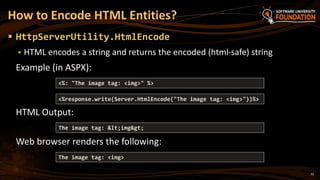
 HttpServerUtility.HtmlEncode
 HTML encodes a string and returns the encoded (html-safe) string
Example (in ASPX):
HTML Output:
Web browser renders the following:
How to Encode HTML Entities?
<%response.write(Server.HtmlEncode("The image tag: <img>"))%>
The image tag: &lt;img&gt;
The image tag: <img>
<%: "The image tag: <img>" %>
33
 The Razor template engine in ASP.NET MVC escapes everything
by default:
 To render un-escaped HTML in MVC view use:
Preventing XSS in ASP.NET MVC
@{ ViewBag.SomeText = "<script>alert('hi')</script>"; }
@ViewBag.SomeText
&lt;script&gt;alert(&#39;hi&#39;)&lt;/script&gt;
@{ ViewBag.SomeText = "<script>alert('hi')</script>"; }
@Html.Raw(ViewBag.SomeText)
<script>alert('hi')</script>
34
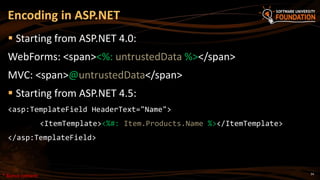
 Starting from ASP.NET 4.0:
WebForms: <span><%: untrustedData %></span>
MVC: <span>@untrustedData</span>
 Starting from ASP.NET 4.5:
<asp:TemplateField HeaderText="Name">
<ItemTemplate><%#: Item.Products.Name %></ItemTemplate>
</asp:TemplateField>
Encoding in ASP.NET
* Bonus content
35
 ASP.NET encoding methods use a black-listing technique
 White-list approach: use the Anti-Cross Site Scripting Library
from Microsoft
ASP.NET 4.5+ :
<httpRuntime encoderType="System.Web.Security.AntiXss.AntiXssEncoder" />
ASP.NET 4.0- :
<httpRuntime encoderType="Microsoft.Security.Application.AntiXssEncoder,
AntiXssLibrary" />
 Inherit HttpEncoder
Using AntiXSSEncoder
* Bonus content
All input is evil.
* Bonus content
* Bonus
content
XSS
 Example
<meta charset=utf-7>%2BADw-script%2BAD4-alert(1)%2BADw-%2Fscript%2BAD4-
<input type=hidden name=x
value=%26lt;script%26gt;alert(1)%26lt;/script%26gt;>
<button formaction=xss2.php style=width:100%25;height:100%25;font-
size:55pt;position:absolute>PWND</button>
38
* Bonus
content
HTML Escaping in Web Forms
and MVC Apps
Live Demo
Cross-Site Request Forgery
What is CSRF and How to Prevent It?
41
 Cross-Site Request Forgery (CSRF / XSRF) is a web security
attack over the HTTP protocol
 Allows executing unauthorized commands on behalf of some
authenticated user
 E.g. to transfer some money in a bank system
 The user has valid permissions to execute the requested
command
 The attacker uses these permissions to send a forged HTTP
request unbeknownst to the user
 Through a link / site / web form that the user is allured to open
What is CSRF?
42
 How does CSRF work?
1. The user has a valid authentication cookie for the site victim.org
(remembered in the browser)
2. The attacker asks the user to visit some evil site, e.g. http://evilsite.com
3. The evil site sends HTTP GET / POST to victim.org and does something
evil
 Through a JavaScript AJAX request
 Using the browser's authentication cookie
4. The victim.org performs the unauthorized command on behalf of the
authenticated user
CSRF Explained
43
 Cross-site request forgery attack
CSRF
Evil.com
MySite.com
User
Submit data on behalf of User
Cross-Site Request Forgery
Live Demo
45
One site refers scripts from another:
webapp.com site includes .JS from bankservice.com
User is authenticated on both with cookie
JSONP used to send data across domains
Hacker.com includes .JS from bankservice.com
User tricked to Hacker.com leads to user data leakage
BONUS: Cross Site Script Inclusion (XSSI)
* Bonus content
46
 To prevent CSRF attacks in MVC apps use
anti-forgery tokens (aka NONCE token)
 Put the anti-CSRF token in the HTML forms:
 Verify the anti-CSRF token in each controller action that should be
protected:
Prevent CSRF in ASP.NET MVC
@using (@Html.BeginForm("Action", "Controller"))
{
…
@Html.AntiForgeryToken()
}
[ValidateAntiForgeryToken]
public ActionResult Action(…)
{ … }
47
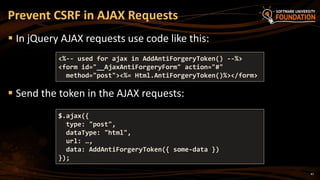
 In jQuery AJAX requests use code like this:
 Send the token in the AJAX requests:
Prevent CSRF in AJAX Requests
<%-- used for ajax in AddAntiForgeryToken() --%>
<form id="__AjaxAntiForgeryForm" action="#"
method="post"><%= Html.AntiForgeryToken()%></form>
$.ajax({
type: "post",
dataType: "html",
url: …,
data: AddAntiForgeryToken({ some-data })
});
48
 Http Header:
Content-Security-Policy: script-src 'self'
 Whitelist trusted locations for content
 Show errors when there are violations
 Supports variants:
script-src; style-src; frame-src; connect-src
 Growing browser support
Content Security Policy
* Bonus content
49
 Indicate if a browser should be allowed to render a page in a <frame>,
<iframe> or <object>
 DENY
 The page cannot be displayed in a frame, regardless of the site
attempting to do so.
 SAMEORIGIN
 The page can only be displayed in a frame on the same origin as the
page itself.
 ALLOW-FROM uri
 The page can only be displayed in a frame on the specified origin.
 Can prevent ClickJack attacks
The X-Frame-Options header
* Bonus content
The X-Frame-Options response header
 Web.config
<system.webServer>
...
<httpProtocol>
<customHeaders>
<add name="X-Frame-Options" value="SAMEORIGIN" />
</customHeaders>
</httpProtocol>
...
</system.webServer>
HttpContext.Current.Response.AddHeader("x-frame-options", "DENY");
50* Bonus content
Anti-CSRF in MVC Apps
Live Demo
52
 In Web Forms just add the following code in your Site.Master.cs:
 It changes the VIEWSTATE encryption key for all pages when there is a
logged-in user
 In the VS 2013 Web Forms app template, there is already CSRF
protection in Site.master.cs
Prevent CSRF in Web Forms
protected override void OnInit(EventArgs e) {
base.OnInit(e);
if (Page.User.Identity.IsAuthenticated)
{
Page.ViewStateUserKey = Session.SessionID;
}
}
Parameter Tampering
What is Parameter Tampering and
How to Prevent It?
54
 What is Parameter Tampering?
 Malicious user alters the HTTP request parameters in unexpected
way
 Altered query string (in GET requests)
 Altered request body (form fields in POST requests)
 Altered cookies (e.g. authentication cookie)
 Skipped data validation at the client-side
 Injected parameter in MVC apps
What is Parameter Tampering?
55
 URL is http://www.dumbsite.com/ShowUserProfile/666
 Changed to http://www.dumbsite.com/ShowUserProfile/667
667…N
Result: Information leakage.
Tampering example
* Bonus content
Parameter Tampering
Live Demo
57
 MVC is stateless – no real protection
 WebForms is much better – ViewState & Event Validation
 Looking at Request.UrlReferrer is not sufficient!
 Parameter encryption
 ([Bind(Include = "Name, Email, CommentText")] &
[Bind(Exclude)]
 Only real solution – validate if the user can retrieve or update
the data – [Authorize] is not enough!
Preventing Parameter Tampering
* Bonus content
Key learning:
There is no such thing as
Security Through Obscurity
(STO)
* Bonus content
Other security concepts in ASP.NET
60
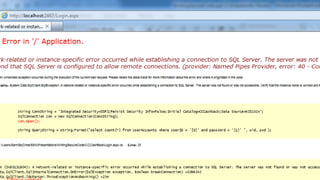
 Script injection when displaying the Page Not Found error
 Server details
Error message leaking
* Bonus content
61
* Bonus content
* Bonus content
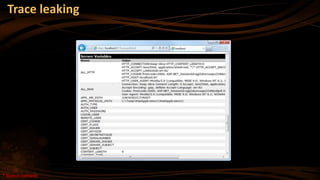
Trace leaking
* Bonus content
Error Logging Modules and Handlers…
 MUST secure ELMAH!
64
 Hosted on non-SSL site
 Accesses data and sends credentials
 Real life: Old Subway.bg site
Flash in ASP.NET
* Bonus content
JSON responses
 Don’t return DB objects
public JsonResult Search() /* Exposed to Hack */
{
/* I am passing whole 'Users' object */
return Json(new dbContext().Users);
}
public JsonResult Search() /* Secured */
{
/* I am passing required fields only, not whole object!! */
return Json(new dbContext().Users.Select(u => new{u.UserName, u.FullName}));
}
65
* Bonus content
66
 Don’t use :
 the “unsafe” keyword
 unsafe API’s, like the “Marshal” class unless you *really* know
what you are doing
 StructLayoutKind.Explicit
Buffer Overflow
* Bonus content
67
 Use cookies
 <forms protection="All" > (encryption and validation)
 Use SHA1 for HMAC Generation and AES for Encryption
 requireSSL="true“ httpOnlyCookies=”true”
 Do Not Persist Forms Authentication Cookies
 Use a Fixed Expiration and have it low
 Cross-subdomain attack!
 Use Distinct Cookie Names and Paths
 Now called ASP.NET Identity, across all frameworks
ASP.NET Forms Authentication
* Bonus content
68
 Semantic URL attacks
 URL Manipulation (Weev, AT&T)
 Man in the Middle (MiTM)
 Session Hijacking (easy if part of the URL)
 Always use SSL when sending sensitive data
 Never redirect to HTTPS
 Insufficient Access Control
 Error messages can reveal information
 Denial of Service (DoS and Ddos and Hash Dos)
 Brute force (use CAPTCHA!)
 Phishing
 Security flows in other software you are using
 Social Engineering
Other Threats
MitM - The importance of
HTTPS
Live Demo – Code from Troy Hunt
70
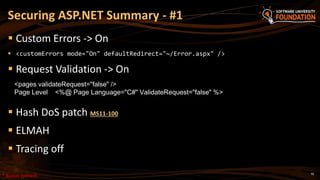
 Custom Errors -> On
 <customErrors mode="On" defaultRedirect="~/Error.aspx" />
 Request Validation -> On
 Hash DoS patch MS11-100
 ELMAH
 Tracing off
Securing ASP.NET Summary - #1
<pages validateRequest="false" />
Page Level <%@ Page Language="C#" ValidateRequest="false" %>
* Bonus content
71
 Constrain All Input (whitelist)
 Encode All HTML Output
 Encode All URL Output
 Validate Unicode Characters
 Verify HTML Output that Includes Input Parameters
 HTTPS only!
 Remove the version header - MvcHandler.DisableMvcResponseHeader = true;
 Remove the version header - HttpContext.Current.Response.Headers.Remove("Server");
 Decorate with PrincipalPermission to prevent unrestricted URL access
Securing ASP.NET Summary - #2
* Bonus content
72
 Use IsLocalUrl() on login pages
FormsService.SignIn(model.UserName, model.RememberMe);
if (IsLocalUrl(returnUrl)) {
 Use the AntiForgeryToken on every form post to prevent CSRF
attacks
 Use ValidateAntiForgeryToken on Controllers
[ValidateAntiForgeryToken] public ViewResult Update()
 Validate access to retrieved or edited data
Securing ASP.NET Summary - #3
* Bonus content
73
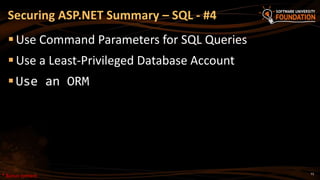
Use Command Parameters for SQL Queries
Use a Least-Privileged Database Account
Use an ORM
Securing ASP.NET Summary – SQL - #4
* Bonus content
74
 patterns & practices Security Guidance for Applications Index
(https://msdn.microsoft.com/en-us/library/ff650760.aspx )
 XSRF/CSRF Prevention in ASP.NET MVC and Web Pages
(http://www.asp.net/mvc/overview/security/xsrfcsrf-
prevention-in-aspnet-mvc-and-web-pages )
 Security Considerations (Entity Framework)
https://msdn.microsoft.com/en-
us/library/vstudio/cc716760(v=vs.110).aspx
Reading #1
* Bonus content
75
 OWASP .NET Project
(https://www.owasp.org/index.php/Category:OWASP_.NET_Pro
ject )
 ASP.NET Web Application Security
(https://msdn.microsoft.com/en-
us/library/330a99hc(v=vs.100).aspx )
Reading #2
* Bonus content
Part 2 
Server-Side Protection
* Bonus content
77
 Contains lots of sensitive info
 Connection Strings
 Never use clear text passwords
 OAuth: ClientID & ClientSecret
 Payment gateway secrets
Web.Config
* Bonus content
78
 Never store clear text passwords anywhere
 ASP.NET Forms Authentication database should be safe, uses
Salt + Hash
 Least-privilege SQL permissions
Password Storage and Databases
79
 DLL files
 Can be reflected
 Can be replaced!
 Signing of assemblies
Assemblies
* Bonus content
80
 ASP.NET Web pages and code files are compiled dynamically
 Stored in
%SystemRoot%Microsoft.NETFrameworkversionTemporary
ASP.NET Files folder
 Can modify code at any point in time
No precompilation
* Bonus content
81
 Faster response time for users, because pages and code files do
not have to be compiled the first time that they are requested.
This is especially useful on large sites that are frequently
updated.
 A means to identify compile-time bugs before users see a site.
 The ability to create a compiled version of the site that can be
deployed to a production server without source code.
 Stored in BIN folder
 Still a risk!
Precompilation
* Bonus content
82
 Not precompiled by default
 Can be with <MvcBuildViews>true</MvcBuildViews> in .csproj
file
 ASP.NET 5 and MVC 6 have the RazorPreCompileModule
Razor Views
* Bonus content
83
 Central location for assemblies
 Must be signed (good thing!)
 .NET 4.0+ : %windir%Microsoft.NETassembly
 .NET 4.0- : %windir%assembly
 Trickier to install, needs privileges
 Use gacutil.exe
 You are already using it!
 Need to use fully qualified assembly name:
System.Data.SqlClient.SqlConnection, System.Data,
Version=1.0.3300.0, Culture=neutral,
PublicKeyToken=b77a5c561934e089
Global Assembly Cache
* Bonus content
84
 A “token” used to make the fully qualified assembly name
unique
 A hash is generated from the important parts of an assembly
 A signature private key is used to encrypt the hash
 The signed hash is stored in the assembly with the public key
 The public key will decrypt the signed hash
 The CLR will generate a new hash and compare with the
decrypted hash
Public Key Token
* Bonus content
Quick Assembly Demo
* Bonus content
86
 Directory listing
 File system ACL’s
 Remove headers
 Certificate management
 Avoid HTTP to HTTPS redirect ***
 HTTP Verb rules
 Allowed files
 Remove unnecessary modules and handlers
 Avoid basic authentication for web services
Protecting IIS
* Bonus content
87
 Authentication protocols
 Basic, Digest, NTLM, Kerberos, Certificate Auth
 Claims, SAML, OAuth, OpenID Connect
 Active Directory and Azure Active Directory
 Service accounts, credential storage and least privilege
 Hashing & encryption
 Edge firewalls, perimeter networks and DMZ
 TLS/SSL/IPSEC
So much more in Enterprise…
* Bonus content
88
 Data security and leakage
 Automated hardening during deployment
 Load-balancing and state management
 Active Directory and Azure Active Directory
 Intra-Farm Communication
 SQL TDE
 STRIDE & DREAD concepts
So MUCH more in Enterprise…
* Bonus content
?
ASP.NET MVC
https://softuni.bg/courses/asp-net-mvc/
License
 This course (slides, examples, demos, videos, homework, etc.)
is licensed under the "Creative Commons Attribution-NonCommercial-ShareAlike
4.0 International" license
 Heavily modified by Radi Atanassov
90
 Attribution: this work may contain portions from
 "ASP.NET MVC" course by Telerik Academy under CC-BY-NC-SA license
Free Trainings @ Software University
 Software University Foundation – softuni.org
 Software University – High-Quality Education,
Profession and Job for Software Developers
 softuni.bg
 Software University @ Facebook
 facebook.com/SoftwareUniversity
 Software University @ YouTube
 youtube.com/SoftwareUniversity
 Software University Forums – forum.softuni.bg

ASP.NET Web Security

  • 1.
    Web Security SQL Injection,XSS, CSRF, Parameter Tampering, DoS Attacks, Session Hijacking SoftUni Team Radi Atanassov Software University http://softuni.bg
  • 2.
    C:usersradi>whoami Radi Atanassov Microsoft CertifiedMaster: SharePoint 2010 Microsoft Certified Solutions Master Microsoft MVP - SharePoint Microsoft Certified Trainer Owner - OneBit Software Web Platform User Group Lead Certified Scrum Master Microsoft Office Dev PnP Core Team & P-TSP
  • 3.
    3  Web SecurityMain Concepts  Main Security Problems with Examples  SQL Injection  Cross Site Scripting (XSS)  Cross-Site Request Forgery (CSRF)  Parameter Tampering  Other Threats  Server-Side Protection Table of Contents
  • 4.
  • 5.
    5 Security Triangle Security Ease ofUseFeatures * Bonus content
  • 6.
    6  Is SoftwareSecurity a Feature?  Most people consider software security as a necessary feature of a product  Is Security Vulnerability a Bug?  If the software "failed" and allowed a hacker to see personal info, most users would consider that a software bug Feature or Bug
  • 7.
    7  Not enoughtime or money  No quality over development  Lack of penetration testing in the industry  Redundant solutions are expensive  Software failures usually happen spontaneously  Without intentional mischief  Failures can be result of malicious attacks  For the Challenge/Prestige  Curiosity driven  Aiming to use resources  Vandalizing  Stealing Reasons for Failures
  • 8.
    8 * Bonus content KeepCalm You Will Be Hacked
  • 9.
    9  We usea secure hosting provider  We are not a bank  We are too busy and don’t have time  We are too small  We are using a stable platform like Java, PHP, ASP.NET Real-Life Excuses * Bonus content
  • 10.
    10  Maximum Simplicity More complicated – greater chance for mistakes  Secure the Weakest Link  Hackers attack where the weakest link is  Limit the Publicly Available Resources  Incorrect Until Proven Correct  Consider each user input as incorrect  The Principle of the "Weakest Privilege"  Security in Errors (Remain stable)  Provide Constant Defense (also use backups) Golden Rules!
  • 11.
    11  The OpenWeb Application Security Project (OWASP) is a not- for-profit org. focused on improving the security of software, make software security visible, so that individuals and organizations worldwide can make informed decisions about true software security risks. https://www.owasp.org * Bonus content
  • 12.
    12  Injection  BrokenAuthentication and Session Management  Cross-Site Scripting (XSS)  Insecure Direct Object References  Security Misconfiguration  Sensitive Data Exposure  Missing Function Level Access Control  Cross-Site Request Forgery (CSRF)  Using Components with Known Vulnerabilities  Unvalidated Redirects and Forwards Top 10 Web Security Vulnerabilities * Bonus content
  • 13.
    SQL Injection What isSQL Injection and How to Prevent It?
  • 14.
    14  Try thefollowing queries:  '  crashes  '; INSERT INTO Messages(MessageText, MessageDate) VALUES ('Hacked!!!', '1.1.1980')  injects a message What is SQL Injection? protected void ButtonSearch_Click(object sender, EventArgs e) { string searchString = this.TextBoxSearch.Text; string searchSql = "SELECT * FROM Messages WHERE MessageText LIKE '%" + searchString + "%'"; MessagesDbContext dbContext = new MessagesDbContext(); var matchingMessages = dbContext.Database.SqlQuery<Message>(searchSql).ToList(); this.ListViewMessages.DataSource = matchingMessages; this.DataBind(); }
  • 15.
    15  The followingSQL commands are executed:  Usual search (no SQL injection):  SQL-injected search (matches all records):  SQL-injected INSERT command: How Does SQL Injection Work? SELECT * FROM Messages WHERE MessageText LIKE '%atanassov%'" SELECT * FROM Messages WHERE MessageText LIKE '%%%%'" SELECT * FROM Messages WHERE MessageText LIKE '%'; INSERT INTO Messages(MessageText, MessageDate) VALUES ('Hacked!!!', '1.1.1980') --%'" SELECT * FROM Messages WHERE MessageText LIKE '%' or 1=1 --%'"
  • 16.
    16  Original SQLQuery:  Setting username to Admin & password to ' OR '1'= '1 produces  The result:  If a user Admin exists – he is logged in without password Another SQL Injection Example String sqlQuery = SELECT * FROM user WHERE name = 'Admin' AND pass='' OR '1'='1' String sqlQuery = "SELECT * FROM user WHERE name = '" + username + "' AND pass='" + password + "'" * Bonus content
  • 17.
    17  Username: radi Password: test -> SELECT * FROM users WHERE name = ‘radi’ AND pass=‘test’  Username: ‘ OR 1=1; /*  Password: */ --  -> SELECT * FROM users WHERE name=‘’ OR 1=1; /* ‘ AND pass=‘*/’ Another SQL Injection Example
  • 18.
    18  Ways toprevent the SQL injection:  SQL-escape all data coming from the user:  Not recommended: use as last resort only!  Preferred approach:  Use ORM (e.g. Entity Framework)  Use parameterized queries Preventing SQL Injection string searchSql = @"SELECT * FROM Messages WHERE MessageText LIKE {0} ESCAPE '~'"; string searchString = "%" + TextBoxSearch.Text.Replace("~", "~~").Replace("%", "~%") + "%"; MessagesDbContext dbContext = new MessagesDbContext(); var matchingMessages = dbContext.Database.SqlQuery<Message>(searchSql, searchString);
  • 19.
    19  SqlDataAdapter myCommand= new SqlDataAdapter( "SELECT au_lname, au_fname FROM Authors WHERE au_id = @au_id", myConnection); SqlParameter param = myCommand.SelectCommand.Parameters.Add( "@au_id" ,SqlDbType.VarChar, 11); param.Value = Login.Text; SQL Query Parameters – ADO.NET * Bonus content
  • 20.
    Stored Procedures &ORM ALTER PROCEDURE dbo.SearchWidgets @SearchTerm VARCHAR(50) AS BEGIN DECLARE @query VARCHAR(100) SET @query = 'SELECT Id, Name FROM dbo.Widget WHERE Name LIKE ''%' + @SearchTerm + '%''' EXEC(@query) END 20 var searchTerm = Request.QueryString["SearchTerm"]; var db = new WidgetEntities(); var widgets = db.SearchWidgets(searchTerm); SELECT Id, Name FROM dbo.Widget WHERE Name LIKE '%Radi' or 1=1;--%' * Bonus content from: http://www.troyhunt.com/2012/12/stored-procedures-and-orms-wont-save.html
  • 21.
    21  Encrypt yourDB connection: https://technet.microsoft.com/en- us/library/ms189067.aspx (Use SSL for connections to MS SQL Server)  Do not use username/password in your connection string! -> use service accounts -> use ApplicaitonPoolIdentity and give access to “IIS APPPOOLAppPoolName”  Run under a “least privilege” account  Avoid query concatenation at almost all costs. BONUS: SQL Security Hardening * Bonus content
  • 22.
    22  sp_executesql vs.EXEC  exec “string” – executes T-SQL string – not safe!  sp_executesql allows parameterized statements – safer! BONUS: SQL Security Hardening * Bonus content
  • 23.
    SQL Injection andPrevention Live Demo
  • 24.
    Cross Site Scripting(XSS) What is XSS and How to Prevent It?
  • 25.
    25  Cross-site scripting(XSS) is a common security vulnerability in Web applications  Web application is let to display a JavaScript code that is executed at the client's browser  Crackers could take control over sessions, cookies, passwords, and other private data  How to prevent from XSS?  Validate the user input (built-in in ASP.NET)  Perform HTML escaping when displaying text data in a Web control XSS Attack
  • 26.
    26  Cross-site scriptingattack  Cookie theft  Account hijacking  Modify content  Modify user settings  Download malware  Submit CRSF attack  Password prompt XSS
  • 27.
    27  ASP.NET appliesautomatic request validation  Controlled by the ValidateRequest attribute of Page directive  Checks all input data against a hard-coded list of potentially dangerous values  The default is true  Using it could harm the normal work on most applications  E.g. a user posts JavaScript code in a forum  Escaping is a better way to handle the problem Automatic Request Validation 500 Internal Server Error: A potentially dangerous Request.Form value was detected from the client (…)
  • 28.
    28  ASP.NET WebForms Disable the HTTP request validation for all pages in Web.config (in <system.web>):  ASP.NET MVC  Using the ValidateInput filter we can disable validation for an action or entire controller Disable Request Validation <httpRuntime requestValidationMode="2.0" /> <pages validateRequest="false" /> [ValidateInput(false)] public ActionResult XssMvc(string someInput) { … }
  • 29.
    29  Database varchar(not nvarchar)  ‘%uFF1C’ converted to angle bracket in DB (<)  Aka “Smuggling” Request Validation loophole * Bonus content
  • 30.
    30  HTML escapingis the act of replacing special characters with their HTML entities  Escaped characters are interpreted as character data instead of mark up  Typical characters to escape  <, > – start / end of HTML tag  & – start of character entity reference  ', " – text in single / double quotes  … What is HTML Escaping?
  • 31.
    31  Each charactercould be presented as HTML entity escaping sequence  Numeric character references:  'λ' is &#955;, &#x03BB; or &#X03bb;  Named HTML entities:  'λ' is &lambda;  '<' is &lt;  '>' is &gt;  '&' is &amp;  " (double quote) is &quot; HTML Character Escaping
  • 32.
    32  HttpServerUtility.HtmlEncode  HTMLencodes a string and returns the encoded (html-safe) string Example (in ASPX): HTML Output: Web browser renders the following: How to Encode HTML Entities? <%response.write(Server.HtmlEncode("The image tag: <img>"))%> The image tag: &lt;img&gt; The image tag: <img> <%: "The image tag: <img>" %>
  • 33.
    33  The Razortemplate engine in ASP.NET MVC escapes everything by default:  To render un-escaped HTML in MVC view use: Preventing XSS in ASP.NET MVC @{ ViewBag.SomeText = "<script>alert('hi')</script>"; } @ViewBag.SomeText &lt;script&gt;alert(&#39;hi&#39;)&lt;/script&gt; @{ ViewBag.SomeText = "<script>alert('hi')</script>"; } @Html.Raw(ViewBag.SomeText) <script>alert('hi')</script>
  • 34.
    34  Starting fromASP.NET 4.0: WebForms: <span><%: untrustedData %></span> MVC: <span>@untrustedData</span>  Starting from ASP.NET 4.5: <asp:TemplateField HeaderText="Name"> <ItemTemplate><%#: Item.Products.Name %></ItemTemplate> </asp:TemplateField> Encoding in ASP.NET * Bonus content
  • 35.
    35  ASP.NET encodingmethods use a black-listing technique  White-list approach: use the Anti-Cross Site Scripting Library from Microsoft ASP.NET 4.5+ : <httpRuntime encoderType="System.Web.Security.AntiXss.AntiXssEncoder" /> ASP.NET 4.0- : <httpRuntime encoderType="Microsoft.Security.Application.AntiXssEncoder, AntiXssLibrary" />  Inherit HttpEncoder Using AntiXSSEncoder * Bonus content
  • 36.
    All input isevil. * Bonus content
  • 37.
  • 38.
    XSS  Example <meta charset=utf-7>%2BADw-script%2BAD4-alert(1)%2BADw-%2Fscript%2BAD4- <inputtype=hidden name=x value=%26lt;script%26gt;alert(1)%26lt;/script%26gt;> <button formaction=xss2.php style=width:100%25;height:100%25;font- size:55pt;position:absolute>PWND</button> 38 * Bonus content
  • 39.
    HTML Escaping inWeb Forms and MVC Apps Live Demo
  • 40.
    Cross-Site Request Forgery Whatis CSRF and How to Prevent It?
  • 41.
    41  Cross-Site RequestForgery (CSRF / XSRF) is a web security attack over the HTTP protocol  Allows executing unauthorized commands on behalf of some authenticated user  E.g. to transfer some money in a bank system  The user has valid permissions to execute the requested command  The attacker uses these permissions to send a forged HTTP request unbeknownst to the user  Through a link / site / web form that the user is allured to open What is CSRF?
  • 42.
    42  How doesCSRF work? 1. The user has a valid authentication cookie for the site victim.org (remembered in the browser) 2. The attacker asks the user to visit some evil site, e.g. http://evilsite.com 3. The evil site sends HTTP GET / POST to victim.org and does something evil  Through a JavaScript AJAX request  Using the browser's authentication cookie 4. The victim.org performs the unauthorized command on behalf of the authenticated user CSRF Explained
  • 43.
    43  Cross-site requestforgery attack CSRF Evil.com MySite.com User Submit data on behalf of User
  • 44.
  • 45.
    45 One site refersscripts from another: webapp.com site includes .JS from bankservice.com User is authenticated on both with cookie JSONP used to send data across domains Hacker.com includes .JS from bankservice.com User tricked to Hacker.com leads to user data leakage BONUS: Cross Site Script Inclusion (XSSI) * Bonus content
  • 46.
    46  To preventCSRF attacks in MVC apps use anti-forgery tokens (aka NONCE token)  Put the anti-CSRF token in the HTML forms:  Verify the anti-CSRF token in each controller action that should be protected: Prevent CSRF in ASP.NET MVC @using (@Html.BeginForm("Action", "Controller")) { … @Html.AntiForgeryToken() } [ValidateAntiForgeryToken] public ActionResult Action(…) { … }
  • 47.
    47  In jQueryAJAX requests use code like this:  Send the token in the AJAX requests: Prevent CSRF in AJAX Requests <%-- used for ajax in AddAntiForgeryToken() --%> <form id="__AjaxAntiForgeryForm" action="#" method="post"><%= Html.AntiForgeryToken()%></form> $.ajax({ type: "post", dataType: "html", url: …, data: AddAntiForgeryToken({ some-data }) });
  • 48.
    48  Http Header: Content-Security-Policy:script-src 'self'  Whitelist trusted locations for content  Show errors when there are violations  Supports variants: script-src; style-src; frame-src; connect-src  Growing browser support Content Security Policy * Bonus content
  • 49.
    49  Indicate ifa browser should be allowed to render a page in a <frame>, <iframe> or <object>  DENY  The page cannot be displayed in a frame, regardless of the site attempting to do so.  SAMEORIGIN  The page can only be displayed in a frame on the same origin as the page itself.  ALLOW-FROM uri  The page can only be displayed in a frame on the specified origin.  Can prevent ClickJack attacks The X-Frame-Options header * Bonus content
  • 50.
    The X-Frame-Options responseheader  Web.config <system.webServer> ... <httpProtocol> <customHeaders> <add name="X-Frame-Options" value="SAMEORIGIN" /> </customHeaders> </httpProtocol> ... </system.webServer> HttpContext.Current.Response.AddHeader("x-frame-options", "DENY"); 50* Bonus content
  • 51.
    Anti-CSRF in MVCApps Live Demo
  • 52.
    52  In WebForms just add the following code in your Site.Master.cs:  It changes the VIEWSTATE encryption key for all pages when there is a logged-in user  In the VS 2013 Web Forms app template, there is already CSRF protection in Site.master.cs Prevent CSRF in Web Forms protected override void OnInit(EventArgs e) { base.OnInit(e); if (Page.User.Identity.IsAuthenticated) { Page.ViewStateUserKey = Session.SessionID; } }
  • 53.
    Parameter Tampering What isParameter Tampering and How to Prevent It?
  • 54.
    54  What isParameter Tampering?  Malicious user alters the HTTP request parameters in unexpected way  Altered query string (in GET requests)  Altered request body (form fields in POST requests)  Altered cookies (e.g. authentication cookie)  Skipped data validation at the client-side  Injected parameter in MVC apps What is Parameter Tampering?
  • 55.
    55  URL ishttp://www.dumbsite.com/ShowUserProfile/666  Changed to http://www.dumbsite.com/ShowUserProfile/667 667…N Result: Information leakage. Tampering example * Bonus content
  • 56.
  • 57.
    57  MVC isstateless – no real protection  WebForms is much better – ViewState & Event Validation  Looking at Request.UrlReferrer is not sufficient!  Parameter encryption  ([Bind(Include = "Name, Email, CommentText")] & [Bind(Exclude)]  Only real solution – validate if the user can retrieve or update the data – [Authorize] is not enough! Preventing Parameter Tampering * Bonus content
  • 58.
    Key learning: There isno such thing as Security Through Obscurity (STO) * Bonus content
  • 59.
  • 60.
    60  Script injectionwhen displaying the Page Not Found error  Server details Error message leaking * Bonus content
  • 61.
  • 62.
  • 63.
    * Bonus content ErrorLogging Modules and Handlers…  MUST secure ELMAH!
  • 64.
    64  Hosted onnon-SSL site  Accesses data and sends credentials  Real life: Old Subway.bg site Flash in ASP.NET * Bonus content
  • 65.
    JSON responses  Don’treturn DB objects public JsonResult Search() /* Exposed to Hack */ { /* I am passing whole 'Users' object */ return Json(new dbContext().Users); } public JsonResult Search() /* Secured */ { /* I am passing required fields only, not whole object!! */ return Json(new dbContext().Users.Select(u => new{u.UserName, u.FullName})); } 65 * Bonus content
  • 66.
    66  Don’t use:  the “unsafe” keyword  unsafe API’s, like the “Marshal” class unless you *really* know what you are doing  StructLayoutKind.Explicit Buffer Overflow * Bonus content
  • 67.
    67  Use cookies <forms protection="All" > (encryption and validation)  Use SHA1 for HMAC Generation and AES for Encryption  requireSSL="true“ httpOnlyCookies=”true”  Do Not Persist Forms Authentication Cookies  Use a Fixed Expiration and have it low  Cross-subdomain attack!  Use Distinct Cookie Names and Paths  Now called ASP.NET Identity, across all frameworks ASP.NET Forms Authentication * Bonus content
  • 68.
    68  Semantic URLattacks  URL Manipulation (Weev, AT&T)  Man in the Middle (MiTM)  Session Hijacking (easy if part of the URL)  Always use SSL when sending sensitive data  Never redirect to HTTPS  Insufficient Access Control  Error messages can reveal information  Denial of Service (DoS and Ddos and Hash Dos)  Brute force (use CAPTCHA!)  Phishing  Security flows in other software you are using  Social Engineering Other Threats
  • 69.
    MitM - Theimportance of HTTPS Live Demo – Code from Troy Hunt
  • 70.
    70  Custom Errors-> On  <customErrors mode="On" defaultRedirect="~/Error.aspx" />  Request Validation -> On  Hash DoS patch MS11-100  ELMAH  Tracing off Securing ASP.NET Summary - #1 <pages validateRequest="false" /> Page Level <%@ Page Language="C#" ValidateRequest="false" %> * Bonus content
  • 71.
    71  Constrain AllInput (whitelist)  Encode All HTML Output  Encode All URL Output  Validate Unicode Characters  Verify HTML Output that Includes Input Parameters  HTTPS only!  Remove the version header - MvcHandler.DisableMvcResponseHeader = true;  Remove the version header - HttpContext.Current.Response.Headers.Remove("Server");  Decorate with PrincipalPermission to prevent unrestricted URL access Securing ASP.NET Summary - #2 * Bonus content
  • 72.
    72  Use IsLocalUrl()on login pages FormsService.SignIn(model.UserName, model.RememberMe); if (IsLocalUrl(returnUrl)) {  Use the AntiForgeryToken on every form post to prevent CSRF attacks  Use ValidateAntiForgeryToken on Controllers [ValidateAntiForgeryToken] public ViewResult Update()  Validate access to retrieved or edited data Securing ASP.NET Summary - #3 * Bonus content
  • 73.
    73 Use Command Parametersfor SQL Queries Use a Least-Privileged Database Account Use an ORM Securing ASP.NET Summary – SQL - #4 * Bonus content
  • 74.
    74  patterns &practices Security Guidance for Applications Index (https://msdn.microsoft.com/en-us/library/ff650760.aspx )  XSRF/CSRF Prevention in ASP.NET MVC and Web Pages (http://www.asp.net/mvc/overview/security/xsrfcsrf- prevention-in-aspnet-mvc-and-web-pages )  Security Considerations (Entity Framework) https://msdn.microsoft.com/en- us/library/vstudio/cc716760(v=vs.110).aspx Reading #1 * Bonus content
  • 75.
    75  OWASP .NETProject (https://www.owasp.org/index.php/Category:OWASP_.NET_Pro ject )  ASP.NET Web Application Security (https://msdn.microsoft.com/en- us/library/330a99hc(v=vs.100).aspx ) Reading #2 * Bonus content
  • 76.
    Part 2  Server-SideProtection * Bonus content
  • 77.
    77  Contains lotsof sensitive info  Connection Strings  Never use clear text passwords  OAuth: ClientID & ClientSecret  Payment gateway secrets Web.Config * Bonus content
  • 78.
    78  Never storeclear text passwords anywhere  ASP.NET Forms Authentication database should be safe, uses Salt + Hash  Least-privilege SQL permissions Password Storage and Databases
  • 79.
    79  DLL files Can be reflected  Can be replaced!  Signing of assemblies Assemblies * Bonus content
  • 80.
    80  ASP.NET Webpages and code files are compiled dynamically  Stored in %SystemRoot%Microsoft.NETFrameworkversionTemporary ASP.NET Files folder  Can modify code at any point in time No precompilation * Bonus content
  • 81.
    81  Faster responsetime for users, because pages and code files do not have to be compiled the first time that they are requested. This is especially useful on large sites that are frequently updated.  A means to identify compile-time bugs before users see a site.  The ability to create a compiled version of the site that can be deployed to a production server without source code.  Stored in BIN folder  Still a risk! Precompilation * Bonus content
  • 82.
    82  Not precompiledby default  Can be with <MvcBuildViews>true</MvcBuildViews> in .csproj file  ASP.NET 5 and MVC 6 have the RazorPreCompileModule Razor Views * Bonus content
  • 83.
    83  Central locationfor assemblies  Must be signed (good thing!)  .NET 4.0+ : %windir%Microsoft.NETassembly  .NET 4.0- : %windir%assembly  Trickier to install, needs privileges  Use gacutil.exe  You are already using it!  Need to use fully qualified assembly name: System.Data.SqlClient.SqlConnection, System.Data, Version=1.0.3300.0, Culture=neutral, PublicKeyToken=b77a5c561934e089 Global Assembly Cache * Bonus content
  • 84.
    84  A “token”used to make the fully qualified assembly name unique  A hash is generated from the important parts of an assembly  A signature private key is used to encrypt the hash  The signed hash is stored in the assembly with the public key  The public key will decrypt the signed hash  The CLR will generate a new hash and compare with the decrypted hash Public Key Token * Bonus content
  • 85.
    Quick Assembly Demo *Bonus content
  • 86.
    86  Directory listing File system ACL’s  Remove headers  Certificate management  Avoid HTTP to HTTPS redirect ***  HTTP Verb rules  Allowed files  Remove unnecessary modules and handlers  Avoid basic authentication for web services Protecting IIS * Bonus content
  • 87.
    87  Authentication protocols Basic, Digest, NTLM, Kerberos, Certificate Auth  Claims, SAML, OAuth, OpenID Connect  Active Directory and Azure Active Directory  Service accounts, credential storage and least privilege  Hashing & encryption  Edge firewalls, perimeter networks and DMZ  TLS/SSL/IPSEC So much more in Enterprise… * Bonus content
  • 88.
    88  Data securityand leakage  Automated hardening during deployment  Load-balancing and state management  Active Directory and Azure Active Directory  Intra-Farm Communication  SQL TDE  STRIDE & DREAD concepts So MUCH more in Enterprise… * Bonus content
  • 89.
  • 90.
    License  This course(slides, examples, demos, videos, homework, etc.) is licensed under the "Creative Commons Attribution-NonCommercial-ShareAlike 4.0 International" license  Heavily modified by Radi Atanassov 90  Attribution: this work may contain portions from  "ASP.NET MVC" course by Telerik Academy under CC-BY-NC-SA license
  • 91.
    Free Trainings @Software University  Software University Foundation – softuni.org  Software University – High-Quality Education, Profession and Job for Software Developers  softuni.bg  Software University @ Facebook  facebook.com/SoftwareUniversity  Software University @ YouTube  youtube.com/SoftwareUniversity  Software University Forums – forum.softuni.bg

Editor's Notes

  • #4 (c) 2008 National Academy for Software Development - http://academy.devbg.org. All rights reserved. Unauthorized copying or re-distribution is strictly prohibited.*
  • #7 Advanced Software Testing Vol. 1
  • #8 Software Security Testing, Gary McGraw + Software Testing, Ron Patton
  • #40 5/23/201507/16/96