ASLP2 - Agriculture Sector Linkages Program in Pakistan (Phase 2) Applying ICTs for communication, collaboration and development through participatory design and engagement Professor Rob Fitzgerald, PhD Director, INSPIRE Centre for ICT Pedagogy and Practice Senior Research Scientist, Australian Institute for Sustainable Communities, University of Canberra Presentation to the Citrus Research Team, Dareton Agricultural and Research Station, Riverina, NSW, 10 May 2011
Overview Objectives of the social research team Towards an ICT social ecology (Wordpress and Google Apps working together) Details of the aslp2.org ecology Generating digital data from your field work that can be used in aslp2.org
Social research objectives To engage the poor and marginalized groups that can potentially benefit from participating in the selected value chains of ASLP2 (Sandra) To enhance collaboration across project teams (Barbara) To  assess and enhance  information and communication  modalities  and  technologies  for  collaboration and value chain enhancement  (Rob) To foster effective collaborative development in rural Pakistan (John)
Social research objectives To  engage   the poor and marginalized groups  that can potentially benefit from  participating  in the selected value chains of ASLP2 (Sandra) To  enhance collaboration  across project teams (Barbara) To  assess and enhance  information and communication modalities and technologies for  collaboration  and  value chain enhancement  (Rob) To  foster  effective  collaborative  development in rural Pakistan (John)
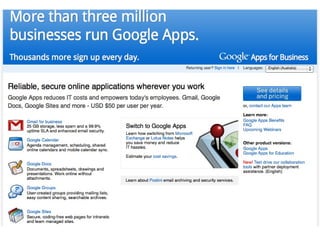
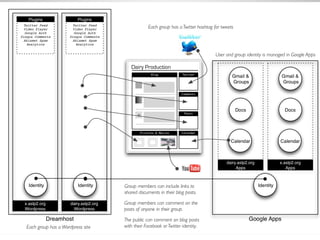
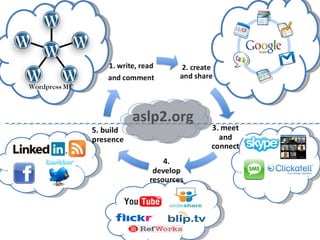
The proposed ASLP2 social ecology The ASLP2 social ecology is made up of social networking and group collaboration services presented in a consistent way The ecology complements your existing ICT systems – an invitation to participate; a layered approach The aim is to provide a secure, easily manageable environment that meets the needs of the participants now, and is expandable with other services in the future Participants use these apps in conjunction with social networking tools provided by an instance of  Wordpress Multi-Site The core applications that participants use are provided by  Google Apps . These include email ( Gmail ), mailing lists ( Groups ), rich document creation ( Docs ) and shared schedules ( Calendar )
 
 
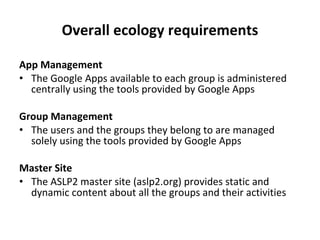
Overall ecology requirements App Management The Google Apps available to each group is administered centrally using the tools provided by Google Apps Group Management The users and the groups they belong to are managed solely using the tools provided by Google Apps Master Site The ASLP2 master site (aslp2.org) provides static and dynamic content about all the groups and their activities
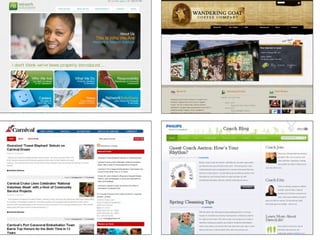
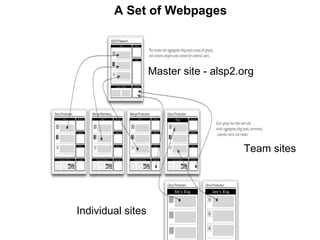
A Set of Webpages Master site - alsp2.org Team sites Individual sites
A set of related sites http://www.aslp2.org http://citrus.aslp2.org http://dairy.aslp2.org http://mangovc.aslp2.org http://mangoprod.aslp2.org http://social.aslp2.org
 
aslp2.org Wordpress MU
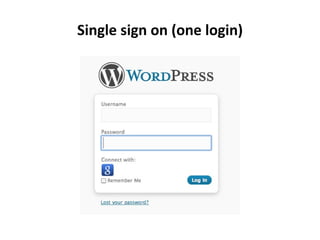
Single sign on (one login)
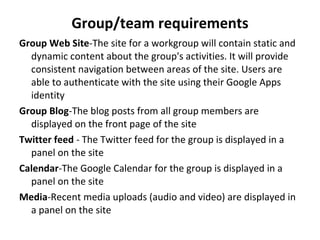
Group/team requirements Group Web Site - The site for a workgroup will contain static and dynamic content about the group's activities. It will provide consistent navigation between areas of the site. Users are able to authenticate with the site using their Google Apps identity Group Blog - The blog posts from all group members are displayed on the front page of the site Twitter feed  -  The Twitter feed for the group is displayed in a panel on the site Calendar - The Google Calendar for the group is displayed in a panel on the site Media - Recent media uploads (audio and video) are displayed in a panel on the site
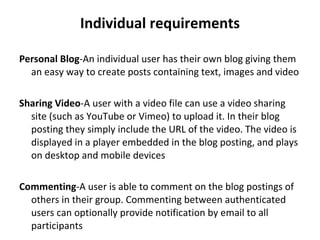
Individual requirements Personal Blog - An individual user has their own blog giving them an easy way to create posts containing text, images and video Sharing Video - A user with a video file can use a video sharing site (such as YouTube or Vimeo) to upload it. In their blog posting they simply include the URL of the video. The video is displayed in a player embedded in the blog posting, and plays on desktop and mobile devices Commenting - A user is able to comment on the blog postings of others in their group. Commenting between authenticated users can optionally provide notification by email to all participants
Future requirements The software and services form a platform on which additional social services can be implemented as they become available  In the future we consider the integration of web conferencing (skype, video conferencing), SMS messaging and location services We will conduct an evaluation of each technology and an analysis of how best to build it on this platform
Generating digital data from your field work Maintain a diary/journal, log field notes, tell a story, make a sketch, report an event, take a video, produce a mini-documentary, ask the people (vox pop) or create a photo essay
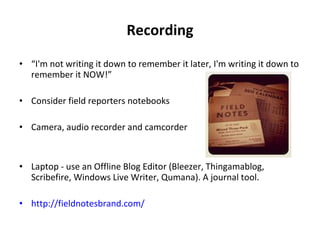
Recording “ I'm not writing it down to remember it later, I'm writing it down to remember it NOW!” Consider field reporters notebooks Camera, audio recorder and camcorder Laptop - use an Offline Blog Editor (Bleezer, Thingamablog, Scribefire, Windows Live Writer, Qumana). A journal tool. http://fieldnotesbrand.com/
Writing a good blog post Develop a meaningful title Write great content Think about your audience (researchers, media, public) Use graphics (images, video) to illustrate your point Use hyperlinks to connect and layer your writing Use short paragraphs with a clear topic sentence (encourage the reader A good post can be about 250 words Expect comments and be prepared to  comment back  to readers
Taking great photos Know your camera Know the subject – composition matters  Remember the Law of Thirds Use fill flash in shadow conditions but avoid flash indoors Image quality matters > 5 mega pixels Formats - jpg (raw or png); Avoid time/date stamp on images Share your images - we will have a web-based photo gallery for the project Use Creative Commons-  www.creativecommons.org.au
Making great video for the web Get a tripod Tell a story (3-5min … no longer than a song) Use an interview format (or consider voxpop) Avoid too many moves (Pan, Zoom) Use a lapel microphone Use a fluffy ferret  - wind shield- on external microphones Consider the lighting Media Players vs. File Formats  media player is the software that plays the video a file format is the type of the video itself MP4 followed by FLV Creative Commons  www.creativecommons.org.au

ASLP2 ICT social ecology project

  • 1.
    ASLP2 - AgricultureSector Linkages Program in Pakistan (Phase 2) Applying ICTs for communication, collaboration and development through participatory design and engagement Professor Rob Fitzgerald, PhD Director, INSPIRE Centre for ICT Pedagogy and Practice Senior Research Scientist, Australian Institute for Sustainable Communities, University of Canberra Presentation to the Citrus Research Team, Dareton Agricultural and Research Station, Riverina, NSW, 10 May 2011
  • 2.
    Overview Objectives ofthe social research team Towards an ICT social ecology (Wordpress and Google Apps working together) Details of the aslp2.org ecology Generating digital data from your field work that can be used in aslp2.org
  • 3.
    Social research objectivesTo engage the poor and marginalized groups that can potentially benefit from participating in the selected value chains of ASLP2 (Sandra) To enhance collaboration across project teams (Barbara) To assess and enhance information and communication modalities and technologies for collaboration and value chain enhancement (Rob) To foster effective collaborative development in rural Pakistan (John)
  • 4.
    Social research objectivesTo engage the poor and marginalized groups that can potentially benefit from participating in the selected value chains of ASLP2 (Sandra) To enhance collaboration across project teams (Barbara) To assess and enhance information and communication modalities and technologies for collaboration and value chain enhancement (Rob) To foster effective collaborative development in rural Pakistan (John)
  • 5.
    The proposed ASLP2social ecology The ASLP2 social ecology is made up of social networking and group collaboration services presented in a consistent way The ecology complements your existing ICT systems – an invitation to participate; a layered approach The aim is to provide a secure, easily manageable environment that meets the needs of the participants now, and is expandable with other services in the future Participants use these apps in conjunction with social networking tools provided by an instance of Wordpress Multi-Site The core applications that participants use are provided by Google Apps . These include email ( Gmail ), mailing lists ( Groups ), rich document creation ( Docs ) and shared schedules ( Calendar )
  • 6.
  • 7.
  • 8.
    Overall ecology requirementsApp Management The Google Apps available to each group is administered centrally using the tools provided by Google Apps Group Management The users and the groups they belong to are managed solely using the tools provided by Google Apps Master Site The ASLP2 master site (aslp2.org) provides static and dynamic content about all the groups and their activities
  • 9.
    A Set ofWebpages Master site - alsp2.org Team sites Individual sites
  • 10.
    A set ofrelated sites http://www.aslp2.org http://citrus.aslp2.org http://dairy.aslp2.org http://mangovc.aslp2.org http://mangoprod.aslp2.org http://social.aslp2.org
  • 11.
  • 12.
  • 13.
    Single sign on(one login)
  • 14.
    Group/team requirements GroupWeb Site - The site for a workgroup will contain static and dynamic content about the group's activities. It will provide consistent navigation between areas of the site. Users are able to authenticate with the site using their Google Apps identity Group Blog - The blog posts from all group members are displayed on the front page of the site Twitter feed - The Twitter feed for the group is displayed in a panel on the site Calendar - The Google Calendar for the group is displayed in a panel on the site Media - Recent media uploads (audio and video) are displayed in a panel on the site
  • 15.
    Individual requirements PersonalBlog - An individual user has their own blog giving them an easy way to create posts containing text, images and video Sharing Video - A user with a video file can use a video sharing site (such as YouTube or Vimeo) to upload it. In their blog posting they simply include the URL of the video. The video is displayed in a player embedded in the blog posting, and plays on desktop and mobile devices Commenting - A user is able to comment on the blog postings of others in their group. Commenting between authenticated users can optionally provide notification by email to all participants
  • 16.
    Future requirements Thesoftware and services form a platform on which additional social services can be implemented as they become available In the future we consider the integration of web conferencing (skype, video conferencing), SMS messaging and location services We will conduct an evaluation of each technology and an analysis of how best to build it on this platform
  • 17.
    Generating digital datafrom your field work Maintain a diary/journal, log field notes, tell a story, make a sketch, report an event, take a video, produce a mini-documentary, ask the people (vox pop) or create a photo essay
  • 18.
    Recording “ I'mnot writing it down to remember it later, I'm writing it down to remember it NOW!” Consider field reporters notebooks Camera, audio recorder and camcorder Laptop - use an Offline Blog Editor (Bleezer, Thingamablog, Scribefire, Windows Live Writer, Qumana). A journal tool. http://fieldnotesbrand.com/
  • 19.
    Writing a goodblog post Develop a meaningful title Write great content Think about your audience (researchers, media, public) Use graphics (images, video) to illustrate your point Use hyperlinks to connect and layer your writing Use short paragraphs with a clear topic sentence (encourage the reader A good post can be about 250 words Expect comments and be prepared to comment back to readers
  • 20.
    Taking great photosKnow your camera Know the subject – composition matters Remember the Law of Thirds Use fill flash in shadow conditions but avoid flash indoors Image quality matters > 5 mega pixels Formats - jpg (raw or png); Avoid time/date stamp on images Share your images - we will have a web-based photo gallery for the project Use Creative Commons- www.creativecommons.org.au
  • 21.
    Making great videofor the web Get a tripod Tell a story (3-5min … no longer than a song) Use an interview format (or consider voxpop) Avoid too many moves (Pan, Zoom) Use a lapel microphone Use a fluffy ferret - wind shield- on external microphones Consider the lighting Media Players vs. File Formats media player is the software that plays the video a file format is the type of the video itself MP4 followed by FLV Creative Commons www.creativecommons.org.au