

Using Learning Design
        for Innovative eTeaching


                        James Dalziel
              Professor of Learning Technology &
Director, Macquarie E-Learning Centre Of Excellence (MELCOE)
             Macquarie University, Sydney, Australia
                  james@melcoe.mq.edu.au
                     www.melcoe.mq.edu.au

           Presentation for ALTC National Teaching Fellowship
            INSPIRE, University of Canberra, July 2nd, 2012
Overview

•  What is Learning Design?
•  LAMS case study
•  Current Issues in Learning Design
•  Discussion


Acknowledgement: ALTC National Teaching Fellowship
Support for this activity has been provided by the Australian Government Office for
Learning and Teaching. The views expressed in this activity do not necessarily reflect the
views of the Australian Government Office for Learning and Teaching.
What is Learning Design?

Two examples

1.  Teaching Psychology Tutorials
  –    Fostering discussion using the “pyramid” technique

2.  Transforming Medical Education
  –    Whole of degree adoption of Problem Based Learning
What is Learning Design?

•  Variety of definitions and approaches:
   –  A pedagogical meta-model
   –  A framework/language for describing the structure of teaching
      and learning activities
   –  A technical specification: IMS Learning Design (2003)
   –  A software system for managing sequences of content and
      collaborative learning activities
   –  A community of educators sharing ideas on effective teaching
       •  A repository of “ready to run” activity sequences & templates
   –  A process that describes how educators make decisions about
      creating effective teaching and learning experiences
What is Learning Design?

•  Learning Design is not
   –  a traditional educational theory (like, say, constructivism), as it
      does not put forward a theory about how students learn
       •  Instead, it seeks to be a framework for many different theories
   –  a mature field – there is much yet to be considered, developed,
      and researched
   –  a “small” field – the pretensions of the field potentially cover
      much of what educators do in teaching and learning, but early
      descriptions were often narrow (ie, 7 blind men and elephant)
   –  just about technology – despite technological origins of the
      field, it is really about all of education
       •  Technology is just one of many implementation options
What is Learning Design?

•  One description of Learning Design is as “Teaching 2.0”
   –  An attempt to rethink current approaches to teaching given new
      technologies and new ways of thinking
   –  A focus on “user generated content” for teaching – that is,
      empowering educators with tools for creating, sharing and
      adapting innovative teaching approaches
   –  A community-centric view of technology for education, rather
      than a “courseware production” model


   –  (yet another buzzword, already past its prime….)
What is Learning Design?

•  Before moving to a practical example, the deep idea of
   Learning Design is a framework/language for describing
   the structure of teaching and learning activities


•  To better understand what this could be, consider two
   other domains with frameworks for sharing good ideas
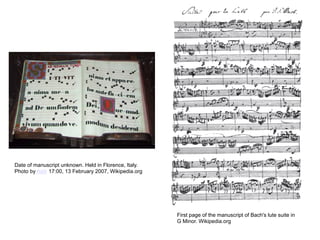
Date of manuscript unknown. Held in Florence, Italy.
Photo by Asiir 17:00, 13 February 2007, Wikipedia.org


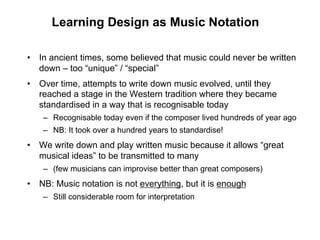
                                                        First page of the manuscript of Bach's lute suite in
                                                        G Minor. Wikipedia.org
Learning Design as Music Notation

•  In ancient times, some believed that music could never be written
   down – too “unique” / “special”
•  Over time, attempts to write down music evolved, until they
   reached a stage in the Western tradition where they became
   standardised in a way that is recognisable today
    –  Recognisable today even if the composer lived hundreds of year ago
    –  NB: It took over a hundred years to standardise!
•  We write down and play written music because it allows “great
   musical ideas” to be transmitted to many
    –  (few musicians can improvise better than great composers)
•  NB: Music notation is not everything, but it is enough
    –  Still considerable room for interpretation
Learning Design
   as Recipe
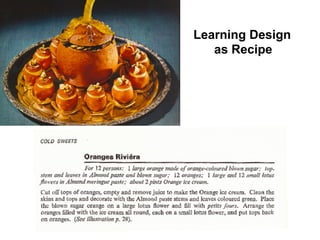
Learning Design as Recipe

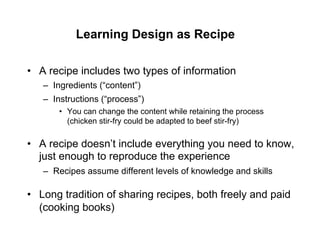
•  A recipe includes two types of information
   –  Ingredients (“content”)
   –  Instructions (“process”)
       •  You can change the content while retaining the process
          (chicken stir-fry could be adapted to beef stir-fry)

•  A recipe doesn’t include everything you need to know,
   just enough to reproduce the experience
   –  Recipes assume different levels of knowledge and skills

•  Long tradition of sharing recipes, both freely and paid
   (cooking books)
Learning Design analogies

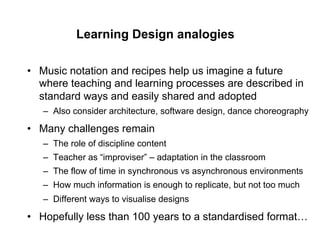
•  Music notation and recipes help us imagine a future
   where teaching and learning processes are described in
   standard ways and easily shared and adopted
   –  Also consider architecture, software design, dance choreography

•  Many challenges remain
   –  The role of discipline content
   –  Teacher as “improviser” – adaptation in the classroom
   –  The flow of time in synchronous vs asynchronous environments
   –  How much information is enough to replicate, but not too much
   –  Different ways to visualise designs

•  Hopefully less than 100 years to a standardised format…
Vittorio Sciosia CC http://www.flickr.com/photos/7504140@N04/472279792/
Some LAMS history

•  In 2001, we had a vision of a new approach to e-learning
   technology where educators could create “sequences” of activities
   for students to work through step by step
    –  Using a range of content and collaboration tools


•  Most importantly, the created sequences would be shareable, so if
   one educator creates a great sequence of activities, this can be
   used (and adapted) by other educators
    –  Hoped to create a community of educators sharing good ideas
    –  Through educator-led innovation and sharing, we’d develop a library of
       great “teaching ideas”
    –  The ultimate goals was not a new e-learning system, but a new
       approach to sharing
Some LAMS history

•  We created “LAMS” (Learning Activity Management system) to
   realise this vision
   –  Together with the online LAMS community for sharing
   –  LAMS is freely available as open source software


•  LAMS can be used on its own, or integrated with other systems,
   such as LMSs like Moodle and Blackboard


•  LAMS is now used by thousands of educators in 80+ countries and
   translated into 32 languages
   –  LAMS community has 7700 members and 1050 shared sequences
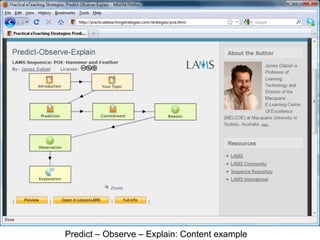
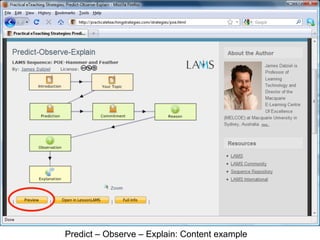
Predict – Observe – Explain: Content example
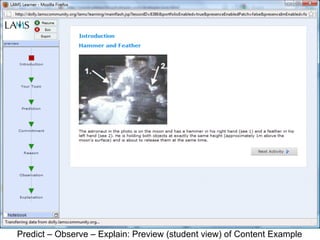
Predict – Observe – Explain: Preview (student view) of Content Example
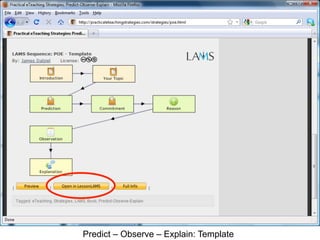
Predict – Observe – Explain: Template
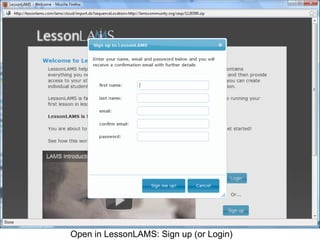
Open in LessonLAMS: Sign up (or Login)
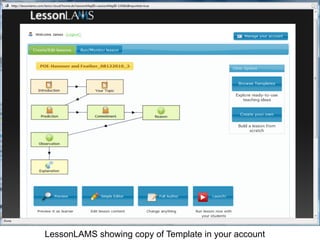
LessonLAMS showing copy of Template in your account
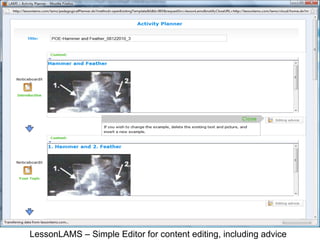
LessonLAMS – Simple Editor for content editing, including advice
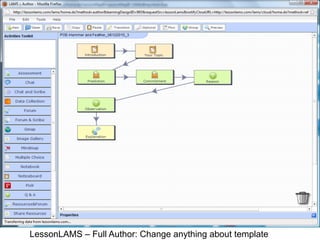
LessonLAMS – Full Author: Change anything about template
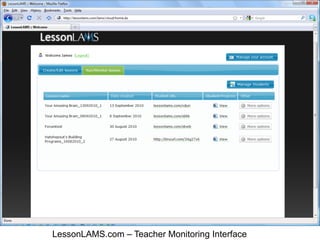
LessonLAMS.com – Teacher Monitoring Interface
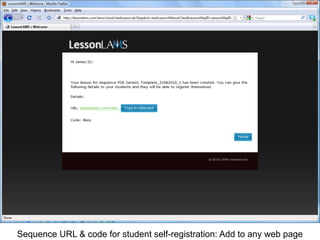
Sequence URL & code for student self-registration: Add to any web page
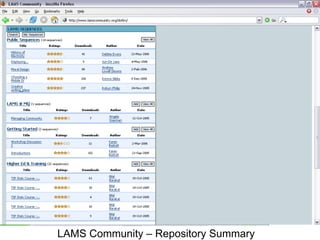
LAMS Community – Repository Summary
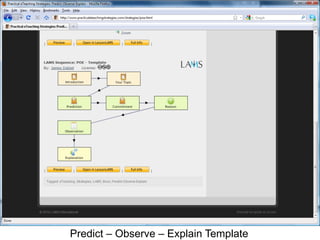
Predict – Observe – Explain Template
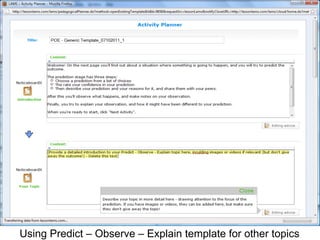
Using Predict – Observe – Explain template for other topics
Current Issues in Learning Design

•  Templates vs “embedded content”
   –  Direct re-use vs “inspiration” (cf patterns and the creative leap)
   –  Are textbook publishers the missing (content) link?

•  From Learning Design to Curriculum Design
   –  Different “levels” of Learning Design – a task (1-10 minutes); a
      module/sequence (1 hour/1 day/1 week); a course (2-13
      weeks), an institutional approach (eg, medical degree)
   –  Recent JISC projects, especially Viewpoints and OULDI

•  Linking activity descriptions to pedagogical descriptions
   –  LDSE/Learning Designer project from London Knowledge Lab
Current Issues in Learning Design

•  Challenges include:
   –  Lack of general awareness of Learning Design field
   –  Confusion over differences between Instructional Design and
      Learning Design, and “US” vs “European” approaches
   –  Time demands required for implementation
   –  Unrecognised amid the “noise” of education technology
      •  LD is a “deep” innovation, but harder to explain than a “clicker”


•  But significant opportunities around educational reform,
   especially ideas like 21st Century skills; Generic
   Attributes of a Graduate; the “flipped” classroom
Current Issues in Learning Design

•  Where to next?
   –  The field is making good progress on fleshing out the large
      “landscape” of issues covered by Learning Design
       •  See especially new Laurillard and Conole Learning Design books
   –  Broad adoption yet to occur – do we need more:
       •    Templates with better advice? (eg, Practical eTeaching Strategies)
       •    Content (collaboration with publishers?)
       •    Simplicity in Learning Design tools?
       •    Marketing?

•  Regardless of immediate ups and downs, Learning Design has
   much to contribute in the future
   –  As its goals are the same as those of a typical educator each day
Questions
[Break]
Options for Part 2

•  Questions
•  Discussion
   –  Eg, Could Learning Design help you adopt new teaching
      approaches? More information? Concerns?

•  Learning Design and Curriculum Design
   –  Discussion of JISC projects such as Viewpoints, OULDI, LDSE

•  Lessons from LAMS use and sharing
   –  LAMS developments: LMS integration, Activity Planner, Embed

•  Other?
Aligning LD and CD

•    The recent JISC Curriculum Design program (building
     on the earlier Learning Design program) has led to
     innovative approaches to whole-of-course design
     http://www.jisc.ac.uk/whatwedo/programmes/elearning/curriculumdesign.aspx

•    Today focus on 2 JISC projects and 1 related project
     –  Open University Learning Design project
     –  University of Ulster Viewpoints project
     –  “Learning Design Support Environment” (LDSE), now called
        “Learning Designer” (London Knowledge Lab and team)
Aligning LD and CD

•    Learning Design (LD) applies at the level of a class, or
     (sub)topic or (sub)module, it typically lasts from 10min
     to 2 hours (synchronous) or up to a few weeks
     (asynchronous)


•    Curriculum Design (CD) can be thought of the layer
     above Learning Design – it is the design of whole
     units/courses
     –    Eg, if you have 26 lectures and 13 tutorials in a course, how
          do you structure content and activities over this period?
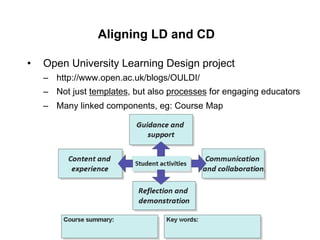
Aligning LD and CD

•    Open University Learning Design project
     –  http://www.open.ac.uk/blogs/OULDI/
     –  Not just templates, but also processes for engaging educators
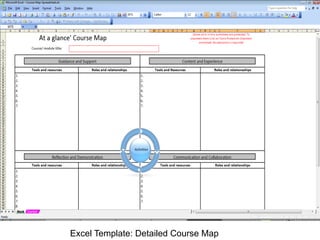
     –  Many linked components, eg: Course Map
Excel Template: Detailed Course Map
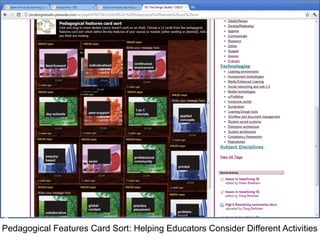
Pedagogical Features Card Sort: Helping Educators Consider Different Activities
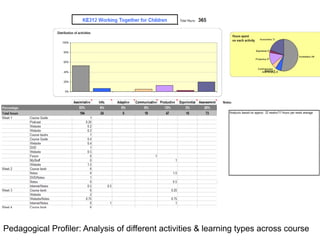
Pedagogical Profiler: Analysis of different activities & learning types across course
James Note: The next 11 slides come from the Viewpoints project
They tell the story better than I can! (thanks to Alan and the team)
http://wiki.ulster.ac.uk/display/VPR/Home
Viewpoints – module workshop
             examples

  These slides will give you an idea of what
happens in a typical Viewpoints course design
         workshop at module level.
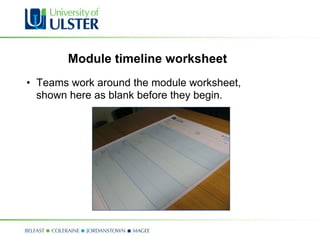
Module timeline worksheet
•  Teams work around the module worksheet,
   shown here as blank before they begin.
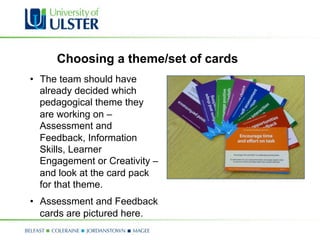
Choosing a theme/set of cards
•  The team should have
   already decided which
   pedagogical theme they
   are working on –
   Assessment and
   Feedback, Information
   Skills, Learner
   Engagement or Creativity –
   and look at the card pack
   for that theme.
•  Assessment and Feedback
   cards are pictured here.
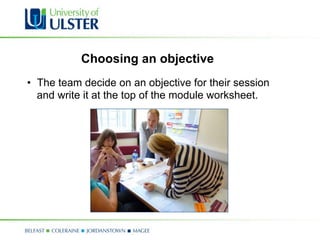
Choosing an objective
•  The team decide on an objective for their session
   and write it at the top of the module worksheet.
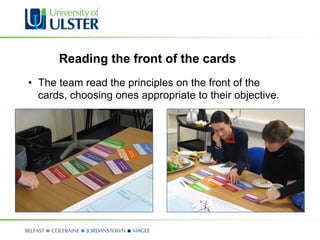
Reading the front of the cards
•  The team read the principles on the front of the
   cards, choosing ones appropriate to their objective.
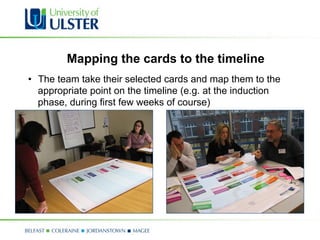
Mapping the cards to the timeline
•  The team take their selected cards and map them to the
   appropriate point on the timeline (e.g. at the induction
   phase, during first few weeks of course)
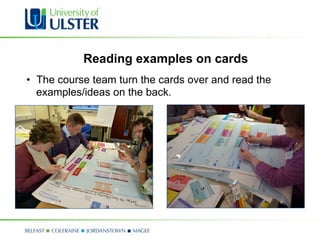
Reading examples on cards
•  The course team turn the cards over and read the
   examples/ideas on the back.
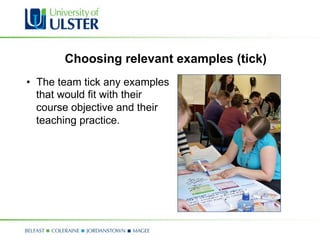
Choosing relevant examples (tick)
•  The team tick any examples
   that would fit with their
   course objective and their
   teaching practice.
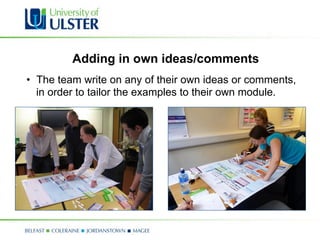
Adding in own ideas/comments
•  The team write on any of their own ideas or comments,
   in order to tailor the examples to their own module.
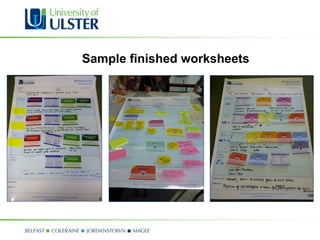
Sample finished worksheets
Aligning LD and CD

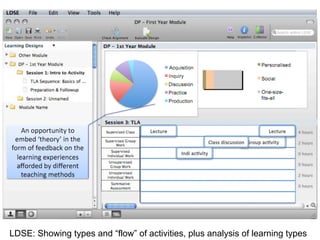
•    Learning Design Support Environment (LDSE) – now
     known as the “Learning Designer” (LKL et al)
     –  https://sites.google.com/a/lkl.ac.uk/ldse/
     –  Diana Laurillard and team from London Knowledge Lab and
        partners
     –  Screenshot may not be latest version of software, but concept
        is the same
LDSE: Showing types and “flow” of activities, plus analysis of learning types
LAMS Resources

•  To try out LAMS, visit
   http://www.lessonlams.com/


•  For general information (and links to other sites), see
   http://www.lamsfoundation.org/
•  For teacher user guides & animated walkthroughs, see
   http://wiki.lamsfoundation.org/display/lamsdocs/Home
•  For all technical details, see
   http://wiki.lamsfoundation.org/display/lams/Home

James Dalziel - Using Learning Design for Innovative eTeaching

  • 1.
    Using Learning Design for Innovative eTeaching James Dalziel Professor of Learning Technology & Director, Macquarie E-Learning Centre Of Excellence (MELCOE) Macquarie University, Sydney, Australia james@melcoe.mq.edu.au www.melcoe.mq.edu.au Presentation for ALTC National Teaching Fellowship INSPIRE, University of Canberra, July 2nd, 2012
  • 2.
    Overview •  What isLearning Design? •  LAMS case study •  Current Issues in Learning Design •  Discussion Acknowledgement: ALTC National Teaching Fellowship Support for this activity has been provided by the Australian Government Office for Learning and Teaching. The views expressed in this activity do not necessarily reflect the views of the Australian Government Office for Learning and Teaching.
  • 3.
    What is LearningDesign? Two examples 1.  Teaching Psychology Tutorials –  Fostering discussion using the “pyramid” technique 2.  Transforming Medical Education –  Whole of degree adoption of Problem Based Learning
  • 4.
    What is LearningDesign? •  Variety of definitions and approaches: –  A pedagogical meta-model –  A framework/language for describing the structure of teaching and learning activities –  A technical specification: IMS Learning Design (2003) –  A software system for managing sequences of content and collaborative learning activities –  A community of educators sharing ideas on effective teaching •  A repository of “ready to run” activity sequences & templates –  A process that describes how educators make decisions about creating effective teaching and learning experiences
  • 5.
    What is LearningDesign? •  Learning Design is not –  a traditional educational theory (like, say, constructivism), as it does not put forward a theory about how students learn •  Instead, it seeks to be a framework for many different theories –  a mature field – there is much yet to be considered, developed, and researched –  a “small” field – the pretensions of the field potentially cover much of what educators do in teaching and learning, but early descriptions were often narrow (ie, 7 blind men and elephant) –  just about technology – despite technological origins of the field, it is really about all of education •  Technology is just one of many implementation options
  • 6.
    What is LearningDesign? •  One description of Learning Design is as “Teaching 2.0” –  An attempt to rethink current approaches to teaching given new technologies and new ways of thinking –  A focus on “user generated content” for teaching – that is, empowering educators with tools for creating, sharing and adapting innovative teaching approaches –  A community-centric view of technology for education, rather than a “courseware production” model –  (yet another buzzword, already past its prime….)
  • 7.
    What is LearningDesign? •  Before moving to a practical example, the deep idea of Learning Design is a framework/language for describing the structure of teaching and learning activities •  To better understand what this could be, consider two other domains with frameworks for sharing good ideas
  • 8.
    Date of manuscriptunknown. Held in Florence, Italy. Photo by Asiir 17:00, 13 February 2007, Wikipedia.org First page of the manuscript of Bach's lute suite in G Minor. Wikipedia.org
  • 9.
    Learning Design asMusic Notation •  In ancient times, some believed that music could never be written down – too “unique” / “special” •  Over time, attempts to write down music evolved, until they reached a stage in the Western tradition where they became standardised in a way that is recognisable today –  Recognisable today even if the composer lived hundreds of year ago –  NB: It took over a hundred years to standardise! •  We write down and play written music because it allows “great musical ideas” to be transmitted to many –  (few musicians can improvise better than great composers) •  NB: Music notation is not everything, but it is enough –  Still considerable room for interpretation
  • 11.
  • 12.
    Learning Design asRecipe •  A recipe includes two types of information –  Ingredients (“content”) –  Instructions (“process”) •  You can change the content while retaining the process (chicken stir-fry could be adapted to beef stir-fry) •  A recipe doesn’t include everything you need to know, just enough to reproduce the experience –  Recipes assume different levels of knowledge and skills •  Long tradition of sharing recipes, both freely and paid (cooking books)
  • 13.
    Learning Design analogies • Music notation and recipes help us imagine a future where teaching and learning processes are described in standard ways and easily shared and adopted –  Also consider architecture, software design, dance choreography •  Many challenges remain –  The role of discipline content –  Teacher as “improviser” – adaptation in the classroom –  The flow of time in synchronous vs asynchronous environments –  How much information is enough to replicate, but not too much –  Different ways to visualise designs •  Hopefully less than 100 years to a standardised format…
  • 14.
    Vittorio Sciosia CChttp://www.flickr.com/photos/7504140@N04/472279792/
  • 15.
    Some LAMS history • In 2001, we had a vision of a new approach to e-learning technology where educators could create “sequences” of activities for students to work through step by step –  Using a range of content and collaboration tools •  Most importantly, the created sequences would be shareable, so if one educator creates a great sequence of activities, this can be used (and adapted) by other educators –  Hoped to create a community of educators sharing good ideas –  Through educator-led innovation and sharing, we’d develop a library of great “teaching ideas” –  The ultimate goals was not a new e-learning system, but a new approach to sharing
  • 16.
    Some LAMS history • We created “LAMS” (Learning Activity Management system) to realise this vision –  Together with the online LAMS community for sharing –  LAMS is freely available as open source software •  LAMS can be used on its own, or integrated with other systems, such as LMSs like Moodle and Blackboard •  LAMS is now used by thousands of educators in 80+ countries and translated into 32 languages –  LAMS community has 7700 members and 1050 shared sequences
  • 17.
    Predict – Observe– Explain: Content example
  • 18.
    Predict – Observe– Explain: Content example
  • 19.
    Predict – Observe– Explain: Preview (student view) of Content Example
  • 20.
    Predict – Observe– Explain: Template
  • 21.
    Open in LessonLAMS:Sign up (or Login)
  • 22.
    LessonLAMS showing copyof Template in your account
  • 23.
    LessonLAMS – SimpleEditor for content editing, including advice
  • 24.
    LessonLAMS – FullAuthor: Change anything about template
  • 25.
    LessonLAMS.com – TeacherMonitoring Interface
  • 26.
    Sequence URL &code for student self-registration: Add to any web page
  • 27.
    LAMS Community –Repository Summary
  • 28.
    Predict – Observe– Explain Template
  • 29.
    Using Predict –Observe – Explain template for other topics
  • 30.
    Current Issues inLearning Design •  Templates vs “embedded content” –  Direct re-use vs “inspiration” (cf patterns and the creative leap) –  Are textbook publishers the missing (content) link? •  From Learning Design to Curriculum Design –  Different “levels” of Learning Design – a task (1-10 minutes); a module/sequence (1 hour/1 day/1 week); a course (2-13 weeks), an institutional approach (eg, medical degree) –  Recent JISC projects, especially Viewpoints and OULDI •  Linking activity descriptions to pedagogical descriptions –  LDSE/Learning Designer project from London Knowledge Lab
  • 31.
    Current Issues inLearning Design •  Challenges include: –  Lack of general awareness of Learning Design field –  Confusion over differences between Instructional Design and Learning Design, and “US” vs “European” approaches –  Time demands required for implementation –  Unrecognised amid the “noise” of education technology •  LD is a “deep” innovation, but harder to explain than a “clicker” •  But significant opportunities around educational reform, especially ideas like 21st Century skills; Generic Attributes of a Graduate; the “flipped” classroom
  • 32.
    Current Issues inLearning Design •  Where to next? –  The field is making good progress on fleshing out the large “landscape” of issues covered by Learning Design •  See especially new Laurillard and Conole Learning Design books –  Broad adoption yet to occur – do we need more: •  Templates with better advice? (eg, Practical eTeaching Strategies) •  Content (collaboration with publishers?) •  Simplicity in Learning Design tools? •  Marketing? •  Regardless of immediate ups and downs, Learning Design has much to contribute in the future –  As its goals are the same as those of a typical educator each day
  • 33.
  • 34.
  • 35.
    Options for Part2 •  Questions •  Discussion –  Eg, Could Learning Design help you adopt new teaching approaches? More information? Concerns? •  Learning Design and Curriculum Design –  Discussion of JISC projects such as Viewpoints, OULDI, LDSE •  Lessons from LAMS use and sharing –  LAMS developments: LMS integration, Activity Planner, Embed •  Other?
  • 36.
    Aligning LD andCD •  The recent JISC Curriculum Design program (building on the earlier Learning Design program) has led to innovative approaches to whole-of-course design http://www.jisc.ac.uk/whatwedo/programmes/elearning/curriculumdesign.aspx •  Today focus on 2 JISC projects and 1 related project –  Open University Learning Design project –  University of Ulster Viewpoints project –  “Learning Design Support Environment” (LDSE), now called “Learning Designer” (London Knowledge Lab and team)
  • 37.
    Aligning LD andCD •  Learning Design (LD) applies at the level of a class, or (sub)topic or (sub)module, it typically lasts from 10min to 2 hours (synchronous) or up to a few weeks (asynchronous) •  Curriculum Design (CD) can be thought of the layer above Learning Design – it is the design of whole units/courses –  Eg, if you have 26 lectures and 13 tutorials in a course, how do you structure content and activities over this period?
  • 38.
    Aligning LD andCD •  Open University Learning Design project –  http://www.open.ac.uk/blogs/OULDI/ –  Not just templates, but also processes for engaging educators –  Many linked components, eg: Course Map
  • 39.
  • 40.
    Pedagogical Features CardSort: Helping Educators Consider Different Activities
  • 41.
    Pedagogical Profiler: Analysisof different activities & learning types across course
  • 42.
    James Note: Thenext 11 slides come from the Viewpoints project They tell the story better than I can! (thanks to Alan and the team) http://wiki.ulster.ac.uk/display/VPR/Home
  • 43.
    Viewpoints – moduleworkshop examples These slides will give you an idea of what happens in a typical Viewpoints course design workshop at module level.
  • 44.
    Module timeline worksheet • Teams work around the module worksheet, shown here as blank before they begin.
  • 45.
    Choosing a theme/setof cards •  The team should have already decided which pedagogical theme they are working on – Assessment and Feedback, Information Skills, Learner Engagement or Creativity – and look at the card pack for that theme. •  Assessment and Feedback cards are pictured here.
  • 46.
    Choosing an objective • The team decide on an objective for their session and write it at the top of the module worksheet.
  • 47.
    Reading the frontof the cards •  The team read the principles on the front of the cards, choosing ones appropriate to their objective.
  • 48.
    Mapping the cardsto the timeline •  The team take their selected cards and map them to the appropriate point on the timeline (e.g. at the induction phase, during first few weeks of course)
  • 49.
    Reading examples oncards •  The course team turn the cards over and read the examples/ideas on the back.
  • 50.
    Choosing relevant examples(tick) •  The team tick any examples that would fit with their course objective and their teaching practice.
  • 51.
    Adding in ownideas/comments •  The team write on any of their own ideas or comments, in order to tailor the examples to their own module.
  • 52.
  • 53.
    Aligning LD andCD •  Learning Design Support Environment (LDSE) – now known as the “Learning Designer” (LKL et al) –  https://sites.google.com/a/lkl.ac.uk/ldse/ –  Diana Laurillard and team from London Knowledge Lab and partners –  Screenshot may not be latest version of software, but concept is the same
  • 54.
    LDSE: Showing typesand “flow” of activities, plus analysis of learning types
  • 55.
    LAMS Resources •  Totry out LAMS, visit http://www.lessonlams.com/ •  For general information (and links to other sites), see http://www.lamsfoundation.org/ •  For teacher user guides & animated walkthroughs, see http://wiki.lamsfoundation.org/display/lamsdocs/Home •  For all technical details, see http://wiki.lamsfoundation.org/display/lams/Home