SERVER SIDE PROGRAMS
Where are we?
                                      JAVA


        Introduction     Object-oriented design            Advanced topics Server-side coding

                         4. Object                                   10. JDBC
1. Intro to
Java, Course             Classes          7. Inheritance              11.Streams

      2. Java lang.                                  6. Exception            13. Servlets
                       5. Encapsulation
      basics                                         Handling
                                                                                    14. JSP
          3. Arrays          8. Polymorphism
                                                                  12. Networking
                                      9. Abstract classes
                                       and Interfaces

 Newbie        Programmers           Designers               Developers         Professionals
HTTP
            Request

          Request


                              <html>
                              <head>
                              <body>
                             <html>
                                …
                             <head>
                             <body>
                               …


Client
         Response
                      HTTP

                      HTML
Why Build Web Pages Dynamically?
   The Web page is based on data submitted by the
    user
       E.g., results page from search engines
 The Web page is derived from data that changes
frequently
       E.g., a weather report or news headlines page
 The Web page uses information from databases or
other server-side sources
      E.g., an e-commerce site could use a servlet to build a
    Web page that lists the current price and availability of each
    item that is for sale.
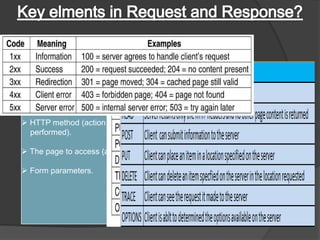
HTTP Request                    HTTP Response


Key elements of a “request”      Key elements of a “response”
stream:                         stream:

 HTTP method (action to be      A status code (for whether
  performed).                     the request was successful).

 The page to access (a URL).    Content-type (text, picture,
                                  html, etc…).
 Form parameters.
                                 The content ( the actual
                                   content).
Introduction – What is a Servlet


• Where does Servlet come into the picture?
                                                  I can serve only
                                                     static HTML
                                                        pages
                           Web Server
                           Application

                                                        Dude ,Not a
                                                         problem. I
                                                        can handle
                                                          dynamic
                                Helper                   requests.
                               Application
Web Server machine

    “The Helper Application is nothing but a SERVLET”
What is java servlet ?
 A servlet is a small Java program that runs within a Web server. Servlets
 receive and respond to requests from Web clients, usually across HTTP,
  the HyperText Transfer Protocol. Servlet is an opposite of applet as a
server-side applet. Applet is an application running on client while servlet
                            is running on server.
                         Request


                                                           Servlet


Client                   Response            Server
Example use of servlet

       Processing data POST over HTTPs using HTML form as purchase
        order or credit card data
       Allowing collaborative between people such as on-line
        conferencing


Application/Browser               Web Server            Database/ FileSystem
  (User Interface)             (Application Logic)       (Persistent Storage)
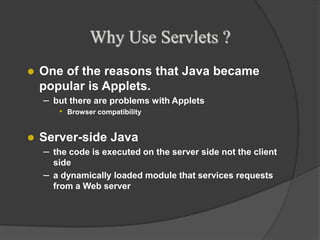
Why Use Servlets ?
   One of the reasons that Java became
    popular is Applets.
    – but there are problems with Applets
       •   Browser compatibility


   Server-side Java
    – the code is executed on the server side not the client
      side
    – a dynamically loaded module that services requests
      from a Web server
Servlets (contd.)
– vs. Common Gateway Interface (CGI)
   • create new process for each request
      – most platform independent CGI language - Perl
           • start a new instance of interpreter for every request
   • CGI runs in a completely separate process from the Web
     server
– vs. Server-Side JavaScript
   • only available on certain web servers
– vs. Active Server Pages (ASP)
   • only available on certain web servers
Servlet Architecture -Web Container


• What is a Web Container?

         request
                                                  GET.
          GET.                 GET.
          …..                  …..                …..


                       Web              Web              Servlet
                      Server          Container
Client
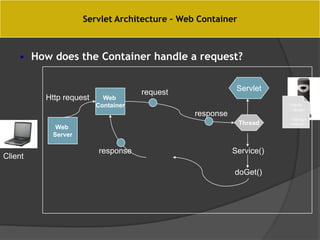
Servlet Architecture – Web Container


    • How does the Container handle a request?


                                    request               Servlet
         Http request     Web
                        Container                                    <Html>
                                                                      <Body>
                                              response                 …….
                                                                      </Body>
                                                          Thread     </Html>
           Web
          Server

                        response                         Service()
Client

                                                         doGet()
Servlet Architecture – Web Container


                                                    The CONTAINER
• What is the role of Web Container ?
                                                                       S2

• Communication Support                               S1

• Lifecycle Management
                                                                 JSP1
  Multi-threading support
                                                       S3
• Security

                                                                  S4
• JSP Support


        The container can contain multiple Servlets & JSPs within it
Example for Servers: Netscape Web servers
Microsoft's Internet Information Server (IIS),
the World Wide Web Consortium's Jigsaw Web server
Developer(s)         Apache Software Foundation


Stable release       7.0.37
                     (February 18, 2013;)


Preview release      Non [±]

Development status   Active

Written in           Java

Operating system     Cross-platform

Type                 Servlet container
                     HTTP web server


License              Apache License 2.0

Website              tomcat.apache.org/
Apache


    Apache is a very popular server
    Apache is a very popular server
    
    
        66% of the web sites on the Internet use Apache
        66% of the web sites on the Internet use Apache
   Apache is:
   Apache is:
     Full-featured and extensible
     Full-featured and extensible
     Efficient
     Efficient
     Robust
     Robust
     Secure (at least, more secure than other servers)

     Secure (at least, current standards other servers)
     Up to date with more secure than

     Up to date with current standards
     Open source

     Free source
      Open
   Why use anything else?
     Free


                                                           3
                                                           3
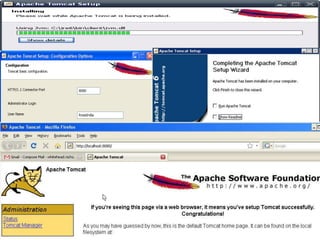
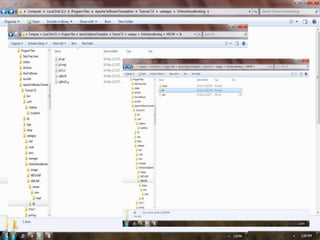
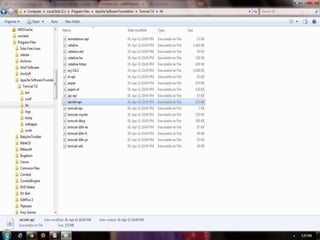
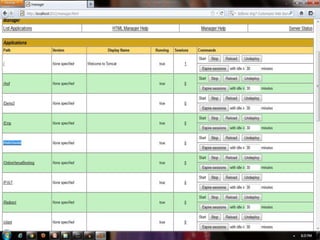
• Before you can program with servlets, you must
  download and install the Apache group's
  implementation of servlets called Tomcat.
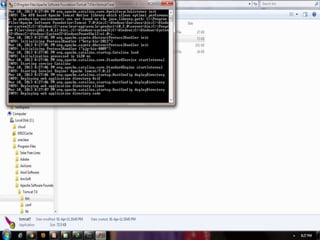
• Install the Tomcat with specific port number(default
  is 8080
• If the installation is successful, you get the Tomcat’s
  home page
Servlet Lifecycle


  • The Servlet lifecycle is simple, there is only one main state –
    “Initialized”.

                                      Does not exist


The container calls                                  destroy()
the init() before the        init()
servlet can service
                                                           When a new request
any client requests.
                                                           for that servlet
                                                           comes in.
To initialize your
                                       Initialized         To determine which
servlet before
                                                           HTTP method
handling any client
                        Service()                          should be called.
requests.
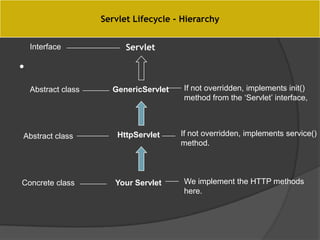
Servlet Lifecycle - Hierarchy


    Interface              Servlet

•
    Abstract class     GenericServlet    If not overridden, implements init()
                                         method from the ‘Servlet’ interface,


Abstract class           HttpServlet    If not overridden, implements service()
                                        method.


Concrete class          Your Servlet     We implement the HTTP methods
                                         here.
Object model of Servlet Framework
        <<Interface>>                                               <<Interface>>
     javax.servlet.Servlet                                    javax.servlet.ServletConfig
    init( )                   javax.servlet.GenericServlet
                                                              getInitParameter( )
    getServletConfig( )
                              init( )                         getServletContext( )
    service( )
                              getServletConfig( )             getInitParameterNames( )
    getServletInfo( )
                              service( )                      getServletName( )
    destroy( )
                              getServletInfo( )
                              destroy( )
                              getInitParameter( )
                              getServletContext( )
                              getInitParameterNames( )
                              getServletName( )
                              log( )


                             javax.servlet.http.HttpServlet
                             doDelete( )
                             doGet( )
                             doOptions( )
                             doPost( )
                             doPut( )
                             doTrace( )
                             getLastModified( )
                             service( )


                                      Basic Servlet
import java.io.*;
import javax.servlet.*;
import javax.servlet.http.*;

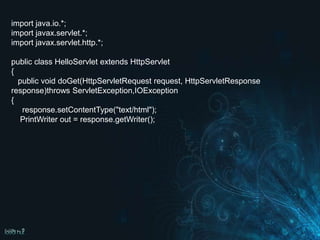
public class HelloServlet extends HttpServlet
{
  public void doGet(HttpServletRequest request,
HttpServletResponse response)throws
ServletException,IOException
Request and Response – GET v/s POST


      The HTTP request method determines whether doGet() or
       doPost() runs.
                         GET (doGet())                     POST (doPost())

                   The request contains only the   Along with request line
   HTTP Request   request line and HTTP header.    and header it also contains
                                                   HTTP body.
   Parameter      The form elements are passed     The form elements are
   passing        to the server by appending at    passed in the body of the
                  the end of the URL.              HTTP request.
   Size           The parameter data is limited    Can send huge amount of
                  (the limit depends on the        data to the server.
                  container)


   Usage          Generally used to fetch some     Generally used to process
                  information from the host.       the sent data.
import java.io.*;
import javax.servlet.*;
import javax.servlet.http.*;

public class HelloServlet extends HttpServlet
{
  public void doGet(HttpServletRequest request, HttpServletResponse
response)throws ServletException,IOException
{
   response.setContentType("text/html");
HttpServletResponse Interface

 void setContentType( String type )
  Specifies the MIME( Multipurpose Internet Mail
  Extensions) type of the response to the browser.
  The MIME type helps the browser determine how to
  display the data (or possibly what other application to
  execute to process the data).
 For example, MIME type "text/html" indicates that
  the response is an HTML document, so the browser
  displays the HTML page.
import java.io.*;
import javax.servlet.*;
import javax.servlet.http.*;

public class HelloServlet extends HttpServlet
{
  public void doGet(HttpServletRequest request, HttpServletResponse
response)throws ServletException,IOException
{
   response.setContentType("text/html");
   PrintWriter out = response.getWriter();
ServletOutputStream getOutputStream()
Obtains a byte-based output stream enabling binary data to be sent
to the client.

PrintWriter getWriter()
Obtains a character-based output stream enabling text data to be
sent to the client.
import java.io.*;
import javax.servlet.*;
import javax.servlet.http.*;

public class HelloServlet extends HttpServlet
{
  public void doGet(HttpServletRequest request, HttpServletResponse
response)throws ServletException,IOException
{
   response.setContentType("text/html");
   PrintWriter out = response.getWriter();

    out.println("<html><head><title>Hello World</title></head>");
    out.println("<body><h1>Hello World</h1></body></html>");

}
}
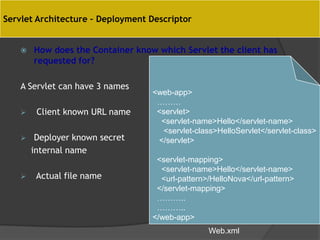
Servlet Architecture – Deployment Descriptor


       How does the Container know which Servlet the client has
        requested for?

    A Servlet can have 3 names
                                   <web-app>
                                    ………
        Client known URL name      <servlet>
                                     <servlet-name>Hello</servlet-name>
                                     <servlet-class>HelloServlet</servlet-class>
        Deployer known secret      </servlet>
        internal name
                                    <servlet-mapping>
                                     <servlet-name>Hello</servlet-name>
        Actual file name            <url-pattern>/HelloNova</url-pattern>
                                    </servlet-mapping>
                                    ………..
                                    ………..
                                   </web-app>
                                                  Web.xml
<web-app>
 ………
 <servlet>
  <servlet-name>Hello</servlet-name>
  <servlet-class>HelloServlet</servlet-class>
 </servlet>

 <servlet-mapping>
  <servlet-name>Hello</servlet-name>
  <url-pattern>/HelloNova</url-pattern>
 </servlet-mapping>
 ………..
 ………..
</web-app>
Asif

Asif

  • 1.
  • 2.
    Where are we? JAVA Introduction Object-oriented design Advanced topics Server-side coding 4. Object 10. JDBC 1. Intro to Java, Course Classes 7. Inheritance 11.Streams 2. Java lang. 6. Exception 13. Servlets 5. Encapsulation basics Handling 14. JSP 3. Arrays 8. Polymorphism 12. Networking 9. Abstract classes and Interfaces Newbie Programmers Designers Developers Professionals
  • 3.
    HTTP Request Request <html> <head> <body> <html> … <head> <body> … Client Response HTTP HTML
  • 6.
    Why Build WebPages Dynamically?  The Web page is based on data submitted by the user  E.g., results page from search engines  The Web page is derived from data that changes frequently  E.g., a weather report or news headlines page  The Web page uses information from databases or other server-side sources  E.g., an e-commerce site could use a servlet to build a Web page that lists the current price and availability of each item that is for sale.
  • 8.
    HTTP Request HTTP Response Key elements of a “request” Key elements of a “response” stream: stream:  HTTP method (action to be  A status code (for whether performed). the request was successful).  The page to access (a URL).  Content-type (text, picture, html, etc…).  Form parameters.  The content ( the actual content).
  • 9.
    Introduction – Whatis a Servlet • Where does Servlet come into the picture? I can serve only static HTML pages Web Server Application Dude ,Not a problem. I can handle dynamic Helper requests. Application Web Server machine “The Helper Application is nothing but a SERVLET”
  • 10.
    What is javaservlet ? A servlet is a small Java program that runs within a Web server. Servlets receive and respond to requests from Web clients, usually across HTTP, the HyperText Transfer Protocol. Servlet is an opposite of applet as a server-side applet. Applet is an application running on client while servlet is running on server. Request Servlet Client Response Server
  • 11.
    Example use ofservlet  Processing data POST over HTTPs using HTML form as purchase order or credit card data  Allowing collaborative between people such as on-line conferencing Application/Browser Web Server Database/ FileSystem (User Interface) (Application Logic) (Persistent Storage)
  • 12.
    Why Use Servlets?  One of the reasons that Java became popular is Applets. – but there are problems with Applets • Browser compatibility  Server-side Java – the code is executed on the server side not the client side – a dynamically loaded module that services requests from a Web server
  • 13.
    Servlets (contd.) – vs.Common Gateway Interface (CGI) • create new process for each request – most platform independent CGI language - Perl • start a new instance of interpreter for every request • CGI runs in a completely separate process from the Web server – vs. Server-Side JavaScript • only available on certain web servers – vs. Active Server Pages (ASP) • only available on certain web servers
  • 15.
    Servlet Architecture -WebContainer • What is a Web Container? request GET. GET. GET. ….. ….. ….. Web Web Servlet Server Container Client
  • 16.
    Servlet Architecture –Web Container • How does the Container handle a request? request Servlet Http request Web Container <Html> <Body> response ……. </Body> Thread </Html> Web Server response Service() Client doGet()
  • 17.
    Servlet Architecture –Web Container The CONTAINER • What is the role of Web Container ? S2 • Communication Support S1 • Lifecycle Management JSP1 Multi-threading support S3 • Security S4 • JSP Support The container can contain multiple Servlets & JSPs within it
  • 18.
    Example for Servers:Netscape Web servers Microsoft's Internet Information Server (IIS), the World Wide Web Consortium's Jigsaw Web server
  • 19.
    Developer(s) Apache Software Foundation Stable release 7.0.37 (February 18, 2013;) Preview release Non [±] Development status Active Written in Java Operating system Cross-platform Type Servlet container HTTP web server License Apache License 2.0 Website tomcat.apache.org/
  • 20.
    Apache   Apache is a very popular server Apache is a very popular server   66% of the web sites on the Internet use Apache 66% of the web sites on the Internet use Apache  Apache is:  Apache is:  Full-featured and extensible  Full-featured and extensible  Efficient  Efficient  Robust  Robust  Secure (at least, more secure than other servers)  Secure (at least, current standards other servers)  Up to date with more secure than  Up to date with current standards  Open source  Free source Open  Why use anything else?  Free 3 3
  • 21.
    • Before youcan program with servlets, you must download and install the Apache group's implementation of servlets called Tomcat. • Install the Tomcat with specific port number(default is 8080 • If the installation is successful, you get the Tomcat’s home page
  • 33.
    Servlet Lifecycle • The Servlet lifecycle is simple, there is only one main state – “Initialized”. Does not exist The container calls destroy() the init() before the init() servlet can service When a new request any client requests. for that servlet comes in. To initialize your Initialized To determine which servlet before HTTP method handling any client Service() should be called. requests.
  • 34.
    Servlet Lifecycle -Hierarchy Interface Servlet • Abstract class GenericServlet If not overridden, implements init() method from the ‘Servlet’ interface, Abstract class HttpServlet If not overridden, implements service() method. Concrete class Your Servlet We implement the HTTP methods here.
  • 35.
    Object model ofServlet Framework <<Interface>> <<Interface>> javax.servlet.Servlet javax.servlet.ServletConfig init( ) javax.servlet.GenericServlet getInitParameter( ) getServletConfig( ) init( ) getServletContext( ) service( ) getServletConfig( ) getInitParameterNames( ) getServletInfo( ) service( ) getServletName( ) destroy( ) getServletInfo( ) destroy( ) getInitParameter( ) getServletContext( ) getInitParameterNames( ) getServletName( ) log( ) javax.servlet.http.HttpServlet doDelete( ) doGet( ) doOptions( ) doPost( ) doPut( ) doTrace( ) getLastModified( ) service( ) Basic Servlet
  • 36.
    import java.io.*; import javax.servlet.*; importjavax.servlet.http.*; public class HelloServlet extends HttpServlet { public void doGet(HttpServletRequest request, HttpServletResponse response)throws ServletException,IOException
  • 37.
    Request and Response– GET v/s POST  The HTTP request method determines whether doGet() or doPost() runs. GET (doGet()) POST (doPost()) The request contains only the Along with request line HTTP Request request line and HTTP header. and header it also contains HTTP body. Parameter The form elements are passed The form elements are passing to the server by appending at passed in the body of the the end of the URL. HTTP request. Size The parameter data is limited Can send huge amount of (the limit depends on the data to the server. container) Usage Generally used to fetch some Generally used to process information from the host. the sent data.
  • 38.
    import java.io.*; import javax.servlet.*; importjavax.servlet.http.*; public class HelloServlet extends HttpServlet { public void doGet(HttpServletRequest request, HttpServletResponse response)throws ServletException,IOException { response.setContentType("text/html");
  • 39.
    HttpServletResponse Interface  voidsetContentType( String type ) Specifies the MIME( Multipurpose Internet Mail Extensions) type of the response to the browser. The MIME type helps the browser determine how to display the data (or possibly what other application to execute to process the data).  For example, MIME type "text/html" indicates that the response is an HTML document, so the browser displays the HTML page.
  • 40.
    import java.io.*; import javax.servlet.*; importjavax.servlet.http.*; public class HelloServlet extends HttpServlet { public void doGet(HttpServletRequest request, HttpServletResponse response)throws ServletException,IOException { response.setContentType("text/html"); PrintWriter out = response.getWriter();
  • 41.
    ServletOutputStream getOutputStream() Obtains abyte-based output stream enabling binary data to be sent to the client. PrintWriter getWriter() Obtains a character-based output stream enabling text data to be sent to the client.
  • 42.
    import java.io.*; import javax.servlet.*; importjavax.servlet.http.*; public class HelloServlet extends HttpServlet { public void doGet(HttpServletRequest request, HttpServletResponse response)throws ServletException,IOException { response.setContentType("text/html"); PrintWriter out = response.getWriter(); out.println("<html><head><title>Hello World</title></head>"); out.println("<body><h1>Hello World</h1></body></html>"); } }
  • 50.
    Servlet Architecture –Deployment Descriptor  How does the Container know which Servlet the client has requested for? A Servlet can have 3 names <web-app> ………  Client known URL name <servlet> <servlet-name>Hello</servlet-name> <servlet-class>HelloServlet</servlet-class>  Deployer known secret </servlet> internal name <servlet-mapping> <servlet-name>Hello</servlet-name>  Actual file name <url-pattern>/HelloNova</url-pattern> </servlet-mapping> ……….. ……….. </web-app> Web.xml
  • 56.
    <web-app> ……… <servlet> <servlet-name>Hello</servlet-name> <servlet-class>HelloServlet</servlet-class> </servlet> <servlet-mapping> <servlet-name>Hello</servlet-name> <url-pattern>/HelloNova</url-pattern> </servlet-mapping> ……….. ……….. </web-app>